

Page 1

LinkMAX HSA300 User Manual
1
LinkMAX
HSA300
User Manual
BroadMax Techno logy Li mited
BMTBEHSA304 E diti on V1.1
Page 2

LinkMAX HSA300 User Manual
ii
Table of Contents
1
Introduction................................................................................................................................ 7
Features ............................................................................................................................................. 7
System Requirements......................................................................................................................7
Using this Document........................................................................................................................8
Notational conventions.................................................................................................................... 8
Typographical conventions..............................................................................................................8
Special messages...........................................................................................................................8
2
Getting to Know HSA300..........................................................................................................9
Parts Check........................................................................................................................................9
Front Panel.......................................................................................................................................10
Figure 2.
Front panel LEDs functionality
............................................................................................10
Rear Panel........................................................................................................................................ 11
3
Quick Start................................................................................................................................12
Part 1 — Connecting the Hardware...............................................................................................12
Step 1. C onnect the ADSL cable and optional t elephone.............................................................12
Step 2. Connect the Ethernet cable. .............................................................................................13
Step 3. Attach the power connector..............................................................................................13
Step 4: Install USB software and connect the USB cable ............................................................. 13
Part 2 — Configuring Your Computers.........................................................................................14
Before you begin...........................................................................................................................14
Windows 95, 98 PCs:.................................................................................................................14
Windows NT 4.0 workstations:......................................................................................................15
Windows 2000 PCs:. ................ ........................ . ................ . ................ . ................ ..........................16
Windows Me PCs... ................ . ....................... ......... ........ . . ................ . ................ . . .........................17
Assigning static Internet in forma tion to your PCs..........................................................................18
Configuring a computer conne cted to the USB port......................................................................19
Part 3 — Configuring HSA300 .......................................................................................................24
Logging in to HSA300 Quick Setup...............................................................................................24
DNS Settings.................................................................................................................................25
PPP Settings .................................................................................................................................25
Default Router Settings.................................................................................................................26
4
Getting Started with the Configuration Manager.................................................................27
Accessing the Configuration Manag er.........................................................................................27
Functional Layout...........................................................................................................................29
Commonly used buttons................................................................................................................29
Page 3

LinkMAX HSA300 User Manual
iii
The Home Tab and Sys tem V ie w T ab le........................................................................................30
Changing the System Date and Time ...........................................................................................32
Changing the System Date and Time ...........................................................................................32
Changing Your Login Password ................ .................... ................... ........................................ ....33
Committing Your Changes and Rebooting the Device...............................................................34
Committing your changes.......................... ................. .................... .................... .................... .......34
Rebooting the device using Configuration Manager.....................................................................35
5
Setting the LAN IP Add ress....................................................................................................36
Ethernet, USB, or Both?.................................................................................................................36
Configuring the LAN IP Address............................... .................... ....................................... .........37
Configuring the USB Port IP Address...........................................................................................40
6
Viewing System IP Information and Performance Statistics.............................................. 41
Viewing HSA300’s IP addresses....................................................................................................41
Viewing IP Global Statist ics........................................................................................................... 42
7
Configuring Dynamic Host Configuration Protocol.............................................................43
Overview of DHCP...........................................................................................................................43
What is DHCP?.............................................................................................................................43
Why use DHCP?...........................................................................................................................43
HSA300 DHCP modes..................................................................................................................44
Configuring DHCP Server..............................................................................................................45
Viewing, modifying, and deleting address pools, and excluding IP addresses from a pool..........48
Viewing current DHCP address a ssi gnmen ts...............................................................................49
Configuring DHCP Relay................................................................................................................ 50
Setting the DHCP Mode..................................................................................................................51
8
Configuring Network Address Translation........................................................................... 52
Overview of NAT ............................................................................................................................. 52
Your Default NAT Setup.................................................................................................................53
Viewing NAT Global Settings and Statistics...............................................................................54
Viewing NAT Rules and Rule Statistics........................................................................................56
Viewing Current NAT Translations................................................................................................57
Adding NAT Rules...........................................................................................................................59
The napt rule: Translating between private and public IP addresses ...........................................59
The rdr rule: Allowing external access to a LAN computer...........................................................61
Page 4

LinkMAX HSA300 User Manual
iv
The basic rule: Performing 1:1 translations...................................................................................64
The filter rule: Con fi guring a b asic rule with additional criteria......................................................65
The bimap rule: Performing two-way translations.........................................................................67
The pass rule: Allowing specific addresses to pass through untranslated....................................68
9
Configuring DNS Server Addresses......................................................................................69
About DNS .......................................................................................................................................69
Assigning DNS Addresses.............................................................................................................69
Configuring DNS Relay................................................................................................................... 70
10
Configuring IP Routes.....................................................................................................72
Overview of IP Routes....................................................................................................................72
Comparing IP routing to telephone switching................................................................................72
Hops and gateways.......................................................................................................................73
Using IP routes to define default gateways...................................................................................73
Do I need to de fine IP r o utes?.......................................................................................................73
Viewing the IP Routing Table.........................................................................................................74
Adding IP Routes ............................................................................................................................76
11
Configuring the Routing Info rmat ion P rotocol.............................................................77
RIP Overview ...................................................................................................................................77
When should you configure RIP?..................................................................................................77
Configuring HSA300’s Interfaces with RIP................................................................................... 78
Viewing RIP Statistics..................................................................................................................... 80
12
Configuring the ATM VCC...............................................................................................81
Viewing Your ATM VC Setup .........................................................................................................81
Adding ATM VCCs..................... ..................................... .................... .................... ........................ 82
Modifying ATM VCCs................ .................... ................... .................... ...........................................84
13
Configuring PPP Interfaces ............................................................................................85
Viewing Your Current PPP Configuration ....................................................................................85
Viewing PPP Interface Details........................................................................................................87
Adding a PPP Interface Definition.................................................................................................90
Modifying and Deleting PPP Interfaces........................................................................................91
Page 5

LinkMAX HSA300 User Manual
v
14
Configuring EOA Interfaces............................................................................................92
Overview of EOA.............................................................................................................................92
Viewing Your EOA Setup ...............................................................................................................93
Adding EOA Interfaces...................................................................................................................94
15
Configuring IPoA Interfaces ...........................................................................................96
Viewing Your IPoA Interface Setup...............................................................................................96
Adding IPoA Interfaces...................................................................................................................97
16
Configuring Bridging.......................................................................................................99
Overview of Bridges .......................................................................................................................99
Using the Bridging Feature..........................................................................................................100
Defining Bridge Interfaces ...........................................................................................................101
Deleting a Bridge Interface...........................................................................................................102
17
Configuring Firewall Settings....................................................................................... 103
Configuring Global Firewall Settings.......................................................................................... 103
Managing the Black List...............................................................................................................106
18
Configuring IP Filters.....................................................................................................107
Overview ........................................................................................................................................107
Configuring IP Filter Global Settings..........................................................................................109
Creating IP Filter Rules.................................................................................................................110
IP filter rule examples ...................................................................................................................115
Viewing IP Filter Statistics............................................................................................................117
Managing Current IP Filter Sessions .......................................................................................... 117
19
Viewing DSL Parameters...............................................................................................119
20
Viewing System Alarms................................................................................................122
Viewing the Alarm Table...............................................................................................................122
Page 6

LinkMAX HSA300 User Manual
vi
Displaying the Alarm Monitor in a Separate Window................................................................123
A
IP Addresses, Network Masks, and Subnets..................................................................124
IP Addresses.................................................................................................................................. 124
Structure of an IP address...........................................................................................................124
Network classes..........................................................................................................................125
Subnet masks................................................................................................................................ 125
B
Binary Numbers.................................................................................................................127
Binary Numbers ............................................................................................................................ 127
Bits and bytes..............................................................................................................................127
C
Troubleshooting.................................................................................................................128
Diagnosing Problem using IP Utilities........................................................................................130
ping..............................................................................................................................................130
nslookup...................................................................................................................................... 131
D
Glossary..............................................................................................................................132
Index................................................................................................................................................... 139
Page 7

LinkMAX HSA300 User Manual
7
1
Introduction
Congratulations on becoming the owner of HSA300 ADSL Ethernet
bridge/router. Your LAN (local area network) will now be able to
access the Internet using your high-speed ADSL connection.
This User Guide will show you how to install and set up HSA300
ADSL Bridge/Router, and how to customize its configuration to get
the most out of your new product.
Features
! Internal ADSL modem for high-speed Internet access
! 10/100Base-T Ethernet router to provide Internet
conne ctivity to al l c om p u te r s o n yo u r LA N
! USB port for connecting a USB-enabled PC
! Network address translation (NAT), Firewall, and IP filtering
functions to provide security for your LAN
! N e twor k configuration through DHCP Server and DHCP
Relay
! Services including IP route and DNS configuration, RIP,
and IP and DSL performance monitoring
! Configuration program you access via an HTML browser
System R equirem ents
In order to use HSA300 ADSL/Ethernet router, you must have the
following:
! ADSL service up and running on your telephone line, with
at least one public Internet address for your LAN
! One or more computers each containing an Ethernet
10Base-T/100Base-T network interface card (NIC) and/or a
single computer with a USB port
! An Ethernet hub/switch, if you are connecting the device to
more than one computer on an Ethernet network.
! For system configuration using the supplied web-based
program: a web browser such as Internet Explorer v5.0 or
later, or Netscape v4.7 or later
Page 8
LinkMAX HSA300 User Manual
8
Using this Document
Notational conventions
! Acronyms are defined the first time they appear in text and
in the glossary (Appendix D) .
! For brevity, HSA300 is referred to as “the router.”
! The terms LAN and netw o rk a re used in te rcha nge ably to
refer to a group of Ethernet-connected computers at one
site.
Typog raphical conve ntions
! Itali cs are used to identify terms that are defined in the
glossary (Appendix D).
! Bolded text is use d for items you select from m enus and
drop-down lists, and text strings you type when prompted
by the prog ram .
Special messages
This document uses the following icons to call your attention to
specific instructions or explanations.
Note
Provides clarifying or non-essential information on the current
topic.
Definition
Explains terms or acronyms that may be unfamiliar to many
readers. These terms are also included in the Glossary.
WARNING
Provides messages of high importance, including messages
relating to personal safety or system integrity.
Page 9

LinkMAX HSA300 User Manual
9
2
Getting to Know HSA300
Parts Check
In add ition to this document, y our HSA 3 00 sho u ld arrive with the
following:
•
The LinkMAX
HSA300
• 6 ft straight Ethernet cable (RJ45/RJ45)
• 6 ft Phone line cable (RJ11/RJ11)
• Optional USB cable
• Power supply adaptor
•
CD ROM contains User’s manual and USB driver
Figure 1. HSA300 ADSL/Ethernet Router Package Contents
Page 10
LinkMAX HSA300 User Manual
10
Front Panel
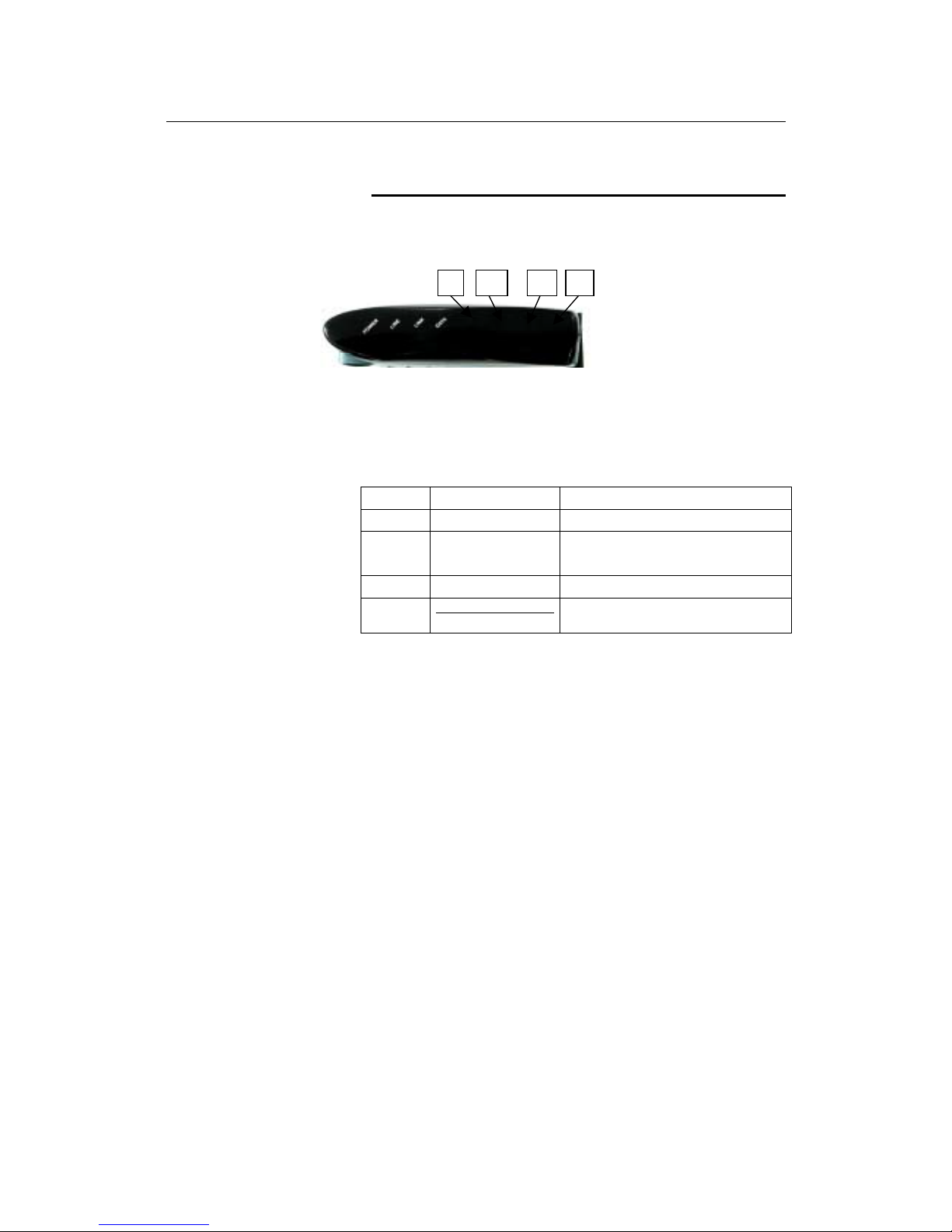
The front panel contains lights called LEDs that indicate the status
of the unit.
1 2 3 4
HSA300 is equipped with 4 LEDs at its front panel , representi ng the stat us
of the device (see figure above).
Figure 2.
Front panel LEDs funct ionality
Label Function Status if LED is ON
1. Power Power Indicator Power up, ready to service
2. Line ADSL Link LED steady: ADSL link is in operation
LED blinking: A DSL l in k i s init i ali zing
3. Link Ethernet Link Ethernet link is in operation
4. Data
Ethernet Rx/Tx Activity
Data is being received from/ transmitted out
the Ethernet interface
Page 11
LinkMAX HSA300 User Manual
11
Rear Panel
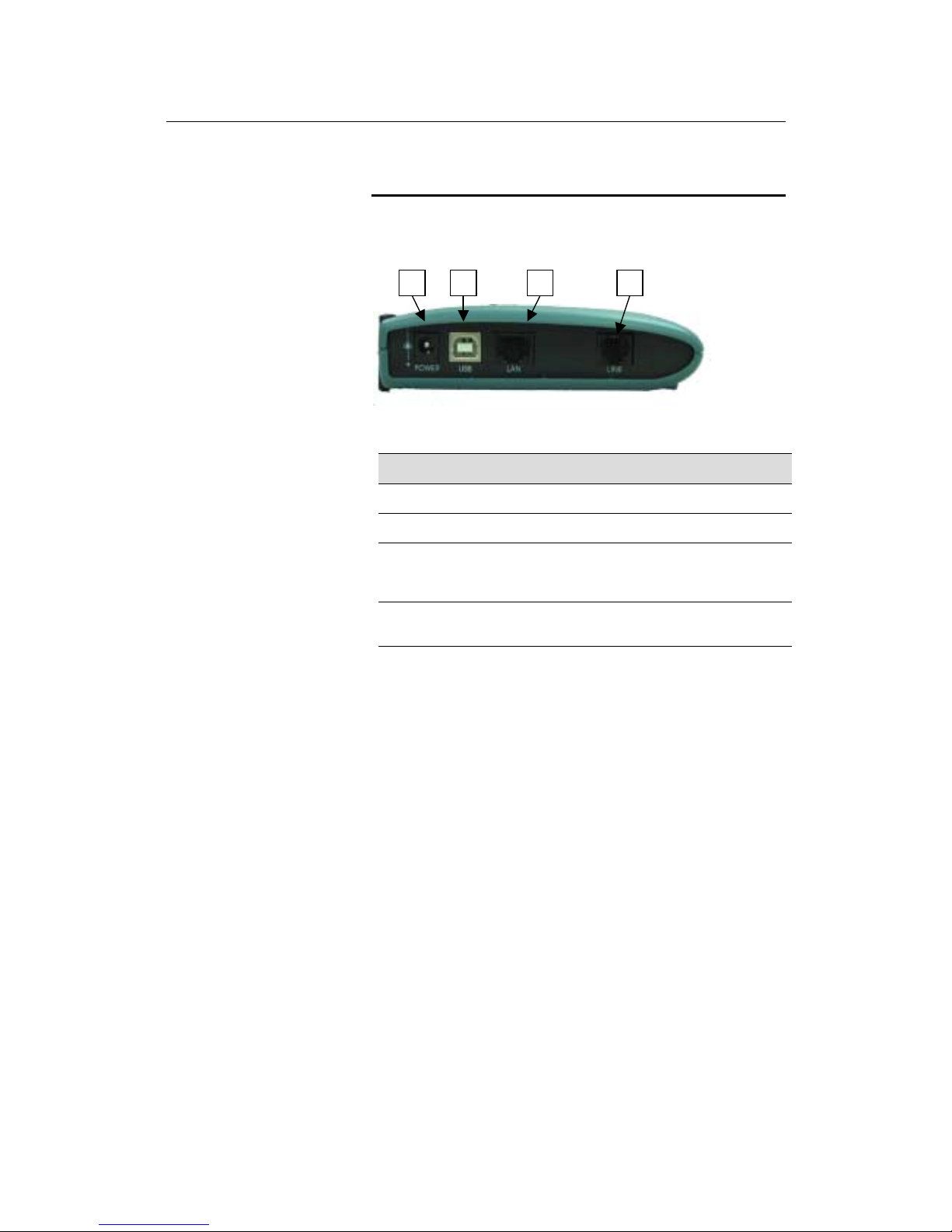
The rear panel conta ins the p orts for th e unit's data and pow er
connections.
1 2 3 4
Figure 3. Rear Panel Connections
Label Function
1.Power Connects to the supplied power adapter cable
2.USB Connects to the USB port on your PC
3.LAN Connects the device to your PC's Ethernet port, or to
the uplink port on your LAN's hub, using the cabl e
provided
4.LINE Connects the device to an ADSL telephone jack for
data communication
Page 12

LinkMAX HSA300 User Manual
12
3
Quick Start
This Quick Start provides basic instructions for connecting HSA300
to a computer or LAN and to the Internet.
! Part 1 describes setting up the hardware.
! Part 2 describes how to configure Internet properties on
your comput er (s) and how to install the so ftwa re for u sing a
computer attached to the USB port.
!
Part 3 shows you how to configure basic settings on
HSA300 to get your LAN connected to the Internet.
This Quick Start assumes that you have already established ADSL
service with your Internet service provider (ISP). These instructions
provide a basic configuration that should be compatible with your
home or small office network setup. Refer to the subsequent
chapters for add i tional configurati on in stru ctio n s.
Part 1 — Connecting the Hardware
In Part 1, you connect the device to the phone jack, the power
outlet, and your computer or network.
WARNING
Before you begin, turn the power off for all devices. These
include your computer(s), your LAN hub/switch (if applicable),
and HSA300.
Step 1. Co nn ec t the A DSL cab le and optio na l telep h o ne .
Connect one end of the provided phone cable to the port labeled
LINE on the rear panel of the device. Connect the other end to your
wall phone jack.
Page 13

LinkMAX HSA300 User Manual
13
Step 2. Connect t h e Ethernet cable.
If you are connecting a LAN to HSA300 ADSL/Ethernet router,
attach one end of a provided Ethernet cable to a regular hub port
and the other to the LAN port on HSA300.
If you are using HSA300 with a single computer and no hub, you
must use a “straight” Ethernet cable (provided) to attach the PC
directly to the device. The straight cable is wired differently than the
cable you would use to connect to a hub. When you compare the
colored wires on each end of a straight-through cable, they will be in
the same sequence; on crossover cables, they will not. Contact
your IS P fo r a s sistance .
Step 3. Attach the power connector.
Connect the AC power adapter to the Power connector on the back
of the device and plug in the adapter to a wall outlet or power strip.
Step 4: Install USB software and connect the USB cable.
You can attach a single computer to the device using a USB cable.
The USB port is useful if you have a USB-enabled PC that does not
have a network interface card for attaching to your Ethernet
network.
Before attaching the USB cable, you must install a USB driver and
configure the computer. For complete instructions, see page 19.
Page 14
LinkMAX HSA300 User Manual
14
Part 2 — Configuring Your Computers
Part 2 of the Quick Start provides instructions for configuring the
Internet settings on your computers to work with HSA300.
Before you begin
By default, HSA300 automatically assigns all required Internet
settings to your PCs. You need only to configure the PCs to accept
the information when it is assigned.
Note
In some cases, you may want to assign Internet information
manually to some or all of your computers rather than allow
HSA300 to do so. See “Assigning static Internet information to your
PCs” on page 19 for instructions.
! If you have connected your PC via the USB port, see the
USB configuration instructions on page 190.
! If you have connected your PC of LAN via Ethernet to
HSA300, follow the instructions that correspond to the
operating system installed on your PC.
Windows 95, 98 PCs:
First, check for the IP protocol and, if necessary, install it:
1. In the Windows task bar, click the Start button, point to
Settings, and then click Control Panel.
2. Double-click the Network icon.
The Network dialog box displays with a list of currently installed
network components. If the list includes TCP/IP, and then the
protocol has already been enabled. Skip to step 9.
3. If TCP/IP does not display as an installed component, click
.
The Select Network C omponent Type dialog b ox displays.
4. Select Protocol, and then click
.
The Select Network Protocol dialog box displays.
5. Click on Microsoft in the Manufacturers list box, and then
click
TCP/IP
in the Network Protocols list box.
6. Click
to return to the Network dialog box, and
then click
again.
You may be prompted to install files from your Windows 95/98
installation CD. Follow the instructions to install the file s.
7. Click
to restart the PC and complete the
TCP/IP installation.
Page 15

LinkMAX HSA300 User Manual
15
Next, configure the PCs to accept IP information assigned by
HSA300:
8. Open the Control Panel window, and then click the Network
icon.
9. Select the network component labeled TCP/IP, and then
click
.
If you have multiple TCP/IP listings, select the listing associated
with your network card or adapter.
10. In the TCP/IP Properties dialog box, click the IP Address tab.
11. Click the radio button labeled Obtain an IP address
automatically.
12. Click the DNS Configuration tab, and then click the radio
button labeled Obtain an IP address automatically.
13. Click
twice to confirm and save your changes.
You will be prompted to restart Windows.
14. Click
.
Windows NT 4.0 workstations:
First, check for the IP protocol and, if necessary, install it:
1. In the Windows NT task bar, click the Start button, point to
Settings
, and then click
Control Panel
.
2. In the Control Panel window, double click the Network icon.
3. In the Network dialog box, click the Protocols tab.
The Protocols tab displays a list of currently installed network
protocols. If the list includes TCP/IP, then the protocol has
already been en able d . S kip to ste p 9.
4. If TCP/IP does not display as an installed component, click
.
5. In the Select Network Protocol dialog box, select TCP/IP,
and then click
.
You may be prompted to install files from your Windows NT
installation CD or other media. Follow the instructions to install
the files.
After all files are installed, a window displays to inform you that
a TCP/IP service called DHCP can be set up to dynamically
assign IP information.
6. Click
to continue, and then click if
prompted to restart your computer.
Next, configure the PCs to accept IP information assigned by
HSA300:
Page 16
LinkMAX HSA300 User Manual
16
7. Open the Control Panel window, and then double-click the
Network icon.
8. In the Network dialog box, click the Protocols tab.
9. In the Protocols tab, select TCP/IP, and then click
.
10. In the Microsoft TCP/IP Properties dialog box, click the radio
button labeled Obtain an IP address from a DHCP server.
11. Click
twice to confirm and save your changes,
and then close the Control Panel.
Windows 2000 PCs:
First, check for the IP protocol and, if necessary, install it:
1. In the Windows task bar, click the Start button, point to
Settings, and then click Control Panel.
2. Double-click the Network and Dial-up Connections icon.
3. In the Network and Dial-up Connections window, right-click
the Local Area Connection icon, and then select Properties.
The Local Area Co nne ction Propertie s dialog box display s wi th
a list of currently installed network components. If the list
includes Internet Protocol (TCP/IP), then the protocol has
already been en able d . S kip to ste p 10.
4. If Internet Protocol (TCP/IP) does not display as an installed
component, click
.
5. In the Select Network Component Type dialog box, select
Protocol
, and then click
.
6. Select Internet Protocol ( TCP/IP) in the Network Protocols
list, and then click
.
You may be prompted to install files from your Windows 2000
installation CD or other media. Follow the instructions to install
the files.
7. If prompted, click
to restart your computer with
the new settings.
Next, configure the PCs to accept IP information assigned by
HSA300:
8. In the Control Panel, double-click the Network and Dial-up
Connections icon.
9. In Network and Dial-up Connections window, right-click the
Local Area Connection icon, and then select Properties.
10. In the Local Area Connection Properties dialog box, select
Internet Protocol (TCP/IP), and then click
.
Page 17

LinkMAX HSA300 User Manual
17
11. In the Internet Protocol (TCP/IP) Properties dialog box, click
the radio button labeled Obtain an IP address
automatically. Also click the radio button labeled Obtain
DNS server address automatically.
12. Click twice to confirm and save your changes,
and then close the Control Panel.
Windows Me PCs
1. In the Windows task bar, click the Start button, point to
Settings, and then click Control Panel.
2. Double-click the Network and Dial-up Connections icon.
3. In the Network and Dial-up Connections window, right-click
the Network icon, and then select Properties.
The Network Properties dialog box displays with a list of
currently installed network components. If the list includes
Internet Protocol (TCP/IP), then the protocol has already been
enabled. Skip to step 11.
4. If Internet Protocol (TCP/IP) does not display as an installed
component, click
.
5. In the Select Network Component Type dialog box, select
Protocol, and then click
.
6. Select Microsoft in the Manufacturers box.
7. Select Internet Protocol ( TCP/IP) in the Network Protocols
list, and then click
.
You may be prompted to install files from your Windows Me
installation CD or other media. Follow the instructions to install
the files.
8. If prompted, click
to restart your computer with
the new settings.
Next, configure the PCs to accept IP information assigned by
HSA300:
9. In the Control Panel, double-click the Network and Dial-up
Connections icon.
10. In Network and Dial-up Connections window, right-click the
Network icon, and then select Properties.
11. In the Network Properties dialog box, select TCP/IP, and
then click
.
12. In the TCP/IP Settings dialog box, click the radio button
labeled Server assigned IP address. Also click the radio
button labeled Server assigned name server address.
Page 18
LinkMAX HSA300 User Manual
18
13. Click twice to confirm and save your changes,
and then close the Control Panel.
Assigning static Internet information to your PCs
In some cases, you may want to assign Internet information to
some or all of your PCs directly (often called “statically”), rather than
allowing HSA 300 to assi gn it. Th i s op tio n m ay be de si rable ( but n ot
required) if :
! You have obtained one or more public IP addresses that
you want to always associate with specific computers (for
example, if you are using a computer as a public web
server).
! You maintain different subnets on your LAN (subnets are
described in Appendix 0).
Before yo u begin, contact your ISP if you do not alr eady have the
following information:
!
The IP address and subnet mask to be assigned to each
PC to which you will be assigning static IP information.
! The IP address of the default gateway for your LAN. In
most cases, this is the address assigned to the LAN port on
HSA300. By default, the LAN port is assigned this IP
address: 192.168.0.1. (You can change this number, or
another num ber can be a ssig ned by your ISP. See
Chapter 5 for more information.)
! The IP address of your ISP’s Domain Name System (DNS)
server.
On each PC to which you want to assign static information, follow
the instructions on pages 14 through 17 relating only to checking for
and/or installing the IP protocol. Once it is installed, continue to
follow the instructions for displaying each of the Internet Protocol
(TCP/IP) properties. Instead of enabling dynamic assignment of the
IP addresses for the computer, DNS server, and default gateway,
click the radio buttons that enable you to enter the information
manually.
Note
Your PCs must have IP addresses that place them in the same
subnet as HSA300’s LAN port. If yo u manually assign IP
information to all your LAN PCs, you can follow the instructions in
Chapter 5 to change the LAN port IP address accordingly.
Page 19
LinkMAX HSA300 User Manual
19
Configuring a computer connected to the USB port
If HSA300 includes a USB port for connecting to a PC, you must
install the provided USB driver software on the PC. The driver
enables Ethernet-over-USB communication with HSA300.
Configuring the USB computer is a two-part process:
! In Part 1, you install the USB driver on the PC.
! In Part 2, you configure the IP properties on the USB PC.
Part 1. Installing the USB Driver:
1. Ensure that the USB cable is not connected t o the USB
port on the PC or to the USB port on the G8100 device. The
installation program will prompt you when to connect the
cable.
2. Copy the USB installation file to a temporary directory on the
USB computer.
3. In the folder where you copied the files, double-click on
setup.exe to start the installation program.
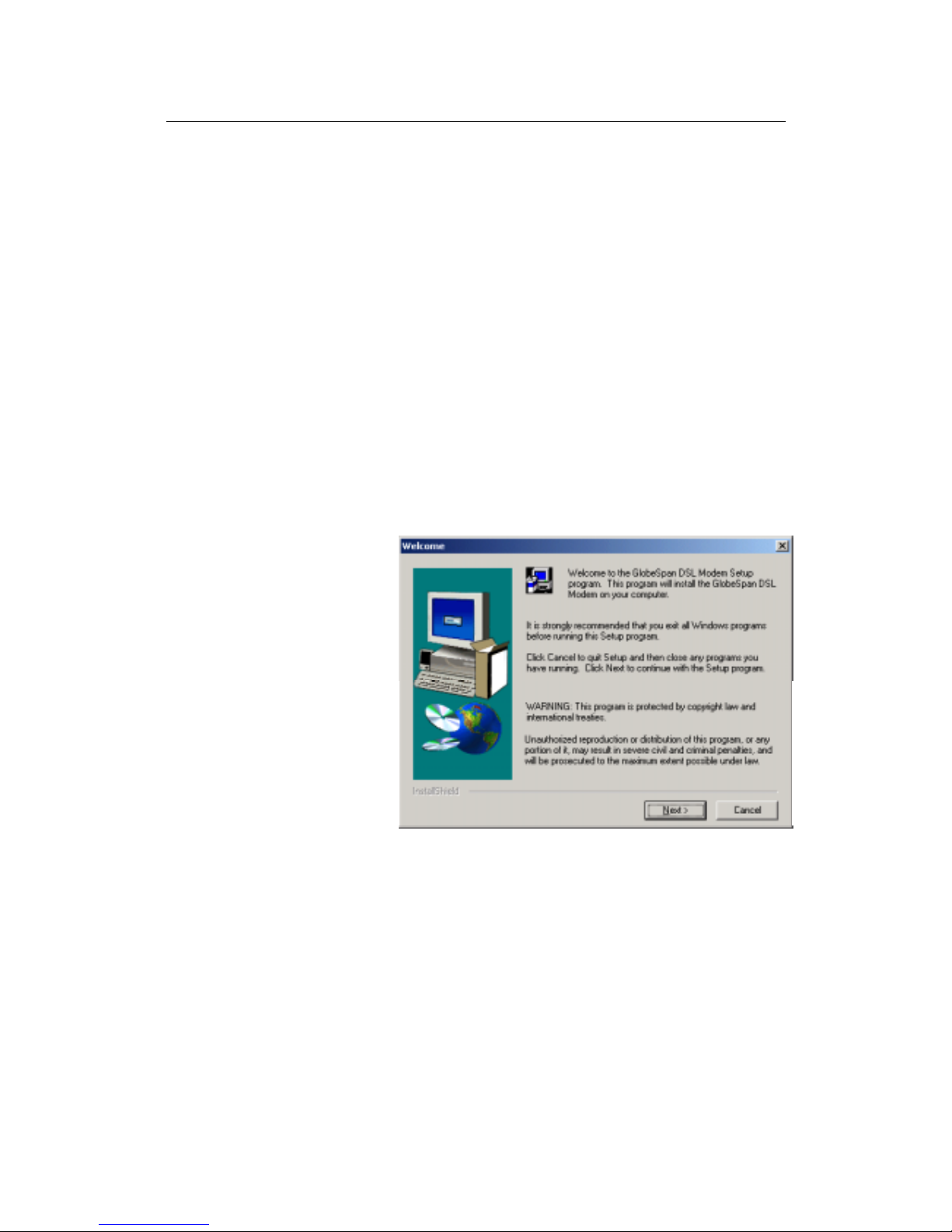
The Welcome dialog box displays, as shown in Figure 4:
Figure 4. USB Driver Installation: Welcome Screen
Page 20
LinkMAX HSA300 User Manual
20
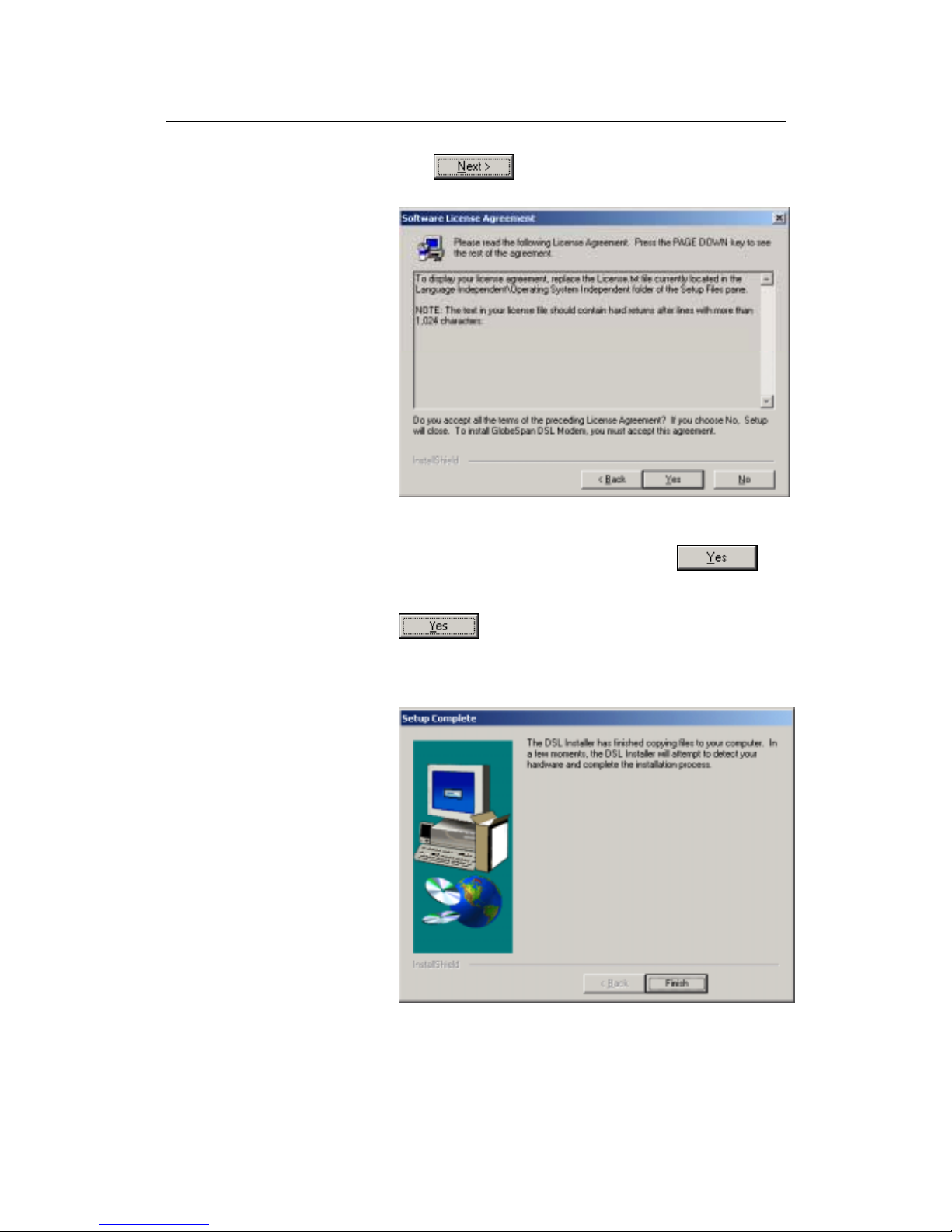
4. Click to display the Soft ware Lice nse
Agreement dialog box, as shown in Figure 55.
Figure 5. USB Driver Installation: Software License Agreement
5. After reviewing the license agreement, click to
continue.
6. If a Microsoft digital signature dialog box displays, click
to continue.
The install ati on p rog ram wil l b egi n c opy i ng the ne ce ssa ry
installation files to the required locations. When finished, the
Setup Complete dialog box will display, as shown in Figure6.
Figure 6. USB Driver Installation: Setup Complet e
Page 21
LinkMAX HSA300 User Manual
21
7. Click .
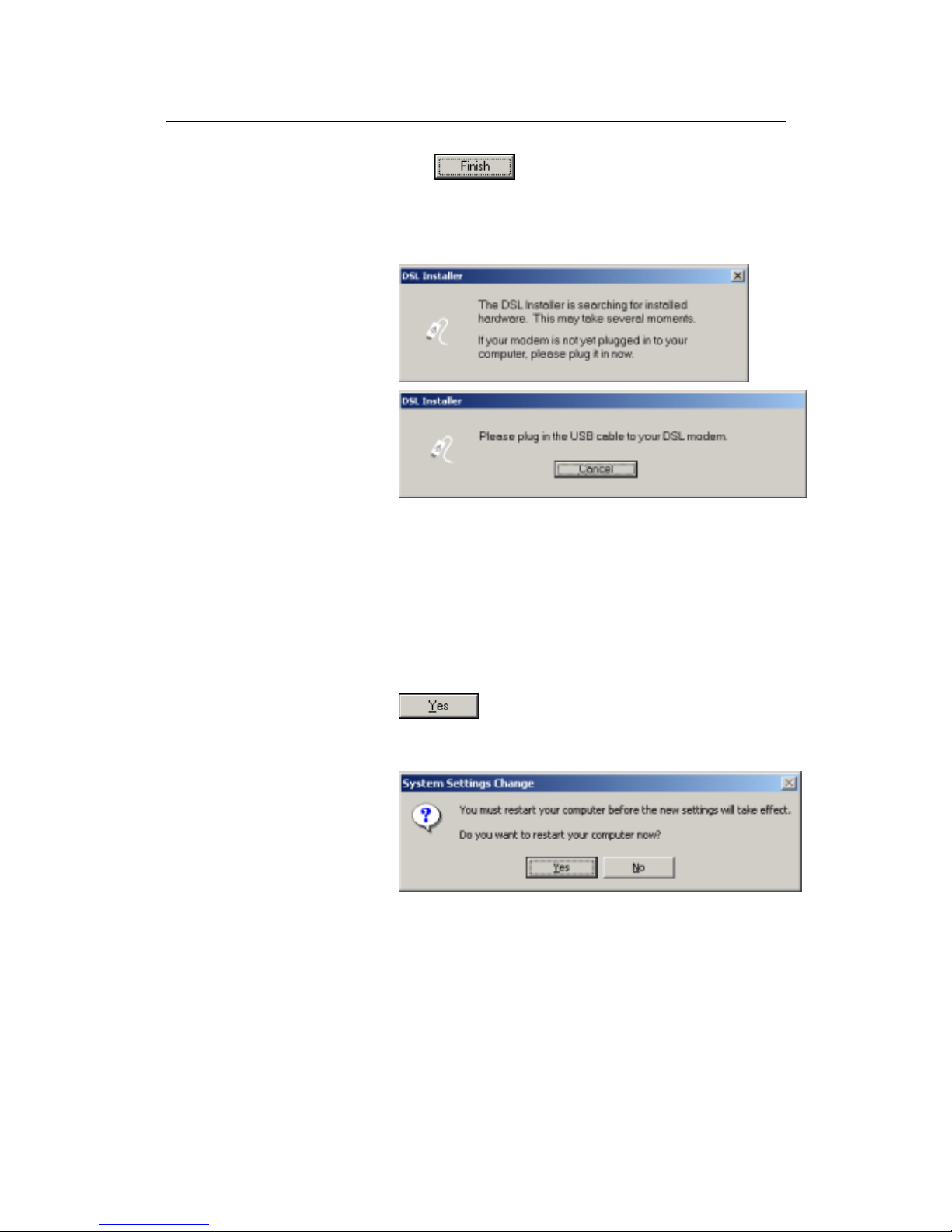
A DSL Installer dialog box displays while the program searches
for your USB hardware. After a few seconds, a second dialog
box displays to prompt you to attach the USB cable, as shown
in Figure7.
Figure 7. USB Driver Installation: DSL I nstall er
8. Attach the USB cable to HSA300 and to your PC.
The USB cable provided has a flat connector on one end
(called Type A) and a square connector on the other (Type B).
Connect the flat connector to your PC and the square
connector to HSA300.
A window displays briefly, indicating that the system has found
new hardware.
9. If a Microsoft digital signature dialog box displays, click
to continue.
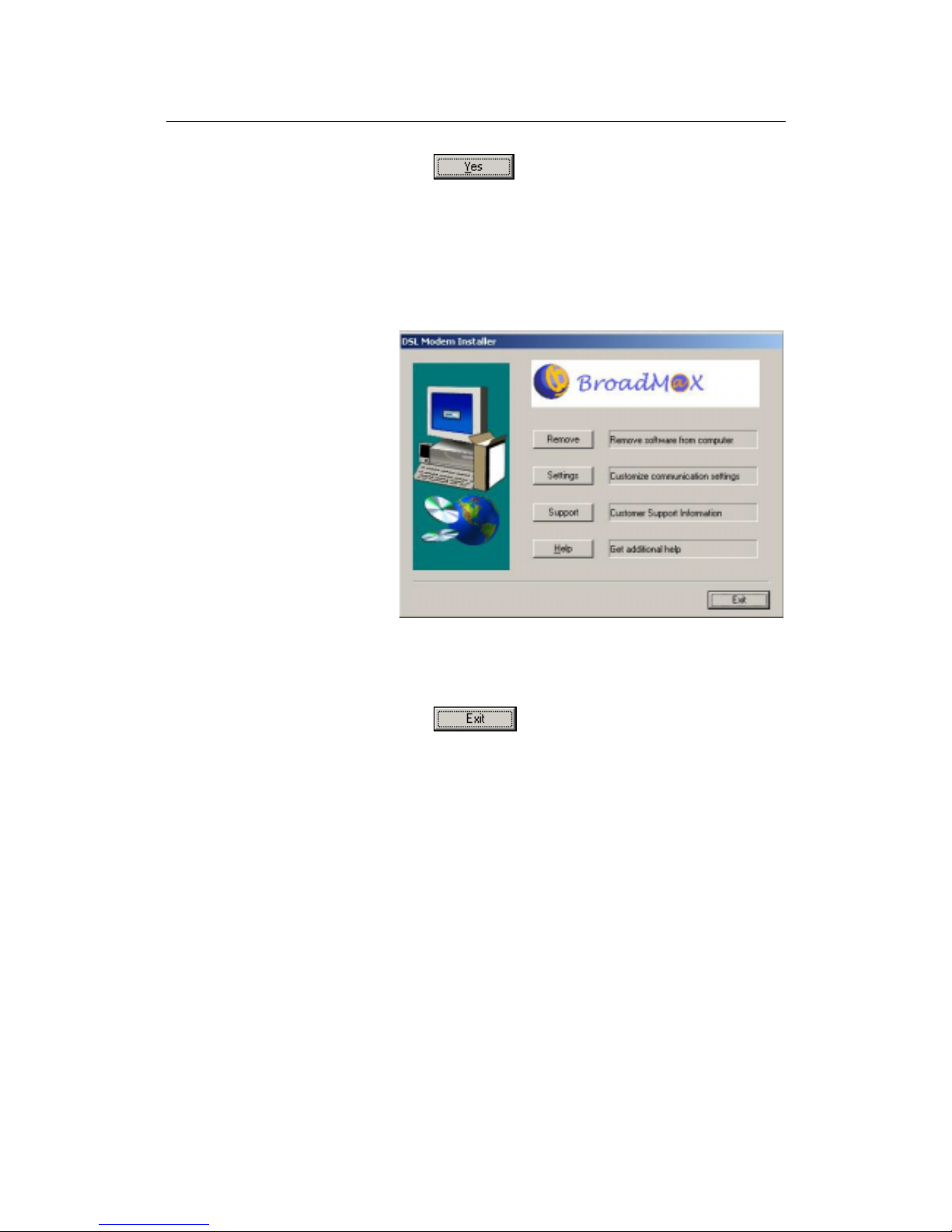
The System Settings Change dialog box displays to prompt you
to restart your computer, as shown in Figure8:
Figure 8. USB Driver Installation: System Settings C hange
Page 22
LinkMAX HSA300 User Manual
22
10. Click to restart your computer.
When your computer finishes rebooting, make sure that the GlobeSpan installer program displays as an item on your Windows Start
menu:
11. Click the Start button, point to Program s » Glob eSpan DSL
Modem, and click on Configure.
The DSL Modem Installer dialog box should display, as shown
in Figure9.
Figure 9. DSL Modem Installer Dialog Box
This step is only verification. You do not need to access the
configuration program at this time.
12. Click
.
Page 23

LinkMAX HSA300 User Manual
23
Part 2. Configuring IP properties on the USB PC. Now that the
USB driver installation is complete, you must configure the USB PC
so that its IP properties place it on the same subnet as HSA300’s
USB port. There are two ways to do this:
! HSA300 is configured to assign an appropriate IP address
to the USB PC. If you want to use this automatic
assignment feature, called “DHCP server,” you must
configure the USB PC to accept dynamically assigned IP
information.
! If you want to assign a static IP address to the PC, follow
the instructions on page 19 and use the following
information.
•
In the Network and Dial-up Connections window, be
sure to select the icon that corresponds to your new
USB connectio n (no t th e one th a t co rr e spond s to y ou r
Ethernet NIC). When you display the properties for the
icon, the following text should display in the Connect
Using text box:
GlobeSpan USB IAD LAN Modem #n
•
The USB port on HSA300 is preconfigured with these
properties (you cannot change these values):
USB port IP address: 192.168.0.2
USB port subnet mask: 255.255.255.0
Therefore, your PC must be configured as follows:
IP address: 192.168.0.n where n is a
number from 3 to 254.
Subnet ma sk : 255.255.255.0
Default gateway: 192.168.0.2
Page 24
LinkMAX HSA300 User Manual
24
Part 3 — Configuring HSA300
In Part 3, you log into the program on HSA300 and configure basic
settings fo r yo ur In te rne t co nn e ction . Yo u r IS P s houl d prov ide you
with the necessary information to complete this step.
Logging in to HSA300 Quick Setup
HSA300 provides a preinstalled software program called
Configuration Manager which enables you to configure the
operation of the device via your Web browser. The settings that you
are most likely to need to change before using the device are
grouped on to a sin gle Q ui ck S ta rt page.
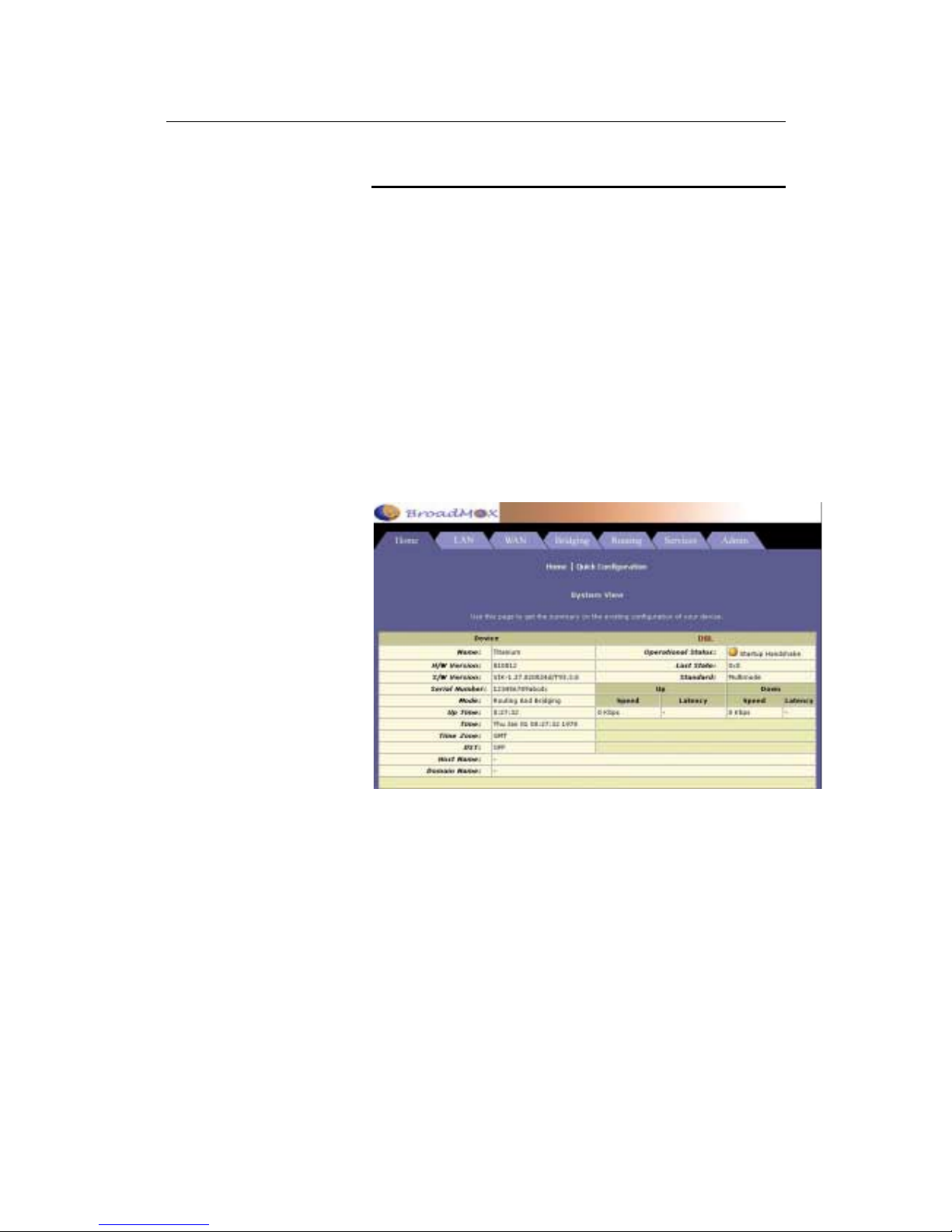
To access the Configuration Manager Quick Start page, open the
Web browser on any PC connected to HSA300 via Ethernet or
USB. Type th e fol low ing URL in the addr es s/l o cation box a nd pr es s
<Return>:
192.168.0.1
Figure 10 shows the Quick Start page:
Figure 10 Quick Start Page—Configuration Manager
Page 25

LinkMAX HSA300 User Manual
25
Configure each of the Quick Start settings as instructed by your
ISP:
DNS Settings
! DNS Proxy Selection:
This setting determines how
HSA300 will obtain DNS server addresses. The DNS
server matches the user-friendly website names you type
into your b r o wser with th e sites’ nume r ic IP a ddresses.
Choose User Configured if you know the DNS server
addresses; otherwise choose AutoDiscovery.
! Pr im ary /Seco nd ary DNS :
If you selected User Configured
in the DNS Proxy Selection, enter the Primary and
Secondary DNS addresses provided by your ISP. If you
selected Auto Discovery + User Configured, you are not
required to enter addresses here; they will be used in
addition to any addresses discovered automatically.
PPP Settings
! Username and Password: Enter the username and
password you use to l o g i n to your ISP.
! Disc onne ct t imeout: Enter the number of seconds after
which your ISP connection will time out if there is no
activity.
! Authentication: Select the user/password authentication
method your ISP uses (PAP or CHAP).
Page 26

LinkMAX HSA300 User Manual
26
Default Router Settings
In addition to handling the DSL connection to your ISP, the HSA300
ADSL/Ethernet router can provide a variety of services to your
network. The device is preconfigured with default settings for use
with a ty p i ca l ho m e o r sm a l l o ffi c e networ k .
Table 1 lists some of the most important default settings; these and
other fea tures are described fully in the subsequent c hapters. If you
are familiar with network configuration, review the settings in Table
1 to verify that they meet the needs of your network. Follow the
instructions to change them if necessary. If you are unfamiliar with
these settings, try using the device without modification, or contact
your IS P fo r a s sistance .
Before y o u mo di fy i n g a ny se tti ngs, review Ch ap ter 4 for ge ne r al
information about accessing and using the Configuration Manager
program. We strongly recommend that you contact your ISP prior to
changing th e de faul t co n figu rat io n .
Table 1. Default Settings Summary
Option Default Setting Explanation/Instructions
DHCP (Dynamic
Host Configuration
Protocol)
DHCP server enabled addresses:
192.168.0.3 through 192.168.0.34
subnet mask = 255.255.255.0
HSA300 maintains a pool of 32 private IP
addresses for dynamic assignment to your LAN
computers and a pool containing 1 IP address
for assignment to your USB computer . To use
this service, you must have set up your
computers to accept IP information
dynamically, as described in Part 2 of the Qui ck
Start. See Chapter 7 for an explanation of the
DHCP service.
NAT (Network
Address Translation)
Nat rule enabled Your computers’ private IP addresses (see
DHCP above) will be translated to your public
IP address whenever they access the Internet .
See Chapter 8 for a description of the NAT
service.
LAN Port
IP Address
Static IP address: 192.168.0.1
subnet mask: 255.255.255.0
This is the IP address of the LAN port on the
device. The LAN port connects the device to
your Ethernet network. Typically, you will not
need to change this address. See Chapter 5 for
instructions.
USB Port
IP Address
Assigned static IP address:
192.168.0.2
subnet mask: 255.255.255.0
This is the IP address assigned to t he USB port
on the device (if used). Typically, you will not
need to change this address. See Chapter 5 for
instructions.
Page 27
LinkMAX HSA300 User Manual
27
4
Getting Started with the Configurati on
Manager
HSA300 includes preinstalled program called the Configuration
Manager, which provides an interface to the software installed on
the device. It enables you to configure the device settings to meet
the needs of your network. You access it through your web browser
from any PC connected to HSA300 via
the LAN port.
This chapter describes how to use the Configuration Manager.
Note
HSA300 may already be configured to provide Internet connectivity
for your network. If it works properly with the preconfigured settings,
then you may not need to use the Configuration Manager. Contact
your ISP to determine which settings you may need to change, if
any.
Accessing the Configuration Manager
The Configuration Manager program is preinstalled into memory on
HSA300. To access the program, you need the following:
!
A PC or laptop connected to the LAN port on the device as
described in the Quick Start chapter.
! An web browser installed on the PC. The program is
designed to work best with Microsoft Internet Explorer®
version 5.0, Netscape Navigator® version 4.7, or later
versions.
You can access the program from any computer connected to
HSA300 via the LAN or USB ports.
1. From a LAN computer, open your web browser, type the
following URL in the web address (or location) box, and
press <Enter>:
http://192.168.0.1
Or, from the USB computer, type:
http://192.168.0.2
These are the predefined IP addresses for the LAN and USB
ports on H SA300.
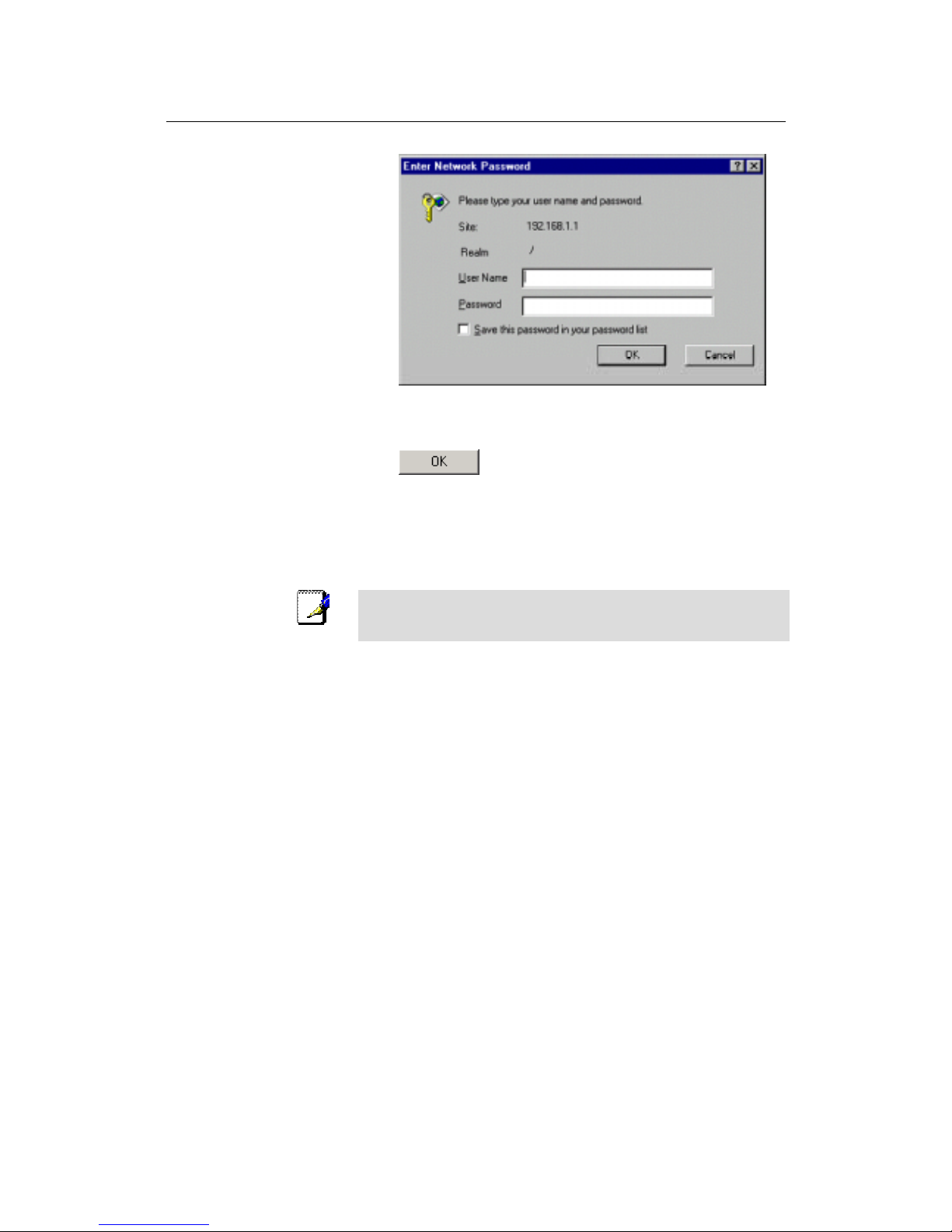
A login screen di s play s , as s how n in Fi gu re 11.
Page 28
LinkMAX HSA300 User Manual
28
Figure 11. Login Screen
2. Enter your user name and password, and then click
.
3. The first time you log into the program, use these defaults:
Default User Name:
root
Default Password:
root
Note
You can change the p a ssword a t any time (see Changing Y our
Login Password on page 33). The user name cannot be changed.
The System View page displays each time you log into the
program (sho wn in Figu re on pa ge 29 ) .
Page 29
LinkMAX HSA300 User Manual
29
Functional Layo ut
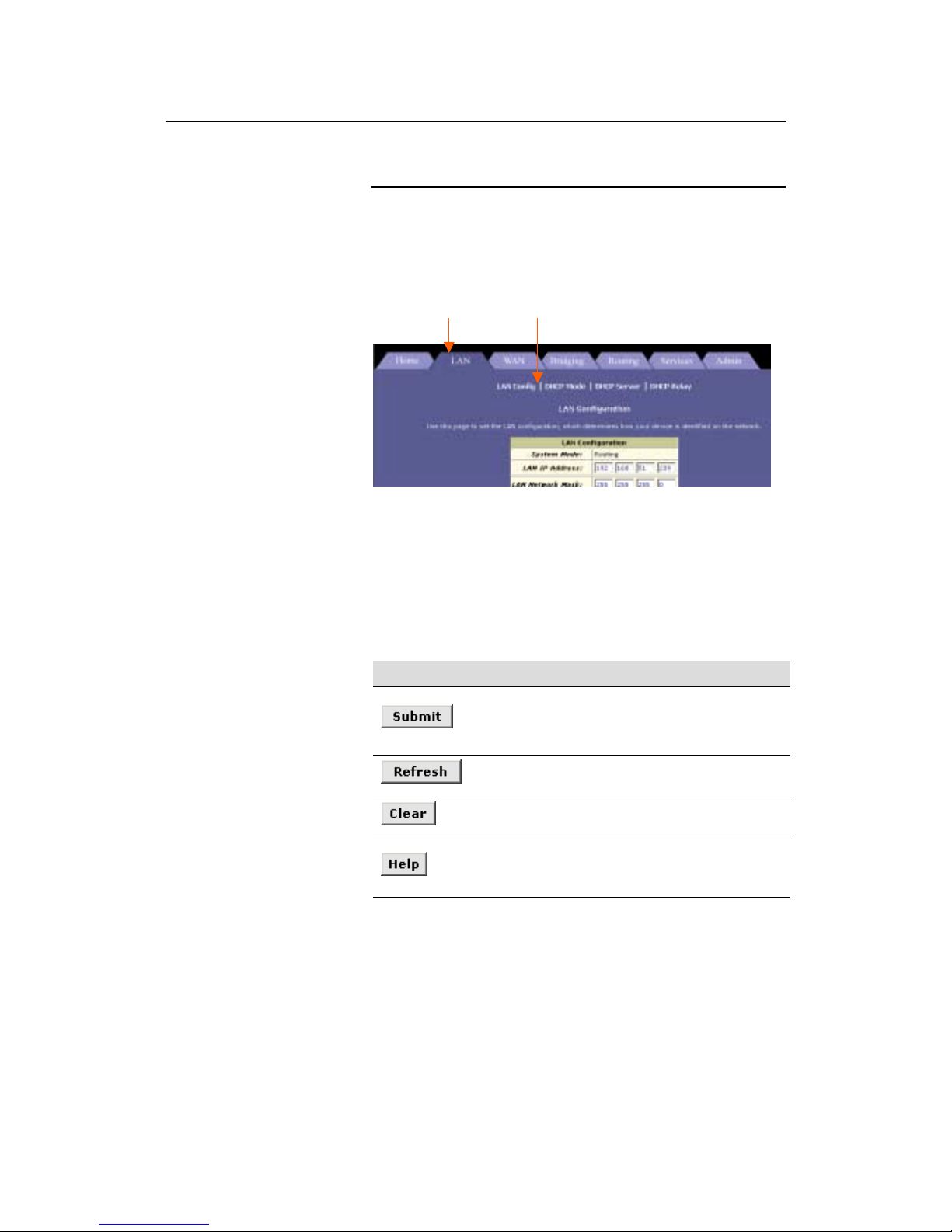
Configuration Manager tasks are grouped into categories, which
you can access by clicking the tabs at the top of each page. Each
tab, except for the Home tab which displays when you first log in,
displays the available tasks horizontally the top of the page. You
can click on these to display the specific configuration options.
A separate page displays for each task in the task bar. The leftmost task displays by default when you click on a new tab. The
same task may appear in more than one tab, when appropriate. For
example, the Lan Config task displays in both the LAN tab and the
Routing tab.
Commonly used buttons
The following buttons are used throughout the application.
Button Function
Stores in temporary system memory any changes you
have made on the current page. See “Committing your
changes” on page 34 for instructions on storing
changes permanently.
Redisplays t he curr en t p age w i th u pda ted
statistics.
When accumulated statistics are displaying, this
button resets the statistics to their initial values.
Launches the online help for the current topic in a
separate browser windo w. Help is available f rom
any main topic page.
Tab Tab Tab Task bar
Page 30
LinkMAX HSA300 User Manual
30
The Home Tab and System View Table
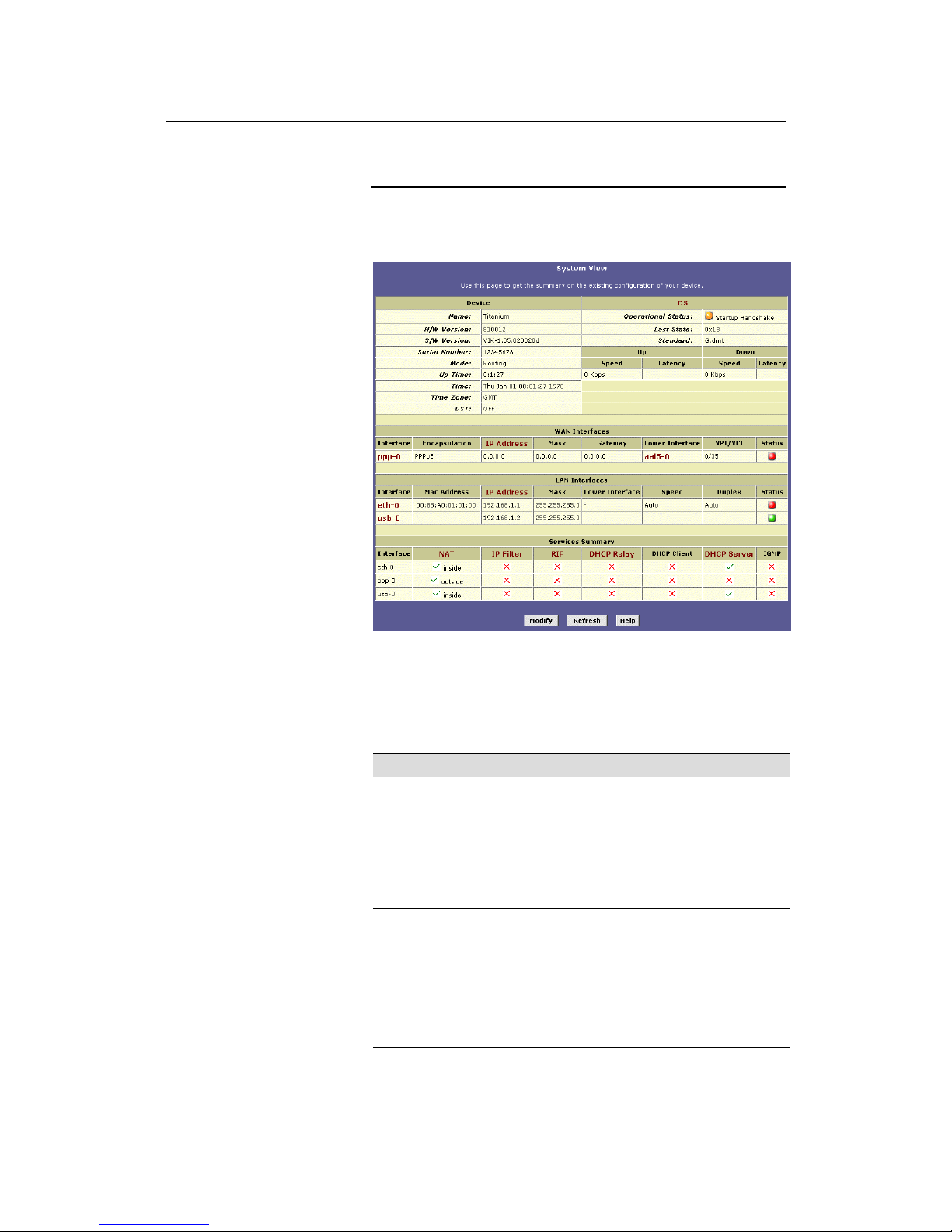
The Home Tab displays when you first access the program: Only
one topic page — the System View page — is available on the
Home tab.
Figure 12. System View Page
The System View table provides a snapshot of your system
configuration, and provides links to the software pages that enable
you to configure each setting (if available). The following table
describes the various sections of the system view table.
Table Heading Descri ption
Device
Displays basic information about HSA300
hardware and software versions, the system
uptime (since the last reboot), and the
preconfigured operating mode.
DSL
Displays performance statistics for the DSL line.
You can click the DSL link in the Advanced titl e
bar to display additional DSL settings, which are
described in Chapter 14.
WAN Interfaces
Displays the software name(s) and various
settings for the device interfaces that
communicate with your ISP via DSL. Although you
only have one physical DSL port, multiple
software-defined interfaces can be configur ed to
use it. See the ATM VCC, PPP, EOA, and IPoA
chapters (Chapters 12, 13, 14, and 15,
respectively) for more information about the
interfaces defined on you system.
Page 31

LinkMAX HSA300 User Manual
31
Table Heading Descri ption
LAN Interfaces
Displays the software names and various settings
for the device interfaces that communicate directly
with your network. These typically include at l east
one Ethernet interface, named eth-0, and may
include a USB interface named usb-0. You can
configure some properties of these int erfaces, as
described in Chapter 5.
Services Summary
Displays the following service that HSA300
performs to help you manage your network:
o Translating private IP addresses to y our
public IP address (NAT, Chapter 8).
o
Setting up filtering rules that accept or deny
incoming or outgoing data. (IP Filter,
Chapter 16).
o
Enabling router-to-router communication
(RIP, Chapter 9).
o
Dynamic assignment or receipt of IP
information (DHCP, Chapter 7).
o
Message forwarding based on Internet Group
assignment (IGMP, not configurable).
Page 32
LinkMAX HSA300 User Manual
32
Changing the System Date and Time
The device keeps a record of the current date and time, which it
uses to calculate and report various performance data.
Note
Changing HSA300 date and time does not affect the date and time
on your PCs.
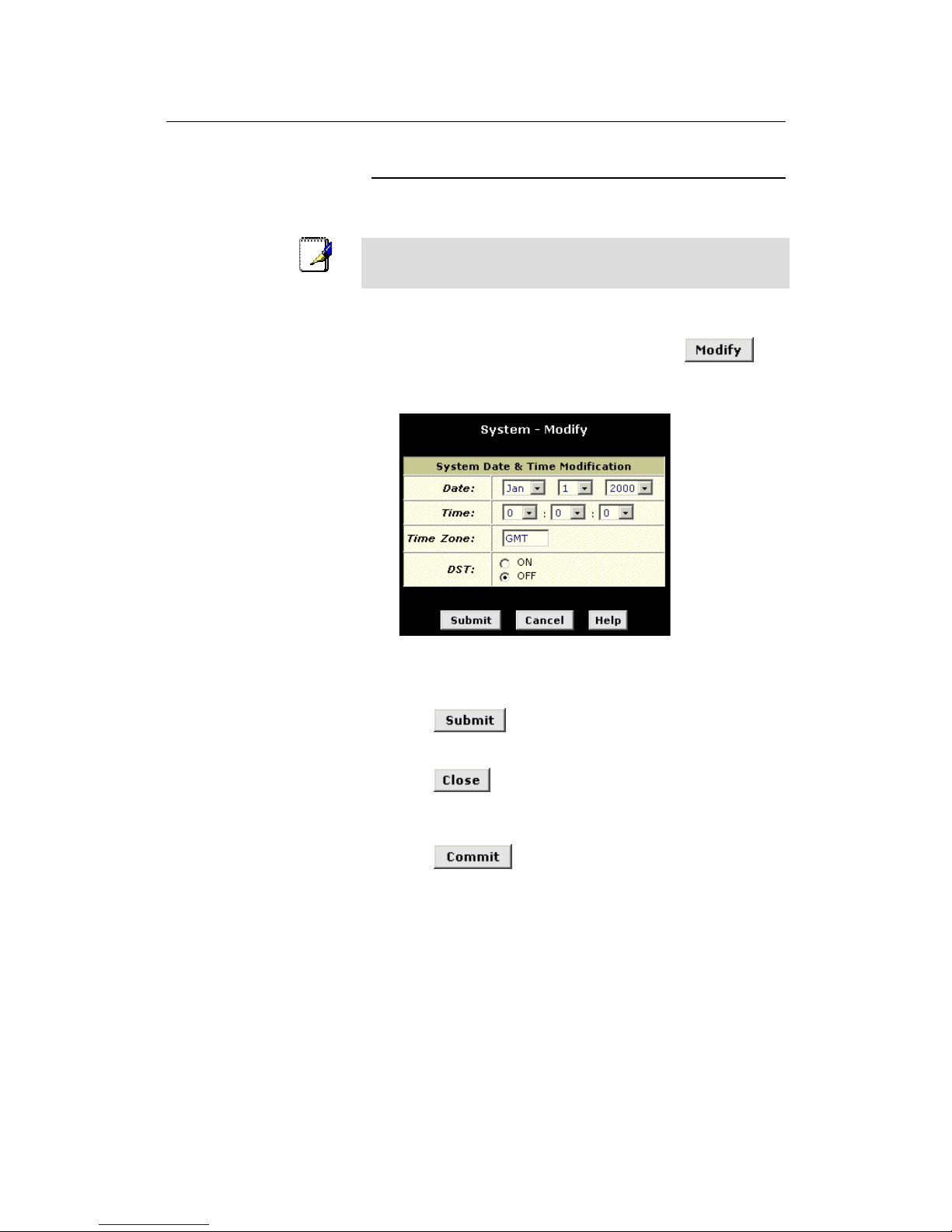
Follow these instructions to change the date and time:
1. At the bottom of the System View page, click
.
The System – Modify page displays in a separate browser
window:
Figure 13. System – Modify Page
2. Use the drop-down lists to select a new date and time.
3. Click
.
A page displays to confirm your change.
4. Click
to return to the System View page.
5. Click the Admin tab, and then click
Commit & Reboot
in the
task bar.
6. Click
to save your changes to permanent
memory.
Page 33
LinkMAX HSA300 User Manual
33
Changing Your Login Password
The first t ime you log into th e Configurat ion Manager, you use the
default user ID and password (root and root). The system allows
only one user ID and password. Only the password can be
changed.
Note
This user ID and password is only used for logging into the
Configuration Manager; it is not the same as the login you may use
to connect to your ISP (described in Chapter 12).
To change the Configuration Manager login password:
1. Click the Admin tab.
The User Password Configuration page displays by default.
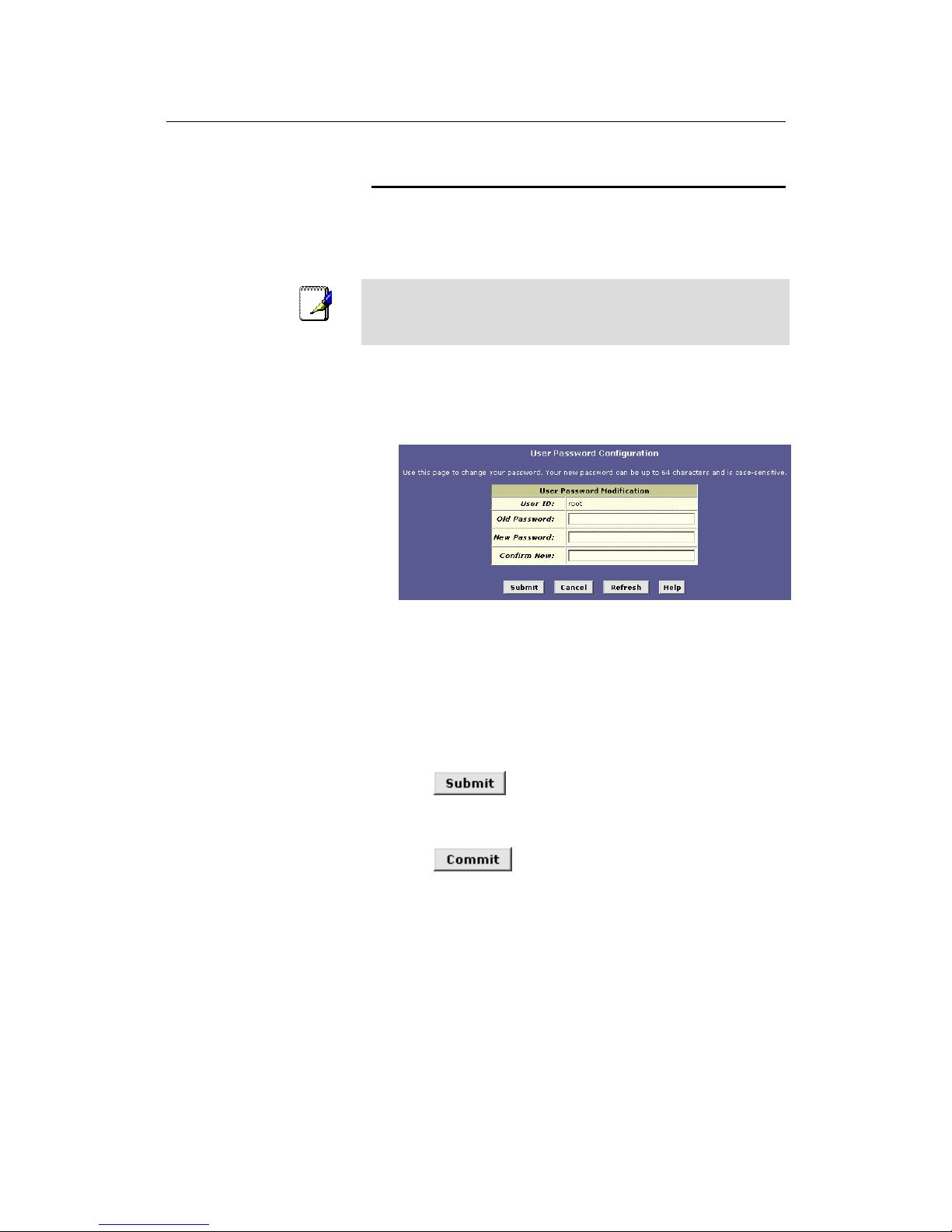
Figure 14. User Password Configuration Page
2. Type your current password in the Old Password text box.
3. Type the new password in the New Password text box and
again in the Confirm New text box.
The password can be up to eight ASCII characters long. When
logging in, you must type the new password in the same upper
and lower case characters that you use here.
4. Click
.
5. Click the Admin tab, and then click
Commit & Reboot
in the
task bar.
6. Click
to save your changes to permanent
memory.
Page 34
LinkMAX HSA300 User Manual
34
Committing Your Changes and Rebooting the Device
Committing your changes
Whenever you use the Configuration Manager to change system
settings, the changes are initially placed in temporary storage
(called random access memory or RAM). Your changes are made
effective when you submit them, but will be lost if the device is reset
or turned off.
To save your changes for future use, you can use the commit
function. This function saves your changes from RAM to permanent
storage (called flash memory).
Note
Submitting changes saves them only until the device is reset or
powered down. Committing changes sav es them permanently.
Follow these steps to commit changes to permanent storage.
1. Click the Admin tab, and then click
Commit & Reboot
in the
task bar.
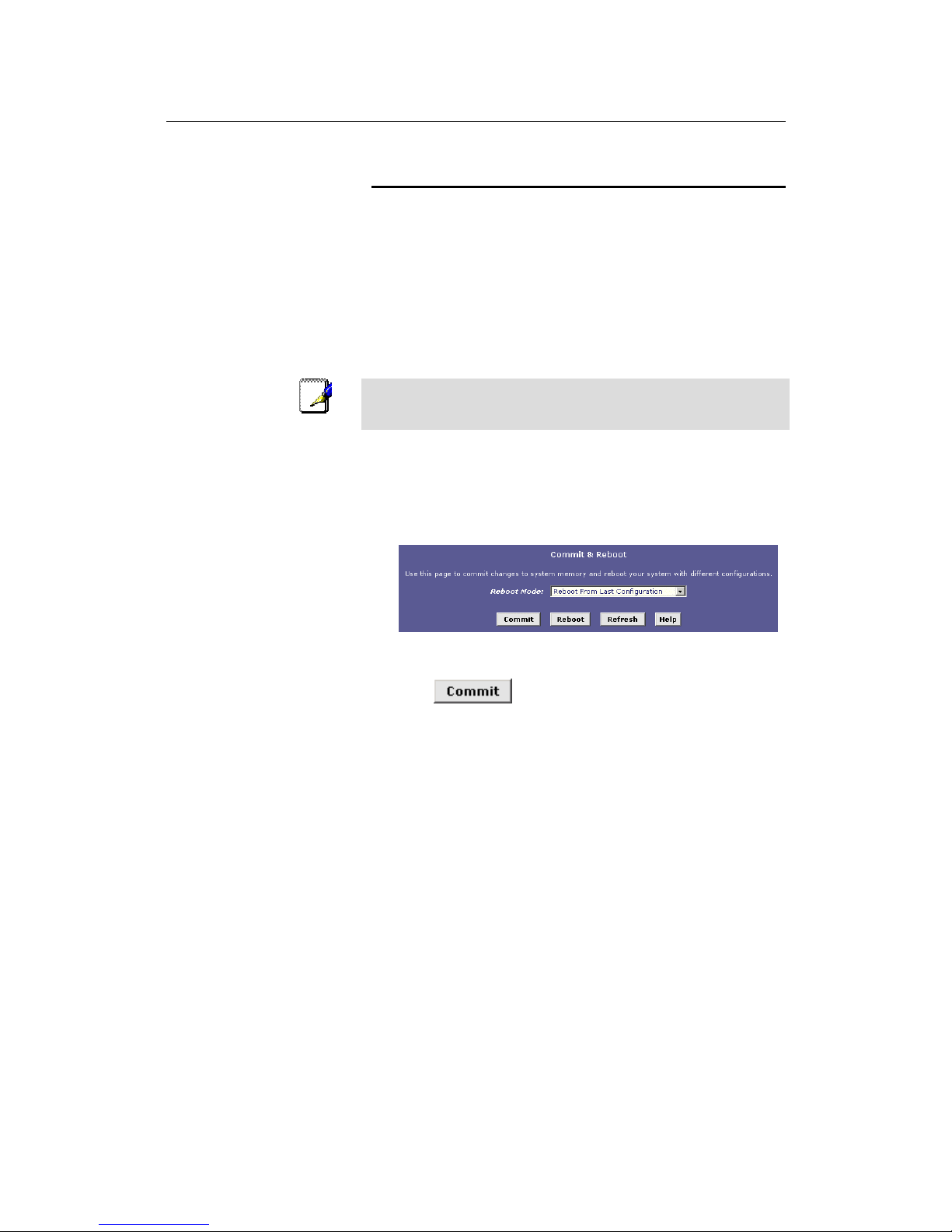
The Commit & Reboot page displays:
Figure 15. Commit & Reboot Page
2. Click
. (Disregard the selection in the Reboot
Mode drop-down list; it does not affect the commit process.)
The changes a re sav ed to pe rmanent storage.
The previous settings are copied to backup storage so that they
can be recalled if your new settings do not work properly (see
the rebooting instructions on page 36).
Page 35
LinkMAX HSA300 User Manual
35
Rebooting the device using Configuration Manager
To reboot the de vic e, displ ay the C omm it and Reboo t pa ge , se le ct
the appropriate reboot mode from the drop-down menu, and then
click
.
You can select from the following three options when rebooting:
Option Description
Reboot from Last
Configuration
Reboots the device using the current settings i n
permanent memory, including any changes you
just committed.
Reboot from Backup
Configuration
Reboots the device using settings stored in
backup memory. These are the settings that were
in effect before you committed new settings in the
current session.
Reboot from Default
Configuration
Reboots the device to default settings provided by
your ISP or the manufacturer. Choosing t his
option erases any custom settings.
WARNING
Do not reboot the device using the Reset button on the back panel
of HSA300 to activate new changes. This button resets the device
settings to the manufacturer’s default values. Any custom setting s
will be lost.
Page 36

LinkMAX HSA300 User Manual
36
5
Setting the LAN IP Address
This chapter describes how to configure the interfaces on the
ADSL/Ethernet rou ter tha t commu n icate with y our LA N and US B
computers.
Ethernet, USB, or Both?
If you are using the ADSL/Ethernet router with multiple PCs on your
LAN, you must connect the LAN via an Ethernet hub to the device's
LAN port, called eth-0.
If you are using a single PC with the ADSL/Ethernet router, you
have two options for connecting it to the device:
! You can connect the PC directly to the LAN port using a
straight Ethernet cable. See Appendix C, “Troubleshooting“
for a description of crossover versus straight-through
Ethernet cables.
! If the P C is USB-enabled , you can connect it directly to the
device's USB port, called usb-0. Only one computer can be
connected in this manner.
You can also use the USB and Ethernet ports simultaneously,
connecting your LAN to the Ethernet port and a standalone PC to
the USB port.
You must assign a unique IP address to each device port that you
use.
Note
The instructions that follow assume that the device has been
preconfigured to operate in Routing mode, which uses the IP
protocol to determine how to exchange data among your PCs, the
device, and your ISP. If your device is configured in Bridging
mode, its ports do not require IP addresses. The operating mode
displays at the top of the LAN Configuration page and cannot be
changed by the user.
Page 37
LinkMAX HSA300 User Manual
37
Configuring the LAN IP Address
The LAN I P address identifies the LAN por t (eth-0) as a node on
your network; that is, its IP address must be in the same subnet as
the PCs on your LAN.
Definition
A network node can be thought of as any interface where a
device connects to the network, such as HSA300’s LAN port and
the network interface cards on your PCs. See Appendix 0 for an
explanation of subnets..
You can change the default to reflect the set of IP addresses that
you want to use with your network.
If your network uses a local DHCP server (other than the
ADSL/Ethernet router) to assign IP addresses, you can configure
the device to accept and use a LAN IP address assigned by that
server. In this mode, the ADSL/Ethernet router is considered a
DHCP client of your DHCP server.
Note
HSA300 itself can function as a DHCP server for your LAN
computers, as de scribed in Chapt er 5, bu t no t for its own LAN
port.
Follow these steps to change the default LAN IP address or to
configure the LAN port as a DHCP client.
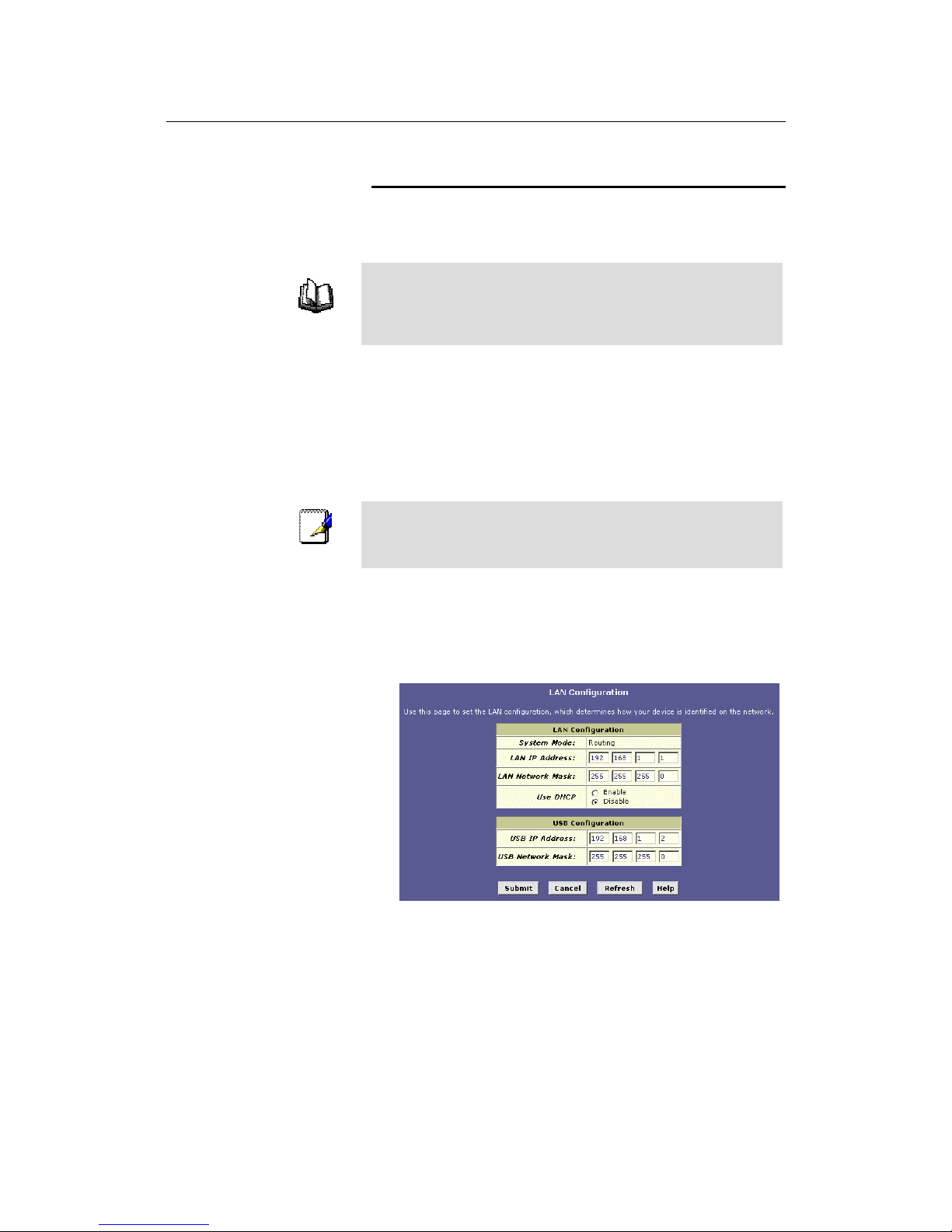
1. Log into Configuration Manager, and then click the LAN tab.
The LAN Configuration page displays, as shown in Figure 16.
Figure 16. LAN Configuration Page
Page 38

LinkMAX HSA300 User Manual
38
The LAN Configuration table displays the following settings:
Setting
Description
System Mode
The preconfigured mode for your device, such as
Routing or Bridging mode. This setting i s not user configurable.
LAN IP
Address
The IP address your computers use to identify the
device’s LAN port.
Note that the public IP address assigned to y ou by your
ISP is not your LAN IP address. The public I P addre ss
identifies the WAN (ADSL) port on your ADSL/Ethernet
router to the Internet.
LAN Network
Mask
The LAN Network mask identifies which parts of the
LAN IP Address refer to your network as a whole and
which parts refer specifically to nodes on the network.
Your device is preconfigured with a default networ k
mask of 255.255.255.0.
Use DHCP
When checked, this setting instructs the device to
accept LAN IP information assigned dynamically from
another DHCP server already configured on your
network. HSA300 cannot act as a DHCP server for its
own LAN port.
2. Enter a LAN IP address and network mask, or click the
DHCP Enable radio button.
! Entering a fixed address: If you are using routing services
on you LAN such as DHCP and NAT, you will want to
assign a fixed LAN IP address and mask. This ensures that
your LAN computers have a fixed address that they use to
communicate with the device.
The IP address you assign must be on the same subnet as
your LAN computers that connect to this port (that is, the
network ID portion of their IP addresses and their subnet
masks must be the same). See Appendix 0 for an
explanation of IP addresses a nd network masks.
You may need to update the DHCP configuration so that
the addresses that the DHCP server dynamically assigns
to your computers are on the same subnet as the new LAN
IP address. See Chapter 7 for instructions on changing the
pool of dynami c ally a ssig ned a ddr e sse s. In add it ion , i f you
change the DHCP pool, you will also need to update the
NAT configuration so the new IP addresses are translated
properly . See Chap te r 8 for ins tru ction s on N AT.
! Enabling DHCP: If another computer on your LAN
provides DHCP services for your network, you can click the
Use DHCP checkbox to enable the LAN port to accept a
dynamically assigned address from the server. Check with
your ISP to determine if this is advisable.
When you click the Enable radio button, the LAN Network
Mask field will be dimmed (made unavailable for entry).
The LAN IP Address field will remain editable, however.
The address that you specify here will be used as a
Page 39

LinkMAX HSA300 User Manual
39
requested IP address from the DHCP server. This is
referred to as a "Configured IP Address" in the program. If
the configured IP address is not available from the DHCP
server, the server will distribute another address to the LAN
port. Even if another number is assigned, the same
configured IP address will continue to display in this field.
For a description of how DHCP works, see Chapter 7.
3. Click
.
!
If you were using an Ethernet connection for the current
session, and changed the IP address, the connection will
be terminated.
! If you are currently using the USB interface, a page will
display to confirm your change and your connection will
remain acti ve.
! If you enabled the DHCP service, the ADSL/Ethernet router
will initia te a re que st fo r a n IP address from your LA N's
DHCP server. Assuming a different IP address is assigned,
your current connection will be terminated.
4. Reconfigure your PCs, if necessary, so that their IP
addresses place them in the same subnet as the new IP
address of the LAN port. See the Quick Start chapter, “Part 2
— Configuring Your Computers,” for instructions.
5. Log into Configuration Manager by typing the new IP
address in your Web browser’s address/location box.
If you enabled DHCP, you may need to check the DHCP server
on your LAN to determine the IP address actually assigned to
the LAN port.
6. If the new settings work properly click the Admin tab, and
then click
Commit & Reboot
in the task bar.
7. Click
to save your changes to permanent
memory.
Page 40
LinkMAX HSA300 User Manual
40
Configuring the USB Port IP Address
1. If the LAN Configuration page is not already displaying,
click the LAN tab.
2. In the USB Configuration table, enter the IP Address and
Network Mask for the USB port.
The IP address must place the USB port in the same subnet as
the USB computer; If you are using both the LAN port and the
USB port, however, the USB port and USB computer must not
be in the same subnet as the LAN port or the computers
attached to it.
For example, you could assign the following IP addresses to
the LAN and USB ports (both assume a network mask of
255.255.255.0):
Port IP Address Computer(s) IP
Address(es)
LAN
192.168.0.1 192.168.0.x (x = 3-254)
USB
192.168.0.2 192.168.0.x (x = 3-254)
3. Click
.
!
If you are currently communicating with the device via the
USB interface, then the connection will be terminated,
because the IP address that the connection was using has
now changed.
! If you are currently using the Ethernet interface, a page will
display to confirm your change and your connection will
remain acti ve.
4. If necessary, reconfigure your USB PC so that its IP address
places it in the same subnet as the new IP address of the
USB port. See the Quick Start chapter, “Part 2 —
Configuring Your Computers,” for instructions.
5. Log into Configuration Manager by typing the new USB port
IP address in your Web browser’s address/location box.
6. If the new settings work properly click the Admin tab, and
then click
Commit & Reboot
in the task bar.
7. Click
to save your changes to permanent
memory.
Page 41
LinkMAX HSA300 User Manual
41
6
Viewing System IP Information and
Performance Statistics
The interfaces on HSA300 that communicate with other network
and Internet devices are identified by unique Internet protocol (IP)
addresses. You can use the Configuration Manager to view the list
of IP addresses that your device uses, and to view other system
and network performance data.
See Appendix 0 for a description of IP addresses and masks.
Viewing HSA300’s IP addresses
To view HSA300’s IP addresses, click the Routing tab, and then
click
IP Addr
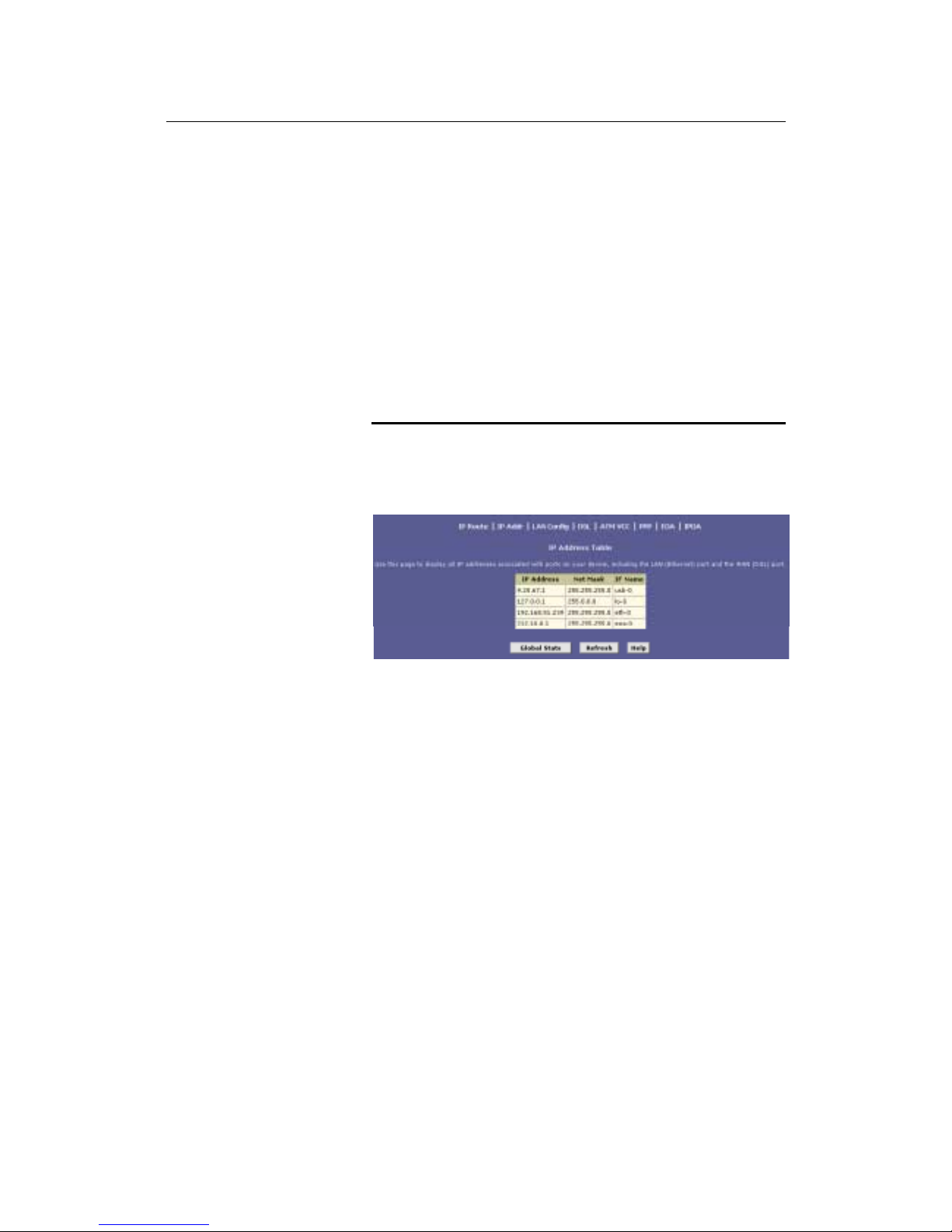
in the task bar. The IP Address Table page displays,
as shown in Figure 17:
Figure 17. IP Address Table Page
The table lists the IP addresses, network masks (“Net Mask”), and
interface names (“IF Name”) for each of its IP-enabled interfaces.
The listed IP addresses may include:
! The IP address of the device’s LAN (Ethernet) port, called
eth-0. See Chapter 5 for instructions on configuring this
address.
! The IP address of the device’s USB port, named usb-0.
See Chapter 5 for instructions on configuring this address.
! The IP address of the WAN (ADSL line) interface, which
your ISP and other external d evices use to identify your
network. It may be identified in the Configuration Manager
by the names ppp-0 or eoa-0, or ipoa-0, depending on the
protocol your device uses to communicate with your ISP.
Your ISP may assign the same address each time, or it
may change e ach time you reconnect.
! The “loopback” IP address, named lo-0, of 127.0.0.1. This
is a special address that enables the device to keep any
data addressed directly to it, rather than route the data
through the WAN or LAN ports.
If your device has additional IP-enabled interfaces, the IP
addresses of these will also display.
Page 42
LinkMAX HSA300 User Manual
42
Viewing IP Global Statistics
You can view statistics on the processing of Internet protocol
packets (a packet is a collection of data that has been bundled for
transmission). You will not typically need to view this data, but you
may find it helpful when working with your ISP to diagnose network
and Internet data transmission problems.
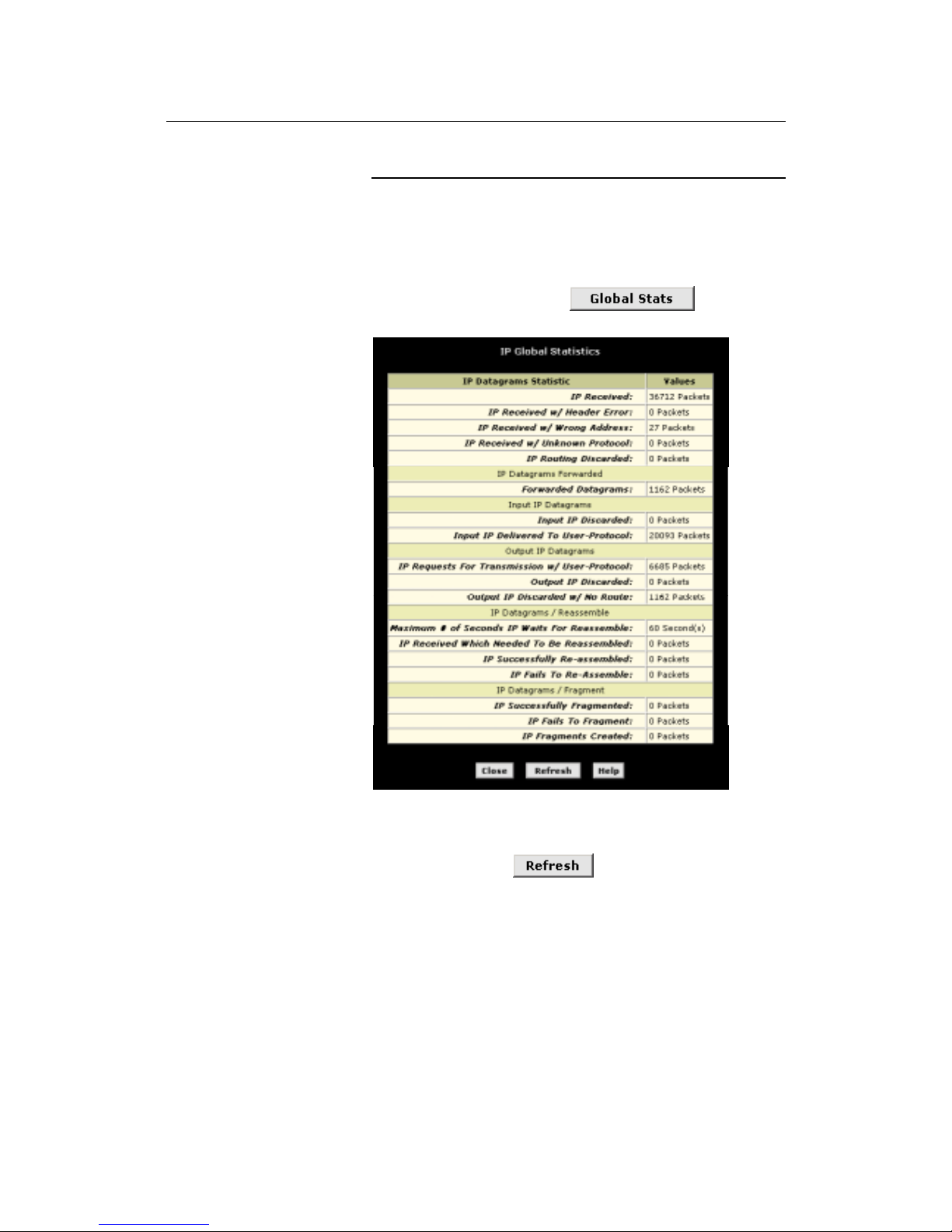
To view global IP statistics, click
on the IP
Address Table page. Figure 8 shows the IP Global Statistics page:
Figure 18. IP Global Statistics Page
To display updated statistics showing any new data since you
opened the page, click
.
Page 43
LinkMAX HSA300 User Manual
43
7
Configuring Dynamic Host Configuration
Protocol
You can configure your network and HSA300 to use the Dynamic
Host Configuration Protocol (DHCP). This chapter provides an
overview of DHCP and instructions for implementing it on your
network.
Overview of DHCP
What is DHCP?
DHCP is a pro toco l th a t enables network adm ini st ra tor s to c ent ral ly
manage the assignment and distribution of IP information to
computers on a network.
When you enable DHCP on a network, you allow a device — such
as HSA300 or a router located with your ISP — to assign temporary
IP addresses to your computers whenever they connect to your
network. The assigning device is called a DHCP server, and the
receiving device is a DHCP client.
Note
If you used the Quick Start instructions, you either configured
each LAN PC with an IP address, or you specified that it will
receive IP information dynamically (automatically). If you chose to
have the information assigned dynamically, then you configured
your PCs as DHCP clients that will accept IP addresses assigned
from a DCHP server such as HSA300.
The DHCP ser ver draw s fr om a de fin ed pool o f IP a ddr ess es and
“leases” them for a specified amount of time to your computers
when they request an Internet session. It monitors, collects, and
redistributes the addresses as needed.
On a DHCP-enabled network, th e IP information is assigned
dynamically rather than statically. A DHCP client can be assigned a
different address from the pool ea ch tim e it re con ne cts to the
network.
Why use DHCP?
DHCP allows you to manage and distribute IP addresses
throughout your network from a central computer. Without DHCP,
you would have to configure each computer separately with IP
addresses and related information. DHCP is commonly used with
large networks and those that are frequently expanded or otherwise
updated.
Page 44
LinkMAX HSA300 User Manual
44
HSA300 DHCP modes
The device can be configured as a DHCP server, DHCP relay
agent, or, in some cases, a DHCP client.
! If you configure the device as a DHCP server, it will
maintain the pool of addresses and distribute them to your
LAN computers. If the pool of addresses includes private IP
addresses, you must also configure the Network Address
Translation service, so that the private addresses can be
translated to your public IP address on the Internet. Both
DHCP server and NAT are enabled in the default
configuration.
! If your ISP performs the DCHP server function for your
network, then you can configure the device as a DHCP
relay agent . Whe n H SA3 00 rec eiv es a requ e s t for In te rnet
access from a computer on your network, it contacts your
ISP for the necessary IP information, and then relays the
assigned information back to the computer.
! If you have another PC or device on your network that is
already performing the DHCP server function, then you can
configure the LAN port on HSA300 to be a DHCP client of
that server (as are your PCs). This configuration is not
discussed in this chapter. See Chapter 5 for instructions.
Note
You can input settings for both DHCP server and DHCP relay
mode, and then activate either mode at any time. De-activated
settings are retained for your future use.
Page 45
LinkMAX HSA300 User Manual
45
Configuring D HCP S erver
Note
By default, the device is configured as a DHCP server, with a
predefined IP address pool of 192.168.0.3 through 192.168.0.34
(subnet ma sk 255 .25 5 .255 .0) . To change this rang e o f
addresses, see “Viewing, modifying, and deleting address pools”
on page 50.
First, you must configure your PCs to accept DHCP information
assigned by a DHCP server:
1. Open the Windows Control Panel and display the computer's
Networking properties. Configure the TCP/IP properties to
"Obtain an IP address automatically" (the actual text may
vary depending on your operating system). For detailed
instructions, see the Quick Start chapter, “Part 2 —
Configuring Your Computers.”
Next, you define the pools of IP addresses you want to make
available for distribution to your computers. These addresses can
be multiple public addresses that you have purchased from your
ISP, but are typically private addresses that you create. (LAN
administrators often create private IP addresses for use only on
their networks. See “Overview of NAT” on page 53.)
2. Log into Configuration Manager, click the LAN tab, and then
click
DHCP Server
in the task bar.
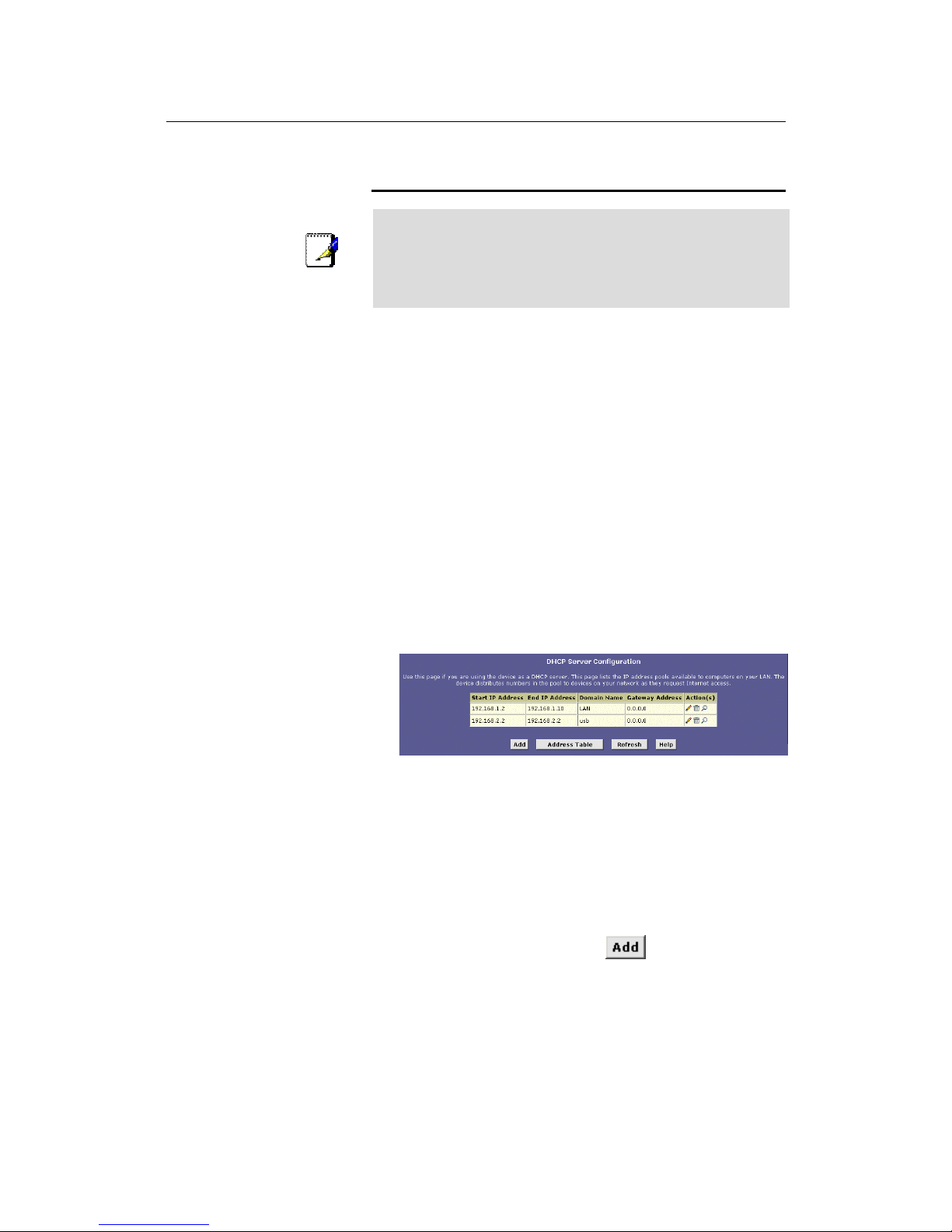
The DHCP Server Configuration page displays:
Figure 19. DHCP Configuration Page
Each pool you create displays in a row on the table on this
page.
You can create up to eight pools; however, most users will
need to create only one for their LAN. Some users many want
to create ano the r th a t dis tributes an IP add re ss to th eir USB
computer, which must be in a different subnet than the LAN
computers.
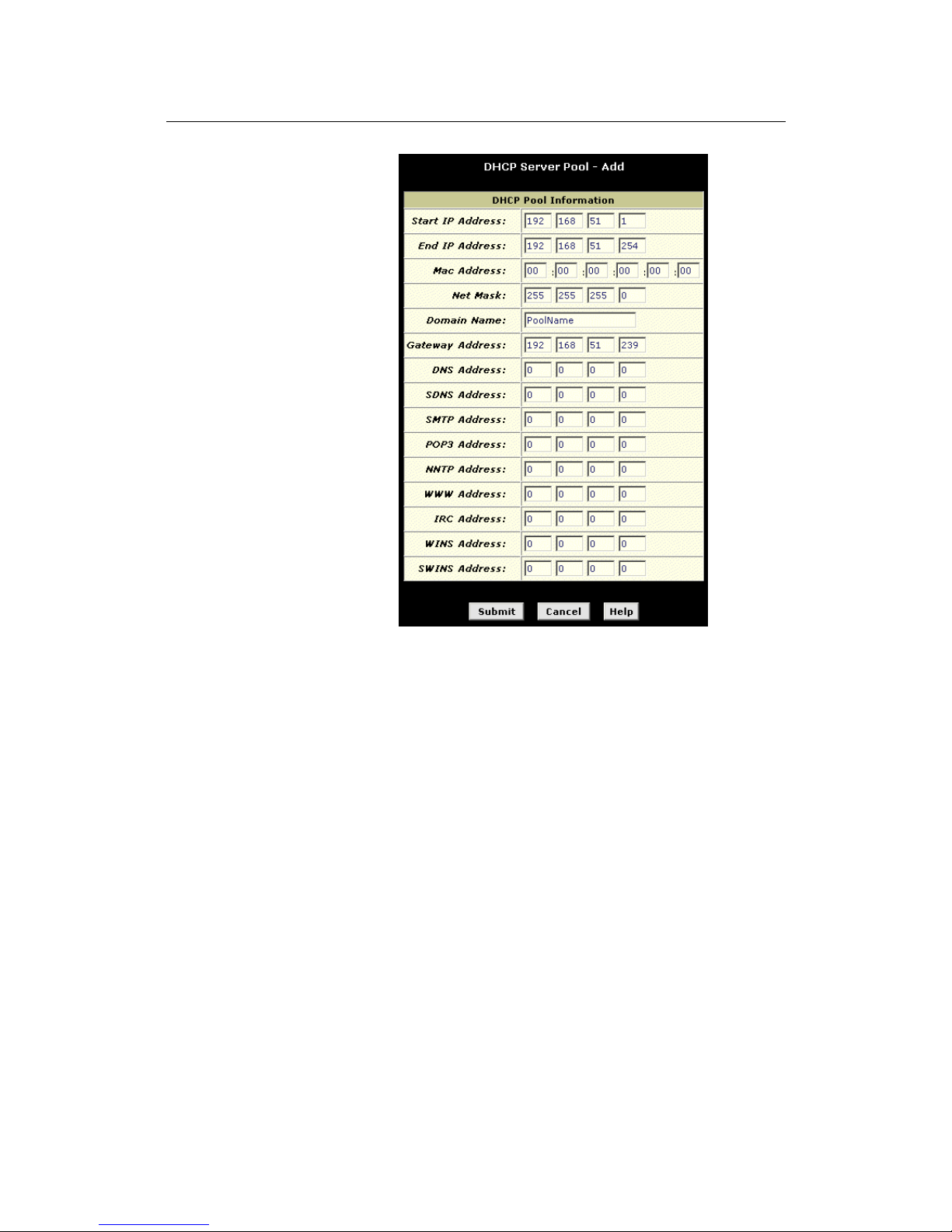
3. To add an IP address pool, click
.
The DHCP Server Pool – Add page displays.
Page 46
LinkMAX HSA300 User Manual
46
Figure 20. DHCP Server Pool – Add Page
Page 47

LinkMAX HSA300 User Manual
47
4. Enter the Start IP Address, End IP Address, Net Mask, and
Gateway Address fields are required; the others are optional.
The following table describes each field.
Field Description
Start/End IP
Addresses
Specify the lowest and highest addresses
in the pool.
Mac Address Use this field only if you want to assign a
specific IP address to a specific computer
(that is, you are creating an exception to
the dynamic assignment of addresses).
The IP address you specify will be
assigned to the computer that
corresponds to this MAC address. (A MAC
address is a manufacturer-assigned
hardware ID that is unique for each device
on a network.) If you type a MAC address
here, you must have specified the same IP
address in both the Start IP Address and
End IP Address fields.
Net Mask Specifies which portion of each IP address
in this range refers to the network and
which portion refers to the host
(computer). For a description of network
masks and LAN network masks, see
Appendix 0. You can use the network
mask to dis tingu i sh whi ch pool of
addresses should be distributed to a
particular subset of computers on your
LAN (called a subnet).
Domain Name A user-friendly name that refers to the
group of computers (subnet) that will be
assigned addresses from this pool.
Gateway
Address
The address of the default gateway for
computers that receive IP addresses from
this pool. The default gateway is the IP
address that the computers first contact to
communicate with the Internet. Typically, it
is the device’s LAN port IP address. See
“Hops and ga tewa y s” on page 73 for an
explanation of gateway addresses.
DNS/SDNS
Address
The IP address of the Domain Name
System server and Secondary Domain
Name System serve r to be use d by
computers that receive IP addresses from
this pool. These DNS servers translate
common Internet names that you type into
your web browser into their equivalent
numeric IP addresses. Typically, these
servers are located with y ou r IS P .
Page 48
LinkMAX HSA300 User Manual
48
Field Description
SMTP...SWINS
(optional)
The IP addresses of devices that perform
various services for computers that
receive IP addresses from this pool (such
as the SMTP, or Simple Mail Transfer
Protocol, server which handles e-mail
traffi c ) . C o n tact your ISP for th ese
addresses.
5. Click .
A confirmation page displays briefly to indicate that the pool has
been added successfully. After a few seconds, the DHCP
Server Pool – Add page displays with the newly added pool.
6. Follow the instructions in “Setting the DHCP Mode” on
page 551 to set the DHCP mode to DHCP Server.
Viewing, modifying, and deleting address pools, and
excluding IP addresses from a pool
To view, modify, or delete an existing address pool, display the
DHCP Server Configuration page, and click the icons in the
corresponding row in the address pool table.
! To delete an IP address pool, click
, then submit and
commit your changes.
! To vi ew det ail s on an IP add re s s po ol, clic k
. A page
displays with all the same information you entered when
adding the pool.
To modify the domain name associated with an IP address
pool, or to exclude addresses from the pool, click
. The
DHCP Server Pool – Modify page displays, as shown in
Figure 21.
Figure 21. DHCP Server Pool – Modify Page
Excluded addresses are those that you have designated
for fixed use with specific devices, or for some other reason
do not want to make available to your network.
Page 49
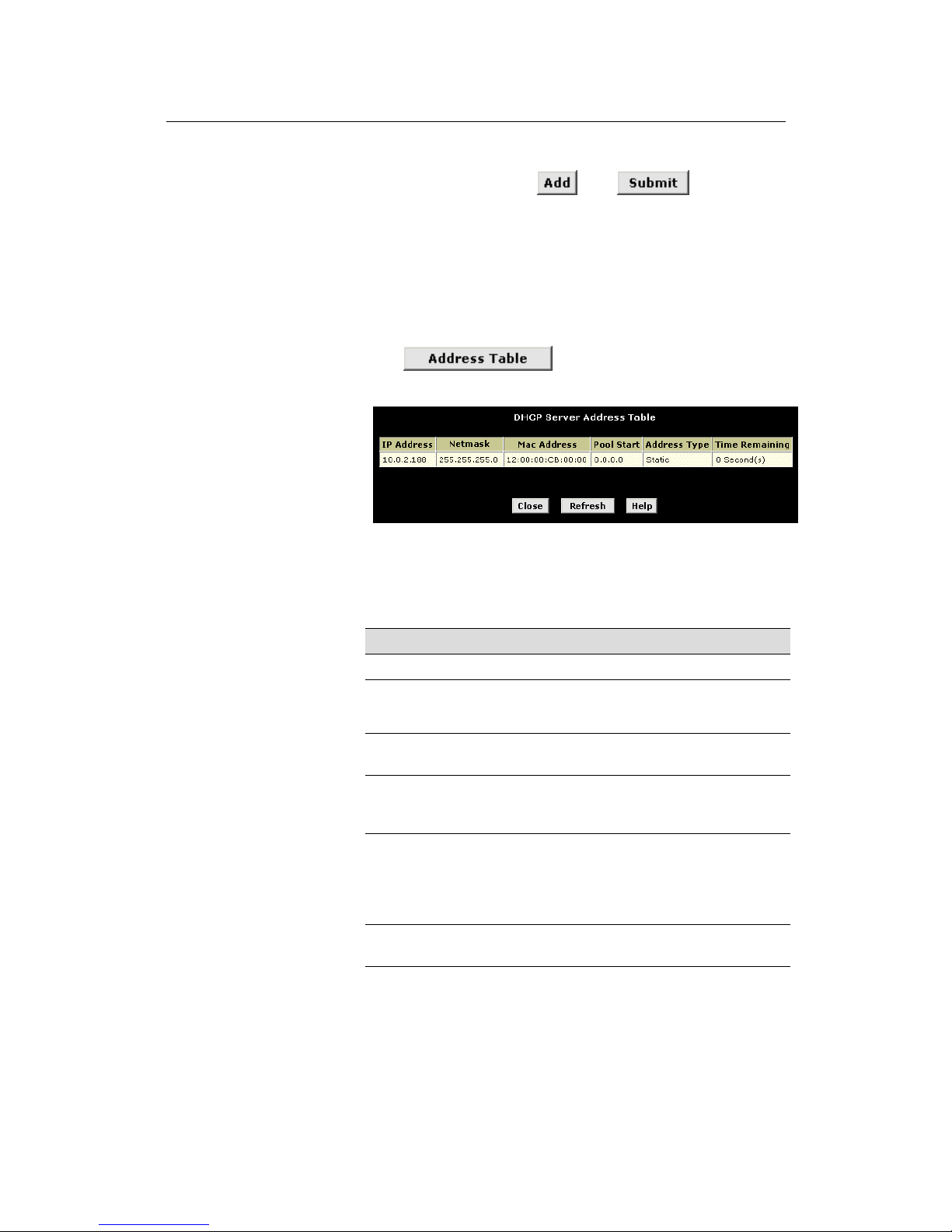
LinkMAX HSA300 User Manual
49
To exclude an address from distribution, type it in the fields
provided and click
. Click after entering
your changes. Be sure to use the Commit feature to save
your changes to permanent memory, as described on
page 34.
Viewing current DHCP address assignments
When HSA300 functions as a DHCP server for your LAN, it keeps a
record of any addresses it has leased to your computers. To view a
table of all current IP address assignments,
display the DHCP
Server Configuration page, and then
click
.
A page displays similar to that shown in Figure 22:
Figure 22. DHCP Server Address Table Page
The DHCP Server Address Table lists any IP addresses that are
currently leased to LAN devices. For each leased address, the table
lists the following information:
Field D esc ription
IP Address The address that has been leased from the pool.
Netmask
The network mask associated with the leased address,
which identifies the network ID and host ID portions of
the address (see Appendix A).
Mac Address A hardware ID for the device to which the number
has been assigned.
Pool Start The lowe r boundary of the add ress pool
(provided to identify the pool from which the
leased number came).
Address Type Static or Dynamic. Static indicates that the IP
number has been assigned permanently to the
specific hardware device. Dynamic indicates that
the number has been leased temporarily for a
specified length of time.
Time
Remaining
The amount of time left for the device to use the
assigned address.
Page 50
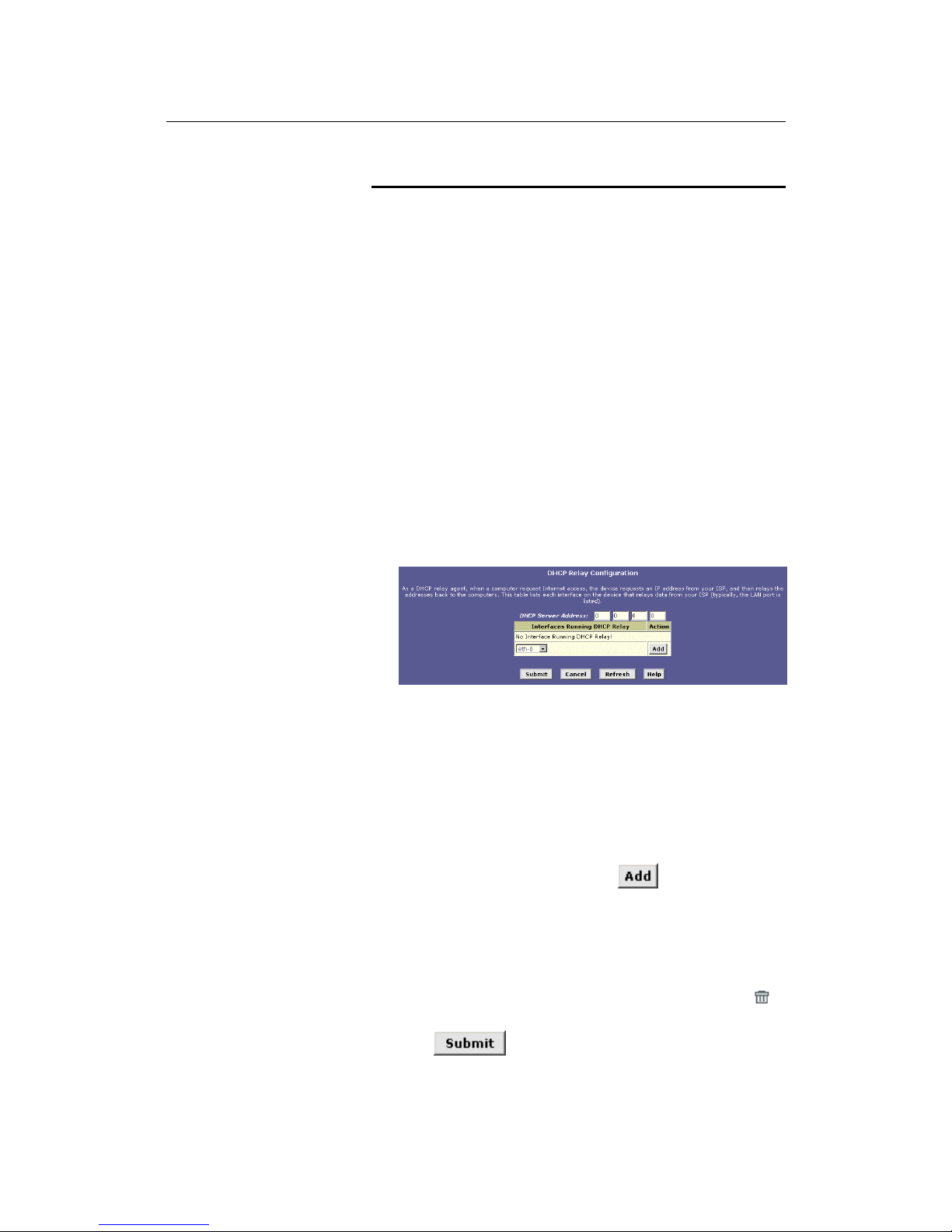
LinkMAX HSA300 User Manual
50
Configuring DH CP Re lay
Some ISPs perform the DHCP server function for their customers’
home/small office networks. In this case, you can configure the
device as a DHCP relay agent. When a computer on your network
requests Internet access, HSA300 contacts your ISP to obtain an IP
address (and other information), and then forwards that information
to the computer.
First, you must configure your PCs to accept DHCP information
assigned by a DHCP server:
1. Open the Windows Control Panel and display the computer's
Networking properties. Configure the TCP/IP properties to
"Obtain an IP address automatically" (the actual text may
vary depending on your operating system). For detailed
instructions, see the Quick Start chapter, “Part 2 —
Configuring Your Computers.”
Next, you specify the IP address of the DHCP server and select the
interfaces on your network that will be using the relay service.
2. Log into the Configuration Manager, click the LAN tab, and
then click
DHCP Relay
in the task bar.
The DHCP Relay Configuration page displays:
Figure 23. DHCP Relay Configuration Page
3. Type the IP address of your ISP’s DHCP server in the fields
provided.
If you do no t have thi s nu m b e r , i t i s n o t e s se n ti a l to enter it
here. Requests for IP information from your LAN will be passed
to the default gateway, which sho uld rou te the r eques t
appropriately.
4. If the interface named eth-0 is not already displaying, select
it from the drop-down list and click
.
The eth-0 interface specifies that your default Ethernet (LAN)
interface is running DHCP relay for your LAN. Typically, this is
the only interface you need to specify here. If HSA300 has
additional interfaces that you want to perform DHCP relay, you
can select and add them.
(You can also delete an interface from the table by clicking
in the right column.)
5. Click
.
Page 51

LinkMAX HSA300 User Manual
51
A page displays to confirm your changes, and then the program
returns to the DHCP Relay Configuration page.
6. Follow the instructions in “Setting the DHCP Mode” on
page 51 to set the DHCP mode to DHCP Relay.
Setting the DHCP Mode
You should set the DHCP mode only after you have configured
DHCP relay or DHCP server settings. See “Configuring DHCP
Server” on page 45 or “Configuring DHCP Relay” on page 50 for
additional instructions.
Follow these instructions to set the DHCP mode:
1. Click the LAN tab, and then click DHCP Mode in the task
bar.
2. From the DHCP Mode drop-down list, choose DHCP Server,
DHCP Relay, or none.
If you choose none, your LAN computers must be configured
with static IP addresses.
3. Click
.
4. Click the Admin tab, and then click Commit & Reboot in
the task bar.
5. Click
to save your changes to permanent
memory.
Page 52
LinkMAX HSA300 User Manual
52
8
Configuri ng Network Addr ess Tr anslation
This chapter provides an overview of Network Address Translation
(NAT) and instructions for modifying the default configuration on
your device.
Overview of NAT
Network Address Translation is a method for disguising the private
IP addresses you use on your LAN as the public IP address you
use on the Internet. You define NAT rules that specify exactly how
and when to translate between public and private IP addresses.
Definitions
A private IP address is created by a network administrator for use
only on a LAN, whereas a public IP address is purchased from the
Internet Corporation for Assigned Names and Numbers (ICANN)
for use on the Internet. Typically, your ISP provides a public IP
address for your entire LAN, and you define the private addresses
for computers on your LAN.
In a typical NAT setup, your ISP provides you with a single public IP
address to use for your entire network. Then, you assign each
computer on your LAN a unique private IP address. (Or, you define
a pool of private IP addresses for dynamic assignment to your
computers, as de scribed in Chapt er 7.) O n HSA 300, y ou se t u p a
NAT rule to specify that whenever one of your computers
communicates with the Internet, (that is, it sends and receives IP
data packets) its private IP address—which is referenced in each
packet—will be replaced by the LAN’s public IP address.
Definitions
An IP data packet contains bits of data bundled together in a
specific format for efficient transmission over the Internet. Such
packets are the building blocks of all Internet communication. Each
packet contains header information that identifies the IP address of
the computer that initiates the communication (the source IP
address), the port number that the router associates with that
computer (the source port number), the IP address of the
targeted Internet computer (the destination IP address), and other
information.
When this type of NAT rule is applied, because the source IP
address is swapped out, it appears to other Internet computers as if
the data packets are actually originating from the computer
assigned your public IP addre ss (i n thi s c ase , HSA 300 ).
The NAT rule could further be defined to disguise the source port in
the data packet (i.e., change it to another number), so that outside
computers will not be able to determine the actual port from which
the packet originated. Data packets that arrive in response contain
the public IP address as the destination IP address and the
disguised source port number. HSA300 changes the IP address
Page 53

LinkMAX HSA300 User Manual
53
and source port number back to the original values (having kept
track of the changes it made earlier), and then routes the packet to
the originating computer.
NAT rules such as these provide several benefits:
! They eliminate the need for purchasing multiple public IP
addresses for computers on your LAN. You can make up
your own private IP addresses at no cost, and then have
them translated to the public IP address when your
computers access the Internet.
! They provide a measure of security for you LAN by
enabling you to assign private IP addresses and then have
these and the source port numbers swapped out before
your computers access the Internet.
The type of NA T fu n ction des cri bed abo v e is cal led net wo rk
address port translation (napt). You can use other types, called
flavors, of NAT for other purposes; for example, providing outside
access to your LAN or translating multiple private addresses to
multiple public addresses.
Your Default NAT Setup
By default, NAT is enabled, with an napt rule configured to perform
the following translation:
These priv ate IP addresses: ...are translated to:
192.168.0.3
192.168.0.4
.
.
.
192.168.0.34
Your ISP-assigned
public IP address
For a description of napt rules, see page 60. This default NAT setup
assumes that, on each LAN computer, you configured TCP/IP
properties as follows:
! You selected the check bo x that enables them to rece ive
their IP addresses automa ti cally (that is, to use a D HCP
server);
or,
! You assigned static IP addresses to your PCs in the range
192.168.0.3 through 192.168.0.34.
If your computers are not configured in one of these ways, you
can either change the IP addresses on your computers to match the
NAT setup (see the Quick Start instructions, Part 2), or delete this
NAT rule and add a new one th a t m atch e s the add re s ses yo u
assigned to your computers (see “Adding NAT Rules” on page 61
for instruc tio n s ).
Page 54
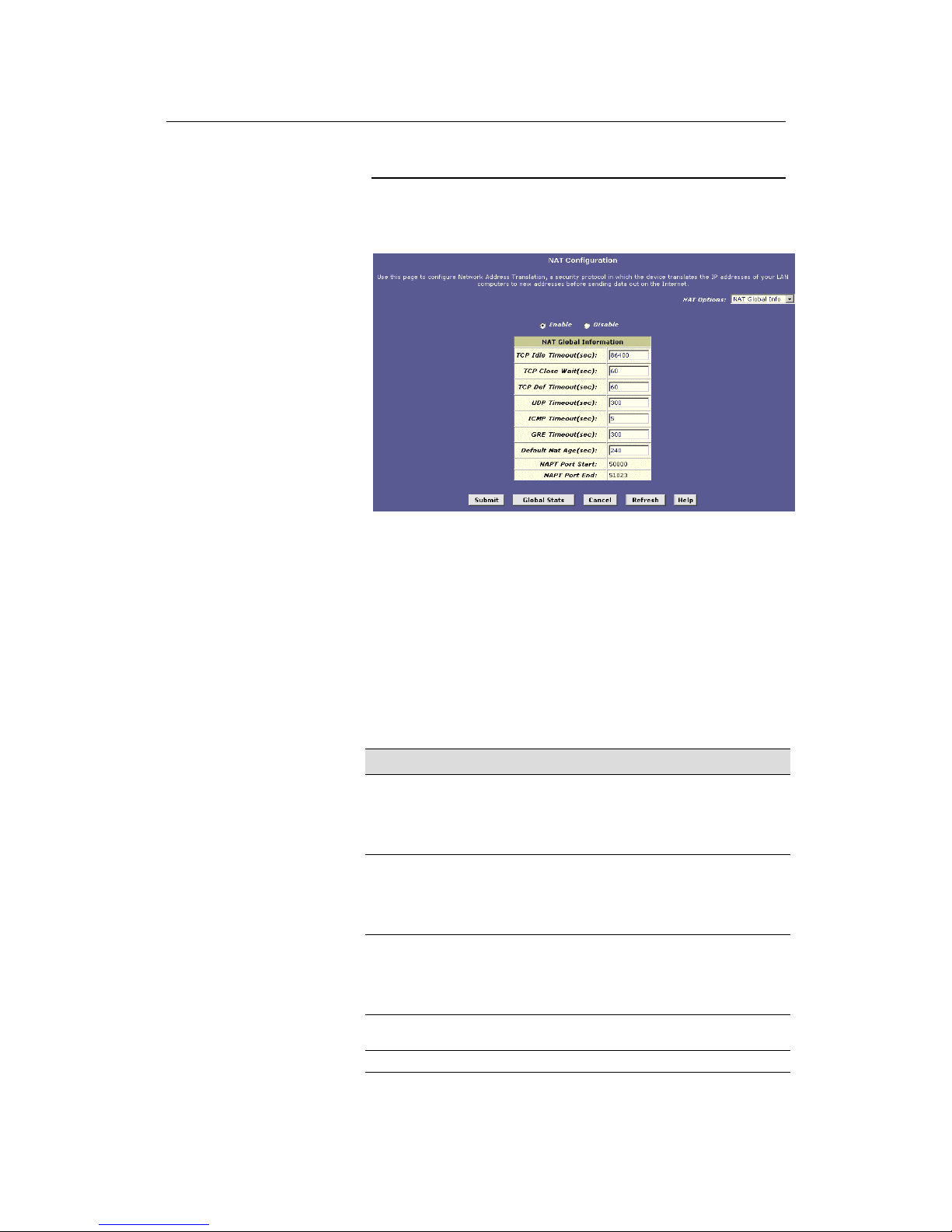
LinkMAX HSA300 User Manual
54
Viewing NAT Global Settings and Statistics
To view your NAT settings, log into Configuration Manager, click the
Services tab. The NAT Configuration page displays by default, as
shown in Figu re 24 .
Figure 24. NAT Configuration Page
The NAT Configuratio n page contains the fol lowing elemen t s :
! The NAT Options drop-down list, which provides access to
the Global Information page (shown by default), the NAT
Rule Configuration page, and the NAT Translations page,
which shows current translations.
! Enable/Disable radio buttons, which allow you to turn on or
off the NAT feature.
! The NAT Global Information table, which displays the
following settings that apply to all NAT rule translations:
Field Description
TCP Idle Timeout (sec)
For a NAT translation session on data that
uses the TCP protocol, the translation will no
longer be performed if no matching data
packets are received after the specified tim e
has elapsed.
TCP Close Wait (sec)
For a NAT translation on data using the TCP
protocol, after a communication session has
been closed, the translation will no longer be
performed if no matching data packets are
received after the specified time has elapsed.
TCP Def Timeout (sec)
For a NAT translation session on data that
uses the TCP protocol, the translati on will no
longer be performed if no matching data
packets are received after the specified tim e
has elapsed.
UDP Timeout (sec)
Same as TCP Idle Timeout, but for UDP
packets.
ICMP Timeout (sec)
Same as TCP Idle Timeout, but for ICMP
Page 55
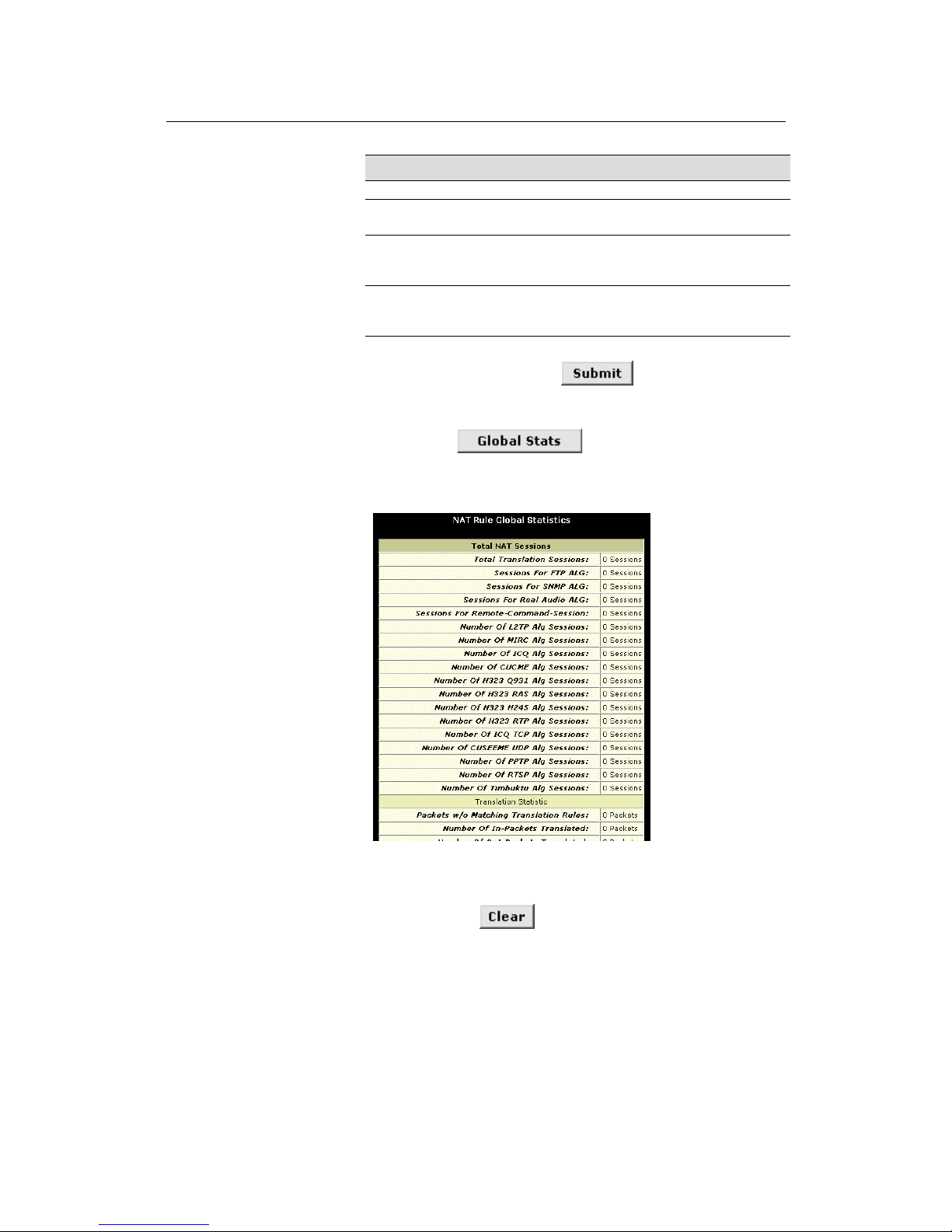
LinkMAX HSA300 User Manual
55
Field Description
packets.
GRE Timeout (sec)
Same as TCP Idle Timeout, but for GRE
packets.
Default Nat Age (sec)
For all other NAT translation sessions, the
number of seconds after which a translation
session will no longer be valid.
NAPT Port Start/End
When an napt rule is defined, the source
ports will be translated to sequential numbers
in this range.
If you change any values, click
, and then click the
Admin tab and commit your changes to permanent system memory
.
You can click
to view accumulated data on
how many NAT rules have been invoked and how much data has
been translated. A page similar to the one shown in Figure 25
displays.
Figure 25. NAT Rule Global Statistics Page
The table provides basic information for each NAT rule you have set
up. You can click
to restart the accumulation of the
statistics at their initial values.
Page 56
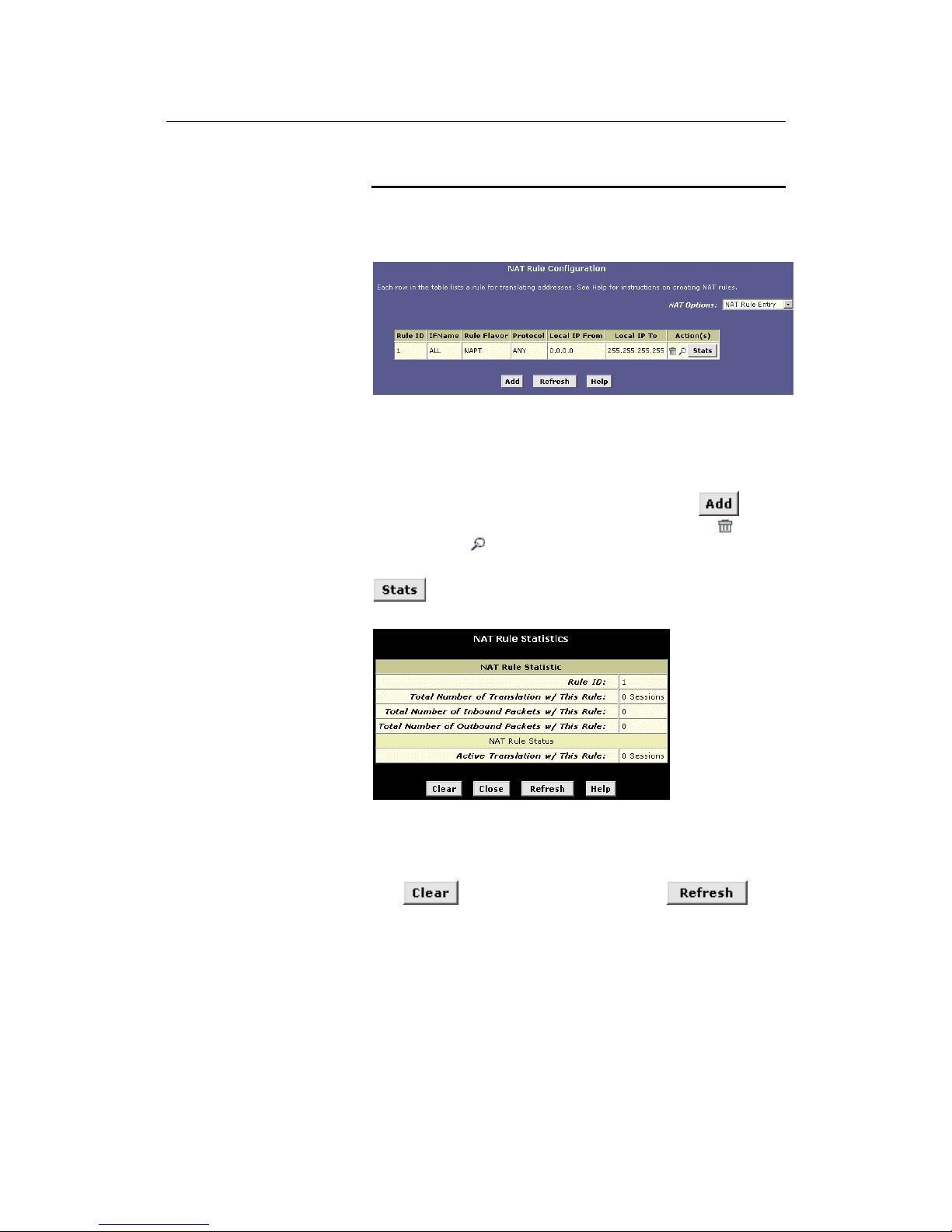
LinkMAX HSA300 User Manual
56
Viewing NAT Ru les and Rule Statisti cs
To view the NAT rule s currently defined on your sy stem , se l e ct NAT
Rule Entry in the NAT Options drop-down list. The NAT Rule
Configuration page displays, as shown in Figure 26.
Figure 26. NAT Rule Configuration Page
The NAT Rule Configuration table displays a row containing basic
information for each rule. For a description of these fields, refer to
the instructions for adding rules (pages 61 through 70).
From the NAT Rule Configuration page, you can click
to add
a new rule, or use the icons in the right column to delete (
) or
view detail s on (
) a rule.
To view data on how often a specific NAT rule has been used, click
in the Action(s) column. A page similar to the one show in
Figure 27 di spl ay s:
Figure 27. NAT Rule Statistics Page
The statistics show how ma ny times this rule ha s b een invoked and
how many currently active sessions are using this rule. You can
click
to reset the statistics to zeros and to
display newly accumulated data.
Page 57
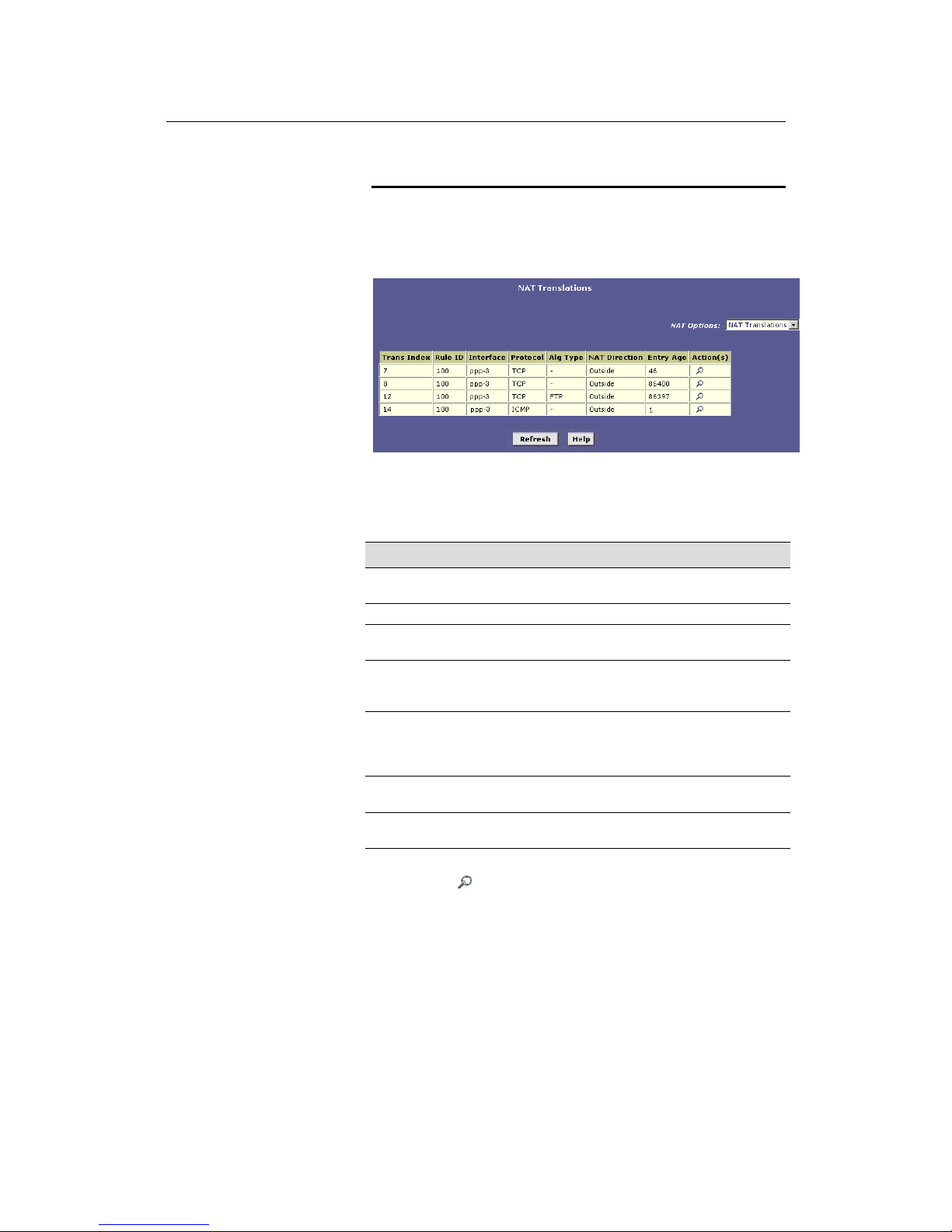
LinkMAX HSA300 User Manual
57
Viewing Current NAT Translations
To view a list of NAT translations that have recently been performed
and which remain in effect (for any of the defined rules), select NAT
Translations from the NAT Options drop-down list. The NAT
Translations page displays, as shown in Figure 28:
Figure 28. NAT Translations Page
For each current NAT translation session, the table contains the
following fields:
Field Description
Trans Index
The sequential number assigned to the IP session
used by this NAT translation session.
Rule ID
The ID of the NAT rule invoked.
Interface
The device interface on which the NAT rule was
invoked (from the rule definition).
Protocol
The IP protocol used by the data packets t hat are
undergoing translations (from the rule definitio n)
Exampl e : TCP, UD P, I C M P.
Alg Type The Application Level Gateway (ALG), if any, that
was used to enable this NAT translation (ALGs are
special settings that certain applications requir e in
order to work while NAT is enabled).
NAT Direction
The direction (incoming or outgoing) of t he
translation (from the port definition).
Entry Age
The elapsed time, in seconds, of the NAT
translation session.
You can click
in the A cti o n ( s) co l u m n to v i ew a dditiona l d e ta ils
about a NAT translation session, as shown in Figure 29.
Page 58
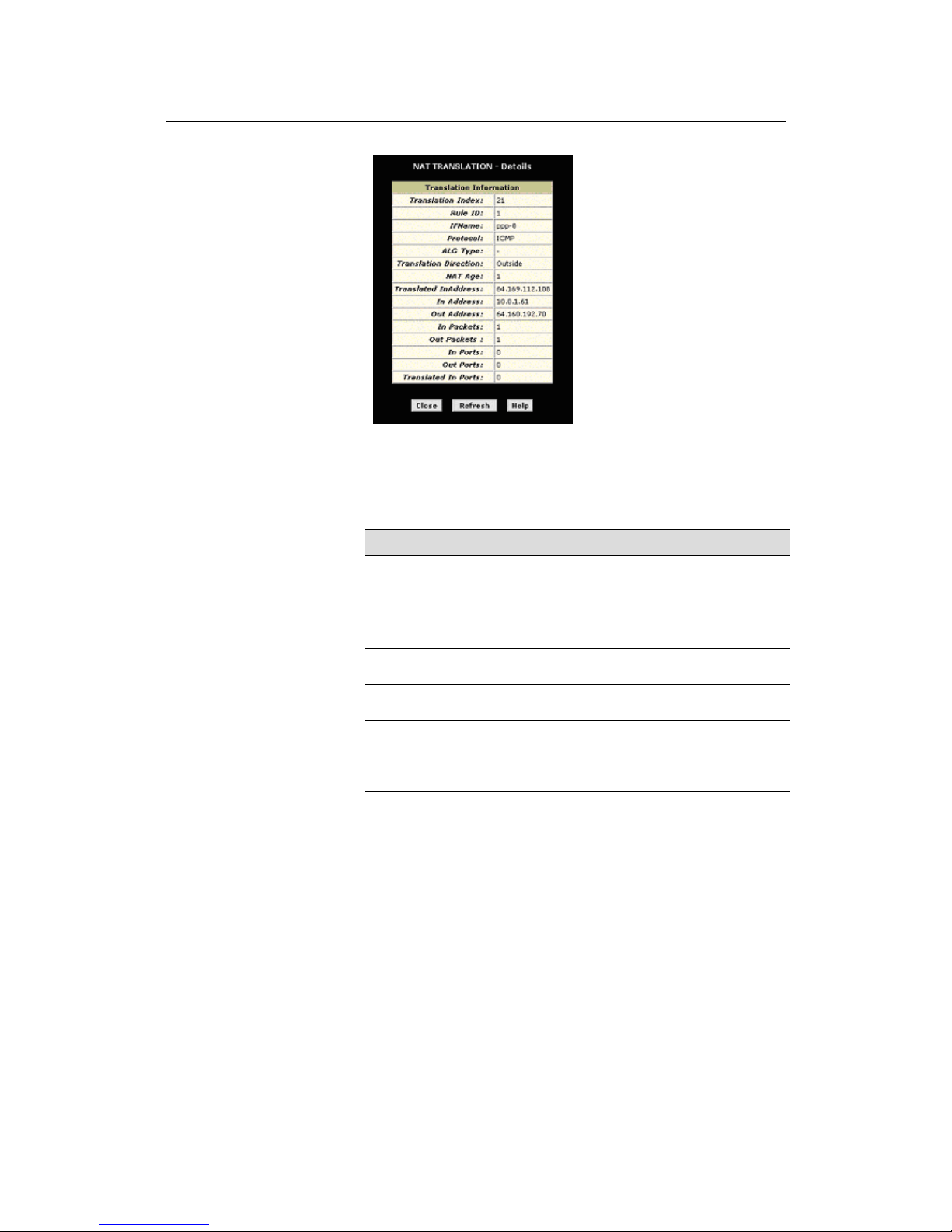
LinkMAX HSA300 User Manual
58
Figure 29. NAT Translation – Detail s Page
In addition to the information displayed in the NAT Translations
table, this table displays the following for the selected current
translation sessions:
Field Description
Translated
InAddress
The public IP address to which the private IP
address was translated.
In Address
The private IP address that was translated.
Out Address
The IP address of the outside destinati on (w eb, ftp
site, etc.)
In/Out Packets
The number of incoming and outgoing IP packets
that have been translated in thi s translation session.
In Ports
The actual port number corresponding to the LAN
computer.
Out Ports
The port number associated with the destination
address.
Translated In Ports
The port number to which the LAN computer’s
actual port number was translated.
Page 59
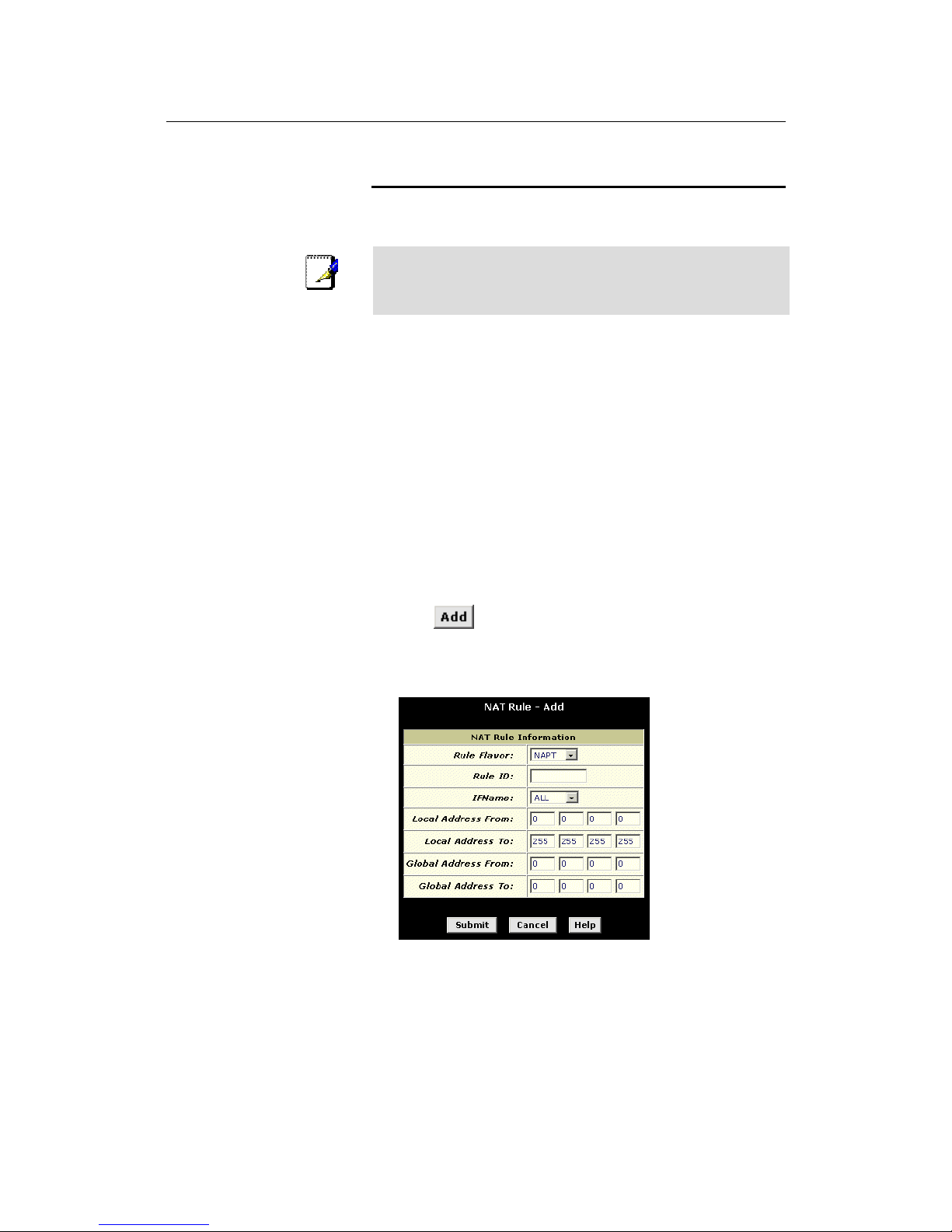
LinkMAX HSA300 User Manual
59
Adding NAT Rules
This section explains how to create rules for the various NAT
flavors.
Note
You cannot edit existing NAT rules. To change a rule setup,
delete it and add a new rule with the modified settings.
The napt rule: Translating between private and public IP
addresses
Follow these instructions to create a rule for translating the private
IP addresses on your LAN to your public IP address. This type of
rule uses the NAT flavor napt, which was used in your default
configuration. The napt flavor translates private source IP
addresses to a single public IP address. The napt rule also
translates the source port numbers to port numbers that are defined
on the NAT Global Configuration page (see page 56). The
Introduction to NAT on page 52 describes how the napt rule works.
1. Click the NAT tab, then select NAT Rule Entry from the
NAT Options drop-down list on the right side of the page.
The NAT Rule ent ry page disp la ys a row fo r ea ch cur r ently
configured NAT rule.
2. Click
to display the NAT Rule – Add page.
The NAPT flavor displays by default in the Rule Flavor dropdown list. The NAT Rule – Add page displays, as shown in
Figure 30.
Figure 30. NAT Rule – Add Page (napt Flavor)
3. Enter a Rule ID.
The Rule ID determines the order in which rules are invoked
(the lowest numbered rule is invoked first, and so on). In some
cases, two or more rules may be defined to act on the same set
Page 60

LinkMAX HSA300 User Manual
60
of IP addresses. Be sure to assign the Rule ID so that the
higher priority rules are invoked before lower-priority rules. It is
recommended that you select rule IDs as multiples of 5 or 10 so
that, in the future, you can insert a rule between two existing
rules.
Once a data packet matches a rule, the data is acted upon
according to that rule and is not subjected to higher-numbered
rules.
4.
From the IFName drop-down list, select the interface on the
device to which this rule applies.
Typically, NAT rules are used for communication between your
LAN and the Internet. Because the device uses the WAN
interface (which may be named ppp-0 or eoa-0) to conn ec t y ou r
LAN to your ISP, it is the usual IFName selection.
5. In the Local Address From field and Local Address To fields,
type the starting and ending IP addresses, respectively, of
the range of private address you want to be translated. Or,
type the same address in both fields to specify a single
value.
To specify that data from all LAN addres se s should be
translated, type 0 (zero) in each From field and 255 in each To
field.
If you have several non-sequential private addresses, you can
create an additional napt rule for each address.
These addre sse s s houl d corre s pond t o p ri va te addr e sses
already in use on your network (either assigned statically to
your PCs, or assigned dynamically using DHCP, as discussed
in the Quick Start).
6. In the Global Address From and Global Address To fields,
type the public IP address assigned to you by your ISP.
If you have multiple WAN interfaces, in both fields type the IP
address of the interface to which this rule applies. This rule will
not be enforced for data that arrives on other PPP interfaces.
If you have multiple WAN interfaces and want the rule to be
enforced on a range of them, type the starting and ending IP
addresses of the range.
7. When you have completed entering all information, click
.
A page displays to confirm the change.
8. Click
to return to the NAT Configuration page.
The new rule should display in the NAT Rule Configuration
table.
9. Ensure that the Enable radio button is selected, and then
click
.
A page displays to confirm your changes.
Page 61
LinkMAX HSA300 User Manual
61
10. Click the Admin tab, and then click
Commit and Reboot
in
the task bar.
11. Click
to save your changes to permanent
memory.
The rdr rule: Allowing external access to a LAN computer
You can create an rdr rule to make a computer on your LAN, such
as a Web or FTP server, available to Internet users without
requiring you to obtain a public IP address for that computer. The
computer’s private IP address is translated to your public IP
address in all incoming and outgoing data packets.
Note
Without an rdr rule (or bimap ru l e de sc rib ed on page 67 ),
HSA300 blocks attempts by external computers to access your
LAN computers.
The following example illustrates using the rdr rule to provide
external access to your web server:
Your ADSL/Ethernet router receives a packet containing a
request for access to your Web server. The packet header
contains the public address for your LAN as the destination IP
address, and a destination port number of 80. Because you
have set up an rdr rule for incoming packets with destination
port 80, the device recognizes the data as a request for Web
server access. The device changes the packet's destination
address to the private IP address of your Web server and
forwards the data packet to it.
Your Web server sends data packets in response. Before the
ADSL/Ethernet router forwards them on to the Internet, it
changes the source IP address in the data packets from the
Web server's private address to your LAN's public address. To
an external Internet user then, it appears as if your Web server
uses your public IP address.
Figure 31 shows the fields used to establish an rdr rule:
Page 62
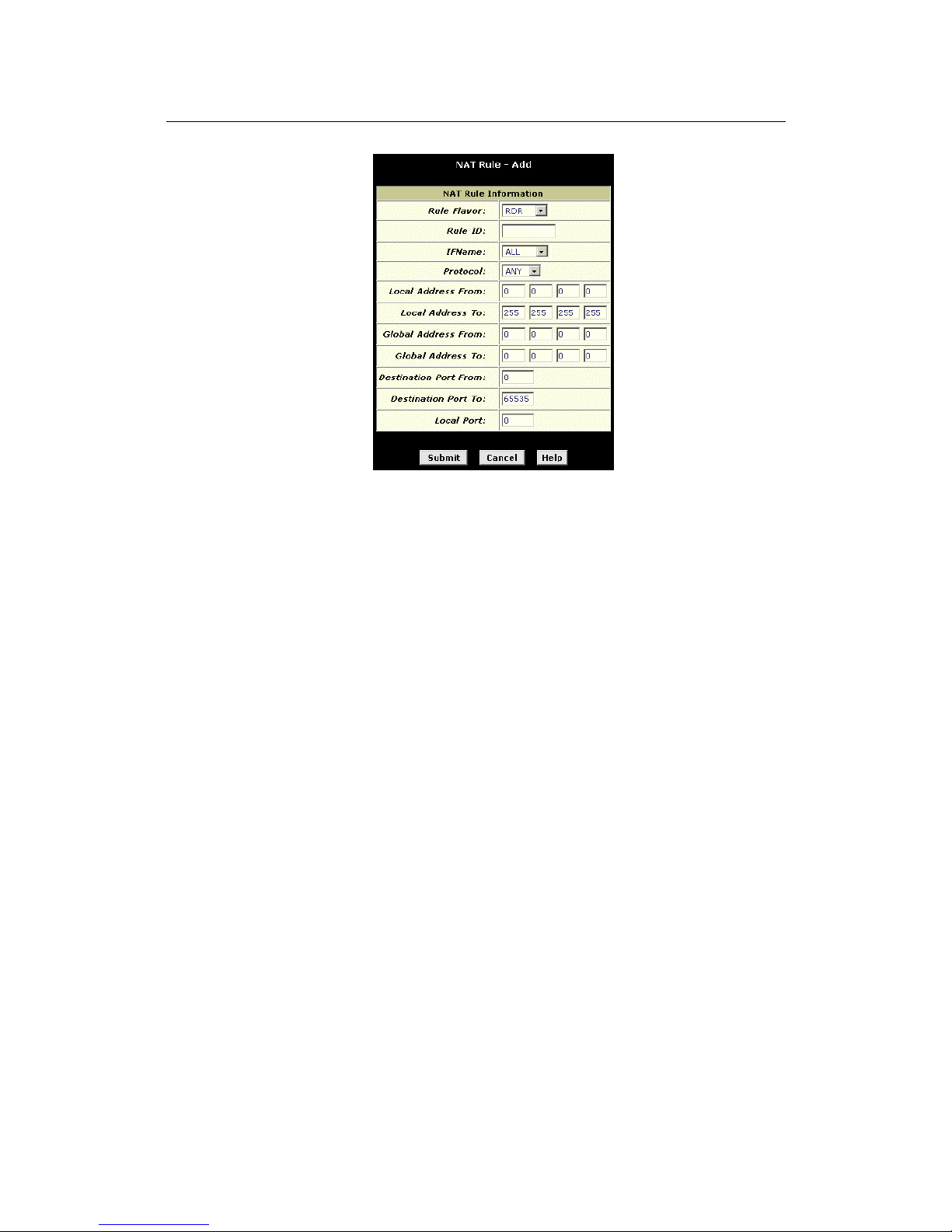
LinkMAX HSA300 User Manual
62
Figure 31. NAT Rule – Add Page (rdr Flavor)
Follow these instructions to add an rdr rule (see steps 1-4 under
"The napt rule" on page 61 for specific instructions corresponding to
steps 1 and 2 below):
1. Display the NAT Rule – Add Page, select RDR as the Rule
Flavor, and enter a Rule ID.
2. Select the interface on which this rule will be effective.
3. Select a protocol to which this rule applies, or choose ALL.
This selection specifies which type of Internet communication
will be subject to this translation rule. You can select ALL if the
rule applies to all data. Or, select TCP, UDP, ICMP, or a
number from 1-255 that represents the IANA-specified protocol
number.
4. In the Local Address From and Local Address To fields, type
the same private IP address, or the lowest and highest
addresses in a range:
! If you type the same IP address in both fields, incoming
traffic that matches the criteria you specify in steps 5 and 6
will be redirected to that IP address.
! If you type a range of addresses, incoming traffic will be
redirected to any avail a ble co mpu ter in th at range. This
option would typically be used for load balancing, whereby
traffic is distributed among several redundant servers to
help ensure efficient network performance.
These addre sse s s houl d corre s pond t o p ri va te addr e sses
already in use on your network (either assigned statically to
your PCs or assigned dy nami cally using DHCP, as discussed
in the Quick Start, Part 2).
5. In the Global Address From and Global Address To fields,
type the public IP address assigned to you by your ISP.
Page 63

LinkMAX HSA300 User Manual
63
If you have multiple WAN (PPP) interfaces, this rule will not be
enforced for data that arrives on other PPP interfaces. This rule
will not be enforced for data that arrives on WAN interfaces not
specified here.
If you have multiple WAN interfaces and want the rule to be
enforced on more than one of them (or all), type the starting
and ending IP addresses of the range.
6. In the Destination Port From and Destination Port To fields,
enter the port ID (or a range) that you expect to see on
incoming packets destined for the LAN computer for which
this rule is being created.
Incoming traffic that meets this criteria will be redirected to the
Local Port number you specify in the next field.
For example, if you grant public access to a Web server on
your LAN, you would expect that incoming packets destined for
that computer would contain the well-known web server port
number, 80. This setting serves as a filter; data packets not
containing this port number would not be granted access to you
local computer.
7. If the LAN computer that you are making publicly available is
configured to use a non-standard port number for the type of
traffic it receives, type the non-standard port number in the
Local Port field.
This option translates the standard port number in packets
destined for your LAN computer to the non-standard number
you specify. For example, if your Web server uses (nonstandard) port 2000, but you expect incoming data packets to
refer to (standard) port 80, you would enter 2000 here and 80 in
the Destination Port fields. The headers of incoming packets
destined for port 80 will be modified to refer to port 2000. The
packet can then be routed appropriately to the web server.
8. Follow steps 7-12 under "The napt rule" on page 59 to
submit your changes.
Page 64
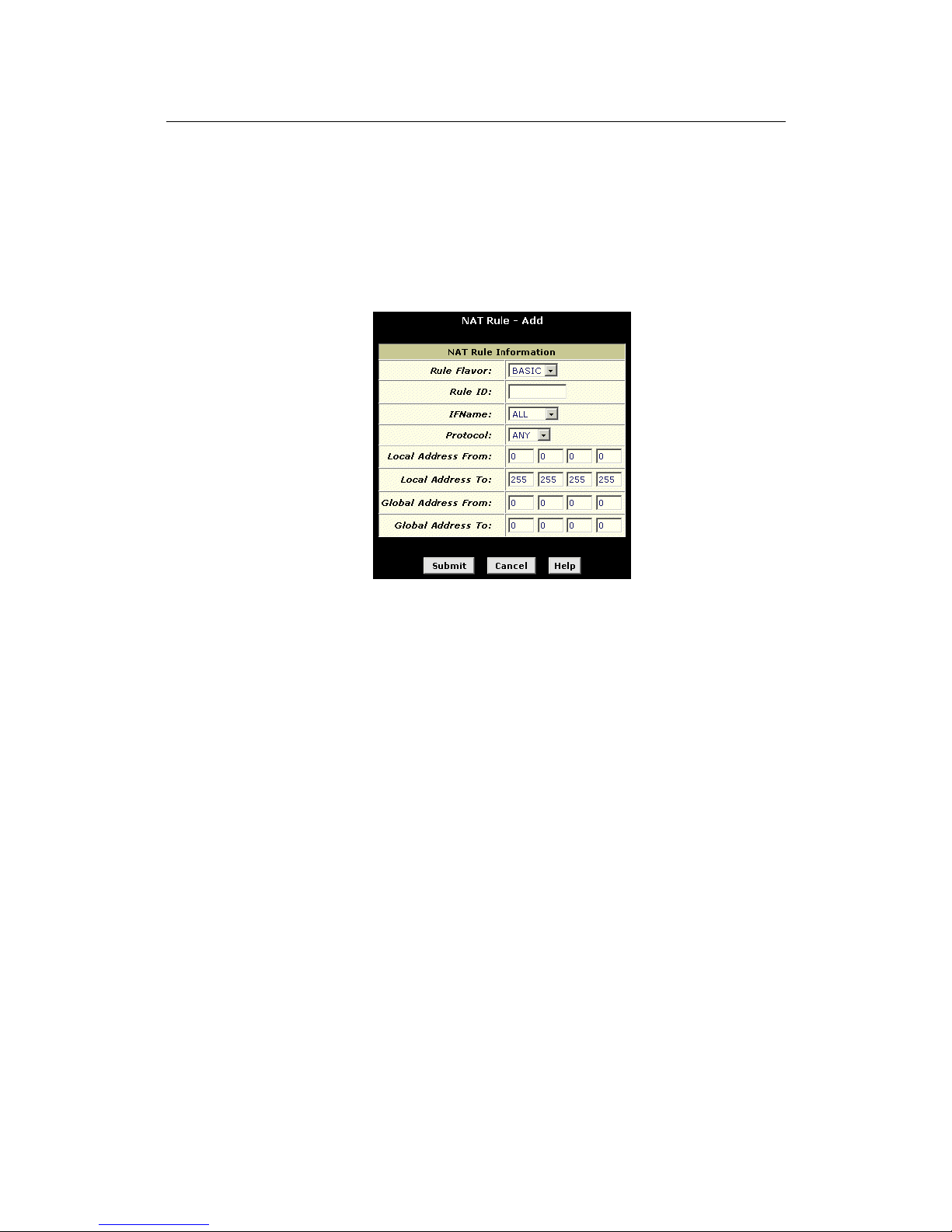
LinkMAX HSA300 User Manual
64
The basic rule: Performing 1:1 translations
The basic flavor translates the private (LAN-side) IP address to a
public (WAN-side) address, like napt rules. However, unlike napt
rules, basic rules do not also translate the port numbers in the
packet header; they are passed through untranslated. Therefore,
the basic rule does not provide the same level of security as the
napt rule.
Figure 32 shows the fields used for adding a basic rule.
Figure 32. NAT Rule – Add Page (basic Flavor)
Follow these instructions to add an basic rule (see steps 1-4 under
"The napt rule" on page 61 for specific instructions corresponding to
steps 1 and 2 below):
1. Display the NAT Rule – Add Page, select BASIC as the Rule
Flavor, and enter a Rule ID.
2. Select the interface on which this rule will be effective.
3. Select a protocol to which this rule applies, or choose ALL.
This selection specifies which type of Internet communication
will be subject to this translation rule. You can select ALL if the
rule applies to all data. Or, select TCP, UDP, ICMP, or a
number from 1-255 that represents the IANA-specified protocol
number.
4. In the Local Address From and Local Address To fields, type
the starting and ending IP addresses that identify the range
of private address you want to be translated. Or, type the
same address in both fields.
If you specify a range, each address will be translated in
sequence to a corresponding address in a range of global
addresses (which you specify in step 5).
You can create a basic rule for each specific address
translation to occur. The range of addresses should correspond
to private addresses already in use on your network, whether
Page 65
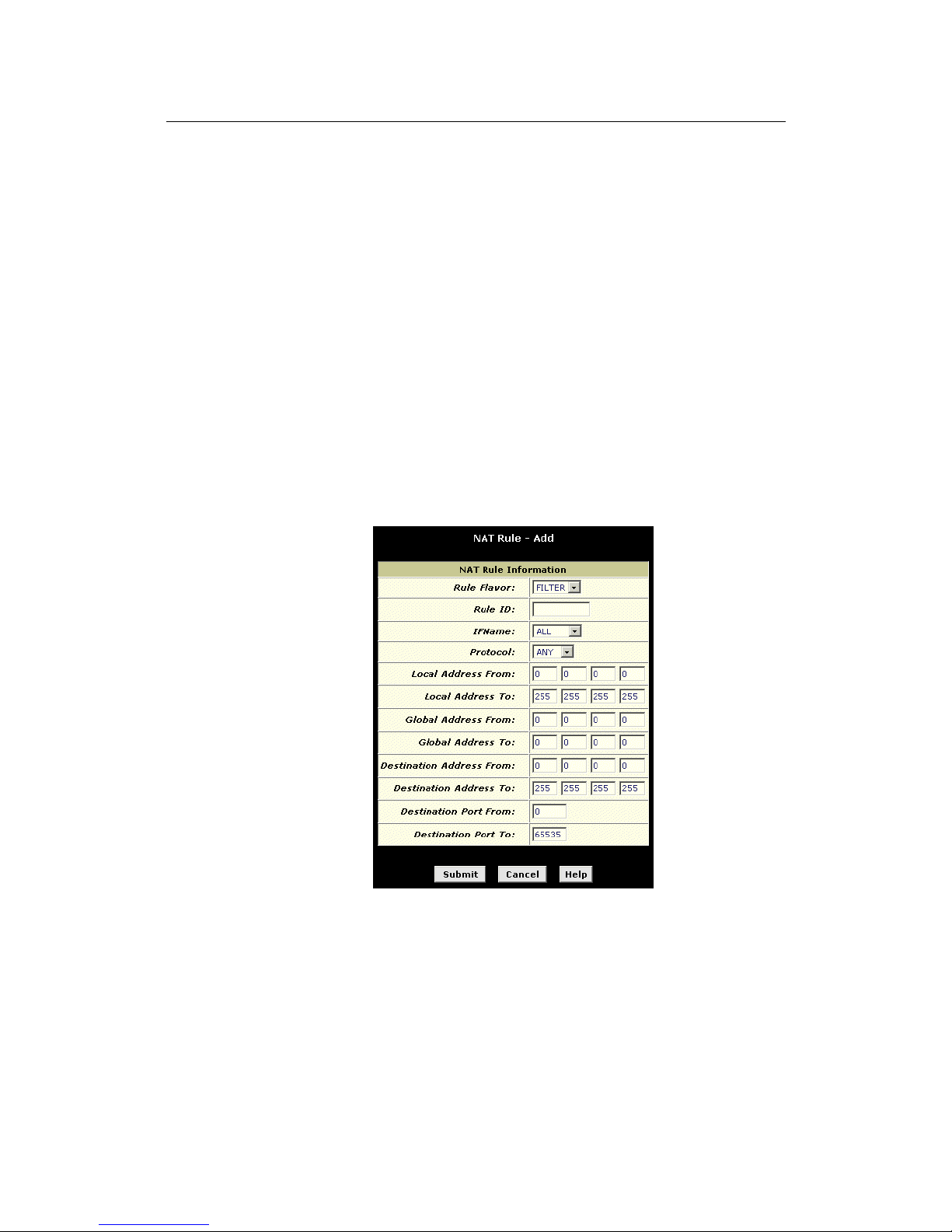
LinkMAX HSA300 User Manual
65
assigned stati cally to your PCs, or a ssigned dynamicall y using
DHCP.
5. In the Global Address From and Global Address To fields,
type the starting and ending address that identify the pool of
public IP addresses that the private addresses should be
translated to. Or, type the same address in both fields (if you
also specified a single address in step 4).
6. Follow steps 7-12 under "The napt rule" on page 61 to
submit your changes.
The filter rule: Configuring a basic rule with additional crite ria
Like the basic flavor, the filter flavor translates public and private IP
addresses on a one-to-one basis. The filter flavor extends the
capability of the basic rule. Refer to “The basic Rule” on page 66 for
a general description.
You can use the filter rule if you want an address translation to
occur only when your LAN computers initiate access to specific
destinations. The destinations can be identified by their IP
addresses, server type (such as FTP or Web server), or both.
Figure 33 shows the field s use d to es tabl is h a fil ter rul e .
Figure 33. NAT Rule
Add Page (filter Flavor)
Follow these instructions to add a filter rule (see steps 1-4 under
"The napt rule" on page 61 for specific instructions corresponding to
steps 1 and 2 below):
1. Display the NAT Rule – Add Page, select FILTER as the
Rule Flavor, and enter a Rule ID.
2. Select the interface on which this rule will be effective.
Page 66

LinkMAX HSA300 User Manual
66
3. Select a protocol to which this rule applies, or choose ALL.
This selection specifies which type of Internet communication
will be subject to this translation rule. You can select ALL if the
rule applies to all data. Or, select TCP, UDP, ICMP, or a
number from 1-255 that represents the IANA-specified protocol
number.
4. In the Local Address From and Local Address To fields, type
the starting and ending IP addresses that identify the range
of private address you want to be translated. Or, type the
same address in both fields.
If you specify a range, each address will be translated in
sequence to a corresponding address in a range of global
addresses (which you specify in step 5).
The address (or range of addresses) should correspond to a
private addresses (or addresses) already in use on your
network. These may be assigned statically to your PCs or
assigned dynamically using DHCP, as discussed in the Quick
Start.
5. In the Global Address From and Global Address To fields,
type the starting and ending address that identify the range
of public IP addresses to translate your private addresses to.
Or, type the same address in both fields (if you also
specified a single address in step 4).
6. Specify a Destination Address or addresses, Destination
Port (or ports), or both. You can specify a single value by
entering that value in both fields.
! Specify a destination address (or range) if you want this
rule to apply only to outbound traffic to the address (or
range).
If you enter only the network ID portion of the destination
address, the n the r ule wil l appl y to outbound traffic to all
computers on network.
! Specify a destination ports (or range) if you want this rule to
apply to any outbound traffic to the types of servers
identified by th a t por t nu mb er.
For example, if you do not specify a destination address,
but specify a Destination Port From/To of 21, then this
translatio n wil l o ccu r on all accesses by your LA N t o all
external FTP servers (that is, when one of your LAN
computers communicates with an external FTP server, the
source IP address in the packet headers is changed to the
public address, replacing the initiator's private IP address).
Port number assignments are maintained in RFCs
maintained by IANA . Co mmo n po rt nu mbe rs incl ude :
20, 21—FTP (file transfer protocol) server
25—SMTP (simple mail transfer protocol) server
80—HTTP (World Wide Web) server
! Specify both a destination address (or range) and a
destination port (or range) if you want this translation rule to
Page 67
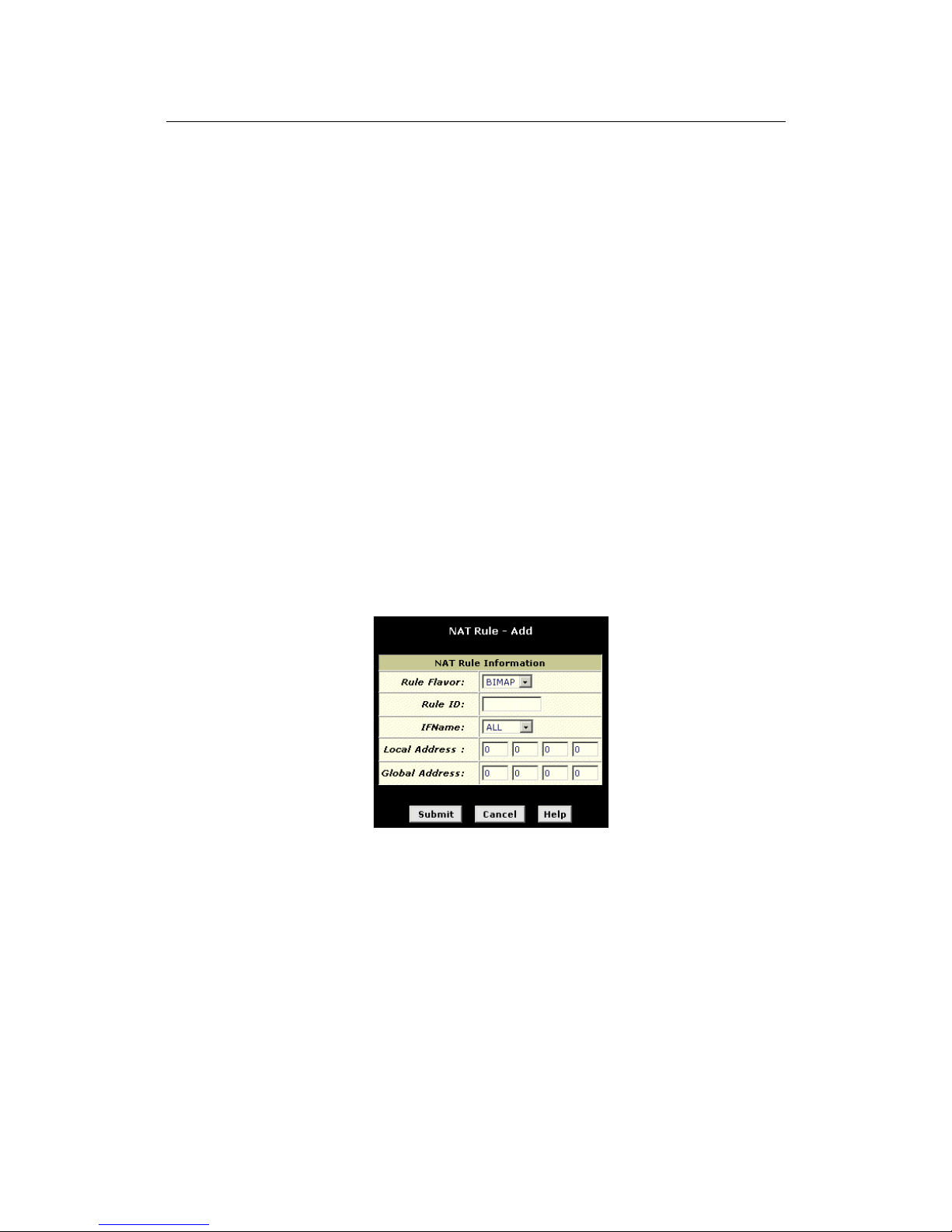
LinkMAX HSA300 User Manual
67
apply to accesses to the specified server type at the
specified IP address or network.
7. Follow steps 7-12 under "The napt rule" on page 61 to
submit your changes.
The bimap rule: Performing two-way translations
Unlike the other NAT flavors, the bimap flavor performs address
translations in both the outgoing and incoming directions.
In the incoming direction, when the specified HSA300 interface
receives a packet with your public IP address as the destination
address, this address is translated to the private IP address of a
computer on your LAN. To the external computer, it appears as if
the access is being made to the public IP address, when, in fact, it
is communicating with a LAN computer.
In the outgoing direction, the private source IP address in a data
packet is translated to the LAN’s public IP address. To the rest of
the Internet, it appears as if the data packet originated from the
public IP address.
Bimap rules can be used to provide external access to a LAN
device. They do not provide the same level of security as rdr rules,
because rdr rules also reroute incoming packets based on the port
ID. Bimap rules do not account for the port number, and therefore
allow external access regardless of the destination port type
specified in the incoming packet.
Figure 34 shows the fields used to establish a bimap rule.
Figure 34. NAT Rule – Add Page (bimap Flavor)
Follow these instructions to add a bimap rule (see steps 1-4 under
"The napt rule" on page 61 for specific instructions corresponding to
steps 1 and 2 below):
1. Display the NAT Rule – Add Page, select
BIMAP
as the
Rule Flavor, and enter a Rule ID.
2. Select the interface on which this rule will be effective.
3. In the Local Address field, type the private IP address of the
computer to which you are granting external access.
Page 68
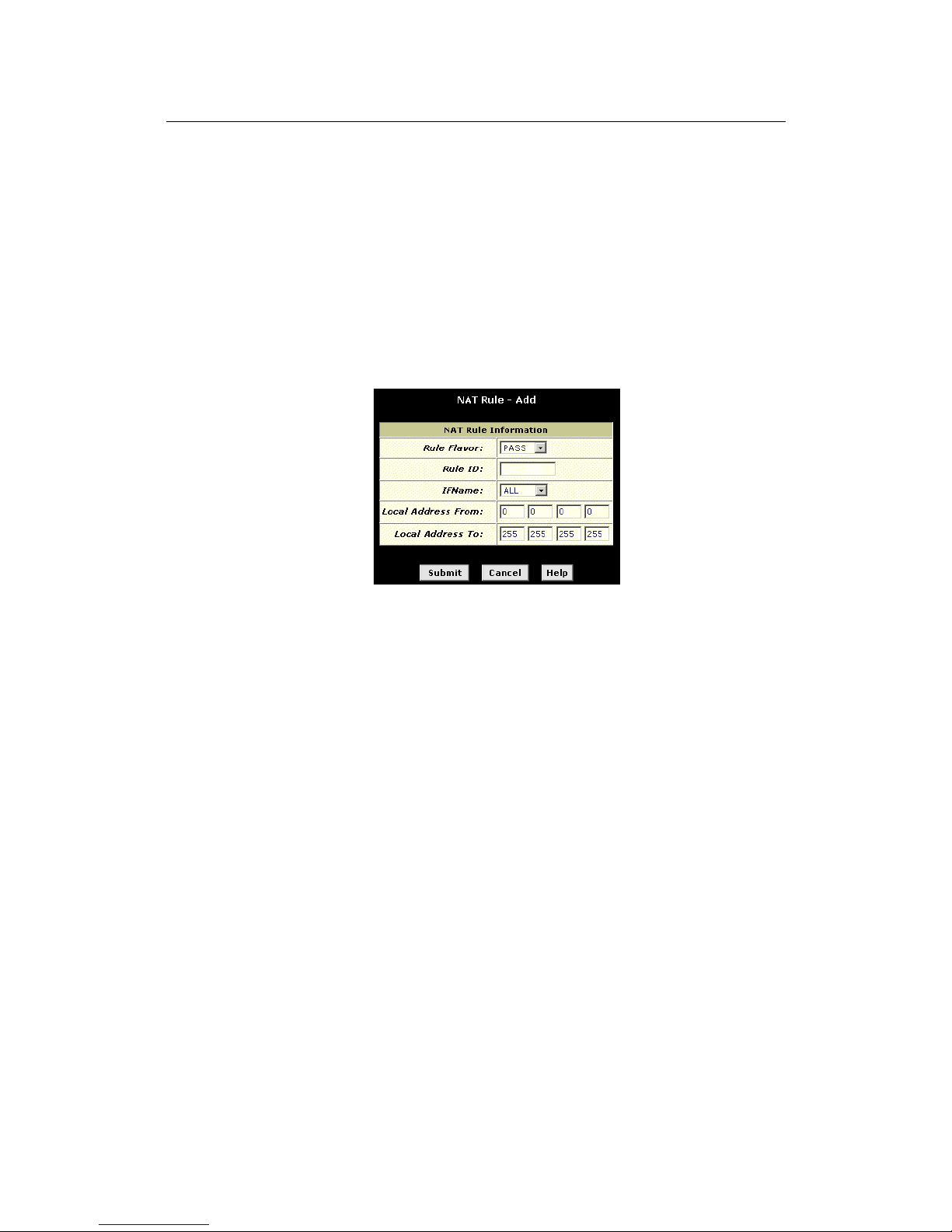
LinkMAX HSA300 User Manual
68
4. In the Global Address field, type the address that you want
to serve as the publicly known address for the LAN
computer.
5. Follow steps 7-12 under "The napt rule" on page 61 to
submit your changes.
The pass rule: Allowing specific addresses to pass through
untranslated
You can create a pass rule to allow a range of IP addresses to
remain untranslated when another rule would otherwise do so.
Figure 35. NAT Rule – Add Page (pass Flavor)
The pass rule must be assigned a rule ID that is a lower number
than the ID assigned to the rule it is intended to pass. In you want a
specific IP address or range of addresses to not be subject to an
existing rule, say rule ID #5, then you can create a pass rule with ID
#1 through #4 .
Follow these instructions to add a pass rule (see steps 1-4 under
"The napt rule" on page 61 for detailed instructions corresponding to
steps 1 and 2 below):
1. Display the NAT Rule – Add Page, select PASS as the Rule
Flavor, and enter a Rule ID.
2. Select the interface on which this rule will be effective.
3. In the Local Address From and Local Address To fields, type
the lowest and highest IP addresses that define the range of
private address you want to be passed without translation.
If you want the pass rule to act on only one address, type that
address in both fields.
4. Follow steps 7-12 under "The napt rule" on page 61 to
submit your changes.
Page 69
LinkMAX HSA300 User Manual
69
9
Configuring DNS Server Addresses
About DNS
Domain Nam e Sy stem (D NS) se rve rs m ap the use r- fri endly domain
names that users type into their Web browsers (e.g., "yahoo.com")
to the equivalent numerical IP addresses that are used for Internet
routing.
When a PC user types a domain name into a browser, the PC must
first send a request to a DNS server to obtain the equivalent IP
address. The DNS server will attempt to look up the domain name
in its own database, and will communicate with higher-level DNS
servers when the name cannot be found locally. When the address
is found, it is sent back to the requesting PC and is referenced in IP
packets for the remainder of the communication.
Assigning DNS Addresses
Multiple DNS addresses are useful to provide alternatives when one
of the servers is down or is encountering heavy traffic. ISPs typically
provide primary and secondary DNS addresses, and may provide
additional addresses. Your LAN PCs learn these DNS addresses in
one of the following ways:
! Statically: If your ISP provides you with their DNS server
addresses, you can assign them to each PC by modifying
the PC s' IP prope r ti e s .
! Dy nam ically f rom a DHCP pool: You can configure the
DHCP Server feature on the ADSL/Ethernet router and
create an address pool that specify the DNS addresses to
be distributed to the PCs. Refer to Chapter 7, “Configuring
DHCP Server” on page 47 for instructions on creating
DHCP address pools.
In either case, you can specify the actual addresses of the ISP's
DNS servers (on the PC or in the DHCP pool), or you can specify
the address of the LAN port on the ADSL/Ethernet router (e.g.,
192.168.0.1). When you specify the LAN port IP address, the
device performs DNS relay, as described in the following section.
Note
If you specify the actual DNS addresses on the PCs or in the
DHCP pool, the DNS relay feature is not used.
Page 70

LinkMAX HSA300 User Manual
70
Configuring D NS Re lay
When you specify the device's LAN port IP address as the DNS
address, then the ADSL/Ethernet automatically performs “DNS
relay”; i.e., because the device itself is not a DNS server, it forwards
domain name lookup requests from the LAN PCs to a DNS server
at the ISP. It then relays the DNS server’s response to the PC.
When performing DNS relay, HSA300 must maintain the IP
addresses of the DNS servers it contacts. It can learn these
addresses in either or both of the following ways:
! Lea rned through PPP : If the device uses a PPP
connection to the ISP, the primary and secondary DNS
addresses can be learned via the PPP protocol. To use this
method, the "Use DNS" checkbox must be selected in the
PPP interface properties. (See Chapter 13 for instructions
on configuring your PPP interface. Note that you cannot
change this property by modifying an existing PPP
interface; you must delete the interface and recreate it with
the new setting.)
Using this option provides the advantage that you will not
need to reconfigure the PCs or the ADSL/Ethernet router if
the ISP changes their DNS addresses.
! Conf igured on the ADSL/Ethernet route r: You can use
the device's DNS feature to specify the ISP's DNS
addresses. If the d evice also u ses a PPP interface with the
"Use DNS" pr oper ty enab l ed, th en th e se c on figu red
addresses will be used in addition to the two addresses
learned through PPP. If "Use DNS" is not enabled, or if a
protocol other than PPP is used (such as EoA), then these
configured addresses will be used as the primary and
secondary DNS ad dr es ses.
Follow these steps to configure DNS relay:
1. Configure the LAN PCs to use the ADSL/Ethernet router's
LAN IP address as their DNS server address—by assigning
the LAN IP address statically to each PC, or by inputting the
LAN IP address or the address 0.0.0.0 as the DNS address
in the DHCP server pool used by the PCs.
2. If using a PPP connection to the ISP, click the "Use DNS"
check box so that the DNS server addresses it learns are
used for DNS relay.
Or, ...
If not using a PPP connection (or if you want to specify DNS
addresses in addition to those learned through PPP),
configure the DNS addresses on the ADSL/Ethernet router
as follows:
Page 71
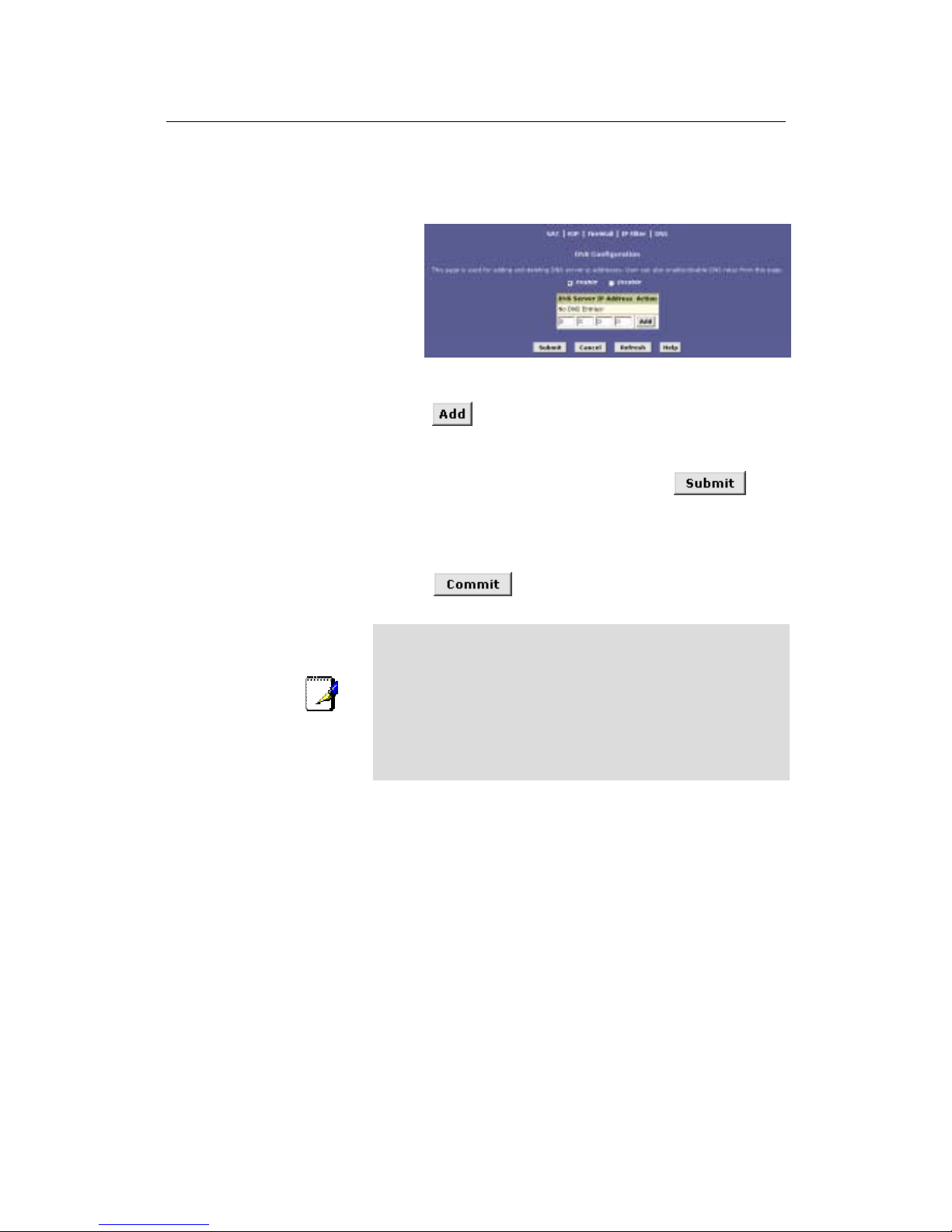
LinkMAX HSA300 User Manual
71
a.
Click the Services tab, and then click DNS in the task bar. The
DNS Configuration page displays.
Figure 36. DNS Configuration Page
b. Type the IP address of the DNS server in an empty row and click
.
You can enter only two addresses.
c.
Click the Enable radio button, and then click
.
3. Click the Admin tab, and then click Commit & Reboot in
the task bar.
4. Click
to save your changes to permanent
memory.
Note
DNS addresses that are assigned to LAN PCs prior to enabling
DNS relay will remain in effect until the PC is rebooted. DNS relay
will only take effect when a PC's DNS address is the LAN IP
address.
Similarly, if after enabling DNS relay, you specify a DNS address
(other than the LAN IP address) in a DHCP pool or statically on a
PC, then that address will be used instead of the DNS relay
address.
Page 72

LinkMAX HSA300 User Manual
72
10
Configuri ng IP Routes
You can use Configuration Manager to define specific routes for
your Internet and network data. This chapter describes basic routing
concepts and provides instructions for creating routes.
Note that most users do not need to define IP routes.
Overview of IP Routes
The essential challenge of a router is: when it receives data
intended for a particular destination, which next device should it
send that data to? When you define IP routes, you provide the rules
that a computer uses to make these decisions.
Comparing IP routing to telephone switching
IP routing decisions are similar to those made by switchboards that
handle telephone calls.
When you dial a long distance telephone number, you are first
connected to a switchboard operated by your local phone service
carrier. All calls you ini tiate g o first to this main swi tch board.
If the phone number you dialed is outside your calling area, the
switchboard opens a conn ection to a higher-level switchboard for
long distance calls. That switchboard looks at the area code you
dialed and connects you with another switchboard that serves that
area. This new switchboard, in turn, may look at the prefix in the
number you dialed (the middle set of three numbers) and connect to
a more localized switchboard that handles numbers with that prefix.
This final switchboard can then look at the last four digits of the
phone number to open a connection with the person or company
you dialed.
In comparison, when your computer initiates communication over
the Internet, such as viewing a web page connecting to an web
server, the data it sends out includes the IP address of the
destination computer (the “phone number”). All your outgoing
requests first go to the same router at your ISP (the first
“switchboard”). That router looks at the network ID portion of the
destination address (the “area code”) and determines which next
router to send the reque st to . After several such p a sses, the request
arrives at a router for the destination network, which then uses the
host ID portion of the destination IP address (the local “phone
number”) to route the request to the appropriate computer. (The
network ID and host ID portions of IP addresses are explained in
Appendix 0..)
With both the telephone and the computer, all transactions are
initially sent to the same switchboard or router, which serves as a
gateway to other higher- or lower-level devices. No single device
knows at the outset the eventual path the data will take, but each
uses a specific part of the destination address/phone number to
make a decision about which device to connect to next.
Page 73

LinkMAX HSA300 User Manual
73
Hops and gateways
Each time Internet data is passed from one Internet address to
another, it is s aid to ta k e a hop. A hop can be a ha ndoff to a
different port on the same device, to a different device on the same
network, or t o a de vi ce on an en ti rel y diffe ren t n e twor k.
When a hop passes data from one type of network to another, it
uses a gateway. A gateway is an IP address that provides initial
access to a network, just as a switchboard serves as a gateway to a
specific set of phone numbers. For example, when a computer on
your LAN requests access to a company’s web site, your ISP
serves as a gateway to the Internet. As your request reaches its
destination, another gateway provides access to the company’s
web servers.
Using
IP rout es to define default gateways
IP routes are defined on computers, routers, and other IP-enabled
devices to instruct them which hop to take, or which gateway to use,
to help forward data along to its specified destination.
If no IP route is defined for a destination, then IP data is passed to a
predetermined default gat ew ay . The default gateway serves like a
higher-le vel te lep h one swi tch boa rd; it m ay not be able to conne ct
directly to the destination, but it will know a set of other devices that
can help pass the data intelligently. If it cannot determine which of
these devices provides a good next hop (because no such route
has been defined), then that device will forward the data to its
default gateway. Eventually, a high level device, using a predefined
IP route, will be able to forward the data along a path to its
destination.
Do I need to define IP routes?
Most users do not need to define IP routes. On a typical small home
or office LAN, the existing routes that set up the default gateways
for your LAN computers and for HSA300 provide the most
appropriate path for all your Internet traffic.
! On your LAN computers, a default gateway directs all
Internet traffic to the LAN port on HSA300. Your LAN
computers know their default ga t ew ay either because you
assigned it to t he m when you modified the ir TCP /IP
properties, or because you configured them to receive the
information dynamically from a server whenever they
access the Internet. (Each of these processes is described
in the Quick Start instructions, Part 2.)
! On HSA300 itself, a default gateway is defined to direct all
outbound Internet traffic to a router at your ISP. This default
gateway i s assigned au t omatically by your ISP whenever
the device negotiates an Internet connection. (The process
for adding a default route is described on page 78.)
You may need to define routes if your home setup includes two or
more networks or subnets, if you connect to two or more ISP
services, or if you connect to a remote corporate LAN.
Page 74
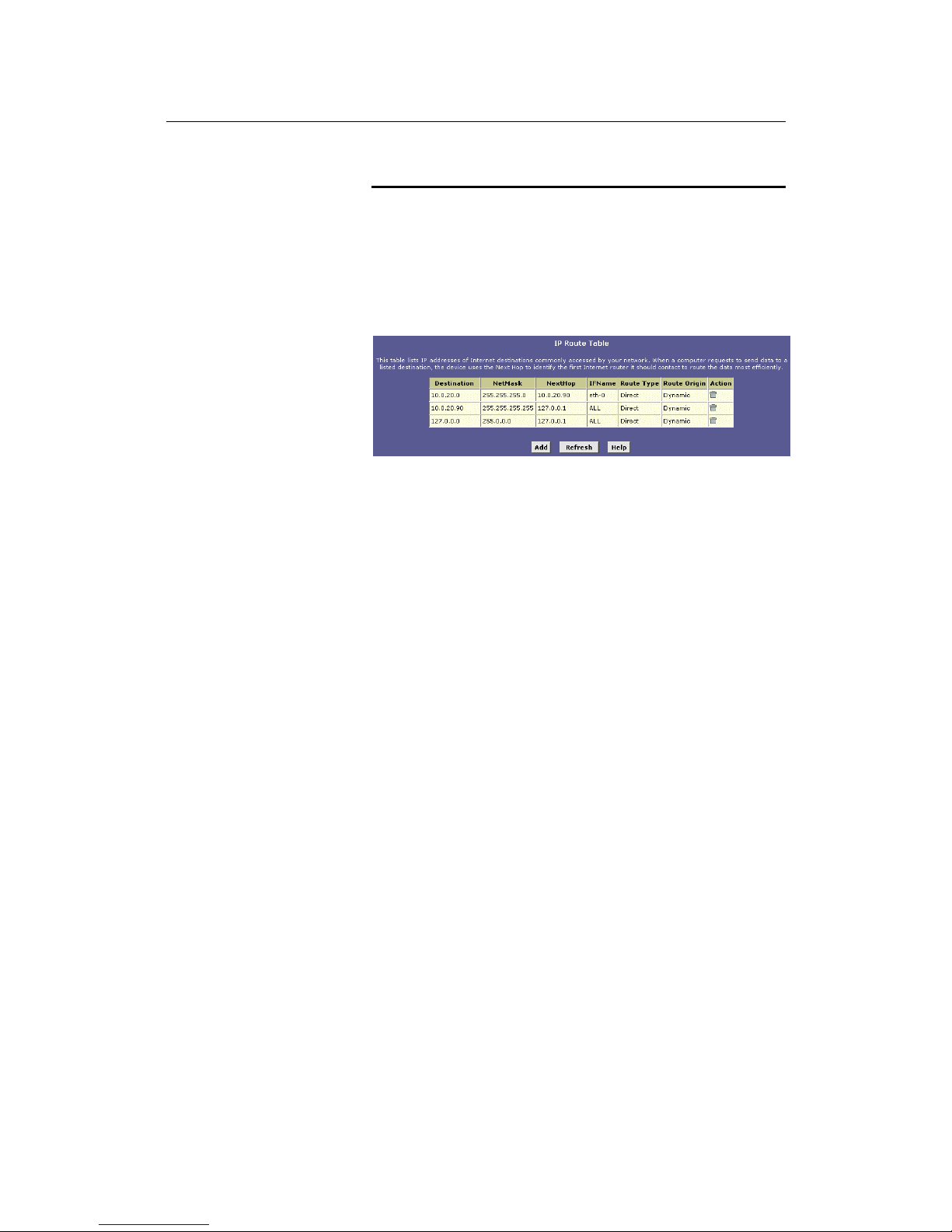
LinkMAX HSA300 User Manual
74
Viewing the IP Routing Table
All IP-enabled computers and routers maintain a table of IP
addresses that are commonly accessed by their users. For each of
these destination IP addresses, the table lists the IP address of the
first hop the data should take. This table is known as the device’s
routing table.
To view HSA300’s routing table, click the Routing tab. The IP Route
page displays by default, as shown in Figure 37:
Figure 37. IP Route Table Page
The IP Route Table displays a row for each existing route. These
include routes that were predefined on the device, routes you may
have added, and routes that the device has identified automatically
through communication with other devices.
The routing table s hould reflect a default gateway, whi c h directs
outbound Internet traffic to your ISP. This default gateway is shown
in the row containing destination address 0.0.0.0.
Page 75

LinkMAX HSA300 User Manual
75
The following table defines the fields in the IP Routing Table.
Field Description
Destination
Specifies the IP address of the destination com puter.
The destination can specified as the IP address of a
specific computer or an entire netwo rk. It can al so be
specified as all zeros to indicate that thi s rout e should be
used for all destinations for which no other route is
defined (this is the route that creates t he default
gateway).
Netmask
Indicates which parts of the destination address refer to
the network and which parts refer to a comput er on the
network. Refer to Appendix 0, for an expl anati on of
network masks. The default gateway uses a netmask of
0.0.0.0.
NextHop Speci fies the next IP address to send data to when its
final destination is that shown i n the destinati on column.
IFName
Displays the name of the interface on the devi ce th rough
which data is forwarded to the specifi ed next hop.
Route Type Displays whether the route is direct or indir ect. In a direct
route, the source and destination comput ers are on th e
same network, and the router attem pt s to directly deliver
the data to the computer. In an ind i rect route, the source
and destination computers are on different networks,
and the router forwards data to a device on another
network for further handling.
Route Origin Displays how the route was defined. Dynamic indicates
that the route was created automatically or predefined
by your ISP or the manufacturer. Routes yo u cr eate ar e
labeled
Local
. Other routes can be created automatically
(using RIP, as described in Chapter 9), or defi ned
remotely through various network management
protocols (LCL or ICMP).
Action
Displays an icon (
) you can click on to delete a route.
Page 76
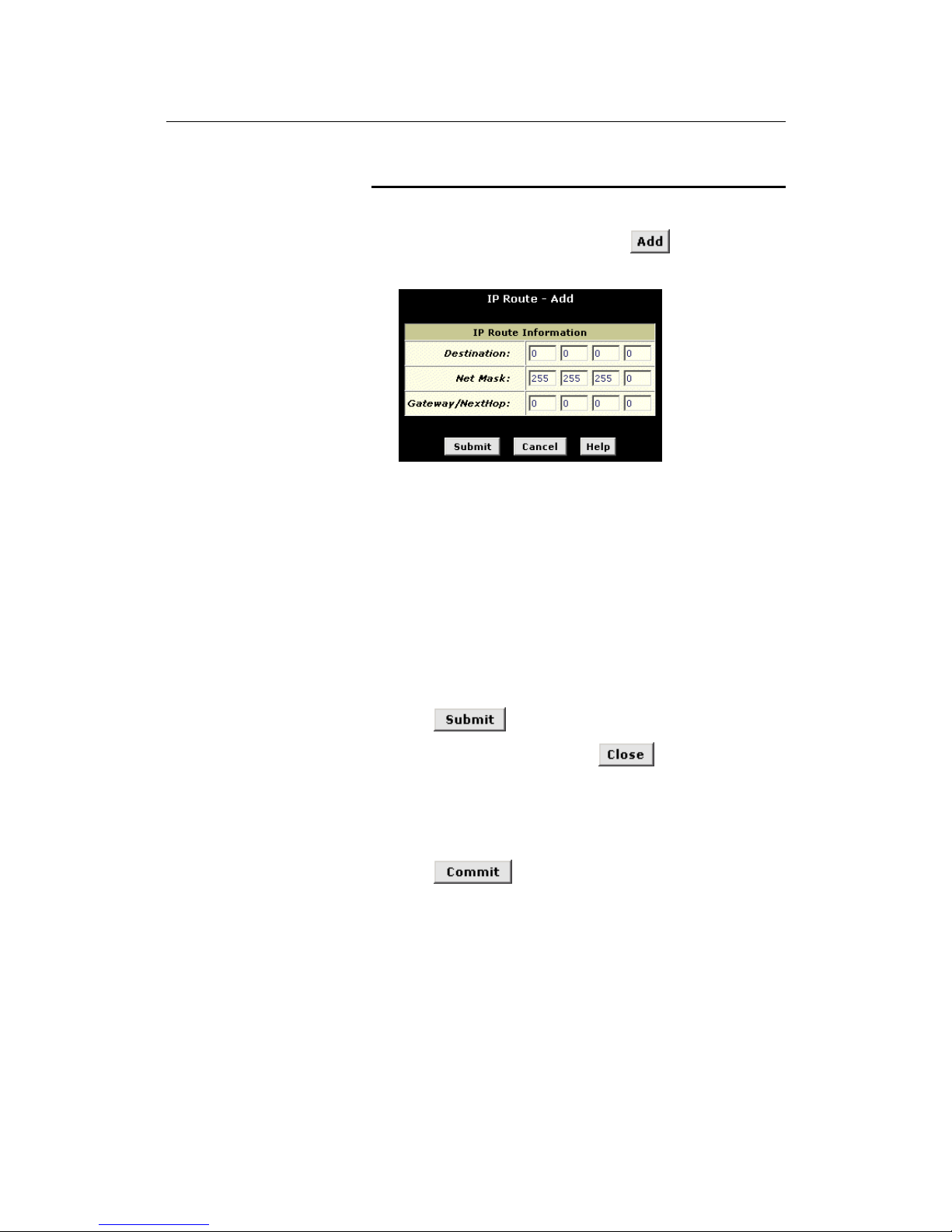
LinkMAX HSA300 User Manual
76
Adding IP Routes
Follow these instructions to add an IP route to the routing table.
1. From the IP Route Table page, click
.
The IP Route – Add page displays, as shown in Figure 38.
Figure 38. IP Route – Add Page
2. Specify the destination, network mask, and gateway or next
hop for this route.
For a descrip tio n of the s e fi eld s, ref er to th e tabl e on page 7 7.
To create a route that defines the default gateway for your LAN,
enter 0.0.0.0 in both the Destination and Net Mask fields. Enter
your ISP’s IP address in the Gateway/NextHop field.
Note that you cannot specify the interface name, route type or
route origin. These parameters are used only for routes that are
identified aut oma tic ally a s the dev i ce c omm uni ca tes wi th o the r
routing devices. For routes you create, the routing table
displays system default values i n these fields.
3. Click
.
4. On the confirmation page, click
to return to t he IP
Route table page.
The IP Routing Table will now display the new route.
5. Click the Admin tab, and then click
Commit & Reboot
in the
task bar.
6. Click
to save your changes to permanent
memory.
Page 77

LinkMAX HSA300 User Manual
77
11
Configuring the Routing Information Protocol
HSA300 can be configured to communicate with other routing
devices to determine the best path for sending data to its intended
destination. Routing devices communicate this information using a
variety of IP protocols. This chapter describes how to configure
HSA300 to use one of these, called the Routing Information
Protocol (RIP).
RIP Overview
RIP is an Internet protocol you can set up to share routing table
information with other routing devices on your LAN, at your ISP’s
location, or on remote networks connected to your network via the
ADSL line. Generally, RIP is used to enable communication on
autonomous networks. An autonomous network is one in which all
of the computers are administered by the same entity. An
autonomous network may be a single network, or a grouping of
several networks under the same administration. An example of an
autonomous network is a corporate LAN, including devices that can
access it from remote locations, such as the computers
telecommuters use.
Using RIP, each device sends its routing table to its closest
neighbor every 30 seconds. The neighboring device in turn passes
the information on to its next neighbor and so on until all devices in
the autonomous network have the same set of routes.
When should you configure RIP?
Most small home or office networks do not need to use RIP; they
have only one router, such as HSA300, and one path to an ISP. In
these cases, there is no need to share routes, because all Internet
data from the network is sent to the same ISP gateway.
You may want to configure RIP if any of the following circumstances
apply to your network:
! Your home network setup includes an additional router or
RIP-enabled PC (other than HSA300). HSA300 and the
router will need to communicate via RIP to share their
routing tables.
! Your network connects via the ADSL line to a remote
network, such as a corporate network. In order for your
LAN to learn the routes used within your corporate network,
they should both be configured with RIP.
! Your ISP requests that you run RIP for communication with
devices on their network.
Page 78
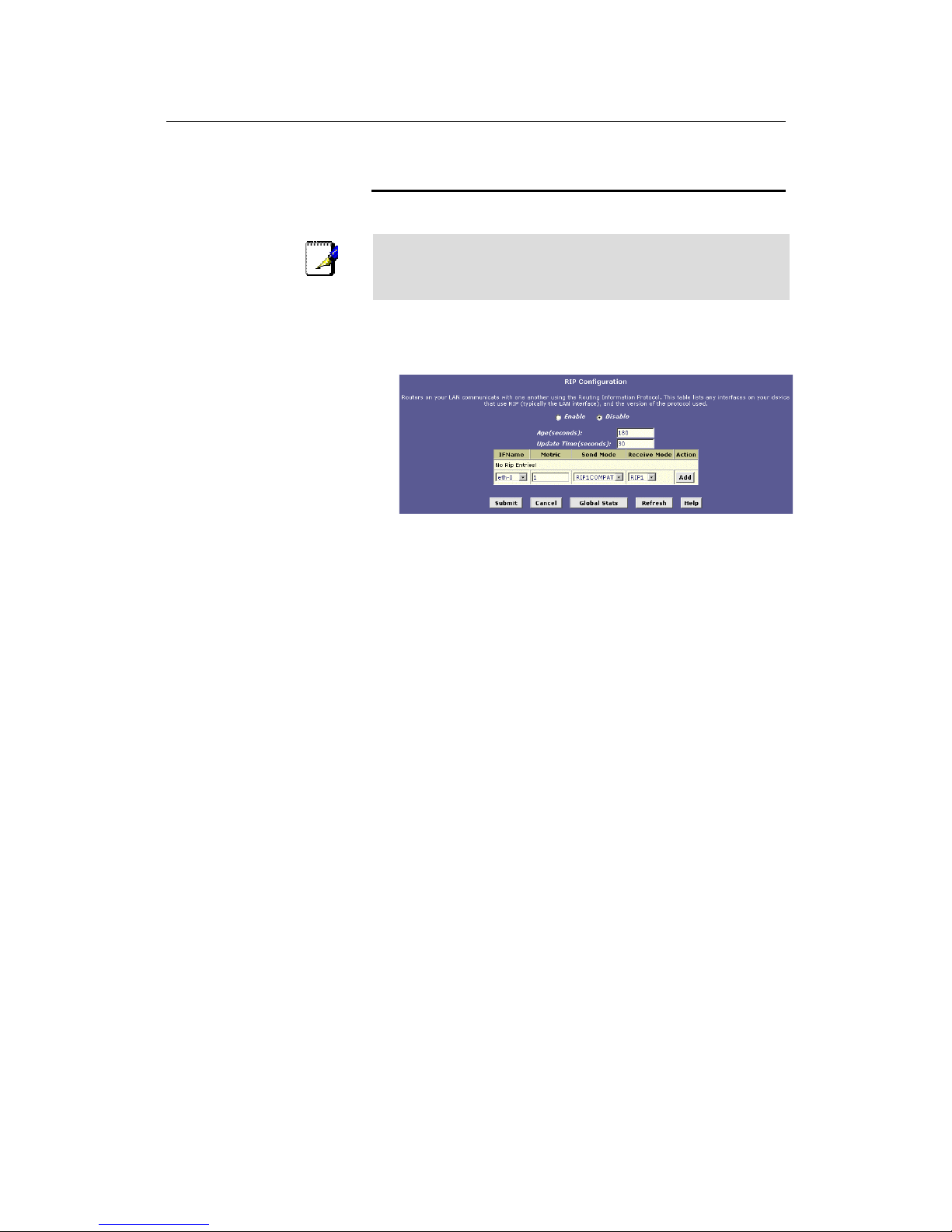
LinkMAX HSA300 User Manual
78
Configuring HSA300 ’s Inter faces wi th RIP
The following instructions describe how to enable RIP on HSA300.
Note
In ord er for HSA300 to co mmunicate with other devices using
RIP, you must also enable the other devices to use the protocol.
See the product documentation for those devices.
1. Log into the Configuration Manager, click the Services tab,
and then click
RIP
in the task bar.
The RIP Configuration page displays, as shown in Figure 39.
Figure 39. RIP Configuration Page
The page contains radio buttons for enabling or disabling the
RIP feature and a table listing interfaces on which the protocol
is currently running. The first time you open this page, the table
may be empty.
2. If necessary, change the Age and Update Time.
These are global settings for all interfaces that use RIP.
! Ag e is the amount of time in seconds that the device’s RIP
table will retain each route that it learns from adjacent
computers.
! U pdate Time specifies how frequently HSA300 will send
out its routing table its neighbors.
3. In the IFName column, select the name of the interface on
which you want to enable RIP.
For communication with RIP-enabled devices on your LAN,
select eth-0 or the name of the appropriate virtual Ethernet
interface.
For com m u ni c a ti o n wi th y ou r IS P o r a re m o te LA N , s e lect the
corresponding ppp, eoa, or other WAN interface.
(See page 43 for a description of various interfaces and their
names.)
4. Select a metric value for the interface.
RIP uses a “hop count” as a way to determine the best path to
a given destination in the network. The hop count is the sum of
the metric values assigned to each port through which data is
passed before reaching the destination. Among several
Page 79
LinkMAX HSA300 User Manual
79
alternative routes, the one with the lowest hop count is
considered the fastest path.
For example, if you assign this port a metric of 1, then RIP will
add 1 to the hop count when calculating a route that passes
through this port. If you know that communication via this
interface is slower than through other interfaces on your
network, you can assign it a higher metric value than the others.
You can select any integer from 1 to 15.
5. Select a Send Mode and a Receive Mode.
The Send Mode setting indicates the RIP version this interface
will use when it sends its route information to other devices.
The Receive Mode setting indicates the RIP version(s) in which
information must be passed to HSA300 in order for it to be
accepted into its routing table.
RIP version 1 is the original RIP protocol. Select RIP1 if you
have devices that communicate with this interface that
understand RIP version 1 only.
RIP version 2 is the preferred selection because it supports
“classless” IP addresses (which are used to create subnets)
and other features. Select RIP2 if all other routing devices on
the autonomous network support this version of the protocol.
6. Click
.
The new RIP entry will display in the table.
7. Click the Enable radio button to enable the RIP feature.
Note
If you disable the RIP feature, the interface settings you have
configured will remain available for future activation.
8. When you are finished defining RIP interfaces, click
.
A page displays to confirm your changes.
9. Click the Admin tab, and then click
Commit & Reboot
in the
task bar.
10. Click
to save your changes to permanent
memory.
Note
You can delete an existing RIP entry by clicking in the A cti o n
column.
Page 80
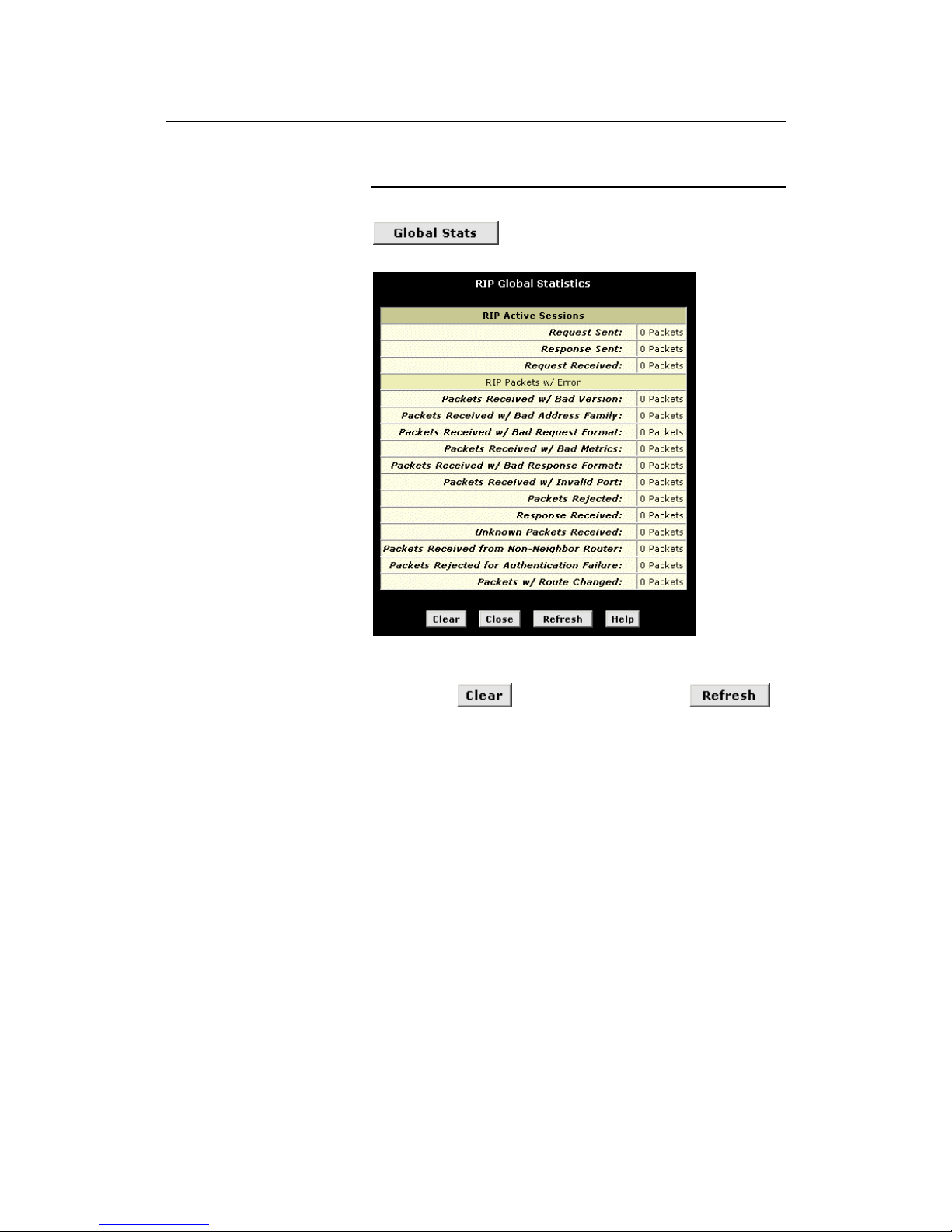
LinkMAX HSA300 User Manual
80
Viewing RIP Statistics
From the RIP Configuration page, you can click
to view statistics on attempts to send and
receive route table data over RIP-enabled interfaces on HSA300.
Figure 40. RIP Global Statistics Page
You can click
to reset all statistics to 0 and
to display any new ly acc u mulated data .
Page 81
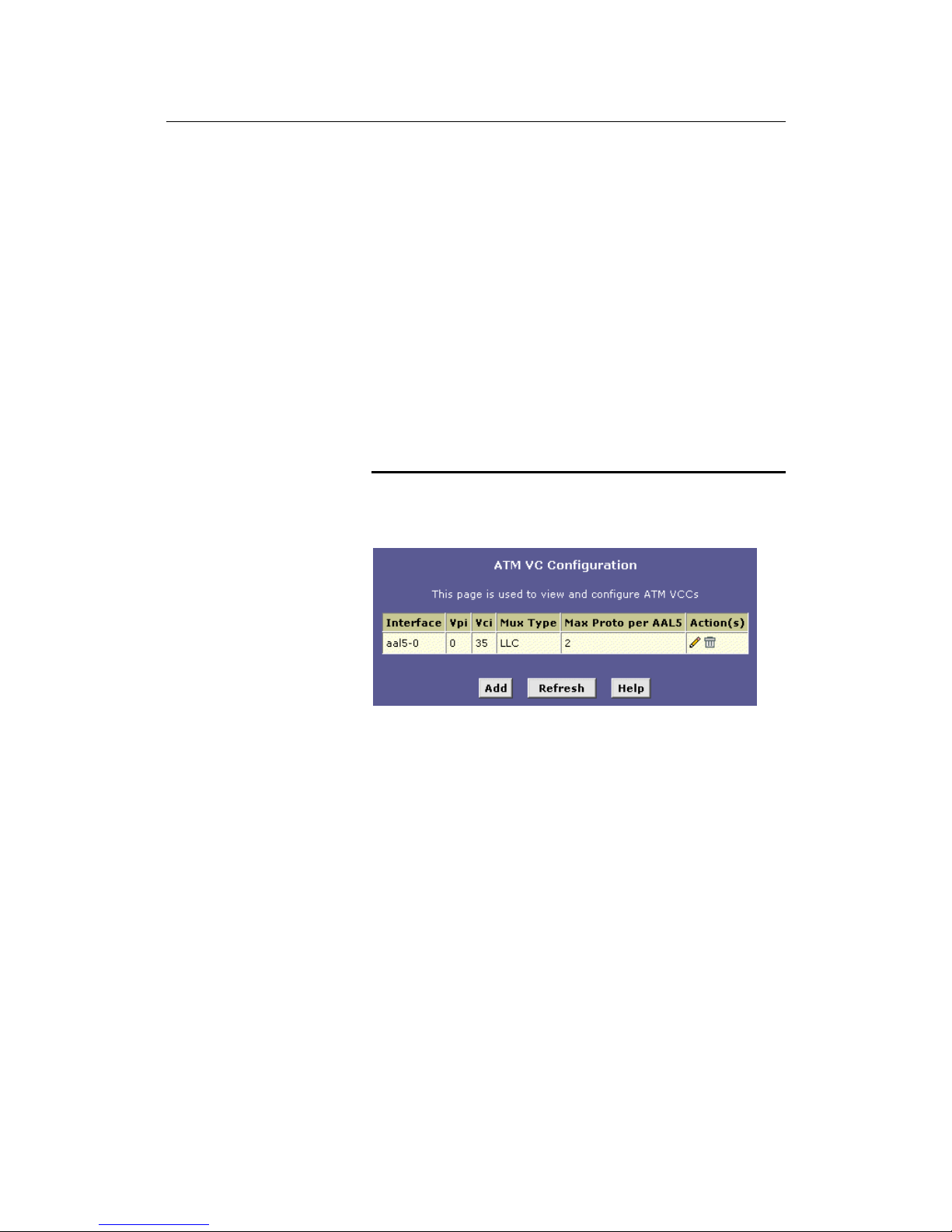
LinkMAX HSA300 User Manual
81
12
Configuri ng the A TM V CC
As your LAN computers access the Internet via HSA300, data is
exchanged with your ISP through a complex network of telephone
switches, Internet routers, servers, and other specialized hardware.
These various devices communicate using a common language, or
protocol, called Asynchronous Trans fe r Mode (ATM). On the Wide
Area Network (WAN) that connects you to your ISP, the ATM
protocol performs functions like those that the Ethernet protocol
performs on your LAN.
This chapter describes how to configure the ATM virtual channel
connection (VCC). The VCC properties define the path HSA300
uses to communicate with your ISP over the ATM network.
Viewing Your ATM VC Setup
To view your current configuration, log into Configuration Manager,
click the WAN tab, and then click
ATM VCC
in the task bar. The ATM
VCC Configuration page displays, as shown in Figure 41.
Figure 41. ATM VCC Configuration Page
Page 82
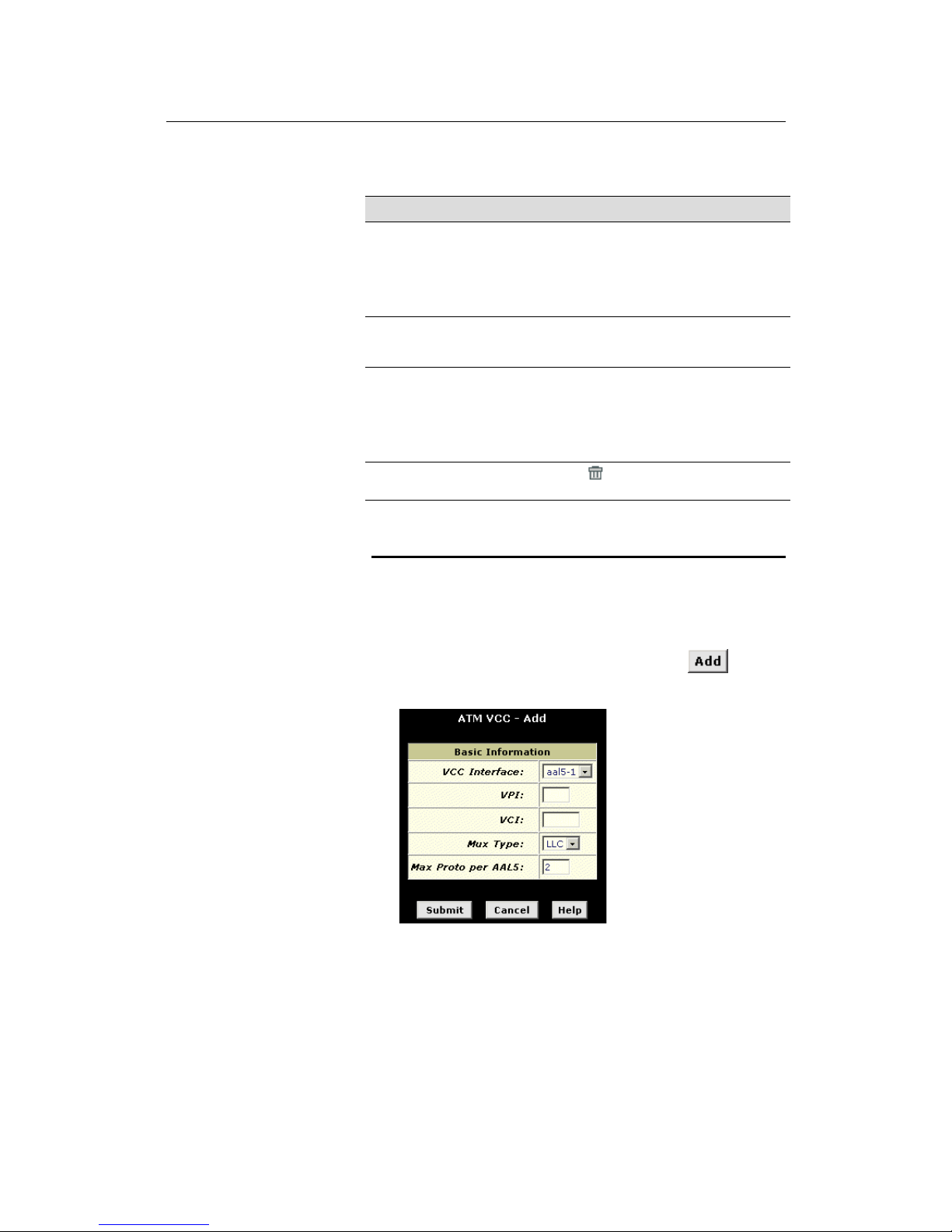
LinkMAX HSA300 User Manual
82
The ATM VCC Configuration table displays the following fields
(contact your ISP to determine these settings):
Field Description
Interface
The name of the lower-level interface on which this
VC operates. The low-level interface names are
preconfigured in the software and identify the ty pe of
traffic that can be supported, such as data or voice.
Internet data services typically use an AAL5-type
interface.
Vpi, Vci, and Mux
Type
These settings identify a unique ATM data path for
communication between your ADSL/Ethernet router
and your ISP.
Max Proto per
AAL5
If you are using an AAL5-type of interface, t his
setting indicates the number of higher-level i nterfaces
that the VC can support (the higher level interfaces
can be PPP, EoA, or IPoA interfaces). C ontact your
ISP to determine which connection protocol(s) they
require.
Actions
Displays an icon (
) you can click on to delete th e
associated interface.
Adding ATM VCCs
You may need to create a VCC if none has been predefined on
your system or if you use multiple services with your ISP. Ea ch
service may require its own VCC. Follow these instructions to add a
VCC:
1. From the ATM VCC Configuration page, click
.
The ATM VCC – Add page displays, as shown in Figure 42.
Figure 42. ATM VCC – Add Page
Page 83

LinkMAX HSA300 User Manual
83
2. Select an interface name from the VCC Interface drop-down
list.
3. Enter the VPI and VCI values assigned by your ISP, and
select the mux type from the drop-down list.
4. Click
.
5. On the confirmation page, click
to return to the
ATM VCC Configuration page.
6. Click the Admin tab, and then click
Commit & Reboot
in the
task bar.
7. Click
to save your changes to permanent
memory.
The new interface should now display in the ATM VCC
Configuration table.
You may need to create a new WAN interface, or modify an existing
interface, so that it uses the new VCC. See the instructions for
configuring a PPP (Chapter 12), EoA (Chapter 14), or IPoA
(Chapter 15) interfaces, depending on the type you use to
communicate with your ISP .
You can verify that the new settings work by attempting to access
the Internet from a LAN/USB computer. Contact your ISP for
troubleshooting assistance.
Page 84
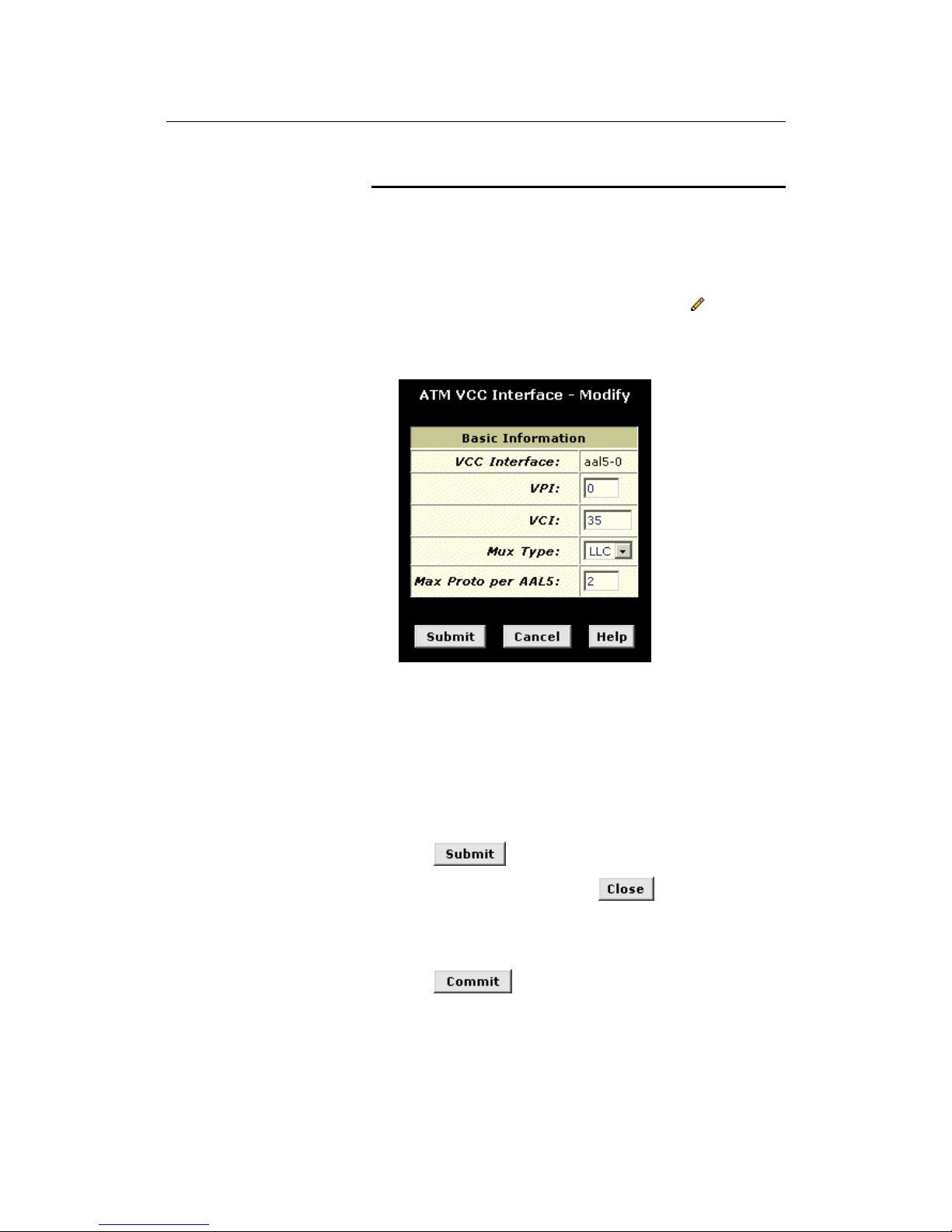
LinkMAX HSA300 User Manual
84
Modifying ATM VCCs
Your devi ce may already be precon f igured with the necessary ATM
VCC properties, or t he table m ay contain pl aceholder v alues that
you mu s t ch a n ge be f o r e u sin g the dev i ce . C o n tact your IS P to
determine your ATM VCC values. Follow these instructions to
modify a preconfigured VCC:
1. From the ATM VCC Configuration page, click
in the
Actions column for the interface you want to modify.
The ATM VCC Interface – Modify page displays, as shown in
Figure .
Figure 43. ATM VCC Interface – Modify Page
2. Enter the new VPI and VCI values, select the MUX type, or
change the maximum number of protocols that the VCC can
carry, as directed by your ISP.
You cannot modify the interface type over which an existing
VCC operates (aal5-0, for example). If you want to change the
interface type, you must delete the existing interface, create a
new one, and select the desired interface type.
3. Click
.
4. On the confirmation page, click
to return to the
ATM VCC Configuration page.
5. Click the Admin tab, and then click
Commit & Reboot
in the
task bar.
6. Click
to save your changes to permanent
memory.
You can verify that th e new settings work by attempting to access
the Internet from a LAN/USB computer. Contact your ISP for
troubleshooting assistance.
Page 85
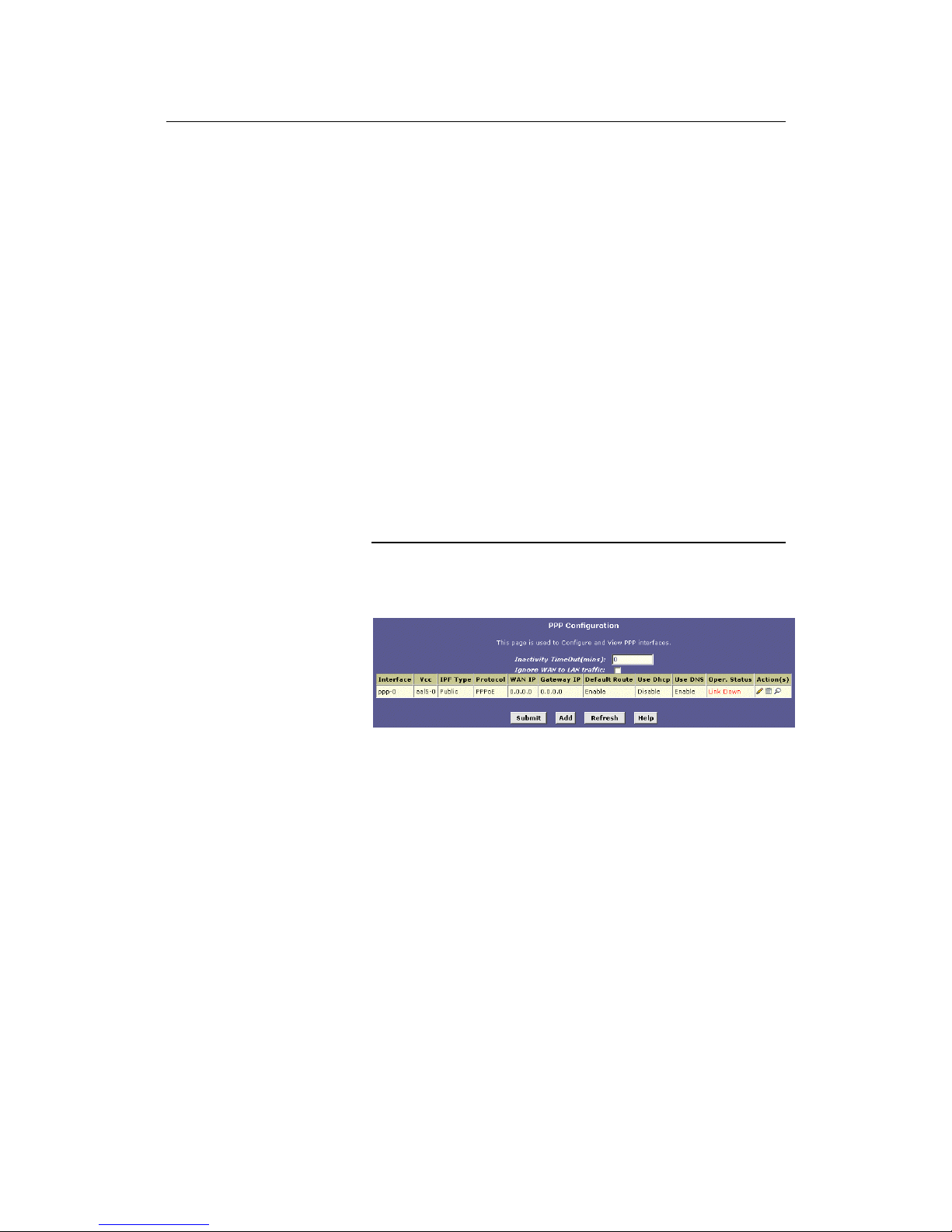
LinkMAX HSA300 User Manual
85
13
Configuri ng PPP Interfaces
When powered on, HSA300 initiates a connection through your
DSL line to your ISP.
The point-to-point (PPP) protocol is commonly used between ISPs
and their customers to identify and control various communication
properties, in cluding:
! Identifying the type of service the ISP provides to a given
customer
! Identifying the customer to the ISP through a username
and password login
! Enabling the ISP to assign Internet information to the
customer’s computers
Your ISP may or may not use the PPP protocol. Contact your ISP to
determine if you will need to change the default settings in order to
connect to their server.
Viewing Your Curre nt P PP Configur atio n
To view your current PPP setup, log into Configuration Manager,
click the WAN tab, and then click
PPP
in the task bar. The PPP
Configuration page displays, as shown in Figure 44.
Figure 44. PPP Configuration Page
PPP is configured as a group of software settings associated with
the ADSL port. Although the device has only one physical ADSL
port, HSA300 can be defined with more than one group of PPP
settings. Each group of settings is called a PPP interface and is
given a name, such as ppp-0, ppp-1, etc.
Page 86

LinkMAX HSA300 User Manual
86
You can configure the following settings on the PPP Configuration
page:
! Inactivity TimeOut (mins): The time in minutes that must
elapse before a PPP connection times-out due to inactivity.
! Ignore WAN to LAN traffic: Whe n enabled, d ata traffi c
traveling in the incoming direction—from the WAN port to
the LA N po r t—w i ll not cou n t a s a ctivity on th e WAN p o r t;
i.e., it will not prevent the connection from being terminated
if inactive for the specified time.
The PPP Configuration Table displays the following fields:
Field Description
Interface
The predefined name of the PPP interface.
VCC
The Virtual Channel Connection over which this PPP
data is sent. The VCC identifies the physi cal path the
data takes to reach your ISP. See Chap ter 12 for
more information.
IPF Type
The type of IP Firewall protections that ar e i n effect on
the interface (public, private, or DMZ):
o
A public interface connects to the Internet (PPP
interfaces are typically public). Packets received
on a public interface are subject to the most
restrictive set of firewall protections defined in the
software.
o
A private interface connects to your LAN, such
as the Ethernet interface. Packets received on a
private interface are subject to a less restrictive
set of protections, because they originat e within
the network.
o The term DMZ (de-militarized zone), in Internet
networking terms, refers to computers that are
available for both public and in-network accesses
(such as a company's public Web server).
Packets incoming on a DMZ interface -- whether
from a LAN or external source -- are subject to a
set of protections that is in be tween publi c and
private interfaces in terms of restrictiveness.
Protocol
The type of PPP protocol used. Your ISP m ay use
PPP-over-Ethernet (PPoE) or PPP-over-ATM
(PPoA).
WAN IP
The IP address currently assigned to your WAN
(DSL) port by your ISP.
Gateway IP
The IP address of the server at your ISP that provides
you access to the Internet. See “Hops and gateways”
on page 73 for a description of gateway addresses.
Default Route
Indicates whether the ADSL/Ethernet router should
use the IP address assigned to this connection as its
default route. Can be Enabled or Disabled. See
Chapter 10 for an explanation of default routes.
Page 87

LinkMAX HSA300 User Manual
87
Field Description
Use DHCP When set to Enable, the device will acquire additional
IP information from the ISP's DHCP server. The PPP
connection itself acquires the device's IP address,
mask, DNS address, and default gateway address.
With Use DHCP enabled, the device will acquir e IP
addresses for various other server types (WINS,
SMTP, POP3, etc. -- these server types are li sted on
the DHCP Server Configuration page).
User DNS When set to Enable, the DNS address le arned
through the PPP connection will be distributed to
clients of the device's DHCP server. This option is
useful only when the ADSL/Ethernet Router is
configured to act as a DHCP Server for your LAN.
When set to Disable, LAN hosts will use the DNS
address(es) preconfigured in the DHCP pool (see
“Configuring DHCP Server” on page 45) and in the
DNS feature (see Chapter 9, “Configuring DNS
Server Addresses” ).
Oper. Status
Indicates whether the link is currently up or down or if
a specific type of data exchange is under way (e.g.,
password authorization or DHCP).
Actions
You can use these icons to modify (
), delete ( ),
and view additional details on (
) the PPP interface.
Viewing PPP Interface Details
When you click to view additi on al de tail s, th e PPP In te rface -
Detail page di splay s , as s how n in Figu re 45 .
Page 88
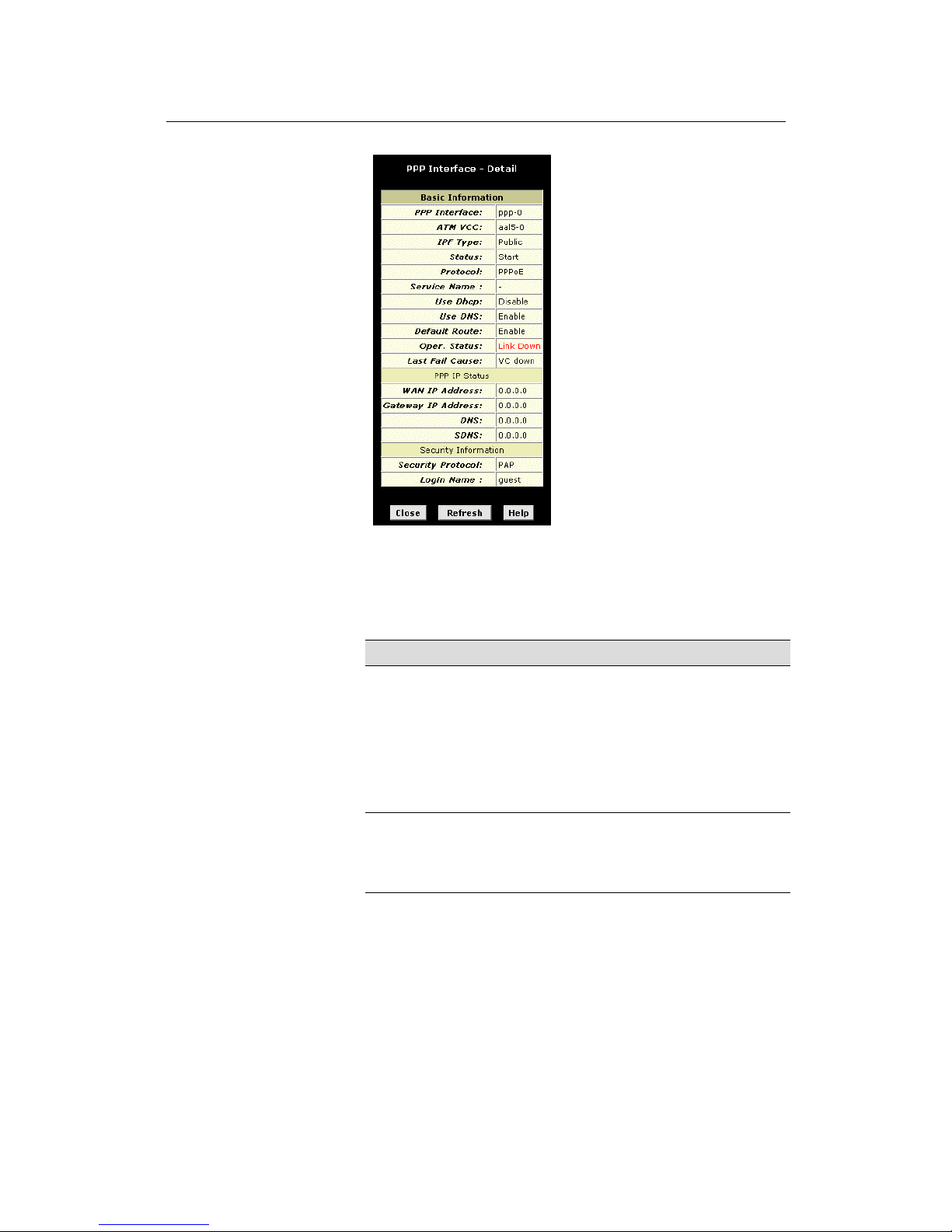
LinkMAX HSA300 User Manual
88
Figure 45. PPP – Detail Page
In addition to the properties d efined on page 86, the Detail page
displays these fields:
Field Descript ion
Status
Indicates whether the interface has been specifi ed in the
system as :
o Enabled: A connection will be established for use
when the device is turned on or rebooted.
o Disabled: The PPP interface cannot currently be
used.
o Start On Data: The PPP connection will be
made only when data is sent to the i nterface (e .g. ,
when a LAN user attempts to use the Internet).
Service Name
The name of the ISP service you are using with t his PPP
connection. ISPs may offer different types of services (for
example, for online gaming or business
communications), each requiring a different login a nd
other connection properties.
Page 89

LinkMAX HSA300 User Manual
89
Field Descript ion
Last Fail Cause
Indicates the action that ended the previous PPP
session:
o
No Valid PADO Recvd: The unit initiated a PPoE
handshake but did not receive a packet in reply from
the ISP.
o
No Valid PADS Recvd: After the initial handshake,
the unit did not receive a confirmation packet from
the ISP.
o Stopped by User: The user stopped the connection
(for example, by changing the Configuration
Manager settings for the PPP interface.)
o
No Activity: The PPP communication timed out, in
accordance with the timeout period specified on the
PPP Configuration page.
o
Auth Failure: The ISP could not authorize the
connection based on the user name and/or
password provided.
o PADT recvd: The ISP issued a special packet type
to terminate the PPP connection.
o VC down: The Virtual Circuit between the unit and
the ISP is down.
o Internal failure: A system software failure occurred.
DNS
The IP address of the DNS server (locat ed with your
ISP) used on this PPP connection.
SDNS
The IP address of the secondary DNS server (located
with your ISP) used on this PPP connection.
Security
Protocol
The type of PPP security your ISP uses: PAP (Password
Authentication Protocol) or CHAP (Challenge
Handshake Authentication Protocol).
Login Name
The name you use to log in to your IS P each tim e this
PPP connection is established.
Page 90
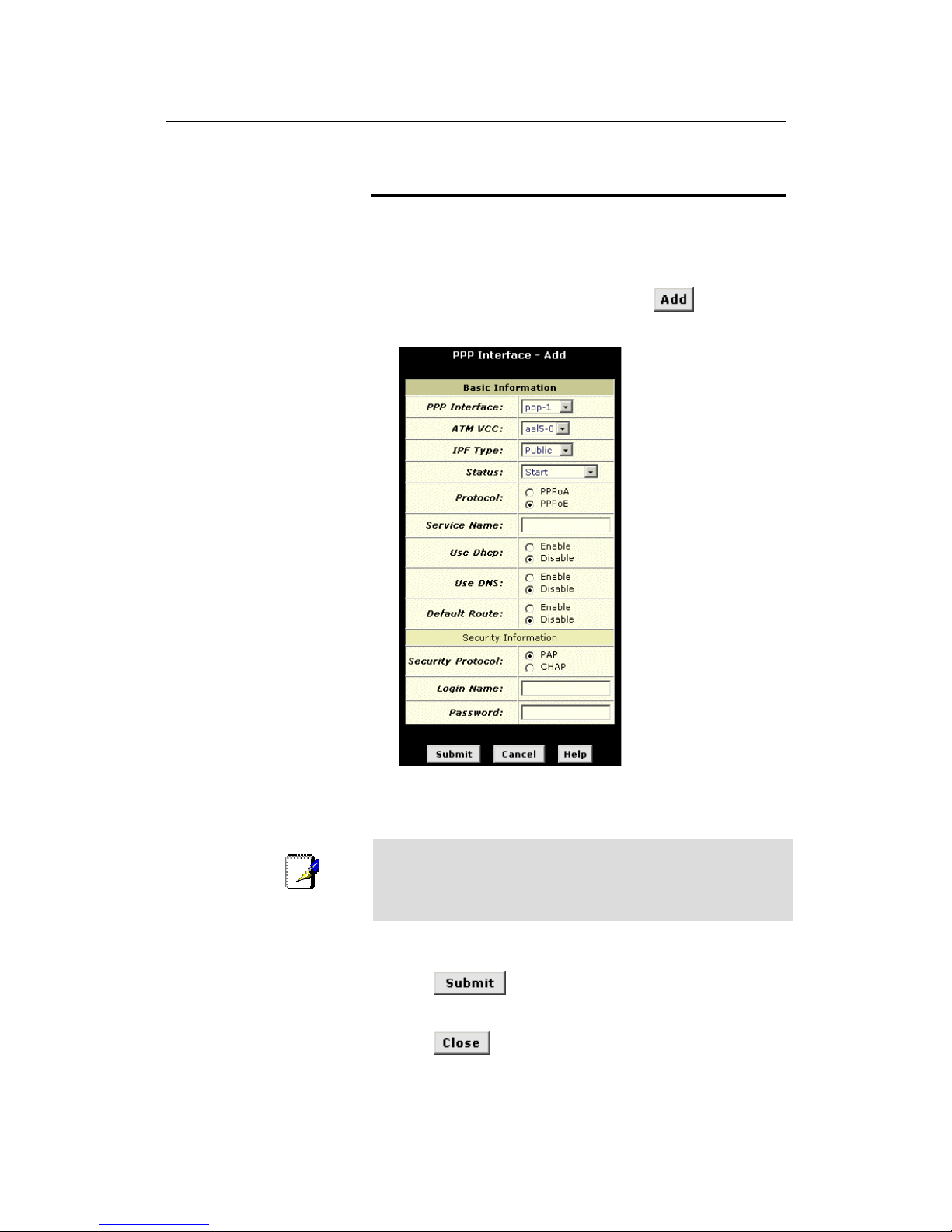
LinkMAX HSA300 User Manual
90
Adding a PPP Interface Definition
If you intend to use more than one type of service from your ISP,
the device may be configured with multiple PPP interfaces, each
with unique logon and other pr operties. Follow this procedure to
define properties for a PPP interface:
1. From the PPP Configuration Page, click
.
The PPP Interface – Add page displays, as shown in Figure 46.
Figure 46. PPP Interface – Add Page
2. Select a PPP interface name from the drop-down list, and
then enter or select data for each field.
Note
You can create multiple PPP interfaces only if you are using the
PPoA protocol; only one PPP interface can be define if you are
using PPoE. Check with your ISP which version of the protocol
they require.
The fields are defined in the tables on page 86 and 88.
3. Click
.
A page displays to confirm your changes.
4. Click
to return to the PPP page and view the new
interface in the table.
Page 91
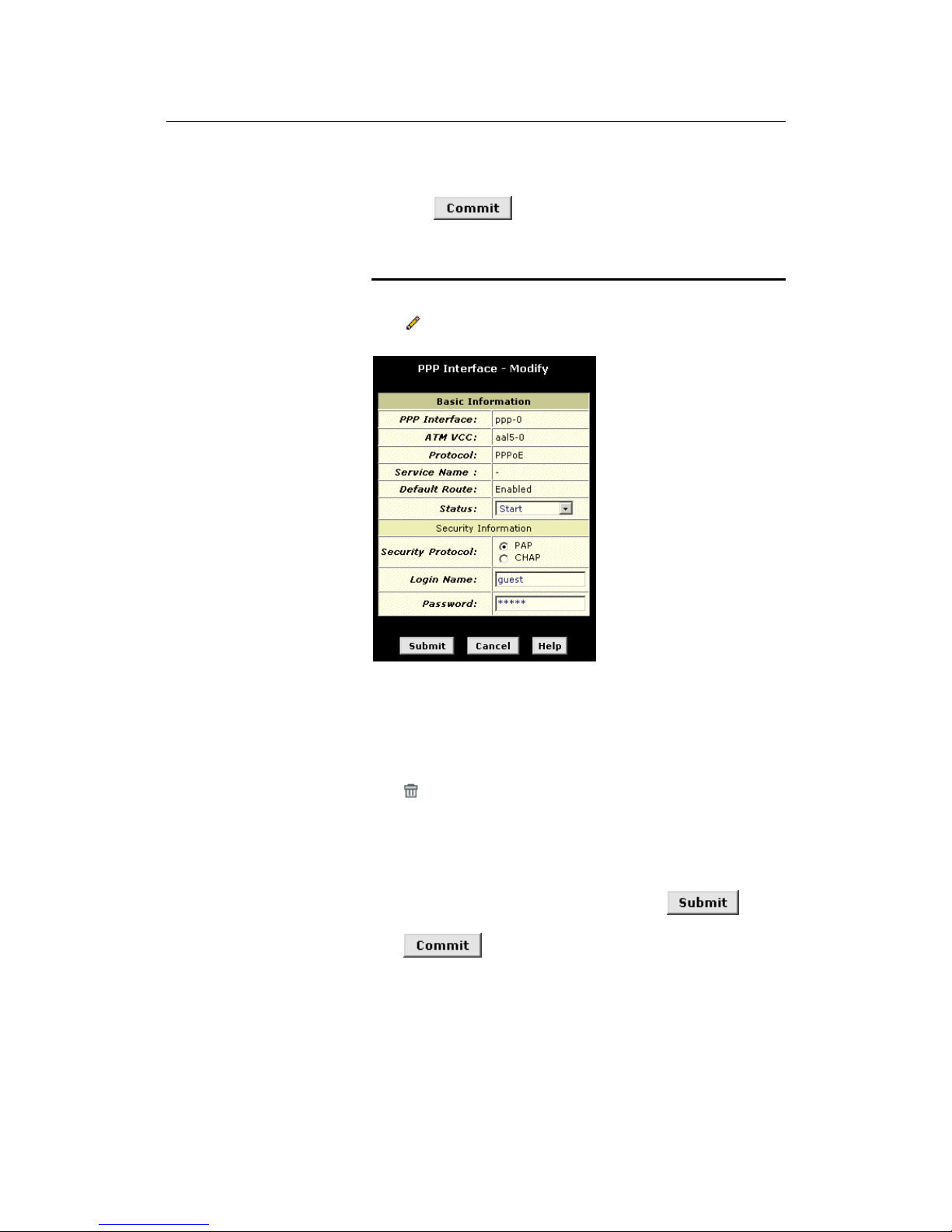
LinkMAX HSA300 User Manual
91
5. Click the Admin tab, and then click
Commit & Reboot
in the
task bar.
6. Click
to save your changes to permanent
memory.
Modifying and Deleting PPP Interfaces
To modify a PPP interface, display the PPP Configuration page and
click
in the Action(s) column for the interface you want to modify.
The PPP Interface – Modify page displays, as shown in Figure 47.
Figure 47. PPP Interface – Modify
You can change only the status of the PPP connection, the security
protocol, your login name, and your password. To modify the other
settings, you must delete the interface and create a new one.
To delete a PPP interface, display the PPP Configuration page and
click
in the Action(s) column for the interface you want to delete.
You should not delete a PPP interface unless you have received
instructions to do so from your ISP. Without an appropriately
defined PPP interface, you will not be able to connect to your ISP.
You can recreate the PPP interface with the same name at a later
time.
After modifying or deleting a PPP interface, click
. Then,
Click the Admin tab, click
Commit & Reboot
in the task bar, and
click
to save your changes to permanent memory.
Page 92
LinkMAX HSA300 User Manual
92
14
Configuri ng EOA Interfaces
This chapt er describes how to con fig u re an E the rnet -o ver- AT M
interface on HSA300, if one is needed to communicate with your
ISP.
Overview of EOA
The Ethernet-over-ATM (EOA) protocol is commonly used to carry
data between local area networks that use the Ethernet protocol
and wide-area networks that use the ATM protocol. Many
telecommunications industry networks use the ATM protocol. ISPs
who provide DSL services often use the EOA protocol for data
transfer with their customers’ DSL modems.
EOA can be implemented to provide a bridged connection between
a DSL modem and the ISP. In a bridged connection, data is shared
between the ISP’s network and their customer’s as if the networks
were on the s ame phy si cal LAN . B ridg ed c onn e ction s do n ot use
the IP protocol. EOA can also be configured to provide a routed
connection with the ISP, which uses the IP protocol to exchange
data.
Before creating an EOA interface or modifying the default settings,
contact your ISP to determine which type of protocol they use.
Note
PPP vs. EOA: Your ISP may use a protocol other than EOA for
communication with HSA300, such as the point-to-point protocol
(PPP). One type of PPP, named PPP over Ethernet (PPPoE),
actually works “on top” of the EOA protocol. The other type, PPP
over ATM (PPPoA), does not. However, if your ISP uses either
type of PPP, you do not need to separa tel y c rea te an EOA
interface. See Chapter 12 for instructions on creating or
configuring a PPP interface.
Page 93
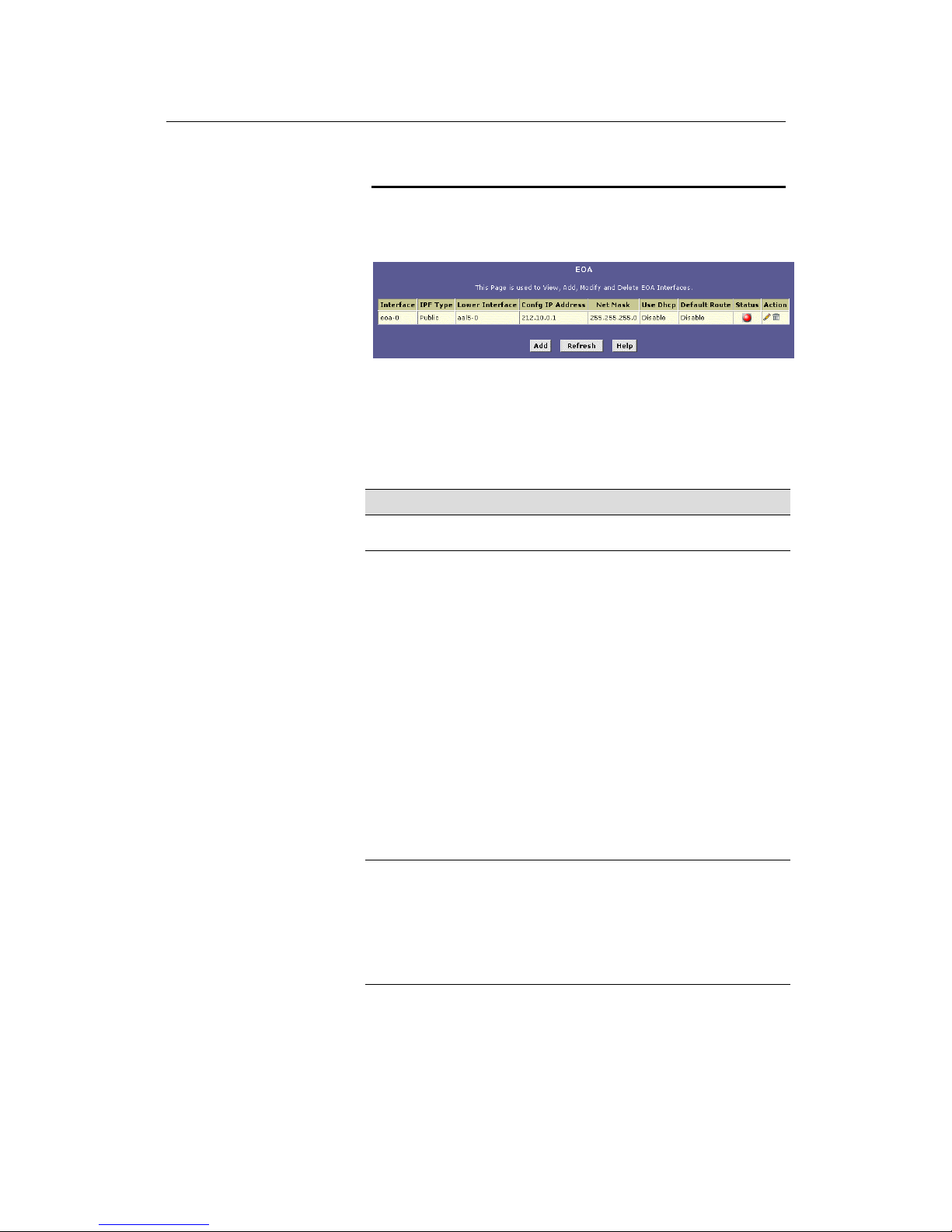
LinkMAX HSA300 User Manual
93
Viewing Your EOA Setup
To view your current EOA configuration, log into Configuration
Manager, click
Advanced
in the task bar, and then click
EOA
. Figure
48 shows the EOA configuration page.
Figure 48. EOA Page
The EOA table contains a row for each EOA interface currently
defined on the device. The table may contain no entries if your ISP
does not use the EOA protocol.
The following table describes the fields on this page:
Field Description
Interface
The name the software uses to identify the EOA
interface.
IPF Type
The type of IP Firewall protections i n effect on th e
interface (public, private, or D MZ):
o A public interface connects to the Intern et (I PoA
interfaces are typically public). Packets received
on a public interface are subject to t he most
restrictive set of firewall protections defined in the
software.
o A private interface connects to your LAN, such
as the Ethernet interface. Packets received on a
private interface are subject to a less restrictive
set of protections, because they originate withi n
the network.
o
The term DMZ (de-militarized zone), in Internet
networking terms, refers to computers that are
available for both public and in-network accesses
(such as a company's public Web server).
Packets incoming on a DMZ interface—whether
from a LAN or external source—ar e subject to a
level of protection that is in between those for
public and private interfaces.
Lower interface
EOA interfaces are defined in software, and then
associated with lower-level software and hardw are
structures (at the lowest level, they are associated
with a physical port —the WAN port). Thi s field shoul d
reflect an interface name defined in the next lower
level of software over which the EOA interface wil l
operate. This will be an ATM VCC interface, such as
aal5-0, as described in Chapter 12.
Page 94
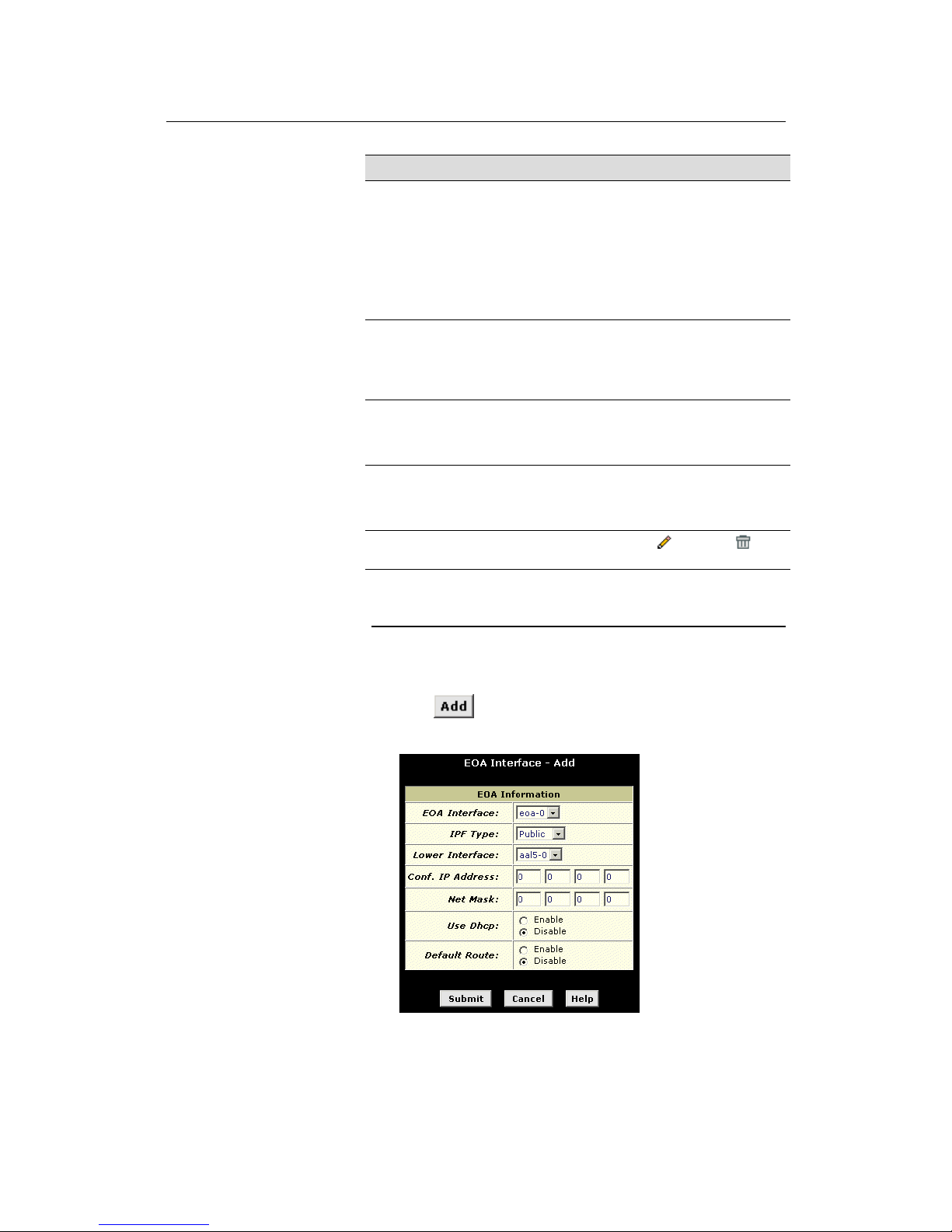
LinkMAX HSA300 User Manual
94
Field Description
Config IP Address
and
Net Mask
The IP address and network mask you want to assign
to the interface. If the inter face will be used for
bridging with your ISP and you will not be usi ng
HSA300 as a router on your LAN, the n you do no t
need to specify IP information. If you enable DHCP
for this interface, then the Configured IP address will
serve only as a request to the DHCP server. The
actual address that is assigned by the ISP m ay di ffer
if this address is not available.
Use DHCP
When checked, this setting instructs the device to
accept IP information assigned dynamically by yo ur
ISP’s DHCP server. If the interface will be used for
bridging with your ISP and you will not be routing data
through it, leave this checkbox unsel ected.
Default Route
Indicates whether HSA300 should use the IP address
assigned to this interface, if any, as i ts de fault route
for your LAN. This can be Enable or Di sable. See
Chapter 9 for an explanation of default r out es.
Status
A green or red ball will display to indicate that the
interface is currently up or dow n, r espectively. Y ou
cannot manually enable or disable the int erface; a r ed
ball may indicate a problem with the DSL connection.
Action
Icons you can click on to edit (
) or delete ( ) the
associated EOA interface.
Adding EOA Interfaces
Follow these instructions to add an EOA interface:
1. Click the WAN tab, and then click
EOA
in the task bar.
2. Click
.
The EOA Interface – Add page displays, as shown in Figure49.
Figure 49. EOA Interface – Add Page
3. Select one of the predefined interface names from the EOA
Interface drop down list.
Page 95

LinkMAX HSA300 User Manual
95
4. From the IPF Type drop-down list, select the level of IP
Firewall to be used on this interface, as defined above.
5. In the Lower Interface field, select the lower-level interface
name over which this protocol is being configured. Typically,
an EOA interface is configured to operate over an aal5
interface, such as aal5-0.
If you are using HSA300 as a bridge only, skip to step 7.
6. If you are using HSA300 as a router on your LAN, enter the
IP address and network mask you want to assign to the
interface. This address serves as the public IP address for
your entire LAN and is usually assigned by your ISP.
Or, if your ISP will assign this information, click the Enable radio
button to set up the DHCP service.
Also, specify whether this interface should serve as the default
route for your LAN for accessing the Internet.
7. Click
.
A confirmation page display to confirm your changes.
8.
Click to return to the EOA page and view the new
interface in the table.
9. Click the Admin tab, and then click
Commit & Reboot
in the
task bar.
10. Click
to save your changes to permanent
memory.
Page 96
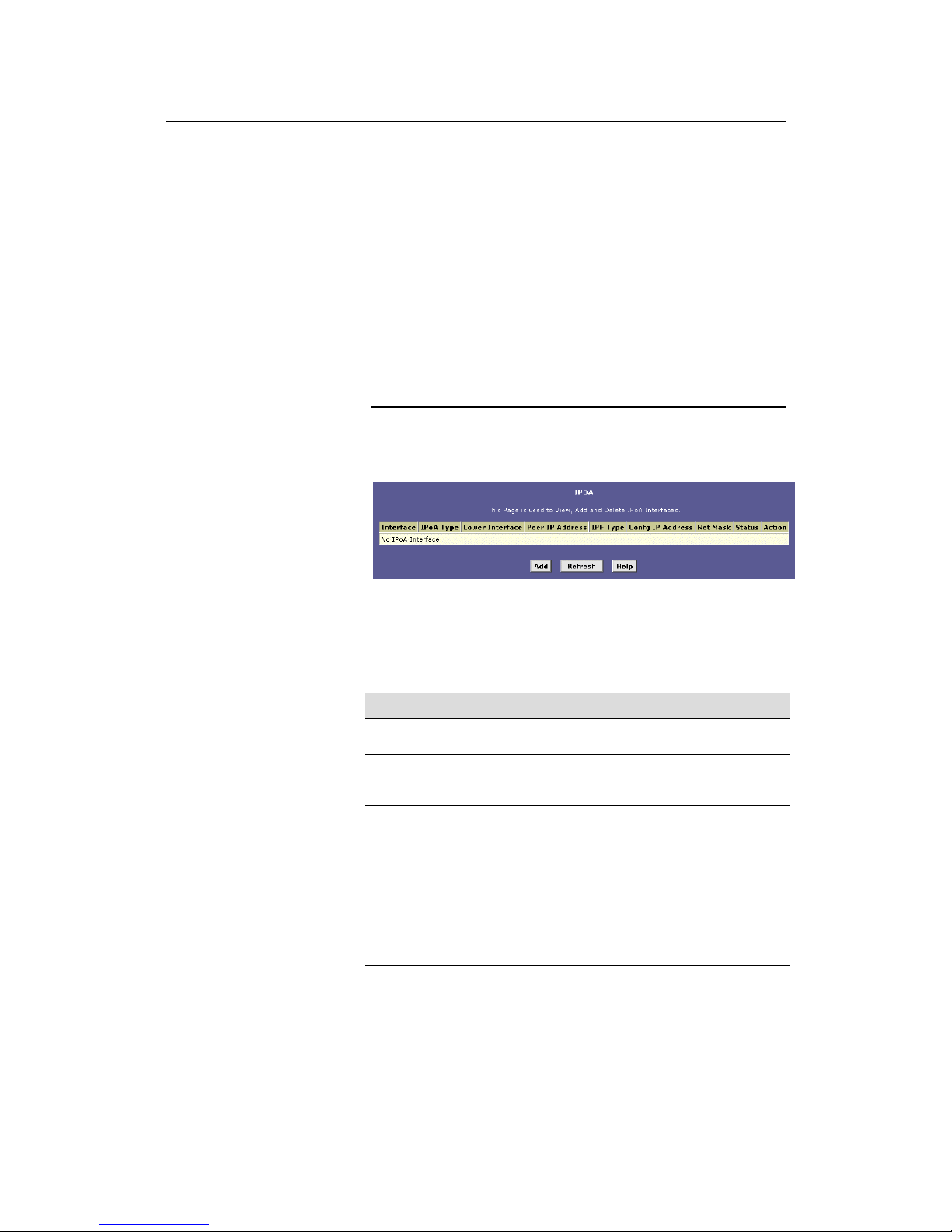
LinkMAX HSA300 User Manual
96
15
Configuring IPoA Interfaces
This chapter describes how to configure an IPoA (Internet Protocolover-ATM) interface on HSA300.
An IPoA interface can be used to exchange IP packets over the
ATM network, without using an underlying Ethernet over ATM
(EOA) connection. Typically, this type of interface is used only in
product development and test environments, to eliminate unneeded
variables when evaluating IP layer processing.
Viewing Your IPoA Interface Setup
To configure an IPoA interface, log into Configuration Manager,
click the WAN tab, and then click
IPoA
in the task bar. The IPoA
page displays, as shown in Figure 50.
Figure 50. IPoA Page
The IPoA table contains a row for each EOA interface currently
defined on the device. The table may initially contain no entries.
The following table describes the fields on this page:
Field Description
Interface
The name the software uses to identify the IPoA
interface
IPoA Type
Specifies whether or not the IPoA protocol to be used
complies with the IEFT RFC 1577 "Cla ssical IP and
ARP over ATM" (contact your ISP if unsure).
Lower interface
IPoA interfaces are defined in software, and t hen
associated with lower-level software and hardware
structures (at the lowest level, they are associated
with a physical port – the WAN port). This field should
reflect an interface name defined in the next lower
level of software over which the IP oA int erface wil l
operate. This will be an ATM VCC interface, su ch as
aal5-0, as described in Chapter 12.
Peer IP Address
The IP address of the remote computer y ou will be
connecting to via the WAN interface.
Page 97

LinkMAX HSA300 User Manual
97
Field Description
IPF Type
The type of IP Firewall protections that ar e i n effect on
the interface (public, private, or DMZ):
o
A public interface connects to the Intern et (I PoA
interfaces are typically public). Packets received
on a public interface are subject to the most
restrictive set of firewall protections defined in the
software.
o
A private interface connects to your LAN, such
as the Ethernet interface. Packets received on a
private interface are subject to a less restrictive
set of protections, because they originat e within
the network.
o
The term DMZ (de-militarized zone), in Internet
networking terms, refers to computers that are
available for both public and in-network accesses
(such as a company's public Web server).
Packets incoming on a DMZ interface—whether
from a LAN or external source—ar e subject to a
level of protection that is in between those for
public and private interfaces.
Config IP Address
and Net Mask
The IP address and network mask you want to assign
to the interface.
Status
A green or red ball will display to indicate that the
interface is currently up or dow n, r espectively. Y ou
cannot manually enable or disable the int erface; a
down interface may in dicat e a problem with the DSL
connection.
Action
Icons you can click on to edit (
) or delete ( ) the
associated EOA interface.
Adding IPoA Interfaces
Follow these instructions to add an IPoA interface:
1. Display the IPoA page and click
.
The IPoA Interface – Add page displays, as shown in Figure 51.
Page 98
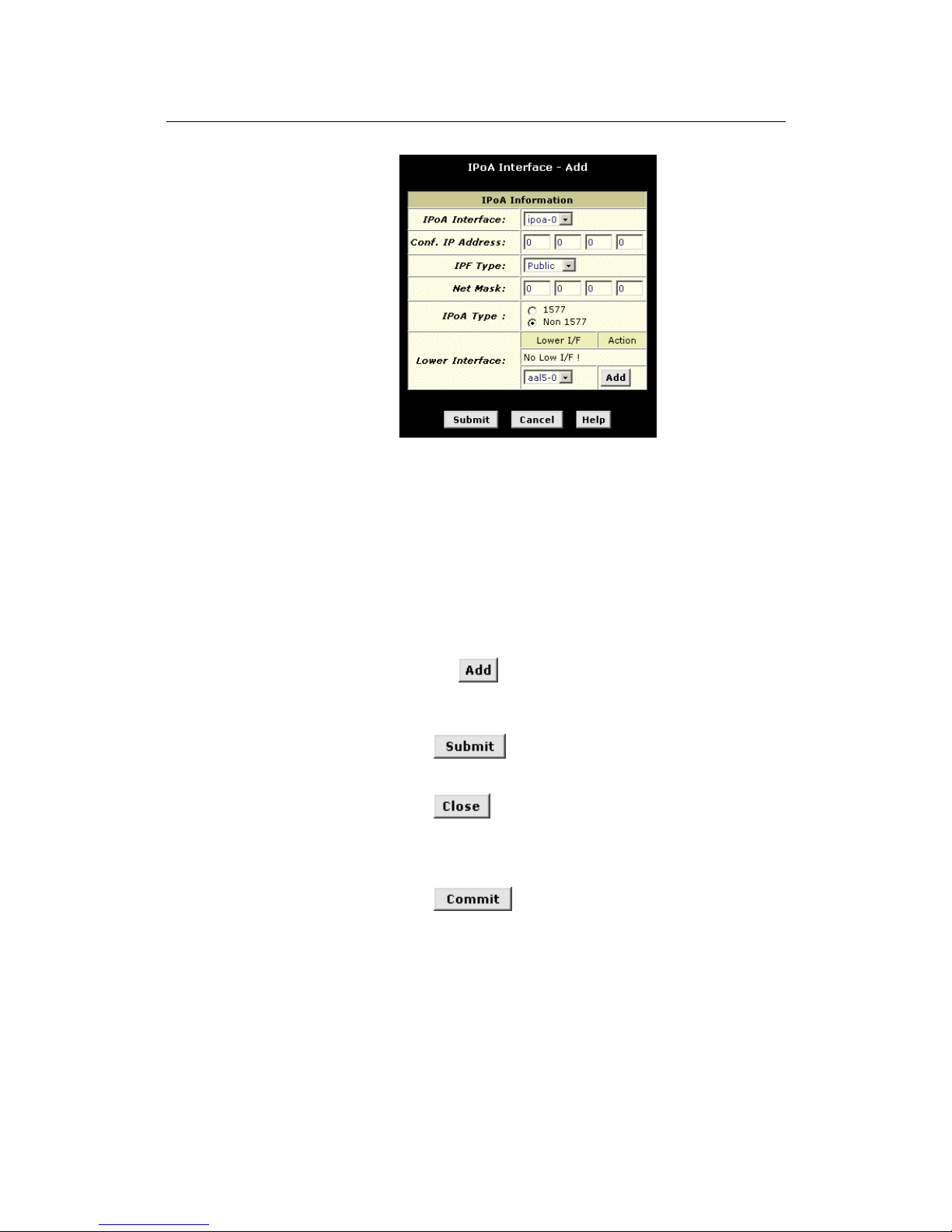
LinkMAX HSA300 User Manual
98
Figure 51. IPoA Interface – Add Page
2. Select the next available interface name from the IPoA
Interface drop-down list.
3. In the Configured IP Address and Net Mask boxes, type the
address and mask that you want to assign to the IPoA
interface.
4. Select the level of firewall security to apply to the interface
by selecting the IPF Type as Public, Private, or DMZ.
5. In the Lower Interface dialog box, select the lower-level
interface name over which this protocol is being configured
and click
.
Typically, an IPoA interface is configured to operate over an
aal5 interface.
6. Click
.
A confirmation page will display to confirm your changes.
7. Click
to return to the EOA page and view the new
interface in the table.
8. Click the Admin tab, and then click
Commit & Reboot
in the
task bar.
9. Click
to save your changes to permanent
memory.
Page 99
LinkMAX HSA300 User Manual
99
16
Configuri ng Bridging
HSA300 can be configured to act as a bridging device between
your LAN and your ISP. Bridges are devices that enable two or
more networks to communicate as if they are two segments of the
same physical LAN. This chapter describes how to configure
HSA300 to operate as a bridge.
Note
Before changing your bridge configuration, check with your ISP to
determine the type of connection they use to exchange data with
their customer’s DSL modems (such as Ethernet bridging or IP
routing).
Overview of Bridges
A bridge is a device used to connect two or more networks so they
can exchange data. A bridge learns the unique manufacturerassigned hardware IDs of each computer or device on both (or all)
networks it is attached to. It learns that some of the IDs represent
computers attached via one of the device's interfaces and others
represent computers connected via other interfaces. For example,
the hardware IDs of your home computers are attached via the
Ethernet port, and the hardware IDs of your ISP's computers are
attached via the WAN (DSL) port. It stores the ID list and the
interface associated with each ID in its bridge forwarding table.
When the bridge receives a data packet, it compares its destination
hardware ID to the entries in the bridge forwarding table. When the
packet's ID matches one of the entries, it forwards the packet
through the interface that connects to the corresponding network.
Note that the bridge does not send the data directly to the receiving
computer, but broadcasts it to the receiving network, making it
available to any node on that network. On the receiving network, a
LAN protocol such as Ethernet takes over, helping the packet
reaches its destination.
When the bridge does not recognize a packet’s destination
hardware ID, it broadcasts the packet through all of its interfaces –
to each network it i s a tta ched to.
Page 100

LinkMAX HSA300 User Manual
100
Note
Bridges vs. Routers: The essential difference between a bridge
and a router is that a router uses a higher-level protocol (such as
the IP) to determine how to pass data. IP data packets contain IP
addresses that specifically identify the destination computer.
Routers can read this information and pass the data to the
destination computer, or determine which next router to send the
data to if the destination is not on a connected network.
Bridges cannot read IP information, but instead refer to the
hardware ID of the destination computer, which is also included in
data packets. The hardware ID is a unique number that the
manufacturer assigns to each piece of hardware it sells. A bridge
learns to recognize the hardware IDs accessible through each of
its ports. When it receives a packet, the bridge simply forwards the
packet through the port it associates with the given hardware ID,
or thr oug h all it s po r ts i f i t d o e s no t r e co gnize th e ID. The
hardware ID is often referred to as the Media Access Control
(MAC) address.
Routers are considered more intelligent and flexible devices than
bridges, and often provide a variety of security and network
administration services based on the IP protocols.
Using the Bridging Feature
Although HSA300 is preconfigured to serve as a router for providing
Internet connectivity to you LAN, there are several instances in
which you may also want to configure bridging:
! Your ISP may use protocols that require bridging with your
LAN. The device can be configured to appear as a bridge
when co m m un i cating wi th y ou r IS P , w hi l e c on t in u i ng t o
provide router functionality for your LAN.
!
Your LAN may include computers that communicate using
“layer-3” protocols other than the Internet Protocol. These
include I PX
®
and AppleTalk®.. In thi s ca s e , t h e de v i ce ca n
be configured to act as a bridge for packets that use these
protocols while continuing to serve as a router for IP data.
In both cases, you need to specify the device’s interfaces as bridge
interfaces.
 Loading...