

Page 1
IP Oce 4602 Quick Reference Guide
Default Short Codes
You can access a variety of system features by dialling short codes. The following table shows the default
short codes. For a full list of your phone’s default short codes, see the "IP Oce 4602 and 5602 User
Guide".
Replace N, where shown, with an appropriate number. For example, *07*N# , where N is the extension to
which you want your calls forwarded to, when you have forwarding switched on.
Short Code Description Short Code Description
*00 Cancel All Forwarding *30 Call Pick Up Any
*01 Forward Unconditional On *31 Call Pick Up Group
*02 Forward Unconditional O *32*N# Call Pick Up Extension
*03 Forward On Busy On *33*N# Call Queue
*04 Forward On Busy O *34 Hold Music
*05 Forward On No Answer On *35*N# Extn Login
*06 Forward On No Answer O *36 Extn Logout
*07*N# Forward to Number *37*N# Park Call
*08 Do Not Disturb On *38*N# Ride Call
*09 Do Not Disturb O *39 Relay On
*10*N# Do Not Disturb Exception Add *40 Relay O
*11*N# Do Not Disturb Exception Delete *41 Relay Pulse
*12*N# Follow Me Here *45*N# Call Steal
*13*N# Follow Me Here Cancel *46 Call Steal
*14*N# Follow Me To *47 Conference Add
*17 Voicemail Collect *48 Voicemail Ringback On
*18 Voicemail On *49 Voicemail Ringback O
*19 Voicemail O *50 Forward Hunt Group Calls On
*20*N# Set Hunt Group Night Service *51 Forward Hunt Group Calls O
*21*N# Clear Hunt Group Night Service *53*N# Call Pickup Members
*29 Toggle Calls *57*N# Forward On Busy Number
Further information about Avaya IP Oce is available from www.avaya.com/support and also from
http://marketingtools.avaya.com/knowledgebase/
.
Reference: 15-601112
Issue 2 (22 November 2006)
IP Oce 4602 Quick Reference Guide
This guide covers the basic functionality of your IP Oce 4602 phone.
For more information on your phone settings and features, see the "IP Oce 4602 and 5602 User Guide".
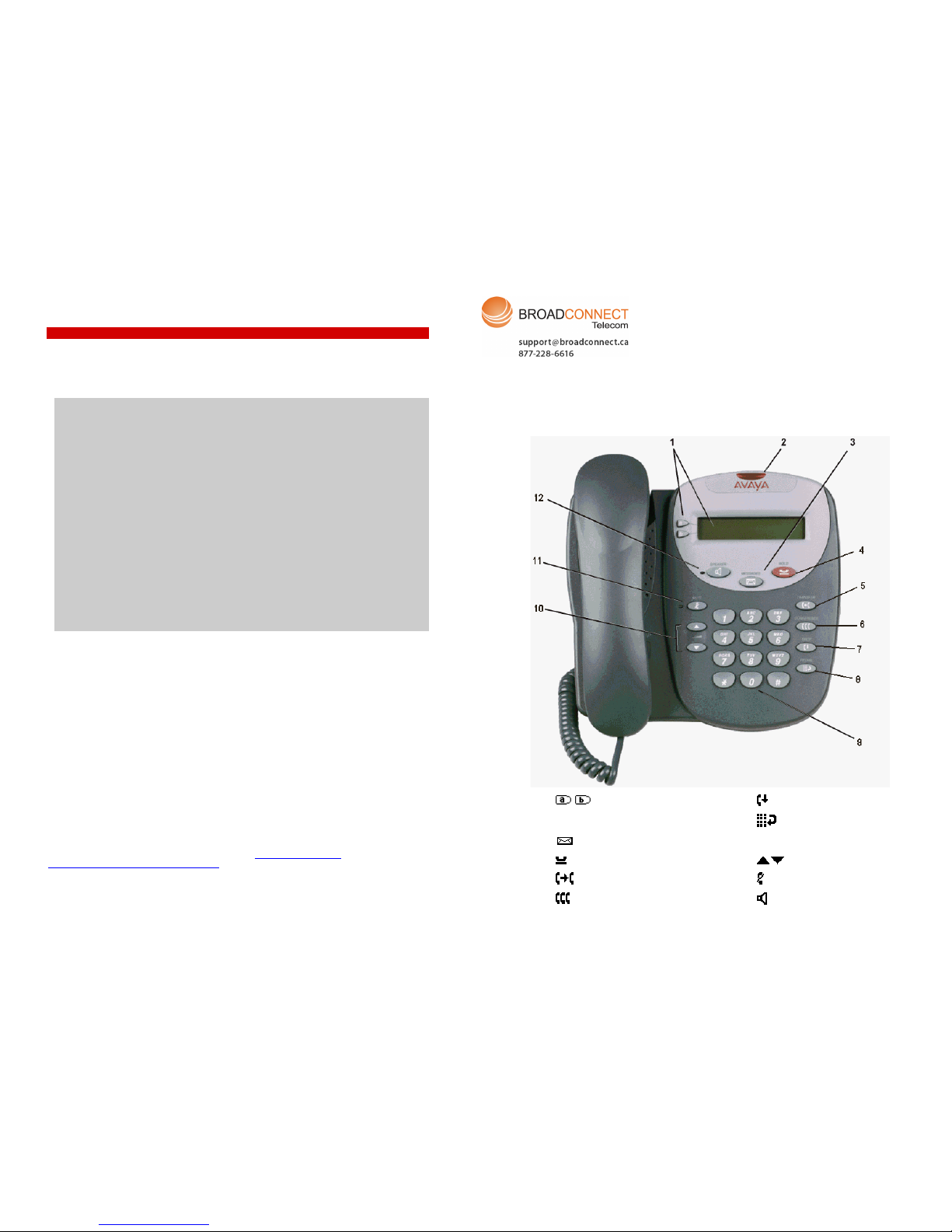
The diagram below shows the main phone features:
1
Display/Call Appearance
7
Drop
2
Message Waiting Lamp
8
Redial
3
Messages
9
Dialling Pad
4
Hold
10
Volume
5
Transfer
11
Mute
6
Conference
12
Speaker
Page 2

IP Office 4602 Quick Reference Guide
Answering Incoming Calls
• Pick up the handset or press to use the speakerphone.
Making a Call
• Pick up the handset or press to use the speakerphone.
• Dial the number, including any outside line digits and/or area codes.
Accessing Voicemail
• To retrieve your voicemail, press MESSAGES.
Hold
• To place a call on hold, press Hold.
• To retrieve a held call, press corresponding to the held call.
Transferring a Call
1. With the call active, press Transfer. The call is placed on hold; is displayed and you hear a
dial tone. Dial the number you want to transfer the call to.
2. To transfer without announcing the call, if the line is free, hang up. If the line is busy or if no one
answers, press
corresponding to the held call.
OR
To announce the call, remain on the line and wait for an answer. Announce the call and hang up.
If the line is busy or if no one answers, press
corresponding to the held call.
Conference
1. To establish a conference call, dial the first party and wait for an answer.
2. Press
CONFERENCE. The current call is placed on hold, is displayed and you hear a dial
tone.
3. Dial the number of the next party and wait for an answer.
4. To add the new party to the call, press
CONFERENCE again.
5. Repeat Steps 2 to 4 to add further participants.
To drop yourself from the conference, hang up.
Note: The short codes documented in this guide refer to the use of default short codes only.
IP Office 4602 Quick Reference Guide
Speakerphone
• The Speaker facility allows you to monitor incoming calls only. You must use the handset to speak to
the caller.
Speaker switches the speaker on/off.
Do Not Disturb
• To switch Do Not Disturb on, dial *08. An N is displayed. To switch Do Not Disturb off, dial *09.
Mute
• To prevent the other person on the line from hearing you, press Mute.
• To reinstate two-way conversation, press Mute again.
Redial
• To redial the last dialed number, press Redial.
Diverting Calls
• To divert calls at another extension, dial *12*N# (where N is your extension number). All calls to
your extension will be diverted to the extension you are using.
To re-direct your calls back to your own extension, dial *13*N#.
• To divert calls at your own extension, dial *14*N# (where N is the extension to which you want your
calls diverted).
To cancel divert calls from your own extension, dial *14*#.
Call Forwarding
• To set the number to which your calls are forwarded, dial *07*201# (forwarding to 201 in this
example).
• To switch Forward Unconditionally On, dial *01. A D is displayed. To switch it off, dial *02.
• To switch Forward On Busy On, dial *03. To switch it off, dial *04.
• To switch Forward On No Answer On, dial *05. To switch it off, dial *06.
 Loading...