

Page 1
!!!!!!!!!!!!!!!!!!!!!!!!!!!!!!!!!!Fluent'Multi‐View'
'''''Graphics'Card'Installation'Guide'''''''!
!
!
!!!!!
!!!!!!!
!
!!!!!!!!!!!!!!!!!!!!!!!!
!
!!!!!!!!!!!!!!!!!!!!!!!!!!!!!!!!
!
!
!
!
!
!
*!This!image!may!not!represent!your!actual!graphics!card!and!is!pure l y ! f or!illustration!purposes! !
Page 2

!!!!!!!!!!!!!!!!!!!!!!!!!!!!!!!!!!!!'
'''''''''''''''''''''''''''''''''''''''''''''''''''''''''''''''''''''!
Graphics!card!Installation!Guide!! Page!1!
!
!
!
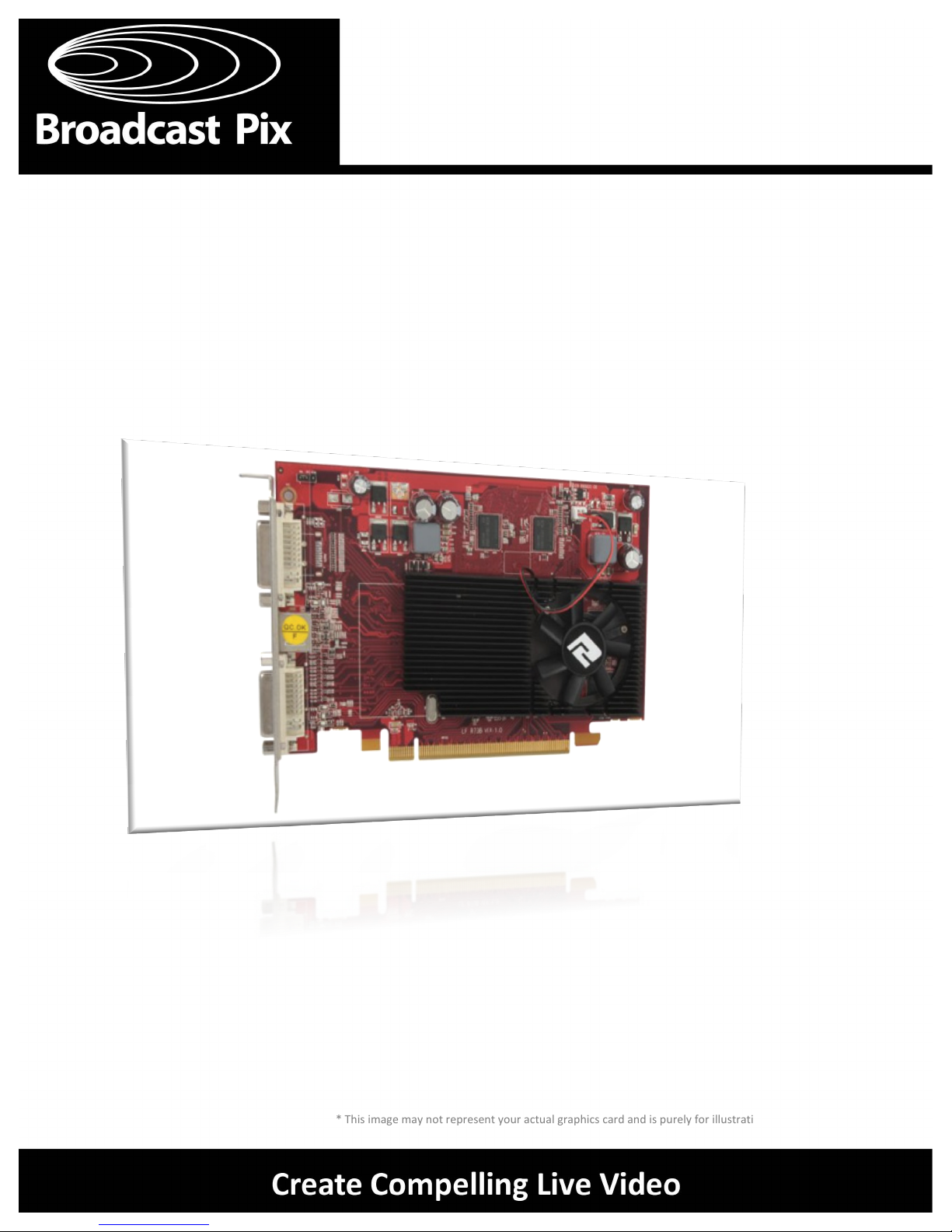
This!document!will!guide!you!through!the!process!of!removing!and!installin g!a!graphics!card!for!the!
Broadcast!Pix!Fluent!Multi‐View.!The!process!is!identical!for!installing!a!replac em en t !d u a l‐headed!
monitor!card!or!for!installing!the!quad‐headed!monitor!card,!option!#!340.!To!configure!a!Multi‐View!
layout,!please!refer!to!the!Broadcast!Pix!Operators!Manual.!
!
The!following!will!describe!how!to!remove!the!current!graphics!card!and!drivers!and!how!to!install!new!
ones.!
!
Depending!on!the!graphics!card!model!number,!the!corresponding!driver!must!b e!i n s t a l l ed !f o r!p ro p er!
operation.!A!list!of!the!latest!graphics!card!drivers!is!available!on!the!Broadcast!Pix!S u p p o rt !w eb s i t e. !!
!
Visit:!http://www.broadcastpix.com/Driver‐Downloads.html!
!
'
Tools'Required'
1!Philips!head!screwdriver!
1!Flat!head!screwdriver!
1!pair!of!wire!cutters!
3!Wire!ties!
!
!
'
'
'
'
'
'
'
'
'
'
'
'
'
'
'
'
'
'
Getting'Started'
Page 3
!!!!!!!!!!!!!!!!!!!!!!!!!!!!!!!!!!!!'
'''''''''''''''''''''''''''''''''''''''''''''''''''''''''''''''''''''!
Graphics!card!Installation!Guide!! Page!2!
!
!
!
!
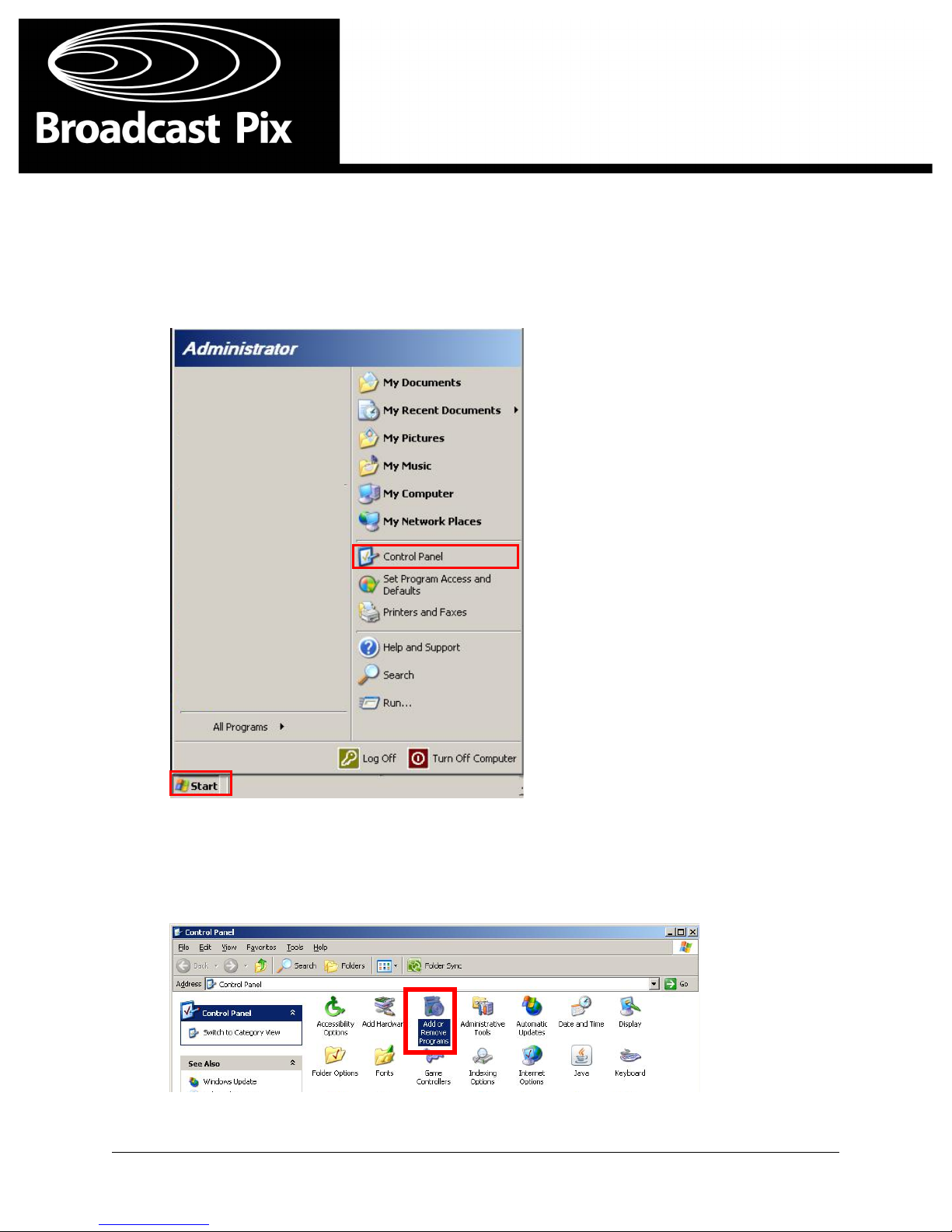
1. Turn!on!the!Broadcast!Pix!workstation.!Once!the!desktop!is!visible!navigate!to!the!Start'Menu'
and!select!the!Control'Panel'link.!
!
!
!
!
!
!
2. In!Control!Panel!window,!double!click!the!Add'or'Remove'Programs!butt o n ,!a s !s h o w n !b el o w .!
!
!
!
!
!
!
!
!
!
!
!
!
Uninstalling'the'Current'Drivers'
Page 4
!!!!!!!!!!!!!!!!!!!!!!!!!!!!!!!!!!!!'
'''''''''''''''''''''''''''''''''''''''''''''''''''''''''''''''''''''!
Graphics!card!Installation!Guide!! Page!3!
!
Uninstalling'the'Current'Drivers'
!
!
!
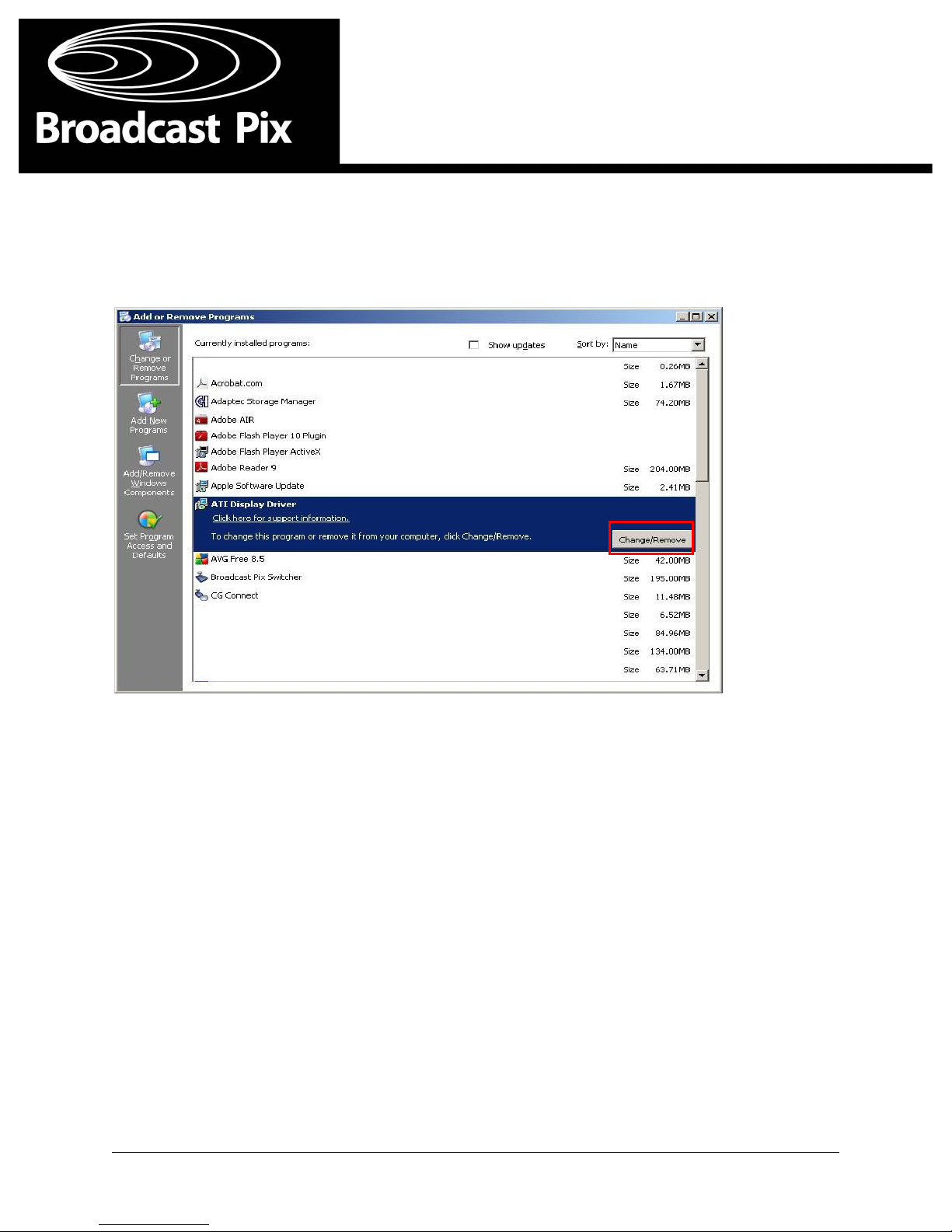
3. In!Add!or!Remove!Programs!window,!select!the!current!graphic!driver!(ATI!or!Nvidia)!a n d !c l i c k!
on!the!Change/Remove!button,!as!shown!below.!
!
!
!
Note:'Be'sure'to'remove'all'files'related'to'the'current'graphics'card.'For'example 'yo u 'may'have'
some'ATI'Catalyst'Control'Panel'files'that'also'need'to'be'removed.'
!
!
!
4. Follow!the!onscreen!menu!instructions!for!removing!your!specific!drivers.!B ec a u s e!t h i s !p ro c es s !
can!vary!between!different!cards!it!is!not!shown!in!this!guide.!!
!
5. Once!the!drivers!have!been!removed,!shut'down!your!system!and!proceed!to!the!next!sec t i o n !
for!physically!removing!the!old!graphics!card.!
!
!
!
!
!
!
!
!
!
!
Page 5
!!!!!!!!!!!!!!!!!!!!!!!!!!!!!!!!!!!!'
'''''''''''''''''''''''''''''''''''''''''''''''''''''''''''''''''''''!
Graphics!card!Installation!Guide!! Page!4!
!
Removing'the'Graphics'Card'
!
!
!
1. With!the!workstation!powered!off,!unplug!the!power!cord!connected!to!the!back!of!the!
workstation.!!
!
2. Remove'any!VGA/DVI!cables!connected!to!the!graphics!card.!
!
!
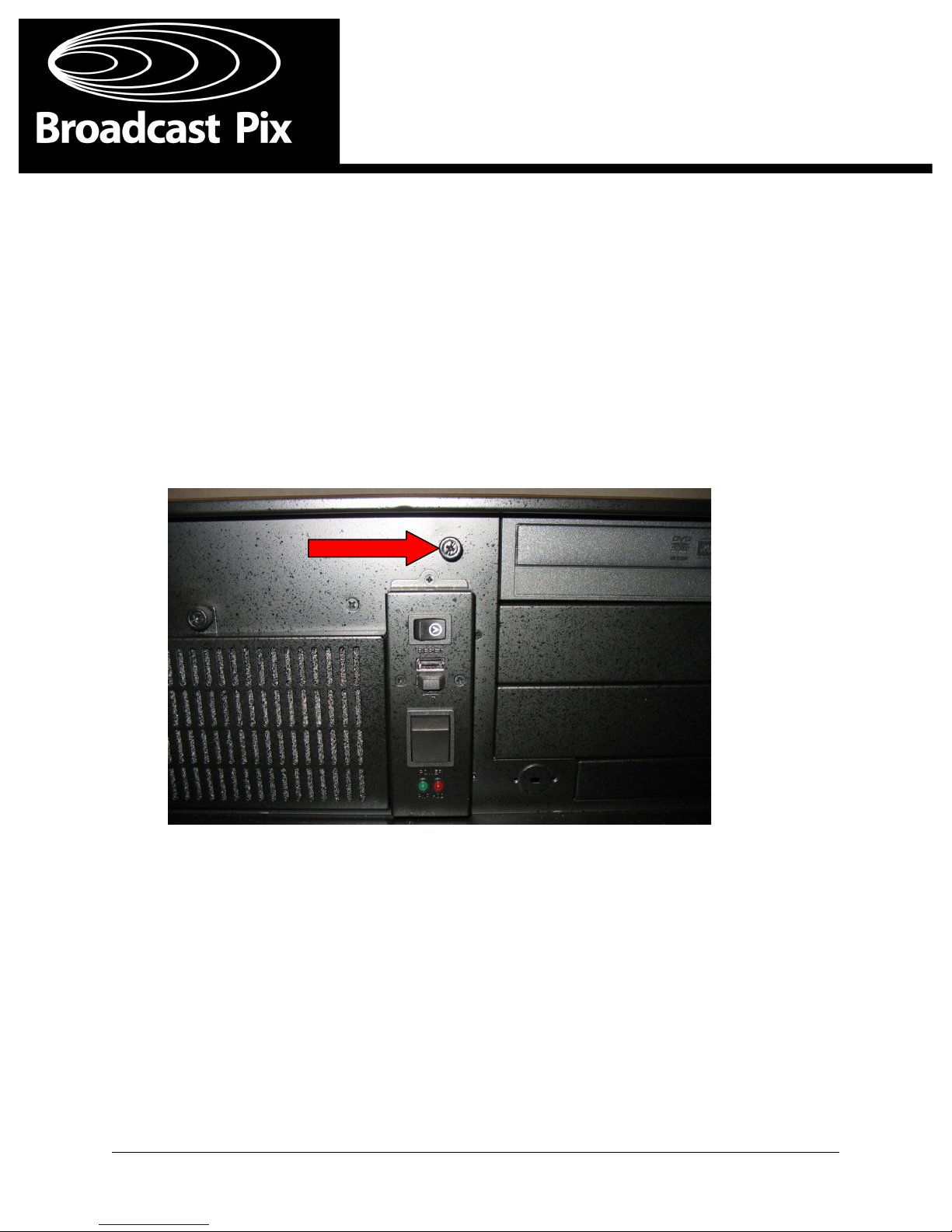
3. Remove!the!top!cover!from!your!workstation.!Loosen!the!top!cover!hold!down!screw!located!
behind!the!front!door!on!your!system,!with!a!Philips!screwdriver.!Once!loosened ,!s l i d e!t h e!c o ver!
towards!the!back!of!the!workstation!and!remove!it.!
!
!
!
!
!
!
!
!
!
!
!
!
!
!
!
!
!
!
!
!
!
!
!
!
!
!
!
!
!
!
!
!
Page 6
!!!!!!!!!!!!!!!!!!!!!!!!!!!!!!!!!!!!'
'''''''''''''''''''''''''''''''''''''''''''''''''''''''''''''''''''''!
Graphics!card!Installation!Guide!! Page!5!
!
Removing'the'Graphics'Card'
!
!
!
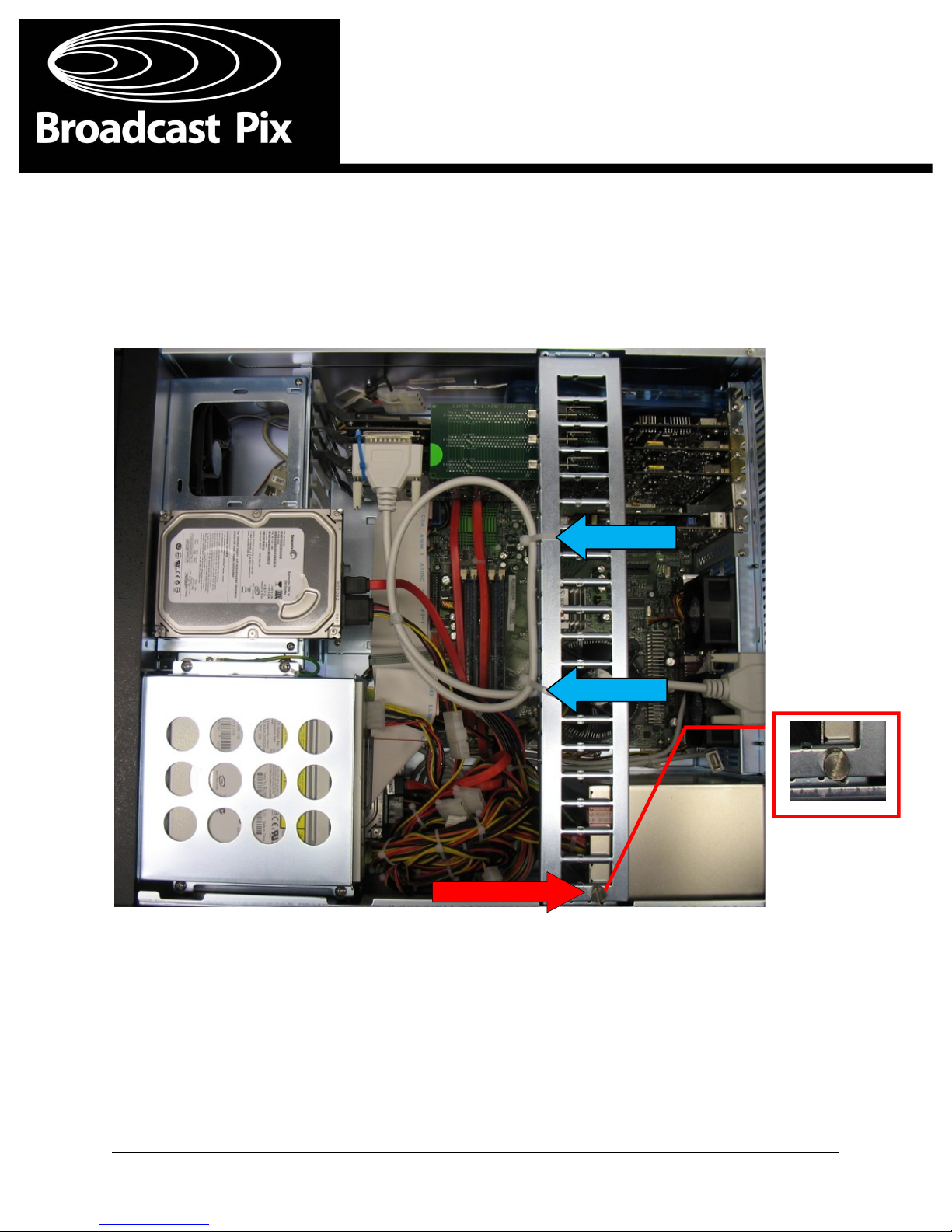
4. With!a!flat!head!screwdriver,!remove!the!screw!for!the!board!hold‐down!bar.!W i t h !a !p a i r!o f !w i re!
cutters!cut!the!wire!ties!attached!to!the!hold‐down!bar.!
!
5. Lift'and!remove!the!hold‐down!bar!
!
!
!
!
!
!
!
!
!
!
!
!
!
Page 7
!!!!!!!!!!!!!!!!!!!!!!!!!!!!!!!!!!!!'
'''''''''''''''''''''''''''''''''''''''''''''''''''''''''''''''''''''!
Graphics!card!Installation!Guide!! Page!6!
!
Removing'the'Graphics'Card'
!
!
!
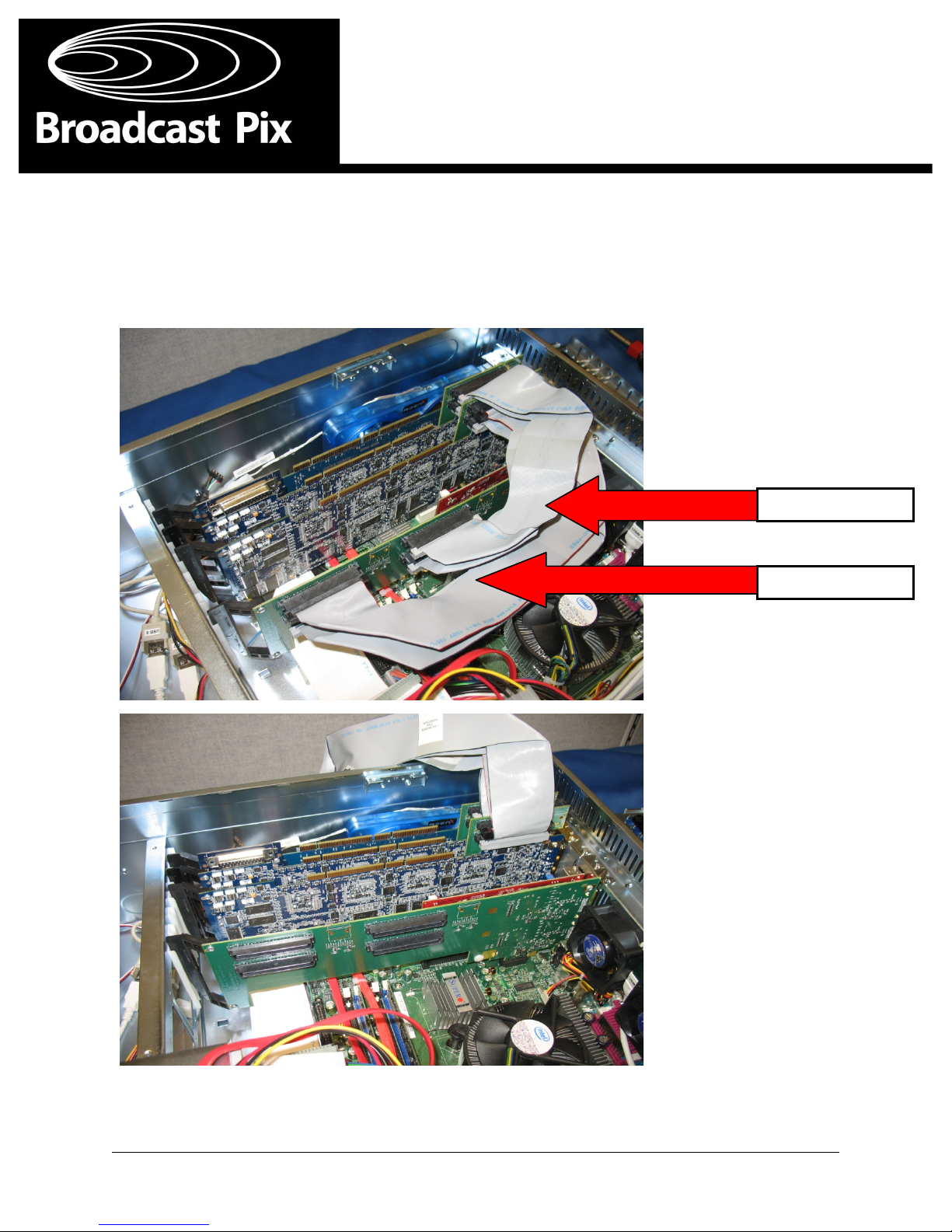
6. If!a!DVI!I/O!card!is!installed!in!the!workstation,!the!ribbon!cables!connected!to!the!HD!I/O!ca rd !
(s)!may!also!need!to!be!removed.!Simply!pull!the!cables!from!the!connectors!on!the!on!daughter!
card!and!move!them!aside.!Be!sure!to!make!note!of!which!cables!were!on!which!co n n ec t o r.!
!
!
!
!
!
!
!
!
!
!
!
!
!
!
!
!
!
!
!
!
!
!
!
!
!
!
!
!
!
!
!
!
!
!
!
!
!
!
!
Input!4/Output!D!
Input!8/Output!E!
Page 8
!!!!!!!!!!!!!!!!!!!!!!!!!!!!!!!!!!!!'
'''''''''''''''''''''''''''''''''''''''''''''''''''''''''''''''''''''!
Graphics!card!Installation!Guide!! Page!7!
!
Removing'the'Graphics'Card'
!
!
!
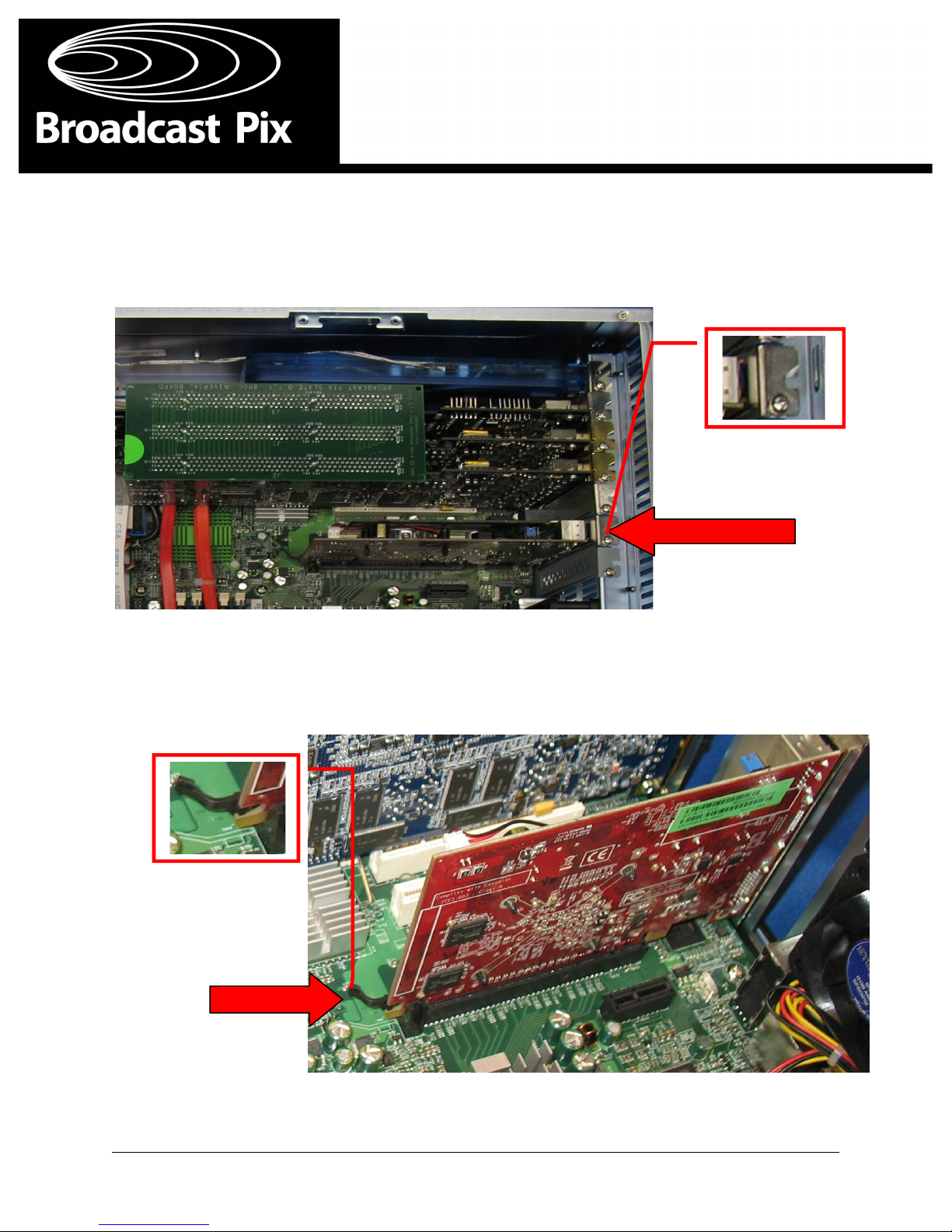
7. Locate!the!graphics!card!in!the!6th!PCI!slot!from!the!left!hand!side,!if!standing!in!front!of!the!unit.!
With!a!Philips!screwdriver,!remove!the!hold‐down!screw!on!the!graphics!card.! !
!
!
!
!
!
8. Release!the!tab!at!the!rear!of!the!graphics!card!by!pushing!it!to!the!left!and!remove!th e!c a rd!by!
lifting!the!card!out!of!the!slot,!as!shown!below.!
!
!
!
!
!
!
!
!
!
!
!
!
!
!
!
!
!
!
!
Page 9

!!!!!!!!!!!!!!!!!!!!!!!!!!!!!!!!!!!!'
'''''''''''''''''''''''''''''''''''''''''''''''''''''''''''''''''''''!
Graphics!card!Installation!Guide!! Page!8!
!
Installing'the'New'Graphics'Card'
'
'
'
Once!the!old!card!is!removed,!simply!reverse!the!steps!for!installing!the!new!gra p h i c s !c a rd ,!a s !d es c ri b ed !
above.!
!
1. Insert!the!new!graphics!card!into!the!6th!PCI!slot,!being!sure!it!is!seated!properly.!
!
2. Replace!the!graphics!card!hold!down!screw.!
!
3. Replace!the!board!hold‐down!bar!and!secure!it!with!the!screw.!!
!
4. Reattach!the!audio!cable!with!new!wire!ties!to!the!hold‐down!bar.!In!additio n ,!rea t t a c h !t h e!D V I!
ribbon!cables,!if!any!were!previously!removed.!!
!
5. Replace!the!system!top!cover!and!tighten!the!cover!screw!located!behind!the!front!door!of!t h e!
system.!
!
6. Reattached!the!power!cord!to!the!workstation!and!any!DVI/VGA!cables!to!the!graphic s !c a rd !and!
power!on!the!system.!
!
7. Once!the!desktop!appears,!install!the!graphics!card!driver!that!you!downloaded!from!th e!
Broadcast!Pix!Support!website!and!follow!the!onscreen!instruction.!Becau s e!t h i s !p ro c es s !can!
vary!between!different!cards!it!is!not!shown!in!this!guide.!!
!
9. Once!the!drivers!are!installed!restart!the!system.!Once!the!desktop!appears,!it!may!b e!n ec es s a ry!
to!reset!your!screen!resolution!for!proper!viewing.!
!
'
'
'
'
'
'
'
'
'
'
'
'
'
'
'
'
'
Page 10
!!!!!!!!!!!!!!!!!!!!!!!!!!!!!!!!!!!!'
'''''''''''''''''''''''''''''''''''''''''''''''''''''''''''''''''''''!
Graphics!card!Installation!Guide!! Page!9!
!
'
'
'
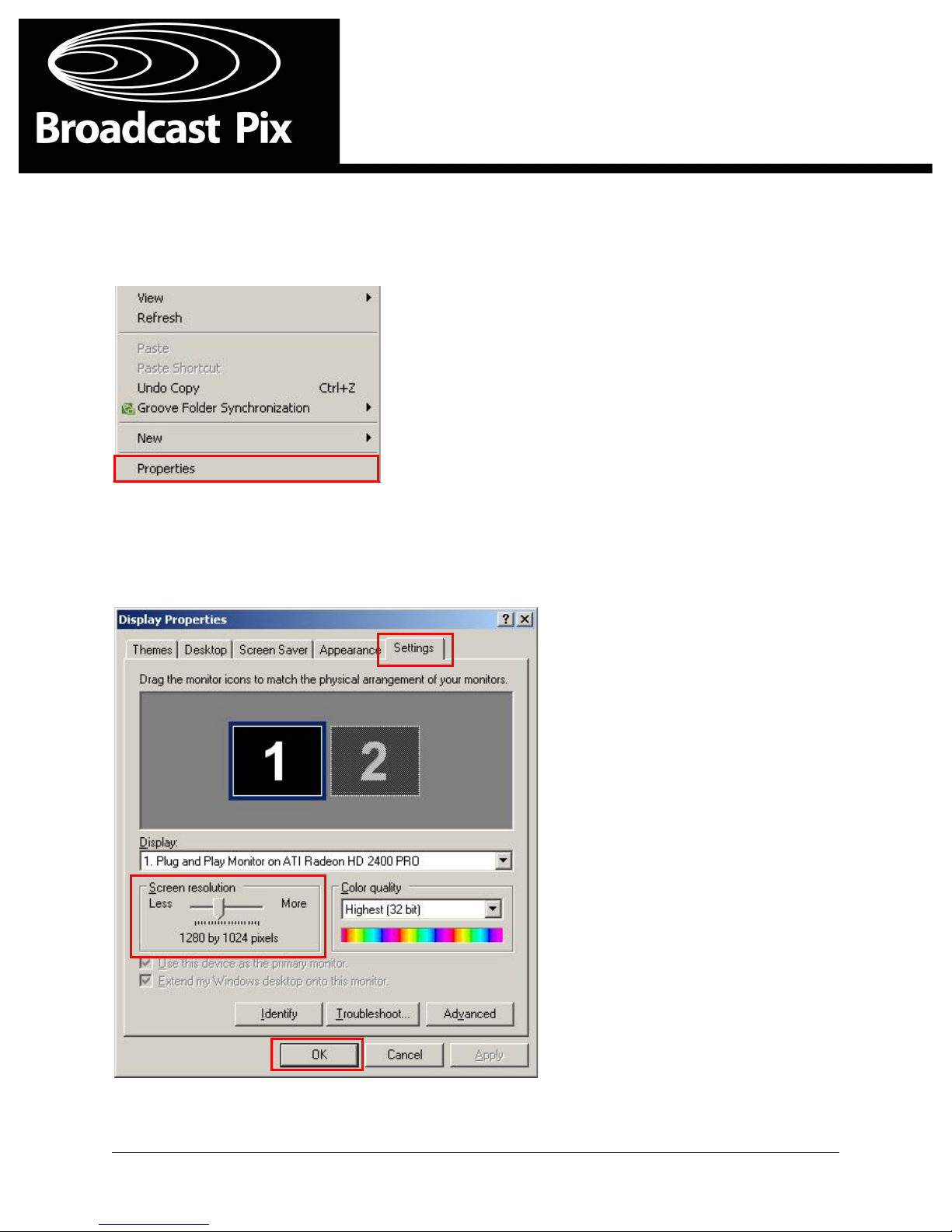
1. Right‐click!on!the!desktop,!in!the!pop‐up!menu!select!the!Properties'option.!
!
!
!
!
2. In!the!Display!Properties!window!select!the!Settings!tab.!Now!move!the!Screen!Resol u t i o n!slider!
to!your!desired!screen!resolution,!ensuring!that!the!aspect!ratio!of!the!monitor!matc h es !t h e!
aspect!ratio!of!the!selected!resolution.!Click!on!the!OK'button!to!save!and!apply!th e!c h a n g es.!
!
!
!
!
Resetting'the'Screen'Resolution'
Page 11

!!!!!!!!!!!!!!!!!!!!!!!!!!!!!!!!!!!!'
'''''''''''''''''''''''''''''''''''''''''''''''''''''''''''''''''''''!
Graphics!card!Installation!Guide!! Page!10!
!
!
Toll!Free:!! ! +1‐866‐914‐9484'
Phone:!!! ! +1‐978‐600‐1100!
Technical!Support:!! +1‐978‐600‐1098!!
! ! ! ! Monday!to!Frid a y!9 a m‐8pm!(EST/Boston)!!
! ! ! ! After!8pm,!plea s e!l ea ve!u s !a !vo i c e!m es s a g e!t h a t !w i l l !b e!ret u rn ed !the!next!
business!day!
!
Fax:! ! ! +1‐978‐663‐2811!
Website:!! ! www.broadcastpix.com!
Register!on‐line!at!www.broadcastpix.com/support.html!for!access!to!the!latest !
software!downloads!and!support!information!
!
Support!E‐mail:!! support@b ro a d c a s t p i x . c o m!
Mailing!Address:! 3!Federal!Street!
!!!!!!!!!!!!!!!!!!!!!!!!! ! Billerica,!Massachusetts!01821!
! ! !! USA!
!
!
!
!
!
!
!
©!!2009!Copyright!Broadcast!Pix,!Inc.!!
Broadcast!Pix,!Slate,!iBoB,!PixButtons,!PixMaster,!PixPad,!AutoAspect,!and!SoftPa n el !a re!t ra d em a rks !o f !
Broadcast!Pix,!Inc.!!Other!trademarks!are!owned!by!their!respective!companies.!
Broadcast'Pix'Contact'Information!
 Loading...