

Page 1
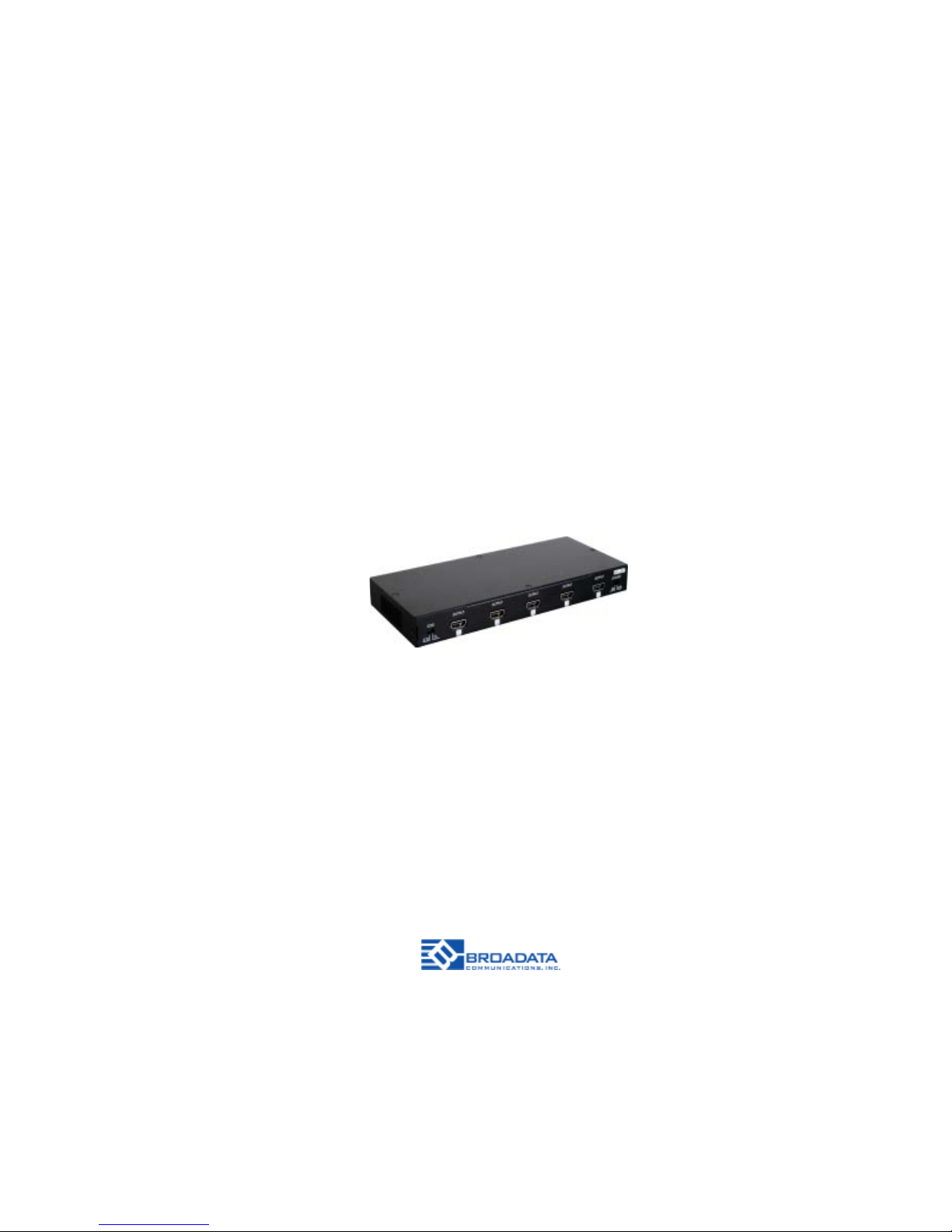
LB-H2-SP8
HDMI 2.0
DISTRIBTUTION AMPLIFIER
1X8 SPLITTER
BCI reserves the right to make changes to the products described herein without
prior notice or consent. No liability is assumed as a result of their use or
application. All rights reserved.
©2016 Broadata Communications, Inc.
Page 2

BCI LB-H2-SP8 User’s Manual
HDMI 2.0 Distribution Amplifier 1x8 S plitter
Broadata Technical Support, [email protected]
3
SAFETY INSTRUCTIONS AND
COMPLIANCE DECLARATIONS
PLEASE OBSERVE THE FOLLOWING SAFETY PRECAUTIONS
SURGE PROTECTION DEVICE RECOMMENDED
This product contains sensitive electrical components that may be damaged
by electrical spikes, surges, electric shock, lightning strikes, etc. Use of
surge protection systems is highly recommended in order to protect and
extend the life of your equipment.
Page 3

BCI LB-H2-SP8 User’s Manual
HDMI 2.0 Distribution Amplifier 1x8 S plitter
Broadata Technical Support, (800) 214-0222
4
TABLE OF CONTENTS
1.0 PRODUCT DESCRIPTION .............................................5
2.0 OPERATION CONTROLS AND FUNCTIONS ............... 6
3.0 SPECIFICATIONS ............................................................8
4.0 SERVICE PROCEDURE .................................................9
4.1 REPLACEMENT POLICY ...............................................9
4.2 RETURN AND REPAIR SERVICE ...................................9
5.0 LIMITED WARRANTY....................................................10
6.0 APPENDIX - SUPPORTED RESOLUTIONS ...............11
Page 4

BCI LB-H2-SP8 User’s Manual
HDMI 2.0 Distribution Amplifier 1x8 S plitter
Broadata Technical Support, [email protected]
5
1.0 PRODUCT DESCRIPTION
- A 1x8 HDMI 2.0 splitter with HDCP 2.2 compliance
- Supports video resolutions up to 3840×2160@60Hz and
4096×2160@60Hz with 4:4:4 YUV and HDR format
- Supports pass-through of audio formats including LPCM 2.0~7.1,
Dolby Digital, DTS, Dolby Digital Plus, Dolby T rueHD, Dolby Atmos
and DTS-HD Master Audio
- HDMI input supports internal standard EDID mode and external TV
EDID mode settings
- System Reset function supported (with CEC active source command)
Page 5

BCI LB-H2-SP8 User’s Manual
HDMI 2.0 Distribution Amplifier 1x8 S plitter
Broadata Technical Support, (800) 214-0222
6
2.0 OPERATION CONTROLS AND FUNCTIONS
Front Panel
1. EDID: The dip switch has two EDID modes to select: St andard
(STD) mode or TV mode. Whe TV mode is selected, the unit
will automatically detect and store EDID data from Output 1.
When STD mode is selected, the unit will set to standard 1080p
video and PCM 2 channel audio.
2. OUTPUT 1~5: Connect to 6G HDMI TV / display or HD amplifier
for output display .
3. SYS-RST: When the dip switch is set to “ON”, the device will
trigger a CEC command to be sent to the TV(s), switching to its
HDMI input1 immediately. As long as the dip switch is set to
“ON”, the unit will trigger this cycle every 8~10 minutes. TV
must support HDMI-CEC to take advantage of this feature.
EDID
SYS-RST
STD TV
ON OFF
1
3
OUTPUT OUTPUT OUTPUT OUTPUT OUTPUT
1 234 5
2
Page 6
BCI LB-H2-SP8 User’s Manual
HDMI 2.0 Distribution Amplifier 1x8 S plitter
Broadata Technical Support, [email protected]
7
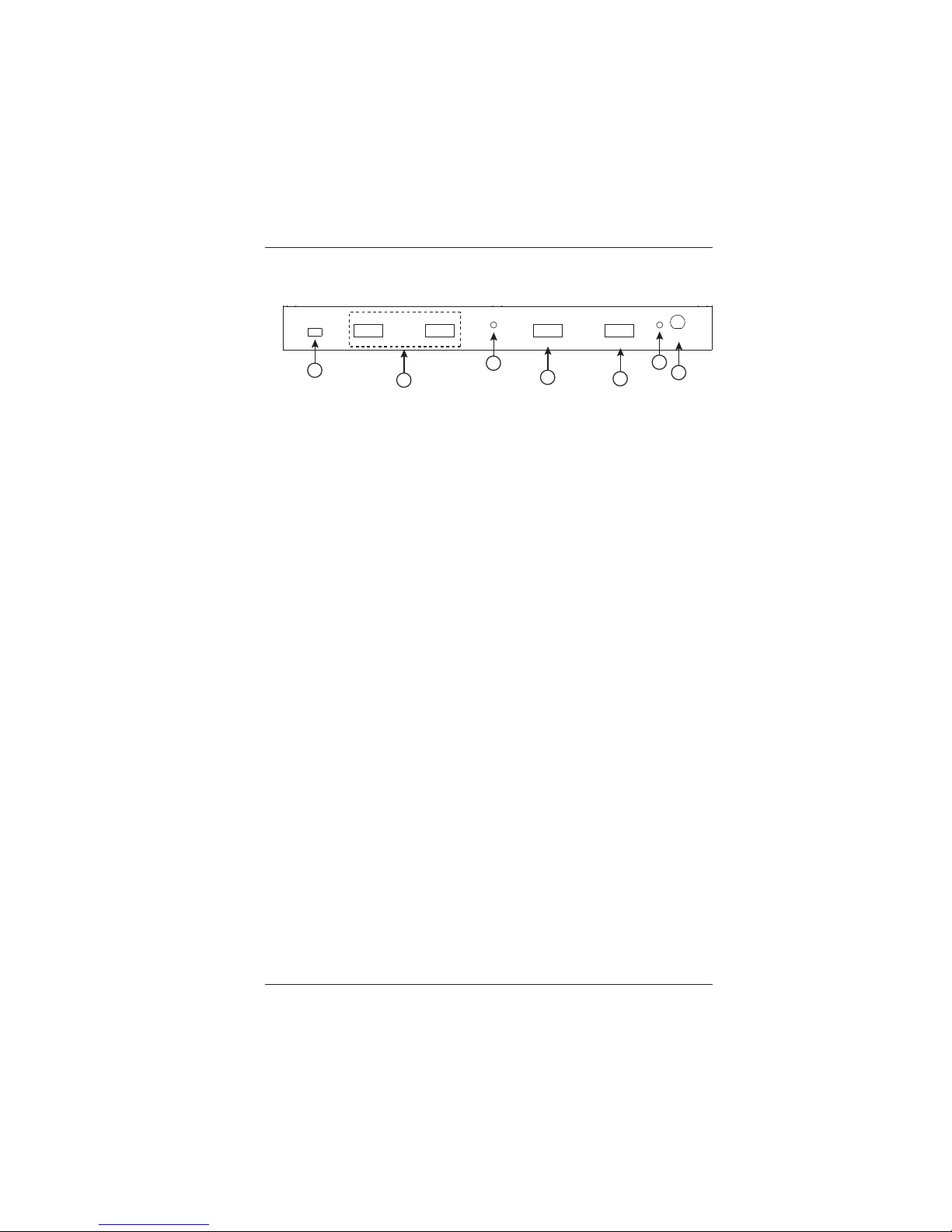
Rear Panel
1. SERVICE: This is reserved for firmware update use only .
2. OUTPUT 6~8: Connect to HDMI 6G TV/display or HD amplifier
for output signal display .
3. SYNC: When a HDMI input is detected, the LED will light up.
The LED will flicker when it detects an abnormal or unstable
source signal. When an input source is not connected the LED
light will turn off.
4. INPUT: Connect with 6G HDMI source equipment such as Bluray players and/or PC/Laptop devices.
5. Power: The LED will light up when the device is connected to
an active power supply .
6. DC 5V: Connect the adapter included in the package and
connect to AC wall outlet to supply power to the device.
1
SERVICE
OUTPUT OUTPUT
SYNC
INPUT OUTPUT
POWER
DC 5V
67 18
2
3
4
2
5
6
Page 7

BCI LB-H2-SP8 User’s Manual
HDMI 2.0 Distribution Amplifier 1x8 S plitter
Broadata Technical Support, (800) 214-0222
8
3.0 SPECIFICATIONS
Array Size 1x8
Input One (1) HDMI 2.0 port
Output Eight (8) HDMI 2.0
ports
Control EDID Selection: Internal standard
mode or external TV mode
Service USB, for firmware upgrade
Physical
Dimension (W x D x H) 9.45” x 4.26” x 1.00”
Operating T emperature 0°C to 40°C
Storage T emperature -20°C to 60°C
Power Supply [email protected]
Page 8

BCI LB-H2-SP8 User’s Manual
HDMI 2.0 Distribution Amplifier 1x8 S plitter
Broadata Technical Support, [email protected]
9
4.0 SERVICE PROCEDURE
4.1 Replacement Policy
Standard products found defective on arrival (DOA) will be
replaced, based on availability , within 24 to 48 hours anywhere
in the U.S. Please call Customer Service at 800-214-0222 for
information.
4.2 Return/Repair Service
The BCI LB-H2-SP8 System contains no user serviceable
components. If you have a problem with your unit, please contact
the Customer Service Department. To facilitate our return/repair
processing please contact Broadata Communications, Inc. to
obtain a Return Material Authorization (RMA). Please include
the following information:
• Product model number
• Serial Number
• Complete description of problem
• Hardware installation description
Broadata Communications, Inc.
2545 West 237th Street, Suite K
T orrance, CA 90505
1-800-214-0222
(310) 530-1416
(310) 530-5958 (Facsimile)
e-mail: [email protected]
Website: www .broadatacom.com
Page 9

BCI LB-H2-SP8 User’s Manual
HDMI 2.0 Distribution Amplifier 1x8 S plitter
Broadata Technical Support, (800) 214-0222
10
5.0 LIMITED W ARRANTY
Broadata Communications, Inc. (BCI) warrants, for a period of one year
from date of shipment, each product sold shall be free from defects in
material and workmanship. BCI will correct, either by repair, or at BCI’ s
election, by replacement, any said products that in our sole discretion
prove to be defective and are returned to the manufacturing location
within 30 days after such defect is ascertained. All warranties are limited
to defects arising under normal use and do not include malfunctions or
failure resulting from misuse, abuse, neglect, alterations, electrical power
problems, usage not in accordance with product instructions, improper
installation, or damage determined by BCI to have been caused by the
Buyer or repair made by a third party. Limited warranties granted on
products are to the initial customer end-user and are not transferable.
OUR LIABILITY UNDER THIS WARRANTY SHALL IN ANY CASE BE
LIMITED TO THE INVOICE VALUE OF THE PRODUCT SOLD AND BCI
SHALL NOT BE LIABLE TO ANYONE FOR CONSEQUENTIAL OR
INCIDENT AL DAMAGES ARISING FROM THE USE OF ITS PRODUCTS
OR THE SALE THEREOF. We make NO WARRANTY AS TO THE
MERCHANT ABILITY OF ANY GOODS, OR THA T THEY ARE FIT FOR
ANY P ARTICULAR PURPOSE OR END APPLICATION NOR DO WE
MAKE ANY WARRANTY, EXPRESSED OR IMPLIED OTHER THAN
AS ST A TED ABOVE.
Page 10
BCI LB-H2-SP8 User’s Manual
HDMI 2.0 Distribution Amplifier 1x8 S plitter
Broadata Technical Support, [email protected]
11
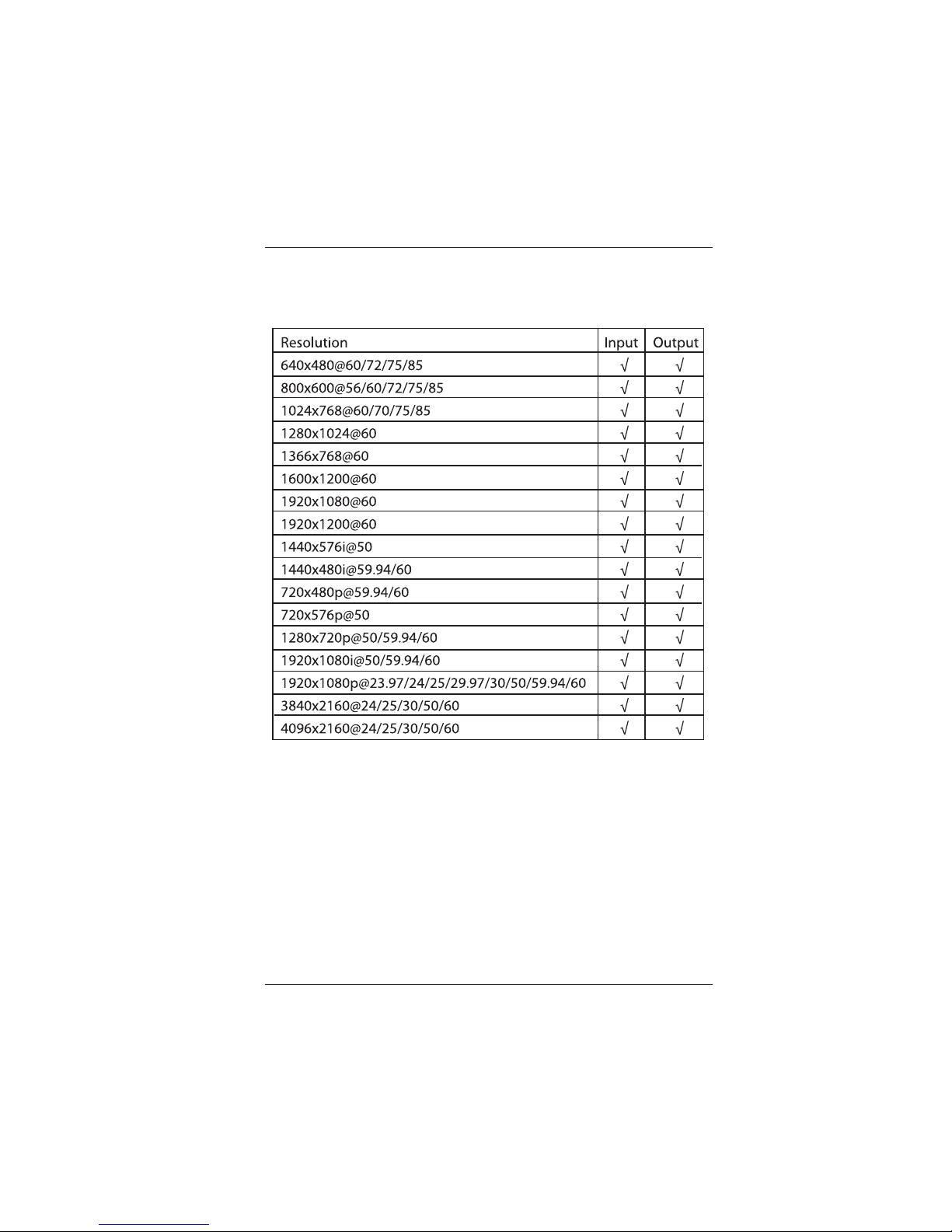
6.0 APPENDIX - SUPPORTED RESOLUTIONS
Page 11

BCI LB-H2-SP8 User’s Manual
HDMI 2.0 Distribution Amplifier 1x8 S plitter
Broadata Technical Support, (800) 214-0222
12
Page 12

BCI LB-H2-SP8 User’s Manual
HDMI 2.0 Distribution Amplifier 1x8 S plitter
Broadata Technical Support, [email protected]
13
Page 13

Broadata Communications, Inc.
2545 West 237th Street, Suite K
T orrance, CA 90505
1-800-214-0222
(310) 530-1416
(310) 530-5958 (Facsimile)
e-mail: [email protected]
Website: www .broadatacom.com
60000-LBH2SP8
 Loading...