

Page 1
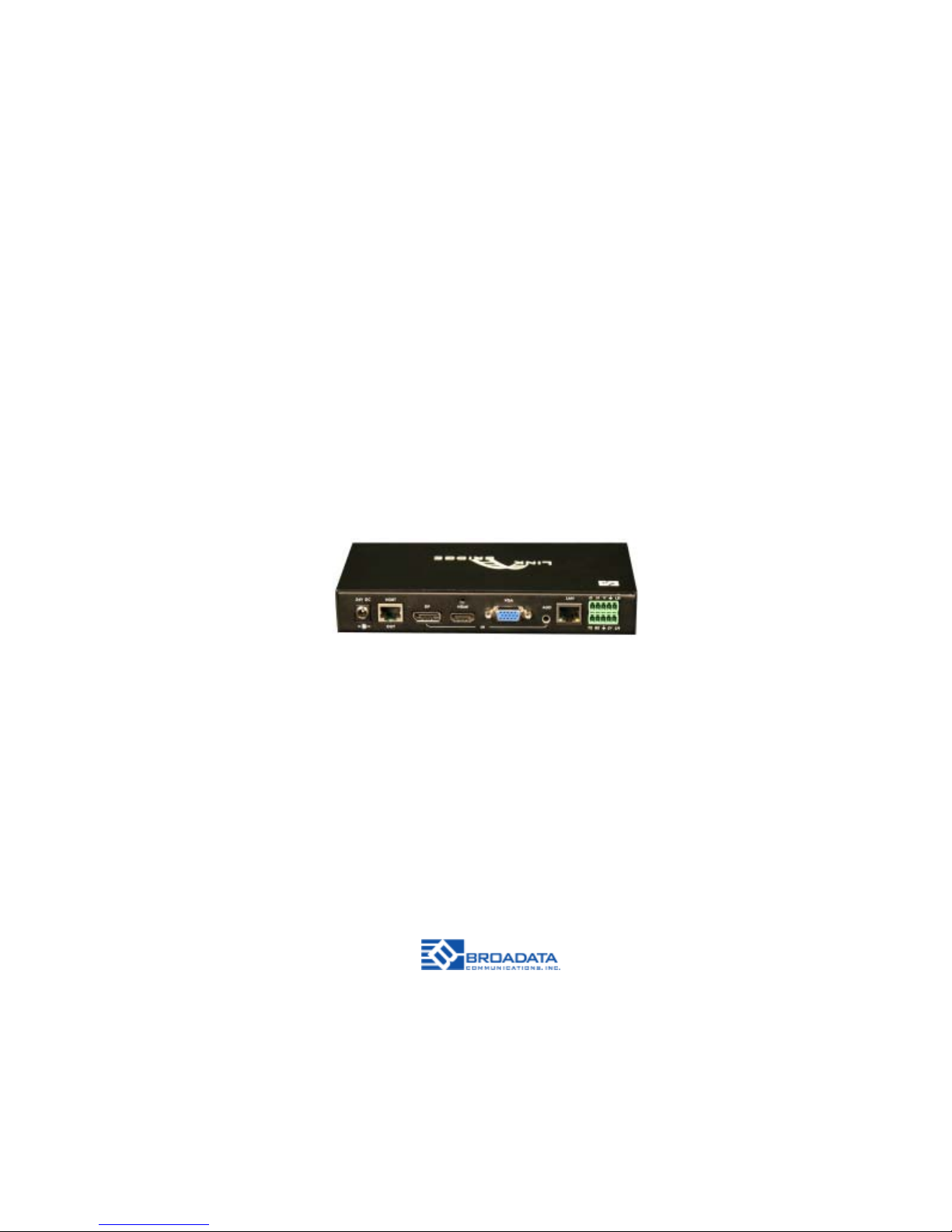
LBC-HDV-T
LINK BRIDGETM HDBASET
HDMI/DISPLA YPORT/VGA
TRANSMISSION SYSTEM
BCI reserves the right to make changes to the products described herein without prior
notice or consent. No liability is assumed as a result of their use or application. All
rights reserved.
©2015 Broadata Communications, Inc.
Page 2

LBC-HDV-T User Manual
Link Bridge
TM
HDBaseT HDMI/DisplayPort/VGA Transmission System
Broadata Technical Support, [email protected]
3
SAFETY INSTRUCTIONS AND
COMPLIANCE DECLARA TIONS
PLEASE OBSERVE THE FOLLOWING SAFETY
PRECAUTIONS
SURGE PROTECTION DEVICE RECOMMENDED
This product contains sensitive electrical components that may be
damaged by electrical spikes, surges, electric shock, lightning strikes,
etc. Use of surge protection systems is highly recommended in order
to protect and extend the life of your equipment.
Page 3

LBC-HDV-T User Manual
Link Bridge
TM
HDBaseT HDMI/DisplayPort/VGA Transmission System
Broadata Technical Support, (800) 214-0222
4
TABLE OF CONTENTS
1.0 PRODUCT DESCRIPTION ..............................................5
2.0 OPERATION CONTROLS AND FUNCTIONS .................6
2.1 FRONT PANEL .................................................................6
2.2 REAR P ANEL ...................................................................7
2.3 DC POWER CONNECTION.............................................8
3.0 PHOENIX CONTACT CONNECTION ..............................9
4.0 WEB SERVER................................................................10
5.0 MAINTENANCE AND TROUBLESHOOTING ...............15
5.1 MAINTENANCE ..............................................................15
5.2 TROUBLESHOOTING ...................................................15
6.0 SPECIFICA TIONS...........................................................17
7.0 SERVICE PROCEDURE ................................................18
7.1 REPLACEMENT POLICY ..............................................18
7.2 RETURN AND REPAIR SERVICE .................................18
8.0 LIMITED WARRANTY ....................................................19
9.0 APPENDIX A ...................................................................20
Page 4

LBC-HDV-T User Manual
Link Bridge
TM
HDBaseT HDMI/DisplayPort/VGA Transmission System
Broadata Technical Support, [email protected]
5
1.0 PRODUCT DESCRIPTION
The LBC-HDV-T is a multi-format switcher with HDMI, VGA and
DisplayPort inputs to HDBT output. The audio port is independent and
could be embedded into any of the video signals and send it to the far
end. The product supports webserver and can be controlled by the
button, LAN, RS-232, contact closure, IR and RS-232 can pass through.
Features
• Switch and extend HDMI, DisplayPort or VGA signals up to
70 meters over CAT-5e/6
• HDTV video resolutions up to 720p/1080i/1080p@60Hz or
1920x1200@60Hz, as well as Ultra HD (4K2K@30Hz)
• Fully uncompressed video with embedded audio provides zero
loss of quality
• Selectable manual or auto-switching between HDMI,
DisplayPort and VGA inputs
• Webserver for monitoring and configuation
• Manual switching through front-panel button, contact closure,
RS-232 or webserver
• Video/Audio+Data over 1 CAT-5e/6 with true DDC/EDID/HDCP
transmission
• Compatible with our LBH/LBC Series products
Page 5
LBC-HDV-T User Manual
Link Bridge
TM
HDBaseT HDMI/DisplayPort/VGA Transmission System
Broadata Technical Support, (800) 214-0222
6
2.0 OPERA TION CONTROLS AND FUNCTIONS
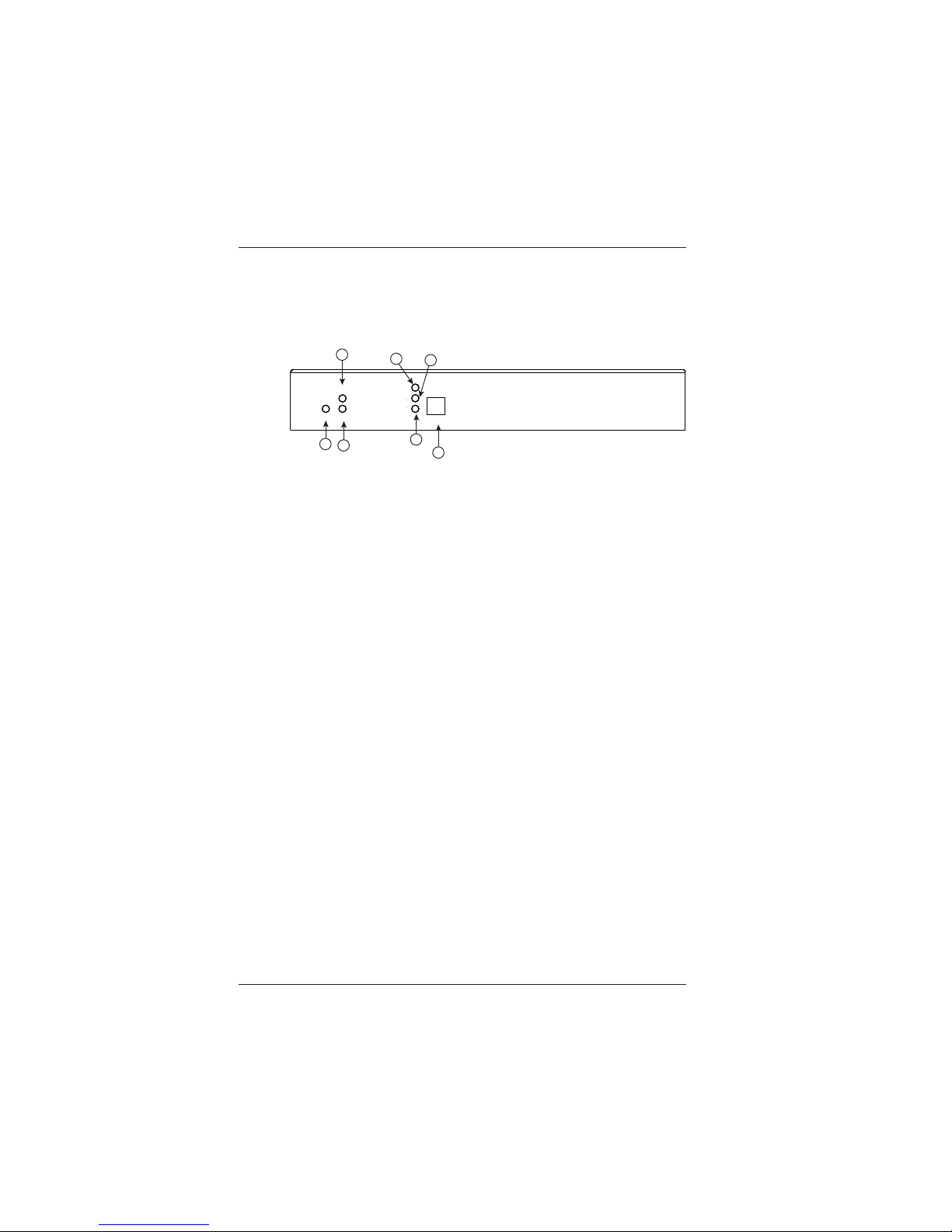
2.1 Front Panel
1. PWR:
Solid red when powered on.
2. HDMI:
LED solid when the HDCP , flashing when without HDCP.
3. LINK:
Flashing when HDBT connected without video signal, solid when
video presented.
4. D:
LED solid when DP selected, flashing when signal presented,
off means no input signal.
5. H:
LED solid when HDMI selected, flashing when signal presented,
off means no input signal.
6. V:
LED solid when VGA selected, flashing when signal presented,
off means no input signal.
7. Button for switching input signal.
HDMI
LINKPWR
D
H
V
SELECT
HDMI
LINKPWR
D
H
V
SELECT
HDMI
LINKPWR
D
H
V
SELECT
1
2
3
4
5
6
7
Page 6
LBC-HDV-T User Manual
Link Bridge
TM
HDBaseT HDMI/DisplayPort/VGA Transmission System
Broadata Technical Support, [email protected]
7
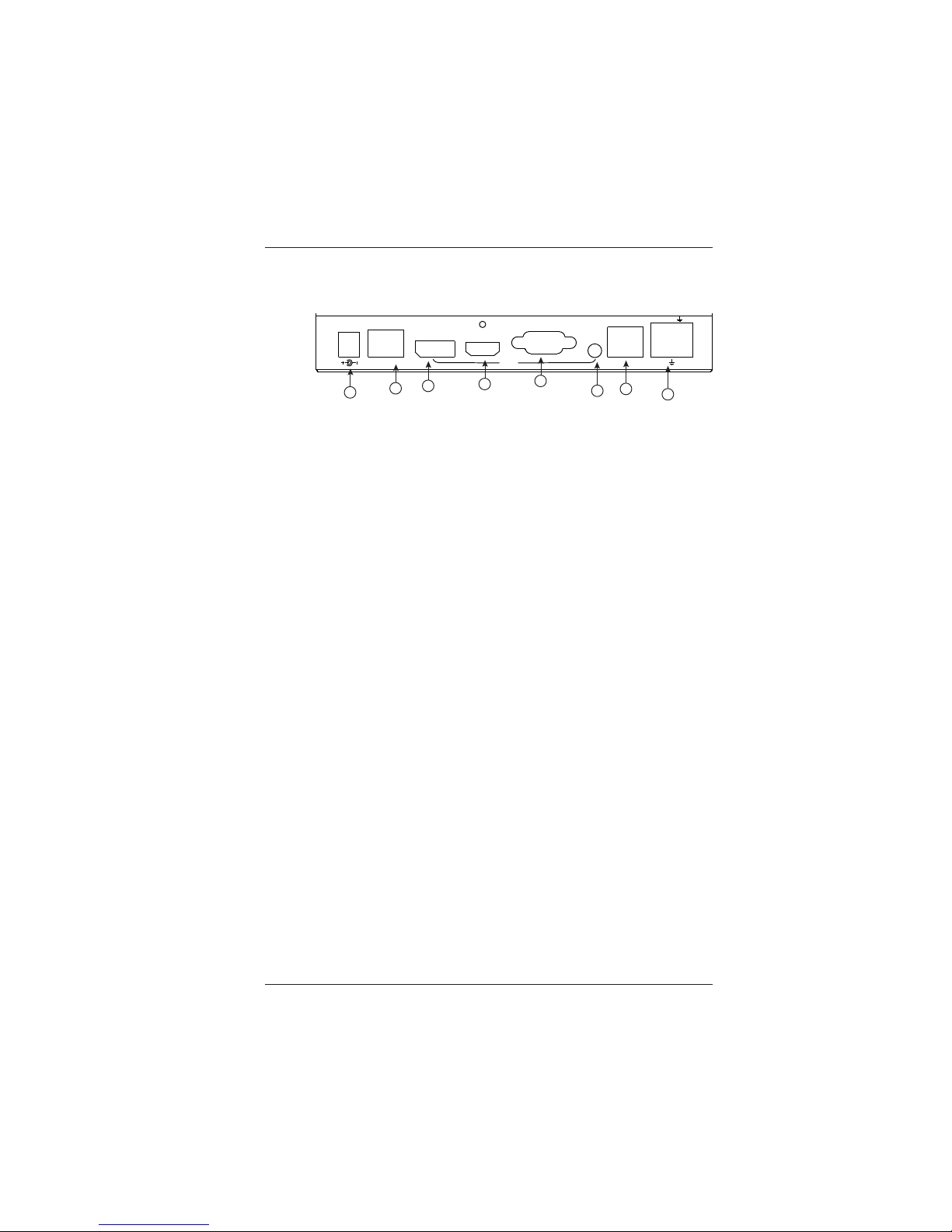
2.2 Rear Panel
1. Power:
24V DC Power.
2. HDBT Out:
HDBT output.
3. DP:
DisplayPort input.
4. HDMI:
HDMI input.
5. VGA:
VGA input.
6. AUD:
Independent audio input
7. LAN:
LAN for local control or web serve access
8. Phoenix Port:
RS-232 and Contact Closure with LED indicator
24V DC
HDBT
OUT
DP
HDMI
VGA
IN
AUD
LAN
DH
V
LD
TX RX
LV
LH
1
3
6
7
8
2
4
5
Page 7

LBC-HDV-T User Manual
Link Bridge
TM
HDBaseT HDMI/DisplayPort/VGA Transmission System
Broadata Technical Support, (800) 214-0222
8
2.3 DC Power Connection
Congratulations! You are now ready to power up the
LBC-HDV-T and set up your network connection. In order to
make sure that you have a proper installation, please observe
the following:
1. Your AC jack has power.
2. The 24VDC power supply is working.
3. Your electrical system has proper grounding (this ensures
that your power supply does not suffer from voltage
variations).
4. Power Surge Protection. This is optional, but highly
recommended. A UPS system provides voltage regularity
as well as prevents spikes from occurring, thus protecting
your LBC-HDV-T from sensitive voltage conditions.
The LBC-HDV-T derives power from an external 24VDC power supply.
This power supply is a wall mounted AC/DC adapter, 100-240 VAC,
50-60 Hz, at 1A. This power supply comes standard for the LBC-HDV -T
unless otherwise specified.
If you have any problems or concerns, regarding the installation, make
sure that you have taken the proper steps to ensure a proper power
connection. Otherwise, feel free to contact us for any questions you
may have.
Page 8
LBC-HDV-T User Manual
Link Bridge
TM
HDBaseT HDMI/DisplayPort/VGA Transmission System
Broadata Technical Support, [email protected]
9
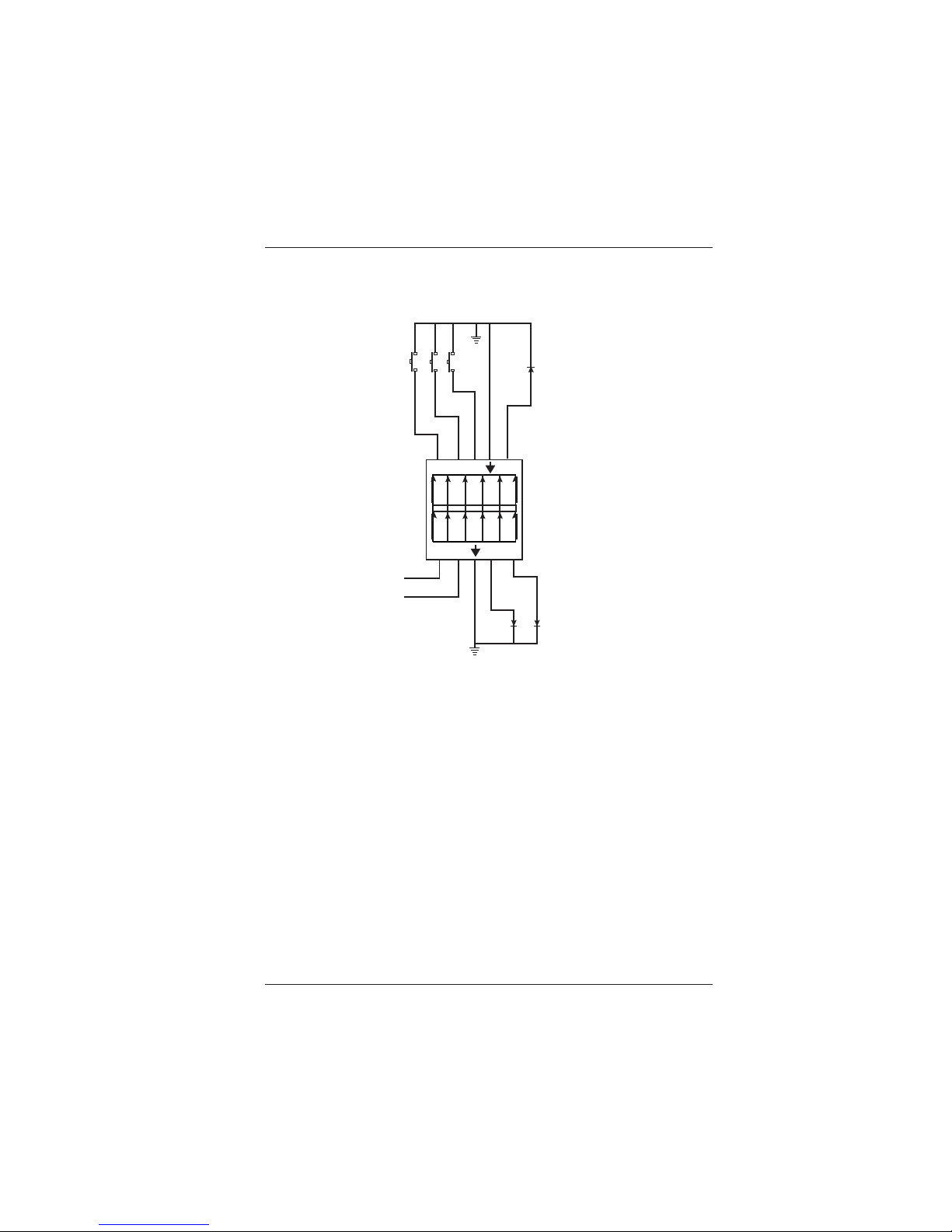
3.0 PHOENIX CONT ACT CONNECTION
DH
V
LD
TX RX
LV
LH
LD
V
H
D
GND
LH
LV
GND
TX
RX
Note:
V: VGA Input LV: LED indicator for VGA
D: DP Input LD: LED indicator for DP
H: HDMI Input LH: LED indicator for HDMI
TX: RS-232 Tx
RX: RS-232 Rx
GND: Ground
Page 9
LBC-HDV-T User Manual
Link Bridge
TM
HDBaseT HDMI/DisplayPort/VGA Transmission System
Broadata Technical Support, (800) 214-0222
10
4.0 WEB SERVER
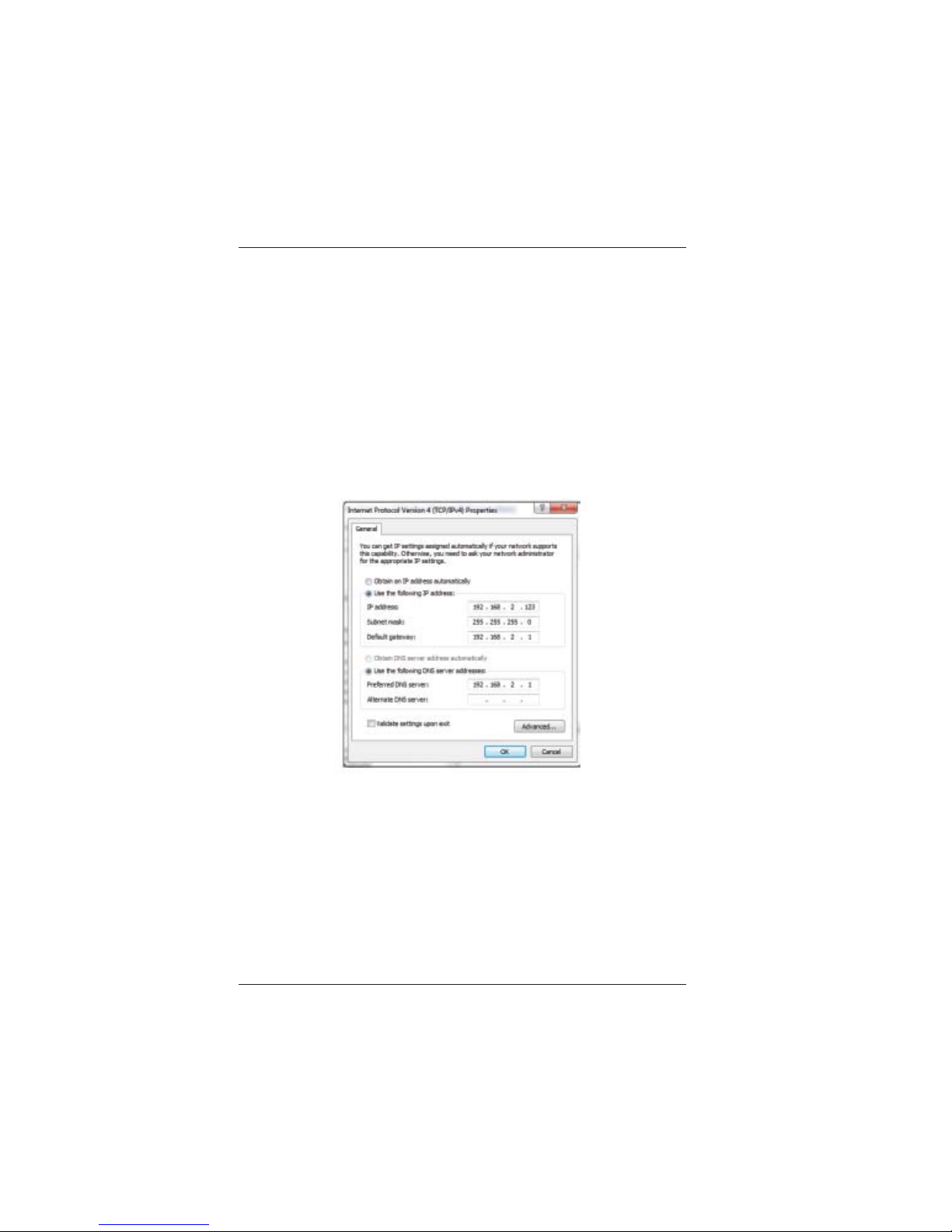
The factory default IP: 192.168.2.175
Note: BCI product configuration program can be used to discover
unit’s IP address.
To access the product web server, user candirect connect the
PC LAN port to the LBC-HDV-T LAN port with a straight RJ-45
cable. After making the connection, go to network connection of
the PC and revise the IP property to static IP as below. Once
done, open a web browser and enter the 192.168.2.175 to
access the web server.
For the LBC-HDV-T connection to the local area network, please
update the LBC-HDV-T IP to match the LAN network setting
from the web server.
For example, if the LAN IP is set as 192.168.88.xxx. Once the
IP is set, then you can access to the device from an PC in the
same network.
Page 10
LBC-HDV-T User Manual
Link Bridge
TM
HDBaseT HDMI/DisplayPort/VGA Transmission System
Broadata Technical Support, [email protected]
11
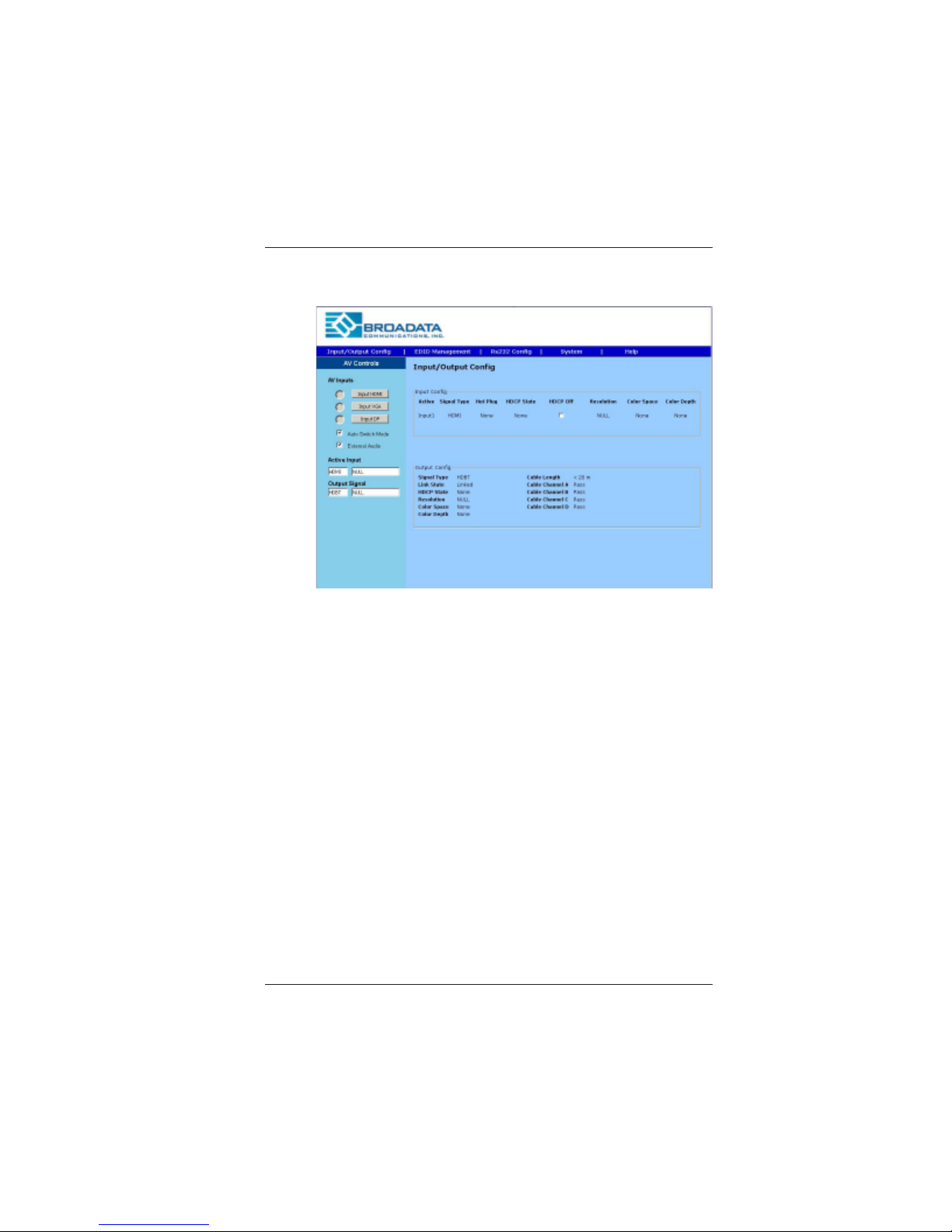
Input/Output Configuration
This page provides the switching, connection input signal
information, and the HDBT output connection status.
A V Input s: Select to switch the input.
Auto Switch Video: If checked, the device is set in auto
switching mode rather than manual mode.
External Audio: If checked, the 3.5mm audio input is embedded
to the input video.
Input Config: Input port information.
Output Config: HDBT connection status.
Active Input: Showing the input signal format and resolution.
Active Output: Showing output signal format and resolution.
HDCP Unauthorized: When checked, LBC-HDV-T will request
no HDCP compliant source.
Page 11
LBC-HDV-T User Manual
Link Bridge
TM
HDBaseT HDMI/DisplayPort/VGA Transmission System
Broadata Technical Support, (800) 214-0222
12
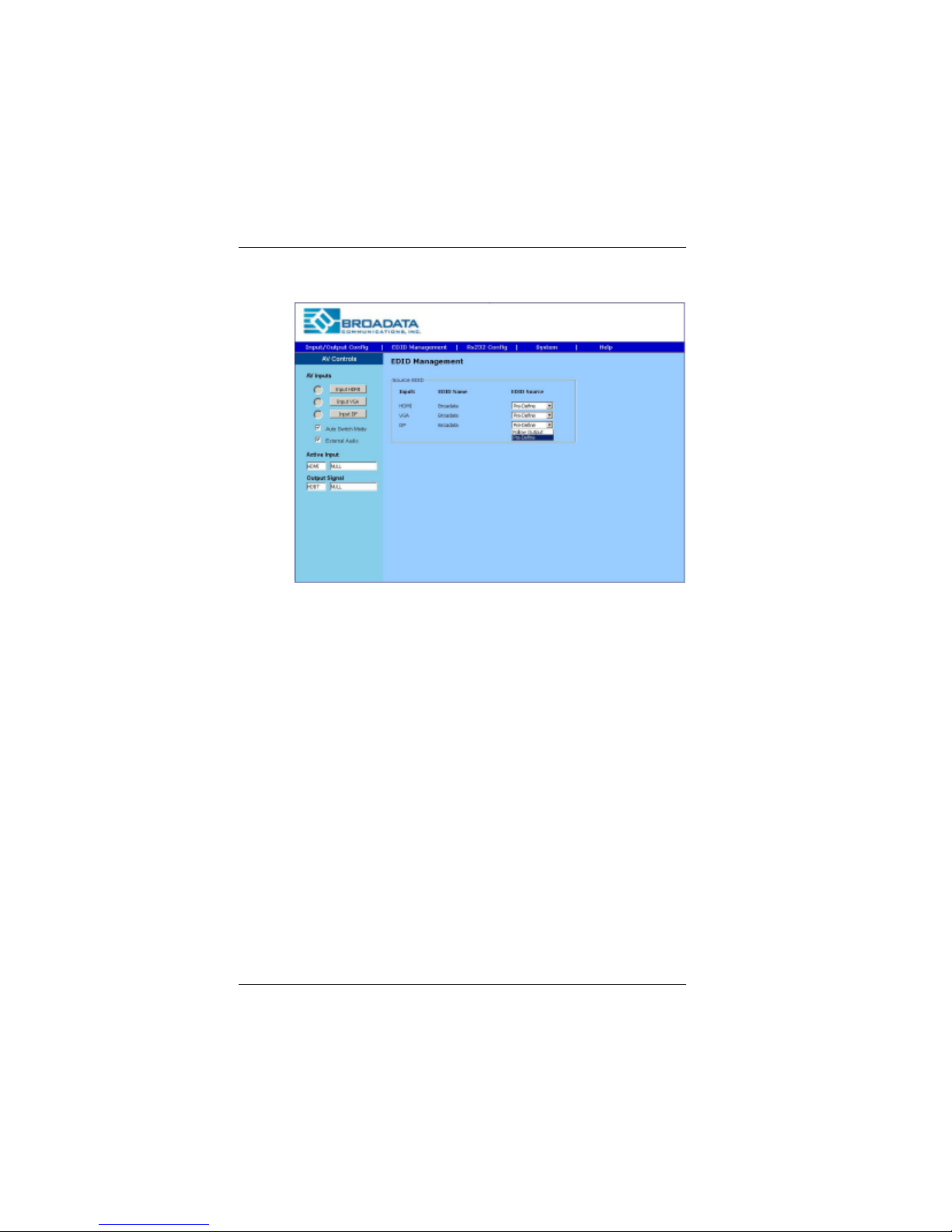
EDID Management
This page provides switching and EDID management.
Follow Output: EDID from display.
Broadata EDID: Internal preload EDID
Page 12
LBC-HDV-T User Manual
Link Bridge
TM
HDBaseT HDMI/DisplayPort/VGA Transmission System
Broadata Technical Support, [email protected]
13
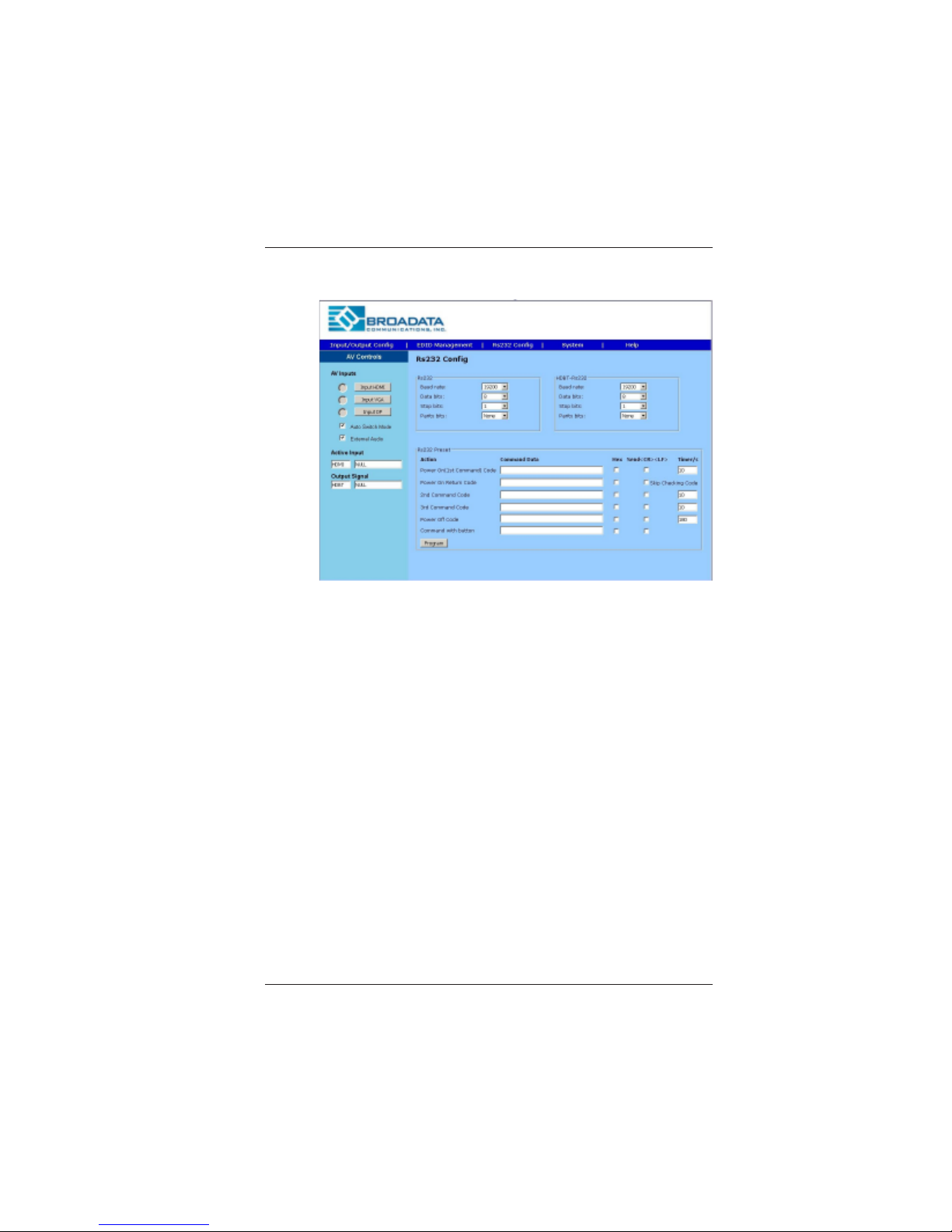
RS-232 Configuration
RS-232: Local RS-232 setting to control the LBC-HDV-T.
HDBT RS-232: Set the far end RS-232 baud rate.
RS-232 Preset
Command 1: When detecting active signal, sends the RS-232
command in the preset timing.
Command 2: When no active signal present, sends the command
in the preset timing.
Button: Press and hold the button for 3-5 seconds, sends the
preset command.
T o set the preset RS-232, click the program button to program
the code to the unit.
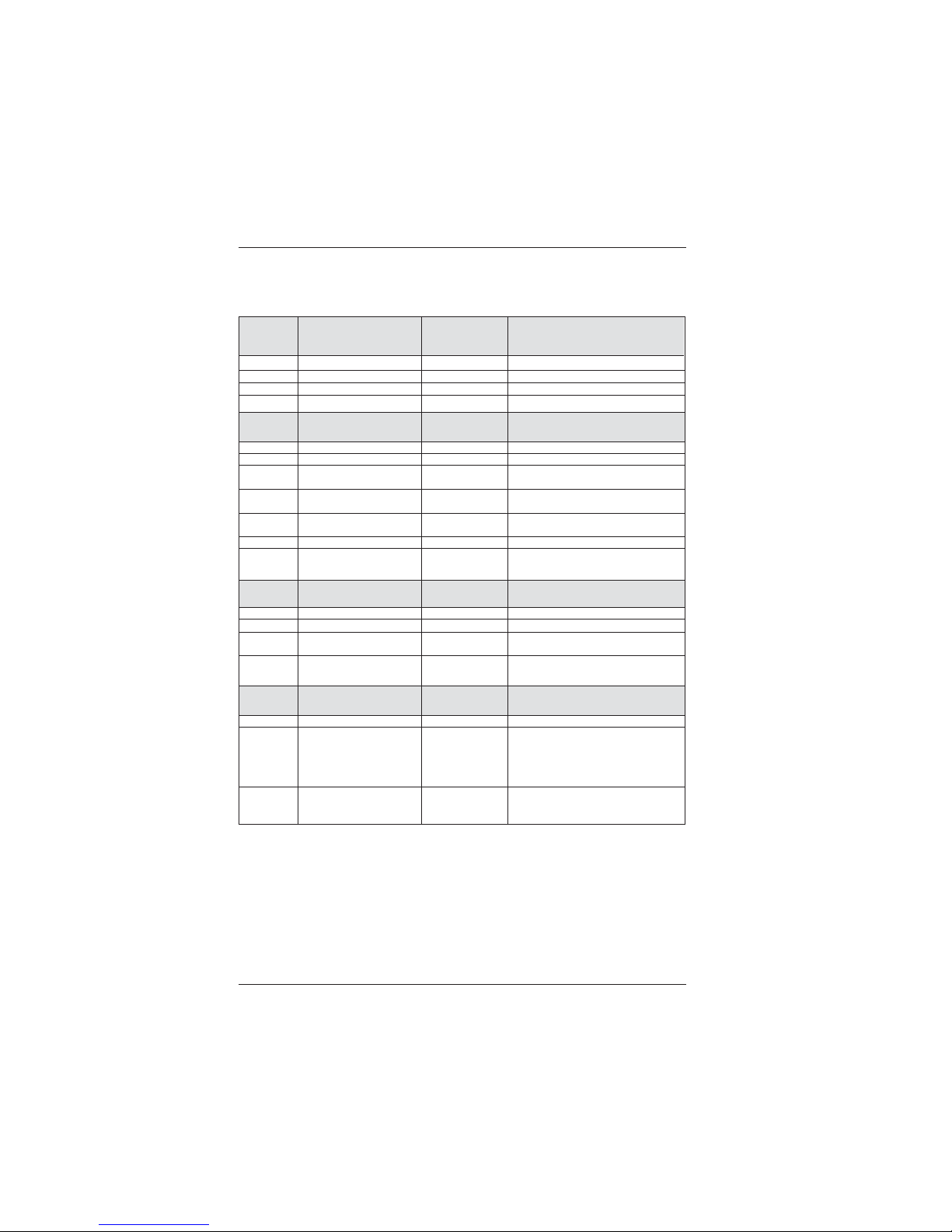
Note: See Appendix A for RS-232 Command T able.
Page 13
LBC-HDV-T User Manual
Link Bridge
TM
HDBaseT HDMI/DisplayPort/VGA Transmission System
Broadata Technical Support, (800) 214-0222
14
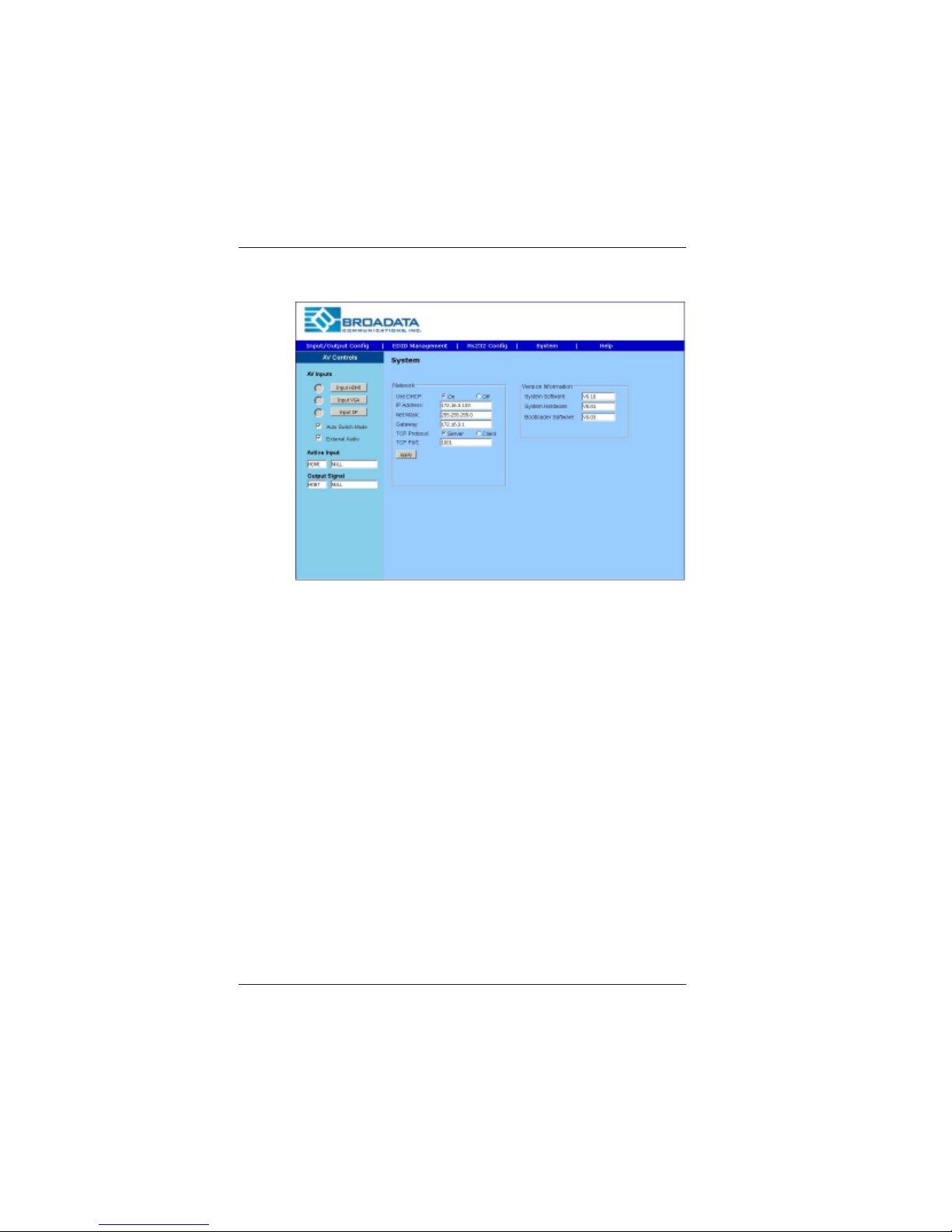
System
System and firware information. User can modify the IP setting
on this page. Remember to click on Apply for the changes.
Page 14

LBC-HDV-T User Manual
Link Bridge
TM
HDBaseT HDMI/DisplayPort/VGA Transmission System
Broadata Technical Support, [email protected]
15
5.0 MAINTENANCE AND TROUBLESHOOTING
5.1 Maintenance
There is no operator maintenance other then keeping the units
clean. However, observe the following light indicators to make
sure that the unit is working properly:
5.2 Troubleshooting
If the LBC-HDV-T units do not operate properly after installation,
check for possible cable breaks, loose connections, and
incorrect cable connections. If problems persist that may be
fiber related, contact BCI at 1-800-214-0222 for further
assistance.
For electrical problems, perform the following troubleshooting
procedures:
1. If the POWER indicator is OFF, check for the following:
a. The line cord is plugged into the unit and your outlet
has power.
2. If the POWER indicator is ON, but the Link indicator is
OFF, check for the following:
a. Make sure the appropriate cables are being used.
b. Cable and cable connectors are not broken.
c. For each unit, the transmit (TX) cable is connected to
the other unit’s receiver (RX).
3. If the POWER indicator and Link indicator are ON, but
the channels are not operating, then:
a. Check to see that the attached user equipment is turned
on.
b. Both ends of the link are connected to the corresponding
equipment and to the same corresponding channel port.
Page 15

LBC-HDV-T User Manual
Link Bridge
TM
HDBaseT HDMI/DisplayPort/VGA Transmission System
Broadata Technical Support, (800) 214-0222
16
c. Cable connections at both channels are securely
fastened to each connector. T urn the power of f, then
back on to reset the link.
Page 16

LBC-HDV-T User Manual
Link Bridge
TM
HDBaseT HDMI/DisplayPort/VGA Transmission System
Broadata Technical Support, [email protected]
17
6.0 SPECIFICATIONS
Video
Resolution (HDMI) up to 4K2K@30Hz
(DisplayPort) up to 4K2K@30Hz
(VGA) up to 1920x1200@60Hz
Connectors HDMI, DisplayPort, and VGA
Female Plug
Protocol DDC/EDID/HDCP Capable
Audio
Channel Capacity 1 L/R Analog
Operating Mode Unbalanced (Stereo Audio)
Connector 3.5mm Stereo Jack
Control
Channel Capacity 1
Signal Format RS-232 or Ethernet
Data Rate 19.2k baud (RS-232)
Connector Terminal Block (RS-232),
RS-45 (Ethernet)
HDBaseT Link
Cable Type CAT-5e/6 or higher
Number of Cables 1
Connector/Distance RJ-45/Up to 70m
Remote Powering
24VDC 2-Way
Physical
Dimensions 7.48” (W) x 4.12” (D) x 1.18” (H)
Page 17

LBC-HDV-T User Manual
Link Bridge
TM
HDBaseT HDMI/DisplayPort/VGA Transmission System
Broadata Technical Support, (800) 214-0222
18
7.0 SERVICE PROCEDURE
7.1 Replacement Policy
Standard products found defective on arrival (DOA) will be
replaced, based on availability , within 24 to 48 hours anywhere
in the U.S. Please call Customer Service at 800-214-0222 for
information.
7.2 Return/Repair Service
The LBC-HDV-T System contains no user serviceable
components. If you have a problem with your unit, please contact
the Customer Service Department. To facilitate our return/
repair processing please contact Broadata Communications,
Inc. to obtain a Return Material Authorization (RMA). Please
include the following information:
• Product model number
• Serial Number
• Complete description of problem
• Hardware installation description
Broadata Communications, Inc.
2545 West 237th Street, Suite K
Torrance, CA 90505
1-800-214-0222
(310) 530-1416
(310) 530-5958 (Facsimile)
e-mail: [email protected]
Website: www.broadatacom.com
Page 18

LBC-HDV-T User Manual
Link Bridge
TM
HDBaseT HDMI/DisplayPort/VGA Transmission System
Broadata Technical Support, [email protected]
19
8.0 LIMITED WARRANTY
Broadata Communications, Inc. (BCI) warrants, for a period of one
year from date of shipment, each product sold shall be free from defects
in material and workmanship. BCI will correct, either by repair, or at
BCI’s election, by replacement, any said products that in our sole
discretion prove to be defective and are returned to the manufacturing
location within 30 days after such defect is ascertained. All warranties
are limited to defects arising under normal use and do not include
malfunctions or failure resulting from misuse, abuse, neglect, alterations,
electrical power problems, usage not in accordance with product
instructions, improper installation, or damage determined by BCI to
have been caused by the Buyer or repair made by a third party . Limited
warranties granted on products are to the initial customer end-user and
are not transferable. OUR LIABILITY UNDER THIS W ARRANTY SHALL
IN ANY CASE BE LIMITED TO THE INVOICE VALUE OF THE
PRODUCT SOLD AND BCI SHALL NOT BE LIABLE TO ANYONE FOR
CONSEQUENTIAL OR INCIDENT AL DAMAGES ARISING FROM THE
USE OF ITS PRODUCTS OR THE SALE THEREOF. We make NO
WARRANTY AS TO THE MERCHANTABILITY OF ANY GOODS, OR
THAT THEY ARE FIT FOR ANY PARTICULAR PURPOSE OR END
APPLICA TION NOR DO WE MAKE ANY WARRANTY, EXPRESSED
OR IMPLIED OTHER THAN AS STA TED ABOVE.
Page 19
LBC-HDV-T User Manual
Link Bridge
TM
HDBaseT HDMI/DisplayPort/VGA Transmission System
Broadata Technical Support, (800) 214-0222
20
9.0 APPENDIX A: RS-232 COMMAND TABLE
Baud Rate >MBaud:115200<0D 0A> #MBaud<0D 0A> Support 9600, (default) 38400, 115200
Data Bits >MDBits:8<0D 0A> #MDBits<0D 0A> Support 8 & 9
Stop Bits >MSBits:1<0D 0A> #MSBits<0D 0A> Support 1 & 2
Parity Bits >Mparity:None<0D 0A> #Parity<0D 0A> Support ODD, Even, None
Network
Setting
DHCP >DHCP:ON<0D 0A> #DHCP <0D 0A>
IP >IP:192.168.2.175<0D 0A> #IP<0D 0A>
Net Mask >Mask:255.255.255.0 #Mask<0D 0A>
<0D 0A>
Gateway >Gate:192.168.2.175 #Gate<0D 0A>
<0D 0A>
TCP >Tcp Protocol:Server #tcp Protocol
Protocol <0D 0A> <0D 0A>
TCP Port >tcp Port:1001<0D 0A> #Tcp Port<0D 0A>
TCP Host >HsIP:192.168.2.200 #HsIP<0D 0A>
IP <0D 0A>
Video
Switching
Switching >C2to1<0D 0A> #C 1:DP 2:HDMI 3:VGA
Output Port >V0<0D 0A> 1:Output On 0:Output Mute
Query
Resolution #R
Switching
Mode >M0<0D 0A> 1:Auto 0:Manual
Auto
Setting 0:Mute 1:Vol Up 2:Vol Down
Audio >A1<0D 0A> 0:Internal Audio 1:External Audio
Pass
through
(RS-232 >RS1TX05Hello<0D 0A> Command pass through (control port):
to LAN or 1:RS232 2:LAN
vice versa)
Ex: passing command
through RS-232 port 5
character “Hello”
RS-232
Setting
Protocol Command
Example
Query
Command
Example Note
Note: The default baud rate 19200
Page 20

LBC-HDV-T User Manual
Link Bridge
TM
HDBaseT HDMI/DisplayPort/VGA Transmission System
Broadata Technical Support, [email protected]
21
Page 21

LBC-HDV-T User Manual
Link Bridge
TM
HDBaseT HDMI/DisplayPort/VGA Transmission System
Broadata Technical Support, (800) 214-0222
22
Page 22

Broadata Communications, Inc.
2545 West 237th Street, Suite K
Torrance, CA 90505
1-800-214-0222
(310) 530-1416
(310) 530-5958 (Facsimile)
e-mail: [email protected]
Website: www.broadatacom.com
60000-LBCHDVT
 Loading...