

Page 1
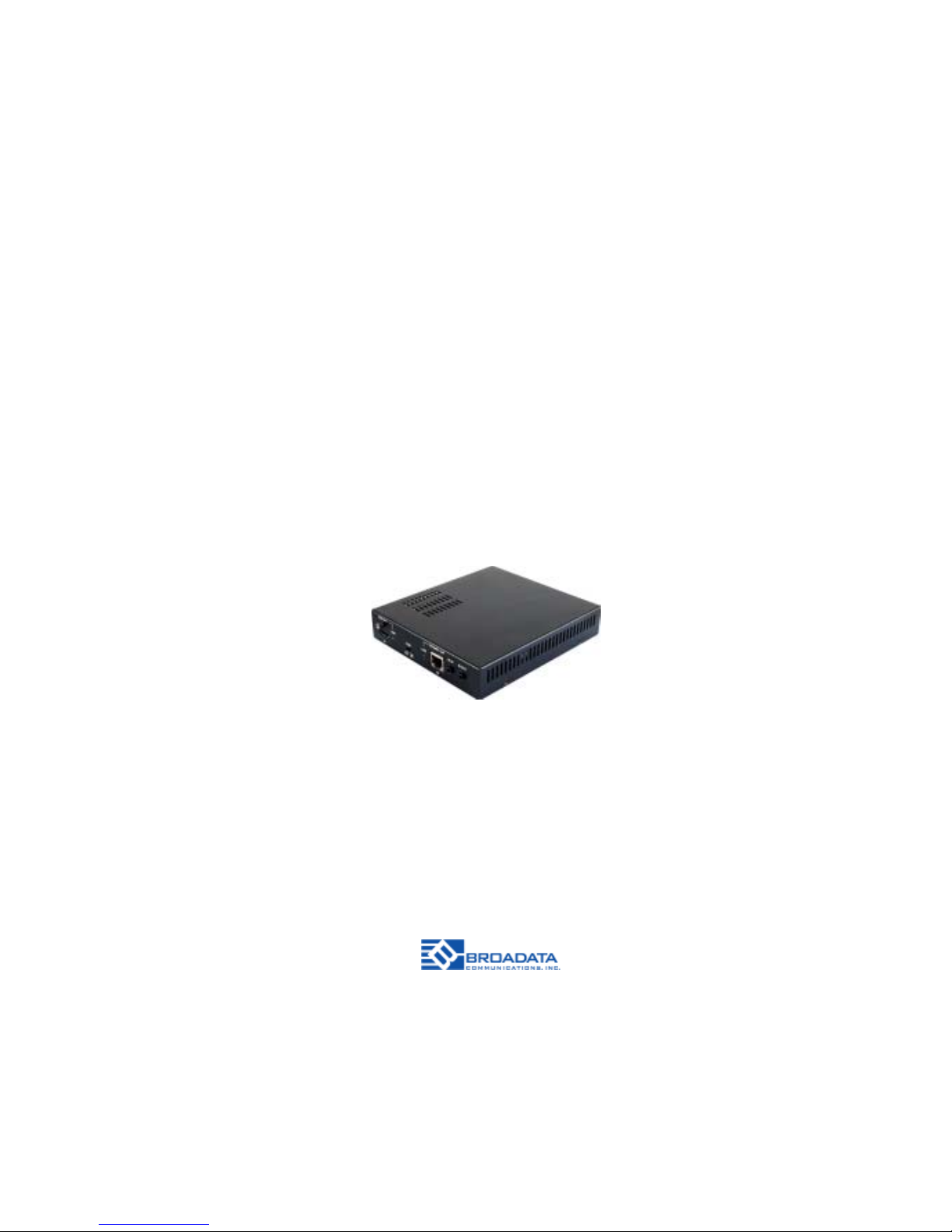
LBC-H-DRP-Lite
LINK BRIDGETM HDBASET
HDMI TRANSMISSION SYSTEM
WITH
DROPPING AND REPEATING VIDEO
BCI reserves the right to make changes to the products described herein without prior
notice or consent. No liability is assumed as a result of their use or application. All
rights reserved.
©2015 Broadata Communications, Inc.
Page 2

LBC-H-DRP-Lite User Manual
Link Bridge
TM
HDBaseT HDMI Transmission System w/Dropping and Repeating Video
Broadata Technical Support, [email protected]
3
SAFETY INSTRUCTIONS AND
COMPLIANCE DECLARA TIONS
PLEASE OBSERVE THE FOLLOWING SAFETY
PRECAUTIONS
SURGE PROTECTION DEVICE RECOMMENDED
This product contains sensitive electrical components that may be
damaged by electrical spikes, surges, electric shock, lightning strikes,
etc. Use of surge protection systems is highly recommended in order
to protect and extend the life of your equipment.
Page 3

LBC-H-DRP-Lite User Manual
Link Bridge
TM
HDBaseT HDMI Transmission System w/Dropping and Repeating Video
Broadata Technical Support, (800) 214-0222
4
TABLE OF CONTENTS
1.0 PRODUCT DESCRIPTION .............................................5
2.0 OPERATION CONTROLS AND FUNCTIONS ............... 6
2.1 TRANSMITTER FRONT PANEL......................................6
2.2 RECEIVER REAR P ANEL................................................7
3.0 IR.......................................................................................8
3.1 IR BLASTER CABLE PIN ASSIGNMENT........................8
3.2 IR RECEIVER CABLE PIN ASSIGNMENT ......................8
4.0 MAINTENANCE AND TROUBLESHOOTING .................9
4.1 MAINTENANCE ................................................................9
4.2 TROUBLESHOOTING .....................................................9
5.0 SPECIFICA TIONS...........................................................11
6.0 SERVICE PROCEDURE ................................................12
6.1 REPLACEMENT POLICY ..............................................12
6.2 RETURN AND REPAIR SERVICE .................................12
7.0 LIMITED WARRANTY ....................................................13
Page 4

LBC-H-DRP-Lite User Manual
Link Bridge
TM
HDBaseT HDMI Transmission System w/Dropping and Repeating Video
Broadata Technical Support, [email protected]
5
1.0 PRODUCT DESCRIPTION
The LBC-H-DRP-Lite can convert a single CAT -5e/6/7 input and 2-way
IR control to a single CAT-5e/6/7 output and includes a simultaneous
HDMI bypass output. It supports resolutions up to 1080p Full HD, 4K×2K
timing, 3D and multi-channel digital audio formats (such as LPCM 7.1CH,
Dolby TrueHD, Dolby Digit al Plus and DTS-HD). The HDMI output can
be connected to an HDMI display or cascaded to another splitter . The
CA T-5e/6/7 output can be connected to a CA T -5e/6/7 to HDMI Receiver
to extend the operating distance up to 60 meters.
Features
• Extend HDBaseT signals up to 60m meters over one
CA T-5e/6 Cable and drop HDMI video
• Supports full HDTV video resolutions up to 4K2K@30Hz
• Fully uncompressed video and audio provides zero loss of
quality
• Supports true DDC/EDID/HDCP transmission
• Video/audio+IR+data, over 1 CAT-5e/6 cable
• 1-way 24V/PoC remoting power at HDBaseT output port
• HDMI 1.4 and HDCP 2.2 compliant
• Supports IR control data
Page 5
LBC-H-DRP-Lite User Manual
Link Bridge
TM
HDBaseT HDMI Transmission System w/Dropping and Repeating Video
Broadata Technical Support, (800) 214-0222
6
2.0 OPERA TION CONTROLS AND FUNCTIONS
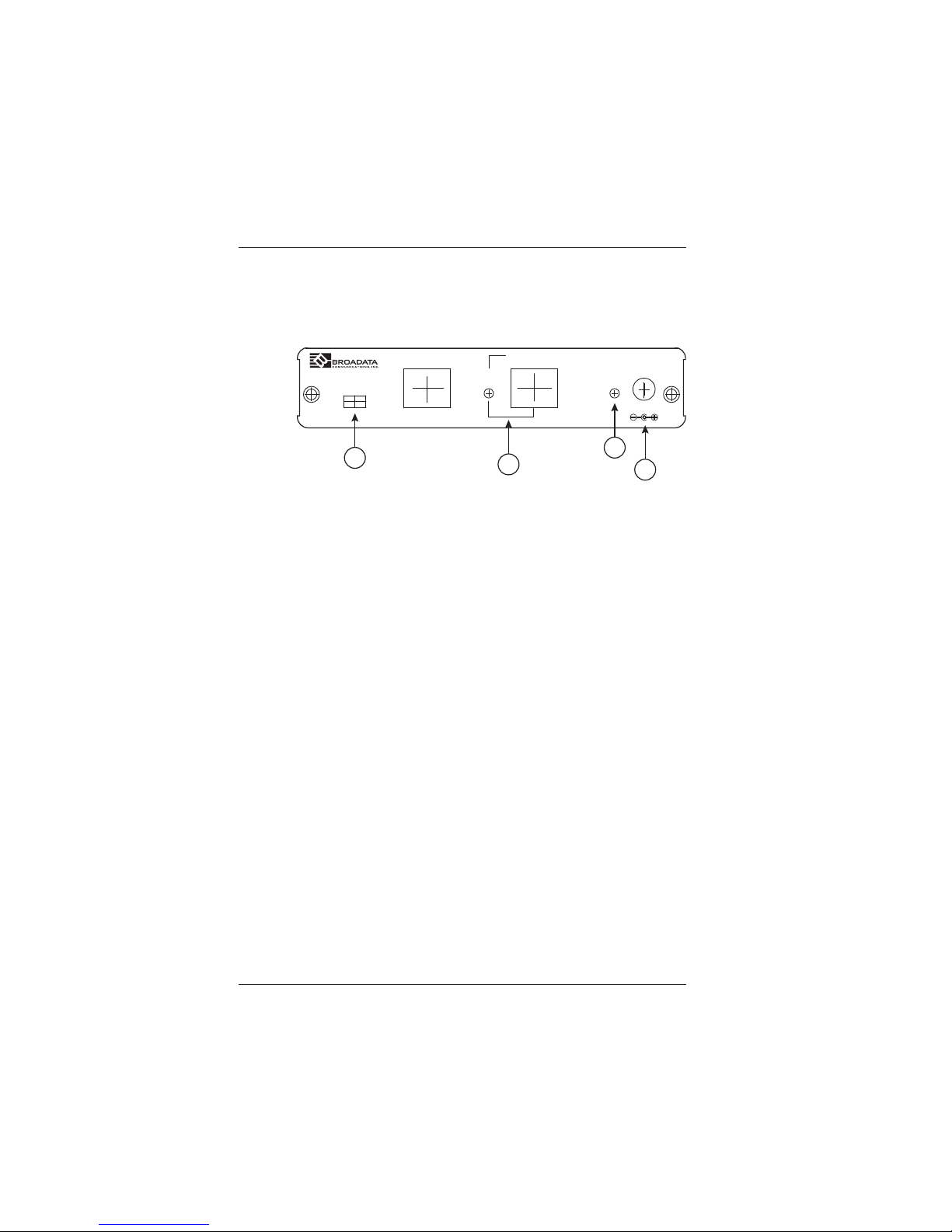
2.1 Transmitter Front Panel
1. Service: This slot is reserved for firmware update only .
2. CA T -5e/6/7 IN and LINK LED: Connect from HDMI over CA T-
5e/6/7 transmitter device along with source device for input
signal distribution up to 60m. Once the connection is made with
active signal the LINK LED will illuminate.
3. Power LED: Once the power supply is connected the LED will
illuminate.
4. DC 24V: Plug the 24V DC power supply into the unit and connect
the adapter to an AC outlet.
LAN
CAT5e/6/7 IN
LINK POWER
SERVICE
DC 24V
1
2
3
4
Page 6
LBC-H-DRP-Lite User Manual
Link Bridge
TM
HDBaseT HDMI Transmission System w/Dropping and Repeating Video
Broadata Technical Support, [email protected]
7
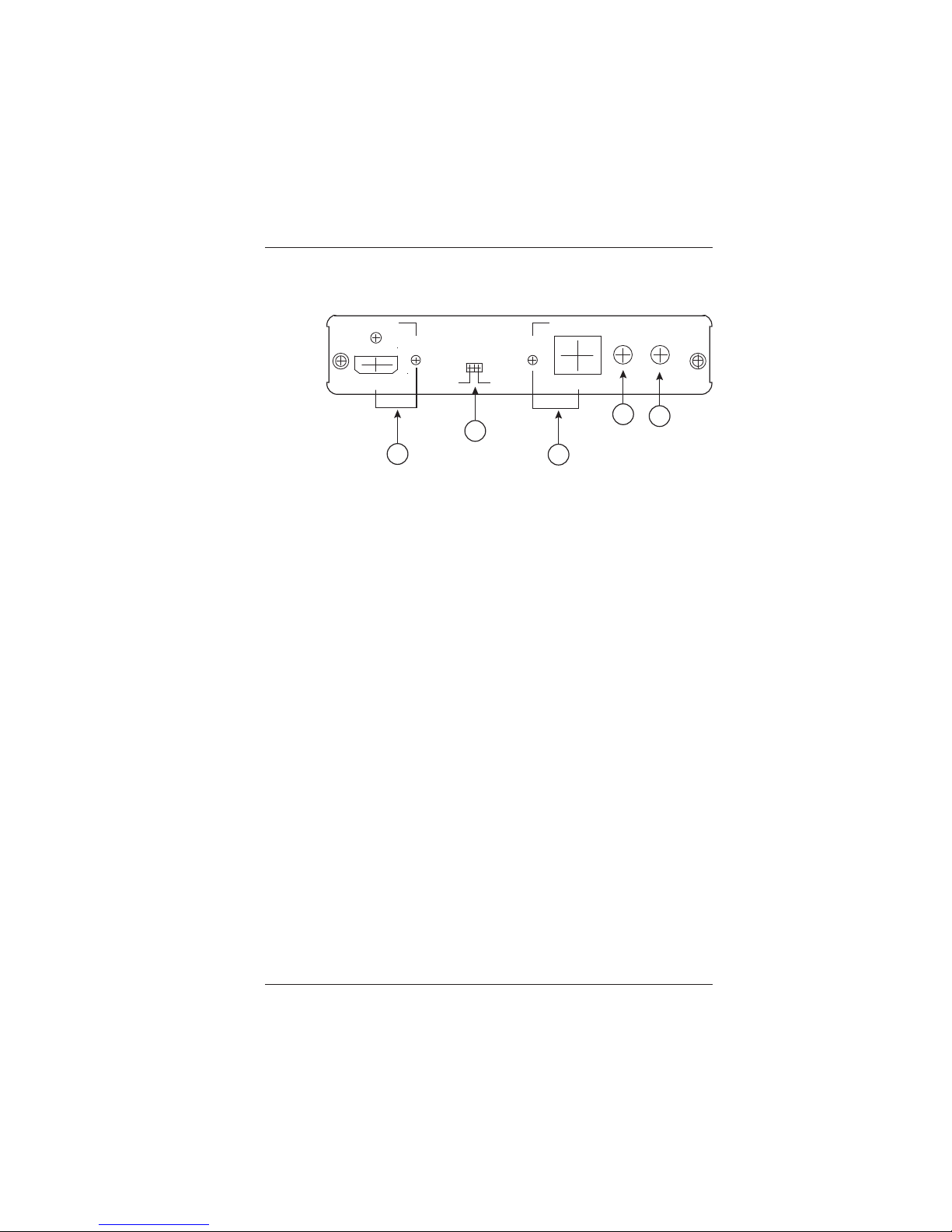
2.2 Receiver Rear Panel
1. HDMI OUT and LINK LED: Connect to HDMI display for instant
image display or cascade with another family type transmitter.
The LINK LED will illuminate once the active display signal is
detected.
2. EDID: Switch to A/B to allow device to output image according
to output A/B (A: HDMI, B:CA T OUT) port’s EDID. For example,
switch to A and both input and output A is connected to 4K2K’s
equivalence signal, both output A and B will obtain 4K2K’ s signal.
If output B is not connected with 4K2K’s display there will be no
image.
3. CA T -5e/6/7 OUT and LINK LED: Connect this port to CA T-5e/
6/7 to HDMI receiver with CAT -5e/6/7 cable along with display
to extend the signal up to 60m. Once the connection is made
with active signal the LINK LED will illuminate.
4. IR IN: Connect with the supplied IR Extender to receive IR
signal from transmitter side and blast out at receiver side. Ensure
that remote controller being used is within the direct line-ofsight of the IR Extender.
5. IR OUT: Connect with the supplied IR Blaster to blast out the
IR signal received from the receiver side. Place the IR Blastyer
in direct line-of-sight of the equipment to be controlled.
HDMI OUT CAT5e/6/7 OUT
LINK LINK
IR IN IR OUT
EDID
A
AB
B
1
2
3
4
5
Page 7
LBC-H-DRP-Lite User Manual
Link Bridge
TM
HDBaseT HDMI Transmission System w/Dropping and Repeating Video
Broadata Technical Support, (800) 214-0222
8
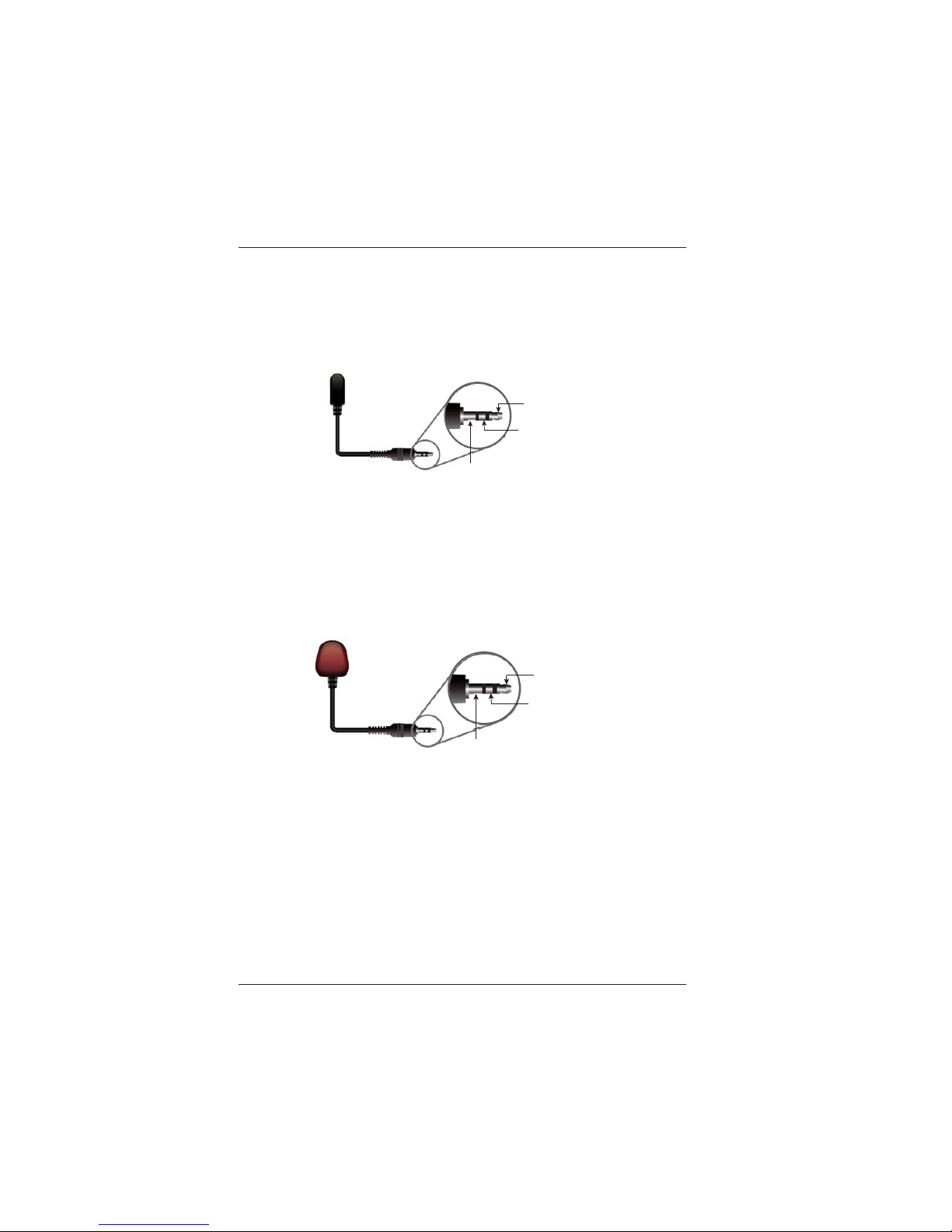
3.0 IR
3.1 IR Blaster Cable Pin Assignment
3.2 IR Receiver Cable Pin Assignment
IR Blaster
Power 5V
IR Blaster Signal
NC
IR Receiver
IR Signal
Power 5V
Grounding
Page 8

LBC-H-DRP-Lite User Manual
Link Bridge
TM
HDBaseT HDMI Transmission System w/Dropping and Repeating Video
Broadata Technical Support, [email protected]
9
4.0 MAINTENANCE AND TROUBLESHOOTING
4.1 Maintenance
There is no operator maintenance other then keeping the units
clean. However, observe the following light indicators to make
sure that the unit is working properly:
4.2 Troubleshooting
If the LBC-H-DRP-Lite units do not operate properly after
installation, check for possible cable breaks, loose connections,
and incorrect cable connections. If problems persist that may
be fiber related, contact BCI at 1-800-214-0222 for further
assistance.
For electrical problems, perform the following troubleshooting
procedures:
1. If the POWER indicator is OFF , check for the following:
a. The line cord is plugged into the unit and your outlet
has power.
2. If the POWER indicator is ON, but the Link indicator is
OFF, check for the following:
a. Make sure the appropriate cables are being used.
b. Cable and cable connectors are not broken.
c. For each unit, the transmit (TX) cable is connected to
the other unit’s receiver (RX).
Page 9

LBC-H-DRP-Lite User Manual
Link Bridge
TM
HDBaseT HDMI Transmission System w/Dropping and Repeating Video
Broadata Technical Support, (800) 214-0222
10
3. If the POWER indicator and Link indicator are ON, but
the channels are not operating, then:
a. Check to see that the attached user equipment is turned
on.
b. Both ends of the link are connected to the
corresponding equipment and to the same
corresponding channel port.
c. Cable connections at both channels are securely
fastened to each connector. T urn the power of f, then
back on to reset the link.
Page 10

LBC-H-DRP-Lite User Manual
Link Bridge
TM
HDBaseT HDMI Transmission System w/Dropping and Repeating Video
Broadata Technical Support, [email protected]
11
5.0 SPECIFICATIONS
Video/Audio Specifications
HDMI Version 1.4 with 3D, 4Kx2K
support
Video Resolution Up to 4K2K@30Hz
Protocol DDC/EDID Capable, HDCP 2.2
Video Bandwidth 300MHz/10.2Gbps
Audio Formats Supports up to 7.1CH and Dolby
TrueHD, DTS-HD Master Audio
HDMI/Audio Connector HDMI Female Plug
IR
Data Rate 30 - 50KHz
In/Out Connectors 3.5mm S tereo
HDBT Transmission
Cable Type CAT-5e/6 or higher
Number of Cables 1
Connector/Distance RJ-45/Up to 60m
Physical
Dimensions 5.71” (W) x 6.77” (D) x 1.38” (H)
Power Consumption +24VDC @ 1.25 Amps (Max.)
Operating Temperature 0 to 40o C
Humidity 0 to 95%, non-condensing
Page 11

LBC-H-DRP-Lite User Manual
Link Bridge
TM
HDBaseT HDMI Transmission System w/Dropping and Repeating Video
Broadata Technical Support, (800) 214-0222
12
6.0 SERVICE PROCEDURE
6.1 Replacement Policy
Standard products found defective on arrival (DOA) will be
replaced, based on availability, within 24 to 48 hours anywhere
in the U.S. Please call Customer Service at 800-214-0222 for
information.
6.2 Return/Repair Service
The LBC-H-DRP-Lite System contains no user serviceable
components. If you have a problem with your unit, please contact
the Customer Service Department. T o facilit ate our return/repair
processing please contact Broadata Communications, Inc. to
obtain a Return Material Authorization (RMA). Please include
the following information:
• Product model number
• Serial Number
• Complete description of problem
• Hardware installation description
Broadata Communications, Inc.
2545 West 237th Street, Suite K
Torrance, CA 90505
1-800-214-0222
(310) 530-1416
(310) 530-5958 (Facsimile)
e-mail: [email protected]
Website: www.broadatacom.com
Page 12

LBC-H-DRP-Lite User Manual
Link Bridge
TM
HDBaseT HDMI Transmission System w/Dropping and Repeating Video
Broadata Technical Support, [email protected]
13
7.0 LIMITED WARRANTY
Broadata Communications, Inc. (BCI) warrants, for a period of one
year from date of shipment, each product sold shall be free from defects
in material and workmanship. BCI will correct, either by repair, or at
BCI’s election, by replacement, any said products that in our sole
discretion prove to be defective and are returned to the manufacturing
location within 30 days after such defect is ascertained. All warranties
are limited to defects arising under normal use and do not include
malfunctions or failure resulting from misuse, abuse, neglect, alterations,
electrical power problems, usage not in accordance with product
instructions, improper installation, or damage determined by BCI to
have been caused by the Buyer or repair made by a third party . Limited
warranties granted on products are to the initial customer end-user and
are not transferable. OUR LIABILITY UNDER THIS W ARRANTY SHALL
IN ANY CASE BE LIMITED TO THE INVOICE VALUE OF THE
PRODUCT SOLD AND BCI SHALL NOT BE LIABLE TO ANYONE FOR
CONSEQUENTIAL OR INCIDENT AL DAMAGES ARISING FROM THE
USE OF ITS PRODUCTS OR THE SALE THEREOF. We make NO
WARRANTY AS TO THE MERCHANTABILITY OF ANY GOODS, OR
THAT THEY ARE FIT FOR ANY PARTICULAR PURPOSE OR END
APPLICA TION NOR DO WE MAKE ANY WARRANTY, EXPRESSED
OR IMPLIED OTHER THAN AS STATED ABOVE.
Page 13

LBC-H-DRP-Lite User Manual
Link Bridge
TM
HDBaseT HDMI Transmission System w/Dropping and Repeating Video
Broadata Technical Support, (800) 214-0222
14
Page 14

LBC-H-DRP-Lite User Manual
Link Bridge
TM
HDBaseT HDMI Transmission System w/Dropping and Repeating Video
Broadata Technical Support, [email protected]
15
Page 15

LBC-H-DRP-Lite User Manual
Link Bridge
TM
HDBaseT HDMI Transmission System w/Dropping and Repeating Video
Broadata Technical Support, (800) 214-0222
16
Page 16

Broadata Communications, Inc.
2545 West 237th Street, Suite K
Torrance, CA 90505
1-800-214-0222
(310) 530-1416
(310) 530-5958 (Facsimile)
e-mail: [email protected]
Website: www.broadatacom.com
60000-LBCHDRPLITE
 Loading...