

Page 1
Technical Data
Double 13 Amp Socket Outlet with USB Charger
Brief product description:
Free up your sockets using the Nexus
White Moulded Socket with USB charger
capability ideal for charging iPad, iPhone,
tables, mobiles, cameras and more.
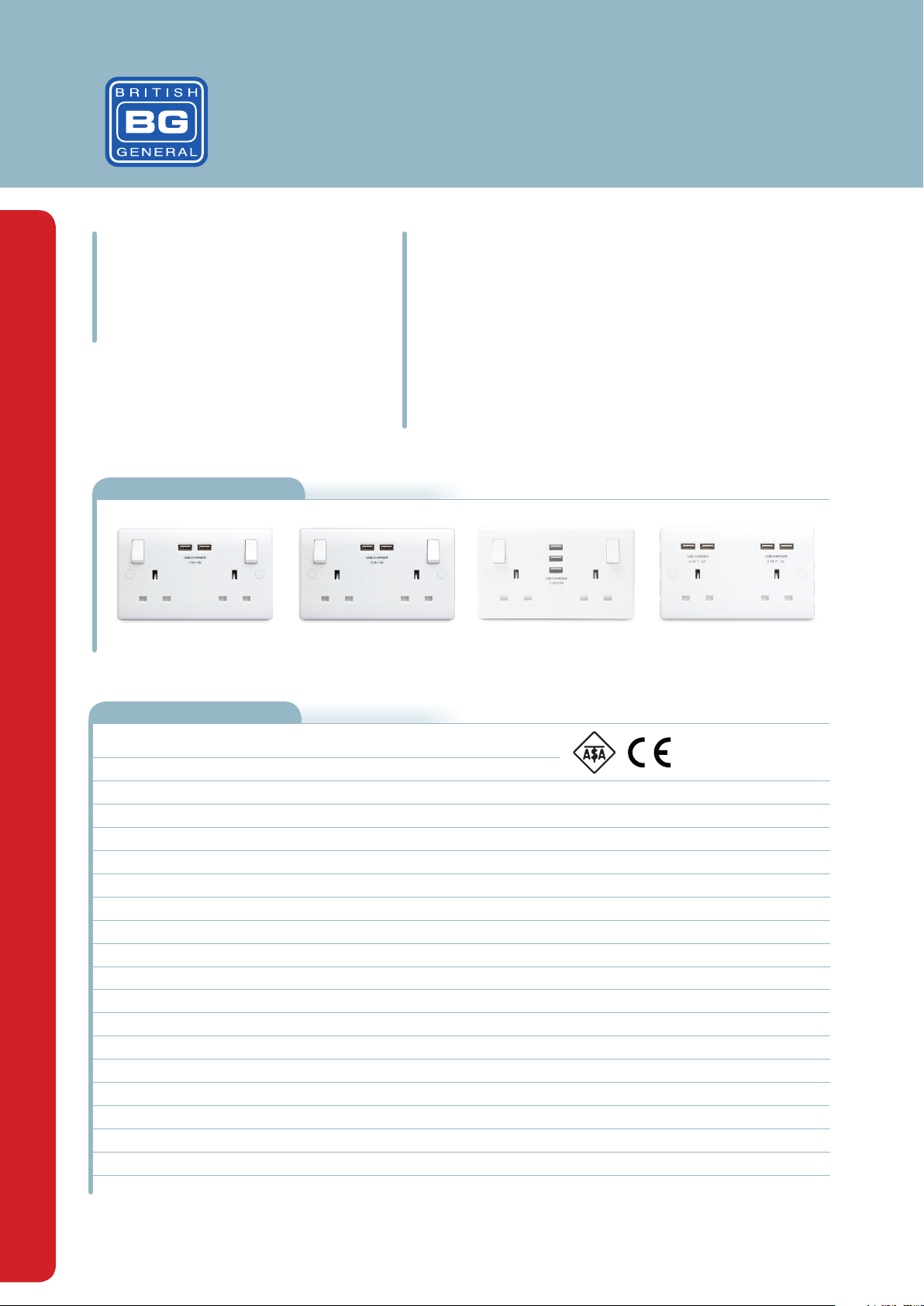
Product Images
822U3822U 822U33 824U44
Features:
• White moulded round edge, sleek and slim with softly
rounded edges
• Smart USB - Standby mode when device is fully charged;
AutoDetect's the USB device and adjusts charging pattern to
suite; protective overload function
• USB charger standby mode when not in use
• Angled colour coded terminals with captive screws
Technical Specifications
Standard(s)
ASTA Approval
Rating
Contact Gap
Switch Type
Terminal Capacity - L & N
RoHS Directive
WEEE Directive
Mounting Box Depth (Min)
Fixing Centres
USB Output
Output Tolerance
Stand-by Power
USB Overcurrent Protection
BS1363-2:2016
Licence Number 1182
13 Amp 240V~
3.0mm minimum
Single Pole (824U44 Unswitched)
3 x 2.5mm², 3 x 4.0mm² & 2 x 6.0mm²
Yes, conforms
Yes
25mm
120.6mm
822U 5V, 2.1A, shared across two USB ports
822U3 5V, 3.1A, shared across two USB ports
822U33 5V, 3.1A, shared across three USB ports
824U44 5V, 4.2A, shared across four USB ports
<5%
<75mW
822U ≦2.43A
822U3 ≦3.60A
822U33 ≦3.60A
824U44 ≦4.85A
Page 2
Double 13 Amp Socket Outlet with USB Charger
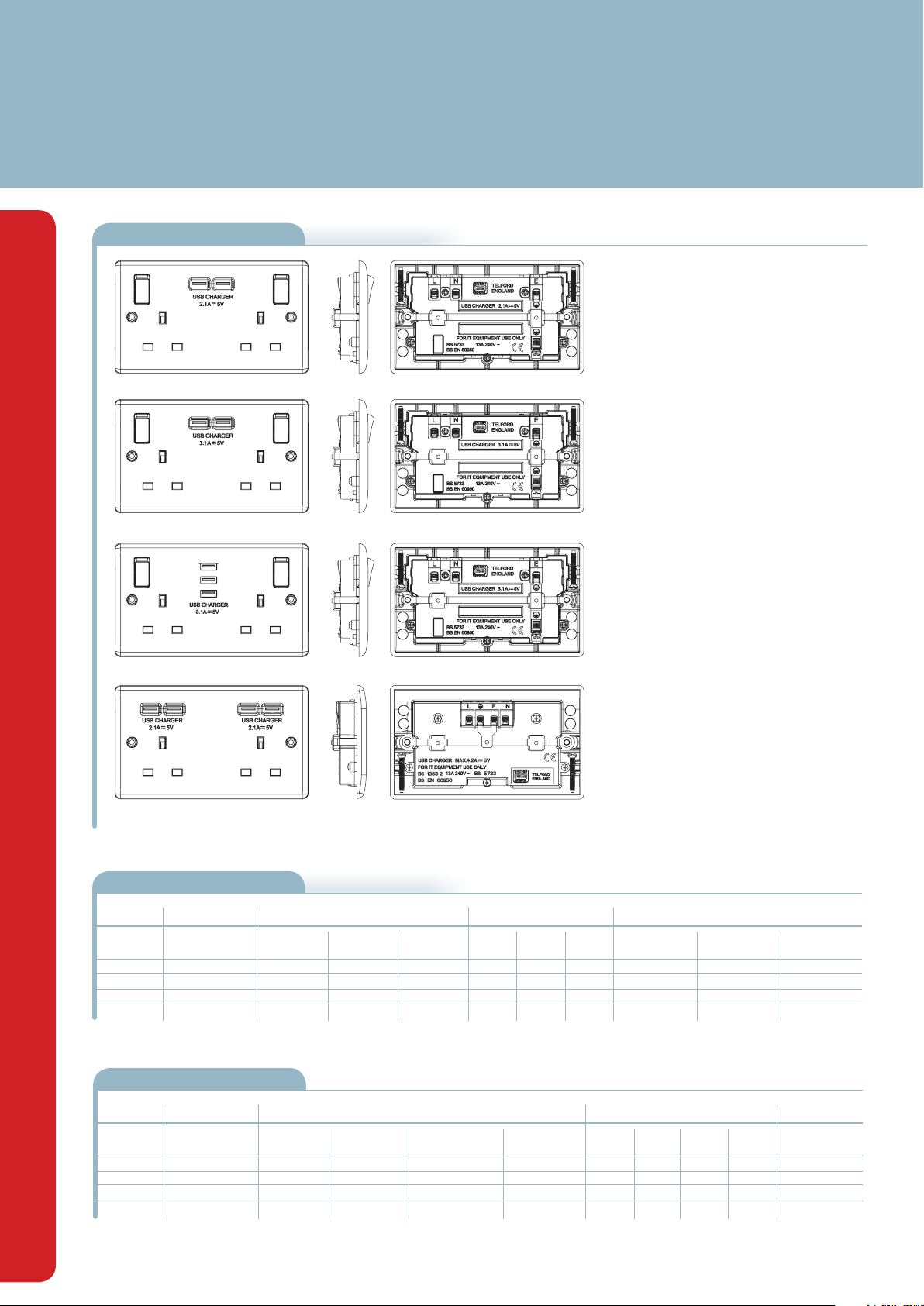
Line Diagrams
822U
822U3
822U33
824U44
Packaging Information
Cat No. Description
822U-01
822U3-01
822U33-01
824U44-01
2g, 2xUSB (2.1A)
2g, 2xUSB (3.1A)
2g, 3xUSB (3.1A)
2g, 4xUSB (4.2A)
Packaging Type
Product Each IndividualInner Box Inner
Eco Blister
Eco Blister
Eco Blister
Eco Blister
Box
Box
Box
Box
Carton
Carton
Carton
Carton
Weights & Dimensions
Cat No. Description Dimensions (L x W x D) cm
822U-01
822U3-01
822U33-01
824U44-01
2g, 2xUSB (2.1A)
2g, 2xUSB (3.1A)
2g, 3xUSB (3.1A)
2g, 4xUSB (4.2A)
Unpacked
Product
8.6 x 14.6 x 3.3
8.6 x 14.6 x 3.3
8.6 x 14.6 x 3.3
8.6 x 14.6 x 3.3
Packed
Product
11.0 x 23.0 x 3.6
11.0 x 23.0 x 3.6
11.0 x 23.0 x 3.6
11.0 x 23.0 x 3.6
Inner Box Outer Box
16.7 x 14.2 x 9.3
16.7 x 14.2 x 9.3
16.7 x 14.2 x 9.3
16.7 x 14.2 x 9.3
Pack Quantity
Box
1
1
1
1
5
5
5
5
48.5 x 30.0 x 19.0
48.5 x 30.0 x 19.0
48.5 x 30.0 x 19.0
48.5 x 30.0 x 19.0
Box
50
5050765107105
50
5050765136945
50
5050765137157
50
5050765137171
Weight (kg)
Each Inner
Packed
Product
0.198
0.186
0.198
0.186
0.198
0.186
0.198
0.186
Barcode
Inner BoxOuter Box Outer
5050765106887
5050765142571
5050765142953
5050765142991
Outer
Box
1.02
1.02
1.02
1.02
Box
10.62
10.62
10.62
10.62
Outer Box
5050765106993
5050765142762
5050765142977
5050765143172
CBM (m3)
Outer Box
0.02
0.02
0.02
0.02
Page 3
Double 13 Amp Socket Outlet with USB Charger
Installation Information
Safety Warning
For your safety, this product must be installed in accordance with local building regulations. If in any doubt, or where required by the law, consult a competent person who is registered with an
electrical self-certification scheme. Further information is available online or from your Local Authority.
Please read carefully and use in accordance with these safety wiring instructions.
Before commencing any electrical work ensure the supply is switched off at the mains either by switching off the consumer unit or by removing the appropriate fuse.
Wiring should be in accordance with the latest edition of the IET regulations (BS 7671). To prevent fire hazard always use cable of the correct rating, size and type for the application.
Any bare earth wires must be covered with appropriate green/yellow sleeving.
Warning do not exceed the load rating of this device as stated on the rear of the product.
If in doubt consult a competent electrician.
Wire Identification – Twin & Earth Cable
EARTH = Green/Yellow Sleeving
NEUTRAL = Black (pre Apr 04) / Blue (after Apr 04)
LIVE = Red (pre Apr 04) / Brown (after Apr 04)
The ends of the individual conductors should have the insulation removed by approx.12mm. Any bare earth conductors should be sleeved to within 12mm of the ends.
(These details are for general information only and conductor lengths may need to be trimmed in certain installations).
General Installation Instructions
1) If using the new product to replace an old one, note the cable connections and wire up new product in the same way as the old one, with Earthing as stated in these instructions.
2) Ensure the mounting box (metal or patress) for either flush or surface mounting is the appropriate size for the product.
3) Route the cable through the most suitable entry point of the mounting box. If a metal box is used, a protective cable grommet should be used.
4) Cables should be prepared so a sufficient conductor length reaches the terminals. Strip the ends of the individual conductors so that an adequate length enters the terminals.
5) Carefully arrange the wiring to lie along the edges of the product or box, keeping the central area clear.
6) To assist with the correct installation please consult the appropriate wiring diagram on this leaflet.
7) When connecting the new accessory ensure that only the bare end of the wire enters the terminal, and no bare wires are visible.
Always tighten the terminal screws securely, but do not overtighten.
An earth connection should always be made between the mounting box earth terminal, and the accessory earth terminal, where fitted. If this earth wire is bare, it is essential that it is sheathed
with a length of green/yellow sleeving.
8) Carefully position the accessory into the wall box, ensuring that no wires are trapped between the plate and the wall. Do not overtighten the screws. (Fit screw covers + clip-on)
9) Once work has been completed correctly, replace the fuse for the circuit, switch the power back on, and test.
The product is now ready for use.
* Note - If your installation uses a four lug metal mounting box, remove the top and bottom lugs or bend fully back.
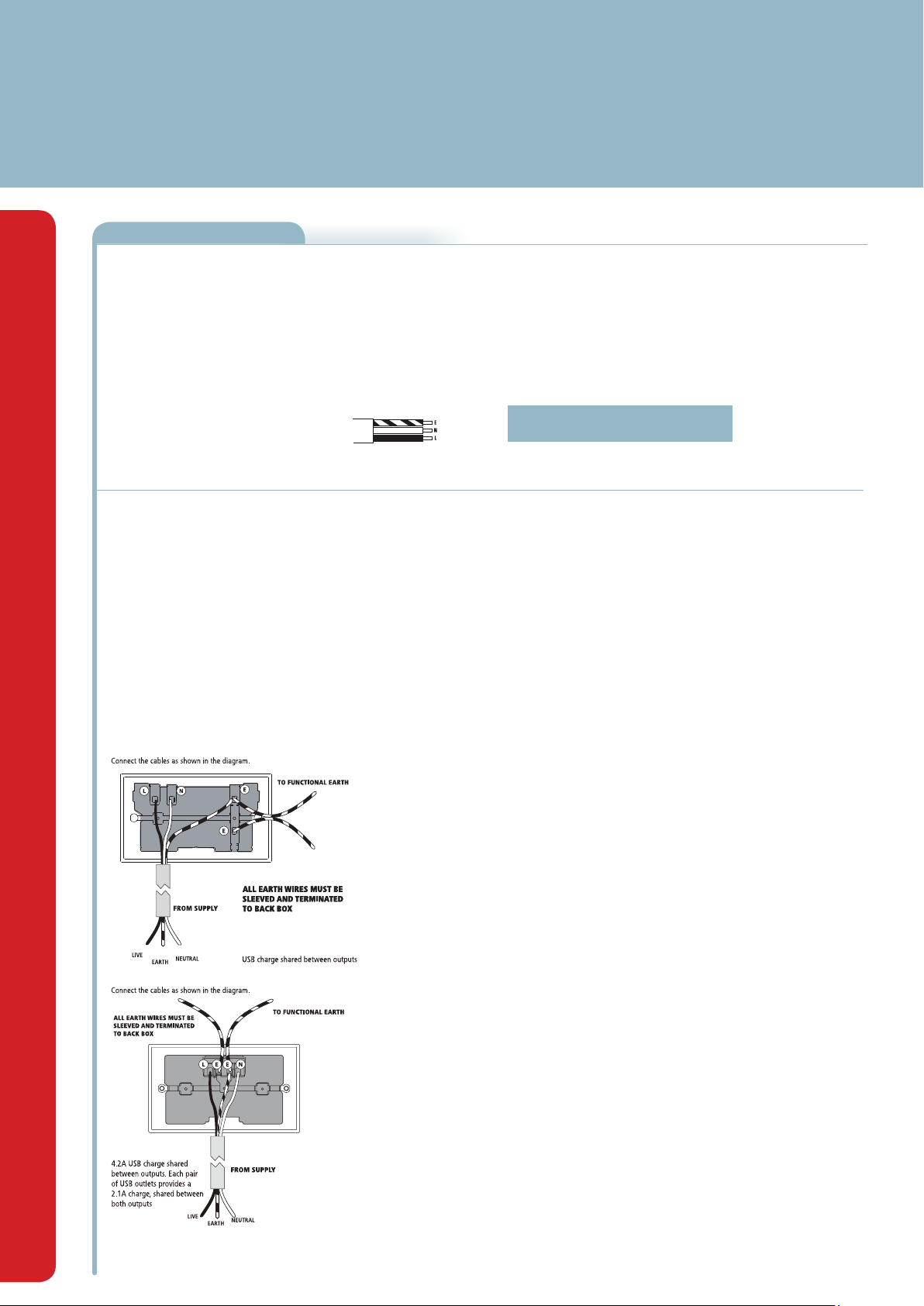
Twin Earth Fitted
This socket is fitted with with two linked terminals to provide a dual earth facility. This is for use in "clean earth" installations where additional earth capacity is required to comply with Regulation
607 of BS7671 IEE Wiring Regulations. Connect the cables as shown in the diagram.
2 gang Switched Socket Line Drawing USB Charger Information
• 13A Sockets with USB charging ports for charging mobile devices such as mobile phones, MP3 players an tablets.
• Total charger current can be delivered from one USB socket or divided between outputs as required
• For 3.1A output chargers, if a device was charging using 1.5A then it would leave the other port with 1.6A. This
means that devices may charge more slowly than with a normal single plug charger
• The speed of charging will depend on the batery capacity of the device and not charge output of the socket. A device
with a battery capacity of 1500mAh will not charge any faster with a 3.1A charger compared to a 2.1A charger.
• The total output current achieved is dictated by the specific device being charged and other external factors, such as
the quality of the charging cable being used
• When not in use, the USB sockets are in a low energy standby mode.
• The USB circuits on this socket are designed to withstand insulation resistance tests at 500V
Note - The front surface of this product may become warm in use. This is normal and not cause for
concern.
Technical Helpline: 03300 249 279
If in doubt consult a competent electrician.
2 gang Unswitched Socket Line Drawing
 Loading...