

Page 1

PartyPro 320A
Active Karaoke & PA Speaker
User Guide
Page 2

IMPORTANT!
To prevent from Bluetooth transmission lost or bad
receiving of wireless microphones, DO NOT use or store
the device and its microphones in a magnetic
environment.
Do NOT drop the device or apply excessive force to it.
Do NOT subject the device to extreme temperatures.
Do NOT expose the device to high temperatures or place
it near a fire or heat source, so to avoid damaging the
battery.
This devise is NOT waterproof. Do NOT use or store the
device in a place near water, raindrops, juice, coffee,
perspiration, etc., or otherwise in places with excessive
humidity or steam.
Clean only with a soft, dry cloth.
WARNING!
Do NOT attempt to disassemble, repair, reassemble the
device on your own, or remove the warranty sticker. Any
of these actions will void the warranty and any repair
services covered thereunder.
Do NOT replace the Li-Ion Battery on your own. This will
void the warranty.
NOTICE!
The information provided in this User Guide is subject to change without
prior notice.
Page 3

The Federal Communication Commission Statement
This equipment has been tested and found to comply with the limits for a Class B Digital Device, pursuant to
Part 15 of the FCC rules. These limits are designed to provide reasonable protection against harmful
interference in a residential installation. T
his equipment generates, uses and can radiate radio frequency
energy and, if not installed and used in accordance with the instruction, may cause harmful interference to
radio communication. However, there is no guarantee that interference will not occur
in a particular
installation. If this equipment does cause harmful interference to radio or television reception, which can be
determined by turning the equipment off and on, the user is encouraged to try to correct the interference
by one of more of the following measures: -
- Reorient or relocate the receiving antenna.
- Increase the separation between the equipment and receiver.
-
Connect the equipment into an outlet on a circuit different from that to which the receiver is
connected.
- Consult the dealer or an experienced Radio/TV technician for help.
Use only shielded cables to connect I/O devices to this equipment. You are cautioned that change or
modifications not expressly approved by the party responsible for compliance could void yo
ur authority to
operate the equipment.
THIS DEVICE COMPLIES WITH PART 15 OF FCC RULES. OPERATION IS SUBJECT TO THE
FOLLOWING TWO CONDITIONS:
1 This device may not cause harmful interference and
2 This device must accept any interference received, including interference that may cause undesired
operation.
The antenna used for this transmitter must not be collocated or operation in conjunction
with any other antenna or transmitter.
Notice : The changes or modifications not expressly approved by the party responsible
for compliance could void the user’s authority to operate the equipment.
IMPORTANT NOTE: To comply with the FCC RF exposure compliance requirements, no change
to the antenna or the device is permitted. Any change to the antenna or the device could result
in the device exceeding the RF exposure requirements and void user’s authority to operate
the device.
Page 4

PART 1. Getting Started
1.1 Package Contents
Included in this package are:
PARTYPRO 320A Main Speaker and Associated
Speaker
DC Power Adapter
(AC 100-240V/50-60Hz in; DC 19V1.5A out)
IR Remote Control
Audio Cable (connector 3.5mm-3.5mm)
Connecting Audio Wire (for pairing speakers)
User Guide
NOTE: Actual contents may vary according to sales
territories and their respective sales representatives.
1.2 Important Instructions for Battery
A rechargeable Li-Ion battery is built-in on main
speaker. Make sure it is charged over 12 hours before
first use. The battery status LED will turn to green (or
blinking) from red color after fully charged.
Suggest to connect AC power to keep the best
performance of speakers.
The sound quality and volume will decrease when
battery volume is insufficient.
The battery playback time is around 8-10 hours (main
speaker only). The battery charge time is around 12
hours.
Page 5
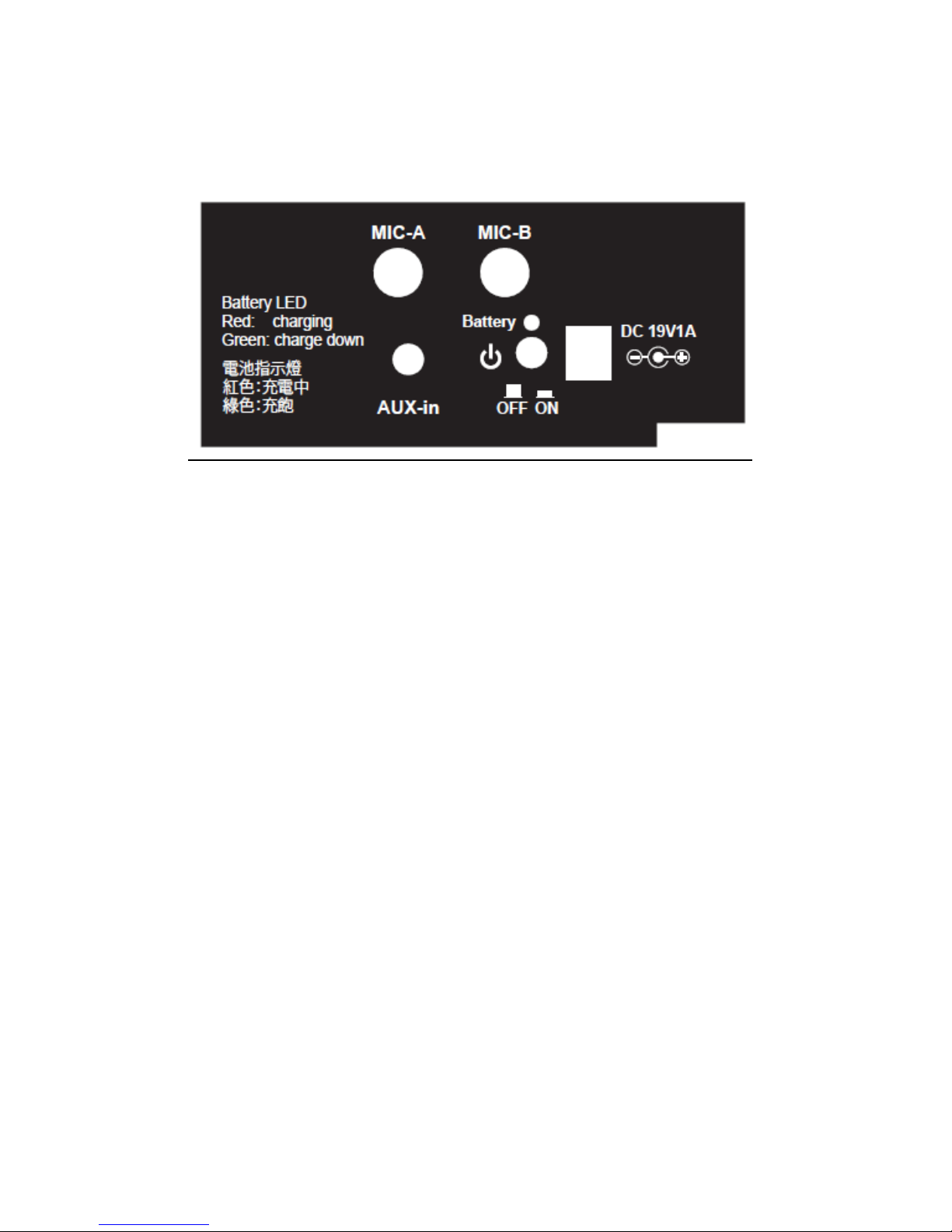
1.3 Jacks and Buttons on Rear Panel of Main Speaker
The rear panel on main speaker
1. Power Jack: DC19V1.5A input.
2. Power On/Off button
3. Battery status LED: LED remains red during charging.
LED turns to green once fully charged. An over charge
protection is on if LED is blinking.
4. AUX-in: this 3.5mm jack connects to audio output of
smart phone, tablet, laptop, or any music source.
5. MIC-A, MIC-B: microphone input jacks, Ø6.3mm
connector, 600Ω±30% impedance。
Connecting Between Speakers
1. Use the standard audio wire to connect main speaker
and associated speaker.
2. The main speaker is good for outdoor. The associated
speaker is not necessary to connect to main speaker.
Page 6
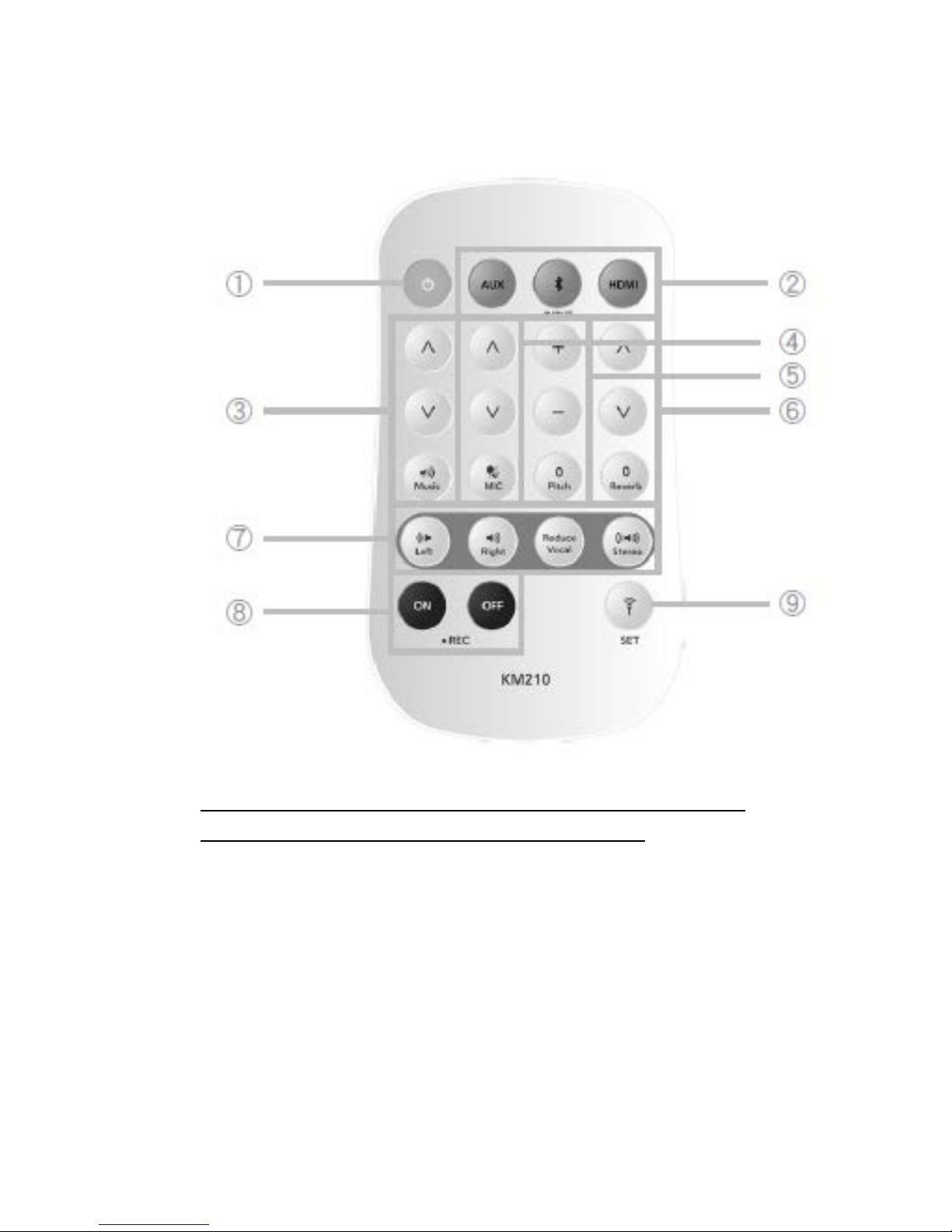
1.4 Remote Control & Use
The LED will blink RED once whenever you press any
button to confirm the command received.
1. Power Button
Turn on or turn to standby the PARTYPRO 320A
during power is ON.
Warning: Always switch the main power button to
OFF if the speaker is standby over 1 hour for battery
volume saving.
2. Input Source
Choose one of input sources from AUX or Bluetooth.
Page 7

Note: The default input is Bluetooth. The Bluetooth
will pair the device which had been paired before
automatically. The Bluetooth will enter manual
pairing mode after 15 seconds if paired device is
not found.
3. Music Volume Adjustment
Increases or decreases the music volume from 0-15
range. The lower button is mute and it is preset to
“8”.
4. Microphone Volume Adjustment
Increases or decreases the microphone volume
from 0-15 range. The lower button is mute and it is
preset to “8”.
5. Pitch Adjustment
The device takes full range pitch adjustment from
+12 to -12. Pressing the lower button「0」 will force
back to original pitch.
6. Reverb Echo Adjustment
The device is with versatile 8 reverb echo sound
effects. They are Jazz, Hall, SuperPro, Church, Pro,
Echo, OnStage and SuperEcho in low to strong
sequence. It is preset to「OnStage」to provide
stronger effect.
7. Vocal Multiplexing and Vocal Reduce:
Switch between right track or left track on karaoke
vocal multiplexing. The device will reduce about
60%-80% original vocal of MP3/Music Video once
「Reduce Vocal」 pressed. The「Stereo」will release
the settings and go back to preset stereo playback.
Note: The vocal reduce effect may differ due to
different song recording. Normally it will reduce
60%-80% original vocal is average.
Page 8

8. REC (Recording)
For KM210 only.
9. SET
For KM210 only.
Page 9

PART 2. Using PARTYPRO 320A
1.1 Basic Operation
1. Turn the Bluetooth of your source device ON if you
are using Bluetooth connection.
2. Turn ON the power button (or from remote control if
the main speaker is standby), and the speaker will
enter the automatic pairing mode of Bluetooth.
3. Pairing the Bluetooth. Or press AUX on remote
control to choose audio input from 3.5mm jack.
The first 15 seconds will be in automatic pairing
mode, the device will search and pair any
available device which paired with PARTYPRO
320A before automatically
.
The device will be in manual pairing mode after
15 seconds if automatic pairing is not available.
Search KM300 as the device ID. The LED in front
panel will turn to blue instead of blinking blue to
confirm the successful Bluetooth connection.
4. Now playback songs on your source (phone, tablet,
laptop,…) and start to sing.
Warning:
Always turn off the microphone of your input source to
prevent the sound feedback. For iPhone/iPad, go to
Setting>Privacy>Microphone to turn off the APPs’
microphone.
Page 10

3.2 Advanced Features
PARTYPRO 320A uses remote control as the command
inputs.
Volume Control
Volumes of music and microphone can be adjusted
separately. To prevent the bad sound quality caused
by speaker overload, always tune your input source to
be under 80% of volume.
Pitch Adjustment
Pitch can be adjusted dynamically from +12 to -12
ranges. Whenever you change a pitch, this pitch will
be fixed until the「0」button pressed.「0」will make
pitch to go back the original key.
Reverb Echo Effects
The device is with 8 varieties of reverb/echo sound
effects. From weak to stronger effect, they are Jazz,
Hall, SuperPro, Church, Pro, Echo, OnStage, and
SuperEcho. OnStage is the preset effect.
Vocal Multiplexing and Vocal Reduce
User can switch between LEFT, RIGHT, or STEREO
tracks for karaoke vocal multiplexing, otherwise to
press「Reduce Vocal」button to remove the original
vocal from MP3/MV (music video) songs. Refer to
chapter 1.3 for further information.
Page 11

PART 3. Certifications, Liability, and Trademarks
Certifications
This device is CE and FCC certified.
Limited Liability
Neither the manufacturer nor the dealer will be
responsible for any accidental damage including bodily
injury resulting from any misuse or improper
operation by any user.
Trademarks
Karaoke Master is a registered trademark of XCUBE
Technology Inc. in Taiwan and other countries. All
other trademarks mentioned in this User Guide are
the property of their respective owners.
This product is manufactured and assembled in
Taiwan.
 Loading...