

Page 1

BMT-10
Guía de Instalación
Manual de Instrucciones
Page 2

Lea atentamente este manual de instrucciones antes de utilizar el aparato.
Este manual está sujeto a cambios sin previo aviso.
Si hay discrepancias entre este manual y el funcionamiento real del aparato, siga los pasos
indicados por el aparato o la pantalla.
Por motivos de seguridad, lea las siguientes medidas antes de utilizar el aparato.
Medidas de seguridad
Evite que el aparato reciba golpes o se caiga.
No utilice el reproductor en ambientes extremadamente fríos o calientes ni en lugares
polvorientos o húmedos.
No exponga el aparato a la luz solar directa.
Evite utilizar el reproductor en lugares con campos magnéticos intensos.
Mantenga el aparato alejado del agua o de otros líquidos. Si se introduce agua u otros
líquidos en el interior del aparato, desenchúfelo inmediatamente, séquelo y límpielo.
Para evitar la corrosión, no use soluciones químicas para limpiar el aparato. Límpielo con
un paño seco.
Nuestra empresa no se hace responsable en caso de daños por funcionamiento incorrecto
causado por mal uso, reparaciones, alteraciones o sustitución de componentes.
No intente desmontar, reparar o modificar el aparato usted mismo. De lo contrario, la
garantía quedaría invalidada.
1
Page 3

Características
- Lee archivos MP3/WMA desde memoria USB y tarjeta SD / MMC.
- Reproduce, desde Aux-in, la música de reproductores externos de audio tales como MP3,
CD, VCD, etc.
- 206 canales preestablecidos dentro 87.5MHz ~ 108.0MHz.
- Pantalla LCD 1,5” compatible.
- Incorpora cargador de 5V-1A por USB para cargar teléfonos móviles, auriculares
bluetooth, reproductores de MP3/MP4 y otros productos digitales.
- Diseño flexible que permite adaptarlo a todas las tomas de mechero.
- Ecualización: Normal, Rock, Pop, Clásica, Suave, Jazz, DBB, SRS.
- Alimentación desde toma de mechero: DC12V ~ 24V
- Mando a distancia con todas las funciones
Especificaciones técnicas
Intervalo de canales FM: 87.5 ~ 108.0 MHz (Total 206 canales)
Nivel de separación audio canal izquierdo/derecho: = 40 dB
Frecuencia de respuesta: 35 Hz ~ 20 kHz
Soporta: USB, AUX, SD, MMC
Entrada/salida audio: toma estéreo de 2,5 mm
Requisitos de alimentación: DC 12 V ~ 24 V
Cargador: USB 5V, 1A
Instalación
Inserte el BMT-10 en la toma del encendedor de cigarrillos de su vehículo.
Ajuste la frecuencia del BMT-10 para cualquier canal FM libre de la radio estéreo del
vehículo entre 87.7 ~ 108.0 MHz.
Se recomienda utilizar un canal libre que no reciba interferencias de otras frecuencias
cercanas.
Una vez efectuada la sincronización con la radio del vehículo, el BMT-10 podrá reproducir
música desde muchas fuentes, incluyendo dispositivo de memoria USB, tarjetas SD/MMC u
otras fuentes mediante la línea de entrada como reproductor MP3/MP4, reproductor CD o
iPod.
También se puede utilizar un cable auxiliar para conectar directamente el BMT-10 a la toma
de entrada estéreo.
2
Page 4

Funciones
1. CH + / CH-:
Ajuste la frecuencia de 0,1 en 0.1 MHz mediante una pulsación corta.
2. Botón :
Seleccione la canción anterior o siguiente mediante una pulsación corta
Mediante una pulsación larga puede cambiar el volumen
3. PLAY:
Pulse este botón para reproducir o parar la reproducción
Mediante un pulsación larga seleccione el modo de reproducción (todos, uno, carpeta al azar,
etc.)
4. Cargador USB
Cargador USB salida 5V-1A, para carga de teléfono móvil, auriculares bluetooth, reproductores
de MP3/MP4 y otros productos digitales en el coche.
3
Page 5
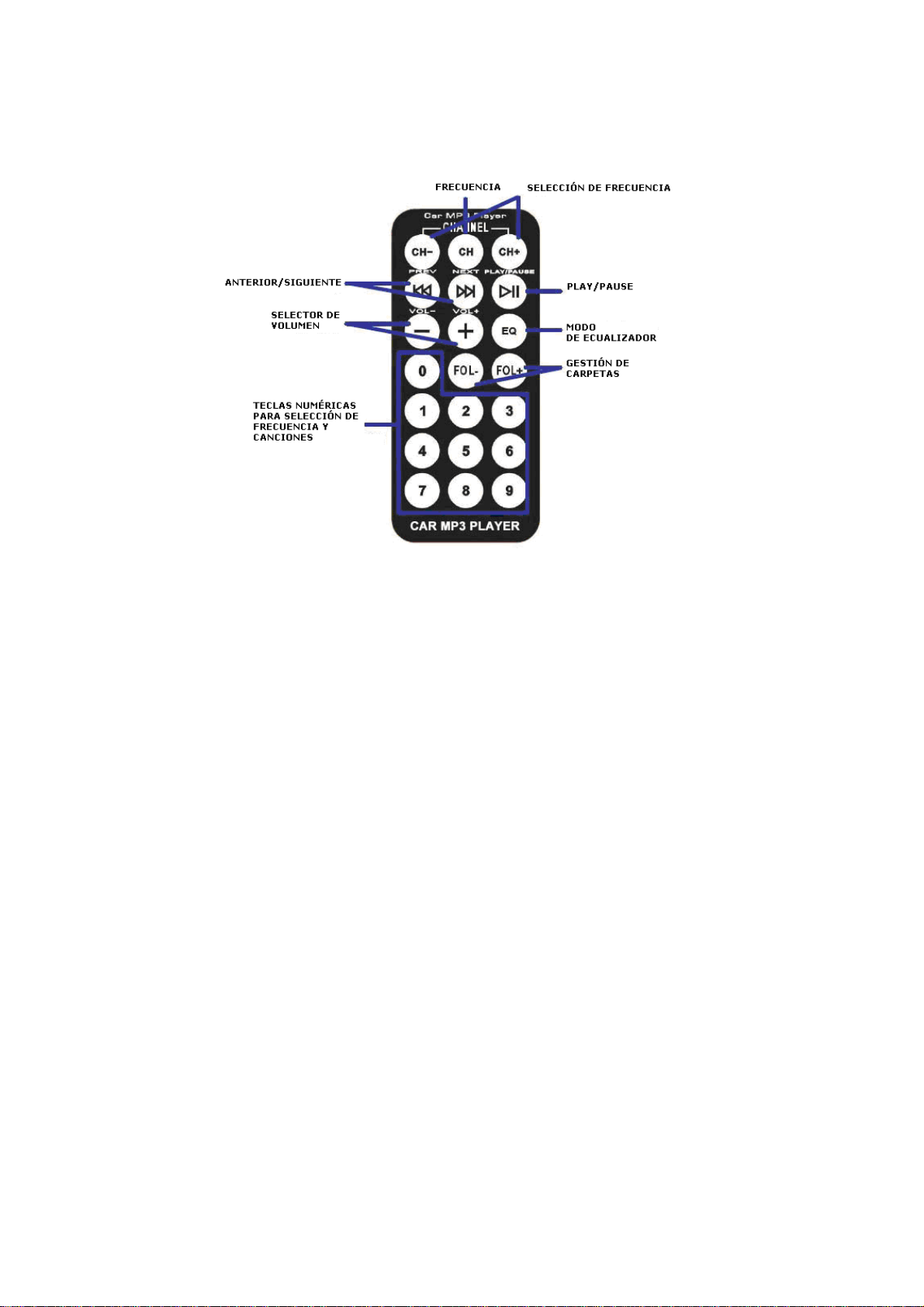
Mando a distancia
1. Botón CH: Para seleccionar una frecuencia concreta. (Por ejemplo, si usted quiere sintonizar
la frecuencia de 94.5MHz seleccione la tecla del número 0.945 y pulse el botón CH para
confirmar.)
2. CH + / CH: Ajuste de la frecuencia de 0,1 en 0.1 MHz mediante pulsación corta. Mediante
pulsación larga puede ajustarla con rapidez.
3. PREV / NEXT: Seleccione la canción anterior o la siguiente.
4. + / - : Suba o baje el volumen.
5. PLAY: Reproduce o pausa por pulsación corta. Mediante pulsación larga selecciona el modo
de reproducción.
6. Tecla numérica: Seleccione el número de la canción directamente. También puede
seleccionar la frecuencia pulsándola y luego confirmándola con el botón CH.
7. EQ: Normal, Rock, Pop, Clásica, Suave, Jazz, DBB, SRS.
Notas
- Por seguridad, por favor inserte el dispositivo USB o tarjeta de memoria antes de conectar el
dispositivo a la toma de cigarro coche.
- Si el dispositivo no puede leer datos desde un dispositivo USB o tarjeta de memoria, intente
volver a insertar la memoria USB / tarjeta de memoria, o vuelva a insertar el dispositivo en el
enchufe del encendedor de cigarrillos.
- La frecuencia de la radio del coche debe ser la misma que la del dispositivo.
- No extraiga o inserte un dispositivo USB o tarjeta de memoria mientras el dispositivo está
siendo alimentado por el encendedor del coche.
- El progreso puede ser lento cuando la memoria USB o tarjeta de memoria almacena gran
cantidad de información.
- Para alargar la vida de este aparato, no lo deje conectado continuamente.
4
Page 6
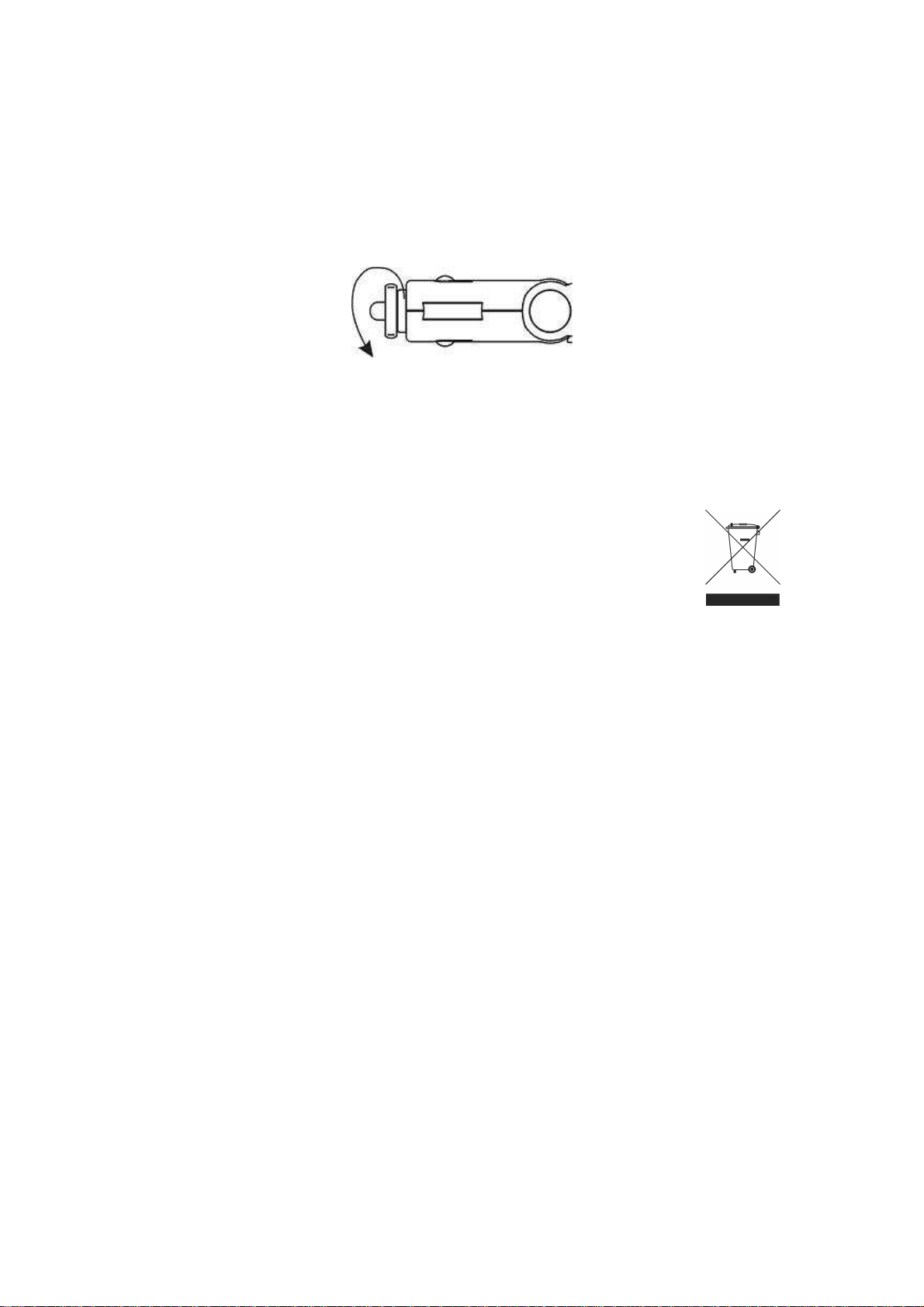
Cambio del fusible de seguridad
Cuando el aparato no funciona correctamente, puede deberse a un fallo del fusible de
seguridad. Si fuera necesario, sustituya el fusible de seguridad observando los siguientes tres
pasos:
Retire el dispositivo de la toma del encendedor de cigarrillos.
Desenrosque el extremo de la toma del encendedor.
Retire el fusible de seguridad fundido e inserte otro nuevo (hay un fusible extra en el embalaje).
IMPORTADO:
I.R.P., S.L.
SANTA CLARA DE CUBA 5
41007 SEVILLA
SPAIN
DECLARACIÓN DE CONFORMIDAD
I.R.P., S.L. declara bajo su responsabilidad que el aparato indicado cumple los requisitos de las
siguientes directivas:
DIRECTIVAS EMC
EN50371
EN60950-1
ETSI EN301 489-3
ETSI EN301 489-1
ETSI EN301 357-1
ETSI EN301 357-2
Descripción del aparato:
Modelo BRIGMTON BMT-10
Transmisor de sonido
Importador: I.R.P., S.L.
Dirección: Avda. Santa Clara de Cuba 5, 41007, Sevilla.
5
Page 7

BMT-10
6
Page 8

Installation Guide
Instruction Manual
7
Page 9

Features and Functions
1. Trendy design, private patent model, excellent sound quality
2. Read MP3/WMA files from USB stick and SD/MMC card
3. Aux-in function that enables you to enjoy music from external audio players such as MP3
player, CD, VCD, etc.
4. 206 preset channels within 87.5MHz~108.0MHz
5. 1.5 inch LCD display supports HI-FI music (High fidelity stereo)
6. Frequency and music memory function
7. 5V, 1A USB charger, charging for your mobile phone, Bluetooth headset, MP3/MP4 players
and other digital products in the car
8. Spring handle design enables you convenient to adjust the device position
9. Many EQ options: Normal, Rock, Pop, Classic, Soft, Jazz, DBB, SRS
10. Draw power from car cigar socket with in DC12V~24V
11. With 21-key remote control
Technical Specifications:
FM transmitting range: 87.5 MHz ~108.0MHz (Total 206 channels)
The sound channel separation: 40dB
Frequency response: 35Hz-20 KHz
Installation options: Plug & drive: Easy plug-in into cigarette lighter
Support: USB, SD/MMC, audio cable (Aux - in)
Audio Input the interface: 2.5MM stereo jack
Working voltage: DC 12V~24V
Charger output rating: USB 5V, 1A
Installation:
1. Insert the unit into car cigar socket.
2. Adjust the transmitting frequency of the unit to correspond channel between FM 87.5 MHz
~108.0MHz
3. Set the car fm channel the same with unit channel, then the unit could play music of USB stick or
SD/MMC, or other audio source through Aux-in.
8
Page 10
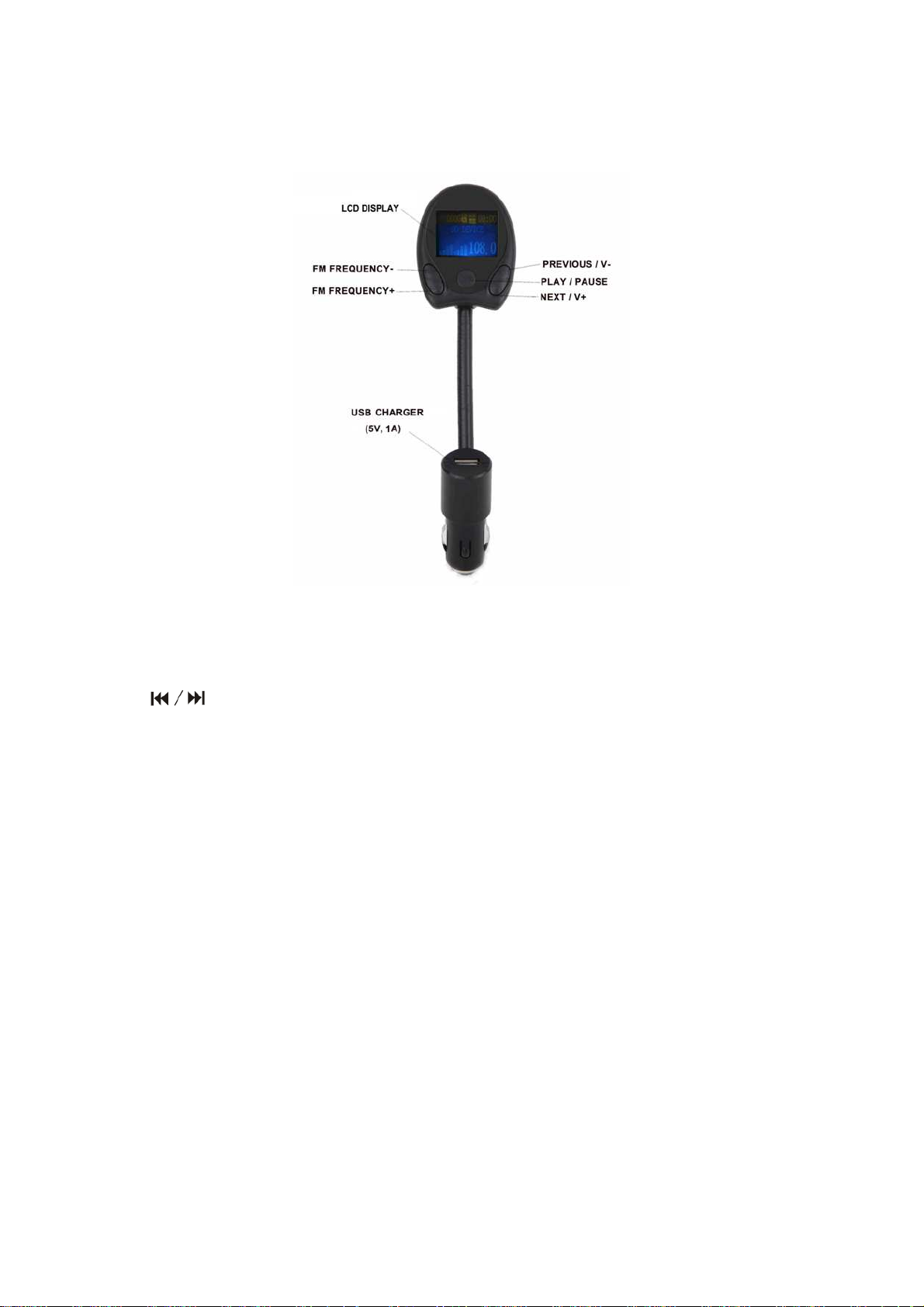
Operations on the Panel
Basic Operations:
1. CH+/CH- Button:
Adjusting the frequency with 0.1MHz by short press
2. Button:
Select the previous song or next song by short press
Enter into volume modulation by long press.
3. PLAY key:
Play or pause by short press
Long press to select circulation mode. (ALL, ONE, RANDOM, FOLDER)
4. USB Charger
5V, 1A USB charger, charging for your mobile phone, bluetooth headset, MP3/MP4 players and
other digital products in the car.
9
Page 11
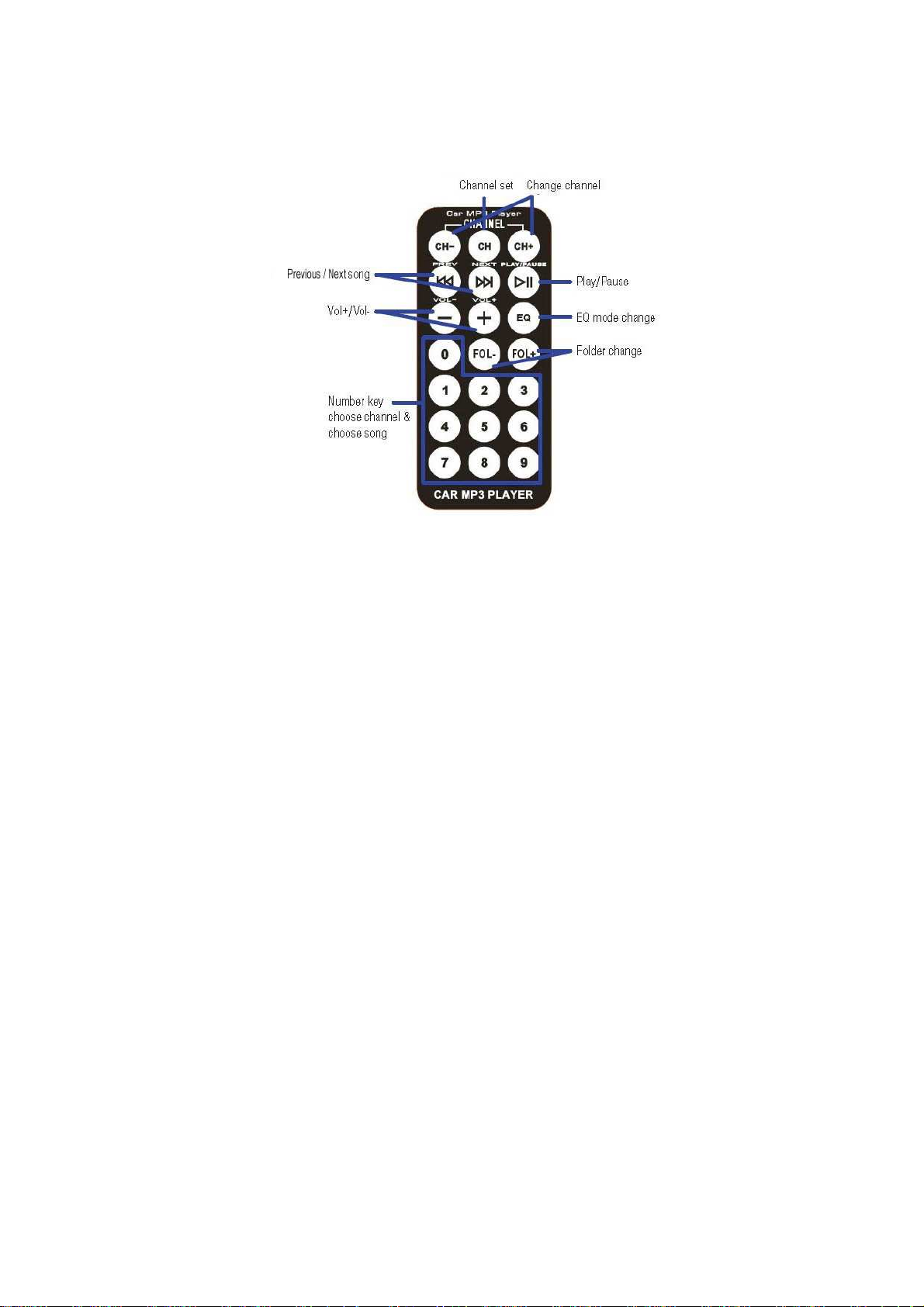
Operations on the Remote Control
Remote Control Functions
1. CH set key: Set the frequency after selecting the frequency directly by number key. (For
example, if you want to tune the frequency to 94.5MHz same as your car radio select the
number key 0945 and press the CH button to confirm.)
2. CH+/CH- key: Adjusting the frequency with 0.1MHz by short press; adjusting the frequency
quickly by long press.
3. PRVE/NEXT key: Select the previous song or the next one.
4. +/- Key: Volume turns up or turns down
5. PLAY key: Play or Pause by short press, Long press to select circulation mode.
6. Number key: Select the song number directly by press the number directly; Select the
frequency directly by press the number key first, then press the CH key to confirm.
7. EQ key: EQ optional: Normal, Rock, Pop, Classic, Soft, Jazz, DBB, SRS
Notice:
For the sake of safety, please insert the USB stick or memory card before you plug the
device into the car cigar socket.
If the device cannot read data from USB stick or memory card, try to reinsert the USB
stick/memory card, or reinsert the device into the cigarette lighter socket.
Frequency of the car radio should be the same as that of the device.
Do not pull out or insert a USB stick or memory card while the device is being powered by
the car cigarette lighter. If you want to, remove the device from the socket first and insert or
remove the disk or card before you re-power the device.
The progress may be slow when the USB stick or memory card stores too many audio files.
In order to extend the device life, please do not keep it in use for too long.
10
Page 12
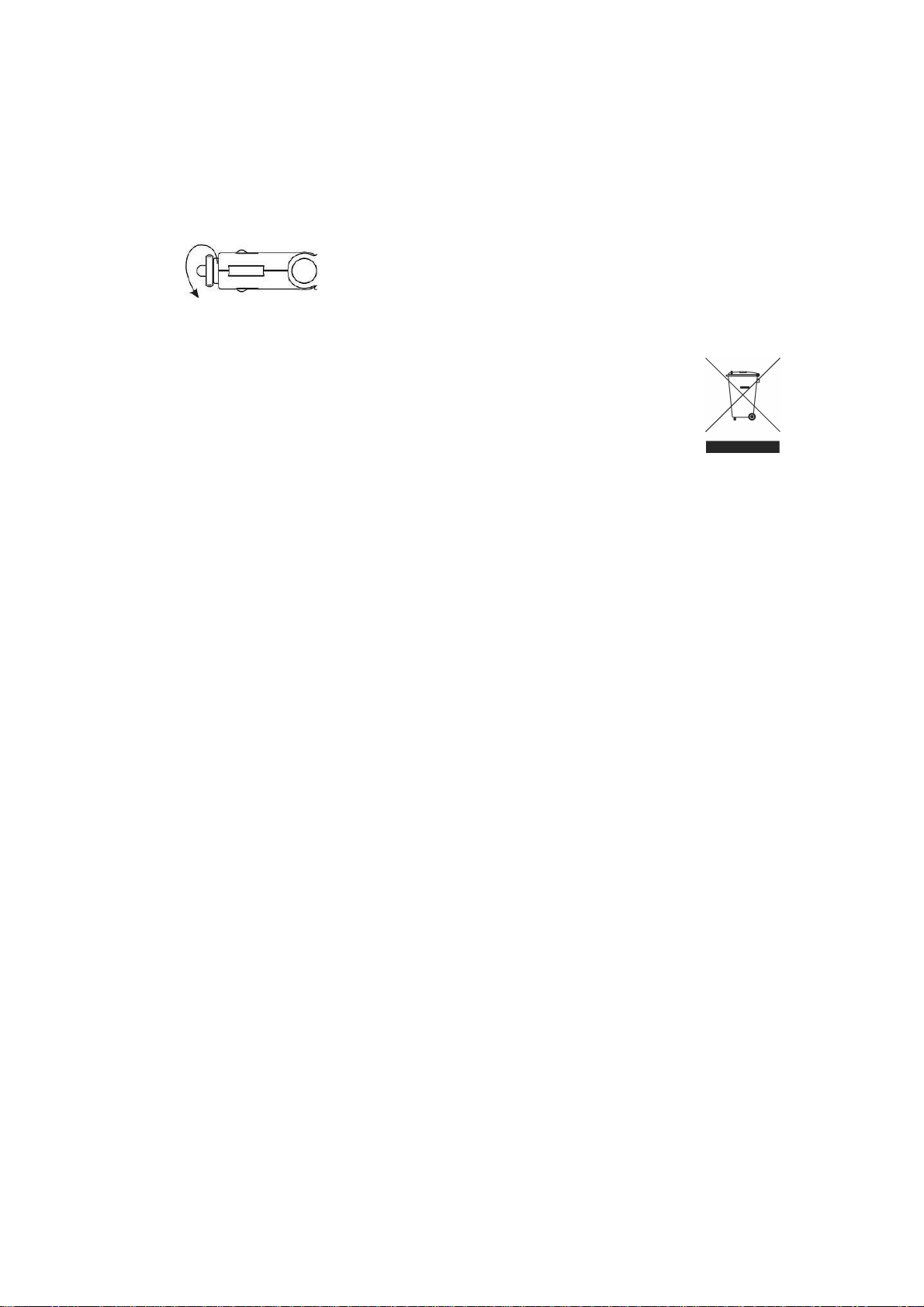
Safety Fuse Replacement:
When the device cannot work properly, it may due to the safety fuse failure. Please replace the
safety fuse following these steps if necessary:
• Remove the device from the cigarette lighter socket.
• Twist the tip of the cigar plug.
Remove the bad safety fuse and insert a new one (Extra in the package)
IMPORTED:
I.R.P., S.L.
SANTA CLARA DE CUBA 5
41007 SEVILLA
SPAIN
DECLARATION OF CONFORMITY
I.R.P., SL declare under our responsibility that the equipment meets the requirements indicated
in the following directives:
EMC DIRECTIVES
EN50371
EN60950-1
ETSI EN301 489-3
ETSI EN301 489-1
ETSI EN301 357-1
ETSI EN301 357-2
Description of apparatus:
BRIGMTON Model BMT-10
Sound transmiter
Importer: I.R.P., SL
Address: Avenida Santa Clara de Cuba 5, 41007, Sevilla.
11
 Loading...