

Page 1
MODEL # BL-4X2 - Oper at ing I ns t ruct ions
WARRANTY
If your product does not work properly because of a defect in materials or
workmanship, our Company (referred to as "the warrantor" ) will , for the length of
the period indicated as below, (Parts(2)Year ,Labor(90) Days) which starts with
the date of original purchase ("Limited Warranty period"), at its opti on either(a)
repair your product with new or refurbished parts, or (b) replace it with a new of a
refurbished product. The decision to repair or replace will be made by the
warrantor.
During the "Labor" Limited Warranty period there will be no charge for labor.
During the "Parts" warranty period, there will be no charge for parts. You must
mail-in your product during the warranty period. This Limited Warranty is extended
only to the original purchaser and only covers produc t purchased as new. A
purchase receipt or other proof of original purchase date is required for Limited
Warranty service.
Mail-In Service
When shipping the unit carefully pack and send it prepaid, adequately insured and
preferably in the original carton. Include a letter detailing the complaint and
provide a day time phone and/or email address where you can be reached.
LIMITED WARRANTY LIMITS AND EXCLUSIONS
1) This Limited Warranty ONLY COVERS failures due to defects in materials or
workmanship, and DOES NOT COVER normal wear and tear or cosmetic damage.
The Limited Warranty ALSO DOES NOT COVER damages which occurred in
shipment, or failures which are caused by products not supplied by warrantor,or
failures which result from accidents, misuse, abuse ,neglect, mishandling,
misapplication, alteration, faulty installati on, set-up adjustments, misadjustment of
consumer controls, improper maintenance, power line surge, lightning damage,
modification, or service by anyone other than a Fac tory Service center or other
Authorized Servicer, or damage that is attributable to acts of God.
2) THERE ARE NO EXPRESS WARRANTIES EXCEPT AS LISTED UNDER
"LIMITED WARRANTY COVERAGE".THE WARRANTOR IS NOT LIABLE FOR
INCIDENTAL OR CONSEQUENTIAL DAMAGES RESULTING FROM THE USE
OF THIS PRODUCT, OR ARISING OUT OF ANY BREACH OF THIS WARRNTY.
(As examples, this excludes damages for lost time, cost of having someone
remove or re-install an installed unit if applicable, travel to and from the service,
loss of or damage to media or images, data or other recorded content. The items
listed are not exclusive, but are for illustrati on only.)
3) PARTS AND SERVICE, WHICH ARE NOT COVERED BY THIS LIMITED
WARRANTY, ARE YOUR RESPONSIBILITY.
4
MODEL # BL-4X2 - Operating Instructions
BRIGHTLINK 4x2 HDMI Matrix, Support 3D
Operating Instructions
Dear Customer
Thank you for purchasing this product. For optimum performance and safety,
please read these instructions carefully before connecting, operating or adjusting
this product. Please keep this manual for future reference.
FEATURES
4 HDMI inp uts,2 HDMI standard outputs.
High Definition Audio support: Dolby TrueHD, and DTS-HD Master Audio.
The 2 HDM I output ports can be from the same or different sources.
Manual or remote select source input signal to different sink.
Auto Signal Enhancement feature can improve signal quality after long
distance transmission.
With remote controller.
High-definition Resolutions support: HDTV-up to 1080p.
Support 3D.
Supports 30/36bit deep color display
NOTICE
Our company reserves the right to make changes in the hard ware, packaging
and any accompanying documentation without prior written notice.
TABLE OF CONTENTS
Specifications
Package Contents
Panel Descriptions
Connecting and Operating
Maintenance
Product Service
Warranty
1
Page 2
MODEL # BL-4X2 - Operating Instructions
SPECIFICATIONS
Operating Temperature Range
-5 to +35℃(+23 to +95℉)
Operating Humidity Range
5 to 90%RH (No Condensation)
Input Video Signal
0.5-1.0 Volts P-P
Input DDC Signal
5 volts p-p(TTL)
Data transfer speed rate
6.75Gbps(Maximum)
Video Format Supported
DTV/HDTV:
480i/576i/480P/576P/720P/1080i/1080P
3D video support
Video Output
HDMI
Support Video Color Format
xv-YCC/deep color 36bit
Support Audio Format
DTS-HD/true-HD/LPCM7.1/AC3/DTS/DSD
Transmission Distance
15m(Maximum)over standard HDMI cable/26AWG
Power consumption
5watts(Maximum)
Dimension (L×W×H)
115x60x32mm
Net Weight
245g
Note: Specifications are subject to change w it hout notice. Mass and
dimensions are approximate.
PACKING CONTENTS
1) Main Unit. 4x2 HDMI Matrix
2) 5VDC 2A Power Supply.
3) Operating Instructions
4) Remote Controller
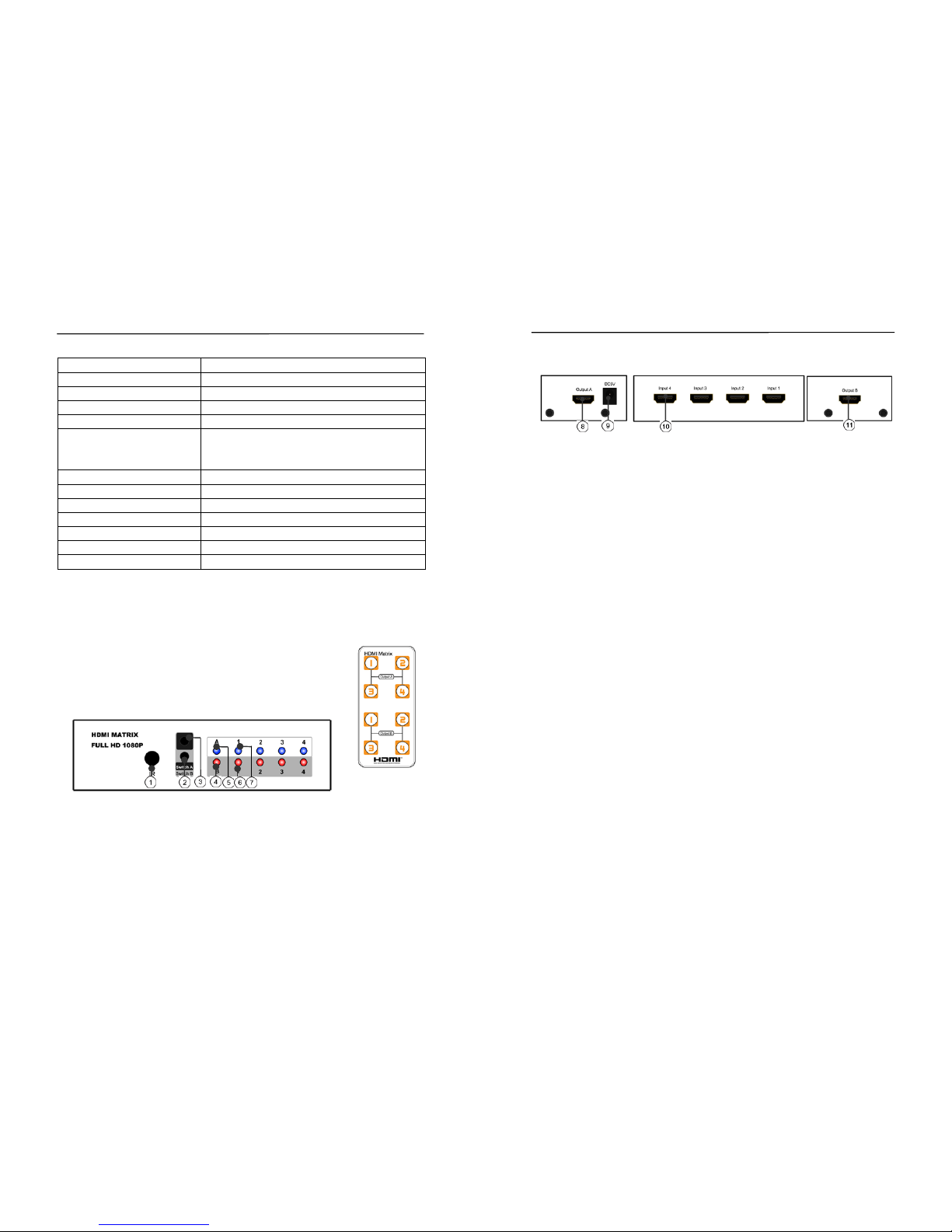
PANEL DESCRIPTIONS
Front Panel
Remote
1) IR Receiver
2) Output B Select Button: Press the " Switch B" button to switch signal source
from input 1 to 4.
3) Output A Select Button: Press the "Switch A" button to switch signal source from
input 1 to 4
4) Indicator of HDMI output B:A red LED light will illuminate when output B works.
5) Indicator of HDMI output A:A blue LED light will illuminate when output A works.
2
MODEL # BL-4X2 - Operating Instructions
Left Panel Rear panel Right Panel
6) Indicator of OutputB's Input source: The corresp onding red LED light will
illuminate according to which input you connect.
7) Indicator of OutputA's input source: The corresp onding blue LED light will
illuminate according to which input you connect.
8) Output A port 9) Power input 10) Input ports 11) O utput B port
Connecting and Operating
1).Connect the HDMI signal sources (Such as PS3, STB etc) into HDMI input.
2).Connect the cables from your displays (moni tor or projector) into the HDMI
outs of the output A and output B.
3).Plug the 5VDC power supply into Power input and the unit is ready to use.
4).Use the remote controller or press buttons t o s el ec t input signal source for
output A and output B
Attention: Insert/Extract cable gently.
Please reset power when there is no signal.
MAINTENANCE
Clean this unit with a soft, dry cloth. Never use alcohol, paint thinner of benz ine
to clean this unit.
PRODUCT SERVICE
1) Damage requiring service: The unit should be s erviced by qualified service
personnel if:
(a)The DC power supply cord or AC adaptor has been damaged;
(b)Objects or liquids have gotten into the unit;
(c)The unit has been exposed to rain;
(d)The unit does not operate normally or exhibits a marked c hange in
performance;
(e)The unit has been dropped or the cabinet damaged.
2) Servicing Personnel: Do not attempt to serv i c e the unit beyond that
described in these operating instructions. R efer all other servicing to authorized
servicing personnel.
3) Replacement parts: When parts need replacing ensure the servicer uses
parts specified by the manufacturer or parts that have the same characteristics
as the original parts. Unauthorized substitutes may result in fire, electric shock,
or other hazards.
4) Safety check: After repairs or service, ask the servicer to perform safety
checks to confirm that the unit is in proper working condition.
3
 Loading...