

Page 1
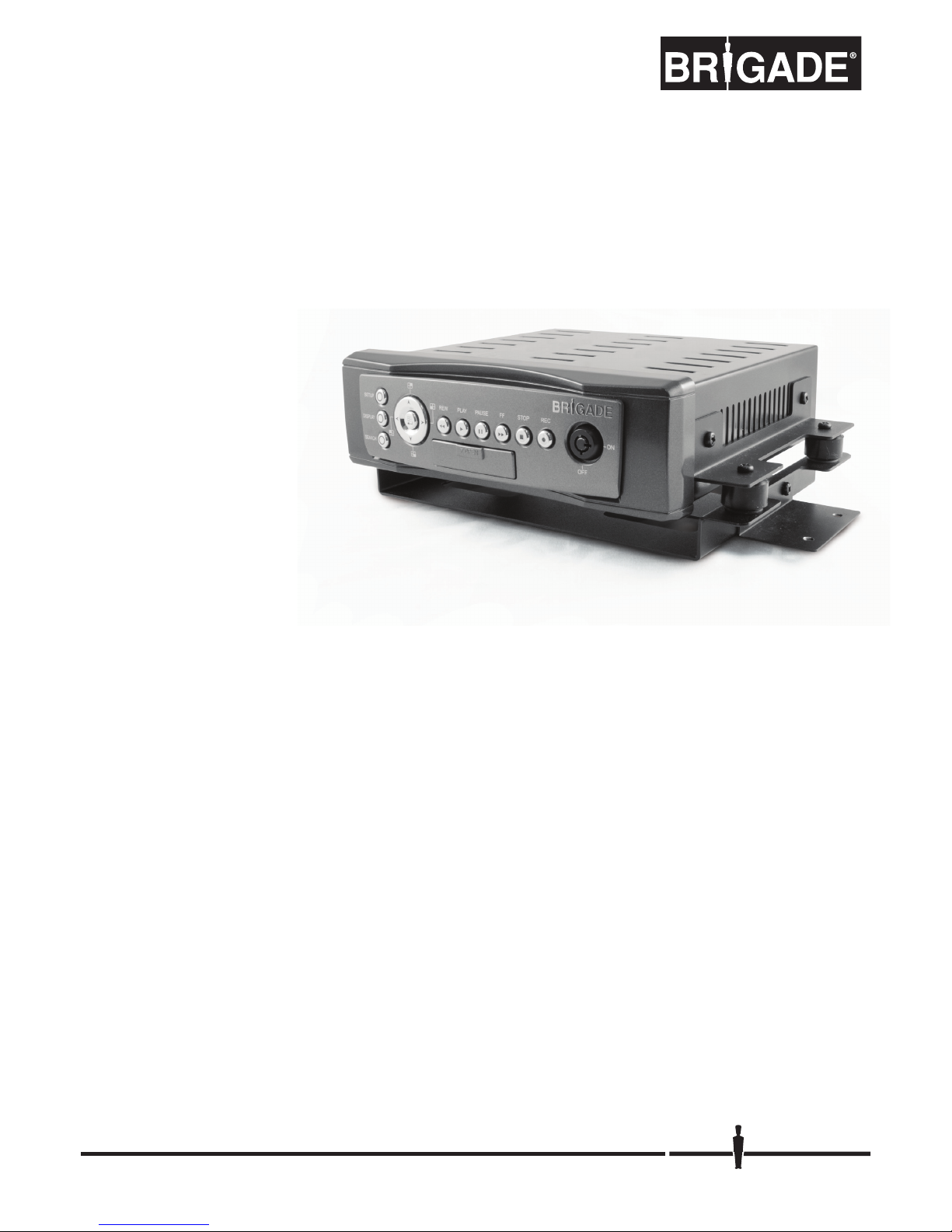
MDR-304A
Digital Video Recorder
Instruction Manual
Stock code: 2919A
Page 2
1
SAFETY PRECAUTIONS
All the following safety and operation instructions which will prevent harm or damage to the operator or
other persons should be read before the unit is operated.
INFORMATION
This equipment has been tested and found to comply with the limits for a Class A digital device,
pursuant to Part 15 of the FCC Rules. These limits are designed to provide reasonable protection
against harmful interference when the equipment is operated in a commercial environment. This
equipment generates, uses, and can radiate radio frequency energy and, if not installed and used
in accordance with the instruction manual, may cause harmful interference to radio
communications.
Operation of this equipment in a residential area is likely to cause harmful interference in which case
the user will be required to correct the interference at his own expense.
WARNING
To reduce the risk of fire or electric shock, do not expose this appliance to rain or moisture.
Do not block ventilation openings.
Do not place anything on top of the unit that might spill or fall into it.
Do not attempt to service this unit yourself as opening or removing covers may expose you to
dangerous voltage or other hazards. Please refer all servicing to qualified service personnel.
Do not use liquid cleaners or aerosols for cleaning.
This installation should be made by a qualified service person and should conform to all local
codes.
To prevent fire or electric shock, do not overload wall outlets or extension cords.
This unit must be grounded to reduce the risk of electric shock hazard.
!
!
!
!
!
!
CAUTION
Danger of explosion if battery( RTC Battery ) is incorrectly replaced. Replace only with the
same or equivalent type recommended by the manufacturer. Dispose of used batteries
according to the manufacturer’s instructions.
Risk of explosion if replaced by an incorrect type. Dispose of used batteries according to the
instructions.
!
!
Page 3

2
1. INTRODUCTION ..................................... 3
Product Features............................................3
Accessories....................................................4
Front View ......................................................6
Rear View.......................................................8
MCU Rear View .............................................9
Power Delay Connection .............................10
The Power Connector ..................................11
I/O Port.........................................................13
I/O Connection .............................................14
Voltage Management ...................................15
2. INSTALLATION ..................................... 16
System Information and Channel Selection.16
System information ......................................16
Channel Selection ........................................17
Updating System Software ..........................17
The G-sensor ...............................................17
3. SET UP................................................ 18
Configuring Recording Settings ...................18
Alarm Recording ..........................................19
Externally Triggered Recording....................19
Menu ............................................................19
REC Setting .................................................20
Alarm............................................................21
CLOCK/ TITLE Settings ...............................23
COMMUNICATION Settings ........................23
DISK Settings...............................................24
SYSTEM Settings ........................................24
Alarm and Motion Settings ...........................26
4. OPERATIONS ..................................... 27
Recording.....................................................27
Manual Recording ....................................... 27
Playback Operations ................................... 27
Normal Playback ......................................... 27
Fast Forward/Backward .............................. 27
Slow Forward/Reverse ................................ 27
Play back picture-by-picture ........................ 28
Search Operations ...................................... 28
FULL LIST Search....................................... 28
ALARM LIST Search ................................... 28
TIME Search ............................................... 28
THUMBNAIL Search ................................... 29
Backup Operations...................................... 30
SD Card Backup Operations ....................... 30
Key Lock Operation..................................... 31
5. MISCELLANEOUS ................................ 32
System Default ............................................ 32
O.S.D Messages ......................................... 33
Time Index Table......................................... 34
Specifications .............................................. 35
HDD Viewer............................................... 36
Introduction.................................................. 36
Installation Instructions - Software .............. 37
Installation Instructions - Hardware ............. 40
Basic Operation........................................... 40
Advanced Operation.................................. 43
Save a snapshot to a PC ............................ 43
Save a video file to a PC ............................. 43
Read the CSV report ................................... 44
APPENDIX 1. –Table of LOG Message..... 46
Page 4

3
1. INTRODUCTION
Product Features
Quad-based operation: real-time operation and playback (30 FPS/ per channel).
MPEG4 compression with resolution up to 720X480 (NTSC) / 720X576 (PAL).
4x Elite/Extreme connectors for AV inputs.
4 camera audio inputs, 2 auxiliary audio inputs, 1 audio output (1 channel record).
Pre-alarm image recording.
USB interface showing video records on a Laptop/PC.
GPIO: 4 inputs and 2 outputs.
Operating temperature: 0℃to 50℃.
Time-lapse and real-time recording.
Refresh rate up to 30 IPS (25 IPS for PAL).
Image quality selectable at 4 different levels for recording.
Alarm recording mode.
Quick search by time, alarm, event, and recording list.
Fast and slow playback of video recorded at various speeds.
Single-picture playback.
On-screen setup menu, title and system timer.
Password protection.
Disk-full warning.
Operation-status record log.
Automatic detection of voltage.
Built-in SD card slot for copying images to an SD card.
Watermark.
Window Division.
Vibration and mechanical shock protection.
By taking advantage of the optional G-Sensor, the MDR-304A will register and record X, Y & Z impact
data in the event of an accident and can be used as an alarm trigger.
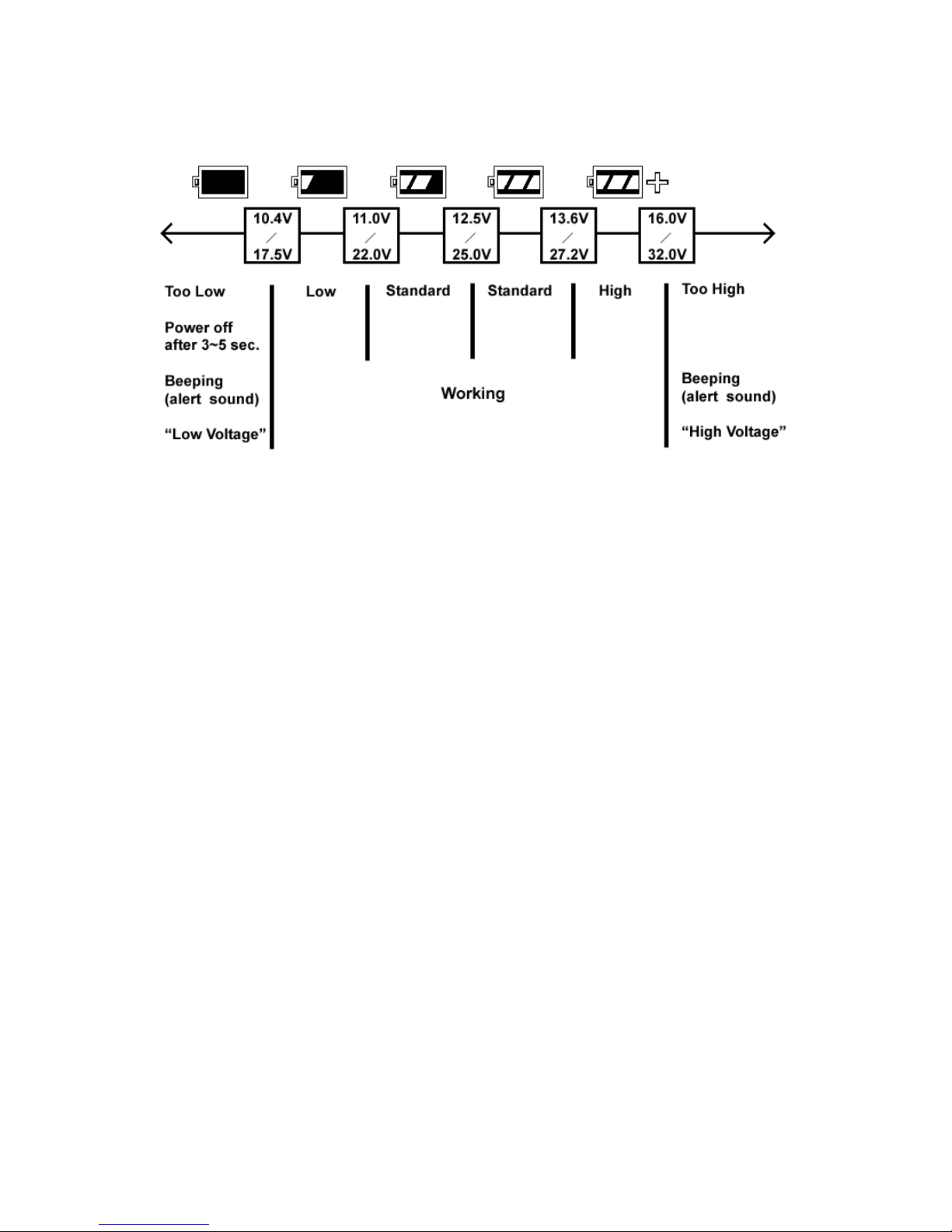
If the voltage is less than 10.4/17.5 volts, the MDR-304A recorder will display a message “Low Voltage”
and then automatically power off after beeping for 3 -5 seconds.
Page 5
Accessories
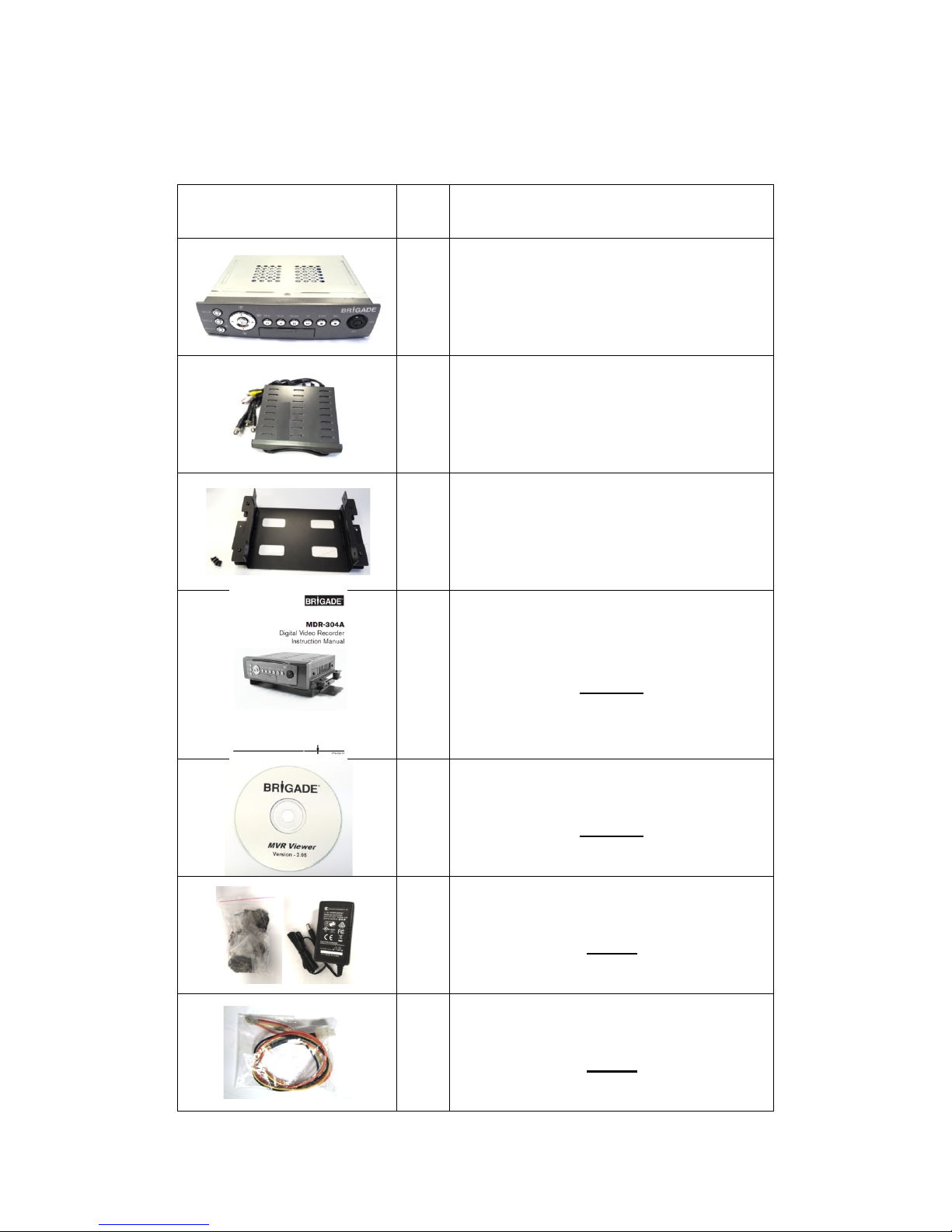
The kit contains the following items:
Sub-System
4
Qty
Sub-system Description
1
MCU-304A-XXX (Mobile Caddy Unit)
1
MDR-304A-DS (Docking Station)
(2798A)
1
AVM-304 (Anti-Shock/Vibration
Mounting)
(2917)
1
MDR-304A-MAN (Instruction Manual)
(2919A)
1
CD-304A-01 (Installation CD)
(2920A)
1
PV-12 (12V MCU Power Supply)
(3973)
1
MDR-304A-PC (Power Cable)
(3972)
Page 6
5
1
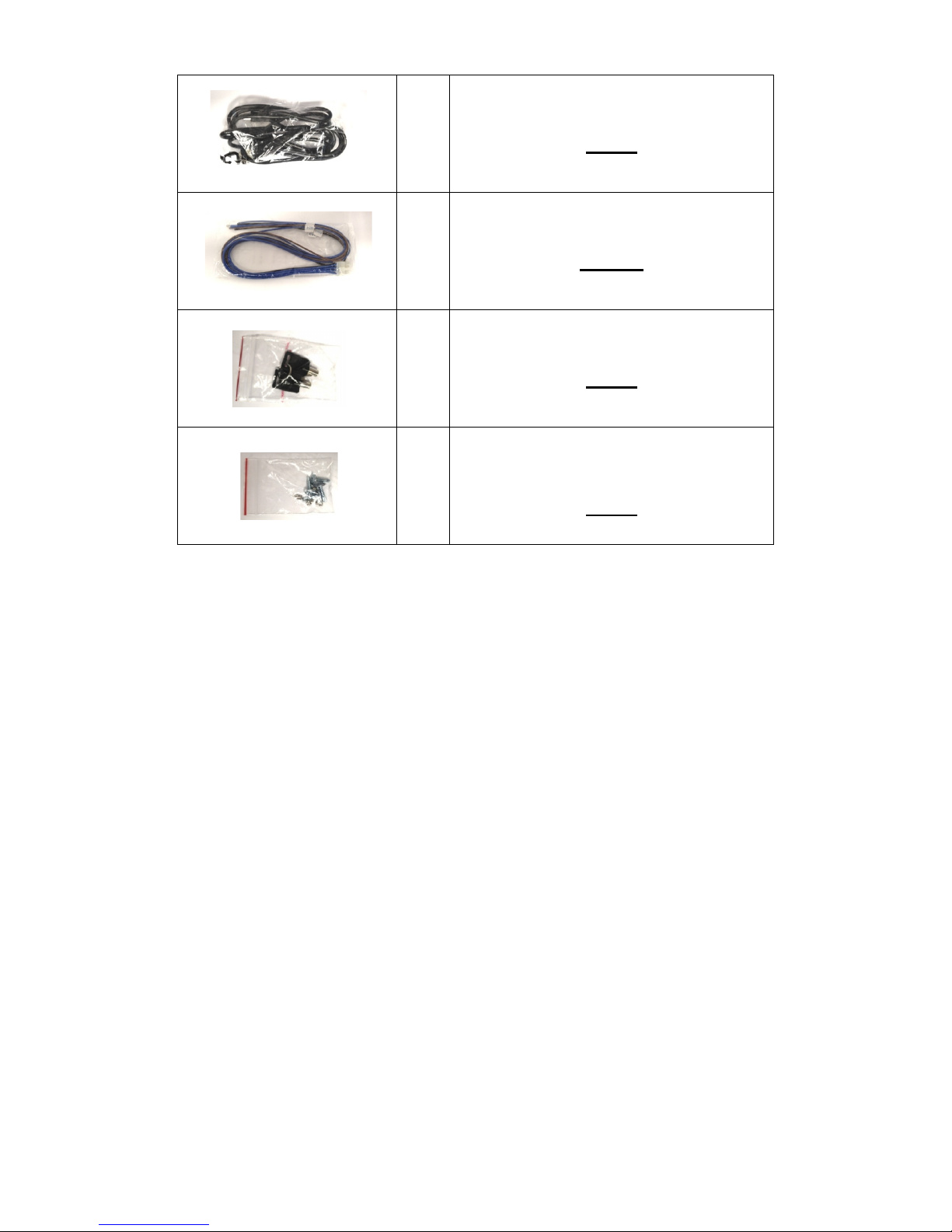
USB-001 (USB Lead)
(2918)
1
MDR-304A-TRIG (Trigger Cable)
(2997A)
1
MDR-304-SK (2x Security Keys)
(2994)
1
MDR-304-STS (4x Self Tapping
Screws)
(2995)
Notes: The MDR-304A should not be operated without the anti-shock/vibration mounting unit.
Stock codes that are underlined are not available separately.
Page 7
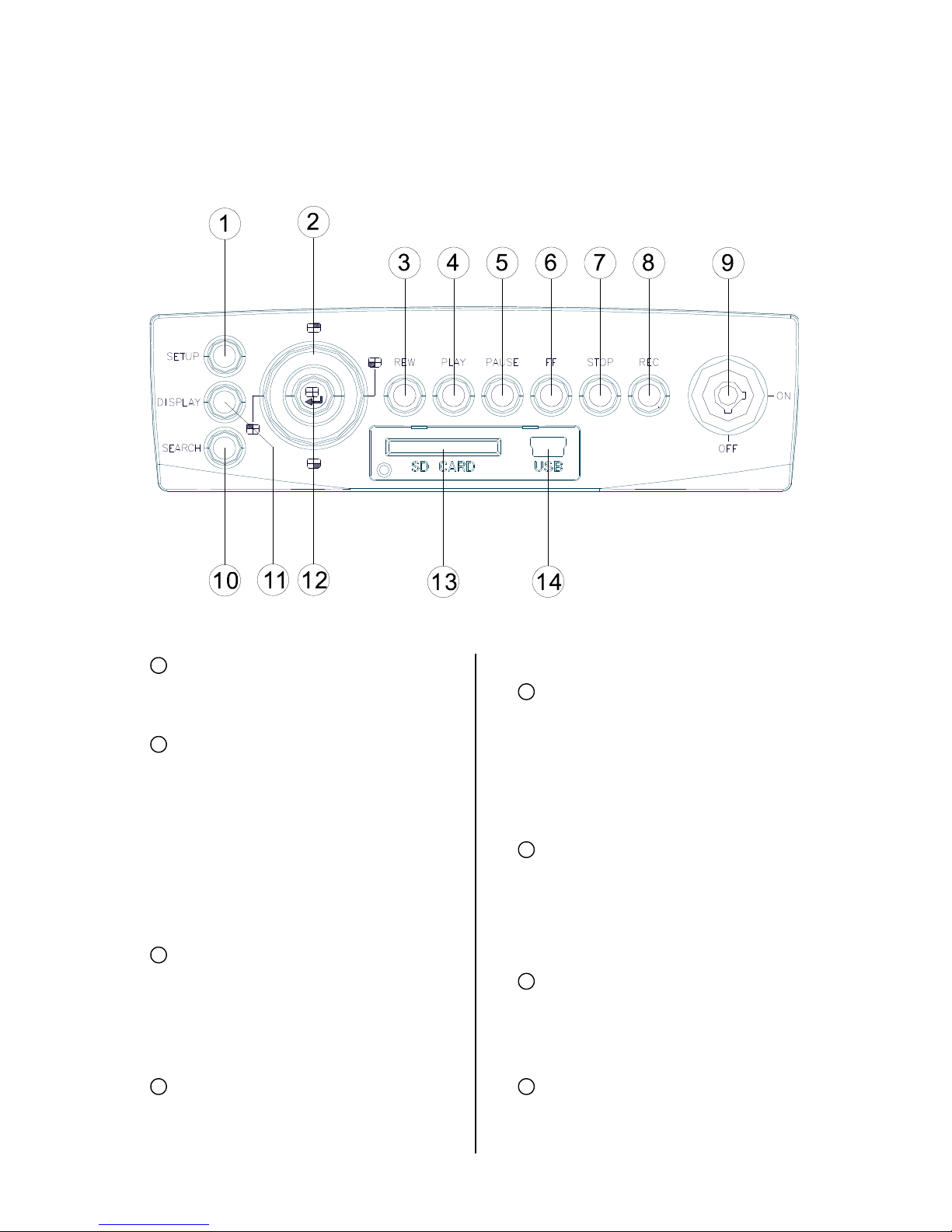
6
Front View
SETUP button:
Press this to enter the setup menu. Press
again to exit the setup mode.
Left/ Right/ Up/ Down (CH1/ CH2/ CH4/
CH3) buttons:
In the menu setup mode / search mode,
press the four buttons on the dial to
highlight desired items in the menu
setup mode. In the live / play mode,
press the four buttons on the dial to
select a channel for display.
REW button:
Press this to play a recorded video in the
reverse direction at a speed that's faster
or slower than the recorded speed in the
play mode.
PLAY button:
Press to play back a recorded video from
the hard disk. (A light glows red in the
PLAY mode.)
PAUSE button:
In a playback display, press this to
freeze the display. During the freeze,
press to display one frame of a picture at
a time in the forward direction (A light
glows red in the PAUSE mode.)
FF button:
Press this to play a recorded video in the
forward direction at a speed that's faster
or slower than the recorded speed in the
play mode
STOP button:
Press to stop playing back a recorded
video. (A light glows red in the STOP
mode.)
REC button:
Push to start recording video into a hard
disk while in the live display mode. (A light
1
2
3
4
5
6
7
8
Page 8

7
glows red in the REC mode.)
MCU Lock:
This key lock secures the MCU with the
hard disk in place. When you lock it in, it
powers on the device. When you unlock
this key and take out the inner case, the
power turns off automatically.
SEARCH button:
Press to enter the search mode to
access the recorded video.
DISPLAY button:
Press to show the system operation
status on the screen.
Enter / (Quad) button:
Press to enter a selected item and save
the setting in the menu setup mode. In
the live/ play mode, use this button to
show a quad display.
SD CARD slot:
This is used for system software
updating, saving and loading of user
settings as well as the saving of JPEG
still images or short AVI clips.
USB port:
Allows the recorder to be
connected to a PC or laptop for
viewing of recorded files using
HDD Viewer Software.
Also can be used to quickly
transfer larger quiantities of raw
video data for storage onto a PC or
laptop Hard Disc when converted
to FAT32 format. HDD viewer
software is still needed to view
these files.
9
10
11
12
13
14
Page 9
8
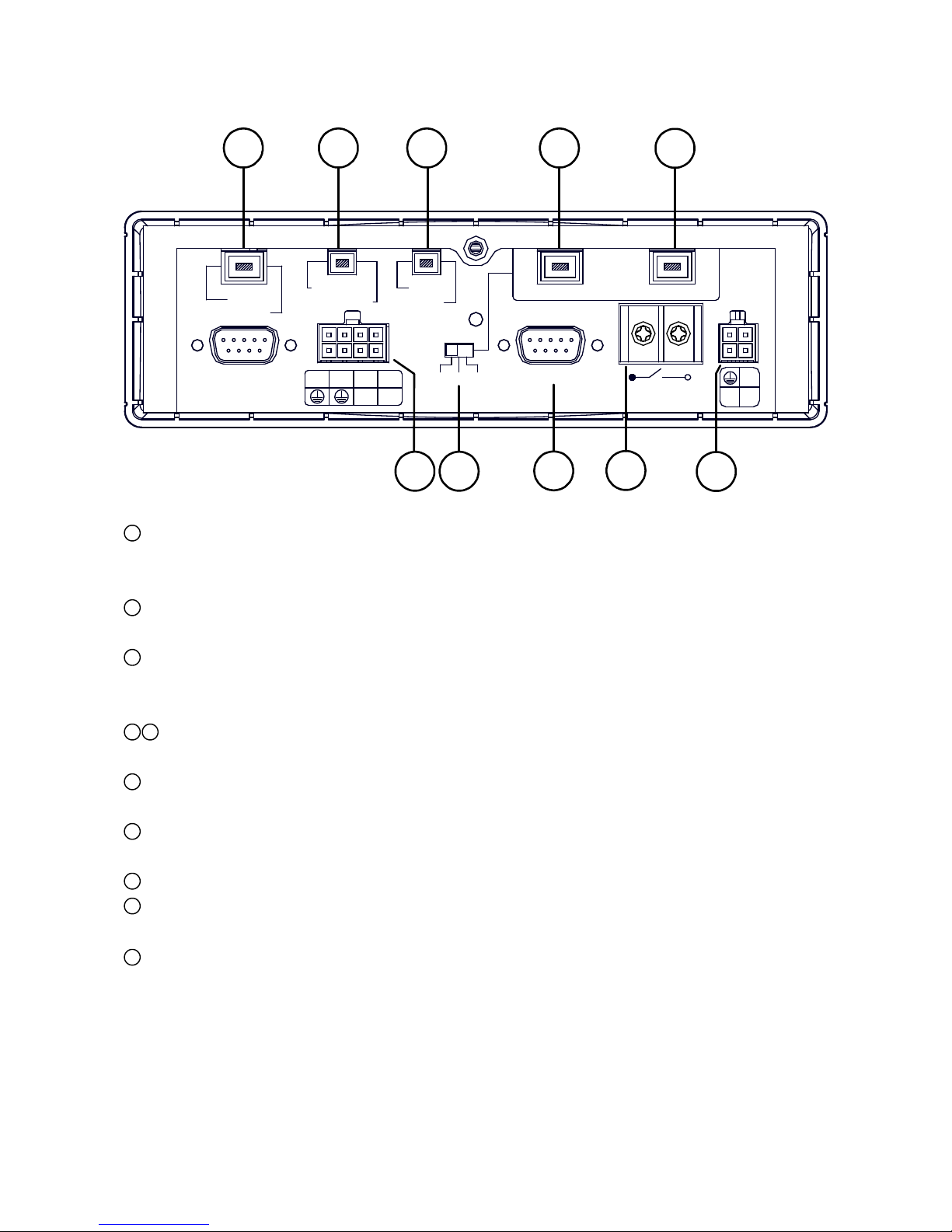
Rear View
GPS & Remote Controller Connector:
The left side connector links up with the optional GPS receiver to capture local position information
data. The right side connector links up with the optional remote controller.
Audio Out / Video Out:
Main output for connecting to an LCD monitor, or any display with Audio & Composite Video inputs.
AUX 1 / AUX 2:
Individual line level inputs for external audio sources. Only one of these inputs can be selected at a
time. Note that are line level inputs and may not be suitable for low level microphones.
Camera In:
Combined video and audio inputs. These connectors also deliver supply voltage to the camera.
I / O port:
Input and output port for connecting to external devices.
Voltage Selector Switch: Please select the required output voltage according to the camera
specification. There is a choice of 6V, 9V or 12V. (12V Should be used for Brigade cameras)
G Sensor port: For the connecting of an optional G Sensor.
Power Delay:
For delaying the powering up of other vehicle devices.
Power Input:
For connecting to either a 12V or 24V supply (These should be fused suitably).
1
2
3
4
5
6
7
8
9
10
+24V
+12V
ACC
Power Delay
30A MAX
G-SENSOR
12V 9V 6V
I/O
OUT1 OUT2
IN1 IN2
IN3 IN4
RS-232
GPS
Remote
Audio Out
Video Out
AUX1
AUX2
1
2
3
4
Camera In
1
2 3
4
5
76
8
9
10
Page 10
9
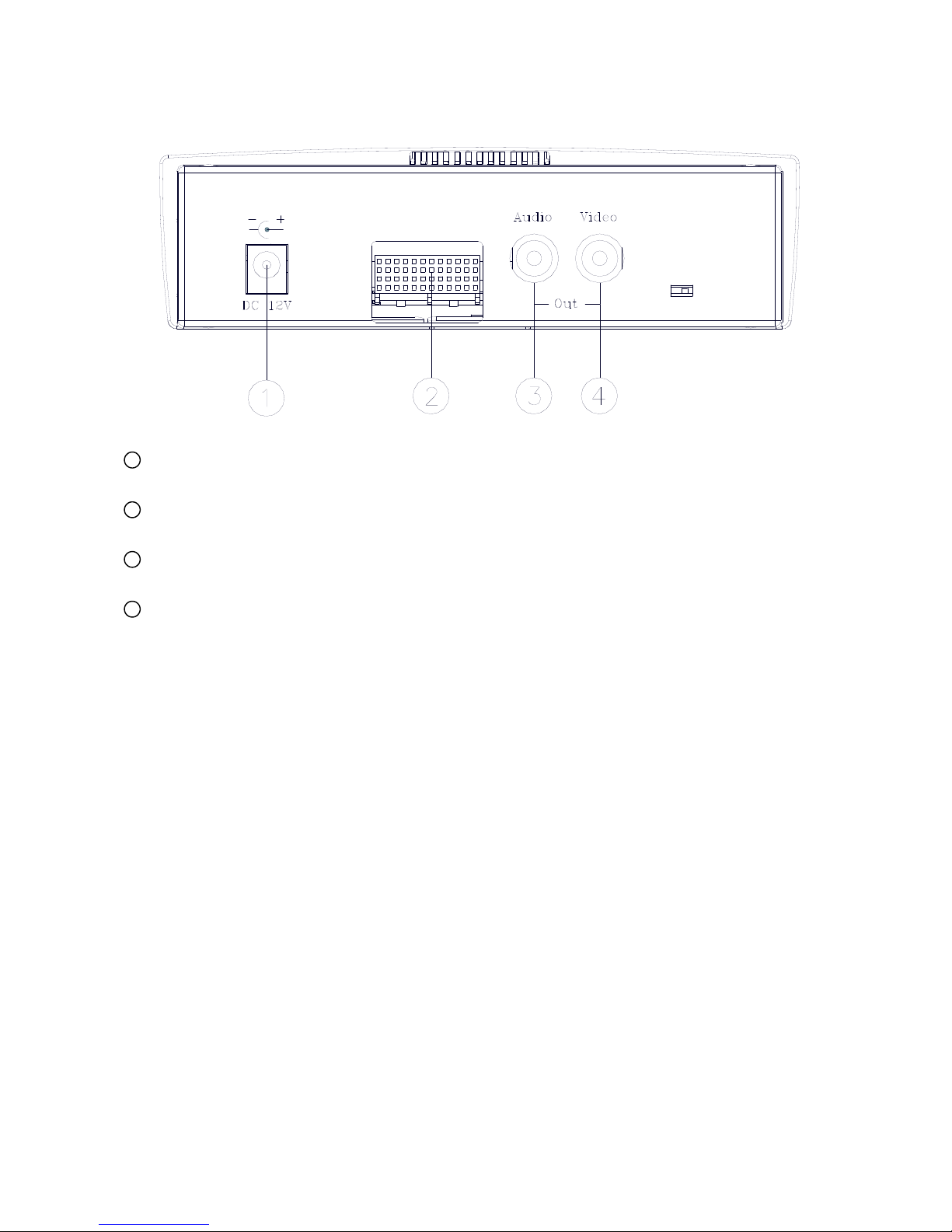
MCU Rear View
Plug Inlet:
The inlet connects to an external power supply. Connect to 12V DC UL Listed Class 2 Power Supply.
Hard Metric Connector (Male):
This connector links up with the outer casing.
Audio Connector:
Line level audio output for when the host is powered independent of the outer case.
Video Connector:
Composite video output for when the host is powered independent of the outer case.
1
2
3
4
Page 11
10
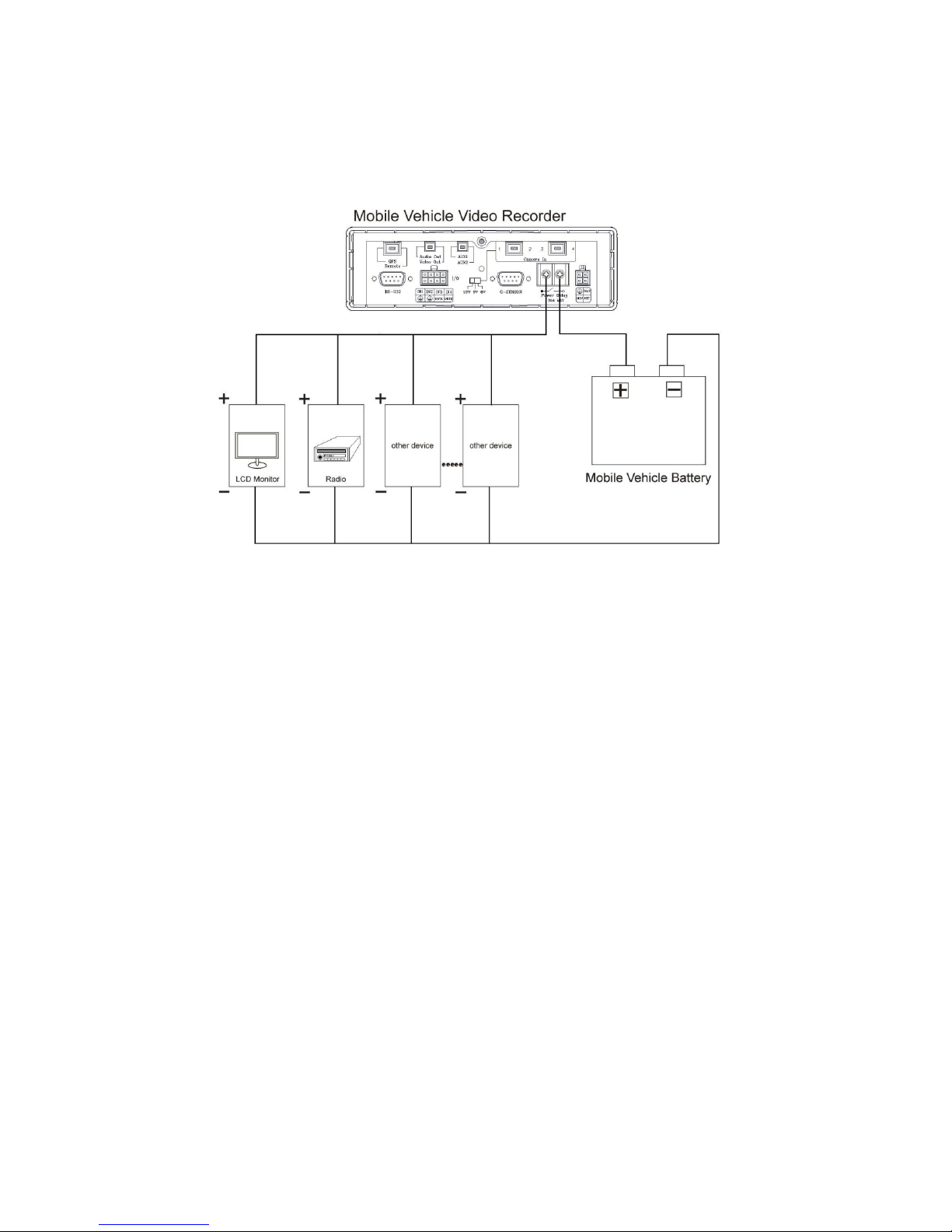
Power Delay Connection
The diagram here illustrates the power delay connection structure. If a device needs to work with our
MDR-304A, it needs to start operating after our MDR-304A has begun operating. See the diagram
below to help you with the mobile vehicle video recorder's power delay connector on its rear panel.
Enter the MDR-304A's "MAIN MENU" page and choose the third item, "CLOCK / TITLE". Now enter the
"CLOCK / TITLE" page, and you will see two items, "DELAY ON" and "DELAY OFF". For both these items,
the default setting is "OFF". You can set the delay time of the relay by choosing one of the following options.
DELAY ON: This entry sets the delay time of the function activation of the relay connector after the
MDR-304A powers up.
DELAY OFF: This entry sets the delay time of the function activation of the relay connector after the ACC is
powered off. The relay connector will function as per the delay time you set by your chosen
option. After the relay connector's delay time duration is over, the relay connector will
automatically turn off, followed by the MDR-304A. (The MDR-304A which is connected with the
cigar-lighter of the vehicle for its power supply will stop working when the ignition is switched
off.)
Note: The relay connector’s electric current range goes to a maximum of 30 amperes.
Note: Our "POST REC DURATION" function also sets the time as per any of the six options available after
the ACC has been turned off. Please always be mindful of the fact that, if the time duration set for either
"DELAY OFF" or "POST REC DURATION" is longer than the other one, the MDR-304A will wait for
the longer setting to end before shutting down.
Page 12
11
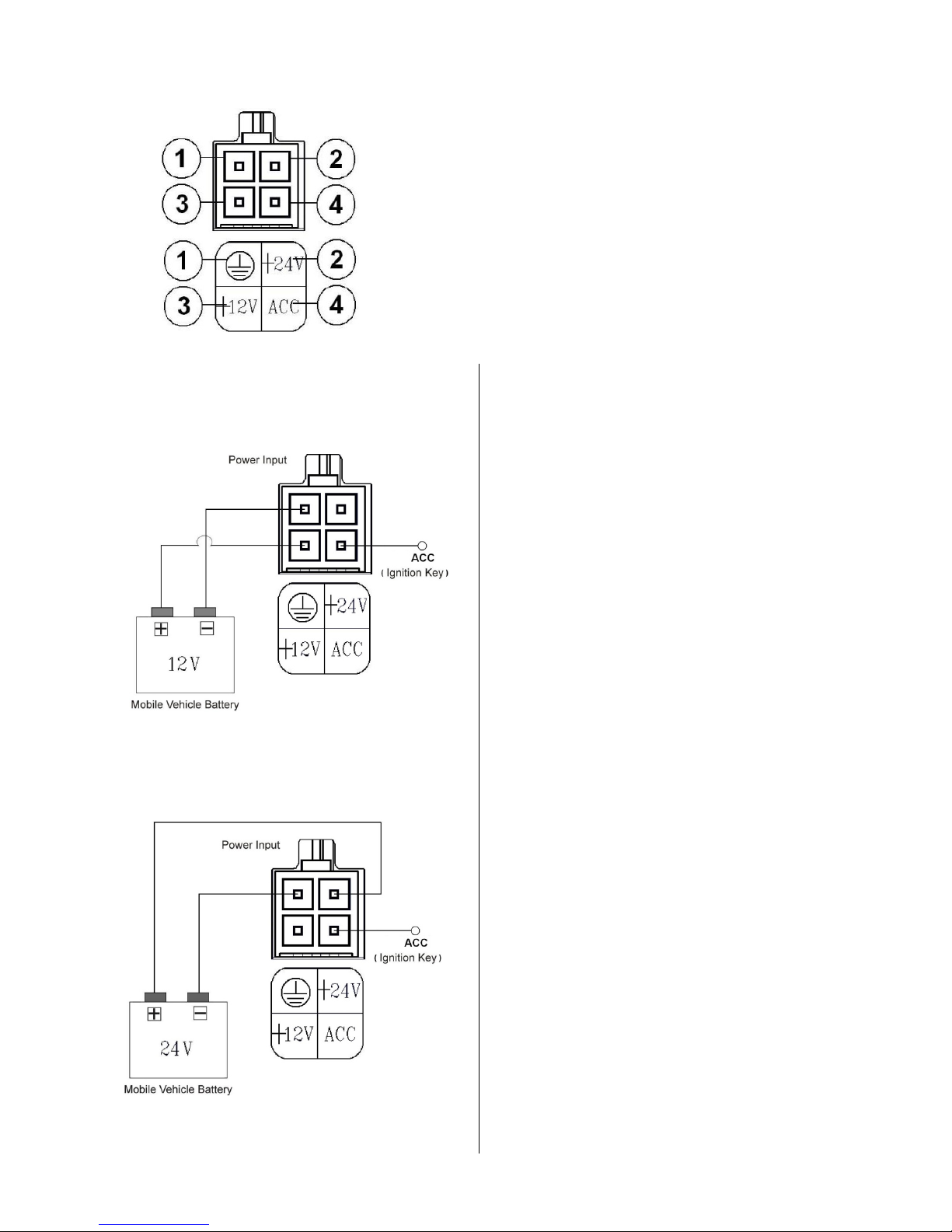
The Power Connector
Pin connections with the ignition key
12V:
24V:
This method of connection is the most accepted
and is recommended for permanent vehicle
installations where either the post record duration
or motion detection features will be used. (12/24V
inputs should be fused).
Connect either pin 2 (24V) or pin 3 (12V) depending
on vehicle voltage.
Page 13
12
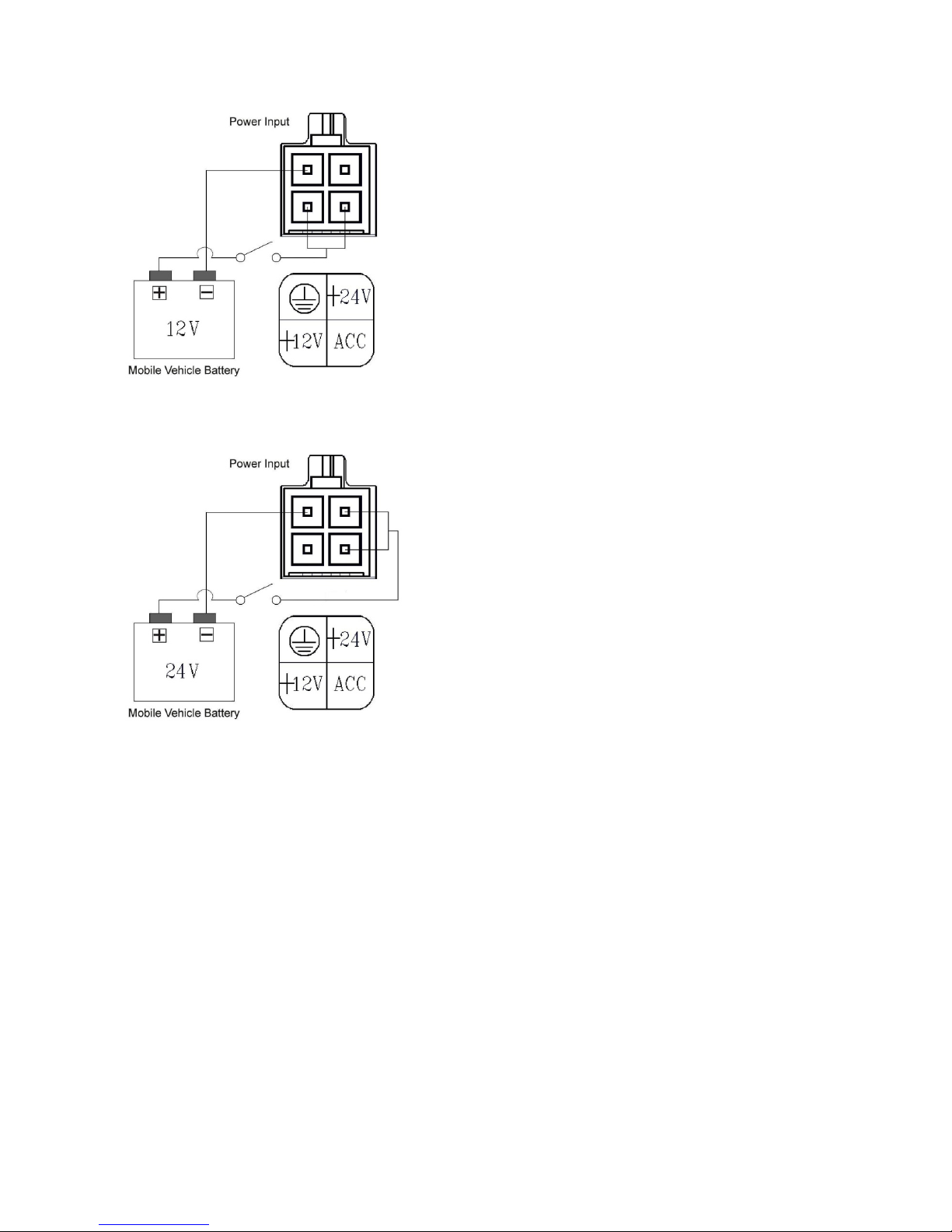
Pin connections without the ignition key.
24V:
This method of connectivity is recomended for temporary
installations only. Post record or motion detection is not possible.
Page 14
13
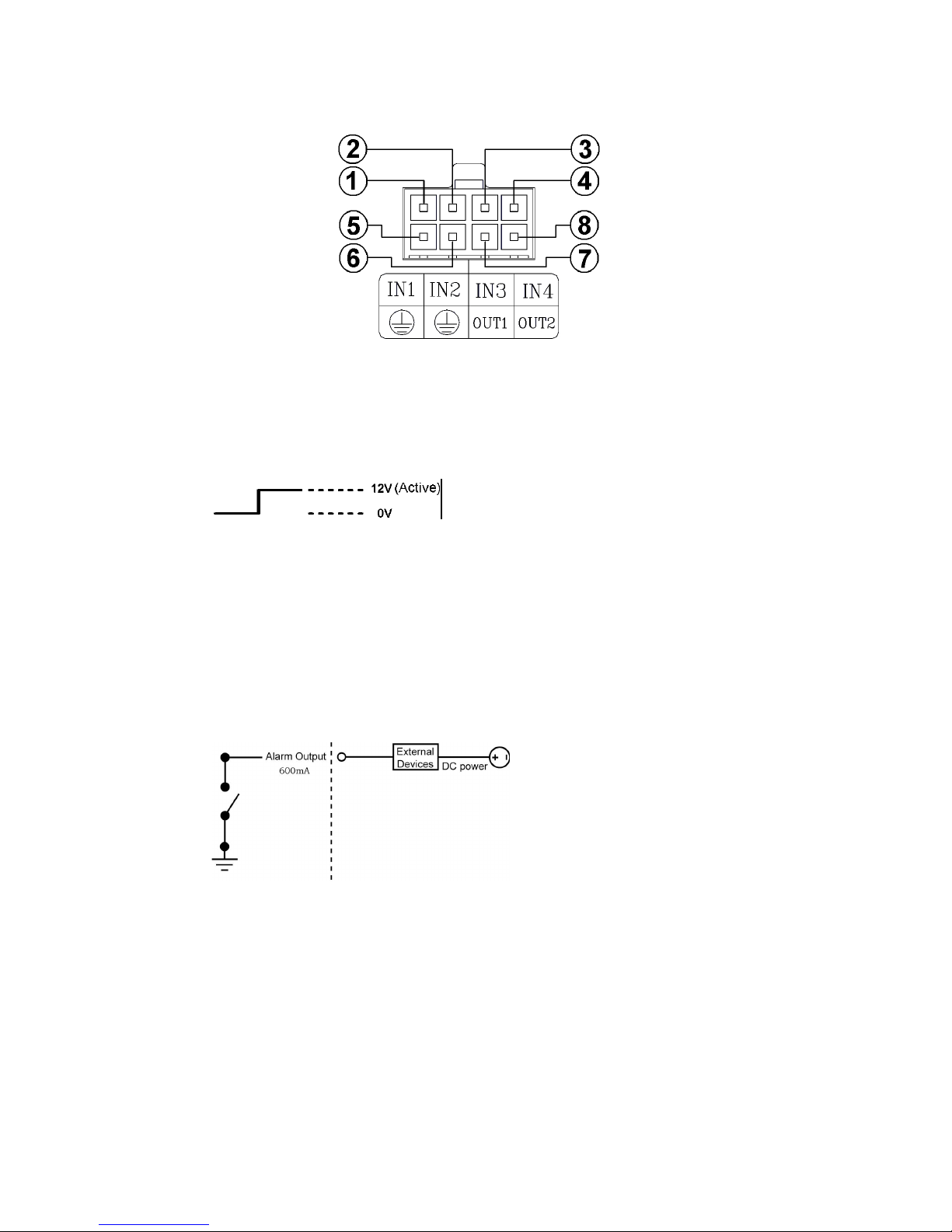
I/O Port
This figure is seen from the rear view.
1. I/O IN1 (INPUT): This is an alarm input which can be programmed in the menu system to Normally
Open or Normally Closed.
2. I/O IN2 (INPUT): same as above.
3. I/O IN3 (INPUT): same as above.
4. I/O IN4 (INPUT): same as above.
5. GND: Ground Contact.
6. GND: Ground Contact.
7. I/O OUT1 (OUTPUT): This is a “normally open” switched ground output that becomes closed when
INPUTS 1-4 go active. Connect this to the negative terminal of an external devices such as a buzzer or
light. Maximum load current is 600mA.
8. I/O OUT2 (OUTPUT): Same as above.
Page 15
14
I/O Connection
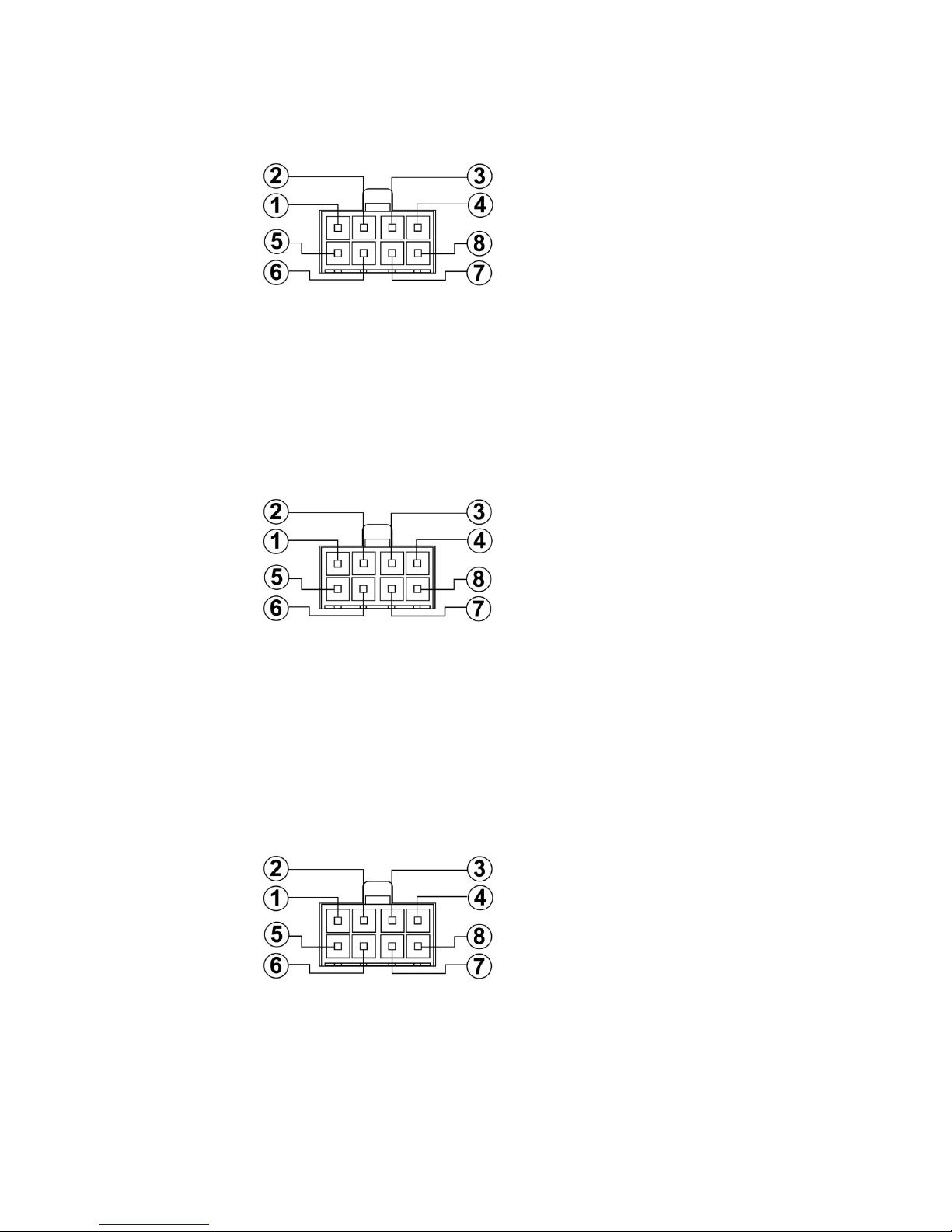
ALARM:
In the "MAIN MENU" page, click "ALARM" to enter the "ALARM" page and then go to the "I/O CONNECTION"
item which has three options, "ALARM", "VEHICLE SIGNAL T" and “VEHICLE SIGNAL A”. If you choose
"ALARM" pins 1, 2 and 3 will become alarm input triggers which can receive a 12v-24v trigger voltage. Pin 4 is
a "Reset" trigger; pins 5 and 6 are permanent ground contacts; pin 7 and 8 are normally open switched
grounds for connecting to external devices like buzzers or lights. Alarm Operation must be set to ON in the
Alarm Setting Menu.
VEHICLE SIGNAL T:
In the "MAIN MENU" page, click "ALARM" to enter the "ALARM" page and then go to the "I/O
CONNECTION" item which has three options, "ALARM", "VEHICLE SIGNAL T" and “VEHICLE SIGNAL A”. If
you choose "VEHICLE SIGNAL T” pins 1, 2, 3 & 4 will become input triggers which can receive a 12v-24v
trigger voltage. These can be connected to left or right indicators, brake lights or other 12v–24v vehicle
signal lines. The time and duration of these signals will be imprinted as a marker on the recording as T1, T2,
T3, T4. Pins 5 and 6 are ground contacts. Pin 7 and 8 are not used.
VEHICLE SIGNAL A:
If you select option "VEHICLE SIGNAL A", pins 1, 2, 3 & 4 will become 12v-24v input triggers for switching
the recorders video output from a quad image to individual full screen images for each cameras when
required. One practical application would be to connect the appropriate trigger for the reversing camera to the
reverse light circuit so when the driver engages reverse the display will show the reverse camera as a full
image rather than one of 4 smaller quad images. Pins 5 and 6 are ground contacts; pin 7 and 8 are not used.
(Indicator triggers will require TS-001ECU).
Page 16
15
Voltage Management
Voltage detection while the MDR-304A is working:
You can display the system-setting information after you press the "DISPLAY" button on the front panel. On
this screen you can see the battery voltage icons. Please consult the above diagram to know the battery
voltage status.
Note: The MDR-304A will not beep when the Buzzer function is disabled.
Warning: If the supply voltage exceeds 36 volts the recorder will be damaged and the warranty may be
void.
Page 17
16
2. INSTALLATION
System Information and Channel Selection
System information
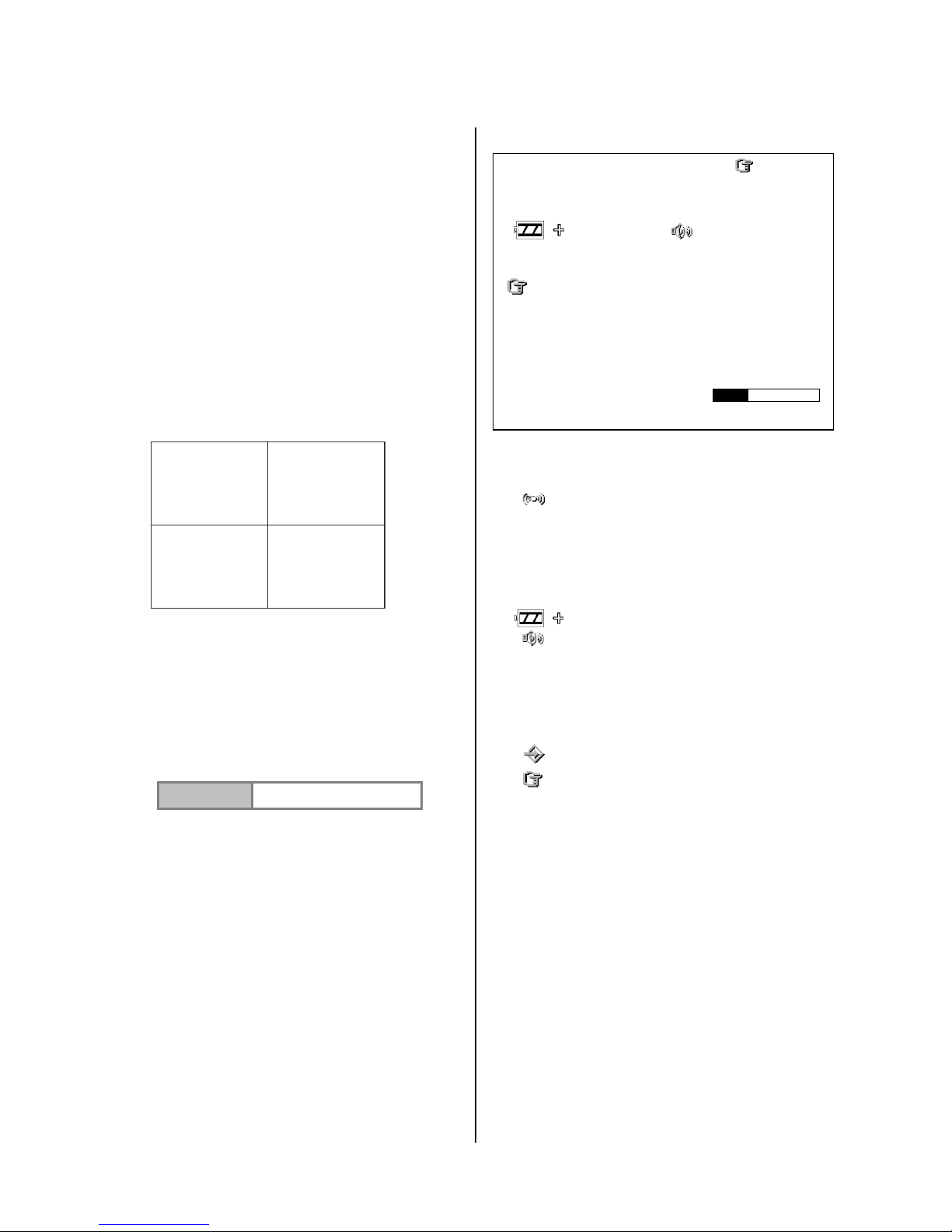
You can display system settings information as
shown in Figure 2.3 A by pressing the Display
button. In playback mode, recorded video
information is displayed. In the live or recording
mode, current recording information is
displayed. Each sequential press of the
Display button displays a different message
detailed in the following example. By default,
the unit displays time, date, and an indicating
bar of capacity status on a monitor as shown.
Default Display
CH1, CH2, CH3, CH4 are titles for each
channel, changeable in the Setup menu.
Capacity Status :
( Capacity Used ) ( Capacity Remaining )
05- 10-2011 12:00:00
(Date) (Time)
Pressing the Display button once, will display
the figure 2.3A. Press the Display button again;
the unit will not display any OSD message.
Press the button one more time to go back to
the default display.
Figure 2.3 A.
( HD1: 163G ): Total capacity of installed hard disk, 163 GB.
( 94.0 HR ): Total 94.0 hours recording time available.
( ): Alarm record activated.
( QUALITY: BEST ): Record quality setting, BEST.
( NTSC ): NTSC system.
( RATE 20 F/S ): Record speed setting, 20
frames/sec.
( ): The current voltage status.
( ): Audio function activated.
( 58K ): The image file size.
( 163G ): The capacity of the installed hard disk.
( REC ): Percentage of system recording position.
( PLAY ): Percentage of the system playback position.
( ): External signal.
( x ): Cannot operate now. For example, press
the SETUP, SEARCH, REW and FF buttons during
the recording mode, and this icon will appear.
(X, Y, Z, G ): The value “G” is only used when the
MDR-304A connects with a G sensor, which can
detect the vehicle acceleration force or G force.
CH1 CH2
CH3 CH4
01/01/2006 12:00:00
HD1 : 163G 94.0 HR x
QUALITY : BEST PAL
RATE : 20 F/S
58 K
HD SIZE REC PLAY
1 163G 10.0% 0.1 %
X : 0
Y : 0
Z : 1.0
G : 0.0
Page 18
17
Channel Selection
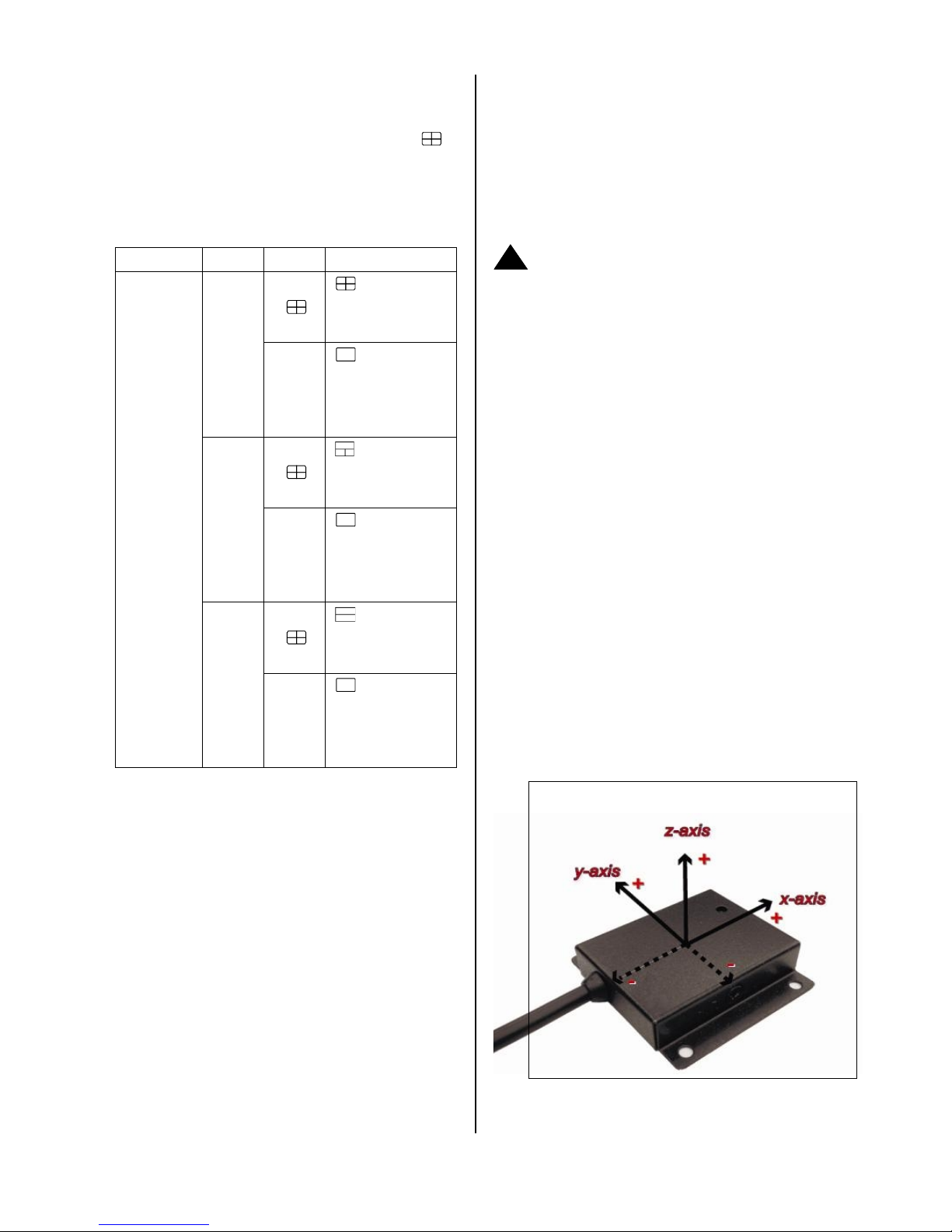
The CH1, CH2, CH3, CH4, and Quad ( )
buttons are used to select single video channels
and the quad mode. The following table shows the
functions under a different mode.
Mode
Split
Key
Result Display
Live /
Record /
Playback
4 CH
Quad
(
)
CH1/
CH2/
CH3/
CH4
( Single
channel )
3 CH
Quad
(
)
CH1/
CH2/
CH3
( Single
channel )
2 CH
Quad
(
)
CH1/
CH2/
( Single
channel )
Updating System Software
To safely update the system software:
1. Turn off the MDR-304A.
2. Insert the SD card into the built-in SD slot.
3. Turn on the MDR-304A.
4. The MDR-304A sounds a tone and displays the
message “ XXXXXX BYTES READ”. Now the
MDR-304A is updating the system software, which
will take approximately 90 seconds to process.
5. The MDR-304A displays the message “PLEASE
REMOVE SD CARD”. The process is complete.
Please remove the SD card, and the MDR-304A will
restart automatically. (If you have already followed
procedures 1 ~ 5 and the unit is still unable to turn on,
then please first check if the SD card you are using
is functioning and the file is intact. And then start
procedures 1 ~ 5 all over again.)
6. Verify the version of the system software.
Caution:
1. Before carrying out the updating procedures, please
ensure the SD card is working and the file of the
system software is intact.
2. Don’t interrupt the process while the unit is updating
itself, as this will cause the unit to crash.
3. Contact Brigade Electronics for latest software
version.
The G-sensor
When installing the G sensor it is important
to correctly orientate it as shown in the
diagram below.When stationary the G
sensor measure 0 g in the X axis, 0 g in the
Y axis, 1 g in the Z axis. The total G value
will be approximately “0” when a vehicle
remains stationary or moves at a constant
speed.
!
Up
Left
Forward
RMN V1.2
Page 19

18
3. SET UP
Configuring Recording Settings
Recording time will vary depending on the image
size, recording rate, and the capacity of the
hard-disk drive (HDD). The table below shows the
possible recording times per 80GB at different
refresh rates and image quality.
NOTE:
Recording times are estimated in the tables
below. For the actual available recording time of
a recording configuration, please refer to the
system information of the MDR-304A. (Please
refer information for more details.)
Possible Recording Time per 500GB ( hour )
Image
BEST
205.6
249.7
464.8
876.0
Quality
HIGH
249.7
321.9
561.5
1137.9
STANDARD
321.9
464.8
786.8
1632.0
BASIC
464.8
604.6
1137.9
2921.9
Refresh Rate (FPS)
NTSC 30 / PAL
25
NTSC 15 /
PAL12.5
6
2
Page 20
19
Alarm Recording
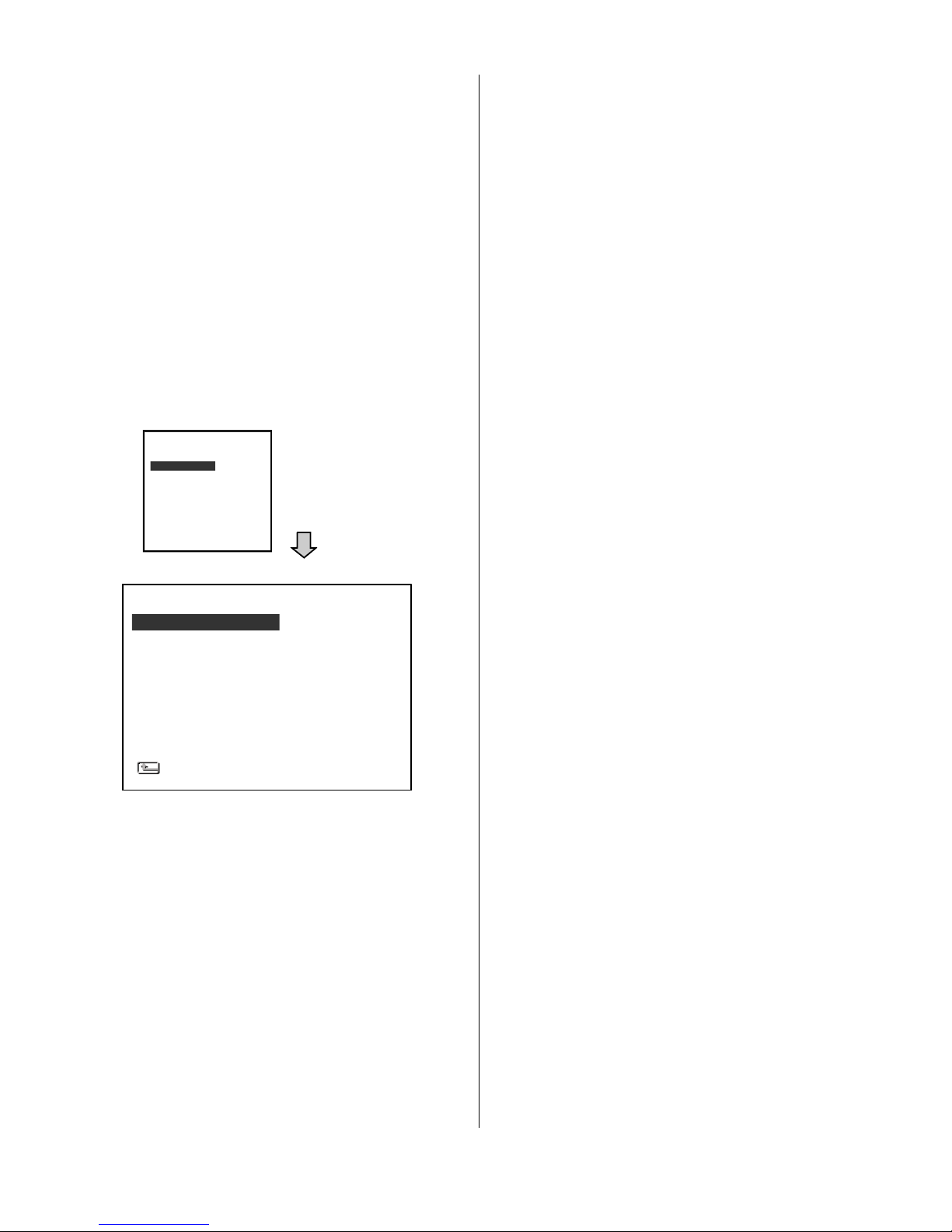
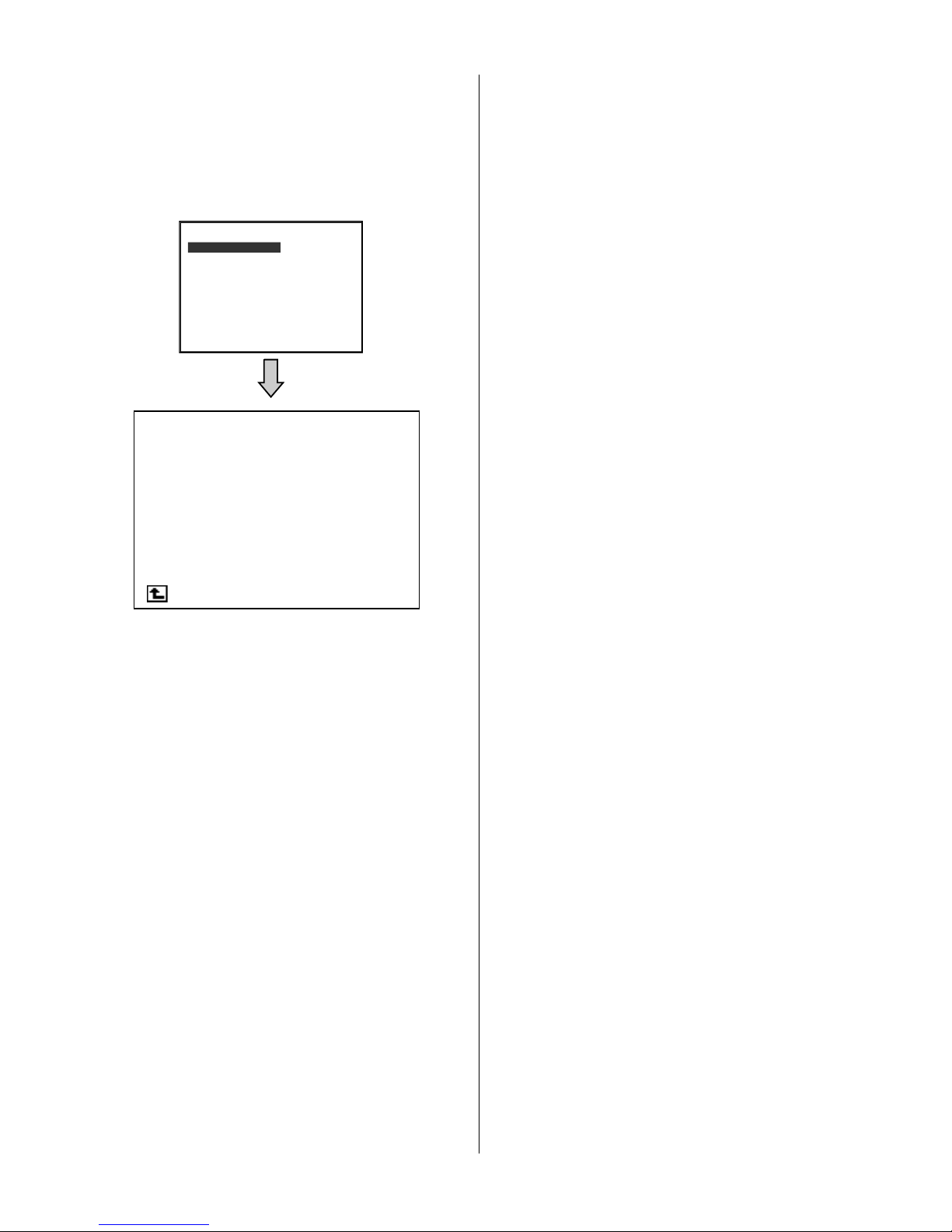
(1) Press the SETUP button to enter the MAIN
MENU.
(2) Select ALARM and press the Enter button
to enter ALARM.
(3) Set the desired REC RATE, REC QUALITY,
ALM TYPE, and ALM DURATION for use. If
the audio function is required, set AUDIO to
ON. If pre-alarm recording is required, set
PRE-ALARM to ON.
(4) To activate/deactivate the alarm recording,
set ALM OPERATION to ON/ OFF.
Externally Triggered Recording
By connecting the ALARM IN of ALARM I/O on the
rear panel of the MDR-304A, you can activate /
deactivate the alarm recording function of an
MDR-304A. The file will be kept with a prefixed “A”.
Menu
Press the Setup button to access the setup menu.
Once inside the menu system, the on-screen menu
allows you to set up the key features of the unit. The
functions of various buttons within the menu-setup
mode are described in the paragraphs below.
KEY FUNCTIONS
Setup button:
Press to enter the setup menu. Press again to exit
the setup mode.
“^” and “v” buttons:
Press to select the desired item or entry for setting.
“<” and “>” buttons:
Press to highlight the desired option or to select the
context for setting.
Enter button:
Press to enter the selected item and to save the
setting.
RECORD
ALARM
CLOCK/ TITLE
COMMUNICATION
DISK
SYSTEM
MAIN MENU
GOTO ALARM PAGE
ALM OPERATION
REC RATE
REC QUALITY
AUDIO
ALM TYPE
ALM DURATION
PRE-ALARM
IO CONNECTION
ALARM SETTING
MAIN PAGE
: OFF
: 15 F/S
: BEST
: OFF
: NO
: 30 SEC
: OFF
: ALARM
Page 21
20
REC Setting
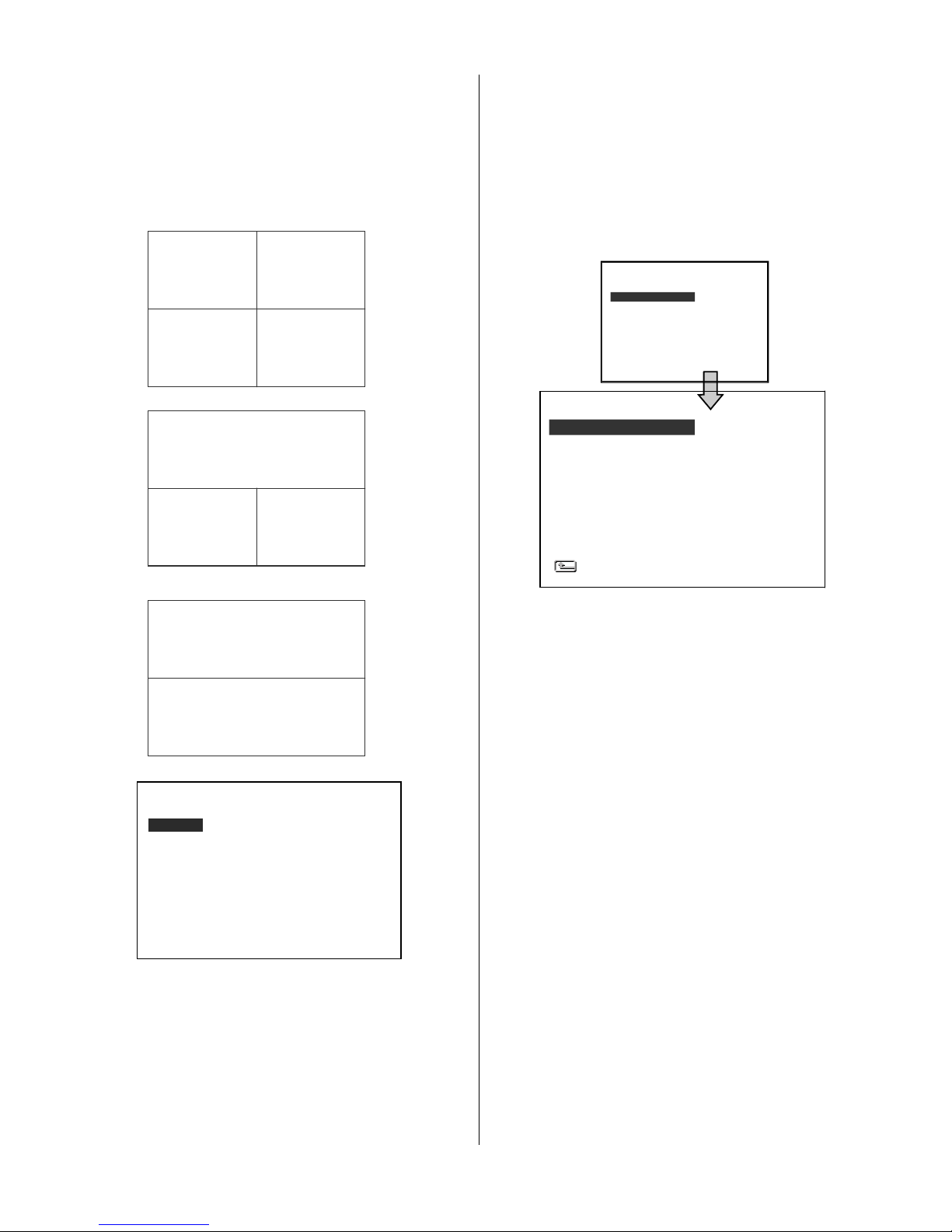
This page allows you to set the recording rate
and recording quality, and enables you to
continue recording when the disk is full.
REC RATE:
This option is for adjusting the number of pictures
recorded very second.
For an NTSC unit, there are 4 different recording
rates you can select from: 30F/S (30 frames per
second), 15F/S, 6F/S, and 2F/S.
For a PAL unit, there are 4 different recording
rates you can select from: 25F/S (20 frame per
second), 12.5F/S, 6F/S and 2F/S.
REC QUALITY:
You can select from 4 levels of image quality:
BEST, HIGH, STANDARD, and BASIC.
Selecting the BEST image for use provides
higher-resolution recorded images, and
normally takes up more storage space than a
HIGH, STANDARD or BASIC image does.
DISK FULL:
This option determines the way to utilize
storage media in case of a full disk.
REWRITE: When the hard disk is full, the device
continues recording by displacing the old data.
STOP: When the hard -disk is full, the device
will stop recording.
AUDIO:
OFF: Disables AUDIO recording.
ON: Enables AUDIO recording.
NOTE: The audio function can only be activated
in the following refresh rates in NTSC(PAL):
30(25), 15(12.5), 6(6) and 2(2) frames/sec.
TIME STAMP:
Select “ON” to add a timestamp to the recording
files. Select “OFF” to deactivate this function.
POST-REC DURATION:
After the ACC is powered off (ACC OFF), the
MDR-304A will continue recording for the time
which is set in the "POST-REC DURATION"
time. This option determines the duration of the
post-recording time after the ACC is turned off.
There are 9 options you can select from: OFF,
1 MIN, 5 MIN, 10 MIN, 30 MIN, 60 MIN, 90 MIN,
120 MIN and NON STOP.
OFF: The recording will stop automatically when
the vehicle motor is turned off.
NON-STOP: This option allows for continuous
recording after a vehicle has been switched off.
However, this depends on the amount of battery
power available, as it can run only as long as
there is power. Enough power will be left
untapped by this option to turn the vehicle engine
on the next time the user starts it.
Note: If the voltage is less than 10.4 volts, the
battery is in the "Too low" mode", and the
MDR-304A will automatically power off and
there may be a problem in starting the
engine.
RECORD
ALARM
CLOCK/ TITLE
COMMUNICATION
DISK
SYSTEM
MAIN MENU
GOTO REC PAGE
REC SETTING
REC RATE : 30 F/S
REC QUALITY : BEST
DISK FULL : REWRITE
AUDIO : ON
TIME STAMP : ON
POST-REC DURATION : OFF
SPLIT : 4CH
A/V SOURCE : SET
MAIN PAGE
Page 22
21
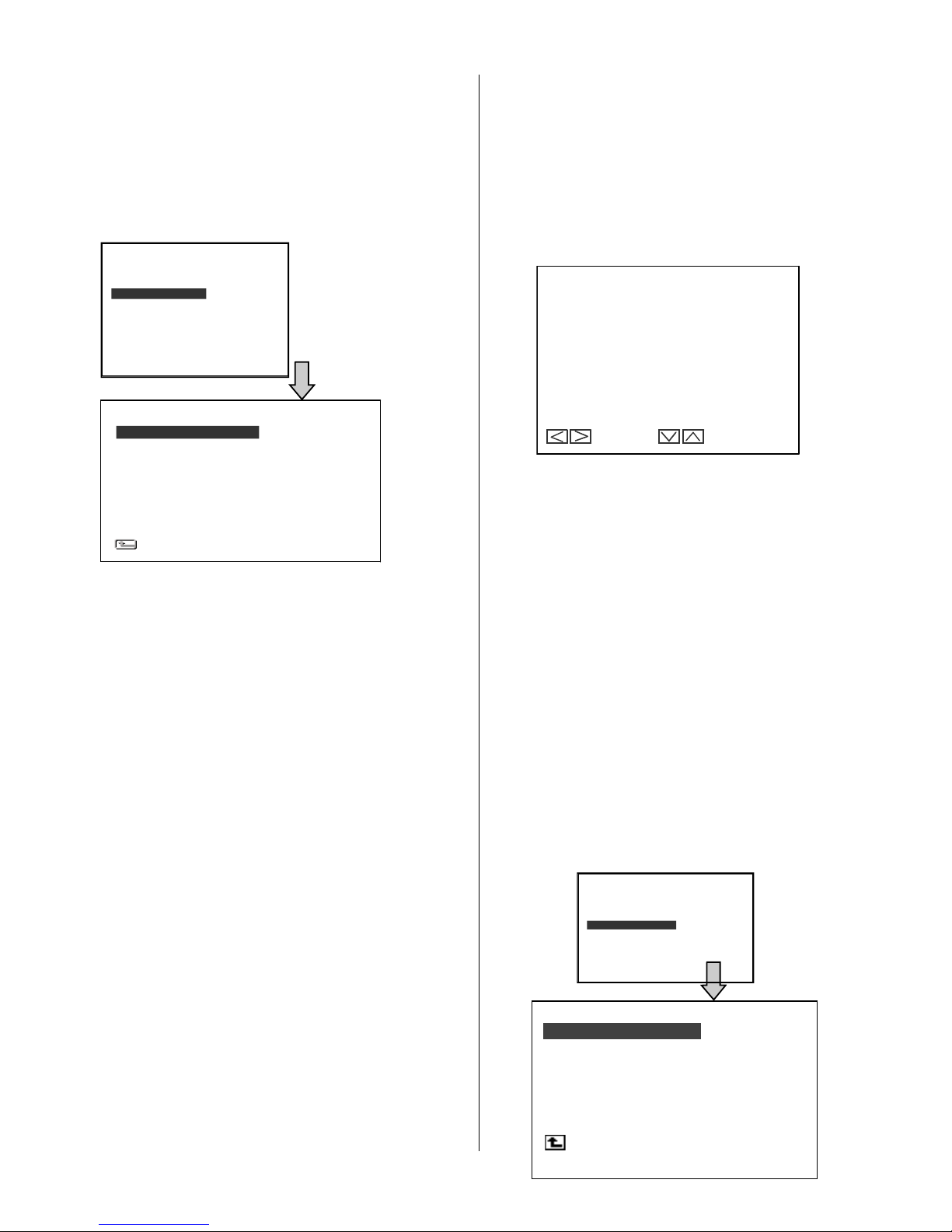
SPLIT:
This option determines the layout of the screen.
You can select from 4CH, 3CH, and 2CH. The
resulting layout on the screen will be as follows.
4 CH:
3 CH:
2 CH:
A/V SOURCE:
This page allows you to configure the video output
and the audio source from the auxillary or one of the
camera inputs. Select which view you require then
position the cameras accordingly.
LIVE OUTPUT VOL.: This item determines the
output volume levels in the live mode. The options
range from "00" (mute) to "10" (full).
Alarm
Recording program settings for when an alarm
input is activated. The device will record at these
settings for as long as the alarm input is
activated.
ALM OPERATION:
ON: The device activates the alarm recording
when it detects an alarm input.
OFF: The device ignores the alarm signal when
it detects an alarm input.
REC RATE:
Choose the number of pictures recorded every
second when an alarm input is activated. For an
NTSC unit, there are 5 different recording
speeds you can select from: 30F/S (30 frames
per second), 15F/S, 6F/S, 2F/S, and REMAIN.
For a PAL unit, there are 5 different recording
speeds you can select from: 25F/S (25 frames
per second), 12.5F/S, 6F/S, 2F/S, and REMAIN.
If you select REMAIN, the device will record
images at the same speed as set on the REC
page.
REC QUALITY:
Choose the image quality to be recorded when
an alarm input occurs. There are 4 levels of
image quality to choose from: BEST, HIGH,
STANDARD, and BASIC. The table below
shows the level of image quality with the
corresponding compression ratio and image
size.
A/V SOURCE
CH1 CH2 CH3 CH4
CAMERA1 CAMERA2 CAMERA3 CAMERA4
AUDIO 1
AUX 1
LIVE OUTPUT VOL.
10
< > MOVE ^ v CHANGE
CH1 CH2
CH3 CH4
01/01/2006 12:00:00
CH1
CH2 CH3
01/01/2006 12:00:00
CH1
CH2
01/01/2006 12:00:00
RECORD
ALARM
CLOCK/ TITLE
COMMUNICATION
DISK
SYSTEM
MAIN MENU
GOTO ALARM PAGE
ALM O PERATION
REC RATE
REC QUALITY
AUDIO
ALM TYPE
ALM DURATION
PRE-ALARM
IO CONNECTION
ALARM SETTING
MAIN PAGE
: OFF
: 15 F/S
: BEST
: OFF
: NO
: 30 SEC
: OFF
: ALARM
MOTION SETTING
Page 23

22
D ur at ion
Se tti ng
Al ar m
ac tiv at ed
Al ar m
de act iv ate d
R es et
Al ar m re cor di ng
N on -Sto p
Al ar m
ac tiv at ed
Al ar m
de act iv ate d
D ur at ion
Al ar m re cor di ng
D ur at ion
REC
Quality
Best
High
Standard
Basic
Image
Size
60KB
50KB
40KB
32KB
AUDIO:
OFF: Disables the AUDIO recording.
ON: Enables the AUDIO recording.
NOTE: The audio function can only be activated in
the following refresh rates in NTSC(PAL): 30(25),
15(12.5), 6(6) and 2(2) frames/sec.
ALM TYPE:
Choose a type of alarm input corresponding to
the sensor signal in use.
NO: Normally Open. This is to be used with the
type of alarm sensor whose contact
remains open in normal conditions and
closes in case of activation.
NC: Normally Closed. This is to be used with the
type of alarm sensor whose contact
remains closed in normal conditions and
opens in case of activation.
ALM DURATION:
You can select one of the six following options: 0
SEC, 30SEC, 1 MIN, 5 MIN, 10 MIN, and
NON-STOP.
PRE- ALARM:
This option determines that images before an
alarm occurs will be recorded in the hard-disk
drive. When an alarm is triggered the device will
record the image prior to the alarm for 5
seconds.
ON: Enables this function.
OFF: Disables this function.
NOTE: If the device is already in the recording
mode before an alarm occurs, the pre-alarm
recording will not take effect.
I/O CONNECTION:
Can be connected to a trigger/alarm sensor which
is for the setting of the I/O connections. There are
three options:
ALARM: Sets the 4 inputs of the I/O connection as
ALM1/ ALM2/ ALM3/ according to…..RESET. The
Alarm signals are used to trigger the alarm
recording (3.2.2).
VEHICLE SIGNAL T: Sets the 4 inputs of the I/O
connection as T1/ T2/ T3/ T4 according to the
user’s definition. For example, if the user gives the
definition of “T1” as “rear passenger door open”,
“T1” is displayed on the screen and imprinted onto
the recording.
VEHICLE SIGNAL A: Sets the inputs of the I/O
connection to full screen displays for CH1/ CH2/
CH3 / CH4. When each input is triggered the
corresponding channel will be displayed as a
single full-screen image on the display .
MOTION SETTING:
Motion detection is only active in the mode
“ACC OFF”.
When motion detection is enabled,
post-record is disabled and the MDR-304A will
only start recording when motion has been
detected. The duration of recording will depend
on the "ALM DURATION" setting. The length of
time the MDR-304A will remain in a state of
“watch” will depend on the “Post Record”
setting.
MOTION SETTING
CH1 : ON
CH2 : OFF
CH3 : OFF
CH4 : OFF
SENSITIVITY : 3
SET CH1 MOTION DETECTION ON/OFF
Page 24
23
C LO CK
D AYL IG H T S AV IN G
T IT LE
D EL AY ON
D EL AY OF F
C LO CK / T IT LE
M A IN PA G E
: S ET
: O FF
: S ET
: O FF
: O FF
DEVICE [ DVR ]
CH1 [ FRONT ]
CH2 [ RIGHT ]
CH3 [ BACK ]
CH4 [ LEFT ]
TITLE
TO MOVE TO CHANGE
CLOCK/ TITLE Settings
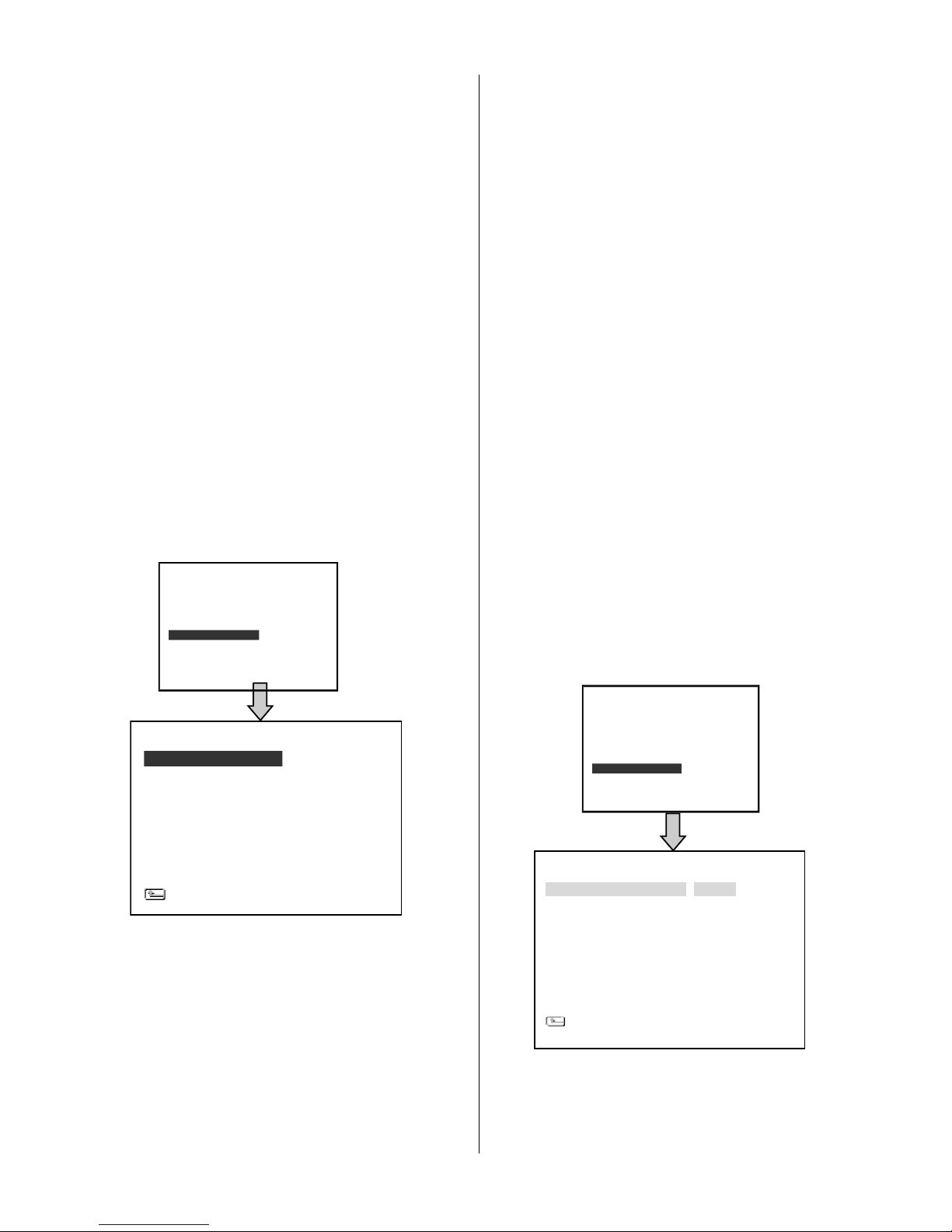
Allows you to set the system time, the daylight
saving time and the power delay time. Also allows
users to set the titles for each video source or
camera, in live or recording mode.
CLOCK:
Allows users to set the system time and decide
whether to start using the GPS time.
NOTE: The clock data is retained for about 3
months after the 15-hour power supply is used up
(in the Operation mode).
DAYLIGHT SAVING
Allows users to set the daylight saving time.
OFF: Disables the daylight saving time.
US: Daylight saving time begins at 2:00 a.m. on
the first Sunday of April. The time reverts to
standard time at 2:00 a.m. on the last Sunday of
October.
EUROPE: (Except the UK) Daylight saving time
begins at 2:00 a.m. on the last Sunday of March.
The time reverts to standard time at 2:00 a.m. on
the last Sunday of October.
UK: Daylight saving time begins at 1:00 a.m. on
the last Sunday of March. The time reverts to
standard time at 1:00 a.m. on the last Sunday of
October.
SET: This sets the beginning and the end of the
daylight saving time.
TITLE:
Allows users to set the titles for each video
source or camera, in live or recording mode;
press the DISPLAY button to switch on the
display status to show the titles. The maximum
length for each title is 24 letters.
OPTIONAL RELAY
Located on the rear of the MDR-304A, can be
used to make an electrical connection to
supplementary device when the MDR-304A is
powered up. The relay is normally open (NO).
DELAY ON ENERGISE OF THE RELAY:
Adds a time delay before the relay is activated.
The options are OFF, 0 SEC, 1 MIN, 5 MIN and
10 MIN
DELAY ON DE-ENERGISE:
Adds a time delay before the relay is deactivated.
The options are OFF, 1 MIN, 5 MIN, 10 MIN, 60
MIN and NON STOP.
COMMUNICATION Settings
COMM SETTING
COMM ID : 0.1
RS232 ENABLE : ON
RS232 CONNECTION : GPS
BAUD : 4800
GPS SPEED : Km/H
GSENSOR SENCITIVITY : 0.8
MAIN PAGE
RECORD
ALARM
CLOCK/ TITLE
COMMUNICATION
DISK
SYSTEM
MAIN MENU
GOTO CLOCK/ TIMER PAGE
RE CO RD
AL AR M
CL OC K/ T ITLE
CO MM UN ICAT ION
DI SK
SY STE M
MA IN ME NU
GO TO CO MM PAG E
Page 25
24
HD REFORMAT
HD FAT32
SD FILE
AUTO ERASE
SD REFORMAT
DISK SETTING
MAIN PAGE
: HD1
: BUILD
: JPEG
: OFF
: START
COMM ID: This function is disabled and not
supported on the current MDR-304A.
RS-232 ENABLE:
This function is disabled and not supported on
the current MDR-304A.
RS-232 CONNECTION: This function is disabled
and not supported on the current MDR-304A.
BAUD:
This entry selects the baud rate of the GPS
Antenna (RS232 port). This should be left at
4800.
GPS SPEED:
Select either Km/H (kilometers per hour) or MPH
(miles per hour).
G-SENSOR SENSITIVITY:
Increases or decreases the point where an alarm
activated recording is triggered by the G-sensor.
DISK Settings
HD REFORMAT:
Allows you to clear out all the data in the
hard-disk drive. You will be required to enter a
pre-set password before clearing out the data.
Enter the standard password “9999” if you
haven’t set your individual password.
HD 1: Clears out all the data stored in HD 1.
HD FAT32:
This function builds the FAT32 file system in the
hard disk, so files can be transferred to and stored
on a PC. HDD Viewer will be required to view these
files.
SD FILE:
This option determines the format in which to save
important image files in an SD card.
JPEG: Archives images in the JPEG format, to
save a single picture in every file.
AVI: Archives images in the AVI format, to save a
sequence of images in a file, the
maximum limit being 300 images for every
file. You can stop recording whenever you
want, and if you don’t, recording will
automatically stop at the maximum of 300
images.
AUTO ERASE:
There are two options.
OFF: Disables the "AUTO ERASE" function.
SET: Enables the "AUTO ERASE" function.
Select "SET" and press the ENTER button to
enter the "AUTO ERASE SETTING" page,
where you can enable the settings to save
data for storage for any period of time from 1
to 365 days. After the expiry of the time
period you set, the data will be erased
automatically.
SD REFORMAT:
Allows you to clear out all the data in the SD Card.
SYSTEM Settings
RECORD
ALARM
CLOCK/ TITLE
COMMUNICATION
DISK
SYSTEM
MAIN MENU
GOTO DISK PAGE
RECORD
ALARM
CLOCK/ TITLE
COMMUNICATION
DISK
SYSTEM
MAIN MENU
GOTO SYSTEM PAGE
SYSTEM
OPERATION LOG : ENTER
OSD LANGUAGE : ENGLISH
MENU BACKGND : 2
BUZZER : OFF
PASSWORD : SET
SETUP PWD : OFF
DEFAULT : LOAD
SD SETUP : SAVE
VERSION : ENTER
MEIN PAGE
Page 26
25
RECORD
ALARM
CLOCK/ TITLE
COMMUNICATION
DISK
SYSTEM
MAIN MENU
GOTO SYSTEM PAGE
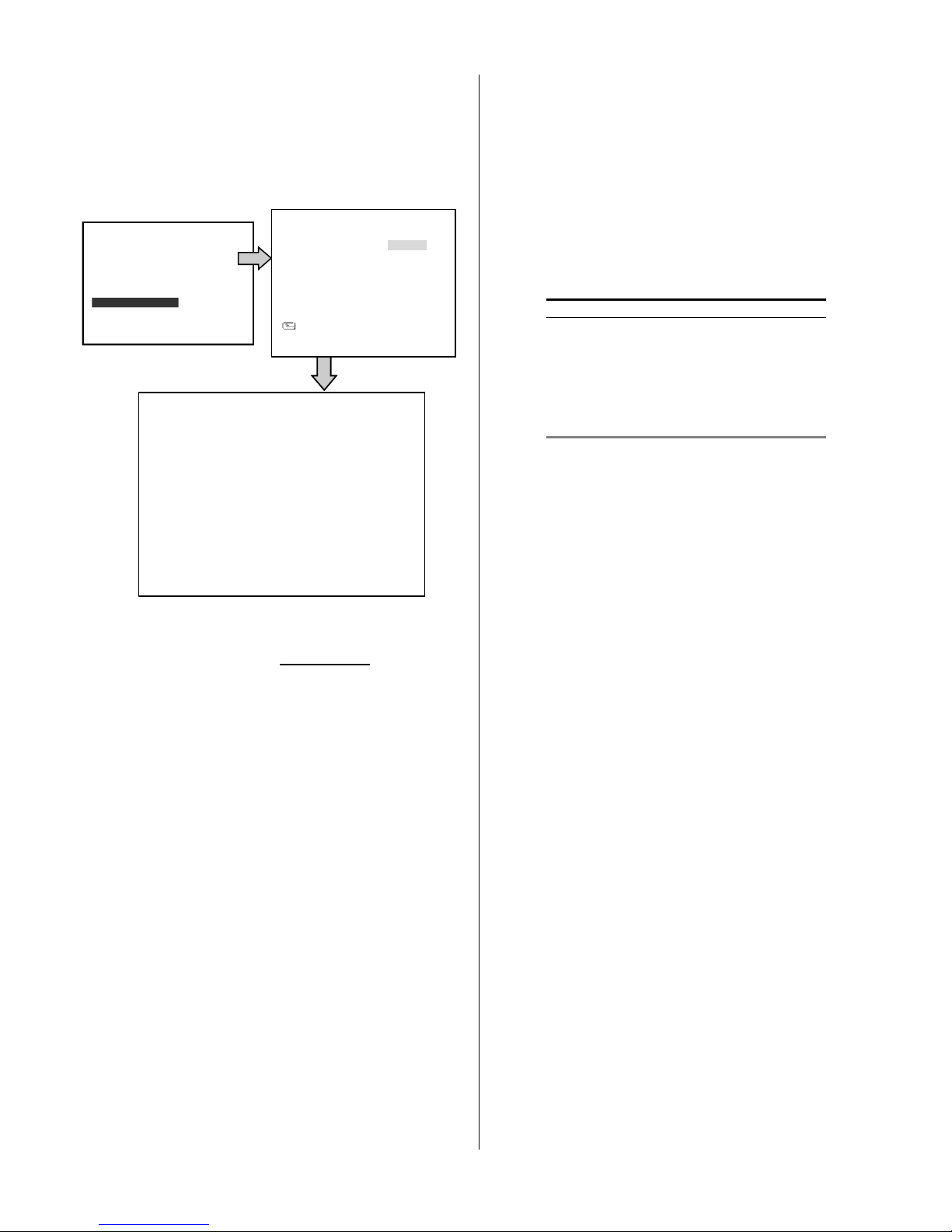
OPERATION LOG:
This page is used for accessing the history of the
operation status, setting the password, resuming
factory default, and determining the menu display
background.
This log shows the history of the operation status
in chronological order. What the following entries
represent is detailed in APPENDIX 1.
Note: When the log is full, the newly registered
record of an operation will replace the existing
records starting with the oldest record.
Backup the operation status log:
1. Insert the SD card into the built-in SD slot of the
unit.
2. Hold down the STOP and SETUP buttons
simultaneously in the live mode.
3. The MDR-304A displays the message “SAVE
OK”. The process is complete.
4. The operation status log will be saved into the
SD card (log.txt).
OSD LANGUAGE (optional):
Choose which language to use.
MENU BACKGND:
There are 3 levels of background color
transparency you can choose from: level 1 is
totally transparent, level 3 is opaque, and level 2 is
between levels 1 and 3. The background color is
used in the setup menu and search functions.
BUZZER:
Enables or disables the embedded buzzer to
sound a 2 seconds long tone to signal the
following situations.
ON: Enables the buzzer.
OFF: Disables the buzzer.
Situation
Alarm occurs
Video loss occurs
Disk is full
Loading factory default
Buzzer is set to ON
Key lock function is enabled/disabled
Powering on /off the mobile rack HDD
PASSWORD:
Allows you to set a password to prevent any
unauthorized re-formatting of the hard disk drive
and to unlock the entire front panel button
controls. The standard password is “9999”.
OLD PASSWORD: Enter the pre-set password
(or the standard password if this is the
initial setting) to access the password
setting system.
NEW PASSWORD: Enter a 4-digit-number
password of your choosing which will
replace the pre-set password (or the
standard password of “9999”).
SETUP PWD:
When this option is on, the user must enter the
correct password before entering the setup menu.
ON: Enables password protection.
OFF: Disables password protection.
DEFAULT:
This option allows you to reload the factory
default setting. Please note that the password
cannot be changed in the factory default setting.
SD SETUP:
The MDR-304A offers a quick setup method by
using an SD card. To set up a number of
MDR-304As with the same settings, simply save
the desired settings from one MDR-304A onto
SYSTEM
OPERATION LOG
OSD LANGUAGE ENGLISH
MENU BACKGND
BUZZER
PASSWORD
SETUP PWD
DEFAULT
SD SETUP
VERSION
MEIN PAGE
SET OSD TO ENGLISH
05/15/04 18:50:30
05/15/04 18:51:20
05/15/04 18:19:30
05/15/04 18:19:36
05/15/04 18:23:10
05/15/04 18:23:50
05/15/04 18:25:05
05/15/04 18:27:12
LOG
SYSTEM ON
SYSTEM OFF
SYSTEM ON
RE
C
STOP
V-LOSS
PLAY
STOP-P
Page 27

26
SW : 1.21
DATE : Nov 10 2006
KEY : 1.00
REAR: 1.09
VERSION
an SD card, and then transfer these settings to
any number of MDR-304A recorders.
SAVE: Saves the whole setting to the SD
card.
LOAD: Loads the whole setting from the SD
card.
VERSION:
This item is in the setup menu: it shows the BIOS
version, the software version and last updated
date, and the rear board version.
Alarm and Motion Settings
ACC IGNITION ON:
In this mode a recording can be activated both
manually or automatically according to the auto start
record setting. To activate an alarm recording, set the
auto start record setting to “off” and “ALM
OPERATION” to “ON” in the “ALARM SETTING” page.
When an alarm is triggered, the device will record in
the set alarm-recording rate.
ACC IGNITION OFF:
1. After the ACC is powered off (ACC OFF), the
MDR-304A will record continuously for the time set
in the "POST-REC DURATION" time. If the user
enables both “ALM OPERATION” and the
“MOTION DETECTION” functions the MDR-304A
will not start recording until motion alarm is
triggered during the "POST-REC DURATION"
period. The length of recording will depend on the
Alarm Duration setting.
2. Motion detection can only be activated in the
“ACC OFF” mode..
3. Please take note that if the "POST-REC
DURATION" time is over, the MDR-304A will stop
recording even if the "ALM DURATION" is set for a
longer time period than the "POST-REC
DURATION" time.)
4. With “ACC OFF” any externally triggered alarm will
not influence the recording mode which you set. But
the MDR-304A will calculate the time of the
"POST-REC DURATION" anew in this situation.
5. If the "POST-REC DURATION" time ends while the
“DELAY OFF” time is still active, the MDR-304A will
not start a post-recording or a motion recording, and
the external triggers will have no effect.
Page 28

27
4. OPERATIONS
Recording
How to record video images. Before
commencing, please configure the recording
settings according to your needs.
Manual Recording
(1) Press the REC button to start recording.
The REC button will light up.
(2) Press the STOP button to stop recording.
Playback Operations
When playing a file, the monitor should display a
flashing PLAY message and the PLAY button will
light up indicating that the MDR-304A is in the
playback status.
To switch between channels 1–4 and the quad
view in the playback mode, please press the
CH1, CH 2, CH 3, CH4 and buttons.
NOTE: When you press the "PLAY" button
to enter the play mode, you then
press the "SEARCH" button to
change the two audio sources to any
one or two of the cameras you have.
Normal Playback
Once the user presses the PLAY button, the
MDR-304A will start to playback the recorded
data at the recorded speed; the starting position
must be fixed according to different operation
sequences.
A. Play back from the latest record in the
STOP position.
[ PLAY ] - [ STOP ] - [ PLAY ]
B. Play back from the latest recorded video.
[ REC ] – [ REC Stop ] – [ PLAY ]
C. Play back from a video clip in the Search
List.
[Search] – [ PLAY ]
D. Play back from the beginning of a hard
disk’s recorded data.
[STOP – press the key for 3 sec. ] – PLAY
Once playback reaches the end of a HDD’s
recorded data, the MDR-304A will show the
ending message ( use the SEARCH functions or
rewind to replay the file if required ).
Fast Forward/Backward
There are 7 speeds available for playback: 1x,
2x, 4x, 8x, 16x, 30x and 100x.
While playing back recorded video at the
recorded speed:
Forward: Press the FF button to view the
recorded video in the forward direction
at a speed faster than the recorded
speed or to return to the normal speed
of playback. Each subsequent
pressing of the FF button to the right
increases the forward rate, as 2x, 4x,
8x, 16x, 30x and 100x.
Backward: Press the REW button to view the
recorded video in the reverse direction
at a speed faster than the recorded
speed or to return to the normal speed
of playback. Each subsequent pressing
of the REW button to the left increases
the reverse rate, as -1x, -2x, -4x, -8x,
-16x, -30x and -100x.
Slow Forward/Reverse
There are 4 speeds available for a slow
playback: 1/2, 1/4, 1/8, and 1/16.
While playing back recorded video at the
recorded speed:
(1) Press the PAUSE button for the slow
playback mode.
(2) Forward: Press the FF button to view the
recorded video in the forward
direction at a speed slower than
the recorded speed. Each
subsequent pressing of the FF
button to the right increases the
forward rate, as 1/2, 1/4, 1/8, and
1/16.
Page 29
28
FULL LIST
ALARM LIST
TIME SEARCH
THUMBNAIL
SD CARD
SEARCH
FULL LIST
ALARM LIST
TIME SEARCH
THUMBNAIL
SD CARD
SEARCH
(3) Normal: Press the PLAY button to return to
the normal speed of playback.
Play back picture-by-picture
While playing back recorded video at the
recorded speed:
(1) Press the PAUSE button for the pause
mode.
(2) Press the PAUSE button to display one
frame of a picture at a time in the forward
direction, but the PAUSE button can only
function in a forward direction.
(3) Press the PLAY button to return to the
normal speed of playback.
Search Operations
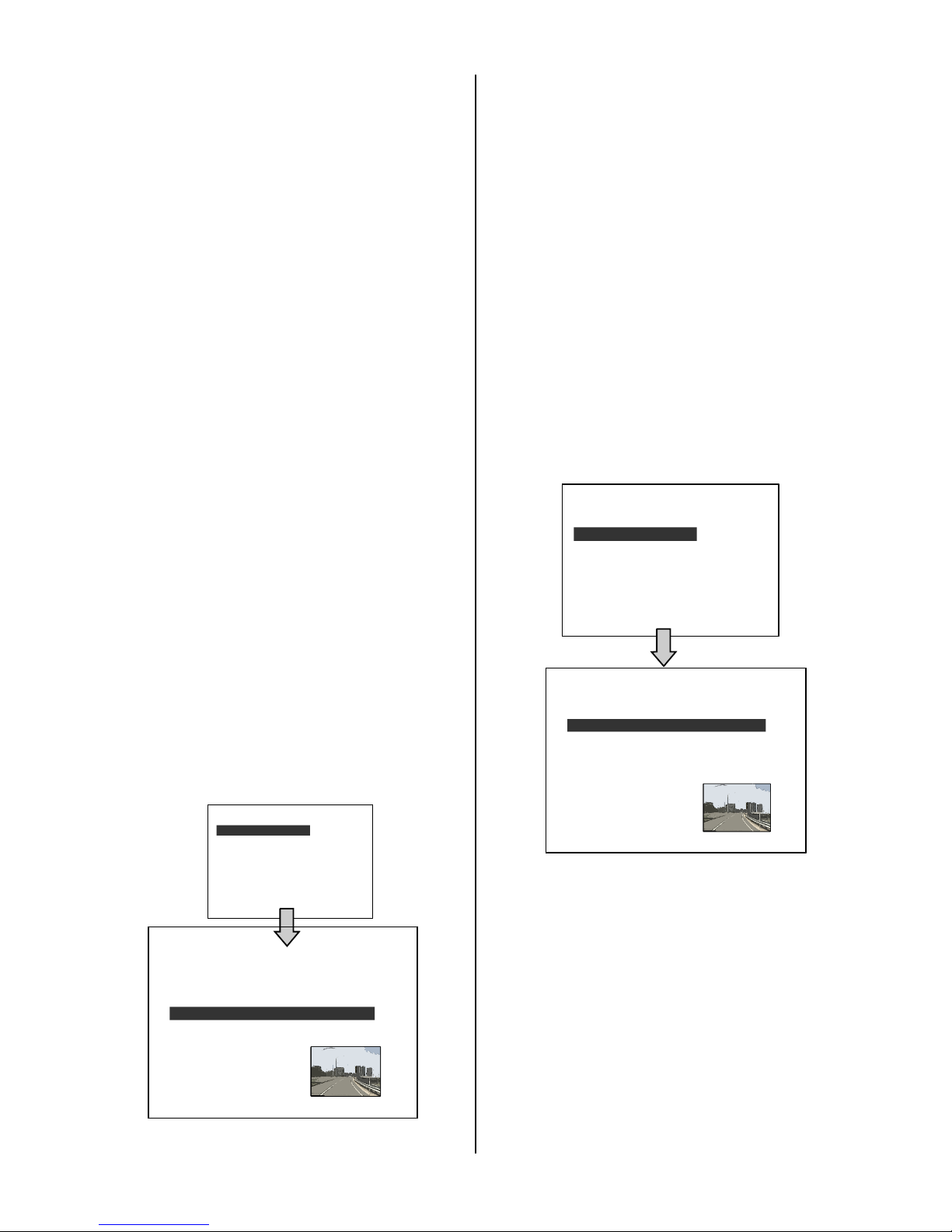
FULL LIST Search
(1) Press the SEARCH button to enter the
search mode.
(2) Select the FULL LIST and press the Enter
button to access the complete list of
recorded video.
(3) Highlight the specific recorded video of
your requirement and press the Enter
button to display the selected video.
(Key Operation: Press the “^” and “v”
buttons to select a video; press the “<”
and “>” buttons to flip over a page.)
NOTE: A: Alarm recording.
NOTE: The maximum number of index items in
the list in a hard disk drive is 3000.
ALARM LIST Search
1) Press the SEARCH button to enter the
search mode.
(2) Select the ALARM LIST and press the
Enter button to access the complete list of
alarm-event recorded video.
(3) Highlight the specific recorded video of
your requirement and press the Enter
button to display the selected video.
(Key Operation: Press the “^” and “v”
buttons to select a video; press the “<”
and “>” buttons to flip over a page.)
TIME Search
(1) Press the SEARCH button to enter the
search mode.
(2) Select TIME SEARCH and press the Enter
button to access the time-setting page.
(3) Set the time period you wish to search for
the recorded video.
(4) Press the Enter button to start searching
and displaying the concerned image.
A 1 08-12-04 10:02:15 1.00G
A 2 08-12-04 12:42:31 18.0M
A 3 08-12-04 12:42:47 10.0M
HD1
1 08-11-04 21:47:55 28.3G
2 08-12-04 06:55:58 8.03G
A 3 08-12-04 10:02:15 1.00G
A 4 08-12-04 12:42:31 18.0M
A 5 08-12-04 12:42:47 10.0M
HD1
Page 30
29
FULL LIST
ALARM LIST
TIME SEARCH
THUMBNAIL
SD CARD
SEARCH
FULL LIST
ALARM LIST
TIME SEARCH
THUMBNAIL
SD CARD
SEARCH
MM DD YEAR
10 / 10 / 2004
THUMBNAIL
10 / 01 / 2004 15:10:30
CH 1
MM DD YEAR
10 / 10 / 2004
THUMBNAIL
10 / 01 / 2004 15:10:30
CH 1
(5) If no video is found, please return to the
time-setting page and repeat steps (3) and
(4) for another search.
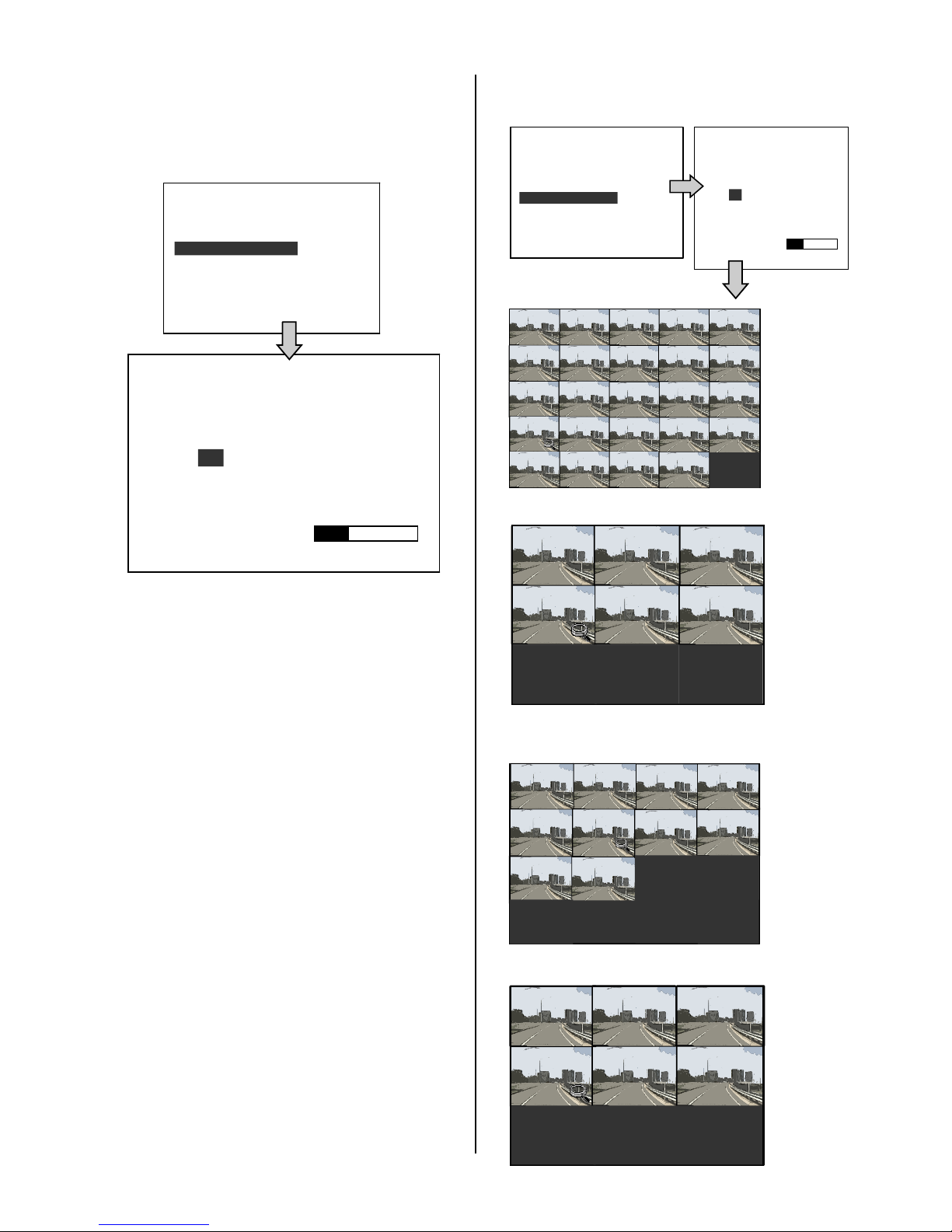
THUMBNAIL Search
(1) Press the SEARCH button to enter the
search mode.
(2) Select THUMBNAIL and press the Enter
button to access the thumbnail page.
(3) Set the date you wish to search for the
recorded video.
(4) Press the Enter button to start searching for
and displaying the concerned image.
Note: You can select the image by using the
“<”, “>”, “^” and “v” buttons to move the
focus.
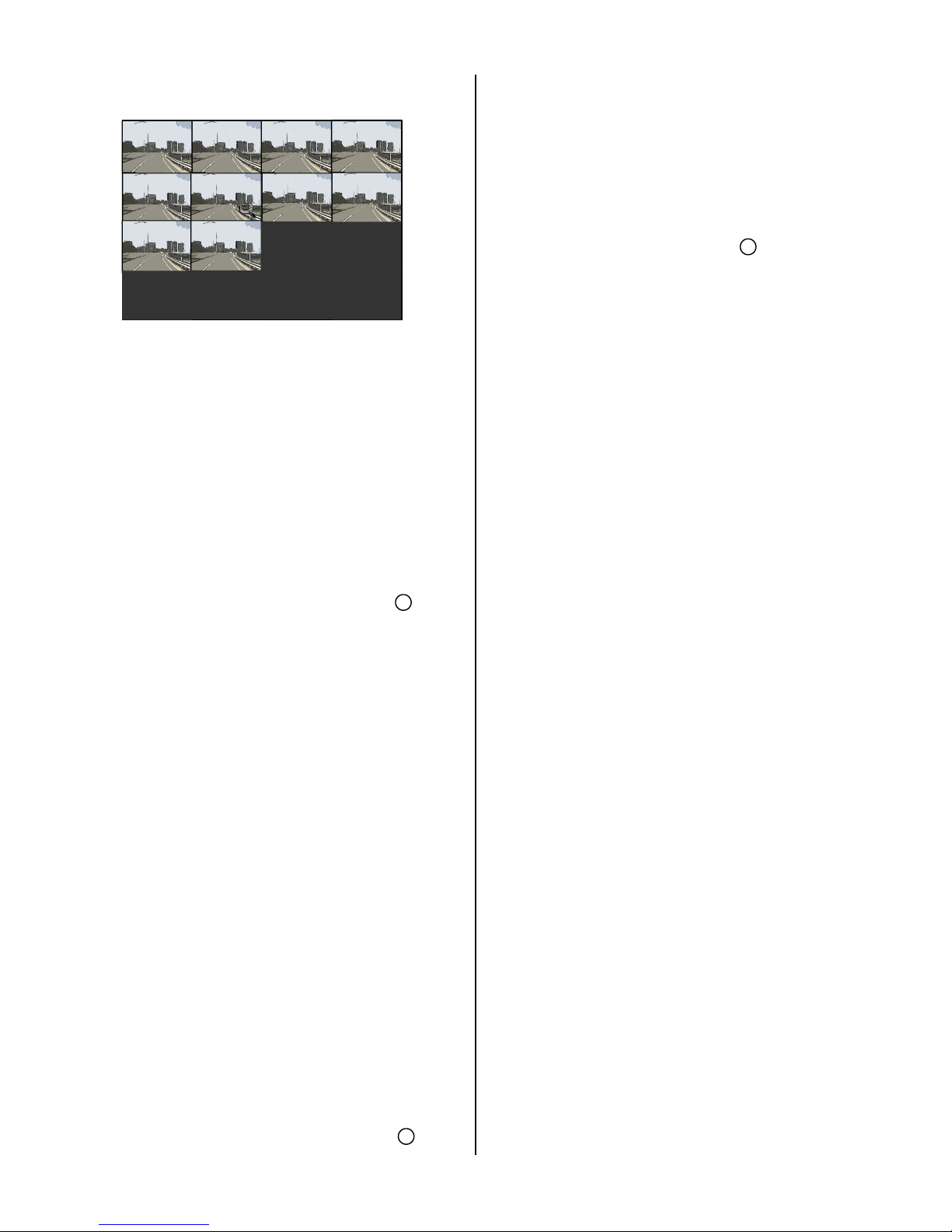
(5) There are 5 levels of recording time modes
to choose from: 1 Hour, 10 Minutes, 1
Minute, 10 Seconds and 1 Second. Select
the specific frame of your requirement and
press the Enter button to enter the next
level. If you want to return to the previous
level, please press the Setup button.
(6) Once you reach the critical point at any
level, you can start to playback by just
clicking the PLAY button.
LEVEL 1 : Interval = 1 Hour
LEVEL 2 : Interval = 10 Min.
LEVEL 3 : Interval = 1 Min
LEVEL 4 : Interval = 10 Sec.
LEVEL 5 : Interval = 1 Sec.
00:00:00
2004:10:20
LEVEL : 1
1 HR
00:00:00 01:00:00 02:00: 00 03:00:00
04:00:00
05:00:00 06:00:00
07:00:00
08:00:00
09:00:00
10:00:00
11:00:00 12:00:00
13:00:00
14:00:00
15:00:00
16:00:00 17:00:00
18:00:00
19:00:00
20:00:00
21:00:00 22:00:00 23:00:00
15:20:00
15:30:00
15:40:00
15:50:00
2004:10:20
LEVEL : 2
10 MIN
15:00:00
15:10:00
15:30:00
15:31:00
15:32:00
15:33:00
15:34:00 15:35:00
15:36:00
15:37:00
15:38:00 15:39:00
2004:10:20
LEVEL : 3
1 MIN
15:35:00
15:35:10
15:35:20
15:35:30
15:35:40
15:35:50
2004:10:20
LEVEL : 4
10 SEC
Page 31
30
LEVEL5 : Interval = 1 Sec.
Backup Operations
SD Card Backup Operations
The SD card slot of the front unit has four
functions as shown below:
Archive Single image Clips into an SD Card
(1) Press the SETUP button to enter the
setup mode and select the DISK.
(2) Highlight DISK and press the Enter
button to enter the DISK SETTING page.
(3) Then set SD FILE to JPEG.
(4) Insert an SD card into the SD card slot of
the front unit.
(5) Start playing back the recorded video.
(6) Press the PAUSE button to freeze the
desired pictures.
(7) Press the SETUP button to save the
image in the SD Card.
The quantity of pictures that can be stored
depends on the SD card capacity. You can
print the saved images from any computer.
The image is stored in the JPEG compressed
format. If more than one clip is stored in an
SD card, the file names will be assigned in
sequence as shown below.
SAVE TO F0000.JPG
SAVE TO F0001.JPG
…
SAVE TO F000N.JPG
(8) The saved picture is the same as the
present picture on the screen; please use
the CH1, CH2, CH3, CH4, and the
Quad buttons to switch to the channel(s)
desired, and then press the SETUP
button to save.
Archive video of AVI clips into an SD Card
(1) Press the SETUP button to enter the setup
mode and select the DISK.
(2) Highlight DISK and press the Enter button
to enter the DISK SETTING page.
(3) Then set SD FILE to AVI.
(4) Insert an SD Card into the SD card slot of
the front unit.
(5) Start playing back the recorded video.
(6) Press the PAUSE button to freeze the
desired pictures.
(7) Press the SETUP button to save the video
in the SD card.
The quantity of video that can be stored depends on
the SD card’s capacity. The image is stored in the
AVI compressed format. If more than one clip is
stored in an SD card, the file names will be assigned
in sequence as shown below.
SAVE TO M0000.AVI
SAVE TO M0001.AVI
…
SAVE TO M000N.AVI
NOTE:
●The AVI file format cannot be played and deleted in
the MDR-304A. It can only be played in a card
reader connected to a computer.
●The file format can be selected from the “SD FILE”
item on the Setup Menu.
Backup the System setting info into an SD
Card.
The MDR-304A offers a quick setup method
by using an SD card. If a user wants to set
many MDR-304A devices with the same
settings, the MDR-304A can save the whole
setting in the SD card, and then transfer it to
another MDR-304A.
12
12
12
15:35:30
15:35:31
15:35:32
15:35:33
15:35:34 15:35:35
15:35:36
15:35:37
15:35:38 15:35:39
2004:10:20
LEVEL : 5
1 SEC
Page 32
31
OPERATION LOG
OSD LANGUAGE
MENU BACKGND
BUZZER
PASSWORD
SETUP PWD
DEFAULT
SD SETUP
VERSION
SYSTEM
MAIN PAGE
SAVE
LOAD
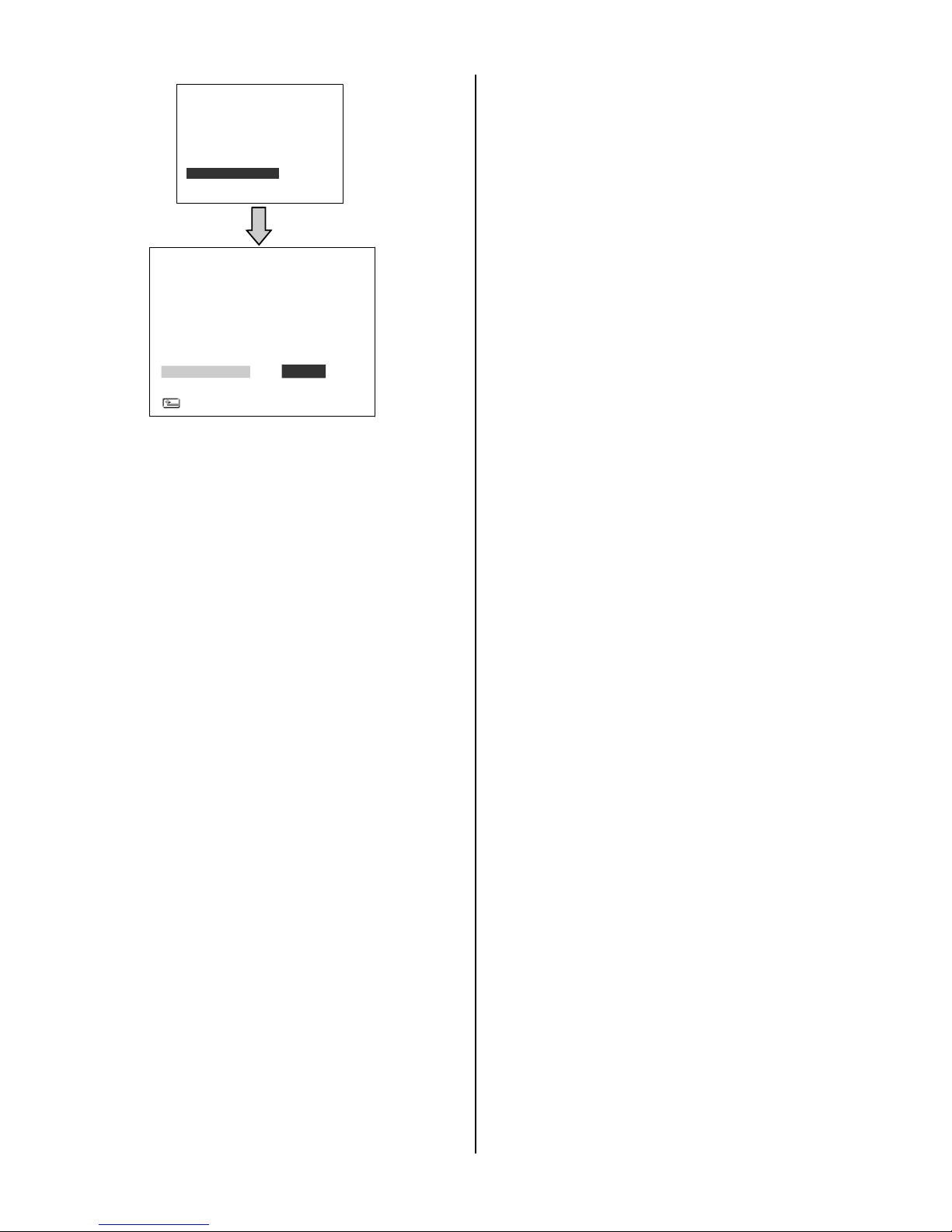
Save the whole setting into the SD card:
Insert an SD card into the SD card slot.
Press the SETUP button to enter the setup
mode.
Highlight SYSTEM and press the Enter
button to enter the SYSTEM SETTING page.
Set SD SETUP to SAVE. Then the system
setting information will be automatically
saved in the SD card.
Transfer the system setting info of the
MDR-304A to another MDR-304A:
Insert the SD card which has stored the
system setting information into the
MDR-304A.
Press the SETUP button to enter the setup
mode and select SYSTEM.
Highlight SYSTEM and press the Enter
button to enter the SYSTEM SETTING page.
Then set SD SETUP to LOAD.
.
Key Lock Operation
The Key lock operation protects the unit against
unauthorized use by disabling the entire front
panel controls. Press the Enter button for at
least 3 seconds to lock the unit; to release the
Key Lock, press the button again and enter the
pre-set password (or the standard password if
this is the initial setting)
RECOR
ALARM
CLOCK/ TITLE
COMMUNICATION
DISK
SYSTEM
MAIN
GOTO SYSTEM PAGE
Page 33
32
1
2
3
RECORD
ALARM
CLOCK/ TITLE
COMMUNICATION
DISK
SYSTEM
MAIN MENU
GOTO REC PAGE
5. MISCELLANEOUS
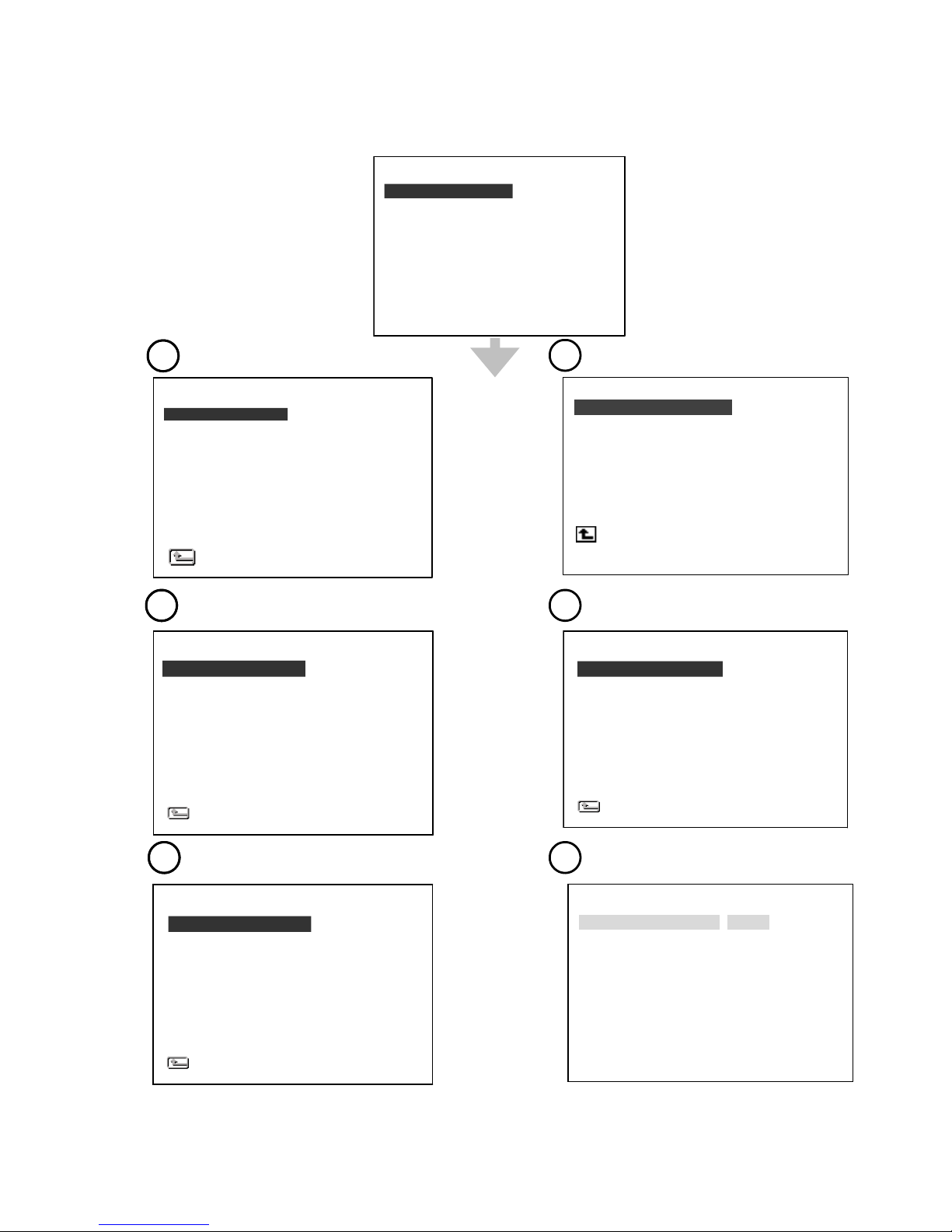
System Default
4
5
6
SYSTEM
OPERATION LOG : ENTER
OSD LANGUAGE : ENGLISH
MENU BACKGND : 2
BUZZER : OFF
PASSWORD : SET
SETUP PWD : OFF
DEFAULT : LOAD
SD SETUP : SAVE
VERSION : ENTER
MEIN PAGE
HD REFORMAT
HD FAT32
SD FILE
AUTO ERASE
SD REFORMAT
DISK SETTING
MAIN PAGE
: HD1
: BUILD
: JPEG
: OFF
: START
GPS STAMP : OFF
COMM SETTING
COMM ID : 0.1
RS232 ENABLE : ON
RS232 CONNECTION : GPS
BAUD : 4800
GPS SPEED : Km/H
GSENSOR SENCITIVITY : 0.8
MAIN PAGE
1
2
3
AUTO START REC
REC RATE
REC QUALITY
DISK FULL
AUDIO
POST-REC DURATION
SPLIT
A/V SOURCE
REC SETTING
MAIN PAGE
: OFF
: 20 F/S
: BEST
: REWRITE
: OFF
: OFF
: 4CH
: SET
CLOCK
DAYLIGHT SAVING
TITLE
DELAY ON
DELAY OFF
CLOCK / TITLE
MAIN PAGE
: SET
: OFF
: SET
: OFF
: OFF
ALM OPERATION
REC RATE
REC QUALITY
AUDIO
ALM TYPE
ALM DURATION
PRE-ALARM
IO CONNECTION
ALARM SETTING
MAIN PAGE
: OFF
: 15 F/S
: BEST
: OFF
: NO
: 30 SEC
: OFF
: ALARM
MOTION SETTING
Page 34
33
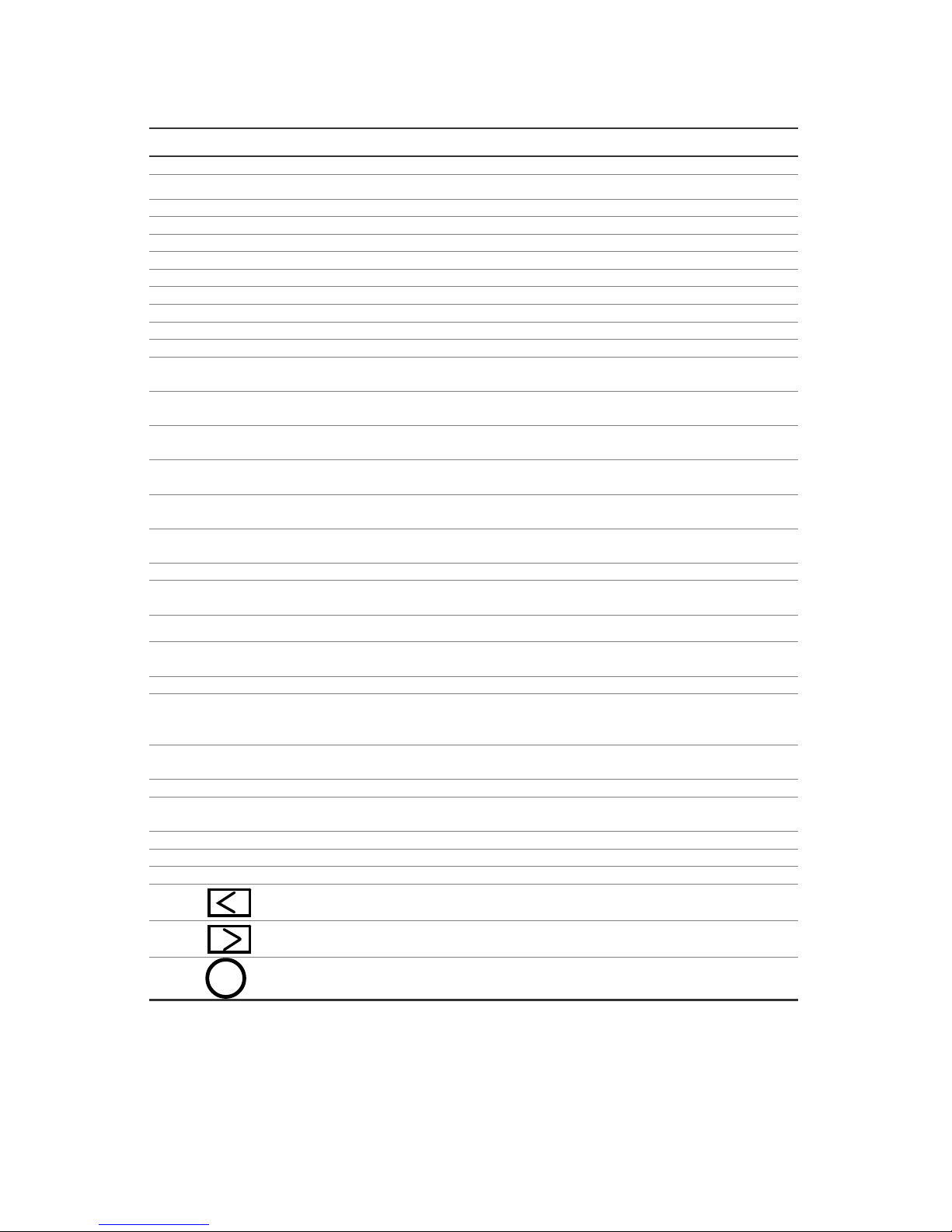
O.S.D Messages
No.
O.S.D Message
Meanings
1
NO DISK
No hard disk detected after power activated
2
BATTERY LOW
Check vehicle battery
3
BATTERY HIGH
Check vehicle alternator output
4
LOADING
System Boot up
5
VIDEO LOSS
Video loss
6
VIDEO IN
Video input source
7
KEY LOCKED
Key lock function is on
8
KEY UNLOCKED
Key lock function is off
9
n1 OF n2 ITEMS PROGRESS n3 %
BACKUP n1/n2 NOW
10
BACKUP COMPLETE
Backup complete
11
NO ENTRY FOR BACKUP
No backup is possible.
12
BACKUP INCOMPLETE
Backup incomplete, since the user has pressed
the STOP button to stop it
13
NOT FOUND
The system cannot find a video in the Search
function.
14
END
Playback of recorded video has reached the end
point
15
DISK FULL
Hard disks are full; this happens only when the
DISK FULL item in the setup menu is set to STOP.
16
EMPTY
The user presses the PLAY button or uses the
Search function, but no video can be played.
17
SET TO NTSC, PLS RESTART
System has to be set to NTSC, please reboot
(PAL is similar)
18
SOFTWARE UPDATE
Software update
19
PLEASE RESTART
The system should be rebooted after the software
has been updated
20
NO DISK
There is no disk.
21
SD CARD ERROR
The user has pressed the Save key without
putting in an SD card.
22
FAN STOPPED
The chassis fan has stopped for over 30 seconds.
23
HDn ERROR AT xxxxx
There is a hard-disk error during recording, where
n is the hard-disk number and xxxxx is the
hexadecimal location.
24
NOT PRESENT
When the user tries to clear a disk that was not
attached in the setup menu.
25
SAVE MXXXX.AVI TO SD CARD
Start saving to the AVI file.
26
SAVE TO Fnnnn. JPG
Start saving to the JPEG file. (where nnnn=
0…9999)
27
SAVE OK
Saving to the JEPG or AVI is ok.
28
SD CARD WRITE PROTECT
An SD card is write-protected; or there is an error.
29
ACC OFF
Power off.
30
Received the leftside trigger signals.
31
Received the rightside trigger signals.
32
Received the brake triggering signal.
S
Page 35
34
Time Index Table
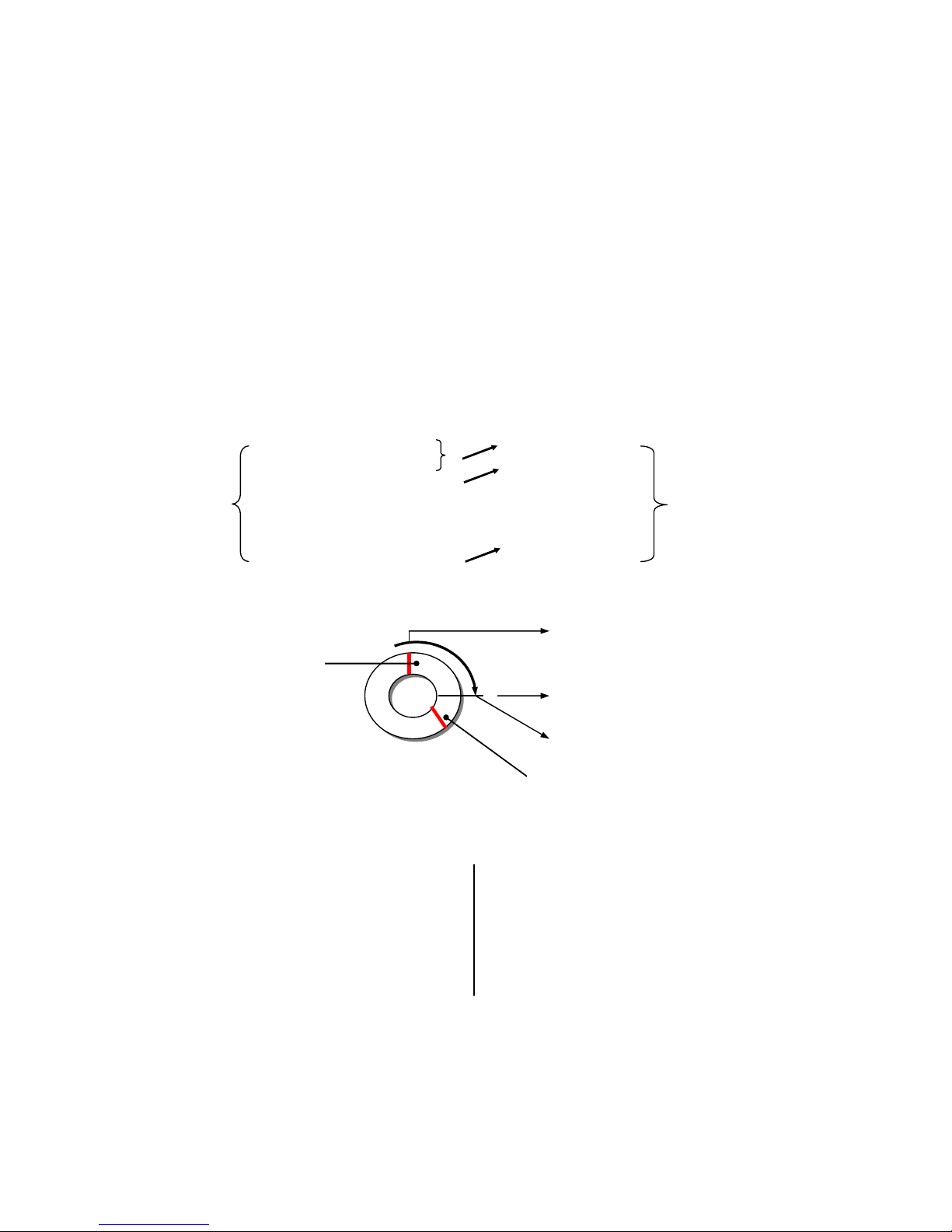
The MDR-304A will generate a Time Index Table for recorded data stored in a particular HDD. This
allows recorded data to be found and displayed via the alarm list search and full list search.
The maximum number of lists for a given HDD is 3000. When the list of any given HDD is used up
and the disk is not full, the unit will still use the rest of the space for recording. In such a case, an
index for the recent recorded data will be generated and the index of the next oldest data will be
erased so that the list remains 3000 in total. And the next oldest data will be kept in the index of the
corresponding oldest data. For any newly-recorded data, this approach will be applied until the disk
becomes full.
HD1
HD1
3000
Indexes
1
12-02-03 12:20:55
1
12-02-03 12:20:55
3000
Indexes
2
12-02-03 13:30:33
2
01-30-04 16:00:34
3
01-30-04 16:00:34
:
:
:
:
:
:
2999
02-03-04 16:00:56
3000
02-03-04 16:00:56
3000
02-08-04 17:30:58
In the rewrite recording mode, when the archived
hard disk drive is full, the MDR-304A will start
overwriting the oldest data recorded. As the
previous recorded data was partially overwritten
by the recent recording, the indicating time index
of that data will be changed corresponding to the
starting time of the remaining session. The index
of the session will be deleted from the table when
it is fully overwritten.
Previously
recorded data
overwritten
The point at which recording stops
Previously recorded data remaining
Page 36
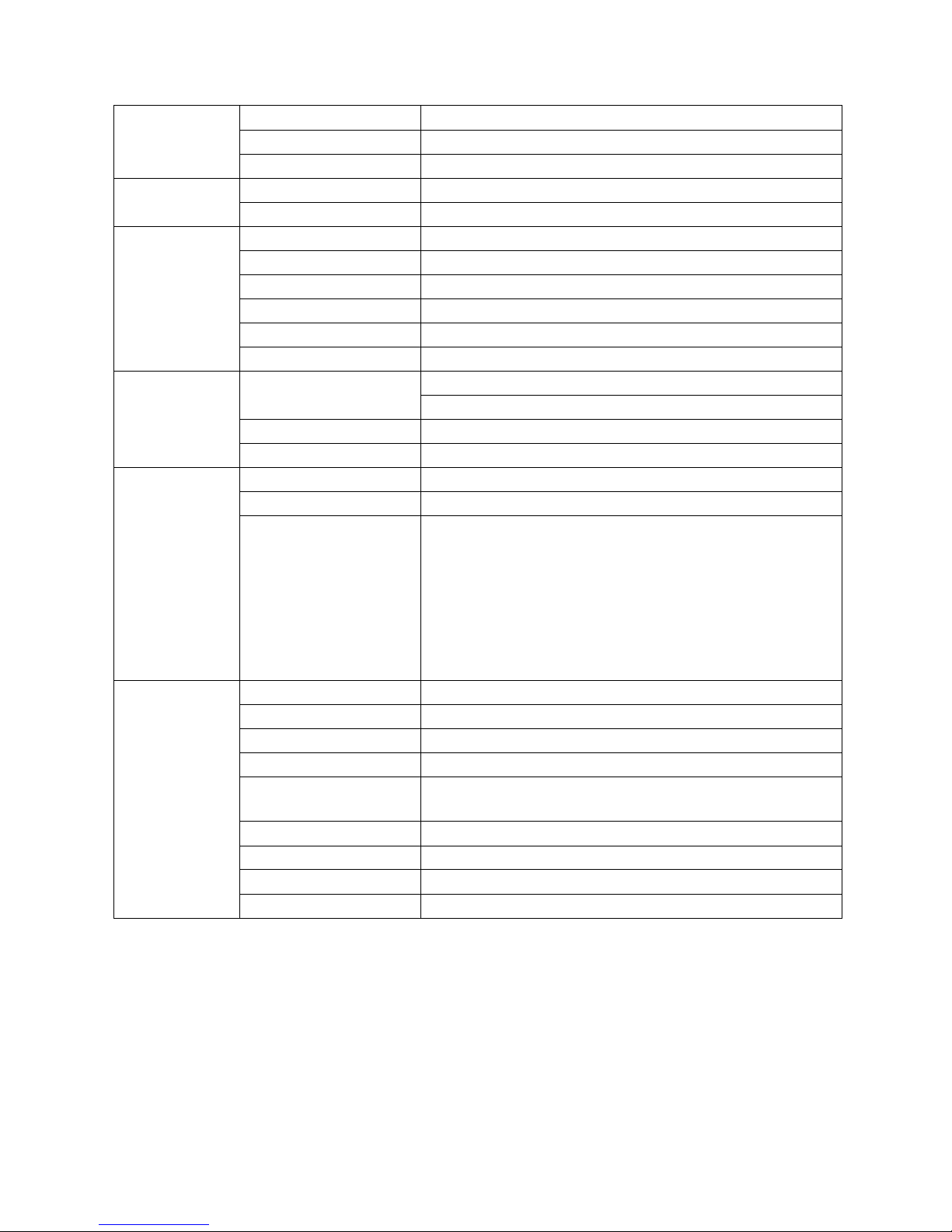
35
Specifications
Video
Video system
NTSC / PAL
Video input
4
Video output
1
Audio
Audio input
6 CH (Rec 1 Ch)
Audio output
1 CH
Recording
Compression
MPEG4
Resolution & Frame rate
120 / 100 IPS @ CIF (NTSC/PAL)
Recording mode
Auto / Manual / Alarm trigger
Watermark
Digital signature
Storage
Removable SATA 2.5” HDD x 1 or SSD x 1
Pre-alarm
On / Off (5 Seconds, N/A)
Playback
Playback speed
Fast Forward: 1X, 2X, 4X, 8X, 16X, 30X, 100X
Reverse: 1/2X, 1/4X, 1/8X, 1/16X
Records search
Record List / Event list / Time & Date / Thumbnail
Display channel
1 / 2 / 3 / 4
Application
GPS[Optional]
Alarm
4 alarm input / 2 alarm output
Power management
Stop the unit recording and closes down operation after a
user defined period has elapsed from the vehicle ignition
being turned off.
Carry out a controlled and timed power down sequence
when the vehicle voltage has fallen below operating
voltage.
Supplies and stabilizes the voltage to peripheral devices
on vehicle.
Miscellaneous
Power voltage
DC10~27V
Software update
SD card
Backup
SD card
Operation Temperature
Operation temperature (without heater): 0℃-50℃
Mechanical construction
Horizontal, Vertical and Bevel angles various installed
angles provided
Vibration resistance
2G
Mechanical shock
8G
Dimension
178 x 173 x 50 mm
Approvals
FCC / CE / e-mark
Page 37

36
HDD Viewer
Introduction
HDD Viewer makes it possible to search recorded video for critical moments and export and convert images into
standard AVI video file or single image JPEG files.
The Hi-Speed USB 2.0 interface (compatible with USB1.1) allows for fast transfer of raw data onto larger
storage devices for long term archiving of files should they be required at a much later date.
The product is available in one package as itemized below. If you discover damaged or missing items, please
contact your supplier.
The package includes:
‧ HDD Viewer CD-ROM
‧ USB2.0 cable
System Requirements:
The following describes the suggested system requirements for the HDD Viewer software.
System requirements:
Minimum: Pentium III 500 PC or higher
64MB RAM or more
Recommended: Pentium III 800 PC or higher
128MB RAM or more
Operating system: Microsoft Windows NT/2000/2003/XP or higher
Page 38
37
Installation Instructions - Software
Installing from the CD-ROM
Insert the CD-ROM in your CD Drive and follow the on-screen instructions. If your Auto Play option is disabled in
your CD-ROM drive, you will need to navigate to the CD-ROM drive through Windows Explore or My Computer
and double click on the Setup.exe file.
Installing from the run dialog
Click on the Windows Start button, then select Run. Type in "D:\Setup.exe " where D:\ is the letter of your CD
ROM drive. If the CD ROM drive letter is something other than "D:\", you will need to find out what your current
CD ROM drive letter designation is and use that instead. For example, if your CD ROM drive is "E:\", then you
will have to enter " E:\Setup.exe ". Follow on-screen instructions to install the HDD Viewer.
Software Installation
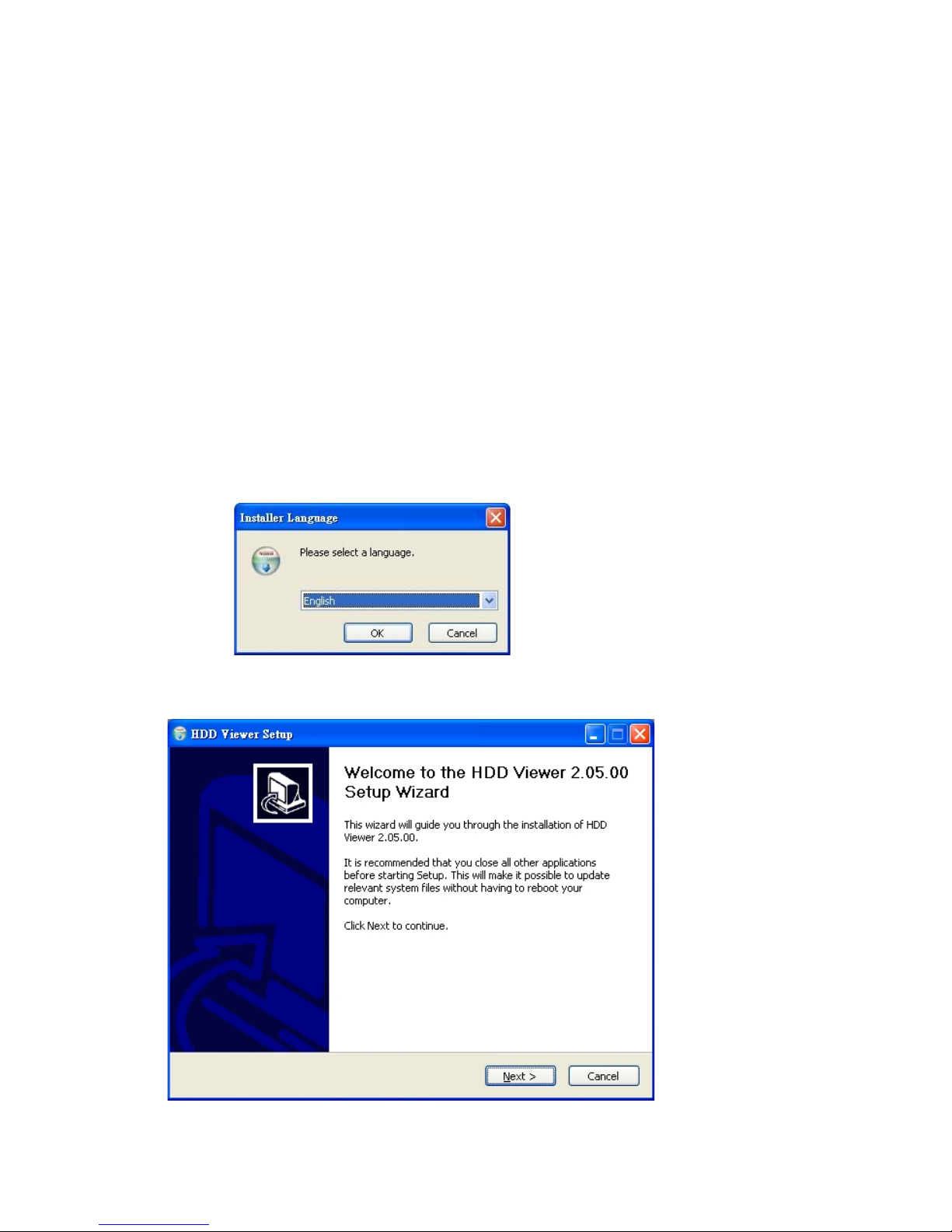
STEP 1: INSTALLER LANGUAGE
Select a language and click OK.
STEP 2: SETUP PROGRAM
Click Next and installation will begin right away.
Page 39
38
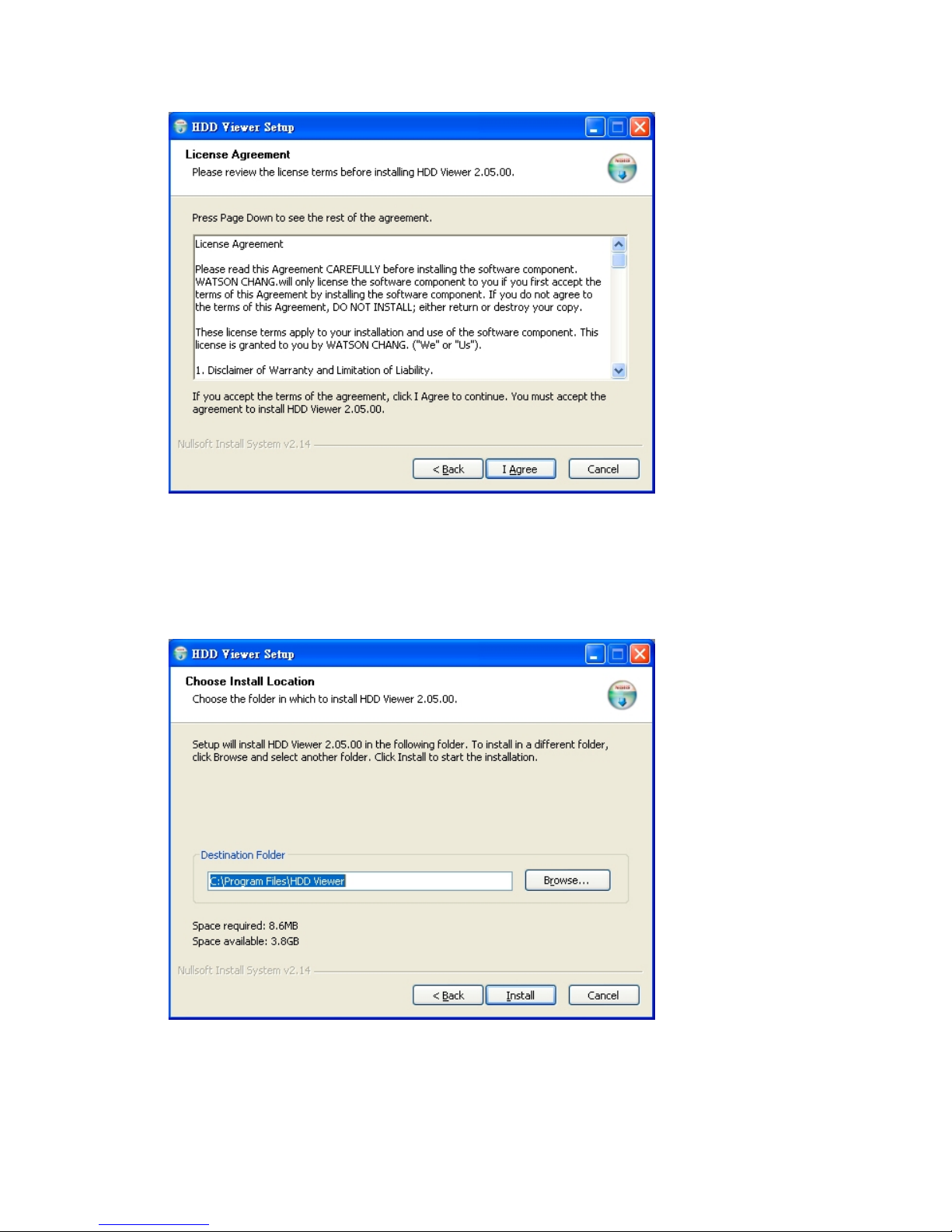
STEP 3: LICENSE AGREEMENT
Click I Agree to continue after reading the license agreement.
STEP 4: SET UP THE INSTALLATION FOLDER
Browse to select the path for the software modules, or just go on to the next step if you select the default
path of C:\Program Files\HDD Viewer.
Please click Install to proceed with the installation. Wait just a few minutes to complete the setup
functions.
Page 40
39
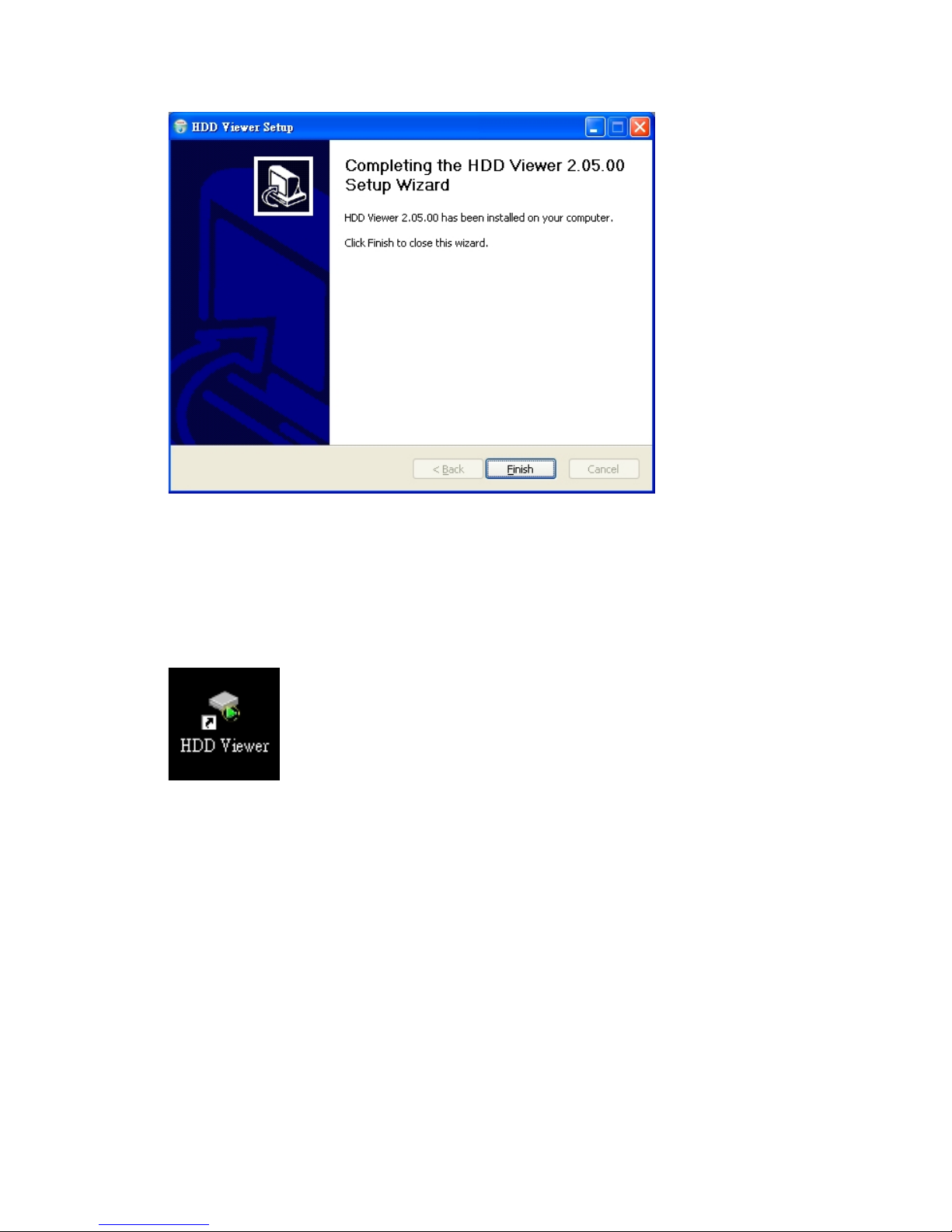
STEP 5: FINISH THE INSTALLATION
Click Finish to complete the installation.
STEP 6: START TO USE THE HDD VIEWER
After completing installation, you can double-click the icon in the desktop, which is shown below. Or
click "Start Menu" in the computer and select "Programs" to open the "Program Selection" page. Then
click the "HDD Viewer" tag to start the program.
NB:
1. The user must have full ‘administrator’ rights/permissions for the PC on which HDD Viewer is
being run; and
2. The HDD Viewer program must have full ‘administrator’ rights/permission settings.
Refer to your IT Department/Manager in this respect.
Page 41
40
Installation Instructions - Hardware
Please follow the instructions to set up the system.
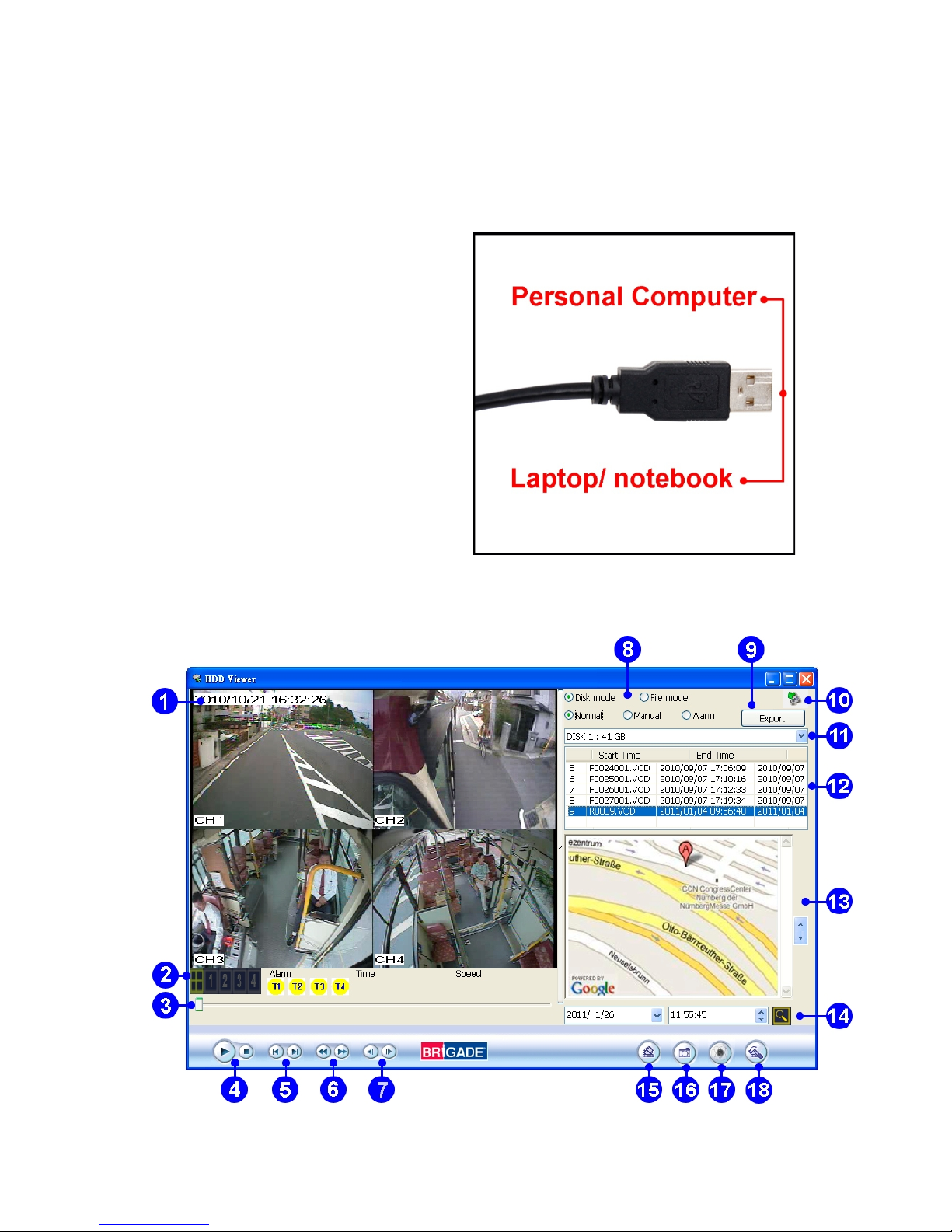
Connecting the MDR-304A and PC by the USB2.0 Cable:
Take the USB cable and insert it into the front panel of the MDR-304A, linking the other end to a
PC. Then open the HDD Viewer.
Use the USB cable to connect the USB
port on your PC or laptop/notebook, and
linking the other end into the front panel
of the MDR-304A.
Basic Operation
This section shows you how to operate the HDD Viewer.
Page 42
41
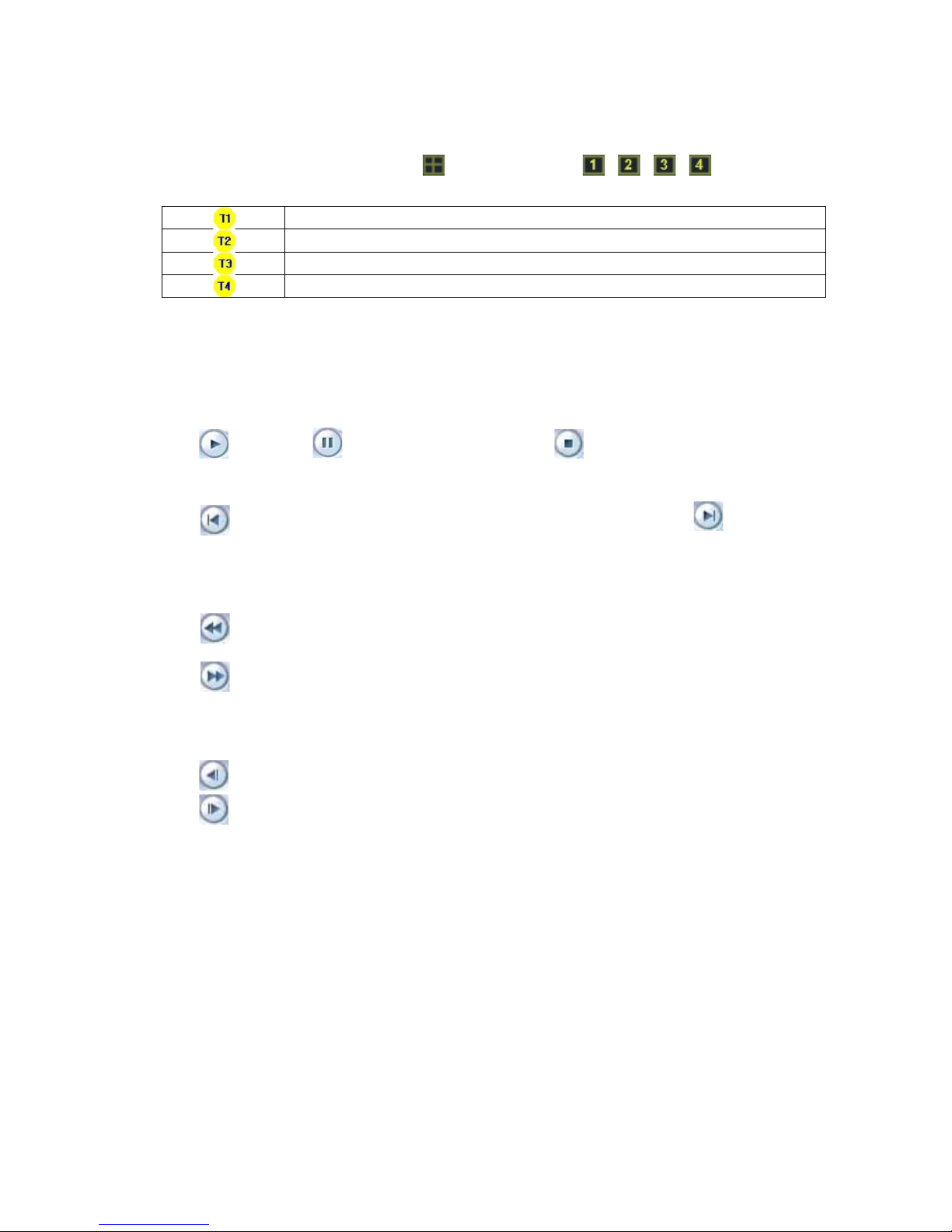
1. Video display area:
It displays images from the files in the HDD.
2. Single-channel or multi-channel modes & the information status:
Click to select channels 1,2,3…all. The button and buttons / / / are used to
select the video displaying modes and the video channels.
Alarm1 Trigger.
Alarm2 Trigger.
Alarm3 Trigger.
Alarm4 Trigger.
3. Scroll bar for video searching.
Drag the square on the bar to search the video.
4. PLAY/ PAUSE/ STOP:
Click to play and to make the video pause. Click to stop the video.
5. Previous file (entry)/ Next file (entry):
Click to skip to the previous video clip (the previous entry in the list). Click to play the
next video clip (the next entry in the list).
6. Backward/ Forward:
Click to play backward. The HDD Viewer provides fast play backward of recorded video at
various speeds: -1x、-2x、-4x、-8x、-16x and -32x.
Click to play forward. The HDD Viewer provides fast play forward of recorded video at
various speeds: 1x、2x、4x、8x、16x and 32x.
7. Step backward/ Step forward:
Click to move to the last image.
Click to move to the next image.
8. Select the mode & select the Rec. Type (Normal/ Manual/ Alarm):
Disk Mode: In this mode, the software will list the files in the MDR-304A hard disk.
File Mode: In this mode, the software will list the files in a specified directory (eg files downloaded
from MDR-304A and stored on a PC). Those files could be the backup files from a
MDR-304A hard disk, and you can directly play the information on the hard disk or
USB device in the File Mode.
Select Rec. Type: Choose the recording type.
Normal: Lists all the recording entries.
Manual: Lists only the manual recording entries.
Alarm: Lists only the alarm recording entries.
Page 43

42
9. Export (G-sensor X, Y & Z data in Excel format):
(1) Select a recorded file from the file list. Then press the Export button.
(2) Specify the file path to be used when exporting the picture and other information in the
Information dialog.
(3) When all is ready, please click the Data Export button to start to export.
10. Rescan disk state:
Click to rescan all the disks. (Refreshes list of recordings).
11. Select a hard disk drive:
Select a storage device from the drop-down list.
12. File (Entry) List:
It provides the information in files.
You can double click the file list or just press the play button to play the files.
13. Google map
A vehicle’s location and route are shown on the map. Click the button (17) first to open the
Google map.
14. Time Search:
This allows you to search for a recorded video stored in the HDD of the device. Enter the
Year/Month/Day Hour: Minute: Second you wish to search and click the button to proceed.
15. Save a video clip (AVI):
Click the button to save a video clip in the AVI, JPG or VOD format.
Please refer to section 6.4.2, “Save a video (AVI) to a PC”, for more details.
16. Save a single picture:
Click the button to save a single picture in the JPEG format.
Please refer to section 6.4.1, “Save a single picture to a PC”, for more details.
17. Map:
Click the button to open the Google map. Select ON/ OFF to activate/ deactivate the
Google map function.
18. G-sensor, Audio Gain and OSD Language Settings:
Click the button to open the Localization dialog. Check to activate/ deactivate the G-sensor,
Audio Gain function and select to change the OSD language.
G-sensor: Select to show the X, Y & Z axes data under the scroll bar.
Audio Gain: Select to activate the audio gain (volume) icon: / .
Page 44
43
Advanced Operation
Save a snapshot to a PC
Step 1. Click the button to save a single picture in the JPEG format.
Step 2. Please specify the File Name/ File Path to which you want to export the picture.
Step 3. After specifying the name and the path, please click the "Save" button to start the export.
You can also click "Cancel" to cancel all your previous settings.
Save a video file to a PC
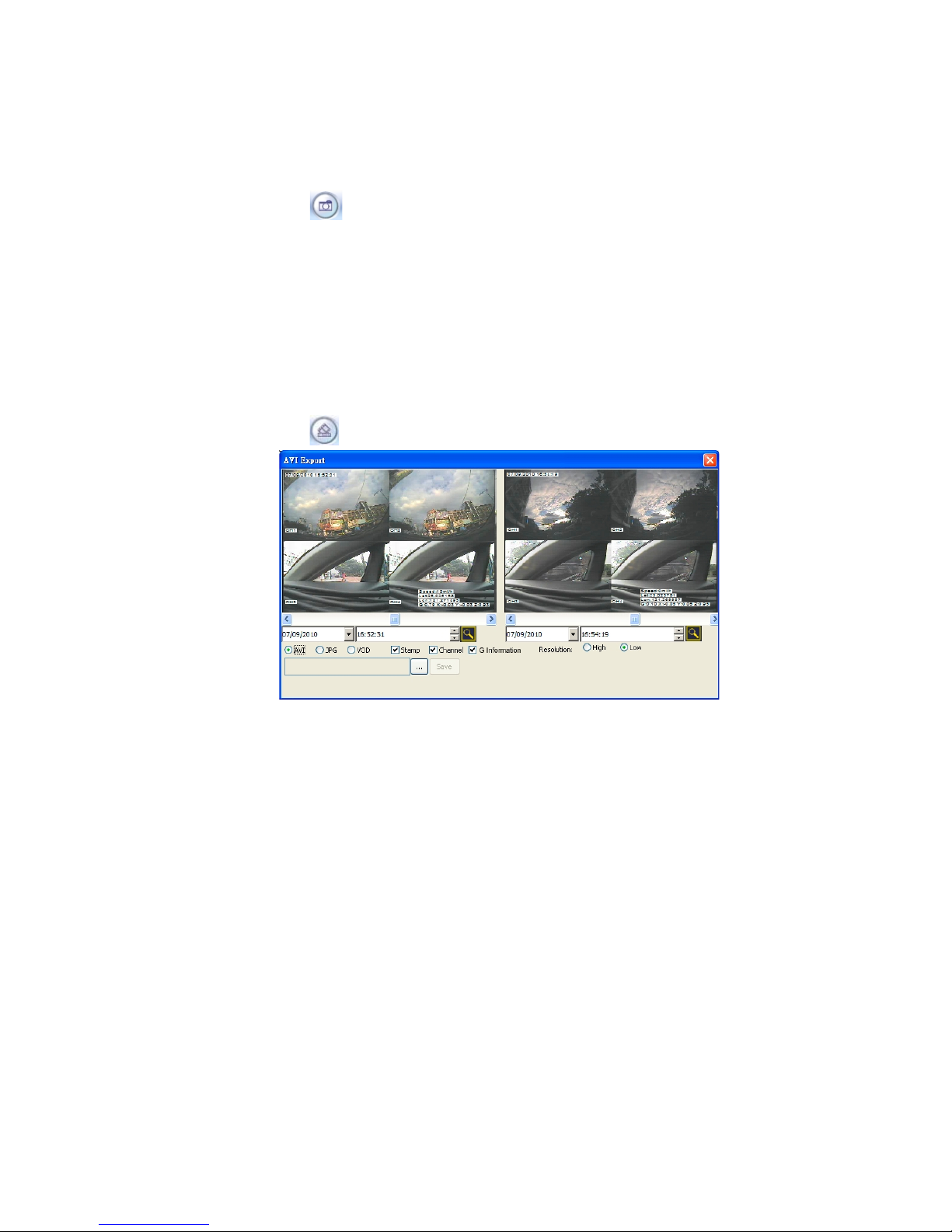
To save a video file in AVI / JPG/ VOD format to a PC.
Step 1. Click the button.
Step 2. Drag the squares on the left and right video scroll bars to search for the start and
finish points of the video file you wish to save/download.
Step 3. Select the backup file format. Check to activate/ deactivate the time stamp or channel
display function.
Step 4. Select the resolution.
Step 5. Specify the file name and the file path in which you want to save the video.
Step 6. After specifying the name and the path, click the "Save" button to start the transfer.
You can also click "Stop" to cancel.
Step 7. After finishing the backup process, a dialog box which displays a message: “Data
export successfully” opens in the center of the screen.
Page 45

44
Read the CSV report
The CSV report helps you to analyze the vehicle status and messages from the G-sensor.
The G-sensor is a 3-axis (X/ Y/ Z) accelerometer which is able to detect the magnitude and
direction of acceleration. The G-sensor can be used to sense orientation (because the direction
of velocity changes), coordinate acceleration (so long as it produces g-force or a change in
g-force) and provides the measurement of low g forces resulting from fall, tilt, motion, positioning,
shock or vibration.
The X/ Y/ Z axes:
1. X [0-4]/ Y [0-4]/ Z [0-4]: The vector data consists of three acceleration values, the X, Y, and
Z parts of the acceleration. The G Sensor will detect the values of X, Y, and Z five times per
second.
X/ Y/ Z [0]: The sampling value of X/ Y/ Z in the first detection in a second.
X/ Y/ Z [1]: The sampling value of X/ Y/ Z in the second detection in a second.
X/ Y/ Z [2]: The sampling value of X/ Y/ Z in the third detection in a second.
X/ Y/ Z [3]: The sampling value of X/ Y/ Z in the fourth e detection in a second.
X/ Y/ Z [4]: The sampling value of X/ Y/ Z in the fifth detection in a second.
2. G [0-4]: The average values of X, Y, and Z will be calculated five times per second as well.
Page 46

45
3. Lat/ Lon: This stands for the latitude and longitude that the GPS receives.
4. GPS speed: The velocity which is measured by the GPS receiver.
5. Alarm:
Stop: The car stops at a signal light.
Left/ Right: The left-side car signal light/ the right-side car signal light.
Page 47

46
APPENDIX 1. –Table of LOG Message
MENU SETUP LOG
-- REC SETTING PAGE --
1>.AUTO START REC OFF --> M-R ASR OFF
AUTO START REC 0 SEC --> M-R ASR 0 SEC
AUTO START REC 1 MIN --> M-R ASR 1 MIN
2>.DISK FULL REWRITE --> M-R DFULL REW
DISK FULL STOP --> M-R DFULL STOP
3>.POST-REC DURATION OFF --> M-R POST OFF
POST-REC DURATION 1 MIN --> M-R POST 1 MIN
POST-REC DURATION 5 MIN --> M-R POST 5 MIN
POST-REC DURATION 10 MIN --> M-R POST 10 MIN
POST-REC DURATION 30 MIN --> M-R POST 30 MIN
POST-REC DURATION 60 MIN --> M-R POST 60 MIN
POST-REC DURATION 90 MIN --> M-R POST 90 MIN
POST-REC DURATION 120 MIN --> M-R POST 120 MIN
POST-REC DURATION NON STOP --> M-R POST NON
STOP
4>.SPLIT 4CH --> M-R SPLIT 4CH
SPLIT 3CH --> M-R SPLIT 3CH
SPLIT 2CH --> M-R SPLIT 2CH
5>.A / V SOURCE --> M-R AV
SET
-- ALARM SETTING PAGE --
1>.ALM OPERATION OFF --> M-A OPERATION OFF
ALM OPERATION ON --> M-A OPERATION ON
2>.REC RATE 25 F/S --> M-A RATE 25
REC RATE 12.5F/S --> M-A RATE 12.5
REC RATE 8.3 F/S --> M-A RATE 8.3
REC RATE 5 F/S --> M-A RATE 5
REC RATE REMAIN --> M-A RATE REMAIN
3>.ALM DURATION 0 SEC --> M-A DUR 0 SEC
ALM DURATION 30 SEC --> M-A DUR 30 SEC
ALM DURATION 1 MIN --> M-A DUR 1 MIN
ALM DURATION 5 MIN --> M-A DUR 5 MIN
ALM DURATION 10 MIN --> M-A DUR 10 MIN
ALM DURATION NON STOP --> M-A DUR NON STOP
4>.IO CONNECTION ALARM --> M-A IO ALARM
IO CONNECTION VEHICLE SIGNAL --> M-A IO VS
IO CONNECTION VEHICLE SIGNAL --> M-A IO VST
-- CLOCK/TITLE SETTING PAGE --
1>.CLOCK SET --> M-T CLOCK SET
2>.DAYLIGHT SAVING OFF --> M-T DST OFF
DAYLIGHT SAVING US --> M-T DST US
DAYLIGHT SAVING EUROPE --> M-T DST EU
DAYLIGHT SAVING UK --> M-T DST UK
DAYLIGHT SAVING SET --> M-T DST SET
Page 48

47
-- DISK SETTING PAGE --
1>.HD REFORMAT HD1 --> M-D HD REFORMAT
2>.AUTO ERASE OFF --> M-D A-ERASE OFF
AUTO ERASE SET --> M-D A-ERASE SET
3>.SD REFORMAT START --> M-D SD REFORMAT
4>.GPS STAMP OFF --> M-D G-STAMP ON
GPS STAMP ON --> M-D G-STAMP OFF
-- SYSTEM SETTING PAGE --
1>.BUZZER OFF --> M-S BUZZER OFF
BUZZER ON --> M-S BUZZER ON
2>.PASSWORD SET --> M-S PASSWORD
3>.SETUP PWD OFF --> M-S SETUP_PWD OFF
SETUP PWD ON --> M-S SETUP_PWD ON
4>.DEFAULT LOAD --> M-S DEFAULT
5>.SD SETUP SAVE --> M-S SD SAVE
SD SETUP LOAD --> M-S SD LOAD
6>.VERSION ENTER --> M-S VERSION
-- OTHER LOG -----------
1>.POST REC DURATION
MENU / REC / POST-REC DURATION --> POST 1 MIN
MENU / REC / POST-REC DURATION --> POST 30 MIN
MENU / REC / POST-REC DURATION --> POST xxxxxx
2>.AUTO START REC
MENU / REC / AUTO START REC = 0 SEC --> AUTO REC
3>.I/O WDT RESET
I/O / WDT Reset --> WDT RST
4>.NTSC PAL
PAUSE + LEFT --> NTSC PAL SET
5>.NO DISK
NO DISK --> NO DISK
6>.SYSTEM
Main board system on --> SYSTEM ON
Main board system off --> SYSTEM OFF
Starts recording --> REC:
Ceases recording --> STOP:
Ceases playback --> STOP-P:
Shows recorded video --> PLAY:
Video input is connected --> V-IN:
Video loss occurs --> V-LOSS:
Power interruption occurs --> P-LOSS:
Detects an alarm input --> A-IN:
Disables the entire front panel controls --> LOCK:
Releases the key lock --> UNLOCK:
Updates system software --> UPDATE:
Vehicle Ignition ON --> ACC ON:
Vehicle Ignition OFF --> ACC Off:
Power off because of the low voltage of battery --> OFF-BL:
Power off because of the high voltage of battery --> OFF-BH:
Page 49
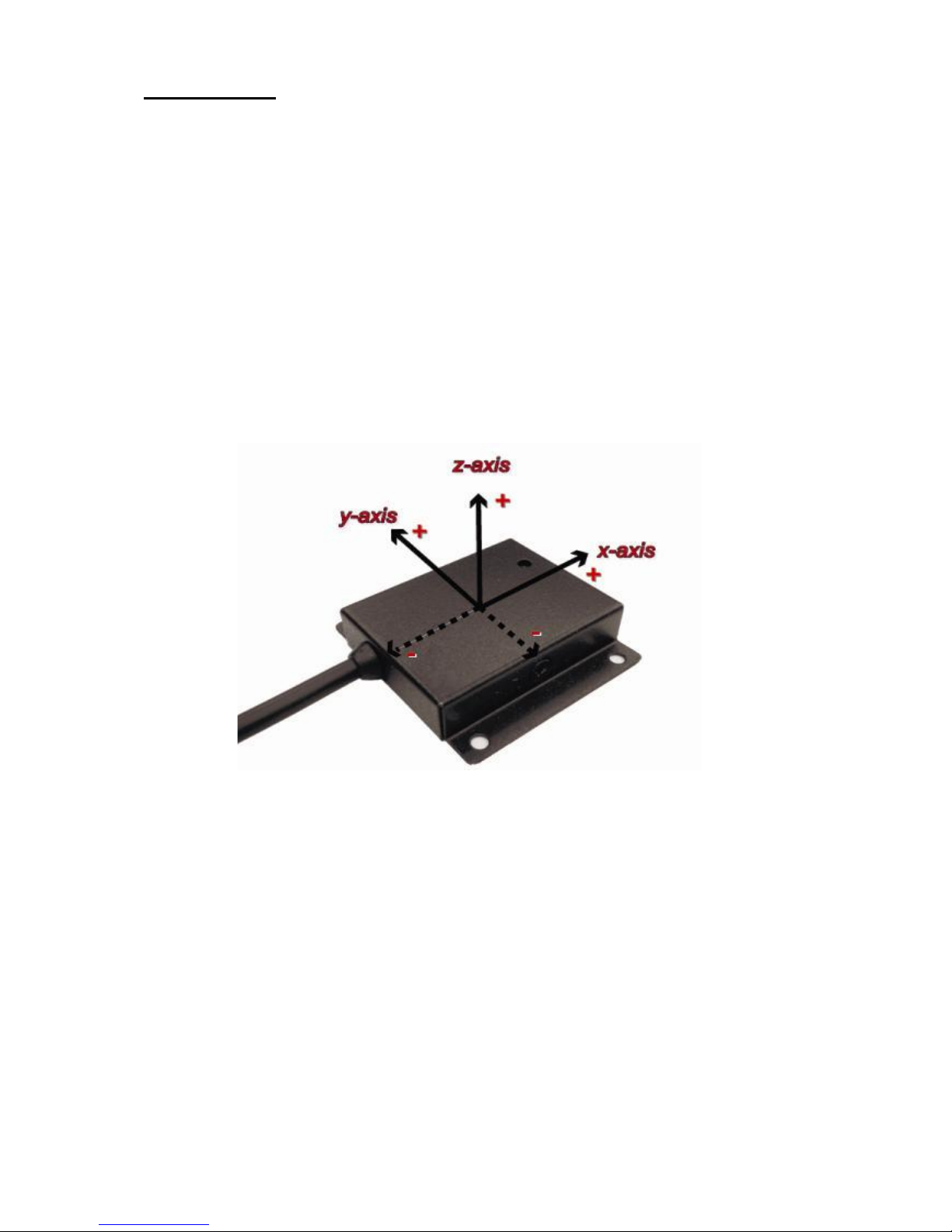
The G-sensor
The value “G” is only used when the MVR connects with a G sensor, which can
detect the vehicle acceleration force or G force. The G value is equal to the square
root of the x²+y²+z².
The user can set the G-sensor sensitivity which is a limited value for corresponding
with the value “G” of the G-sensor. When the currently value is over the limited
sensitivity, and the alarm operation is already set to on, the MVR will trigger alarm
signal.
The Range of the G-sensor sensitivity: 0.2, 0.4, 0.6, 0.8, 1.0, 1.2, 1.4.
The X/ Y/ Z axes:
Forward
Up
Left
Page 50
Brigade Electronics Plc
Brigade House, The Mills, Station Road, South Darenth, Kent DA4 9BD
Sales +44(0) 1322 420300 Facsimile +44(0) 1322 420343
www.brigade-electronics.com [email protected]
1774 Dec 11
Stock code: 2919A
 Loading...