

Page 1
PRO 7500
Basic Charger Type 3757
Handle Type 3765
Charging Stand Type 3755
Smart Plug Type 492-5214
Page 2
91723734/IV-18
CN/EN
2
Page 3
Oral
-B
A
B
al
10
Or
B
l
a
Or
1
B
-
Oral
11
2
3
4
5
6
7
8
B
12
13
C
EK
S
N
I
M
e
on
D
se
u
Pa
I
14
SEK
N
I
M
e
se Don
Pau
II
I
D
9
15
4
Page 4
1
3
0
s
3
0
s
3
0
s
3
0
s
3
4
5
2
B
al
Or
5
Page 5
67891011121314
Page 6
Page 7
Page 8
Page 9
Page 10
Page 11
Page 12
Page 13

English
Welcome to Oral-B!
Before operating this toothbrush, please
read these instructions and save this manual
for future reference.
IMPORTANT
•
Periodically check the entire
product/cords/accessories for
damage. A damaged or
non-functioning unit should no
longer be used. If the product/
cords/accessories are damaged, take it to an Oral-B Service Centre. Do not modify or
repair the product. This may
cause fire, electric shock or
injury.
•
Usage by children under age
3 is not recommended. Toothbrushes can be used by children and persons with reduced
physical, sensory or mental
capabilities or lack of experience and knowledge, if they
have been given supervision or
instruction concerning use of
the appliance in a safe way
and understand the hazards
involved.
•
Cleaning and maintenance
shall not be performed by children.
•
Children shall not play with the
appliance.
•
Use this product only for its
intended use as described in
this manual. Do not use
attachments which are not
recommended by the manufacturer.
WARNING
• Do not place the charger in water or liquid
or store where it can fall or be pulled into a
tub or sink. Do not reach for it when fallen
into water. Unplug immediately.
• This appliance contains batteries that are
non-replaceable. Appliance has no user
serviceable parts. Do not open and disassemble device except when disposing of
the battery. Use handling and disposal
instructions of the battery/device as
described in this manual.
• When unplugging, always hold the power
plug instead of the cord. Do not touch the
power plug with wet hands. This can
cause an electric shock.
• If you are undergoing treatment for any
oral care condition, consult your dental
professional prior to use.
• This toothbrush is a personal care device
and is not intended for use on multiple
patients in a dental practice or institution.
• Only use the charger and/or special cord
set (smart plug) with integrated Safety
Extra Low Voltage power supply provided
with your appliance. Do not exchange or
tamper with any part of it, otherwise there
is risk of an electric shock.
If charging stand/charging travel case is
marked with
use Braun/Oral-B special cord set (smart
plug) with this identification.
• Small parts may come off, keep out of
reach of children.
To avoid brush head breakage which may
generate a small parts choking hazard or
damage teeth:
• Prior to each use, ensure the brush head
fits well. Discontinue use of the tooth-
492-5214, only
Page 14

brush, if brush head no longer fit properly.
Never use without a brush head.
• If the toothbrush handle is dropped, the
brush head should be replaced before the
next use even if no damage is visible
• Replace brush head every 3 months or
sooner if brush head becomes worn.
• Clean brush head properly after each use
(see «Cleaning recommendations» paragraph). Proper cleaning ensures the safe
use and functional life of the toothbrush.
Important Information
• Your Oral-B toothbrush can be used
with your smartphone (find details
under «Connecting your toothbrush to
your Smartphone»).
• To avoid electromagnetic interference
and/or compatibility conflicts, deactivate the radio transmission of your
toothbrush handle (5) before using it in
restricted surroundings, such as aircrafts or specially marked areas in hospitals.
• Deactivate radio transmission by simul-
taneously pressing the on/off (3) and
mode button (4) for 2 seconds until the
radio transmission display (7) goes off.
Follow the same procedure to reactivate
transmission again.
• Persons with pacemakers should
always keep the toothbrush more than
six inches (15 centimeters) from the
pacemaker while turned on. Anytime
you suspect interference is taking
place, deactivate the radio transmission
of your handle.
Description
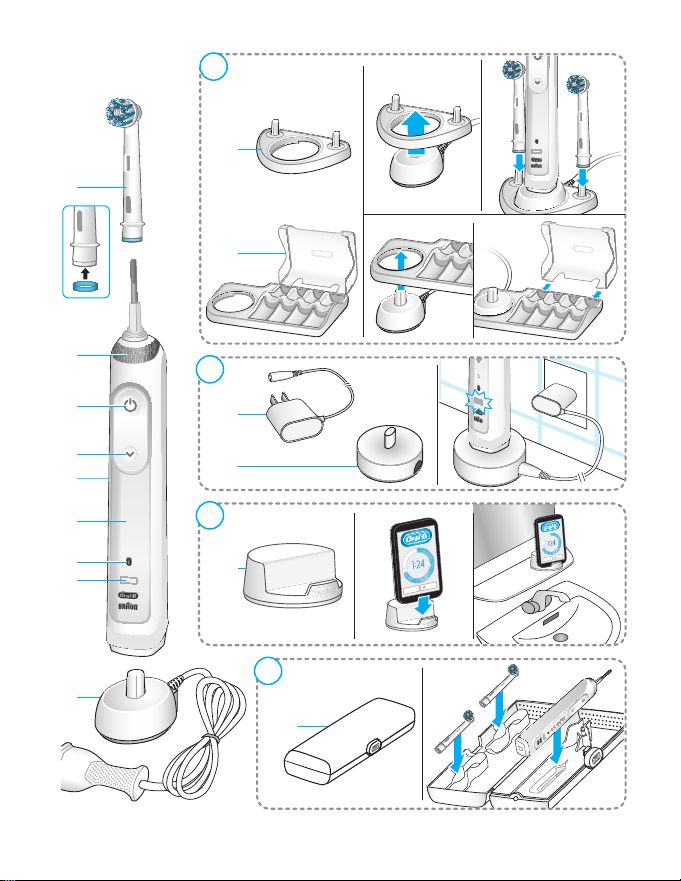
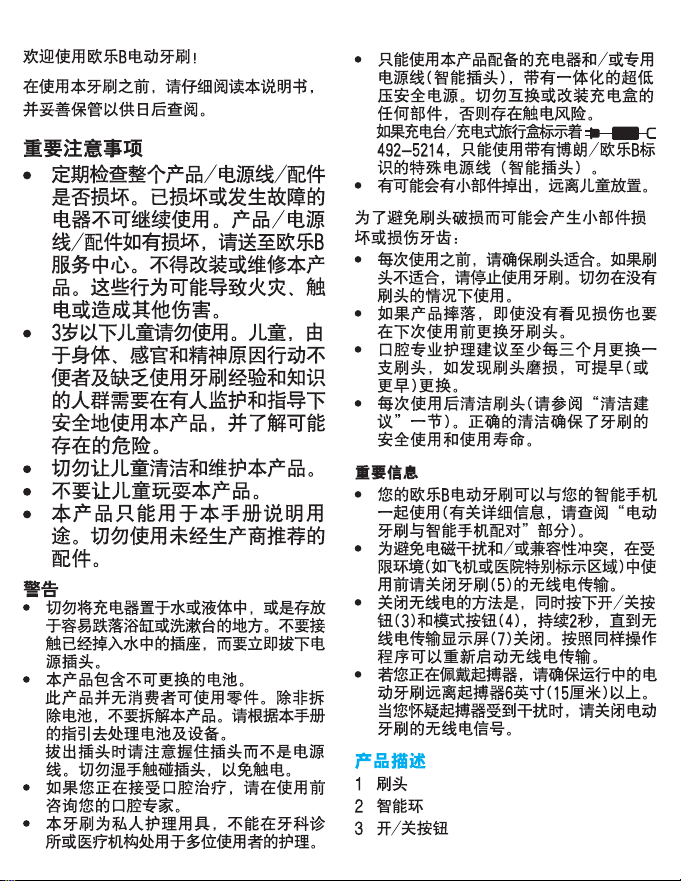
1 Brush head
2 Smart Ring
3 On/off button
4 Brushing mode button
5 Handle
6 Brushing mode display
7 Radio transmission display
(with Bluetooth
8 Charge level display
®
wireless technology)
Accessories (depending on model):
9 Basic charger (with fixed cord)
10 Brush head holder
11 Brush head compartment with protec-
tive cover
12 Smart plug (power supply)
13 Charging stand (with detachable cable)
14 Smartphone holder (stand)
15 Travel case
Note: Content may vary based on the model
purchased.
Specifications
For voltage specifications refer to the bottom of the charging unit.
Noise level: 68 dB (A)
Charging and Operating
Your toothbrush has a waterproof handle, is
electrically safe and designed for use in the
bathroom.
• You may use your toothbrush right away
or charge it briefly by placing it on the
plugged-in basic charger (9) or charging
stand (13). When using the charging stand
use the extra smart plug (12) provided (picture B). The smart plug may be used for all
global mains voltage ranges (100 -240V).
Note: In case the battery is empty (no
lights illuminated on charge level display
(8) while charging or no reaction when
pressing the on/off button (3)), charge at
least for 30 minutes.
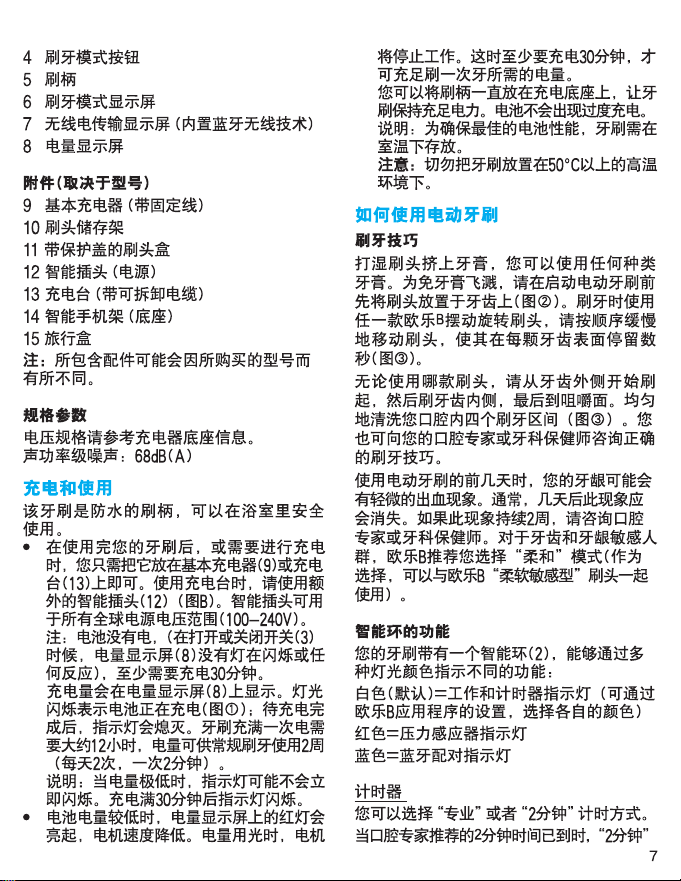
• The charge level is indicated on the charge
level display (8). Flashing lights indicate
that the battery is charging (picture
once it is fully charged, the lights turn off.
A full charge typically takes 12 hours and
enables at least 2 weeks of regular brushing (twice a day, 2 minutes).
Note: At a very low charge level, the lights
might not flash immediately; it can take up
to 30 minutes.
• If the battery is running low, a red light is
flashing on the charge level display and
the motor is reducing its speed. Once the
battery is empty, the motor will stop; it will
need at least a 30-minute charge for one
usage.
);
1
15
Page 15

• You can always store the handle on the
plugged-in charging unit to maintain it at
full power; a battery overcharge is prevented by device.
Note: Store handle at room temperature
for optimal battery maintenance.
Caution: Do not expose handle to temperatures higher than 50 °C.
Using your toothbrush
Brushing technique
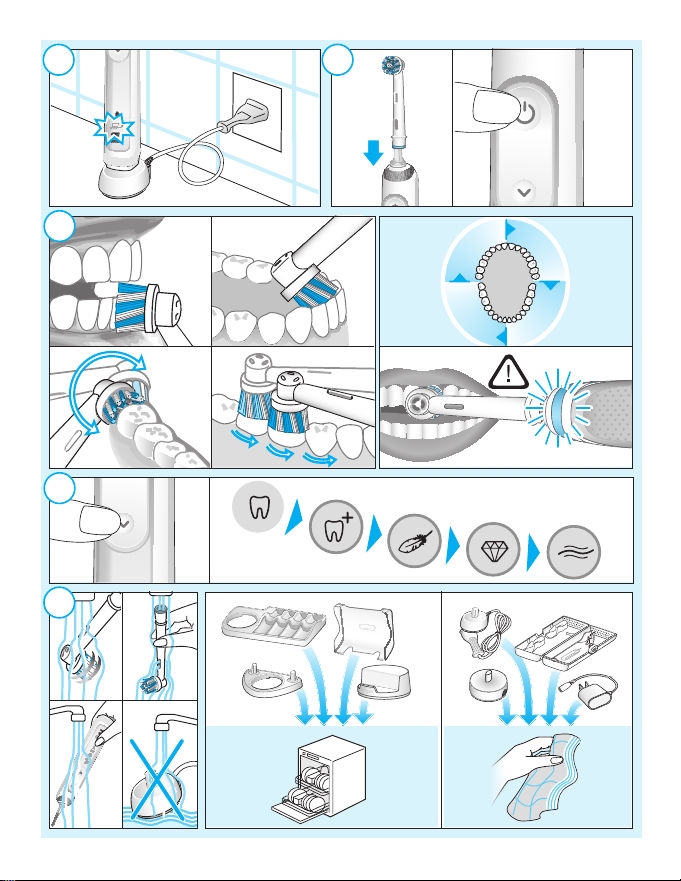
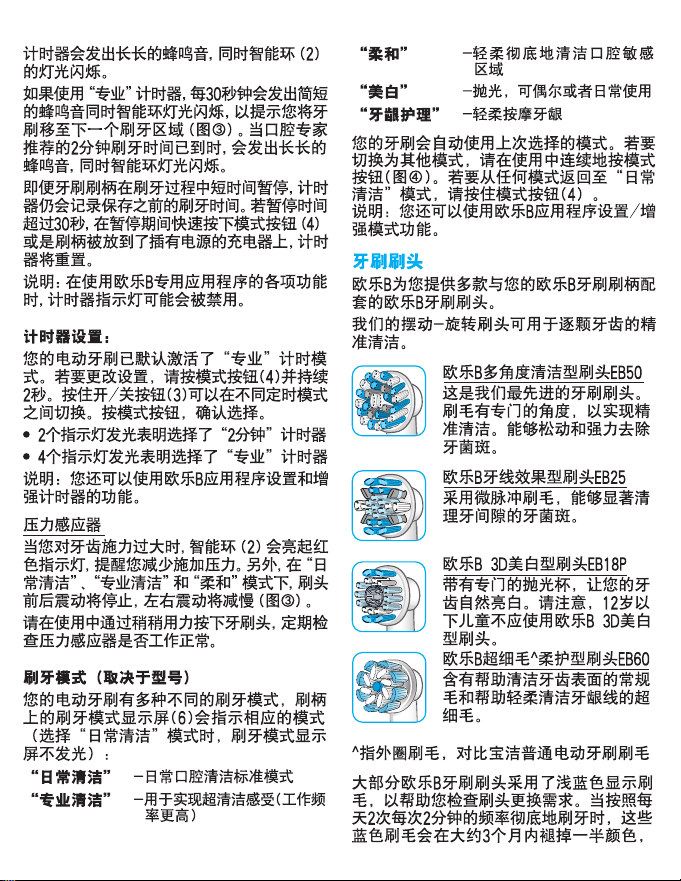
Wet brush head and apply any kind of toothpaste. To avoid splashing, guide the brush
head to your teeth before switching on the
handle (picture
teeth with one of the Oral-B oscillating-rotating brush heads guide the brush head slowly
from tooth to tooth, spending a few seconds
on each tooth surface (picture
With any brush head start brushing the outsides, then the insides and finally the chewing surfaces. Brush all four quadrants of your
mouth equally (picture
sult your dentist or dental hygienist about the
right technique for you.
In the first days of using any electric toothbrush, your gums may bleed slightly. In general, bleeding should stop after a few days.
Should it persist after 2 weeks, please consult your dentist or dental hygienist. If you
have sensitive teeth and/or gums, Oral-B
recommends using the «Sensitive» mode
(optional in combination with an Oral-B
«Sensitive» brush head).
Smart Ring features
Your toothbrush is equipped with a Smart
Ring (2) that has various functionalities indicated via different colors of light:
White (default) = Operating and visual timer
light (choose individual color via Oral-B
app settings)
Red = Pressure sensor light
Blue = Bluetooth
Timer
You can choose between «Professional» or
«2-Minute» timer.
16
). When brushing your
2
).
3
). You may also con-
3
®
pairing indicator
TM
The «2-Minute» timer signals with a long
stuttering sound and a flashing light of the
Smart Ring (2) that the professionally recommended 2-minute brushing time has
been reached.
The «Professional» timer signals with a short
stuttering sound and a flashing light of the
Smart Ring at 30-seconds intervals to move
to the next quadrant of your mouth (picture
). A long stuttering sound and a flashing
3
light indicate the end of the professionally
recommended 2-minute brushing time.
The timer memorizes the elapsed brushing
time, even when the handle is briefly
switched off during brushing. The timer
resets if pausing longer than 30 seconds,
briefly pressing the mode button (4) during
pause or placing the handle on the
plugged-in charger.
Note: During the use of special Oral-B
features, the visual timer light may be deacti-
TM
app
vated.
Timer setup:
Your toothbrush comes with the «Professional» timer activated. To change this, press
and hold the mode button (4) for 2 seconds.
Toggle between timer selection by pressing
the on/off button (3). Confirm selection by
pressing the mode button.
• 2 LED’s illuminated indicate «2-Minute»
timer
• 4 LED’s illuminated indicate «Professio-
nal» timer
Note: You can also set/advance the timer
functionality via Oral-B
TM
App.
Pressure sensor
If too much pressure is applied, the Smart
Ring (2) will light up in red, reminding you to
reduce pressure. In addition the pulsation of
the brush head will stop and the oscillation
movement of the brush head will be reduced
(during «Daily Clean», «Pro Clean» and «Sensitive» mode) (picture
Periodically check the operation of the pres-
).
3
sure sensor by pressing moderately on the
brush head during use.
Page 16
Brushing modes (depending on model)
Your toothbrush offers different brushing
modes indicated on the brushing mode display (6) on your handle («Daily Clean» mode
does not illuminate on the brushing mode
display):
«Daily Clean» – Standard mode for daily
«Pro Clean» – For an extraordinary clean
«Sensitive» – Gentle, yet thorough
«3D White» – Polishing for occasional or
«Gum Care» – Gentle massage of gums
Your toothbrush automatically starts in the
mode selected last. To switch to other
modes, successively press the mode button
during use (picture
mode back to «Daily Clean» mode, press
and hold the mode button (4).
Note: You can also set/advance the mode
functionality via Oral-B
mouth cleaning
feeling (operated with a
higher frequency)
cleaning for sensitive
areas
everyday use
). To return from any
4
TM
App.
Brush heads
Oral-B offers you a variety of different Oral-B
brush heads that fit your Oral-B toothbrush
handle.
Our oscillating-rotating brush heads can
be used for tooth-by-tooth precision cleaning.
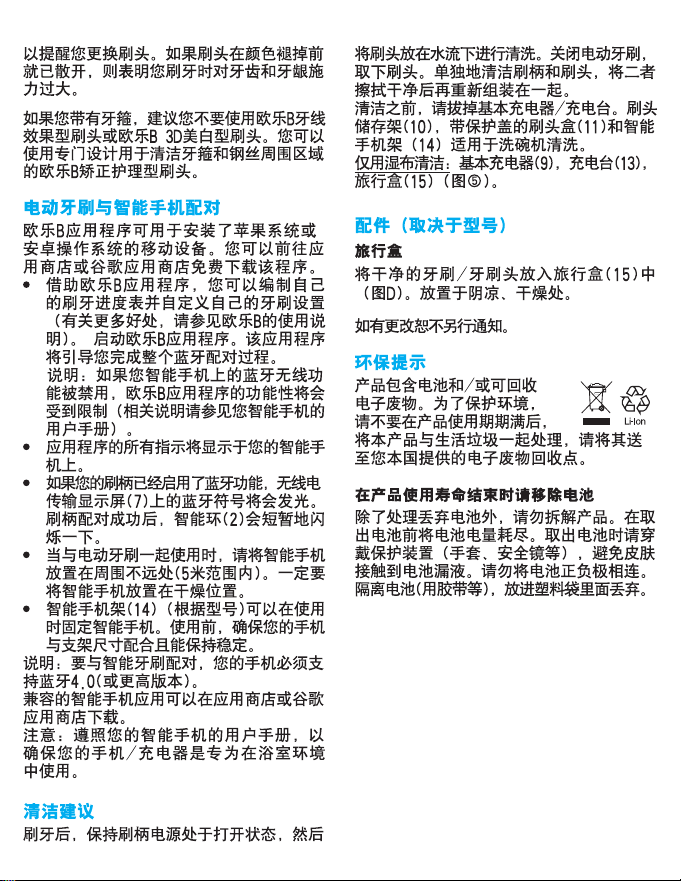
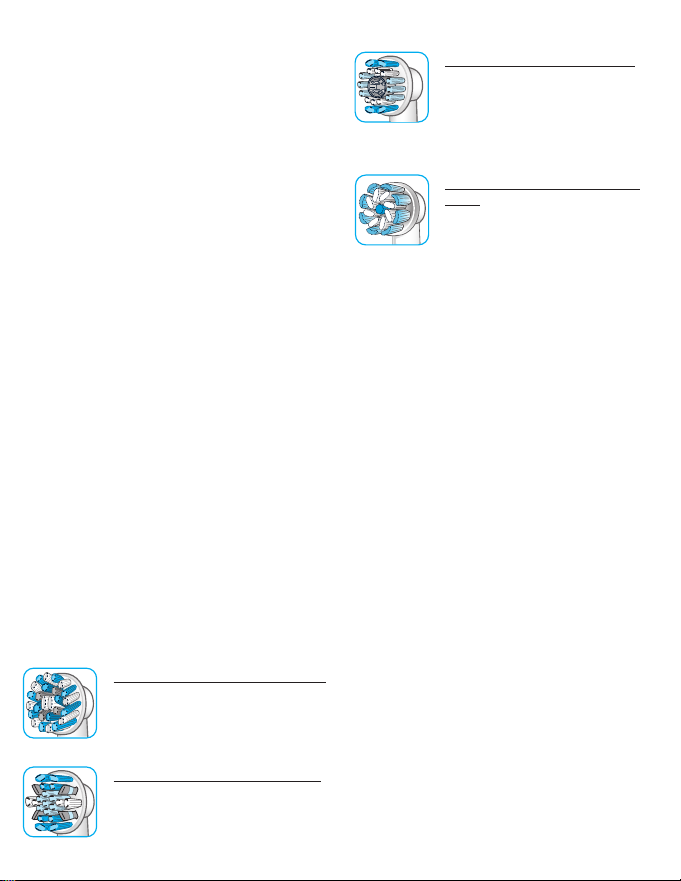
Oral-B CrossAction brush head
Our most advanced brush head.
Angled bristles for a precise
clean. Lifts and powers away
plaque.
Oral-B FlossAction brush head
features micropulse bristles
that allow for an outstanding
plaque removal in the interdental areas.
Oral-B 3D White brush head
features a special polishing
cup to naturally whiten your
teeth. Please note that children
under 12 years old should not
use the Oral-B «3D White»
brush head.
Oral-B Sensi UltraThin brush
head
features a combination of regular bristles to clean teeth surfaces and ultrathin bristles for
a gentle brushing experience
on the gumline.
Most Oral-B brush heads feature light blue
INDICATOR
brush head replacement need. With thorough brushing, twice a day for two minutes,
the blue color will fade halfway approximately within 3 months, indicating the need
to exchange your brush head. If the bristles
splay before the color recedes, you may
exert too much pressure on teeth and gums.
We do not recommend using the Oral-B
«FlossAction» or Oral-B «3D White» brush
head with braces. You may use the Oral-B
«Ortho» brush head, specifically designed to
clean around braces and wires.
®
bristles to help you monitor
Connecting your
toothbrush to your
Smartphone
The Oral-BTM App is available for mobile
devices running iOS or Android operating
systems. It can be downloaded for free from
App Store
The Oral-B™ App gives you the opportunity
to chart your brushing progress and customize your toothbrush settings (for many
more benefits see the Oral-B™ App instructions).
• Start the Oral-B™ App. It will guide you
(SM)
or Google Play™.
through the entire Bluetooth pairing procedure.
17
Page 17
Note: Oral-B™ App functionality is limited
if Bluetooth wireless technology is deactivated on your smartphone (for directions
please refer to your smartphone’s user
manual).
• Any app instructions will be displayed on
your smartphone.
• If Bluetooth wireless technology is acti-
vated on your handle, the Bluetooth symbol on the radio transmission display (7)
illuminates. Once the handle is paired, the
Smart Ring (2) flashes briefly.
• Keep your smartphone in close proximity
(within 5m distance) when using it with the
handle. Make sure the smartphone is
safely positioned in a dry place.
• The smartphone holder stand (14)
(depending on model) can hold your
smartphone while using. Before use,
make sure your phone fits the stand and
keeps stable.
Note: Your smartphone must support Blue-
tooth 4.0 (or higher)/Bluetooth Smart in
order to pair your handle.
Compatible smartphones are listed in App
(SM)
or Google Play™.
Store
Caution: Follow your smartphone’s user
manual to ensure your phone/charger is
designed for use in a bathroom environment.
Cleaning
recommen dations
After brushing, rinse your brush head under
running water with the handle switched on.
Switch off and remove the brush head. Clean
handle and brush head separately; wipe
them dry before reassembling. Unplug the
basic charger/charging stand before cleaning. Brush head holder (10), brush head
compartment and protective cover (11) and
smartphone holder stand (14) is dishwasher-safe.
To be cleaned with a damp cloth only: basic
charger (9), charging stand (13), travel case
(15) (picture
).
5
Accessories
(depending on model)
Travel Case
Store the cleaned and dried toothbrush/brush
heads in the travel case (15) (picture D). Store
the travel case in clean and dry place.
Subject to change without notice.
Environmental Notice
Product contains batteries and/or
recyclable electric waste. For
environment protection do not
dispose in household waste, but
for recycling take to electric waste collection
points provided in your country
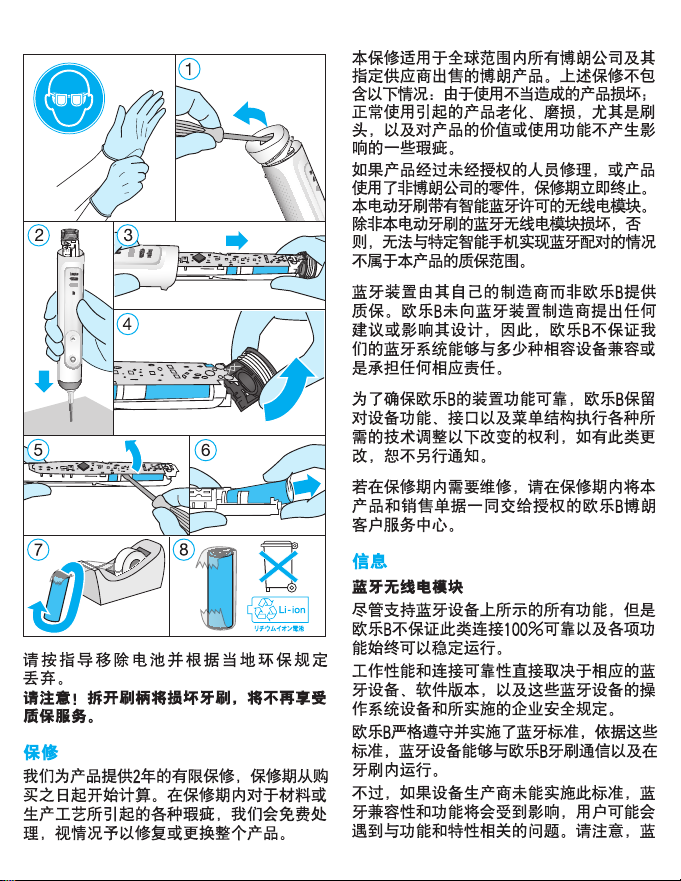
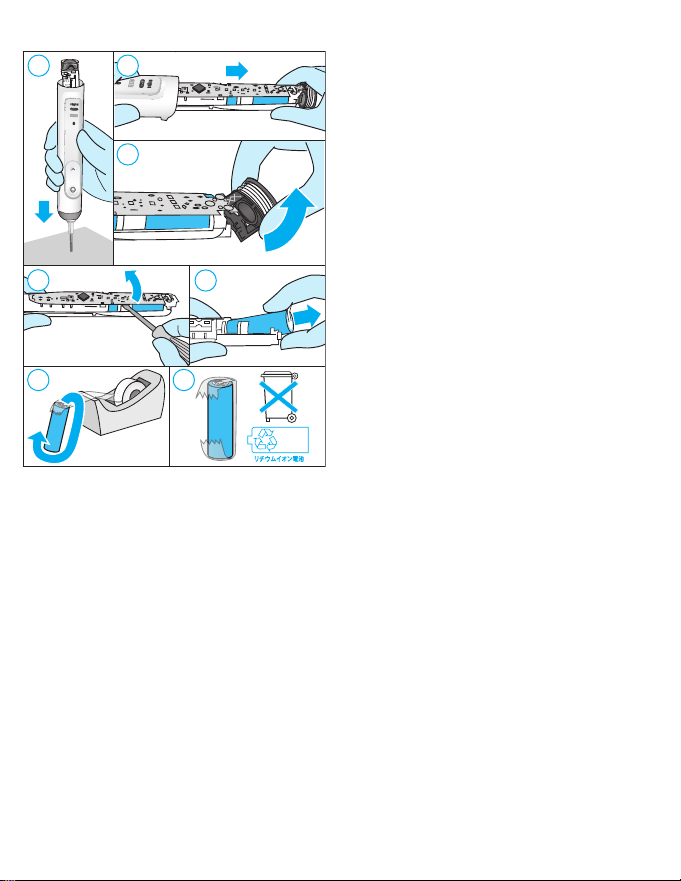
Battery removal at the end of the
product’s useful life
Do not disassemble the product except
when disposing of the battery. Run down
battery before removing. When taking out
the battery for disposal, use protective clothing (gloves, safety glasses, etc.) to omit skin
contact whilst leaking batteries.
Use caution not to short the positive (+) and
negative (–) terminals. Insulate terminals
(e.g. with tape) and put the battery in a plastic bag for disposal.
1
18
Page 18
2
3
4
5
7
Open the handle as shown, remove the battery and dispose of it according to local
environmental regulations.
Caution! Opening the handle will destroy
the appliance and invalidate the warranty.
6
8
Li- ion
ing the brush heads, as well as defects that
have a negligible effect on the value or operation of the appliance.
The guarantee becomes void if repairs are
undertaken by unauthorised persons and if
original Braun parts are not used.
This appliance is equipped with a Bluetooth
Smart approved radio module. Failure to
establish a Bluetooth Smart connection to
specific smart phones is not covered under
the device guarantee, unless the Bluetooth
radio module of this appliance is damaged.
The Bluetooth devices are warranted by
their own manufacturers and not by Oral-B.
Oral-B does not influence or make any recommendations to device manufacturers,
and therefore Oral-B does not assume any
responsibility for the number of compatible
devices with our Bluetooth systems.
Oral-B reserves the right, without any prior
notice, to make any technical modifications
or changes to system implementation of
device features, interface, and menu structure changes that are deemed necessary to
ensure that Oral-B systems function reliably.
To obtain service within the guarantee
period, hand in or send the complete appliance with your sales receipt to an authorised
Oral-B Braun Customer Service Centre.
Guarantee
We grant 2 years guarantee on the product
commencing on the date of purchase.
Within the guarantee period we will eliminate, free of charge, any defects in the
appliance resulting from faults in materials
or workmanship, either by repairing or
replacing the complete appliance as we may
choose.
This guarantee extends to every country
where this appliance is supplied by Braun or
its appointed distributor. This guarantee
does not cover: damage due to improper
use, normal wear or use, especially regard-
Information
Bluetooth® radio module
Although all indicated functions on the Bluetooth device are supported, Oral-B does not
ensure 100% reliability in connection, and
feature operation consistency.
Operation performance and connection reliability are direct consequences of each individual Bluetooth device, software version, as
well as the operating system of those Blue-
tooth devices and company security regulations implemented on the device.
Oral-B adheres to and strictly implements
the Bluetooth standard by which Bluetooth
19
Page 19

devices can communicate and function in
Oral-B toothbrushes.
However, if device manufacturers fail to
implement this standard, Bluetooth compatibility and features will be further compromised and the user may experience functional and feature-related issues. Please
note that the software on the Bluetooth
device can significantly affect compatibility
and operation.
1) Warranty – Exclusions and Limitations
This limited warranty applies only to the new
products manufactured by or for The Procter
& Gamble Company, its Affiliates or Subsidiaries («P&G») that can be identified by the
Braun / Oral-B trademark, trade name, or
logo affixed thereto. This limited warranty
does not apply to any non-P&G product
including hardware and software. P&G is
not liable for any damage to or loss of any
programs, data, or other information stored
on any media contained within the product,
or any non-P&G product or part not covered
by this limited warranty. Recovery or reinstallation of programs, data or other information
is not covered under this limited warranty.
This limited warranty does not apply to (i)
damage caused by accident, abuse, misuse, neglect, misapplication, or non-P&G
product; (ii) damage caused by service performed by anyone other than Braun or
authorized Braun service location; (iii) a
product or part that has been modified without the written permission of P&G, and (iv)
damage arising out of the use of or inability
to use the Oral-B Smartphone stand/puck,
Smartphone mirror holder, or charging travel
case («Accessories»).
2) Using your smartphone holder
The Oral-B Accessories included in the
package has been designed to provide you
with a convenient way to position your
smartphone while you are using the Oral-B
app. Try multiple orientations of your smartphone in the Oral-B smartphone holder prior
to use to determine the best positioning of
your smartphone in the holder. Be sure to try
20
this in a manner which will not harm your
smartphone if it falls out of the stand. Do not
use in automobiles.
LIMITATION OF LIABILITY
TO THE EXTENT PERMITTED BY APPLICABLE LAW, IN NO EVENT SHALL P&G ITS
DISTRIBUTORS OR SUPPLIERS BE LIABLE
TO YOU OR ANY THIRD PARTY FOR ANY
DIRECT, INDIRECT, INCIDENTAL, CONSEQUENTIAL, SPECIAL, EXEMPLARY OR PUNITIVE DAMAGES, OF ANY NATURE WHATSOEVER, ARISING OUT OF THE USE OF OR
INABILITY TO USE THE ORAL-B ACCESSORIES, INCLUDING, WITHOUT LIMITATION,
INJURY TO PERSONS, PROPERTY DAMAGE,
LOSS OF VALUE OF ANY THIRD PARTY
PRODUCTS THAT ARE USED IN OR WITH
THE ORAL-B ACCESSORIES, OR LOSS OF
USE OF THE ORAL-B ACCESSORIES OR
ANY THIRD PARTY PRODUCTS THAT ARE
USED IN OR WITH THE ORAL-B ACCESSORIES, EVEN IF P&G HAS BEEN ADVISED OF
THE POSSIBILITY OF SUCH DAMAGES.
WITHOUT LIMITING THE FOREGOING, YOU
UNDERSTAND AND AGREE THAT P&G HAS
NO LIABILITY FOR ANY DAMAGE OR
DESTRUCTION TO CONSUMER ELECTRONICS DEVICES OR OTHER PERSONAL
PROPERTY THAT ARE CONTAINED ON OR
EXTERIOR TO THE ORAL-B ACCESSORIES,
OR ANY LOSS OF DATA CONTAINED IN THE
FOREGOING DEVICES. IN NO EVENT
SHALL ANY RECOVERY AGAINST ORAL-B
EXCEED THE ACTUAL PRICE PAID FOR THE
PURCHASE OF THE PRODUCT.
Warranty replacement brush heads
Oral-B warranty will be voided if electric
rechargeable handle damage is found to be
attributed to the use of non-Oral-B replacement brush heads.
Oral-B does not recommend the use of nonOral-B replacement brush heads.
• Oral-B has no control over the quality of
non-Oral-B replacement brush heads.
Therefore, we cannot ensure the cleaning
performance of non-Oral-B replacement
brush heads, as communicated with the
Page 20
electric rechargeable handle at time of
initial purchase.
• Oral-B cannot ensure a good fit of non-
Oral-B replacement brush heads.
• Oral-B cannot predict the long-term
effect of non-Oral-B replacement brush
All Oral-B replacement brush heads carry
the Oral-B logo and meet Oral-B’s high quality standards. Oral-B does not sell replacement brush heads or handle parts under any
other brand name.
heads on handle wear.
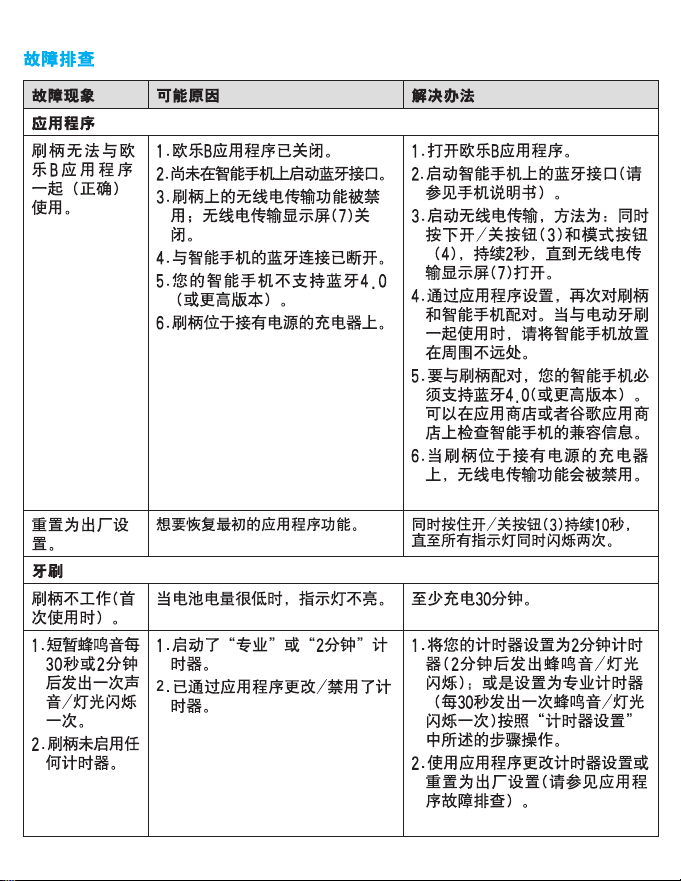
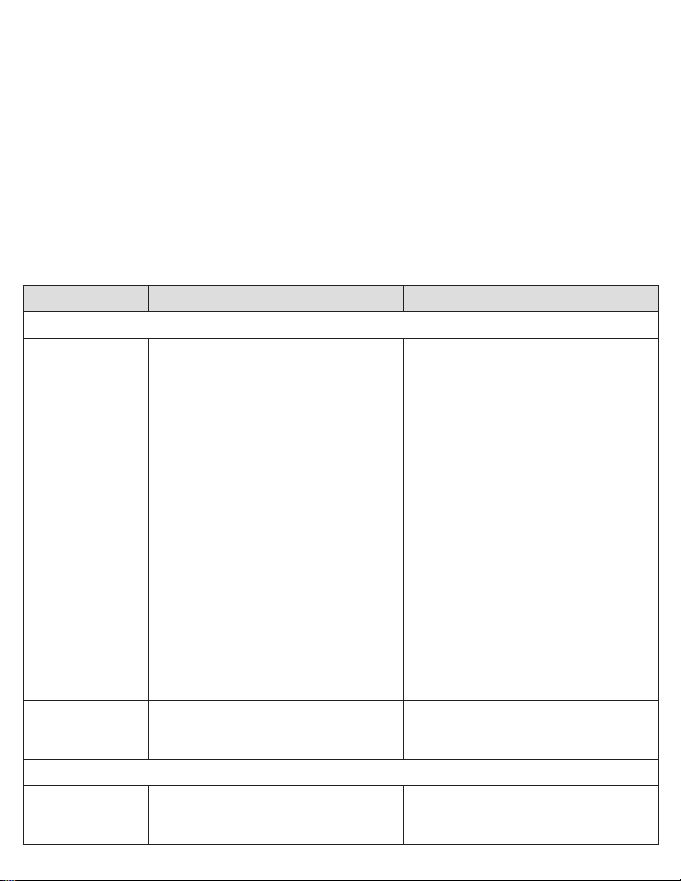
Trouble Shooting
Problem Possible reason Remedy
APP
Handle does
not operate
(properly) with
TM
App.
Oral-B
Reset to factory
settings.
TOOTHBRUSH
Handle is not
operating (during first use).
1. Oral-BTM App is turned off.
2. Bluetooth interface is not activa-
ted on smartphone.
3. Radio transmission is deactivated on handle; radio transmission display (7) is turned off.
4. Bluetooth connection to smart-
phone has been lost.
5. Your smartphone does not support Bluetooth 4.0 (or higher)/
Bluetooth Smart.
6. Handle on plugged-in charger.
1. Turn on Oral-B
2. Activate Bluetooth interface on
smartphone (described in its
user manual).
3. Activate radio transmission by
simultaneously pressing on/off
(3) and mode button (4) for 2
seconds until radio transmission
display (7) turns on.
4. Pair handle and smartphone
again via app settings. Keep
your smartphone in close proximity when using it with handle.
5. Your smartphone must support
Bluetooth 4.0 (or higher)/ Bluetooth Smart in order to pair han-
dle. Check App Store
Google Play
smartphones.
6. Radio transmission is deactivated while handle is placed on
plugged-in charger.
Original app functionality wanted. Press and hold on/off button (3)
for 10 seconds until all indicator
lights double blink simultaneously.
Battery has a very low charge
Charge at least for 30 min.
level; no lights illuminate.
TM
App.
TM
(SM)
for compatible
or
21
Page 21
1. Short stuttering sounds/
flashing light
every
30 seconds
or after 2 minutes.
2. Handle does
not operate
any timer.
1. «Professional timer» or «2-Minute timer» activated.
2. Timer has been modified/deactivated via app.
1. Set your timer to 2-Minute timer
(stuttering sounds/flashing light
after 2min); or set your timer to
Professional timer (stuttering
sounds/flashing light every 30
seconds). Follow steps under
«Timer setup».
2. Use app to change timer settings or perform factory reset
(see App Trouble Shootings).
Handle does
not charge.
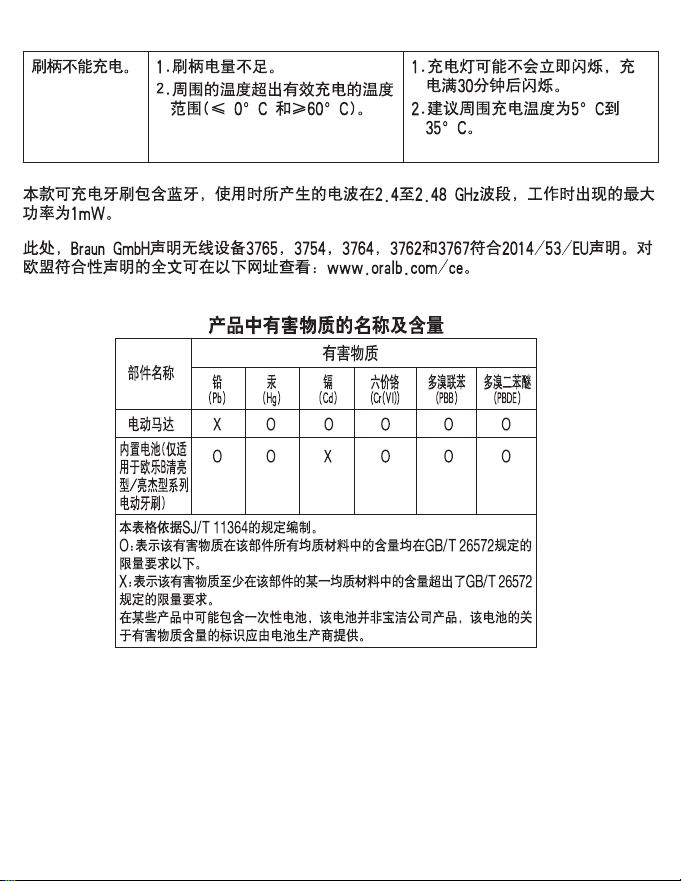
The rechargeable toothbrush contains a radio module which operates in the 2.4 to 2.48 GHz
band with a maximum power of 1mW.
Hereby, Braun GmbH declares that the radio equipment types 3765, 3754, 3764, 3762 and
3767 are in compliance with Directive 2014/53/EU. The full text of the EU declaration of conformity is available at the following internet address: www.oralb.com/ce.
1. Battery is at a very low charger
level.
2. Ambient temperature for charging is out of valid range (
≥
60 °C).
and
≤
0 °C
1. Charging lights might not flash
immediately; it can take up to 30
minutes.
2. Recommended ambient temperature for charging is 5°C to
35°C.
22
91723734
 Loading...