

Page 1

!
1!
MANUAL!P/N!900000156!REV!A!
!
!
!
!
!
!
!
!
PTP-8080!
!
User!Manual!
!
P/N:!900000156!
Revision!A!
!
For!Brandywine!Communications!products!with!the!
following!Part!Numbers:!
03500180X!
Page 2
!
2!
MANUAL!P/N!900000156!REV!A!
Safety Warnings
!
!
!
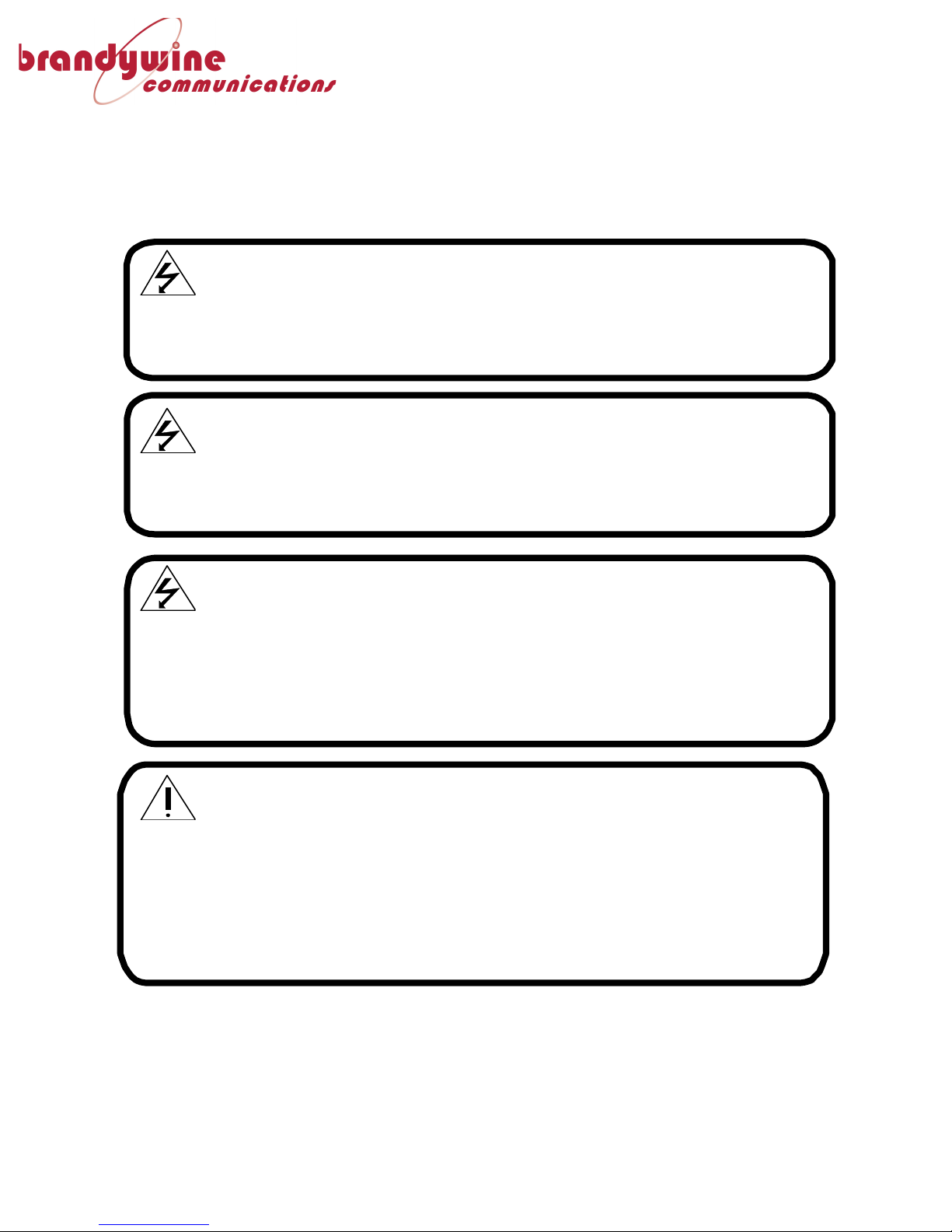
WARNING:
This unit contains lethal AC voltages. Disconnect the unit from the AC
supply before removing the cover.
!
!!!WARNING:!
This unit contains dual power supplies. Isolate BOTH power supplied
from AC Power before removing the top cover.
!
!
!!!WARNING:!
The+ lightning+ flash+ with+ an+ arrowhead+ inside+ of+ an+ equilateral+ triangle+ is+
intended+to+alert+the+user+to+the+presence+of+un-insulated+“dangerous+voltage”+
within+the+product’s+ enclosure.++The+ “dangerous+voltage”+may+ be+of+sufficient+
magnitude+to+constitute+a+risk+of+electrical+shock+to+people.!!Do+not+attempt+to+
repair+the+unit+without+first+unplugging+it.!!
!
!
+++CAUTION:+
The+exclamation+point+inside+of+an+equilateral+triangle+is+intended+to+alert+the+
user+to+the+ presence+of+important+operation+ and+maintenance+instructions+i n+
the+ user+ guide.+ + Only+ qualified+ personnel+ should+ repair+ this+ unit.+ + Several+
board+ assemblies+ contain+ static+ sensitive+ devices.+ Appropriate+ procedures+
must+be+used+when+handling+these+board+assemblies.+
Page 3

!
3!
MANUAL!P/N!900000156!REV!A!
Revision+History+
Revision+
Date+
Comments+
A!
09/27/2016!
Initial!release!
!!!
!!!!!
!
!!!!!
!
!!!
!!!!!
!
!!!
!!!
Page 4

!
4!
MANUAL!P/N!900000156!REV!A!
+
Table+of+Contents+
1! Introduction!...........................................................................................................!6!
1.1! Specifications!...................................................................................................................................................!8!
2! Setup!....................................................................................................................!10!
2.1! Installation!.....................................................................................................................................................!10!
2.1.1! Mounting+......................................................................................................................................................+10!
2.1.2! Power+.............................................................................................................................................................+10!
2.1.3! Ethernet+........................................................................................................................................................+10!
2.1.4! Input+Reference+.........................................................................................................................................+10!
3! Configuration!.......................................................................................................!11!
3.1! Initial!Setup!....................................................................................................................................................!11!
3.1.1! Installing+the+Discovery+Utility+...........................................................................................................+11!
3.1.2! Connecting+to+the+PTP-8080+................................................................................................................+11!
3.2! Status!................................................................................................................................................................!11!
3.2.1! System+Information+.................................................................................................................................+11!
3.2.2! PTP+Status+...................................................................................................................................................+12!
3.2.3! System+Event+Log+.....................................................................................................................................+13!
3.3! Configuration!Pages!...................................................................................................................................!14!
3.3.1! System+Information+.................................................................................................................................+14!
3.3.2! IP+Settings+....................................................................................................................................................+14!
3.3.3! PTP+Settings+................................................................................................................................................+15!
3.3.4! LLDP+Settings+.............................................................................................................................................+16!
3.3.5! I/O+Settings+.................................................................................................................................................+17!
3.3.6! RSTP+Settings+.............................................................................................................................................+18!
3.3.7! Port+Control+Settings+..............................................................................................................................+18!
3.3.8! IGMP+Snooping+..........................................................................................................................................+19!
4! Support!Information!.............................................................................................!20!
5! Outline!Drawings!..................................................................................................!21!
+
Page 5

!
5!
MANUAL!P/N!900000156!REV!A!
+
Table+of+Figures+
Figure!1!–!PTP-8080!.................................................................................................................................!6!
Figure!2!-!System!Status!Page!............................................................................................................!11!
Figure!3!-!PTP!Status!Page!..................................................................................................................!12!
Figure!4!-!System!Event!Log!Page!....................................................................................................!13!
Figure!5!-!System!Information!Configuration!Page!..................................................................!14!
Figure!6!-!IP!Address!Configuration!Page!.....................................................................................!14!
Figure!7!-!PTP!Settings!page.!..............................................................................................................!16!
Figure!8!-!LLDP!Configuration!page!................................................................................................!16!
Figure!9!-!I/O!Settings!Page!................................................................................................................!17!
Figure!10!-!RSTP!Settings!Page!.........................................................................................................!18!
Figure!11!-!Port!Settings!Page!...........................................................................................................!19!
Figure!12!-!IGMP!Snooping!Configuration!Page!........................................................................!19!
+
!
Page 6
!
6!
MANUAL!P/N!900000156!REV!A!
!
1 Introduction!
!
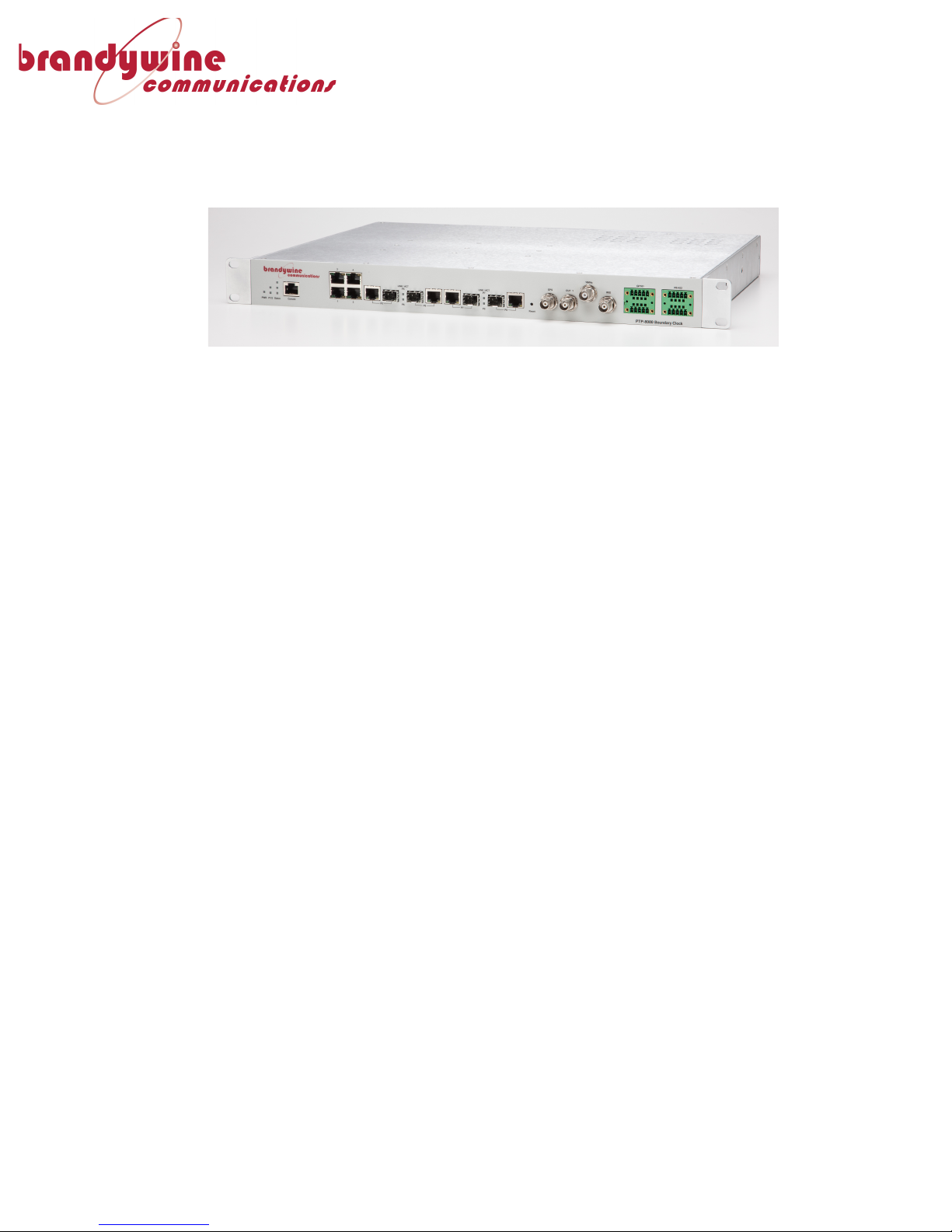
Figure+1+–+PTP-8080+
The!PTP-8080!is!a!GPS!Network!Time!Server!(NTS)!for!PTP!IEEE!1588!that!provides!
secure,!accurate!and!reliable!time!synchronization!for!networks!and!offers!
integrated!fully!managed!network!switch!capabilities!for!8!(10/100/1000BASE)!
Gigabit!Ethernet!ports.!The!PTP-8080!can!be!used!for!data!centers,!test!facilities,!
military!installations,!federal!or!municipal!agencies,!financial!services!and!
technology!firms,!and!many!other!enterprises!which!need!precision!timing!to!
support!their!network!operations.!
!
The!PTP-8080!provides!exact!time!over!Ethernet!either!based!on!the!wellestablished!NTP/SNTP!protocol!or!PTP!according!to!IEEE!1588!Std!2008.!It!not!only!
provides!NTP!and!PTP!timing!capabilities,!but!also!a!variety!of!other!time!codes!and!
signals,!such!as!GPS!emulation!and!IRIG-B.!The!unit!also!provides!backwards!
compatibility!for!older!timing!systems.!Such!interfaces!are!normally!provided!on!the!
network!boundaries!integrated!on!relevant!SNTP!clients!or!PTP!Slave!Clocks!
platforms.!
!
The!PTP-8080!is!used!for!applications!that!require!reliable!timing!to!accurately!
synchronize!networks,!systems,!and!devices!and!to!log!events!with!legally!traceable!
time.!The!PTP-8080!Series!offers!a!broad!portfolio!of!features,!including!network!
master!clocks!(NTP!or!PTP),!monitoring!and!management!capabilities,!and!a!
complete!software!package!to!deliver!high!performance!timing!for!network!
applications!and!devices.!The!PTP-8080!is!easy-to-install!and!is!fully!configurable!to!
customize!features,!interfaces,!ports!and!protocols!to!your!needs.!These!features!
include!remote!login!and!file!transfer!capabilities,!which!provide!the!utmost!
security!using!industry!standard!interfaces.!A!full-suite!of!network!protocols!
includes!SNMP!capability,!support!for!enterprise!directory!servers!to!authenticate!
users,!internal!and!external!logging!and!monitoring!of!error!messages!through!
Syslog,!DHCP!for!installation!convenience,!and!IPv4.!
!
The!PTP-8080!is!a!reliable!and!accurate!NTP!and!PTP!Grand!Master!Clock!fulfilling!
the!IEEE!1588!Std!2002!(v1)!and!IEEE!1588!Std!2008!(v2).!The!PTP-8080!contains!a!
built-in!state-of-the-art!GPS!receiver!that!is!used!as!the!time!base!for!the!GMC!clock.!
The!PTP-8080!platform!supports!2-step!clock!modes!and!either!E2E!or!P2P!as!the!
Page 7

!
7!
MANUAL!P/N!900000156!REV!A!
delay!mechanism.!This!means!that!all!possible!PTP!profiles!can!be!supported.!The!
platform!maximizes!PTP!performance!since!all!critical!PTP!functions!are!
implemented!in!hardware.!The!switch!functionality!in!the!PTP-8080!series!offer!full!
management!based!on!HTTP,!telnet,!CLI!or!SNMP.!Network!Redundancy!is!achieved!
based!on!the!RSTP!protocol.!The!unit!offers!a!wide!operating!temperature!range:![40°F!to!158°F]!/![-40°C!to!70°C].!
Page 8

!
8!
MANUAL!P/N!900000156!REV!A!
1.1 Specifications!
Ethernet!LAN!ports!
10/100/1000!
BASE-TX!ports!in!
RJ45!Auto!
MDI/MDIX!
4-8!
1000BASE-X!SFP!
slots!
4!
BNC!
GPS!antenna!
interface!!
Male!BNC!connector!
OUT1!
PPS!output!signal!
10MHz!
10MHz!output!
Technology!
Standards!
IEEE!802.3!for!10Base-T!
IEEE!802.3u!for!100Base TX!and!100Base-FX!
IEEE!802.3z!for!1000Base X!
IEEE!802.3ad!for!LACP!
(Link!Aggregation!Control!
Protocol)!
IEEE!802.1Q!for!VLAN!
Tagging!
IEEE!802.1w!for!RSTP!
(Rapid!Spanning!Tree!
Protocol)!
IEEE!802.1X!for!
Authentication!
IEEE!802.1AB!for!LLDP!
(Link!Layer!Discovery!
Protocol)!
IEEE!1588!Std!2008!
(PTPv2)!
RFC!4330!NTP!!
MAC!table!
8192!MAC!addresses!
Priority!queues!
4!
Switch!!properties!
Store-and-forward!and!
full!wire!speed!on!all!ports!
Security!Features!
Enable/disable!ports,!Port!
based!network!access!
control!(802.1x)!
VLAN!(802.1Q!)!to!
segregate!and!secure!
network!traffic!
Radius!centralized!
password!management!
SNMPv3!encrypted!
authentication!and!access!
security!
Network!
redundancy!
RSTP!
Management!
HTTP,!telnet,!CLI!and!
SNMP!v1/v2/v3!or!IPSet!
tool.!
Other!protocols!
Multicast!filtering!based!
on:!
- IGMP!snooping!
v2!or!v3!
- Up!to!1024!
multicast!filters!
can!be!active!
VLAN!(802.1Q)!with!VLAN!
tagging!and!GVRP!
Port!configuration,!status,!
statistics,!monitoring,!
security!
Console!ports!!
2!x!RS-232!in!RJ45!
connector!–!service!port!
for!PTP-!and!switch!CPUs.!
Baud!rate!setting:!
9600bps,!8,!N,!1!for!
switch!management!
115200bps,!8,!N,!1!for!PTP!
server!
NTP!
NTP!clock!modes!!
NTP!server!
Client!or!server;!client!can!
be!used!in!combination!
with!PTP!MC!operation!
(kind!of!PTP!BC!
operation),!where!NTP!
client!is!the!time!base!of!
the!switch.!
Accuracy!
1ms!
IEEE1588!
PTP!clock!modes!
GMC,!TC!or!SC!
PTP!versions!
PTPv2!!
Delay!mechanism!
End-to-End(E2E)!or!Peerto-Peer!(P2P!
1!step-!or!2!step!
clock!
2-step!only!
Accuracy!
20ns!
Power!
Input!Power!!
100-240AC!
Power!
Consumption!
(Typ.)!
20!Watts!(typical)!
Physical!Characteristics!
Enclosure!
IP30,!Aluminum!case!
Dimension!(W!x!D!
x!H)!
443.7(W)!x!260(D)!x!44(H)!
mm!(17.47!x!10.24!x!1.73!
Page 9

!
!
! MANUAL!P/N!900000156!REV!A!
9!
inch.)!
Weight!(g)!
2500g!
Installation!
19”!mounting.!
Environmental!
Storage!
Temperature!
[-40°F!to!185°F]!/![-40°C!to!
85°C]!
Operating!
Temperature!
[-40°F!to!158°F]!/![-40°C!to!
70°C]!
!
Page 10

!
!
! MANUAL!P/N!900000156!REV!A!
10!
2 Setup!
Remove!the!PTP-8080!from!the!shipping!carton.!!The!following!items!should!be!
included!in!the!shipment:!
1x!PTP-8080!
2x!Power!supply!cables!
1x!CD-ROM!containing!User!Manual!and!Utility!Software!
1x!GPS!Antenna!and!100’!cable!if!the!GPS!option!is!included!
2.1 Installation!
2.1.1 Mounting!!
The!PTP-8080!can!be!installed!into!a!19”!rack!mount!cabinet!using!rack!slides.!!
Slides!are!installed!using!10-32!UNF-2B!hardware.!
Optional!Rack!Mount!Slides:!!
!
P/N!002000123,!SLIDE,!RACK,!24",!21"!TRAVEL,!85!LB!
P/N!002000150,!SLIDE,!RACK,!28",!27"!TRAVEL,!80!LB!
!
Original!Manufacturer:!General!Devices!Chassis!Trak!Type!C300.!
2.1.2 Power!
Insert!the!power!cord!of!the!PTP-8080!into!an!electrical!socket!to!power!up!the!unit.!!!
!
If! dual! redundant! power! is! required,! connect! both! power! sources! to! independent!
power!sources.!
2.1.3 Ethernet!
Connect!one!end!of!an!Ethernet!patch!cable!to!Ethernet!port!#1!located!on!the!Front!
of!the!unit.!!Connect!the!other!end!of!the!Ethernet!cable!to!the!network!with!an!
Ethernet!hub!or!switch.!!Connect!the!additional!ports!to!the!network!as!needed.!
2.1.4 Input!Reference!
Connect!any!external!input!references!to!the!appropriate!BNC!connector.!!The!PTP8080!is!capable!of!receiving!an!input!reference!from!GPS,!IRIG-B,!or!NTP.!
Page 11

!
!
! MANUAL!P/N!900000156!REV!A!
11!
3 Configuration!
3.1 Initial!Setup!
3.1.1 Installing!the!Discovery!Utility!
For!information!on!installing!or!using!the!Discovery!software!provided!with!the!
PTP-8080,!please!see!the!user!manual!for!the!Discovery!application.!(P/N!
900000157)!
3.1.2 Connecting!to!the!PTP-8080!
Either!use!the!Discovery!utility,!or!enter!the!IP!Address!of!the!PTP-8080!retrieved!
via!the!Discovery!utility!into!a!web!browser!window;!this!will!open!the!PTP-8080!
control!webpage.!
3.2 Status!
3.2.1 System!Information!
The!System!Information!page!under!the!status!folder!lists!inventory!information!
about!the!unit,!as!well!as!a!graphical!representation!of!which!Ethernet!ports!are!
currently!being!used.!
!
An!Ethernet!port!that!is!colored!black!indicates!that!there!is!no!cable!connected!to!
them.!
An!Ethernet!port!that!is!colored!green!indicates!that!there!is!currently!a!cable!
connected!to!it!and!it!is!successfully!connected!to!a!network.!
!
Figure+2+-+System+Status+Page+
Page 12
!
!
! MANUAL!P/N!900000156!REV!A!
12!
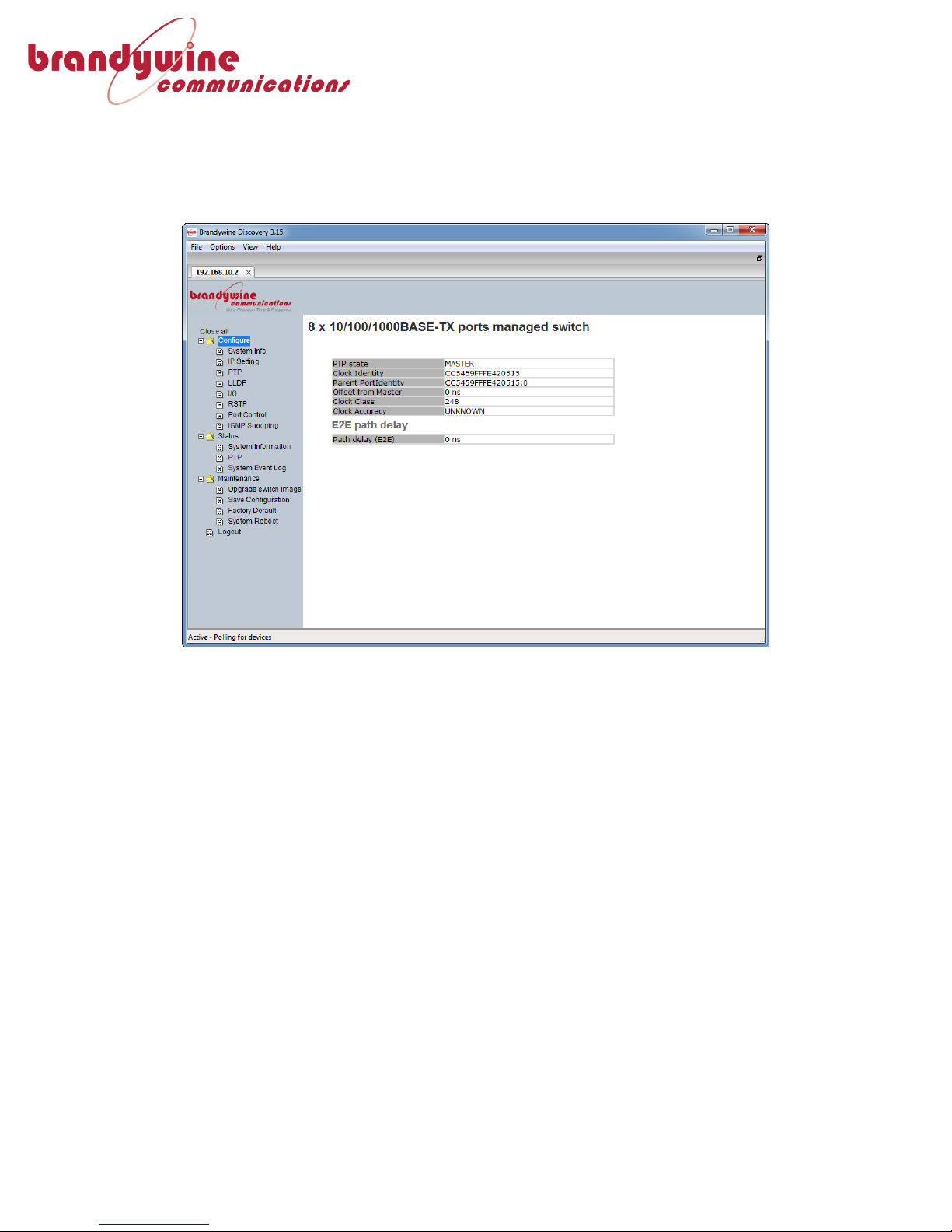
3.2.2 PTP!Status!
The!PTP!status!page!shows!the!current!state!of!the!PTP!stack,!as!well!as!the!current!
end!to!end!path!delay.!!The!PTP-8080!is!designed!to!automatically!measure!and!
compensate!any!propagation!delay!in!a!PTP!network.!
!
!
Figure+3+-+PTP+Status+Page+
Page 13
!
!
! MANUAL!P/N!900000156!REV!A!
13!
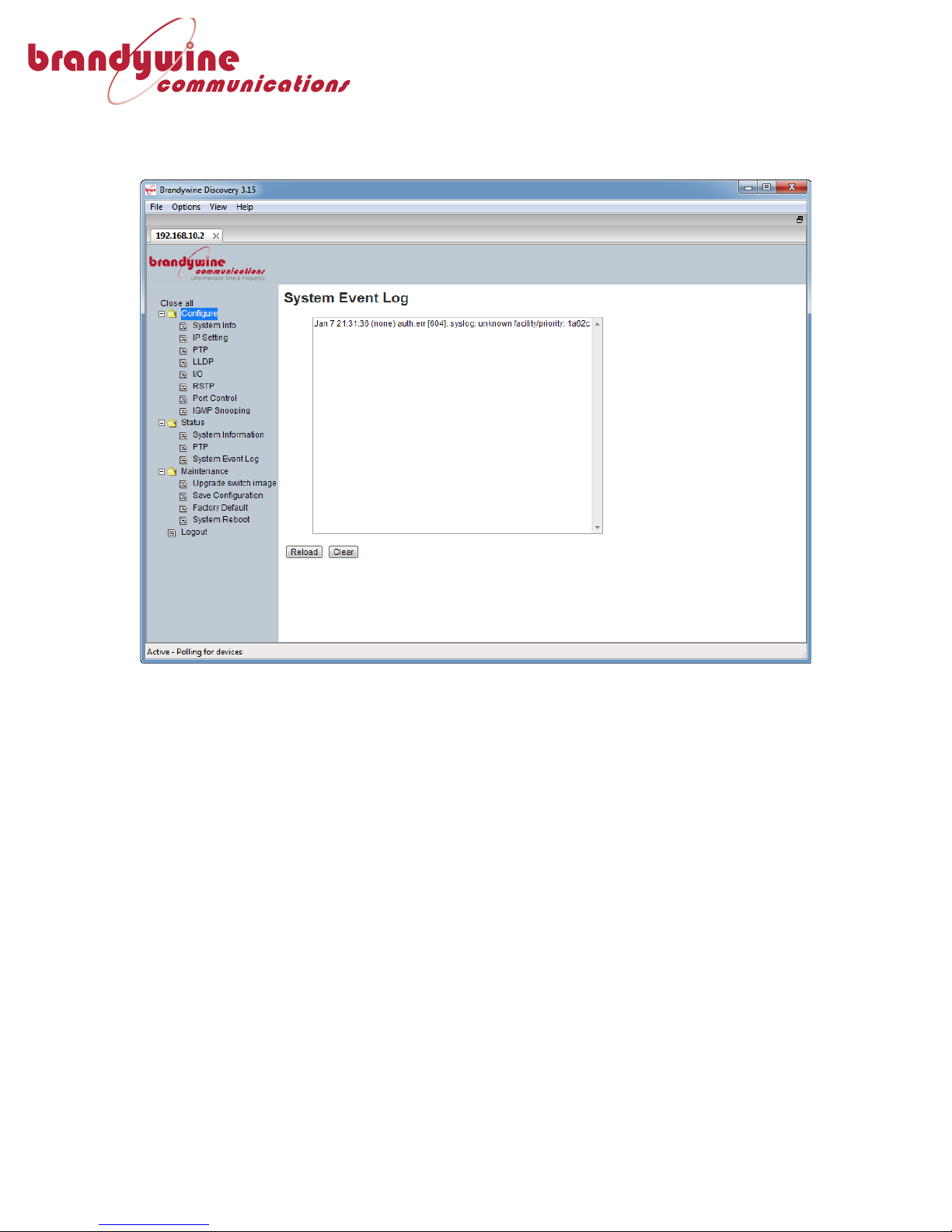
3.2.3 System!Event!Log!
The!system!event!log!page!shows!a!listing!of!all!fault!messages!that!the!system!has!
generated!while!running!for!diagnostic!purposes.!
!
Figure+4+-+System+Event+Log+Page+
Page 14
!
!
! MANUAL!P/N!900000156!REV!A!
14!
3.3 Configuration!Pages!
3.3.1 System!Information!
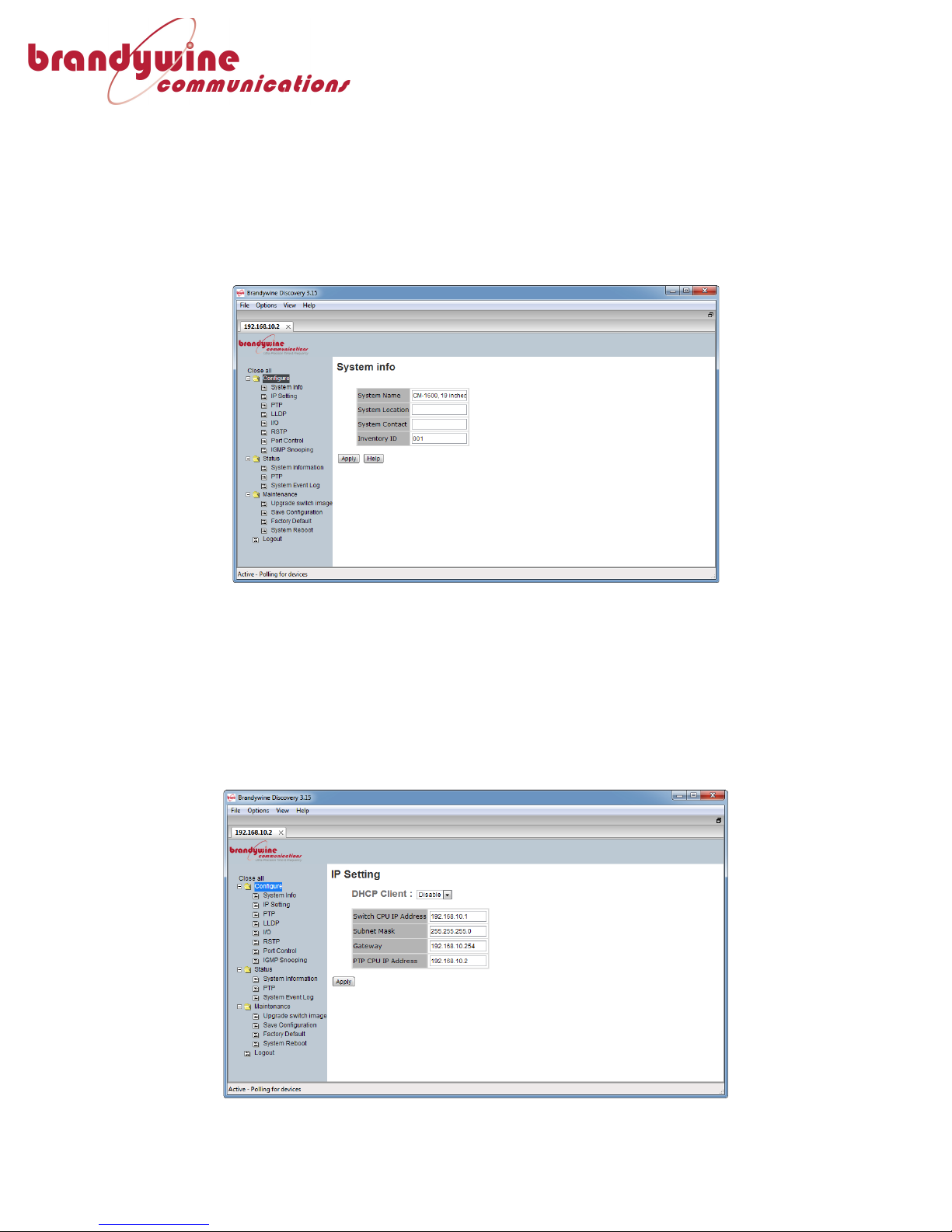
The!System!Information!configuration!page!allows!the!user!to!edit!information!
fields!for!the!purposes!of!unit!identification.!!Editable!fields!include:!System!Name,!
System!Location,!System!Contact,!and!Inventory!ID.!!These!fields!are!displayed!on!
the!System!Information!Status!page,!and!are!intended!for!use!in!identifying!which!
physical!unit!is!connected!when!accessed!over!a!network.!!
!
Figure+5+-+System+Information+Configuration+Page+
3.3.2 IP!Settings!
The!IP!Settings!page!allows!the!user!to!adjust!the!IP!address,!Subnet!Mask!and!
Gateway!address!of!the!PTP-8080,!as!well!as!the!option!to!enable!DHCP.!!
Brandywine!Communications!recommends!the!use!of!a!Static!IP!address!for!ease!of!
management!purposes.!!Please!note!that!the!PTP-8080!uses!two!IP!addresses,!one!
for!the!network!switch,!which!is!not!accessible!for!the!user,!and!a!separate!one!for!
the!PTP!and!web!server.!!Both!the!PTP!server!and!the!network!switch!must!be!in!the!
same!subnet!so!that!both!parts!of!the!PTP-8080!can!talk!to!each!other.!
!
Figure+6+-+IP+Address+Configuration+Page +
Page 15

!
!
! MANUAL!P/N!900000156!REV!A!
15!
3.3.3 PTP!Settings!
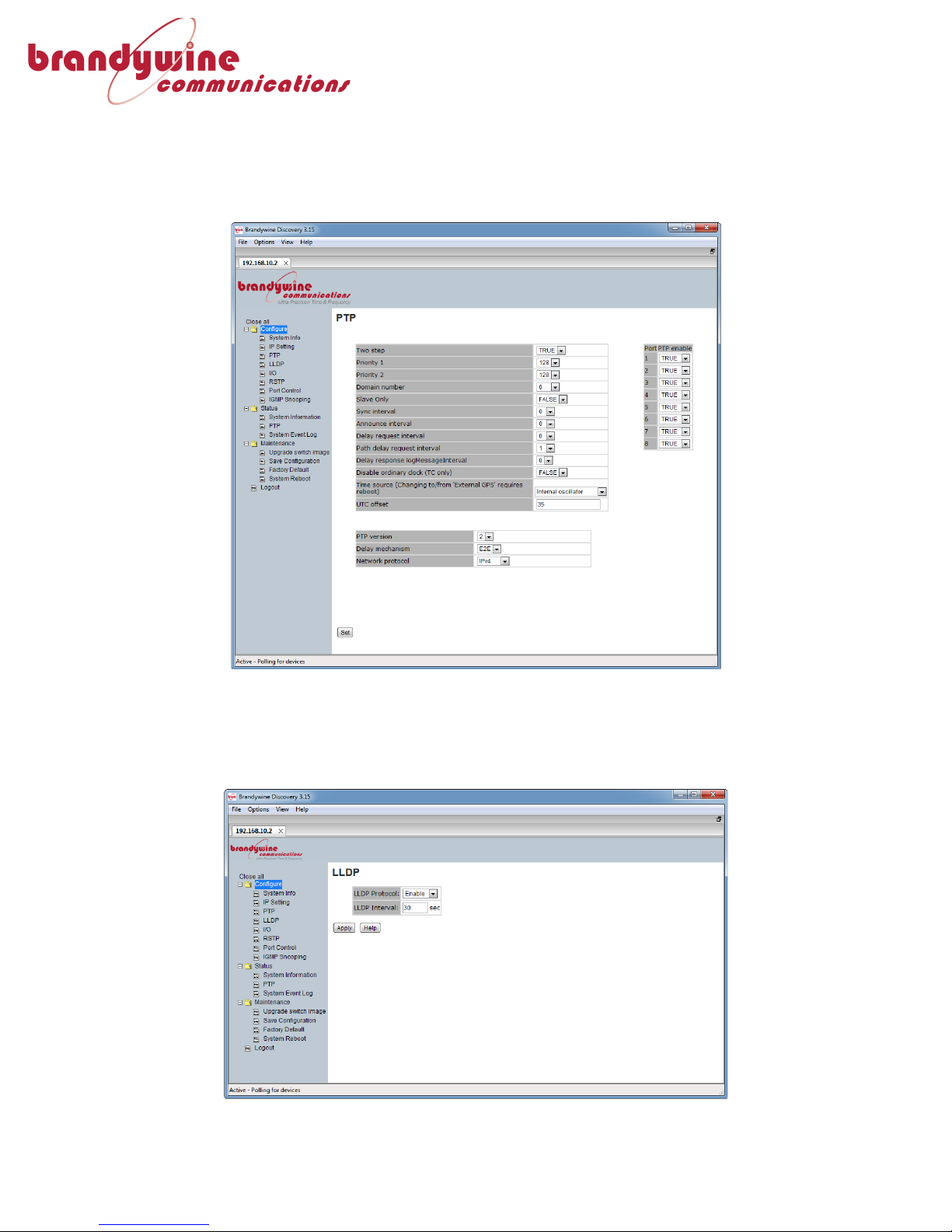
The!PTP!Settings!page!allows!the!use!to!adjust!and!configure!the!PTP-8080’s!PTP!
service.!!More!detailed!information!about!each!of!these!settings!can!be!found!by!
using!the!PTP-8080’s!built!in!help!menu.!
!
Two+step:!!Setting!this!to!TRUE!runs!the!PTP!clock!in!two!step!mode.!!On!certain!
versions!of!the!PTP-8080,!this!can!be!disabled!to!allow!it!to!run!in!one!step!mode.!!
Priority+1:!This!field!is!used!to!determine!the!precedence!of!the!available!PTP!
servers,!so!that!PTP!clients!can!correctly!determine!a!Grandmaster.!This!can!be!any!
value!from!0!to!255.!
Priority+2:!This!field!is!used!to!determine!the!precedence!of!the!available!PTP!
servers,!so!that!PTP!clients!can!correctly!determine!a!Grandmaster.!!This!can!be!any!
value!from!0!to!255.!!
Domain+Number:!!Defaults!to!0.!!This!determines!which!PTP!domain!the!PTP-8080!
is!operating!in.!!For!most!applications,!this!is!0.!
Slave+only:!!When!set!to!TRUE,!the!unit!will!only!receive!time!from!another!PTP!
source!on!the!network.!!If!this!value!is!set!to!TRUE,!the!clock!can!never!take!the!role!
of!a!network!grandmaster.!
Sync+interval:!!Determines!the!interval!period!in!seconds!for!how!frequently!the!
unit!synchronizes!with!other!PTP!sources.!!!
Announce+interval:!!Determines!how!frequently!in!seconds!the!PTP-8080!
announces!to!the!network!that!it!is!an!available!PTP!server!for!clients!to!connect!to.!
Delay+request+interval:+!Determines!the!interval!in!seconds!between!delay!request!
messages!going!from!the!PTP!slave!to!the!PTP!master.!
Path+delay+request+interval:!!Determines!how!frequently!in!seconds!the!PTP-8080!
polls!the!network!to!determine!the!propagation!delay!from!the!PTP-8080!to!its!peer!
partners.!
Delay+response+logMessageInterval:!!This!is!the!value!inserted!into!
logMessageInterval!of!a!delay!response!packet!going!from!the!master!back!to!the!
slave.!Note!that!this!value!is!a!function!of!the!sync!interval!since!it!cannot!be!slower!
than!32!times!the!sync!interval!or!faster!than!the!sync!interval.!This!parameter!only!
has!meaning!when!the!PTP-8080!operates!as!the!grandmaster.!
Disable+Ordinary+Clock+(TC+only):!When!this!is!set!to!TRUE,!the!PTP-8080!will!
only!operate!as!a!TC!switch,!with!no!master!or!slave!functionality.!
Time+Source:!!Determines!the!time!input!source!for!the!PTP!service!to!use.!!This!
can!either!be!GPS,!IRIG,!Internal!Oscillator!or!another!PTP!source!on!the!network.!!
Please!note!that!setting!the!unit!to!“External!GPS”!or!switch!it!to!a!different!source!
from!“External!GPS”!requires!a!reboot!of!the!PTP-8080.!
UTC+Offset:!!Use!this!field!to!set!the!offset!from!UTC!time!in!seconds.!!This!is!only!
valid!if!the!PTP-8080!is!running!with!the!internal!oscillator!as!a!valid!source.!
PTP+Version:!!This!field!determines!what!PTP!version!the!PTP-8080!will!use!in!
operation.!Please!not!that!PTP!version!translation!is!not!supported!by!the!PTP-8080!
and!so!the!PTP!version!setting!must!match!the!rest!of!the!network.!
Delay+Mechanism:!!Determines!how!the!propagation!delay!is!measured,!either!End!
to!End!(E2E)!or!Peer!to!Peer!(P2P).!
Page 16
!
!
! MANUAL!P/N!900000156!REV!A!
16!
Network+Protocol:!!Whether!the!PTP-8080!connects!to!the!network!using!IPv4!or!
IPv6.!!Currently,!only!IPv4!and!Ethernet!layer!2!are!supported.!
!
On!the!right!hand!side!of!the!PTP!configuration!page,!is!the!option!to!enable!or!
disable!PTP!on!each!of!the!Ethernet!ports.!
!
Figure+7+-+PTP+Settings+page.+
3.3.4 LLDP!Settings!
The!LLDP!settings!page!enables!the!user!to!enable!Link!Layer!Discovery!Protocol!on!
the!PTP-8080,!as!well!as!adjust!the!interval!for!when!it!announces!itself!over!the!
network.!
!
Figure+8+-+LLDP+Configuration+page+
Page 17
!
!
! MANUAL!P/N!900000156!REV!A!
17!
3.3.5 I/O!Settings!
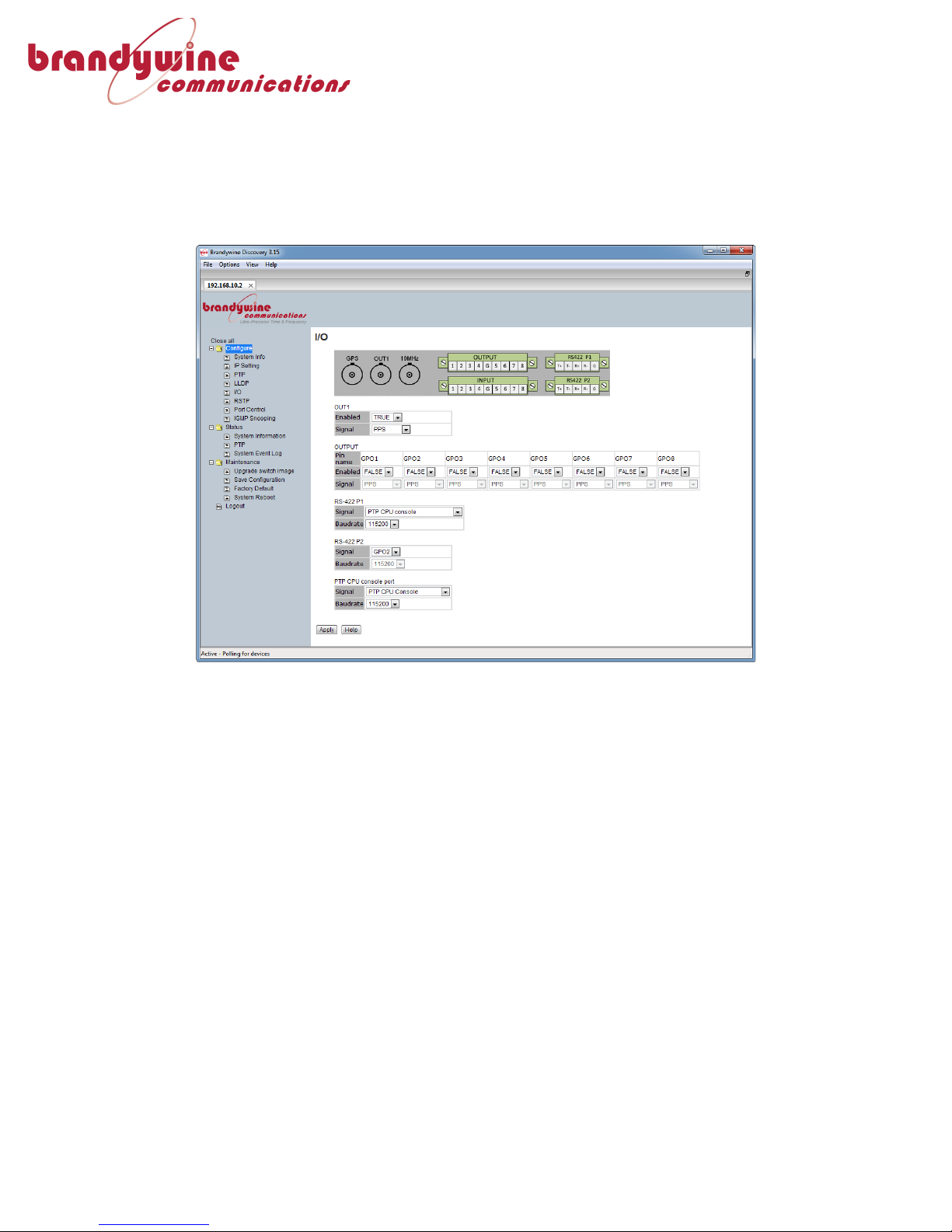
The!I/O!settings!page!allows!the!user!to!adjust!various!input!and!output!settings!for!
the!PTP-8080.!!The!PTP-8080!is!capable!of!outputting!10MHz!from!a!dedicated!BNC!
connector,!a!dedicated!IRIG-B!connector,!or!1PPS,!IRIG-B!(DC!Level!Shift),!or!100Hz!
over!a!programmable!BNC!connector.!!In!addition,!the!PTP-8080!can!support!up!to!
four!additional!programmable!outputs!via!the!terminal!block!connector!interface.!
!
Figure+9+-+I/O+Settings+Page+
Page 18
!
!
! MANUAL!P/N!900000156!REV!A!
18!
3.3.6 RSTP!Settings!
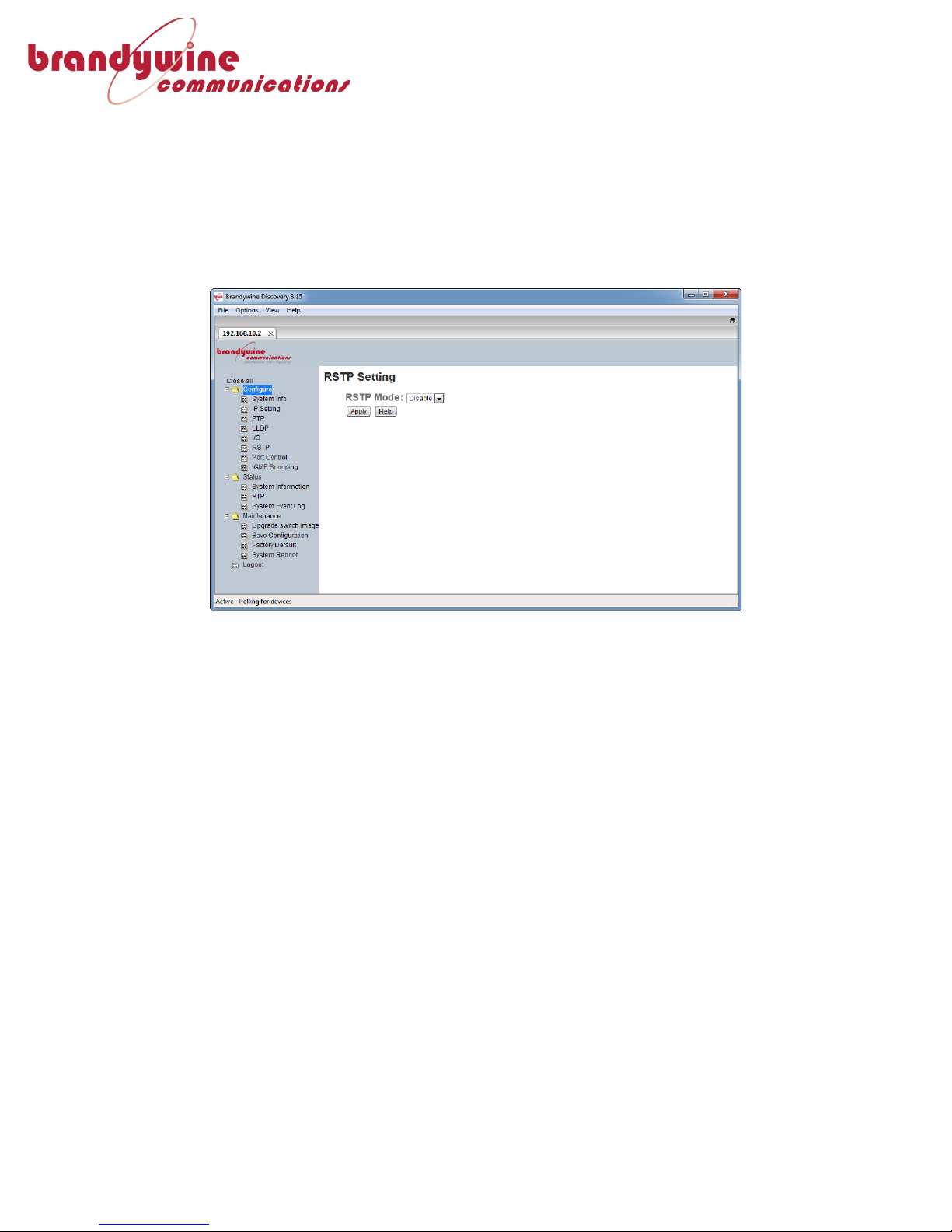
The!RSTP!Settings!page!allows!the!user!to!enable!or!disable!RSTP!mode!for!the!PTP8080,!as!well!as!set!which!version!of!RSTP!to!use.!!The!PTP-8080!can!use!Rapid!
Spanning!Tree!Protocol”!to!quickly!map!out!the!network!it’s!connected!to!and!
compensate!for!any!changes!in!network!topology.!!Brandywine!recommends!that!
RSTP!mode!be!enabled.!!Please!note!that!the!PTP-8080!is!a!network!switch!and!it!is!
recommended!that!it!not!be!looped!back!from!another!network!switch!or!have!two!
of!its!own!ports!connected!to!each!other,!in!order!to!prevent!a!traffic!storm.!
!
Figure+10+-+RSTP+Settings+Page+
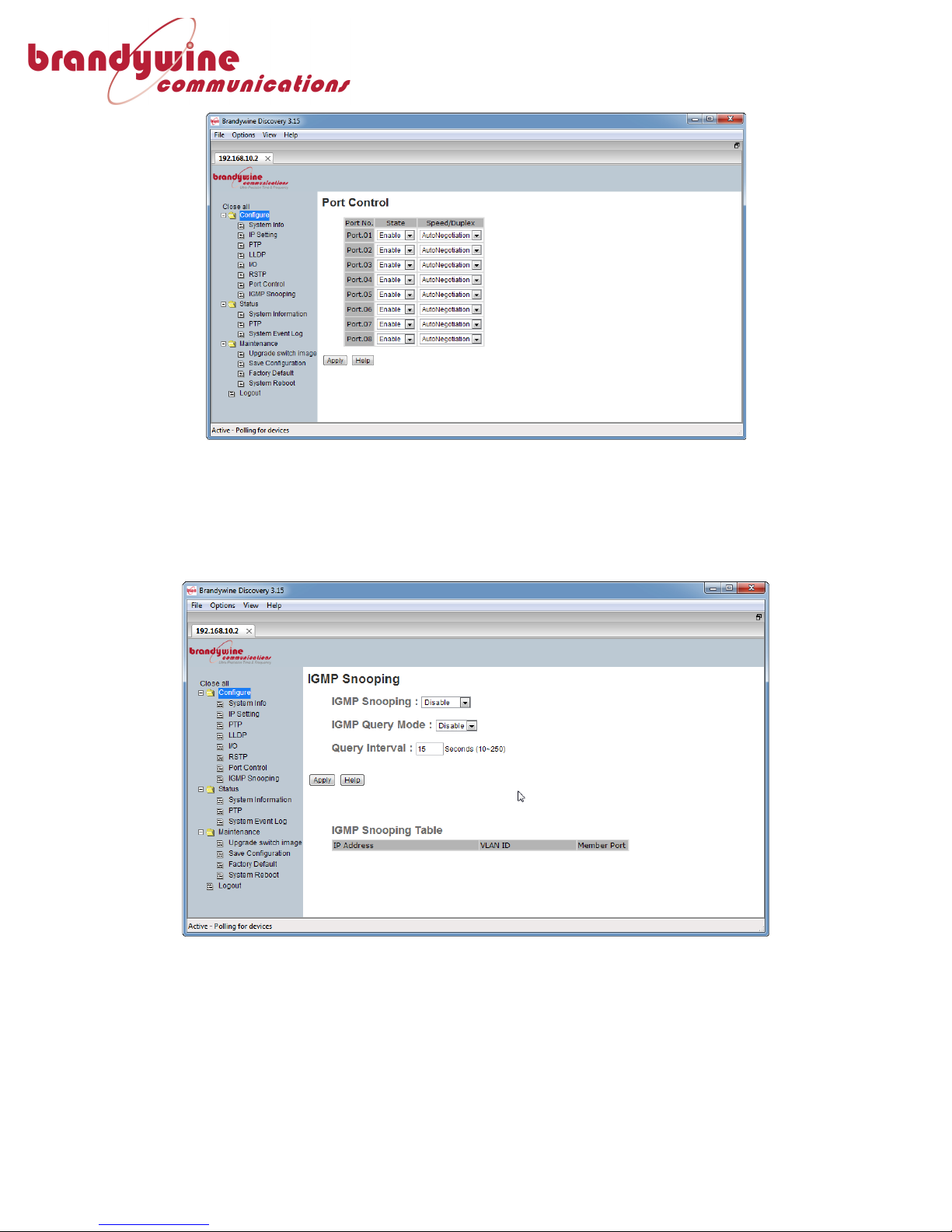
3.3.7 Port!Control!Settings!
The!port!control!settings!page!enables!the!user!to!enable!or!disable!each!of!the!
numbered!PTP!ports!on!the!PTP-8080.!!In!addition,!the!speed!and!duplex!of!each!
port!can!be!set!from!the!page.!!Please!note!that!the!PTP-8080’s!network!ports!are!
10/100/1000BaseT!ports!and!for!most!use!cases!they!should!be!set!to!“Auto!
Negotiation”!for!RJ-45!copper!use.!!When!SFP!is!used,!the!speed!must!be!set!to!
“1000!Full.”!If!it!becomes!necessary!to!force!the!PTP-8080!to!run!at!a!specific!speed!
and!duplex!setting!for!other!reasons,!that!can!be!set!from!here.!
Page 19
!
!
! MANUAL!P/N!900000156!REV!A!
19!
!
Figure+11+-+Port+Settings+Page+
3.3.8 IGMP!Snooping!
IGMP!snooping!allows!the!PTP-8080!to!passively!listen!in!to!IGMP!communications!
between!hosts!and!routers!as!a!way!to!keep!track!of!changes!in!network!topology!in!
real!time!in!order!to!efficiently!map!IP!multicast!streams,!filtering!them!from!links!
that!don’t!need!them!in!order!to!improve!the!efficiency!of!the!PTP-8080.!
!
Figure+12+-+IGMP+Snooping+Configuration+Pa ge +
Page 20

!
!
! MANUAL!P/N!900000156!REV!A!
20!
4 Support!Information!
!
All!Brandywine!Communications!products!come!with!a!one-year!warranty.!
!
If!the!unit!is!still!exhibiting!problems!not!covered!by!the!above!troubleshooting!
guide,!contact!us!for!technical!support!at![email protected]!or!call!us!
at!714-755-1050.!
!
If!it!becomes!necessary!to!return!the!unit!to!the!factory!for!repairs,!call!us!at!714755-1050!extension!113!to!arrange!an!RMA.!!
!
Page 21
!
!
! MANUAL!P/N!900000156!REV!A!
21!
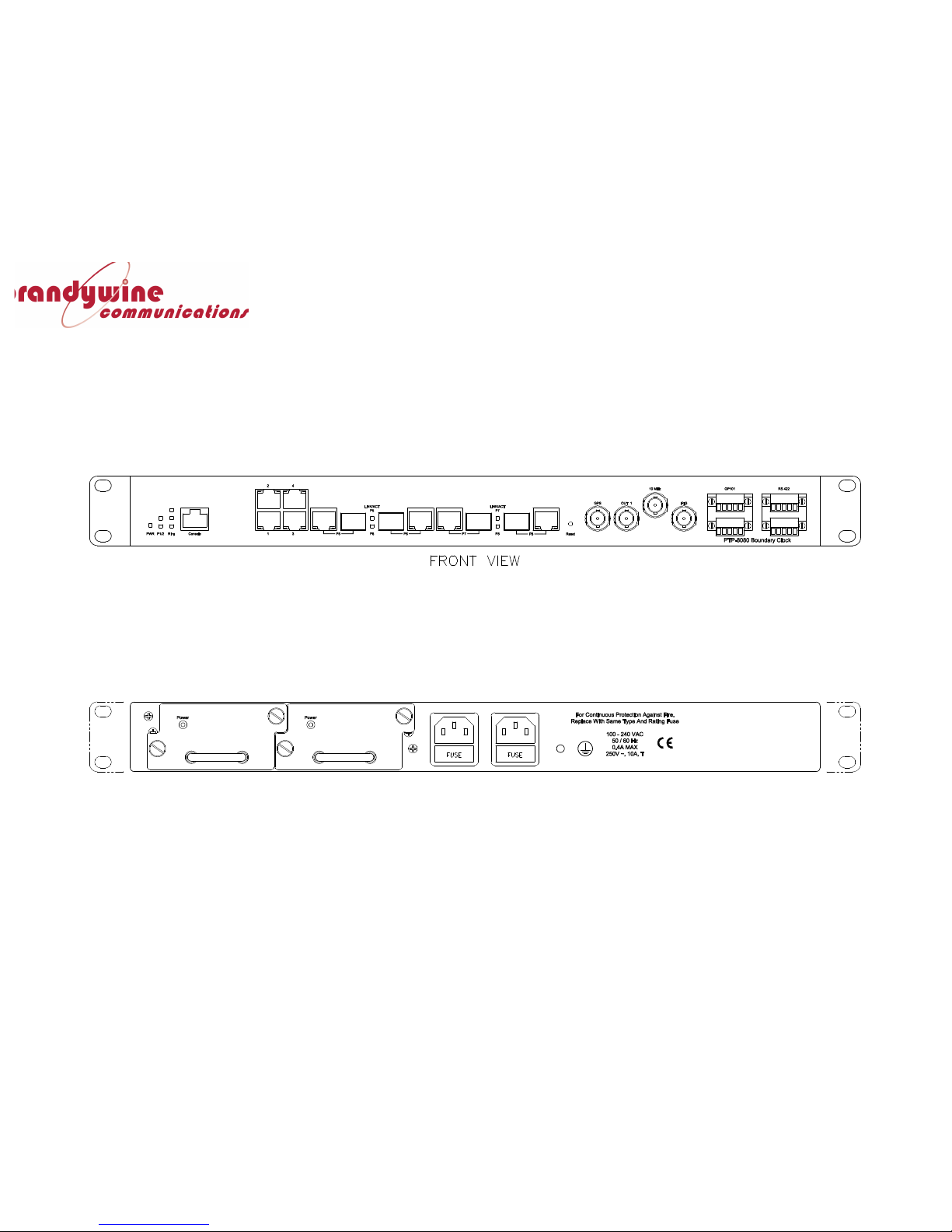
5 Outline)Drawings)
!
!
 Loading...