

Page 1
The Dash Developer Kit
Quick Start Guide
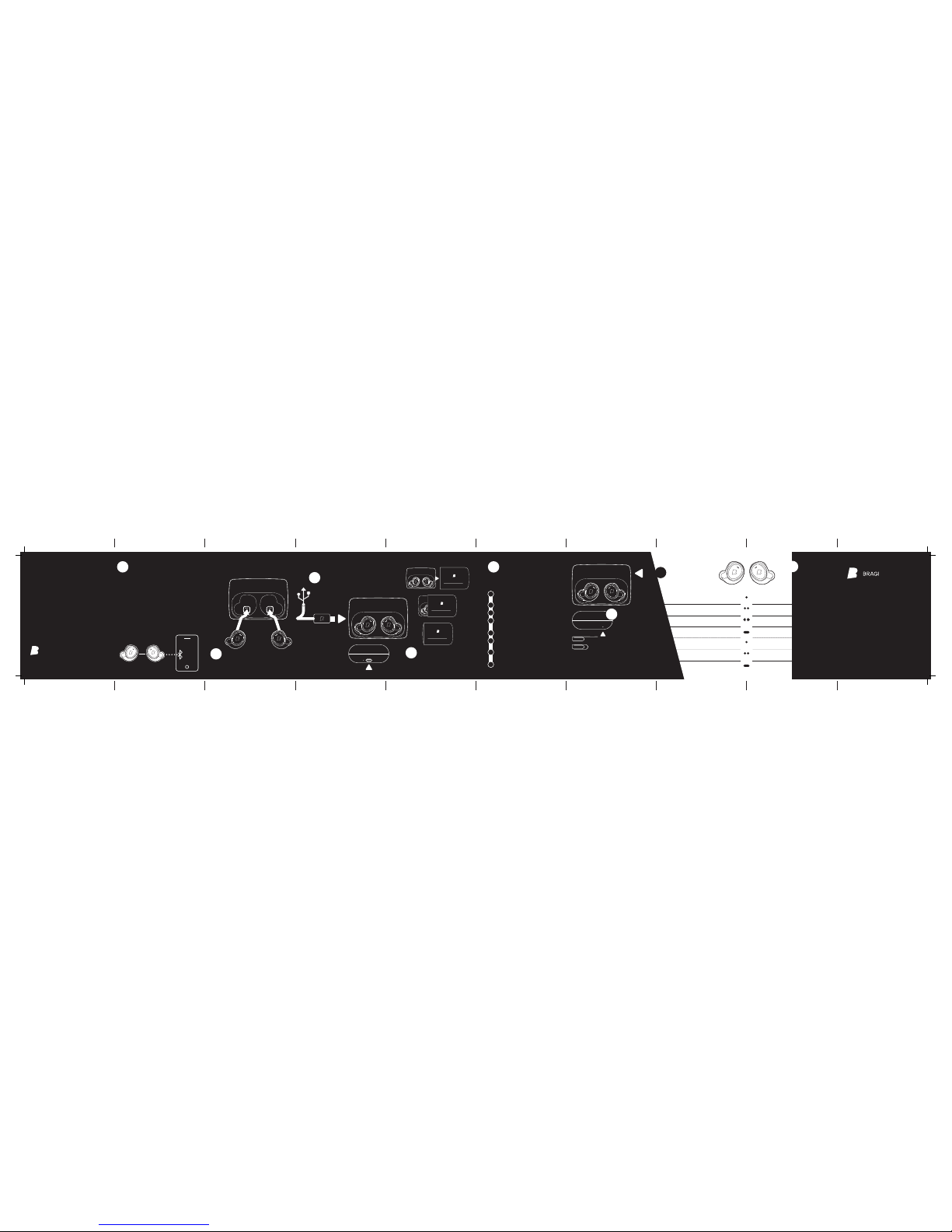
How to connect
The Dash & BT Device
7
How to reset
The Dash
12
How to interact
Basic gestures
13
How to charge
The Dash
8
How to charge
Please plug the Charger
with the Dash into a
USB-Port or Wallcharger.
Download the latest Software
from developer.bragi.com
Place the Dash in the Charger
Connect the Charger to your com puter
Copy the software file onto
your Dash
Safely eject the Dash mas s storage
The Dash will start to blink b lue and
run the update
The update is complete when th e Dash
LED starts breathing ag ain
Enjoy the new version!
How to apply the Case - XL
If you need to reset the
Dash Plug it into
the charger and press
a paper clip into the
hole on the right side
of the Charger for
until it blinks 3 times.
developer.bragi.com
We created a platform
for you to ask questions,
discuss with us on
different topics, share
your experience with
other developers & get
additional and always
up-to-date information
on the Dash.
Bragi Developer App
To get the Developer
App please visit
developer.bragi.com for
further instructions
Go to your smartphone sett ings to turn on
bluetooth. Insert the Das h into your ear and activate pairing mode by touching th e touch area with
a finger until the pairing fee dback sound is heard.
Phone & media connection (Bluetooth Classic)
Select “The Dash Audio “ in your list of available
bluetooth devices.
Data connection (Bluetooth LE)
Open the Bragi App and sele ct “The Dash Smar t“.
How to charge
The Charger
9
Take a paper clip
or something
else pointy
Tap
Tap
2x Tap
2x Tap
Swipe
Hold
5 sec.
copyright 2015 by BRAGI
Content may change without prior warning
v1. 07-25-201 5
Guess what ...
The Charger & Slide
10
How to update
The Software
11
1
2
3
4
5
6
7
8
Right
Listen & Communicate
Left
Track
Activity feedback
Start / Stop activity
Select activity
Next activity
Next song
Play / Pause music
Select playlist
Next playlist
Audio Transparency Up/Down Volume Up/Down
Activity Menu Enter/Exit–Playlist Menu Enter/Exit
BT Pairing mode
More
Treasures
14
Page 2
How to check battery status of The Case
2
3
1
4
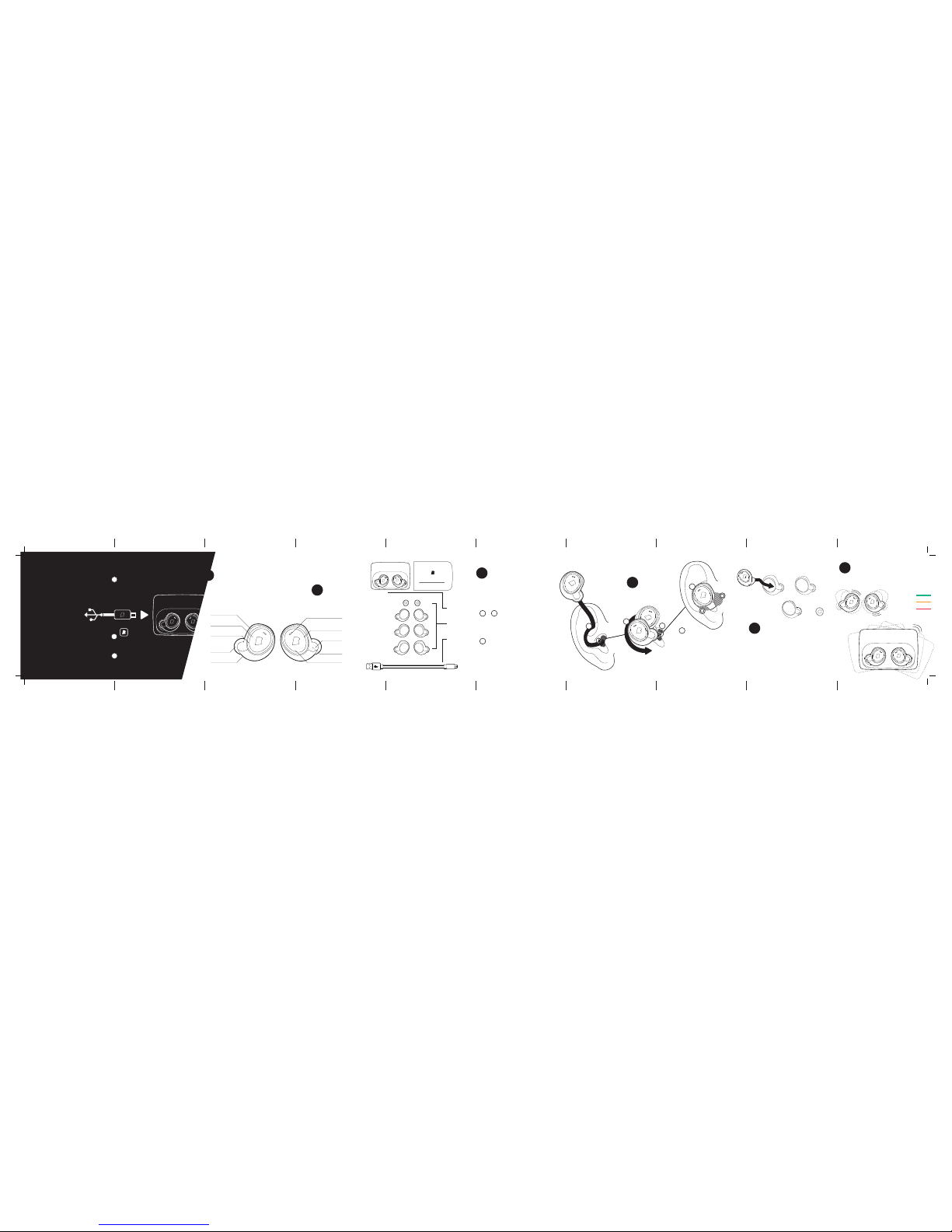
Before you get started –
Activate The Dash.
!
To activate the Dash connect
the Charger including Dash
to a USB power source.
Disconnect the USB Power and
your Dash is active.
Download the Bragi Developer App
on developer.bragi.com
Register your Dash through the
developer app to get full support.
Here we go.
What’s inside?
Introducing the Dash
FitSleeves
(XS/S/M/L)
Ambient Microphone
Balanced
Armature Drivers
Accelerometer
4GB Flash storage
Optical Touch Surface
LED Lightring
Passive Noise
Cancellation
Pulse Oximitre &
Health Sensors
... and a lot more.
1
Position the „R“ Dash wit h LED lightring in a
vertical position as show n in diagram „Insert t he
Dash“. Insert the tip of the Das h
firmly into your ear canal and rotate b ackwards.
To finish installing the Dash, ge ntly pull the top
portion of your ear upwards, w hile using your
free hand to adjust the Dash for a co mfortable
fit within your ear canal and out er ear cartilage.
To achieve a good seal, you should
feel the tip of the sleeve close
off your ear canal. Check that
The Dash is firmly seated wi thin
the portion of your ear.
Experiment with the Perfe ct Fit
by trying the different sizes : large
sleeve to the extra small tip.
Try different sleeve sizes until
it feels comfortable and secu re.
You will need the Perfect Fit to max imise
performance and accurac y of the device.
2
2
3
&
3
1
1
What’s inside the box?
The Developers Kit
2
3
How to insert
The Dash
The Dash
the Charger &
the Slide
FitSleeves
XS / S / M / L
USB to
Micro-USB Cable
4
How to wear
The Perfect Fit
4
How to change size
The FitSleeves
5
FitSleeves
L / M / S / XS
Shake the Dash
to get the battery status
100%
< 40%
< 20%
Shake the
Charger
with the Dash
plugged in
How to check the battery
The Dash & the Charger
6
InEar Microphone
Page 3
The Dash
Attention!
Page 4
Headphone listening at high volume levels
– particularly over extended periods of time –
may damage your hearing.
CAUTION RISK OF EXPLOSION IF BATTERY IS REPLACED
BY AN INCORRECT TYPE.
DISPOSE OF USED BATTERIES ACCORDING TO THE
INSTRUCTIONS.
› To guarantee your personal safety, please ensure that
these headphones are not worn or kept in the
immediate vicinity (closer than 10 cm) of a pacemaker.
› Do not insert jack plug into electric sockets.
› Supervise children when using the equipment.
The product is not a toy.
EN ATTENTION!
This symbol on the products and/or accompanying documents means that used electrical and electronic products
should not be mixed with general household waste. For
proper treatment, recovery and recycling, pleas take these
products to designated collection points, where they will
be accepted on a free of charge basis. Alternatively, in
some countries you may be able to return your products to
your local retailer upon the purchase of an equivalent new
product. Disposing of this product correctly will help to save
valuable resources and prevent any potential negative effects
on human health and the environment which could otherwise
arise from inappropriate waste handling. Please contact your
local authority for further details of your nearest designated
collection point. Penalties may be applicable for incorrect
disposal of this waste, in accordance with national legislation.
INFORMATION ON DISPOSAL IN OTHER COUNTRIES
OUTSIDE THE EUROPEAN UNION
This symbol is only valid in the European Union. If you wish to
discard this product, please contact your local authorities or
dealer and ask for the correct method of disposal.
INFORMATION ON DISPOSAL FOR
USERS OF WASTE ELECTRICAL &
ELECTRONIC EQUIPMENT
(PRIVATE HOUSHOLDS)
Page 5
The device complies with the FCC rules, Part 15. Operation is
subject to the following two conditions:
1. This device may not cause harmful interference, and
2. This device must accept any interference received,
including interference that may cause undesired operation.
FCC RULES
This equipment has been tested and found to comply with
the limits for a Class B digital device, pursuant to part
15 of the FCC Rules. These limits are designed to provide
reasonable protection against harmful interference in a
residential installation. This equipment generates, uses and
can radiate radio frequency energy and, if not installed and
used in accordance with the instruction manual, may cause
harmful interference to radio communications. However,
there is no guarantee that interference will not occur in a
particular installation. If this equipment does cause harmful
interference to radio or television reception, which can be
determined by turning the equipment off and on, the user is
encouraged to try to correct the interference by one or more
of the following measures:
• Relocate the receiving antenna.
• Increase the separation between equipment and receiver.
• Connect the equipment into an outlet on a circuit different
from that to which the receiver is connected.
• Consult the dealer or an experienced radio/TV technician
for help.
EN
CANADA:
This device complies with Industry Canada licence-exempt
RSS standard(s). Operation is subject to the following
Two conditions: (1) this device may not cause harmful
interference, and (2) this device must accept any interference
received, including interference that may cause undesired
operation.
CAN ICES(B)/NMB-3(B)
IC RADIATION EXPOSURE STATEMENT:
This equipment complies with Canada radiation exposure
limits set forth for uncontrolled environments. This transmitter must not be co-located or operating in conjunction with
any other antenna or transmitter.
CAUTION: THE USER IS CAUTIONED THAT CHANGES OR
MODIFICATIONS NOT EXPRESSLY APPROVED BY THE PAR
TY RESPONSIBLE FOR COMPLIANCE COULD VOID THE
USER’S AUTHORITY TO OPERATE THE EQUIPMENT.
NOTICE OF COMPLIANCE
Page 6
Cet appareil satisfait aux règlements de la FCC partie 15
du Code of Federal Regulations. Son fonctionnement est
assujetti aux deux conditions suivantes:
1. Cet appareil ne doit pas causer d’interférence préjudiciable et
2. l’appareil doit accepter toute interférence reçue, y compris
les interférences qui peuvent causer un fonctionnement
non désiré.
RÈGLEMENT DE LA FCC
Cet équipement a été testé et jugé compatible avec les
limites s’appliquant aux appareils numériques de la classe
B, conformément à l’article 15 du règlement de la FCC.
Ces limites ont été définies pour fournir une protection
raisonnable contre les interférences nuisibles dans le cadre
d’une installation résidentielle. Cet équipement génère, utilise
et peut émettre de l’énergie radiofréquence et, s’il n’est pas
installé ni utilisé conformément aux instructions, peut causer
des interférences gênantes pour les communications radio.
Rien ne garantit toutefois que des interférences ne surviendront pas dans une installation particulière. Si cet équipement cause des interférences nuisibles pour la réception de
la radio ou de la télévision, ce qui peut être déterminé en
mettant l’équipement hors tension puis sous tension, l’utilisateur devra essayer de corriger ces interférences en effectuant
une ou plusieurs des opérations suivantes:
FR
Déplacez l’antenne de réception.
Augmentez la distance entre l’équipement et le récepteur.
Branchez l’équipement à une prise d’un circuit autre que celui
sur lequel le récepteur est branché. Consultez le détaillant ou
un technicien de radiotélévision expérimenté.
CANADA :
Le présent appareil est conforme aux CNR d’Industrie
Canada applicables aux appareils radio exempts de licence.
L’exploitation est autorisée aux deux conditions suivantes : (1)
l’appareil ne doit pas produire de brouillage, et (2) l’utilisateur
de l’appareil doit accepter tout brouillage radioélectrique
subi, même si le brouillage est susceptible d’en compromettre
le fonctionnement.
CAN ICES(B)/NMB-3(B)
DÉCLARATION D’IC SUR L’EXPOSITION AUX RADIATIONS:
Cet équipement est conforme aux limites d’exposition aux
radiations définies par le Canada pour des environnements
non contrôlés.
CET ÉMETTEUR NE DOIT PAS ÊTRE INSTALLÉ AU MÊME
ENDROIT NI UTILISÉ AVEC UNE AUTRE ANTENNE OU UN
AUTRE ÉMETTEUR.
AVIS DE CONFORMITÉ
Page 7
g
Flipbook starts here ...
Page 8
go
Page 9
goo
Page 10
w
Page 11
wi
Page 12
wil
Page 13
wild
Page 14
wild!
Page 15
Bragi GmbH, Munich, Germany, Earth
v 1.1, 2015-10, Kickstarter & Pre-Order Issue
Copyright ©2015 Bragi GmbH. All rights reserved. BRAGI, The
Dash, and the B logo are trademarks of Bragi GmbH in the U.S.
or one or more other countries. The absence of a product or
service name or logo from this list does not constitute a waiver
of Bragi GmbH trademark or other intellectual property rights
concerning that name or logo. Patents pending.
 Loading...