

Page 1
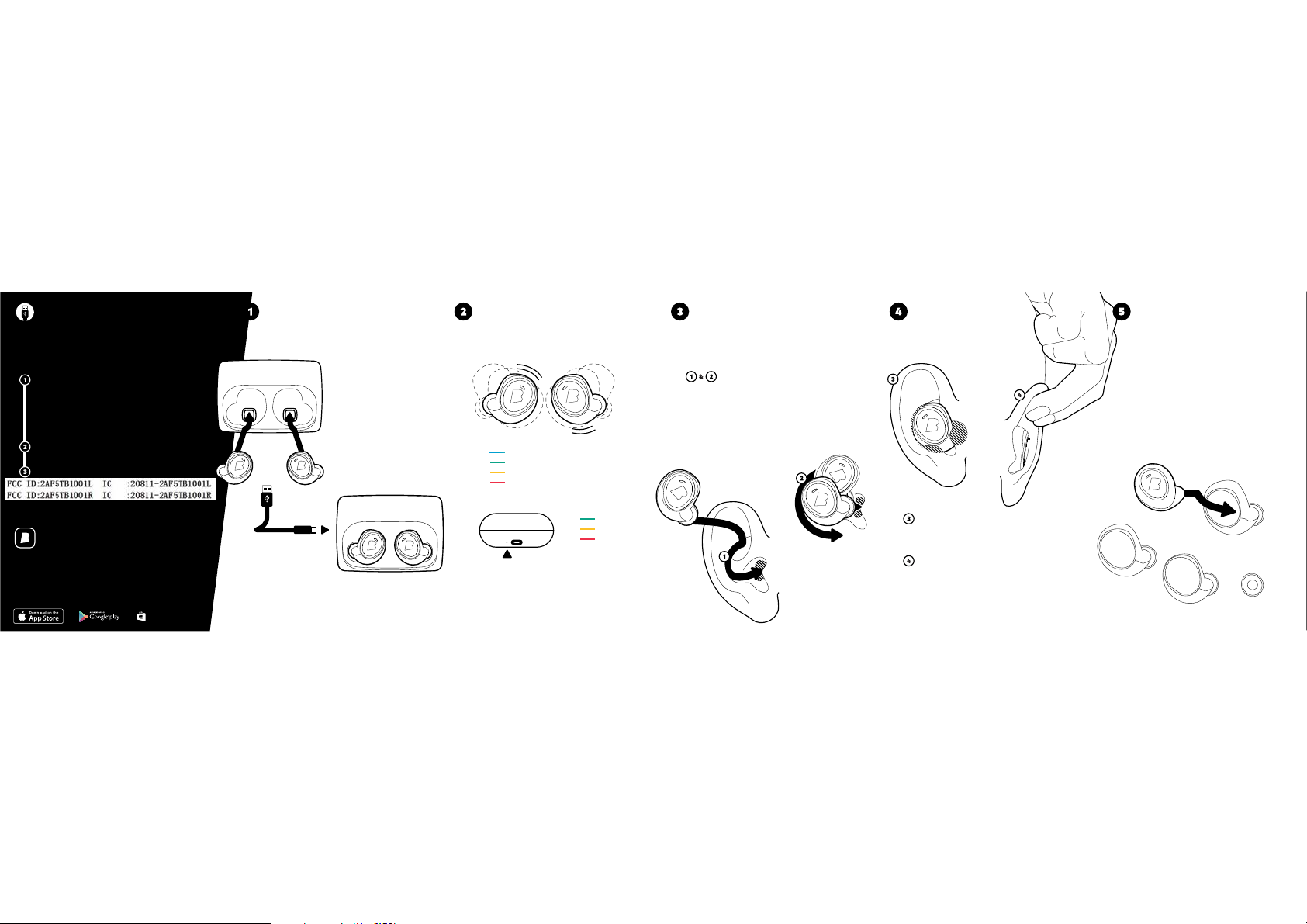
Before you get started
Activate the Dash
How to charge
The Dash & Charger
How to check the battery
The Dash & Charger
How to insert
The Dash
How to wear
The PerfectFit
How to change
The FitSleeves
To activate The Das h connect The
Charger including The Dash to your
computer via t he USB Cable.
The Dash is ac tivated when the
LightGuide flashes blue. You may
now safely eject and disconnect
at any time.
Download the Bragi App on
bragi.com
Register your Da sh through the
bragi app to get fu ll support.
Bragi App
Download it
Customize
Download the free Bragi App now
to personalize a nd set up your Dash
bragi.com/app
Download from
Windows Phone Store
Place The Das h in The
Charger and make sure
it sits on the MagSnap.
BRAGI
To charge the batter y, connect The Charger to
your Computer o r another power source via US B
The Charger fu lly charges The Dash up to 5 t imes
while on-the-go.
full
Shake The Das h
high
medium
Check out the L ED on the side of The Charger to s ee the
current batt ery status. The Das h needs to be placed in
The Charger or T he Charger needs to be conn ected to a
power source.
And you will see t he current
battery s tatus of your Dash.
low
high
medium
low
Take The Right Dash, ti lt it slightly forward and
insert the s peaker tip into your ear canal .
Adjust to a Perfe ctFit by rotating The Das h backwards until it feel s comfortable and secure in yo ur
ear.
With The Per fectFit you should feel T he Dash
completely clo sing off your ear canal whil e it sits
snugly in your ear.
Achieving The PerfectFit may require some adjustment. To adjust you can us e one hand to lift up in
your ear and adju st with the other. By doing this
you should be ab le to press the upper par t of The
Dash into a locke d position as shown in the d iagram above.
The Dash is alre ady fitted with XS
FitSleeves . Try different sizes to
find your PerfectFit.
The Perfec tFit is important to maximise performance of The Dash
and accuracy t he DataHub.
M
S
L
XS
Page 2
v 1.0, 201603, V2B QSM English
Model B1000, B1000H, B1000C, B1000L, B1000R
Bragi GmbH, Munich, Germany, Earth
Copyright ©2015 Bragi GmbH. All rights reserved. BRAGI, The Dash, and the B logo are
trademarks of Bragi GmbH in the U.S. or one or more other countries. The absence of a
product or service name or logo from this list does not constitute a waiver of Bragi GmbH
trademark or other intellectual property rights concerning that name or logo.
Patents pending.
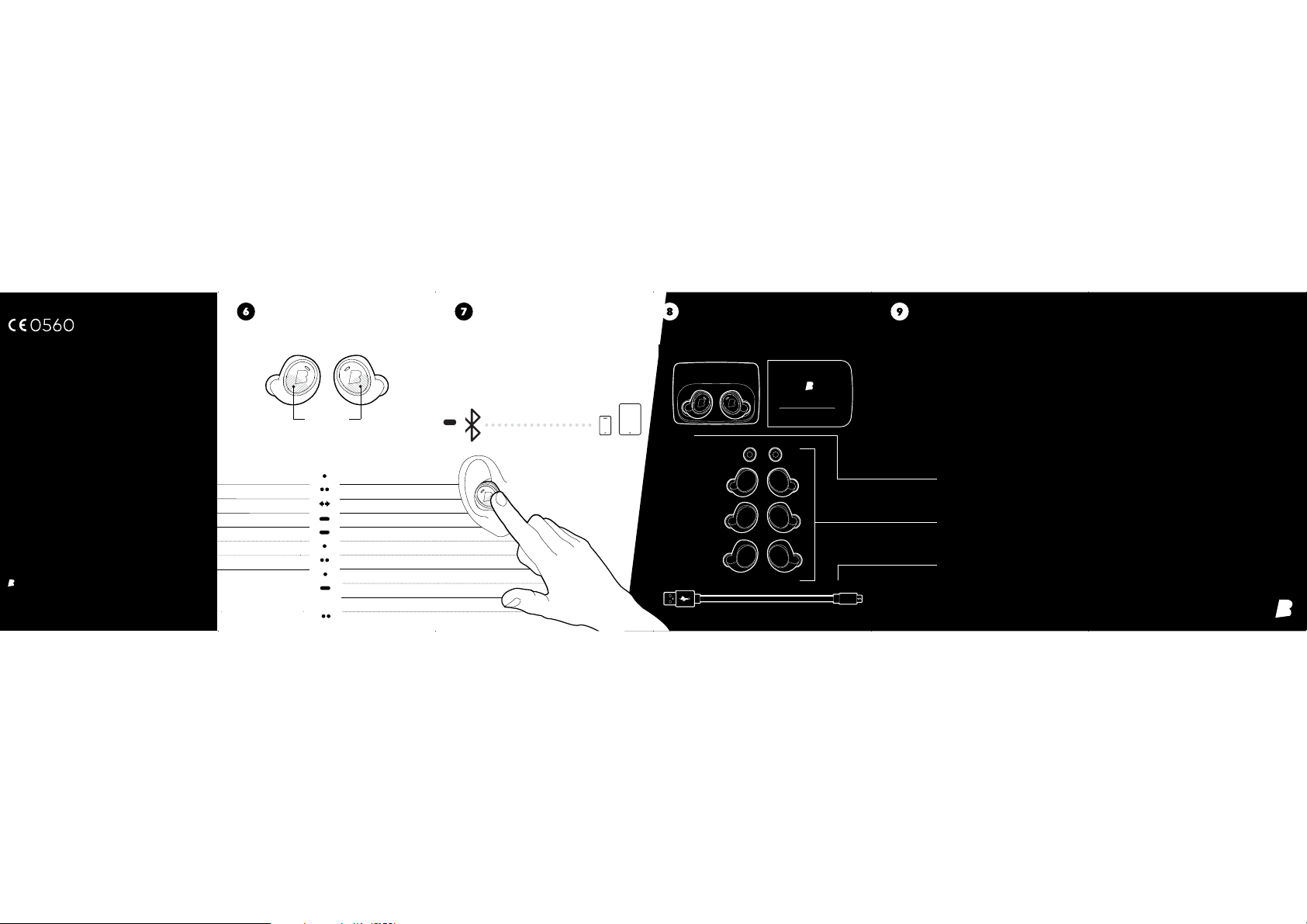
How to interact
Basic gestures
Touch Control
Left Dash
Tra ck
Activity feedback-Next song
Audio Transparency On/Off Volume Up / Down
Pairing mode Activity Data Pairing mode Audio
Activity Menu Start / Exit Playlist Menu Start / Exit
Start / End a ctivit y
Next activity
Right Dash
Listen & Communicate
Play / Pause music
Tap
2x Tap
Swipe
5 sec
Hold
Select playlist
Tap
Next playlist
Answer a call
Tap
End a call
Hold
Only R Dash inserted
Activate standalone mode
2x Tap
How to connect
Bluetooth & The Dash
Touch and hold The Rig ht Dash for
5 seconds to enter p airing mode.
Select The Dash in your Bluetooth
settings and connect.
connecti on visible for max. 2 m inutes
5 sec.
What’s inside the box?
The Dash
Manual & Registration
Reveal all features
bragi.com/support
Experience the full capabilities of
The Dash & revea l all of it‘s exciting
features.
The Dash
The Charger &
The Slide
FitSleeves
XS / S / M / L
USB to
Micro USB Cable
Quick Start Guide
The Dash
Page 3
Should be translated to:
Cet appareil est conforme avec Industrie Canada RSS exemptes de licence standard(s).
Son fonctionnement est soumis aux deux conditions suivantes:
(1) cet appareil ne peut pas provoquer d'interférences, et
(2) cet appareil doit accepter toute interférence, y compris celles pouvant causer un
mauvais fonctionnement de l'appareil.
(2) this device must accept any interference, including interference that may
cause undesired operation of the device.
Operation is subject to the following two conditions:
(1) this device may not cause interference, and
FCC statements:
This device complies with part 15 of the FCC rules. Operation is subject to the
following two conditions: (1) this device may not cause harmful interference, and (2)
this device must accept any interference received, including interference that may
cause undesired operation.
NOTE: The manufacturer is not responsible for any radio or TV interference caused
by unauthorized modifications or changes to this equipment. Such modifications or
changes could void the user’s authority to operate the equipment.
RF exposure:
The device has been evaluated to meet general RF exposure requirement, The device
can be used in portable exposure condition without restriction
IC statement:
This device complies with Industry Canada license-exempt RSS standard(s).
Excessive sound pressure from earphones and headphones can cause hearing loss.
The device has been evaluated to meet general RF exposure requirement, The device
can be used in portable exposure condition without restriction
DISPOSE OF USED BATTERIES ACCORDING TO THE INSTRUCTIONS
CE statement˖
Do not use the product in the environment at too high or too low temperature,
never expose the product under strong sunshine or too wet environment.
The suitable temperature for the product and accessories is 0ć-50ć.
CAUTION RISK OF EXPLOSION IF BATTERY IS REPLACED BY AN INCORRECT TYPE.
Page 4

NOTE: This equipment has been tested and found to comply with the limits for a
Class B digital device, pursuant to part 15 of the FCC Rules. These limits aredesigned
to provide reasonable protection against harmful interference in a residential
installation. This equipment generates uses and can radiate radiofrequency energy
and, if not installed and used in accordance with the instructions,may cause harmful
interference to radio communications. However, there is no guarantee that
interference will not occur in a particular installation. If thisequipment does cause
harmful interference to radio or television reception, whichcan be determined by
turning the equipment off and on, the user is encouraged totry to correct the
interference by one or more of the following measures:
- Reorient or relocate the receiving antenna.
- Increase the separation between the equipment and receiver.
-Connect the equipment into an outlet on a circuit different from that to which the
receiver is connected.
-Consult the dealer or an experienced radio/TV technician for help.
This Class B digital apparatus complies with Canadian ICES-003.
Cet appareil numérique de la classe B est conforme à la norme NMB-003 du Canada.
 Loading...