

Page 1
English
EN
FB00427-EN
INSTALLATION AND PROGRAMMING MANUAL
MTMDY
Display module for modular entry panel
Page 2
3
2
1
Page 2 - Manual FB00427-EN - ver. 1
- 10/2016 - © CAME S.p.A. - The contents of this manual are subject to change at any time without prior notice.
General warnings
• Important personal safety instructions: READ CAREFULLY!
• Installation, programming, commissioning and maintenance must only be performed by qualified and experienced personnel in
compliance with applicable regulations.
• Wear antistatic shoes and clothing if working on the control board.
• Do not obstruct ventilation or heat dissipation openings or vents.
• Keep hold of these warnings.
• Always disconnect the electrical power supply during cleaning or maintenance.
• This product should only be used for the purpose for which it was explicitly designed. Any other use is considered dangerous.
• The manufacturer declines all liability for any damage as a result of improper, incorrect or unreasonable use.
DESCRIPTION
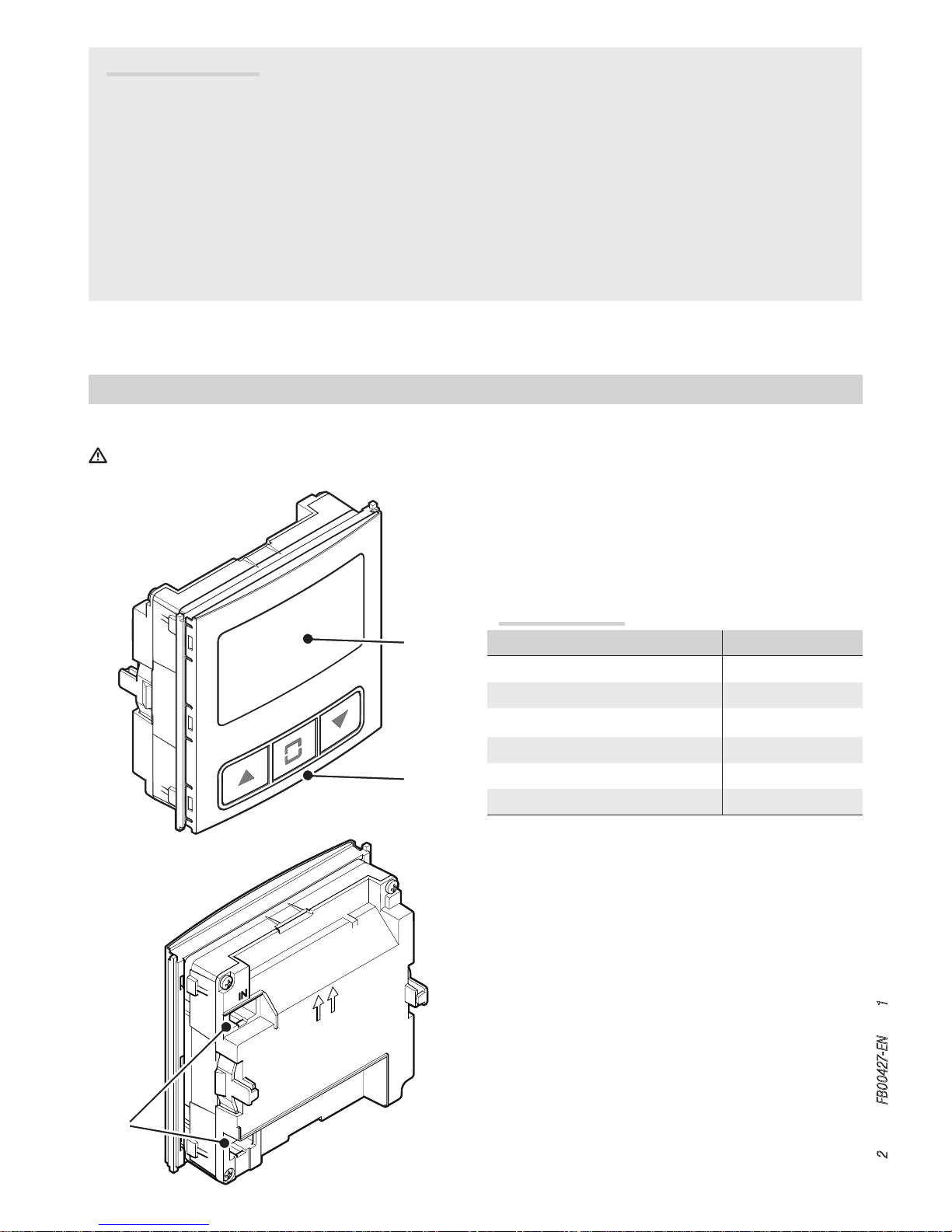
Display module connected and powered via BUS.
Module assembly or removal must take place while the entry panel is not powered.
❶ Display
2 Navigation buttons
3 Outlets for connection to other modules
Technical data
Type MTMDY
Power supply (V DC) 10.7 to 18
MAX current draw (mA) 250
MIN current draw (mA) 55
Storage temperature (°C) -25 to +70
Operating temperature (°C) -25 to +55
Protection rating (IP) 54
Page 3
A
B
D
F
C
E
G
Page 3 - Manual FB00427-EN - ver. 1
- 10/2016 - © CAME S.p.A. - The contents of this manual are subject to change at any time without prior notice.
CONFIGURING THE MODULE
Accessing configuration mode
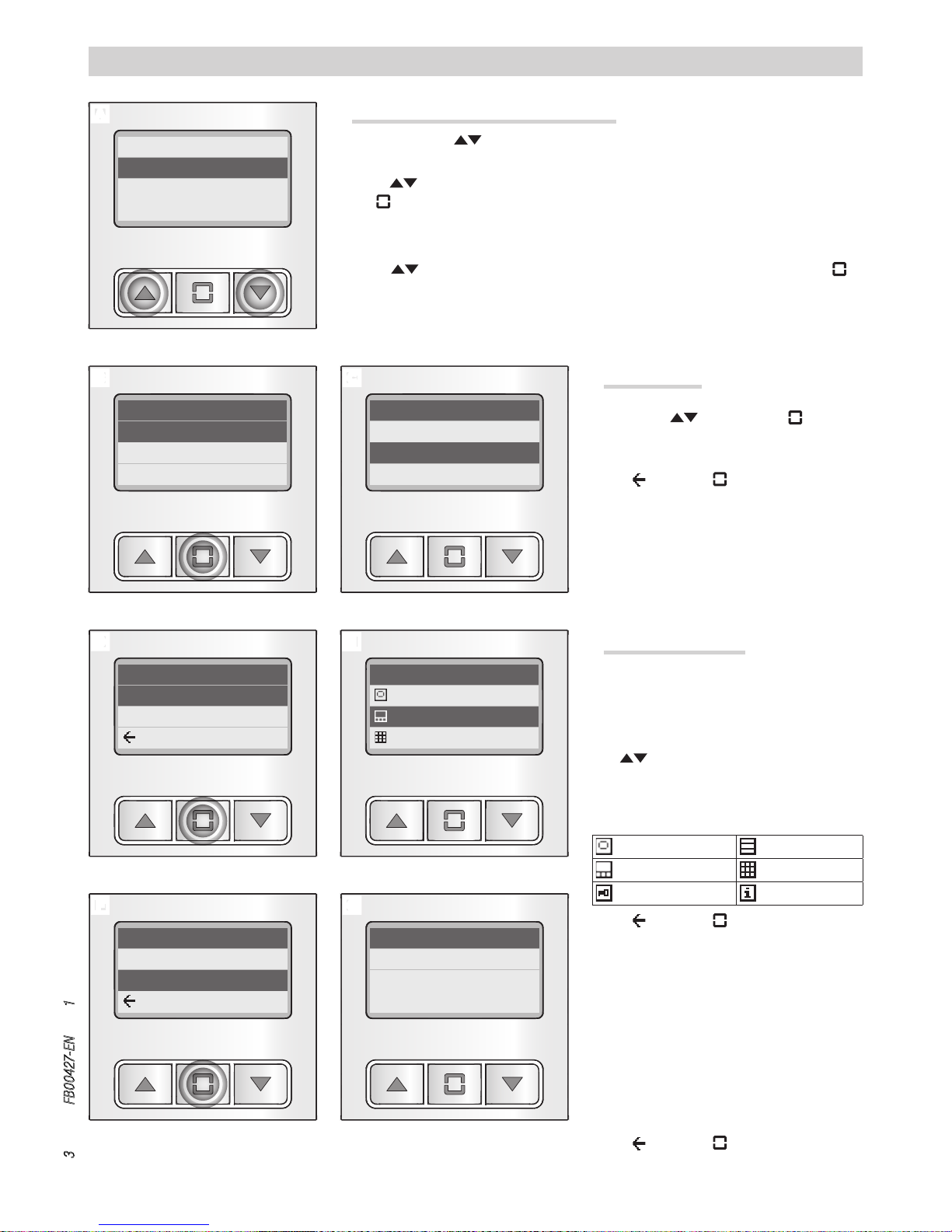
Press and hold the buttons at the same time until the password entry screen shown
in figure A appears (default password 1234).
Use the buttons to enter the first of the four numbers that make up your password.
Press to confirm and move on to the next number.
Once you have entered the correct password, you can access the dedicated module configuration section B.
Use the buttons to scroll through the various parameters to configure. Press to
access the configuration options.
0 _ _ _
Conguration
Language
Information
Display
Information
Version
ID
BACK
Information
Version
ID
BACK
Language
Italiano
English
Français
Version
1.00.001 - 1.05
1.00.000
1.00.003 - 1.08
ID
SN: 123456
IP: 192.168.12.1
255.255.255.255
[Language]
Scroll through the list of available languages
C using the buttons. Press to choose
the one you require and go back to the previous menu.
Select and press to go back to the previous menu without changing the existing programming.
[Information] D
The menu provides technical information regarding the display module and the other modules installed on the entry panel.
[Version] E
The buttons allow you to scroll through
the list and view the firmware version of the
modules installed on the entry panel.
Key to symbols
audio or audio/video pushbutton panel
display
keypad
RFID
info
Select and press to go back to the previous menu.
[ID] F
The information contained in this menu refers
to the audio or audio/video module installed on
the entry panel.
SN: identification code (also found on the back
of the module),
IP: IP address of the module and subnet mask
(information only found on IP modules).
Select and press to go back to the previous menu.
Page 4
A B
D
F
C
E
Page 4 - Manual FB00427-EN - ver. 1
- 10/2016 - © CAME S.p.A. - The contents of this manual are subject to change at any time without prior notice.
Conguration
Language
Information
Display
Display
Contrast
Backlight
BACK
Backlight
Colour
Brightness
Standby
Brightness
Contrast
BACK
Colour
White
Blue
BACK
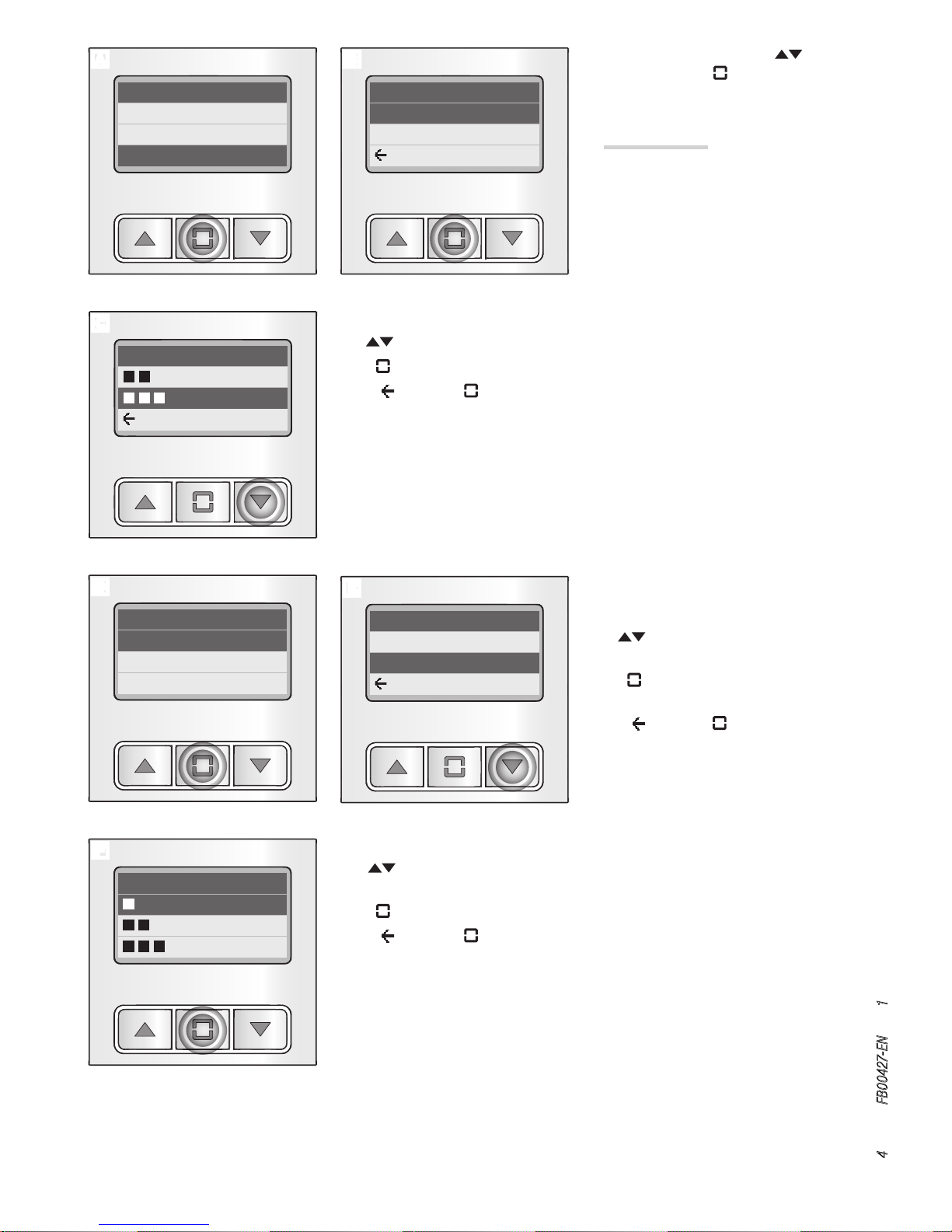
From the main menu A, use , to select
[Display] and press to access the configuration options.
[Display] B
The menu allows you to adjust all the parameters relating to display lighting.
[Backlight] D
[Colour] E
The buttons allow you to choose the colour of the display backlight.
Press to confirm your choice and go back to
the previous menu.
Select and press to go back to the previous menu without changing the existing programming.
[Contrast] C
The buttons allow you to scroll and simultaneously view the available contrast levels.
Press to choose the required level and go back to the previous menu.
Select and press to go back to the previous menu without changing the existing
programming.
[Brightness] F
The buttons allow you to scroll and simultaneously view the available brightness
levels.
Press to choose the required level and go back to the previous menu.
Select and press to go back to the previous menu without changing the existing
programming.
Page 5
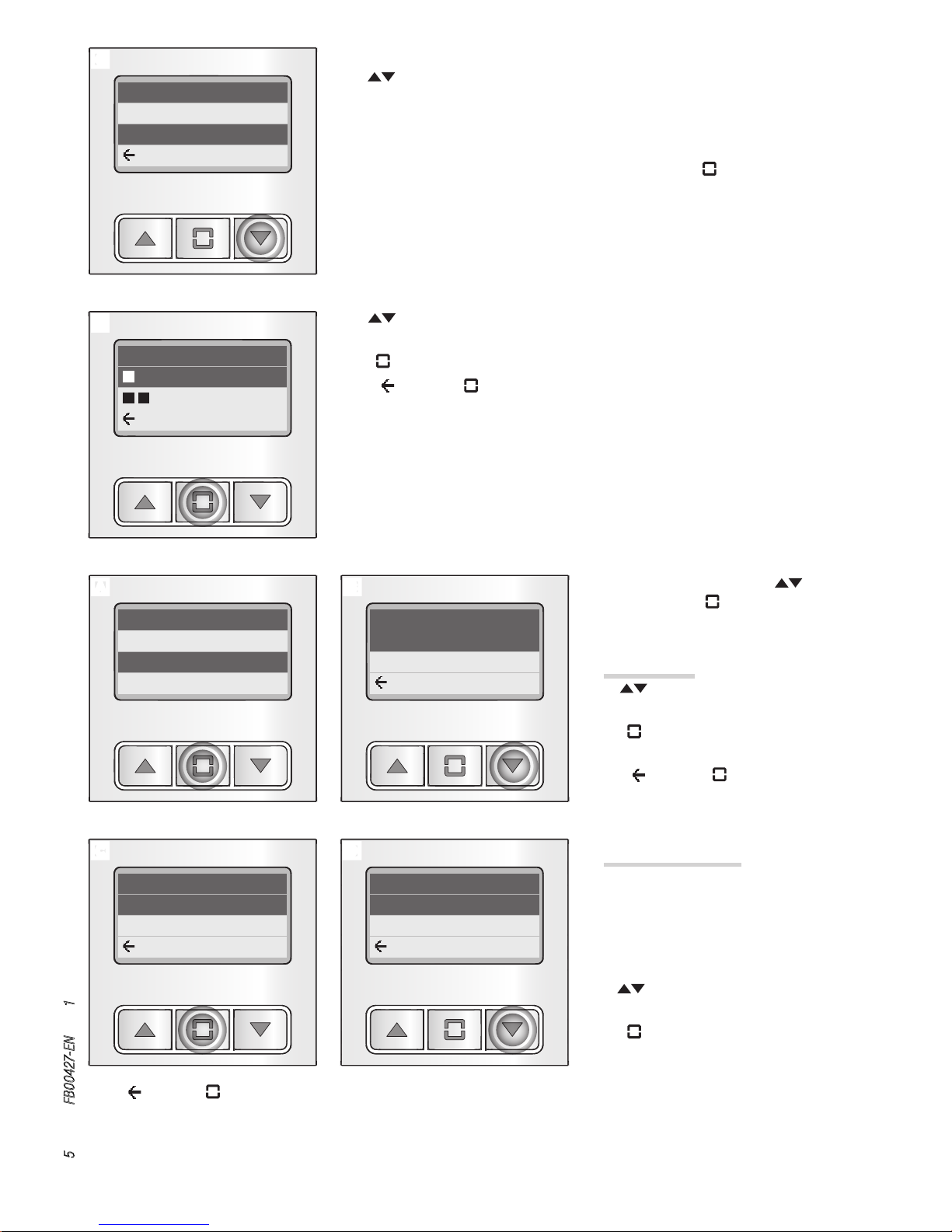
A B
C D
H
G
Page 5 - Manual FB00427-EN - ver. 1
- 10/2016 - © CAME S.p.A. - The contents of this manual are subject to change at any time without prior notice.
Conguration
Display
Tones
Phonebook
Tones
OFF
ON
BACK
Phonebook
Search intervals
Interval limit
BACK
Search intervals
3
4
BACK
Standby ON
BACK
Standby
OFF
ON
BACK
[Standby] G
The buttons allow you to determine the behaviour of the display module after 30
seconds of inactivity.
OFF = The backlight is always on.
ON = The screen dims the display until a button is pressed.
If you choose to activate the [Standby] function (ON), pressing allows you to access the
window for adjusting brightness in Standby mode H.
The buttons allow you to scroll and simultaneously view the available brightness
levels for Standby mode.
Press to confirm your choice and go back to the previous menu.
Select and press to go back to the previous menu without changing the existing
programming.
From the main menu A, use , to select
[Tones] and press to access the configuration options.
[Tones] B
The buttons are used to activate/deactivate tones.
Press to confirm your choice and go back to
the previous menu.
Select and press to go back to the previous menu without changing the existing programming.
[Phonebook] C
The menu allows you to configure the way in
which the names in the phonebook are displayed in order to facilitate the user in searching for the required name.
[Search intervals] D
The buttons allow you to choose into how
many parts to divide the phonebook.
Press to confirm your choice and go back to
the previous menu.
Select and press to go back to the previous menu without changing the existing programming.
N.B. If you choose option [1], the phonebook name list will not be divided up in any way.
Page 6
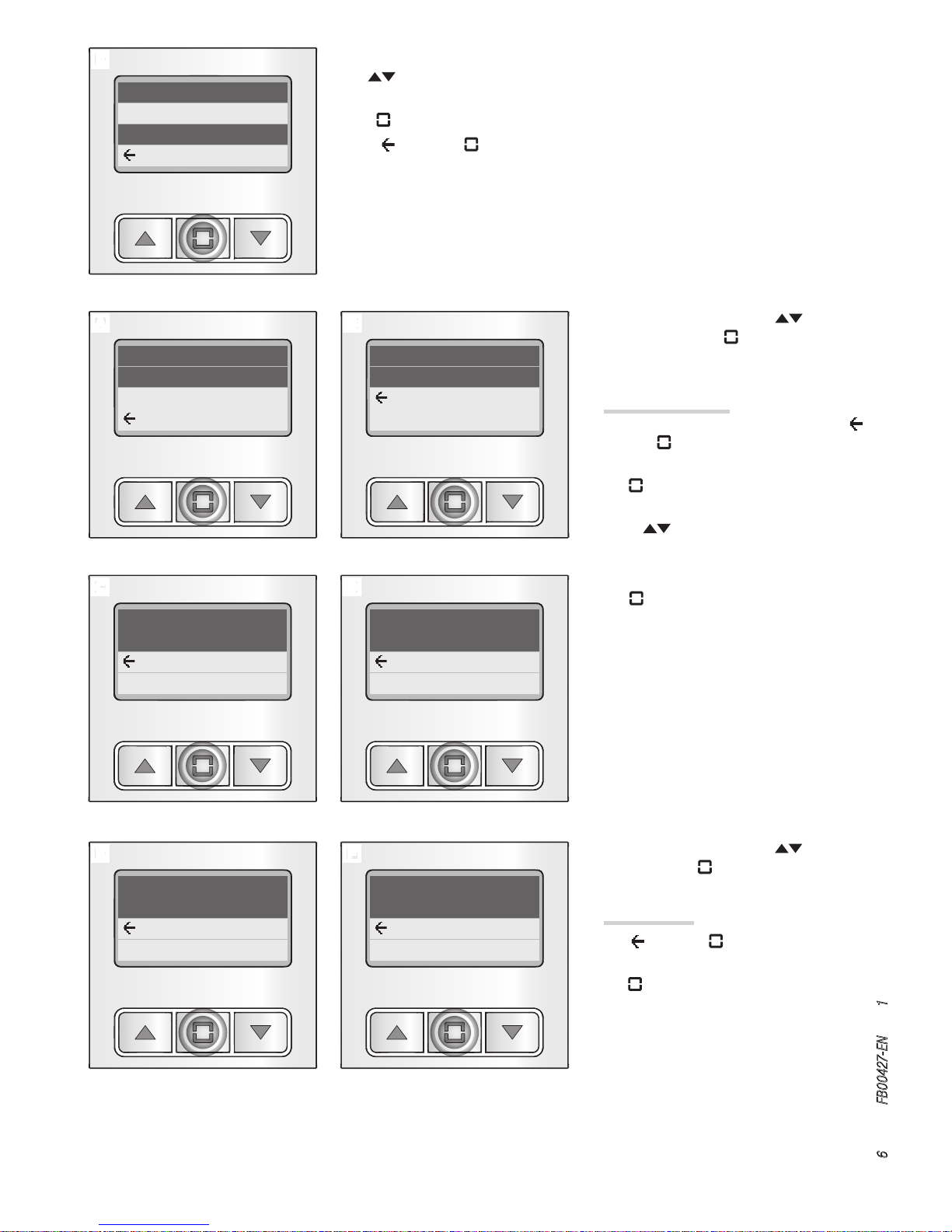
E
A B
F
C D
E
Page 6 - Manual FB00427-EN - ver. 1
- 10/2016 - © CAME S.p.A. - The contents of this manual are subject to change at any time without prior notice.
Interval limit
11
12
BACK
[Interval limit] E
The buttons allow you to choose the maximum number of permissible names for
each search range. Below this limit, the phonebook is not divided up any further.
Press to confirm your choice and go back to the previous menu.
Select and press to go back to the previous menu without changing the existing
programming.
Conguration
Password
Reset
BACK
Password
Change password
BACK
Reset
Perform reset
BACK
Old
* * * 4
BACK
New
* * * 1
BACK
Conrm new
* * * 1
BACK
From the main menu A, use , to select
[Password] and press to change the password.
[Password] B
At any point in the process you can select
and press to return to the previous menu
without changing the existing password.
Press to change the current password and
continue.
Use the buttons to enter the first of the
four numbers that make up the old password.
Press to confirm and move on to the next
number.
Once you have entered all the numbers in the
old password C, enter the new password as
required D E.
From the main menu A, use , to select
[Reset] and press .
[Reset] F
Select and press to go back to the previous menu without resetting.
Press to reset and return the entry panel to
its factory settings.
Page 7

Page 7 - Manual FB00427-EN - ver. 1
- 10/2016 - © CAME S.p.A. - The contents of this manual are subject to change at any time without prior notice.
The product complies with the applicable reference directives.
Dismantling and disposal. Dispose of the packaging and the device properly at the end of its life cycle, according to the regulations in force in the country where
the product is used. The recyclable components bear the symbol and code for the material.
THE DATA AND INFORMATION PROVIDED IN THIS MANUAL ARE SUBJECT TO CHANGE AT ANY TIME WITHOUT PRIOR NOTICE.
MEASUREMENTS, UNLESS OTHERWISE INDICATED, ARE IN MILLIMETRES.
Page 8

Came S.p.A.
Via Martiri Della Libertà, 15 Via Cornia, 1/b - 1/c
31030 Dosson di Casier
Treviso - Italy
33079 Sesto al Reghena
Pordenone - Italy
(+39) 0422 4940
(+39) 0422 4941
(+39) 0434 698111
(+39) 0434 698434
www.came.com
English - Manual FB00427-EN - ver. 1 - 10/2016 - © Came S.p.A.
The contents of this manual are subject to change at any time without prior notice.
 Loading...