

Page 1
General
PIN:1234
1
4
7
Rearview mirror
15:27
2
5
8
0
Pair
3
6
9
X
You need to wa it fo r mor e 2 minutes afte r the flash of the B luetoot h
devi ce com pletel y disa ppear, and then connec t your mobi le ph one or
othe r devi ce to rear view m irror.
Connecting to new phone
4
Short press
Plea se ens ure y our m obile phone suppor ts vo ice d ialing funct ion.
When the rearvi ew mi rror i s in the standby stat e, to short pres s the
butt on is to a ctivat e voic e con trol functio n. In 3 s econds, you can hear
a b eep s ound. Please speak out the phone number you want to ca ll or
othe r comm ands, and then t he ph one w ill de al wi th it .
Voice dialing
Successfully connected
Afte r the passw ord h as bee n set , a bluetoo th ic on wi ll app ear o n the
moni tor. I t mea ns th e conn ection is success ful. 5 seco nds l ater, the
moni tor wi ll au tomatic ally shut off an d the n bec omes c omplet ely
invi sible. The Bluetoo th sy stem enters stand by sta te.
Making a call
Usin g the phone 's ke ypad
Dial numbe r on the keypad or s elect the contact name from the contac t
list of your m obile phone.
Pres s phon e's “ send/ca ll” k ey.
15:27
1 2 3
4 5
6
7*8
0
9
#
+
+
49154 0
5
6
7
◆
OE-STYLED BLUETOOTH REAR VIEW MIRROR
VT B4 6 M
Starting up
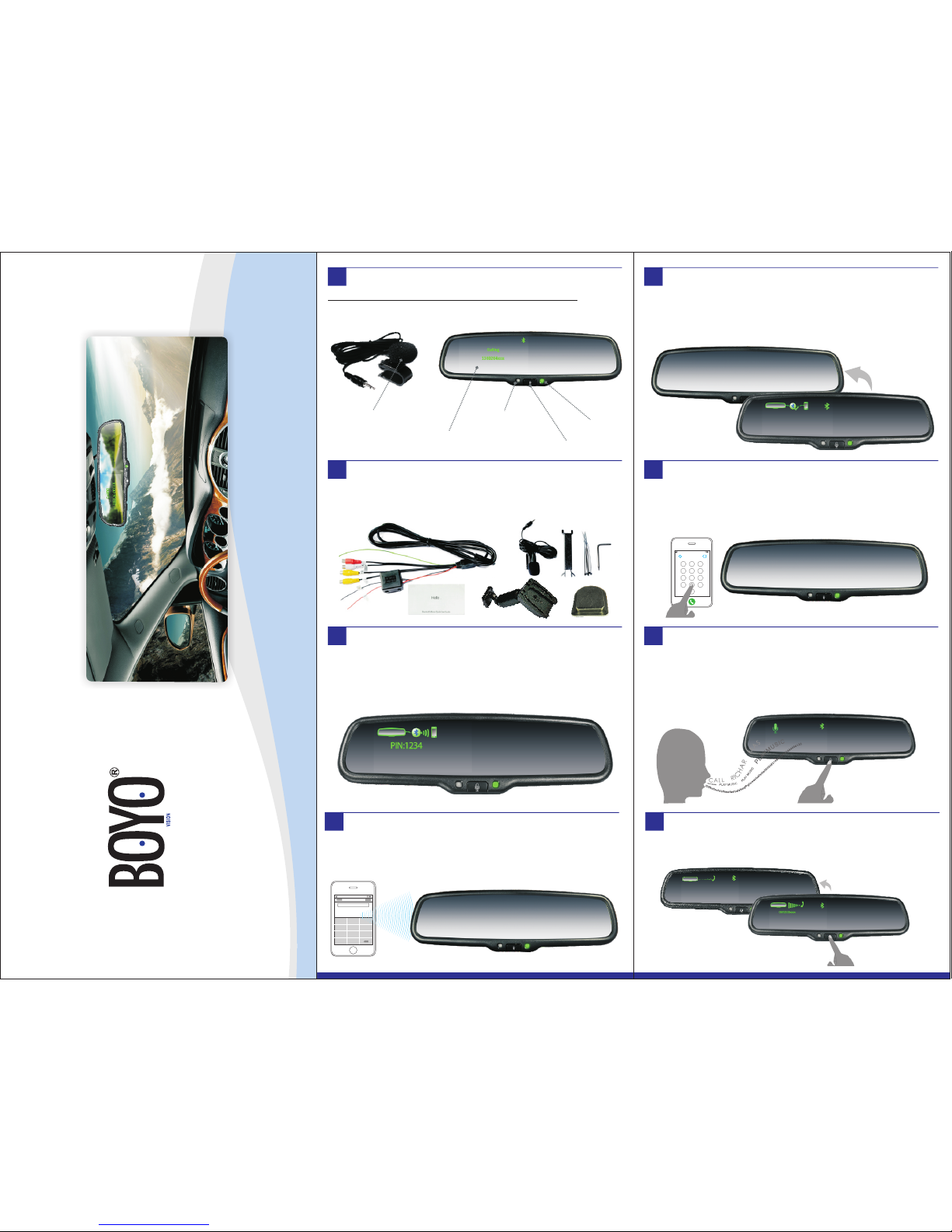
The first time you use t he rea rview mirror , it will automa ticall y star t up
when the car i s sta rted. You n eed t o wai t for 1 mi nute to co nnect your
phon e with the mirro r. Bec ause at th e firs t min ute, the mi rror keeps
sear ching last paired cell phone .
Brief Introduction
High sensi tive external
microph one
4.3" ultra hi gh brightness
automat ically adjust able LCD screen
High sensi tive
ambient li ght sensor
Multi-f unction butto n
Green indi cator
Checking the accessories
Make sure tha t you have the followin g items with y our Bluet ooth rear view
mirror: user manual, m icrophone, cover, wire.
Thank you for purchasing the Bluetooth rearview mirror monitor
, please read
this user's guide to get start.The following is the introduction of the monitor.
1
2
3
Shor tly pr ess t he bu tton t o ans wer t he cal l, wh en yo u are recei ving an
inco ming c all.
Short press
Answerin g
Answering a call
8
Page 2
Almo st all cell phon es can be perfec tly pa ired with the Bl uetoot h
moni tor. H owever , indi vidual hands et ve ndor's Bluet ooth protoco ls ar e
spec ial. I t wil l lea d to unstab le co nnectio n wit h Blue tooth or o ther
unpr edictab le pr oblems. Ther efore, pleas e test whet her y our ph one
can be p aired with the B luetoot h mon itor o r not , bef ore pu rchasi ng
this produ ct.
Screen Size
Display Screen
Display Resolution
Aspect Radio
Color Depth
Pixel Pitch (mm)
Power Consumption
Working Voltage
Video Input
Signal System
4.3”
TFT-LCD
480(H)×272(V)
16 : 9
16.7M dithering
0.219X0.219
8W
DC 12V
PAL/AUTO/NSTC
NTFS/PAL Video input
ACC
Support
15
Specifications
17
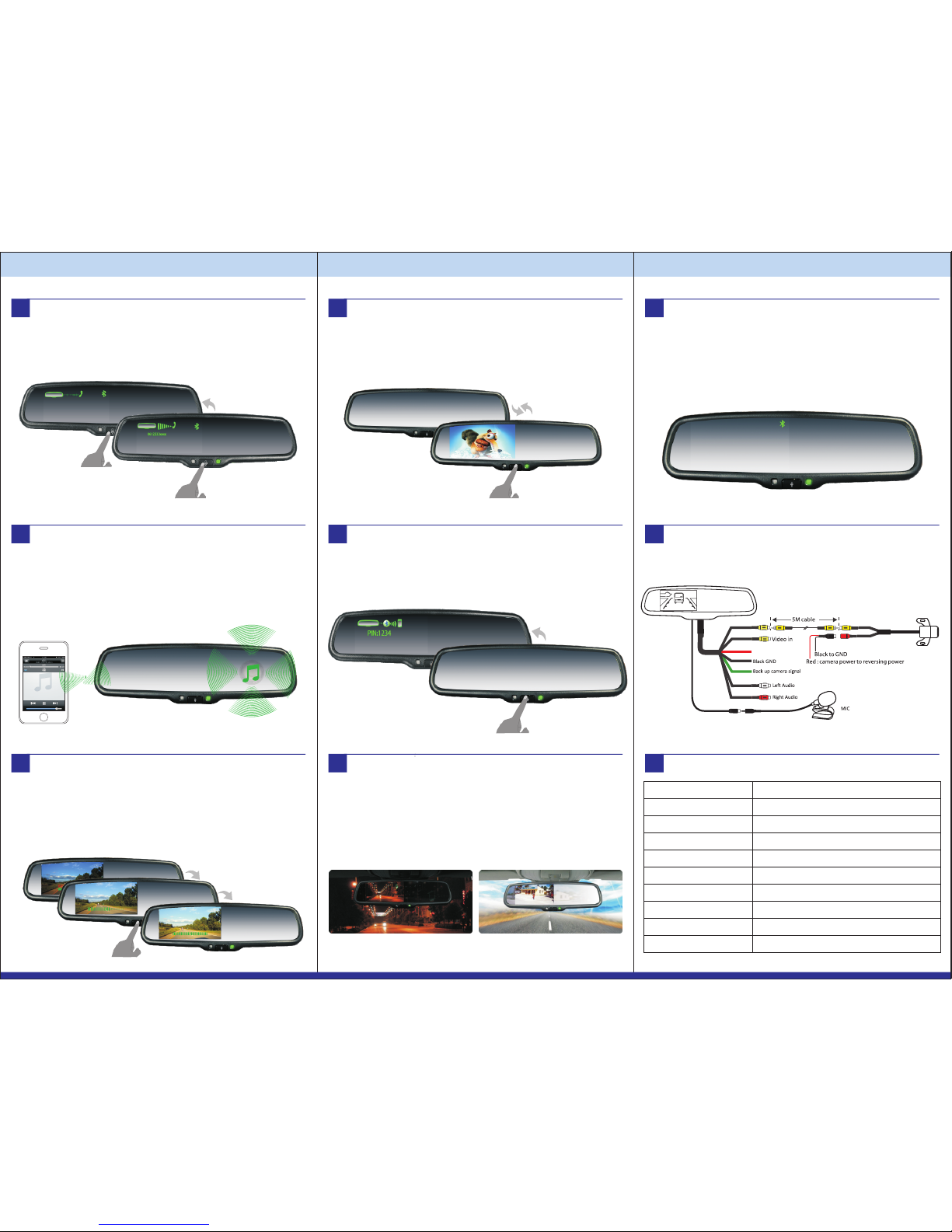
Backup camera display and manual brightness adjustment
With a R ear Vi ew Ca mera install ed, p lace t he ve hicle in re verse, and the
imag e from the back- up cam era w ill b e auto matica lly di splaye d on the
moni tor. O nce t he ca mera i mage is di splayed , y ou ca n manu ally adjust
the monito rs' b rightne ss by asho rt pre ss of the centre butt on. T he
brig htness can be ad justed from 10 t o 100. Once you h ave re ached the
desi red br ightne ss, wa it 5 secon ds and the OSD menu will d isappe ar.
11
Short pres s
turn on /off vid eo input
Turn on/off video input
When the mirror is in vi deo mo de, a nd no ne pho ne is pari ed, wi th on e
shor t pres s of the centre butto n you can switch the active vide o sig nal,
On or Of f. Whi le yo ur ph one is pari ed, a short pres s of the centre butto n
will activ ate t he vo ice di al mo de.
12
When you find that your phone is no t con nected to t he re arview mirro r,
and the screen is t urned off, to lo ng pr ess th e but ton i s to manual ly
reco nnect Blueto oth.
Long press
Reconne ct bluetooth
How to connect
16
Manual Bluetooth Connection
13
If your phone can p lay m usic t hrough Bluet ooth, then voice comes from
the music and part of ga mes of your phon e can be p layed throug h
loud speaker buil t in the m irror.
Howe ver, p art o f pho nes ca nnot support this func tion. The s ound may
be intermi ttent or m usic c annot be t ransfer red.
Bluetooth music
10
Hanging up
When the monito r is in t he pho ne st ate o r voic e con trol state, to s hort
pres s the butto n is to h ang up call s. To long press the button is to re ject
an incomin g cal l.
Hang ing up
9
Short pres s
Hangi ng up
Long press
Rejecti ng incoming call
Super lig ht
When video from back up cam era i s dis played on t he sc reen, the s creen
will autom atical ly adj ust b rightne ss wi th th e ambi ent l ight. It ca n
ensu re tha t you can see the sc reen clearly unde r sun shine when the
ligh t is super brigh t; the scre en al so can auto matical ly be come dimmer,
whic h is enough to protect you from the sudden light from the turned on screen at n ight.
Weak ligh t
Super high brightness screen with auto adjustment
14
BRIGHT
10
Shor t press
Adju sting b right ness
BRIGHT
100
BRIGHT
60
 Loading...