

Page 1
BY OUNDLESS ECHNOLOGIES
B T
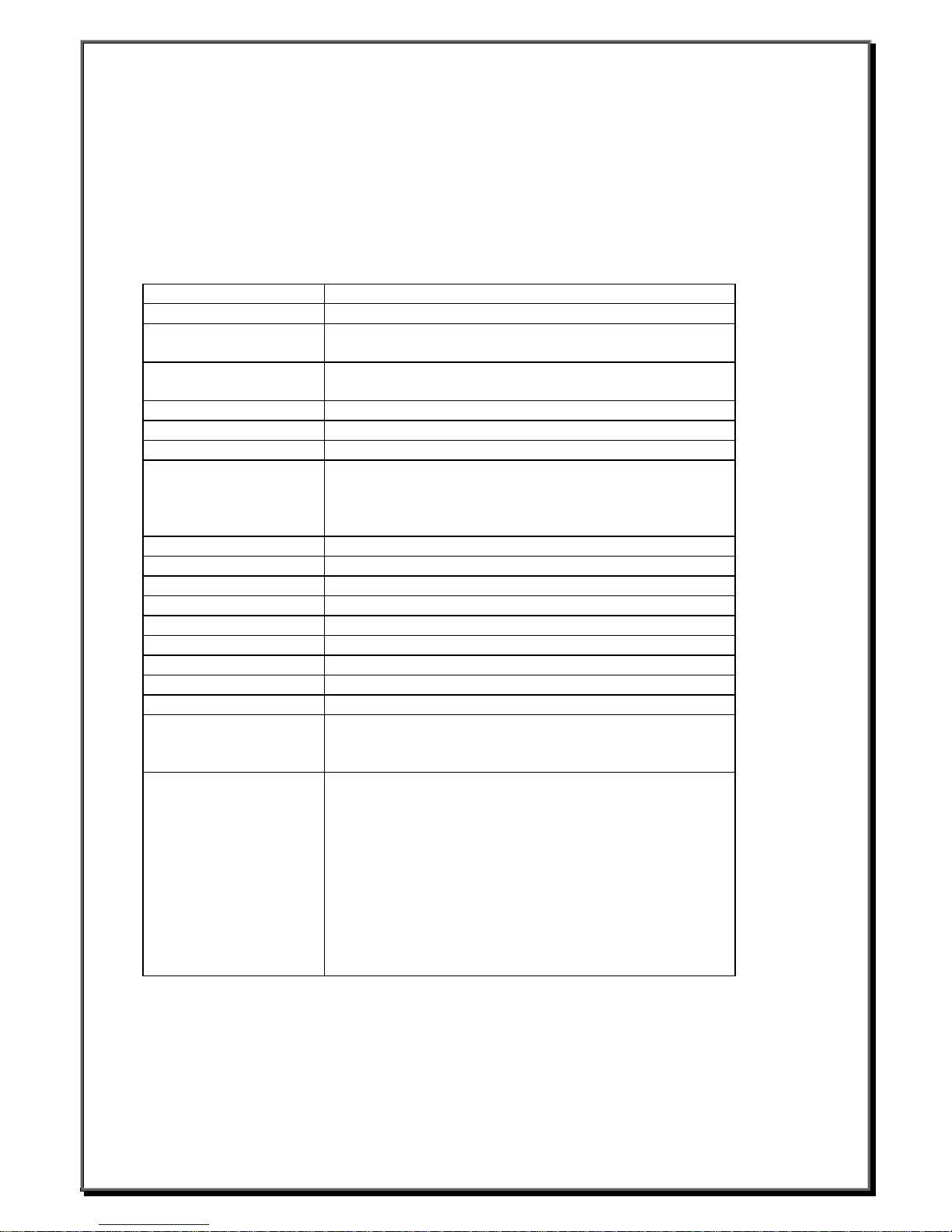
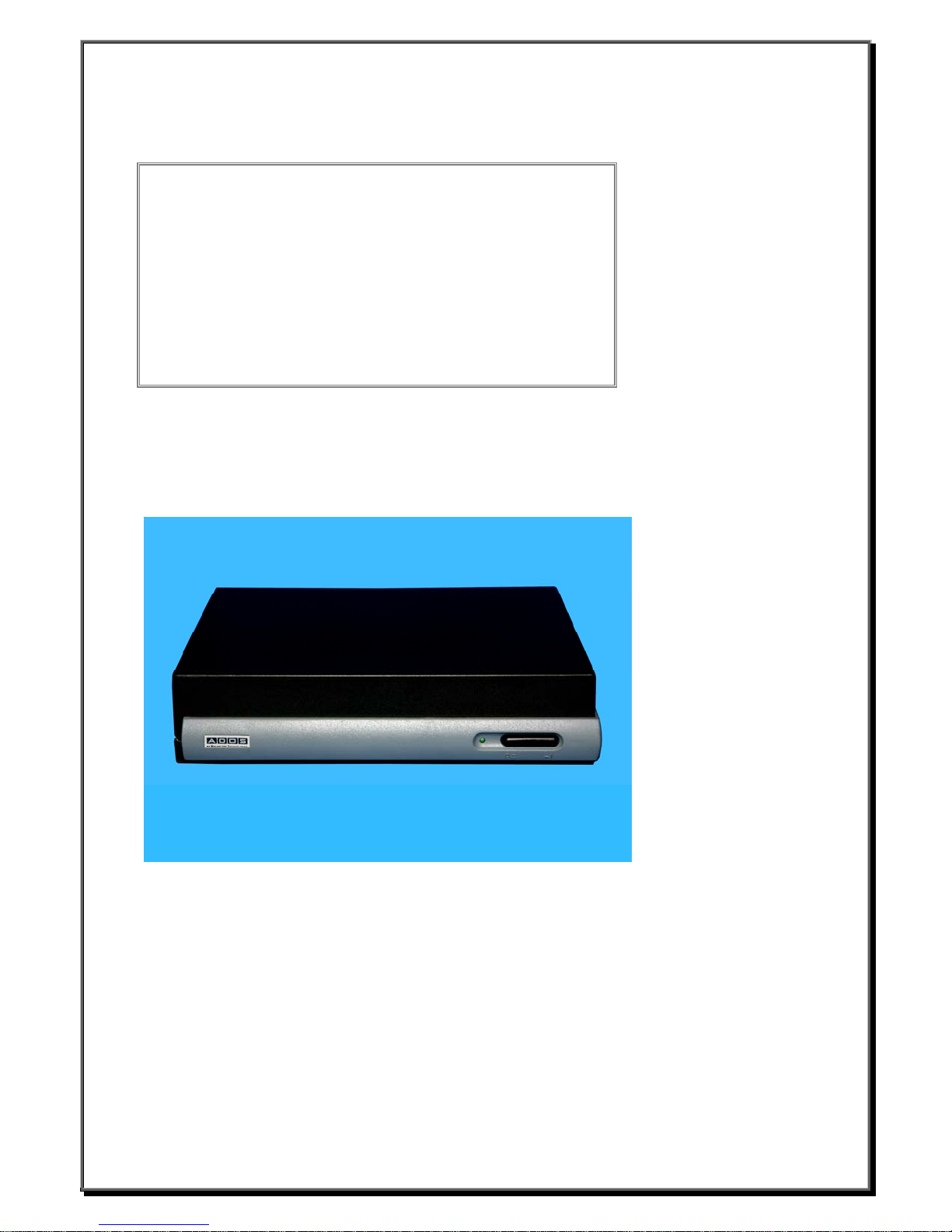
ADDS 6300 XPe Thin Client
(Service Pack 2)
User’s Manual
Boundless Technologies: 50 Engineers Lane Farmingdale, NY 11735
In the US and Canada call: 1-800-231-5445 or 1- 63 1-962-1460
In Europe and the UK call: 44-1785-811668
Website: www.boundless.com
Sales: [email protected]
Page 2

TABLE OF CONTENTS
CHAPTER 1 License Agreement ...................................................................................................3
CHAPTER 2 Product Review..........................................................................................................7
2.1 WBTs...........................................................................................................................7
2.2 Terminal Specifications ...............................................................................................7
2.3 Terminal Features .......................................................................................................8
2.4 Terminal Overview.......................................................................................................8
2.4.1 Connecting the Terminal ..................................................................................8
2.4.2 Connector Descriptions ....................................................................................9
CHAPTER 3 Control Panel .............................................................................................................11
3.1 Display Configuration ..................................................................................................12
3.1.1 DVI function.........................................................................................................12
3.2 Keyboard Properties....................................................................................................13
3.3 Mouse Properties ........................................................................................................14
3.4 Date and Time Properties ...........................................................................................14
3.5 Regional and Language Options.................................................................................15
3.5.1 Regional Options ................................................................................................15
3.5.2 Languages Setting ..............................................................................................15
3.6 User Accounts .............................................................................................................16
3.7 Sounds, Speech, and Audio Devices..........................................................................17
3.7.1 Volume ................................................................................................................17
3.7.2 Sounds................................................................................................................17
3.8 Network and Internet Connections..............................................................................18
3.8.1 Use the IP information supplied by DHCP..........................................................18
3.8.2 Specify a static IP address .................................................................................19
3.9 Local Printer Setup ......................................................................................................20
3.9.1 Add Printer ..........................................................................................................20
3.9.2 Select the Printer Port.........................................................................................20
CHAPTER 4 Connections Management........................................................................................22
4.1 RDP Connection..........................................................................................................22
4.2 ICA Connection ...........................................................................................................24
4.2.1 Add a new ICA connection .................................................................................24
4.3 Wireless LAN Settings............ .....................................................................................26
4.4 Microsoft Internet Explorer Connection.......................................................................28
4.5 Adobe Acrobat 5.0.......................................................................................................28
4.6 Microsoft Media Player 6.4..........................................................................................29
4.7 Sun Java 1.41and Flash Player 6.0 ............................................................................29
CHAPTER 5 Advanced Function ...................................................................................................30
5.1 Enhance Write Filter ....................................................................................................30
5.2 System Info..................................................................................................................30
5.2.1 General ...............................................................................................................30
5.2.2 Network Information............................................................................................30
5.3 Device Update Agent...................................................................................................31
5.4 RamDisk Driver ...........................................................................................................31
Boundless Technologies ADDS 6300 XPe
1 _________________________
Page 3

Trademarks
ICA 7.0 is a registered trademark and MetaFrame is a trademark of Citrix Systems Inc.
Microsoft and Windows are registered tr ad ema rks of Microsoft Corporation.
All other products are trademarks and/ o r reg i stered trademarks of their respective compa nies.
The Energy Star emblem does not represent endorsement of any product or service.
Specifications subject to change without notice.
FCC Statement
This equipment has been tested and found to comply with the limits for either Class A or Class B digital
devices, pursuant to Part15 of the FCC Rules. These limits are designed to provide reasonable protection
against harmful interference in a re side ntial installation. This equipment generates, uses, and can radiate
radio frequency energy and, if not installed and used in accordance with the instructio ns, may cause harmful
interference to radio communicatio ns. Howe ver, there is no guarantee that interfere nce wi ll no t o ccur in a
particular installation. If this equipment does cause harmful interf ere nce to radio or television reception, which
can be determined by turning the equ i pme nt off and on, the user is encouraged to tr y t o co rre ct the
interference by one or more of the following measures:
§ Reorient or relocate the receiving antenna.
§ Increase the separation between the equipment and the receiver.
§ Connect the equipment into an outlet on a circuit different from that to which the receiver is connected.
§ Consult the dealer or an experienced radio/TV technician for help.
CAUTION
Danger of explosion if battery is incorrectly replaced.
Replace only with the same or equivalent type
recommended by the manufacturer.
Dispose of used batteries according
to the manufacturer’s instructions.
Boundless Technologies ADDS 6300 XPe
2 _________________________
Page 4

License Agreement
YOU SHOULD CAREFULLY READ THE FOLLOWING TERMS AND CONDITIONS BEFORE USING THIS EQUIPMENT WHICH
CONTAINS SOFTWARE IN A NON-VOLATILE FORMAT AND CERTAIN OTHER INTELLECTUAL PROPERTY (HEREAFTER
“FIRMWARE”). USING THIS EQUIPMENT INDICATES YOUR ACCEPTANCE OF THE FOLLOWING TERMS AND CONDITIONS.
Grant
You may use the Firmware in or in conjunction with the Equipment as provided to You. You may transfer ownership of the Equipment,
including the right to use the Firmware to another party so long as that party agrees to accept these terms and conditions.
YOU MAY NOT USE, COPY, MODIFY, TRANSLATE OR TRANSFER THE FIRMWARE, OR MODIFICATION THEREOF, IN WHOLE OR
IN PART, EXCEPT AS EXPRESSLY PROVIDED FOR IN THIS LICENSE. YOU MAY NOT DECOMPILE, REVERSE ENGINEER OR
OTHERWISE DECODE OR ALTER THE SOFTWARE CONTAINED IN THE FIRMWARE.
Limited Software Warranty and Disclaimer
We warrant that, for a period of ninety (90) days from the date of shipment, the Firmware will, under normal use, be free from defects in
materials and workmanship in the EPROM (or similar storage device). The foregoing warranty shall not apply to any Firmware that has
been used in violation of this Agreement. During this limited warranty period We will provide support by phone on a best-efforts basis. We
may, in addition to the above, replace any defective Firmware with a functionally equivalent product. The foregoing shall be Your
exclusive remedy for any breach of warranty hereunder. You assume responsibility for choosing the Equipment containing the Firmware
to achieve your intended results, and for the installation, use and results obtained from the Equipment and Firmware.
EXCEPT FOR THE ABOVE EXPRESS LIMITED WARRANTIES, WE MAKE AND YOU RECEIVE NO WARRANTIES ON THE
FIRMWARE, EXPRESS, IMPLIED, OR STATUTORY, OR IN ANY OTHER PROVISION OF THIS AGREEMENT OR COMMUNICATION
WITH YOU, AND WE DISCLAIM ANY IMPLIED WARRANTIES OF MERCHANTABILITY, NON-INFRINGEMENT AND FITNESS FOR
ANY PARTICULAR PURPOSE. WE DO NOT WARRANT THAT THE FUNCTIONS CONTAINED IN THE PRODUCT WILL MEET YOUR
REQUIREMENTS OR THAT THE OPERATIO N WILL BE UNINTERRUPTED OR ERROR FREE.
SOME STATES DO NOT ALLOW LIMITATIONS ON HOW LONG AN IMPLIED WARRANTY LASTS SO THE ABOVE LIMITATION MAY
NOT APPLY TO YOU. THIS WARRANTY GIVES YOU SPECIFIC LEGAL RIGHTS. YOU MAY ALSO HAVE OTHER RIGHTS WHICH
VARY FROM STATE TO STATE.
Limit of Liability
UNDER NO CIRCUMSTANCES SHALL WE BE LIABLE FOR LOSS OF DATA, COST OF COVER, OR ANY INCIDENTAL OR
CONSEQUENTIAL DAMAGES, HOWEVER CAUSED AND ON ANY THEORY OF LIABILITY. THESE LIMITATIONS SHALL APPLY
EVEN IF WE OR OUR RESELLERS HAVE BEEN ADVISED OF THE POSSIBILITY OF SUCH DAMAGES, AND NOTWITHSTANDING
ANY FAILURE OF ESSENTIAL PURPOSE OF ANY LIMITED REMEDY PROVIDED HEREIN.
YOU AGREE THAT THESE ARE THE ONLY APPLICABLE TERMS OF AGREEMENT BETWEEN US COVERING FIRMWARE AND
THAT THEY SUPERSEDE ANY OTHER COMMUNICATIONS (ORAL OR WRITTEN) BETWEEN US RELATING TO THE FIRMWARE.
U.S. Government Restricted Rights
The Firmware is provided with RESTRICTED RIGHTS. Use, duplication or disclosure by the Government is subject to restrictions as set
forth in subparagraph (c)(1)(ii) of the Rights in Technological Data and computer software clause at DFARS 252.227-7013 or in
subparagraphs (c)(1) and (2) of the Commercial Computer Software-Restricted Rights at 8 C.F.R. 52-227-19 as applicable.
Boundless Technologies ADDS 6300 XPe
3 _________________________
Page 5

EULA for Microsoft® Windows® XPe Operating System for Windows-based
Terminal Devices
IMPORTANT—READ CAREFULLY
This End User License Agreement (EULA) is a legal agreement between you (either an i ndividual or a single entity) and the
manufacturer (MANUFACTURER) of the special purpose computing device (SYSTEM) you acquired which includes certain
Microsoft software product(s) installed on the SYSTEM and/or included in the SYSTE M package (SOFTWARE). The SOFTWARE
includes computer software, the associated media, any printed materials, and any online or electronic documentation. By
installing, copying or otherwise using the SOFTWARE, you agree to be bound by the terms of this EU LA. If you do not agree to
the terms of this EULA, MANUFACTURER and Microsoft Licensing, Inc. (MS) are unwilli n g to license the SOFTWARE to you. In
such event, you may not use or copy the SOFTWARE, and you should promptly contact MANUFACTURER for instructions on
return of the unused product(s) for a refund.
Software License
The SOFTWARE is protected by copyright laws and international copyright treaties, as well as other intellectual property laws and treaties.
The SOFTWARE is licensed, not sold.
Boundless Technologies ADDS 6300 XPe
4 _________________________
Page 6

1.Grant of License
SOFTWARE includes software already installed on the
SYSTEM (SYSTEM SOFTWARE) and, if included in the
SYSTEM package, software contained on the CD-ROM disk
and/or floppy disk(s) labeled "Desktop Software for Microsoft
Windows XPe" (DESKTOP SOFTWARE). This EULA grants
you the following rights to the SOFTWARE:
SYSTEM SOFTWARE
You may use the SYSTEM SOFTWARE only as installed in the
SYSTEM.
DESKTOP SOFTWARE
DESKTOP SOFTWARE might not be included with your
SYSTEM. If DESKTOP SOFTWARE is included with your
SYSTEM, you may install and use the component(s) of the
DESKTOP SOFTWARE in accordance with the terms of the
end user license agreement provided with such component(s).
In the absence of a separate end user license agreement for
particular component(s) of the DESKTOP SOFTWAR E, y ou
may install and use only one (1) copy of such component(s) on
a single computer with which you use the SYSTEM.
Use of Windows XP Operati ng System for Windows-Based
Terminal Devices with Microsoft Windows NT Server,
Terminal Server Edition
If the SOFTWARE is Windows XPe operating system for
Windows-Based Terminal devices, the following special
provisions apply. In order to use the SYSTEM in connection
with Windows NT Terminal Server Edition, you must possess
(1) a Client Access License for Windows NT Server, Terminal
Server Edition and (2) an end user license for Windows NT
Workstation or an end user license agreement for Windows NT
Workstation for Windows-Based Terminal Devices (please refer
to the end user license agreement for Windows NT Server,
Terminal Server Edition for additional information).
MANUFACTURER may have included a Certificate of
Authenticity for Windows NT Workstation for Windows-Based
Terminal Devices with the SYSTEM. In that case, this EULA
constitutes an end user license for the version of Windows NT
Workstation for Windows-Based Terminal Devices indicated on
such Certificate of Authenticity.
Back-up Copy
If MANUFACTURER has not included a back-up copy of the
SYSTEM SOFTWARE with the SYSTEM, you may make a
single back-up copy of the SYSTEM SOFTWARE. You may
use the back-up copy solely for archival purposes.
2.Description of Other Rights and Limit ations
Speech/Handwriting Recognition
If the SYSTEM SOFTWARE includes speech and/or
handwriting recognition component(s), you should understand
that speech and handwriting recognition are inherently
statistical processes; that recognition errors are inherent in the
processes; that it is your responsibility to provide for handling
such errors and to monitor the recognition processes and
correct any errors. Neither MANUFACTURER nor its suppliers
shall be liable for any damages arising out of errors in the
speech and handwriting recognition processes.
Limitations on Reverse Engineering, Decompilation and
Disassembly
You may not reverse engineer, de-compile, or disassemble the
SYSTEM SOFTWARE, except and only to the extent that such
activity is expressly permitted by applicable law notwithstanding
this limitation.
Single SYSTEM
The SYSTEM SOFTWARE is licensed with the SYSTEM as a
single integrated product. The SYSTEM SOFTWARE installed in
Read Only Memory (ROM) of the SYSTEM may only be used as
part of the SYSTEM.
Single EULA
The package for the SYSTEM SOFTWARE may contain multiple
versions of this EULA, such as multiple translations and/or
multiple media versions (e.g., in the user documentation and in
the software). Even if you receive multiple versions of the EULA,
you are licensed to use only one (1) copy of the SYSTEM
SOFTWARE.
Rental
You may not rent or lease the SOFTWARE.
Software Transfer
You may permanently transfer all of your rights under this EULA
only as part of a sale or transfer of the SYSTEM, provided you
retain no copies, you transfer all of the SOFTWARE (including all
component parts, the media, any upgrades or backup copies, this
EULA and, if applicable, the Certificate(s) of Authenticity), and the
recipient agrees to the terms of this EULA. If the SOFTWARE is
an upgrade, any transfer must include all prior versions of the
SOFTWARE.
Termination
Without prejudice to any other rights, MANUFACTURER or MS
may terminate this EULA if you fail to comply with the terms and
conditions of this EULA. In such event, you must destroy all
copies of the SOFTWARE and all of its component parts.
3.Upgrades
If the SYSTEM SOFTWARE and this EULA are provided separate
from the SYSTEM by MANUFACTURER and the SYSTEM
SOFTWARE is on a ROM chip, CD ROM disk(s) or floppy disk(s),
and labeled "For ROM Upgrade Purposes Only" ("ROM Upgrade"),
you may install one copy of the ROM Upgrade onto the SYSTEM
as a replacement copy for the SYSTEM SOFTWARE originally
installed on the SYSTEM and use it in accordance with Section 1
of this EULA.
4.Copyright
All title and copyrights in and to the SOFTWARE (including but
not limited to any images, photographs, animations, video, audio,
music, text and "applets," incorporated into the SOFTWARE), the
accompanying printed materials, and any copy of the
SOFTWARE, are owned by MS or its suppliers (including
Microsoft Corporation). You may not copy the printed materials
accompanying the SOFTWARE. All rights not specifically granted
under this EULA are reserved by MS and its suppliers (including
Microsoft Corporation).
5.Product Support
Product support for the SOFTWARE is not provided by MS, its
parent corporation, Microsoft Corporation, or their affiliates or
subsidiaries. For product support, please refer to
MANUFACTURER’s support number provided in the
documentation for the SYSTEM. Should you have any questions
concerning this EULA, or if you desire to contact
MANUFACTURER for any other reason, please refer to the
address provided in the documentation for the SYSTEM.
Boundless Technologies ADDS 6300 XPe
5 _______________________________
Page 7

6.Export Restrictions
You agree that you will not export or re-export the SOFTWARE
to any country, person, or entity subject to U.S. export
restrictions. You specifically agree not to export or re-export the
SOFTWARE: (i) to any country to which the U.S. has
embargoed or restricted the export of goods or services, which
as of March 1998 include, but are not necessarily limited to
Cuba, Iran, Iraq, Libya, North Korea, Sudan and Syria, or to
any national of any such country, wherever located, who
intends to transmit or transport the products back to such
country; (ii) to any person or entity who you know or have
reason to know will utilize the SOFTWARE or portion thereof in
the design, development or production of nuclear, chemical or
biological weapons; or (iii) to any person or entity who has been
prohibited from participating in U.S. export transactions by any
federal agency of the U.S. government.
If the SOFTWARE is labeled "North America Only Version"
above, on the Product Identification Card, or on the
SOFTWARE packaging or other written materials, then the
following applies: The SOFTWARE is intended for distribution
only in the United States, its territories and possessions
(including Puerto Rico, Guam, and U.S. Virgin Islands) and
Canada. Export of the SOFTWARE from the United States is
regulated under "EI controls" of the Export Administration
Regulations (EAR, 15 CFR 730-744) of the U.S. Commerce
Department, Bureau of Export Administration (BXA). A license
is required to export the SOFTWARE outside the United States
or Canada. You agree that you will not directly or indirectly,
export or re-export the SOFTWARE (or portions thereof) to any
country, other than Canada, or to any person or entity subject
to U.S. export restrictions without first obtaining a Commerce
Department export license. You warrant and represent that
neither the BXA nor any other U.S. federal agency has
suspended, revoked or denied your export privileges.
7.Note on Java Support
The SYSTEM SOFTWARE may contain support for programs
written in Java. Java technology is not fault tolerant and is not
PERFORMANCE OF THE SOFTWARE IS WITH YOU.
No Liability for Consequential Damages
MANUFACTURER OR MANUFACTURER’S SUPPLIERS,
INCLUDING MS AND ITS SUPPLIERS, SHALL NOT BE
HELD TO ANY LIABILITY FOR ANY DAMAGES
SUFFERED OR INCURRED BY THE END USER
(INCLUDING, BUT NOT LIMITED TO, GENERAL,
SPECIAL, CONSEQUENTIAL OR INCIDENTAL
DAMAGES INCLUDING DAMAGES FOR LOSS OF
BUSINESS PROFITS, BUSINESS INTERRUPTION,
LOSS OF BUSINESS INFORMATION AND THE LIKE),
ARISING FROM OR IN CONNECTION WITH THE
DELIVERY, USE OR PERFORMANCE OF THE
SOFTWARE.
If you acquired this EULA in the United States, this EULA
is governed by the laws of the State of Washington.
If you acquired this EULA in Canada, this EULA is
governed by the laws of the Province of Ontario, Canada.
Each of the parties hereto irrevocably attorns to the
jurisdiction of the courts of the Province of Ontario and
further agrees to commence any litigation which may arise
hereunder in the courts located in the Judicial District of
York, Province of Ontario.
If this EULA was acquired outside the United States, then
local law may apply.
Should you have any questions concerning this EULA,
please contact the MANUFACTURER of your SYSTEM.
U.S. GOVERNMENT RESTRICTED RIGHTS
designed, manufactured, or intended for use or resale as on-line
control equipment in hazardous environments requiring fail-safe
performance, such as in the operation of nuclear facilities, aircraft
navigation or communication systems, air traffic control, direct life
support machines, or weapons systems, in which the failure of
Java technology could lead directly to death, personal injury, or
severe physical or environmental damage.
8.Limited Warranty
Limited Warranty
MANUFACTURER warrants that the SOFTWARE will perform
substantially in accordance with the accompanying written materials
for a period of ninety (90) days from the date of receipt. Any implied
warranties on the SOFTWARE are limited to ninety (90) days. Some
states/jurisdictions do not allow limitations on duration of an implied
warranty, so the above limitation may not apply to you.
Customer Remedies
MANUFACTURER’S and its suppliers’ entire liability and your
exclusive remedy shall be, at MANUFACTURER’S option, either
(a) return of the price paid, or (b) repair or replacement of the
SOFTWARE that does not meet the above Limited Warranty and
which is returned to MANUFACTURER with a copy of your receipt.
This Limited Warranty is void if failure of the SOFTWARE has
resulted from accident, abuse, or misapplication. Any replacement
SOFTWARE will be warranted for the remainder of the original
warranty period or thirty (30) days, whichever is lo nger.
No Other Warranties
EXCEPT AS EXPRESSLY PROVIDED IN THE LIMITED
WARRANTY SECTION ABOVE, THE SOFTWARE IS PROVIDED
TO THE END USER "AS IS" WITHOUT WARRANTY OF ANY
KIND, EITHER EXPRESSED OR IMPLIED, INCLUDING, BUT
NOT LIMITED TO, WARRANTIES OF NON- INFRINGEMENT,
MERCHANTABILITY, AND/OR FITNESS FOR A PARTICULAR
PURPOSE. THE ENTIRE RISK OF THE QUALITY AND THE
PERFORMANCEOF THE SOFTWARE IS WITH YOU.
The SOFTWARE and documentation are provided with
RESTRICTED RIGHTS. Use, duplication, or disclosure by the
Government is subject to restrictions as set forth in
subparagraph (c)(1)(ii) of the Rights in Technical Data and
Computer Software clause at DFARS 252.227-7013 or
subparagraphs (c)(1) and (2) of the Commercial Computer
Software—Restricted Rights at 48 CFR 52.227- 19, as
applicable. MANUFACTURER is Microsoft Corporation/O n e
Microsoft Way/Redmond, WA 98052-6399
Boundless Technologies ADDS 6300 XPe
6 _______________________________
Page 8
2 Product Overview
A
A
A
A
2.1 WBTs
WBTs (Windows-based Terminals) are designed to connect to WTS (Windows Terminal Server) servers via RDP (Remote
Desktop Protocol), or Windows NT applications server via ICA (Independent Computing Architecture). RDP is the Windows
XP-based protocol for connecting to Windows terminal servers. ICA is a distributed presentation services protocol for
Windows NT server, allowing an application's user interface to execute on a Windows-based terminal while the application's
logic executes on the server.
2.2 Terminal Specifications
CPU VIA-V4 1GMHz
RAM Up To 1GB
Flash Memory 256MB CF Card standard, expandable to 4GB
Device Update Agent utility via Ethernet
Resolution Resolution up to 1600x1200 / 60 Hz SVGA 32 bit to High color.
16 million palette supports all VESA monitors
Refresh Rate Flicker-free, up to 85Hz
Video Memory Graphics utilizes system RAM
udio Support Full 16 bit stereo FM synthesis, 8 bit mini Microphone in
Networking Protocols 10/100 Base T Fast Ethernet, Twisted Pair (RJ45)
TCP/IP with DNS, DHCP and PPP
Load balancing supported by Citrix ICA
Remote modem dial up with Citrix ICA
Communications Protocols MS RDP / Citrix ICA
One Parallel Port Bi-directional centronics compatible, DB-25
One Serial Port DB-9 pin male connector with RS-232C, up to 115.2K bps
One Display Port
One DVI Port Digital Visual Interface output (DVI-D)
USB Port Four USB ports
SATA Port Two SATA Port
udio Port
KB & Mouse Interface Enhanced PS/2 keyboard and mouse interface
Extensible Slot One PCI Slot
One Smart Card Reader
Operation System Microsoft Windows XP Embedded, Microsoft CE, Linux
Server Operating System
Support
nalogue VGA type video output (DB-15)
udio out, Microphone In, Line In
RDP:
Microsoft Windows NT4.0 + TSE.
Microsoft Windows 2000 Server Family.
Microsoft Windows 2003 Server Family.
Microsoft Windows XP with RDP protocol
ICA:
Citrix Winframe
Microsoft Windows NT4.0 + TSE+ Citrix Metaframe
Microsoft Windows 2000 + Citrix Metaframe.
Microsoft Windows 2000/ Windows 2003 + Citrix MetaframeXP
.
7 ________________________________
Boundless Technologies ADDS 6300 XPe
Page 9
2.3 Terminal Features
Physical Characteristics
Height 57 mm (2.25 in)
Width 250 mm (9.875 in)
Depth 232 mm (9.125 in)
Net Weight 2.49 kgs (5.5 lbs)
Power Cord 6 ft (1.83m)
Environmental
Operating Temperature
Non-operating Temperature
Operating Humidity 10% to 90%, non-condensing
Operating Altitude 0 to 2,000 ft ASL
Nonoperating Altitude 0 to 40,000 ft ASL
Regulatory
EMC Terminal/Power Brick FCC B, CE, CB, CUL, C-TICK, BSMI,
Safety Power Brick UL1950, CB IEC60950.
5 to 40℃ (41 to 104℉ )
-20 to 60℃ (-40 to 150℉ )
Installation
2.4 Terminal Overview
2.4.1 Connecting the Terminal
Follow these instructions to connect the terminal to its peripheral devices:
A. Connect the keyboard to the keyboard connector.
B. Connect the mouse to the mouse connector.
C. Connect the 10/100-T network cable to the RJ-45 network connector.
D. Connect the power cord and the adapter to the power connector with DC adapter.
E. Connect the power cord to the power connector with DC adapter.
__________________________
Boundless Technologies ADDS 6300 XPe
8
Page 10
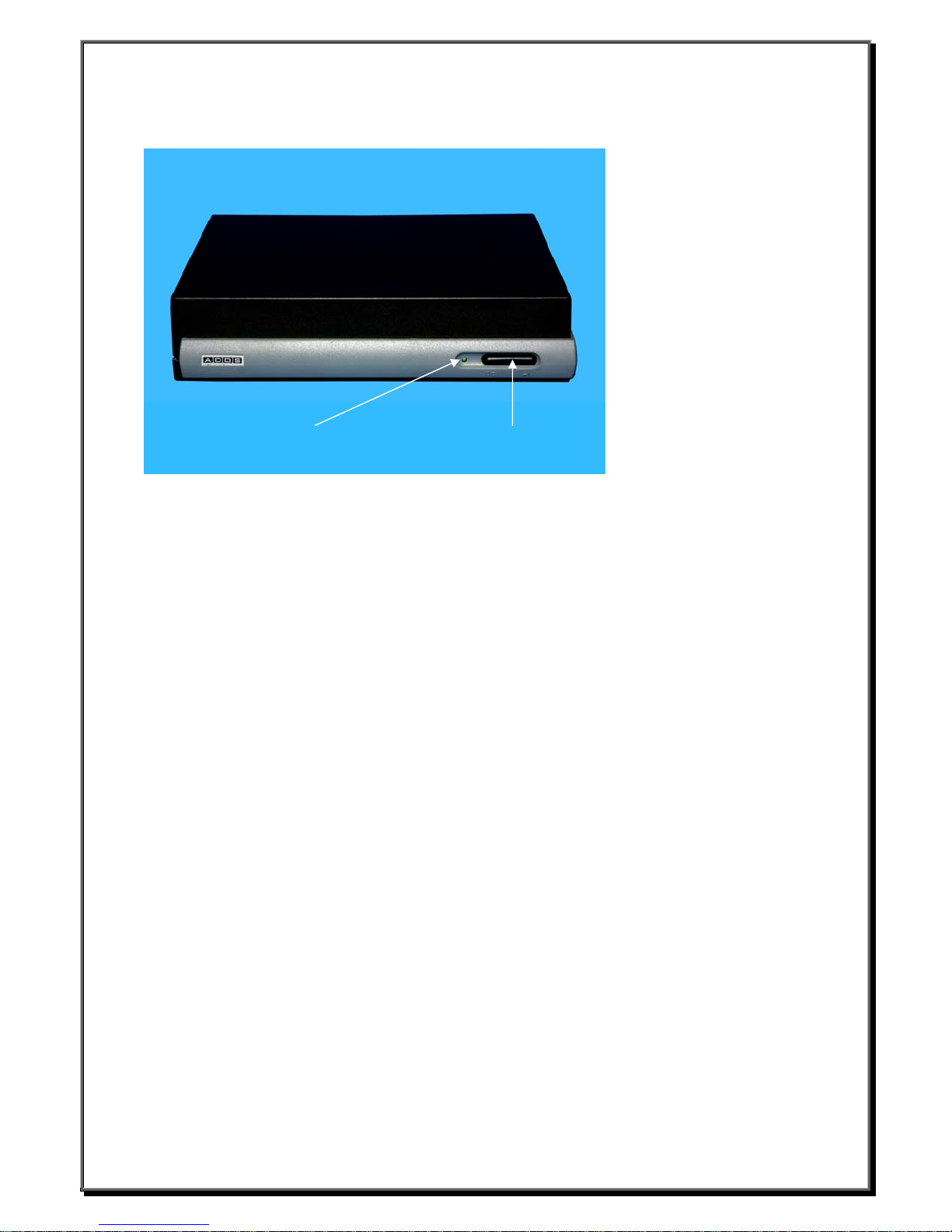
Power Switch Power LED
2.4.2 Connector Descriptions
Power Switch
The Power Switch turns the WBT ON/OFF
Power LED
Illuminated when power is ON
__________________________
Boundless Technologies ADDS 6300 XPe
9
Page 11
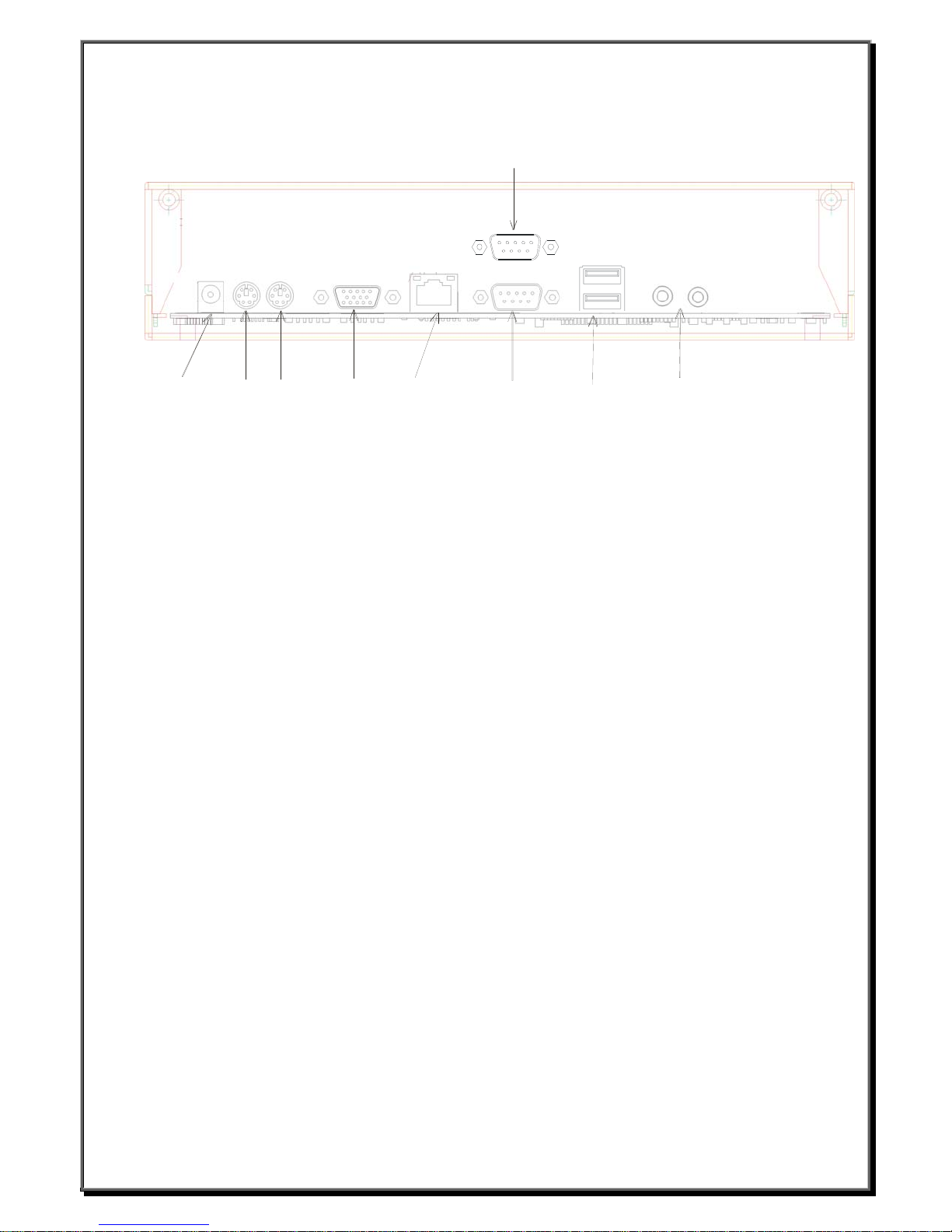
2nd COM M Port
9 Pin
Pow er
Keyboard
Mouse
VGA Port
Ethernet
COM M Por t
9 Pin
2 USB Ports
Audio Ports
RJ45 Network Connector
This connector can be used to connect the built-in 32 bit 10/100-T Ethernet network LAN Controller to a host or Hub.
VGA Connector
This connector is for displaying on a standard VGA compatible device.
USB 2.0 Port
These connectors can be used for USB devices
Serial Port Connectors (COMM))
These connectors can be used for the serial device such as a modem device.
Audio Connector
This connector is used to connect to an outward speaker.
Microphone input connector
PS/2 Keyboard Connector
This connector is for a standard keyboard using PS/2 plug (mini DIN)
PS/2 Mouse Connector
This connector is for a mouse using a PS/2 plug (mini DIN)
Power Connector
This connector is for connecting the power cord with the terminal and the AC outlet.
__________________________
Boundless Technologies ADDS 6300 XPe
10
Page 12
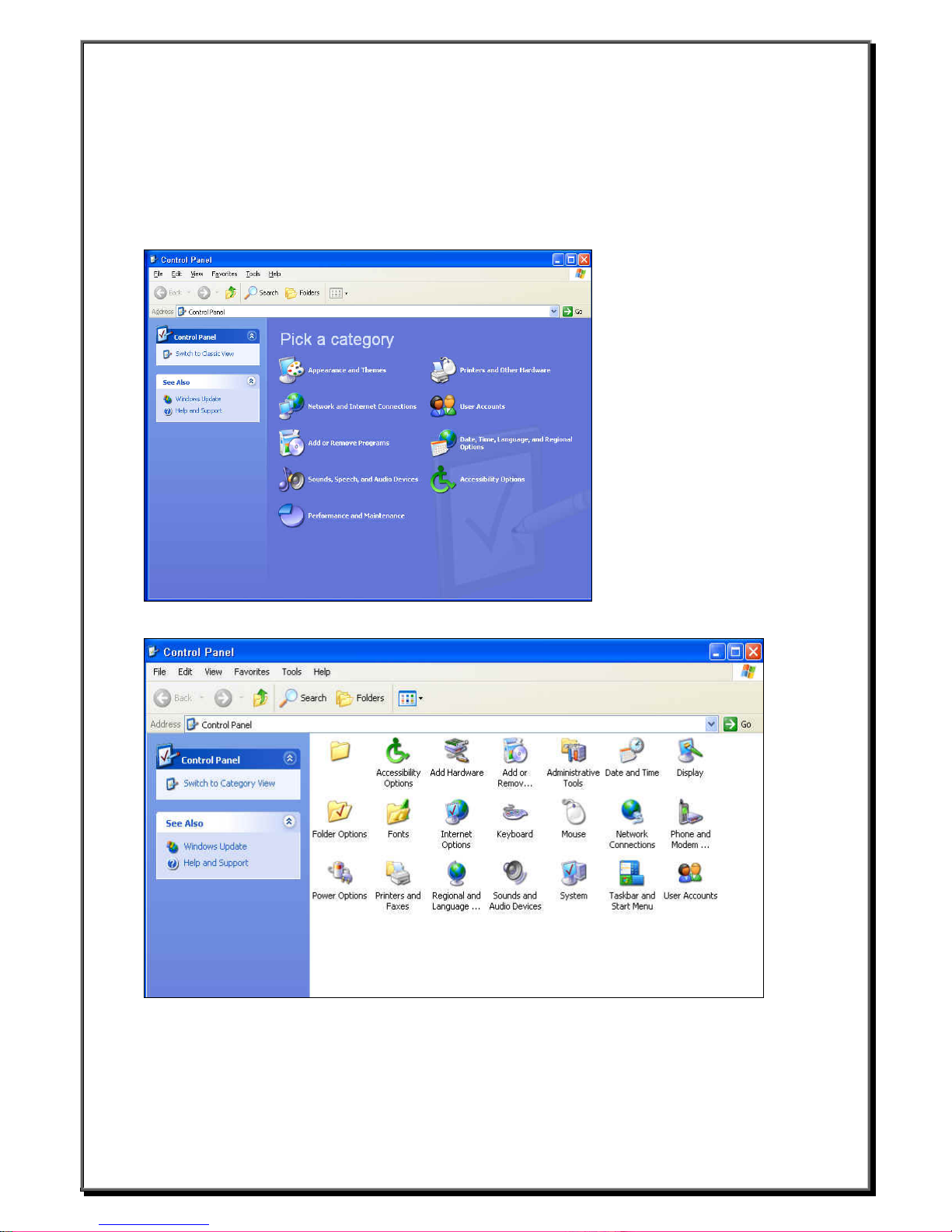
3. Control Panel
The Control Panel lets you configure your terminal’s funct i o n. Pr ovides options for you to customize the
appearance and functionali ty of your computer, add or remove programs, and set up network connections and
user accounts.
It describes all the information of the terminal function about this WBT.
You can also click Switch to Classic View to see another display mode.
__________________________
Boundless Technologies ADDS 6300 XPe
11
Page 13
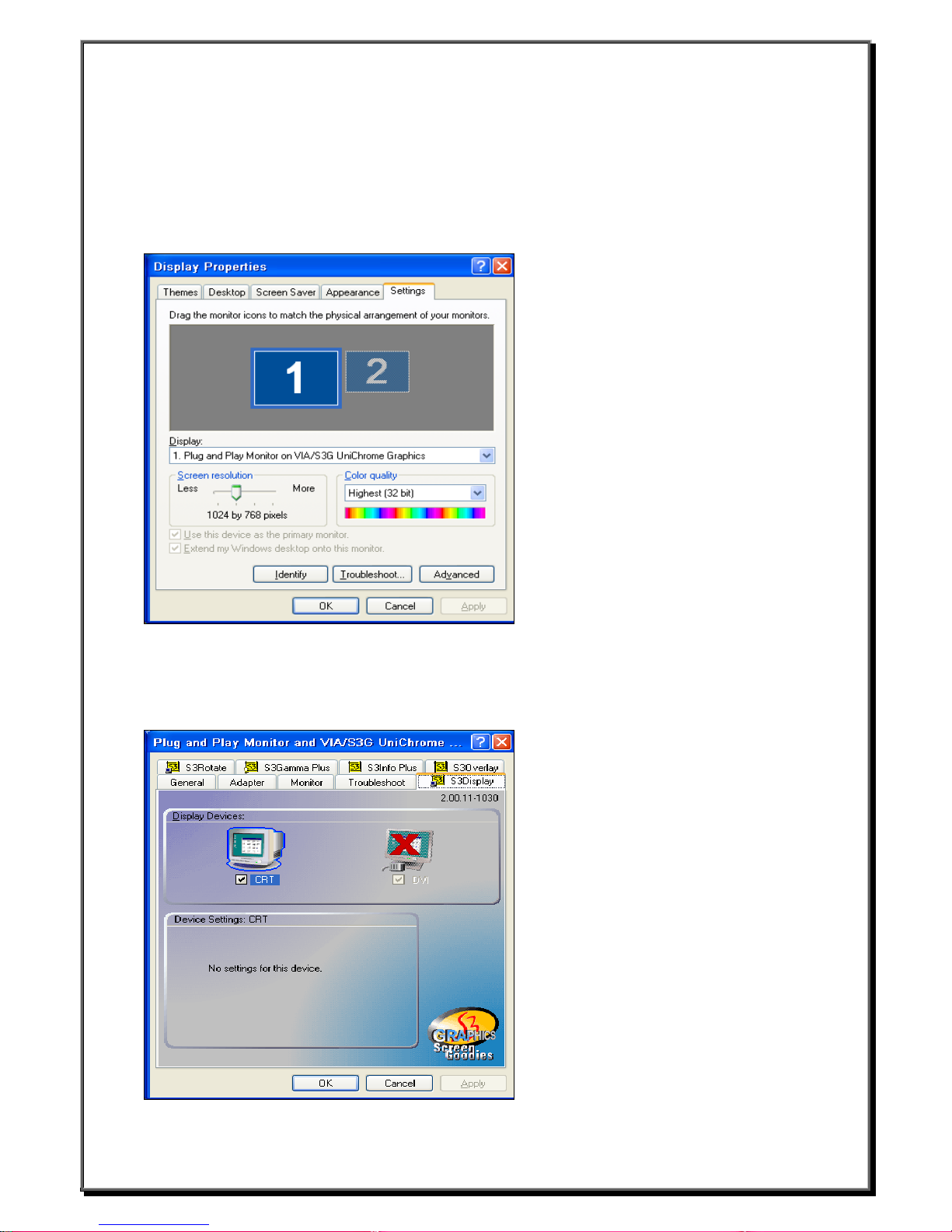
3.1 Display Configuration
The Settings properties lets you configure the terminal's display screen. Invoke this properties sheet by
clicking on the Settings tab in the Display Properties dialog box. The following figure show s the pr op erties
sheet.You can also Apply your display after selecting Screen resolution and Color quality, the new testing
mode will appear. The graphics adapter will be set to the new mode temporarily for about 5 seconds so you can
determine whether your display works properly.
3.1.1 DVI function ( Option )
Click “Advanced” and you will see the figure as below by clicking “S3Display” sheet.
And you will find the two display devices “CRT” and “DVI”. If you don’t connect to LCD panel with DVI cable,
the check box with DVI is grayed.
__________________________
Boundless Technologies ADDS 6300 XPe
12
Page 14
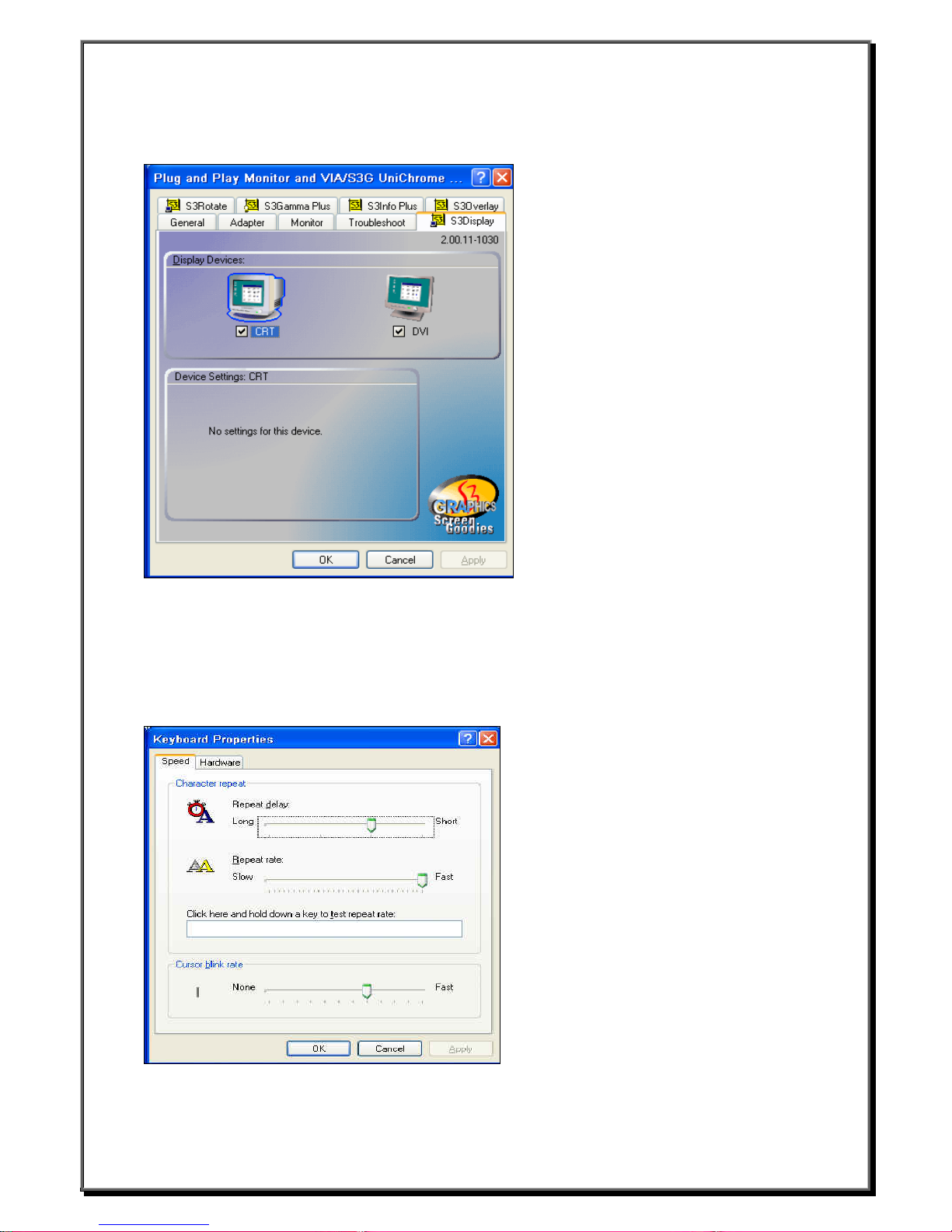
If you have connected to LCD panel with DVI cable, the check box with DVI will be available. As below, you
can enable or disable DVI function by clicking th e che ck bo x.
3.2 Keyboard Properties
The Keyboard properties sheet lets you configure your terminal's keyboard. The following figure shows the
properties sheet.
__________________________
Boundless Technologies ADDS 6300 XPe
13
Page 15
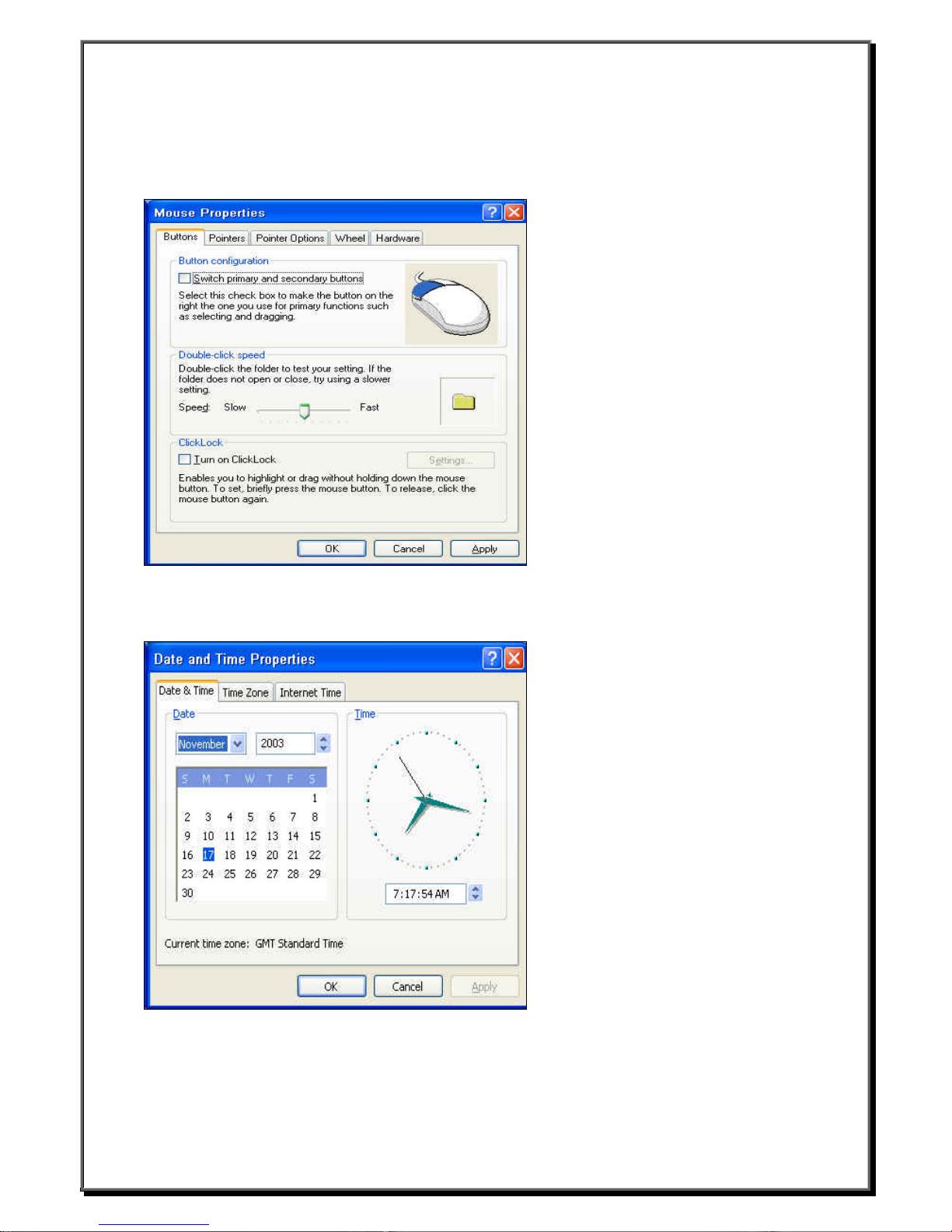
3.3 Mouse Properties
Click Mouse Properties if you want to configure your mouse setting to Right-Handed or Left-Handed, and the
Pointer Speed. You can also set othe r functions by clicking properties sheet, su ch as Pointers, Pointer
Options, Wheel.
3.4 Date and Time Properties
User can set up your local time for this device.
__________________________
Boundless Technologies ADDS 6300 XPe
14
Page 16
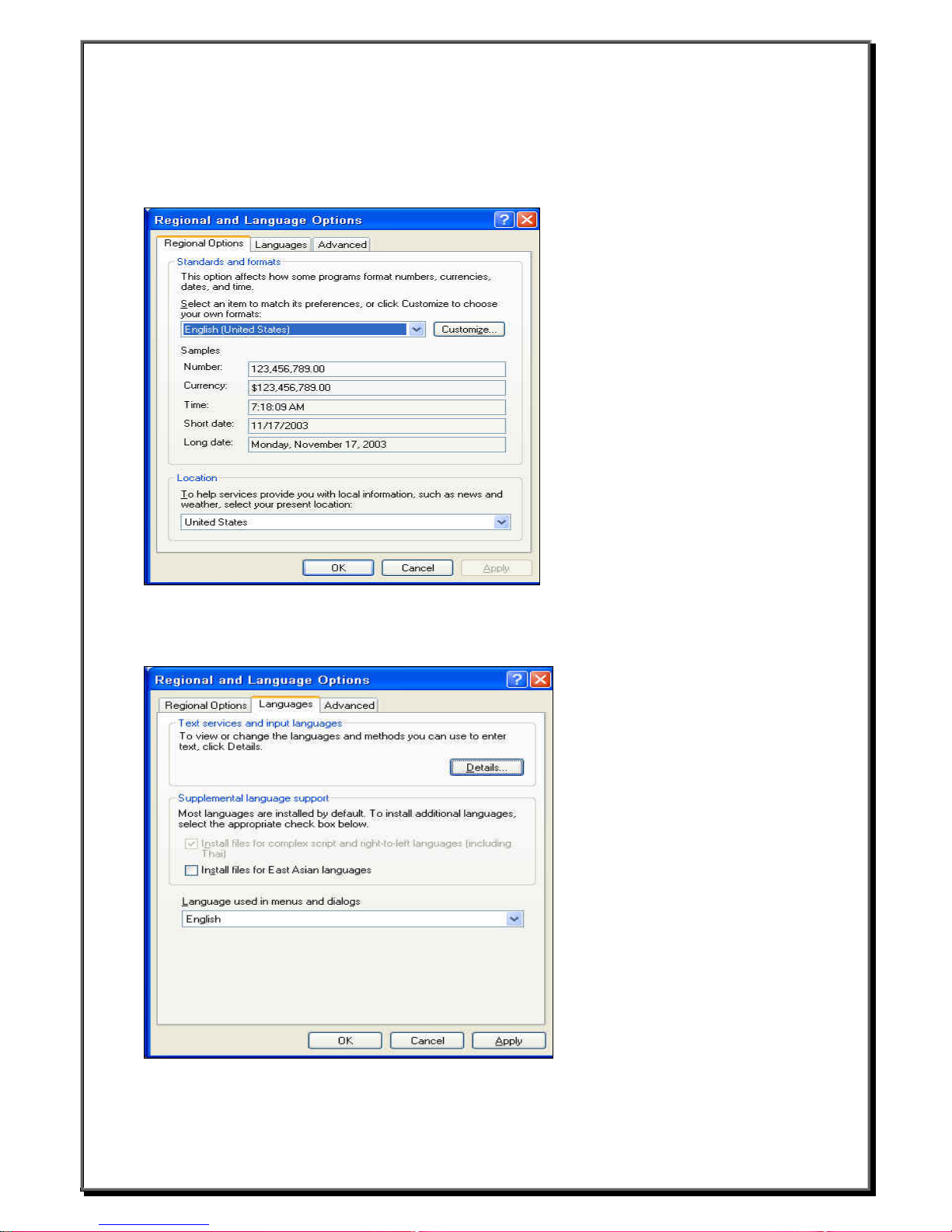
3.5 Regional and Language Options
3.5.1 Regional Options
This option affects how some programs format number, currencies, dates, and time. You can select an item to
match its preferences, or click Customize to choose your own formats.
3.5.2 Languages Setting
Set up the keyboard locale for the local device. If you want to view or change the languages, click Details.
__________________________
Boundless Technologies ADDS 6300 XPe
15
Page 17
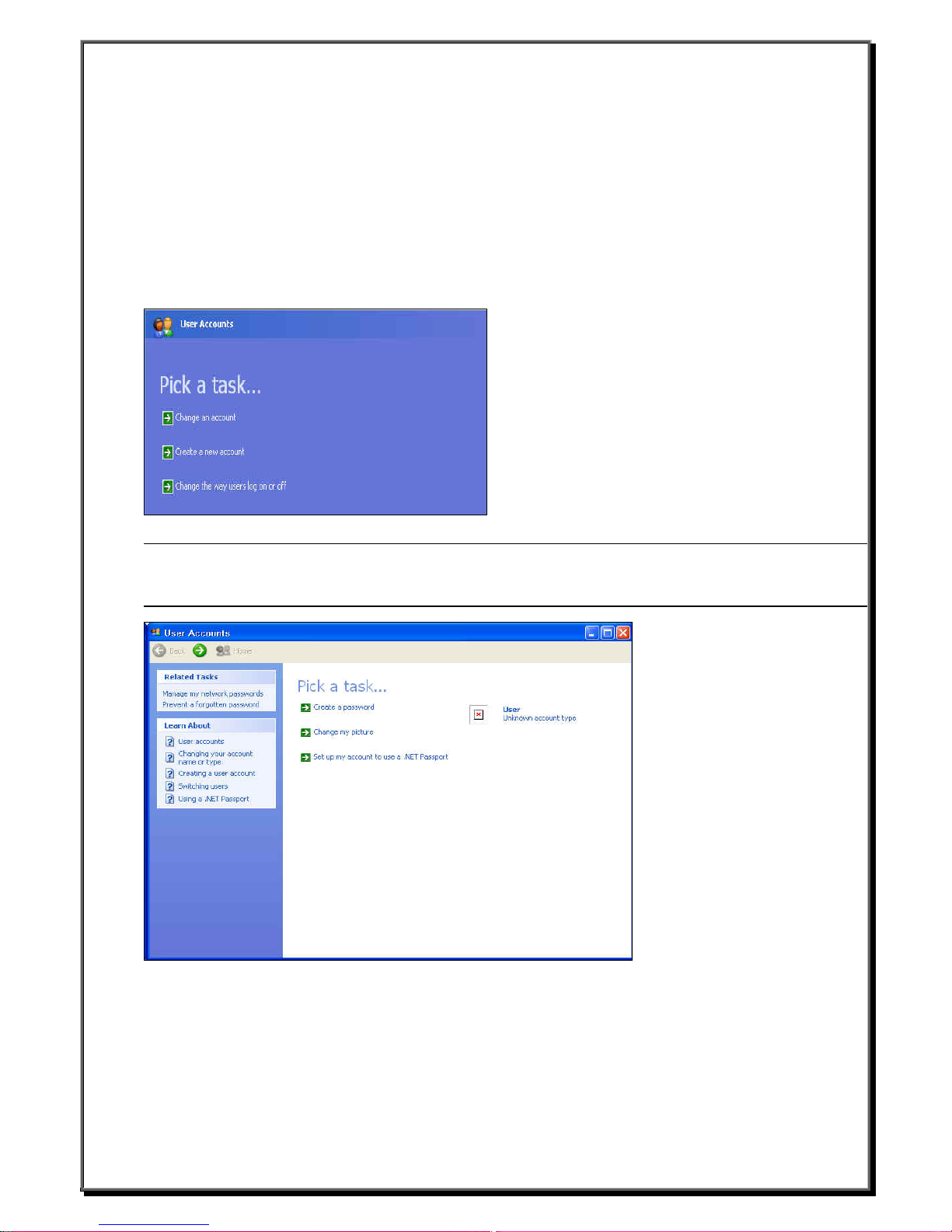
3.6 User Accounts
User Accounts are the mechanism that we use to give people access to resources on the computer or network.
These resources can include things such as files and folders, printers, applications, and so on. When logging on,
a user is authenticated (proves their identity) to the computer or network, by providing the correct combination
of User Account Name and a Password.
z Click Start
z Click Control Panel
z Click User Accounts
You should see this screen below
Note:When logging on that used “Admini s tr ator account” (password:9999), you will see the screen above.
General user logon, you just can see the scree n below. And user can only change password him self,
can’t add new account.
__________________________
Boundless Technologies ADDS 6300 XPe
16
Page 18
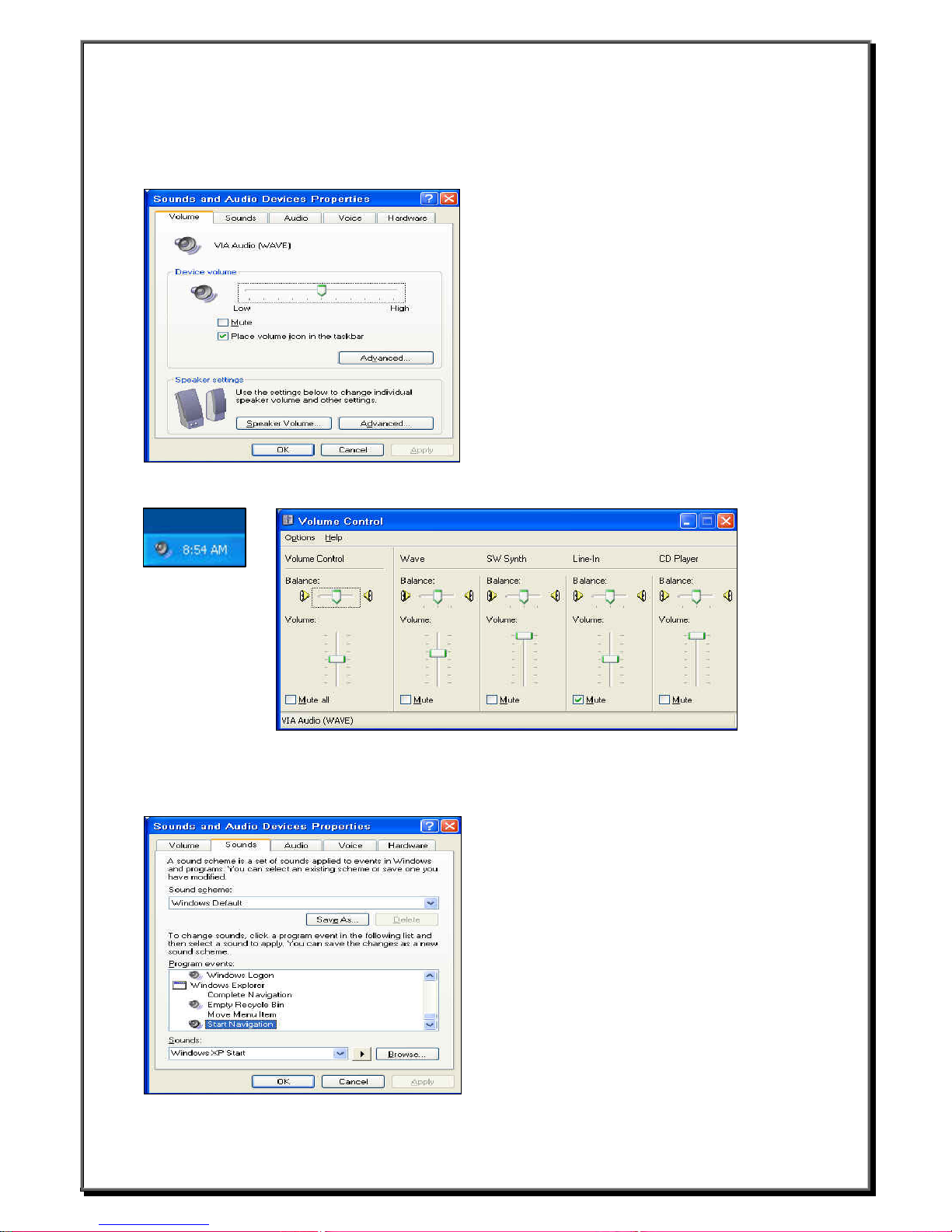
3.7 Sounds, Speech, and Audio Devices
3.7.1 Volume
You can use these settings to adjust the Volume.
You can also click the icon that likes speaker on the d eskt op to adjust the volume.
3.7.2 Sounds
A sound scheme is a set of sounds applied to ev en ts in Windows and programs. You can select an ex isting
scheme or save one you have modified. Test it before you save the settings.
__________________________
Boundless Technologies ADDS 6300 XPe
17
Page 19
3.8 Network and Internet Connections
Network attached device must contain a un ique network identifier. If the networ k i s usin g TCP/IP as a
communication protocol, these ident ifiers are called IP addresses. The following serie s of screens will allow you
to choose from two different methods of assigning the IP addresses.
3.8.1 Use the IP information supplied by DHCP
If your network provides DHCP (Dyna mic Host Configuration Protocol) service and you want it to provide the
terminals IP information, leave the first option selected.
The terminal can get its IP address through a DHCP service by default. The DHCP will automatically assign an
IP address that is drawn from a pool of available IP addresses, when a terminal unit is powered on and a
request is broadcast over the netwo rk.
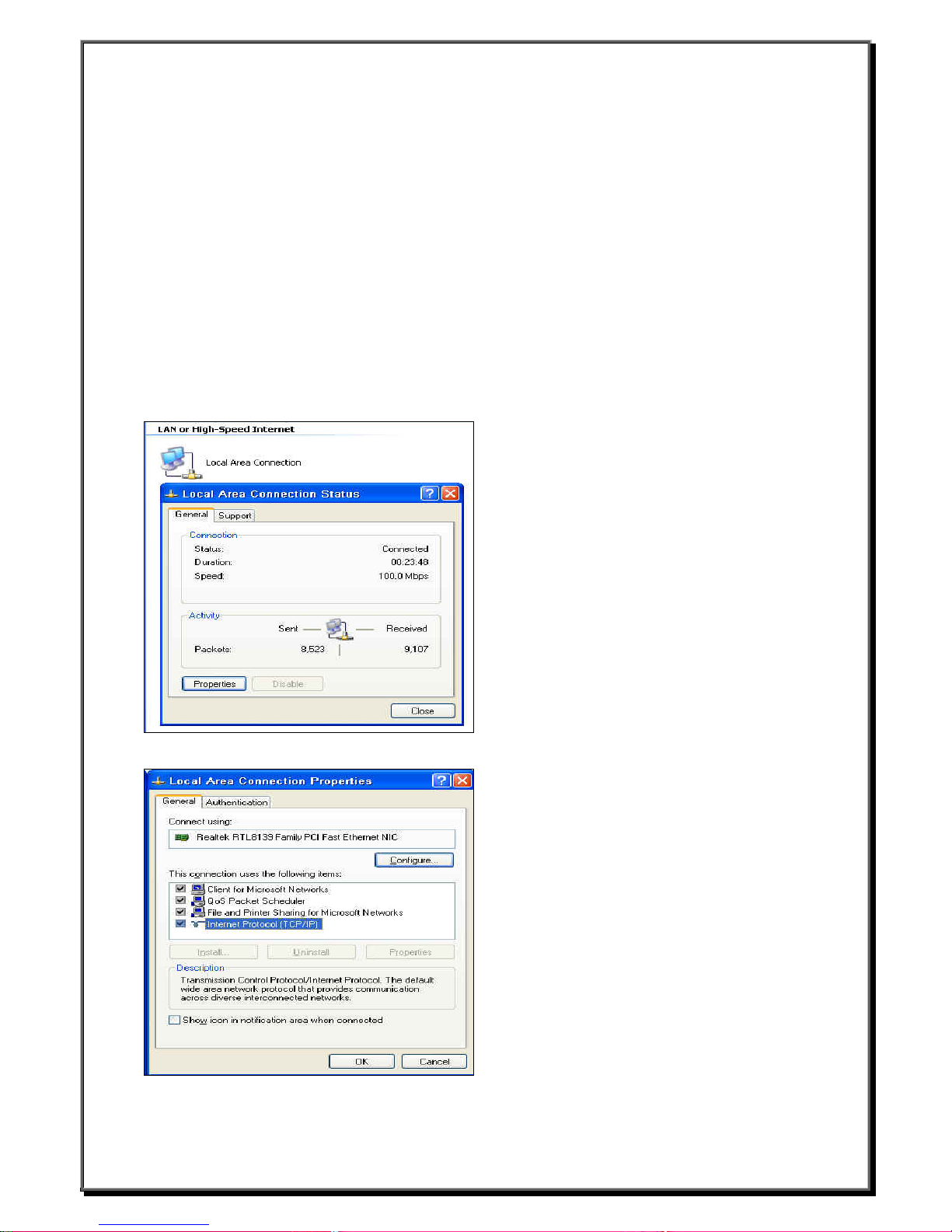
Use the IP information supplied by DHCP. You can click StartÆControl PanelÆNetwork and Internet
ConnectionÆNetwork Connection and select the picture that called “Local Area Connection”. You will see the
figure as follow.
Select the Properties then you will see the “Internet Protocol (TCP/IP)” option. As follow
__________________________
Boundless Technologies ADDS 6300 XPe
18
Page 20
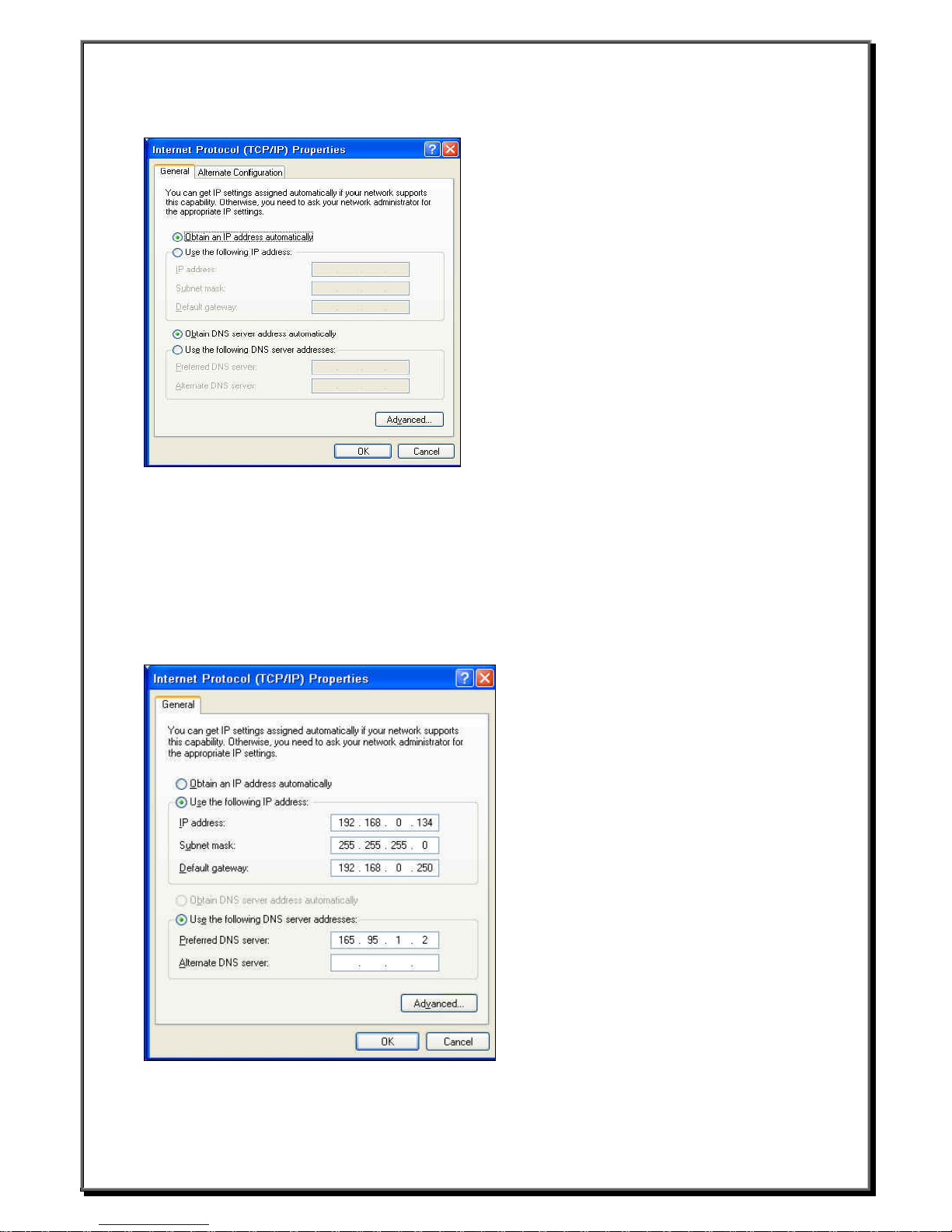
Click the “Internet Protocol (TCP/ I P )” yo u will see the option that called “ Obtain an IP address automatically “.
3.8.2 Specify a static IP address
If your network does not provide a DHCP service, or if the unit is not properly connected to the network. In
these cases, leave the second option selected.
IP address
Required for identifying this unit to the network. The format will follow the standard addressing format.
Subnet Mask
Required for designating which network the IP address is a part of.
Gateway
Optional address which identifies the machine through which a subnet communicates wi th ano ther network.
__________________________
Boundless Technologies ADDS 6300 XPe
19
Page 21
3.9 Local Printer Setup
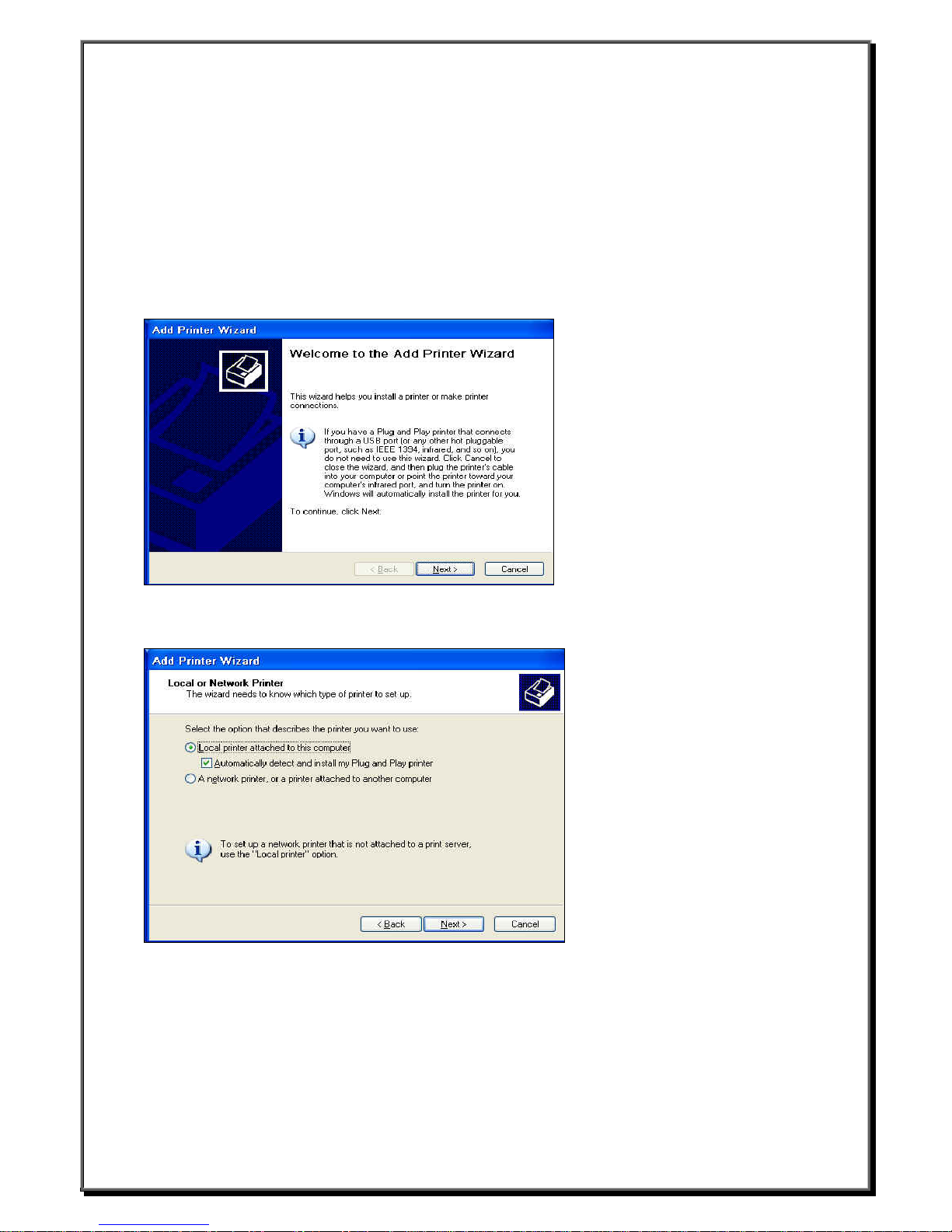
3.9.1 Add Printer
z Click Start
z Click Control Panel
z Click Printers and Other Hardware
z Click Printers and Faxes
z Click Add Printer
You will see the screen below.
3.9.2 Select the Printer Port
Select the option that describes the printer you want to use. Or you can select Network to set a network printer.
Select the port you want your printer to use. If the port is not listed, you can create a new port. Most computers
use the LPT1 port. Click Next and install your printer driver.
__________________________
Boundless Technologies ADDS 6300 XPe
20
Page 22
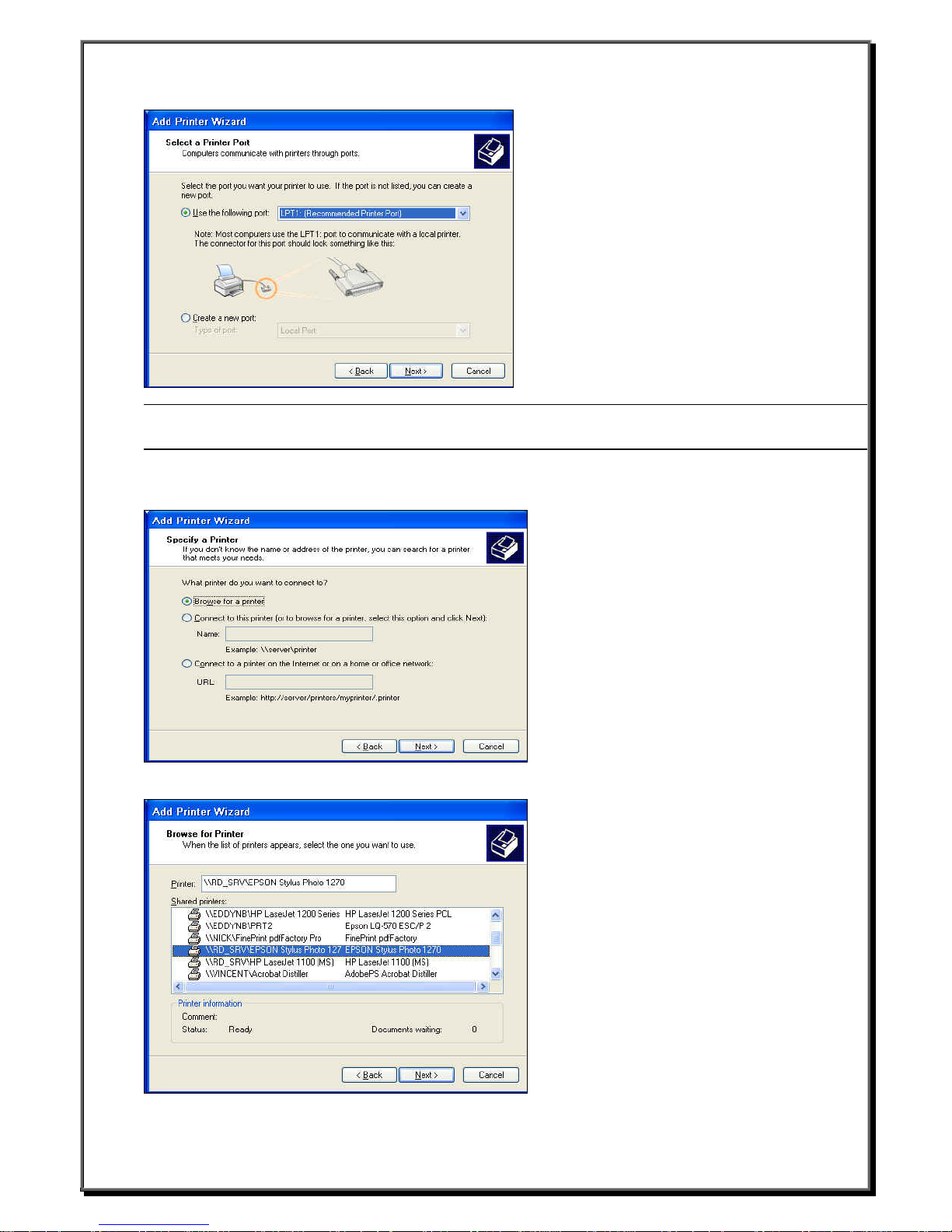
Note:The function of Add Local printer just for “Administrator account” (password:9999). General user can
only select network printer.
Select a network printer
If you don’t know the name or address of the printer, you can search for a printer that meets your needs.
Browse for a printer
__________________________
Boundless Technologies ADDS 6300 XPe
21
Page 23
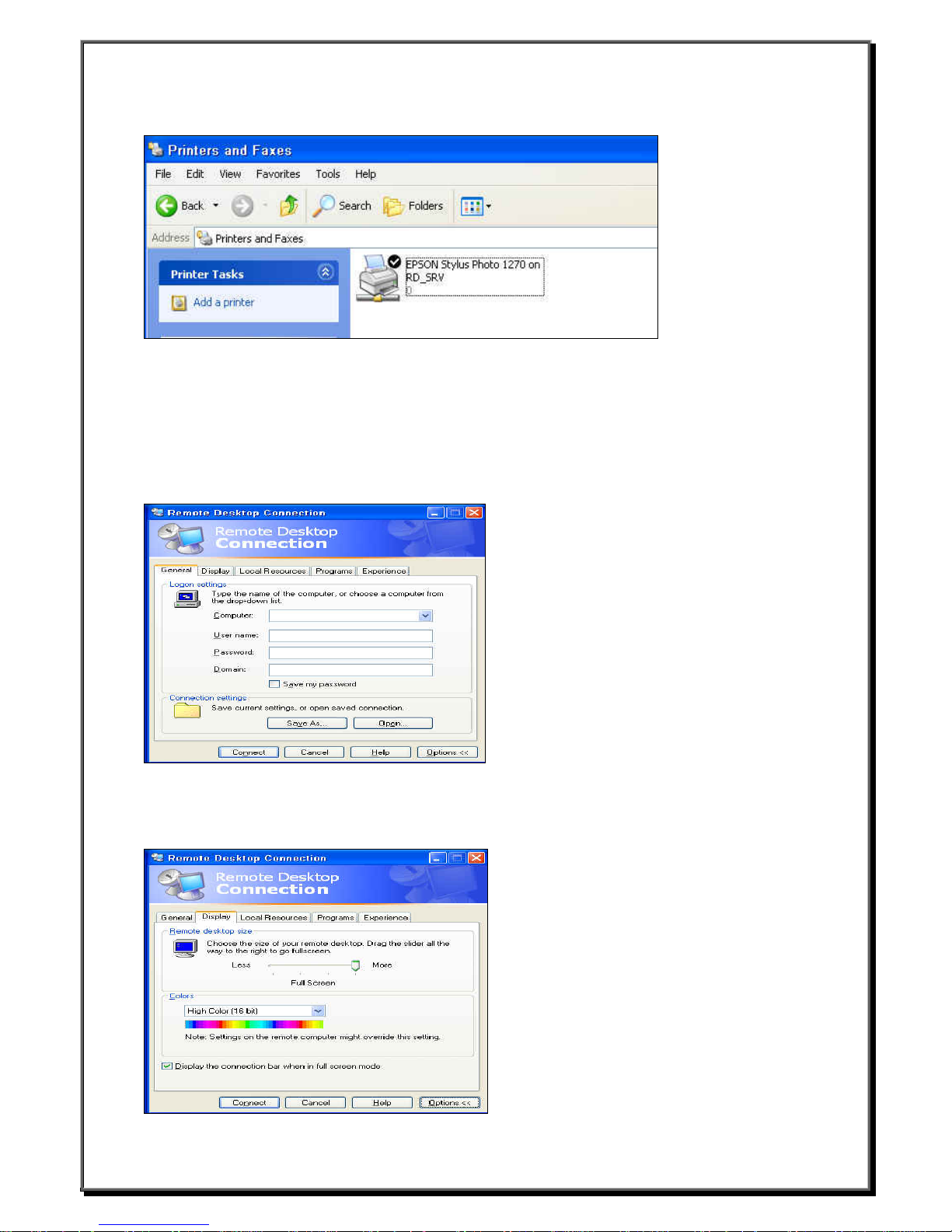
After the printer setup OK then the added printer model would be showed up .
4. Connections Management
4.1 RDP Connection
Click the shortcut “Remote Desktop” on the desktop and you will see the screen below.
General:You can type the Computer name, User name, Passwor d, and Domain on this page.
Display:You can choose the size of yo ur re mote desktop and set the color quality. If you click Display the
connection bar when in full screen mode, the connection bar will be showed on the Windows desktop in full
screen mode.
__________________________
Boundless Technologies ADDS 6300 XPe
22
Page 24
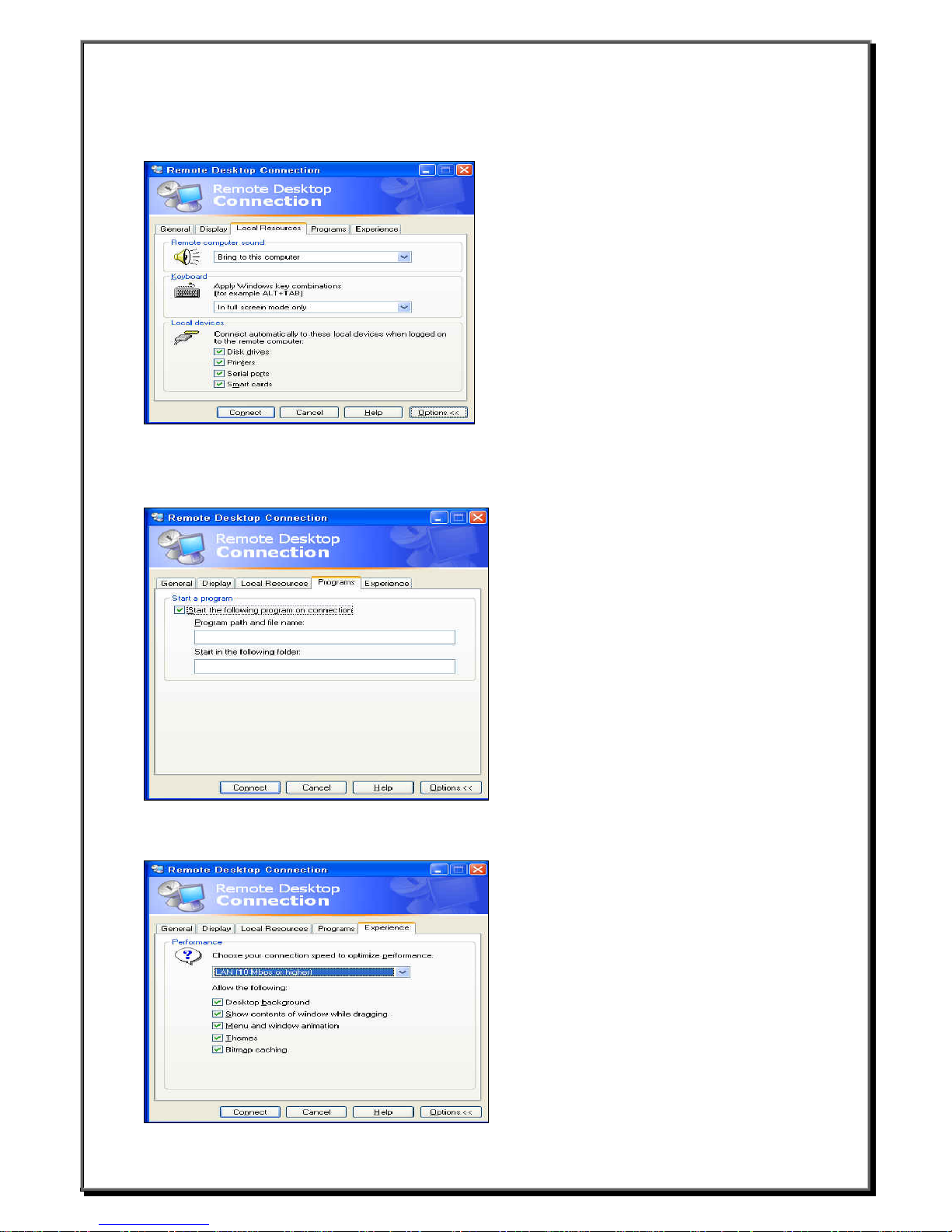
Local Resources:You can set the sound, keyboard status, and local devices.
Programs:If you want to start a program while connection, you can
connection . You can also specify path and file name when you specify a program.
Experience:You can choose your connection spe ed t o optimize performance
click Start the following program on
__________________________
Boundless Technologies ADDS 6300 XPe
23
Page 25
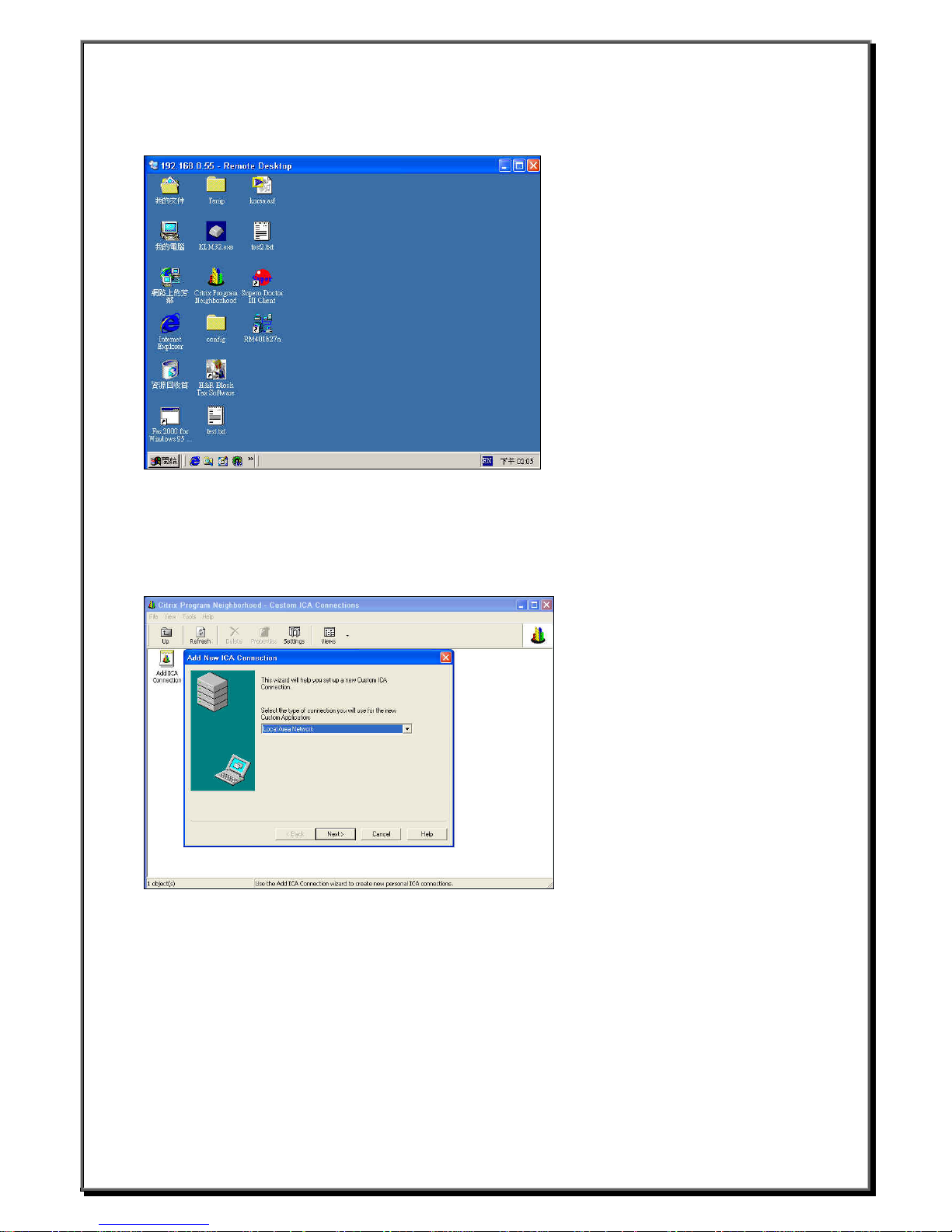
Type the correct User name and Password to logon. You will see the screen below if connection success.
4.2 ICA Connection
4.2.1 Add a new ICA connection
Click the shortcut “Citrix Program Neighb or ho od “ on the desktop.
z Click “Add ICA Connection”
z Enter a description for the new ICA Connection.
z Select the network protocol.
z Select the Citrix MetaFrame server or published application which you want to connect.
__________________________
Boundless Technologies ADDS 6300 XPe
24
Page 26
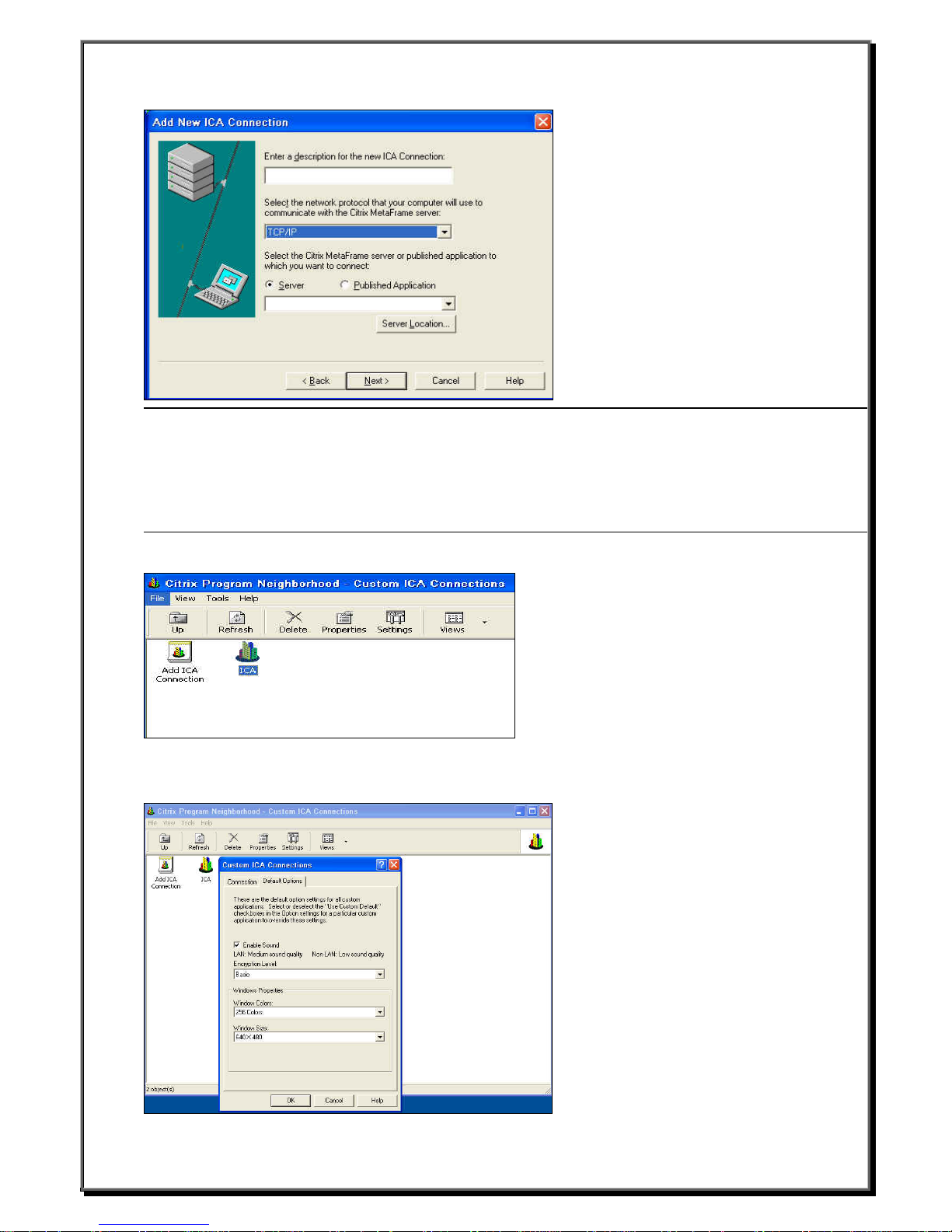
Note
Citrix server connections allow you to remotely control a session on a Citrix server from your WBT. Citrix
server connections let you access the deskt op of a specific Citrix server; you can run any applications
available on the desktop, in any order.
Published applications are specific applications set up by an administrator for remote users to run. When
connected, you are presented with the ap plication itself.
You will see the screen below if connection success.
Click the Settings option to enable sound and a dju st resolution.
__________________________
Boundless Technologies ADDS 6300 XPe
25
Page 27
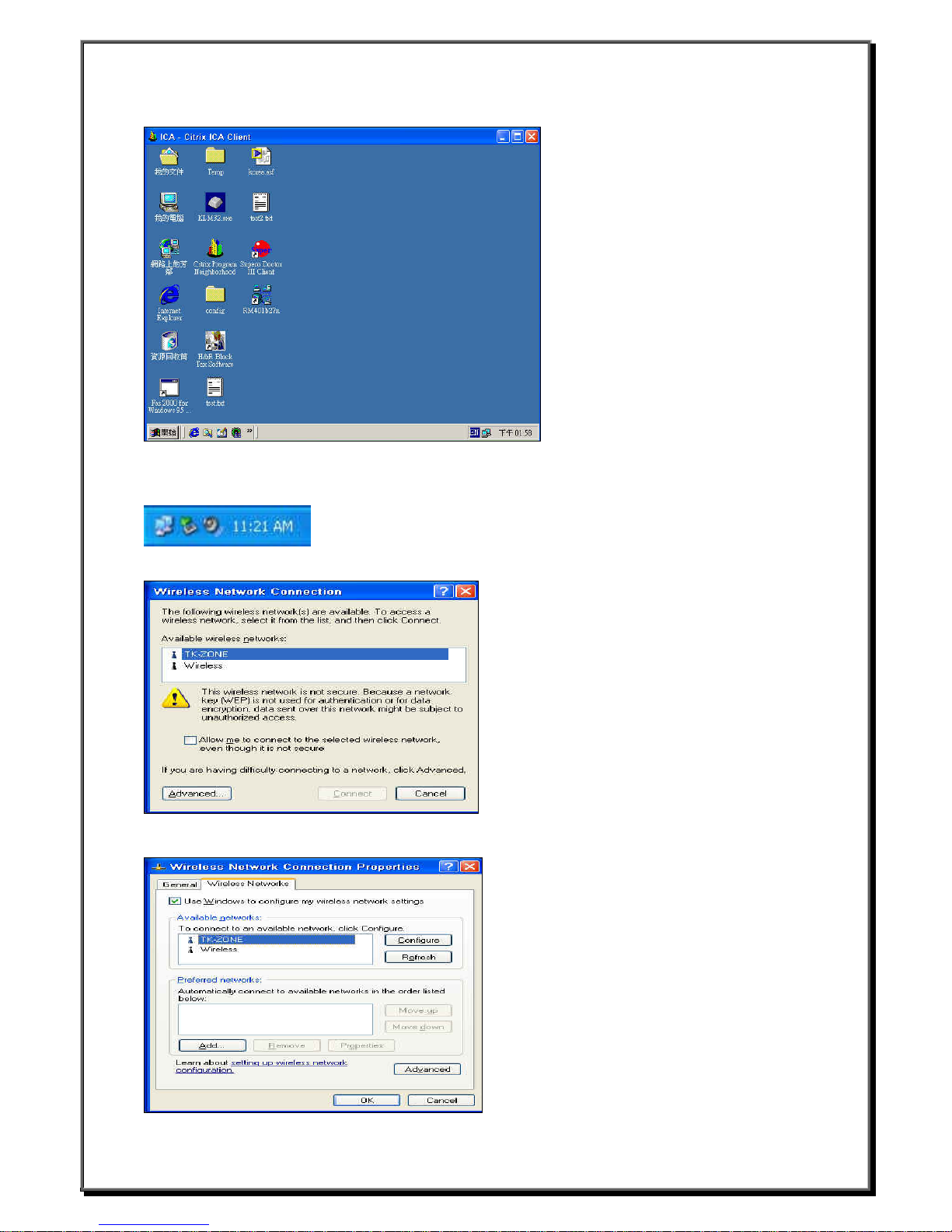
Type the correct User name and Password to logon. You will see the screen below if connection success.
4.3 Wireless LAN Settings
1. Plug in wireless card and double click the figure as b elo w.
You should see the screen.
2. Select the available wireless ne tw orks and click Advanced. For example, we select the “TK-ZONE”.
__________________________
Boundless Technologies ADDS 6300 XPe
26
Page 28
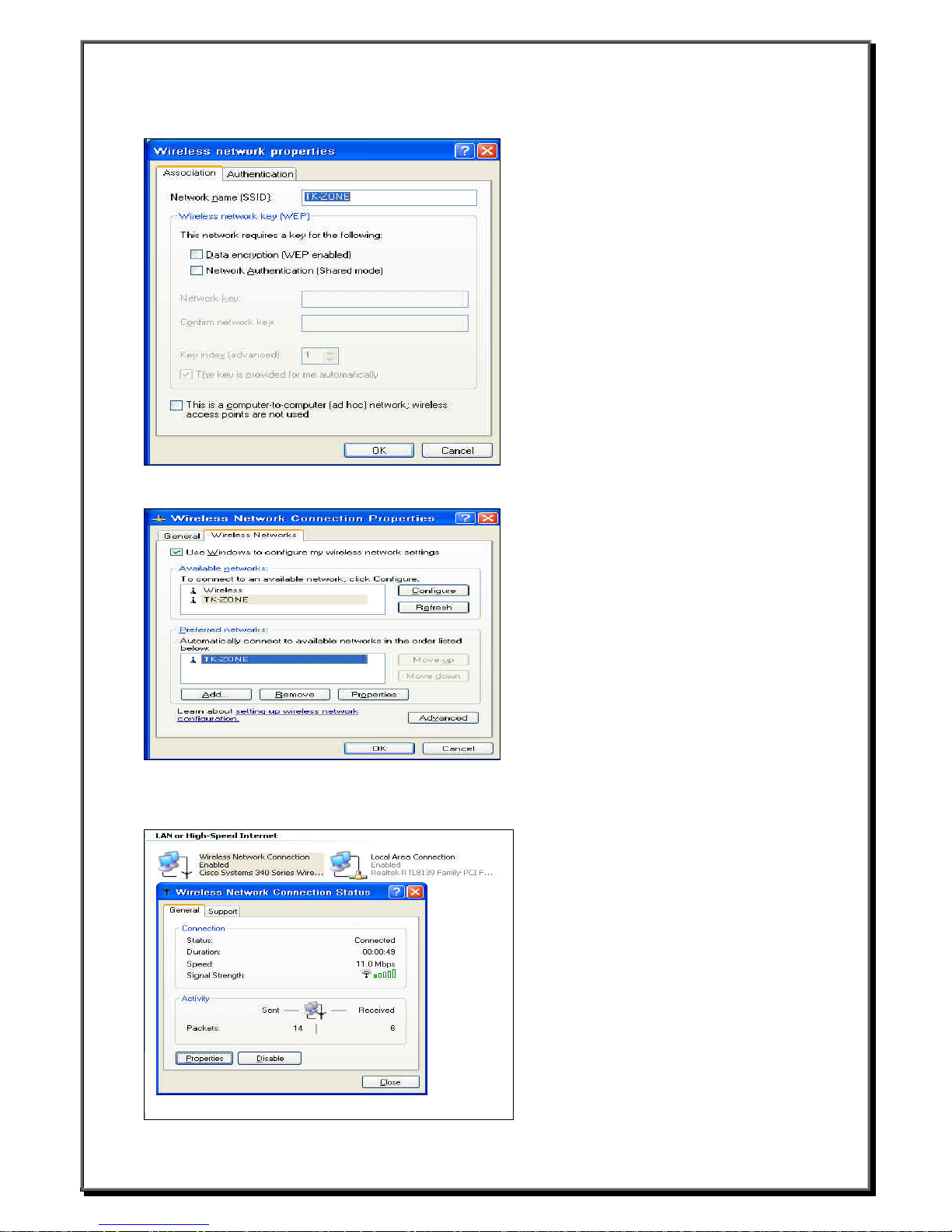
3.To connect to an available network, click Configure.
4. After click OK, you will find the available network (TK-ZONE) in the Preferred networks.
5. Setting is finished after click OK. Go to StartÆControl PanelÆ Network and Internet ConnectionsÆNetwork
Connections, beside Local Area Connection you will find the other figure called Wireless Network
Connection is enabled. And you can see the Wireless Network Connection Status by clicking this figure.
__________________________
Boundless Technologies ADDS 6300 XPe
27
Page 29
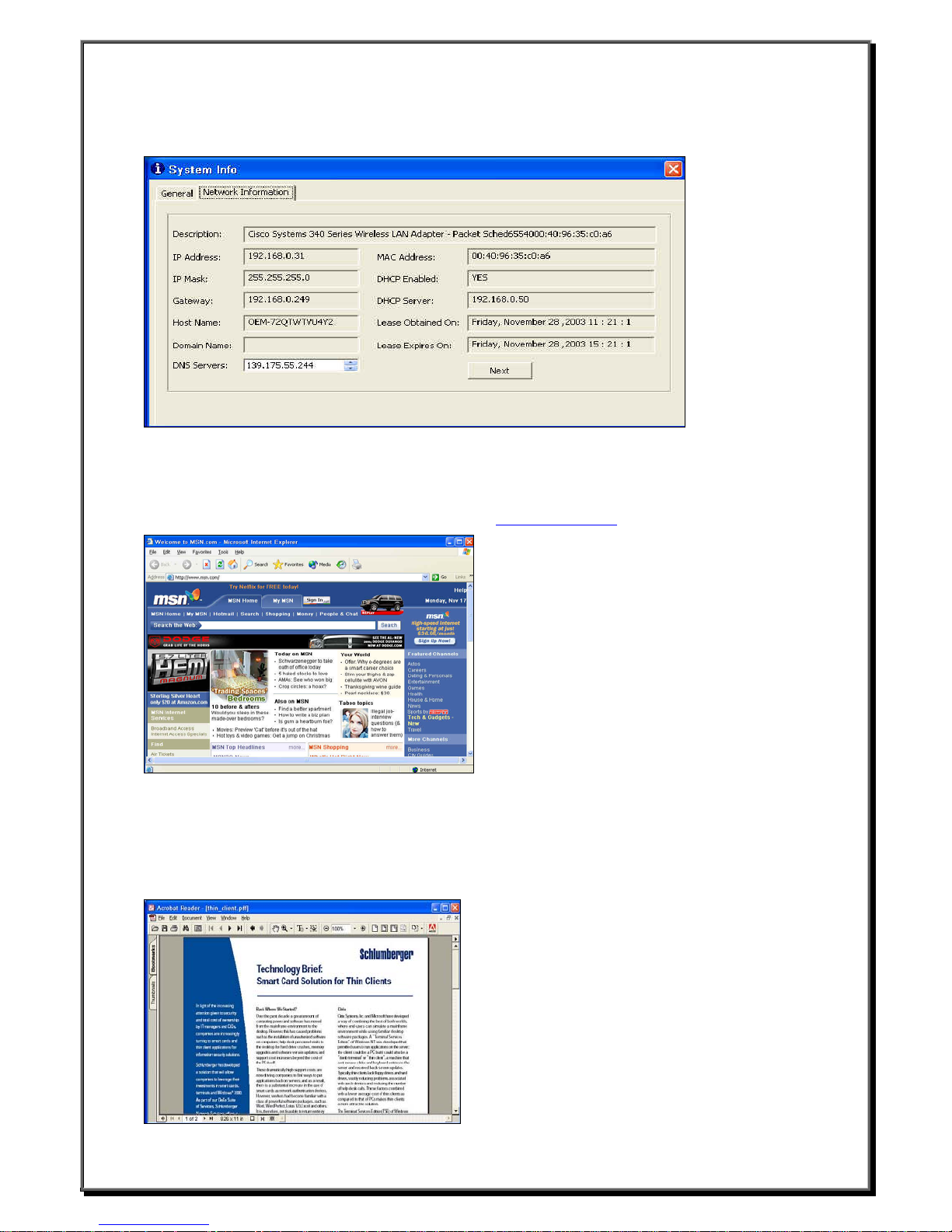
6. When you go to StartÆAll ProgramsÆCommon ToolsÆSystem Info and click Network Information, you
will find the wireless network connection information.
4.4 Microsoft Internet Explorer Connection
z Click Start
z Click Internet Explorer and you can connect to internet.
then this is going to work. For example, we connect to http://www.msn.com/
If your network settings have been correctly set up
. You will see the screen below.
4.5 Adobe Acrobat 5.0 (Optional)
Adobe Acrobat 5.0 lets you convert any document to an Adobe Portable Document Format (PDF) file.Anyone
with Acrobat Reader software can open your document across a broad range of hardware and software, and it
will look exactly as you intended—with layout, fonts, links, and images intact.
For example, we connect to a website to execute the “thin_client.pdf ”.
__________________________
Boundless Technologies ADDS 6300 XPe
28
Page 30
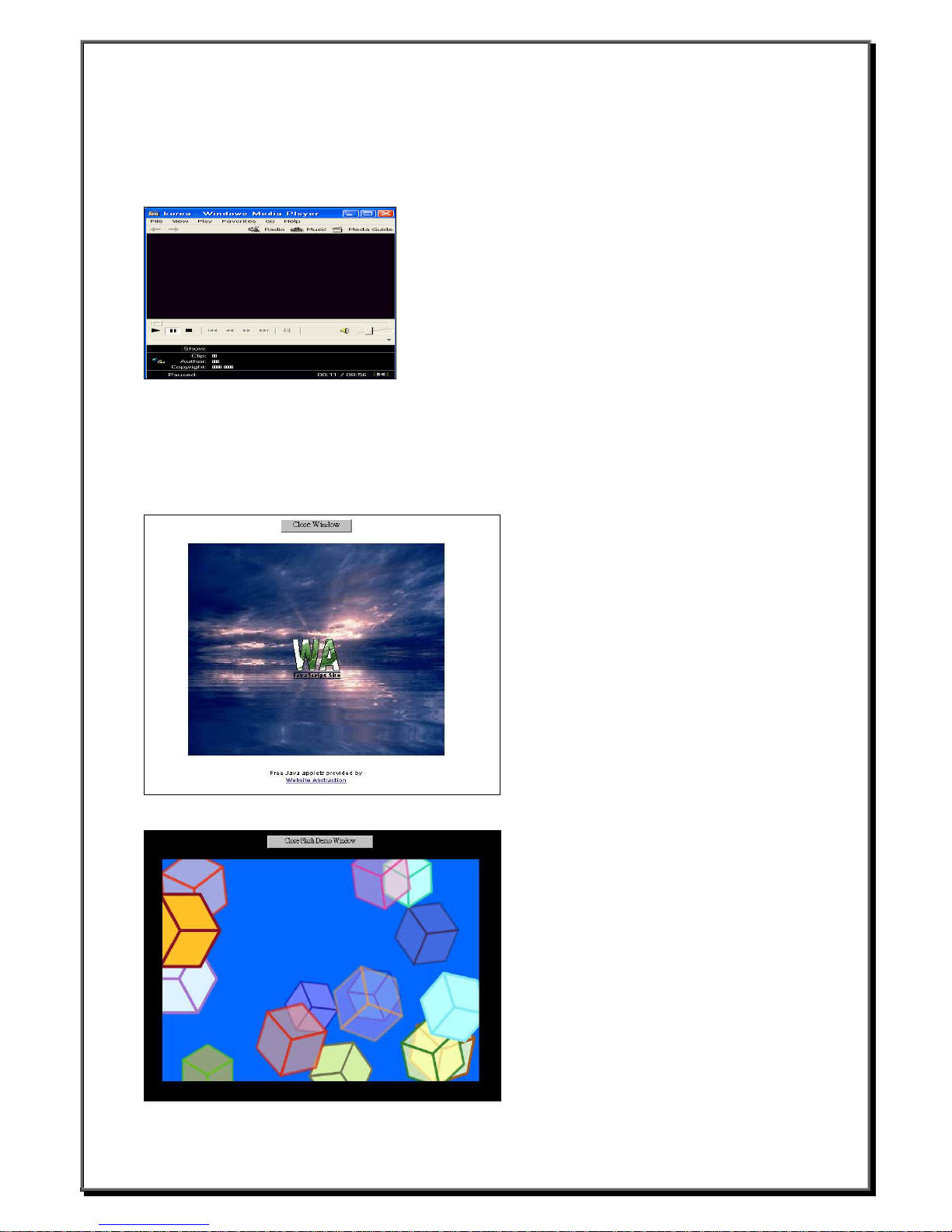
4.6 Microsoft Media Player 6.4
Windows XP Embedded supports Media Player function. It can play multimedia files such as .asf, .wmv,
and .mpg etc..
For example, we connect to a website to execute the “korea.asf ”.
4.7 Sun Java 1.41 and Flash Player 6.0
Windows XP Embedded supports Java and Flash player. For example, we connect to a website to test these
functions.
After few minutes, you should see t he scree n be low.
Java
Flash
__________________________
Boundless Technologies ADDS 6300 XPe
29
Page 31
5. Advanced Function
5.1 Enhance Write Filter (EWF)
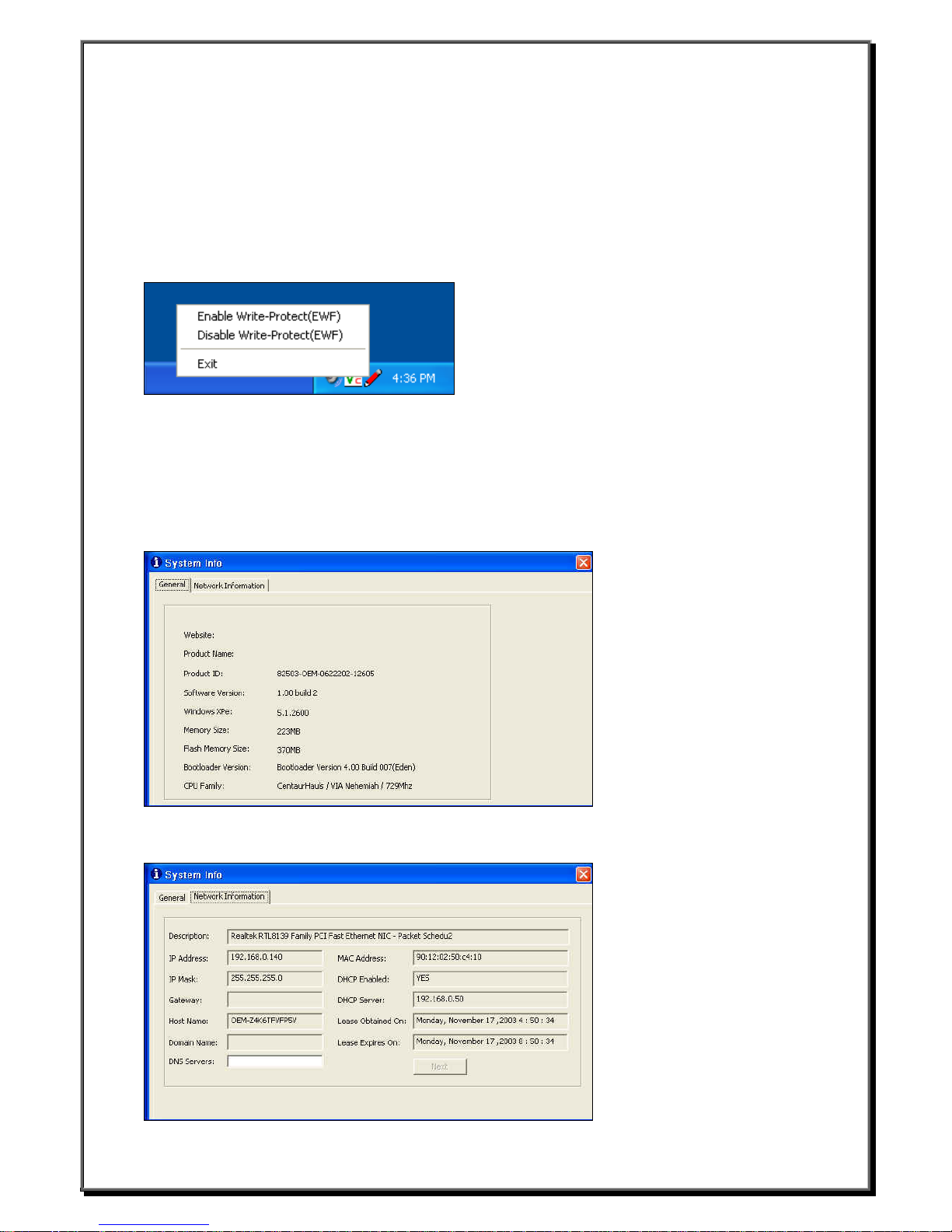
The EWF function is used by “Administrator account” (password:ewf9999). When you logon, you will see the
picture that likes pencil. Default color is green. You can click it by mouse. It will show the screen below. When
you enable EWF, WBT will reboot and the picture’s color will become red. After enable EWF, system will be
protected. You can delete or add f lie s, e ven add a new hardware. But these works will be ine ffective after
reboot WBT.
Enhance Write Filter
5.2 System Info
5.2.1 General
This Component describes product information, such as Copyrights, Product Name, Product ID, Software
Version etc. Also describes network information, such as IP Address, MAC Address, Gateway, etc. Yo u ca n
see that by clicking StartÆAll ProgramsÆCommon ToolsÆSystem Info and you will see the screen below.
5.2.2 Network Information
__________________________
Boundless Technologies ADDS 6300 XPe
30
Page 32
5.3 Device Update Agent ( DUA )
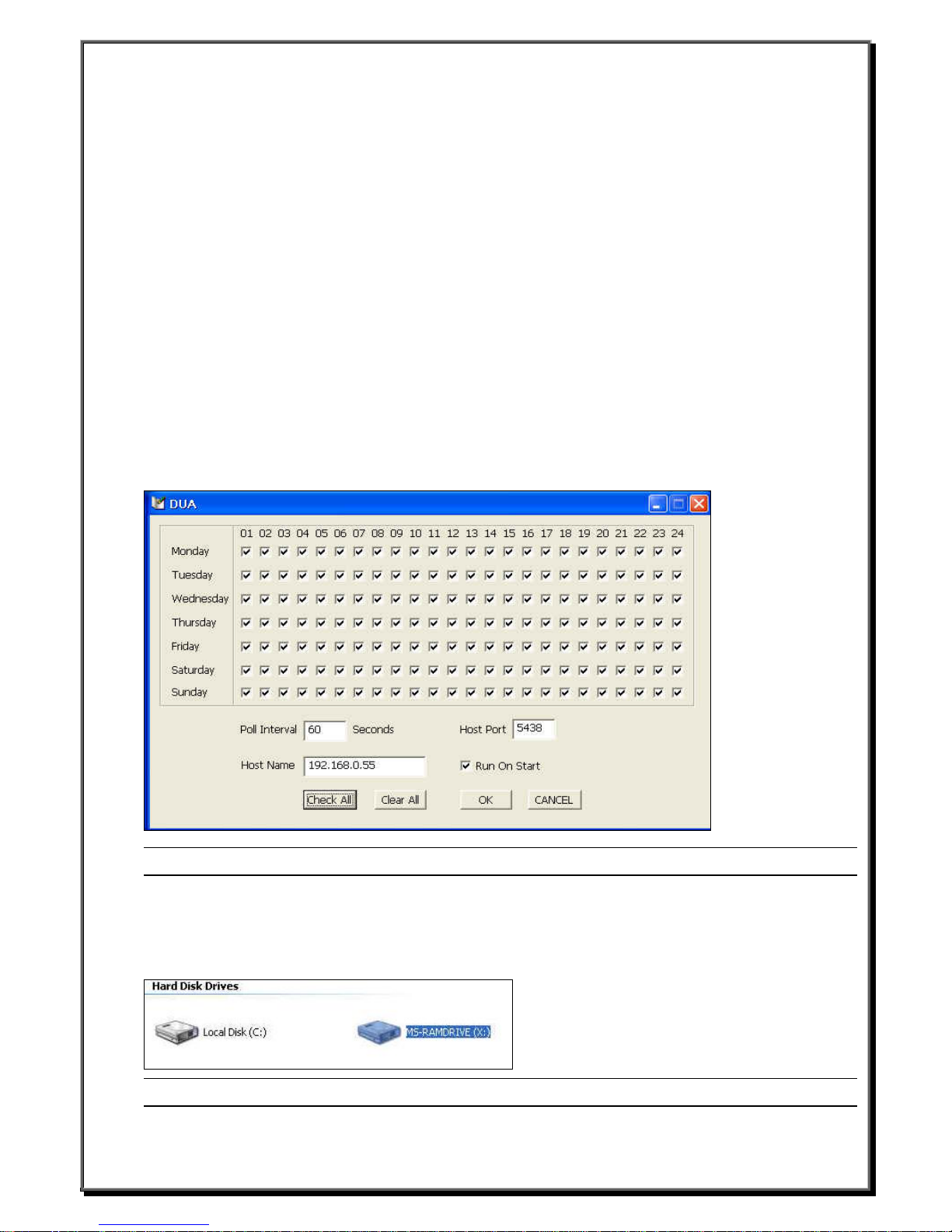
You can update new component via de vice update agent. You can go to St artÆAll ProgramsÆCommon
ToolsÆDUAUI and you will see the screen below.
z Poll Interval
Poll interval is required for polling and specifies the polling frequency during the indicated day of the week and
hour of the day. For example, if you have configured Duagent.exe to start polling on Sunday at 11 P.M., the
polling occurs during the 11 P.M. to 12 P.M. hour at a frequency specified by the polling interval.
z Host Name
Host name for HTTP server.
z Host Prot
Port number for HTTP server.
z Run On Start
Not Click : Do not run immediately when started .
Click : Run once immediately when started.
z Monday ~ Sunday
It describes what days of the week do you want to update.
z 01~24
It describes what hours of the day do you want to update.
Note:The DUA function is used by “Administrator account” (password:9999).
5.4 RamDisk Driver
We use a part of RA M to simulate a disk space that called “RamDisk“. It is additional disk space about 16
MB for WBT. You also can delete or add files in RamDisk, but these data will be lost after reboot. You will see
the RamDisk by clicking My Computer.
Note:The data in the RamDisk will lost after WBT reboot.
__________________________
Boundless Technologies ADDS 6300 XPe
31
 Loading...