

Page 1
Manual
Strobe Energy
DMX 2000
Page 2

Table of Content
1. Safety instructions ........................................................................................................................... 3
1.1. FOR SAFE AND EFFICIENT OPERATION ............................................................................ 3
2. Product overview ............................................................................................................................. 5
3. Control ............................................................................................................................................. 6
3.1. DMX mode ............................................................................................................................... 6
3.2. Manual mode ........................................................................................................................... 6
3.3. Sound-to-light mode ................................................................................................................ 7
4. Overheat protection ......................................................................................................................... 7
5. Technical data ................................................................................................................................. 7
2 / 8
Page 3
1. Safety instructions
• This device is suitable for indoor use (not outdoors) only.
• All modifications to the device will void the warranty.
• Repairs are to carry out by skilled personnel only.
• Use only fuses of the same type and original parts as spare parts.
• Protect the unit from rain and humidity to avoid fire and electric shocks.
• Make sure to unplug the power supply before opening the housing.
1.1. FOR SAFE AND EFFICIENT OPERATION
Be careful with heat and extreme temperature
Avoid exposing it to direct rays of the sun or near a heating appliance.
Not put it in a temperature bellow 32°F /0°C, or exceeding 104°F /40°C.
Keep away from humidity, water and dust
Do not place the set in a location with high humidity or lots of dust.
Containers with water should not be placed on the set.
To avoid placing on un-stable location
Select a level and stable location to avoid vibration.
Do not use chemicals or volatile liquids for cleaning
Use a clean dry cloth to wipe off the dust, or a wet soft cloth for stubborn dirt.
If out of work, contact sales agency immediately
Any troubles arose, remove the power plug soon, and contact with an engineer for repairing,
do not open the cabinet by yourself, it might result a danger of electric shock.
Take care with the power cable
Never pull the power cable to remove the plug from the receptacle, be sure to hold the plug.
When not using the device for an extended period of time, be sure to disconnect the plug
from the receptacle
.
Risk of Health!
The device causes (UV) radiation.
objects.
Therefore, keep a safe distance (at least 1.5m) to people and
3 / 8
Page 4

By fast flashing, the risk of an epileptic seizure increases. Therefore do not install it in danger zones
(such as stairs, exit routes ...). Point out the visitors before operating on the use of a strobe. Avoid
prolonged flash sequences.
Important: Damages caused by the disregard of this user manual are not subject to
warranty. The dealer will not accept liability for any resulting defects or problems. Make sure
the electrical connection is carried out by qualified personnel. All electrical and mechanical
connections have to be carried out according to the European safety standards.
4 / 8
Page 5
2. Product overview
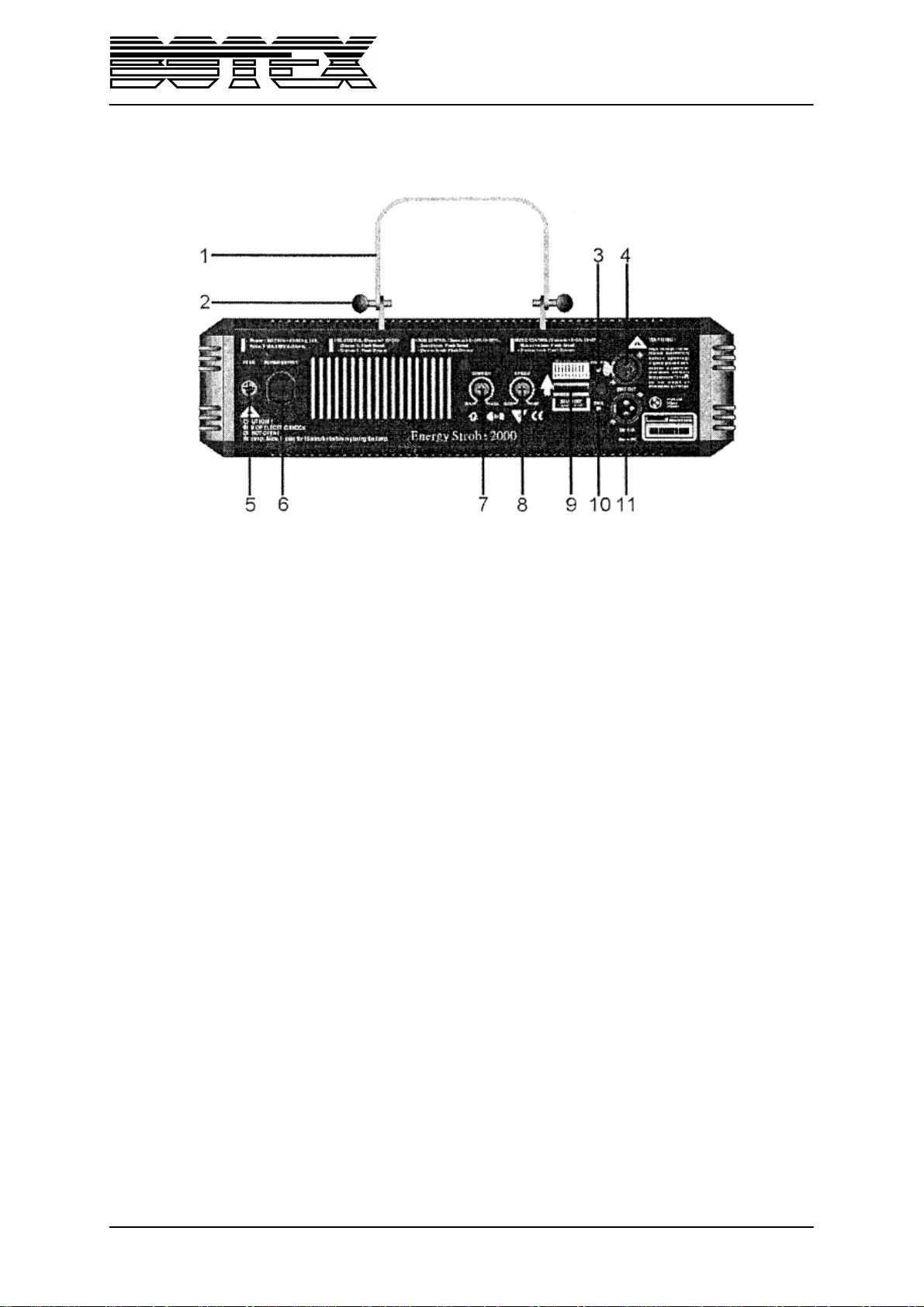
1. Adjustable hanging bracket
2. Fastening screw
3. Power LED
4. DMX Out
5. Fuse
6. Power input
7. Dimmer
8. Speed
9. Dip-Switches 1-10
10. DMX LED
11. DMX In
5 / 8
Page 6
3. Control
3.1. DMX mode
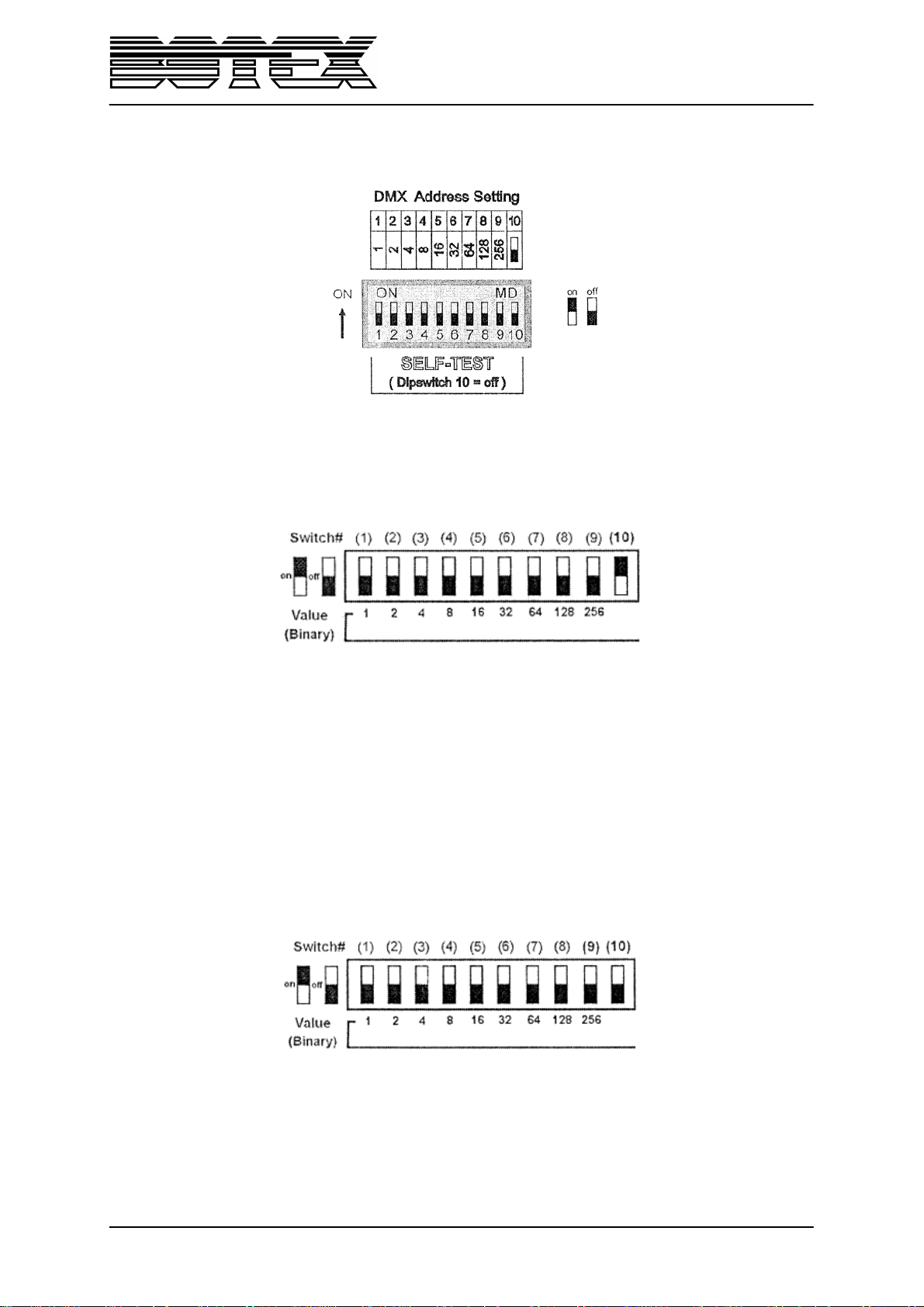
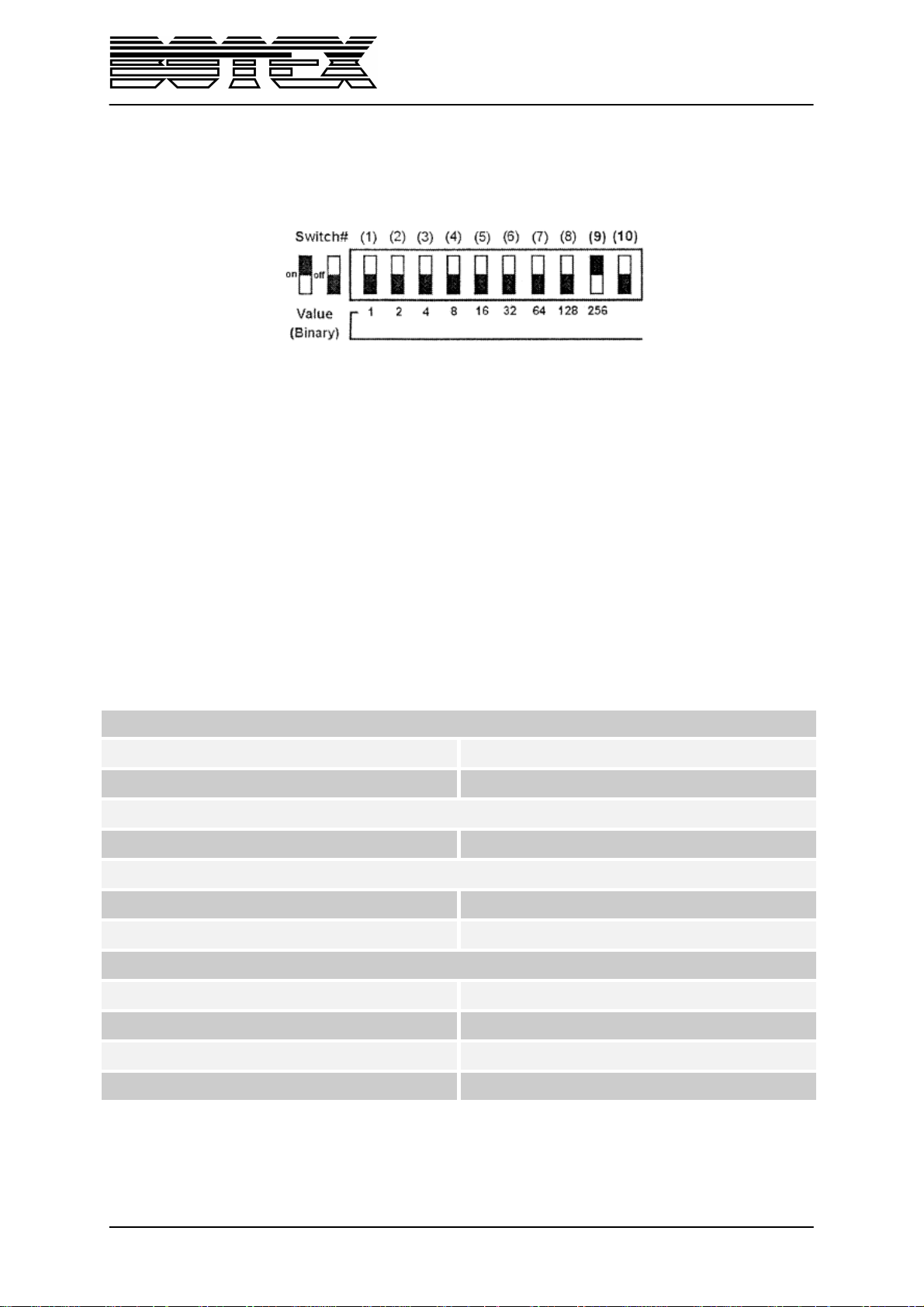
To get into the DMX, you have to set the Dip-Switch 10 to „On“.
• With the help of the Dip-Switches 1-9 you can set the required DMX address. The active Dip-
Switches amount to the DMX address.
• In the DMX mode the channels are as follows:
Channel 1 Speed
Channel 2 Dimmer
• The DMX LED will begin to flash when there a DMX input signal.
3.2. Manual mode
To get into the DMX, you have to set the Dip-Switch 9 and 10 to „Off“.
• Speed and dimmer are set with the help of the rotaries on the backside of the device.
6 / 8
Page 7
Power supply
Connections
Control
Hardware
3.3. Sound-to-light mode
To get into the DMX, you have to set the Dip-Switch 9 to „On“ and the Dip-Switch 10 to „Off“.
• The speed is controlled by the bass music effect and the dimmer with the help of the rotary on
the backside of the device.
4. Overheat protection
The internal micro processor will automatically limit the flash dimmer level when the lamp flashes for a
long period of time. The lamp can flash continuously for about 5 minutes when in the highest flash
speed level and in the maximum flash dimmer level. After that the flash dimmer will gradually
decrease to the level of 50%.
When the inside thermostat’s temperature exceeds 100°C the lamp will automatically switched off.
5. Technical data
Voltage 120-230V AC, 50/60Hz
Power consumption max. 800W
XLR in/out XLR 3pin
Sound-to-light Yes
DMX512 2 channels
Protection class IP20
Skill Indoor
Dimensions (LxBxH) 400x85x150mm
Weight 2,15kg
7 / 8
Page 8
Importer:
B & K Braun GmbH
Industriestraße 2
D-76307 Karlsbad
www.bkbraun.com
8 / 8
 Loading...