

Page 1
BOSSCOM DENMARK • www.BOSSCOM.com • SALES@BOSSCOM.com +45 7020-0045
BOSSCOM Powerlink-Switch
(Powerlink Converter / Automatic Source Switching with RCA and 8-pin DIN Inputs, B&O® Compatible)
User Manual
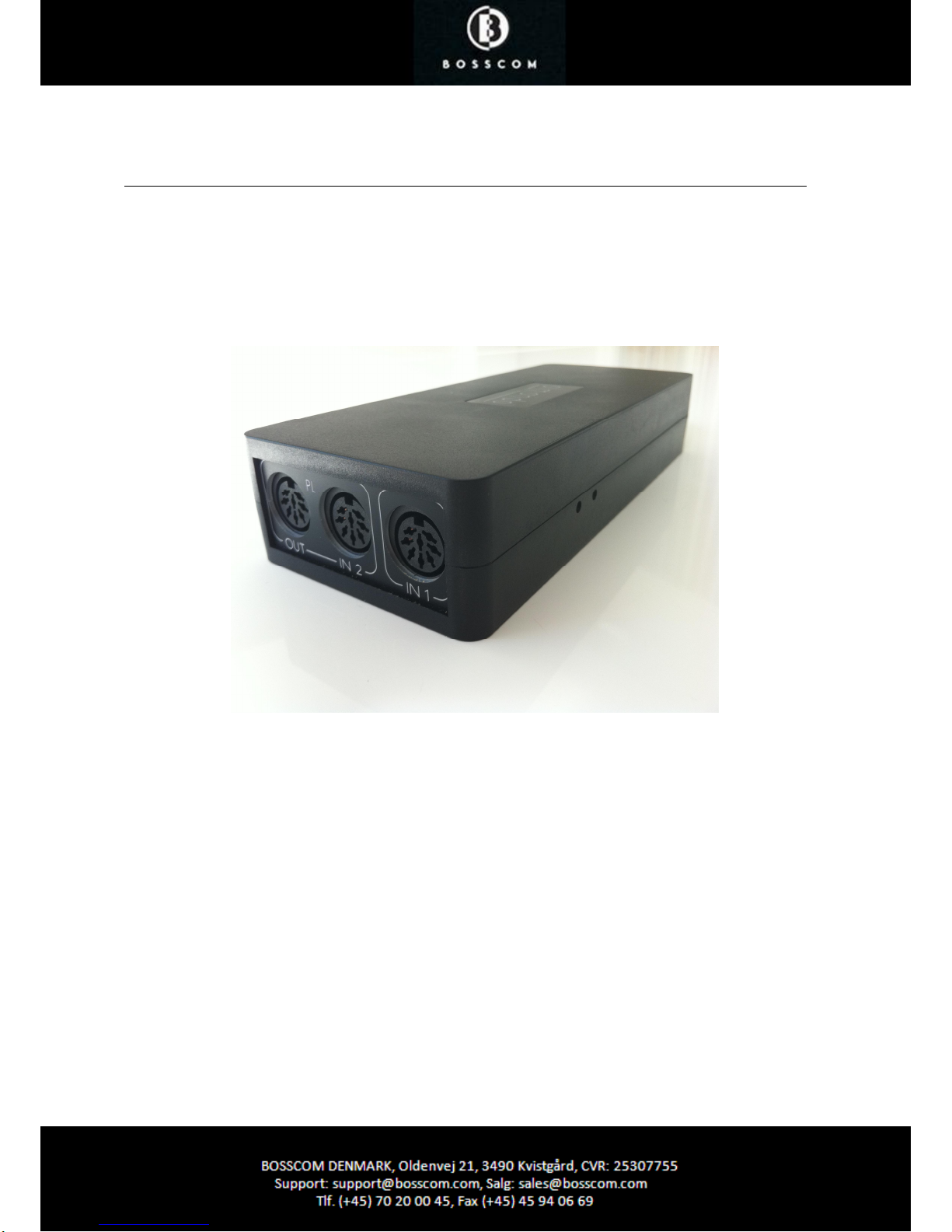
The BOSSCOM Powerlink-Switch is both, a converter and an automatic source-switch with 8-pin DIN
and RCA inputs and is 100% B&O® compatible.
This device provides you a solution for many problems in audio/video installations, such as feed-in of
any audio/video sources to B&O® systems, connection of B&O® speakers to audio/video devices of
other manufacturers, etc.
The examples shown below represent only a small part of the many possible uses.
Page 2
BOSSCOM Powerlink-Switch
(Powerlink Converter / Automatic Source Switching with RCA and 8-pin DIN Inputs, B&O® Compatible)
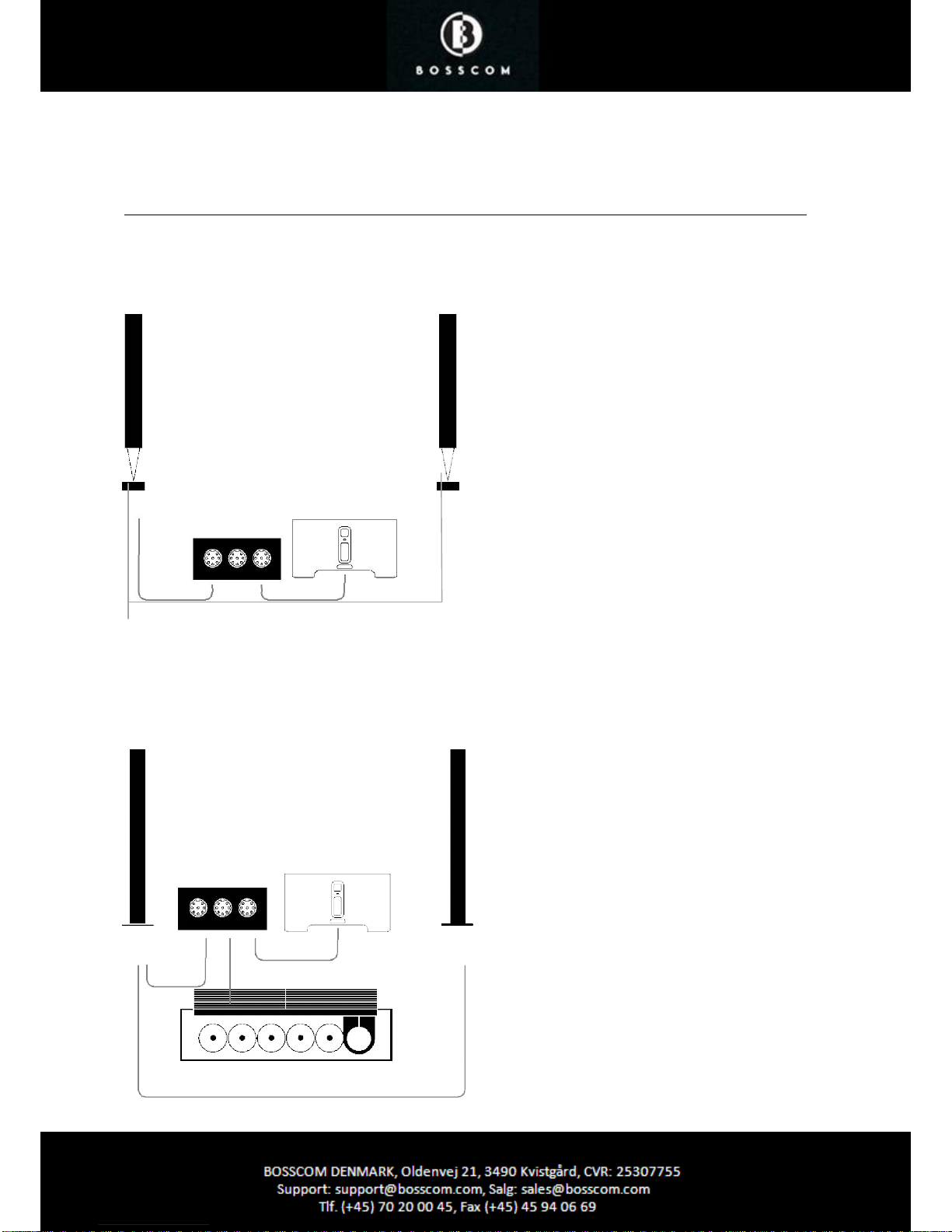
Example of Use 1
Converting LF-Signals (stereo-RCA) to Standard-Conforming B&O® Powerlink Signals
B&O® Speakers
B&O®
Speakers
e.g. BeoLab 8000
®
e.g. BeoLab 8000
®
Connect any stereo source with an RCA cable to INPUT
1 of the BOSSCOM Powerlink-Switch, via the adapter
cable (included) and use the device as Powerlink
converter and use the device as Powerlink converter.
Once a low-frequency signal is present, a standardconforming B&O® Powerlink signal (including contact
voltage) is sent. If the source does not send a signal to
INPUT 1 (e.g. it's turned off, or muted), an intelligent
switch provides a delay of about 1 minute - only then will
the Powerlink signal be switched off and the
BOSSCOM
PowerlinkSwitch
Any stereo source, e.g.
SONOS® Zoneplayer
B&O® speakers will go to standby mode. This is
necessary for longer pauses in audio books for example
and allows you sufficient time to select the next songs to
be played from your music library.
Example of Use 2
Feed-in of LF-Signals (Stereo-RCA) to B&O® Systems with Automatic Switching
(without trigger signal)
B&O® Speakers B&O® Speakers
e.g. BeoLab 6000® e.g. BeoLab 6000
®
Interconnect the BOSSCOM Powerlink-Switch
between your B&O® system and your B&O
®
speakers. Connect any stereo source with an
RCA cable to INPUT 1 of the BOSSCOM
Powerlink-Switch, via the adapter cable
(included).
BOSSCOM
PowerlinkSwitch
Any stereo source, e.g.
SONOS® Zoneplayer
Once a low-frequency signal is present at INPUT
1, it is converted to a standard-conforming B&O®
Powerlink signal (including contact voltage) and
you can listen to this stereo source with your
B&O® speakers, otherwise the Powerlink signal is
passed through to INPUT 2 and you listen to
your B&O® system.
CAUTION: If signals are present at both
INPUT 1 and INPUT 2, INPUT 1 always has
priority!
B&O® System
e.g. BeoSound
9000®
If the source does not send a signal to INPUT 1
(e.g. it's turned off, or muted), an intelligent
switch provides a delay of about 1 minute - only
then will the Powerlink signal be switched off
and the B&O® speakers will go to standby
mode, or INPUT 2 will be passed through (if a
signal is present).
Page 3
BOSSCOM DENMARK • www.BOSSCOM.com • SALES@BOSSCOM.com +45 7020-0045
BOSSCOM Powerlink-Switch
(Powerlink Converter / Automatic Source Switching with RCA and 8-pin DIN Inputs, B&O® Compatible)
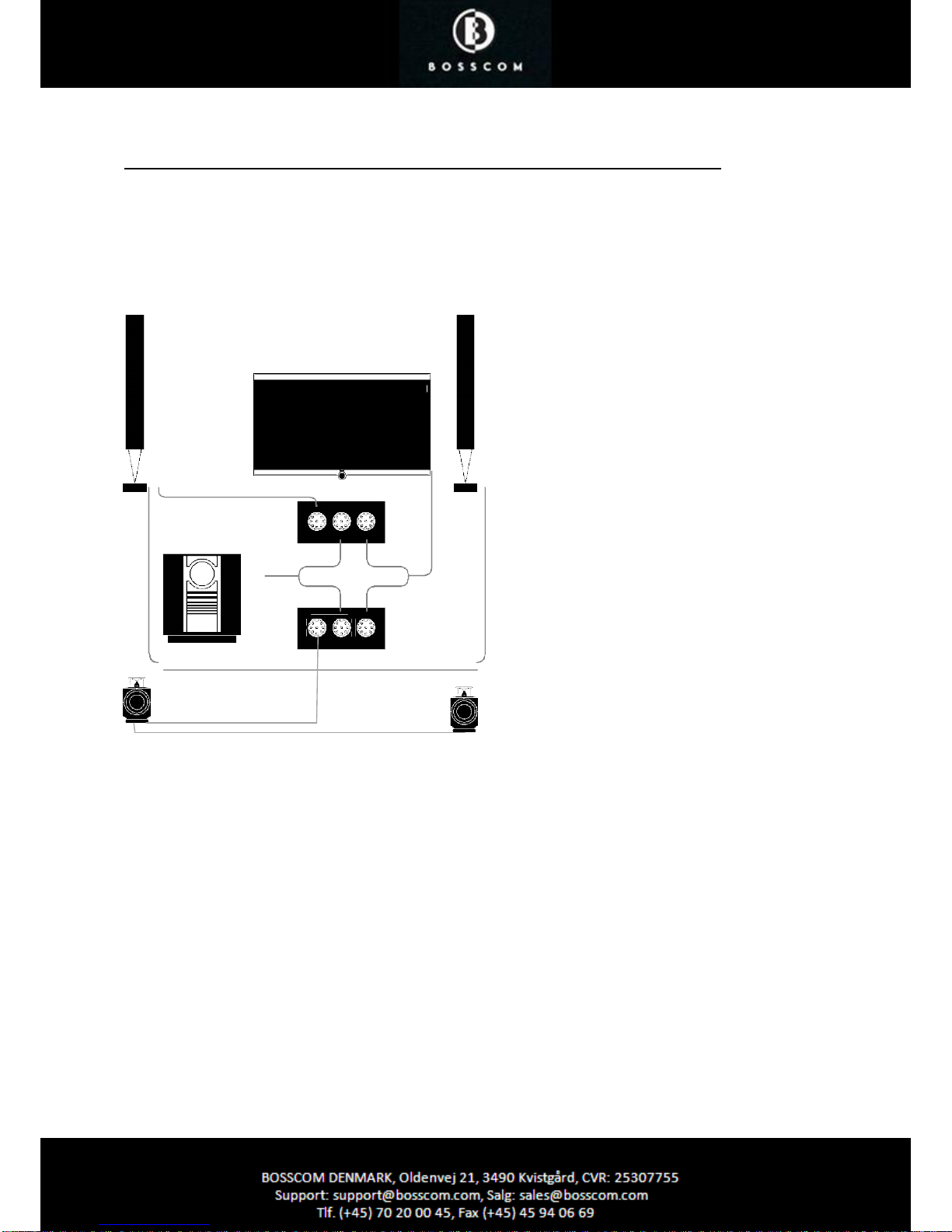
Example of Use 3
Dolby Surround Setup for LOEWE® TV and B&O® Systems with Automatic
Switching (with trigger signal)
Front Speakers
Front Speakers
e.g. BeoLab 8000
®
e.g. BeoLab 8000
®
TV with Dolby
Surround
decoder, like
LOEWE®
Individual
®
B&O® System e.g.
BeoSound 3200®
2 x BOSSCOM
PL-Switch
Use two BOSSCOM Powerlink switches and
connect for example your LOEWE ® TV to your
B&O® system and your B&O® speakers. Connect
the two front channels of your TV to the front
speakers, via INPUT 1 of the first BOSSCOM
Powerlink switch and the two rear channels to
the two rear speakers, via the second BOSSCOM
Powerlink switch.
Your stereo source - in this example, a BeoSound
3200® - is connected to INPUT 2 of both
BOSSCOM Powerlink switches. You will need
an additional power Y-cable link.
You can also create a trigger level, by connecting
the adapter cable (included) to each INPUT 1 of
the BOSSCOM Powerlink switch, if the audio
source provides such, like the LOEWE® TV in the
example shown. The advantage of using the
trigger level on INPUT 1 is that is the automatic
switch to INPUT 2 is no longer initiated after a lag
of about 1 minute without audio signal, but
immediately when the trigger level is no longer
present - this way you don't need to wait, to be
able to listen to the audio source of INPUT 2.
In the example shown, you can enjoy Dolby Surround Sound for TV and Speaker-4 sound when listening
to the audio system - and all this completely automatically. You do not need to unlock the source on the
B&O system with the B&O remote control - you simply turn on the TV and the B&O® speakers are turned
on automatically. The following applies: If both sources are active, INPUT 1 has priority!
Rear Speakers Rear Speakers
e.g. BeoLab 3
®
e.g. BeoLab 3®
Page 4
BOSSCOM DENMARK • www.BOSSCOM.com • SALES@BOSSCOM.com +45 7020-0045
BOSSCOM Powerlink-Switch
(Powerlink Converter / Automatic Source Switching with RCA and 8-pin DIN Inputs, B&O® Compatible)
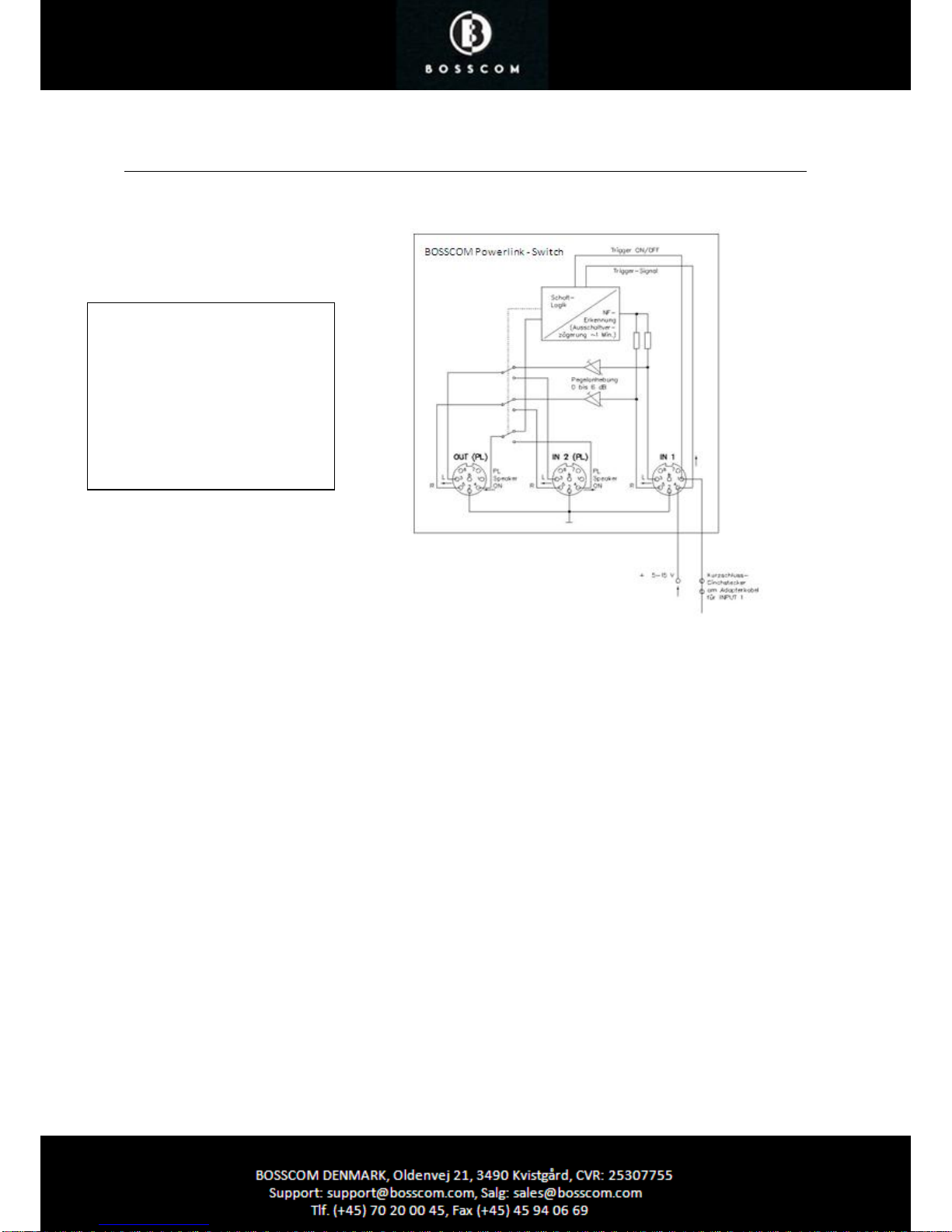
Block Diagram
Technical Data
Powerlink Signals INPUT 2 and OUTPUT are 100% B&O® compatible
Remote Power INPUT 1 ON/OFF via external contact voltage (5-15 V DC)
an 8-pin DIN input jack
Automatic Activation INPUT 1 "ON" as soon as a low-frequency signal is present, "OFF" (Standby)
if no LF-signal is present for longer than 1 minute.
Level Increase INPUT 1 Max. +6 dB to equalize the volume to INPUT 2,
separately adjustable for L and R
Inputs INPUT 1 | 8-pin DIN
INPUT 2 | 8-pin DIN (Powerlink)
Output OUTPUT | 8-pin DIN (Powerlink)
Power Supply 200-240V~ 50 Hz
Power Consumption Stand by <1 Watt
Dimensions 171 x 72 x 34 mm (L x W x H)
Weight 0.3 kg
Color black
Included Accessories Adapter Cable for INPUT 1,
Short circuit-RCA plug for trigger ON / OFF
Power cable (Euro plug)
Warranty 2 years
Schaltlogik = Switching Logic
NF-Erkennung (Ausschaltverzogerung – 1
Min) = LF-Recognition (switching off delay
– 1 min.)
Pegelanhebung 0 bis 5 dB = Level Increase
0 to 6 dB
Kurzschluss-Cinchstecker am Adapterkabel
fur INPUT 1 = Short circuit RCA-plug on
adapter cable for INPUT 1
 Loading...