

Page 1
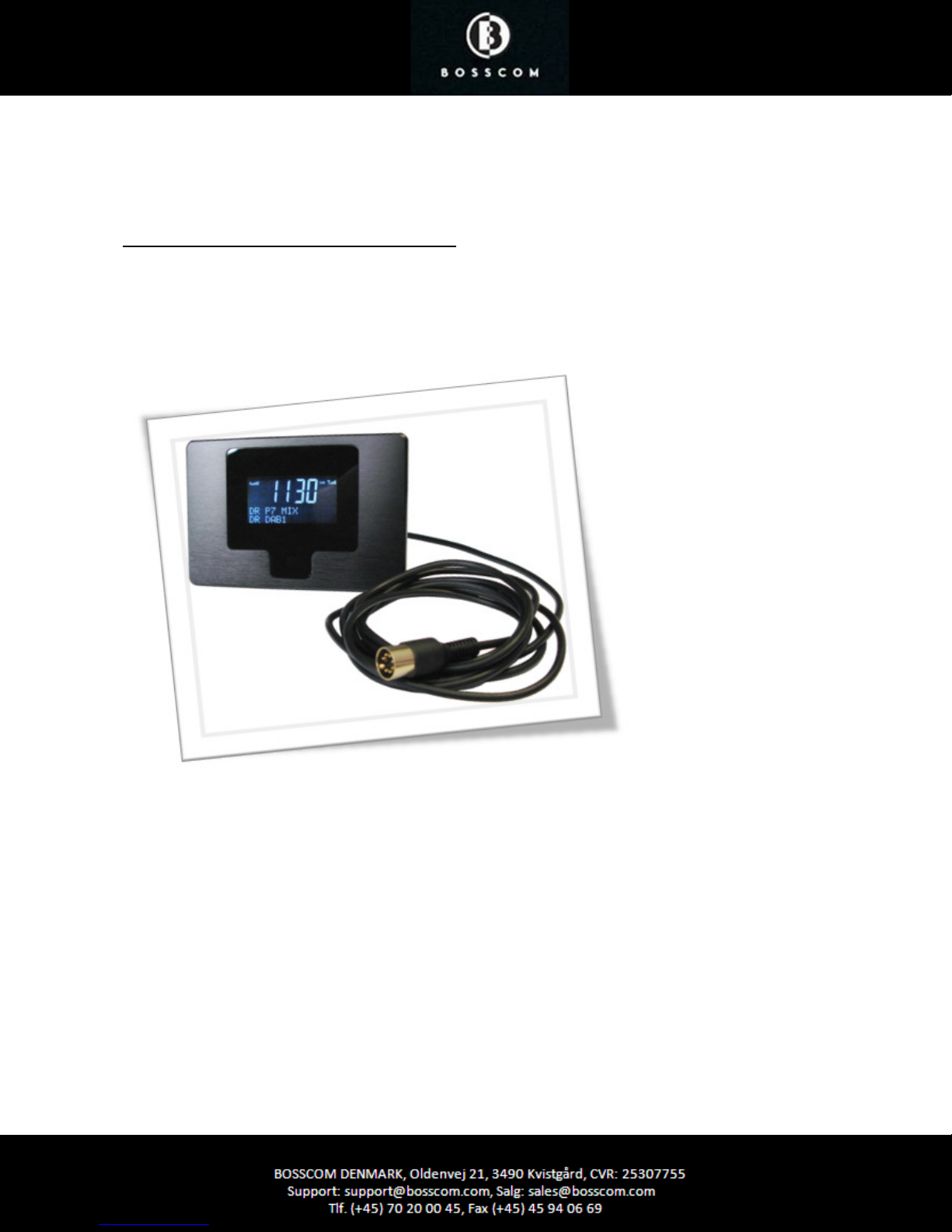
BOSSCOM DAB/FM Tuner
Compatible with B&O Remote Controls
User Manual
Page 2
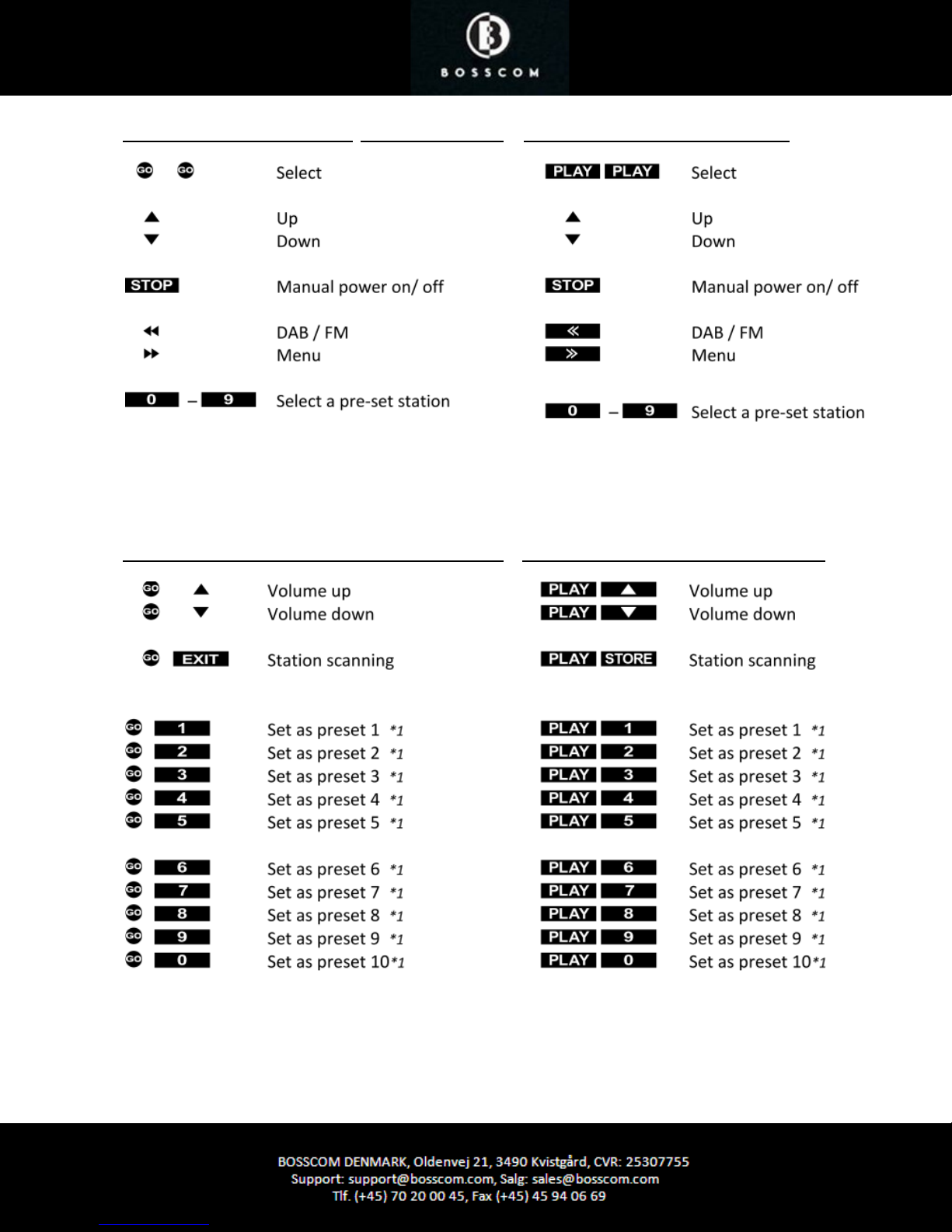
Everyday control with Beo4, Beo5, Beo6 Everyday control with Beolink 1000
Special commands, used only by initial installation Special commands, used by initial installation
*1
Not all Bang & Olufsen equipment responds to
numeric commands. Using the Direct Mode
option is recommended.
Page 3

List of Contents
Getting started ........................................................................................................ page 5
Direct or CableLink mode ........................................................................................ page 5
Factory settings ....................................................................................................... page 5
Installation ........................................................................................ ...................... page 6
Connection to B&O Equipment ................................................................................ page 6
Antenna connection ................................................................................................ page 7
Automatic power on and off .................................................................................... page 7
Option programming ............................... ................................................... ............. page 8
Source & Option selection. ................................................................................... page 9
o BeoSound5, Encore, BeoCenter2 ................................................................ page 9
o BeoSound4, BeoSound1 ............................................................................. page 10
o BeoSound Century, BeoSound 9000, BeoSound 3000/3200 ........................ page 11
o BeoSoundOuverture, BeoSystem 2500, BeoCenter 2500 ............................. page 12
o BeoCenter 2300, BeoMaster 3300/3500/4500/ 5500/6500/7000 ............... page 13
o BeoCenter 8000/ 8500/9000/9300/9500 .................................................... page 14
o BeoSystem 3 ............................................................................................... page 15
o BeoLink Converter 1611/ 1612 .................................................................... page 16
o BeoLink Active ....................................................................................... ...... page 17
o Bang & Olufsen TV, all models .................... ................................................ page 18
Page 4
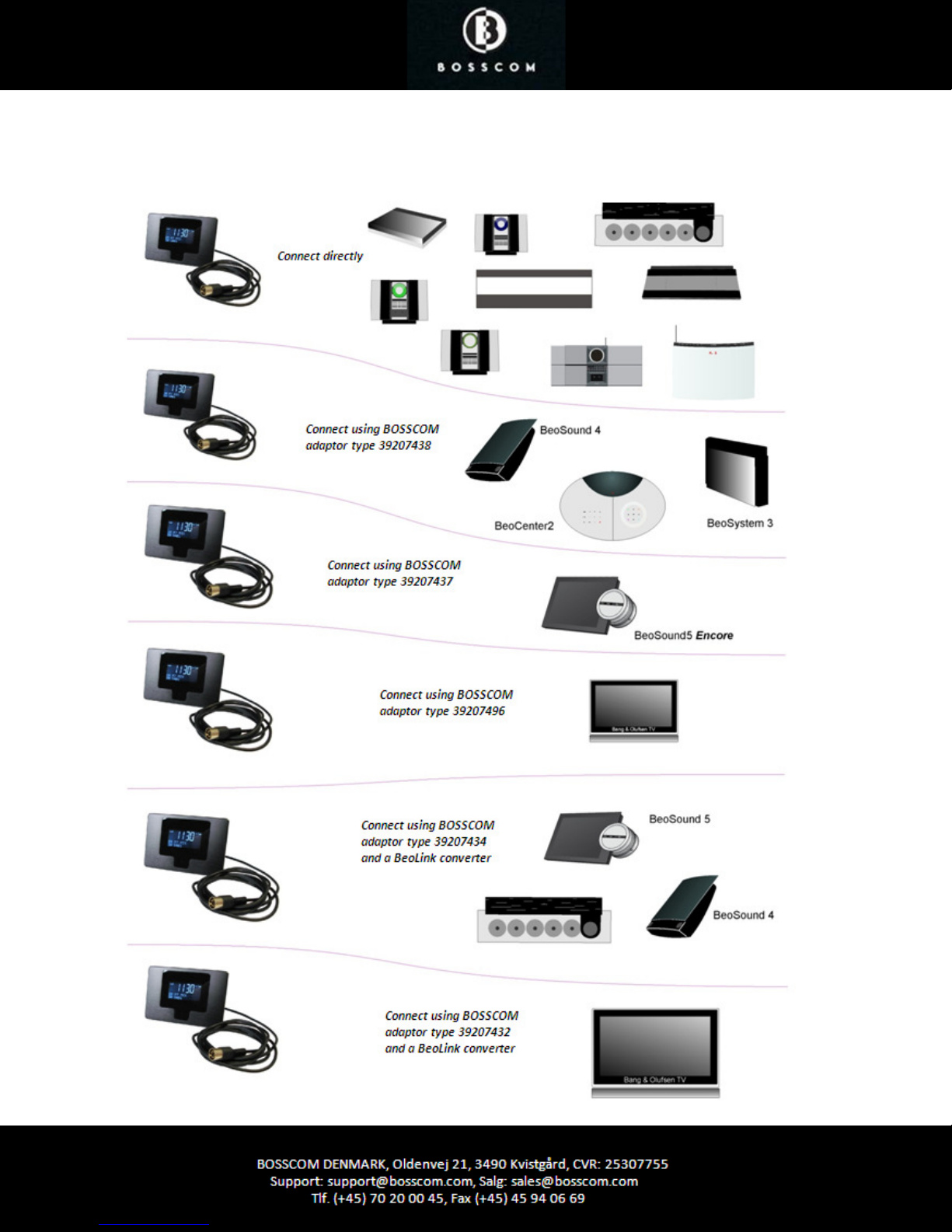
BOSSCOM DAB/FM is equipped with a 7 pin DIN Data Link cable for connection to Bang & Olufsen equipment. Thus
an adaptor cable is required for connection to equipment not having a DIN input socket. See below examples and the
Option Programming section page 8.
Page 5
Getting Started
Beolink 1000
SHIFT A.TAPE
This BOSSCOM DAB/FM tuner has been designed for operation in a Bang & Olufsen remote control system allowing
full control with a Bang & Olufsen remote control terminal either directly or via connection to Bang & Olufsen
equipment.
Thus the tuner is Beolink compatible.
Direct Mode or CableLink Mode
The BOSSCOM DAB/FM tuner is connected to Bang & Olufsen equipment via the 7-pin DIN cable with or without
adaptor, and through option programming it may be controlled as follows:
1. Via the tuner’s built in IR-receiver, ”Direct Mode”
Direct Mode is used when connection to an input with control data is not possible.
2. Via the cable connected Bang & Olufsen equipment, ”CableLink Mode”
CableLink Mode is used only when connection to an input with control data is possible.
See page 8 for Option Programming.
Factory Settings
The factory setting is for “Direct Mode” and manual power control.
The factory setting for input socket and selected source is:
Remote control Source
Beo4, Beo5 or Beo6 N.MUSIC, A.MEM2 or TAPE2
If the DAB/FM tuner is connected to a different input, the option should be programmed accordingly.
See page 8 for Option Programming
Page 6
Installation
1) Connect power supply.
2) Connect external antenna if required.
3) Turn the power switch on, located on the cabinet.
4) Select option and complete option programming, if required.
5) Connect the tuner to the correct input socket on the Bang & Olufsen equipment.
6) Select the corresponding source on the remote control terminal.
7) Turn on the tuner manually, if it is not in the automatic power up mode.
8) Select and program your favorite stations.
Connection to Bang & Olufsen Equipment
This BOSSCOM DAB/FM tuner may be connected to any Bang & Olufsen BeoSound, BeoCenter, BeoMaster,
BeoSystem or BeoVision TV and controlled with a Bang & Olufsen remote control terminal, but it may also be
connected to equipment of any other brand and still be controlled with the Bang & Olufsen remote control terminal.
Through the years Bang & Olufsen equipment has had input sockets added, removed and renamed. A newer Bang &
Olufsen remote control has the button N.MUSIC, which is identical to SHIFT A.TAPE or A.TAPE2 on older remotes.
Below tables are showing available input sockets and their designation on various Bang & Olufsen equipment. The
tables below also show the source that has to be selected to open a given input.
Thus with identified Bang & Olufsen equipment and the selected input socket the required option for the tuner to be
operable may be determined. Some input sockets allow for the CableLink option to be selected, whereas most of the
newer audio equipment requires the Direct Mode option to be used.
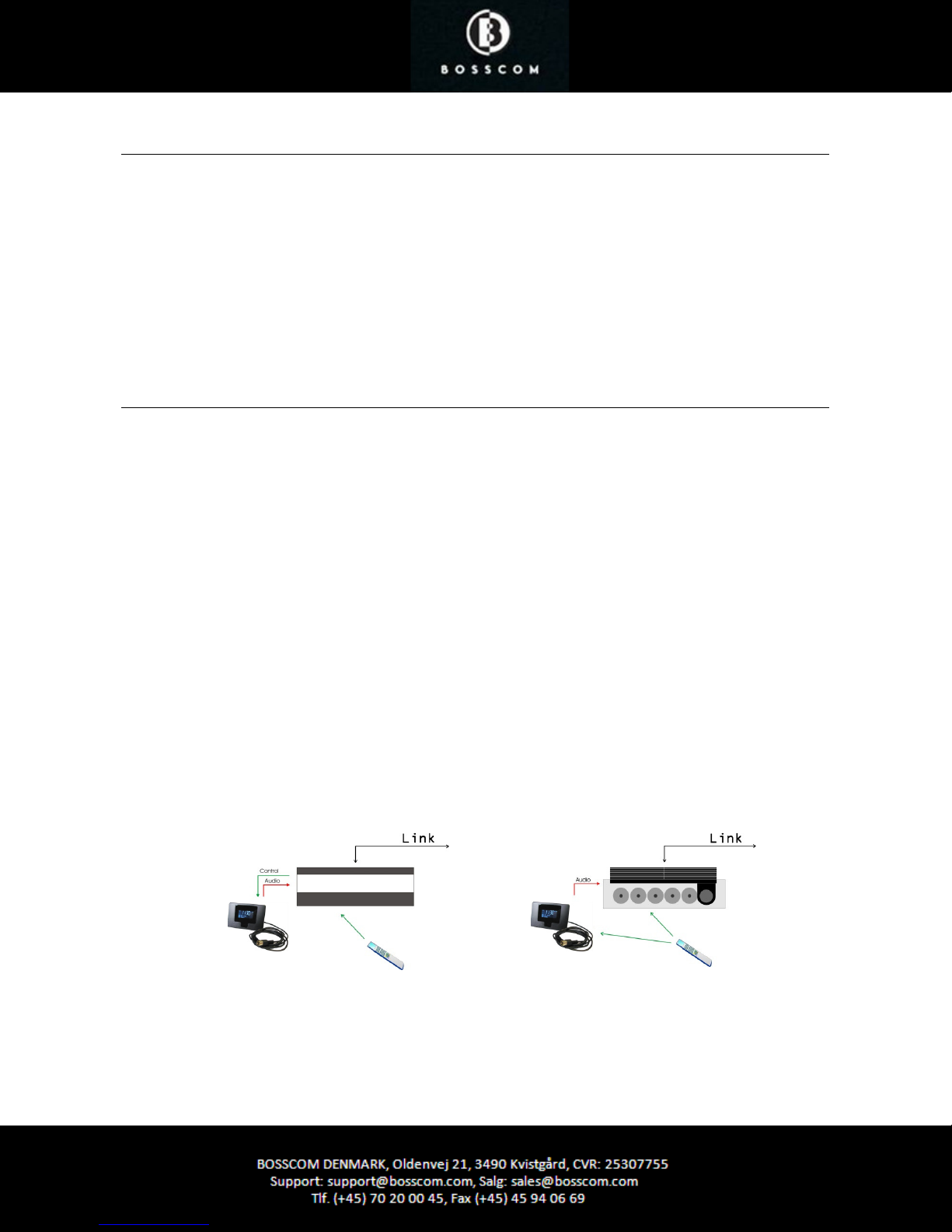
The Direct Mode Option:
The tuner is controlled directly with the Bang & Olufsen remote control terminal.
Control from a linkroom is not possible, although the tuner may be listened to there.
The CableLink Option:
The tuner is controlled with the Bang & Olufsen remote control terminal through the connected Bang & Olufsen
equipment sending control data via the connection cable. The tuner may be controlled from any linkroom too.
CableLink
The CableLink option allows for the tuner to be listened
to and controlled from any linkroom.
Direct Mode
The Direct Mode option allows for the tuner to be listened to
but not controlled from any linkroom. The Direct Mode
option works in any Bang & Olufsen set up, but the tuner’s IR
receiver is not plasma safe.
Page 7
Antenna Connection
BOSSCOM DAB/FM tuner may be connected to any antenna designed for FM and the DAB reception, if the supplied
one is not sufficient.
o If the FM signal strength is not sufficient the reception will be noisy.
o If the DAB signal strength is not sufficient the reception is varying from
disturbing ”bubbles” to complete quietness.
o If no signal is received the display indicates N/A.
Automatic Power Up and Down
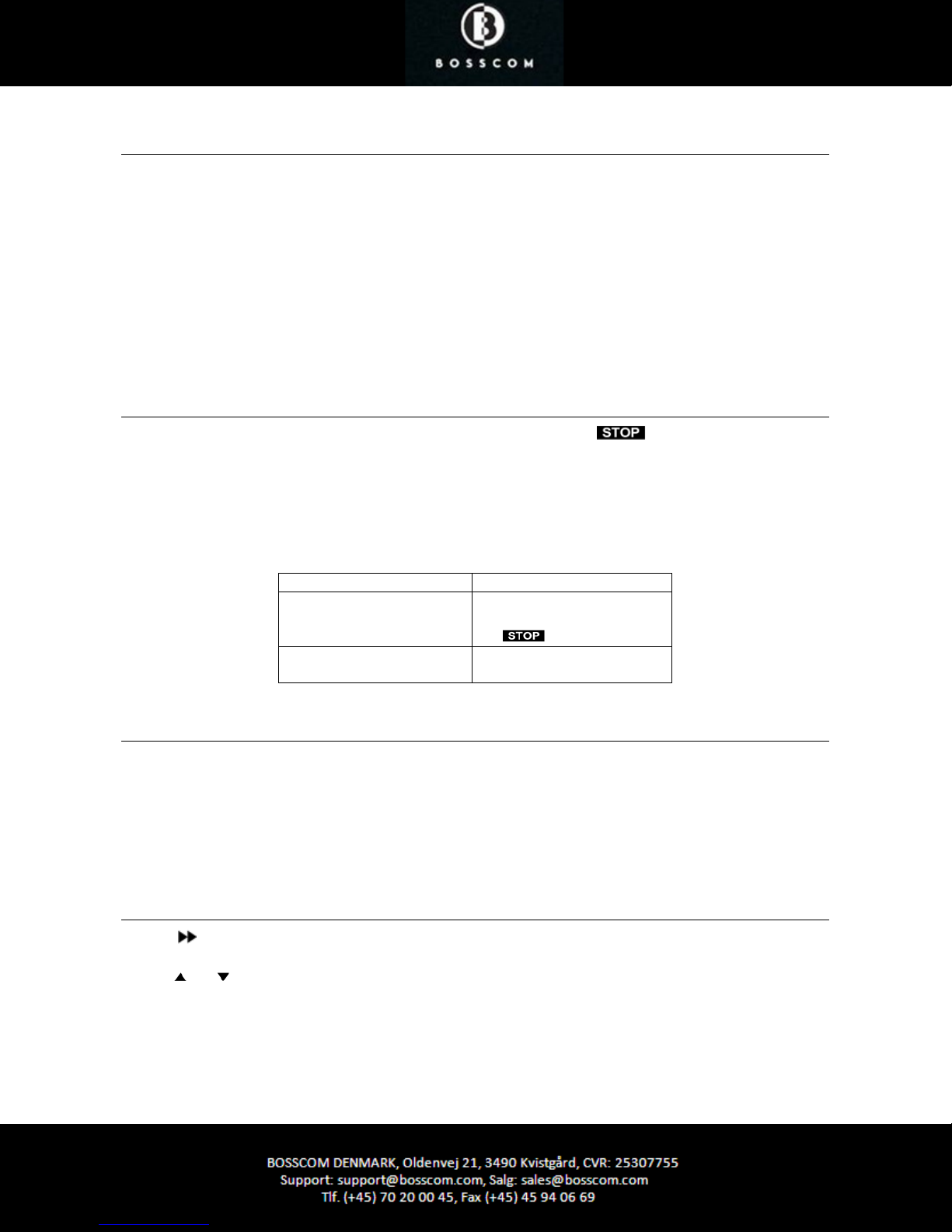
As default factory setting the tuner is manually powered up and down with the button. As the display is
automatically dimmed 10 seconds after any operation, powering the tuner down is not a strict requirement.
If automatic powering up and down with the source selection is desired, programming a specific option allows for
that.
Option Code Function
Option 990
Option 991 The tuner automatically
The tuner can only be
powered up and down, using
the button.
powers up and down.
Important Info about the Automatic Power Mode
When the automatic power option has been set, the tuner turns on and off automatically with the source selection.
But if the tuner’s clock has not been set, automatic power up and down is NOT possible.
The clock is automatically set 10-30 seconds after power has been applied to the tuner, provided a DAB station has
been received. Thus the automatic power option cannot be used if the tuner is switched off the mains regularly.
Menu
Pressing enters the tuner’s main Menu.
Use the buttons to select one of the sub menus:
• Manual scan
• Contrast
• System reset
• Software version
Page 8
Option Programming
Option programming is required only when installing the tuner. The programming is performed with a Bang &
Olufsen remote control terminal by initiating a 5 button sequence within 8 seconds after powering up the tuner.
When powering up the tuner the red control LED flashes for 8 seconds, and the programming has to be carried out
before the control LED stops flashing. When entering a button the timeout is prolonged with another 8 seconds.
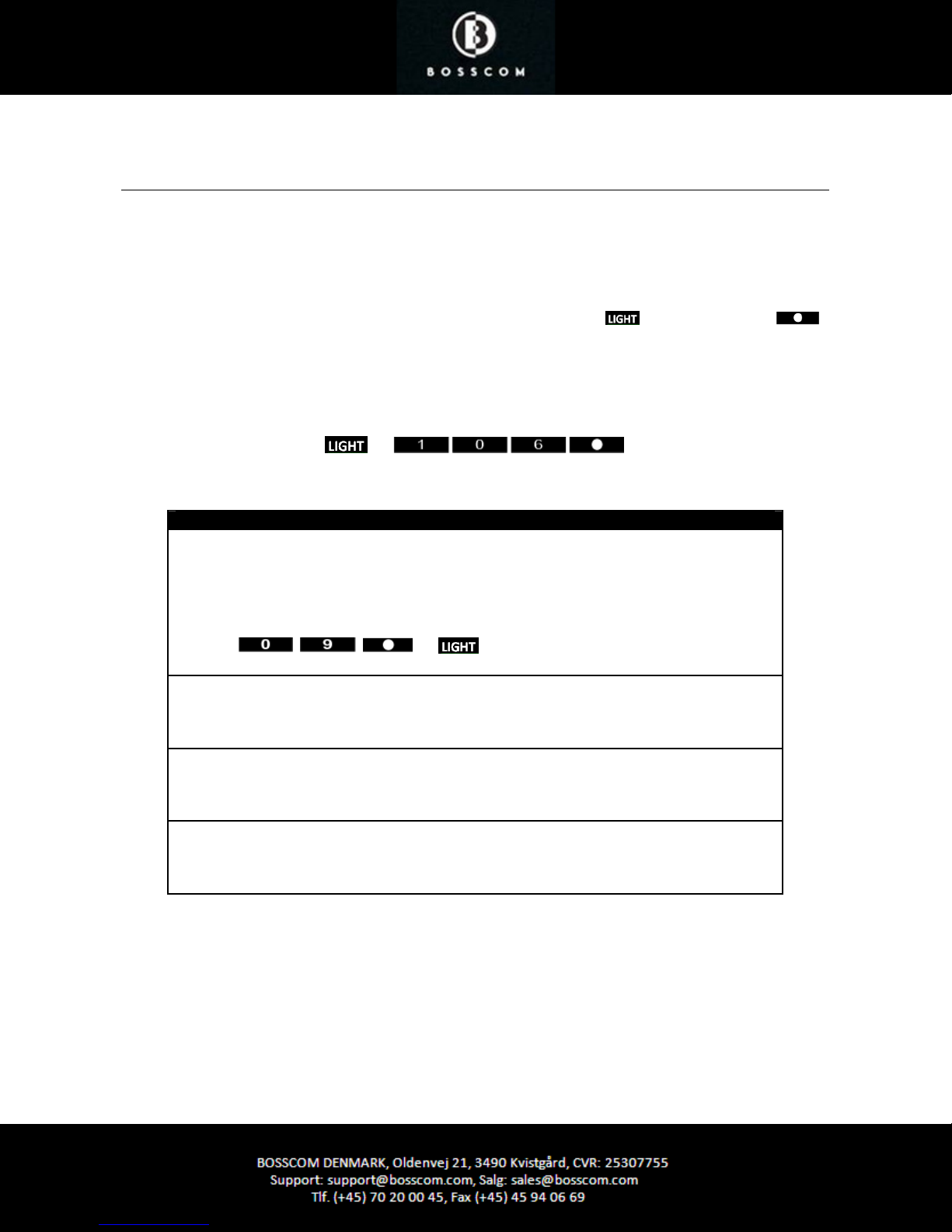
If not successful the operation may be repeated. Programming starts by pressing and ends by pressing
All options have 3 digits to be entered in between.
Option 106 is entered like this:
*1
Control LED Indications
Red/green flash
By initial power up the LED starts flashing red/green, indicating that the tuner is in Option
Programming Mode, i.e. an option may be entered.
The Option Programming Mode is terminated after 30 seconds or prior hereto if any command
except for - , or is received.
Red
The tuner is powered down.
Green
The tuner is powered up or the tuner is searching for a signal to set the clock.
Intermittently turned off
The LED turns off very briefly as a command handshake indicator.
*1.
If using a Beolink1000 remote control, LIGHT must be replaced with SHIFT-LINK.
Page 9
Source & Option Selection
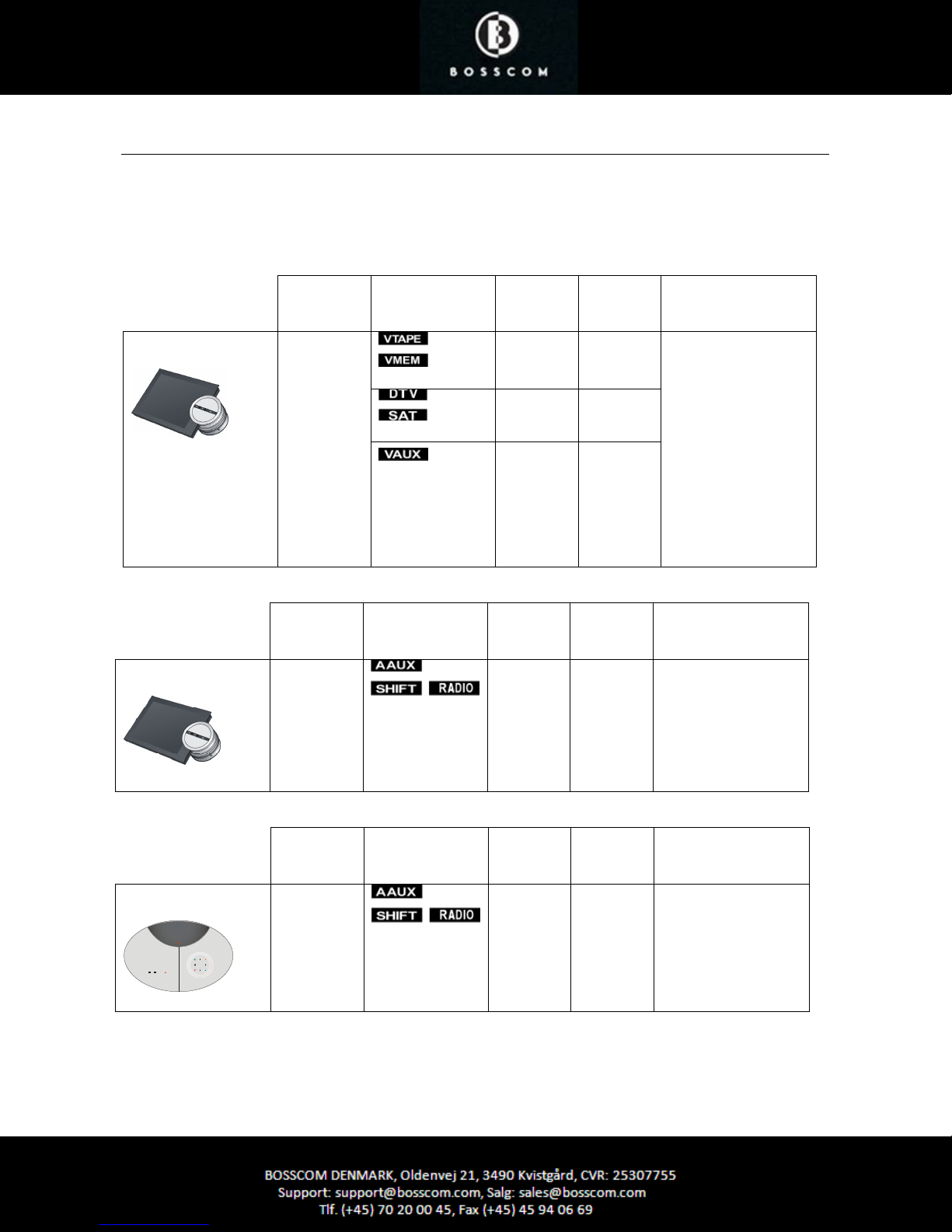
The following tables show the available input sockets on various Bang & Olufsen audio and video products, how to
select them using a remote control terminal and what the corresponding option program of the BOSSCOM DAB/FM
tuner should be.
The BOSSCOM DAB/ FM tuner has to be programmed with the right option to operate correctly:
BeoSound 5
BeoSound 5 Encore
Input
Socket
MasterLink
Input
Socket
LINE-IN
Source Selected
Source Selected
Direct
Option
- 410
- 416
- 412
Direct
Option
100 -
CableLink
Option
CableLink
Option
Remarks
If the MasterLink
socket is not used, the
DAB/FM tuner might
be connected and
operated via a BeoLink
Converter.
See page 16 for details
on connection of the
BeoLink Converter
1611.
Remarks
The Encore input is a
mini jack socket.
Use BOSSCOM
adaptor cable, type
39207437.
BeoCenter 2
Input
Socket
AUX-IN
Source Selected
Direct
Option
100 -
CableLink
Option
Remarks
The input is RCA
phono sockets. Use
BOSSCOM adaptor
cable, type 39207438.
Page 10
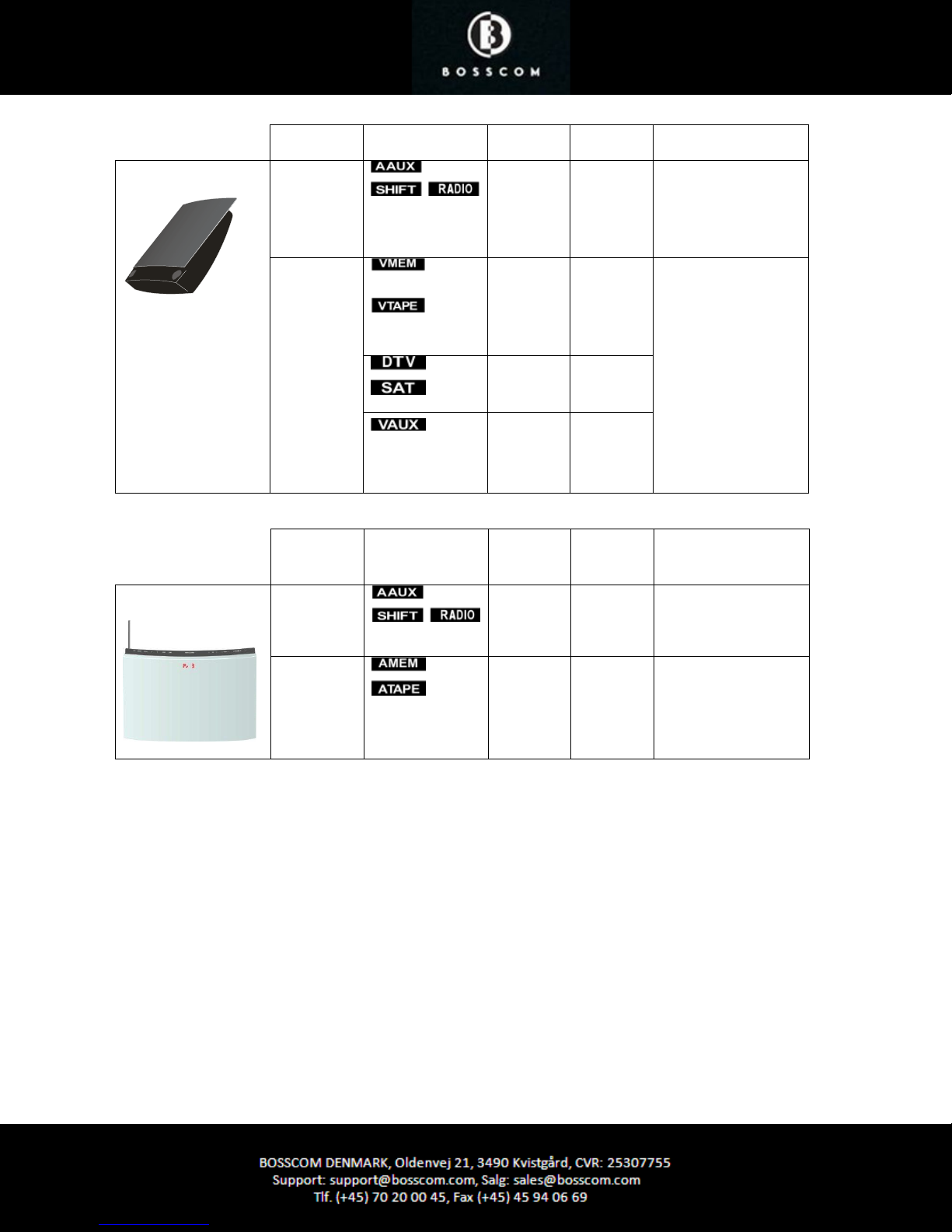
BeoSound 4
BeoSound 1
AUX
MasterLink
Input
Socket
AUX
Source Selected
100 -
-
410
- 416
- 412
Direct
Option
CableLink
Option
100 -
The input is RCA
phono sockets. Use
BOSSCOM adaptor
cable, type 39207438.
If the MasterLink
socket is not used, the
DAB/FM tuner might
be connected and
operated via a BeoLink
Converter.
See page 16 for details
on connection of the
BeoLink Converter
1611.
Remarks
AUX
102 -
Page 11
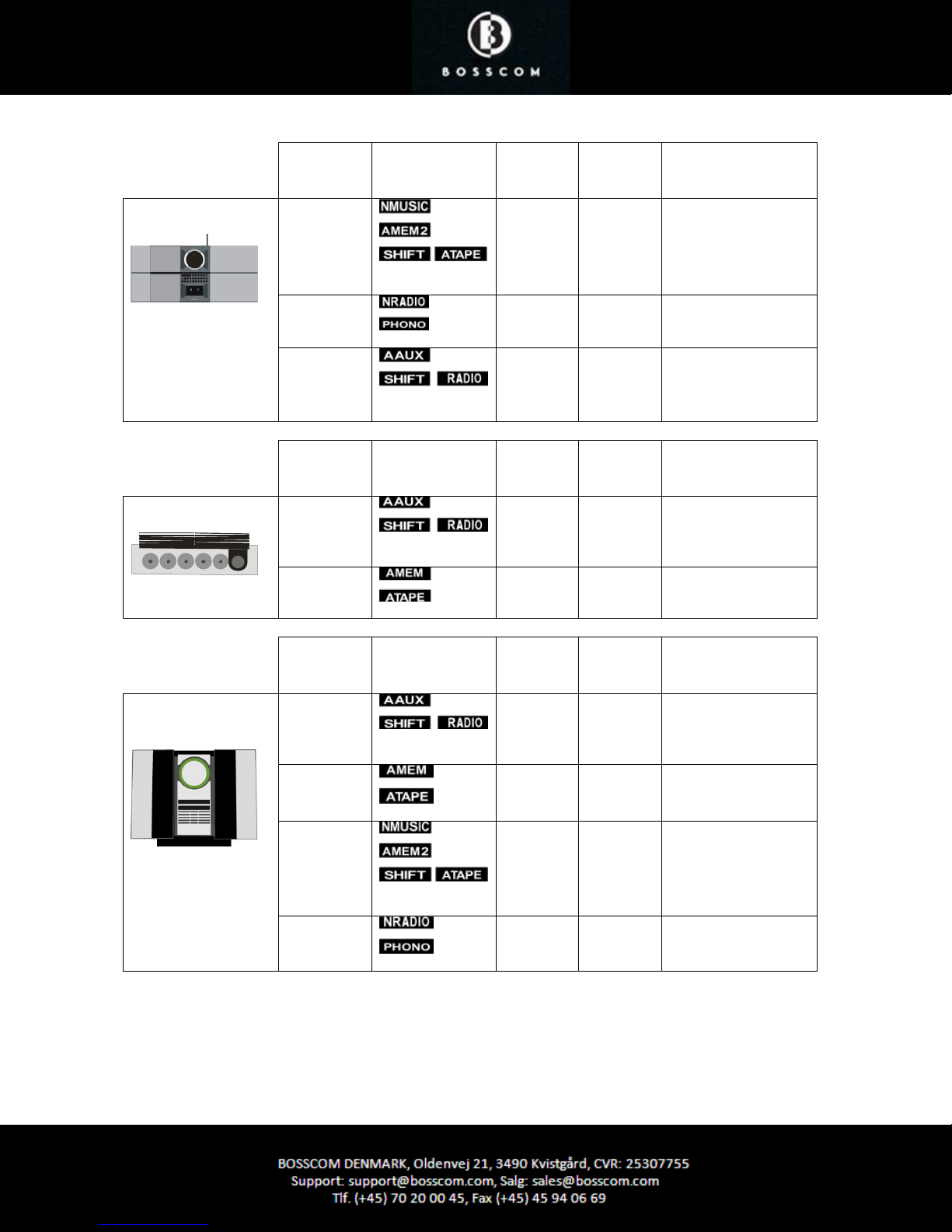
Input
Source Selected
Socket
Direct
Option
CableLink
Option
Remarks
BeoSound Century
BeoSound 9000
AUX
AUX
AUX
Input
Socket
AUX
AUX
Input
Socket
Source Selected
Source Selected
103 -
106 -
100 -
Direct
Option
100 -
102 -
Direct
Option
CableLink
Option
CableLink
Option
Remarks
Remarks
BeoSound 3000
BeoSound 3200
AUX
100 -
AUX
102 -
AUX
103 -
AUX
106 -
Page 12
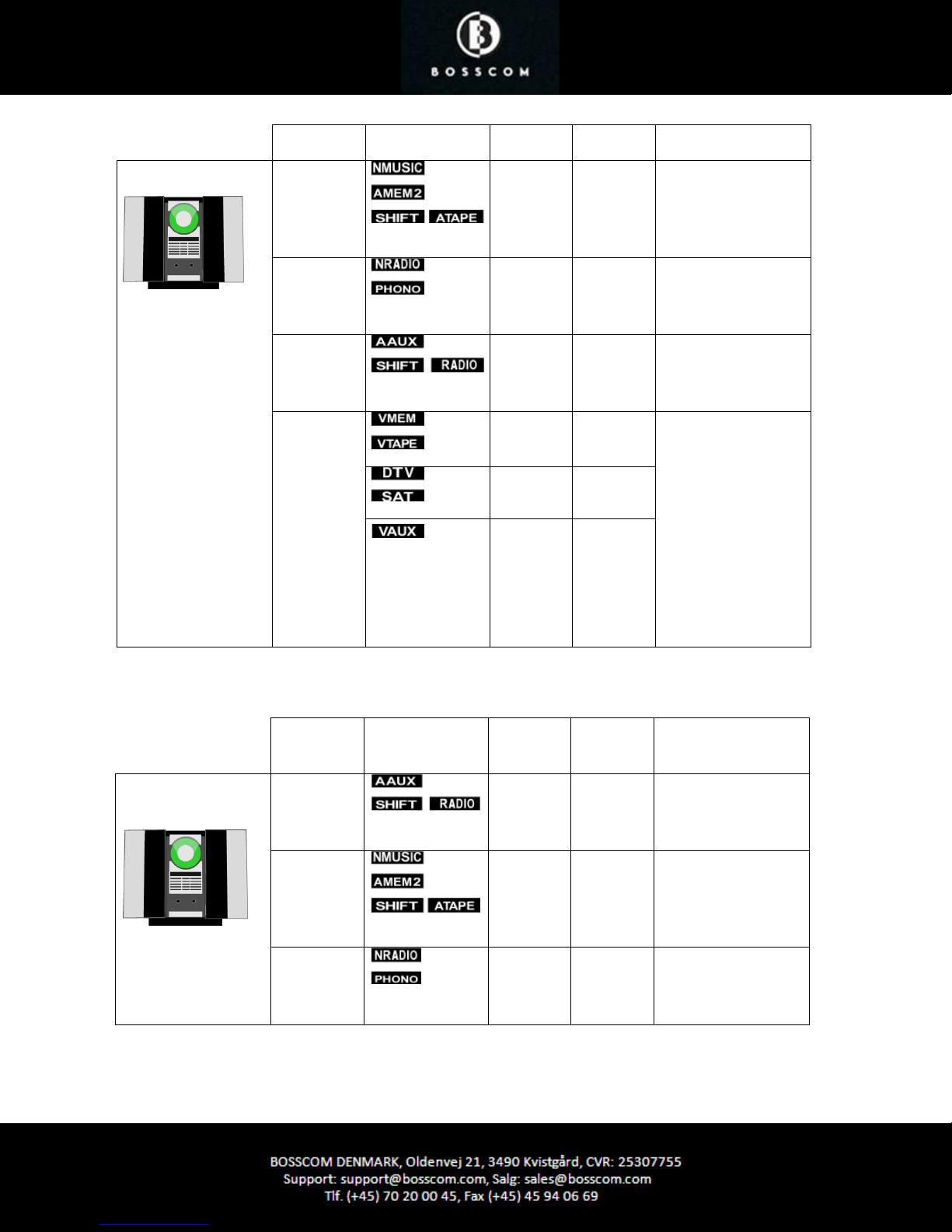
BeoSound Ouverture AUX
AUX
AUX
MasterLink
103 302
In the CableLink mode
numeric commands
are not accepted.
106 206
In the CableLink mode
numeric commands
are not accepted.
100 -
In the CableLink mode
numeric commands
- 410
are not accepted.
If the MasterLink
socket is not used, the
DAB/FM tuner might
- 416
- 412
be connected and
operated via a BeoLink
Converter.
See page 16 for details
on connection of the
BeoLink Converter
1611.
BeoSystem 2500
BeoCenter 2500
Input
Socket
AUX
AUX
AUX
Source Selected
Direct
Option
CableLink
Option
100 -
103 302
106 206
Remarks
In the CableLink mode
numeric commands
are not accepted.
In the CableLink mode
numeric commands
are not accepted.
In the CableLink mode
numeric commands
are not accepted.
Page 13
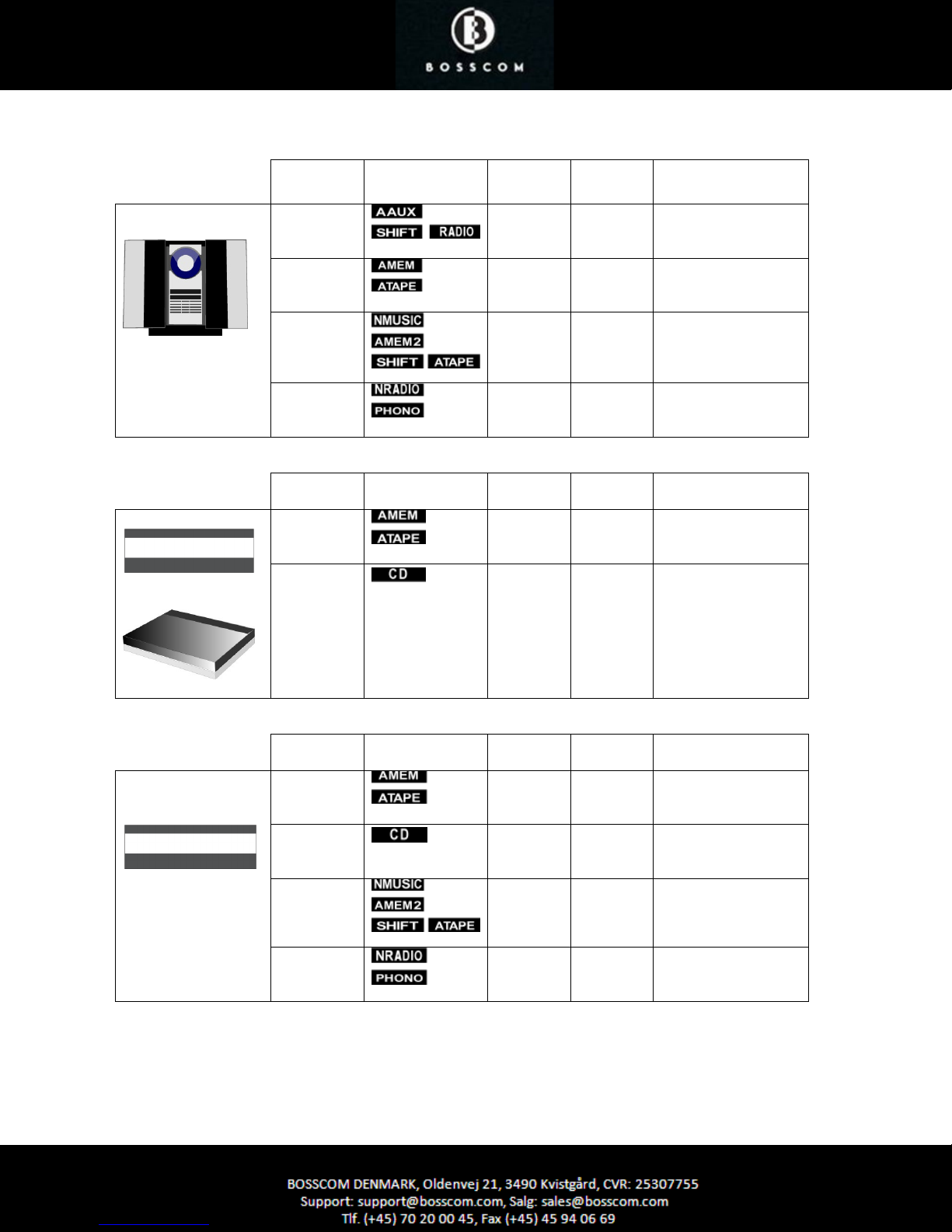
not accepted.
Input Socket Source Selected Direct
Option
BeoCenter 2300
AUX
AUX
100 300 In the CableLink mode
102 302 In the CableLink mode
AUX
103 303 In the CableLink mode
AUX
106 306 In the CableLink mode
Input Socket Source Selected Direct
Option
BeoMaster 3300
TP
102 302 In the CableLink mode
CD
104 204 In the CableLink mode
BeoMaster 5500
CableLink
Option
CableLink
Option
Remarks
numeric commands are
not accepted.
numeric commands are
not accepted.
numeric commands are
not accepted.
numeric commands are
not accepted.
Remarks
numeric commands are
numeric commands are
not accepted.
Input Socket Source Selected Direct
Option
BeoMaster 3500
BeoMaster 4500
TP1
102 302 In the CableLink mode
CD
104 204 In the CableLink mode
TP2
103 302 In the CableLink mode
PHONO
106 206 In the CableLink mode
CableLink
Option
Remarks
numeric commands are
not accepted.
numeric commands are
not accepted.
numeric commands are
not accepted.
numeric commands are
not accepted.
Page 14
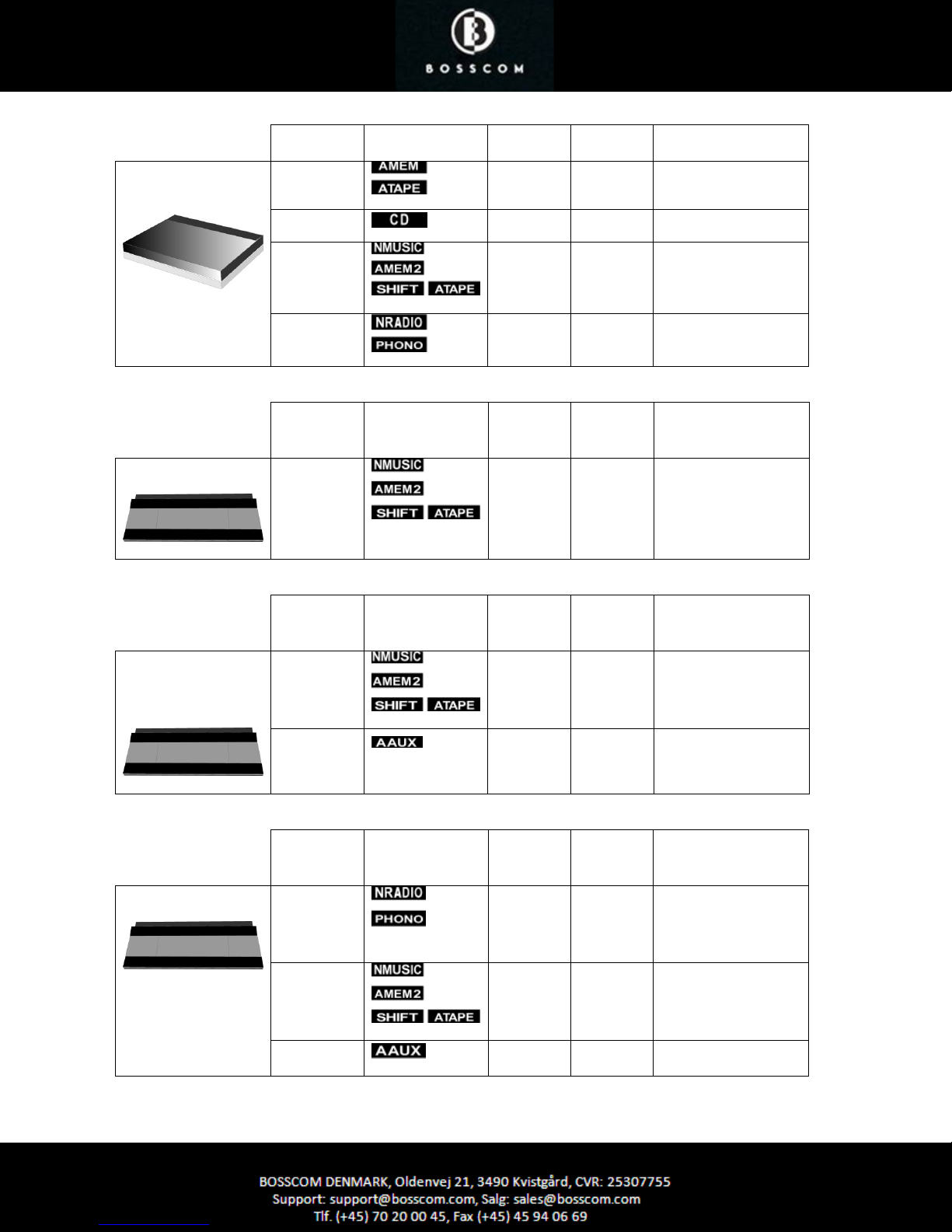
Input Socket Source Selected Direct
Option
BeoMaster 6500
BeoMaster 7000
TP1
102 302
CD
104 204
CableLink
Option
Remarks
TP2
PHONO
Input Socket Source Selected
BeoCenter 8000
TAPE2
Input Socket Source Selected
BeoCenter 8500
TAPE2
BeoCenter 9000
BeoCenter 9500
103 302
106 206
Direct
Option
CableLink
Option
103 302
Direct
Option
CableLink
Option
103 302
Remarks
In the CableLink mode
numeric commands are
not accepted.
Remarks
In the CableLink mode
numeric commands are
not accepted.
AUX
Input Socket Source Selected
BeoCenter 9300
PHONO
TAPE2
AUX
100 -
Direct
Option
CableLink
Option
106 206
103 302
100 -
Remarks
In the CableLink mode
numeric commands are
not accepted.
In the CableLink mode
numeric commands are
not accepted.
Page 15
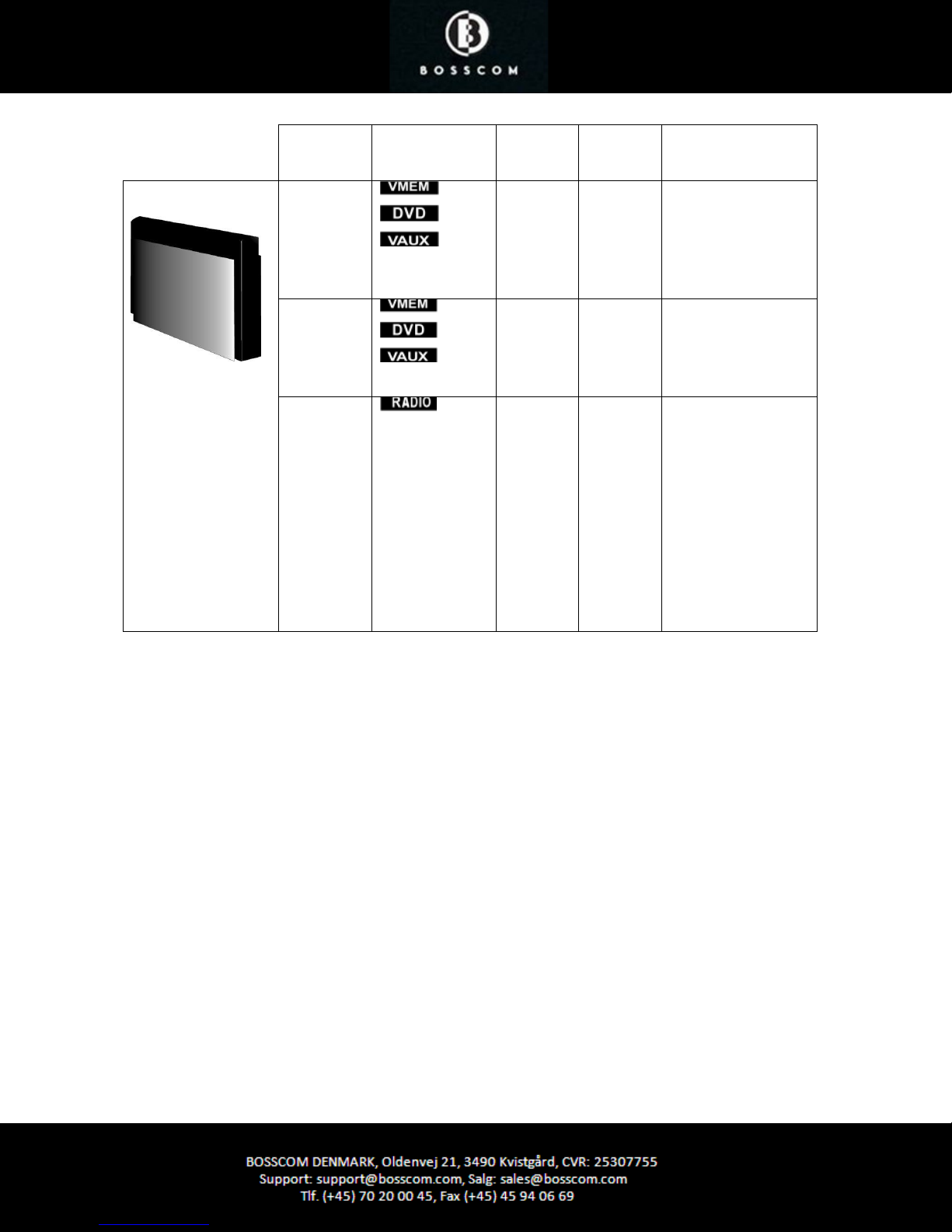
Input
Socket
Source Selected Direct
Option
CableLink
Option
Remarks
BeoSystem 3
AV1
AV2
AV3
AV4
AV5
AV6
MasterLink etc. -
-
-
410
414
412
410
414
412
The input is a scart
socket, 21 pin AV
socket. Use BOSSCOM
adaptor cable, type
39207496.
The input is RCA
phono sockets. Use
BOSSCOM adaptor
cable, type 39207438.
If the MasterLink
socket is not used, the
DAB/FM tuner might
be connected and
operated via a BeoLink
Converter.
See page 16 for details
on connection of the
BeoLink Converter
1611.
Page 16
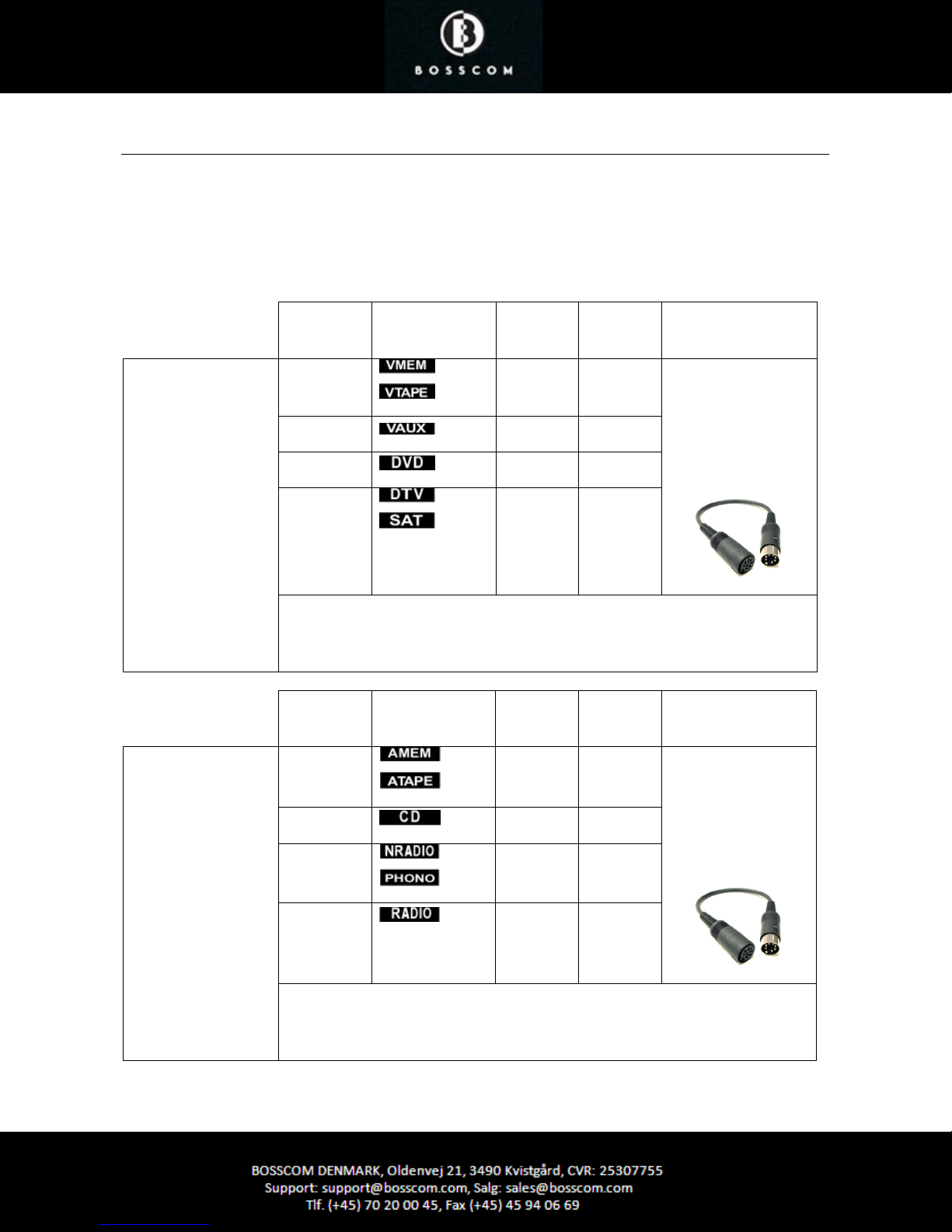
Connection via BeoLink Converter 1611/1612
BOSSCOM DAB/FM tuner may be connected to a Bang & Olufsen stand-alone audio or video master, TV, via a BeoLink
Converter using MasterLink and the AAL inputs.
Connected to an audio master and programmed as an ”video source” the DAB/FM tuner may be selected as that,
VMEM as an example. Connected to a video master and programmed as an “audio source” the DAB/FM may be
selected as that, ATAPE as an example. Notice that Bang & Olufsen equipment has to be programmed in option 2. See
the relevant Bang & Olufsen user guide.
BeoLink Converter
1611 or 1612 used
with a Bang & Olufsen audio master
and BOSSCOM
DAB/FM tuner.
BeoLink Converter
1611 or 1612 used
with a Bang & Olufsen
TV and the DAB/FM.
Input
Socket
AAL
AAL
AAL
AAL
The BeoLink Converter 1611 connects to a stand-alone Bang & Olufsen audio master
with a MasterLink cable. Connection of more Bang & Olufsen equipment might create
control conflicts.
Input
Socket
AAL
AAL
AAL
Source Selected
Source Selected
Direct
Option
- 410
- 412
- 414
- 416
Direct
Option
- 402
- 404
- 406
CableLink
Option
CableLink
Option
Remarks
BOSSCOM DAB/FM
connects to the
BeoLink Converter
with BOSSCOM VSNUT
adaptor cable, type
39207434.
Remarks
The DAB/FM connects
to the BeoLink
Converter with
BOSSCOM ASNUT
adaptor cable, type
39207432.
AAL
The BeoLink Converter 1611 connects to a stand-alone Bang & Olufsen TV with a
MasterLink cable. Connection of more Bang & Olufsen equipment might create control
conflicts.
- 408
Page 17
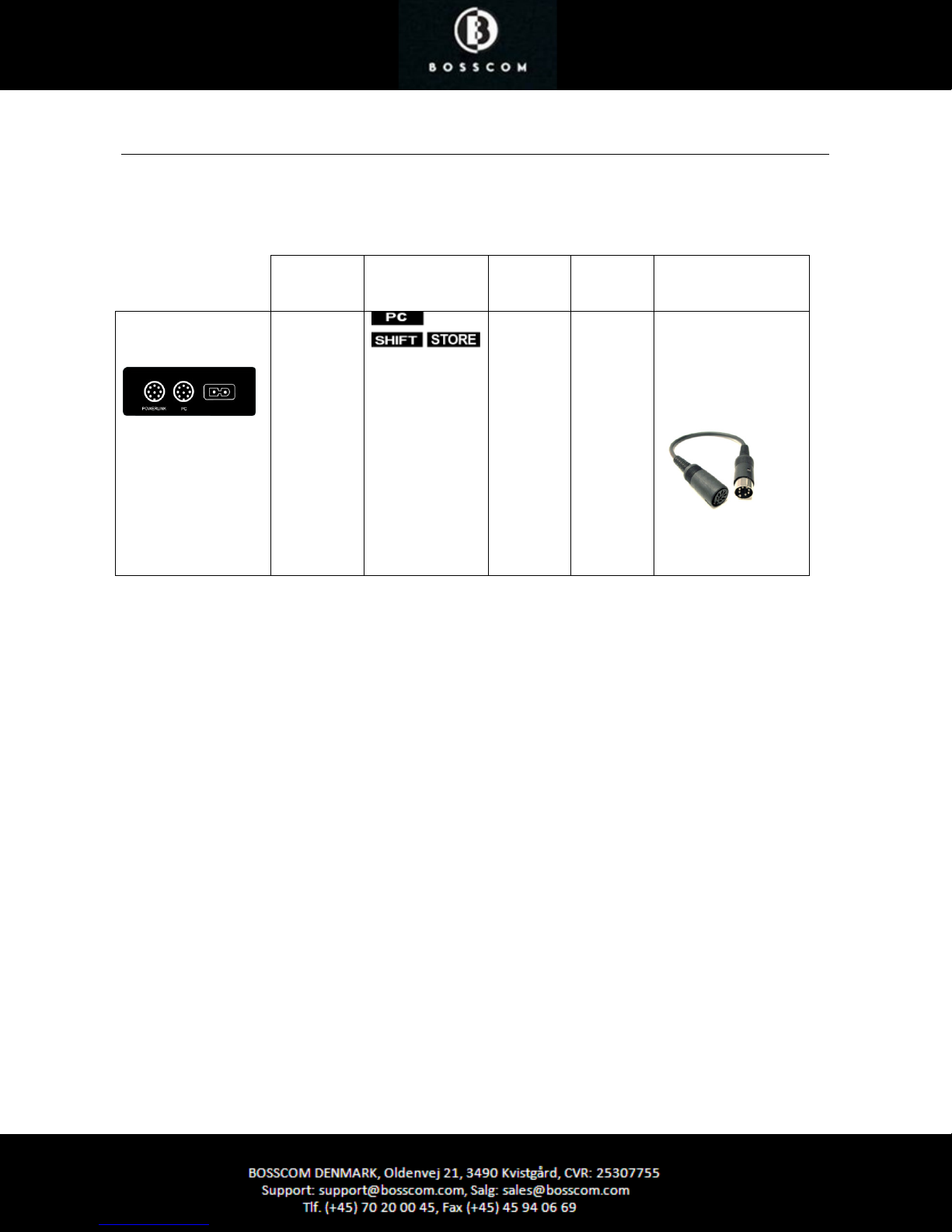
Connection via BeoLink Active in any Link Room
BOSSCOM DAB/FM tuner may be connected to a Bang & Olufsen BeoLink Active with a vacant ‘PC’ socket.
Thus active speakers in any link room allow for the installation of the DAB/FM tuner and the opportunity of having a
local radio source controlled directly with the Bang & Olufsen remote control terminal.
BeoLink Active
Input
Socket
PC
Source Selected
Direct
Option
118 -
CableLink
Option
Remarks
The DAB/FM connects
to the BeoLink Active
with BOSSCOM
PCSNUT adaptor
cable, type 39207436.
Page 18
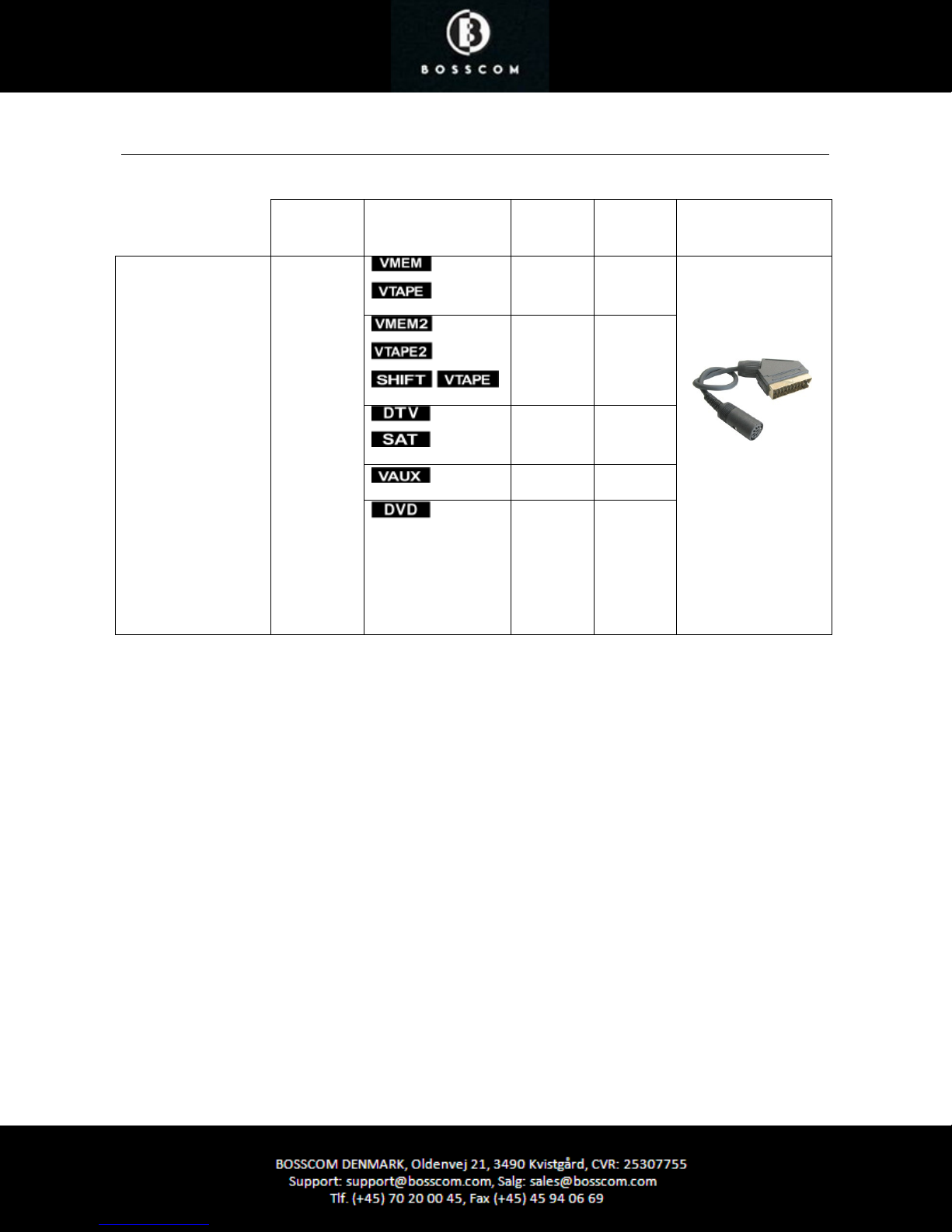
Connection to 21 Pin AV Socket on any Bang & Olufsen TV
All B&O TV models
BeoVision 10
BeoVision 8
BeoVision 7
BeoVision 6
BeoVision 4
BeoVision 3
BeoVision 1
BeoSystem 3
Avant models
LX models
LE models
LS models
L models
MX models
ME models
Input
Socket
Scart
AV1 - AV6
NOT the
DECODER
input!!
Source Selected
Direct
Option
110 410
110 410
116 416
112 412
114 414
CableLink
Option
Remarks
The input is a scart
socket, 21 pin AV
socket. Use BOSSCOM
adaptor cable, type
39207496.
Check the TV user
guide for
programming of the
AV connections.
 Loading...