

Page 1

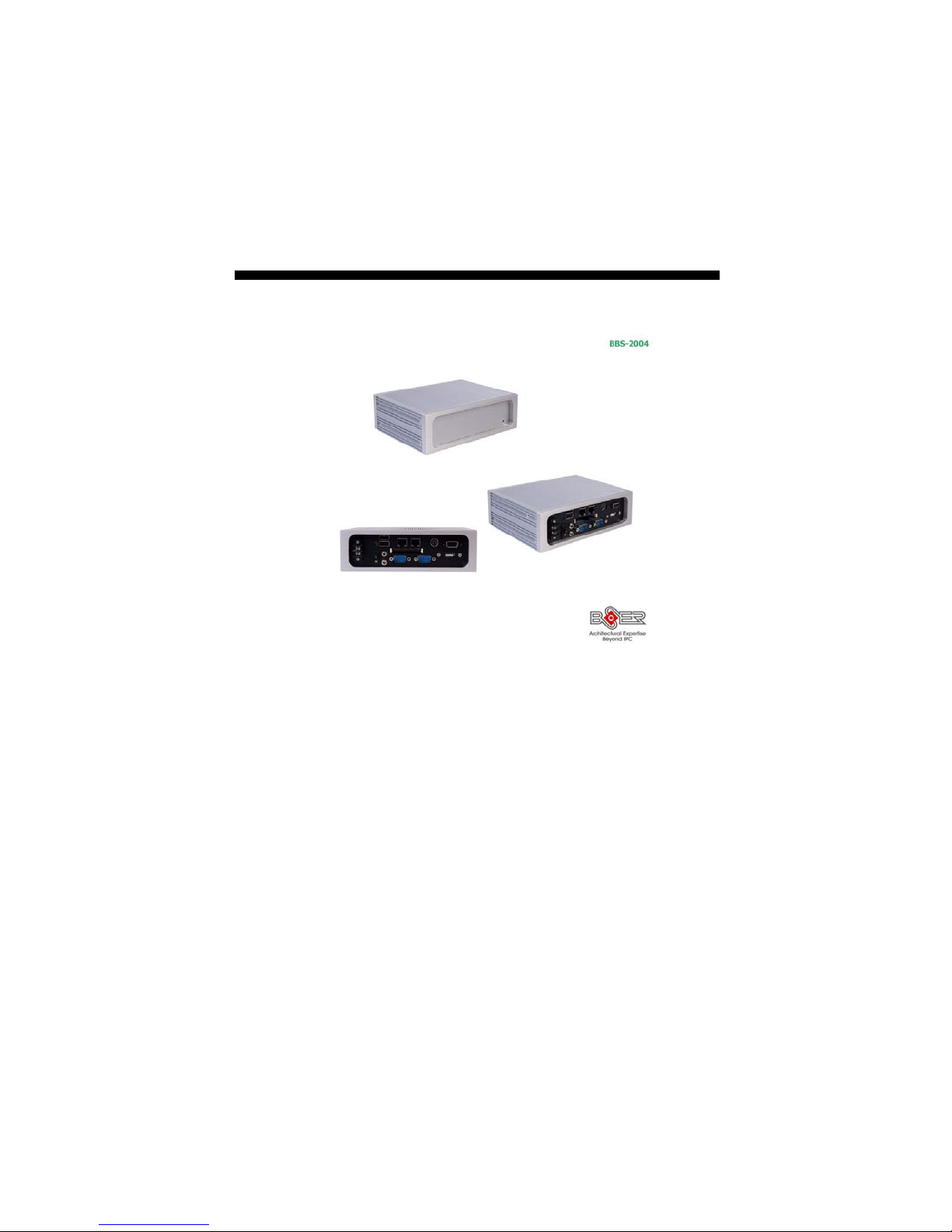
BBS-2004
Fanless, Box PC with VIA V4 Eden 1GHz or
Atom™ N270, CF, +12V DC In
Page 2

Copyright Disclaimers
The accuracy of contents in this manual has passed through checking and review before
publishing. BOSER Technology Co., Ltd., the manufacturer and publisher, is not liable for
any infringements of patents or other rights resulting from its use. The
not be responsible for any direct, indirect, special, incidental or consequential
damages arising from the use of this product or documentation, even if advised of
the possibility of such damage(s).
This manual is copyrighted and BOSER Technology Co., Ltd. reserves all
documentation rights. Unauthorized reproduction, transmission, translation, and
storage of any form and means (i.e.,
of this document, in whole or partly, is prohibited, unless granted permission by BOSER
Technology Co., Ltd.
BOSER Technology Co., Ltd. reserves the right to change or improve the contents of
this document without due notice. BOSER Technology Co., Ltd. assumes no
responsibility for any errors or omissions that may appear in this manual, nor does
it make any commitment to update the information contained herein.
T
r
a
d
e
m
T
r
T
r
BOSER is a registered trademark of BOSER Technology Co., Ltd.
ISB is a registered trademark of BOSER Technology Co., Ltd.
Intel is a registered trademark of Intel Corporation.
Award is a registered trademark of Award Software, Inc.
AMI is a registered trademark of AMI Software, Inc.
All other trademarks, products and or product names mentioned herein are
mentioned for identification purposes only, and may be trademarks and/or
registered trademarks of their respective companies or owners.
a
a
d
e
m
a
a
d
e
m
a
r
k
s
r
k
s
r
k
s
electronic, mechanical, photocopying, recording)
manufacturer will
© Copyright 2010 BOSER Technology Co., Ltd.
All Rights Reserved.
Edition 1.1, March 30, 2010
Page 3

Table of Contents
Chapter 1 General Description ..................................1
1.1 Major Features....................................................................... 2
1.2 Specifications ........................................................................ 2
1.3 Dimensions ............................................................................ 4
Chapter 2 Unpacking .................................................. 5
2.1 Opening the Delivery Package............................................. 5
2.2 Inspection............................................................................... 5
Chapter 3 Hardware Installation ..............................7
3.1 HDD Installation..................................................................... 7
3.2 Installation SBC..................................................................... 8
3.3 Cover Installation ................................................................ 10
3.4 Wallmount Kit ...................................................................... 11
Page 4

Declaration of Conformity -- CE Mark
BOSER Technology hereby acknowledges that compliance testing in
accordance with applicable standards of the EU’s EMC Directive,
89/336/EEC, was successfully completed on a sample of the equipment
identified below:
Equipment Class: Information Technology Equipment
Product Model Series: BBS-2004
This Product Complies With: EN55022: Class A for Radiated emissions
EN50082-2: Heavy Industrial EMC Immunity
We, the undersigned, hereby declare that the equipment specified above
conforms to the above directives and standards.
Manufacturer:
BOSER TECHNOLOGY CO., LTD.
Page 5

Safety Instructions
The safety recommendations outlined in this section are read, understood
and followed before you operate the product. Keep this information in a
safe place for future reference. Failure to comply with any of the following
safety procedures could result in serious damage.
Do not operate the product for any purposes other than its
intended use
This product is intended for indoor use only
Do not operate the product if power cord is damaged in
anyway
Do not insert objects into openings
Do not immerse the product in water or permit liquids to
spill inside of the product.
Turn off power when the product is unattended or not in
use. Unplug product before moving it or when it is not in
use for an extended period of time. The socket-outlet shall
be installed near the equipment and shall be easily
accessible
Do not alter or extend the electric plug. which is configured
for the appropriate electrical supply
Do not overload electrical outlets beyond their capacity as
this can result in a fire
NOTE: DO NOT TOUCH THE PRODUCT OR ANY OTHER SENSITIVE
COMPONENTS WITHOUT ALL NECESSARY ANTI-STATIC
PROTECTIONS.
Page 6

This page intentionally left blank.
Page 7
Chapter 1
General Description
The BBS-2004 series is an industrial-grade Compact PC. The rear
design of BBS-2004 series come with easy assembly when needed. It
also supports various mounting solution for different applications.
This model can be accommodated with BOSER’s mini ITX board. The
BBS-2004 series provides VGA, LAN, MIC In, Line Out, COM, USB2.0
and KB/MS ports.
The BBS-2004 series is IBM PC/AT compatible and can
be drawn from a large body of hardware and software
resources worldwide.
A variety of operation systems can be used in BBS-2004
The BBS-2004 can be use widely such as Digital
signage, Factory Automation, Oil Industry,
Entertainment, and transportation, etc.
You can select a mainboard from various range to meet
your optimal configuration and budget.
1
Page 8

1.1 Major Features
The BBS-2004 series comes with the following features:
Fanless, box PC design
BBS-2004-G w/HS-2615+VIA V4 Eden 1GHz CPU, +12V DC in, CF, 4 x
COM, 5 x USB2.0
BBS-2004-I w/HS-2621+Intel® Atom™ N270 processor 1.6GHz, +12V
DC in, 4 x COM, 4 x USB2.0
1 x 2.5” HDD space
Option for 12V DC in 60W adapter
1.2 Specifications
Mechanical
Dimensions (LxHxW)
19.0 x 5.8 x 13.6 cm
Operation/Storage Temperature
0~+45 degrees C/-20~+70 degrees C
EMC
FCC/CE
Power In
+12V DC in or option 12V DC in 60W adapter
System
BBS-2004-G
SBC Model
HS-2615
CPU
VIA V4 Eden 1GHz CPU
BIOS
Award PnP Flash BIOS
System Chipset
VIA CX700(M)
System Memory
1 x 200-pin SO-DIMM socket up to 1GB DDR2 SDRAM
Display Chipset
VIA CX700(M)
Audio Chipset
VIA VT1708A
2
Page 9
Ethernet Chipset
Dual RealTek RTL8139DL10/100/1000 Mbps LAN
Drive Bay
1 x 2.5” HDD space
Storage
1 x Type II CF socket
Watchdog Timer
Software programmable time-out intervals from 1~255 sec. or
1~255 min.
External I/O
5 x USB2.0, 4 x COM, MIC In, Line Out, 2 x LAN, CF,
PS/2 KB/MS, VGA
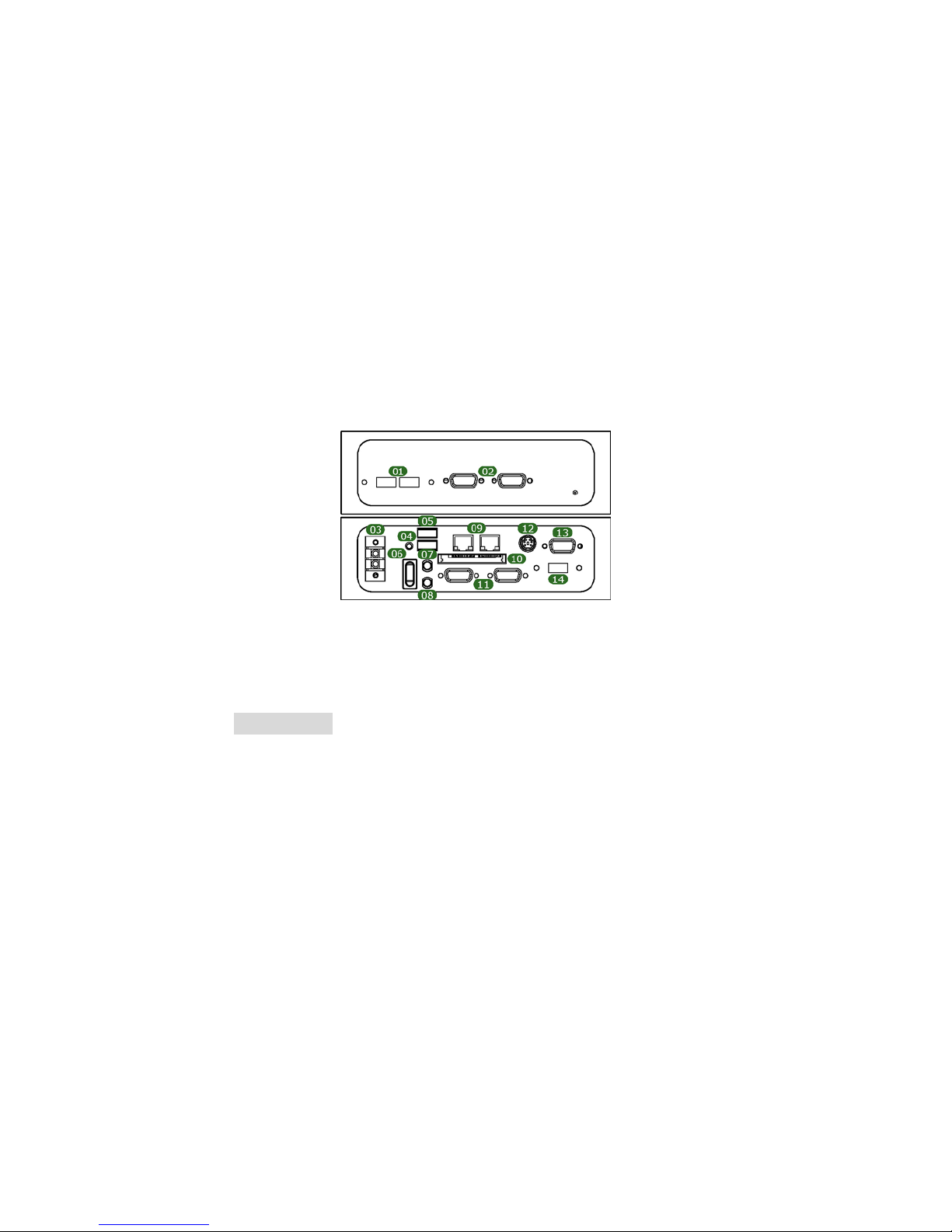
Rear I/O
01. USB2.0 * 2 06. Main Power ON/OFF 11. COM * 2
02. COM * 2 07. MIC In 12. KB/MS
03. +12V DC In or DC Adapter
In
04. Reset Button 09. LAN * 2 14. USB2.0
05. USB2.0 * 2 10. CF
08. Line Out 13. VGA
BBS-2004-I
SBC Model
HS-2621
CPU
Intel® Atom
BIOS
Award PnP Flash BIOS
System Chipset
Intel® 945GSE/ICH7-M
System Memory
1 x 200-pin SO-DIMM socket up to 2GB DDR SDRAM
Display Chipset
Intel® 945GSE
Audio Chipset
RealTek ALC202A
TM
N270 processor 1.6GHz
3
Page 10
Ethernet Chipset
RealTek RTL8111C 10/100/1000 Mbps LAN
Drive Bay
1 x 2.5” HDD space
Watchdog Timer
Software programmable time-out intervasls from 1~255 sec. or
1~255 min.
External I/O
4 x USB2.0, 4 x COM, LAN, PS/2 KB/MS, VGA, MIC In, Line Out
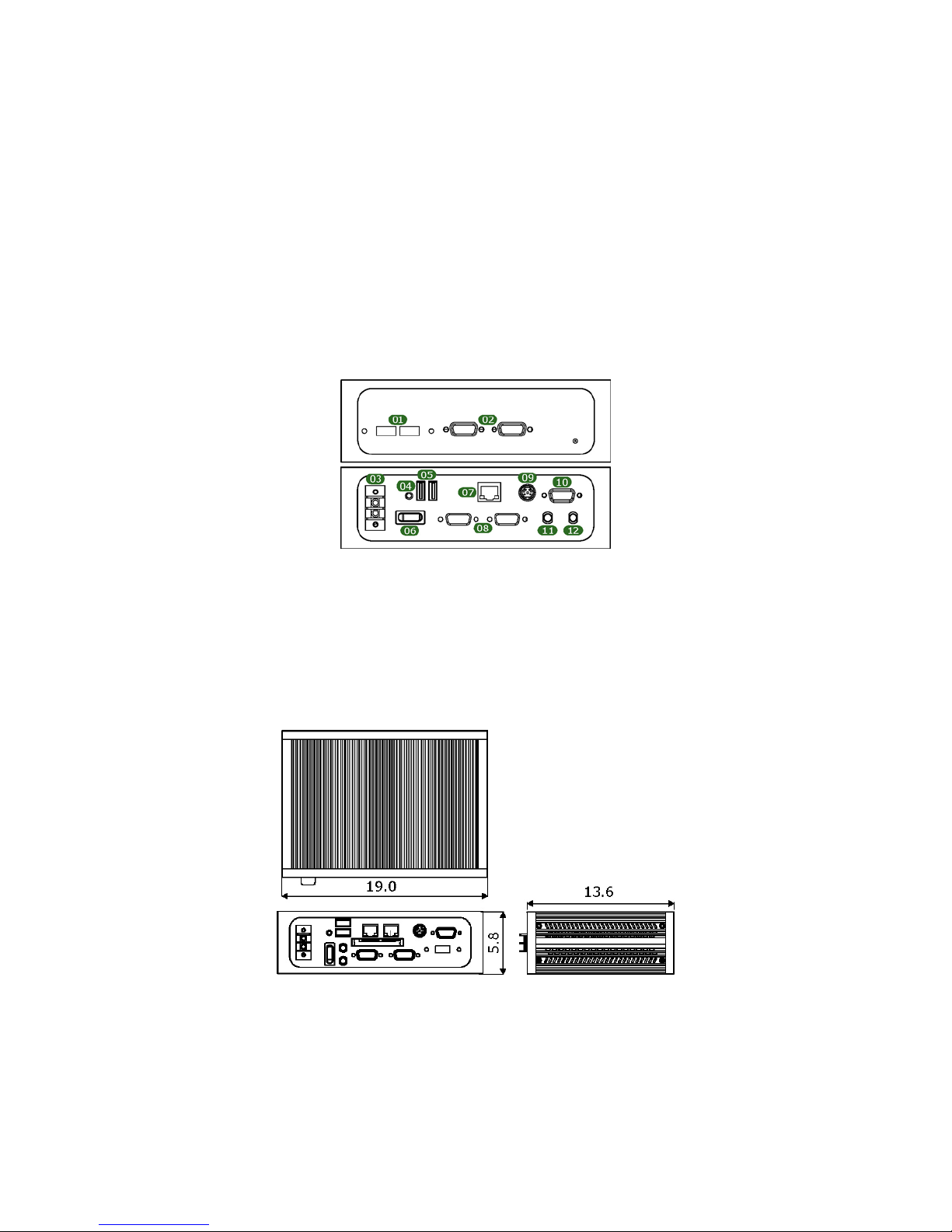
Rear I/O
01. USB2.0 * 2 05. USB2.0 *2 09. KB/MS
02. COM * 2 06. Main Power
ON/OFF
03. +12V DC In or DC Adapter
In
04. Reset Button 08. COM * 2 12. Line Out
07. LAN 11. MIC In
10. VGA
1.3 Dimensions
Dimension measured in cm
4
Page 11

Chapter 2
Unpacking
2.1 Opening the Delivery Package
The BBS-2004 is packed with an anti-static bag. The board contains
sensitive electrical components that are easily damaged by static
(electricity). Do not remove the anti-static wrapping until proper
grounding have been taken. Safety instruction has been described the
anti-static precautions and procedures in the previous.
2.2 Inspection
After unpacking the Panel PC, place it on a raised surface and carefully
inspect the board for any damage that might have occurred during
shipment. Ground the board and exercise carefrlly to prevent any
damage to the board from static.
Integrated circuits will sometimes come out of their sockets during
shipment. Examine all integrated circuits, particularly the BIOS,
processor, memory modules, ROM-Disk, and keyboard controller chip
to ensure that they are firmly seated. The BBS-2004 series delivery
package contains the following items:
BBS-2004 x 1
Power Cable x 1
Drive CD Disk x 1, including System Board User’s Manual and BBS-2004
User’s Manual
It is recommended that user keeps all the parts of the delivery package
intactness and store them in a safe/dry place for any require the
returning of the product. In case you find any missing and/or damaged
items from the list, please contact your dealer or sale representatives
immediately.
5
Page 12

This page intentionally left blank.
6
Page 13
Chapter 3
Hardware Installation
This chapter illustrates how to install components into the compact PC
system. Please refer to system board’s manual for the external
interface.
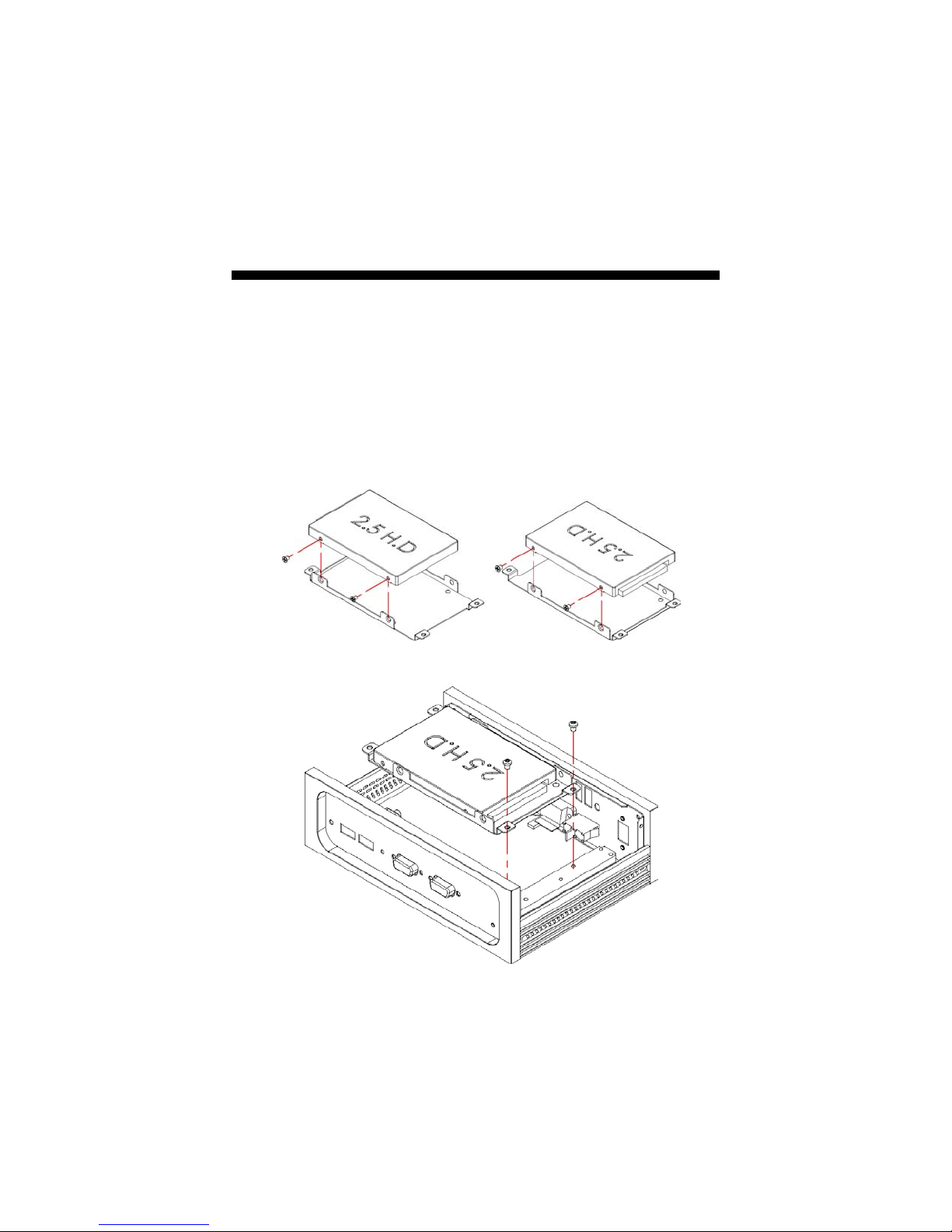
3.1 HDD Installation
1. Follow the photo instructions to install the HDD onto the HDD
mounting bracket.
2. Follow the photo instructions to install the HDD_KIT onto the
chassis.
7
Page 14
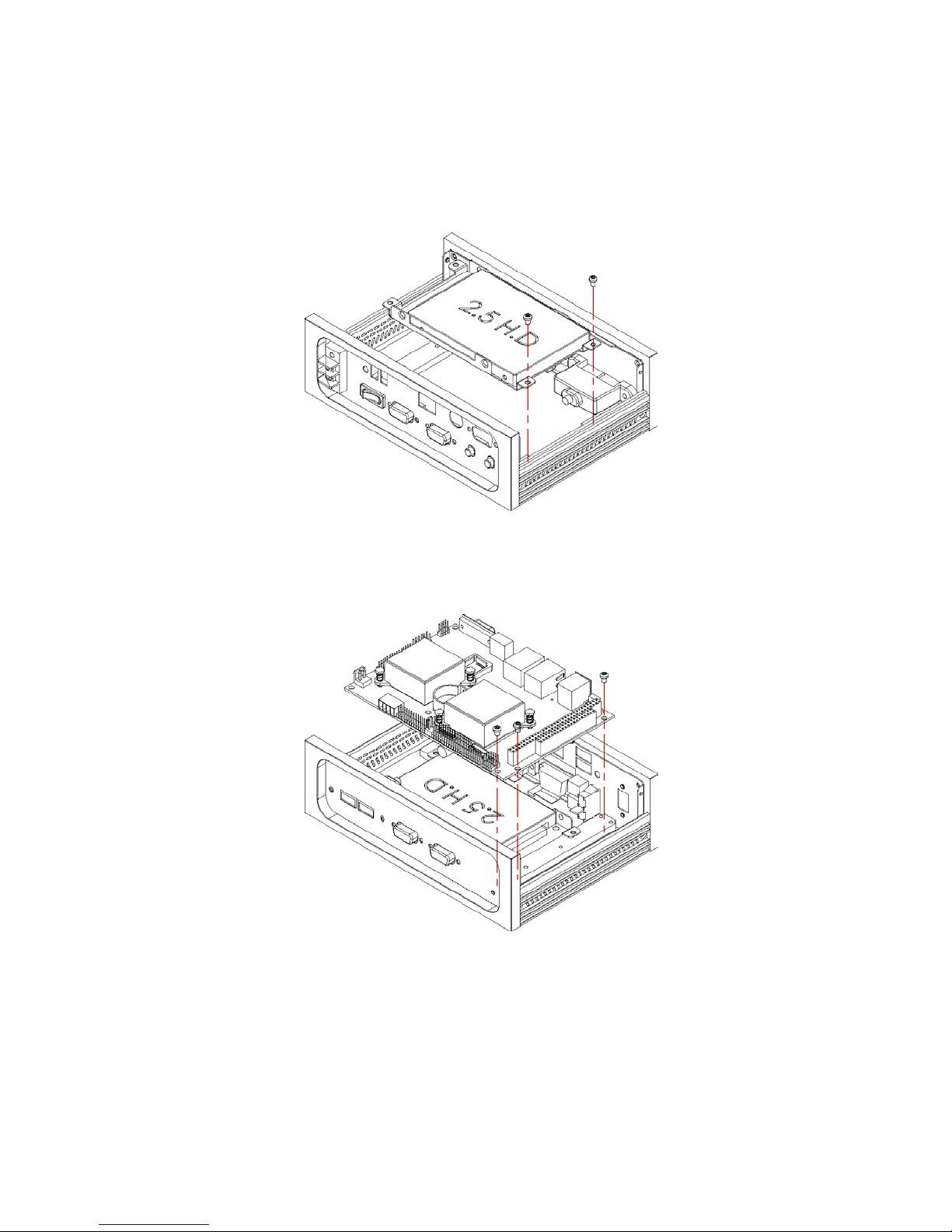
3.2 Installation SBC
3.2.1 BBS-2004-G(HS-2615)
1. Install the SBC with chassis.
8
Page 15
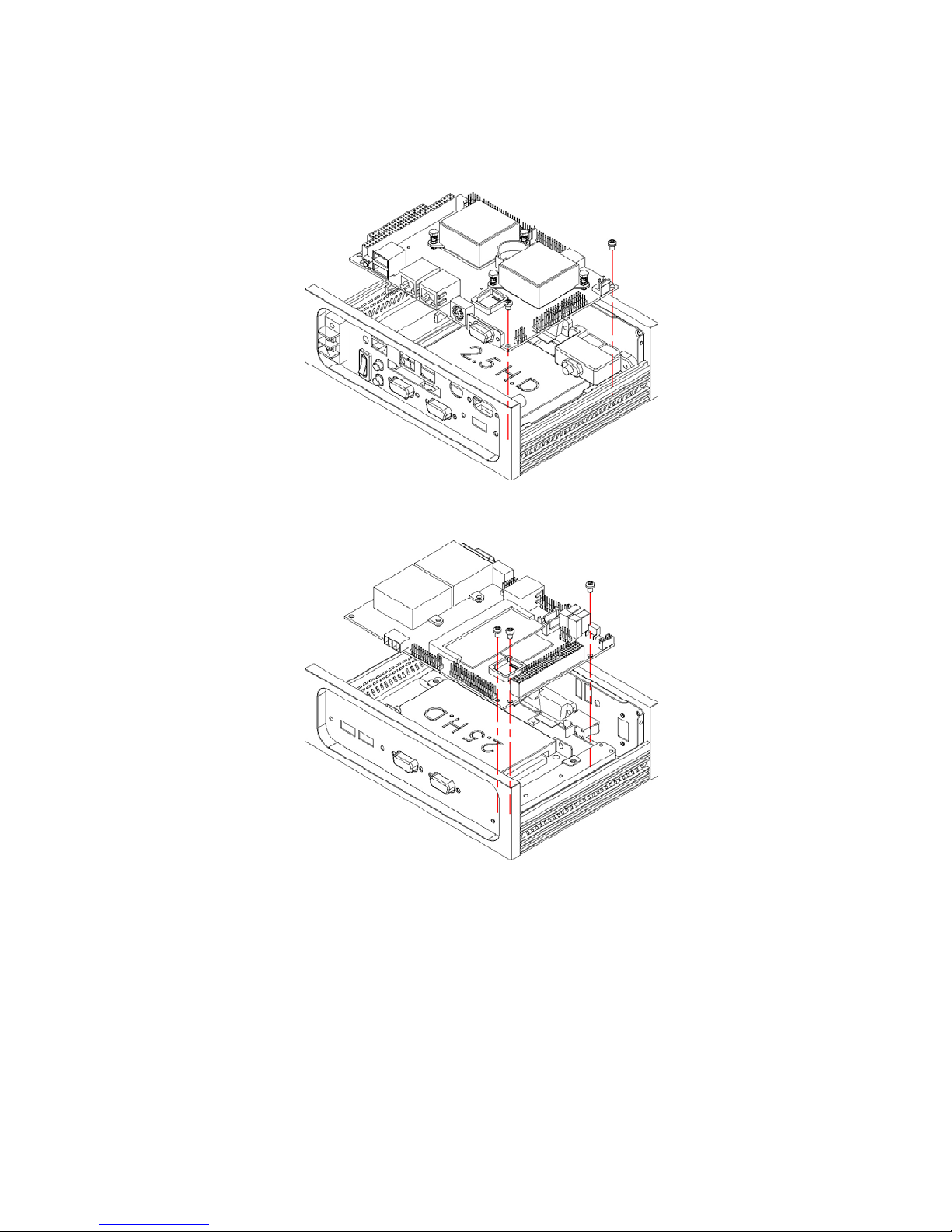
3.2.2 BBS-2004-I(HS-2621)
1. Install the SBC with chassis.
9
Page 16
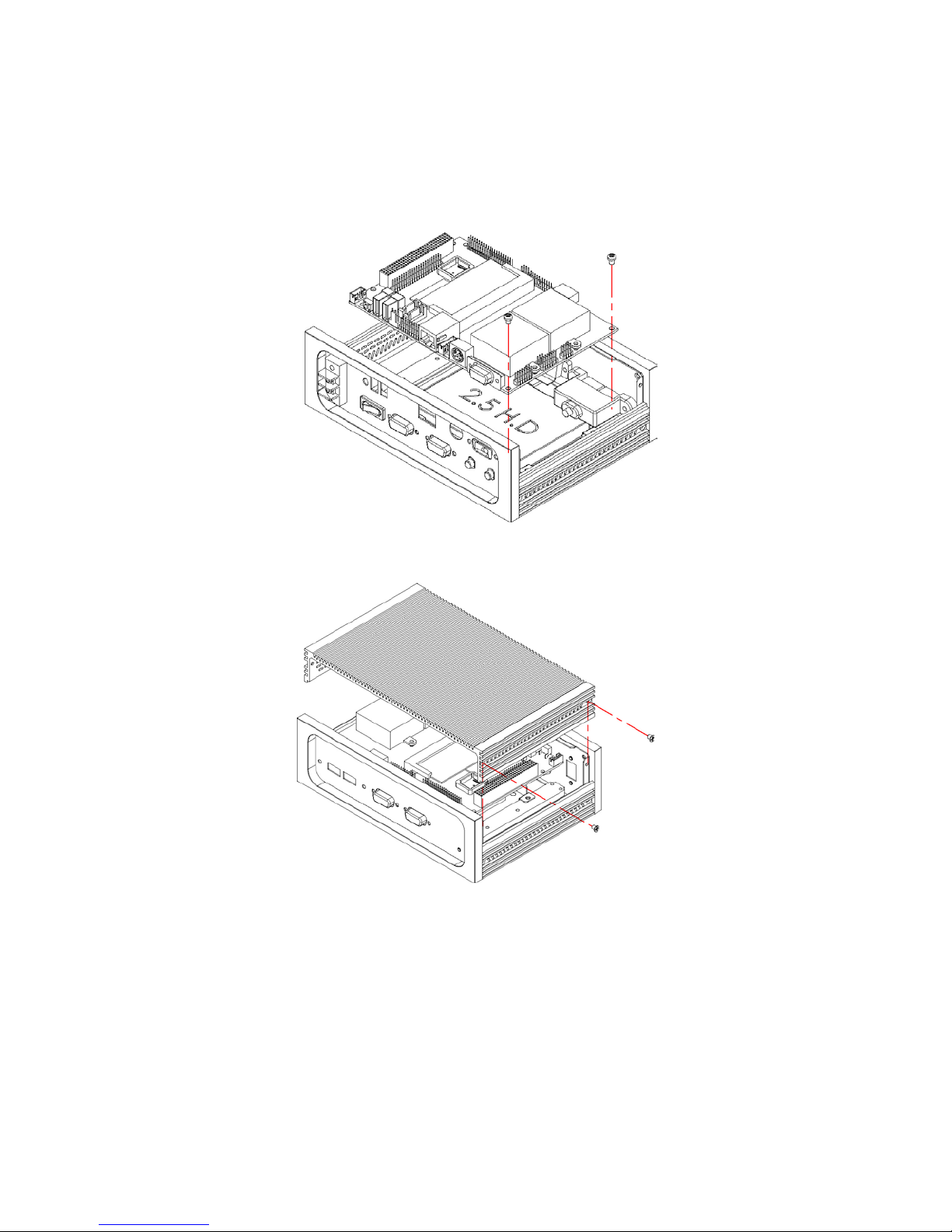
3.3 Cover Installation
10
Page 17
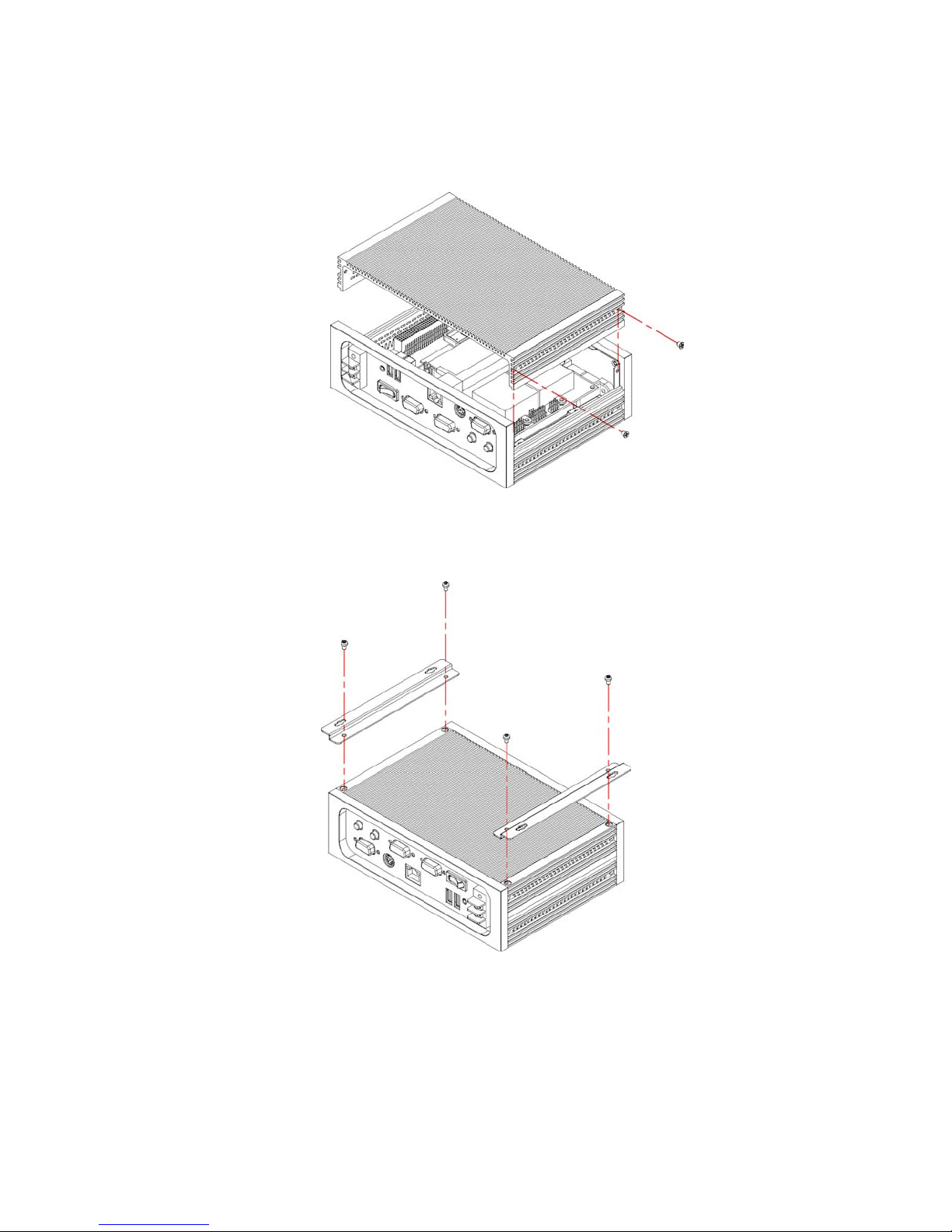
3.4 Wallmount Kit
1. There are two wallmount accessories coming with package.
Please use them shown below.
11
Page 18

This page intentionally left blank.
12
 Loading...