

BosCom e-Twinax 4693, e-Twinax 4756, e-Twinax 4608, e-Twinax 4610, e-Twinax 4712 Specification
...Page 1
1
2
3
4
5
6
7
8
1
2
3
4
5
6
7
8
e-Twin@x Controller™
Complete hardware and software solution that provides a
secure Twinax-over-TCP/IP connection to a local or remote
AS/400 – without SNA!
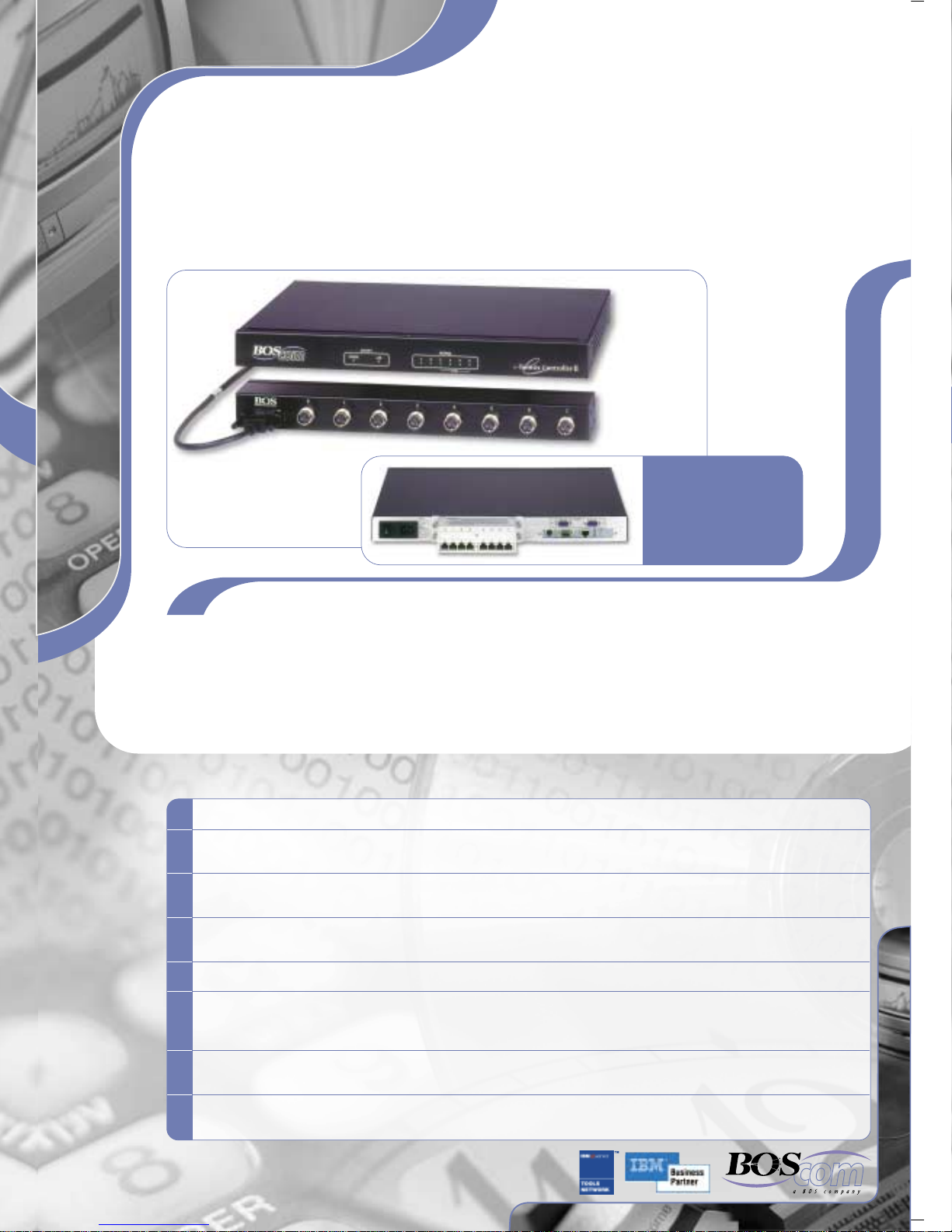
Rear view of e-TwinSt@r
Controller, with RJ45 unit
attached.
Overview
The e-Twin@x Controller is the only SNA-free, pure TCP/IP Controller in existence. It allows you to leverage your investment
in Twinax by supporting all Twinax display stations and printers (both SCS and IPDS), as well as existing cabling. When
used as a remote Controller, all SNA, AnyNet and MPTN traffic is eliminated, leaving your network with a single protocol:
pure TCP/IP, which is easy to configure and maintain, and is routable. The e-Twin@x Controller also supports remote
management via a Web browser, saving you valuable technical resources.
Advantages
Replaces SNA connectivity and Anynet protocol with simple, easy-to-configure TN5250e TCP/IP.
Serves as a secure, low cost connection from your remote branches to the AS/400 using the Internet, saving a fortune
in leased line expenses.
Allows configuration and management from a standard Web browser that accesses the Controller via dial up or over
the WAN; most changes can be done without restarting the Controller.
Includes a built-in 2- or 6-port* Remote Access Server (RAS), complete with AS/400 client RAS software, built-in
firewall and support for RADIUS standards.
Housed in a compact 1U communications Controller that fits into standard 19” rack-mount communications cabinets.
Provides IP over Twinax connection to a local or remote AS/400, allowing Twinax-attached PCs to benefit from IP
applications such as e-Mail, Web browsers and Microsoft Networking, while running up to 5 times faster when used
with BOS IP over Twinax drivers.
Supports up to 112 Twinax devices; upgrades to expand the number of devices supported from 8 up to 56, are
software-based and can be applied either on-site or remotely, via the Internet.
Provides an interface to Citrix Metaframe supporting Twinax technology or other corporate intranet computing for
PCs using IP over Twinax.
* optional
Page 2
Secure, Reliable, Low Cost Connection using the Internet
1
2
When the traditional SDLC connection is replaced with a Wide Area Network (WAN) connection using TCP/IP, the e-Twin@x
Controller can be used to maintain legacy Twinax devices (such as high-speed printers and dumb terminals) at your remote
sites. In this configuration, all the devices will appear on the AS/400 as TN5250 devices, and all PC devices can connect
to the AS/400 either by using dumb terminal emulation or by installing the e-Twin@x version of BOSâNOVA TCP/IP or IBM
TCP/IP drivers to connect to the AS/400 over TCP/IP.
The e-Twin@x Controller can be connected to the AS/400 via the Internet, saving you a fortune in leased line expenses.
Requirements are minimal:
Local site: a fixed connection to the Internet and BOS' Java-based SECURIT-e Server™, which can be run on the
AS/400, and any PC or Mini Computer with a Windows, Unix-based or Linux operating system.
Remote site: a connection to the Internet, either via a dial up account or using a leased line to a local ISP.
5250 traffic, encrypted via industry-standard algorithms, flows from the Controller to the Java-based server, where the data
is deciphered and sent to the AS/400. The e-Twin@x Controller can initiate the dial-up to the Internet when the first user
tries to access the AS/400. It also supports two parallel connections to two different ISPs, allowing increased bandwidth,
speed and reliability.
Configuration and Maintenance with Ease
The e-Twin@x Controller is managed via a standard Web browser, which enables all of the units to be managed from a
central point anywhere on the network, or via a modem dialed in to the RAS. Configuration can also be done using a dumb
terminal attached to any of the ports. The Controller software can also be updated over the network or via dial-in. Terminals,
PCs or printers can be added to the Controller very simply using a plug-and-play feature in Auto mode. The device name
can be changed at any time, without restarting the Controller. The Controller also verifies the host connection, including
which PTFs are installed for each OS version.
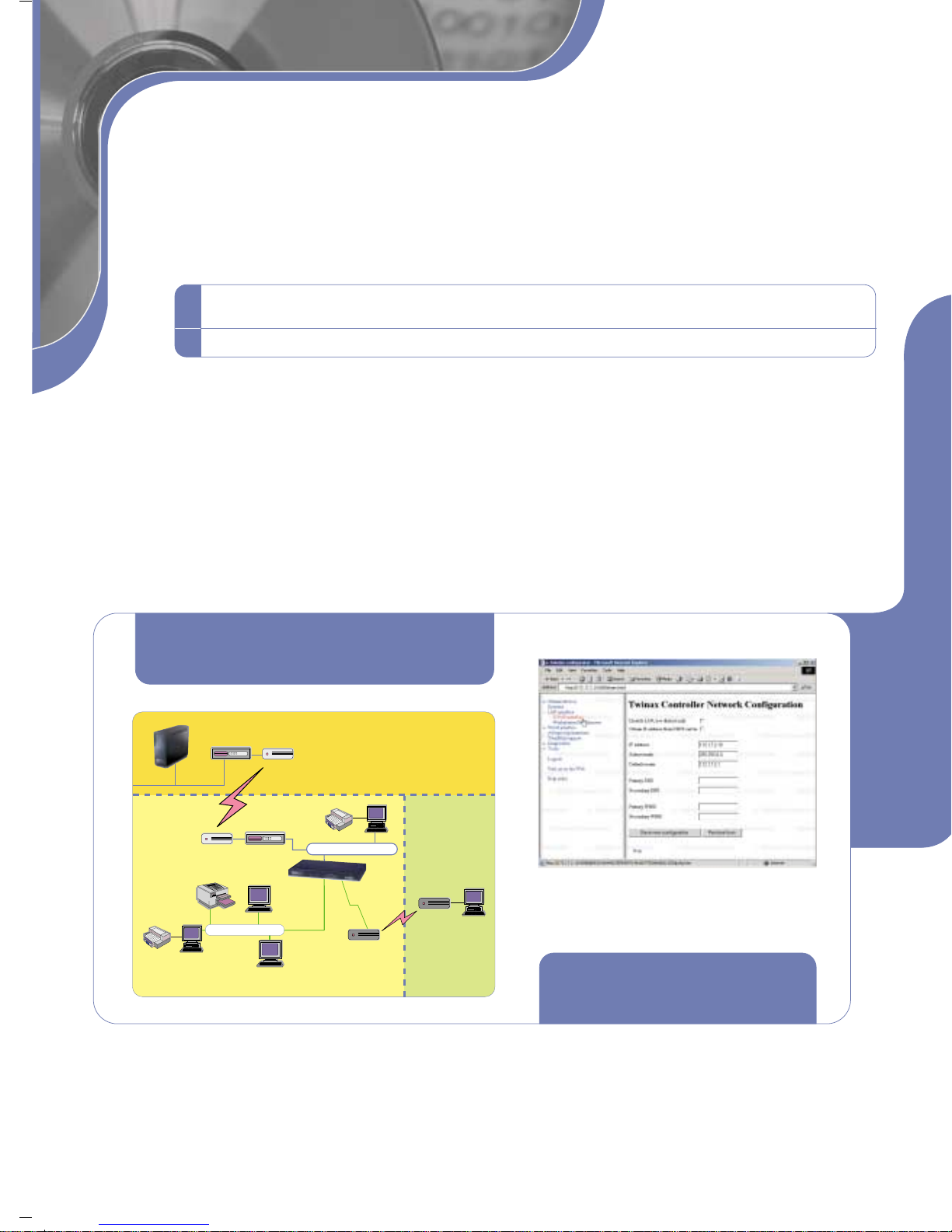
The e-Twin@x Controller as an
IP gateway with enabled RAS feature.
Router
Twinax
Router
DCU/CSU
Twinax
Terminal
Twinax
Terminal
e-Twin@x
Controller
PC Printer
Ethernet
Modem for
dial - in (RAS)
Local Site
PC
Modem
PC
Home Office
Configuration and management can be done
via a standard Web browser from anywhere on
IBM AS/400
or iSeries
Remote Site
Twinax Printer
PC Printer
DCU/CSU
PC
the network.
e-Twin@x Controller as an IP Gateway
The e-Twin@x Controller connects to the network using a standard network hub, which is attached to the local office via
a standard IP router. Ethernet PCs can be connected to the same network hub as the Controller for mixed Ethernet and
Twinax infrastructures.
With the TCP/IP drivers loaded on the PC, the user can take full advantage of the WAN, and get: support for e-Mail; printer
and file sharing on the network; access to Internet applications; and support for Citrix Metaframe.
Page 3
Overcome Network Instability and Printing Problems
Dial Backup *
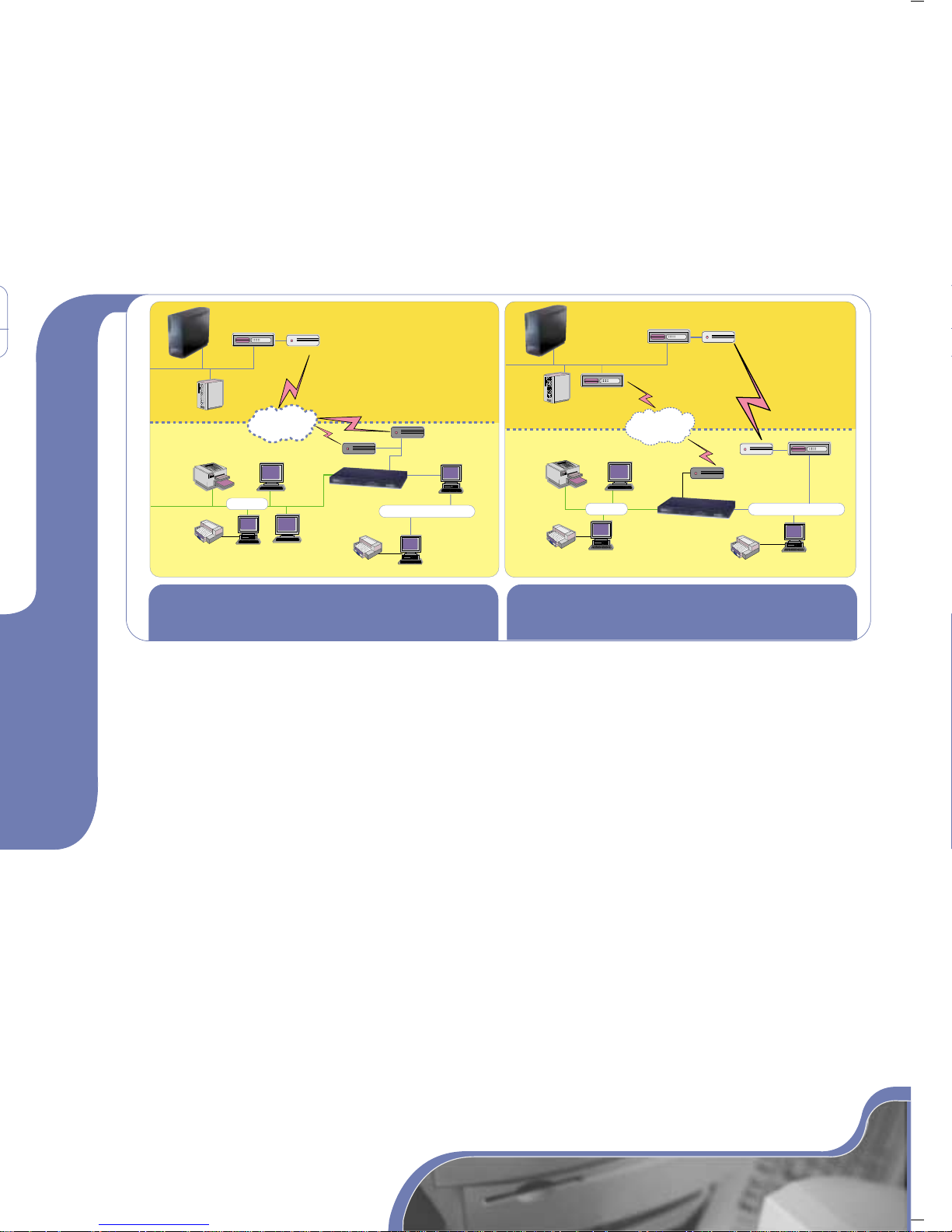
The Dial Backup feature ensures improved uptime for Controllers that are connected to an AS/400 using a LAN connection
(via the Internet routers or a separate Frame Relay network). If the LAN connection fails, the Dial Backup provides (via an
attached modem) an additional method to connect to the AS/400.
Automatic Session Recovery
In the event that a router on a frame-relay network disconnects and then re-connects, users of remote Twinax-attached
devices can choose to resume their current session. The e-Twin@x Controller can be set to automatically recover the session,
within a user-defined time period, ensuring smooth and efficient operations even in cases of network instability.
Router
IBM AS/400
or iSeries
Router
DCU/CSU
IBM AS/400
or iSeries
DCU/CSU
Frame
Relay
Back-Up
Modem
e-Twin@x Controller
PC Printer
DCU/CSU
Local Site
Router
Ethernet
PC
Securit-e Server
Remote Site
Twinax Printer
PC Printer
Twinax
PC
Internet
Twinax
Terminal
Twinax
Terminal
Main
Back-Up
Modem 2
e-Twin@x Controller
PC Printer
Local Site
Modem 1
PC
Ethernet
PC
Secure connection via the Internet using modem(s) for a
mixed Twinax and LAN environment.
Router
Securit-e Server
Internet
Remote Site
Twinax Printer
PC Printer
Twinax
PC
Twinax
Terminal
LAN (Frame Relay) connection with Dial
Backup feature.
Customized Object for Specialty Printers
The e-Twin@x Controller supports a wide variety of Twinax printers, including label and barcode printers that are often
called upon to deal with special printing requirements such as oversized fonts, graphics, and unusual page sizes. A
parameter can be set to instruct the host to send a pure data stream through the e-Twin@x Controller, allowing it to override
the original complex formatting commands with simplified commands that are supported by most printer models, before
releasing the job to the destination printer.
e-TwinSt@r Series Eliminates Need for Active Star Hubs
The e-TwinSt@r Series Controller includes a built-in unit featuring 8 (or 16) RJ45 sockets. Twinax devices working over CAT5
lines are connected directly to the Controller, saving the cost of an active star hub and eliminating the need for power
sources and additional space in the communications closet, as well as the extra set-up and maintenance time.
E-mail on Dumb Twinax Terminals
Basic e-mail functionality, known as TwinMail, is supported on dumb Twinax terminals. In addition to sending and receiving
e-mail, TwinMail includes a personal address book that can be organized according to user-defined preferences.
PC Remote Access
The e-Twin@x Controller supports a 2- or 6-port* Remote Access Server (RAS), providing remote PC users with network
access in addition to AS/400 access. Remote users can dial in to the e-Twin@x Controller and gain access to the network
using the RAS. This RAS includes a firewall for restricting access per user to specific IP devices or ports (e.g. one group
of users may be allowed access to the AS/400 for display emulation, but not file transfer). The RAS also automatically logs
all remote access activity. The RAS component can use the services of any RADIUS server for authentication, if required.
* optional
*
Page 4
1
2
3
4
5
6
7
8
1
2
3
4
5
6
7
8
Technical Specifications
1
2
3
4
1
2
48xx
4600
4601
4602
4604
4605
4800
4801
1
2
3
4693
4608
4610
46xx
4756
4712
Devices Supported
Supports virtually any Twinax-attached terminal, although for the later models not all features are supported (such as shared
addressing, mouse support, imaging, etc.). Here is a partial list: 5251, 5291, 3179-2, 3180, 3196, 3197C, 3197D, 3477, 3476, 3486, 3487
Printers
SCS Printers: all models supported
IPDS Printers: all models supported
Workstations: Supports all PCs with TDLC emulation and BOS, IBM or IBM-compatible ISA emulation cards.
Host System Requirements
OS/400 V3R2 or higher
For device naming and SCS printing functionality the
correct PTF must be installed. (See Web site for details.)
Ethernet LAN connection
Ordering Information
e-Twin@x Controller Remote Models
Supports up to 3 Twinax devices
(includes 2 port Y-cable)
Supports up to 8 Twinax devices
(not for sale in North America)
Supports up to 10 Twinax devices
(includes 2 port Y-cable)
Where xx represents the number of Twinax devices
supported: 16, 28, 56 or 12 (for 112)
e-Twin@x Controller Local Models
Supports up to 56 Twinax devices connected to local hosts
Supports up to 112 Twinax devices connected to local hosts
Physical Specifications
Electrical: Universal input 100v-240v, 0.6A, 50/60Hz
Width: 17.4" / 44.1 cm; with brackets: 19" / 48.3 cm
Height: 1.64" / 4.16 cm (1U)
Depth: 9.8" / 25 cm
Weight: 5.1 lbs / 2.3 kg
e-TwinSt@r Series
Where xx represents the number of Twinax devices
supported: 08, 16, 28, 56 or 12 (for 112)
Additional Options
8-port Twinax connector brick
4-port RAS: Remote Access Server for e-Twin@x
Controller – Provides additional 4 ports
(pre-requisite: 4602)
SECURIT-e Server: Secure access to
AS/400 over the Internet (includes 2 port RAS)
TwinMail: e-Mail Support for Dumb Terminals
Dial Backup Communications Option
(pre-requisite: 4602)
North America
BOSaNOVA, Inc.
2021 W. Rose Garden Lane
Phoenix, AZ 85027
Tel: 866 865-5250 623 516-0029
Fax: 623 516-8697
sales@bosanova.net
support@bosanova.net
www.e-twinaxcontroller.com
AS/400 photograph courtesy of International Business Machines Corporation. Unauthorized use
not permitted. The IBM Business Partner emblem is a trademark of International Business Machines
Corporation in the United States, other countries, or both. All other trademarks are the property
of their respective owners. © 2002 BOScom. All specifications are subject to change.
MK0050.04.03
RJ45 Connection Option (8 outputs)
RJ45 Connection Option (16 outputs)
European Headquarters
BOS House Meridian East
Meridian Business Park
Leicestershire LE19 1WZ
United Kingdom
Tel: +44 116 282 0600
Fax: +44 116 282 0601
[email protected]
[email protected]
Corporate Headquarters
Teradion Industrial Park
D.N. Misgav, 20179
Israel
Tel: +972-4-990-7555
Fax: +972-4-999-0334
[email protected]
[email protected]
 Loading...