

Page 1
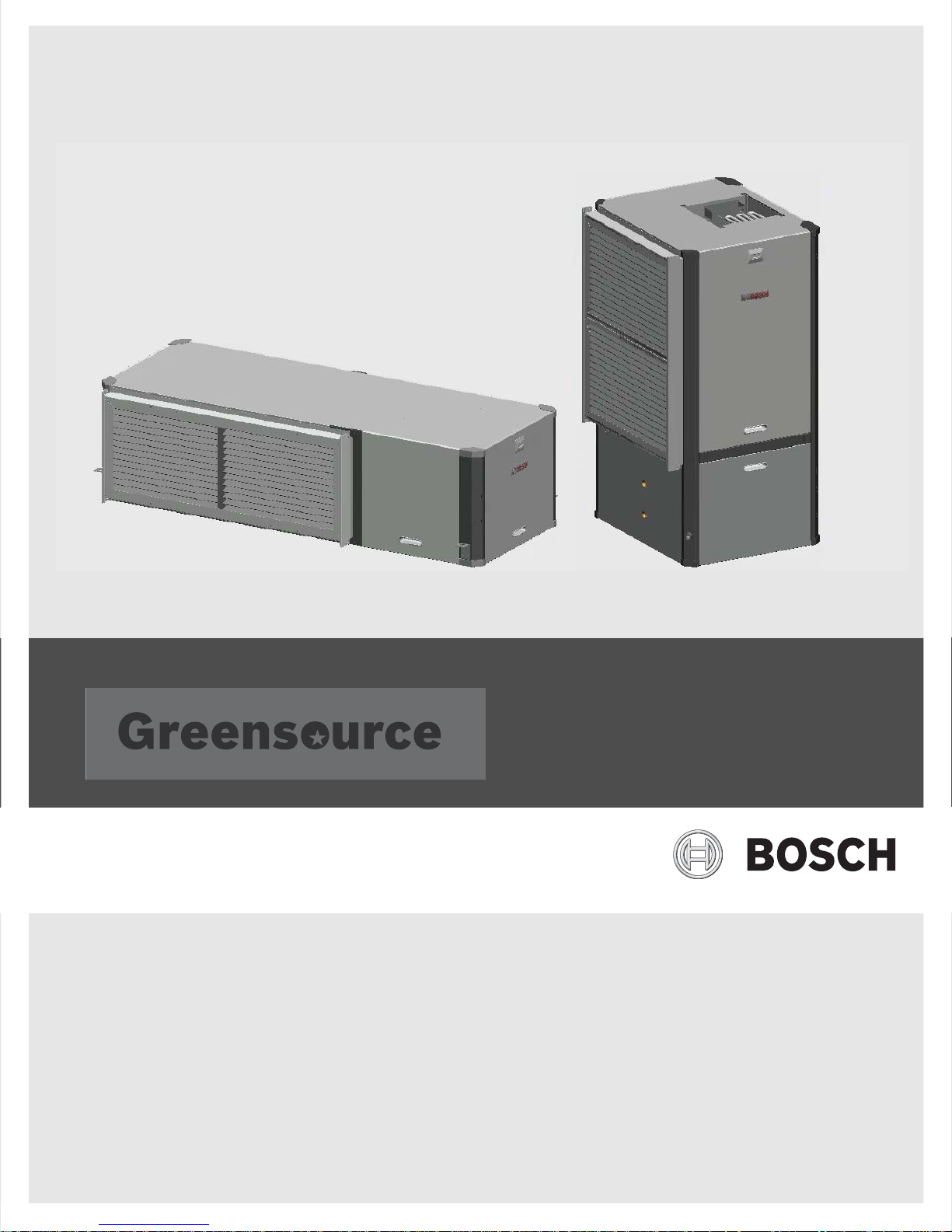
SM Series Heat pump
SM024 | SM036 | SM048 | SMO60 | SM070
Installation, Operation and Maintenance Manual
6 720 220 406 (2015/02)
Page 2
2 |
SM Series Heat Pump
CONTENTS
Key to Symbols...................................................................3
Safety Warnings ................................................................ 3
Standard package.............................................................. 3
Model Nomenclature.......................................................... 3
General Description........................................................... 5
Moving and Storage ........................................................... 6
Initial Inspection ............................................................... 6
Location............................................................................ 6
Configurability .................................................................. 7
Horizontal Configurability .................................................. 7
Required Tools ............................................................ 7
Instructions - Left-Hand Unit (SM0**-1HZ-*L*-**) ............... 7
Instructions - Right-Hand Unit (SM0**-1HZ-*R*-**) ........... 10
Counter-Flow configurability............................................ 13
Vertical Configurability.................................................... 13
Required Tools .......................................................... 15
Access to Internal Components.................................... 15
Blower Re-Configuration ............................................. 17
Condensate Drain Connection Re-configuration ............. 20
HRP Switch Relocation ............................................... 21
Electric Heat Relocation.............................................. 22
Electrical Box re-configuration ..................................... 24
Reinstall All Panels ..................................................... 25
Return and Discharge Duct Flanges .................................. 25
Pre Installation Unit Preparation ...................................... 26
Corner Cap Installation Instructions .............................. 26
DPS Water Flow Proving..............................................38
Pump Relay ............................................................... 38
Comfort Alert Module .................................................38
Smart Start Assist.............................................................39
Mode of Operation Notes............... ...............................40
Heat Recovery Package .................................................... 41
Water Tank Preparation ..............................................41
HR Water Piping.........................................................41
Water Tank Refill ........................................................42
Initial Start-Up ...........................................................42
Sequence of Operation.....................................................43
Cooling Mode ............................................................ 43
Heating Mode ............................................................43
Application Considerations ..............................................45
Well Water Systems.................................................... 45
Cooling Tower/Boiler Systems ..................................... 45
Geothermal Systems ..................................................47
System Checkout .............................................................48
Unit Start-up....................................................................48
Maintenance ...................................................................49
Unit Check-Out Sheet .......................................................50
Customer Data...........................................................50
Unit Nameplate Data................................................... 50
Operating Conditions..................................................50
Auxiliary Heat ............................................................50
Troubleshooting ..............................................................51
Electronic Thermostat Installation ....................................56
Operating Temperatures and Pressures ............................ 57
Airflow Tables..................................................................62
Mounting Vertical Units ................................................... 27
Mounting horizontal Units ................................................ 27
Hanging Bracket kit..........................................................27
Condensate Drain ............................................................ 28
Duct System.................................................................... 29
Piping ............................................................................. 29
Electrical ........................................................................ 30
Safety Devices and the UPM Controller ......................... 31
ECM INTERFACE BOARD ............................................ 35
Dehumidification Method Selector ............................... 36
Constant Torque Motors (ECM).................................... 36
Options........................................................................... 37
Hot Gas Reheat (HGRH).............................................. 37
Electric Heat ............................................................. 37
Heat Recovery Package (HRP) ..................................... 37
Constant Airflow Motor............................................... 38
Water Side Pressure Drop Table........................................64
Wiring Diagrams ..............................................................65
WIRING HARNESS DRAWINGS ..........................................72
Constant Torque Motor (SM0**-***-***-T*)........................72
Constant Airflow Motor (SM0**-***-***-A*) ....................... 73
Spare Parts List ...............................................................74
Dimensional Drawings......................................................95
Horizontal - Straight Through .......................................96
Horizontal - Hanging bracket location ............................97
Counter Flow.................................................. ...........98
CF Vertical ................................................................99
SM Series Heat Pump6 720 220 406 (2015/02) Subject to change without prior notice
Page 3
Key to Symbols | 3SM Series Heat Pump
1
2
3
4
KEY TO SYMBOLS
Warnings
Warnings in this document are identified by
a warning triangle printed against a grey
background. Keywords at the start of the
warning indicate the type and seriousness
of the ensuing risk if measures to prevent
the risk are not taken.
The following keywords are defined and can be
used in this document:
• NOTE indicates a situation that could result in
damage to property or equipment.
• CAUTION indicates a situation that could
result in minor to medium injury.
• WARNING indicates a situation that could
result in sever injury or death.
• DANGER indicates a situation that will result in
severe injury or death.
Important Information
This symbol indicates important information
where there is no risk to property or people.
SAFETY WARNINGS
NOTE: All refrigerant discharged from this
unit must be recovered WITHOUT
EXCEPTION. Technicians must follow
industry accepted guidelines and all local,
state, and federal statutes for the recovery
and disposal of refrigerants. If a compressor
is removed from this unit, refrigerant circuit
oil will remain in the compressor. To avoid
leakage of compressor oil, refrigerant lines
of the compressor must be sealed after it is
removed.
NOTE: To avoid equipment damage, DO
NOT use these units as a source of heating
or cooling during the construction process.
Doing so may affect the unit’s warranty. The
mechanical components and filters will
quickly become clogged with construction
dirt and debris, which may cause system
damage.
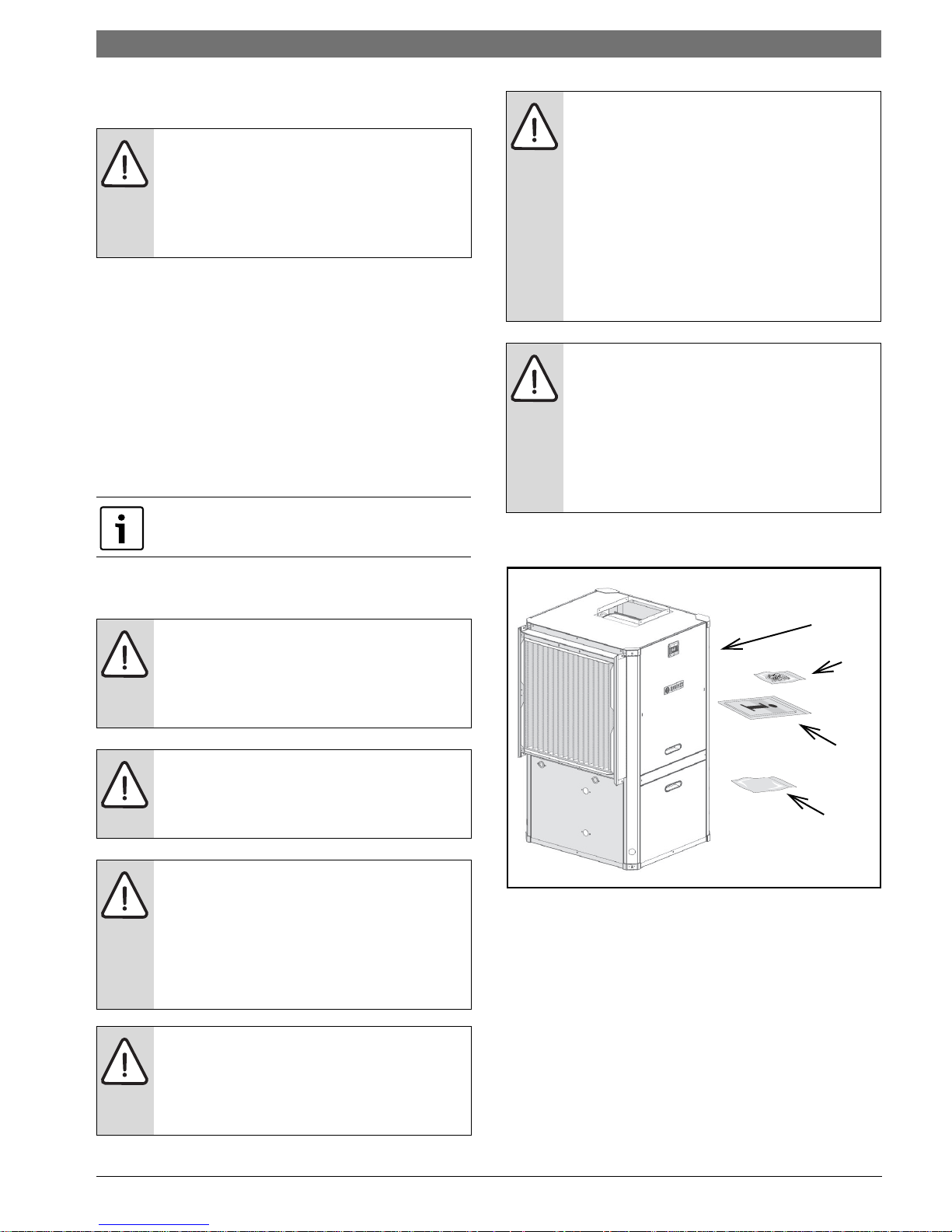
STANDARD PACKAGE
WARNING: Installation and servicing of this
equipment can be hazardous due to system
pressure and electrical components. Only
trained and qualified personnel should
install, repair, or service the equipment.
WARNING: Before performing service or
maintenance operations on the system, turn
off main power to the unit. Electrical shock
could cause personal injury or death.
WARNING: When working on equipment,
always observe precautions described in
the literature, tags, and labels attached to
the unit. Follow all safety codes. Wear
safety glasses and work gloves. Use a
quenching cloth for brazing, and place a fire
extinguisher close to the work area.
NOTE: To avoid the release of refrigerant
into the atmosphere, the refrigerant circuit
of this unit must be serviced only by
technicians who meet local, state, and
federal proficiency requirements.
Figure # 1
[1] SM Series Water-to-Air Heat Pump
[2] Corner Caps Package
[3] Installation and Operation Manual
[4] Hanging Bracket kit (HZ unit only)
6 720 220 406 (2015/02)Revised 02-15
Page 4
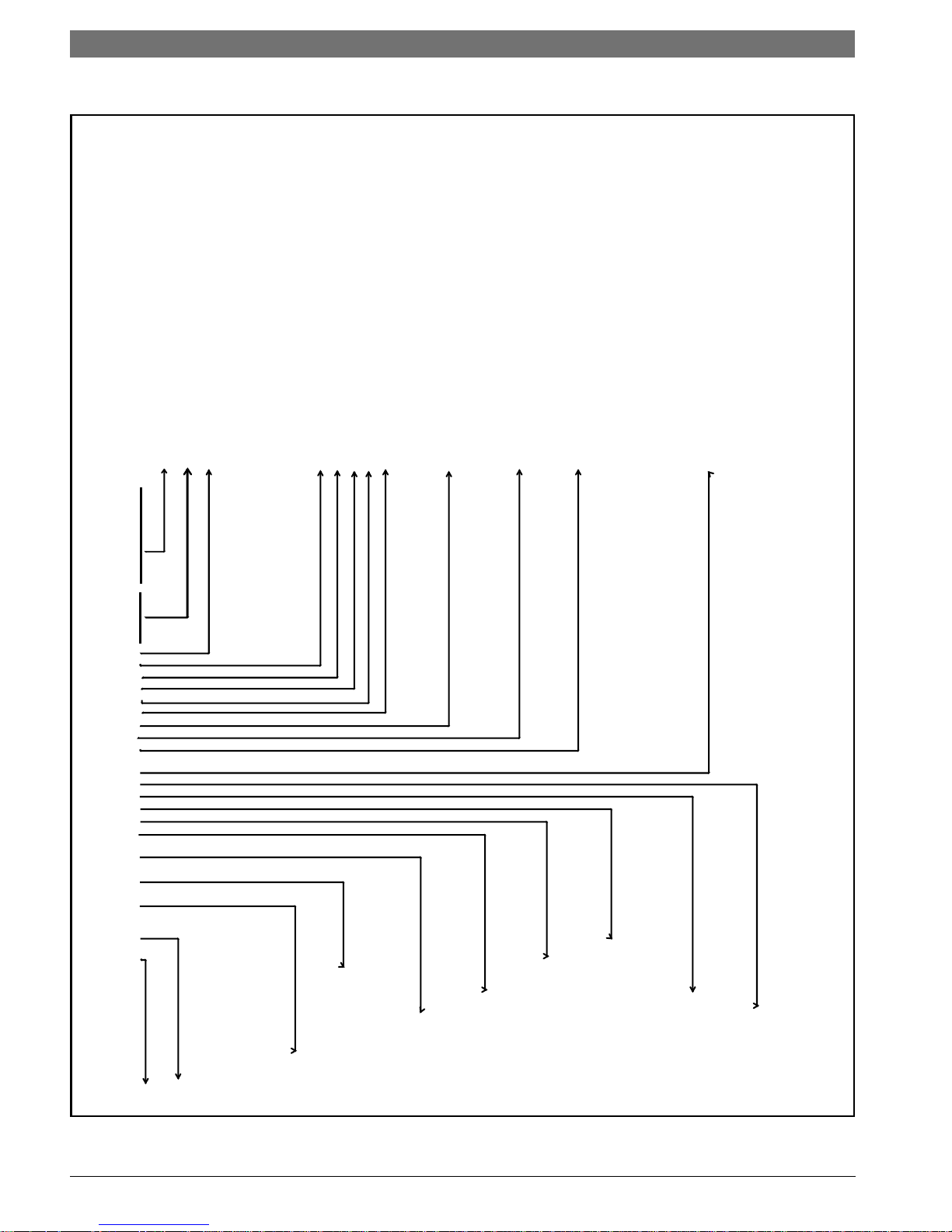
4 | Model Nomenclature
SM024 - 1 VT C - S LTATA - XXGAEXXXX7XXXX5XXXX SB A
SM
75VA Transformer +
Size
024
036 Refrigeration Circuit Options
H - Hot Gas Reheat - On/O
070 D - Heat Recovery Package
Voltage
1 208-230/60/1 General Electrical Options (up to 5 available per unit)
A - EMS relay
Cabinet Conguration E - Pump/valve relay
HZ - Horizontal H - Flow proving switch (DPS)
VT - Vertical N - Comfort Alert Module
CF - Downow (Counterow) S - Smart Start Assist
X - As default for non used electrical codes
Coax Options
N - Cupro-Nickel Application
G - EXTENDED RANGE (Geothermal)
Water Connections
y
F - Front (HZ only) Cabinet Construction
H - Painted Steel / 1/2" Closed Cell Foam
Return Air Conguration
Electric Heat (Dual power connection)
(Not Available with HGRH)
Discharge Air Conguration X - None
T - Top (VT only) A - 5 kW
E - End (HZ only) C - 10 kW
B - Bottom (CF only) D - 15 kW
E - 20 kW
Fan/Motor Options
Revision Level
T - Constant Torque ECM A - Current
Air Coil
T- Tin Plated
MERV13 - 2" w/ 4-SIDED FILTER RACK
MODEL NOMENCLATURE
SM Series Heat Pump
)
048 X - None
060
L - Left
R - Right
A - Constant Airow ECM
SM Series Heat Pump6 720 220 406 (2015/02) Subject to change without prior notice
C - Copper
Figure # 2
S - Side (VT and CF onl
Page 5
General Description | 5SM Series Heat Pump
1
2
3
4
5
6
7
9
10
3
8
10
GENERAL DESCRIPTION
SM Series Water-to-Air Heat Pumps provide the
best combination of performance and efficiency
available. All units are performance certified to
American Heating and Refrigeration Institute
(AHRI) ISO Standard 13256-1. All SM Water-to-Air
Heat Pumps conform to UL1995 standard and are
certified to CAN/CSA C22.2 No 236 by IntertekETL. The Water-to-Air Heat Pumps are designed to
operate with entering fluid temperature between
20°F to 90°F in the heating mode and between
30°F to 120°F in the cooling mode
NOTE: Heat Pump operating under extreme
conditions will have limitation on air/fluid flow
rates and/or temperatures.
.
NOTE: 50° F Minimum Entering Water
Temperature (EWT) is recommended for well
water applications with sufficient water flow to
prevent freezing. Antifreeze solution is required
for all closed loop applications and EWT below
45°. Cooling Tower/Boiler and Geothermal
applications should have sufficient antifreeze
solution to protect against extreme conditions
and equipment failure. Frozen water coils are
not covered under warranty. Other equivalent
methods of temperature control are acceptable.
Safety devices are built into each unit to provide
the maximum system protection possible when
properly installed and maintained. Each unit has
externally mounted LCD error code display,
allowing unit diagnosis without opening the
cabinet.
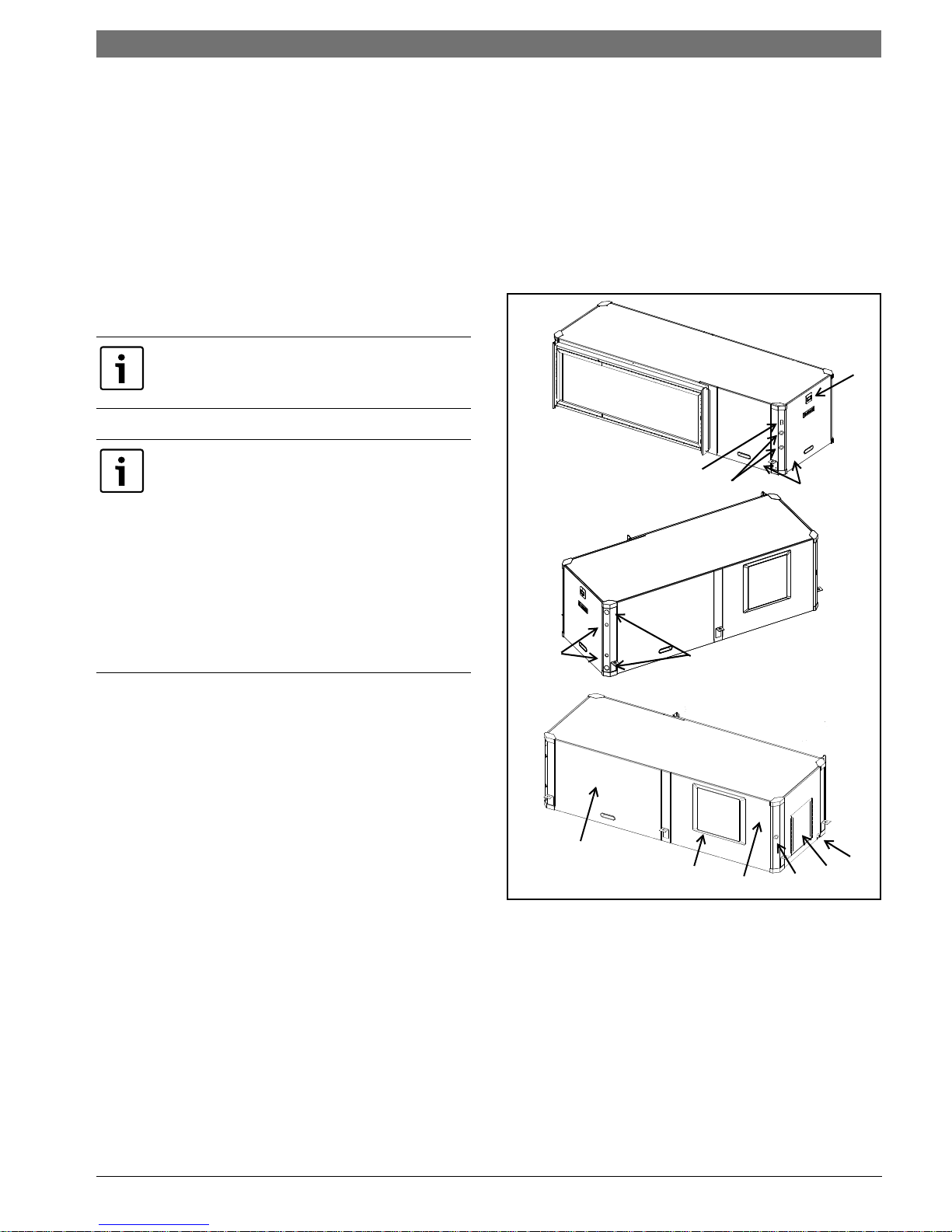
Basic Horizontal unit layout and connections are
shown in Figure #3 . Refer to Dimensional
Drawings for further detail, as well as Vertical and
Counter Flow unit details. Pg#95 through Pg#95
SM Series Water-to-Air Heat Pumps are available in
Vertical (VT), Horizontal (HZ) and Counter-Flow
(CF) configurations. VT units are field convertible
for three discharge/supply air orientations and
left-hand (LH) or right-hand (RH) return
configurations. HZ units have two field
configurable discharge/supply air orientations.
Several factory installed options are available: Hot
Gas Reheat, Electric Heat, Heat Recovery Package,
Smart Start Assist, Constant Airflow Blower Motor,
DPS Water Flow Proving Switch, Auxiliary Pump
Figure # 3
Relay, and Comfort Alert Module. Electric Heat and
Smart Start Assist are also available as field
installed accessory. See Pg#37 for more detail.
[1] LCD Error Code Display
[2] Air handler access panel
[3] Condensing section access panel
[4] Condensate drain connection
[5] Water connection
[6] Heat Recovery water connection (Optional)
[7] Heat Recovery disconnect switch (Optional)
[8] Electrical connection knockout
6 720 220 406 (2015/02)Revised 02-15
Page 6
6 | Moving and Storage
[9] Electric Heat electrical connection knockout
(Optional)
[10] Blower outlet (Supply Air)
MOVING AND STORAGE
If the equipment is not needed for immediate
installation upon its arrival at the job site, it should
be left in its shipping carton and stored in a clean,
dry area. Units must only be stored or moved in the
normal upright position as indicated by the “UP”
arrows on each carton at all times.
WARNING: For storage If unit stacking is
required, stack units as follows:
Vertical units: less than 6 tons, no more
than two high.
Horizontals units: less than 6 tons, no more
than three high.
INITIAL INSPECTION
Be certain to inspect all cartons or crates on each
unit as received at the job site before signing the
freight bill. Verify that all items have been received
and that there are no visible damages; note any
shortages or damages on all copies of the freight
bill. In the event of damage or shortage, remember
that the purchaser is responsible for filing the
necessary claims with the carrier. Concealed
damages not discovered until after removing the
units from the packaging must be reported to the
carrier within 24 hours of receipt.
SM Series Heat Pump
LOCATION
Locate the unit in an indoor area that allows easy
removal of the filter and access panels, and has
enough room for service personnel to perform
maintenance or repair. Provide sufficient room to
make fluid, electrical, and duct connection(s). If
the unit is located in a confined space such as a
closet, provisions must be made for return air to
freely enter the face of unit’s air coil. On horizontal
units, allow adequate room below the unit for a
condensate drain trap and do not locate the unit
above supply piping.
NOTE: These units are not approved for
outdoor installation; therefore, they must
be installed inside the structure being
conditioned. Do not locate in areas that are
subject to freezing.
SM Series Heat Pump6 720 220 406 (2015/02) Subject to change without prior notice
Page 7
Configurability | 7SM Series Heat Pump
1
1
2
2
CONFIGURABILITY
HORIZONTAL CONFIGURABILITY
The Horizontal Configuration water source heat
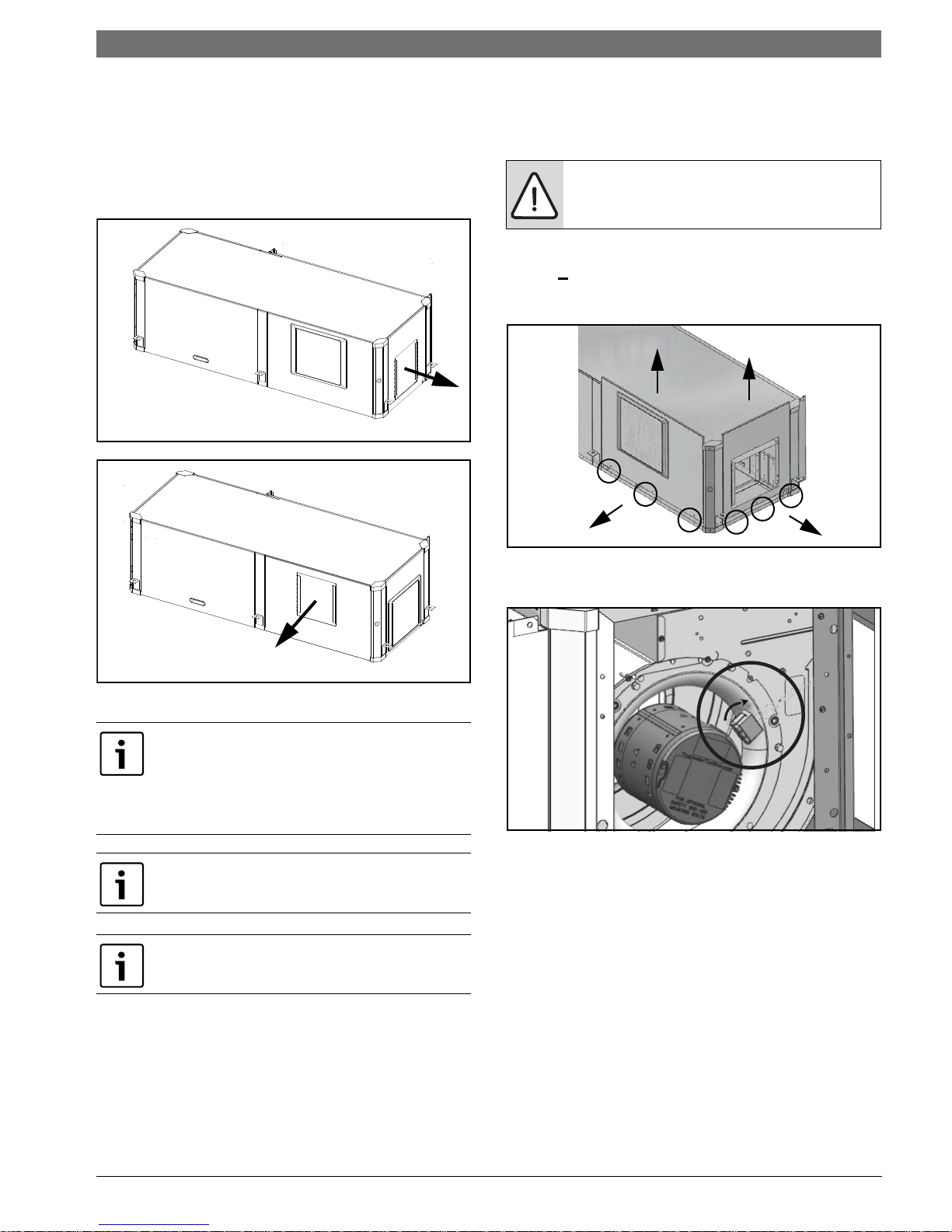
pump is designed to have a field configurable
blower orientation: end blow (default) and straight
through. (Figure #4 and #5)
Figure # 4
• 1/4" hex head driver
• Needle nose pliers
• 5/16”-1/4” ratchet wrench
NOTE: Discharge air configuration change is
not possible on Heat Pumps equipped with
Electric Heat Option.
Instructions - Left-Hand Unit (SM0**1HZ-*L*-**)
1. Remove and retain end and side panels.(Figure
#6)
Figure # 5
Left-Hand and Right-hand Horizontal (HZ) units
have different Blower Configuration instructions.
---------------------------------------------------------------
Left- Hand unit instructions refer to Pg#7 and
Right-Hand unit instructions refer to Pg#10.
Internally mounted electric heat is only available
in End Blow configuration.
Blower configuration changes should be done
prior to unit being installed in the final location.
Figure # 6
2. Disconnect blower motor wiring and ground
wire fastened to blower housing.(Figure#7)
Figure # 7
Required Tools
• 5/16" hex head driver
•3/8" hex head driver
• 7/16" hex head driver
• Flat screw driver
• Phillips screw driver
6 720 220 406 (2015/02)Revised 02-15
Page 8
8 | Horizontal Configurability
SM Series Heat Pump
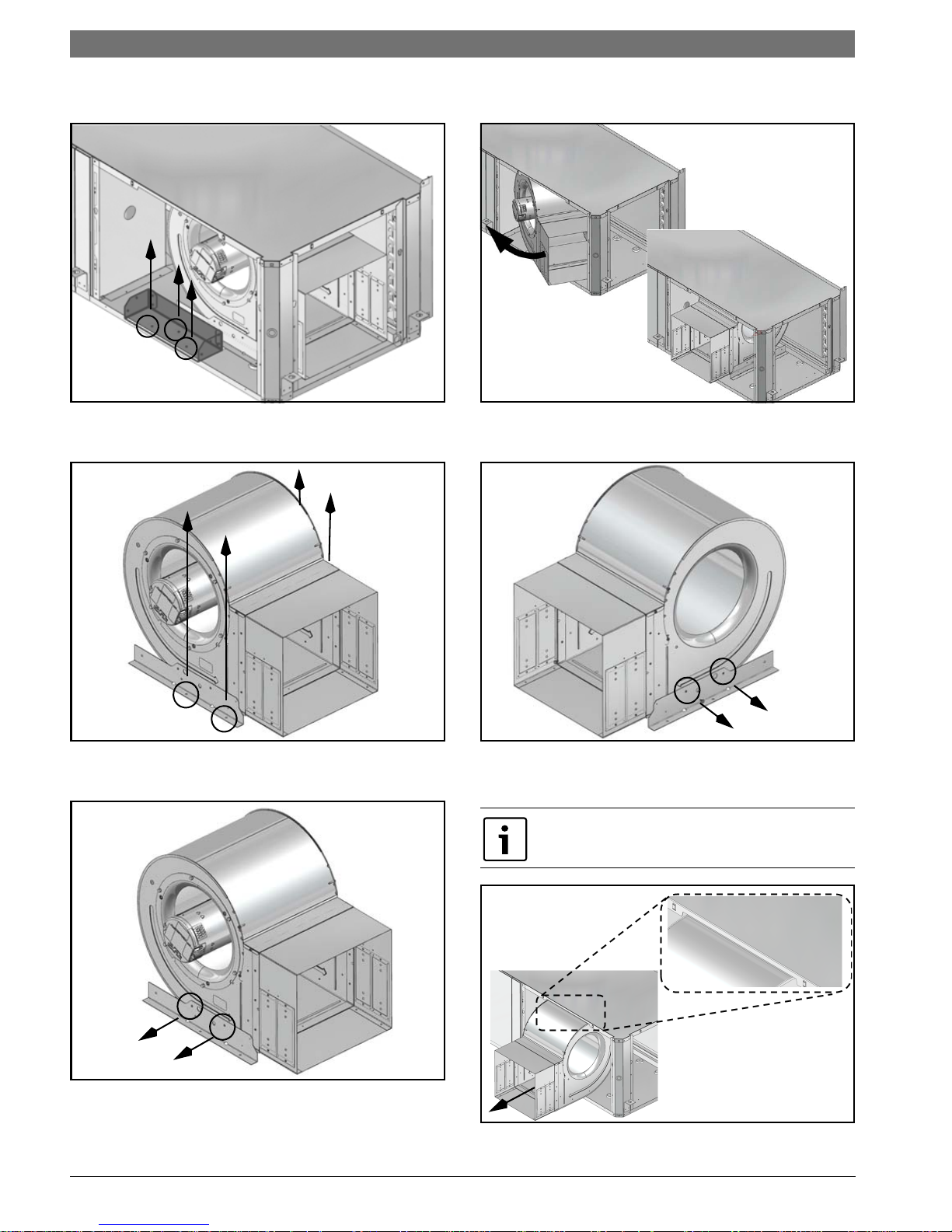
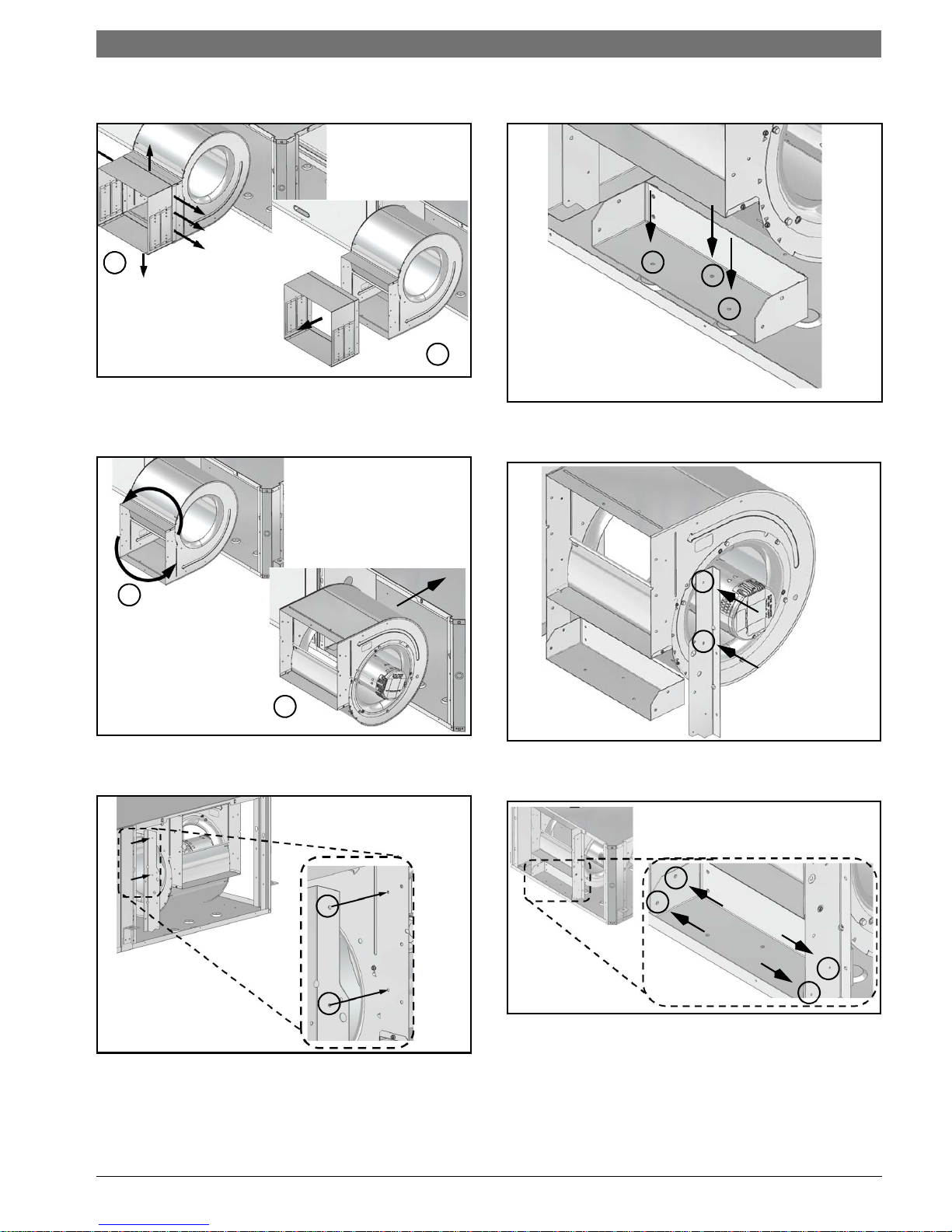
3. Remove and retain bracket by removing (3)
screws. (Figure #8)
Figure # 8
4. Loosen blower assembly by removing (4)
screws. (Figure #9)
6. Rotate the blower into its new
position.(Figure#11)
Figure # 11
7. Remove and retain remaining bracket by
removing (2) screws. (Figure #12)
Figure # 9
5. Remove and retain bracket by removing (2)
screws. (Figure #10)
Figure # 10
Figure # 12
8. Remove the blower assembly by sliding it
forward. (Figure #13)
Unit top is notched to allow blower to slide
through.
Figure # 13
SM Series Heat Pump6 720 220 406 (2015/02) Subject to change without prior notice
Page 9
Horizontal Configurability | 9SM Series Heat Pump
1
2
1
2
9. Remove and discard blower collar by removing
(8) screws. (Figure #14)
Figure # 14
10. Reorient the blower assembly 180 degree with
blower “belly” down and slide back into the
cabinet. (Figure #15)
12. Reinstall bracket removed in step (#3) using
(3) screws in the same location. (Figure#17)
Figure # 17
13. Reinstall remaining bracket using (2) screws.
(Figure#18)
Figure # 15
11. Reinstall bracket in the new vertical position
using (2) screws. (Figure #16)
Figure # 16
Figure # 18
14. Connect vertical and horizontal brackets by
installing (4) screws. (Figure#19)
Figure # 19
15. Reconnect blower motor wiring and ground
wire.
6 720 220 406 (2015/02)Revised 02-15
Page 10
10 | Horizontal Configurability
2
1
3
1
1
2
2
SM Series Heat Pump
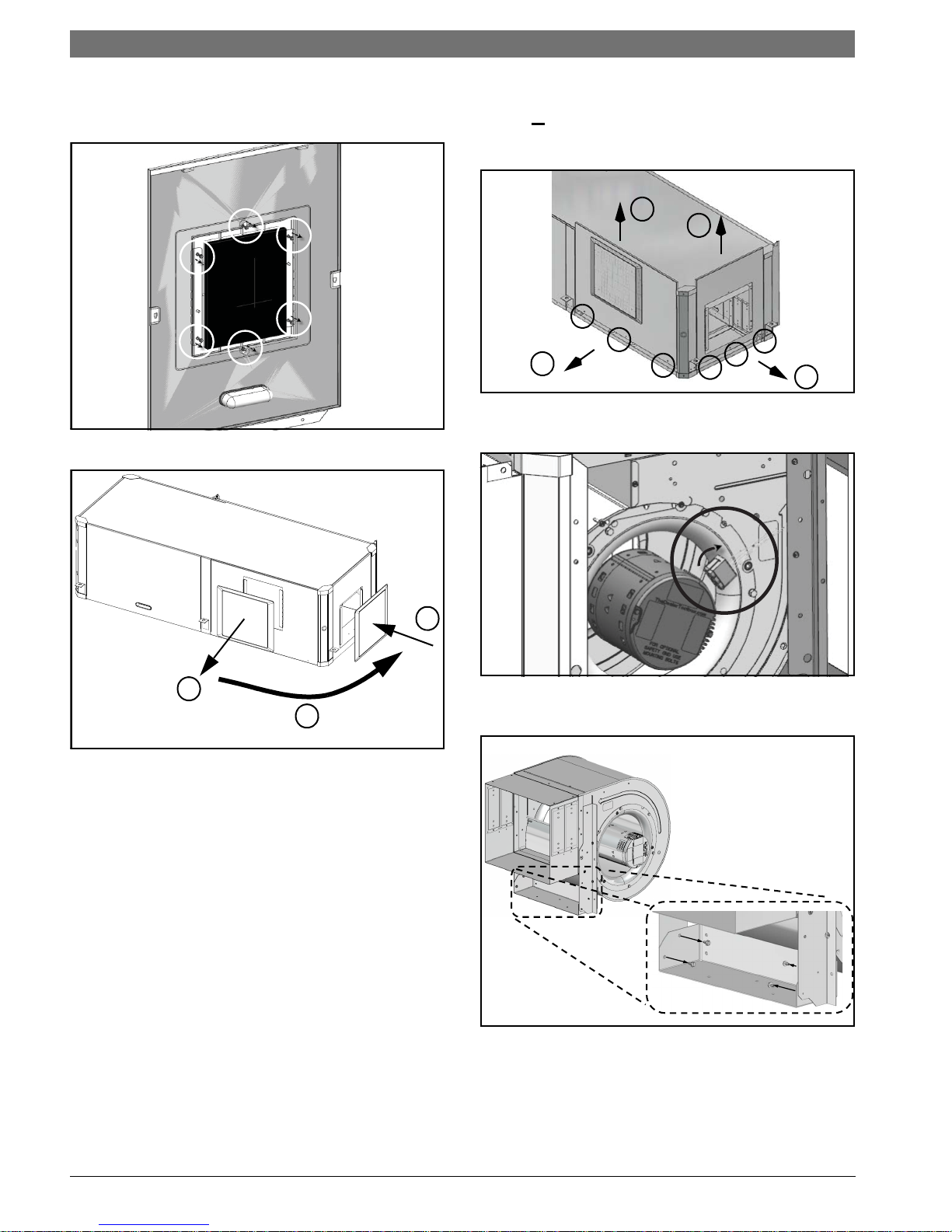
16. Remove and retain plastic Blower opening
cover by removing (6) screws and reinstall it in
the new location (Figure#20 and #21)
Figure # 20
Instructions - Right-Hand Unit (SM0**1HZ-*R*-**)
1. Remove and retain end and side
panels.(Figure#22)
Figure # 22
2. Disconnect blower motor wiring and ground
wire fastened to blower housing.(Figure#23)
Figure # 21
17. Reinstall all unit panels.
Figure # 23
3. Remove and retain (4) screws under the
blower collar. (Figure #24)
Figure # 24
SM Series Heat Pump6 720 220 406 (2015/02) Subject to change without prior notice
Page 11
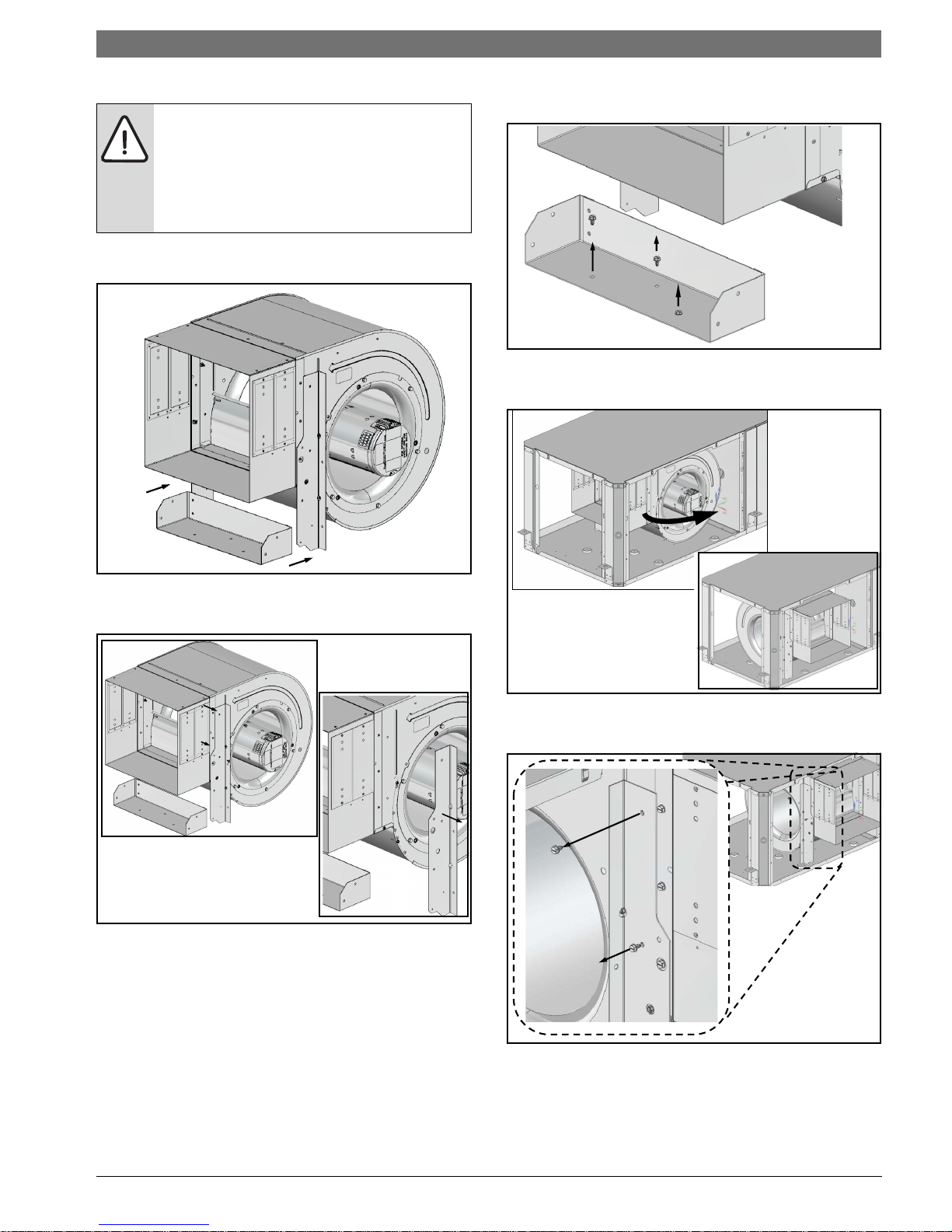
NOTE: Air coil is in close proximity to the
blower. Air coil fins are easily damaged.
Great care must be taken during this step to
avoid coil damage. Shipping cardboard can
be used as protection during blower
removal and installation.
4. Slide blower assembly away from mounting
bracket. (Figure #25)
Horizontal Configurability | 11SM Series Heat Pump
6. Remove and discard horizontal blower bracket
by removing (3) screws. (Figure #27)
Figure # 27
7. Rotate the blower into its new
position.(Figure#28)
Figure # 25
5. Remove and retain (1) vertical bracket by
removing (2) screws. (Figure #26)
Figure # 26
Figure # 28
8. Remove and retain remaining vertical blower
bracket by removing (2) screws. (Figure #29)
Figure # 29
6 720 220 406 (2015/02)Revised 02-15
Page 12
12 | Horizontal Configurability
SM Series Heat Pump
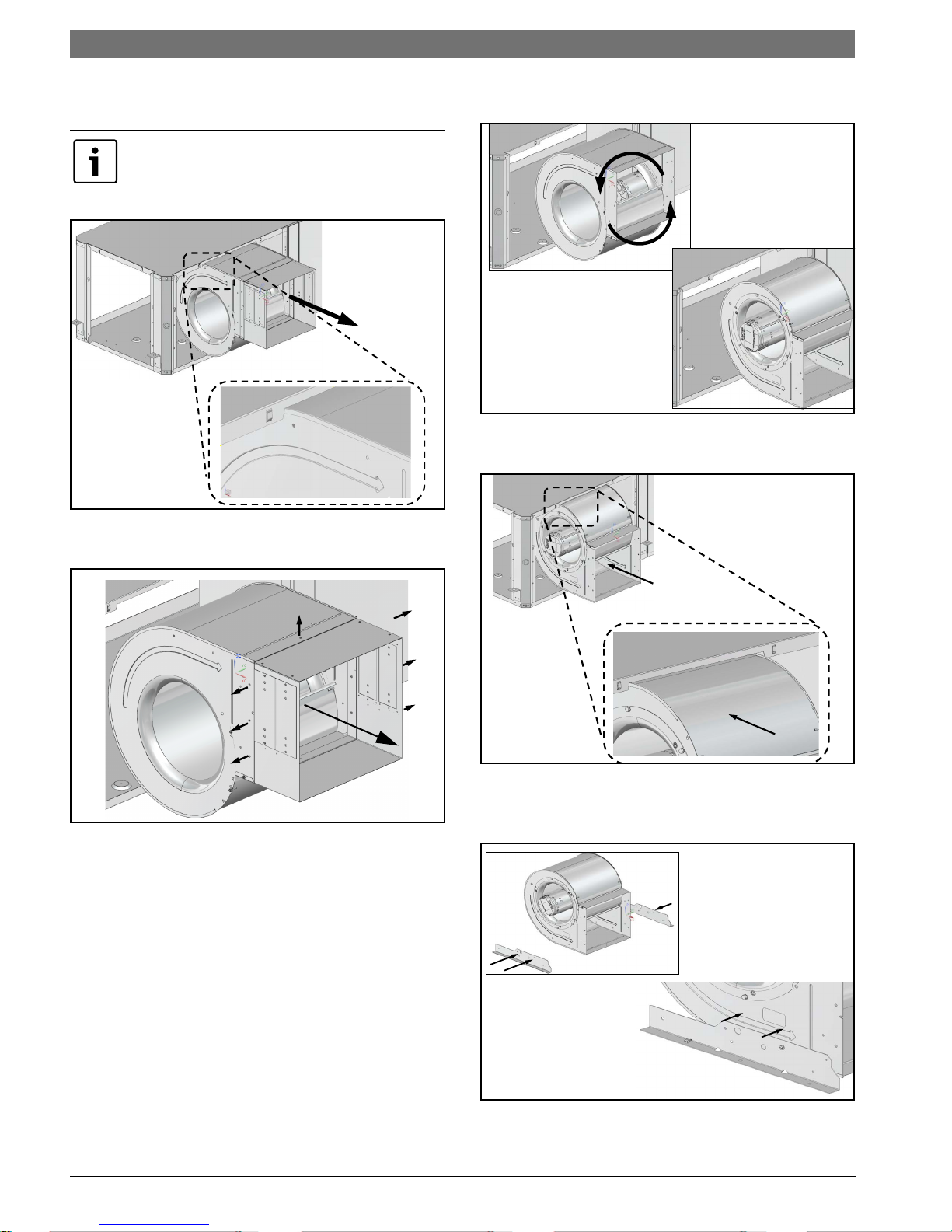
9. Remove the blower assembly by sliding it
forward. (Figure #30)
Unit top is notched to allow blower to slide
through.
Figure # 30
10. Remove and discard blower collar by removing
(8) screws. (Figure #31)
11. Reorient the blower assembly 180 degree with
blower “belly” up. (Figure #32)
Figure # 32
12. Move the blower back into the cabinet. (Figure
#33)
Figure # 31
Figure # 33
13. Reinstall (2) vertical blower brackets in the
new horizontal position using (4) screws.
(Figure #34)
Figure # 34
SM Series Heat Pump6 720 220 406 (2015/02) Subject to change without prior notice
Page 13
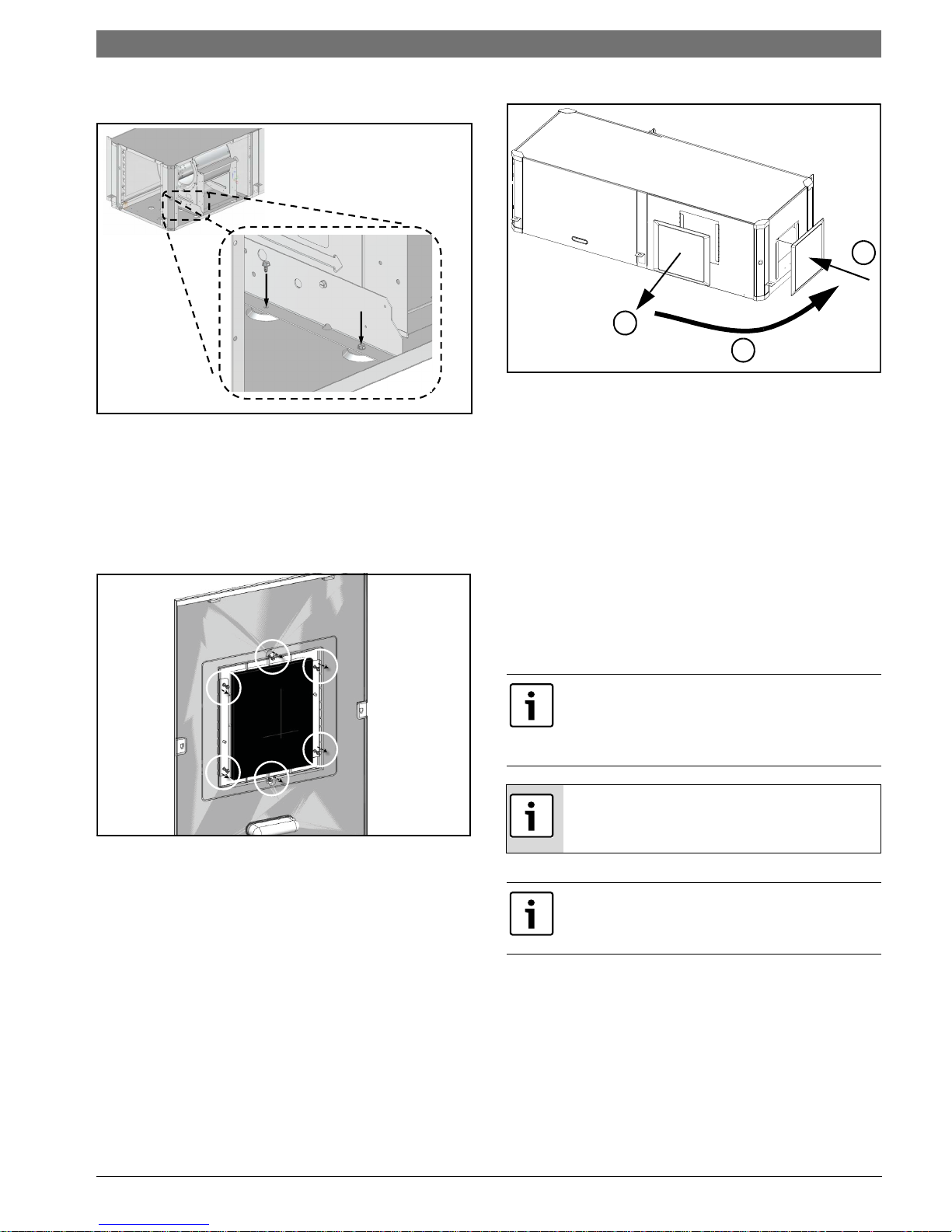
14. Secure (2) the now horizontal blower brackets
2
1
3
to the unit base using (4) screws. (Figure#35)
Figure # 35
15. Reconnect blower motor wiring and ground
wire.
16. Remove and retain plastic Blower opening
cover by removing (6) screws and cutting/
tearing insulation at perforations around the
perimeter of cover. Reinstall it in the new
location (Figure#36 and #37)
Counter-Flow configurability | 13SM Series Heat Pump
Figure # 37
17. Reinstall all unit panels.
COUNTER-FLOW CONFIGURABILITY
The Counter-Flow Configuration water source heat
pump is a dedicated down flow configuration.
Available from the factory in Left-hand and righthand return air configurations.
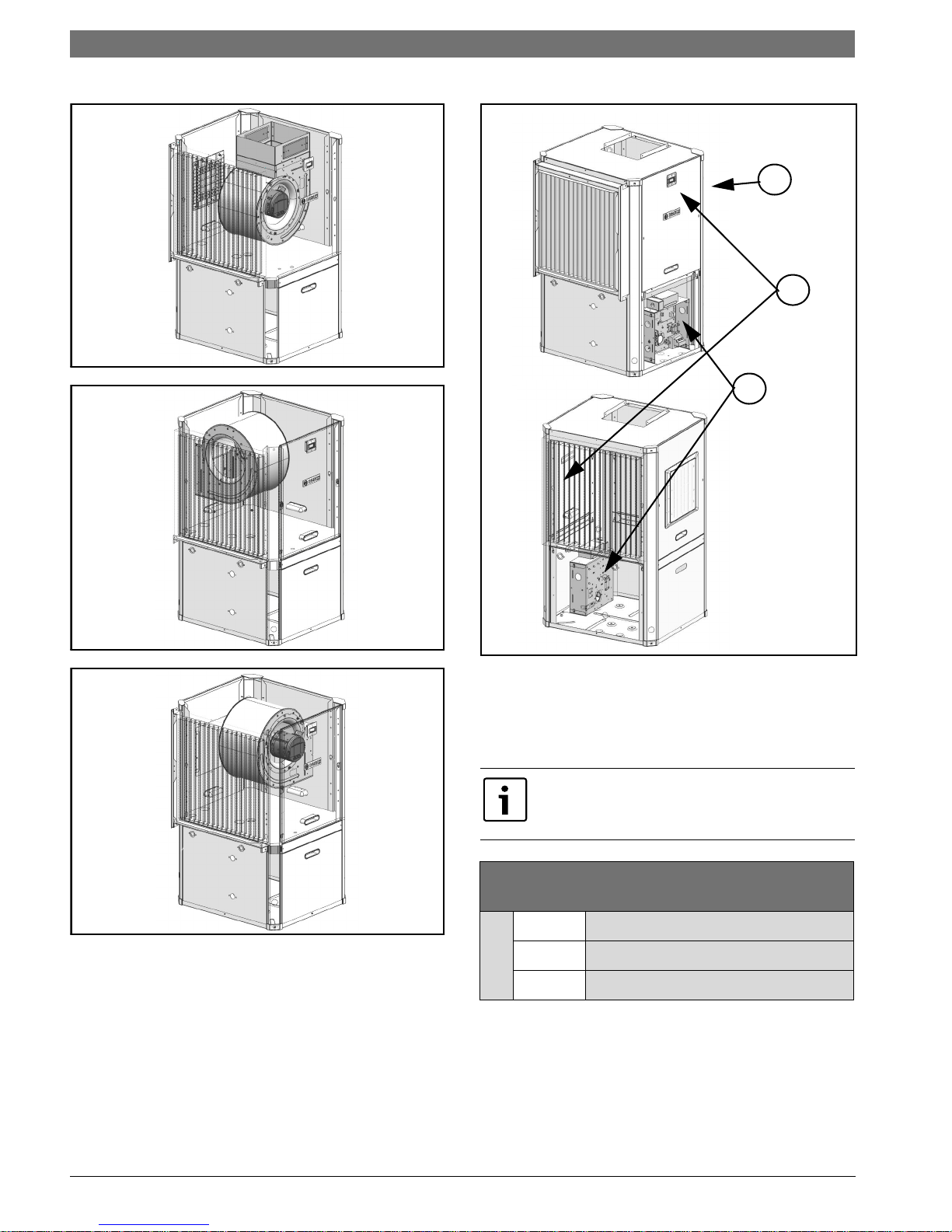
VERTICAL CONFIGURABILITY
The Vertical (VT) Configuration water source heat
pump is designed to be field configured for various
configurations. This is achieved by relocating
Electrical box (E-box), unit panels and reorienting
blower to discharge UP, BACK OR SIDE. See Figure
#37 through #41 for more detail.
The unit, as shipped from the factory, does not
have configuration on the discharge air from to
side or back, field configuration kit is requiered,
(sold as an accessory Kit).
Figure # 36
Discharge air configuration change is not
possible on Heat Pumps equipped with
Electric Heat Option.
Blower, E-box and panel configuration
changes should be done prior to unit being
installed in the final location.
6 720 220 406 (2015/02)Revised 02-15
Page 14
14 | Vertical Configurability
1
2
3
Figure # 38 Top Discharge (Default)
SM Series Heat Pump
Figure # 39 Back Discharge
Figure # 40 Side Discharge
Figure # 41
[1] Logo/Front Panel
[2] Electrical Box
[3] Default Configuration (can be ordered as either
right or left hand return)
Internally mounted electric heat is only available
in Top Discharge configuration. See table below
for details
Blower Orientation and Electric Heat
Compatibility
Up Yes Internally or Duct Mounted
Back
Blower
Side
Duct Mounted
Duct Mounted
SM Series Heat Pump6 720 220 406 (2015/02) Subject to change without prior notice
Page 15
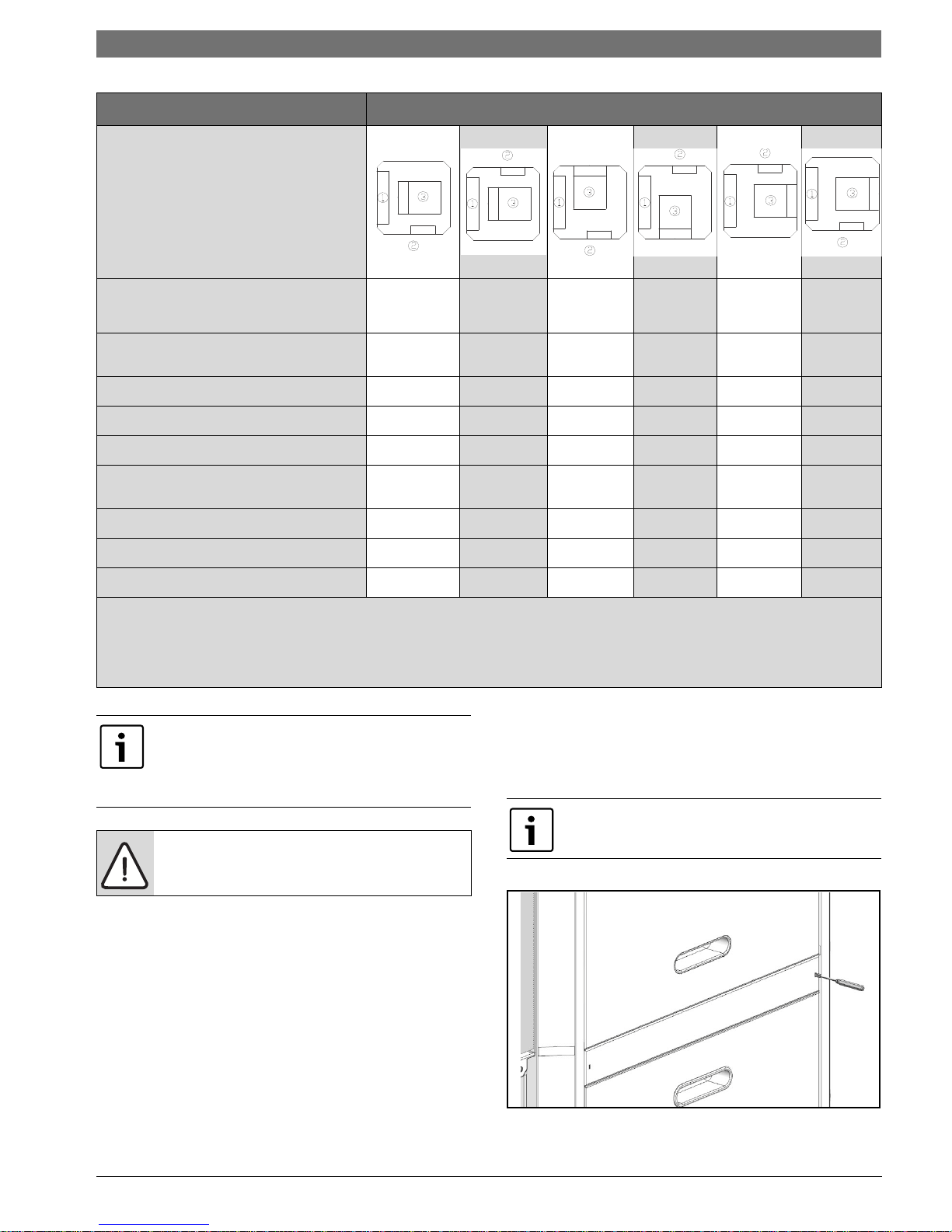
Required steps Possible unit configurations
How to use this table:
• Select desired configuration
from “possible unit
configurations”.
• Instructions with “X” have to
be performed to reconfigure
the unit.
Vertical Configurability | 15SM Series Heat Pump
ACCESS TO INTERNAL COMPONENTS
(PG#15)
BLOWER RE-CONFIGURATION (PG#17)
E-BOX CONFIGURATION (PG#24)
ELECTRIC HEAT RELOCATION* (PG#22)
CONDENSATE DRAIN RELOCATION
(PG#20)
HRP SWITCH* (PG#21)
REINSTALL PANELS (PG#25)
*APPLIES IF OPTION IS INSTALLED
[1] AIR COIL
[2] E-BOX (UNIT FRONT)
[3] BLOWER
X APPLICABLE STEP
All heat pumps are supplied with panel belt
which needs to be removed to access screws
for panel removal. The panels have additional
internal fasteners to prevent any air leakage.
For safety precautions two persons are
required to perform this operation.
Left return,
top discharge
Right return,
top
discharge
Left return,
rear
discharge
Right
return, rear
discharge
XXXXX
X XXX
X XX
X*
X XX
X* X* X* X*
XXXXX
Access to Internal Components
1. Using a Flat Screw driver remove and retain
Panel Belt by inserting the screwdriver into the
slot and releasing the catch.
(Figures#42and#43)
The belt is held in place by a clip on one side
and an interference fit on the other end.
Right return,
left
discharge
Left return,
right
discharge
Required Tools
• 5/16" hex head driver
•3/8" hex head driver
• 7/16" hex head driver
• Flat screw driver
• Phillips screw driver
•1/4" hex head driver
• Needle nose pliers
Figure # 42
6 720 220 406 (2015/02)Revised 02-15
Page 16
16 | Vertical Configurability
1) UP
2) AWAY
1) UP
2) AWAY
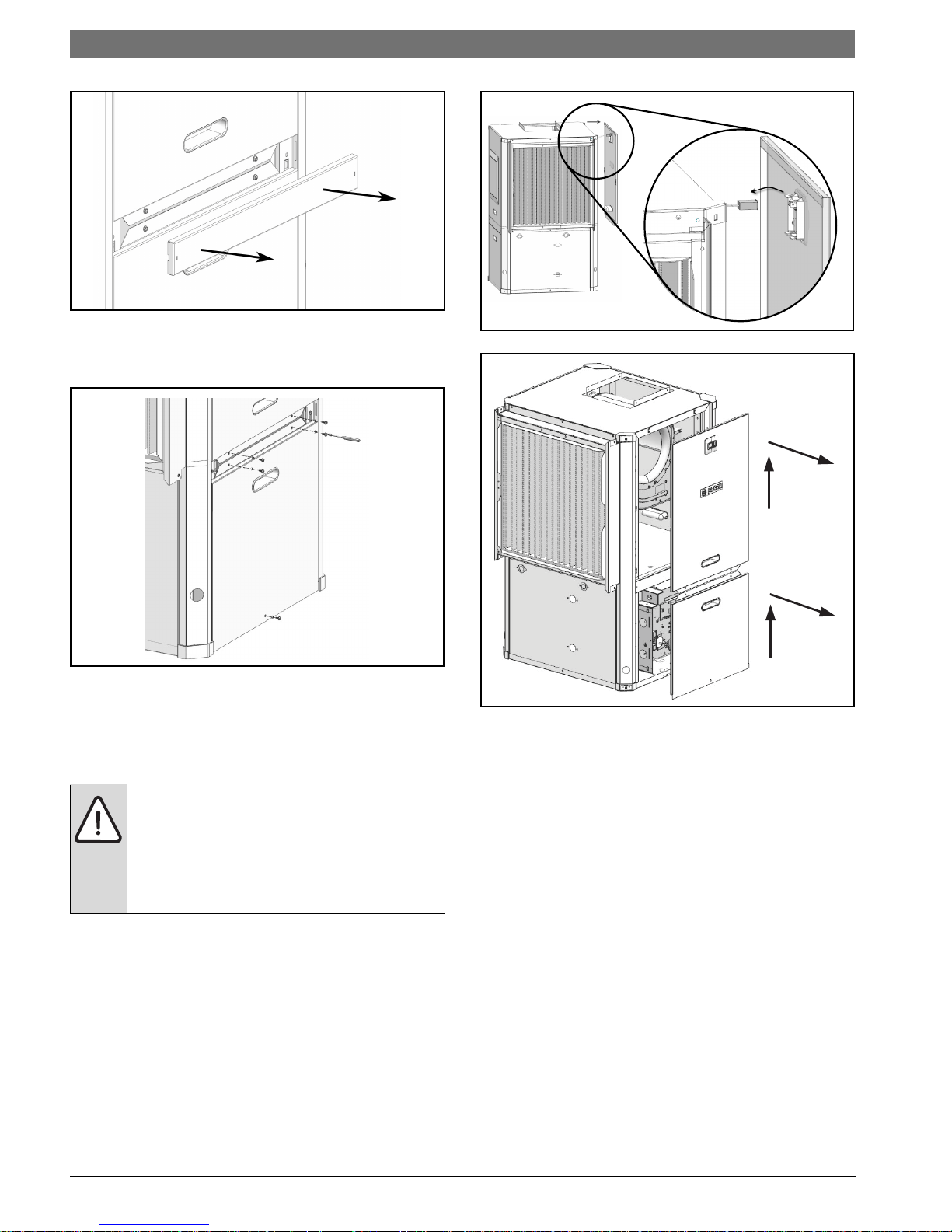
Figure # 43
2. Remove and retain Condensing Section access
panels (bottom panel) by removing (3) screws.
(Figure #44)
SM Series Heat Pump
Figure # 45
Figure # 44
3. Remove and retain Air Handler Panel by lifting
up and out as shown in Figure #46. Remove
panel about 12" away from the cabinet and
unplug LCD screen wiring. (Figures #45
and#46)
The unit panel mounted diagnostic display
is connected to the heat pump controls with
a wire harness. Use care when removing the
display panel and carefully disconnect and
reconnect the harness when repositioning
the panel.
Figure # 46
4. Repeat steps 1–3 for all three sides.
SM Series Heat Pump6 720 220 406 (2015/02) Subject to change without prior notice
Page 17
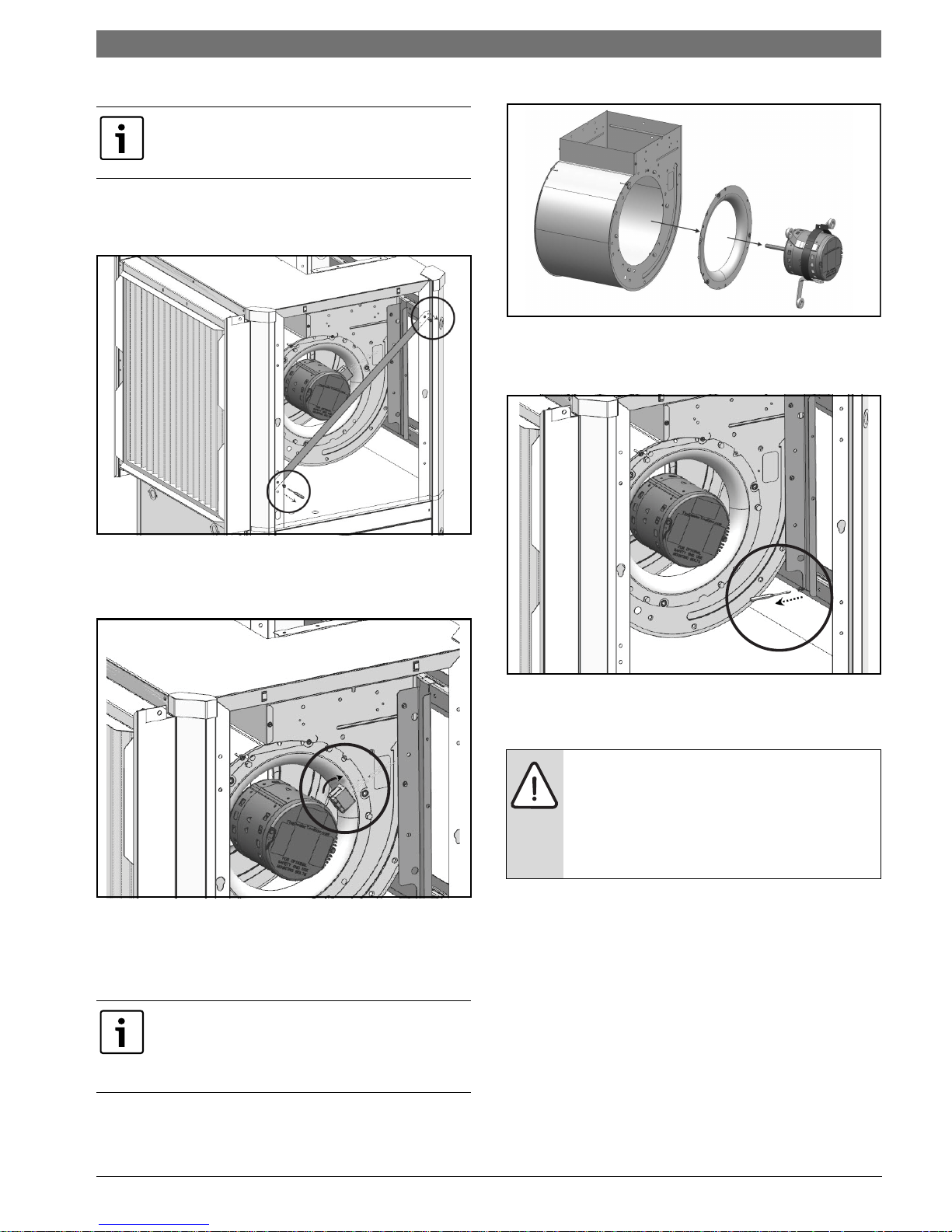
Blower Re-Configuration
This instruction details re-configuration of
blower from UP to SIDE discharge. Reconfiguration to other side uses similar steps.
1. Remove and retain diagonal support brackets
on Front and Back sides of the unit. (Figure
#47)
Vertical Configurability | 17SM Series Heat Pump
Figure # 49
4. Remove screws on both sides of the blower
securing vertical blower bracket to horizontal
support.(Figure#50)
Figure # 47
2. Unplug electrical connections of Blower motor
and ground wire connected to blower housing.
(Figure #48)
Figure # 48
3. Remove and retain blower motor and inlet ring
assembly by removing (3) bolts securing
blower motor bracket and screws securing the
blower inlet ring. (Figure #49)
Figure # 50
5. Remove and retain blower assembly by lifting
up. (Figure #51)
Air coil is in close proximity to the blower
and air coil fins are easily damaged. Great
care must be taken during this step to avoid
coil damage. Shipping cardboard can be
used as protection during blower removal
and installation.
Removing the blower motor and blower wheel
greatly simplifies handling of the blower
assembly and reduces the chance of damaging
heat pump components.
6 720 220 406 (2015/02)Revised 02-15
Page 18
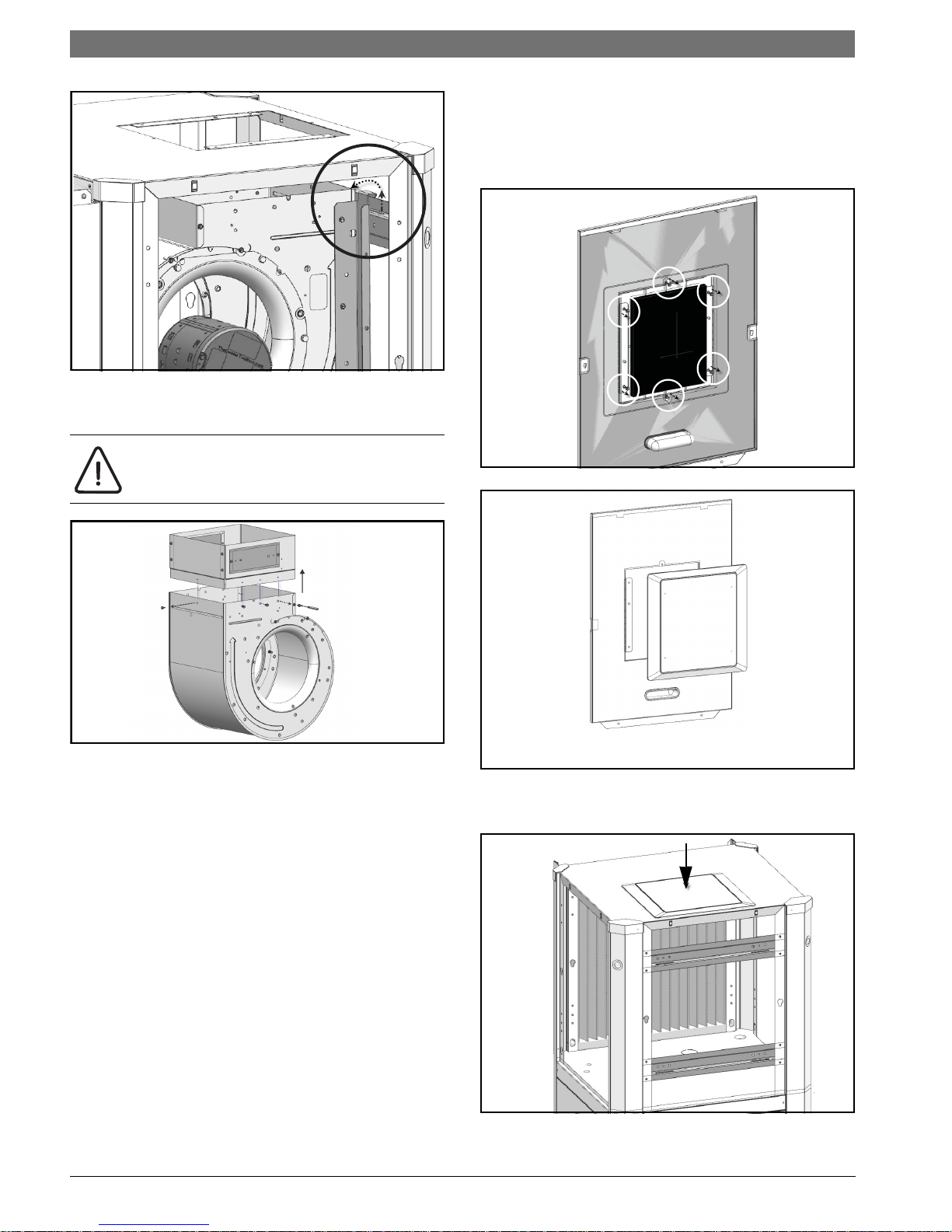
18 | Vertical Configurability
1
2
FRONT OF THE PANEL VIEW
Figure # 51
6. Remove and discard blower collar. (Figure
#52)
Discharge air configuration change is not
possible on Heat Pumps equipped with
Electric Heat Option.
SM Series Heat Pump
7. Remove and retain side panel blower opening
cover by removing (6) phillips head screws and
cutting/tearing insulation at perforations
around the perimeter of cover.(Figures #53
and #54)
Figure # 53
Figure # 52
Figure # 54
8. Reinstall blower opening cover in the TOP
panel. (Figure #55)
Figure # 55
SM Series Heat Pump6 720 220 406 (2015/02) Subject to change without prior notice
Page 19
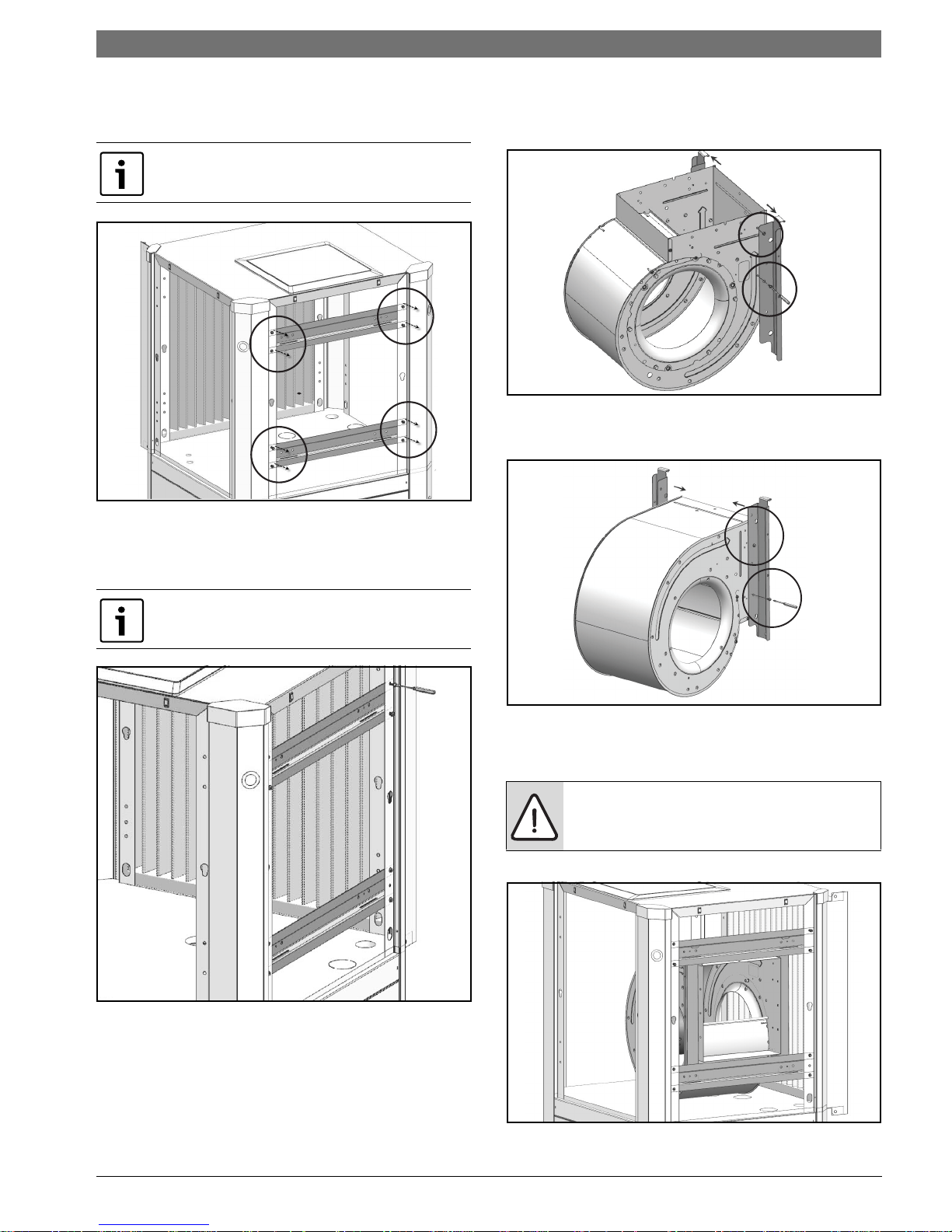
Vertical Configurability | 19SM Series Heat Pump
9. Remove and retain (2) horizontal blower
support brackets by removing (4) screws in
each. (Figure #56)
Upper bracket contains two push-in rubber
bump stops.
Figure # 56
10. Reinstall brackets removed in Step (9) on the
same side of the unit as the blower outlet.
(Figure #57)
11. Remove and retain vertical brackets from
blower by removing (4) screws, (2) on each
side of the blower. (Figure #58)
Figure # 58
12. Reinstall vertical brackets in new orientation.
(Figure #59)
Ensure bracket with push-in rubber bump stops
is installed in the top position.
Figure # 57
Figure # 59
13. Reinstall the blower assembly in the new
desired location, using the existing holes.
(Figure
#60)
NOTE: Be aware of blower housing
proximity to air side coil and potential for
coil damage.
Figure # 60
6 720 220 406 (2015/02)Revised 02-15
Page 20
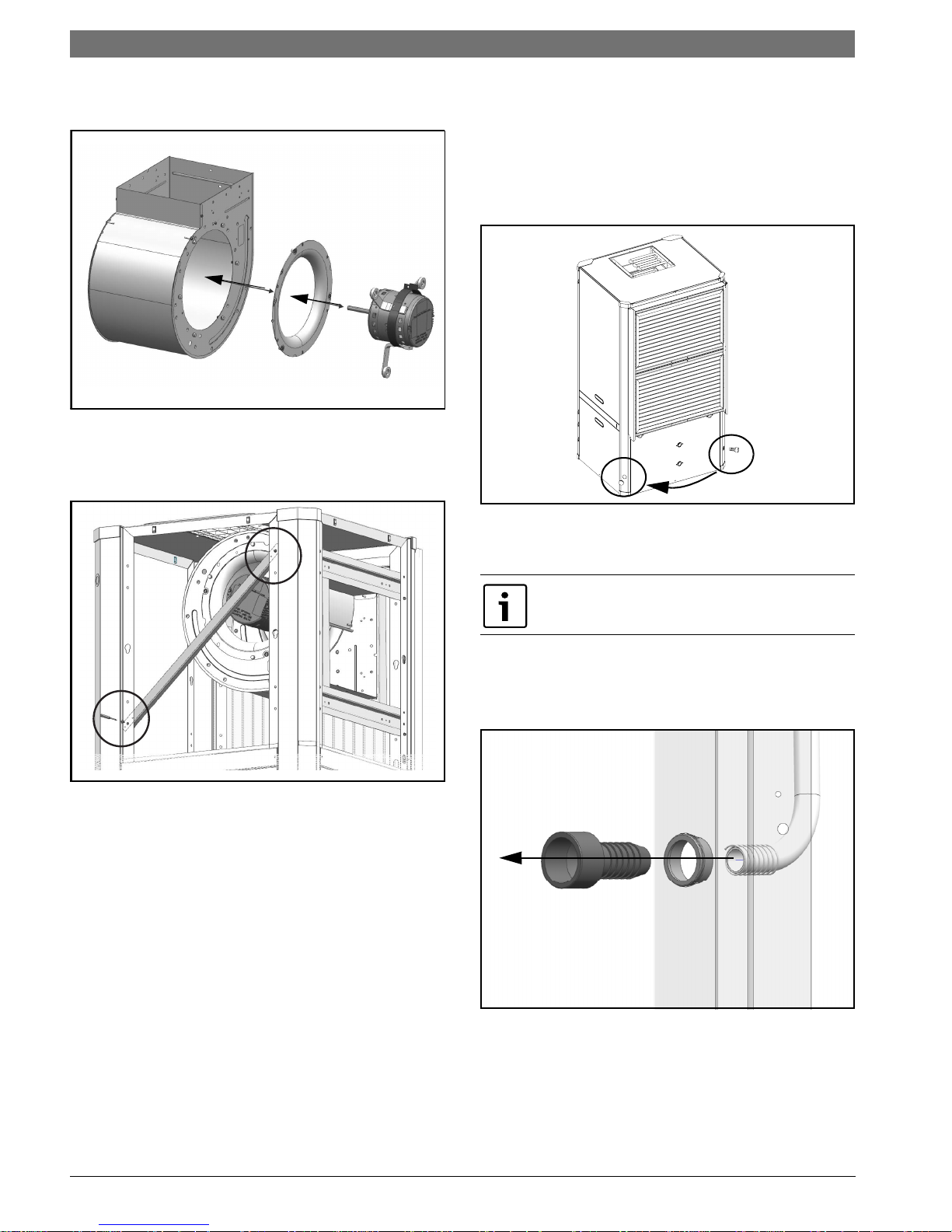
20 | Vertical Configurability
SM Series Heat Pump
14. Reinstall blower motor and inlet ring assembly
by reversing Step #6. (Figure #61)
Figure # 61
15. Reconnect blower motor electrical plug and
ground wire.
16. Reinstall diagonal bracket(s). (Figure #62)
Condensate Drain Connection Reconfiguration
When re-configuring the unit from Left-Hand
Return to Right-Hand Return it is necessary to
relocate condensate drain connection from FRONT
left corner post to BACK left corner
post.(Figure#63)
Figure # 63
1. Cut the condensate drain hose on the inside of
cabinet.
Be sure to retain the spring
2. Remove and retain condensate drain plastic
fitting and grommet from the hose by pulling it
away from the hose (barb style connection).
(Figure#64)
Figure # 62
Figure # 64
SM Series Heat Pump6 720 220 406 (2015/02) Subject to change without prior notice
Page 21

Vertical Configurability | 21SM Series Heat Pump
3. Locate the BACK left condensate drain and
remove and retain plastic plug covering the
cutout. (Figure#65)
Figure # 65
4. Reinstall the removed plastic plugs in the
original Condensate Drain Location.
5. Route the flexible plastic tube from FRONT left
corner post to BACK left. (Figure#66)
NOTE: Avoid kinking the hose and/or
creating a dip which could act as a second
internal p-trap. Double trapped drain lines
will not drain properly.
8. Reinstall condensate drain plastic fitting and
bushing in its new location.(Figure#67)
Figure # 67
HRP Switch Relocation
The HRP Pump Disconnect Switch is shipped loose
inside unit E-Box, to be connected to either FRONT
right corner post or BACK right corner
post.(Figure#68)
Figure # 66
6. Measure and cut the condensate drain hose to
the appropriate length.
7. Insert spring onto condensate drain hose.
Figure # 68
1. From the inside of the unit remove (2) wires
connected to HRP Pump Disconnect Switch.
6 720 220 406 (2015/02)Revised 02-15
Page 22
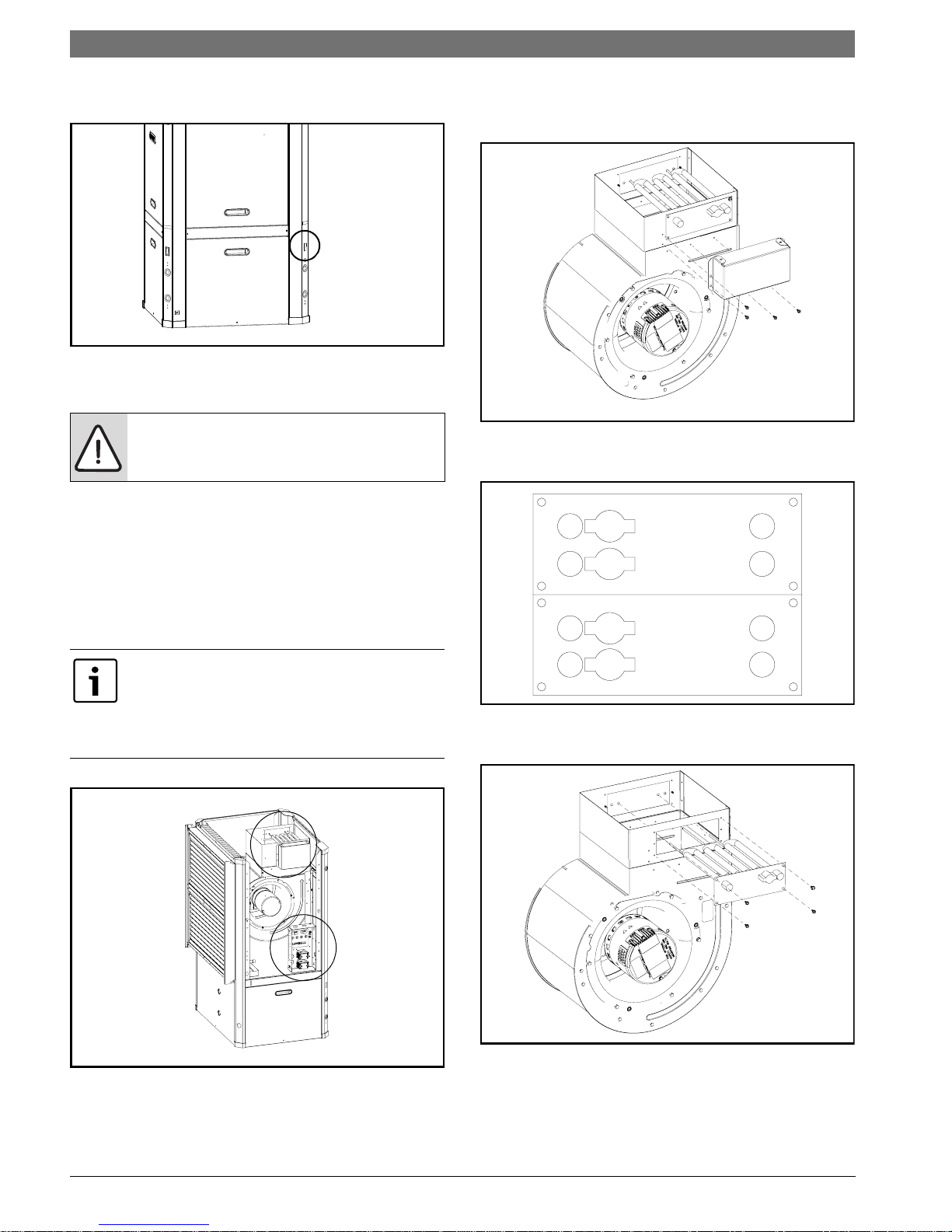
22 | Vertical Configurability
1
2
SM Series Heat Pump
2. Identify a rectangular knockout and remove it.
Along with insulation.(Figure#69)
Figure # 69
3. Route HRP Pump Disconnect switch wires to
the new switch location.
NOTE: Do not route wiring over potentially
hot surfaces or exposed sharp edges.
Damage to wiring could result.
4. Install HRP Switch.
5. Reconnect the Switch wires.
2. Remove and retain the Electric Heat Element
cover(s) by removing (4) screws in
each.(Figure#71)
Figure # 71
3. Disconnect high voltage wiring a the Electric
Heat Elements. (Figure#72)
Electric Heat Relocation
When changing the unit from Left-Hand Return to
Right-Hand Return, it’s required to relocate
Electric Heat Components to the opposite side of
the blower in order to allow field servicing.
Electric Heat comes with (1) or (2) heating
element inserts, depending on capacity.
This instruction shows (1) heating element
insert. Perform the same steps for the
second insert, if present.
1. Identify Electric Heat components. (Figure#70)
Figure # 72
4. Remove and retain Electric Heat
Element(s).(Figure#73)
Figure # 70
[1] Electric Heat Electrical Box
[2] Electric Heat Elements.
Figure # 73
SM Series Heat Pump6 720 220 406 (2015/02) Subject to change without prior notice
Page 23
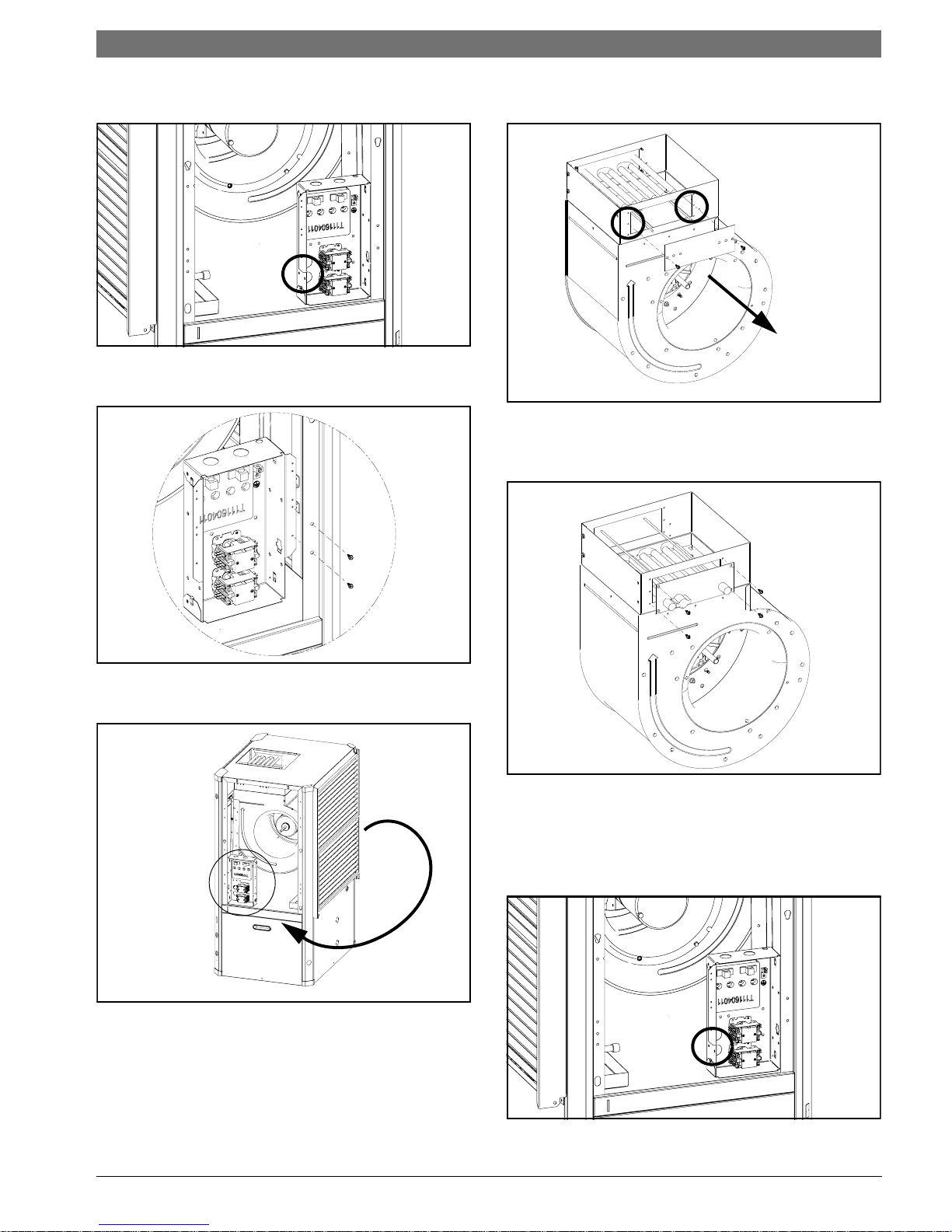
Vertical Configurability | 23SM Series Heat Pump
5. Disconnect main Electric Heat E-box
plug.(FIgure#74)
Figure # 74
6. Remove and retain Electric Heat E-box by
removing (2) screws.(Figure#75)
8. Remove and retain Blower collar cover(s).
(FIgure#77)
Figure # 77
9. Re-install Electric Heat Elements in the new
location. Ensure High Temperature Cutouts are
located on the left side. (Figure#78)
Figure # 75
7. Re-install Electric Heat E-box in the new
location. (Figure#76)
Figure # 76
Figure # 78
10. Route the Unit E-box to Electric Heat wiring
harness to the new Electric Heat Element
location.
11. Connect wiring harness to the connector on
the side of Electric Heat E-Box. (Figure#79)
Figure # 79
6 720 220 406 (2015/02)Revised 02-15
Page 24
24 | Vertical Configurability
HT-4
HT-3
HT-2
HT-1
HLS-1
HLS-2
HLS-3
HLS-4
BLACK
RED
SM Series Heat Pump
12. Reconnect high voltage wiring from Electric
Heat E-Box and Heating Element(s) matching
wire number to terminals as
shown.(Figure#80)
Figure # 80
13. Re-install Electric Heat Elements Cover(s).
(Figure#81)
CAUTION: take great care to ensure all
wires are disconnected and none of the
wires are 'snagged' on any components
Figure # 82
4. Reroute all of the disconnected wire bundles
to the opposite side of the heat pump.
Figure # 81
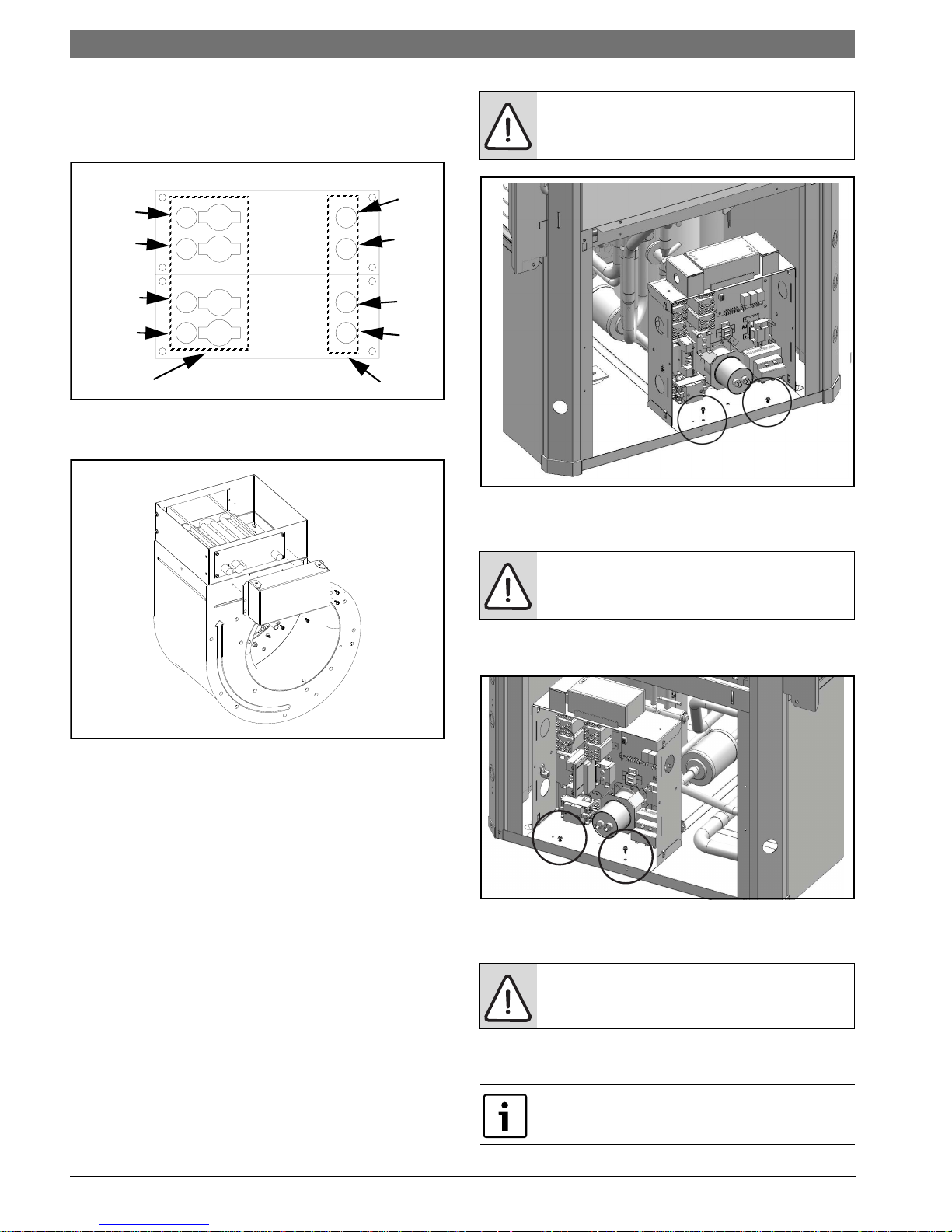
Electrical Box re-configuration
E-box is designed to be removable to support field
configuration of unit: Left-Hand Return and RightHand Return, and also to allow full access to
compressor during servicing.
The Electrical box (E-Box) has a set of plugs that
allows complete removal from the system while
keeping the majority of its internal connections.
(FIgure#123 & #124, Pg#72 and Pg#73)
1. Disconnect wiring harness by unplugging the
following plugs: P18, P19, P20 and P23 (P12 if
unit is equipped with Electric Heat).
(FIgure#123 & #124, Pg#72 and Pg#73)
2. Disconnect compressor plugs at compressor.
3. Remove and retain Electric Box by removing
(2) screws. (Figure #82)
NOTE: Do not route wiring over potentially
hot surfaces or exposed sharp edges.
Damage to wiring could result.
5. Install E-box in its new location by installing (2)
screws. (Figure #83)
Figure # 83
6. Reconnect all the wiring disconnected in Step
#1.
NOTE: Ensure all connectors are properly
oriented and are fully engaged.
7. Identify and re-route LCD wiring harness to the
new location.
Panel containing LCD always mounts on the
same side as E-Box.
SM Series Heat Pump6 720 220 406 (2015/02) Subject to change without prior notice
Page 25
Return and Discharge Duct Flanges | 25SM Series Heat Pump
8. Swap FRONT panel (containing LCD) to the
BACK
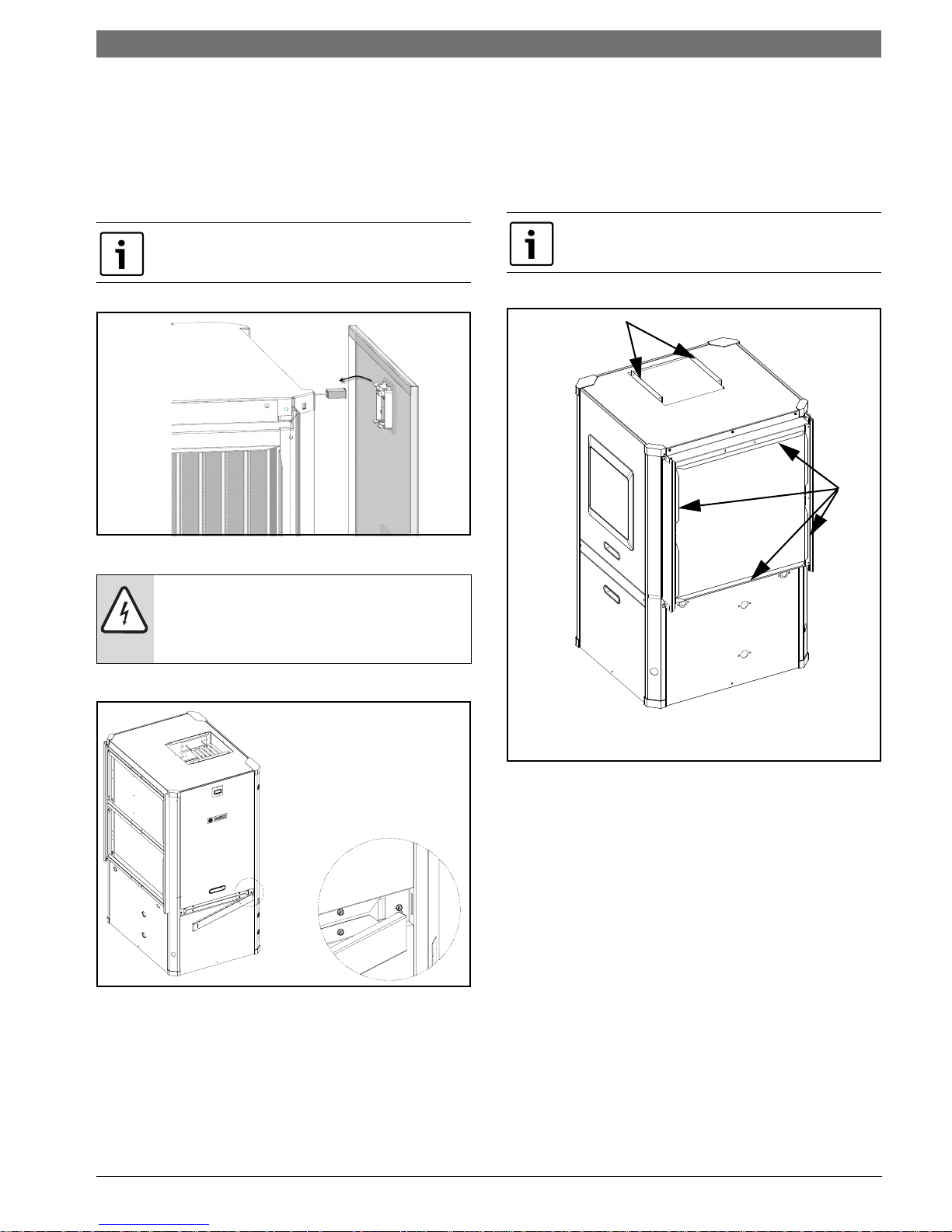
Reinstall All Panels
1. Re-route the LCD wiring to the new location
and reconnect LCD screen wiring. Reinstall
panels. (Figure #84)
Panel containing LCD and Bosch Logo must be
installed on the same side as Electrical Box.
Figure # 84
RETURN AND DISCHARGE DUCT
FLANGES
Return and discharge opening duct flanges are
shipped unfolded. Flanges bend lines are
perforated allowing easy bending using standard
sheet metal pliers or channel locks. (Figure #90)
Bend flanges one at a time.
NOTE: When re-installing panel, the “RED”
cable from the LCD connector must be
connected to the “R” terminal of the LCD
PCB. The LCD will not work any other way.
2. Reinstall belts. (Figure#85)
Figure # 85
6 720 220 406 (2015/02)Revised 02-15
Page 26
26 | Pre Installation Unit Preparation
T
B
A
T2
T1
T1
T1
T2
T2
A
A
A
A
SM Series Heat Pump
PRE INSTALLATION UNIT PREPARATION
Corner Cap Installation Instructions
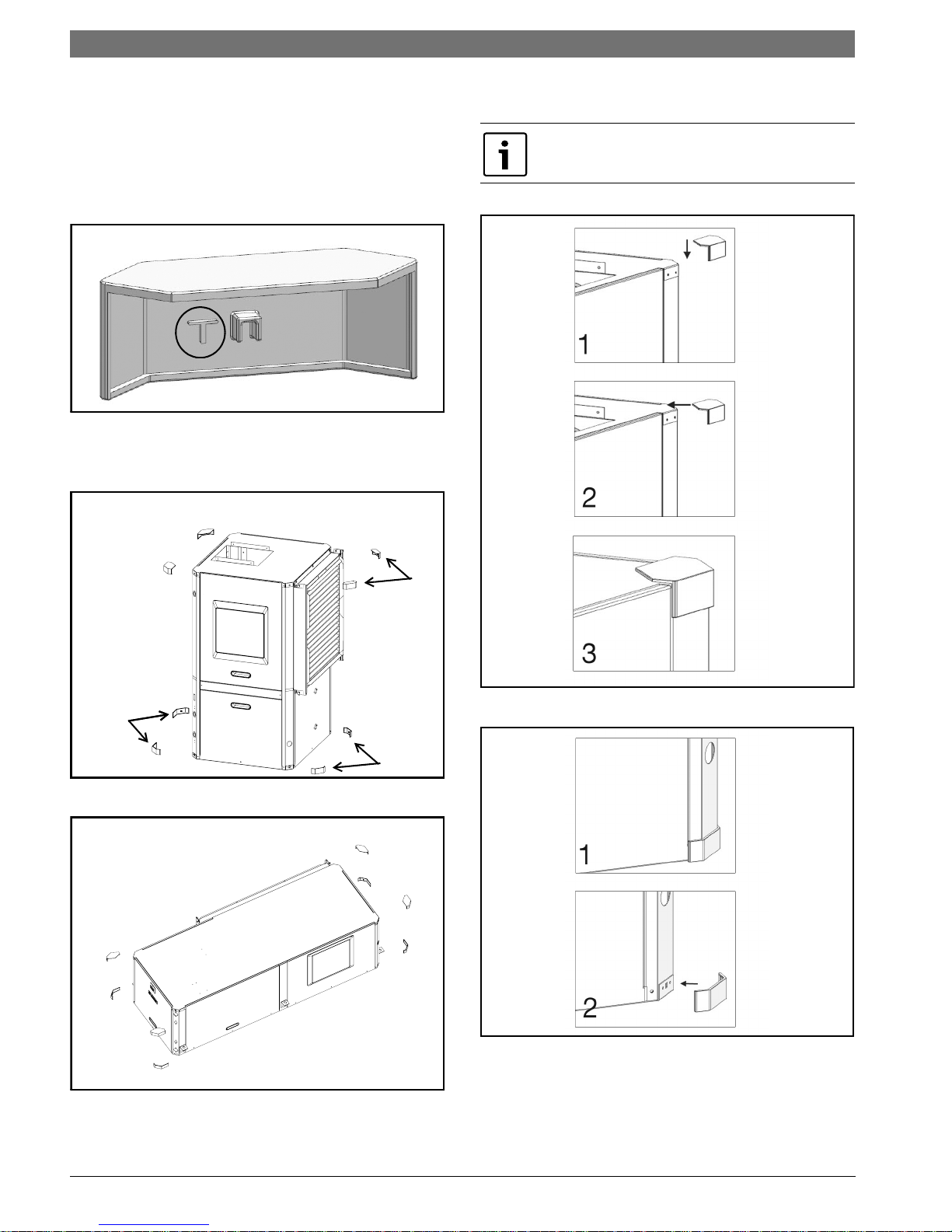
Each corner cap is stamped with one the following
identifiers: T, T1,T2 B, B1, B2, A.
1. Identify Letter code on each Corner Cap.
(Figure#86)
Figure # 86
2. In preparation for installation identify each
Corner Cap location. (VT & CF Figure#87 and
HZ Figure#88)
3. Remove adhesive backing and install each
Corner Cap. (Figure#89 and#90)
Ensure cabinet surface is clean and free of
debris to ensure proper Corner Cap Adhesion.
Figure # 87
Figure # 88
Figure # 89
Figure # 90
SM Series Heat Pump6 720 220 406 (2015/02) Subject to change without prior notice
Page 27
Mounting Vertical Units | 27SM Series Heat Pump
VIBRATION
PAD FULL SIZE
MOUNTING VERTICAL UNITS
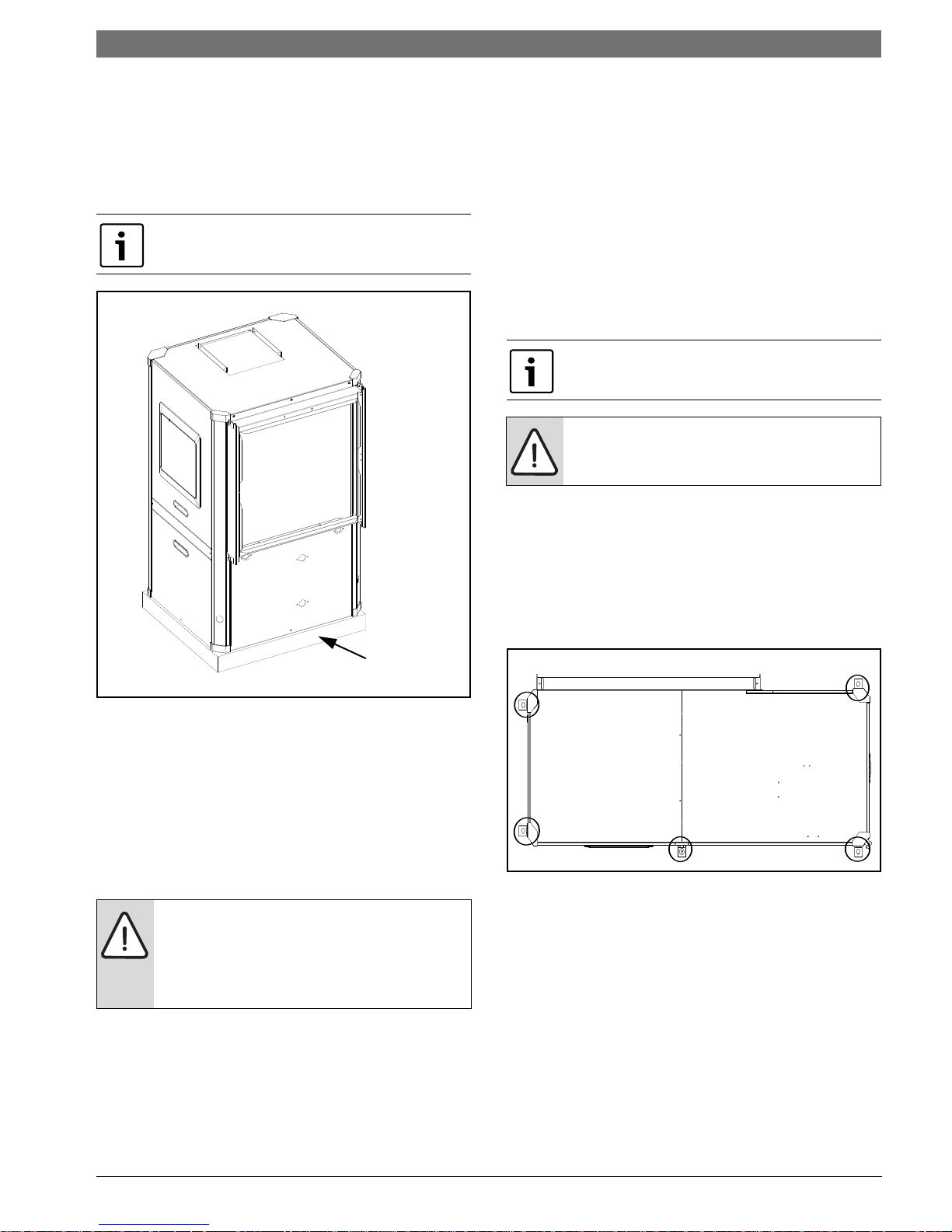
Vertical units should be mounted level on a
vibration absorbing pad slightly larger than the
base to minimize vibration transmission to the
building structure. It is not necessary to anchor the
unit to the floor. (Figure #91).
On VT and CF Units Condensate Drain pan is
internally sloped. There is no internal P-Trap.
The secondary drain pan prevents possible
condensate overflow or water leakage damage to
the ceiling.
The secondary drain pan is usually placed on a
plywood base isolated from the ceiling joists by
additional layers of vibration absorbing mesh. In
both cases, a 3/4”drain connected to this
secondary pan should be run to an eave at a
location that will be noticeable.
If the unit is located in a crawl space, the bottom
of the unit must be at least 4” above grade to
prevent flooding of the electrical parts due to
heavy rains.
HZ Units Condensate Drain pan is NOT
internally sloped.
NOTE: Horizontal (HZ) units must be
installed pitched toward the Condensate
Drain Connection 1/8” per foot.
HANGING BRACKET KIT
Installation Instructions
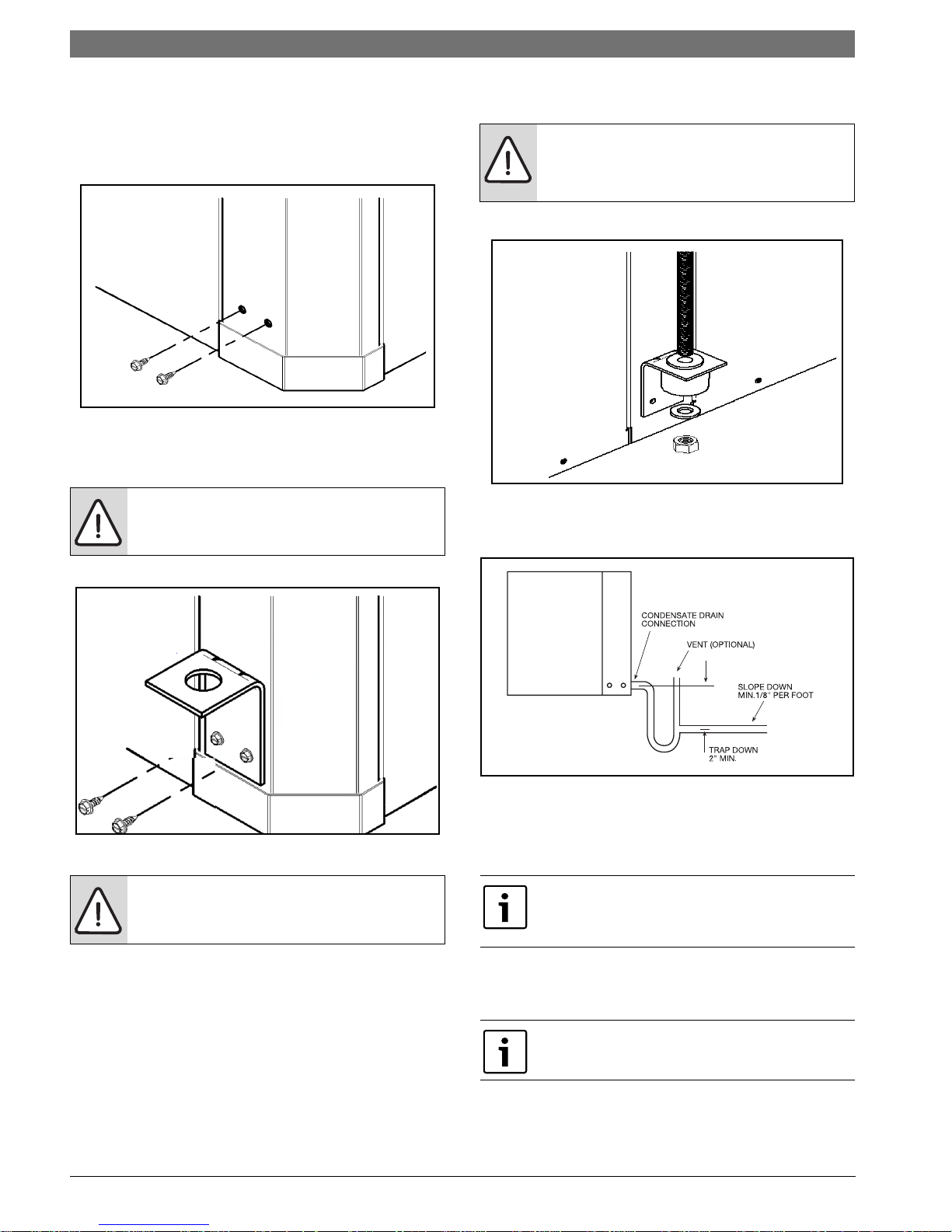
All horizontal units come with hanging bracket
installation kit to facilitate suspended unit
mounting using threaded rod.Hanging brackets are
to be installed as shown in Figure #92.
Figure # 91
MOUNTING HORIZONTAL UNITS
While horizontal units may be installed on any level
surface strong enough to hold their weight, they
are typically suspended above a ceiling by
threaded rods. The manufacturer recommends
these be attached to the unit corners by hanger
bracket kits. The rods must be securely anchored
to the ceiling. Refer to the hanging bracket
assembly and installation instructions for details.
WARNING: Horizontal units installed above
the ceiling must conform to all local codes.
An auxiliary drain pan if required by code,
should be at least four inches larger than
the bottom of the heat pump.
Plumbing connected to the heat pump must not
come in direct contact with joists, trusses, walls,
etc. Some applications require an attic floor
installation of the horizontal unit. In this case the
unit should be set in a full size secondary drain pan
on top of a vibration absorbing mesh.
Figure # 92
This kit includes the following:
(5) Brackets
(5) Rubber Vibration isolators
(8) Screws #10x1/2 (not used for these models)
(10) Bolts 1/4-28x12” Hex bolt
The following are needed and are to be field
provided:
Threaded rod (3/8“ max dia)
Hex nuts
Washers (1-3/4“ min O.D.)
6 720 220 406 (2015/02)Revised 02-15
Page 28
28 | Condensate Drain
1. Remove and discard factory provided screws
from locations where hanging brackets will be
installed shown in Figure #93
Figure # 93
2. Mount 5 brackets to unit corner post using the
Bolts provided in the kit as shown on Figure # 94
SM Series Heat Pump
WARNING:Rods must be securely anchored
to the ceiling
WARNING: Do not re-use screws removed
from the unit on step 1 to mount the
hanging brackets to the unit.
Figure # 94
WARNING: Follow all applicable codes and
requirements when hanging this unit,
selecting threaded rod material, etc.
Figure # 95
CONDENSATE DRAIN
Figure # 96
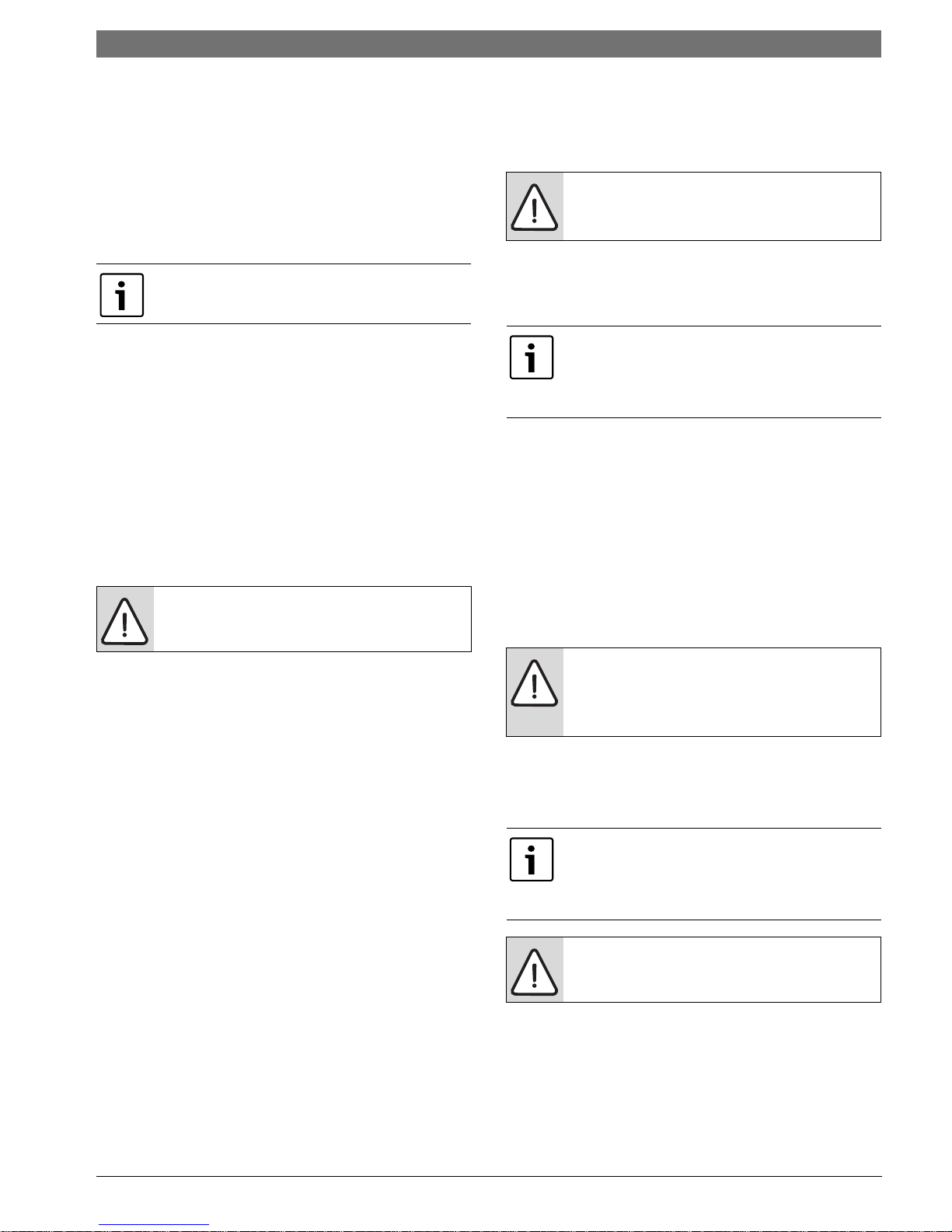
A drain line must be connected to the heat pump
and pitched away from the unit a minimum of 1/8”
per foot to allow the condensate to flow away from
the unit.
When converting unit from left-hand return to
right-hand return, condensate drain connection
must be relocated. Refer to Pg#20.
3. Install rubber grommet onto the brackets as
shown in Figure # 95
4. Hang the unit and assemble the field provided
Thread rod, nuts and washers on to the brackets as
shown in Figure # 95
This connection must be in conformance with local
plumbing codes. A trap must be installed in the
condensate line to insure free condensate flow.
HZ Heat Pump Drain Pan is not internally
sloped.
SM Series Heat Pump6 720 220 406 (2015/02) Subject to change without prior notice
Page 29
Duct System | 29SM Series Heat Pump
A vertical air vent is sometimes required to avoid
air pockets. The length of the trap depends on the
amount of positive or negative pressure on the
drain pan. A second trap must not be included.
DUCT SYSTEM
A supply air outlet collar and return air duct flange
are provided on all units to facilitate duct
connections.
Supply air duct and return air duct flanges are
shipped unfolded with unit.
Fold the duct flange outwards along the perforated
line. Refer to unit Dimensional Drawings for
physical dimensions of the collar and flange.
(Pg#95 through Pg#95)
A flexible connector is recommended for supply
and return air duct connections on metal duct
systems. All metal ducting should be insulated
with a minimum of one inch duct insulation to
avoid heat loss or gain and prevent condensate
forming during the cooling operation. Application
of the unit to the no insulated duct work is not
recommended as the unit’s performance will be
adversely affected.
NOTE: Do not connect discharge ducts
directly to the blower outlet.
PIPING
Supply and return piping must be as large as the
unit connections on the heat pump (larger on long
runs).
NOTE: Never use flexible hoses of a smaller
inside diameter than that of the fluid
connections on the unit.
SM units are supplied with either a copper or
optional cupro-nickel condenser. Copper is
adequate for ground water that is not high in
mineral content.
Proper testing is recommended to assure the
well water quality is suitable for use with water
source equipment. When in doubt, use cupronickel.
In conditions anticipating moderate scale
formation or in brackish water a cupro-nickel heat
exchanger is recommended.
Refer to water quality table on page #30
Both the supply and discharge water lines will
sweat if subjected to low water temperature.
These lines should be insulated to prevent damage
from condensation. All manual flow valves used in
the system must be ball valves. Globe and gate
valves must not be used due to high pressure drop
and poor throttling characteristics.
The factory provided air filter must be removed
when using a filter back return air grill. The factory
filter should be left in place on a free return
system.
If the unit will be installed in a new installation
which includes new duct work, the installation
should be designed using current ASHRAE
procedures for duct sizing. If the unit is to be
connected to existing duct work, a check should
be made to assure that the duct system has the
capacity to handle the air required for the unit
application. If the duct system is too small, larger
duct work should be installed. Check for existing
leaks and repair.
The duct system and all diffusers should be sized
to handle the designed air flow quietly. To
maximize sound attenuation of the unit blower, the
supply and return air plenums should be insulated.
There should be no direct straight air path thru the
return air grille into the heat pump. The return air
inlet to the heat pump must have at least one 90
degree turn away from the space return air grille. If
air noise or excessive air flow are a problem, the
blower speed can be changed to a lower speed to
reduce air flow.
NOTE: Never exceed the recommended
water flow rates as serious damage or
erosion of the water-to-refrigerant heat
exchanger could occur.
Always check carefully for water leaks and repair
appropriately. Units are equipped with swivel
female pipe thread fittings. Consult Unit
Dimensional Drawings. (Pg#95 through Pg#95)
Teflon tape sealer should be used when
connecting water piping connections to the units
to insure against leaks and possible heat
exchanger fouling.
NOTE: Do not overtighten the connections.
Flexible hoses should be used between the unit
and the rigid system to avoid possible vibration.
Ball valves should be installed in the supply and
return lines for unit isolation and unit water flow
balancing.
6 720 220 406 (2015/02)Revised 02-15
Page 30
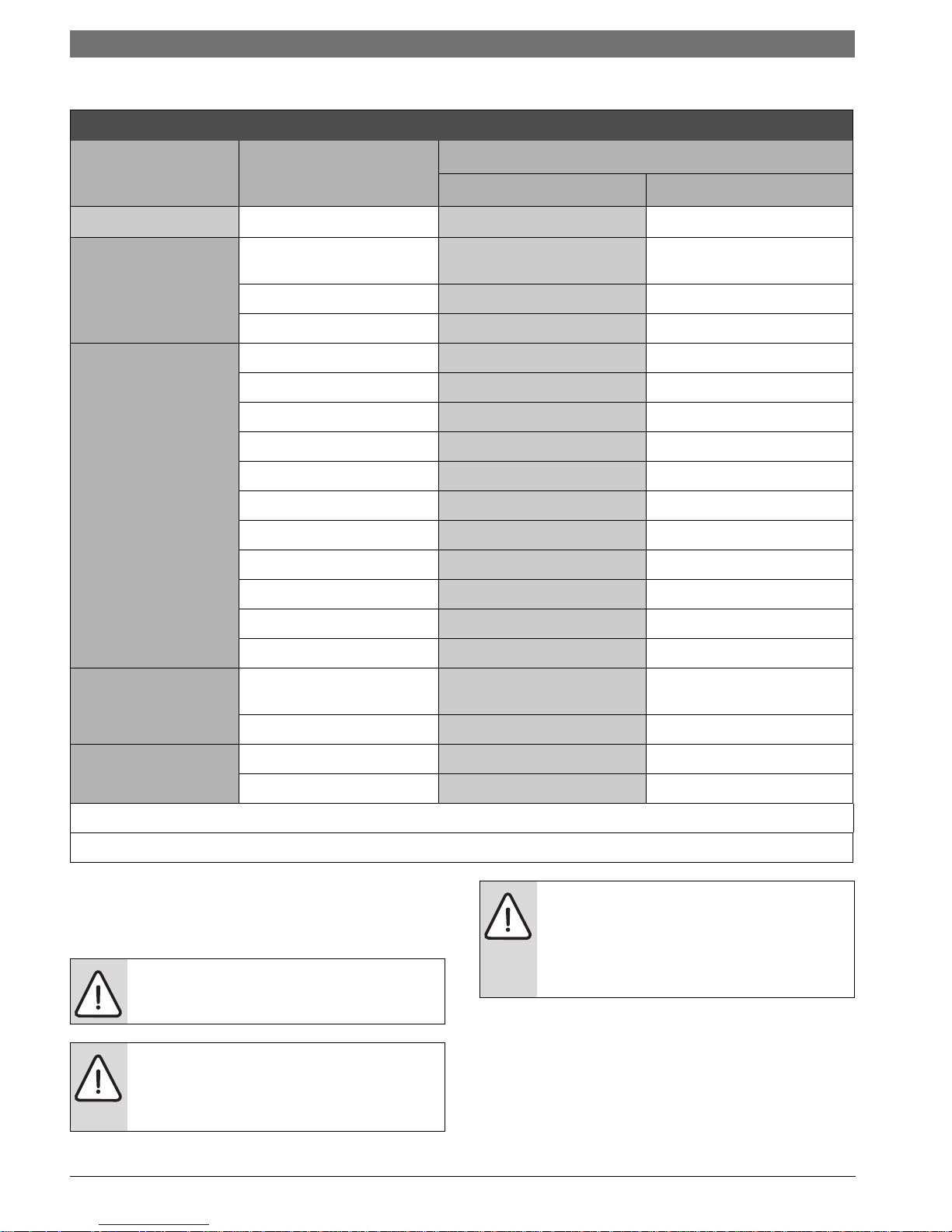
30 | Water Quality
WATER QUALITY
Table 1: Water Quality
SM Series Heat Pump
POTENTIAL
PROBLEM
SCALING
CORROSION
Water Characteristic Acceptable Value
Copper Cupro-Nickel
pH (Acidity/Alkalinity) 7-9 7-9
Hardness (CaCO3,
MgCO3)
Ryznar Stability Index
Langelier Saturation Index
Hydrogen Sulfide (H2S) < 0.5 ppm * 10-50 ppm
Sulfates
Chlorine
Chlorides
Carbon Dioxide
Ammonia
Ammonia Chloride
Ammonia Nitrate
Ammonia Hydroxide
< 350 ppm < 350 ppm
6.0 - 7.5 6.0 - 7.5
-0.5 - +0.5 -0.5 - +0.5
< 125 ppm < 125 ppm
< 0.5 ppm < 0.5 ppm
< 20 ppm < 150 ppm
< 50 ppm < 50 ppm
< 2 ppm < 2 ppm
< 0.5 ppm < 0.5 ppm
< 0.5 ppm < 0.5 ppm
< 0.5 ppm < 0.5 ppm
Ammonia Sulfate
Dissolved Solids
IRON FOULING
EROSION
* No "rotten egg" smell present at < 0.5 ppm H2S.
** Equivalent to 30 mesh strainer
Iron (Fe2+ Iron Bacteria
Potential)
Iron Oxide
Suspended Solids < 10 ppm, < 600 μm size ** < 10 ppm, < 600 μm size **
Maximum Water Velocity
ELECTRICAL
Refer to electrical component box layout.
(Figure #97)
WARNING: Field wiring must comply
with local and national electric codes.
WARNING: Power to the unit must be
within the operating voltage range
indicated on the unit nameplate or on
the performance data sheet.
< 0.5 ppm < 0.5 ppm
< 1,000 ppm < 1,500 ppm
< 0.2 ppm < 0.2 ppm
< 1 ppm < 1 ppm
6 ft/sec 6 ft/sec
NOTE: Operation of unit on improper
line voltage or with excessive phase
imbalance will be hazardous to the unit,
constitutes abuse and may void the
warranty.
Properly sized fuses or HACR circuit breakers must
be installed for branch circuit protection. See unit
nameplate for maximum fuse or breaker size.
SM Series Heat Pump6 720 220 406 (2015/02) Subject to change without prior notice
Page 31

The unit is provided with a concentric knock-out
1
2
3
4
5
6
7
8
9
10
11
12
1
2
3
4
5
6
7
9
10
11
1213
17
14
15
16
8
for attaching common trade sizes of conduit, route
power supply wiring through this opening. Always
connect the ground lead to the grounding lug
provided in the control box and power leads to the
line side of compressor contactor as indicated on
the wiring diagram (Figures#113 through #117
Pg#65 through Pg#66).
Units supplied with internal electric heat require
two (2) separate power supplies:
1) Unit compressor
2) Electric Heat, blower motor and control
circuit.
-------------------------------------------------------------
Refer to the ELECTRIC HEATER PACKAGE
OPTION section and Pg#65 through Pg#66 for
wiring diagrams. See data plate for minimum
circuit ampacities and maximum fuse/breaker
sizing.
Electrical | 31SM Series Heat Pump
Safety Devices and the UPM Controller
[1] Compressor contactor
Figure # 97
[2] Comfort Alert Module (Option)
[3] Emergency Relay (Option)
[4] Second Stage Relay
[5] Hot Gas Reheat Relay (Option)
[6] Cooling Relay
[7] Unit Protection Module (UPM)
[8] Terminal block (Option)
[9] Auxiliary Relay (Option)
[10] Transformer
[11] Capacitor
[12] ECM Module (Option, mounts on E-Box cover)
Figure # 98
[1] Board Power Indicator
[2] UPM Status LED Indicator
[3] Water Coil Freeze Protection Temperature
Selection [R30]
[4] Air Coil Freeze Protection Temperature
Selection
[5] UPM Board Settings
[6] Water Coil Freeze Connection (Freeze 1)
[7] Air Coil Freeze Connection (Freeze 2)
[8] LCD Unit Display Connection
[9] 24VAC Power Input
[10] Compressor Contact Output
[11] High Pressure Switch Connection
[12] Call for Compressor Y1
[13] Low Pressure Switch Connection
[14] 24VAC Power Common
[15] Condensate Overflow Sensor
[16] Dry Contact
[17] UPM Ground Standoff
If the unit is being connected to a thermostat
with a malfunction light, this connection is made
at the unit malfunction output or relay. Refer to
Figure #98
6 720 220 406 (2015/02)Revised 02-15
Page 32

32 | Electrical
SM Series Heat Pump
If the thermostat is provided with a malfunction
light powered off of the common (C) side of the
transformer, a jumper between “R” and “COM”
terminal of “ALR” contacts must be made.
If the thermostat is provided with a malfunction
light powered off of the hot (R) side of the
transformer, then the thermostat malfunction
light connection should be connected directly to
the (ALR) contact on the unit’s UPM board.
Each unit is factory provided with a Unit Protection
Module (UPM) that controls the compressor
operation and monitors the safety controls that
protect the unit.
Safety controls include the following:
• High pressure switch located in the refrigerant
discharge line and wired across the HPC
terminals on the UPM.
• Low pressure switch located in the unit
refrigerant suction line and wired across
terminals LPC1 and LPC2 on the UPM.
NOTE: If unit is employing a fresh water
system (no anti-freeze protection), it is
extremely important to have the Freeze1
R30 resistor set to 26°F in order to shut
down the unit at the appropriate leaving
water temperature and protect your heat
pump from freezing if a freeze sensor is
included.
• Evaporator freeze protection sensor, mounted
after the thermal expansion device and the
evaporator, monitors refrigerant temperature
between the evaporator coil and thermal
expansion valve. If temperature drops below or
remains at freeze limit trip for 30 seconds, the
controller will shut down the compressor and
enter into a soft lockout condition. The default
freeze limit trip is 26°F. (Figure#100)
UPM Board Dry Contacts are Normally Open
(NO)
• Water side freeze protection sensor, mounted
close to condensing water coil, monitors
refrigerant temperature between condensing
water coil and thermal expansion valve. If
temperature drops below or remains at freeze
limit trip for 30 seconds, the controller will
shut down the compressor and enter into a
soft lockout condition. The default freeze limit
trip is 26°F, however this can be changed to
15°F by cutting the R30 or Freeze1 resistor
located on top of DIP switch SW1 (Refer to
Figure #98, item [3] for resistor location),
Refer to Figure #99 for sensor location.
Figure # 100
• The condensate overflow protection sensor is
located in the drain pan of the unit and
connected to the ‘COND’ terminal on the UPM
board. (Figure #101)
Figure # 99
SM Series Heat Pump6 720 220 406 (2015/02) Subject to change without prior notice
Page 33

Figure # 101
UPM Board Factory Default Settings
TEMP
LOCKOUT
RESET
ALARM
TEST
26°F
2
Y
PULSE
NO
UPM DIP SWITCH DEFAULT POSITION
lockout 42
reset
alarm
test
The UPM Board includes the following features:
• ANTI-SHORT CYCLE TIMER:
break timer to prevent compressor short cycling.
• RANDOM START: Each controller has an unique
random start delay ranging from 270 to 300 seconds
on initial power up to reduce the chance of multiple
unit simultaneously starting at the same time after
power up or after a power interruption, thus
avoiding creating large electrical spike.
RY
Cont pulse
yes no
5 minute delay on
Electrical | 33SM Series Heat Pump
• LOW PRESSURE BYPASS TIMER: If the
compressor is running and the low pressure switch
opens, the controller will keep the compressor ON
for 120 seconds. After 2 minutes if the low pressure
switch remains open, the controllers will shut down
the compressor and enter a soft lockout. The
compressor will not be energized until the low
pressure switch closes and the anti-short cycle time
delay expires. If the low pressure switch opens 2-4
times in 1 hour, the unit will enter a hard lockout. In
order to exit hard lockout power to the unit would
need to be reset.
• BROWNOUT/SURGE/POWER INTERRUPTION
PROTECTION:
UPM board will shut does the compressor if the
incoming power falls below 18 VAC. The compressor
will remain OFF until the voltage is above 18 VAC
and ANTI-SHORT CYCLE TIMER (300 seconds) times
out. The unit will not go into a hard lockout.
The brownout protection in the
• MALFUNCTION OUTPUT: Alarm output is
Normally Open (NO) dry contact.
If pulse is
selected the alarm output will be pulsed. The
fault output will depend on the dip switch
setting for "ALARM". If it is set to "CONST", a
constant signal will be produced to indicate a
fault has occurred and the unit requires
inspection to determine the type of fault. If it is
set to "PULSE", a pulse signal is produced and
a fault code is detected by a remote device
indicating the fault. See L.E.D Fault Indication
below for blink code explanation. The remote
device must have a malfunction detection
capability when the UPM board is set to
"PULSE".
If 24 VAC output is needed, R must be wired to
ALR-COM terminal; 24 VAC will be available o
the ALR-OUT terminal when the unit is in the
alarm condition.
• DISPLAY OUTPUT:
output connected to the Unit Diagnostic Display
(UDD) and it pulses 24VAC when the unit is in an
lockout alarm condition.
The Display output is a pulse
• TEST DIP SWITCH: A test dip switch is provided to
reduce all time delays settings to 10 seconds during
troubleshooting or verification of unit operation.
NOTE: Operation of unit in test mode can
lead to accelerated wear and premature
failure of components. The "TEST" switch
must be set back to "NO" after
troubleshooting/servicing.
6 720 220 406 (2015/02)Revised 02-15
Page 34

34 | ECM INTERFACE BOARD
10
1
27
8
9
5
11
46
3
SM Series Heat Pump
• FREEZE SENSOR: The default setting for the
freeze limit trip is 26°F (sensor number 1); however
this can be changed to 15°F by cutting the R30
resistor located on top of the DIP switch SW1.
default setting for the freeze limit trip is 26°F
(sensor number 1); however this can be
changed to 15°F by cutting the R24 resistor
located on top of the DIP switch SW1. Since
freeze sensor 2 is dedicated to monitor the
evaporator coil it is recommended to leave the
factory default setting on the board. The UPM
controller will constantly monitor the
refrigerant temperature with the sensor
mounted close to the condensing water coil
between the thermal expansion valve and
water coil. If temperature drops below or
remains at the freeze limit trip for 30 seconds,
the controller will shut the compressor down
and enter into a soft lockout condition. Both
the status LED and the Alarm contact will be
active. The LED will flash (three (3) times) the
code associated with this alarm condition. If
this alarm occurs 2 times (or 4 if Dip switch is
set to 4) within an hour the UPM controller will
enter into a hard lockout condition. Sensor
number 2 will constantly monitor the
refrigerant temperature with the sensor
mounted close to the evaporator between the
thermal expansion valve and evaporator coil as
shown in Figure #5. If temperature drops
below or remains at the freeze limit trip for 30
seconds, the controller will shut the
compressor down and enter into a soft lockout
condition. Both the status LED and the Alarm
contact will be active. The LED will flash (six
(6) times) the code associated with this alarm
condition. If this alarm occurs 2 times (or 4 if
Dip switch is set to 4) within an hour the
controller will enter into a hard lockout
condition.
NOTE: Freeze sensor will not guard against
the loss of water. Flow switch is
recommended to prevent unit from running
if water flow is lost or reduced.
The
• INTELLIGENT RESET:
initiated, the 5 minute delay on break time period is
initiated and the unit will restart after these delays
expire. During this period the fault LED will indicate
the cause of the fault. If the fault condition still
exists or occurs 2 or 4 times (depending on 2 or 4
setting for Lockout dip switch) before 60 minutes,
the unit will go into a hard lockout and requires a
manual lockout reset. A single condensate overflow
fault will cause the unit to go into a hard lockout
immediately, and will require a manual lockout
reset.
If a fault condition is
• LOCKOUT RESET: A hard lockout can be reset
by turning the unit thermostat off and then
back on when the “RESET” dip switch is set to
“Y” or by shutting off unit power at the circuit
breaker when the “RESET” dip switch is set to
“R”.
The blower motor will remain active during a
lockout condition.
ECM INTERFACE BOARD
Refer to Figure #97, item [12] for ECM interface
board location. In addition to providing a
connecting point for thermostat wiring, the
interface board also translates thermostat inputs
into control commands for the Electronic
Commutated Motor (ECM) DC fan motor and
provides thermostat signals to unit’s UPM board.
The thermostat connections and their functions
are as follows:
Figure # 102
[1] Motor harness plug
[2] Blower CFM adjustment
[3] Motor settings
[4] Dehumidification indication
[5] Thermostat contact inputs
[6] CFM count indicator
[7] Thermostat input status indication
SM Series Heat Pump6 720 220 406 (2015/02) Subject to change without prior notice
Page 35

ECM INTERFACE BOARD | 35SM Series Heat Pump
[8] Reheat digital outputs
[9] Thermostat outputs
[10] 24 VAC
[11] Dehumidification method selector
CFM LED indication is an approximation. Utilize
conventional Test and Balance equipment for
accurate airflow measurement.
• CFM count indicator (Figure #102 item [6])
blinks to indicate approximate airflow in CFM
and may flicker when the unit if off.
• Each blink of the LED represent approximately
100 CFM of air delivery so if the LED blinks 12
times, pauses, blinks 12 times, etc. the blower
is delivering approximately 1200 CFM.
Thermostat Outputs
Y1 First Stage Compressor Operation
Y2 Second Stage Compressor Operation
GFan
O Reversing Valve (energized in cooling)
W1 Auxiliary Electric Heat (runs in
conjunction with compressor)
EM/W2 Emergency Heat (electric heat only)
NC Transformer 24 VAC Common (extra
connection)
C1 Transformer 24 VAC Common (primary
connection)
R Transformer 24 VAC Hot
H Dehumidification Mode
Airflow Selector
The airflow selector (Figure #102, items [2] & [3])
allows airflow adjustment to meet application
requirements and to ease troubleshooting.
Only one dip switch can be enabled at a time.
Refer to Figure #103 for each airflow setting.
• CFM Selector (Figure #102, Item [2]) must
remain with only “A” being enabled.
• ADJUST Selector can be adjusted to NOM, (+),
(-), or TEST. NOM, (+) and (-) can be adjusted
as needed by application. TEST is used for
troubleshooting to override unit airflow to
100%.
Figure # 103
Do not set the ADJ DIP switch to the (-)
setting when electric heaters are installed.
Doing so may cause the heaters to cycle on
their thermal overload switches, potentially
shortening the life of the switches.
Always disconnect power before changing
DIP switch positions on the interface board
and reset the unit afterward.
Dehumidification Method Selector
Dehumidification method selector (Figure #102,
item [11]) is used to select between the following
two methods:
1. Units equipped with optional Hot Gas Reheat,
on dehumidification call (the “H” terminal on
the thermostat is energized) the reheat
outputs will energize the hot gas reheat valve
in the circuit and the heat pump will start in
dehumidification mode. Dehumidification
selector (Figure #102, item [11]) should be
selected to ‘YES’.
2. Units without optional Hot Gas Reheat, on
dehumidification call, the heat pump fan will
operate at a lower speed to increase
dehumidification while cooling.
Dehumidification selector ((Figure #104, item
[11]) should be selected to ‘NO’.
In this mode, the heat pump will only dehumidify
the space when it is running in cooling mode.
6 720 220 406 (2015/02)Revised 02-15
Page 36

36 | ECM INTERFACE BOARD
3. To the left of the red and green status LED’s is
a row of 1/4” male quick connects. These are
used to pass thermostat inputs on to the rest
of the control circuit. Remember to always turn
off unit power at the circuit breaker before
attaching or disconnecting any wiring from
these connections to avoid accidental short
circuits that can damage unit control
components.
Dehumidification indicator LED (Figure #104, item
[4]) will energize when dehumidification call is
present.
SM Series Heat Pump
Figure # 104
Constant Torque Motors (ECM)
For installations where the efficiency of an
electronically commutated brushless DC motor
(ECM) motor is required, but the features of a
constant airflow motor are not required, the LM
series comes standard with the constant torque
ECM motor option. These motors feature up to
90% thermal efficiency combined with a flatter fan
curve than a PSC motor and simple operation.
These motors are provided with 5 speed taps to
allow for a wide range of air flow and external
static options.
To change a speed tap follow the instructions
below:
1. Disconnect power to the heat pump.
2. Remove the blower access panel.
3. Remove the speed tap wire from the terminal it
is currently connected to and connect it to the
terminal desired.
Refer to the constant torque motor performance
tables for heat pump blower performance with the
constant torque motor option. (Pg#62)
SM Series Heat Pump6 720 220 406 (2015/02) Subject to change without prior notice
Page 37

OPTIONS
Number of factory installed options are available
on SM Series of Heat Pumps. The following details
the purpose, function and components of each
option.
Options | 37SM Series Heat Pump
NOTE: Heat pumps with hot Gas Reheat
need to be connected to a humidistat along
with a traditional thermostat or a
combination thermostat/humidistat.
Hot Gas Reheat (HGRH)
Hot gas reheat is an active dehumidification option
available on the SM series that cools and
dehumidifies return air, and then reheats it back to
approximately entering dry bulb temperature using
waste compressor heat. In this way, a unit with Hot
Gas Reheat can efficiently remove humidity from
the return air without altering the sensible
temperature of the space.
Hot Gas Reheat (HGRH) Option is not available
on SM024 model or on models with Electric
Heat installed.
The reheat option consists of a refrigerant to air
heat exchanger (reheat coil) mounted down
stream of the evaporator coil and a refrigerant
diverting valve. When there is a signal for
dehumidification AND the sensible space
temperature is satisfied, the unit will operate in
reheat mode. In reheat mode the heat pump will
operate at full load cooling and will divert
discharge gas from the compressor to the reheat
coil, effectively cooling and dehumidifying the air
and then reheating it back to a temperature close
to the entering dry bulb temperature. If there is a
call for sensible cooling while the unit is operating
in the reheat mode, then the unit will revert to
cooling until the sensible demand is satisfied.
Electric Heat
Internally mounted supplemental electric heat is
available on select models of the SM series.
Electric heating elements can operate along with
reverse cycle heating as auxiliary heat or in lieu of
mechanical heating (refrigeration heating) as
emergency backup heat.
Availability matrix, including available nominal kW
capacities is shown below:
Internal mounted Electric Heat is only available
on top blow vertical cabinets, end blow
horizontal cabinet or on down blow counterflow
cabinets. Electric Heat is not available on units
with HGRH.
In cases where Electric Heat is not available in
a desired configuration but is needed, contact
your distributor for available Duct Mounted
Electric Heat Package.
NOTE: Internal electric heat cannot be provided
with hot gas reheat. Units with internal electric
heat must have 2 field power supplies.
KW Stgs Btu/h Product Series Compatibility
Heater
Model
HK050-1201 3.6 4.8 1 12300 16300 xxxxx
HK100-1201 7.2 9.6 2 24600 32700 x # x xxx
HK150-1201 10.8 14.4 2 36900 49100 x # xxx
HK200-1201 14.4 19.2 2 49200 63400 x # x x
x Available
# Only available for units with ECM Constant Airflow Motor.
208V 230V 208V 230V SM024 SM036 SM048 SM060 SM070
Heat Recovery Package (HRP)
The heat recovery package is a factory installed
option on SM series of heat pumps. The HRP can
be used to heat potable water during unit
operation using waste heat from the compressor
discharge gas. In some cases the HRP can provide
most or all of the hot water requirements for a
typical home.
The HRP consists of three major components:
• double wall, vented refrigerant to water heat
exchanger
•circulating pump
•control circuit
6 720 220 406 (2015/02)Revised 02-15
Page 38

38 | Options
SM Series Heat Pump
The heat exchanger is rated for use with potable
water and is acceptable for use as a domestic
water heating device in most building codes.
The pump circulates water between the domestic
hot water tank and HRP heat exchanger in the Heat
Pump. The control circuit ensures that the HRP
only operates when there is available heat from the
compressor and when the water is within a safe
temperature range of below 140 deg F.
When the heat pump compressor operates, the
HRP will monitor the temperature of the discharge
gas from the compressor. Once discharge gas is
hot enough to provide useful heat to the domestic
water tank, the circulating pump will be enabled,
drawing water from the tank, through the HRP heat
exchanger and then depositing the heated water
back into the tank. If the water temperature
reaches 140 deg F, the circulating pump is
disabled to prevent over heating of the domestic
water. The HRP is provided with an on/off switch
in case the end user desires that the HRP be
inactivated (typically during the winter months
when space heating is most important).
NOTE: If heat recovery unit is installed in an
area where freezing may occur, the unit
must be drained during winter months to
prevent heat exchanger damage. Heat
exchanger ruptures that occur due to
freezing will void the heat recovery package
warranty along with the heat pump
warranty.
Constant Airflow Motor
The Constant Airflow Motor is an Electronic
Commutated Motor (ECM) that provides a
constant air flow over a wide range of external
static pressures, while optimizing the power
consumption of the motor.
This option allows the unit to have different air
flow settings depending on the mode that the unit
is operating; i.e heating, cooling, fan only, hot gas
reheat, etc. Refer to the ECM Interface Board
section (pg.35) for more information.
DPS Water Flow Proving
The DPS water flow proving switch is a factory
installed option available for the SM series. The
DPS prevents compressor operation if there is
inadequate water flow through the water to
refrigerant heat exchanger in the heat pump.
The DPS operates by monitoring the water side
pressure drop across the water to refrigerant heat
exchanger. When the pressure drop between the
water in and water out lines reaches a pre-set
value, compressor operation is enabled.
Pump Relay
The factory installed pump relay can be used to
energize a supply pump or solenoid valve when
there is a call for compressor operation. This relay
can be used to switch either high or low voltage
power.
Comfort Alert Module
The Comfort Alert diagnostics module (CADM) is a
breakthrough innovation for troubleshooting heat
pump system failures. (Figure #105)
Figure # 105
By monitoring and analyzing data from the
compressor and the thermostat demand, the
module can accurately detect the cause of
electrical and system related failures without any
sensors. A flashing LED indicator communicates
the ALERT code and guides the service technician
more quickly and accurately to the root cause of a
problem.
This module does not provide safety protection!
The Comfort Alert module is a monitoring device
and cannot shut down the compressor directly.
When an abnormal system condition occurs, the
Comfort Alert module displays the appropriate
ALERT and/or TRIP LED.
The yellow ALERT LED will flash a number of times
consecutively, pause and then repeat the process.
To identify a Flash Code number, count the
number of consecutive flashes.
Every time the module powers up, the last ALERT
Flash Code that occurred prior to shut down is
displayed for one minute.
SM Series Heat Pump6 720 220 406 (2015/02) Subject to change without prior notice
Page 39

Smart start assist | 39SM Series Heat Pump
Smart Start Assist
Mounting Plate
SMART START ASSIST
SM series are available with the Smart Start Assist
device as either a factory installed option or a field
installed accessory.
This device reduces starting (in-rush) current for
compressors by 45% to 65%. This reduction in
starting current can eliminate or greatly reduce
“light flickering” during compressor starts and can
reduce the required size of back-up transformers.
the adaptive technology of the device can also
extend compressor life by providing smoother,
lower currents starts and by protecting the
compressor from transient over voltage and under
voltage after ramp up.
The smart Start is designed for single phase scroll
compressors and can also optimize algorithms for
high pressure starts.
Smart Start Assist as showed in figure #106.
SSA Specifications
Rated Operational Voltage: 208/230VACrms +/- 15% 50-60
Hz
Environmental Operating
Range:
Degree of Protection: IP20
Overvoltage: Category II
Operational Rated Current: 32 Amps
Max Starting Current:
Min Full Load Current:
Min time between starts: 6 minutes
Min time between stop to
start:
-4° to 149°F (-20° to 65°C); <
95% @ 40 C relative humidity,
non-condensing
80A ACrms
80A ACrms
3 minutes
Figure # 106
6 720 220 406 (2015/02)Revised 02-15
Page 40

40 | Smart start assist
Mode of Operation
SM Series Heat Pump
Figure # 107
Figure # 108
SM Series Heat Pump6 720 220 406 (2015/02) Subject to change without prior notice
Page 41

Heat Recovery Package | 41SM Series Heat Pump
Mode of operation Notes
1.The Smart Start Assist has 2 indication LEDs on board.
The green LED indicates the status of the on-board power
supply while the red LED indicates an alarm condition or
the recovery time between starts.*
2. Once the main voltage is present, the green LED will be
fully ON. In case the main voltage is less than the stated
pickup voltage alarm value, the green LED will be flashing.
In case main voltage is higher than the stated pick-up
voltage and green LED is flashing, then this may indicate
that the on-board power supply is faulty. (Power Supply
Alarm)
3. Upon closing K1, the Smart Start Assist will start
ramping, duration of which is < 1 second, provided that the
minimum time from stop to start is respected. When
opening K1, the Smart Start Assist will stop without any
ramp down.
4. In the case of an under voltage, the Smart Start Assist
will shut down and the red LED flashes 2 times as long as
the under voltage is present. Once the main voltage is
restored the red LED will continue flashing for 5
minutes.Following these 5 minutes (6 minutes for HP
versions), the Smart Start Assist will start ramping function
in the case K1 is closed. The device can be reset at any
time by removing power on L1-N connection. When the
power is reapplied, the soft starter will star ramping up as
soon as K1 is closed, provided that the minimum time from
stop to start are respected.
5. If an over current (>80A for 1 sec.) is sensed, the Smart
start Assist will shut down and the red LED will flash 3
times indicating an over current situacion.This continues
for 5 minutes. In the case that the over current is still
present at the second attempt, user intervention is
required to reset the controller by cycling power for the
device to operate again as this implies that there are
problems in the system.
6. A detection circuitry provides protection in case of a
faulty starting capacitor EMR. In such situation, the red
LED will flash 4 times for 5 minutes. Smart Start Assist will
check the status of the starting capacitor EMR before
attempting a ramping function (in the case K1 is closed). If
at the second attempt, the starting capacitor EMR is found
to be faulty, user intervention is required to reset the
controller by cycling power for the device.
7. In the case of incomplete ramping of the Smart Start
Assist, the red LED will flash 5 times. The flashing will be
indicated by the red LED for 5 minutes. If after the second
attempt, there is another incomplete ramp alarm, user
intervention is required to reset the controller.
8. During the recovery from under-voltage, over-current
and incomplete ramp alarms, the red LED will flash twice
the normal flashing frequency using the same number of
flashes. The figure #108 shows the flashing in case of a
recovery from an under-voltage alarm.
9. During the recovery time between starts, the Smart Start
Assist will be continuously ON until the necessary recovery
time elapses.*
10. If Power supply on Smart Start Assist is removed
before the recovery period has elapsed, when supply is
restored, the delay will continue until the remaining
recovery time from the last start/stop (before supply
removal) is over. Following this, another start may be
attempted. If supply is removed during alarm recovery (red
LED flashing), when supply is restored, the alarm will be
reset and the Smart Start Assist will only wait for the
respective delays between starts and/or stop to start to
elapse before attempting another start (assuming K1 is
closed).
*Applicable to HP versions only
HEAT RECOVERY PACKAGE
Water Tank Preparation
1. Turn off electrical or fuel supply to the water
heater.
2. Attach garden hose to water tank drain
connection and run other end of hose out
doors or to an open drain.
3. Close cold water inlet valve to water heater
tank.
4. Drain tank by opening drain valve on the
bottom of the tank, then open pressure relief
valve or hot water faucet.
5. Once drained the tank should be flushed with
cold water until the water leaving the drain
hose is clear and free of sediment.
6. Close all valves and remove the drain hose.
7. Install HR water piping.
Concentric water fitting (p/n 8733907119) is
recommended.
HR Water Piping
All hot water piping MUST be a minimum of 3/8”
O.D. copper tube to a maximum distance of 15
feet. For distances beyond fifteen feet but not
exceeding 60 feet use 1/2” copper tube.
Separately insulate all exposed surface of both
connecting water lines with 3/8” wall closed cell
insulation. Install isolation valves on supply and
return to the heat recovery. (Figure #109)
6 720 220 406 (2015/02)Revised 02-15
Page 42

42 | Heat Recovery Package
NOTE: Diagram for illustration purposes only.
Ensure access to Heat Pump is not restricted.
SM Series Heat Pump
Hot
Water
Supply
Cold
Water
Supply
T/P Valve
Water Out
Retrun from HRP
Isolation Valves
Tank Drain Valve
Concentric Fitting
Part #520105
Water In
Supply to HRP
Figure # 109
Water Tank Refill
1. Open the cold water supply to the tank.
2. Open a hot water faucet to vent air from the
system until water flows from the faucet, then
close.
3. Depress the hot water tank pressure relief
valve handle to ensure there is no air remaining
in the tank.
4. Carefully inspect all plumbing for water leaks.
Correct as required.
5. Purge all air from HR through an external purge
valve. Allow all air to bleed out until water
appears at the valve. Locate the external purge
value at the highest point in installation.
NOTE: All piping from HRP to domestic
water tank must be copper or any metal of
stronger alloy.
Drain Valve
(Optional)
6. Before restoring the power or fuel supply to
the water heater, adjust the temperature
setting on the tank thermostat(s) to ensure
maximum utilization of the heat available from
the refrigeration system and conserve the most
energy. On tanks with both upper and lower
elements and thermostats, the lower element
should be turned down to 100° F, while the
upper element should be adjusted to 120° F.
Depending upon the specific needs of the
customer, you may need to adjust the upper
element differently. On tanks with a single
thermostat lower the thermostat setting to
120° F or the “LOW” position. After thermostat
adjustments are completed, replace access
cover and restore electrical or fuel supply to
water heater.
SM Series Heat Pump6 720 220 406 (2015/02) Subject to change without prior notice
Page 43

Initial Start-Up | 43SM Series Heat Pump
INITIAL START-UP
NOTE: Make sure all valves in heat recovery
water piping system are open. NEVER
OPERATE HR PUMP DRY.
1. Turn on the heat pump. The HR pump should
not run if the compressor is not running.
2. Turn HR switc h to t he “ON” p osi tion . Th e pum p
will operate if entering water temperature to
HR is below 120° F.
3. The temperature difference between the water
entering and leaving the heat recovery should
be 5° to 15° F.
4. Allow the unit to operate for 20 to 30 minutes
to ensure it is functioning properly. The pump
should shut off when the water temperature
entering the heat recovery reaches 120°F.
SEQUENCE OF OPERATION
Cooling Mode
Energizing the “O” terminal energizes the unit
reversing valve thus placing the unit into cooling
mode. The fan motor starts when the “G” terminal
is energized.
The fan motor will take 30 seconds to ramp up
to operating speed and will run at fan only rated
air flow as long as there is no call for compressor
or heater operation.
Note that a fault condition initiating a lockout will
de-energize the compressor irrespective of
which stage is engaged.
Heating Mode
The first two stages of heating (Y1 & Y2) operate in
the same manner as cooling, but with the reversing
valve de-energized. On a call for auxiliary heat
(W1), the fan ramps up to auxiliary heat air flow
immediately and the electric heater package is
energized along with the compressor.
As the thermostat is satisfied, the heaters will shut
off as soon as W1 is de-energized, and the
compressors will remain on until the thermostat
stages are satisfied.
If the unit compressor locks out for any reason
at this time, the electric heaters will continue to
function normally.
Once the thermostat is satisfied, the compressor
shuts down and the fan ramps down either fan only
mode or off over a span of 30 seconds. If
thermostat has two different output points one for
Auxiliary heat and a different one for Emergency
heat the two outputs must be terminated on W1
units equipped with one stage of Electric heat.
(Figure #115)
When the thermostat calls for first stage cooling
(Y1) the loop pump or solenoid valve if present is
energized and the first stage of compressor
capacity starts. The fan ramps up to first stage
cooling air flow in 30 seconds.
Some options will have a built in delay, and
hence, compressor operation is not immediate.
See ‘Options’ sections for more detail.
When the thermostat calls for second stage
cooling (Y2) the second stage (or full compressor
capacity) is initiated. The fan ramps up to full
cooling air flow.
Once the thermostat is satisfied, the compressor
shuts down and the fan ramps down to either fan
only mode or off over a span of 30 seconds.
When using a 2-cool, 3-heat thermostat both the
W1 & W2 on the Heat Pump and W2 & EM on
the thermostat must be connected together via
a jumper. (See Figure#115)
6 720 220 406 (2015/02)Revised 02-15
Page 44

44 | Sequence of Operation
CC
LOCKOUT CAN BE SET
TO 4 VIA DIP SWITCH
BLINK CODE ON STATUS LED
SOFT LOCKOUT
RECORD ALARM
START COUNTER (IF APPLICABLE)
CC OUTPUT = ON
NO
YES
LPC
=CLOSED
FRZ >TEMP
LIMIT
Y1 = ON
TIME > 30
SEC
CON > 0
POWER/ SWITCHES/SENSOR
STATUS CHECK
START
TIMER
NO
YES
NO
YES
NO
YES
T > ASC OR
RS SEC
YES
NO
NO
YES
START
ANTI SHORT CYCLE
INITIAL
POWER UP
YES
NO
START
RANDOM START UP
START
COUNTER
NEEDED?
YES
COUNT = 2
OR
COUNT = 4
BLINK CODE ON STATUS LED
DISPLAY OUTPUT = PULSE
ALR OUTPUT = ON/PULSE
NO
YES
HARD
LOCKOUT?
CC OUTPUT = OFF
V > 18VAC
NO
YES
YES
NO
BLINK CODE
ON STATUS LED
NO
RESET ON
Y
CLEAR FAULTS
R = 24VAC
NO
YES
NO
YES
NO
YES
HPC =
CLOSED
RESET ON R
CC OUPUT=
ON
NO
YES
TIME >
120 SEC
START
TIMER
NO
YES
CNT = CNT+1
SM Series Heat Pump
Figure # 110
SM Series Heat Pump6 720 220 406 (2015/02) Subject to change without prior notice
Page 45

Application Considerations | 45SM Series Heat Pump
1
2
3
4
5
6
7
Typical Installation shown for
illustration purposes only.
9
8
10
11
12
13
APPLICATION CONSIDERATIONS
Well Water Systems
Copper is adequate for ground water that is not
high in mineral content. Should your well driller
express concern regarding the quality of the well
water available or should any known hazards exist
in your area, we recommend proper testing to
assure the well water quality is suitable for use
with water source equipment. In conditions
anticipating moderate scale formation or in
brackish water a cupro-nickel heat exchanger is
recommended. In well water applications water
pressure must always be maintained in the heat
exchanger. This can be accomplished with either
control valve or a bladder type expansion tank.
When using a single water well to supply both
domestic water and the heat pump care must be
taken to insure that the well can provide sufficient
flow for both. In well water applications a slow
closing solenoid valve must be used to prevent
water hammer. Solenoid valves should be
connected across Y1 and C1 on the interface board
for all. Make sure that the VA draw of the valve
does not exceed the contact rating of the
thermostat. (Figure #111)
[1] Flex Duct Connection
[2] Low Voltage Control Connection
[3] Vibration Pad
[4] Ball Valves
[5] Solenoid Valve Slow Closing
[6] Condensate Drain Connection
[7] Drain Valves
[8] Hose Kits (optional)
[9] Pressure Tank (optional)
[10] P/T Ports (optional)
[11] Line Voltage Connection
[12] Electric Heater Line Voltage Disconnect
[13] Unit Line Voltage Disconnect
Figure # 111 Example System Set-up
Cooling Tower/Boiler Systems
The cooling tower and boiler water loop
temperature is usually maintained between 50° F
to 100 ° F to assure adequate cooling and heating
performance.
In the cooling mode, heat is rejected from the unit
into the water loop. A cooling tower provides
evaporative cooling to the loop water thus
maintaining a constant supply temperature to the
unit. When utilizing open cooling towers, chemical
water treatment is mandatory to ensure the water
is free from corrosive elements. A secondary heat
exchanger (plate frame) between the unit and the
6 720 220 406 (2015/02)Revised 02-15
Page 46

46 | Application Considerations
Diagram shows typical
installation and is for
illustration purposes only.
Ensure access to Heat
Pump is not restricted.
SM Series Heat Pump
open cooling tower may also be used. It is
imperative that all air be eliminated from the
closed loop side of the heat exchanger to insure
against fouling. In the heating mode, heat is
absorbed from the water loop. A boiler can be
utilized to maintain the loop at the desired
temperature.
NOTE: Water piping exposed to extreme
low ambient temperatures is subject to
freezing.
Teflon tape sealer should be used when
connecting to the unit to insure against leaks
and possible heat exchanger fouling.
Consult the specification sheets for piping sizes.
Do not overtighten the connections. Flexible hoses
should be used between the unit and the rigid
system to avoid possible vibration.
Ball valves should be installed in the supply and
return lines for unit isolation and unit water flow
balancing. Pressure/temperature ports are
recommended in both supply and return lines for
system flow balancing. Water flow can be
accurately set by measuring the water-torefrigerant heat exchangers water side pressure
drop. See specification sheets for water flow vs.
pressure drop information.
No unit should be connected to the supply or
return piping until the water system has been
completely cleaned and flushed to remove any dirt,
piping chips or other foreign material. Supply and
return hoses should be connected together during
this process to ensure the entire system is
properly flushed. After the cleaning and flushing
has taken place the unit may be connected to the
water loop and should have all valves wide open.
(Figure #112)
[1] Line voltage disconnect (unit)
[2] Low voltage control connection
[3] P/T ports (optional)
[4] Hose kits (optional)
[5] Ball valves
[6] Supply and return line of central system
[7] Flex duct connection
Figure # 112
[8] Hanging bracket assembly
[9] Threaded rod
[10] Hanging bracket assembly
SM Series Heat Pump6 720 220 406 (2015/02) Subject to change without prior notice
Page 47

Application Considerations | 47SM Series Heat Pump
Diagram shows typical
installation and is for
illustration purposes
only. Ensure access to
Heat Pump is not
restricted.
Geothermal Systems
Closed loop and pond applications require
specialized design knowledge. No attempt at these
installations should be made unless the dealer has
received specialized training. Utilizing the Ground
Loop Pumping Package (GLP), makes the
installation easy. Anti-freeze solutions are utilized
when low evaporating conditions are expected to
occur. Refer to the GLP installation manuals for
more specific instructions. (Figure #113)
[1] Line voltage disconnect (unit)
[2] Flex duct Connection
[3] Low voltage control connection
[4] Line voltage connection (unit)
[5] P/T ports
[6] Vibration pad
[7] Condensate drain connection
[8] Ground loop connection kit
[9] Ground loop pumping package
[10] Polyethylene with insulation
[11] Line voltage disconnect (electric heater)
Figure # 113
6 720 220 406 (2015/02)Revised 02-15
Page 48

48 | System Checkout
SM Series Heat Pump
SYSTEM CHECKOUT
After completing the installation, and before
energizing the unit, the following system checks
should be made:
1. Verify that the supply voltage to the heat pump
is in accordance with the nameplate ratings.
2. Make sure that all electrical connections are
tight and secure.
3. Check the electrical fusing and wiring for the
correct size.
DANGER: Ensure cabinet and Electrical Box
are properly grounded.
4. Verify that the low voltage wiring between the
thermostat and the unit is correct.
5. Verify that the water piping is complete and
correct.
6. Check that the water flow is correct, and
adjust if necessary.
7. Check the blower for free rotation, and that it
is secured to the shaft.
8. Verify that vibration isolation has been
provided.
9. Unit is serviceable. Be certain that all access
panels are secured in place.
Considerations:
• Always check incoming line voltage power
supply and secondary control voltage for
adequacy. Transformer primaries are dual
tapped for 208 and 230 volts. Connect the
appropriate tap to ensure a minimum of 18
volts secondary control voltage. 24 volts is
ideal for best operation.
• Long length thermostat and control wiring
leads may create voltage drop. Increase wire
gauge or up-size transformers may be required
to insure minimum secondary voltage supply.
• FHP recommends the following guidelines for
wiring between a thermostat and the unit: 18
GA up to 60 foot, 16 GA up to 100 ft and 14 GA
up to 140 ft.
• Do not apply additional controlled devices to
the control circuit power supply without
consulting the factory. Doing so may void
equipment warranties.
• Check with all code authorities on
requirements involving condensate disposal/
over flow protection criteria.
UNIT START-UP
1. Set the thermostat to the highest setting.
2. Set the thermostat system switch to “COOL”,
and the fan switch to the “AUTO” position. The
reversing valve solenoid should energize. The
compressor and fan should not run.
3. Reduce the thermostat setting approximately 5
degrees below the room temperature.
4. Verify the heat pump is operating in the cooling
mode.
5. Turn the thermostat system switch to the
“OFF” position. The unit should stop running
and the reversing valve should de energize.
6. Leave the unit off for approximately (5)
minutes to allow for system equalization.
7. Turn the thermostat to the lowest setting.
8. Set the thermostat switch to “HEAT”.
9. Increase the thermostat setting approximately
5 degrees above the room temperature.
10. Verify the heat pump is operating in the heating
mode.
11. Set the thermostat to maintain the desired
space temperature.
12. Check for vibrations, leaks, etc.
SM Series Heat Pump6 720 220 406 (2015/02) Subject to change without prior notice
Page 49

MAINTENANCE
1. Filter changes or cleaning are required at
regular intervals. The time period between
filter changes will depend upon type of
environment the equipment is used in. In a
single family home, that is not under
construction, changing or cleaning the filter
every 60 days is sufficient. In other
applications such as motels, where daily
vacuuming produces a large amount of lint,
filter changes may need to be as frequent as
biweekly.
NOTE: Equipment should never be used
during construction due to likelihood of wall
board dust accumulation in the air coil of
the equipment which permanently affects
the performance and may shorten the life of
the equipment.
2. An annual “checkup” is recommended by a
licensed refrigeration mechanic. Recording the
performance measurements of volts, amps,
and water temperature differences (both
heating and cooling) is recommended. This
data should be compared to the information on
the unit’s data plate and the data taken at the
original startup of the equipment.
3. Lubrication of the blower motor is not
required, however may be performed on some
motors to extend motor life. Use SAE-20 nondetergent electric motor oil.
4. The condensate drain should be checked
annually by cleaning and flushing to insure
proper drainage.
5. Periodic lockouts almost always are caused by
air or water flow problems. The lockout
(shutdown) of the unit is a normal protective
measure in the design of the equipment. If
continual lockouts occur call a mechanic
immediately and have them check for: water
flow problems, water temperature problems,
air flow problems or air temperature problems.
Use of the pressure and temperature charts for
the unit may be required to properly determine
the cause.
Maintenance | 49SM Series Heat Pump
6 720 220 406 (2015/02)Revised 02-15
Page 50

50 | Unit Check-Out Sheet
Bosch Group
601 NW 65th Court
Fort Lauderdale, FL 33309
Phone: (954) 776-5471
Fax: (800) 776-5529
MAIL TO: Bosch.Fhp.TechSupport@us.bosch.com
or scan the QR code and attach picture of this form with
the information requested.
SM Series Heat Pump
UNIT CHECK-OUT SHEET
Customer Data
Customer Name _____________________________________________ Date ___________________________________
Address ______________________________________________________
_______________________________________________________________
Phone _______________________________________________________ Unit Number ___________________________
Unit Nameplate Data
Unit Make _________________________________________
Model Number ____________________________________ Serial Number ____________________________________
Refrigerant Charge (oz) __________________________
Compressor: RLA ____________________ LRA ___________________________
Blower Motor: FLA (or NPA) ___________ HP ____________________________
Maximum Fuse Size (Amps) ____________
Maximum Circuit Ampacity _____________
Operating Conditions
Cooling Mode Heating Mode
Entering / Leaving Air Temp
Entering Air Measured at:
Leaving Air Measured at:
Entering / Leaving Fluid Temp
Fluid Flow (gpm)
Compressor Volts / Amps
Blower Motor Volts / Amps
Source Fluid Type
Fluid Flow (gpm)*
Fluid Side Pressure Drop*
Suction / Discharge Pressure (psig)*
Suction / Discharge Temp* _______________ / _____________ _______________ / _____________
Suction Superheat* ______________________________ ______________________________
Entering TXV / Cap Tube Temp* ______________________________ ______________________________
Liquid Subcooling*
* Required for Troubleshooting ONLY
_______________ / _____________ _______________ / _____________
______________________________ ______________________________
______________________________ ______________________________
_______________ / _____________ _______________ / _____________
______________________________ ______________________________
_______________ / _____________ _______________ / _____________
_______________ / _____________ _______________ / _____________
______________________________ ______________________________
______________________________ ______________________________
______________________________ ______________________________
_______________ / _____________ _______________ / _____________
______________________________ ______________________________
Auxiliary Heat
Unit Make __________________________________
Model Number: ______________________________ Serial Number _____________________________
Max Fuse Size (Amps) _______________________
Volts / Amps _______________________________
Entering Air Temperature _____________________
Leaving Air Temperature ______________________
SM Series Heat Pump6 720 220 406 (2015/02) Subject to change without prior notice
Page 51

TROUBLESHOOTING
SM Series Water Source Heat Pump is equipped
with a externally mounted LCD screen that
displays unit errors. (Figure #114)
Troubleshooting | 51SM Series Heat Pump
UPM Board LED Indications
Indication
Color
GREEN Solid 18-30 VAC Power is present
RED 1 High pressure lockout
RED 2 Low pressure lockout
RED 3 Freeze sensor lockout
RED 4 Condensate overflow
RED 5 Brownout
Blinks Description
Figure # 114
RED 6 Evaporator Freeze condition
Troubleshooting Information Solution
column may reflect a possible fault that
may be one of, or a combination of
causes and solutions. Check each cause
and adopt “process of elimination” and
or verification of each before making
any conclusion.
Unit Troubleshooting
Problem Possible Cause Checks and Correction
ENTIRE UNIT
DOES NOT RUN
Power Supply Off Apply power, close disconnect
Blown Fuse
Voltage Supply
Low
Thermostat
Replace fuse or reset circuit breaker. Check for correct fuses
If voltage is below minimum voltage specified on unit data plate,
contact local power company.
Set the fan to “ON”, the fan should run. Set thermostat to “COOL” and
lowest temperature setting, the unit should run in the cooling mode
(reversing valve energized). Set unit to “HEAT” and the highest
temperature setting, the unit should run in the heating mode. If neither
the blower or compressor run in all three cases, the thermostat could
be miswired or faulty. To ensure miswired or faulty thermostat verify 24
volts is available on the condensing section low voltage terminal strip
between “R” and “C”, “Y” and “C”, and “O” and “C”. If the blower does
not operate, verify 24 volts between terminals “G” and “C” in the air
handler. Replace the thermostat if defective.
BLOWER
OPERATES BUT
COMPRESSOR
DOES NOT
Thermostat Check setting, calibration, and wiring
Wiring
Safety Controls
Compressor
overload open
Compressor
motor grounded
Compressor
windings Open
Check for loose or broken wires at compressor, capacitor, or contactor.
Check UPM board red default L.E.D. for Blink Code
If the compressor is cool and the overload will not reset, replace
compressor.
Internal winding grounded to the compressor shell. Replace
compressor. If compressor burnout, install suction filter dryer.
After compressor has cooled, check continuity of the compressor
windings. If the windings are open, replace the compressor
6 720 220 406 (2015/02)Revised 02-15
Page 52

52 | Troubleshooting
Unit Troubleshooting
Problem Possible Cause Checks and Correction
SM Series Heat Pump
UNIT OFF ON
HIGH PRESSURE
CONTROL
UNIT OFF ON LOW
PRESSURE
CONTROL
UNIT SHORT
CYCLES
Discharge
pressure too high
Refrigerant
charge
High pressure
Suction pressure
too low
Refrigerant
charge
Low pressure
switch
Unit oversized Recalculate heating and or cooling loads.
Thermostat
Wiring and
controls
In “COOLING” mode: Lack of or inadequate water flow. Entering water
temperature is too warm. Scaled or plugged condenser. In “HEATING”
mode: Lack of or inadequate air flow. Blower inoperative, clogged filter
or restrictions in duct work
The unit is overcharged with refrigerant. Reclaim refrigerant, evacuate
and recharge with factor recommended charge.
Check for defective or improperly calibrated high pressure switch.
In “COOLING” mode: Lack of or inadequate air flow. Entering air
temperature is too cold. Blower inoperative, clogged filter or
restrictions in duct work. In “HEATING” mode: Lack of or inadequate
water flow. Entering water temperature is too cold. Scaled or plugged
condenser.
The unit is low on refrigerant. Check for refrigerant leak, repair,
evacuate and recharge with factory recommended charge.
Check for defective or improperly calibrated low pressure switch.
Thermostat installed near a supply air grill; relocate thermostat.
Readjust heat anticipator.
Check for defective or improperly calibrated low pressure switch.
INSUFFICIENT
COOLING OR
HEATING
Unit undersized Recalculate heating and or cooling loads. If excessive, possibly adding
insulation and shading will rectify the problem
Loss of
conditioned air by
leakage
Airflow
Refrigerant
charge
Compressor
Reversing Valve
Operating
pressures
TXV
Moisture,
noncondensables
Check for leaks in duct work or introduction of ambient air through
doors or windows
Lack of adequate air flow or improper distribution of air. Replace dirty
filter
Low on refrigerant charge causing inefficient operation
Check for defective compressor. If discharge is too low and suction
pressure is too high, compressor is not pumping properly. Replace
compressor.
Defective reversing valve creating bypass of refrigerant from discharge
of suction side of compressor. Replace reversing valve
Compare unit operation pressures to the pressure/temperature chart
for the unit.
Check TXV for possible restriction or defect. Replace if necessary.
The refrigerant system may be contaminated with moisture or
noncondensables. Reclaim refrigerant, replace filter dryer, evacuate the
refrigerant system, and recharge with factory recommended charge.
SM Series Heat Pump6 720 220 406 (2015/02) Subject to change without prior notice
Page 53

Compressor Ohms
Model Start Winding Run Winding
SM024 1.64 1.3
SM036 1.52 0.88
SM048 1.86 0.52
SM060 1.63 0.39
SM070 1.85 0.34
Tolerance +/- 7%. All resistance values must be
measured with compressor at room temperature.
Comfort Alert Module -Flash Codes
Status LED
Status LED
Description
Troubleshooting | 53SM Series Heat Pump
Status LED Troubleshooting Information Solution
YELLOW "ALERT"
FLASH CODE 3
YELLOW "ALERT"
FLASH CODE 4
YELLOW "ALERT”
FLASH CODE 5
Short Cycling
Compressor is
running only briefly
1. Thermostat demand signal is intermittent
2. Time delay relay or control board defective
3. If high pressure switch present go to Flash Code 2
information
4. If low pressure switch present go to Flash Code 1
information
Locked Rotor 1. Run capacitor has failed (may not be bad, verify)
2. Low line voltage (contact utility if voltage at disconnect
is low)
• Check wiring connections
3. Excessive liquid refrigerant in compressor
4. Compressor bearings are seized
• Measure compressor oil level
Open Circuit 1. Outdoor unit power disconnect is open
2. Compressor circuit breaker or fuse(s) is open
3. Compressor contactor has failed open
• Check compressor contactor wiring and connectors
• Check for compressor contactor failure (burned,
pitted or open)
• Check wiring and connectors between supply and
compressor
• Check for low pilot voltage at compressor contactor
coil
4. High pressure switch is open and requires manual reset
5. Open circuit in compressor supply wiring or
connections
6. Unusually long compressor protector reset time due to
extreme ambient temperature
7. Compressor windings are damaged
• Check compressor motor winding resistance
6 720 220 406 (2015/02)Revised 02-15
Page 54

54 | Troubleshooting
Status LED
Comfort Alert Module -Flash Codes
Status LED
Description
Status LED Troubleshooting Information Solution
SM Series Heat Pump
YELLOW "ALERT”
FLASH CODE 6
YELLOW "ALERT”
FLASH CODE 7
YELLOW "ALERT"
FLASH CODE 8
YELLOW "ALERT"
FLASH CODE 9
Open Start Circuit
Current only in run
circuit
Open Run Circuit
Current only in start
circuit
Welded Contactor
Compressor always
runs
Low Voltage
Control circuit <
17VAC
1. Run capacitor has failed (may not be bad, verify)
2. Open circuit in compressor start wiring or connections
• Check wiring and connectors between supply and
the compressor "S'" terminal
3. Compressor start winding is damaged
• Check compressor motor winding resistance
1. Open circuit in compressor run wiring or connections
• Check wiring and connectors between supply and
the compressor "R” terminal
2. Compressor run winding is damaged
• Check compressor motor winding resistance
1. Compressor contactor has failed closed
2. Thermostat demand signal not connected to module
1. Control circuit transformer is overloaded
2. Low line voltage (contact utility if voltage at disconnect
is low)
• Check wiring connections Flash Code number
corresponds to a number of LED flashes, followed
by a pause and then repeated. TRIP and ALERT LEDs
flashing at same time means control circuit voltage
is too low for operation
HRP Troubleshooting
Problem Possible Cause Checks and Corrections
NO FLOW
LOW FLOW
HIGH WATER
TEMPERATURE
LOW HEAT OUTPUT Scaled or fouled heat exchanger Clean heat exchanger
No Power Check power supply
On/Off Switch Position
Compressor Contactor
Broken or loose wires
Air Lock
Stuck pump shaft/impeller
Defective pump
Kinked or under sized water piping
Set switch to “ON” position
Engage heat pump contactor
Repair or tighten wires
Purge air from piping system
Remove pump cartridge and clean
Replace pump
Repair kink and check for proper line size
Water temp limit closed Stuck limit switch
Sensor not attached securely to line
SM Series Heat Pump6 720 220 406 (2015/02) Subject to change without prior notice
Page 55

SMART START ASSIST LED STATUS INDICATION
Troubleshooting | 55SM Series Heat Pump
Red Led Relay
Condition Action
Contact*
FULLY ON + 11/12 Min. recovery time between
starts and /or recovery time
between stop to start
2 FLASHES 11/14 Undervoltage (Ue<190VAC) Auto reset with 5 mins recovery **
3 FLASHES 11/14 Overcurrent (>80A for >1
sec.)
4 FLASHES 11/14 relay protection Auto reset with 5 mins recovery***
5 FLASHES 11/14 incomplete ramp Auto reset with 5 mins recovery
N/A 11/12 Supply phase loss Physical check
N/A 11/12 Idle state
N/A 11/12 Ramping state
N/A 11/12 Bypass mode
Green Led Relay
Condition Action
Auto reset when minimun recovery
time elapses
Auto reset with 5 mins recovery
Contact*
FLASHING 11/12 Power supply alarm Replace Smart Start device
FULLY ON 11/12 Idle State RSBS waiting for control signal to
start
+ APPLICABLE TO RSBS2332A2V.2C24HP. FOR MODELS,NO INDICATION ON THE RED LED IS PROVIDED
****REFER TO VOLTAGE DIPS AND INTERRUPTIONS SECTION FOR MODE OF OPERATION
*APPLIES ONLY TO RSB23XXA2V22C24..MODELS
**MONITORED DURING IDLE AND BYPASS
***REFER TO NOTE 6 IN MODE OF OPERATION SECTION
Smart Start Assist Flashing sequence
NOTE: During recovery from an alarm condition, the red LED will flash at twice the normal flashing frequency
between successive flashing cycles as shown above to indicate that the Smart start Assist is in recovery mode
which recovery lasts for 5 minutes.
6 720 220 406 (2015/02)Revised 02-15
Page 56

56 | Electronic Thermostat
THERMOSTAT
PACKAGED
HEAT PUMP
Y1
G
C
O
R
Y1
G
B
R
W2
C
O
E
B
W1
W2
Y2
Y2
ELECTRONIC THERMOSTAT
Installation
Position the thermostat subbase against the wall
so that it is level and the thermostat wires
protrude through the middle of the subbase. Mark
the position of the subbase mounting holes and
drill holes with a 3/16-inch bit. Install supplied
anchors and secure base to the wall. Thermostat
wire must be 8-conductor, 18-AWG wire. Strip the
wires back 1/4-inch (longer strip lengths may
cause shorts) and insert the thermostat wires into
the connector as shown. Tighten the screws to
ensure secure connections. The thermostat has
the same type connectors, requiring the same
wiring. See instructions in the thermostat for
detailed installation and operation information.
When using a 2-cool, 3-heat thermostat both the
W1 & W2 on the Heat Pump and W2 & EM on
the thermostat must be connected together via
a jumper. (See Figure#115)
SM Series Heat Pump
Packaged heat pumps are equipped with
detachable Thermostat connectors. These
connectors are located in different locations
based on the blower motor that is installed in the
unit.
a) For the X13 motor, the two detachable
connectors are on the Main Harness;
connectors are marked as P1 and P2. See Wire
Harness Drawing on Pg#72.
b) For the EON motor, the three detachable
thermostat connectors are located on the ECM
Interface board. See Wiring Harness Drawing
on Pg#73.
Harness wiring can be loose, based on the
options installed for the unit. See the Wiring
Harness Drawing notes for further details.
Figure # 115
SM Series Heat Pump6 720 220 406 (2015/02) Subject to change without prior notice
Page 57

OPERATING TEMPERATURES AND
PRESSURES
Operating Temperatures and Pressures
COOLING HEATING
Model Entering
Water
Temp. F
30°
40°
50°
60°
SM024
Part
Load
SM024
Full
Load
70°
80°
90°
100° 3 154-174 367-407 11-15 18-22
30°
40°
50°
60°
70°
80°
90°
100° 3 143-163 377-417 17-21 19-23
Water
Flow
GPM
Suction
Pressure
Discharge
Pressure
PSIG
PSIG
3 76-96 242-282 4-8 16-20
6 72-92 236-276 1-5 17-21
3 97-117 255-295 5-9 19-23
6 93-113 249-289 2-6 20-24
3 140-160 171-211 14-18 21-25 117-137 270-310 6-10 21-25
6 135-155 154-194 6-10 22-26 113-133 263-303 3-7 23-27
3 143-163 210-250 13-17 21-25 138-158 283-323 8-12 24-28
6 138-158 191-231 6-10 21-25 134-154 276-316 3-7 26-30
3 146-166 249-289 13-17 20-24 159-179 298-338 9-13 27-31
6 141-161 228-268 6-10 21-25 155-175 290-330 4-8 29-33
3 148-168 289-329 12-16 20-24 179-199 311-351 11-15 31-35
6 143-163 264-304 5-9 20-24 175-195 303-343 5-9 33-37
3 151-171 328-368 12-16 19-23
6 146-166 301-341 5-9 19-23
6 149-169 337-377 5-9 19-23
3 71-91 264-304 6-10 18-22
6 67-87 258-298 3-7 19-23
3 131-151 135-175 8-12 20-24
6 127-147 129-169 3-7 22-26
3 134-154 179-219 20-24 22-26 133-153 173-213 9-13 23-27
6 129-149 166-206 9-13 23-27 129-149 166-206 4-8 25-29
3 136-156 219-259 19-23 21-25 135-155 211-251 11-15 26-30
6 131-151 204-244 9-13 22-26 131-151 204-244 5-9 29-33
3 138-158 258-298 19-23 21-25 137-157 249-289 13-17 30-34
6 133-153 241-281 9-13 21-25 133-153 241-281 6-10 32-36
3 140-160 298-338 18-22 20-24 139-159 287-327 15-19 33-37
6 135-155 279-319 8-12 21-25 135-155 279-319 7-11 36-40
3 142-162 337-377 17-21 19-23
6 137-157 316-356 8-12 20-24
6 138-158 354-394 8-12 19-23
Water
Temp
Rise °F
Air
Temp
Drop °F
Operating Temperatures and Pressures | 57SM Series Heat Pump
Suction
Pressure
PSIG
Discharge
Pressure
PSIG
Water
Temp
Drop °F
Air
Temp
Rise °F
This chart shows approximate temperatures and pressures for a unit in good repair. The values shown are meant
as a guide only and should not be used to estimate system charge. This chat assumes rated air flow and 80º d.b./
67º w.b. entering air temperature in cooling, 70º d.b. entering air temperature in heating. Heating data at entering
fluid temperatures below 50º assumes the use of antifreeze. As a result of continuing research and development,
specifications are subject to change without notice.
6 720 220 406 (2015/02)Revised 02-15
Page 58

58 | Operating Temperatures and Pressures
Operating Temperatures and Pressures
Model Entering
Water
Temp. F
Water
Flow
GPM
Suction
Pressure
PSIG
Discharge
Pressure
COOLING HEATING
PSIG
Water
Temp
Rise °F
Air
Temp
Drop °F
Suction
Pressure
PSIG
Discharge
Pressure
PSIG
SM Series Heat Pump
Water
Temp
Drop °F
Air
Temp
Rise °F
SM036
Part
Load
SM036
Full
Load
30°
40°
50°
60°
70°
80°
90°
100° 4,5 144-164 358-398 11-15 20-24
30°
40°
50°
60°
70°
80°
90°
100° 4,5 140-160 377-417 17-21 21-25
4,5 81-101 278-318 4-8 19-23
9 77-97 272-312 1-5 20-24
4,5 97-117 294-334 5-9 22-26
9 93-113 288-328 2-6 23-27
4,5 134-154 163-203 14-18 24-28 114-134 311-351 6-10 26-30
9 129-149 149-189 6-10 25-29 110-130 304-344 2-6 27-31
4,5 136-156 202-242 13-17 23-27 131-151 327-367 7-11 29-33
9 131-151 186-226 6-10 24-28 127-147 320-360 3-7 31-35
4,5 138-158 241-281 13-17 23-27 148-168 344-384 9-13 33-37
9 133-153 223-263 5-9 23-27 144-164 336-376 4-8 35-39
4,5 140-160 280-320 12-16 22-26 165-185 360-400 10-14 36-40
9 135-155 259-299 5-9 22-26 161-181 352-392 5-9 39-43
4,5 142-162 319-359 12-16 21-25
9 137-157 296-336 5-9 21-25
9 139-159 333-373 5-9 21-25
4,5 75-95 287-327 6-10 20-24
9 71-91 281-321 2-6 21-25
4,5 91-111 305-345 8-12 23-27
9 87-107 299-339 3-7 24-28
4,5 128-148 178-218 20-24 24-28 107-127 322-362 9-13 26-30
9 123-143 164-204 9-13 24-28 103-123 316-356 4-8 28-32
4,5 131-151 217-257 19-23 23-27 124-144 340-380 11-15 29-33
9 126-146 201-241 9-13 24-28 120-140 334-374 5-9 32-36
4,5 133-153 257-297 19-23 23-27 140-160 358-398 13-17 33-37
9 128-148 239-279 9-13 23-27 136-156 352-392 6-10 36-40
4,5 135-155 298-338 18-22 22-26 157-177 376-416 14-18 36-40
9 130-150 277-317 8-12 22-26 153-173 370-410 7-11 40-44
4,5 138-158 337-377 18-22 21-25
9 133-153 314-354 8-12 22-26
9 135-155 352-392 8-12 21-25
This chart shows approximate temperatures and pressures for a unit in good repair. The values shown are meant
as a guide only and should not be used to estimate system charge. This chat assumes rated air flow and 80º d.b./
67º w.b. entering air temperature in cooling, 70º d.b. entering air temperature in heating. Heating data at entering
fluid temperatures below 50º assumes the use of antifreeze. As a result of continuing research and development,
specifications are subject to change without notice.
SM Series Heat Pump6 720 220 406 (2015/02) Subject to change without prior notice
Page 59

Model Entering
Water
Temp. F
Water
Flow
GPM
Suction
Pressure
PSIG
Operating Temperatures and Pressures | 59SM Series Heat Pump
Operating Temperatures and Pressures
COOLING HEATING
Discharge
Pressure
PSIG
Water
Temp
Rise °F
Air
Temp
Drop °F
Suction
Pressure
PSIG
Discharge
Pressure
PSIG
Water
Temp
Drop °F
Air
Temp
Rise °F
SM048
Part
Load
SM048
Full
Load
30°
40°
50°
60°
70°
80°
90°
100° 6 147-167 377-417 11-15 20-24
30°
40°
50°
60°
70°
80°
90°
100° 6 138-158 399-439 16-20 23-27
6 75-95 259-299 4-8 16-20
12 71-91 253-293 1-5 17-21
6 95-115 273-313 5-9 18-22
12 91-111 267-307 2-6 20-24
6 137-157 175-215 14-18 28-32 116-136 288-328 6-10 21-25
12 132-152 161-201 6-10 30-34 112-132 282-322 3-7 23-27
6 139-159 215-255 13-17 27-31 136-156 302-342 8-12 24-28
12 134-154 199-239 6-10 28-32 132-152 296-336 3-7 26-30
6 141-161 255-295 13-17 25-29 157-177 317-357 9-13 27-31
12 136-156 237-277 6-10 26-30 153-173 311-351 4-8 29-33
6 143-163 297-337 12-16 23-27 177-197 331-371 11-15 30-34
12 138-158 276-316 5-9 24-28 173-193 325-365 5-9 33-37
6 145-165 337-377 12-16 22-26
12 140-160 314-354 5-9 23-27
12 142-162 352-392 5-9 21-25
6 72-92 282-322 6-10 18-22
12 68-88 276-316 2-6 19-23
6 91-111 298-338 8-12 21-25
12 87-107 292-332 3-7 22-26
6 128-148 189-229 19-23 30-34 110-130 313-353 9-13 24-28
12 123-143 175-215 9-13 32-36 106-126 307-347 4-8 26-30
6 130-150 231-271 19-23 29-33 128-148 329-369 11-15 27-31
12 125-145 215-255 9-13 30-34 124-144 323-363 5-9 29-33
6 132-152 273-313 18-22 27-31 147-167 345-385 13-17 30-34
12 127-147 255-295 8-12 29-33 143-163 339-379 6-10 33-37
6 134-154 315-355 18-22 26-30 166-186 361-401 15-19 34-38
12 129-149 294-334 8-12 27-31 162-182 355-395 7-11 37-41
6 136-156 357-397 17-21 24-28
12 131-151 334-374 8-12 26-30
12 133-153 374-414 7-11 24-28
This chart shows approximate temperatures and pressures for a unit in good repair. The values shown are meant
as a guide only and should not be used to estimate system charge. This chat assumes rated air flow and 80º d.b./
67º w.b. entering air temperature in cooling, 70º d.b. entering air temperature in heating. Heating data at entering
fluid temperatures below 50º assumes the use of antifreeze. As a result of continuing research and development,
specifications are subject to change without notice.
6 720 220 406 (2015/02)Revised 02-15
Page 60

60 | Operating Temperatures and Pressures
Model Entering
Water
Temp. F
Water
Flow
GPM
Suction
Pressure
PSIG
Discharge
Pressure
COOLING HEATING
PSIG
Water
Temp
Rise °F
Air
Temp
Drop °F
Suction
Pressure
PSIG
Discharge
Pressure
PSIG
SM Series Heat Pump
Water
Temp
Drop °F
Air
Temp
Rise °F
SM060
Part
Load
SM060
Full
Load
30°
40°
50°
60°
70°
80°
90°
100° 7,5 147-167 374-414 11-15 21-25
30°
40°
50°
60°
70°
80°
90°
100° 7,5 135-155 391-431 17-21 24-28
7,5 77-97 268-308 4-8 17-21
15 73-93 262-302 1-5 18-22
7,5 94-114 283-323 5-9 19-23
15 90-110 277-317 2-6 21-25
7,5 137-157 173-213 14-18 29-33 111-131 298-338 7-11 22-26
15 132-152 159-199 6-10 31-35 107-127 292-332 3-7 24-28
7,5 139-159 213-253 14-18 28-32 129-149 313-353 8-12 26-30
15 134-154 197-237 6-10 29-33 125-145 307-347 3-7 27-31
7,5 141-161 253-293 13-17 26-30 146-166 328-368 10-14 29-33
15 136-156 235-275 6-10 27-31 142-162 322-362 4-8 31-35
7,5 143-163 294-334 12-16 24-28 164-184 343-383 11-15 32-36
15 138-158 273-313 5-9 25-29 160-180 337-377 5-9 35-39
7,5 145-165 334-374 12-16 23-27
15 140-160 311-351 5-9 24-28
15 142-162 349-389 5-9 22-26
7,5 71-91 293-333 7-11 19-23
15 67-87 287-327 3-7 20-24
7,5 89-109 311-351 8-12 22-26
15 85-105 305-345 3-7 23-27
7,5 126-146 185-225 20-24 31-35 106-126 329-369 10-14 25-29
15 121-141 171-211 9-13 32-36 102-122 323-363 4-8 27-31
7,5 128-148 226-266 19-23 29-33 124-144 347-387 11-15 28-32
15 123-143 210-250 9-13 31-35 120-140 341-381 5-9 30-34
7,5 130-150 267-307 19-23 28-32 142-162 365-405 13-17 31-35
15 125-145 249-289 9-13 29-33 138-158 359-399 6-10 34-38
7,5 132-152 309-349 18-22 27-31 160-180 383-423 15-19 35-39
15 127-147 288-328 8-12 28-32 156-176 377-417 8-12 38-42
7,5 134-154 350-390 17-21 25-29
15 129-149 327-367 8-12 26-30
15 130-150 366-406 8-12 25-29
This chart shows approximate temperatures and pressures for a unit in good repair. The values shown are meant
as a guide only and should not be used to estimate system charge. This chat assumes rated air flow and 80º d.b./
67º w.b. entering air temperature in cooling, 70º d.b. entering air temperature in heating. Heating data at entering
fluid temperatures below 50º assumes the use of antifreeze. As a result of continuing research and development,
specifications are subject to change without notice.
SM Series Heat Pump6 720 220 406 (2015/02) Subject to change without prior notice
Page 61

Model Entering
Water
Temp. F
Water
Flow
GPM
Suction
Pressure
PSIG
Operating Temperatures and Pressures | 61SM Series Heat Pump
COOLING HEATING
Discharge
Pressure
PSIG
Water
Temp
Rise °F
Air
Temp
Drop °F
Suction
Pressure
PSIG
Discharge
Pressure
PSIG
Water
Temp
Drop °F
Air
Temp
Rise °F
SM070
Part
Load
SM070
Full
Load
30°
40°
50°
60°
70°
80°
90°
100° 9.0 142-162 374-414 11-15 22-26
30°
40°
50°
60°
70°
80°
90°
100° 9.0 134-154 394-434 16-20 23-27
9.0 72-92 267-307 4-8 17-21
18.0 68-88 261-301 1-5 18-22
9.0 91-111 283-323 5-9 20-24
18.0 87-107 277-317 2-6 21-25
9.0 130-150 173-213 14-18 29-33 109-129 299-339 6-10 23-27
18.0 125-145 159-199 6-10 31-35 105-125 293-333 3-7 25-29
9.0 132-152 213-253 13-17 28-32 128-148 315-355 8-12 26-30
18.0 127-147 197-237 6-10 29-33 124-144 309-349 3-7 27-31
9.0 134-154 253-293 13-17 26-30 147-167 331-371 9-13 30-34
18.0 129-149 235-275 6-10 28-32 143-163 325-365 4-8 32-36
9.0 137-157 294-334 12-16 25-29 165-185 347-387 11-15 34-38
18.0 132-152 273-313 5-9 26-30 161-181 341-381 5-9 36-40
9.0 139-159 334-374 12-16 23-27
18.0 134-154 311-351 5-9 24-28
18.0 137-157 349-389 5-9 23-27
9.0 69-89 289-329 6-10 18-22
18.0 65-85 283-323 2-6 20-24
9.0 85-105 307-347 7-11 21-25
18.0 81-101 301-341 3-7 23-27
9.0 123-143 185-225 18-22 29-33 101-121 325-365 9-13 24-28
18.0 118-138 171-211 9-13 31-35 97-117 319-359 4-8 26-30
9.0 125-145 226-266 18-22 28-32 118-138 342-382 11-15 27-31
18.0 120-140 210-250 8-12 29-33 114-134 336-376 5-9 29-33
9.0 127-147 268-308 17-21 27-31 134-154 360-400 12-16 31-35
18.0 122-142 250-290 8-12 28-32 130-150 354-394 6-10 34-38
9.0 130-150 311-351 17-21 25-29 151-171 378-418 14-18 34-38
18.0 125-145 290-330 8-12 27-31 147-167 372-412 7-11 38-42
9.0 132-152 353-393 16-20 24-28
18.0 127-147 330-370 7-11 25-29
18.0 129-149 369-409 7-11 24-28
This chart shows approximate temperatures and pressures for a unit in good repair. The values shown are meant
as a guide only and should not be used to estimate system charge. This chat assumes rated air flow and 80º d.b./
67º w.b. entering air temperature in cooling, 70º d.b. entering air temperature in heating. Heating data at entering
fluid temperatures below 50º assumes the use of antifreeze. As a result of continuing research and development,
specifications are subject to change without notice.
6 720 220 406 (2015/02)Revised 02-15
Page 62

62 | Airflow Tables
AIRFLOW TABLES
Constant Torque Motor Airflow Table
(SM0**-***-***-T*)
ECM Const Torque Motor - X13
Models
SM024
SM036
SM048
SM060
SM070
FL Full Load
PL Part Load
Fan
Speed
Rated
Airflow
5 950 1154 1117 1077 1034 988 938 886 830 - ---
4 825 FL 1072 1018 966 915 866 818 772 727 - ---
3 725 976 920 867 815 766 719 674 631 - ---
2 650 PL/Fan only 906 844 785 730 678 630 585 544 - ---
1 500 829 750 676 610 551 498 451 412 - ---
5 1300 1506 1469 1430 1390 1347 1300 1249 1193 1130 1061 - -
4 1100 FL 1425 1326 1250 1191 1143 1100 1056 1006 942 860 - -
3 950 1354 1233 1138 1063 1002 950 901 850 791 719 - -
2 800 PL/Fan only 1294 1157 1041 946 866 800 744 696 653 611 - -
1 750 1213 1084 976 886 812 750 698 653 612 573
5 1800 1950 1912 1880 1852 1826 1800 1771 1737 1695 1644 - -
4 1600 FL 1774 1738 1703 1669 1635 1600 1562 1521 1475 1423 - -
3 1400 1565 1526 1493 1463 1432 1400 1363 1319 1265 1199 - -
2 1300 PL/Fan only 1506 1469 1430 1390 1347 1300 1249 1193 1130 1061 - -
1 1100 1425 1326 1250 1191 1143 1100 1056 1006 942 860 - -
5 2200 2476 2403 2338 2283 2237 2200 2172 2153 2142 2141 2149 2166
4 2000 FL 2170 2135 2100 2066 2033 2000 1968 1937 1907 1877 1848 1819
3 1800 1942 1914 1886 1858 1829 1800 1770 1741 1710 1680 1649 1617
2 1600 PL/Fan only 1766 1729 1693 1660 1629 1600 1573 1548 1526 1505 1487 1470
1 1400 1561 1520 1483 1451 1423 1400 1381 1366 1356 1350 1349 1352
5 2500 2723 2671 2622 2578 2537 2500 2467 2437 2412 2390 2372 2358
4 2350 FL 2566 2529 2489 2446 2399 2350 2298 2242 2184 2122 2057 1990
3 2100 2256 2230 2202 2171 2137 2100 2060 2017 1971 1922 1871 1816
2 1850 PL/Fan only 2004 1975 1945 1915 1883 1850 1816 1781 1745 1708 1669 1630
1 1600 1766 1728 1693 1660 1629 1600 1573 1548 1526 1505 1486 1470
Factory
setting
0.10 0.20 0.30 0.40 0.50 0.60 0.70 0.80 0.90 1.00 1.10 1.20
SM Series Heat Pump
External Static Pressure (in of Water)
SM Series Heat Pump6 720 220 406 (2015/02) Subject to change without prior notice
Page 63

CONSTANT AIRFLOW MOTOR AIRFLOW
TABLE(SM0**-***-***-A)
ECM Const CFM Motor - EON
Models
SM024
Part Load
SM024
Full Load
SM036
Part Load
SM036
Full Load
SM048
Part Load
SM048
Full Load
SM060
Part Load
SM060
Full Load
SM070
Part Load
SM070
Full Load
Fan
Speed
Rated
Airflow
Hi 725 + A 725 725 725 725 725 725 725 725 - -
Med 650 Normal A 650 650 650 650 650 650 650 650 - -
Low 500 - A 500 500 500 500 500 500 500 500 - -
Hi 950 + A 950 950 950 950 950 950 950 950 - -
Med 825 Normal A 825 825 825 825 825 825 825 825 - -
Low 725 - A 725 725 725 725 725 725 725 725 - -
Hi 950 + A 950 950 950 950 950 950 950 950 950 950
Med 800 Normal A 800 800 800 800 800 800 800 800 800 800
Low 750 - A 750 750 750 750 750 750 750 750 750 750
Hi 1300 + A 1300 1300 1300 1300 1300 1300 1300 1300 1300 1300
Med 1100 Normal A 1100 1100 1100 1100 1100 1100 1100 1100 1100 1100
Low 950 - A 950 950 950 950 950 950 950 950 950 950
Hi 1400 + A 1400 1400 1400 1400 1400 1400 1400 1400 1400 1400
Med 1300 Normal A 1300 1300 1300 1300 1300 1300 1300 1300 1300 1300
Low 1100 - A 1100 1100 1100 1100 1100 1100 1100 1100 1100 1100
Hi 1800 + A 1800 1800 1800 1800 1800 1800 1800 1800 1800 1800
Med 1600 Normal A 1600 1600 1600 1600 1600 1600 1600 1600 1600 1600
Low 1400 - A 1400 1400 1400 1400 1400 1400 1400 1400 1400 1400
Hi 1800 + A 1800 1800 1800 1800 1800 1800 1800 1800 1800 1800
Med 1600 Normal A 1600 1600 1600 1600 1600 1600 1600 1600 1600 1600
Low 1400 - A 1400 1400 1400 1400 1400 1400 1400 1400 1400 1400
Hi 2200 + A 2200 2200 2200 2200 2200 2200 2200 2200 2200 2200
Med 2000 Normal A 2000 2000 2000 2000 2000 2000 2000 2000 2000 2000
Low 1800 - A 1800 1800 1800 1800 1800 1800 1800 1800 1800 1800
Hi 2100 + A 2100 2100 2100 2100 2100 2100 2100 2100 2100 2100
Med 1850 Normal A 1850 1850 1850 1850 1850 1850 1850 1850 1850 1850
Low 1600 - A 1600 1600 1600 1600 1600 1600 1600 1600 1600 1600
Hi 2500 + A 2500 2500 2500 2500 2500 2500 2500 2500 2500 2500
Med 2350 Normal A 2350 2350 2350 2350 2350 2350 2350 2350 2350 2350
Low 2100 - A 2100 2100 2100 2100 2100 2100 2100 2100 2100 2100
Adjust Tap
0.10 0.20 0.30 0.40 0.50 0.60 0.70 0.80 0.90 1.00
External Static Pressure (in of Water)
| 63SM Series Heat Pump
6 720 220 406 (2015/02)Revised 02-15
Page 64

64 | Water Side Pressure Drop Table
SM Series Heat Pump
WATER SIDE PRESSURE DROP TABLE
Water Side Pressure Drop Table
Model GPM
3 0.7 0.04
4 1.2 0.04
SM024
5 1.7 0.09
6 2.4 0.09
7 3.2 0.13
8 4.0 0.17
4.5 1.3 0.09
6 2.2 0.09
SM036
7.5 3.2 0.17
9 4.5 0.22
10.5 5.9 0.30
12 7.5 0.35
6 1.1 0.09
8 1.8 0.17
SM048
10 2.7 0.26
12 3.7 0.35
14 4.9 0.48
16 6.2 0.61
7.5 1.1 0.17
10 1.9 0.26
SM060
12.5 2.8 0.39
15 3.9 0.52
17.5 5.2 0.69
20 6.6 0.91
9 0.9 0.22
12 1.4 0.35
SM070
15 2.1 0.52
18 3.0 0.74
21 3.9 0.95
24 5.0 1.21
* Hose kit pressure drop based on straight hose. Pressure drop may vary depending on installation of hose kits.
Heat Pump water pressure drop Additional pressure drop in hose kit*
Water PD @ 77°EWT with Water in Psi Water PD in Psi
SM Series Heat Pump6 720 220 406 (2015/02) Subject to change without prior notice
Page 65

WIRING DIAGRAMS
Wiring Diagrams | 65SM Series Heat Pump
NOTE: FOR REFERENCE ONLY Actual unit wiring
may vary from this example. Always refer to the
wiring diagram attached to the unit
Figure # 116
6 720 220 406 (2015/02)Revised 02-15
Page 66

66 | Wiring Diagrams
SM Series Heat Pump
NOTE: FOR REFERENCE ONLY Actual unit wiring
may vary from this example. Always refer to the wiring
diagram attached to the unit.
Figure # 117
SM Series Heat Pump6 720 220 406 (2015/02) Subject to change without prior notice
Page 67

Wiring Diagrams | 67SM Series Heat Pump
NOTE: FOR REFERENCE ONLY Actual unit
wiring may vary from this example. Always refer
to the wiring diagram attached to the unit.
Figure # 118
6 720 220 406 (2015/02)Revised 02-15
Page 68

68 | Wiring Diagrams
SM Series Heat Pump
NOTE: FOR REFERENCE ONLY Actual unit
wiring may vary from this example. Always refer
to the wiring diagram attached to the unit.
Figure # 119
SM Series Heat Pump6 720 220 406 (2015/02) Subject to change without prior notice
Page 69

Wiring Diagrams | 69SM Series Heat Pump
NOTE: FOR REFERENCE ONLY Actual unit
wiring may vary from this example. Always refer
to the wiring diagram attached to the unit.
Figure # 120
6 720 220 406 (2015/02)Revised 02-15
Page 70

70 | Wiring Diagrams
SM Series Heat Pump
NOTE: FOR REFERENCE ONLY Actual unit
wiring may vary from this example. Always refer
to the wiring diagram attached to the unit.
Figure # 121
SM Series Heat Pump6 720 220 406 (2015/02) Subject to change without prior notice
Page 71

Wiring Diagrams | 71SM Series Heat Pump
NOTE: FOR REFERENCE ONLY Actual unit
wiring may vary from this example. Always refer
to the wiring diagram attached to the unit.
Figure # 122
6 720 220 406 (2015/02)Revised 02-15
Page 72

72 | WIRING HARNESS DRAWINGS
WIRING HARNESS DRAWINGS
Constant Torque Motor (SM0**-***-***-T*)
SM Series Heat Pump
Figure # 123
SM Series Heat Pump6 720 220 406 (2015/02) Subject to change without prior notice
Page 73

Constant Airflow Motor (SM0**-***-***-A*)
WIRING HARNESS DRAWINGS | 73SM Series Heat Pump
Figure # 124
6 720 220 406 (2015/02)Revised 02-15
Page 74

74 | Spare Parts List
SM Series Heat Pump
SPARE PARTS LIST
This section is divided into three parts: Vertical
(VT), Counter Flow (CF) and Horizontal (HZ). Each
section is started with kit names and part
numbers, followed by exploded view illustration
identifying all the available components,
assemblies and kits.
Vertical (VT)
VERTICAL CONFIGURATION - PARTS LIST
Item Description SM024-1VTC SM036-1VTC SM048-1VTCSM060-1VTC SM070-1VTC SM024-1VTN SM036-1VTN SM048-1VTN SM060-1VTN SM070-1VTN
1 Floating Base Pan Kit 8733802642 8733802642 8733802642 8733802642 8733802642 8733802642 8733802642 8733802642 8733802642 8733802642
2 Water Coil Kit 8733802643 8733802715 8733802716 8733802717 8733802718 8733802719 8733802720 8733802721 8733802722 8733802723
3 Small Vertical Post Kit 8733802644 8733802724 8733802724 8733802725 8733802725 8733802644 8733802724 8733802724 8733802725 8733802725
4 Wide LH Vertical Post Kit 8733802645 8733802726 8733802726 8733802727 8733802727 8733802645 8733802726 8733802726 8733802727 8733802727
5 Wide RH Vertical Post Kit 8733802646 8733802728 8733802728 8733802729 8733802729 8733802646 8733802728 8733802728 8733802729 8733802729
6 Black Nylon Plug Kit 8733802647 8733802647 8733802647 8733802647 8733802647 8733802647 8733802647 8733802647 8733802647 8733802647
7 Compressor Kit 8733802648 8733802730 8733802731 8733802732 8733802733 8733802648 8733802730 8733802731 8733802732 8733802733
8 Reversing Valve Kit 8733802649 8733802734 8733802735 8733802735 8733802735 8733802649 8733802734 8733802735 8733802735 8733802735
9 Filter Drier Kit 8733802650 8733802650 8733802650 8733802650 8733802650 8733802650 8733802650 8733802650 8733802650 8733802650
10 Lo Pressure Switch Kit 8733802651 8733802651 8733802651 8733802651 8733802651 8733802651 8733802651 8733802651 8733802651 8733802651
11 Hi Pressure Switch Kit 8733802652 8733802652 8733802652 8733802652 8733802652 8733802652 8733802652 8733802652 8733802652 8733802652
12 Drain Pan Assy Kit 8733802653 8733802736 8733802736 8733802736 8733802736 8733802653 8733802736 8733802736 8733802736 8733802736
13 Air Coil Kit 8733802654 8733802737 8733802738 8733802844 8733802740 8733802654 8733802737 8733802738 8733802844 8733802740
14 TXV Kit 8733802655 8733802741 8733802742 8733802743 8733802744 8733802655 8733802741 8733802742 8733802743 8733802744
15 Reinforcing Bracket Kit 8733802656 8733802656 8733802656 8733802656 8733802656 8733802656 8733802656 8733802656 8733802656 8733802656
16 Blower Kit 8733802657 8733802745 8733802745 8733802746 8733802746 8733802657 8733802745 8733802745 8733802746 8733802746
17 HZ Blower mounting Bracket Kit 8733802658 8733802658 8733802658 8733802747 8733802747 8733802658 8733802658 8733802658 8733802747 8733802747
18 Vert. Blower Mounting Bracket KIT 8733802659 8733802748 8733802748 8733802748 8733802748 8733802659 8733802748 8733802748 8733802748 8733802748
19 Constant Torque ECM Motor Kit 8733802660 8733802749 8733802750 8733802751 8733802752 8733802660 8733802749 8733802750 8733802751 8733802752
20 Motor Mounting Kit 8733802661 8733802661 8733802661 8733802661 8733802661 8733802661 8733802661 8733802661 8733802661 8733802661
21 Heater Collar Kit 8733802662 8733802753 8733802753 8733802754 8733802754 8733802662 8733802753 8733802753 8733802754 8733802754
22 # Condensate Drain Kit 8733802663 8733802663 8733802663 8733802663 8733802663 8733802663 8733802663 8733802663 8733802663 8733802663
23 Condensate Sensor Kit 8733802664 8733802664 8733802664 8733802664 8733802664 8733802664 8733802664 8733802664 8733802664 8733802664
24 * EBOX Kit 8733802665 8733802756 8733802757 8733802758 8733802758 8733802665 8733802756 8733802757 8733802758 8733802758
25 # Relay Kit 8733802666 8733802666 8733802666 8733802666 8733802666 8733802666 8733802666 8733802666 8733802666 8733802666
26 # Contactor Kit 8733802667 8733802667 8733802667 8733802667 8733802667 8733802667 8733802667 8733802667 8733802667 8733802667
27 # Capacitor Kit 8733802668 8733802759 8733802760 8733802761 8733802761 8733802668 8733802759 8733802760 8733802761 8733802761
28 # Transformer Kit 8733802669 8733802669 8733802669 8733802669 8733802669 8733802669 8733802669 8733802669 8733802669 8733802669
29 # UPM Kit 8733802670 8733802670 8733802670 8733802670 8733802670 8733802670 8733802670 8733802670 8733802670 8733802670
30 # Main Harness Kit 8733802671 8733802671 8733802671 8733802671 8733802671 8733802671 8733802671 8733802671 8733802671 8733802671
31 # Compressor Plug Kit - Hi voltage 8733802672 8733802672 8733802672 8733802672 8733802672 8733802672 8733802672 8733802672 8733802672 8733802672
32 # Blower Harness Kit 8733802673 8733802673 8733802673 8733802673 8733802673 8733802673 8733802673 8733802673 8733802673 8733802673
33 # Display Harness Kit 8733802674 8733802674 8733802674 8733802674 8733802674 8733802674 8733802674 8733802674 8733802674 8733802674
34 # Transformer Harness Kit 8733802675 8733802675 8733802675 8733802675 8733802675 8733802675 8733802675 8733802675 8733802675 8733802675
35 # Condensor Interface Harness Kit 8733802676 8733802676 8733802676 8733802676 8733802676 8733802676 8733802676 8733802676 8733802676 8733802676
36 Top Panel Assy Kit 8733802677 8733802762 8733802762 8733802763 8733802763 8733802677 8733802762 8733802762 8733802763 8733802763
37 Belt Panel Kit 8733802678 8733802764 8733802764 8733802765 8733802765 8733802678 8733802764 8733802764 8733802765 8733802765
38 * Upper Panel Assy Kit 8733802679 8733802766 8733802766 8733802767 8733802767 8733802679 8733802766 8733802766 8733802767 8733802767
SM Series Heat Pump6 720 220 406 (2015/02) Subject to change without prior notice
Page 75

Spare Parts List | 75SM Series Heat Pump
39 Clip Kit 8733802680 8733802680 8733802680 8733802680 8733802680 8733802680 8733802680 8733802680 8733802680 8733802680
40 * Upper Panel Blower Kit 8733802681 8733802768 8733802768 8733802769 8733802769 8733802681 8733802768 8733802768 8733802769 8733802769
41 * Logo Panel Kit 8733802682 8733802770 8733802770 8733802771 8733802771 8733802682 8733802770 8733802770 8733802771 8733802771
42 * Lower Panel Access Kit 8733802683 8733802772 8733802772 8733802774 8733802774 8733802683 8733802772 8733802772 8733802774 8733802774
43 Lower Panel Kit 8733803600 8733803601 8733803601 8733803602 8733803602 8733803600 8733803601 8733803601 8733803602 8733803602
44 Blower Cover Kit 8733802684 8733802775 8733802775 8733802776 8733802776 8733802684 8733802775 8733802775 8733802776 8733802776
45 Filter Rack Assy Kit 8733802685 8733802777 8733802777 8733802778 8733802778 8733802685 8733802777 8733802777 8733802778 8733802778
46 Display Kit 8733802686 8733802686 8733802686 8733802686 8733802686 8733802686 8733802686 8733802686 8733802686 8733802686
47 MERV-11 Filter Kit 8733802687 8733802779 8733802779 8733802780 8733802780 8733802687 8733802779 8733802779 8733802780 8733802780
48 Corner Cap Kit 8733802688 8733802781 8733802781 8733802782 8733802782 8733802688 8733802781 8733802781 8733802782 8733802782
49 Freeze sensor Kit 8733802689 8733802689 8733802689 8733802783 8733802783 8733802689 8733802689 8733802689 8733802783 8733802783
53 # Constant Airflow ECM Motor Kit 8733802693 8733802784 8733802785 8733802786 8733802787 8733802693 8733802784 8733802785 8733802786 8733802787
54 # Constant Airflow ECM Board Kit 8733802694 8733802694 8733802694 8733802694 8733802694 8733802694 8733802694 8733802694 8733802694 8733802694
55 # Constant Airflow ECM Harness Kit 8733802695 8733802695 8733802695 8733802695 8733802695 8733802695 8733802695 8733802695 8733802695 8733802695
57 DPS Switch Kit 8733802697 8733802697 8733802697 8733802697 8733802697 8733802697 8733802697 8733802697 8733802697 8733802697
59 # HRP Relay Kit 8733802698 8733802698 8733802698 8733802698 8733802698 8733802698 8733802698 8733802698 8733802698 8733802698
59 HRP Switch Kit 8733802699 8733802699 8733802699 8733802699 8733802699 8733802699 8733802699 8733802699 8733802699 8733802699
60 # HRP Water Temp Sensor Kit 8733802700 8733802700 8733802700 8733802700 8733802700 8733802700 8733802700 8733802700 8733802700 8733802700
62 HRP Coil Kit 8733802702 8733802702 8733802788 8733802788 8733802788 8733802702 8733802702 8733802788 8733802788 8733802788
63 HRP Pump Kit 8733802703 8733802703 8733802703 8733802703 8733802703 8733802703 8733802703 8733802703 8733802703 8733802703
64 HGRH Coil Kit 8733802704 8733802789 8733802789 8733802790 8733802790 8733802704 8733802789 8733802789 8733802790 8733802790
65 Reheat Valve Kit - 8733802705 8733802705 8733802705 8733802705 - 8733802705 8733802705 8733802705 8733802705
66 HGRH Small Check Valve Kit - 8733802706 8733802706 8733802706 8733802706 - 8733802706 8733802706 8733802706 8733802706
67 HGRH Big Check Valve Kit - 8733802707 8733802707 8733802707 8733802707 - 8733802707 8733802707 8733802707 8733802707
68 HGRH Top Panel Kit - 8733802708 8733802708 8733802792 8733802792 - 8733802708 8733802708 8733802792 8733802792
69 # HGRH Main Harness Kit - 8733802709 8733802709 8733802709 8733802709 - 8733802709 8733802709 8733802709 8733802709
70 # Comfort Alert Module Kit 8733802710 8733802710 8733802710 8733802710 8733802710 8733802710 8733802710 8733802710 8733802710 8733802710
71 # 5kW EH Element Kit 8733802711 8733802711 8733802711 8733802711 8733802711 8733802711 8733802711 8733802711 8733802711 8733802711
72 5kW EH Cntrl Box KIT 8733802712 8733802712 8733802712 8733802712 8733802712 8733802712 8733802712 8733802712 8733802712 8733802712
73 # 5kW EH Contactor Kit 8733802713 8733802713 8733802713 8733802713 8733802713 8733802713 8733802713 8733802713 8733802713 8733802713
74 # 10kW EH Element Kit - 8733802793 8733802793 8733802793 8733802793 - 8733802793 8733802793 8733802793 8733802793
75 # 10kW EH Cntrl Box KIT - 8733802794 8733802794 8733802794 8733802794 - 8733802794 8733802794 8733802794 8733802794
76 # 10kW EH Contactor Kit - 8733802795 8733802795 8733802795 8733802795 - 8733802795 8733802795 8733802795 8733802795
77 # 15kW EH Element Kit - - 8733802796 8733802796 8733802796 - - 8733802796 8733802796 8733802796
78 # 15kW EH Cntrl Box KIT - - 8733802797 8733802797 8733802797 - - 8733802797 8733802797 8733802797
79 # 15kW EH Fuse Box Kit - - 8733802798 8733802798 8733802798 - - 8733802798 8733802798 8733802798
80 # 15kW EH Contactor Kit - - - 8733802799 8733802799 - - - 8733802799 8733802799
81 # 20kW EH Element Kit - - - 8733802800 8733802800 - - - 8733802800 8733802800
82 # 20kW EH Cntrl Box KIT - - - 8733802801 8733802801 - - - 8733802801 8733802801
83 # 20kW EH Fuse Box Kit - - - 8733802802 8733802802 - - - 8733802802 8733802802
84 # 20kW EH Contactor Kit - - - 8733802803 8733802803 - - - 8733802803 8733802803
HGRH + ECM constant air flow
85 #
Harness Kit
86 Water Piping Kit 8733803577 8733803578 8733803579 8733803585 8733803586 8733803577 8733803578 8733803579 8733803585 8733803586
87 Rubber Bushing kit 8733803587 8733803587 8733803587 8733803587 8733803587 8733803587 8733803587 8733803587 8733803587 8733803587
88 HRP Water pipe kit 8733804632 8733804633 8733804633 8733804634 8733804634 8733804632 8733804633 8733804633 8733804634 8733804634
Constant Airflow Blower Power
107 #
Harness Kit
- 8733802714 8733802714 8733802714 8733802714
8733904563 8733904563 8733904563 8733904563 8733904563 8733904563 8733904563 8733904563 8733904563 8733904563
- 8733802714 8733802714 8733802714 8733802714
109 Handle Plastic Kit 8733803589 8733803589 8733803589 8733803589 8733803589 8733803589 8733803589 8733803589 8733803589 8733803589
# not shown in drawing
* Detailed view available
All refrigerant circuit components kit includes filter drier
6 720 220 406 (2015/02)Revised 02-15
Page 76

76 | Spare Parts List
6 720 220 408 (02)
VT Parts List - Cabinet
SM Series Heat Pump
Figure # 125
SM Series Heat Pump6 720 220 406 (2015/02) Subject to change without prior notice
Page 77

VT Parts List - Blower
6 720 220 408 (02)
Spare Parts List | 77SM Series Heat Pump
Figure # 126
6 720 220 406 (2015/02)Revised 02-15
Page 78

78 | Spare Parts List
6 720 220 408 (02)
6 720 220 408 (02)
VT Parts List -Refrigeration and Electrical
SM Series Heat Pump
Figure # 127
SM Series Heat Pump6 720 220 406 (2015/02) Subject to change without prior notice
Page 79

VT Parts List - Detailed Views
6 720 220 408 (02)
Spare Parts List | 79SM Series Heat Pump
Figure # 128
6 720 220 406 (2015/02)Revised 02-15
Page 80

80 | Spare Parts List
6 720 220 408 (02)
VT Parts List - Detailed Views
SM Series Heat Pump
Figure # 129
SM Series Heat Pump6 720 220 406 (2015/02) Subject to change without prior notice
Page 81

Spare Parts List | 81SM Series Heat Pump
Horizontal (HZ)
HORIZONTAL CONFIGURATION - PARTS LIST
Item Part / Desc SM024-1HZC SM024-1HZN SM036-1HZC SM036-1HZN SM048-1HZC SM048-1HZN SM060-1HZC SM060-1HZN SM070-1HZC SM070-1HZN
1 Floating Base Pan Kit 8733802642 8733802642 8733802642 8733802642 8733802642 8733802642 8733802642 8733802642 8733802642 8733802642
2 Water Coil Kit 8733802643 8733802719 8733802715 8733802720 8733802716 8733802721 8733802717 8733802722 8733802718 8733802723
7 Compressor Kit 8733802648 8733802648 8733802730 8733802730 8733802731 8733802731 8733802732 8733802732 8733802733 8733802733
8 Reversing Valve Kit 8733802649 8733802649 8733802734 8733802734 8733802735 8733802735 8733802735 8733802735 8733802735 8733802735
9 Filter Drier Kit 8733802650 8733802650 8733802650 8733802650 8733802650 8733802650 8733802650 8733802650 8733802650 8733802650
10 Lo Pressure Switch Kit 8733802651 8733802651 8733802651 8733802651 8733802651 8733802651 8733802651 8733802651 8733802651 8733802651
11 Hi Pressure Switch Kit 8733802652 8733802652 8733802652 8733802652 8733802652 8733802652 8733802652 8733802652 8733802652 8733802652
14 TXV Kit 8733802655 8733802655 8733802741 8733802741 8733802742 8733802742 8733802743 8733802743 8733802744 8733802744
16 Blower Kit 8733802657 8733802657 8733802745 8733802745 8733802745 8733802745 8733802746 8733802746 8733802746 8733802746
19 Constant Torque ECM Motor Kit 8733802660 8733802660 8733802749 8733802749 8733802750 8733802750 8733802751 8733802751 8733802752 8733802752
20 Motor Mounting Kit 8733802661 8733802661 8733802661 8733802661 8733802661 8733802661 8733802661 8733802661 8733802661 8733802661
21 Heater Collar Kit 8733802662 8733802662 8733802753 8733802753 8733802753 8733802753 8733802754 8733802754 8733802754 8733802754
23 Condensate Sensor Kit 8733802664 8733802664 8733802664 8733802664 8733802664 8733802664 8733802664 8733802664 8733802664 8733802664
24 * EBOX Kit 8733802665 8733802665 8733802756 8733802756 8733802757 8733802757 8733802758 8733802758 8733802758 8733802758
25 # Relay Kit 8733802666 8733802666 8733802666 8733802666 8733802666 8733802666 8733802666 8733802666 8733802666 8733802666
26 # Contactor Kit 8733802667 8733802667 8733802667 8733802667 8733802667 8733802667 8733802667 8733802667 8733802667 8733802667
27 # Capacitor Kit 8733802668 8733802668 8733802759 8733802759 8733802760 8733802760 8733802761 8733802761 8733802761 8733802761
28 # Transformer Kit 8733802669 8733802669 8733802669 8733802669 8733802669 8733802669 8733802669 8733802669 8733802669 8733802669
29 # UPM Kit 8733802670 8733802670 8733802670 8733802670 8733802670 8733802670 8733802670 8733802670 8733802670 8733802670
30 # Main Harness Kit 8733802671 8733802671 8733802671 8733802671 8733802671 8733802671 8733802671 8733802671 8733802671 8733802671
31 # Compressor Plug Kit - Hi voltage 8733802672 8733802672 8733802672 8733802672 8733802672 8733802672 8733802672 8733802672 8733802672 8733802672
34 # Transformer Harness Kit 8733802675 8733802675 8733802675 8733802675 8733802675 8733802675 8733802675 8733802675 8733802675 8733802675
35 # Condensor Interface Harness Kit 8733802676 8733802676 8733802676 8733802676 8733802676 8733802676 8733802676 8733802676 8733802676 8733802676
39 Clip Kit 8733802680 8733802680 8733802680 8733802680 8733802680 8733802680 8733802680 8733802680 8733802680 8733802680
44 Blower Cover Kit 8733802684 8733802684 8733802775 8733802775 8733802775 8733802775 8733802776 8733802776 8733802776 8733802776
46 Display Kit 8733802686 8733802686 8733802686 8733802686 8733802686 8733802686 8733802686 8733802686 8733802686 8733802686
48 Corner Cap Kit 8733802688 8733802688 8733802781 8733802781 8733802781 8733802781 8733802782 8733802782 8733802782 8733802782
49 Freeze sensor Kit 8733802689 8733802689 8733802689 8733802689 8733802689 8733802689 8733802783 8733802783 8733802783 8733802783
53 # Constant Airflow ECM Motor Kit 8733802693 8733802693 8733802784 8733802784 8733802785 8733802785 8733802786 8733802786 8733802787 8733802787
54 # Constant Airflow ECM Board Kit 8733802694 8733802694 8733802694 8733802694 8733802694 8733802694 8733802694 8733802694 8733802694 8733802694
57 DPS Switch Kit 8733802697 8733802697 8733802697 8733802697 8733802697 8733802697 8733802697 8733802697 8733802697 8733802697
58 # HRP Relay Kit 8733802698 8733802698 8733802698 8733802698 8733802698 8733802698 8733802698 8733802698 8733802698 8733802698
59 HRP Switch Kit 8733802699 8733802699 8733802699 8733802699 8733802699 8733802699 8733802699 8733802699 8733802699 8733802699
60 # HRP Water Temp Sensor Kit 8733802700 8733802700 8733802700 8733802700 8733802700 8733802700 8733802700 8733802700 8733802700 8733802700
62 HRP Coil Kit 8733802702 8733802702 8733802702 8733802702 8733802788 8733802788 8733802788 8733802788 8733802788 8733802788
63 HRP Pump Kit 8733802703 8733802703 8733802703 8733802703 8733802703 8733802703 8733802703 8733802703 8733802703 8733802703
65 Reheat Valve Kit - - 8733802705 8733802705 8733802705 8733802705 8733802705 8733802705 8733802705 8733802705
66 HGRH Small Check Valve Kit - - 8733802706 8733802706 8733802706 8733802706 8733802706 8733802706 8733802706 8733802706
67 HGRH Big Check Valve Kit - - 8733802707 8733802707 8733802707 8733802707 8733802707 8733802707 8733802707 8733802707
68 HGRH Top Panel Kit - - 8733802791 8733802791 8733802791 8733802791 8733802792 8733802792 8733802792 8733802792
69 # HGRH Main Harness Kit - - 8733802709 8733802709 8733802709 8733802709 8733802709 8733802709 8733802709 8733802709
70 # Comfort Alert Module Kit 8733802710 8733802710 8733802710 8733802710 8733802710 8733802710 8733802710 8733802710 8733802710 8733802710
71 # 5kW EH Element Kit 8733802711 8733802711 8733802711 8733802711 8733802711 8733802711 8733802711 8733802711 8733802711 8733802711
72 5kW EH Cntrl Box KIT 8733802712 8733802712 8733802712 8733802712 8733802712 8733802712 8733802712 8733802712 8733802712 8733802712
73 # 5kW EH Contactor Kit 8733802713 8733802713 8733802713 8733802713 8733802713 8733802713 8733802713 8733802713 8733802713 8733802713
74 # 10kW EH Element Kit - - 8733802793 8733802793 8733802793 8733802793 8733802793 8733802793 8733802793 8733802793
6 720 220 406 (2015/02)Revised 02-15
Page 82

82 | Spare Parts List
75 # 10kW EH Cntrl Box KIT - - 8733802794 8733802794 8733802794 8733802794 8733802794 8733802794 8733802794 8733802794
76 # 10kW EH Contactor Kit - - 8733802795 8733802795 8733802795 8733802795 8733802795 8733802795 8733802795 8733802795
77 # 15kW EH Element Kit - - - - 8733802796 8733802796 8733802796 8733802796 8733802796 8733802796
78 # 15kW EH Cntrl Box KIT - - - - 8733802797 8733802797 8733802797 8733802797 8733802797 8733802797
79 # 15kW EH Fuse Box Kit - - - - 8733802798 8733802798 8733802798 8733802798 8733802798 8733802798
80 # 15kW EH Contactor Kit - - - - - - 8733802799 8733802799 8733802799 8733802799
81 # 20kW EH Element Kit - - - - - - 8733802800 8733802800 8733802800 8733802800
82 # 20kW EH Cntrl Box KIT - - - - - - 8733802801 8733802801 8733802801 8733802801
83 # 20kW EH Fuse Box Kit - - - - - - 8733802802 8733802802 8733802802 8733802802
84 # 20kW EH Contactor Kit - - - - - - 8733802803 8733802803 8733802803 8733802803
85 Drain Post RH Kit 8733904516 8733904516 8733904517 8733904517 8733904517 8733904517 8733904517 8733904517 8733904517 8733904517
86 EH Post RH Kit 8733904518 8733904518 8733904519 8733904519 8733904519 8733904519 8733904519 8733904519 8733904519 8733904519
87 Water Post RH Kit 8733904520 8733904520 8733904521 8733904521 8733904521 8733904521 8733904521 8733904521 8733904521 8733904521
88 Electrical Post RH Kit 8733904522 8733904522 8733904523 8733904523 8733904523 8733904523 8733904523 8733904523 8733904523 8733904523
89 Evap Assembly Kit 8733904524 8733904524 8733904525 8733904525 8733904526 8733904526 8733904527 8733904527 8733904528 8733904528
90 Drain Pan RH Kit 8733904529 8733904529 8733904530 8733904530 8733904530 8733904530 8733904531 8733904531 8733904531 8733904531
91 Top Panel Kit 8733904532 8733904532 8733904533 8733904533 8733904533 8733904533 8733904534 8733904534 8733904534 8733904534
92 Wide Center Post Kit 8733904535 8733904535 8733904536 8733904536 8733904536 8733904536 8733904536 8733904536 8733904536 8733904536
93 Narrow Center Post Kit 8733904537 8733904537 8733904538 8733904538 8733904538 8733904538 8733904538 8733904538 8733904538 8733904538
94 Logo Panel Kit 8733904539 8733904539 8733904540 8733904540 8733904540 8733904540 8733904540 8733904540 8733904540 8733904540
95 Compressor Panel Kit 8733904541 8733904541 8733904542 8733904542 8733904542 8733904542 8733904542 8733904542 8733904542 8733904542
96 Water Coil Panel Kit 8733904543 8733904543 8733904544 8733904544 8733904544 8733904544 8733904545 8733904545 8733904545 8733904545
97 Blower End Panel Kit 8733904546 8733904546 8733904547 8733904547 8733904547 8733904547 8733904548 8733904548 8733904548 8733904548
98 Blower Side Panel Kit 8733904549 8733904549 8733904550 8733904550 8733904550 8733904550 8733904551 8733904551 8733904551 8733904551
99 Filter rack Kit 8733904552 8733904552 8733904553 8733904553 8733904553 8733904553 8733904554 8733904554 8733904554 8733904554
100 Blower Harness Kit 8733904555 8733904555 8733904555 8733904555 8733904555 8733904555 8733904555 8733904555 8733904555 8733904555
101 Display Harness Kit 8733904556 8733904556 8733904556 8733904556 8733904556 8733904556 8733904556 8733904556 8733904556 8733904556
102 MERV11 Air Filter Kit 8733904557 8733904557 8733904557 8733904557 8733904557 8733904557 8733904557 8733904557 8733904557 8733904557
103 Blower Mounting Bracket Kit 8733904558 8733904558 8733904558 8733904558 8733904558 8733904558 8733904558 8733904558 8733904558 8733904558
104 Hot Gas Reheat Coil Kit - - 8733904560 8733904560 8733904560 8733904560 8733904570 8733904570 8733904570 8733904570
Constant Airflow ECM Control
105 #
Harness Kit
Constant Airflow Blower Power
107 #
Harness Kit
HGRH + ECM constant air flow
108 #
Main Harness Kit
109 Handle Plastic Kit 8733803589 8733803589 8733803589 8733803589 8733803589 8733803589 8733803589 8733803589 8733803589 8733803589
110 Hanging Bracket kit T111930008 T111930008 T111930008 T111930008 T111930008 T111930008 T111930008 T111930008 T111930008 T111930008
# not shown in drawing
* Detailed view available
All refrigerant circuit components kit includes filter drier
8733904562 8733904562 8733904562 8733904562 8733904562 8733904562 8733904562 8733904562 8733904562 8733904562
8733904563 8733904563 8733904563 8733904563 8733904563 8733904563 8733904563 8733904563 8733904563 8733904563
- - 8733904564 8733904564 8733904564
8733904564 8733904564 8733904564 8733904564 8733904564
SM Series Heat Pump
SM Series Heat Pump6 720 220 406 (2015/02) Subject to change without prior notice
Page 83

HZ Part List - Cabinet
6 720 220 429 (01)
Spare Parts List | 83SM Series Heat Pump
Figure # 130
6 720 220 406 (2015/02)Revised 02-15
Page 84

84 | Spare Parts List
6 720 220 429 (01)
HZ Parts List - Blower
SM Series Heat Pump
Figure # 131
SM Series Heat Pump6 720 220 406 (2015/02) Subject to change without prior notice
Page 85

HZ Parts List - Refrigeration
6 720 220 429 (01)
Spare Parts List | 85SM Series Heat Pump
Figure # 132
6 720 220 406 (2015/02)Revised 02-15
Page 86

86 | Spare Parts List
6 720 220 429 (01)
HZ Part List - Panels
SM Series Heat Pump
Figure # 133
SM Series Heat Pump6 720 220 406 (2015/02) Subject to change without prior notice
Page 87

HZ Part List - Detailed View
6 720 220 429 (01)
Spare Parts List | 87SM Series Heat Pump
Figure # 134
6 720 220 406 (2015/02)Revised 02-15
Page 88

88 | Spare Parts List
SM Series Heat Pump
Counter Flow Part List
COUNTER FLOW CONFIGURATION - PARTS LIST
Item Part / Desc SM024-1CFC SM024-1CFN SM036-1CFC SM036-1CFN SM048-1CFC SM048-1CFN SM060-1CFC SM060-1CFN SM070-1CFC SM070-1CFN
Floating Base Pan Kit 8733802642 8733802642 8733802642 8733802642 8733802642 8733802642 8733802642 8733802642 8733802642 8733802642
1
Water Coil Kit 8733802643 8733802719 8733802715 8733802720 8733802716 8733802721 8733802717 8733802722 8733802718 8733802723
2
Black Nylon Plug Kit 8733802647 8733802647 8733802647 8733802647 8733802647 8733802647 8733802647 8733802647 8733802647 8733802647
6
Compressor Kit 8733802648 8733802648 8733802730 8733802730 8733802731 8733802731 8733802732 8733802732 8733802733 8733802733
7
Reversing Valve Kit 8733802649 8733802649 8733802734 8733802734 8733802735 8733802735 8733802735 8733802735 8733802735 8733802735
8
Filter Drier Kit 8733802650 8733802650 8733802650 8733802650 8733802650 8733802650 8733802650 8733802650 8733802650 8733802650
9
Lo Pressure Switch Kit 8733802651 8733802651 8733802651 8733802651 8733802651 8733802651 8733802651 8733802651 8733802651 8733802651
10
Hi Pressure Switch Kit 8733802652 8733802652 8733802652 8733802652 8733802652 8733802652 8733802652 8733802652 8733802652 8733802652
11
Air Coil Kit 8733802654 8733802654 8733802737 8733802737 8733802738 8733802738 8733802844 8733802844 8733802740 8733802740
13
TXV Kit 8733802655 8733802655 8733802741 8733802741 8733802742 8733802742 8733802743 8733802743 8733802744 8733802744
14
Reinforcing Bracket Kit 8733802656 8733802656 8733802656 8733802656 8733802656 8733802656 8733802656 8733802656 8733802656 8733802656
15
Blower Kit 8733802657 8733802657 8733802745 8733802745 8733802745 8733802745 8733802746 8733802746 8733802746 8733802746
16
HZ Blower mounting Bracket Kit 8733802658 8733802658 8733802658 8733802658 8733802658 8733802658 8733802747 8733802747 8733802747 8733802747
17
Vert. Blower Mounting Bracket
KIT
18
Constant Torque ECM Motor Kit 8733802660 8733802660 8733802749 8733802749 8733802750 8733802750 8733802751 8733802751 8733802752 8733802752
19
Motor Mounting Kit 8733802661 8733802661 8733802661 8733802661 8733802661 8733802661 8733802661 8733802661 8733802661 8733802661
20
Heater Collar Kit 8733802662 8733802662 8733802753 8733802753 8733802753 8733802753 8733802754 8733802754 8733802754 8733802754
21
Condensate Drain Kit 8733802663 8733802663 8733802663 8733802663 8733802663 8733802663 8733802663 8733802663 8733802663 8733802663
22 #
Condensate Sensor Kit 8733802664 8733802664 8733802664 8733802664 8733802664 8733802664 8733802664 8733802664 8733802664 8733802664
23
EBOX Kit 8733802665 8733802665 8733802756 8733802756 8733802757 8733802757 8733802758 8733802758 8733802758 8733802758
24 *
Relay Kit 8733802666 8733802666 8733802666 8733802666 8733802666 8733802666 8733802666 8733802666 8733802666 8733802666
25 #
Contactor Kit 8733802667 8733802667 8733802667 8733802667 8733802667 8733802667 8733802667 8733802667 8733802667 8733802667
26 #
Capacitor Kit 8733802668 8733802668 8733802759 8733802759 8733802760 8733802760 8733802761 8733802761 8733802761 8733802761
27 #
Transformer Kit 8733802669 8733802669 8733802669 8733802669 8733802669 8733802669 8733802669 8733802669 8733802669 8733802669
28 #
UPM Kit 8733802670 8733802670 8733802670 8733802670 8733802670 8733802670 8733802670 8733802670 8733802670 8733802670
29 #
Main Harness Kit 8733802671 8733802671 8733802671 8733802671 8733802671 8733802671 8733802671 8733802671 8733802671 8733802671
30 #
Compressor Plug Kit - Hi voltage 8733802672 8733802672 8733802672 8733802672 8733802672 8733802672 8733802672 8733802672 8733802672 8733802672
31 #
Blower Harness Kit 8733802673 8733802673 8733802673 8733802673 8733802673 8733802673 8733802673 8733802673 8733802673 8733802673
32 #
Display Harness Kit 8733802674 8733802674 8733802674 8733802674 8733802674 8733802674 8733802674 8733802674 8733802674 8733802674
33 #
Transformer Harness Kit 8733802675 8733802675 8733802675 8733802675 8733802675 8733802675 8733802675 8733802675 8733802675 8733802675
34 #
Condensor Interface Harness Kit 8733802676 8733802676 8733802676 8733802676 8733802676 8733802676 8733802676 8733802676 8733802676 8733802676
35 #
Belt Panel Kit 8733802678 8733802678 8733802764 8733802764 8733802764 8733802764 8733802765 8733802765 8733802765 8733802765
37
Clip Kit 8733802680 8733802680 8733802680 8733802680 8733802680 8733802680 8733802680 8733802680 8733802680 8733802680
39
Filter Rack Assy Kit 8733802685 8733802685 8733802777 8733802777 8733802777 8733802777 8733802778 8733802778 8733802778 8733802778
45
Display Kit 8733802686 8733802686 8733802686 8733802686 8733802686 8733802686 8733802686 8733802686 8733802686 8733802686
46
MERV-11 Filter Kit 8733802687 8733802687 8733802779 8733802779 8733802779 8733802779 8733802780 8733802780 8733802780 8733802780
47
Corner Cap Kit 8733802688 8733802688 8733802781 8733802781 8733802781 8733802781 8733802782 8733802782 8733802782 8733802782
48
Freeze sensor Kit 8733802689 8733802689 8733802689 8733802689 8733802689 8733802689 8733802783 8733802783 8733802783 8733802783
49
Constant Airflow ECM Motor Kit 8733802693 8733802693 8733802784 8733802784 8733802785 8733802785 8733802786 8733802786 8733802787 8733802787
53 #
Constant Airflow ECM Board Kit 8733802694 8733802694 8733802694 8733802694 8733802694 8733802694 8733802694 8733802694 8733802694 8733802694
54 #
Constant Airflow ECM Harness
Kit
55 #
DPS Switch Kit 8733802697 8733802697 8733802697 8733802697 8733802697 8733802697 8733802697 8733802697 8733802697 8733802697
57
HRP Relay Kit 8733802698 8733802698 8733802698 8733802698 8733802698 8733802698 8733802698 8733802698 8733802698 8733802698
58 #
HRP Switch Kit 8733802699 8733802699 8733802699 8733802699 8733802699 8733802699 8733802699 8733802699 8733802699 8733802699
59
HRP Water Temp Sensor Kit 8733802700 8733802700 8733802700 8733802700 8733802700 8733802700 8733802700 8733802700 8733802700 8733802700
60 #
8733802659 8733802659 8733802748 8733802748 8733802748 8733802748 8733802748 8733802748 8733802748 8733802748
8733802562 8733802562 8733802562 8733802562 8733802562 8733802562 8733802562 8733802562 8733802562 8733802562
SM Series Heat Pump6 720 220 406 (2015/02) Subject to change without prior notice
Page 89

Spare Parts List | 89SM Series Heat Pump
HRP Coil Kit 8733802702 8733802702 8733802702 8733802702 8733802788 8733802788 8733802788 8733802788 8733802788 8733802788
62
HRP Pump Kit 8733802703 8733802703 8733802703 8733802703 8733802703 8733802703 8733802703 8733802703 8733802703 8733802703
63
HGRH Coil Kit 8733802704 8733802704 8733802789 8733802789 8733802789 8733802789 8733802790 8733802790 8733802790 8733802790
64
Reheat Valve Kit - - 8733802705 8733802705 8733802705 8733802705 8733802705 8733802705 8733802705 8733802705
65
HGRH Small Check Valve Kit - - 8733802706 8733802706 8733802706 8733802706 8733802706 8733802706 8733802706 8733802706
66
HGRH Big Check Valve Kit - - 8733802707 8733802707 8733802707 8733802707 8733802707 8733802707 8733802707 8733802707
67
HGRH Top Panel Kit - - 8733802791 8733802791 8733802791 8733802791 8733802792 8733802792 8733802792 8733802792
68
HGRH Main Harness Kit - - 8733802709 8733802709 8733802709 8733802709 8733802709 8733802709 8733802709 8733802709
69 #
Comfort Alert Module Kit 8733802710 8733802710 8733802710 8733802710 8733802710 8733802710 8733802710 8733802710 8733802710 8733802710
70 #
5kW EH Element Kit 8733802711 8733802711 8733802711 8733802711 8733802711 8733802711 8733802711 8733802711 8733802711 8733802711
71 #
5kW EH Cntrl Box KIT 8733802712 8733802712 8733802712 8733802712 8733802712 8733802712 8733802712 8733802712 8733802712 8733802712
72
5kW EH Contactor Kit 8733802713 8733802713 8733802713 8733802713 8733802713 8733802713 8733802713 8733802713 8733802713 8733802713
73 #
10kW EH Element Kit - - 8733802793 8733802793 8733802793 8733802793 8733802793 8733802793 8733802793 8733802793
74 #
10kW EH Cntrl Box KIT - - 8733802794 8733802794 8733802794 8733802794 8733802794 8733802794 8733802794 8733802794
75 #
10kW EH Contactor Kit - - 8733802795 8733802795 8733802795 8733802795 8733802795 8733802795 8733802795 8733802795
76 #
15kW EH Element Kit ----87338027968733802796 8733802796 8733802796 8733802796 8733802796
77 #
15kW EH Cntrl Box KIT ----87338027978733802797 8733802797 8733802797 8733802797 8733802797
78 #
15kW EH Fuse Box Kit ----87338027988733802798 8733802798 8733802798 8733802798 8733802798
79 #
15kW EH Contactor Kit ------ 8733802799 8733802799 8733802799 8733802799
80 #
20kW EH Element Kit ------ 8733802800 8733802800 8733802800 8733802800
81 #
20kW EH Cntrl Box KIT ------ 8733802801 8733802801 8733802801 8733802801
82 #
20kW EH Fuse Box Kit ------ 8733802802 8733802802 8733802802 8733802802
83 #
20kW EH Contactor Kit ------ 8733802803 8733802803 8733802803 8733802803
84 #
HGRH + ECM constant air flow
Harness Kit
85 #
Water Piping Kit 8733803577 8733803577 8733803578 8733803578 8733803579 8733803579 8733803585 8733803585 8733803586 8733803586
86
Rubber Bushing kit 8733803587 8733803587 8733803587 8733803587 8733803587 8733803587 8733803587 8733803587 8733803587 8733803587
87
Vertical Post Small Kit 8733904481 8733904481 8733904482 8733904482 8733904482 8733904482 8733904483 8733904483 8733904483 8733904483
88
Vertical Post Wide LH Kit 8733904484 8733904484 8733904485 8733904485 8733904485 8733904485 8733904486 8733904486 8733904486 8733904486
89
Vertical Post Wide RH Kit 8733904487 8733904487 8733904488 8733904488 8733904488 8733904488 8733904489 8733904489 8733904489 8733904489
90
LH Drain Pan Kit 8733904490 8733904490 8733904491 8733904491 8733904492 8733904492 8733904492 8733904492 8733904492 8733904492
91
Top Panel Kit 8733904493 8733904493 8733904494 8733904494 8733904494 8733904494 8733904495 8733904495 8733904495 8733904495
92
Upper Panel Blank Kit 8733904496 8733904496 8733904497 8733904497 8733904497 8733904497 8733904498 8733904498 8733904498 8733904498
93
Upper Panel Evap Kit 8733904499 8733904499 8733904500 8733904500 8733904500 8733904500 8733904501 8733904501 8733904501 8733904501
94
Upper Panel Logo Kit 8733904502 8733904502 8733904503 8733904503 8733904503 8733904503 8733904504 8733904504 8733904504 8733904504
95 *
Lower Panel Blank Kit 8733904505 8733904505 8733904506 8733904506 8733904506 8733904506 8733904507 8733904507 8733904507 8733904507
96 *
Lower Panel Drain LH Kit 8733904508 8733904508 8733904509 8733904509 8733904509 8733904509 8733904510 8733904510 8733904510 8733904510
97 *
HRP water pipe kit 8733804632 8733804632 8733804633 8733804633 8733804633 8733804633 8733804634 8733804634 8733804634 8733804634
98
RH Drain Pan Kit 8733804637 8733804637 8733804638 8733804638 8733804639 8733804639 8733804639 8733804639 8733804639 8733804639
99
Constant Airflow Blower Power
Harness Kit
107 #
Handle Plastic Kit 8733803589 8733803589 8733803589 8733803589 8733803589 8733803589 8733803589 8733803589 8733803589 8733803589
109
# not shown in drawing
* Detailed view available
All refrigerant circuit components kit includes filter drier
- - 8733802714 8733802714 8733802714 8733802714 8733802714 8733802714 8733802714 8733802714
8733904563 8733904563 8733904563 8733904563 8733904563 8733904563 8733904563 8733904563 8733904563 8733904563
6 720 220 406 (2015/02)Revised 02-15
Page 90

90 | Spare Parts List
6 720 220 430 (00)
Counter Flow Part List - Cabinet
SM Series Heat Pump
Figure # 135
SM Series Heat Pump6 720 220 406 (2015/02) Subject to change without prior notice
Page 91

Counter Flow Part List - Blower
6 720 220 430 (00)
Spare Parts List | 91SM Series Heat Pump
Figure # 136
6 720 220 406 (2015/02)Revised 02-15
Page 92

92 | Spare Parts List
6 720 220 430 (00)
Counter Flow Part List - Panels
SM Series Heat Pump
Figure # 137
SM Series Heat Pump6 720 220 406 (2015/02) Subject to change without prior notice
Page 93

Counter Flow Part List - Refrigeration
6 720 220 430 (00)
Spare Parts List | 93SM Series Heat Pump
Figure # 138
6 720 220 406 (2015/02)Revised 02-15
Page 94

94 | Spare Parts List
6 720 220 430 (00)
Counter Flow Part List - Detailed View
SM Series Heat Pump
Figure # 139
SM Series Heat Pump6 720 220 406 (2015/02) Subject to change without prior notice
Page 95

DIMENSIONAL DRAWINGS
Dimensional Drawings | 95SM Series Heat Pump
Figure # 140
6 720 220 406 (2015/02)Revised 02-15
Page 96

96 | Dimensional Drawings
Horizontal - Straight Through
SM Series Heat Pump
Figure # 141
SM Series Heat Pump6 720 220 406 (2015/02) Subject to change without prior notice
Page 97

Horizontal - Hanging bracket location
Dimensional Drawings | 97SM Series Heat Pump
Figure # 142
6 720 220 406 (2015/02)Revised 02-15
Page 98

98 | Dimensional Drawings
COUNTER FLOW
SM Series Heat Pump
Figure # 143
SM Series Heat Pump6 720 220 406 (2015/02) Subject to change without prior notice
Page 99

CF-VERTICAL
Dimensional Drawings | 99SM Series Heat Pump
Figure # 144
6 720 220 406 (2015/02)Revised 02-15
Page 100

555 N.W. 65th Court, Ft. Lauderdale, FL 33309
Phone: 866-642-3198 | Fax: 954-776-5529
www.bosch-climate.us
Revised 02/15
 Loading...