

Page 1

DISHWASHER SERVICE TRAINING
MANUAL
S
0
Page 2

Table of Contents
Table of Contents
I. Safety Concerns………………………..……….…..…………...2
II. Product Line Related…………………………………..……….. 2
III. Product Specific………………………………………………… 3
IV. Installation Issues…………………….………………..…….…. 6
V. Theory of Operation…………………………………..………. 22
VI. Component Access/Replacement………………..………… 31
VII. Component Testing/Test Procedures……………..………. 59
VIII. Troubleshooting…………………………………….………… 64
IX. Wiring Diagrams/Tech Sheet…………………….………….104
1
Page 3

I. Safety Concerns
I. Safety Concerns
IA. Safety Symbol Explanation
m = Warning symbol included in Installation Instructions and on this page. It includes serious warnings
such as injury or death, electric shock & dishwasher damage.
IB. Identify Potential Hazards
There are few hazards associated with dishwashers. Two possible hazards are:
m Electrical shock hazard (as with any electrical appliance).
m Sharp edges – only on tank when sump is removed and on inner door when dispenser is removed.
IC. Warning Personal Injury
m Danger of electric shock. Disconnect power before disassembling or working on dishwashers. Make
sure dishwashers are electrically grounded. Use only copper conductors for all wiring or rewiring.
ID. Warning Property Damage
Only warning on property damage comes from improper water connections – overly tightened water
connections could cause water to leak from water inlet valves. This only applies to older models with water
inlet valves with vertical solenoids (coils). Newer models with water inlet valves with horizontal solenoids
(coils) have water connections integrated with mounting brackets to eliminate possibility of damaging valves
from overtightening water fittings.
IE. Electrostatic Sensitive Devices
None since all control modules have pc boards mounted in plastic housings – no pc boards are handled in
repairing dishwashers.
II. Product Line Related
II. Product Line Related
IIA. CFC Information
There are no CFC’s or any other refrigerant used in dishwashers.
IIB. Emissions Related
There are no emissions related to dishwashers. Occasionally smells come from customer drains into
dishwashers if dishwashers weren’t properly connected to drains.
IIC. CO
No carbon monoxide is emitted by dishwashers.
IID. Government Compliance Issues
None.
IIE. Certification Requirements
All dishwashers are designed, tested and certified by UL for use in the U.S. and Canada. In addition, all
dishwashers are Energy Star certified as energy savers. Many dishwashers have NSF sanitized wash
cycles.
2
Page 4

III. Product Specific
III. Product Specific
IIIA. Product Specification Chart
Rated 120V, 60 Hz, 15A, 1450W (max.). Maximum amp draw when heaters running ~ 11A.
Water connection 3/8” NPT female.
Inlet water pressure range 5 - 120 psi (0.3 – 8.27 bars).
Circulation pump motor rated 120V, 60 Hz, 160W, insulation class A. Motor has an auto-reset thermal
protector and uses a 10µF capacitor.
Drain pump rated 120V, 60 Hz, 35W, 0.85A.
IIIB. Model Number Listing and Explanation
Model numbers were changed with the dishwashers introduced during the 4thquarter of 2002.
Current model # listing – see below
Older model # listing – see below
Current Mode l # Legend
SH V 9 9 A 03
Tall
Di shw a she r
1 2 3 4 5 6 789
S =
Dishwasher
Tub Type
U =
Tal l
H =
Tub
Undercounter,
standard
Fully
V =
integrated
Integra I
X =
Integra II
Y =
Semi
I =
Integrated
# Wash
Programs
Automatic
9 =
Six
6 =
Five
5 =
Four
4 =
Three
3 =
Control Sold Through
Mechanical
0 =
Electronic
3 =
Electronic +
6 =
Options
Automatic
9 =
Distribution
A =
Sears
B =
Common
C =
Builder
D =
Other
E =
Dummy
#
H
P
O
L
L
A
D
C
E
E
R
Color UC/#
White
2 =
5 =
Stainless
Black
6 =
Biscuit
7 =
N/A,
3 =
Fully
Integrated
CSI
Old Model # Legend
SH V 6 8 0 3
Dishwasher Tall Tub Type
12 3 4 5 6 78
S =
Dishwasher
H =
Tub
Tal l
Undercounter,
U =
standard
Fully integrated
V =
&
U88x x
Integra I
U995x =
I =
U99xx =
Integra II
Semi Integrated3 &
# W ash Programs Control Level
Integra I (four)
9 =
or II (five)
Six
6 =
Five
5 =
Four
4 =
8 =
Three
Mechanic al
0 =
&
3, 8
9 =
Electronic
0 =
Standard
&
1, 2
Deluxe
=
5 =
Integra II
3
Color UC/ #
White
2 =
N/A, Fully
3 =
Integrated
Almond
4 =
Stainless
5 =
Black
6 =
Biscuit
7 =
3
CSI
Page 5
III. Product Specific
III. Product Specific
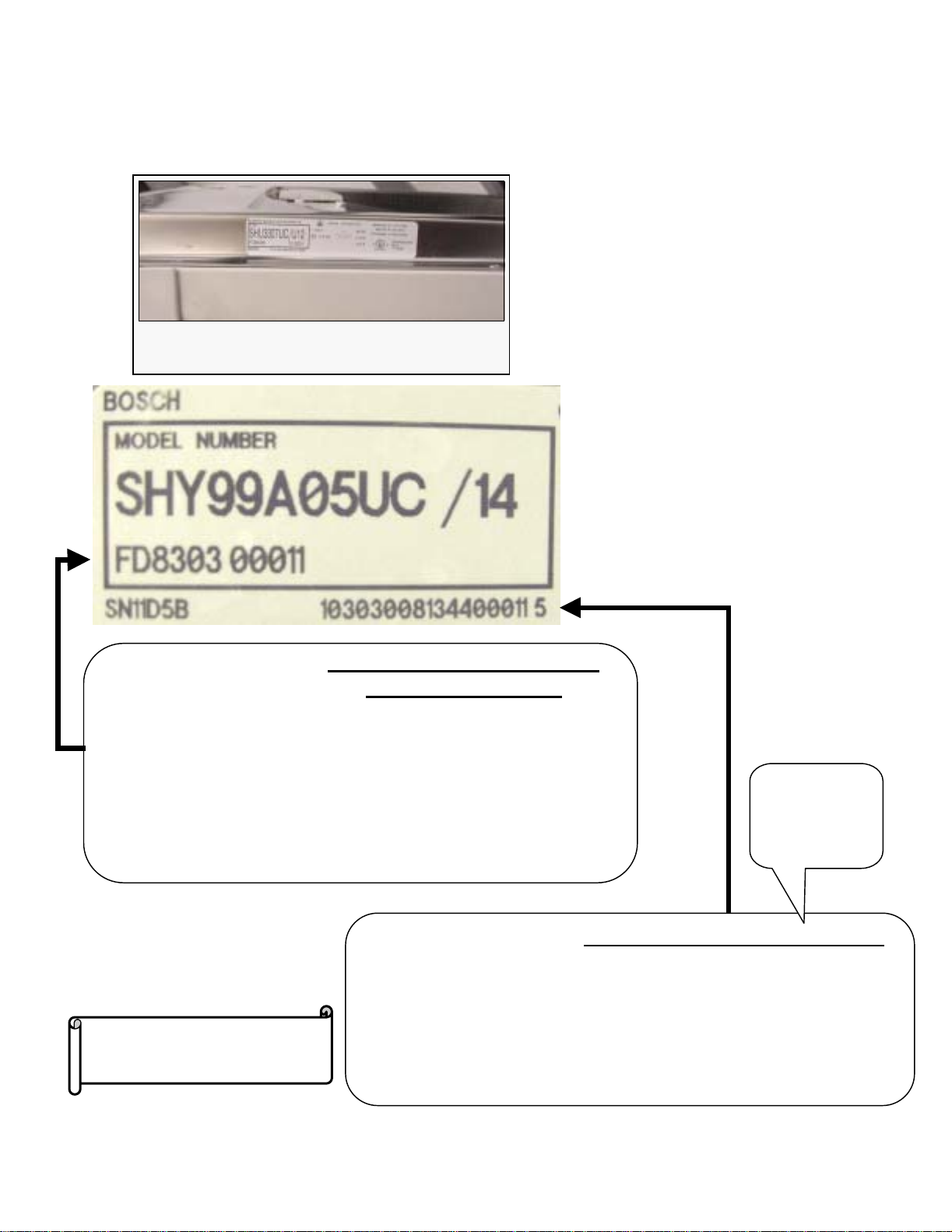
IIIC. Model Number Location
Located on right edge of inner door. See below.
The serial label is fastened to the right
edge of the inner door.
FD8303 00011
Understanding FD Serial #
(used for warranty)
The FD # shows the Fabrication Date
• The first 2 #s represent the year: 83 = 2003 (add 20 to #; e.g. 20 + 83 =
103 → 2003)
• The next 2 #s represent the month: 03 = March
• The next 5 #s represent the unit made that month: 00011 = 11th
SHY99A05UC made that month
10 3 03 0081344 00011 5
Please hold all warranty parts
for (60) days for possible
return for analysis.
• The first 2 #’s represent a factory code: 10 = New Bern dishwasher, 82 = New Bern cooking
•The 3
• The next 2 #’s represent the month: 03 = March
• The next 7 #’s represent the model: 0081344 = SHY99S05UC
• The next 5 #’s represent the unit made that month: 00011 = 11th SHY99A05UC made that
• The last # represents a check digit = 5 in this case (is dependent on all preceding #’s)
rd
# represents the last digit of the year: 3 = 2003
month
This helps the
factory
investigate
product
problems.
Understanding Factory Serial #
4
Page 6

III. Product Specific
III. Product Specific
IIID. Tech Sheet Location
Wiring and circuit diagram folded up and located in slot in front of dishwasher bases.
IIIE. Warranty Information
See below.
Bosch Dishwashers Limited Lifetime Warranty
Statement of Limited Warranty
The warranties provided by BSH Home Appliances ("Bosch") in this Statement of Warranties apply
only to Bosch dishwashers sold to the first using purchaser by Bosch or its authorized dealers,
retailers or service centers in the United States or Canada. The Warranties provided herein are not
transferable, and take place from date of installation or ten business days after delivery date,
whichever comes first.
1 Year Full Limited Warranty
Bosch will repair or replace, free of charge, any component part that proves defective under
conditions of normal home use, labor and shipping costs included. Warranty repair service must be
performed by an authorized Bosch Service Center. All cosmetic defects must be reported within 30
days of installation.
2 Year Limited Warranty
Bosch will provide replacement parts, free of charge, for any component part that proves defective
under conditions of normal home use, shipping costs included, labor charges excluded.
5 Year Limited Warranty On Electronics
Bosch will repair or replace, free of charge, any microprocessor or printed circuit board that proves
defective under conditions of normal home use during the second through fifth year from the date of
original installation, labor charges excluded.
5 Year Limited Warranty On Racks
Bosch will repair or replace, free of charge, the upper or lower dish rack (excluding rack components)
if the rack proves defective under conditions of nor mal home use during the second through fifth year
from the date of original installation, labor charges excluded.
Lifetime Limited Warranty Against Stainless Steel Rust-Through
Bosch will replace your dishwasher, free of charge, with the same model or a current model that is
equivalent or better in functionality if the inner liner should rust through under conditions of normal
home use, labor charges excluded. Bosch will replace the stainless steel door of any dishwasher if
the door should rust through under conditions of normal home use, labor charges excluded.
For location of nearest repair depot call 1--
For location of nearest repair depot call 1
800--
800
944--
2904 from 5:00 AM --
944
2904 from 5:00 AM
5:00 PM M--
5:00 PM M
F (Pacific time)
F (Pacific time)
5
Page 7

IV. Installation Issues
IV. Installation Issues
IVA. Location Requirements
See attached installation instructions.
IVB. Electrical Requirements
See attached installation instructions.
IVC. Water/Drain Requirements
See attached installation instructions.
IVD. Shipping/Packaging Removal
See attached installation instructions.
IVE. Installation Related Process
1. Leveling cabinet –
2. Leveling doors – not required for steel doors. For wooden panels added to steel doors,
see installation instructions.
3. Installing handles – See attached installation instructions.
4. Door reversal – not possible or necessary.
5. Quick test procedure
Top Ten Cosmetic/Customer Use/Installation Issues::
Top Ten Cosmetic/Customer Use/Installation Issues
See attached installation instructions.
Not cleaning sump filters.…Customers often don’t know they exist.
Smelly dishwashers….Often occurs from filters not being cleaned, drain hose high loops
missing or drain gases being present. If all else is OK, then problem can be preservative not purged
from tank door gasket.
Doors leaking or not latching….Usually an installation issue (dishwasher brackets
installed before dishwashers are leveled front to back, tanks & doors out of square, wooden doors
not drilled accurately). Can be blockage in condensation tubes or having condensation tubes
connected to drain hose air gaps.
Inner door damage.…From upper rack during improper shipping and handling
(dishwashers clamped on wrong sides or dropped).
Doors hit toe kicks.…Toe kick installation issue.
Junction boxes.…Comes from wires not being connected correctly during installation.
Dispensers.…Customers using too much detergent, not using rinse-aid & not knowing how to
close the door.
Drain hoses not installed properly.…Often no air gap or high loop + pinched hoses --
causes poor draining & smelly dishwashers. Most drain pumps are mistakenly replaced for drain
hose installation issues.
Outer doors….Most are dinged during shipment.
Damaged water valves….Primarily from fittings being overtightened. A damaged valve
can allow some water onto kitchen floors.
6
Page 8
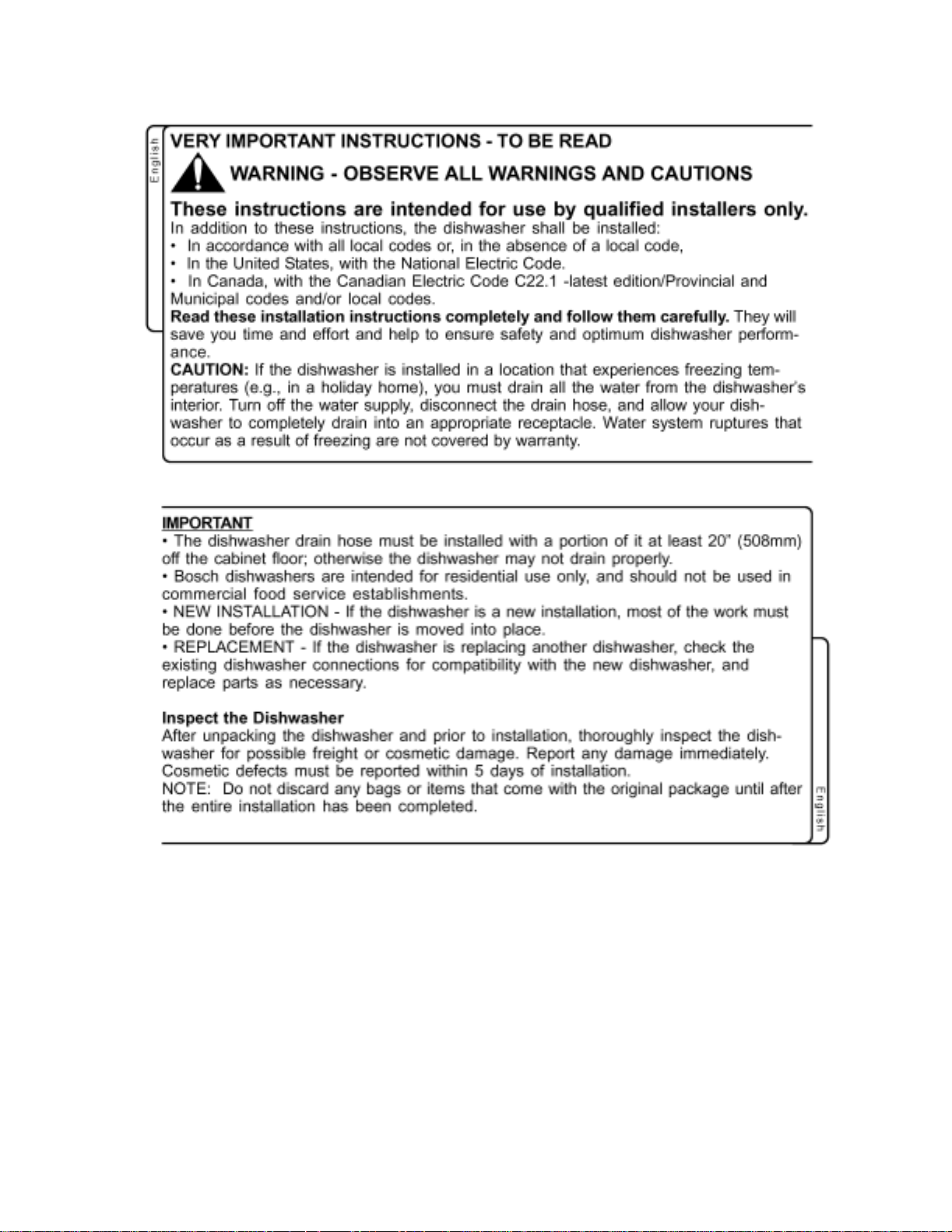
IV. Installation Issues: Installation Instructions
IV. Installation Issues: Installation Instructions
7
Page 9
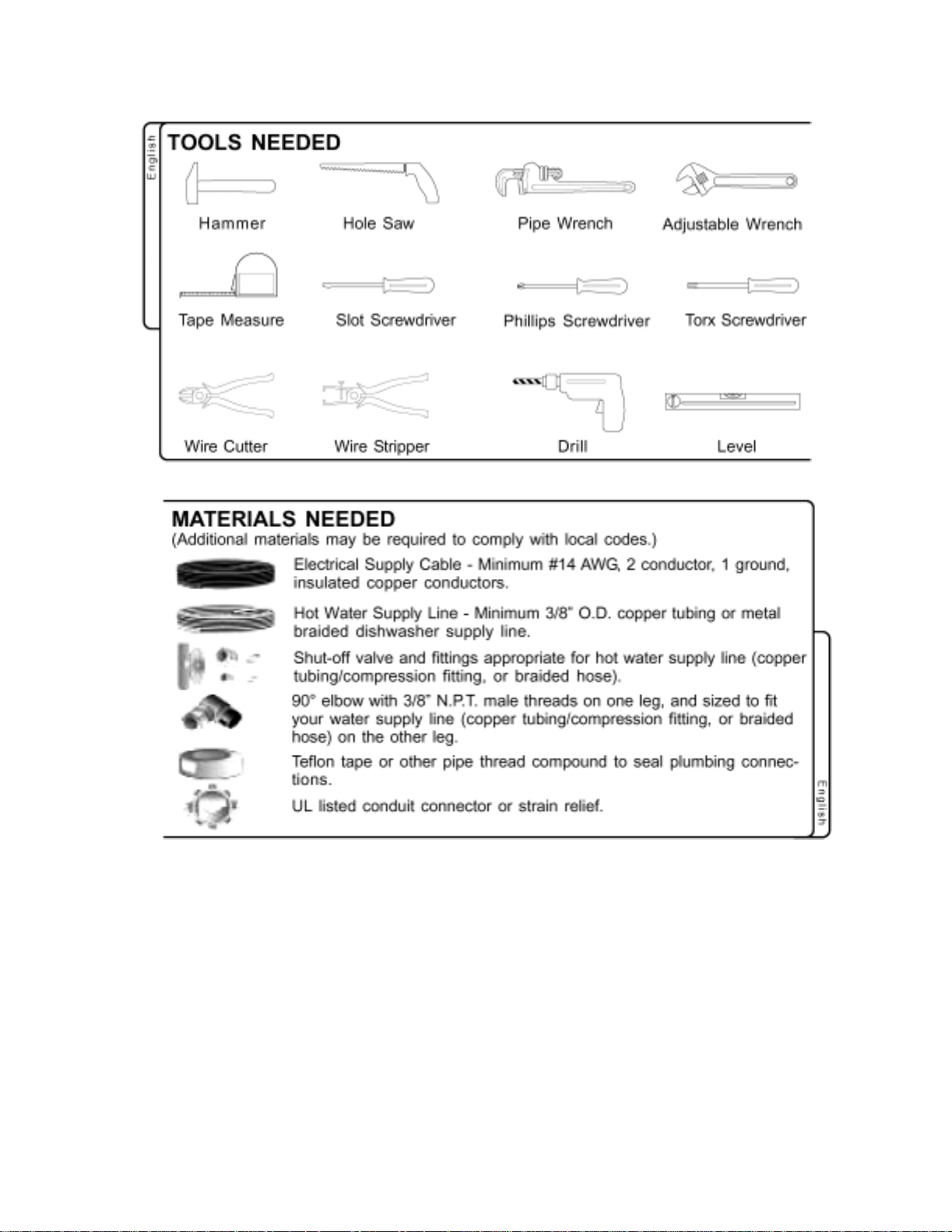
IV. Installation Issues: Installation Instructions
IV. Installation Issues: Installation Instructions
8
Page 10
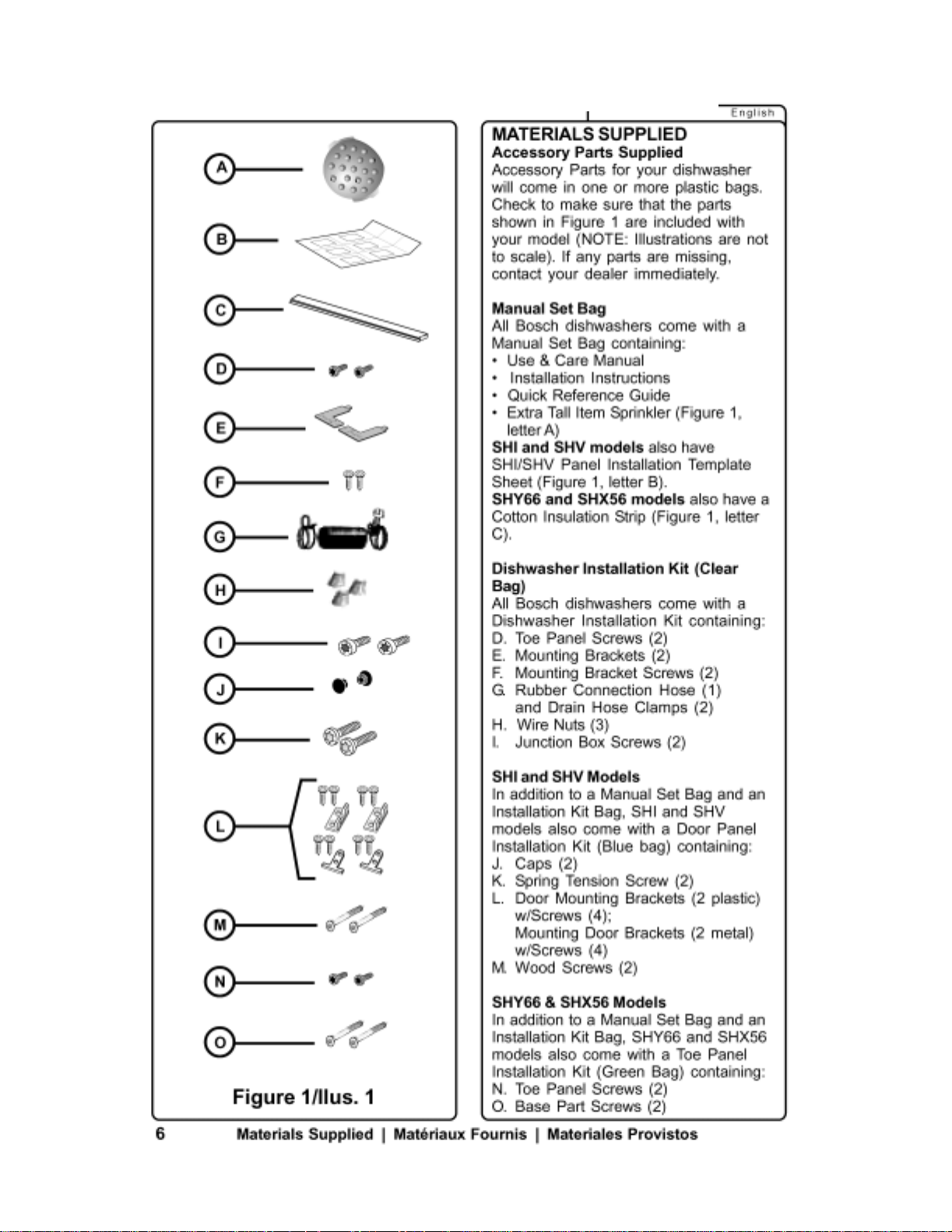
IV. Installation Issues: Installation Instructions
IV. Installation Issues: Installation Instructions
9
Page 11
IV. Installation Issues: Installation Instructions
IV. Installation Issues: Installation Instructions
10
Page 12
IV. Installation Issues: Installation Instructions
IV. Installation Issues: Installation Instructions
11
Page 13
IV. Installation Issues: Installation Instructions
IV. Installation Issues: Installation Instructions
12
Page 14
IV. Installation Issues: Installation Instructions
IV. Installation Issues: Installation Instructions
13
Page 15
IV. Installation Issues: Installation Instructions
IV. Installation Issues: Installation Instructions
14
Page 16

IV. Installation Issues: Installation Instructions
IV. Installation Issues: Installation Instructions
15
Page 17
IV. Installation Issues: Installation Instructions
IV. Installation Issues: Installation Instructions
16
Page 18

IV. Installation Issues: Installation Instructions
IV. Installation Issues: Installation Instructions
17
Page 19
IV. Installation Issues: Installation Instructions
IV. Installation Issues: Installation Instructions
18
Page 20
IV. Installation Issues: Installation Instructions
IV. Installation Issues: Installation Instructions
19
Page 21
IV. Installation Issues: Installation Instructions
IV. Installation Issues: Installation Instructions
20
Page 22

IV. Installation Issues: Installation Instructions
IV. Installation Issues: Installation Instructions
21
Page 23

V. Theory of Operation
V. Theory of Operation
VA. Description of Operation/Cycle
Bosch dishwashers use separate circulation and drain pumps to reduce overall size, noise, vibration
and energy consumption. This allows the use of tall tanks, increasing overall space inside
dishwashers where full-sized plates can be placed in both upper and lower racks. Circulation pumps
are suspended by rubber straps to further reduce noise and vibration.
Bosch dishwashers use flow-through heaters instead of exposed elements used on most other
dishwashers. Water from spray arms drops to the sump and flows through the circulation pump into
the flow-through heater. Flow-through heaters prevent dishware damage from exposed elements
and allow water to be continuously filtered and heated. Bosch flow-through heaters heat water by
two degrees (ºF) per minute. All heaters are protected by a 185ºF Hi-limit (high temperature cutout)
and by a flow switch which prevents heaters from operating when no water is flowing.
Bosch dishwashers regulate water temperatures using NTC (Negative Temperature Coefficient)
sensors and electronic controls. As water temperatures increase, NTC resistances decrease.
Electronic control modules measure these resistance changes and hold wash and rinse cycles to
tight preset temperatures. Older Bosch mechanical dishwashers use thermostats to regulate water
temperatures.
Bosch dishwashers use condensation drying instead of exposed heating elements. Tanks and inner
doors are coated with bitumen (asphalt compound) which absorbs and retains heat from the heated
wash and rinse water. A condensation tube is connected to a cold zone in the tank which isn’t
covered by bitumen (on right side tank wall for UC/12 & later models and at detergent dispenser on
older UC/06 – UC/11 models). Since the cold zone doesn’t retain heat and is cooler than the areas
coated with bitumen, moisture condenses around it and exits the dishwasher through the
condensation tube. For best results, doors should remain closed until dishwashers have completely
finished drying.
22
Page 24
V. Theory of Operation
V. Theory of Operation
VA. Description of Operation/Cycle (continued)
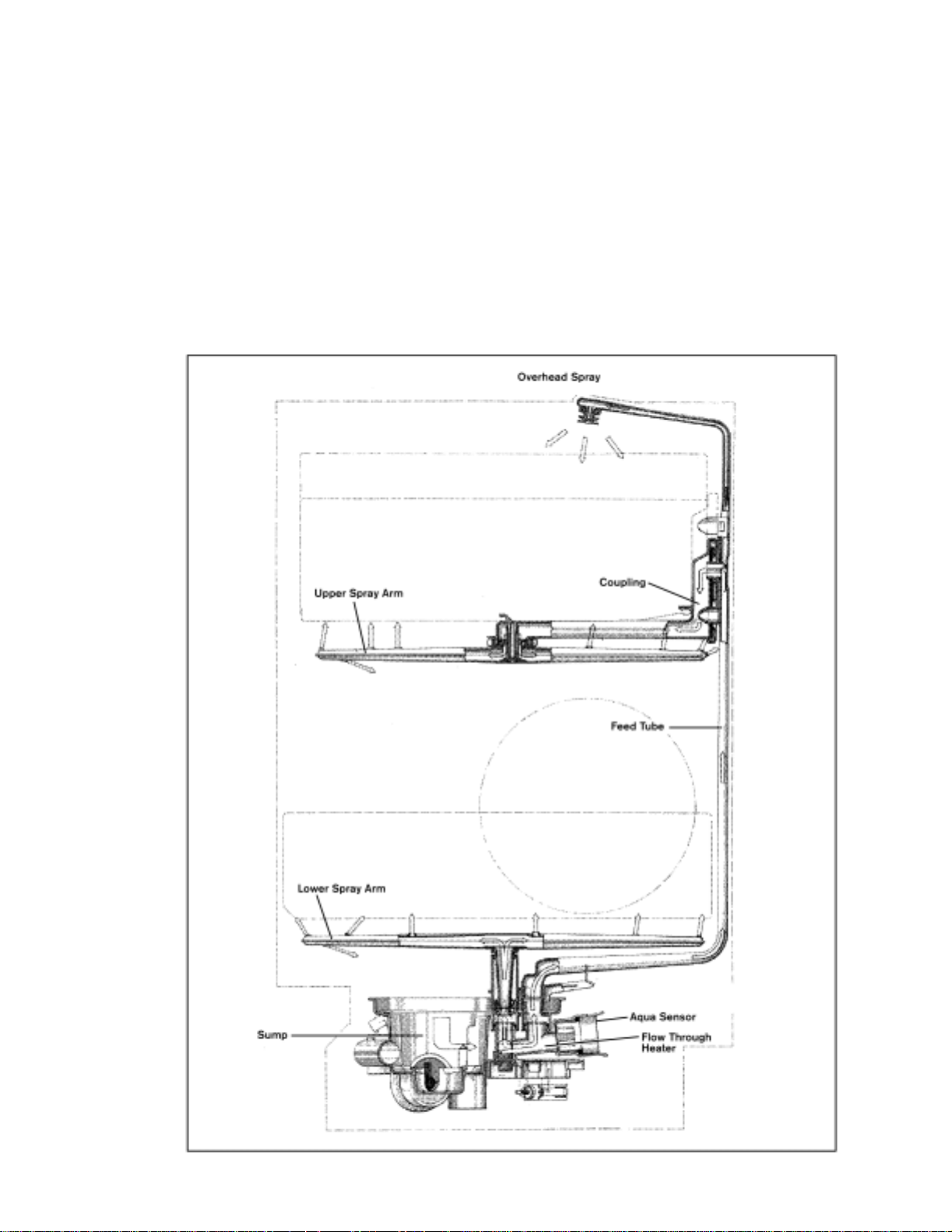
Bosch dishwashers continuously filter all water using a triple filter method. A filter screen above the
sump filters out larger particles. A two-stage microfilter in the sump filters out finer particles. This
microfilter can easily be removed by customers for cleaning and should be cleaned regularly.
All currently sold Bosch dishwashers use aqua sensors to save water and energy – many older
models used them as well. These aqua sensors, located in the sump next to the flow-through heater,
measure water cleanliness (using a light beam and sensor) and add a pre-wash and/or pre-rinse cycle
only if water is dirty. Aqua sensors can save up to 20% of water and energy usage.
Bosch dishwashers use a four-level water spray as shown below. Water sprays up from the lower
spray arm, down from the overhead sprayer and both up and down from the upper spray arm.
23
Page 25

V. Theory of Operation
V. Theory of Operation
VA. Description of Operation/Cycle (continued)
Bosch dishwashers fill with water as shown below.
Normal fill: Water rises to
proper level, pushing air in
pressure chamber which
operates diaphragm.
24
Overfill: Water rises too high
& operates float switch,
causing drain pump to remove
water from sump.
Page 26

V. Theory of Operation
V. Theory of Operation
VB.
VB.
Description of Components
Description of Components
Circulation pump -- Unlike many dishwashers, Bosch dishwashers use separate circulation and
drain pumps to reduce noise, vibration, space and energy usage. The circulation pump circulates
water from the sump into the spray arms.
Drain pump – The drain pump drains water from the dishwasher. Being a separate pump, it is much
smaller and uses much less energy than a single circulation/drain pump used on other dishwashers.
Impeller – This part of the circulation pump is what drives water throughout the dishwasher. It uses a
precisely manufactured ceramic disk to reduce friction, yet prevent water leaking. This is the part to
replace in rarely used dishwashers if pumps don’t turn.
Flow-through water heater – Unlike most dishwashers, that rely on exposed heating elements in the
bottom of tanks, Bosch dishwashers use flow-through water heaters (that heat ~ 2ºF/minute). This
saves space and allows Tall Tubs (see below), where full-sized plates can be placed in both upper and
lower racks.
NTC – Stands for “Negative Temperature Coefficient”. This temperature sensor in the water heater
provides accurate water temperatures. Its called a “NTC” since its resistance goes down as the water
temperature goes up.
Thermostat – Temperature sensor (and switch) used on older mechanical dishwashers. They open
when temperatures are reached.
Control module – The brain of electronic dishwashers, it receives water temperature values and
controls the entire wash process. It also contains the test program to help diagnose dishwasher
issues.
Display module – A separate electronic module with a digital display used on some models.
Water inlet valve – Water valve which turns on and off to allow water into the dishwasher.
Water inlet system (with fill switch and diaphragm) -- It insures dishwashers fill properly at various
incoming pressures. It uses a air pressure diaphragm and fill (micro) switch to alert the dishwasher
control module when the proper amount of water has filled the dishwasher.
Float switch – This safety feature shuts down the dishwasher and starts the drain pump if the
dishwasher has gotten excessive water in the base or has overfilled. The drain pump empties out the
sump and hoses, not the base (I.e. the drain pump isn’t a base bilge pump).
Condensation drying – This feature saves energy and enables Bosch dishwashers to have Tall Tubs
– the tallest tubs in the industry, allowing full-sized plate to be placed in both upper and lower racks.
Bitumen insulation around doors and tanks holds heat inside tanks, which forces water vapor out of
tanks before it can condense onto dishes. The area around the condensation tube exit isn’t coated
with bitumen, providing a cold zone for water vapor to condense (instead of on dishes).
Condensation tube – This is part of the genius of condensation drying. It carries moisture out of the
tank while condensation drying is occuring.
Detergent & rinse-aid dispenser – This dispenses detergent and rinse-aid at just the right times. In
older dishwashers (service indexes UC/06 & UC/11), it attached to the condensation tube (in the door).
Aqua sensor (Sensotronic) – This sends a beam of light through water in the heater and measures
how clean the water is. Depending on water cleanliness, rinses are omitted, saving time & energy.
Microfilter and filter screen – Unlike other dishwashers, the water in Bosch dishwashers is
continuously filtered (100% of the time). The filter screen traps large food chunks while the two or
three stage microfilter (depending on model) filters out small food particles.
Softer bearing – Used to describe circulation pump mounting system using rubber straps to further
reduce noise and vibration (on UC/11 & later models). Sumps and heaters were changed as well as
circulation pumps. Older models (UC/06, UC/07 & UC/09) had pumps mounted on rubber bushings.
Tall tubs – This distinctive feature allows full-sized plates (~ 10”) to be placed in upper racks. The
tallest tanks in the industry is made possible by separate pumps, condensation drying and good use of
space in the dishwasher base.
25
Page 27
V. Theory of Operation
V. Theory of Operation
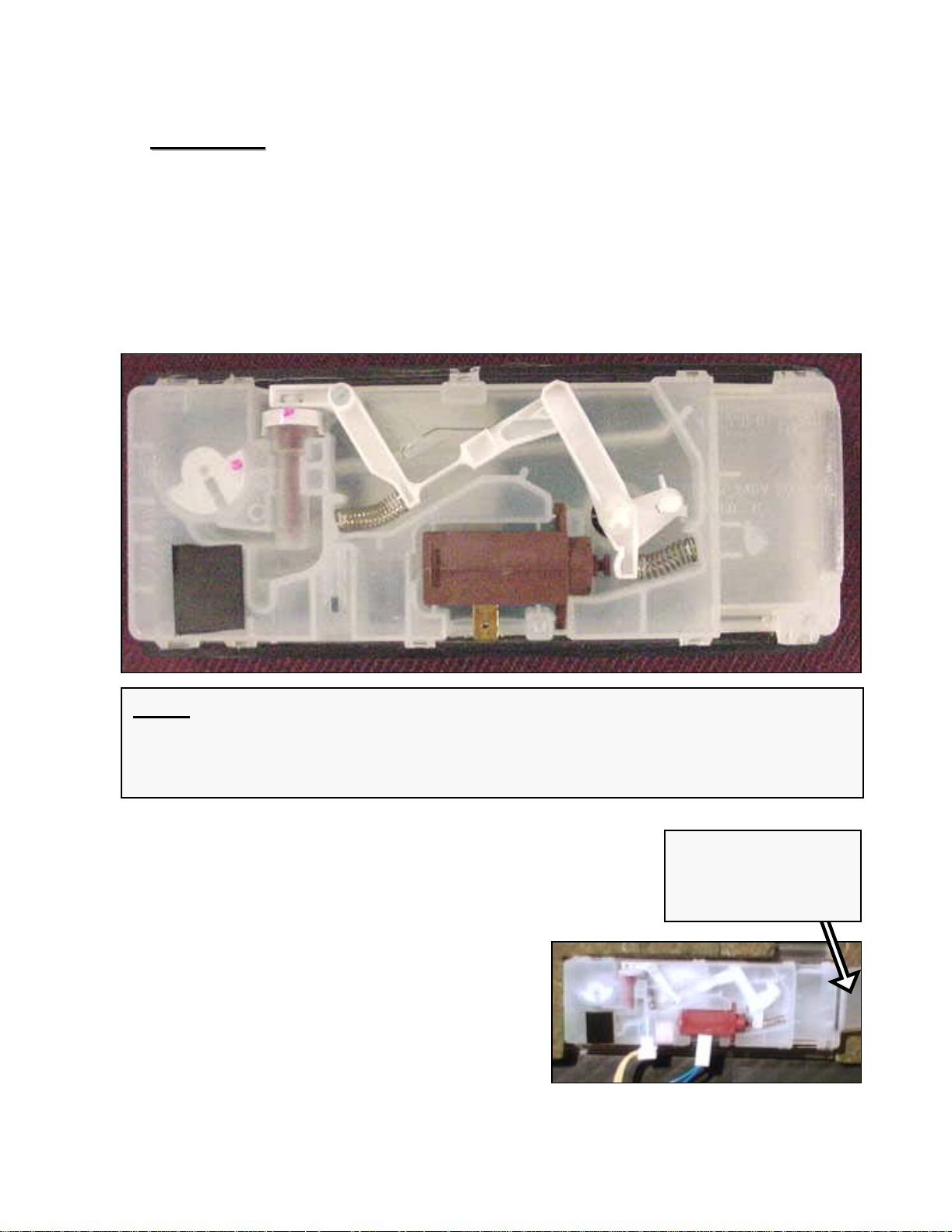
Dispensers
Dispensers
During each wash program, the wax motor opens twice -once to dispense detergent and again to dispense rinse-aid.
The wax motor opens the same way -- the linkages make the
separate compartments open.
NOTE: The white plastic linkage 1st opens the detergent dispenser door, then
cocks in place to dispense rinse-aid when the wax motor operates the 2nd time.
After the 2nd operation, the linkage resets itself so it will open the dispenser
detergent door for the next wash program.
Condensation
tube (for vented
dispenser)
26
Page 28
V. Theory of Operation
V. Theory of Operation
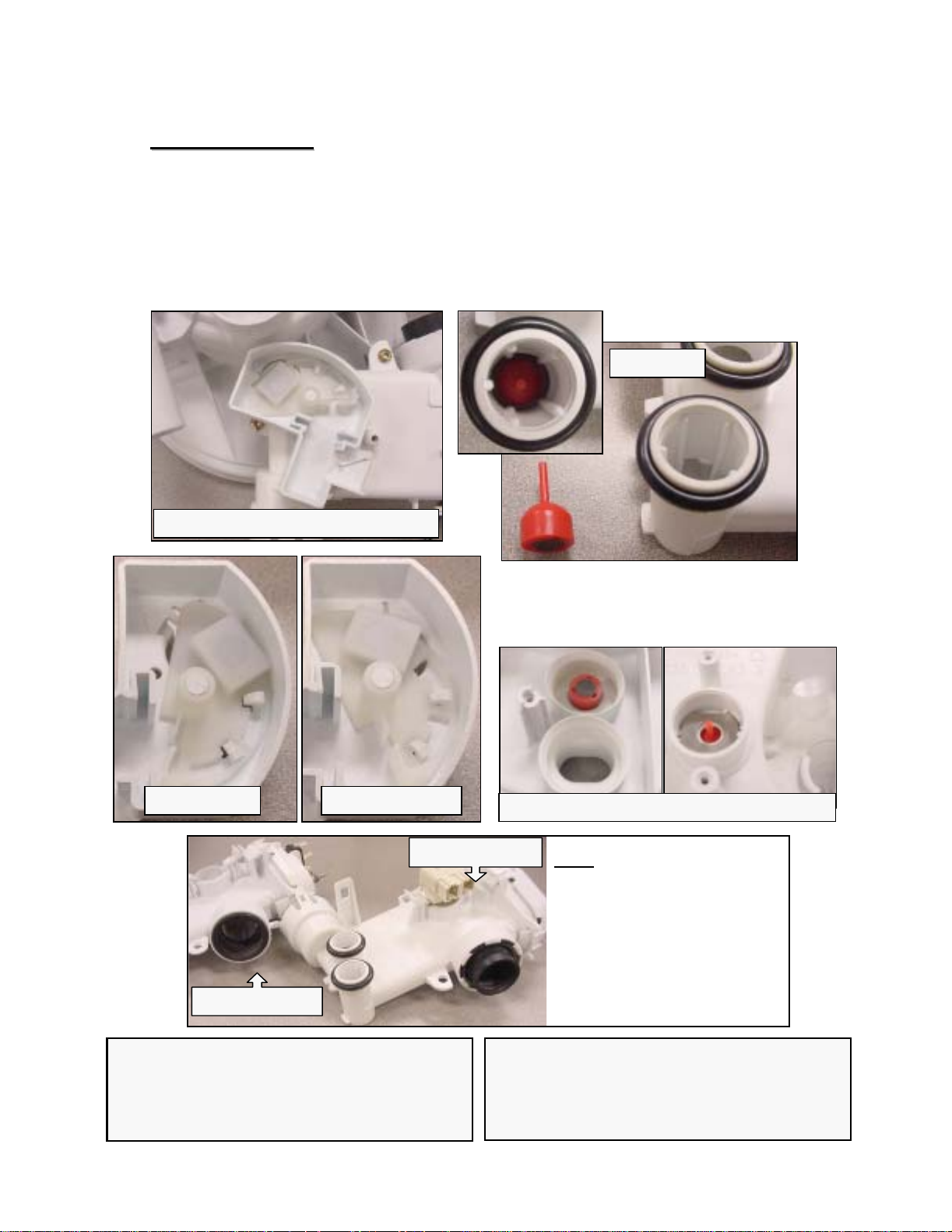
Top Rack Only
Top Rack Only
Models with the Top Rack Only feature have separate
actuators mounted underneath heater assemblies. The
actuator moves a magnetic plunger in the lower rack
heater port, diverting water to the top rack.
Heater with top rack actuator
Plunger
Both racks Top rack only
UC/11 heater
UC/06 heater
HINT: Models with water switches and
Top Rack Only have the Top Rack Only
parts integrated with the water switches.
No separate actuators are needed.
Where plunger engages sump
HINT: Do not use softer
bearing heater assemblies
(UC/11 & later) on older
UC/06 models since the
sump, circulation pump, base
and heater clamps/gaskets
have to be replaced as well
for the heaters to fit.
HINT: Models with water switches and
Top Rack Only have the Top Rack Only
parts integrated with the water switches.
No separate actuators are needed.
27
Page 29
V. Theory of Operation
V. Theory of Operation
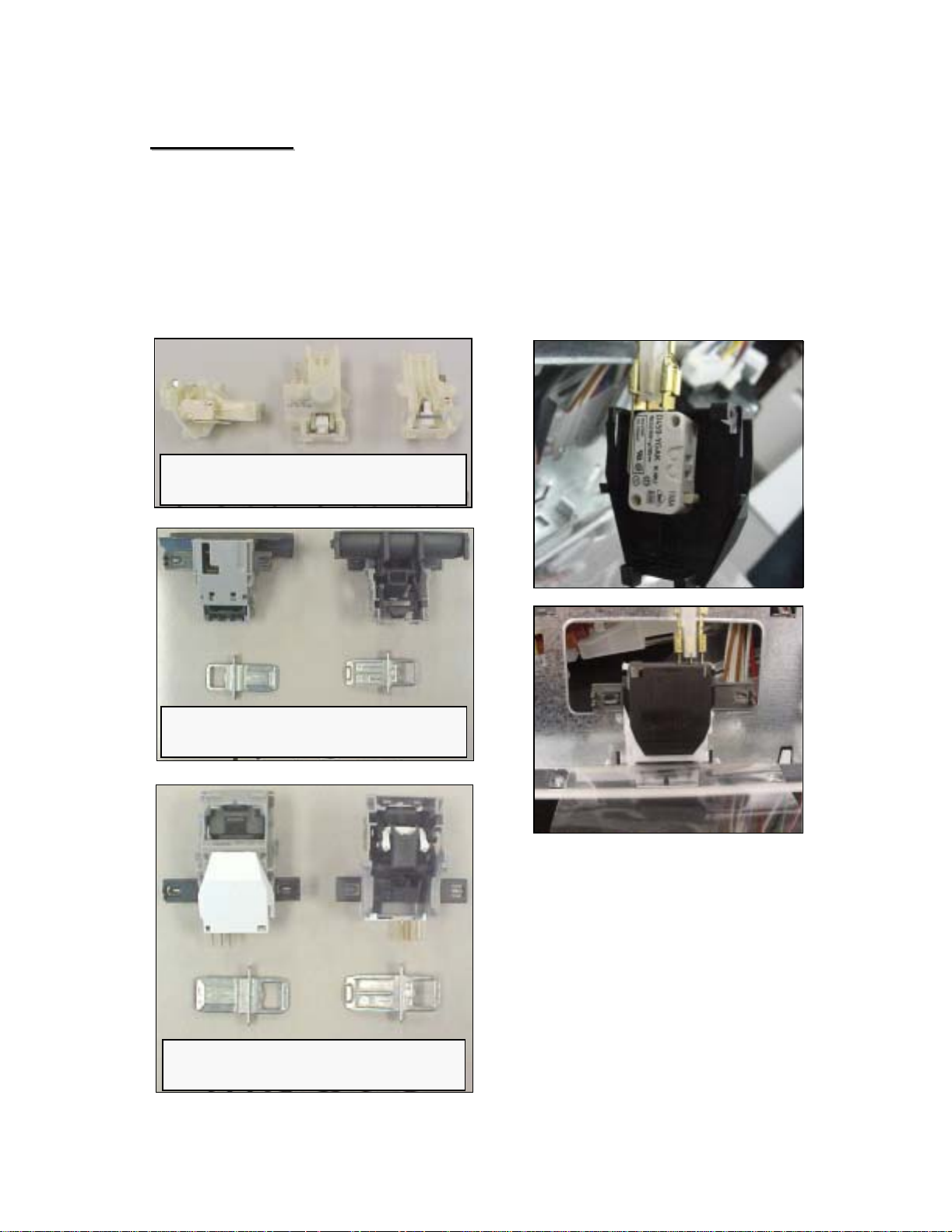
Door Latches
Door Latches
SHU & SHI dishwashers have door latches linked
mechanically to door switches. All other dishwashers
(SHV, SHX & SHY) use electronic door switches
(microswitches activated by door latches).
187184 ball bearing door latch
with microswitch
419827 door latch for SHI/SHU
(for mechanical linking)
419828 door latch with
microswitch
28
Page 30
V. Theory of Operation
V. Theory of Operation
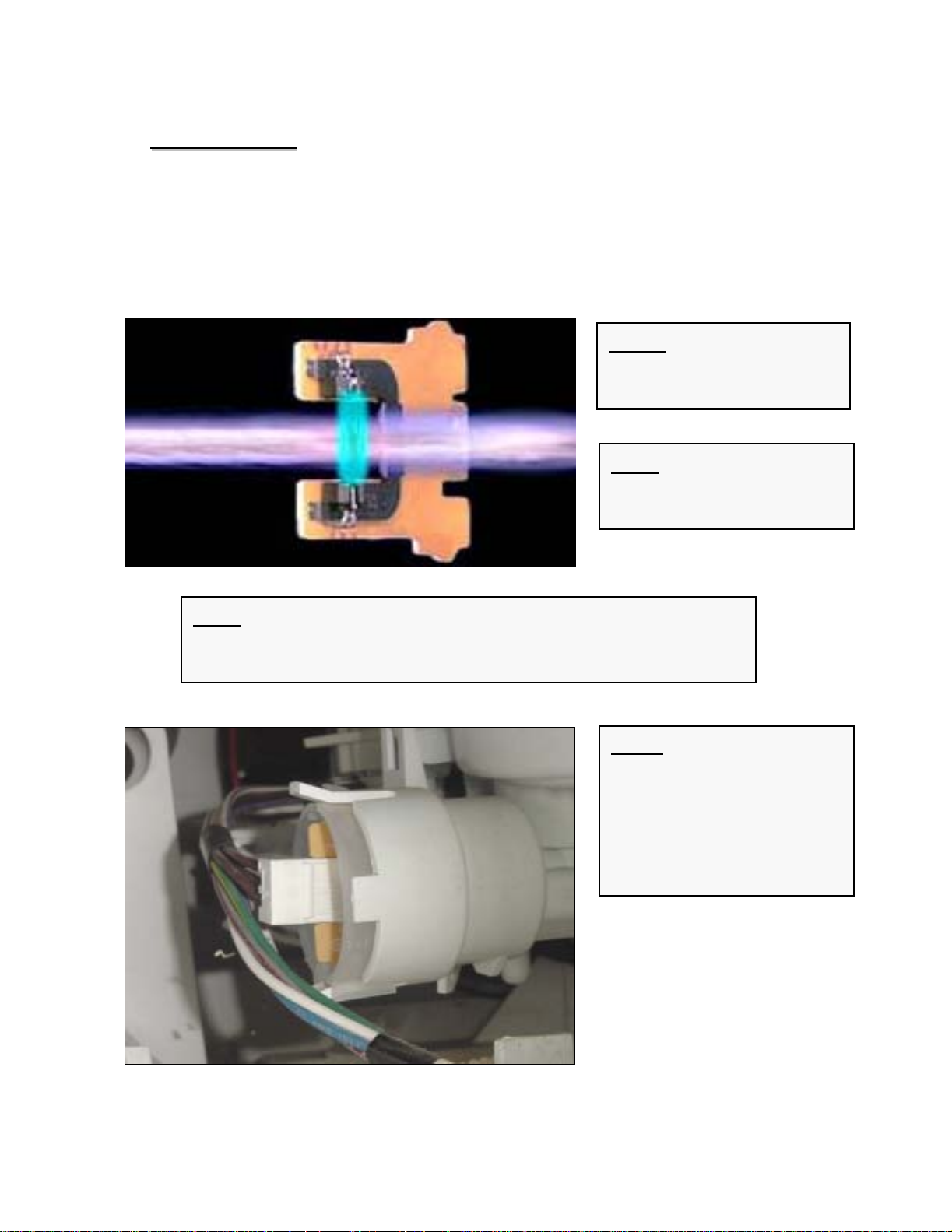
Aqua Sensors
Aqua Sensors
The aqua sensor only affects energy usage, eliminating a
pre-wash and/or pre-rinse cycle if water is clean. Most
customers won’t notice the difference if an aqua sensor fails.
NOTE: Aqua sensors
provide ~ 20% energy
savings.
HINT: Dishwashers still
operate adequately when
aqua sensors fail.
HINT: Customers will only notice aqua sensors failing if they
see their dishwashers running slightly longer or their electric
and water usage getting slightly higher.
NOTE: If water is clean
enough, it will be kept for
the wash cycle. If not, the
aqua sensor directs the
dishwasher to add an
additional pre-rinse or prewash cycle.
29
Page 31

V. Theory of Operation
V. Theory of Operation
Water Fill Assemblies
Water Fill Assemblies
Water fill assemblies insure dishwashers fill
properly at various incoming pressures.
Diaphragm
Switch
lever
Float
Newer water fill assembly without gasket
Water fill
switch
Float
switch
NOTE: Older water fill
assemblies required a
gasket between the upper
and lower housings. Newer
ones do not require gaskets
and are a drop-in
replacement for older ones.
Older water fill assembly with gasket
30
HINT: Floats should be
checked and bases should
be cleared of water &
debris whenever water fill
assemblies are worked on.
Page 32

VI.
VI.
Component Access/Replacement
Component Access/Replacement
Water Valves (1)
Water Valves (1)
The water valve is accessed from
the front of the dishwasher base
by removing the toe kick.
To remove water valve:
Remove two (2) T-20 Torx screws from toe kick and tilt toe
kick out from under dishwasher.
Remove base insulation (on models with insulation).
Move sump inlet hose away from water valve (without
disconnecting it).
Disconnect wires from water valve, including ground wire.
Remove two (2) T-20 Torx screws from water valve.
Pull valve out from dishwasher and disconnect water hose
from rear of valve. Remove any water from sump & base.
Removing toe kick
Removing hose clamp
Moving sump hose
31
Page 33

VI.
VI.
Component Access/Replacement
Component Access/Replacement
Water Valves (2)
Water Valves (2)
580009
189533
NOTE
: Water valves have been upgraded several times since 1st 1/4 of 1999. All
valves with upgraded solenoids have yellow solenoid stems. All old valves have white
solenoid stems.
167081
The newest valve (part # 189533) has the solenoid mounted horizontally and the
water fitting held in place by the metal mounting bracket. This is the only replacement
valve available and it replaces all other valves.
The previous valve (part # 580009) had the solenoid mounted vertically, a yellow
solenoid stem and a fine brown mesh filter screen. Use # 189533 horizontal valve
whenever it needs to be replaced.
The oldest valve, used March, 1999 and earlier (part # 167081), had the solenoid
mounted vertically, a white solenoid stem and a white mesh filter screen. Use #
189533 horizontal valve whenever it needs to be replaced.
HINTS:
When reconnecting the water supply to the
water valve, don’t overtighten the fitting.
On valves with vertical solenoids, the
plastic can crack and cause leaking if
excessive force is used.
Using Teflon tape on water fittings can help
prevent leaking.
The water valve can be accessed without
removing outer door or base cover.
However, removing them will provide easier
access.
32
Page 34

VI.
VI.
Component Access/Replacement
Component Access/Replacement
Circulation Pumps --
Circulation Pumps
Access (1)
Access (1)
The circulation pump & capacitor are accessed from the right
side of the dishwasher by removing the right side panel and
blocking the tank.
To remove outer door:
Remove six T-20 Torx inner door screws below fascia panel -- three
per side (1).
Carefully pull bottom of outer door out from dishwasher until top
door tabs clear, then pull door down until it releases from
dishwasher (2). Take care to not scratch outer door
.
Remove two plastic door guards (3). They occasionally fall out
when the outer door is removed.
1
2
HINT: The fascia panel and door don’t need to be removed to access
the circulation pump. However, they must be removed to completely
remove the tank.
3
33
Page 35

VI.
VI.
Component Access/Replacement
Component Access/Replacement
Circulation Pumps --
Circulation Pumps
To remove toe kick::
To remove toe kick
Remove two T-20 Torx screws
from toe kick (1).
Access (2)
Access (2)
21
Tilt toe kick out from under
dishwasher (2).
To remove right & left side panels::
To remove right & left side panels
Remove two T-20 Torx side panel screws through holes in left &
right trim strips (1).
Carefully slide trim strips up and out of dishwasher (2). If side
panels are removed carefully to avoid damaging trim strips, then
trim strips don’t need to be removed.
Lift side panels up and out from dishwasher (3). Panels can be
removed with trim strips. Although removing the left side panel isn’t
necessary for access, it does allow the right side of the tank to be
blocked upward.
1 2
3
34
Page 36

VI.
VI.
Component Access/Replacement
Component Access/Replacement
Circulation Pumps --
Circulation Pumps
To raise right side of tank for circulation pump access::
To raise right side of tank for circulation pump access
Remove one T-20 Torx screw from both rear corners holding tank to base
(1) -- removing screw from both sides allows tank to be blocked upward.
Remove right toe kick bracket by removing T-20 Torx screw (2).
Remove T-20 Torx screws from front right bottom corner holding tank to
base (3).
Remove right hinge cover (4a), release right door tension cord from hinge
(4b) & remove ground wire (4c).
Raise and block up tank as shown with strut onto base (5a), sliding a piece
of wood or other solid material between the tank and base to keep tank
from falling back onto base (5b).
Access (3)
Access (3)
Screw
1 2
4a 4b
3
4c
5b5a
CAUTION: Its not recommended to turn dishwashers upside-down for tank access. When
dishwashers are turned upside-down, water can flow into the diaphragm of the water fill
assembly and cause water to not fill properly.
35
Page 37

VI.
VI.
Component Access/Replacement
Component Access/Replacement
Circulation Pumps --
Circulation Pumps
To remove motor to access impeller or change complete pump::
To remove motor to access impeller or change complete pump
Disassembly
Disassembly
Disconnect wire harness from motor after carefully noting
connections (1).
For UC/11 & later models with softer bearing, lift up rubber straps
from both sides of motor (2). For older models, lift motor up from
base.
To release plastic latch on pump/motor housing, carefully push onto
latch with screwdriver (3).
To release motor from pump housing, twist motor to the right
(clockwise). Some force may be required. Capacitor should be ~
11:00 position (4). Pull motor out from pump housing.
1 2
4
CAUTION: Don’t grab
motor next to capacitor to
avoid jamming your hand
on the capacitor.
3
Latch
HINT: When replacing complete circulation pumps for
softer bearing models (UC/11 & later), reusing existing
front pump housings (& discarding replacement
housings) can save time by not having to change hose
clamps. If desired, order # 172272 hose clamps &
replace entire pumps.
36
Page 38

VI.
VI.
Component Access/Replacement
Component Access/Replacement
Circulation Pumps --
Circulation Pumps
To remove & install impeller (using kit # 167085)::
To remove & install impeller (using kit # 167085)
Reassembly
Reassembly
While holding motor fan so shaft won’t spin (1a), unscrew impeller
counterclockwise (1b).
Rotate pump housing counterclockwise until tabs clear, then lift
housing from motor (2).
Remove spring and O-ring from pump housing, then lift spacer up
from motor shaft (3).
Place replacement spacer onto motor shaft (4). Note larger end
goes onto shaft 1st.
Install replacement spring & O-ring onto pump housing, then line up
housing-motor tabs to screw pump housing onto motor (5a). Screw
replacement impeller onto motor shaft (5b).
Align motor to pump housing with capacitor @ 11:00 position to
facilitate reassembly.
Motor fan
1a
2
1b
3 4
37
5a
5b
Page 39

VI.
VI.
Component Access/Replacement
Component Access/Replacement
Control Modules --
Control Modules
Disassembly (1)
Disassembly (1)
Control modules are easily removed from
fascia panels by bending console tabs.
Remove fascia panel by removing T-20
Torx inner door screws.
Disconnect wire harnesses from module
after noting connector locations.
Pry out metal console tabs holding
module to console.
Carefully pry back plastic tabs, then slide
module from console.
Removing door screws
Removing fascia panel
(SHU 9922 shown)
Viewing control module
Bending back tabs
Console without module
Disconnecting wires
NOTE: Control modules
for non-integrated models
look differently and have
different tabs, but are
removed using the same
procedure.
38
Sliding module out
Page 40

VI.
VI.
Component Access/Replacement
Component Access/Replacement
Control Modules --
Control Modules
Disassembly (2)
Disassembly (2)
SHY56A/66C, SHU 995x & SHV 68 control modules are
different than other models and are removed differently.
Remove fascia panel by removing six (6)T-20
Torx inner door screws.
Disconnect wire harnesses from module
after noting connector locations.
Remove fascia panel from console by
removing four (4) T-20 Torx screws.
Remove two (2) T-20 Torx screws holding
module to console.
Carefully pry back locking tabs on each front
corner of module, then remove module from
console. Remove button pad from module.
(SHU 995x shown)
These instructions apply to
SHY56A/66C, SHU 995x &
SHV 68 models.
Removing door screws Removing fascia screws Removing module screws
Prying back module tabs
Align tabs when reassembling
Removing button pad --
buttons can come off pad
39
Sliding module out
Page 41

VI.
VI.
Component Access/Replacement
Component Access/Replacement
Control Modules --
Control Modules
SHY56A/66C control modules have separate display
modules mounted on the front of fascia panels.
These instructions apply to
SHY56A & SHY66C models.
SHY56A/66C Control Modules with Displays
SHY56A/66C Control Modules with Displays
To remove/install display module
Remove outer door & fascia panel.
Confirm the (4) pushbutton carrier display
latches are intact.
Route display wire harness through (door
latch) console opening, press harness onto
pushbutton carrier wire guide & connect
terminal.
Insert display into top latches (on
pushbutton carrier), then push bottom of
display up and rotate it into bottom latches.
:
wire guide
1
Removing door & fascia Checking display latches Connecting wire harness
2
latches
3
4
Locking display in place
40
Page 42

VI.
VI.
Component Access/Replacement
Component Access/Replacement
Control Modules ––
Control Modules
These instructions apply
to SHV/SHX/SHY99A
models.
Apexx
Apexx
Control Module Disassembly (1)
Control Module Disassembly (1)
Apexx (SHV99A/SHX99B/SHY99A) control
modules are different than other models and are
removed differently. Modules are mounted on the
base
(where base wiring connectors were), not
behind fascia panels. This means:
• Dishwashers must be pulled out to change
control modules.
• Dishwashers must be pulled out to measure
voltages & resistances -- dishwashers
cannot be diagnosed from the front.
HINT: Its not necessary to remove outer
doors to access Apexx control modules.
21
To remove toe kick:
Remove two (2) T-20 Torx screws
from toe kick (1).
Tilt toe kick out from under
dishwasher (2).
HINT: Apexx control modules
cannot be checked or have
resistances measured from the
front of dishwashers.
NOTE: Modules were moved
to the base to make room for
the larger full text displays in
the fascia panel.
HINT: It may be possible to reach
behind modules without blocking up
tanks. If not, then follow these
instructions to block up tanks.
41
Page 43

VI.
VI.
Component Access/Replacement
Component Access/Replacement
Control Modules ––
Control Modules
Apexx
Apexx
Control Module Disassembly (2)
Control Module Disassembly (2)
To remove right & left side panels (where necessary):
Remove two T-20 Torx side panel screws through holes in left &
right trim strips (1).
Carefully slide trim strips up and out of dishwasher (2). If side
panels are removed carefully to avoid damaging trim strips, then
trim strips don’t need to be removed.
Lift side panels up and out from dishwasher (3). Panels can be
removed with trim strips. Although removing the left side panel
isn’t necessary for access, it does allow the right side of the tank
to be blocked upward.
1
2
3
Removing trim strip screws Removing trim strips Removing side panels
HINT: Apexx control modules cannot
be checked or have resistances
measured from the front of
dishwashers.
HINT: It may be possible to reach behind
modules without blocking up tanks. If not,
then follow these instructions to block up
tanks.
42
Page 44

VI.
VI.
Component Access/Replacement
Component Access/Replacement
Control Modules ––
Control Modules
To raise right side of tank for Apexx module access (where
necessary):
Remove one T-20 Torx screw from both rear corners holding tank to
base (1) -- removing screw from both sides allows tank to be blocked
upward.
Remove right toe kick bracket by removing T-20 Torx screw (2).
Remove T-20 Torx screws from front right bottom corner holding tank to
base (3).
Remove right hinge cover (4a), release right door tension cord from
hinge (4b) & remove ground wire (4c).
Raise and block up tank as shown with strut onto base (5a), sliding a
piece of wood or other solid material between the tank and base to keep
tank from falling back onto base (5b).
Apexx
Apexx
Control Module Disassembly (3)
Control Module Disassembly (3)
4b
Screw
21
4c
CAUTION: Its not recommended to turn dishwashers
upside-down for tank access. When dishwashers are turned
upside-down, water can flow into the diaphragm of the water
fill assembly and cause water to not fill properly.
3
5a
4a
5b
43
Page 45

VI.
VI.
Component Access/Replacement
Component Access/Replacement
Control Modules ––
Control Modules
Locating module in base Opening module cover
Apexx
Apexx
Control Module Disassembly (4)
Control Module Disassembly (4)
21
P
u
s
h
3
Disconnecting module terminals Pushing back module latch
5
Sliding module out Align module tabs when reassembling
6
4
Note latch
l
a
t
c
h
l
e
f
t
HINT: Apexx control modules cannot be checked or have
resistances measured from the front of dishwashers.
44
Page 46

VI.
VI.
Component Access/Replacement
Component Access/Replacement
Control Modules ––
Control Modules
Apexx (SHV99A/SHX99B/SHY99A) display modules are mounted on
fascia panels (where control modules are mounted on other models).
These instructions apply to
SHV/SHX/SHY99A models.
front
top
Apexx
Apexx
Display Module Disassembly
Display Module Disassembly
Removing
fascia screws
1
Removing display module NOTE: Control
3
Removing wire harness
2
modules were moved to
the base to make room
for the larger full text
displays in the fascia
panel.
45
Page 47

VI.
VI.
Component Access/Replacement
Component Access/Replacement
Heater s & NTC’s ––
Heater s & NTC’s
Access (1)
Access (1)
The heater & NTC can be accessed or measured from
the right side of the dishwasher, but can only be removed
by dropping the entire base (by flipping the dishwasher
on its back) since they are wedged underneath the tank.
To remove outer door:
Remove six (6) T-20 Torx screws from inner door below
fascia panel (three (3) per side).
Carefully pull bottom of outer door out from dishwasher until
top door tabs clear, then pull door down until it releases
from dishwasher. Take care to not scratch outer door
.
Remove two (2) plastic door guards. They can fall out when
the outer door is removed.
Remove inner door screws Slide out outer door Remove door guards
HINT: Remove all water from the sump and hoses before accessing the heater -when the dishwasher is flipped on its back, water can enter the water fill assembly
diaphragm and cause the dishwasher to not fill properly.
46
Page 48

VI.
VI.
Component Access/Replacement
Component Access/Replacement
Heaters & NTC’s ––
Heaters & NTC’s
To remove toe kick
Access (2)
Access (2)
:
Remove two (2) T-20 Torx
screws from toe kick.
Tilt toe kick out from under
dishwasher.
HINT: The fascia panel and door don’t
need to be removed to access the heater
& NTC. However, the door must be
removed to completely remove the tank.
To remove right & left side panels:
Remove two (2) T-20 Torx side panel screws from each side
(through holes in trim strip).
Carefully slide trim strips up and out of dishwasher. If side
panels are removed carefully to avoid damaging trim strips,
then trim strips don’t need to be removed.
Lift side panels up and out from dishwasher. Panels can be
removed with trim strips.
Remove panel screws Slide out trim strips Lift panels up and out
47
Page 49

VI.
VI.
Component Access/Replacement
Component Access/Replacement
Heaters & NTC’s ––
Heaters & NTC’s
Access (3)
Access (3)
To separate base from tank (1):
Carefully lay dishwasher on its back.
Carefully pull door springs out from base.
Remove terminal blocks from base.
Separate water valve from base by
removing two (2) T-20 Torx screws, then
move water valve out of the way.
Place on back Pull out door springs from base & disconnect cords
Disconnect door spring cords, then remove terminal blocks from base
HINT: Remove water
from sump and hoses
before laying dishwasher
on its back (to avoid
water entering water fill
assembly & causing
faulty water filling).
Disconnect water valve from base
48
Page 50

VI.
VI.
Component Access/Replacement
Component Access/Replacement
Heaters & NTC’s ––
Heaters & NTC’s
Access (4)
Access (4)
To separate base from tank (2):
Disconnect J-box ground wire,
then pull wires out of J-box.
Pull out inlet hose from sump.
Carefully pull base away from
tank and sump.
HINT: Its simpler &
quicker to remove the
two water valve screws
than to remove the
hose clamp.
Pull wires from J-box Pull out sump inlet hose
Carefully pull base away from tank & sump
HINT: Don’t order duplicate parts when ordering parts below -when these parts are replaced, others are included:
• Heater assy.
sensor where applicable).
• NTC
-- includes Hi-Limit.
-- includes NTC, Hi-Limit, flow switch (& aqua
49
Page 51

VI.
VI.
Component Access/Replacement
Component Access/Replacement
Heaters & NTC’s ––
Heaters & NTC’s
Removal & Installation (1)
Removal & Installation (1)
Removing & Installing Heater & NTC:
Remove two (2) T-20 Torx screws
holding heater assembly to sump.
Disconnect wires from heater, flow
switch, NTC & Hi-Limit after noting
connections.
Pull clips, then carefully pull heater
assembly from sump & pump. Note
heater comes as an assembly (with
housing & gasket).
HINT: If needed, use rinse-aid to lubricate gaskets to make
it easier to assemble heater to sump and pump.
NOTE: Softer bearing &
non-softer bearing
heater assemblies,
circulation pumps and
sumps cannot
and matched. Softer
bearing heaters don’t fit
in older models and
older heaters don’t fit in
softer bearing models.
be mixed
Pull clips
Heater assembly Remove heater screws Remove heater
NOTE: Softer bearing & non-softer bearing heater
assemblies are connected to circulation pumps differently:
• Softer bearing models
assembled to heater and have a separate hose clamp
(order # 172272).
• Older models
not have a hose clamp.
HINT: Heater assemblies contain NTC’s, Hi-Limit’s & flow switches (& aqua
sensors where applicable). If heaters are replaced, these parts are replaced too.
(UC/06) have a separate gasket and do
(UC/11 & above) have gasket
Hose clamp
“Softer
bearing” heater
50
Page 52

VI.
VI.
Component Access/Replacement
Component Access/Replacement
Heaters & NTC’s ––
Heaters & NTC’s
Removal & Installation (1)
Removal & Installation (1)
Removing & Installing NTC:
Remove heater assembly -- NTC is located on
top of heater assembly.
Disconnect wires after noting connections
(since NTC & Hi-Limit are included in the
same part -- # 165281).
Remove NTC cover, pull NTC holding tabs
apart and pull NTC out of heater.
Disconnect wires Remove cover & pull tabs Remove NTC
Hi-Limit
NTC
NTC w/ Hi-Limit
NOTE: To remove flow
switch, carefully pry
housing away from switch
(until tabs clear switch),
then snap switch out.
HINT: If needed, use rinse-aid to
lubricate gaskets to make it easier to
assemble heater to sump and pump.
NOTE: Softer bearing & non-softer
bearing heater assemblies, circulation
pumps and sumps cannot
and matched. Softer bearing heaters
don’t fit in older models and older
heaters don’t fit in softer bearing
models.
be mixed
51
Page 53

VI.
VI.
Component Access/Replacement
Component Access/Replacement
Drain Pumps ––
Drain Pumps
Removal & Installation
Removal & Installation
Drain pumps are mounted to sumps in the front of
dishwashers -- they’re easily accessible from the front of
dishwashers by removing toe kicks.
Removing & installing drain pump:
Remove toe kick, then pull up
terminal cover and disconnect
wires. For easier access, remove
base cover 1st.
To remove pump, push latch (on
circular collar) & rotate pump
clockwise (cw). To install new
pump, insert @ 2:00 position &
rotate counterclockwise (ccw).
Clean water & debris from base,
then check float operation.
Connect wires, then install base
cover & toe kick.
HINT: Improper installation issues causing
dishwashers to not drain properly -- its
usually not a drain pump problem:
Drain hoses without high loops or
drains without air gaps
Drain hoses > 10’ long (i.e. > 4’
extension)
Drain hoses kinked when
dishwashers installed under cabinets
NOTE: Standard 6-vane drain pumps (#
167082) are quieter and smoother than 4-
vane pumps. Drain pumps used in
installations (in Washington State) with
Johnson Tees must use stronger 4-vane
pumps (# 184178). 4-vane pumps will be
slightly noisier, which is normal.
DRAIN HOSE INSTALLATION TIPS:
Must have drain hoses with high
loops or drains with air gaps.
Drain hoses can be up to 10’ long
– can add up to 4’ to dishwasher
hose.
Secure drain hoses to rear of
dishwashers with non-metal
bands.
52
Page 54

VI.
VI.
Component Access/Replacement
Component Access/Replacement
Dispensers ––
Dispensers
To remove/install dispensers:
Removal & Installation (1)
Removal & Installation (1)
Remove outer door, remove fascia panel & disconnect wire harness
from fascia panel.
Disconnect wire harness from above dispenser, then remove wires
to wax motor & reed switch.
Disconnect condensation tube (for older models with condensation
tubes in doors).
Bend retainer tabs, the push dispenser inward toward tank. Protect
hand with towel as edges are sharp.
Replace from inside of tank -- position O-ring seal and bend tabs to
secure. When replacing dispensers, lubricate O-rings with rinse-aid
& support inner doors to avoid damage if O-rings stick.
Disconnecting wire harness Bending retainer tabs
CAUTION: Inner door edges are
sharp! Cover door edges and
remove dispenser carefully.
53
Page 55

VI.
VI.
Component Access/Replacement
Component Access/Replacement
Dispensers ––
Dispensers
Removal & Installation (2)
Removal & Installation (2)
For UC/12 and later dishwashers, condensation tubes were
moved (from dispensers) to the right side of tanks. This
required a change from vented dispensers to unvented
dispensers.
Condensation tube
HINT: UC/12 model
condensation tubes
exit in the base behind
the sump. There is no
drain connection for
these tubes.
HINT: Vented dispensers cannot be
used to replace unvented
dispensers. If they are, dishes won’t
dry properly and there can be water
leaking inside dishwasher doors.
HINT: There are a limited number of
UC/11 dishwashers with condensation
tubes in tanks and with unvented
dispensers. Treat them like UC/12
dishwashers.
54
Page 56

VI.
VI.
Component Access/Replacement
Component Access/Replacement
Door Latches ––
Door Latches
Removal & Installation (1)
Removal & Installation (1)
Other than occasional misalignment, the only door latch repairs
will be replacing microswitches on fully integrated models (e.g.
SHV, SHX, SHY, DW44, SHU 88/99, SL84/A95A, etc.).
SL34A models also use these door latches.
To disassemble door latches for integrated models:
Remove T-20 Torx fascia panel screws from inner door.
Lower fascia panel from door.
Locate door latch in console.
Bend out console metal tabs to allow latch removal.
Remove panel screws Lower fascia panel Door latch in console
Tabs (inner view) Bend out metal tabs
NOTE: Door latches for UC/14 & up models are different
than UC/06 - UC/12 models -- they cannot be interchanged.
Must replace strike plate & door latch together.
55
Page 57

VI.
VI.
Component Access/Replacement
Component Access/Replacement
Door Latches ––
Door Latches
Removal & Installation (2)
Removal & Installation (2)
To remove & install door latches for integrated models (continued):
Remove door latch from console.
Disconnect wire harness, then remove microswitch & cover.
Disconnect wires, then remove microswitch from cover.
Replace microswitch, then reassemble.
Remove door latch Remove microswitch Microswitch
Replace cover (in slots) Insert latch into tabs Bend tabs back
HINT: Make sure
metal console tabs
are bent back
completely during
reassembly.
Replace fascia panel Replace screws
56
Page 58

VI.
VI.
Component Access/Replacement
Component Access/Replacement
Aqua Sensors
Aqua Sensors
The aqua sensor is located on the rear of the sump. It
can be reached through the left side of the dishwasher
(after the left side panel is removed). Its not necessary
to block up the tank to reach the aqua sensor.
Base
Tank
Sump
HINT: To change out the aqua
sensor, pull off the connector
and pull out the aqua sensor
(toward the rear of the
dishwasher).
HINT: The aqua sensor slides
into slots in the sump. Make
sure the aqua sensor is properly
inserted into the slots.
NOTE: The Apexx Sensotronic 2 aqua sensor # 175340 is
similar to standard aqua sensor # 165279, except it has two
(red & green) soil sensors. They mount the same way, but
are not
interchangeable.
57
Page 59

VI.
VI.
Component Access/Replacement
Component Access/Replacement
Water Fill Assemblies
Water Fill Assemblies
The water fill assembly is easily accessed from
the left side by just removing the left side panel.
HINT: Most water fill assembly repairs will involve
replacing microswitches. Occasionally tank
insulation or other debris can prevent the diaphragm
switch lever from operating, allowing overfilling.
58
Page 60

VII. Component Testing/Test Procedures
VII. Component Testing/Test Procedures
Using Test Programs (1)
Using Test Programs (1)
Using test programs for various models (UC/06 - UC/17)
Models
SHU/SHI430x, SHU431x
SHU33/DLX
SHU43C, SL34A, SHU432x
SHU53/66C/68, SHI66A/68
SHU53A, SHX/SHY56, SL95A
SHU88
SHU990x, SHV43/48
SHU991x (thru UC/11)
SHU991x (UC/12), SHU992x
SHU995x
SHV66A, SHY66A
SHV68
GI976/966, GM276
DW44
To enter test programs, hold down buttons above (2nd & 4th from left),
then turn dishwasher on by pushing on/off button. Push buttons above a
2nd time to start test program. Allow program to finish to see fault codes.
Turn dishwasher off to exit test program.
Buttons to Enter Test Program
Power Scrub Plus + Regular Wash
Power Scrub P l us + Rinse & Hold
Regular W ash + Rinse & Hold
Scrub Wash + Delicate/Econo
Regular Wash + Quick Wash
Power Scrub Plus + Quick W ash
Power Scrub Plus + Regular Wash
Power Scrub Plus + Quick W ash
Power Scrub Plus + Delicate/Econo
Regular W ash + Deli cat e Was h
Scrub Wash + Delicate/Econo
Scrub Wash + Regular Wash
Intensive + Delicate
Heavy Wash + Light Wash
HINT: Dishwasher test programs heat water to 150ºF, so test
programs will generally run > 20 minutes for incoming water
temperatures ~ 120ºF.
NOTE: Flow through
heaters heat water ~
2ºF / minute.
HINT: Open door to select test
program for fully-integrated models,
then close door to run program.
59
Page 61

VII. Component Testing/Test Procedures
VII. Component Testing/Test Procedures
Using Test Programs (2)
Using Test Programs (2)
Using test programs for various models (UC/14 - UC/17)
Models
SHV46C, SL84A, SHX43E/ 46A-B
SHX33A
SHU43E/53E/66E
SHV99, SHX99, SHY99
Buttons to Enter Test Program
Regular Wash + Deli cate/E cono
Regular Wash + Rinse & Hold
Turn knob (s ee below) + S tart/ St op
(2) left buttons (s ee below)
To enter SHV46C, SL84A, SHX33A/43E/ 46A-B test programs, hold down buttons above (2nd &
3rd from left of three test program buttons), then turn dishwasher on by pushing on/off button.
When in test program, 2
Push 2
lit (**(). Push 3
2
nd
button (Regular Wash) to scroll until test program is chosen -- when 3
nd
button (Regular Wash) to skip certain steps. Turn dishwasher off to exit test program.
rd
nd
button light (Regular Wash) will be lit and 3
button to start test program. Allow program to finish to see fault codes. Push
rd
button light will flash.
rd
button light is
To enter SHV/X/Y99 test programs, open door, hold down 2 left buttons & turn dishwasher on by
pushing on/off button. Press “+” button repeatedly until "S-3-" shows on display, then push
start button to check faults on last 8 washes. Close door to begin test program. Allow program
to finish to see fault codes. Push “-” button to skip test steps. Turn dishwasher off to exit test
program. Choose “S-6-” to clear fault codes.
To enter SHU43E/53E/66E test programs, 1
st
rotate knob to 6:00 position (pointing straight
down). Hold down Start/Stop button, then turn dishwasher on by pushing on/off button. Push
Start/Stop button to start test program. When test program has finished, Clean light light will
flash and all other lights will be lit.
Test program
Ready
CleanCycle
buttons
Power Scrub Plus
SHV46C, SHX43E/
46A-B, SL84A
SHX33A
Top
Rack
Power
Scrub
Power
Scrub
Reg.
Wash
Reg.
Wash
Del./
Econo
Rinse
& Hold
Rinse
& Hold
Scrub Wash
Regular
Wash
Delicate/
Econo
Quick
Wash
Rinse & Hold
SHU43E/53E/66E
SHV/X/Y99
–
S --3 --------
Start
+
HINT: Dishwasher test programs heat water to 150ºF, so test programs
will generally run > 20 minutes for incoming water temperatures ~ 120ºF.
NOTE: Flow through
heaters heat water ~ 2ºF /
minute.
HINT: Open door to select test
program for fully-integrated models,
then close door to run program.
Sanitized
Top Rack
Only
SHU66E shown
Rinse
Agent
Start
Stop
60
Page 62

VII. Component Testing/Test Procedures
VII. Component Testing/Test Procedures
Fault Codes (1)
Fault Codes (1)
(continued)
(continued)
DISHWASHER TEST PROGRAM ERROR CODES (on 2 & 3-digit digital displays):
# 0 – No faults
# 1 – Aqua Sensor (Sensotronic) fault
# 2 – Heating system fault (heater, Hi-Limit, flow switch, NTC, control heater relay)
# 4 – Water filling fault
# 8 – NTC (temperature sensor) fault
# 16 – Water switch fault
DISHWASHER CUSTOMER USE ERROR CODES (on 2 & 3-digit digital
displays):
# F – Water filling fault (underfill, overfill or water in the base)
# 2H – Last wash cycle too long (> 99 minutes). Can be cold inlet water or heating
system fault (heater, Hi-Limit, flow switch, NTC, control module heater relay).
# _h – Delay Start feature (not a fault code)
DISHWASHER TEST PROGRAM
ERROR CODES (on lower line of
full text Apexx SH_99 displays):
# S3 – No faults
# A – Aqua Sensor (red) fault
# B – Aqua Sensor (green) fault
# E – Water switch fault (no pulses
detected)
# F – Water filling fault
# G – Water switch fault (won’t
stop running)
# H – Heating system fault (heater,
Hi-Limit, flow switch, NTC,
control module heater relay)
# K – NTC fault (short-circuited or
open-circuited)
# xx – Test program step count
(testing done when = 00)
: Top line shows wash cycle &
TIP
bottom line shows fault code.
Selecting test
program
Checking fault
codes
Test program
steps
Top
Front
S3
S3
S3
S --3 --------
Start
In Cycle
0 -------
STEP
HINT: Apexx heater runs
during steps 05 – 08. Press
“-” button to skip to test 05
to measure heater amp draw.
00
000
00
000
00
00
HINT: Dishwasher test programs heat
water to 150ºF, so test programs will
generally run > 20 minutes for incoming
water temperatures ~ 120ºF.
HINT: Open door to select
test program for fullyintegrated models, then close
door to run program.
61
NOTE: Flow
through heaters
heat water ~ 2ºF /
minute.
Page 63

VII. Component Testing/Test Procedures
VII. Component Testing/Test Procedures
Fault Codes (2)
Fault Codes (2)
(continued)
(continued)
DISHWASHER TEST PROGRAM ERROR CODES (on
SHX33A/43E/46A-B, SHV46C, SL84A models):
# **( – Heating system fault (heater, Hi-Limit,
flow switch, control heater relay)
Fault code LED’s
# *(* – NTC (temperature sensor) fault
# *(( – Water filling fault
# (** –N/A
# (*( –N/A
# ((* – Aqua Sensor (Sensotronic) fault
SHV46C, SHX43E/
46A-B, SL84A
SHX33A
Top
Rack
Power
Scrub
Power
Scrub
# ((( –N/A
: Fault codes do NOT add up for multiple faults – shows highest fault code
TIP
on list above (1st– heating, 2nd–NTC, 3rd– water filling, 4th– aqua sensor)
Reg.
Wash
Reg.
Wash
Del./
Econo
Rinse
& Hold
Rinse
& Hold
DISHWASHER TEST PROGRAM ERROR CODES (on SHU43E/53E/66E models):
Faults
0 - N o fa ults
1 - Heater Element
2 - W ater Filling
3 - NT C
4 - Aquasensor
LED Fa ult Code s
CYCLE CLEAN NS FREADY
READY
READY
READY
READY
CYCLE
CYCLE
CYCLE
CYCLE
HINT: Dishwasher test programs heat
water to 150ºF, so test programs will
generally run > 20 minutes for incoming
water temperatures ~ 120ºF.
CLEAN
CLEAN
CLEAN
CLEAN
NSF
NSF
NSF
NSF
HINT: Open door to select
test program for fullyintegrated models, then close
door to run program.
LED fla s he s
LED lit
LED o ff
NOTE: Flow
through heaters
heat water ~ 2ºF /
minute.
62
Page 64

VII. Component Testing/Test Procedures
VII. Component Testing/Test Procedures
Using Test Programs to Measure Heater/NTC Resistances
Using Test Programs to Measure Heater/NTC Resistances
(continued)
(continued)
HINT: Because the flow
switch only closes when
water is flowing, the heater
resistance can only be
measured at the heater
terminals (not at the control
module).
Use dishwasher test program to turn on heater, then measure
dishwasher incoming current. If ~ 1.5A, heater, Hi-Limit, flow switch or
circulation pump has failed. Check voltage @ module (or timer) -- if 0V,
module (or timer) has failed.
For electronic models, current can also be measured in red heater
at control module (~ 9.5A). Since there can be more than one red wire,
check wiring diagram to select heater
wire.
63
wire
HINT: The NTC and
High Limit are contained
in the same part. When
either fails, replace
entire part # 165281.
NOTE: Open door to run
test program for fullyintegrated models.
NOTE: Flow
through heaters heat
water ~ 2ºF / minute.
Page 65

VIII. Troubleshooting
VIII. Troubleshooting
Basic Dishwasher Troubleshooting
Basic Dishwasher Troubleshooting
Probl em Possible Cause Sug gested Action
9
Washability
problems (dishwasher
won't clean properly)
9
detergent used.
Blocked or clogged upper/ lower
9
spray arms.
Water doesn't circulate properly
9
due to debris in circulation motor
impeller.
Filter not locked down securely,
9
allowing debris to enter sump.
Inappropriate dishwasher
Instruct customer to use a powdered
9
dishwasher detergent (e.g. Cascade powder).
Check spray arms – clean or replace as
9
needed.
Twist and remove filter, then remove debris
9
from right side of sump where water enters
circulation pump impeller. If debris has
jammed impeller, turn off and pull out
dishwasher, remove tank, remove circulation
motor and unscrew and clean out imp
HINT: If impeller is damaged, replace entire
impeller assembly or it won't s eal adequat ely.
Twist and remove filter, then remove debris
9
from sump. Instruct c ustomer to twist and
lock filter (cylinder) securely into sump.
HINT: Water level will not
affect washability as water
fill is measured by
pressure, not time – water
level cannot be adjusted.
Suds or foam
9
re m a i ns i n d i sh w a sh e r.
CAUTION: Use caution whenremoving
debris from sump to avoid being cut by
sharp debrissuch as aluminum can tab s
or broken glass.
Drain hose behind dishwasher
9
doesn't have an adequate loop.
Partially clogged air gap, allowing
9
wastewater from prior washes to
circulate in dishwasher.
Water doesn't drain properly
9
Soap doesn't enter dishwasher
9
due to dispenser actuator (A2) failure.
HINT: Must pull out dishwasher and
remove left side panel to access float
switch.
Too much detergent us ed.
9
Improper detergent used (other
9
than powdered dishwasher detergent).
HINT
: Due to high temp erature rinse (161
b reaking down food deb ris an d triple filtering
system trapping food debris, filters shouldn't
normally clog up. Prob lem often caused by filter
not being securely locked do wn. Instruct
customer to twist and l
Loop drain hose behind the dishwasher
9
o
(with the top of the loop) at least 20" above the
floor.
Unclog sink air gap.
9
NOTE: Cleaning sink air gaps is not covered
under warranty.
See
9
Water doesn't drain properly
on
page 65.
Turn off dishwasher and test actuator –
9
replace if faulty.
HINT
: One "wax" m otor operates both the
detergent and rinse aid dispensers through a
mechanical linkage. The system always resets
when door closes. Check linkage b y moving it
manual ly. Check "wax" motor b y running a
continuity check on its terminals.
Instruct customer to use less.
9
Instruct customer to use a powdered
9
dishwasher detergent (e.g. Cascade powder).
9
properly.
Dishwasher doesn't drain
64
See
9
page 65.
Water doesn't drain properly
on
Page 66

VIII. Troubleshooting
)
VIII. Troubleshooting
(continued)
(continued)
Probl em Possible Cause Sug gest e d Ac t ion
Dishes won't dry
9
properly.
Di shw a she r h a s
9
an odor.
Di shw a she r w o n' t
9
run or indicator lights
won't come on.
Rinse aid not used.
9
Standing water in dis hwasher
9
sump.
HINT: Water level in sump should be
at or below dr ain moto r c over.
Standing water in dis hwasher
9
base.
Minerals in customer water
9
supply.
Food debris in dishwasher filters.
9
Dishwasher not turned on.
9
No power to dis hwasher.
9
Instruct customer on using rinse aid –
9
dishes won't dry without it.
Unclog air gap. Make sure top of drain
9
hose loop (behind dishwasher) is at least 20"
above floor (add a loop in hose if there isn't
one).
Turn off dishwasher, drain water manually
9
from dishwasher base and correct source of
water leakage.
Recommend customer to get water tested
9
and use an appropriate water softener.
Clean dishwasher filters.
9
Turn on/off switch on.
9
Check customer circuit breaker, fuse box
9
or power connections.
Water doesn't
9
drain properly.
CAUTION: Use caution
when removing deb ris
from sump to avoid b ei ng
cut by sharp debris such
as aluminum can tabs or
broken glass.
Door ajar or on/off switch failed.
9
Door latch has broken.
9
Indicator light failed.
9
Kink in drain hose.
9
Dishwasher filter(s ) or sump
9
clogged.
Drain motor impeller clogged.
9
Kitchen sink or sink air gap
9
clogged.
Drain motor (m3) failed.
9
Timer (SHU 30/40 models )or
9
module (all othe r m odel s ) failed.
Improper drain connection height
9
(< 20" or 508mm above floor).
Turn off dishwasher and check door or
9
on/off switch -- adjus t or replace them.
Turn off dishwasher and replace door latch
9
– instruct c ustomer to not pull on door without
pulling latch.
Run test program to see if light failed. If
9
so, turn off dis hwas her and replace indicator
light.
Straighten or replace drain hos e.
9
Clean dishwasher filters or sump.
9
Turn off dishwasher, remove drain motor
9
cover (in sump) and clean impeller. If
necessary, remove drain motor to clean
impeller.
Unclog sink or sink air gap.
9
NOTE: Cleaning sink air gaps or sink s are not
covered under warranty.
Turn off dishwasher and measure
9
resistance at motor terminals (≈16.5
Ω
Replace faulty motor.
Check voltage at and wiring to timer or
9
module. Turn off dishwasher and replace faulty
timerormodule(for SHU/I 43/53 models,
install existing module jumper onto new
module).
Install drain height and sink air gap
9
according to local codes.
NOTE: For minor problems from improper usage or lack of maintenance, please refer
customer to the Self-Help chart in their Use and Care Manual.
65
Page 67

VIII. Troubleshooting
VIII. Troubleshooting
(continued)
(continued)
Probl em Possible Cause Sug gested Act ion
Di sh w a sh e r w on 't
9
stop filling or won't
stop draining.
Water fills too
9
sl ow l y.
Water won't fill.
9
NOTE: An "F" fault code
in the display shows
there's a filling problem
(
not filling, over-filling,
underfilling or w ater in the
base
). The fault code
can't
b e reset m anually –
it will reset itself 15
minutes after the
dishwasher has b een
turned on (aft
Dete rge nt or rinse
9
aid won't dispense
properly.
Refill rinse aid
9
light won't come on
Water in dis hwasher base from
9
leaky or loose hose.
Dishwasher isn't level, causing
9
float switch (e6) to operate.
Float switch or diaphragm (e6)
9
failed.
Debris in dishwasher base
9
activated float switch (e6).
Low cus tomer water supply
9
pressure.
Inadequate customer water
9
supply piping.
Scale in customer supply piping
9
or dishwasher piping/parts from hard
water.
Customer water supply turned off
9
or disconnected.
Water valve (s2 ) failed.
9
Water level switch (f1) failed.
9
Timer (SHU 30/40 models )or
9
module (all othe r m odel s ) failed.
Water in dishwasher base
9
operated float s witch (e6).
Dispenser actuator (A2) failed.
9
Detergent dispenser door is
9
jammed.
Rinse aid level switch failed (reed
9
switch e3 on standard dispensers or
built-in actuator on top-load
dispensers).
Turn off dishwasher, drain water manually
9
from dishwasher base and reinstall or replace
hose.
Level dishwasher using front and rear
9
leveling legs (see customer dishwasher
installation instructions).
Turn off dishwasher and replac e float
9
switch or diaphragm.
Turn off dishwasher and remove debris
9
from dishwasher base
Adjust customer water supply pressure (to
9
5-20 psi or 0.3-8.27 bars).
Install appropriate piping to dishwasher
9
according to local codes.
Clean or replace clogged piping/parts and
9
have cus tomer get water tested and use
appropriate water softener.
Reconnect and turn on customer water
9
supply.
Check resistance @ water valve terminals
9
(≈1000Ω). Turn off dishwasher and replace
faulty valve.
Turn off dishwasher and replac e faulty level
9
switch.
Check voltage at and wiring to timer or
9
module. Turn off dishwasher and replace faulty
timerormodule(for SHU/I 43/53 models,
install existing module jumper onto new
module).
Turn off dishwasher, drain water manually
9
from dishwasher base, find source of leaking
water and fix water leak.
Turn off dishwasher and replace actuator.
9
Free jammed detergent dispenser door.
9
Turn off dishwasher and replac e reed
9
switch (standard dispensers) or top-load
dispenser.
NOTE: For minor problems from improper usage or lack of maintenance, please refer
customer to the Self-Help chart in their Use and Care Manual.
66
Page 68

VIII. Troubleshooting
VIII. Troubleshooting
(continued)
(continued)
Probl em Possible Cause Sug gest e d Ac t ion
Water doesn't
9
circulate.
Water doesn’t
9
heat up properly.
Circulation motor (m2) failed.
9
Timer (S HU 30/40 m odel s ) or
9
module (all othe r m odel s ) failed.
Hi-Limit (f5) tripped and failed to
9
reset .
Turn off dishwasher and replac e motor.
9
Check voltage at and wiring to timer or
9
module. Turn off dishwasher and replace faulty
timer or module (for SHU/I 43/53 models,
ins t al l exis ting m odule j um per ont o new
module).
Run test program & measure current to
9
dishwasher. If current ≈ 11A, Hi-Limit is OK. If
not (and for all other models ), turn off
dishwasher and measure resistance @ Hi-Limit
terminals (≈ .3 Ω). Replace faulty Hi-Limit.
Di sh w a sh e r c y c l e
9
runs too long, yet
di shw a she r w a she s,
rinses and shuts off
OK.
Water leaks from
9
front of dishwasher.
NTC (temperature sens or) failed.
9
Heater (r1 ) failed.
9
Water flow switch (e5) failed.
9
Timer (S HU 30/40 m odel s ) or
9
module (all othe r m odel s ) failed.
Customer hot water supply isn't
9
hot enough (< 140
Blocked or clogged upper or
9
o
F/ 60 oC).
lower spray arms.
Excessive foaming.
9
Turn off dishwasher and check resistance
9
of NTC (≈ 55 kΩ @ 72
Run test program & measure current to
9
o
F). Replace faulty NTC.
dishwasher. If current ≈ 11A, heater is OK. If
not (and for all other models ), turn off
dishwasher and measure heater resistance (
≈
11 Ω). Replace faulty heater.
Run test program & measure current to
9
dishwasher. If current ≈ 11A, flow switch is
OK. If not, remove flow switch microswitch,
close its contacts & measure its resistance (
≈
.4 Ω). Replace faulty flow switch.
Check voltage at and wiring to timer or
9
module. Turn off dishwasher and replace faulty
timer or module (for SHU/I 43/53 models,
ins t al l exis ting m odule j um per ont o new
module).
Adjust hot water supply according to local
9
codes.
Check spray arms – clean or replace as
9
needed.
See
9
dishwasher
Suds or foam remains in
on page xx.
NOTE: For minor problems from improper usage or lack of maintenance, please refer
customer to the Self-Help chart in their Use and Care Manual.
NOTE:
(ampere) probes. Do all resistance checks with power turned off
Use a multimeter with temperature, voltage/resistance and current
. Identify each wire
color and location at the control module before looking at this chart.
NOTE: You will need a T20 Torx screwdriver and may need #1/ #2 flat blade
screwdrivers and a pair of needlenose pliers. Many parts can be snapped out without
using tools.
HINT: Symbols for parts (e.g. " f3" or "e6 ") refer to those on circuit/wiring
diagrams.
67
Page 69

VIII. Troubleshooting
VIII. Troubleshooting
NOTE: The following parts can't be serviced from the front of the dishwasher (the
dishwasher must be pulled out and the tank removed or tilted/blocked up to replace them):
•· Heater
•· Circulation motor
•· Aqua sensor – can be reached without blocking up tank
•· NTC (temperature probe)/Hi-Limit (185ºF) thermostat
(continued)
(continued)
NOTE
can run 20 minutes or more (to get temperature up to 150ºF), but tests can be cancelled to
shorten testing time. The test program allows draining, filling, circulating and heating to be
checked more quickly than running a standard wash cycle.
To use test program for troubleshooting, measure voltages/currents as parts come on. For
example, run heating test and measure current coming into dishwasher – if current ≈ 11A, HiLimit, heater and flow switch are OK. If not, check each part to see which one failed. This test
saves time since you can't get to these parts without removing the tank and can't run resistance
checks from front of dishwasher because flow switch stays open.
NOTE
old module and put it on new module.
NOTE: An "F" fault code in the display shows there's a filling problem (not filling,
overfilling, underfilling or water in the base). The fault code can't be reset manually – it will
reset itself 15 minutes after the dishwasher has been turned on (after testing how it fills).
: On electronic models, run test program to identify dishwasher problems. The test
: Jumpers aren't included with SHU/I 43/53 replacement modules – take jumper off
68
Page 70

VIII. Troubleshooting
VIII. Troubleshooting
Dishwasher Parts Issues
Dishwasher Parts Issues
Water valves…. Most damaged valves occur from being cracked by fittings being
overtightened -- some valves are damaged from hard water or debris from customer
pipes clogging them so they can’t close securely. A damaged valve can allow some
water onto kitchen floors.
Impellers or circulation pumps….They’re improved and perform well,
but expectations are high for dishwashers in rarely used summer homes.
Control modules….From heater relay solder joints to broken buttons to “F” or
“2H” fault codes, modules can fail occasionally. However, many good modules have
been replaced due to unrelated problems.
Heaters & NTC’s.…Either one can cause heating problems, but there can be
other parts to check as well....
Drain pumps.…Check drain hose installation 1st to confirm if it’s the pump or not.
Many good pumps have been replaced because high loops were missing
Dispensers.…Repairs often due to customer abuse.
Cosmetic damage.…Dinged doors and broken buttons, often during shipment.
.
Door latches.…Often broken microswitches on integrated models,
understandable seeing how dishwashers are treated. Can be misaligned latches or
miswired switches.
Aqua sensors….Not crucial to operation, but can affect energy & water usage.
Water fill assemblies.…Microswitches can fail. Can be affected when units
have been flipped upside-down, allowing sump water to get into diaphragm.
Circulation Pump --
Circulation Pump
Impeller
Impeller
Symptom Problem Solution
Impeller won't turn. Impeller is frozen. Replace impeller with impeller kit #
not able to replace impeller immediately, place
8mm nutdriver on 8mm stud on impeller and
rotate clockwise twice until impeller is freed up
(for temporary fix until impeller can be
replaced).
Impeller won't turn. Debris binding
pump.
Open sump & remove sump pump cover, then
carefully remove debris from impeller. Check
167085
.If
for broken glass to avoid being cut.
Impeller won't turn. Motor is faulty. Check resistance at motor terminals or at
control panel (~ 7Ωwith water switch or 10
without). Replace motor if faulty.
Ω
WARNING! Unplug dishwasher before starting any repairs.
69
Page 71

VIII. Troubleshooting
VIII. Troubleshooting
Control Module --
Control Module
Modules Displaying “1”
Modules Displaying “1”
Occasionally dishwashers will run for hours, not finish washing & show a “1”
in the display. This means the module has timed out due to an unidentified
heating problem -- all heating related parts must be checked until the
problem is found.
IMPORTANT: Whenever a “1” shows in the
module display, the module must be reset (after the
heating problem has been fixed) by running the
dishwasher. The module resets after the 1strun.
If no, module
is working
fine.
START
Has dishwasher
NO YES
stopped washing
and is showing a
“1” in the
display?
If yes, control
module has timed
out showing
there’s an
unidentified
problem.
heater
NOTE: The heating
problem must
before the module will
reset and stop showing
a “1” in the display.
Replacing
NTC’s also
replaces HiLimit’s.
NTC (~ 55kΩ
@72ºF)
be fixed
3-winding circulation pumps can measure ~
7
Circulation
pump (~ 10Ω)
Ω
or 9.4Ω, depending on motor starter.
Control
module
(heater
relay)
Heater (~ 11Ω)
Replacing heaters also
replaces NTC’s, flow
switches & Hi-Limit’s.
Flow Switch
(~ 0.4Ω)
Have these
parts been
checked??
High Limit
(~ 0.3Ω)
HINT: Check module heater
relays, wire harnesses /
connections & heaters
before checking NTC’s, flow
switches & high limits.
Wire
Harness
70
Page 72

VIII. Troubleshooting
VIII. Troubleshooting
Heater --
Heater
Can also measure heater
current @ module red
heater wire (~ 9.5A).
If ~ 11A,
heater is
working
fine.
Troubleshooting Flowchart
Troubleshooting Flowchart
START
With heater on
(during test
program), measure
dishwasher
incoming current
(black wire).
NOTE: Flow through heaters
heat water ~ 2ºF / minute.
If ~ 1.5A,
heater
circuit has
failed.
Measure
voltage @
control
module.
Measure
resistance
@ heater
terminals.
If ∞, heater
has failed
(opened),
replace
heater.
If ~ 0, heater
has failed
(shorted),
replace
heater.
If ~120 VAC,
check heater
circuit.
If ~11Ω , check
high limit, flow
switch &
circulation pump.
3-winding circulation pumps
can measure ~ 7Ω or 9.4Ω,
depending on motor starter.
If high limit ~ 0.3 Ω, flow
switch ~ 0.4 Ω & circulation
pump ~ 10 Ω, check wire
harnesses. Replace faulty
harness.
If ~ 0 VAC, control module
(heater relay) has failed.
Replace faulty module.
Measure high
limit, flow switch
& circulation
pump motor
resistance.
If high limit,
flow switch or
circulation
pump = ∞ ,
replace faulty
part.
71
Page 73

VIII. Troubleshooting
VIII. Troubleshooting
Water Leaking Past Doors
Water Leaking Past Doors
Water seldom leaks out of bottom of
dishwasher doors. Usually it’s a
customer or installation issue.
Occasionally temporary blockages of
condensation tubes by air pockets
(from standing water in loops) or kinks
in tubes causes leaking. Pressure
builds in tanks, blowing water past
lower door seals. Draining
condensation tubes and straightening
out kinks solves these occasional
problems.
Leveling
dishwashers
before
attaching
undercounter
Draining (&
clearing)
condensation
tubes
(including
debris in
bases)
brackets
Refilling
lower
racks
overfilled
with
dishes
START
Water occasionally
leaks past bottom
of doors, usually at
start of cycles.
Have these
issues been
checked??
Straightening
kinks in
condensation
tubes
Curing oversudsing --
customer education (too
much soap/rinse-aid or
very soft water)
Make sure
condensation
tubes aren’t
connected to
drains or air
gaps!
Making sure
bottom end of
condensation
tubes are in
bases
Redrilling
wood doors
to make
dishwasher
doors
square
Replacing damaged
door seals (including
replacements cut too
short)
Moving flexible cutting
boards to left side of
dishwasher
72
Page 74

VIII.
VIII.
Troubleshooting
Troubleshooting
Circulation Pump --
Circulation Pump
Checking PTC Pump Motor Starter (1)
Checking PTC Pump Motor Starter (1)
The (PTC) circulation pump motor starter (# 182318) is used on SHX99B
/ SHV99A / SHY99A (“Apexx”), SL95A & SHX56B / SHV66A / SHY56A-
66C (“ExactWash”) models with water switches. The matching
circulation pump (# 437345) has three slightly smaller & more efficient
windings compared to the traditional pump with two larger windings (#
266511 motor / # 239144 pump). The 3rd (start) winding is cut out when
the motor gets running. This stronger pump is needed due to the
increased water flow resistance from the water switch.
NOTE: Pump # 437345
NOTE
starter with terminal
pointing inward.
: Install
includes starter # 182318.
HINT: (PTC) motor starter is
located on top of the pump
motor and faces inward over
the motor.
2
3
The (PTC) motor starter helps start the circulation pump. It’s a ceramic thermal
switch which conducts current & heats up, cutting out the 3rd (start) winding at a
preset temperature. The two main windings (with the start/run capacitor) have
power whenever the pump is running.
41
To install (PTC) motor starters,
push female terminals over pump
motor terminals 2 & 4. The
terminals are different sizes to
match the smaller motor terminal 4.
Check the motor starter if the pump motor won’t start (starter stuck open) or
runs hot (starter stuck closed).
73
Page 75

VIII.
VIII.
Troubleshooting
Troubleshooting
Circulation Pump --
Circulation Pump
2
3
41
Checking PTC Pump Motor Starter (2)
Checking PTC Pump Motor Starter (2)
PTC
TECH TIPS: Resistance
measurements:
Between terminals 1 - 2 is ~ 7
Ω (one of the main run
windings).
Won’t help between terminals
2 - 4 (start winding, a run
winding & the motor starter).
The motor starter can’t be
Apexx
model
shown
measured since the windings
are always connected. Must
disconnect PTC 1st to
measure its continuity.
Use terminal 3
located on motor.
2
24
3
NOTE: Apexx (SH_99)
models shown. Wire colors
will change for other models.
NOTE: Unlike standard twowinding pump motors, these
three-winding pump motors have
four terminals instead of three.
1
Terminal 2 located
on motor starter.
NOTE: Motor terminals 2 - 3 and
2
3
24
Use terminal 1
located on motor
NOTE
: Encountering original equipment pumps & motor starters:
L 11/11/03 & later
OVLP) with motor starter # 182318 (4.7 – 4.8Ω).
L 9/16/03 – 11/11/03
120ºC OVLP) with motor starter # 423023 (15Ω).
L 6/6/02 – 9/16/03
OVLP) with motor starter # 182318 (4.7 – 4.8Ω).
1
.
: Circulation pump # 437345 (with 135ºC
: Circulation pump # 239129 (with
: Circulation pump # 239129 (with 120ºC
both PTC terminals are tied
together. Although factory units
are connected to motor terminal 3,
it doesn’t matter if motor terminal 3
or PTC terminal 2 is used (both
will work). Use motor terminal 3 to
be consistent with factory units.
74
Page 76

VIII.
VIII.
Troubleshooting
Troubleshooting
Circulation Pump --
Circulation Pump
Water Switch Pump Nuisance Tripping (1)
Water Switch Pump Nuisance Tripping (1)
There has been some nuisance tripping of motor thermal protectors on
three-winding circulation pumps for use with water switches (# 239129).
To prevent nuisance tripping, these pumps have been replaced by
pumps with upgraded thermal protectors (# 437345).
IMPORTANT: Circulation pump #
437345 includes motor starter #
182318. When replacing any pump,
always
well.
replace the motor starter as
TECH NOTES: Motor starter # 423023 (15Ω) has a larger resistance to limit current draw through pump
motor start windings. Winding temperatures are reduced, but starting torque is reduced as well (by 10%).
To obtain designed (and maximum) start torque and keep UL certification, do not
with circulation pump # 437345. Use only
TECH TIPS
a preset temperature, protectors reset and pumps will work again. If thermal protectors fail to reset, replace
pumps.
NOTE
• 11/11/03 & later:
• 9/16/03 – 11/11/03:
• 6/6/02 – 9/16/03:
: All circulation pump motors use auto-reset thermal protectors. Once motor windings cool below
: Encountering original equipment pumps & motor starters:
Circulation pump # 437345 (with 135ºC OVLP) with motor starter # 182318 (4.7 –
4.8Ω).
Circulation pump # 239129 (with 120ºC OVLP) with motor starter # 423023 (15Ω).
Circulation pump # 239129 (with 120ºC OVLP) with motor starter # 182318 (4.7 –
4.8Ω).
motor starter # 182318 with circulation pump # 437345.
use motor starter # 423023
75
Page 77

VIII.
VIII.
Troubleshooting
Troubleshooting
Circulation Pump --
Circulation Pump
HINTS: Identifying circulation pumps & motor starters:
•Circulation pump # 437345
stamped on housing.
• Motor starter # 182318
housing.
•Circulation pump # 239129
stamped on housing.
• Motor starter # 423023
housing.
– look for # “036906” stamped on
– look for # “041692” stamped on
Water Switch Pump Nuisance Tripping (2)
Water Switch Pump Nuisance Tripping (2)
– look for # “5600 060022”
– look for # “5600 050139”
Motor starter 182318
Pump # 437345
Motor starter 423023
Pump # 239129
76
Page 78

VIII.
VIII.
Troubleshooting
Troubleshooting
Circulation Pump ––
Circulation Pump
Replacing Impellers (1)
Replacing Impellers (1)
Occasionally, a circulation pump impeller can stick if a dishwasher hasn’t been used for a
long time. Impeller ceramic rings and carbon rings had been changed (during January,
2001) to reduce or eliminate impeller sticking (ceramic rings are located around shaft on
rear of impeller).
For temporary repairs when impeller replacement isn’t possible, impellers can be loosened
by rotating them (through the sump) using an 8mm nut driver (impellers should be replaced
shortly thereafter when repairs are possible).
8 mm nutdriver
HINTS:
Sump
Impeller
Access port to
impeller through
sump
Upgraded impellers fit all pumps
regardless of age or type (2 or 3winding).
Check color of impeller ceramic
rings to those shown below –
replace impellers if they have dull
white or cream ceramic rings.
Make sure black spacer is
reinstalled -- failure to reinstall
spacer can cause motor to bind.
INSTRUCTIONS FOR LOOSENING
IMPELLER:
To loosen stuck impeller, access sump
by removing microfilter and sump
screen. Insert an
through sump hole to impeller -- place
nutdriver onto 8mm stud on impeller
and carefully rotate impeller clockwise
until it becomes free (at least two full
revolutions).
NOTE: Impellers should be replaced
(instead of loosened) whenever
possible. Loosening impellers should
only be done as a temporary fix.
NOTE: Upg raded spacers and ceramic
rings (January, 2001 and later) provide
lower friction and less contact area,
preventing impeller sticking when
dishwashers haven’t been used f or lon g
periods of time.
8mm nutdriver
HINT: Impeller ceramic ring color code:
Bright white -- upgraded ring
Pink -- upgraded ring
Dull yellow/cream -- old ring (impeller
should be replaced)
Dull white (off white) -- old ring (impeller
should be replaced)
UPGRADED OLD STYLE
77
Page 79

VIII.
VIII.
Troubleshooting
Troubleshooting
Circulation Pump ––
Circulation Pump
Replacing Impellers (2)
Replacing Impellers (2)
Occasionally, a circulation pump will jam when debris gets caught inside
(when the sump filter wasn’t tightened down) or when a dishwasher hasn’t
been used for months. Often circulation pumps are replaced when merely
changing the impeller (kit # 167085, item # 24) will solve the problem.
“Softer bearing” circulation pump
supported by rubber straps
Sump
impeller
Sump
access to
impeller
spacer
“Old” style circulation pump
supported by rubber bushings
8mm nutdriver
Impeller
CAUTION: When replacing an
impeller, install the black spacer
between the pump motor and the
rear pump housing. Failure to do so
may lock up the pump and
damage the rear pump housing!
HINT: When
replacing an
impeller, instruct the
customer to tighten
the sump filter
properly to avoid
future problems.
microfilter
impeller
spacer
sump
78
Page 80

VIII.
VIII.
Troubleshooting
Troubleshooting
Circulation Pump ––
Circulation Pump
Replacing Impellers (3)
Replacing Impellers (3)
Replacement impellers will have a green tint compared to older
impellers. The impeller ceramic ring should be pink or bright white.
HINT: To remove or
Carbon ring used 1/01 – 12/02 shown
temporarily break loose an
impeller, place a 8mm
driver (or similar tool) on
8mm stud in center of
impeller. Freed impellers
should be replaced as soon
as possible.
nut
Note pink ceramic ring
around impeller shaft.
Impeller kit # 167085, showing front and rear
sides of impeller and carbon ring (spring).
Carbon ring
(spring)
Black spacer
Carbon ring used 1/01 – 12/02 shown
79
NOTE: Starting January,
2003, carbon rings were
upgraded with a smaller
contact surface and an
improved contact surface
treatment. 167085 impeller
kits include these upgraded
carbon rings.
Page 81

VIII.
VIII.
Troubleshooting
Troubleshooting
Circulation Pump ––
Circulation Pump
Changes
Changes
Part description Old part # Models used on
Circulation pump
Pump support bushings 167244
Pump support straps --------
Gasket (pump to heater) 165268
Pipe clamp (pump to heater) --------
Pump rear housing 263314
Pump front housing 263838
Seal (pump to sump) 165269
263835
(motor only)
Service Index UC/06, UC/11 & UC/12 Parts
Service Index UC/06, UC/11 & UC/12 Parts
All models (index #’s
UC/06 & UC/09)
All models (index #’s
UC/06 & UC/09)
--------
All models (index #’s
UC/06 & UC/09)
--------
All models (index #’s
UC/06 & UC/09)
All models (index #’s
UC/06 & UC/09)
All models (index #’s
UC/06 & UC/09)
So fter bearin g
part #
491434
(motor only)
266511
or
--------
171596
--------
172272
267739
266514
171598
(pump)
Models used on
All models (index #’s
UC/07, UC/1 1 & UC/ 12)
--------
All models (index #’s
UC/07, UC/1 1 & UC/ 12)
--------
All models (index #’s
UC/07, UC/1 1 & UC/ 12)
All models (index #’s
UC/07, UC/1 1 & UC/ 12)
All models (index #’s
UC/07, UC/1 1 & UC/ 12)
All models (index #’s
UC/07, UC/1 1 & UC/ 12)
NOTE: Most circulation pump part #’s have changed due to the “softer bearing ” upgrade -
- the circulation pump has been suspended by flexible straps instead of being mounted onto
the base (onto rubber bushings) to make the dishwashers quieter. The impeller kit hasn’t
changed – its still # 167085.
NOTE: Parts can be changed without notice. Please refer to published CD
parts lists for up to date part #’s.
80
Page 82

VIII.
VIII.
Troubleshooting
Troubleshooting
Circulation Pump ––
Circulation Pump
Changes
Changes
Part description Old part # Models used on
491434
Circulation pump
Pump motor starter --------
Heater assembly Various
Sump 263103
Pump support straps 171596
Pipe clamp (pump to heater) 172272
Pump rear housing 267739
Pump front housing 266514
(pump)
266511
or
(motor only)
Service Index UC/14 Water Switch Parts
Service Index UC/14 Water Switch Parts
All models (index #’s
UC/07, UC/11 & UC/12 )
--------
Various
All models (index #’s
UC/07, UC/11 & UC/12 )
All models (index #’s
UC/07, UC/11 & UC/12 )
All models (index #’s
UC/07, UC/11 & UC/12 )
All models (index #’s
UC/07, UC/11 & UC/12 )
All models (index #’s
UC/07, UC/11 & UC/12 )
Wat e r s witch
part #
437345
(pump)
182318
219639 or
431412
482035
171596
172272
267739
266514
Models used on
ExactWash
All
models (index # UC/14)
ExactWash
All
models (index # UC/14)
ExactWash
All
models (index # UC/14)
ExactWash
All
models (index # UC/14)
All models (index #’s UC/07,
UC/11, UC/12 & UC/14)
All models (index #’s UC/07,
UC/11, UC/12 & UC/14)
All models (index #’s UC/07,
UC/11, UC/12 & UC/14)
All models (index #’s UC/07,
UC/11, UC/12 & UC/14)
&
&
&
&
Apexx
Apexx
Apexx
Apexx
NOTE: This affects (ExactWash & Apexx)
models with water switches -- SH_56,
SHV/Y66 & SH_99.
NOTE: Parts can be changed without
notice. Please refer to published CD parts
lists for up to date part #’s.
NOTE: This does not affect
(Sensotronic) UC/14 models
without
the same
water switches. They use
parts used on models
from UC/06 through UC/12.
81
Page 83

VIII.
VIII.
Troubleshooting
Troubleshooting
Circulation Pump ––
Circulation Pump
Pump & Motor Part # Changes
Pump & Motor Part # Changes
The softer bearing (UC/07, UC/11 & UC/12 index) circulation pump and motor
only part #’s for all B, Thermador & G models have been
changed to make parts ordering more consistent throughout the world. All
parts in stock have been changed to new part #’s as follows:
# 239144
complete pump
assembly
# 267739
rear pump
housing
# 167235
capacitor
# 266511
motor only
# 266514 front pump housing
# 171598 sump-pump gasket
NOTE
: The circulation pump assembly
part # has been changed from # 266511 to
# 239144. Please check all pumps
ordered or already in stock to make sure
they show part # 239144.
HINT: The preferred repair for replacing
pump impellers is the # 167085 impeller kit.
The other solution is using complete pump
assembly # 239144. The # 266511 pump
motor only should only be used if the motor
fails (which rarely happens).
# 167085
impeller kit
• 239144 -- complete circulation
pump assembly (with impeller) for
all B, Thermador &
G models with softer
bearing (models with index #’s
UC/07, UC/11 & UC/12).
• 266511 -- circulation pump motor
only for all B, Thermador &
G models with softer
bearing (models with index #’s
UC/07, UC/11 & UC/12).
NOTE
263835 index UC/06 circulation pump
motor only part #’s have not changed and
still are used.
: The # 167085 impeller kit and #
82
Page 84

VIII.
VIII.
Troubleshooting
Troubleshooting
Control Module ––
Control Module
HINT: Occasionally, a heater relay
terminal soldered to a # 266746,
263832 or 264461 control module pc
board can burn
solder
relay, but replace the control
module.
The heater relay is the largest of three
relays in the center
be one of two colors:
. If so, do not resolder the
Black
or have insufficient
Heater Relays
Heater Relays
of the pc board & can
Orange
HINT: Faulty heater
relays can cause
modules to count down
to “1” and stop.
NOTE: Replace all faulty
control modules and
hold them for (60) days
for possible return for
analysis. Do not
resolder control module
pc boards.
For SHU 430x/53 models, reuse existing jumper (#
167782) for replacement module (SHU 53 shown).
Good board -- showing proper
soldering on back of pc board.
Burned board -- showing burned
terminal on back of pc board.
83
Page 85

VIII.
VIII.
Troubleshooting
Troubleshooting
Control Module ––
Control Module
Broken # 266746, # 263832 or # 264461 Control Module Buttons
Broken # 266746, # 263832 or # 264461 Control Module Buttons
Using # 264946 Front Cover to Replace
Using # 264946 Front Cover to Replace
# 266746, # 263832 or # 264461 control modules are often replaced when buttons
break, not for electronic failures. Replacing the # 264946 front cover when buttons
break instead of replacing the entire control module will save customers time and
money.
NOTE: # 264946 front
cover fits on all three
modules -- # 266746, #
263832 & # 264461.
CAUTION: Some pc board
components are sensitive to
static electricity and can be
damaged when touched.
Personnel handling pc boards
should be grounded.
Top of front cover
Top tab
266746,
263832 or
264461
264946
Broken control module
“buttons” occur when tabs
on front cover break. Use
plastic front cover when
replacing “broken buttons”.
CAUTION: Insert display module board carefully to prevent
breaking spring locking tabs on front cover. When installing
Bottom of front cover
Note cracks in plastic locking tabs.
display module, carefully
cover, making sure board is fully seated into tabs. Then,
carefully
tabs spring back and lock without cracking or breaking. DO
NOT FORCE bottom or top of display board into position.
rotate bottom of board into position so spring locking
INSTALLATION: To install a front cover, insert the
hinge tabs into the control module housing -- do NOT
force the cover into the housing. To insert the hinge
tabs, rotate the front cover (with the tabs contacting the
housing hinge) until the cover hinge tabs slide easily into
the hinge. When the hinge is in place, close the front
cover until all three tabs lock the cover in place.
NOTE: To determine which control module you have, check the model #’s on the following list:
266746
6802/6805/6806 UC/11 - UC/12.
263832
264461 -- SHU 4302/4306/4312/4316 UC 06 - UC/11 - UC/12 and SHI 4302/4306 UC/06 - UC/11 - UC/12.
-- SHU 5302/5304/5305/5306/5312/5314/5315/5316/6802/6 805/6806 UC 11 - UC/12, SHU 5307/5317 UC/12 and SHI
-- SHU 5302/5304/5305/5306/5312/5314/5315/5316/6802/6805/6806 UC 0 6 and SHI 6802/6805/6806 UC/06.
slide top of board into top of front
HINT: Use # 264946 front cover
instead
263832 module with a # 266746
module since modules cost more &
have longer lead times than covers.
Many # 263832 modules have been
replaced merely for broken buttons.
of replacing an older #
84
Page 86

VIII.
VIII.
Troubleshooting
Troubleshooting
Control Module ––
Control Module
99 and SHV 43/48 Dishwashers (1)
99 and SHV 43/48 Dishwashers (1)
Using # 481055 Control Modules in Older SHU
Using # 481055 Control Modules in Older SHU
Control module # 265401 used on older SHV 43/48 and SHU 990x/991x
UC/06, UC/07 & UC/11 models has been replaced by control module #
481055 used on all newer SHU 99 & SHV 43/48 UC/12 models. Since
module # 481055 has slightly different wash cycles and an end of cycle
tone compared to the # 265401 module, the pushbutton pad for the
dishwasher must also be changed so the wash cycles will be shown
correctly. Please follow these instructions to order the correct
pushbutton pad and to turn off the end of cycle tone for older models.
NOTE: When replacing pushbutton pads for older SHV 43/48 & SHU
990x/991x models when the # 265401 control module won’t be replaced
(I.e. the # 265401 control is functional and is still being used), use the
following button pads:
# 170424 4-button pad for SHV 43 & SHU 990x/991x models (instead of
# 182605)
# 170423 5-button pad for SHV 48 models (instead of # 182600)
NOTE: When replacing control module # 481055 for newer SHV 43/48 &
SHU 991x/992x models, button pads don’t need to be replaced. If the
button pads are worn, order # 4-button pad # 182605 (for SHV 43 & SHU
991x models) or 5-button pad # 182600 (for SHV 48 & SHU 992x models).
NOTE: When replacing control module # 265401 for older SHV 43/48 &
SHU 990x/991x models, use module # 481055 along with
182605 (for SHV 43 & SHU 990x/991x models) or 5-button pad # 182600
(for SHV 48 models).
4-button pad #
85
Page 87

VIII.
VIII.
Troubleshooting
Troubleshooting
Control Module ––
Control Module
99 and SHV 43/48 Dishwashers (2)
99 and SHV 43/48 Dishwashers (2)
button pushbutton pad # 182600 used on SHV 48
55--button pushbutton pad # 182600 used on SHV 48
UC/06, UC/07, UC/11 & UC/12 and SHU 992x UC/12
UC/06, UC/07, UC/11 & UC/12 and SHU 992x UC/12
Using # 481055 Control Modules in Older SHU
Using # 481055 Control Modules in Older SHU
button pushbutton pad # 182605 used on SHV 43,
44--button pushbutton pad # 182605 used on SHV 43,
SHU 991x UC/06, UC/11 & UC/12 and SHU 990x UC/06
SHU 991x UC/06, UC/11 & UC/12 and SHU 990x UC/06
New pushbutton pads:
INSTRUCTIONS FOR TURNING OFF END OF CYCLE TONE:
Open door, push and hold Delicate/Econo button, then turn
dishwasher on while holding Delicate/Econo button.
Release Delicate/Econo button. If module beeps, then end of
cycle tone is on. Press Delicate/Econo button to disable tone.
If module doesn’t beep after button is pressed, then tone is
disabled.
Turn off dishwasher to save selection.
86
Page 88

VIII.
VIII.
Troubleshooting
Troubleshooting
Control Module ––
Control Module
99 and SHV 43/48 Dishwashers (3)
99 and SHV 43/48 Dishwashers (3)
Using # 481055 Control Modules in Older SHU
Using # 481055 Control Modules in Older SHU
Comparison of old and new pushbutton pads:
SHV 4303 UC/06 & UC/11 models program buttons & indicator lights:
|
Clean
|
Power
Scrub
Plus
|
Scrub
Wash
Regular
old
SHV 4303 UC/12 models program buttons & indicator lights:
new
|
Clean
|
Power
Scrub
Plus
|
Regular
Wash
Delicate
|
Wash
|
/Econo
|
Rinse
& Hold
|
Rinse
& Hold
SHV 4803 UC/06 & UC/07 models program buttons & indicator lights:
|
Clean
|
Refill
Rinse
Agent
|
Top
Rack
Only
|
Power
Scrub
Plus
|
Scrub
Wash
Regular
Wash
old
SHV 4803 UC/12 models program buttons & indicator lights:
|
Clean
new
|
Refill
Rinse
Agent
|
Top
Rack
Only
|
Power
Scrub
Plus
|
Regular
Wash
Delicate
/Econo
|
|
|
Rinse
& Hold
|
Rinse
& Hold
87
Page 89

VIII.
VIII.
Troubleshooting
Troubleshooting
Control Module ––
Control Module
99 and SHV 43/48 Dishwashers (4)
99 and SHV 43/48 Dishwashers (4)
Using # 481055 Control Modules in Older SHU
Using # 481055 Control Modules in Older SHU
Comparison of old and new pushbutton pads:
SHU991x UC/06 & UC/11 models program buttons & indicator lights:
|
Clean
old
SHU991x UC/12 models program buttons & indicator lights:
|
Clean
new
|
Power
Scrub
Plus
|
Power
Scrub
Plus
|
Regular
Wash
|
Regular
Wash
|
Quick
Wash
|
Delicate
/Econo
|
Rinse
& Hold
|
Rinse
& Hold
SHU990x UC/06 Millennium models program buttons & indicator lights:
|
Clean
old
|
Power
Scrub
Plus
|
Scrub
Wash
|
Regular
Wash
SHU992x UC/12 models program buttons & indicator lights:
|
Clean
|
Refill
Rinse
Agent
|
Top
Rack
Only
|
Power
Scrub
Plus
|
Regular
Wash
|
Delicate
/Econo
new
|
Rinse
& Hold
|
Rinse
& Hold
88
Page 90

VIII.
VIII.
Troubleshooting
Troubleshooting
Control Module ––
Control Module
Turning Off End of Cycle Tones (1)
Turning Off End of Cycle Tones (1)
Control modules on integrated models (SHV, SHX, SHY) have been
replaced when end of cycle tones couldn’t be turned off, not for module
failures. Following these instructions for turning off cycle tones, instead of
replacing entire control modules, will save customers time and money.
Use these instructions (copied from Use & Care Manuals) when manuals
aren’t available.
MODELS WITHOUT DISPLAYS:
While pushing & holding right-hand button
marked Cancel Drain (regardless of
model), push On/Off button. When light
on button and tone come on, release both
buttons.
Push right-hand button again to scroll
through tone volumes until no tone is
heard (or desired volume is reached if
Push right-hand
button marked
“Cancel Drain”
tone is to be kept on).
To save changes, push On/Off button and
close door. Dishwasher can now be run.
MODELS WITH DISPLAYS
:
0
Delay
Start
HINT: Open door slightly
to access buttons.
While pushing & holding Delay Start
button (regardless of model), push On/Off
button. When display shows a # (0, 1 or
2) and tone comes on (if tone is on),
release both buttons. (If no tone comes
on, tone is already off -- push On/Off
button to exit change mode.)
Push Delay Start button again to scroll
through tone volumes until no tone is
heard (or desired volume is reached if
tone is to be kept on). Volume level on
display will show “0” when tone is off.
To save changes, push On/Off button and
close door. Dishwasher can now be run.
89
Page 91

VIII.
VIII.
Troubleshooting
Troubleshooting
Control Module ––
Control Module
Control modules on Apexx models (SHV99, SHX99, SHY99) have
been replaced when end of cycle tones couldn’t be turned off, not for
module failures. Following these instructions for turning off cycle
tones, instead of replacing entire control modules, will save
customers time and money. Use these instructions (copied from Use
& Care Manuals) when manuals aren’t available.
Turning Off End of Cycle Tones (2)
Turning Off End of Cycle Tones (2)
Open door slightly to access buttons, then
push On/Off button. Push “Option” button
four (4) times until “End signal” option shows
(see above). The dishwasher then starts
playing the present tone volume level.
Push “+” or “-” buttons to change volume of
end of cycle tone: push “+” button to raise
volume (6 is max.) & push “-” button to lower
volume (0 turns tone off).
If desired, push the green Main Menu button
once to change other options or twice to
start the dishwasher (close the door to begin
the wash cycle).
HINT: Open door slightly
to access buttons.
90
Page 92

VIII.
VIII.
Troubleshooting
Troubleshooting
Heater ––
Heater
Replacing Older UC/06 NLA Heaters
Replacing Older UC/06 NLA Heaters
Heater assemblies # 264463 (for SHU3000/4000 UC/06
models) & # 269255 (for SHU3030 UC/06 models) have
been replaced by kits requiring preparing 264463 and #
269255 heater assemblies from # 266662 heater assemblies
by replacing thermostats and flow switches.
To create replacement for # 264463 & #
269255 heaters, push latches to remove
NTC # 165281, then replace with
thermostat # 168575 (SHU3000 / 4000
UC/06) or # 165384 (SHU3030 UC/06).
NOTE: Kit #’s 264463 and 269255
have all parts for conversions.
Must replace 2-terminal #
175711 flow switch with 3-
terminal switch # 069796.
Make sure Oring is installed.
# 168575 thermostat for
SHU3000/4000 models
NOTE: 263869 (SHU53/68 models) or
264462 (SHU 33/43/99 models) heater
assemblies aren’t recommended for
conversion since they’re needed for
popular models with aqua sensors.
To replace flow
# 069796
# 175711
# 165384 thermostat
for SHU3030 models
HINT: Do not use softer bearing heater
assemblies (UC/11 & later) such as # 480317 on
older UC/06 models since the sump, circulation
pump, base and heater clamps/gaskets have to
be replaced as well for the heaters to fit.
switch, gently pry
both sides of housing
at top of switch until
tabs clear switch,
then pull switch out.
91
Page 93

VIII.
VIII.
Troubleshooting
Troubleshooting
Heater ––
Heater
Water Switch (“Flow Control”) (1)
Water Switch (“Flow Control”) (1)
All Apexx (SH_99) and ExactWash (SHX/Y56 & SHV/Y66)
model heater assemblies have motor operated water switches
inside them, with motors attached where Top Rack Only
housings have been traditionally mounted (underneath heater
assemblies). They consist of a motor-controlled disk (with 3
holes) which rotates to provide precise water flow control -using both spray arms, upper spray arm only or lower spray
arm only.
Water
switch disk
Heater
assy.
Water
switch
motor
Water switch disk
HINT: Models with water switches require
stronger circulation pumps (# 239129) with
separate motor starters (# 182318).
Circulation pumps, heaters & sumps for
water switch and non-water switch models
cannot
HINT: Models with water switches and
Top Rack Only have the Top Rack Only
parts integrated with the water switches.
No separate actuators are needed.
92
be interchanged.
Page 94

VIII.
VIII.
Troubleshooting
Troubleshooting
Heater ––
Heater
Part descrip t io n Ol d part # Models used on
Circulation pump
Pump motor starter --------
Heater assembly Various
Sump 263103
Pump support straps 171596
Pipe clamp (pump to heater) 172272
Pump rear housing 267739
Pump front housing 266514
Water Switch (“Flow Control”) (2)
Water Switch (“Flow Control”) (2)
491434
(motor only)
266511
or
(pump)
All models (index #’s
UC/07, UC/ 11 & UC/12)
--------
Various
All models (index #’s
UC/07, UC/ 11 & UC/12)
All models (index #’s
UC/07, UC/ 11 & UC/12)
All models (index #’s
UC/07, UC/ 11 & UC/12)
All models (index #’s
UC/07, UC/ 11 & UC/12)
All models (index #’s
UC/07, UC/ 11 & UC/12)
Wat er s witch
part #
239129
(pump)
182318
219639 or
431412
482035
171596
172272
267739
266514
Models used on
All ExactWash & Apexx
models (index # UC/14)
All ExactWash & Apexx
models (index # UC/14)
All ExactWash & Apexx
models (index # UC/14)
All ExactWash & Apexx
models (index # UC/14)
All models (index #’s UC/07,
UC/11, UC/ 1 2 & UC/ 14)
All models (index #’s UC/07,
UC/11, UC/ 1 2 & UC/ 14)
All models (index #’s UC/07,
UC/11, UC/ 1 2 & UC/ 14)
All models (index #’s UC/07,
UC/11, UC/ 1 2 & UC/ 14)
NOTE: This affects (ExactWash & Apexx)
models with
water switches -- SH_56,
SHV/Y66 & SH_99.
NOTE: Parts can be changed without notice.
Please refer to published CD parts lists for up
to date part #’s.
93
NOTE: This does not affect (Sensotronic)
models without
the same
water switches. They use
parts used on models from
UC/06 through UC/12.
Page 95

VIII.
VIII.
Troubleshooting
Troubleshooting
Drain Pump ––
Drain Pump
Sump Improvements to aid Draining
Sump Improvements to aid Draining
Two improvements have been made in sump parts
during mid 2003 to improve draining. Drain pump
performance can be optimized if these parts are
replaced when drain pumps are replaced.
Old cover 165263 shown
Drain pump covers were
changed from 165263 to
423419 to provide better
water flow and resistance to
jamming.
Check (backflow) valves
were changed to provide
superior leak resistance.
The new material is leak
proof. Part # is still 165262.
Old valve 165262 shown
94
Page 96

VIII.
VIII.
Troubleshooting
Troubleshooting
Dispenser ––
Dispenser
Replacing Dispenser Doors
Replacing Dispenser Doors
Most dispenser problems occur from dispenser doors being
damaged or pulled off (due to misuse). Please follow the
instructions below when replacing doors.
Dispenser with spring
Attach
spring
to post
Door
Connect spring to
door & dispenser
housing posts.
While keeping
spring attached to
posts, carefully
slide door onto
housing -- making
sure door tabs
engage dispenser
door rails.
Door levers don’t
need to be preset
during installation.
Slide door
into rails
HINT: Make sure door tabs
engage dispenser door rails.
Open
HINT: To close dispenser doors, slide doors closed, then push
white lever until lever locks (showing doors are closed). Levers
don’t need to be preset during installation.
Closed
95
Page 97

VIII.
VIII.
Troubleshooting
Troubleshooting
Dispenser ––
Dispenser
Top Load Dispenser (1)
Top Load Dispenser (1)
Many high-end models (with digital displays) have top-load
dispensers, enabling detergent and rinse-aid to be added
while doors are partially open (preferably @ 45º).
Rinse-aid dosage is shown
on the digital display and is
changed through the
dishwasher controls, not
through a dispenser dial.
Standard dispenser
Top-load dispenser
NOTE: Top-load and standard
dispensers are NOT
HINT: Top-load dispensers are mounted
similarly to standard dispensers.
HINT: Check the Use & Care Manual on
changing top-load dispenser rinse-aid
dosage using dishwasher controls.
interchangeable.
96
Push onto the blue
button to release the
detergent cup (once the
door has been opened).
Page 98

VIII.
VIII.
Troubleshooting
Troubleshooting
Dispenser ––
Dispenser
Top Load Dispenser (2)
Top Load Dispenser (2)
Top-load dispensers measure rinse-aid levels, but not with
removable reed switches as with traditional dispensers. The
dispensing mechanism also operates differently from
traditional dispensers. All top-load dispensers are unvented.
Rinse-aid
reservoir
HINT: Resistances
of actuator and rinseaid sensor cannot be
measured.
Detergent
door
Detergent
cup
Rinse-aid
level
sensor
Top-load
dispenser
actuator terminal
97
Mechanism
latches at the
bottom of the
dispenser
Page 99

VIII.
VIII.
Troubleshooting
Troubleshooting
Dispenser ––
Dispenser
Top Load Dispenser (3)
Top Load Dispenser (3)
Unlike with standard dispensers, top-load dispenser rinse-aid
dosage is adjusted on the fascia (control) panel. Use these
instructions when Use & Care Manuals aren’t available.
SHI66A,
SHU66C,
SHV66A,
SHX56B,
SHY66C
Push right-
hand button
marked
“Cancel
Drain”
Æ While pushing & holding right-hand button
marked Cancel Drain, push On/Off
HINT: On SHV,
SHX & SHY models,
open door slightly to
access buttons.
button. Display will show a # from 0 – 6.
Æ Push right-hand button again to adjust
rinse-aid dosage – higher # to reduce
spotting & a lower # to reduce streaking.
SHV99A,
SHX99B,
SHY99A
HINT: On SHV,
SHX & SHY models,
open door slightly to
access buttons.
Æ Open door slightly to access buttons,
then push On/Off button. Push “Option”
button 5 times until “Rinse-aid” option
shows (see above).
Æ Push “+” or “-” buttons to adjust rinse-aid
dosage: push “+” button to get a higher #
to reduce spotting & push “-” button to get
a lower # to reduce streaking.
Æ If desired, push the green Main Menu
button once to change other options or
twice to start the dishwasher (close the
door to begin the wash cycle).
98
Page 100

VIII.
VIII.
Troubleshooting
Troubleshooting
Door Latch ––
Door Latch
Misaligned Latches
Misaligned Latches
Occasionally integrated dishwasher door latches can be
misaligned, causing doors to not close properly or
dishwashers to run with doors open (when latches don’t
reset). Follow these steps to realign door latches.
Tabs must be even on each side.
Fascia
frame
(console)
Fascia frame (console)
Make sure
console tabs
fully
engage
door latch.
Insert latch tabs into frame Bend tabs down into latch
Latch Open Position
Check operation.
419828 door latch with
microswitch
Reset latch to open position
NOTE: Integrated dishwashers
include the following models: SHV,
SHX, SHY & SHU88/99/995x.
HINT: Make sure latch tabs are seated, all fascia
frame (console) tabs are bent completely
are aligned
with latches and door latches get reset.
187184 ball bearing door latch
with microswitch
, door strikes
99
 Loading...