

Page 1

LUR ED BY PANDORA’S VAULT 2
CON NEC T TO Xbox LIVE 3
MAI N M ENU 4
CRE ATIN G P LAYABLE CHARACTERS 4
CHA RAC TER S 5
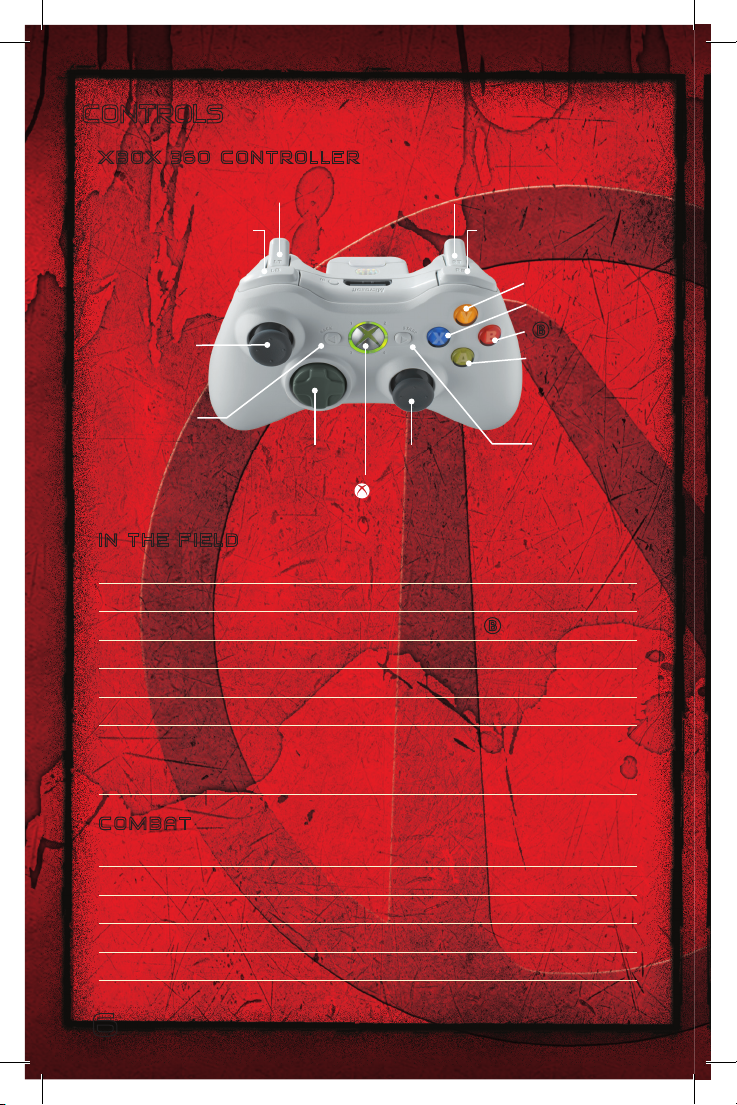
CON TRO LS 6
IN THE FIELD 6
COM BAT 6
VEH ICL ES 7
IN- GAM E S CRE ENS 7
HUD 8
GAM E S CRE ENS 10
NEW -U STATION SCREEN 10
CHA RAC TER SC REE N 10
CHA RAC TER PO WER 11
MIS SIO N S CRE EN 11
INV ENTORY SCR EEN 12
SKI LLS SC REE N 13
LOG SC REE NS 14
MAP SC REE N 15
VEN DIN G M ACH INE S 15
LOOT 16
CATC H A RID E ( VEH ICL ES) 16
PAUSE MENU 17
OPT ION S M ENU 17
MULTI PLAY ER GAM ES 18
KEY PANDORIANS 19
WARRANTY 20
SUP POR T 23
Page 2
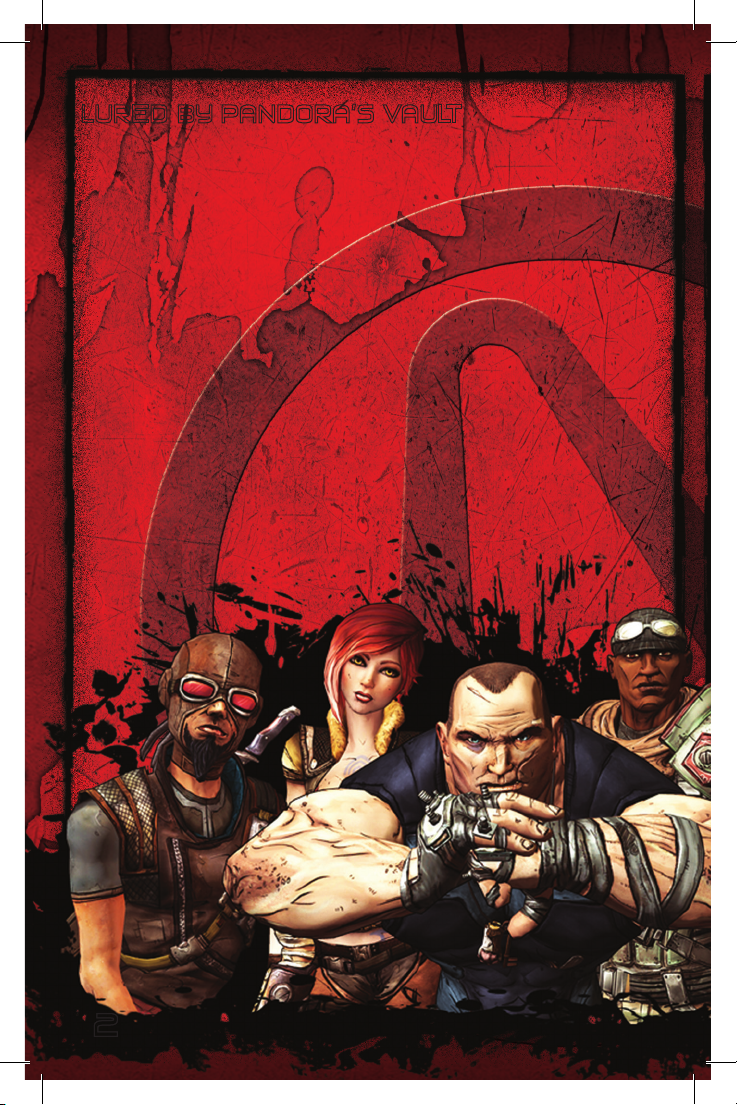
LURED BY PANDORA’S VAULT
Planet P andora i s a sparsely populate d wastel and wher e the ru le of la w get s rewrit ten
daily in the smoke of the las t gun ba ttle. Civiliza tion consists of smal l out posts on the
fringe o f human influ ence, i n an are a called the Borderla nds. Pan dora’s one tou rist
attracti on is a mythical Vault pa cked wit h fantas tic rich es, su pposedly stas hed eons ago
somewher e on the planet by an ad van ced a lien cul ture.
Fortune hunters, corru pt co rporate mercenar ies and lowlife bandits roam the land scape,
searching under every grain of san d for th e treasu re. Si nce most intelli gent life on
Pandora has the occupation of Vau lt Hunter, socie ty has gone t o hell—m aking the
outposts and outback are as damn dange rous. And with hundred s of tho usands of
weapons at their trig ger happ y finger tips, why talk things over whe n machin e gun fire
settles disag reements much mo re effec tively?
Think yo u can find th e Va ult? Maybe go it alon e? You bet you’re tou gh en ough... Keep
all that loot for you rself. .. Or br ing in a few allies t o watch you r back. Cooperat ion could
be vastly profit able, a nd it’s wise n ot to be the only ite m on the menu when a pack of
starv ing skags breaks loos e.
You are ready to ris k it all . But whether you’re a S oldier, Hunter, Sir en, or Berserker, the
real que st is fr eeing th e for midable powers w ithin yoursel f. Eve ry fi refight makes yo u
stronger. Every succ essful m ission pushes your de adly skills t owa rd the n ext leve l. The
conquest of the Vault is about to unfo ld and w ith it—your s tory.
22
Page 3
Xbox LIVE
Play any one and everyone, anytime, an ywhere o n Xbox L IVE®. Build y our prof ile (your
gamer ca rd). Cha t with your f riends. Download content (TV shows, tr ailers, HD mov ies,
game dem os, ex clusive game con tent, and Arcade gam es) at X box LIVE Marketplace.
Send and receive voice and vi deo mess ages. Use LIV E with b oth Xbox 360 and
Windows® . Play, chat, and down load on both your PC and your Xbox 360. LI VE gives you
ultimate access to th e things you wan t and th e people you know, on b oth your PC and
your T V. Get con nected a nd join the revolutio n!
C o n n e c t i n g
Before y ou can u se Xbox LIVE, conne ct your Xbox 360 cons ole to a high-sp eed I nternet
connecti on and sign u p to bec ome an Xbox L IVE memb er. For mo re infor matio n abo ut
connecti ng, and t o determine w hether Xbox L IVE is a vai lable in your re gion, go to
www.xb ox.com/l ive/coun tries .
F a m i ly S e t t i n g s
These ea sy and flexible tools enable parents and care givers t o dec ide whic h games
young ga me playe rs can a ccess based o n the co ntent ra ting. Paren ts can r estrict acces s
to matur e-rated content. Approve who a nd how y our fami ly interacts with oth ers onli ne
with the Xbox LIVE se rvice. And set ti me limit s on how long they ca n play. For more
infor mation, go to www.xb ox.com/fami lysettin gs.
33
Page 4
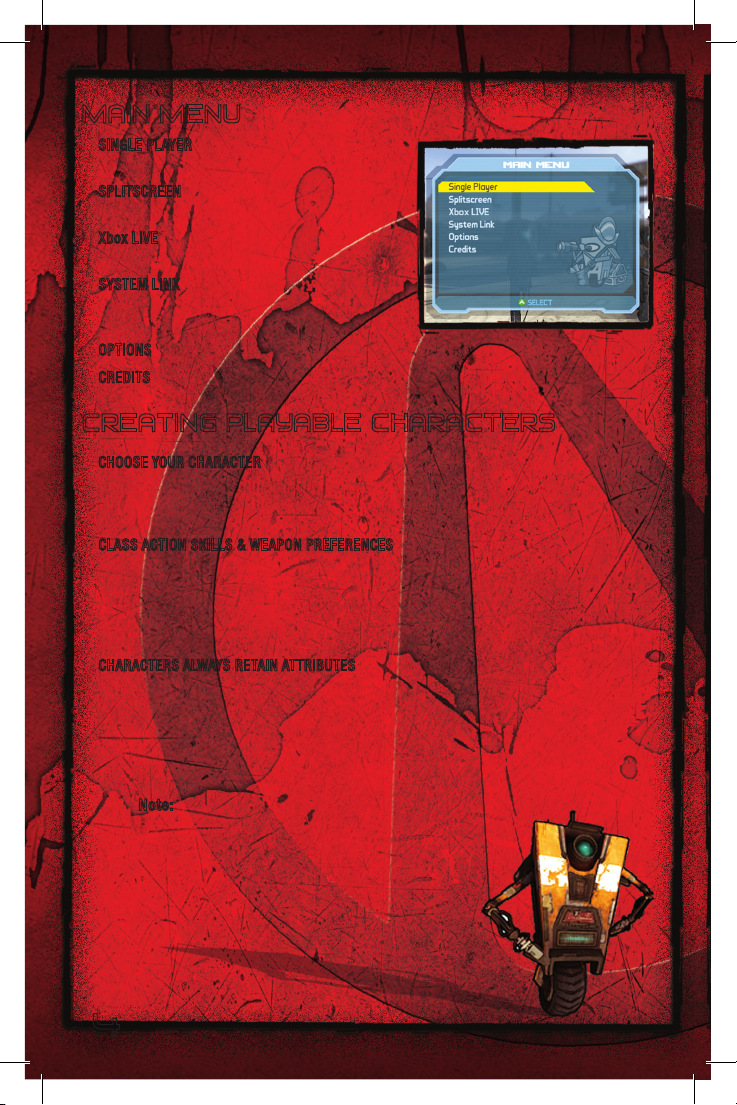
MAIN MENU
SINGLE P LAYER S earch for the Vault on yo ur
own as o ne of fo ur playable characters.
SPLITSCR EEN Two pla yers joi n in the quest
for the Vault on one Xbox 360 system.
Xbox LIV E Two to fo ur playe rs take the ques t
online v ia Xbox LIVE.
SYS TEM LINK Link up to four Xb ox 360
systems and search out t he Vault as a two to-four-player co-op team .
OPTIONS Adju st vario us game settings .
CREDITS View names o f the game’s creators.
CREATING PLAYABLE CHARACTERS
CHOOSE YOUR CHA RACTE R
Get an i ntroduction t o the fo ur game characte rs (L/ C) on the bus ride. Cho ose o ne as
your pla yable ch aracter as you arrive at Fyre stone, the firs t out post on Pandora.
CLASS ACTION S KILLS & WEAPON PREFERENCES
Each charac ter repr esents a class o f fig hter wit h specia l wea pon tale nts. A dditiona lly,
each pos sesses S kills, powerfu l combat techniq ues that deve lop as c haracter s gain
combat e xperienc e. The decis ions you make du ring the ques t will c reate a characte r that
is uniqu e from all ot hers—eve n those from the same fighter clas s.
CHARACTE RS ALWAYS RETAIN ATTR IBUTES
Your charact er takes all ear ned a nd saved attribu tes w herever he or sh e goes.
When you r charac ter join s a multiplayer game hosted by a nothe r player, h e or she brin gs
all save d attrib utes, includin g lev el, XP, weapo ns and l oot t o that g ame.
All character en hancemen ts earned by your cha rac ter d uring th at
game wil l be sav ed.
Note: Plot Mission and Playthrough data in multiplayer
games are determined by the Host player.
4
Page 5
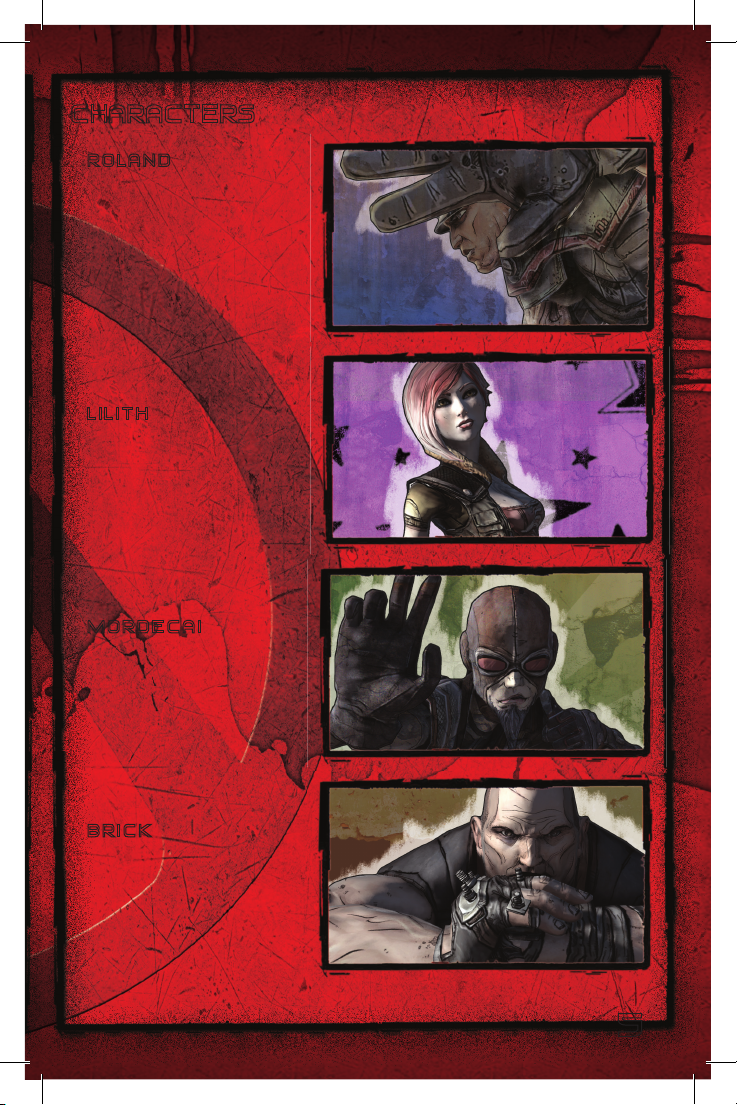
CHARACTERS
R O L A N D
Soldier and former Cr imson
Lance me rcenary, a ble to d eploy
a Scorpi o Tur ret, a we apon that
attacks automati cally while
shieldin g Roland. Rif les and
shotguns are his standard-issue
weapons.
L I L I T H
Siren Ph asewalker w ho can f ight
invisibl y with extreme s peed. She
prefers guns fir ing incendiar y,
shock an d corros ive rounds.
M O R D E C A I
Hunter w hose bird of pre y
Bloodwin g, follows him in to
battle. Mordec ai is a sniper r ifle
master f avoring the revo lver
as a sid earm.
B R I C K
Berserke r who an nihilates
adversar ies with his fists wh ile
in an al most indestru ctible r age
state. When not pulv erizing
enemies by hand, Brick fi ghts
using ex plosive weaponry.
5
Page 6
CONTROLS
X b o x 3 6 0 C O N T R O L L E R
Left Trigger
Left bumper
Left stick
L
<
BACK
D-Pad
l
I N T H E F I E L D
Move forward / back . . . . . . . . . . . . . . .
Sprint . . . . . . . . . . . . . . . . . . . . . j (hold)
Toggle Crouch / Stand . . . . . . . . . . . . . . .
Jump. . . . . . . . . . . . . . . . . . . . . . A
Look around . . . . . . . . . . . . . . . . . . .
Interact: Pick up / Use / Talk / Heal in Multiplayer . . . . X
Pick up all items (ammo, money) on ground /
Replace weapon in hand with weapon
on ground if looking at it . . . . . . . . . . . . . . hold X
C
Xbox Guide
x
Right Trigger
Right stick
Right bumper
L
B
C
Y
X
B
A
button
button
button
button
>
START
C O M B A T
Fire weapon . . . . . . . . . . . . . . . . . . . x
Aim . . . . . . . . . . . . . . . . . . . . . .
Aim with gunsight. . . . . . . . . . . . . . . . . w
Reload . . . . . . . . . . . . . . . . . . . . .
Cycle weapon . . . . . . . . . . . . . . . . . . Y
6
C
X
Page 7
Select weapon . . . . . . . . . . . . . . . . . .
Select weapon with on-screen slot display . . . . . . . hold Y +
Strafe left / right . . . . . . . . . . . . . . . . . S /
Use Skill . . . . . . . . . . . . . . . . . . . . y
Melee attack . . . . . . . . . . . . . . . . . . h
Grenade . . . . . . . . . . . . . . . . . . . . z
Respawn when dying . . . . . . . . . . . . . . . hold
V E H I C L E S
Enter / Exit vehicle . . . . . . . . . . . . . . . . X
Accelerate forward / reverse . . . . . . . . . . . . M /
Switch to turret / driver . . . . . . . . . . . . . . Y
Aim / Turn / Rotate turret . . . . . . . . . . . . . .
Auto-target . . . . . . . . . . . . . . . . . . . A
Fire machine gun . . . . . . . . . . . . . . . . . x
Fire turret / rocket launcher . . . . . . . . . . . . . w
Nitro-boost . . . . . . . . . . . . . . . . . . . y
Look behind (driver only) . . . . . . . . . . . . . . z
Horn . . . . . . . . . . . . . . . . . . . . . . j
I N - G A M E S C R E E N S
Highlight menu item . . . . . . . . . . . . . . . . L or
Accept / Cancel. . . . . . . . . . . . . . . . . . A / B
Open / Close Status Menu . . . . . . . . . . . . . <
Scroll Status Menu tabs . . . . . . . . . . . . . y / z
Cycle message log view . . . . . . . . . . . . Y
Quick-open map . . . . . . . . . . . . . . . . . hold <
Zoom map out / in . . . . . . . . . . . . . . . w / x
Scan / Scroll map . . . . . . . . . . . . . . .
Scroll dialog / details . . . . . . . . . . . . . . . w / x
Pause . . . . . . . . . . . . . . . . . . . . . >
Scroll Splitscreen play area . . . . . . . . . . . . .
l
C
L
l
O
X
Q
l
C
7
Page 8
HUD
3
2
1
4
L
R
5
6
O
P
7
Q
8
M
K
N
9
J
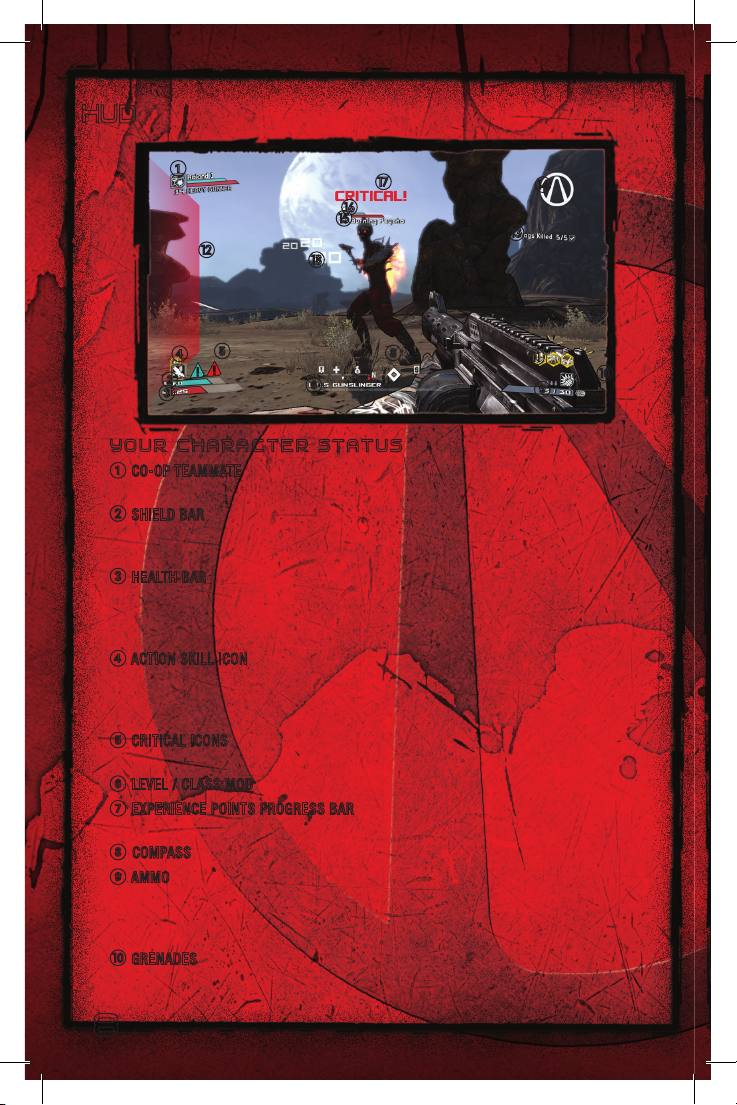
Y O U R C H A R A C T E R S T A T U S
1
CO -OP TE AMMATE Your teamm ate’s identify ing icon and name, s hield an d hea lth
bars, level an d Class mod i con.
B
SH IELD BAR Sh ows your shield strength level. A shie ld absorbs th e force of attac ks
and will lose hit poi nts unti l it fails. D epleted shield strength recharge s if not
under at tack.
C
HE ALTH BAR Shows y our h ealth le vel. Und er at tack, eac h hit de creases the heal th
bar (unl ess your charact er carries a shield). When the bar runs dow n, you begin
fighting for your lif e. You may die, or you may get a sec ond wind , depe nding on your
actions. For an insta nt respa wn while dying, hold
4
ACTION S KILL ICO N Wh en you u se yo ur actio n skill, the i con chan ges to a gaug e
showing the depl etion of Skil l energy. (Gaug e does n ot ap ply to M ordecai) . You can
use the Skill until a ll energ y is dep leted. Skills must co ol down after use, d elaying
their ne xt use.
5
CR ITICAL ICONS A bl ue icon appears when shield s trength level is critical; A r ed
icon app ears when hea lth leve l is critical .
6
LEVEL / CLASS MOD Yo ur curre nt level and Cla ss mo d icon.
7
EX PERIENCE POIN TS PROGR ESS BAR This bar shows your characte r’s progres s
toward s the next exper ience Level U p!
8
COMPASS Shows nor mal compass points plus other indicators, des cri bed on pa ge 9.
9
AMMO N umber on the left ind icates r ounds re maining in th e equipp ed weapon;
when it gets low, press
reser ve; when this hits ze ro, change w eapon s and fi nd more ammo. Icon indicates
type of ammo being us ed.
J
GRENADE S Gren ades rem aining and Grena de mo d icon, if equ ipped.
X
to relo ad. Numb er on the rig ht indic ates total ro unds in
X
.
8
Page 9
K
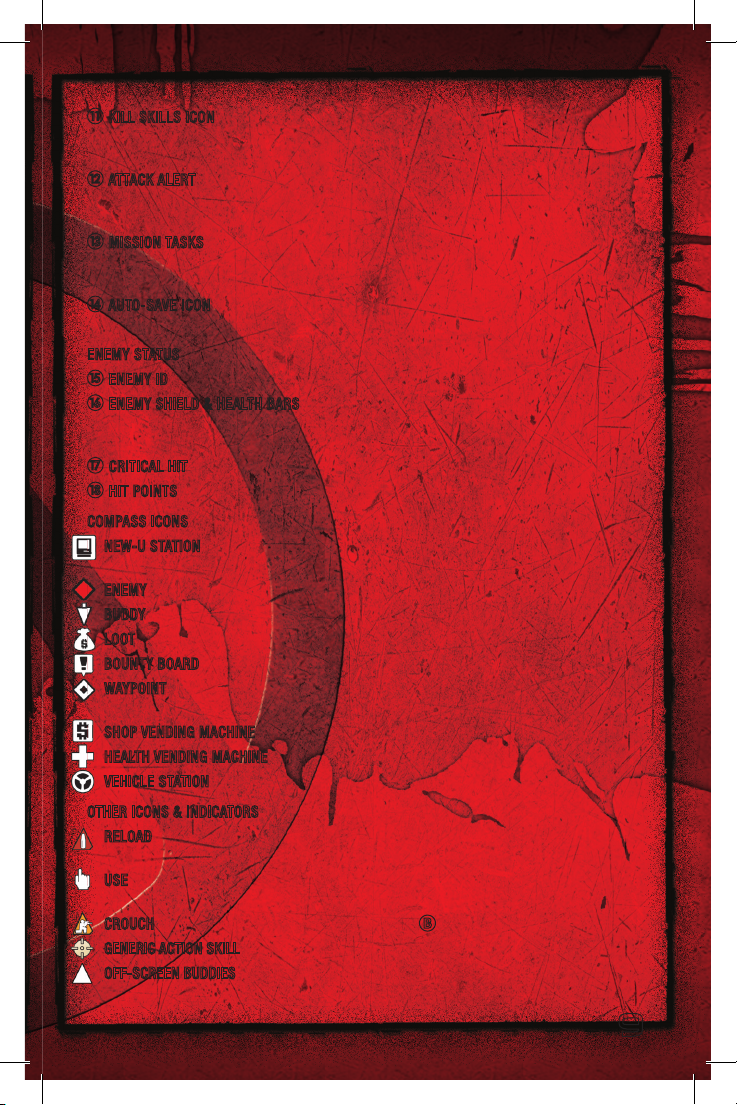
KI LL SKILLS ICO N Icon s show y our Skil ls cu rre ntly in force. These icons a ppear (and
the Skil ls are a ctivated ) in bat tle when you make you r first kill. Sh ortly after t he battl e
ends, the icon s vanish , and wil l reappe ar af ter the first ki ll of your ne xt battl e.
L
ATTACK ALERT Re d flashes at edges of HUD indicate directi on of in coming attack:
Top fla shes are frontal atta ck, botto m flashes are re ar attacks; side flas hes are
lateral attacks.
M
MI SSION TASK S L ist of t asks for current miss ion. Che ckmarks appear a s you
complete tasks. When r elevant, tasks sh ow a cur rent cou nt (l eft of s lash)
and numb er requi red to c omplete the t ask (rig ht of slash), such as 7 / 8.
N
AUTO-S AVE IC ON W hile thi s icon is on- screen, t he ga me is au to-savin g. Do not t urn
off powe r to the console duri ng auto- save or your progress will be lost.
ENEMY STATUS
O
ENEMY I D Look at t his to i dentify the e nemy and check i ts power level.
P
EN EMY SHIELD & HEALTH BAR S Blue bar (top) shows enemy shield strength level. A
honeycomb image flashes here briefly when you hit a shielded enemy. Red bar shows
enemy health level. A Warning icon indicates the enemy is much more powerful than you.
Q
CRITICA L HIT Appear s whe n you de liver a near-leth al shot or bl ow.
R
HIT POI NTS Amount o f inj ury c aused to an e nemy whe n it tak es damag e.
COMPAS S ICONS
NE W-U STATION Po sition o f regist ration s tation where you can check your stats and
reset yo ur Skill Points.
ENEMY Positio n of hostiles , incl uding hu mans and leth al wildl ife.
BUDDY Po sition o f buddies dur ing mult iplayer games.
LOOT Money, item s, XP and othe r rewards y ou want and need .
BOUNTY BOA RD Che ck the B ounty Bo ard for Missi on oppor tunities .
WAYP OINT Positi on of th e tracked m issio n object ive. I f you ha ve multi ple missions in
progress , you can chan ge the t racked mission o n the Mi ssion Log.
SHOP VEN DING MACHINE
HEALTH VEN DING MACHINE
VEHICLE STATI ON Loc ation of a ve hicle yo u can build a nd drive.
OTHER ICONS & INDIC ATORS
RE LOA D indi cates th at yo ur curre nt ammun ition cl ip is close t o runnin g out and tha t
you shou ld reloa d using the
US E indi cates that yo u can us e/collect/act iva te the h ighli ghted it em by press ing t he
X
button.
CROUCH A remin der t hat you are crou ched. Press B to togg le crouching / standi ng.
GENERIC ACTION SKILL Appears above your Shield Bar until you gain your Action Skill.
OFF-SCREEN BUDDIES Names and arrows identify off-screen buddies and their locations.
X
button.
9
Page 10
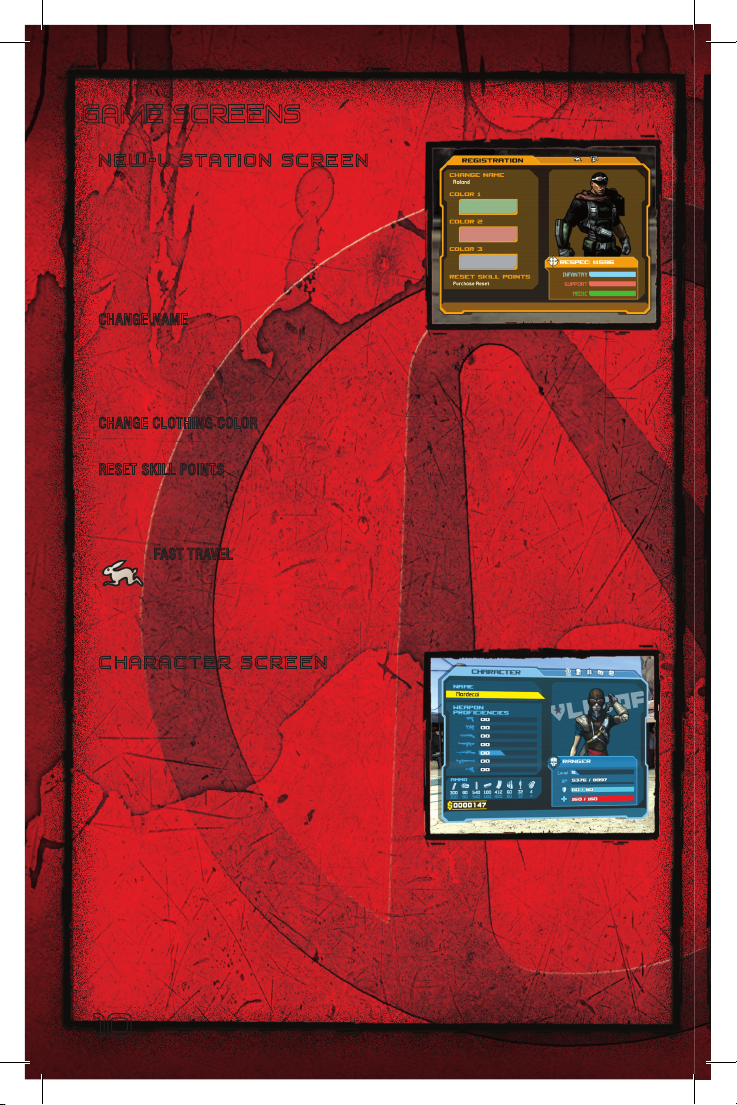
GAME SCREENS
N E W - U S T A T I O N S C R E E N
New-U St ation re gistrati on captures your DNA.
From the n on, when you take a fatal bullet or
get torn to s hreds by ve rmin, New-U Station s
reconstr uct your charact er from a saved DNA file
with eve ry hair an d weapon in place…for a fee.
New-U St ation’s other services i nclude:
CHANGE N AME Give yo ur character a u nique
name for file-saving purposes . Select the name
field to open the keyboard and enter a new na me.
Use this saved c haracter and all its att ribut es
for any BORDERLANDS g ameplay mode.
CHANGE C LOTHIN G COL OR Hig hlight a Colo r featur e with L, press A, high light a new
color an d press
RESET SK ILL POINTS Yo u can re gain Ski ll Point s for merly used to activate specif ic skill s
in order to appl y them to dif ferent s kills. This is a fee-b ased servi ce. You never lo se
earne d Skill Points. Redis tributio n simply frees u p you r accumu lated Sk ill P oints
for reus e.
FAST TRAVEL Teleport t o any complet ed missi on area using the Fas t Travel
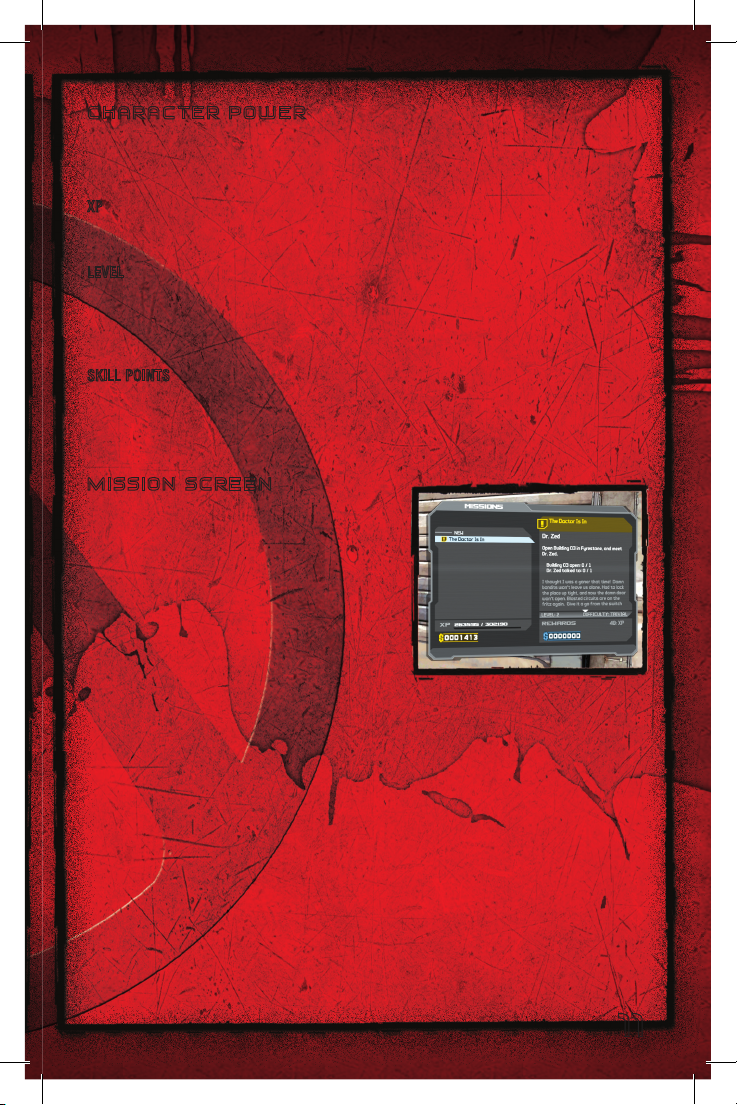
C H A R A C T E R S C R E E N
This scr een give s a quick rundow n of a
character’s we apon pro ficiencies, am mo le vels,
cash, current level, XP, sh ield str ength an d
health. Weapon pr oficiency i ncreases with use.
A
again.
feature. Press
screen. Select y our chos en destinatio n for in stant telepor tation.
y
/ z to sele ct the Rabbit icon at the top of t he New-U Station
10
Page 11
C H A R A C T E R P O W E R
Characte rs gain strength through batt le victo ries and miss ion succ ess. A s they b ecome
ever str onger, t he uniqu e Acti on Skill of e ach charact er comes into play, f ollowed by
increasi ngly mor e powerf ul skill s.
XP Your characte r’s ex perience. Enem y kills, missi on succe ss an d Challe nge comp letio n
increase XP. XP rati ng reads as two numbers: Current XP on the lef t, Lev el Up XP
requirement on t he right , such as: 5462 /8997 .
LEVEL A charact er’s Power. Earn XP to lev el up. High er level charact ers have longer
health b ars, c an carry s tronger shields and h ave high er weapo n profic ienci es to in flict
more dam age. L eveling up also results in Sk ill Poin t awards ne eded to buy Ac tion Skills.
Some wea pons and upgr ades hav e specif ic level require ments be fore the y can be
equipped for use
SKILL PO INTS When yo u reach Level 5 you w ill star t receiv ing a Sk ill Point eve ry ti me
you leve l up. Use t hese special rewards to enhance characte r skills . You must spen d
your fir st point on t he Act ion Skil l.
M I S S I O N S C R E E N
Your jour ney to the Vault involves acce pting an d
completi ng missions. During e ach miss ion, y ou
grab loo t that includ es weapo ns, am mo, items and
more mon ey. Mi ssion su ccess earn s you fu rther
reward s of cash, items an d/or XP.
Find mis sions by : talk ing to p eople wh o nee d
your ser vices, chec king Bou nty Boar ds found
througho ut Pando ra and listening to your Gu ardian
Angel wh en she appear s with a request .
When you talk to a Pa ndorian who needs som e task p erfor med, t he Missi on scree n
appears as you listen . On the Mission screen you c an:
•Liste nto (orread )someon e’spi tch tos ellyou onamis sion. Ifyou accept(
mission appears under the “ In Progr ess” h eading. You c an refer back to mission
details on the Missio n log.
Before d eciding to accept a m ission, check out the reward on the lower right o f the
screen, w here you can also vie w the le vel o f diffic ulty. Accept the miss ion by s electing
the miss ion name on t he right of the screen.
A
), tha t
11
Page 12
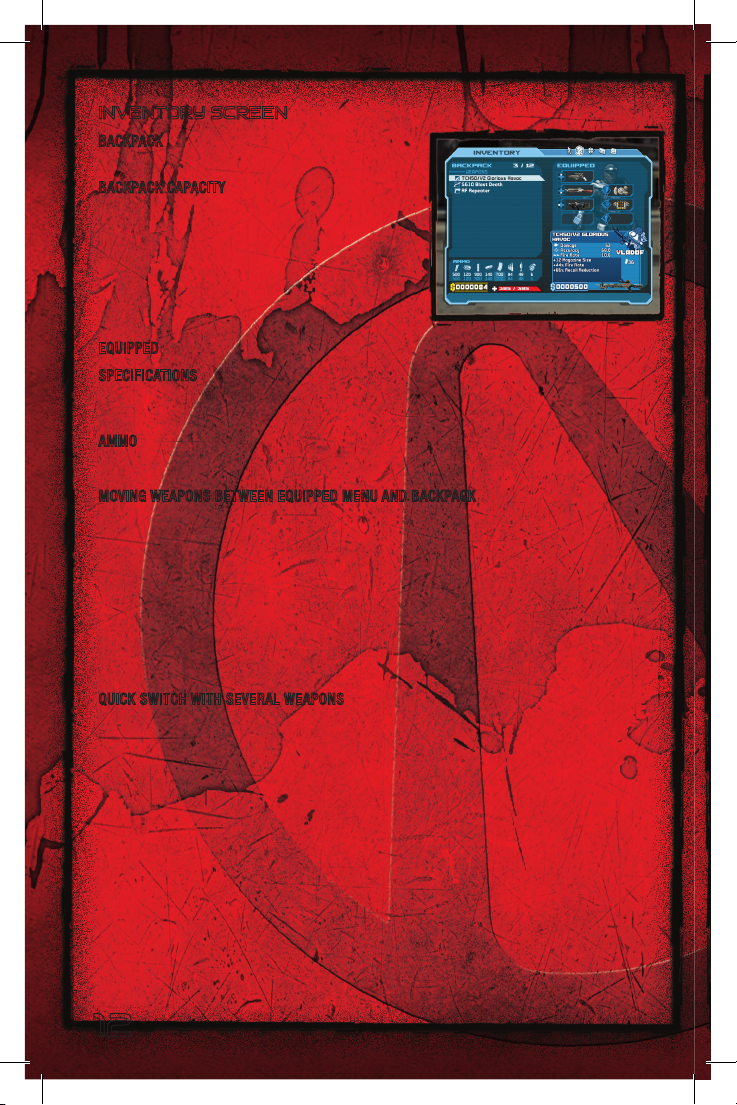
INVENTORY SCREEN
BACKPA CK Hol ds weapo ns, sh ields, med kit s,
mods and other items not yet equipped .
BACKPA CK CAPACITY Shows cu rre nt nu mber of
items in the backpack an d maximum
allowable i tems. Up grade your ba ckpack’s
capaciti es with a Sto rage Deck Upgrad e
(SDU). S DUs increase storage capacity, including
backpack capacit y, number
of equip ped weapons, a mmo m aximums, and
grenade count maximum s.
EQUIPPED Check your weapon, shiel d, Grenad e mod, and Cla ss mod slots.
SPECIFIC ATIONS Highligh t an item to view its specs and cu rrent ma rket value
(if you’re thinking of sell ing i t at a Vendor). H ighlight two lik e items such as weapons
and pres s
AMMO The top number is how m uch ammo you hav e. The botto m number is
the maxi mum ammo allowed for your lev el.
MOV ING WEAPONS BE TWEEN EQ UIPPED MENU AN D BAC KPACK
The Inve ntory disp lays equ ipped items a nd your backpack content s: wea pons, med kits ,
etc. L ock ed weapo n slo ts open up as yo u pro gress th rough th e gam e. To use a we apon
or othe r item, you mu st eq uip it i n one of the equipped slots.
•Toequipa nitemo rswi tch ane quipped itemwit had ifferent one,s electth eite myou
•Tounequip anitem ,high lightaslot andpres sA to toss the item in the back pack.
•Drop anit emfrom Inventor y by highligh ting itandp ressingY.
X
to comp are spec ifications.
wan t from the ba ckp ack, h ighlight the slot whe re you want to put it, an d press
A
.
QUICK SW ITCH W ITH SEVE RAL WE APONS
You can equip as many as four weapons when all Equipped slo ts are u nlocked. When onl y
two weap ons are equipped , press
equipped , or h old
weapon y ou want or you c an still cy cle t hrough t he equip ped w eapons u sing
Y
to disp lay your Equi pped Weapon selec tor, the n use l to grab the
Y
to swit ch weapo ns. Wh en three or four weap ons are
Y
.
12
Page 13
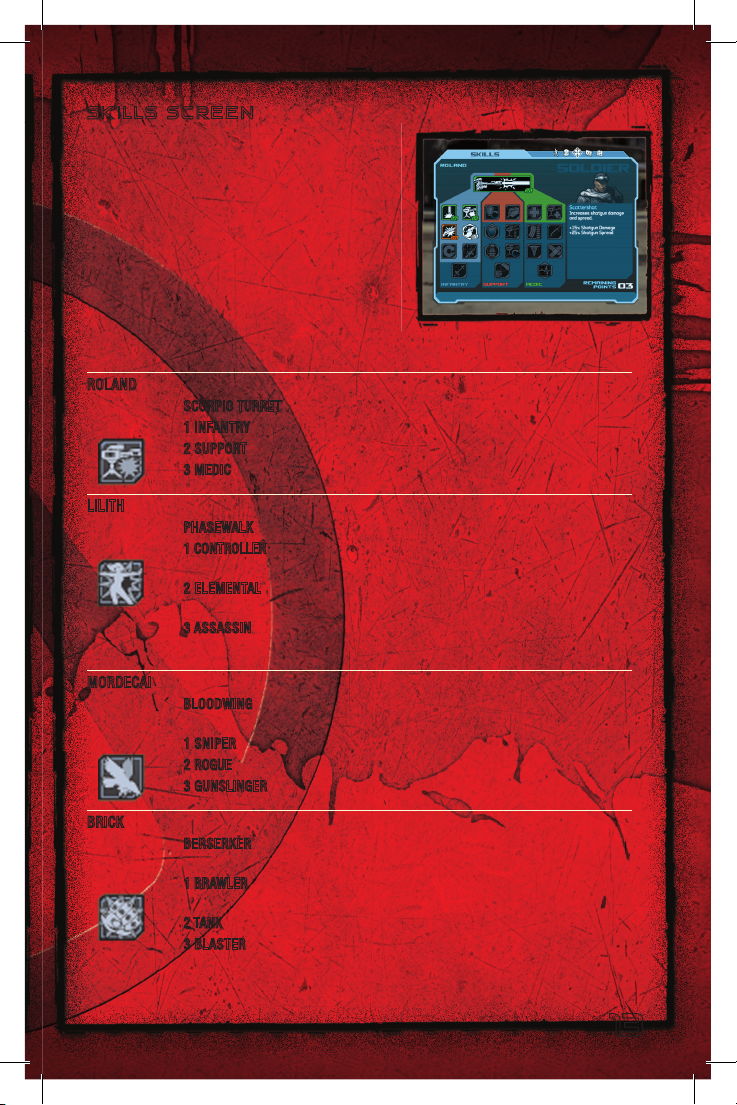
S K I L L S S C R E E N
Purchase Sk ills wit h Skill Points e arned by levelin g
up. You must spend yo ur fi rst Skil l Point on yo ur
character’s Act ion S kill.
Each charac ter’s Skill set is divided into three
Skill Trees of differ ing Skil l types. For every 5
points s pent in a Ski ll Tree a lower row in Tree is
unlocked. Distri bute you r Skill Point s to dif ferent
Skill, Trees, or app ly them to only one S kill Tre e
(max 5 p oints per Ski ll).
Your charact er will never lose th e Skills you
purchase unless you redi stribute your Sk ill P oints at a New-U Stat ion.
ROLAND
Act ion Skill: SCORPIO TURRET Auto-attac ks enemy forces and deploys shie lds fo r cover.
Ski ll Tre es:
1 INFANTRY Improv ed weapon performance.
2 SUPPORT Ammo an d shield regener ation.
3 MEDIC Speed he ali ng and revive al lie s.
LILITH
Act ion Skill: PHASEWALK Invis ibi lity combined wi th ast onishing speed.
Ski ll Tre es:
1 CONTROLLER Daze enemies, speed healing, reduced recover y time
for Phasewalk.
2 ELEMENTAL Elementa l P owers includi ng inc reased damage to enemies
and resistance to d ama ge.
3 ASSASSI N Increased cr iti cal damage with fir ear ms and deadlier
han d-to-hand attack s.
MORDECAI
Act ion Skill: BLOODWI NG P redatory pet hunts dow n e nemies, attacks a nd returns
Ski ll Tre es:
to Mordecai.
1 SNIPER Increas ed sniper rifle acc ura cy and dam age.
2 ROGUE Bloodwing becomes more lethal and dead enemies give up more loot.
3 GUNSLINGE R Increased fi re rate and bull et damage.
BRICK
Act ion Skill: BERSERK ER D eliver hammering pu nches while exhi bit ing extrem e d amage
Ski ll Tre es:
resistance and acce lerated healing.
1 BRAWLER Berserk episodes lengthen with shorter cooldown, and he hits
harder.
2 TANK Health and shield resistance increase; briefly invuln erable after a ki ll.
3 BLASTER More leth al explosions, faste r reloading and roc ket regene ration.
13
Page 14
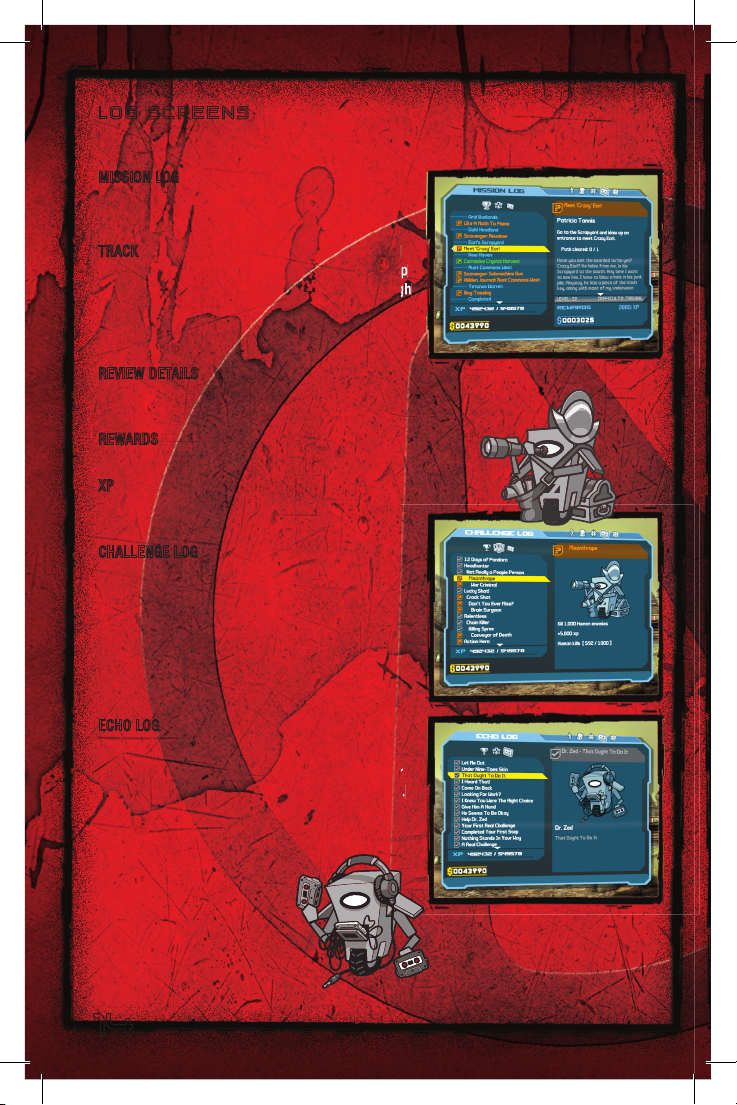
L O G S C R E E N S
Press Y to cycle t hrough t he lo gs.
MISSION LOG
View in- progress or c ompleted mission data .
Select a mission, then sele ct a log.
TRACK Change a waypoin t. Waypoi nts, i ndicated
by Diamond icons on both the Compass and Map
screens, guide you to mission objec tives. Th ough
you can accept multip le missi ons, y ou can o nly
track one
at a tim e.
REVIEW D ETAILS Check th e detail s of your
mission by reviewin g a t ran scrip t of who
gave you the mis sion and what wa s said.
REWARD S Vi ew the r ewa rd you w ill rece ive
for miss ion completio n.
XP V iew you current XP and X P nee ded to
level up.
CHALLENG E LOG
Test yo ur skills and earn ex tra XP b y taking
challeng es. Sele ct a cha llenge from t he list to
see what is requ ired. Co mpleted challeng es are
checked off. (Com pleting challeng es earns XP,
though i t doesn’t get you any closer to th e Va ult.)
ECHO LOG
Come her e to lis ten to what was said dur ing
previous mission s. Maybe you’ ll catch a remin der
of some detail. Selec t an Ech o recording to l isten.
Each record ing is l isted by mission name.
14
Page 15
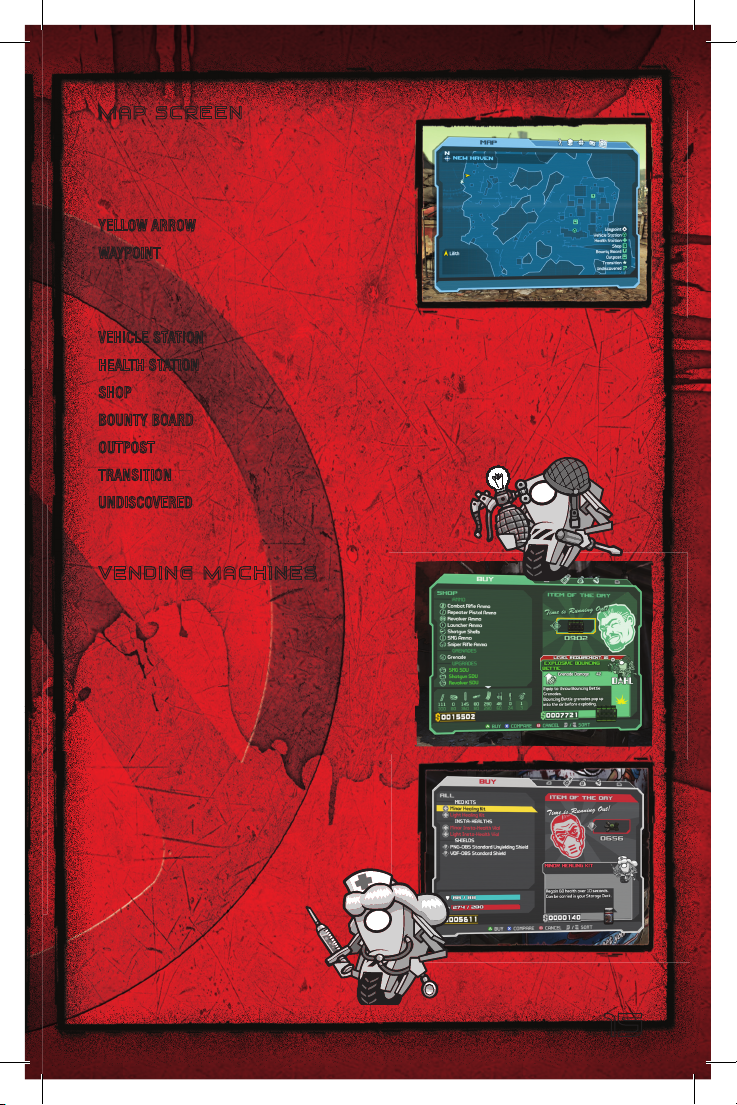
M A P S C R E E N
To quic k-open t he map, p ress and hold <.
Use
to scan / scroll the map. Press w /
L
x
to zoom the map in / out. Ic ons on the ma p
mark the locations of items o f intere st.
YELLOW ARROW Your character’s positi on.
WAYPOINT Mark s the lo cation of you r
currentl y tracked m ission o bject ive. You ca n
change t he waypoint to a differe nt
in-progress mission o n the Mi ssion log.
VEHICLE STATI ON Fin d a C atch-a-R ide Stat ion here.
HEALTH STATION Get me dical attenti on here.
SHOP L ocation of a vending machine that sells we aponr y.
BOUNTY B OAR D Find a mi ssion on a Bount y Boa rd.
OUTPOST Isolated areas of h uman pop ulation.
TRANSITI ON Indicate s a port al between regions.
UNDISCOVERE D You ha ven’t be en he re yet.
V E N D I N G M A C H I N E S
Ven ding mac hines of fer weap ons, a mmunition,
weapons upgrades, g ren ade m ods, class mod s,
medical supplies and shields. Press
to displ ay the Buy, S ell or Buy Ba ck screen.
Use
to high light an item and not e item
l
descript ions or compa re produ cts. T hough
you can purchase any ite m you can aff ord ,
some of them can only be equi pped after yo ur
character has achie ved a certain level.
• Atthew eaponve ndor,cu rrentam mo
inventor y and cash reserves rem ind you
what you need and wha t you ca n afford .
• Thefeat ured“Ite mof theDay”isus uallyfo r
sale for a limited ti me only.
y
/ z
15
Page 16
L O O T
Pandora is litte red with loot, includi ng mo ney, wea pons, ammo, upg rades an d mods.
Take lo ot from dead bod ies, o r find it hid den away or in p iles of junk.
•Pr ess
•Press andhol d
WEAPONS AND AMMO N ote deta ils about a w eapon wh en you approa ch it. You may
MONEY Use money to buy weap ons, a mmo, shie lds and medical suppl ies. Pay for
MINOR IN STA-HEALTH V IAL Give yo urself a smal l health boost.
CLASS MO DS Class-sp ecific m odifications enhance characte r attrib utes for the stated
GRENADE MODS These e nhanc e your P rotean G renade p erfor mance. Equip G renade m ods
SHIELD Pick up new and bette r shield s to protect yourself with.
ERIDIAN ARTIFACT These rare fi nds enha nce the Skill s of spe cific ch aracter types.
X
to pick up loot , or t o pick u p a weap on.
X
weapon i n hand.
decide n ot to take it.
reconstr ucting y our bullet-ri ddled co rpse.
class on ly. (For exampl e, a class m od for a Sold ier will not hel p a H unter, Sire n or
Berserke r.) Equip Class mo ds on the Inv entor y screen .
on the I nventory s creen.
to pick up all items grouped close togeth er, or to equip and take a
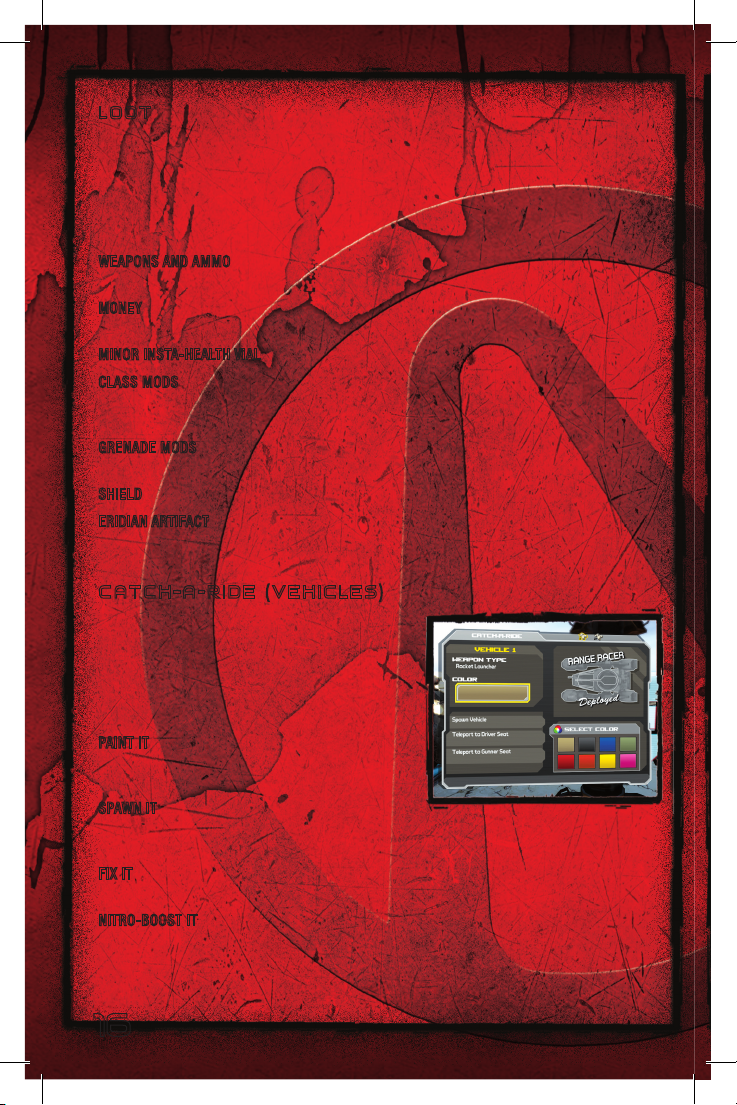
C A T C H - A - R I D E ( V E H I C L E S )
Catch-A- Ride off ers armored v ehicles at st ations
througho ut Pandora. (On the m ap, look for the
Veh icle ico n. Press
the two vehicles .) In multipl ayer gam es, two
players can ride in the vehic le. On ce you h ave a
vehicle, you can:
PAINT IT Bef ore taki ng your vehic le into battle,
give it a custom pain t job an d name. Select the
color bo x to display the colo ur/name schemes.
SPAWN IT C reate yo ur ride and either te leport t o
the driv er’s seat o r turret or clos e the screen and
wal k over t o it.
FIX IT Stuck? Jump out of t he vehic le and give i t a whac k (h) to mov e it. (D on’t beat
your veh icle to death .)
NITRO-BO OST IT Use Nitro-bo ost (y) for hu ge acceleration. The B oost Gauge di splays
remainin g charge. When depleted , Nitr o-boost recharges gradua lly.
w
/ x to alte rnate between
16
Page 17
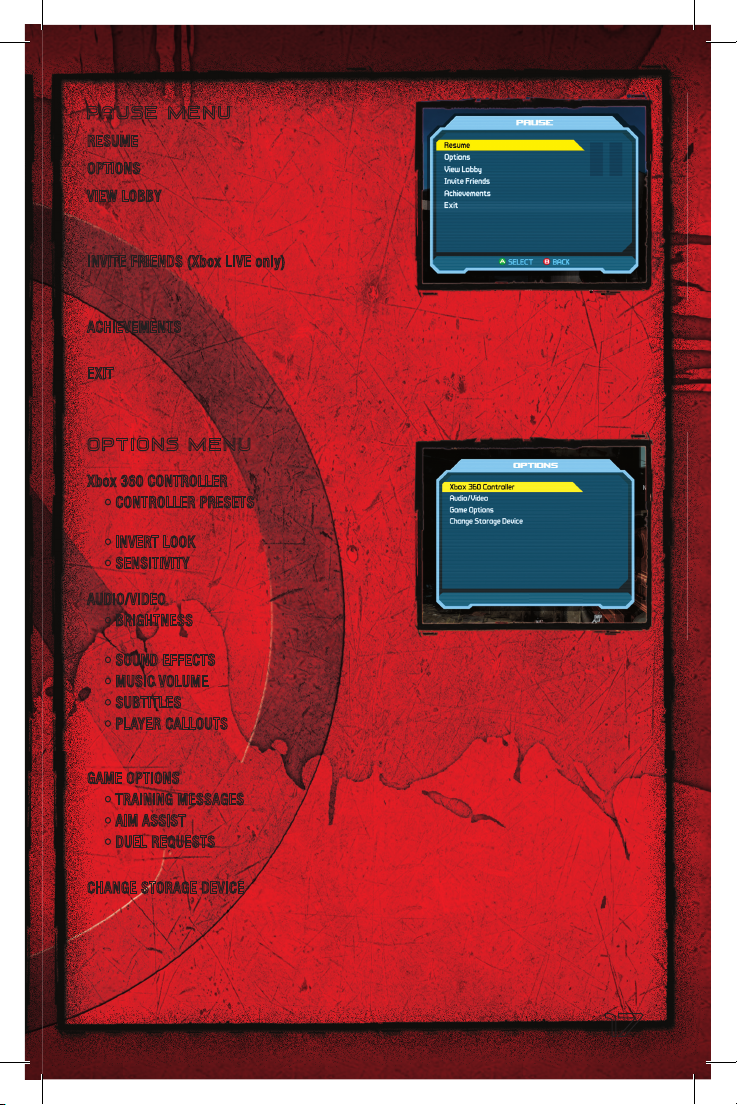
P A U S E M E N U
RESUME Return to ga mepla y.
OPTIONS Adju st vario us game settings .
VIEW LOB BY A dditiona l pla yer s can join
a game i n progress by lo ading their s ave d
character during a game pause.
INVITE F RIENDS (Xbox LIVE onl y) A dd Frien ds
and invi te curre nt Friends to join in games
you host .
ACHIEVEM ENTS Except ional ac ts your
character perfor ms are r ecorded here.
EXIT E xit the current game.
O P T I O N S M E N U
Xbox 360 CONTROLLER
•CONTROL LERP RESETS Vie w a diagram
of the control settings.
•INVERTLOO K Reverse C ac tio n.
•SENSITI VITY Ad jus t C se nsi tivity.
AUDIO/VI DEO (from Mai n Menu o nly)
•BRIGHTN ESS Adjust games creen
bri ght ness.
•SOUNDE FFECT S Adjust game sound volume, including in-g ame character voices.
•MUSICVOLUME Ad just the game’s music soundtrack volume.
•SUBTITL ES Tur n ON to see subtitles for dialog spoken by in-game characters.
•PLAYERC ALLOUTS Turn ON to hear your character’s v oca l r esp ons es to an exc iti ng
eve nt, such a great rifle shot.
GAME OPT IONS
•TRAININ GMES SAGES Turn ON to see helpful messages.
•AIMA SSIST Tur n ON to stabilize aim when sighting in on a target.
•DUELRE QUEST S Accept or decline the option to take a challenge from another player
(mu lti player ga mes only).
CHANGE S TORAGE DEVI CE (when startin g a n ew game only) Selec t a diff erent ha rd drive
or Xbox 360 Memory Unit to load or store saved game dat a.
17
Page 18
MULTIPLAYER GAMES
Up to fo ur playe rs team up to search for the Vaul t.
•Ifpl aying inaga mehoste dbyano therpla yer,youcanloa dacharactercreatedin a
previous BORDERL ANDS game. Your characte r enters the new game with le vel, S kill
data and weaponry saved fr om previ ous game s. Advanc ed-le vel charact ers can load
into a n ew game and t eam up w ith new and b eginning charact ers.
•Missi ondi fficulty increas esasmo replaye rsjoin thequest.En emiesat tackwit h
more fer ocity an d are to ugher to take do wn. Th e payoff gets richer, in cluding bigger
mission rewards and heavier, d eadli er weapo n enhanc ement s.
•All players mustre mainwit hinthe same mission area.Sp litthe loot— sharemo ney
and ammo among the te am. Save your pa rtner ’s lif e (
dying.
•Who ’stoughest?S mackat eammemb er(
by nailing you, t he du el is on . Pick a fight a nywhere or wait until yo u find an arena
designed for fighting.
h
L O A D I N G A M U LT I P L A Y E R C H A R A C T E R
LOA D CHARAC TER Sh ows availab le pl ayable c haracter s as a l ist of s aved gam e
characters with their st ats, i ncluding leve l, class and n ame.
PLOT M ISSION The m ission begins and is deter mined by Player 1’s progress t hrough t he
game.
PLAYTHROUGH Shows the c urrent g ame play through for t he Playe r 1 character. For
example, if thi s is the firs t game, the num ber i s “1.”
Note: Plot Mission and Playthrough data in multiplayer
games are determined by the Host player.
X
) if he or she is sho t up and
). If he or she accep ts the c hallenge
S E T U P
SPLITSCR EEN A 2 Play er game played o n one Xb ox 360 s ystem. On the Main Me nu, se lect
SPLITSCR EEN. As P layer 1, selec t a SAVED CHAR ACTER if you have one on the Lobby
screen o r take t he NEW C HARACTER opti on. Play er 2 fol lows sui t and st arts play by
pressing
>
.
Xbox LIV E Play a mul tiplayer game vi a Xbox LIVE.
SYS TEM LINK Play a mul tiplayer game by li nking up to f our Xbox 360 systems, each with
an indiv idual BORDERL ANDS gam e disc.
18
Page 19
K EY PANDORIANS
C L4 P -T P G E N E R A L P U R P O S E R O B O T ( C l a p t r a p )
Programm ed as your to ur guide, this chatty l ittle box pro vides us eful gui dance. Thoug h it
gets sho t up now and then, it never lets yo u down.
D R . Z E D B L A N C O
This “ defrocked” doctor maintai ns an d repair s Healin g Statio ns. H is vendi ng machi nes
serve your medical and shi eld needs. He lp him o ut from time to time for a little reward.
M A R C U S K I N C A I D
Gun deal er? Bus drive r? Comme rce net entrepre neur? If it turns a p rofit , Marcus turns up.
His vend ing mach ine operation will keep you b roke buy ing weap ons and ammo.
G U A R D I A N A N G E L
She appe ars out of nowhere with encou rag ement , information and m ission o ffers. She wi ll
not stee r you wrong.
S K A G S
Predator y Ska gs attack alone and i n packs. Skags w ill even run into the middle of a
gunfight and start gn awing on combatants. Don’t le t them get cl ose. You’ll be s orry.
R A K K
These mu rderousl y territorial flying creature s flock in and s hred any one who invades their
turf. T heir nest is even mor e horrib le than they are.
19
Page 20

LIMITED SOFTWARE WARRANTY, LICENSE AGREEMENT
& INFORMATION USE DISCLOSURES
This document may be updated from time to time and the current version will be posted at www.2kgames.com/eula. Your
continued use of this Software 30 days after a revised version has been posted constitutes acceptance by you of its terms.
YOUR USE OF THE SOFTWARE IS SUBJECT TO THIS LIMITED SOFTWARE WARRANTY AND LICENSE AGREEMENT (THE
“AGREEMENT”) AND THE TERMS SET FORTH BELOW. THE “SOFTWARE” INCLUDES ALL SOFTWARE INCLUDED WITH THIS
AGREEMENT, THE ACCOMPANYING MANUAL(S), PACKAGING AND OTHER WRITTEN, FILES, ELECTRONIC OR ON-LINE
MATERIALS OR DOCUMENTATION, AND ANY AND ALL COPIES OF SUCH SOFTWARE AND ITS MATERIALS. BY OPENING THE
SOFTWARE, INSTALLING, AND/OR USING THE SOFTWARE AND ANY OTHER MATERIALS INCLUDED WITH THE SOFTWARE,
YOU HEREBY ACCEPT THE TERMS OF THIS AGREEMENT WITH TAKE-TWO INTERACTIVE SOFTWARE, INC. (“LICENSOR”).
I. LICENSE
LICENSE. Subject to this Agreement and its terms and conditions, Licensor hereby grants you the nonexclusive, nontransferable, limited right and license to use one copy of the Software for your personal non-commercial use for gameplay on
a single computer or gaming unit, unless otherwise specied in the Software documentation. Your acquired rights are subject
to your compliance with this Agreement. The term of your license under this Agreement shall commence on the date that
you install or otherwise use the Software and ends on the earlier date of either your disposal of the Software or Licensor’s
termination of this Agreement. Your license terminates immediately if you attempt to circumvent any technical protection
measures used in connection with the Software. The Software is being licensed to you and you hereby acknowledge that no
title or ownership in the Software is being transferred or assigned and this Agreement should not be construed as a sale of
any rights in the Software. All rights not specically granted under this Agreement are reserved by Licensor and, as applicable,
its licensors.
OWNERSHIP. Licensor retains all right, title and interest to the Software, including, but not limited to, all copyrights,
trademarks, trade secrets, trade names, proprietary rights, patents, titles, computer codes, audiovisual effects, themes,
characters, character names, stories, dialog, settings, artwork, sounds effects, musical works, and moral rights. The Software is
protected by United States copyright and trademark law and applicable laws and treaties throughout the world. The Software
may not be copied, reproduced or distributed in any manner or medium, in whole or in part, without prior written consent
from Licensor. Any persons copying, reproducing or distributing all or any portion of the Software in any manner or medium,
will be willfully violating the copyright laws and may be subject to civil and criminal penalties in the US or their local country.
Be advised that US Copyright violations are subject to statutory penalties of up to $150,000 per violation. The Software
contains certain licensed materials and Licensor’s licensors may also protect their rights in the event of any violation of this
Agreement. All rights not expressly granted to you herein are reserved by the Licensor.
LICENSE CONDITIONS. You agree not to:
(a) Commercially exploit the Software;
(b) Distribute, lease, license, sell, rent or otherwise transfer or assign the Software, or any copies of the Software, without the
express prior written consent of Licensor or as set forth in this Agreement;
(c) Make a copy of the Software or any part thereof (other than as set forth herein);
(d) Making a copy of this Software available on a network for use or download by multiple users;
(e) Except as otherwise specically provided by the Software or this Agreement, use or install the Software (or permit others to
do same) on a network, for on-line use, or on more than one computer or gaming unit at the same time;
(f) Copy the Software onto a hard drive or other storage device in order to bypass the requirement to run the Software from
the included CD-ROM or DVD-ROM (this prohibition does not apply to copies in whole or in part that may be made by the
Software itself during installation in order to run more efciently);
(g) use or copy the Software at a computer gaming center or any other location-based site; provided, that Licensor may offer
you a separate site license agreement to make the Software available for commercial use;.
(h) Reverse engineer, decompile, disassemble, prepare derivative works based on or otherwise modify the Software, in whole
or in part;
(i) Remove or modify any proprietary notices, marks or labels contained on or within the Software; and
(j) transport, export or re-export (directly or indirectly) into any country forbidden to receive such Software by any U.S. export
laws or accompanying regulations or otherwise violate such laws or regulations, that may be amended from time to time.
However, you may transfer the entire Software and accompanying documentation on a permanent basis to another person
as long as you retain no copies (including archival or backup copies) of the Software, accompanying documentation, or any
portion or component of the Software accompanying documentation, and the recipient agrees to the terms of this Agreement.
The Software is intended for private use only.
TECHNICAL PROTECTIONS. The Software may include measures to control access to the Software, prevent unauthorized
copies, or otherwise attempt to prevent anyone from exceeding the limited rights and licenses granted under this Agreement.
If the Software permits access to additional online features, only one copy of the Software may access those features at one
time (unless otherwise provided in the Software documentation). Additional terms and registration may be required to access
online services and to download Software updates and patches. Only Software subject to a valid license can be used to access
20
Page 21

online services, and download updates and patches. You may not interfere with such access control measures or attempt to
disable or circumvent such security features. If you disable or otherwise tamper with the technical protection measures, the
Software will not function properly.
USER CREATED CONTENT: The Software may allow you to create content, including but not limited to a gameplay map, a
scenario, screenshot of a car design or a video of your game play. In exchange for use of the Software, and to the extent that
your contributions through use of the Software give rise to any copyright interest, you hereby grant Licensor an exclusive,
perpetual, irrevocable, fully transferable and sub-licensable worldwide right and license to use your contributions in any way
and for any purpose in connection with the Software and related goods and services, including the rights to reproduce, copy,
adapt, modify, perform, display, publish, broadcast, transmit, or otherwise communicate to the public by any means whether
now known or unknown and distribute your contributions without any further notice or compensation to you of any kind for
the whole duration of protection granted to intellectual property rights by applicable laws and international conventions. You
hereby waive any moral rights of paternity, publication, reputation, or attribution with respect to Licensor’s and other players’
use and enjoyment of such assets in connection with the Software and related goods and services under applicable law. This
license grant to Licensor, and the above waiver of any applicable moral rights, survives any termination of this License.
INTERNET CONNECTION. The Software may require an internet connection to access internet-based features, authenticate
the Software, or perform other functions. In order for certain features of the Software to operate properly, you may be
required to have and maintain (a) an adequate internet connection and/or (b) a valid and active account with an online
service as set forth in the Software documentation, including but not limited to Windows Live, Licensor or a Licensor afliate.
If you do not maintain such accounts, then certain features of the Software may not operate or may cease to function
properly, either in whole or in part.
II. INFORMATION COLLECTION & USAGE
By installing and using this software, you consent to these information collection and usage terms, including (where
applicable) transfer of data to Licensor and afliated companies into a country outside of the European Union and the
European Economic Area. If you connect to the Internet when using the Software, either through Xbox LIVE, PLAYSTATION
Network, or any other method, Licensor may receive information from hardware manufacturers or platform hosts (such as
Microsoft or Sony) and may automatically collect certain information from your computer or gaming unit. This information
may include, but is not limited to, user IDs (such as gamer tags and screen names), game scores, game achievements, game
performance, locations visited, buddylists, hardware MAC address, internet protocol address, and your usage of various game
features. All information collected by Licensor is intended to be anonymous information that does not disclose your identity
or constitute personal information, however, if you include personal information (such as your real name) in your user ID, then
such personal information will automatically be transmitted to Licensor and used as described herein.
The information collected by Licensor may be posted by Licensor on publicly-accessible web sites, shared with hardware
manufacturers, shared with platform hosts, shared with Licensor’s marketing partners or used by Licensor for any other lawful
purpose. By using this Software you consent to the Licensor’s use of related data, including public display of your data such
as identication of your user created content or displaying your scores, ranking, achievements and other gameplay data. If
you do not want your information shared in this manner, then you should not use the Software.
III. WARRANTY
LIMITED WARRANTY: Licensor warrants to you (if you are the initial and original purchaser of the Software) that the original
storage medium holding the Software is free from defects in material and workmanship under normal use and service for
90 days from the date of purchase. Licensor warrants to you that this Software is compatible with a personal computer
meeting the minimum system requirements listed in the Software documentation or that it has been certied by the gaming
unit producer as compatible with the gaming unit for which it has been published, however, due to variations in hardware,
software, internet connections and individual usage, Licensor does not warrant the performance of this Software on your
specic computer or gaming unit. Licensor does not warrant against interference with your enjoyment of the Software;
that the Software will meet your requirements; that operation of the Software will be uninterrupted or error-free, or that the
Software will be compatible with third party software or hardware or that any errors in the Software will be corrected. No oral
or written advice provided by Licensor or any authorized representative shall create a warranty. Because some jurisdictions
do not allow the exclusion of or limitations on implied warranties or the limitations on the applicable statutory rights of a
consumer, some or all of the above exclusions and limitations may not apply to you.
If for any reason you nd a defect in the storage medium or Software during the warranty period, Licensor agrees to replace,
free of charge, any Software discovered to be defective within the warranty period as long as the Software is currently being
manufactured by Licensor. If the Software is no longer available, Licensor retains the right to substitute a similar piece of
Software of equal or greater value. This warranty is limited to the storage medium and the Software as originally provided by
Licensor and is not applicable to normal wear and tear. This warranty shall not be applicable and shall be void if the defect
has arisen through abuse, mistreatment, or neglect. Any implied warranties prescribed by statute are expressly limited to the
90-day period described above.
Except as set forth above, this warranty is in lieu of all other warranties, whether oral or written, express or implied, including
any other warranty of merchantability, tness for a particular purpose or non-infringement, and no other representations or
warranties of any kind shall be binding on Licensor.
When returning the Software subject to the limited warranty above, please send the original Software only to the Licensor
address specied below and include: your name and return address; a photocopy of your dated sales receipt; and a brief note
describing the defect and the system on which you are running the Software.
21
Page 22
IN NO EVENT WILL LICENSOR BE LIABLE FOR SPECIAL, INCIDENTAL OR CONSEQUENTIAL DAMAGES RESULTING FROM
POSSESSION, USE OR MALFUNCTION OF THE SOFTWARE, INCLUDING BUT NOT LIMITED TO, DAMAGES TO PROPERTY,
LOSS OF GOODWILL, COMPUTER FAILURE OR MALFUNCTION AND, TO THE EXTENT PERMITTED BY LAW, DAMAGES FOR
PERSONAL INJURIES, PROPERTY DAMAGE, LOST PROFITS OR PUNITIVE DAMAGES FROM ANY CAUSES OF ACTION ARISING
OUT OF OR RELATED TO THIS AGREEMENT OR THE SOFTWAWRE, WHETHER ARISING IN TORT (INCLUDING NEGLIGENCE),
CONTRACT, STRICT LIABILITY OR OTHERWISE, WHETHER OR NOT LICENSOR HAS BEEN ADVISED OF THE POSSIBILITY OF
SUCH DAMAGES. IN NO EVENT SHALL LICENSOR’S LIABILITY FOR ALL DAMAGES (EXCEPT AS REQUIRED BY APPLICABLE
LAW) EXCEED THE ACTUAL PRICE PAID BY YOU FOR USE OF THE SOFTWARE.
BECAUSE SOME STATES/COUNTRIES DO NOT ALLOW LIMITATIONS ON HOW LONG AN IMPLIED WARRANTY LASTS AND/
OR THE EXCLUSION OR LIMITATION OF INCIDENTAL OR CONSEQUENTIAL DAMAGES, THE ABOVE LIMITATIONS AND/
OR EXCLUSION OR LIMITATION OF LIABILITY MAY NOT APPLY TO YOU. THIS WARRANTY SHALL NOT BE APPLICABLE
SOLELY TO THE EXTENT THAT ANY SPECIFIC PROVISION OF THIS WARRANTY IS PROHIBITED BY ANY FEDERAL, STATE, OR
MUNICIPAL LAW, WHICH CANNOT BE PRE-EMPTED. THIS WARRANTY GIVES YOU SPECIFIC LEGAL RIGHTS, AND YOU MAY
HAVE OTHER RIGHTS THAT VARY FROM JURISDICTION TO JURISDICTION.
TERMINATION: This Agreement will terminate automatically if you fail to comply with its terms and conditions. In such event,
you must destroy all copies of the Software and all of its component parts. You can also end this Agreement by destroying the
Software and all copies and reproductions of the Software and deleting and permanently purging the Software from any client
server or computer on which it has been installed.
U.S. GOVERNMENT RESTRICTED RIGHTS: The Software and documentation have been developed entirely at private expense
and are provided as “Commercial Computer Software” or “restricted computer software.” Use, duplication or disclosure by
the U.S. Government or a U.S. Government subcontractor is subject to the restrictions set forth in subparagraph (c)(1)(ii)
of the Rights in Technical Date and Computer Software clauses in DFARS 252.227-7013 or as set forth in subparagraph (c)
(1) and (2) of the Commercial Computer Software Restricted Rights clauses at FAR 52.227-19, as applicable. The Contractor/
Manufacturer is the Licensor at the location listed below.
EQUITABLE REMEDIES: You hereby agree that if the terms of this Agreement are not speci cally enforced, Licensor will be
irreparably damaged, and therefore you agree that Licensor shall be entitled, without bond, other security, proof of damages,
to appropriate equitable remedies with respect any of this Agreement, in addition to any other available remedies.
INDEMNITY: You agree to indemnify, defend and hold Licensor, its partners, licensors, af liates, contractors, of cers, directors,
employees and agents harmless from all damages, losses and expenses arising directly or indirectly from your acts and
omissions to act in using the Software pursuant to the terms of the Agreement.
MISCELLANEOUS: This Agreement represents the complete agreement concerning this license between the parties and
supersedes all prior agreements and representations between them. It may be amended only by a writing executed by both
parties. If any provision of this Agreement is held to be unenforceable for any reason, such provision shall be reformed only to
the extent necessary to make it enforceable and the remaining provisions of this Agreement shall not be affected.
GOVERNING LAW. This Agreement shall be construed (without regard to confl icts or choice of law principles) under the laws
of the State of New York, as such law is applied to agreements between New York residents entered into and to be performed
within New York, except as governed by federal law. Unless expressly waived by Licensor in writing for the particular instance
or contrary to local law, the sole and exclusive jurisdiction and venue for actions related to the subject matter hereof shall be
the state and federal courts located in Licensor’s principal corporate place of business (New York County, New York, U.S.A.).
Both parties consent to the jurisdiction of such courts and agree that process may be served in the manner provided herein
for giving of notices or otherwise as allowed by New York state or federal law. The parties agree that the UN Convention on
Contracts for the International Sale of Goods (Vienna, 1980) shall not apply to this Agreement or to any dispute or transaction
arising out of this Agreement.
IF YOU HAVE ANY QUESTIONS CONCERNING THIS LICENSE, YOU MAY CONTACT IN WRITING TAKE-TWO INTERACTIVE
SOFTWARE, INC. 622 BROADWAY, NEW YORK, NY 10012.
© 2009 Gearbox Software, LLC. All rights reserved. Published and distributed by 2K Games under license from Gearbox
Software, LLC. Borderlands and the Borderlands logo are trademarks of Gearbox Software and used under license. 2K Games
and the 2K Games logo are trademarks of 2K Games in the U.S. and/or other countries. Gearbox Software and the Gearbox
logo are registered trademarks of Gearbox Software, LLC in the U.S. and/or other countries. Scaleform GFX is a registered
trademark of the Scaleform Corporation. All rights reserved. Unreal® is a registered trademark of Epic Games, Inc. All rights
reserved. FMOD Ex Sound System is a registered trademark of Firelight Technologies. All rights reserved. Bink Video is a
registered trademark of RAD Game Tools, Inc. All rights reserved. All rights reserved. All other copyrights or trademarks are
the property of their respective owners and are used under license.
If you desire to contact NVIDIA for any reason, please contact [email protected]. NVIDIA PhysX, Copyright ©
2008 NVIDIA Corporation. All rights reserved. AGEIA PhysX, Copyright © 2002-2008 AGEIA Technologies, Inc. All rights
reserved. Novodex Physics SDK, Copyright © 2001-2006 NovodeX. All rights reserved. Http://www.NVIDIA.com.
22
Page 23

SUPPORT
HINT LINE INFORMATION
NOTE: DO NOT CONTACT TAKE-TWO’S TECHNICAL SUPPORT STAFF IN SEARCH OF GAME HINTS.
They are neither permitted nor qualied to supply such information. Hints on some of our more
difcult games are available by calling the Hint Line number printed below.
For game strategies and hints in the United Kingdom, call: 0906 751 4151
Calls are charged at 75p per min at all times, ask bill payer’s permission, caller must be aged 16 years
or over. Hint Line is available between 8am and 10pm, 7 days a week (excluding Bank Holidays).
TECHNICAL SUPPORT
If you are experiencing problems with the running of one of our titles, you may contact our Technical
Support staff in one of several ways:
Before contacting Technical Support, please be prepared. In order to assist you as efciently as
possible, please describe the circumstances, including any error messages, of your problem as clearly
as possible.
TECHNICAL SUPPORT CONTACT DETAILS
United Kingdom
Post Take-Two Interactive Technical Support
Unit A, Sovereign Park
Brenda Road
Hartlepool
TS25 1NN
Telephone (0870) 1242222 / calls charged at the national rate
(7 days a week from 8am to 10pm (GMT) excluding bank holidays)
www.2kgames.co.uk
Nederland / België
Nederland 0900-2040404 (EUR 0,70ct p/m)
België 0902-88078 (EUR 0,74ct p/m)
23
Page 24

NOTES
24
 Loading...