

Page 1

13 S D P
13 S D P
2009
Page 2

THANK YOU
Thank you for purchasing the BookEndz® Dock for
your MacBook® Pro Computer. The purpose of
the BookEndz® Dock is to eliminate the hassles,
headaches, wear & tear, and delays that arise from
having to plug in all of your peripheral cables each
time you want to use them. Once the cables are
plugged into the dock, all you need to do is slide in
your BookEndz® Dock and you are connected to
everything at once.
Prior to using you new BookEndz® Dock, take a few
minutes to read through this manual. It contains
important information regarding the use of your new
BookEndz® Dock.
2
2
Page 3

TABLE OF CONTENTS
Installing Your New BookEndz® Dock 4
®
13” MacBook
BookEndz
Top View
Pro - Features & Ports 5
®
Dock - Features & Connectors 6
BookEndz
®
Dock - Features & Ports 7
Front View / Rear View
Limited Warranty 8
Product Registration 9
3
Page 4

INSTALLING YOUR NEW BookEndz® DOCK
1. Place the BookEndz Dock on the fl at surface on which it
will be used and plug all of your external devices into the
BookEndz Docking Station (video monitor, network,
modem, etc.).
2. Shut down the MacBook Pro and close the LCD screen.
3. Align the connector ports and slowly slide the dock into your
MacBook Pro.
4. Restart your MacBook Pro and allow your peripheral devices
to bootup.
5. To travel with your MacBook Pro, shut down your MacBook
Pro and all external devices and close the LCD screen. It is not
necessary to unplug them from the dock. Slowly slide the
dock away from your MacBook Pro The BookEndz Dock will
gently undock from your MacBook.
4
Page 5
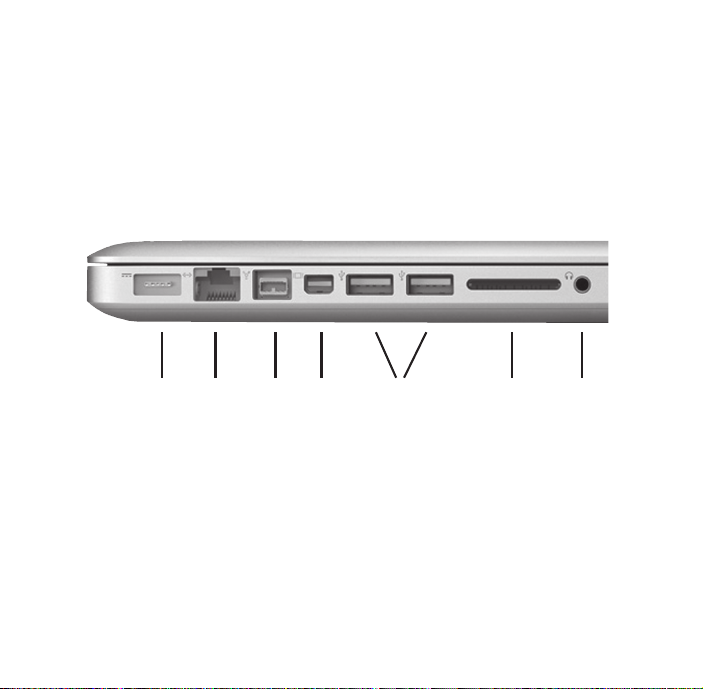
THE 13” MacBook Pro w/SD Slot
FEATURES & PORTS
Your 13” MacBook Pro has eight side panel ports and features
as shown:
1 2 3 4 5 6 7
1. MagSafe Power 4. Mini Display Port
2. Gigabit Ethernet 5. USB 2.0
3. Firewire 800 6. SD Slot
7. Audio In and out
Page 6
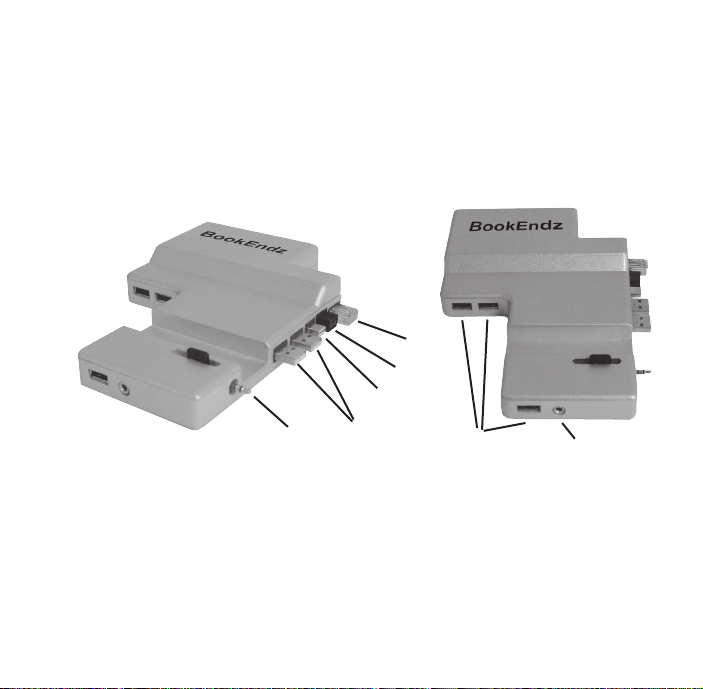
BookEndz®
DOCK FEATURES & CONNECTORS w/SD Slot
Top View
The connectors shown below mate with those on your
MacBook Pro and allow you to easily dock and undock with
your external devices.
5
4
3
1
2
6
7
1. Audio In/Out 4. Firewire 800
2. USB 2.0 5. Gigabit Ethernet
3. Mini Display Port
Front View
6. 3 USB 2.0 7. Headphone Out
*The color of this Docking Station is silver and it closely matches the laptop’s color
6 7
Page 7
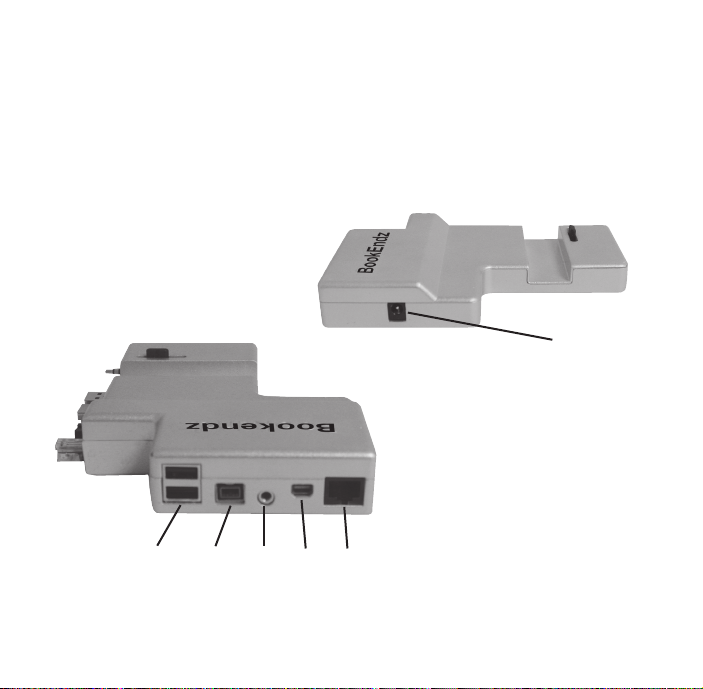
BookEndz® DOCK FEATURES & PORTS
Plug all of your peripherals into the ports shown below on
the rear of your BookEndz Dock. Be sure all peripherals are
turned off prior to connecting them to your BookEndz Dock.
Side View
1. Start USB Power*
1
Rear View
2. Stacked USB 2.0
3. Firewire 800
4. Audio Out/
Microphone In
5. MiniDisplay Port
24
3 56
*The power supply that came with this Docking Station gets plugged into this
port for the USB hub.
6. Gigabit Ethernet
Page 8

LIMITED WARRANTY
OlympicControls Corp. (“Manufacturer”) warrants this BookEndz® product to be free from defects
caused by faulty materials or poor workmanship for a period of one year from the date of shipment
to the initial user of the product. This liability of manufacturer under this warranty is limited to
replacement or repair at its option.
The foregoing warranty is subject to the following conditions that must be met:
a) Manufacturer is promptly notifi ed in writing within ten (10) days after the
discovery of such defect, and
b) The defective unit is returned to Manufacturer, freight prepaid, within
ten (10) days of the discovery of such defect, and
c) Manufacturer’s examination of such units shall disclose to its reasonable satisfaction
that such defects exist and have not been caused by misuse, neglect, improper installation,
repair, alteration or accident caused by parties other than manufacturer.
Manufacturer’s products are not authorized for use as critical components in life support devices or
systems which are intended for surgical implant into the body to sustain life. A critical component is
any component of a life support device or system whose failure to perform can be reasonably expected
to cause the failure of the life support device or system or to affect its safety and effectiveness.
This warranty is the only warranty made to any person by OlympicControls Corp. and is in lieu of
all other express warranties. IMPLIED WARRANTIES OF MERCHANTABILITY AND FITNESS FOR A
PARTICULAR PURPOSE ARE HEREBY DISCLAIMED. The remedies set forth in this warranty shall be
the exclusive remedies available to any person for breach of this warranty. Under no circumstances
shall Manufacturer be liable to any person for incidental or consequential damages, whether arising
out of breach of warranty or other contract, negligence, strict liability or other tort, or otherwise.
No waiver or modifi cation of the Warranty or any of its terms shall bind OlympicControls Corp. unless
in writing and signed by an offi cer of OlympicControls Corp.
®
Apple and MacBook Pro are registered trademarks of Apple Computer Inc. BookEndz
registered trademark of OlympicControls Corp. All other product names are trademarks or registered
trademarks of their respective holders.
Features and specifi cations are subject to change without notice.
is a
8 5
Page 9

BookEndz Product Registration
Mr. Ms. Mrs.
First Name
Last Name
Company
Address
City State Zip Code
Telephone Number
Fax Number
Email Address
Where Purchased
Purchase Date
Model Number
Serial Number
Please Fax to 1-847-742-5686
Or email [email protected]
9
Page 10

Page 11

Page 12
Pub. No. BE-10359
 Loading...