

Page 1
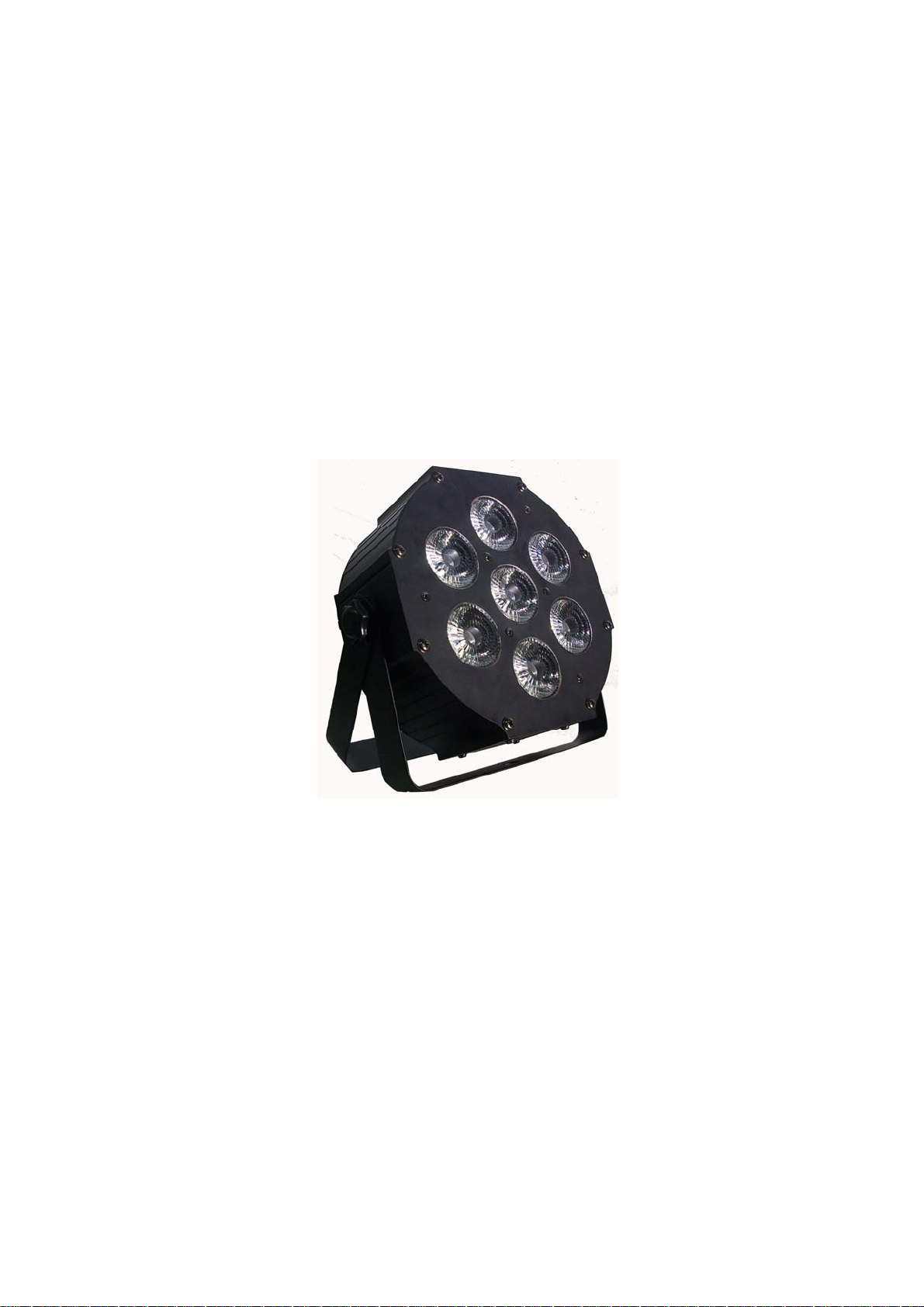
FLAT PAR LIGHT
User’s Manual
Thank you for using our LED PAR light, for your safety, please read the user`s
manual carefully before your operation.
Note: This manual includes the important information of installation, operation,
safety instruction. Please install and operate as requested in the manual,
meanwhile, please keep the manual for any unexpected requirment
Page 2

I. Preface
This Manual includes the important information of installation and operation. Please install and operate the light
according to the instructions strictly. And it must be power off when open the light or before repair.
Please read the complete contents of this manual(please keep this manual attach with the light for any preview)
In order to make sure the correct and safety installation、operation and maintenance, well know and follow to the
instructions of Manual is necessary.
We will not take any responsibility to the light damage、property loss or body injure which caused by the incorrect
installation、operation and maintenance.
Notice:
The data which inside the Manual maybe changed due to the continuous improvement, and we’ll not make
another notice. We will keep the right to any specification update during improvement
Waring: the light shou ld keep a way from fire a nd water to a void it get into lig ht.
Packing Content
One par lgith
One handle
One pair of rotary knob
One power cable
User manual
Note: Please check if all the contents are completed after unpacking, then, check if the light is
undamaged.
Safety specifications
This device for indoor use only,the protection grade is: IP20
Installing of the light must keep a distance with any flammable objects by 5m at least. The distance between the
light and the projected objects must be no less than 1m.
Please never directly install the light on the surface of the flammable objects.
The installation、operation and maintenance must be managed by the qualified professional, and make sure to
operate it under the instruction of the Manual.
Make sure the work environment temperature of the light maximum 35, and minimum -20
The temperature of the light surface will up to 60 even under the normal cooling, so never touch it by hand.
The light was designed by electric shock protection type, and must connect to the power supply system which
well earthed. Furthermore, the ground wire of the light must connect to the ground wire of the power supply
system, ground wire interface of the light must well connect with the light body (or light must be well earthed)
Please check if the voltage is in accordance with the rated power before installing.
Please never use the power cable which was damaged the insulation cover, meanwhile, never put the power
cable on any other wire. Please pull out the power cable by handle the plug when light is stop working or cleaning,
never pull out it roughly or handle the wire directly.
The light doesn’t include any spare parts for repairing , please check if all the parts are well installed and screws
are drove tightly before operating. It’s prohibited to use the light when the cover is opened.
Notice: Please make sure it is power off before any installation, repair and clean
2
Page 3

II. Technology Parameter
Control Channels: 8 DMX Channels
Beam Angel: 40°
Control Mode: AUTO, Master/Slave, DMX512, Sound Active
Working Environment: Indoor, -20℃-40℃
Mixing Color: RGBW mixing color
IP Grade: IP20
Power Supply: AC 100-240V/50-60Hz
LED Unites: 7PCS×12W (RGBW 4in1)
Power consumption: 60W
Packing size: 22.5×10×23.5CM
N/W: 1.8KG(1pc/CTN) G/W: 2KG(1pc/CTN) 24Kg(12pcs/CTN)
III. Connection of power/wire/signal
The exclusive plug should be used between the connection of light and power. Pls check if the rated voltage and
frequency is in accordance with the power supply. In order to make sure the power cable work in the safety
environment. If found the power cable is overheat, please cut off the power and reduce the parallel connection quantity
of lights, The light power supply is AC100~AC240V/50~60Hz
Make sure installation position is steady before fix the light. Professional clamp should be used when the light is
reverse hanging, and drive the clamp into the screw hole which in the bracket of the light. Make sure the light will not
fall from the truss, use the safety cable go through the truss and bracket of the light as a supporting, to avoid the light to
fall down. There is no entrance to the work area during mounting. Periodically to check if the safety cable has fretted
away or clamp is loosen. We will not take any responsibility which caused by the lighting fall of unsteady hanging.
Warning:
It is prohibited to move the light by handle the clamp, please move the light by ha ndle
IV. Features:
There are 4 buttons and 4 bit digital LED on the panel, you can choose diffirent working mode via press the
buttons, and it will be display one the digital led
The speed of fan running is automatical controlled by temperature, higher temperature, then higher speed of fan
running.
when the temperature is higher than 80, the light will be off, until the temperature is lower than 60, the light
will be on again.
V. Operation
Information remaind: When power on, the dot of digital led will be on, when input DMX signal, the dot will
shinning.
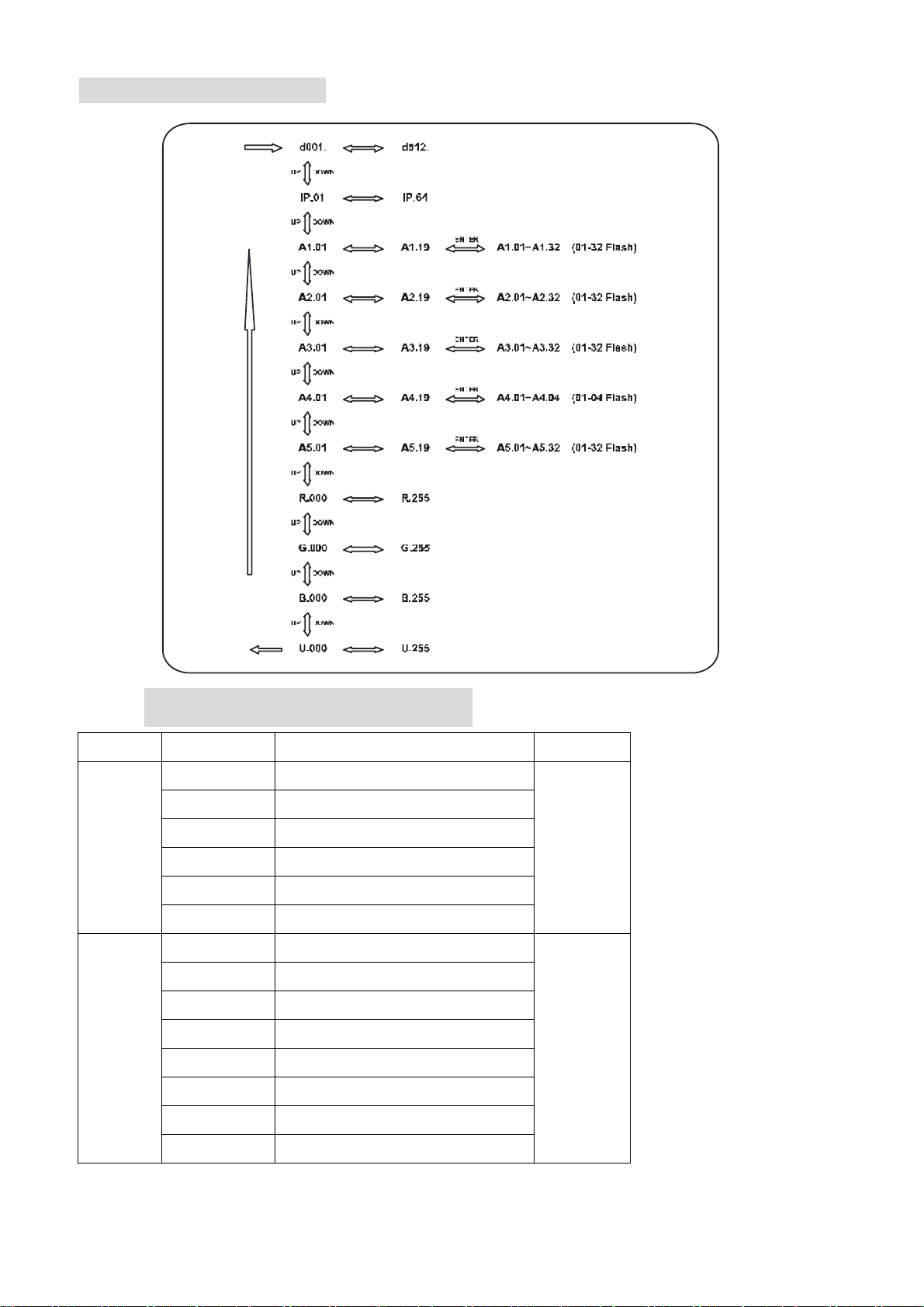
DMX address code setting: Press key of MENU, when the digital led dispay d001~d512, then press UP or
DOWN, you can set the address code, The code from 001~512.
IP code setting: Press Key of MENU, when the degital LED display IP.01~IP.64, then press UP or DOWN, you
can set the IP code. The code from 01~64.
Internal program running:
There are 5 kinds of internal program for choosing. Press Key of MENU, you can choose A1~A5 internal mode, A1 for
static color mode, A2 for LED jump function, A3 for LED rainbow function, A4 for LED sound active function, A5 for
LED strobe function
3
Page 4
Button specifications:
VI. DMX Channel Form
Channel Value Discription Rmaind
0-10 No function
11-50 macro A1
CH1
51-100 macro A2
101-150 macro A3
151-200 macro A4
201-255 macro A5
0-39 All color
40-49 Red
50-59 Green
60-69 Blue
CH2
70-79 Yello
80-89 Cyan
90-99 Purple
Macro
function
Color
choosing
100-109 White
4
Page 5
g
g
g
es
sto
110-119 Red + Green
120-129 Red + Blue
130-139 Red + White
140-149 Green + Blue
150-159 Green + White
160-169 Blue + White
170-179 Red + Green + White
180-189 Red + Blue + White
190-199 Green + Blue + White
200-209 Red + Green + Blue
210-255 Red + Green + Blue + White
CH3 0-255 Speed Adjustable
CH4 0-255 Master dimming
CH5 0-255 Red dimming
CH6 0-255 Green dimming
CH7 0-255 Blue dimming
CH8 0-255 White dimming
VII. Appendix
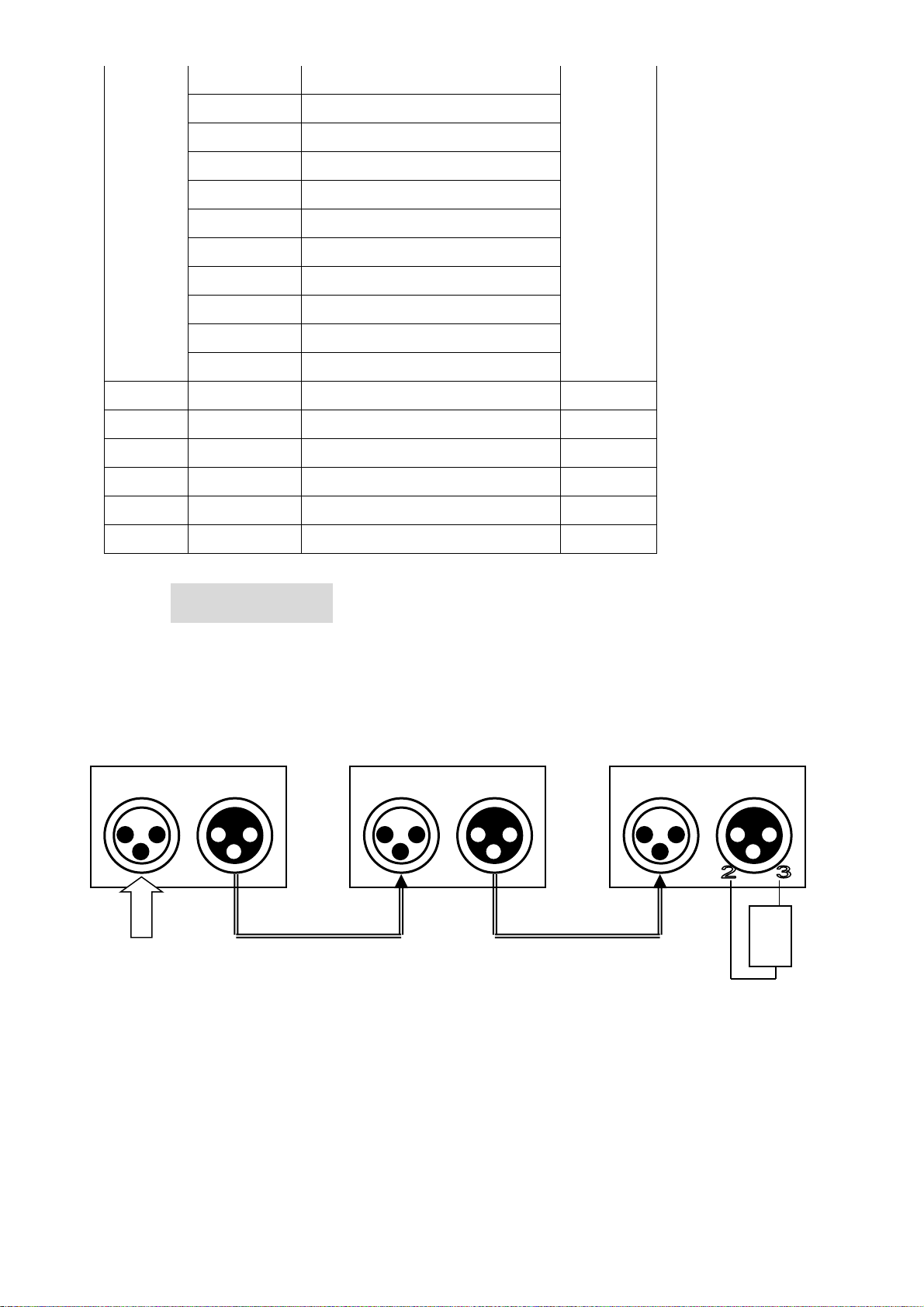
The light is available to receive the DMX512 signal, connect the DMX connector to the panel which marked with “DMX
IN”,and connect it to the next light. then, connect to the “DMX IN” of next light from the “DMX OUT”. The DMX signal
terminator is recommended when the lighting signal is connecting. It will avoid to interfere the signal which caused by
the electrical noise, DMX terminator is a XLR connector, connect with a 120Ω resistor between the pin 2 and pin 3 of
the XLR connector, and connect it to the OUTPUT socket of the final light. see picture:
IN OUT IN OUT IN OUT
DMX IN
1
st
li
ht
2
nd
li
ht
R
i
r
120Ω 1W
3
rd
li
ht
5
Page 6
VIII. Faulty Disposal
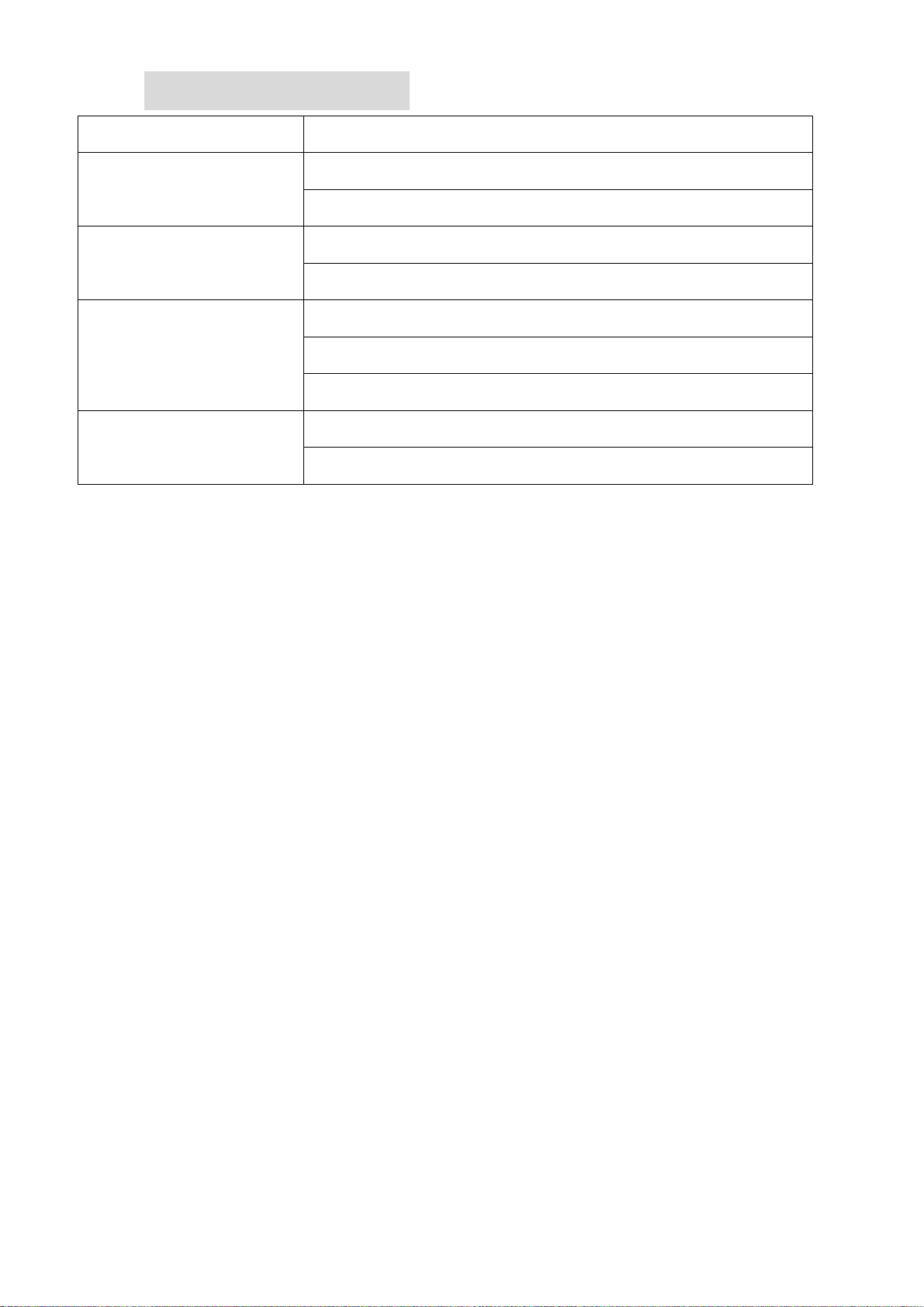
Familiar Faulty Disposal
No display when power is
on
1. Check if the power is correctly connected
2. Check the power supplier`s output is DC24V
1. Check if DMX address code is correctly set
Light is out of control
2. Check if the DMX cable is correctly connected
1. Check the sensor is soldering on the LED PCB
The light is off after working
for a while
2.Check the temperature is too high
3. check the power supplier is demaged
1. Check if the temperature is too high, and cause a fast fade
The beam is dark obviously
2. Check if there is too much dust on the surface of light
Note:
Please contact the supplier or ask for professional repair if it ’s still don’t w ork when excluded the above
faulty .
6
 Loading...