

Page 1
1
FEX SERIES FIXED
FHD SDI + IP ZOOM CAMERA
USER MANUAL
PART TWO
VERSION: FEX-SN-M12082018
© 2018 Bolin Technology
Page 2

2
Contents
PART TWO: NETWORK CAMERA USER MANUAL....................................................................................................................... 3
NETWORK CONNECTION .......................................................................................................................................................... 3
LOGIN ....................................................................................................................................................................................... 3
LOGGING IN TO THE WEB INTERFACE ..................................................................................................................................................... 4
INTRODUCTION TO THE WEB INTERFACE .................................................................................................................................. 5
CONTROLLING THE SDI INTERFACE FROM THE WEB GUI ........................................................................................................... 5
ACCESSING THE SDI MENU ................................................................................................................................................................. 5
PRESET TAB ...................................................................................................................................................................................... 6
PATROL TAB ...................................................................................................................................................................................... 6
CONFIGURING THE CAMERA FROM THE SETUP MENU ............................................................................................................. 6
COMMON ........................................................................................................................................................................................ 6
A/V STREAMS................................................................................................................................................................................... 6
PTZ - BASIC SETTINGS ........................................................................................................................................................................ 8
IMAGE ........................................................................................................................................................................................... 10
OSD ............................................................................................................................................................................................. 10
NETWORK ...................................................................................................................................................................................... 12
SYSTEM ......................................................................................................................................................................................... 15
EVENT ........................................................................................................................................................................................... 18
STORAGE ....................................................................................................................................................................................... 20
Page 3
3
Part Two: Network Camera User Manual
Network Connection
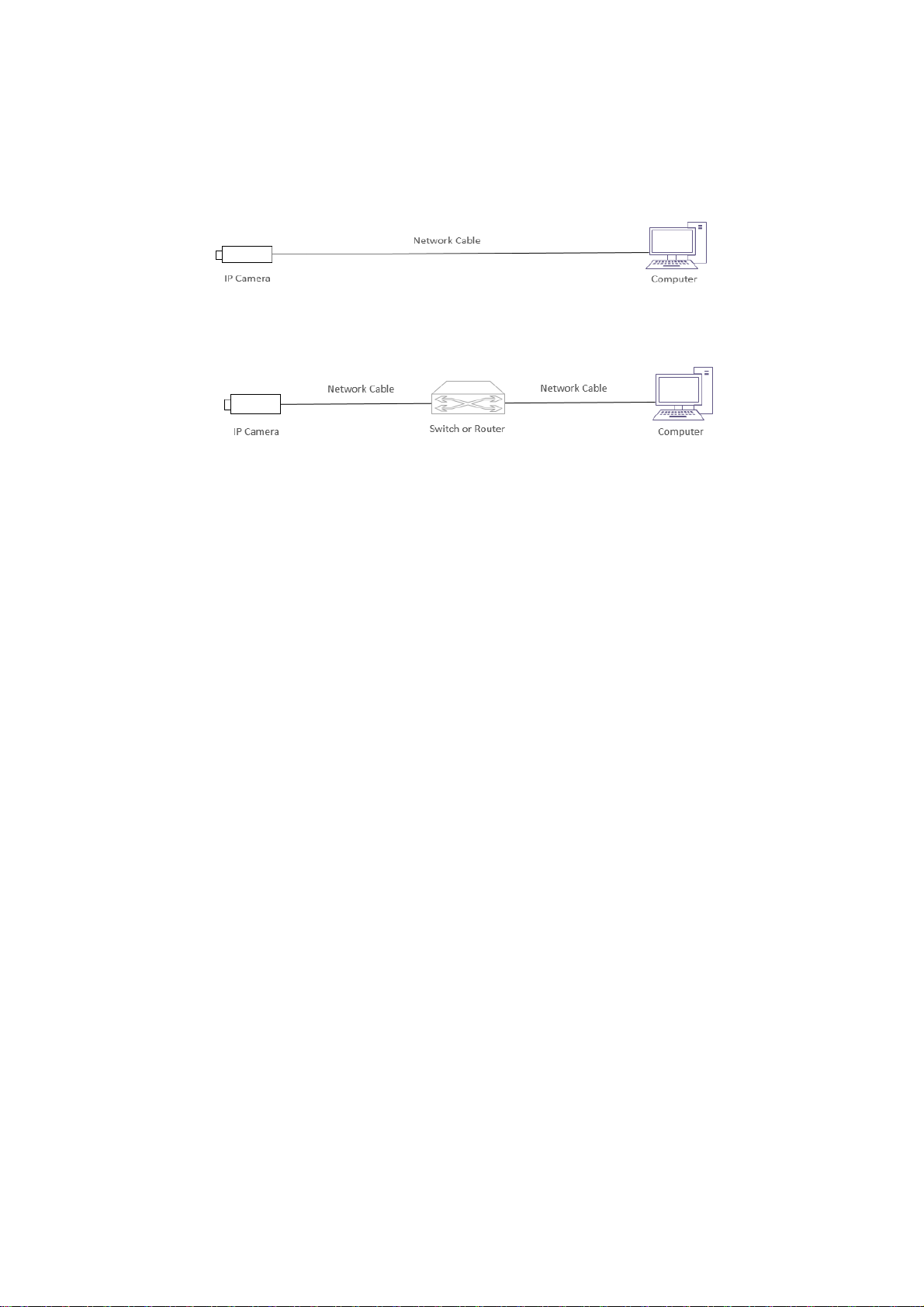
Before accessing a network camera (also known as IP Camera or IPC) from a PC, you need to connect the
network camera to the PC directly with a network cable or via a switch or router.
Use a Shielded Twisted Pair (STP) cable to connect the network interfaces of the network camera and the PC.
Use Shielded Twisted Pair (STP) cables to connect the network interfaces of the camera and the switch or router.
Login
Preparation
After you have completed the installation in accordance with the quick guide, connect the camera to power to boot
it. After the camera is booted, you can access the camera from a PC client using Internet Explorer or a Video
Management System (VMS).
The following uses Internet Explorer 11 on a Microsoft Windows 10 operating system as an example.
Check before login
The camera is powered on and connected to the network switch
The camera’s IP address is located within the same subnet as the PC
The PC is connected to the network switch
The PC’s IP address is located within the same subnet as the camera
The PC is installed with Internet Explorer 8.0 or higher (Internet Explorer 11 recommended)
Use default video format setting or set the camera video format to 1080P30 or 1080P25 using RS485
keyboard (Refer to camera setting menu).
Page 4
4
Logging In to the Web Interface
The default static IP address of the camera is 192.168.0.13, and the default subnet mask is 255.255.255.0
The following uses Internet Explorer as an example to describe the login procedure.
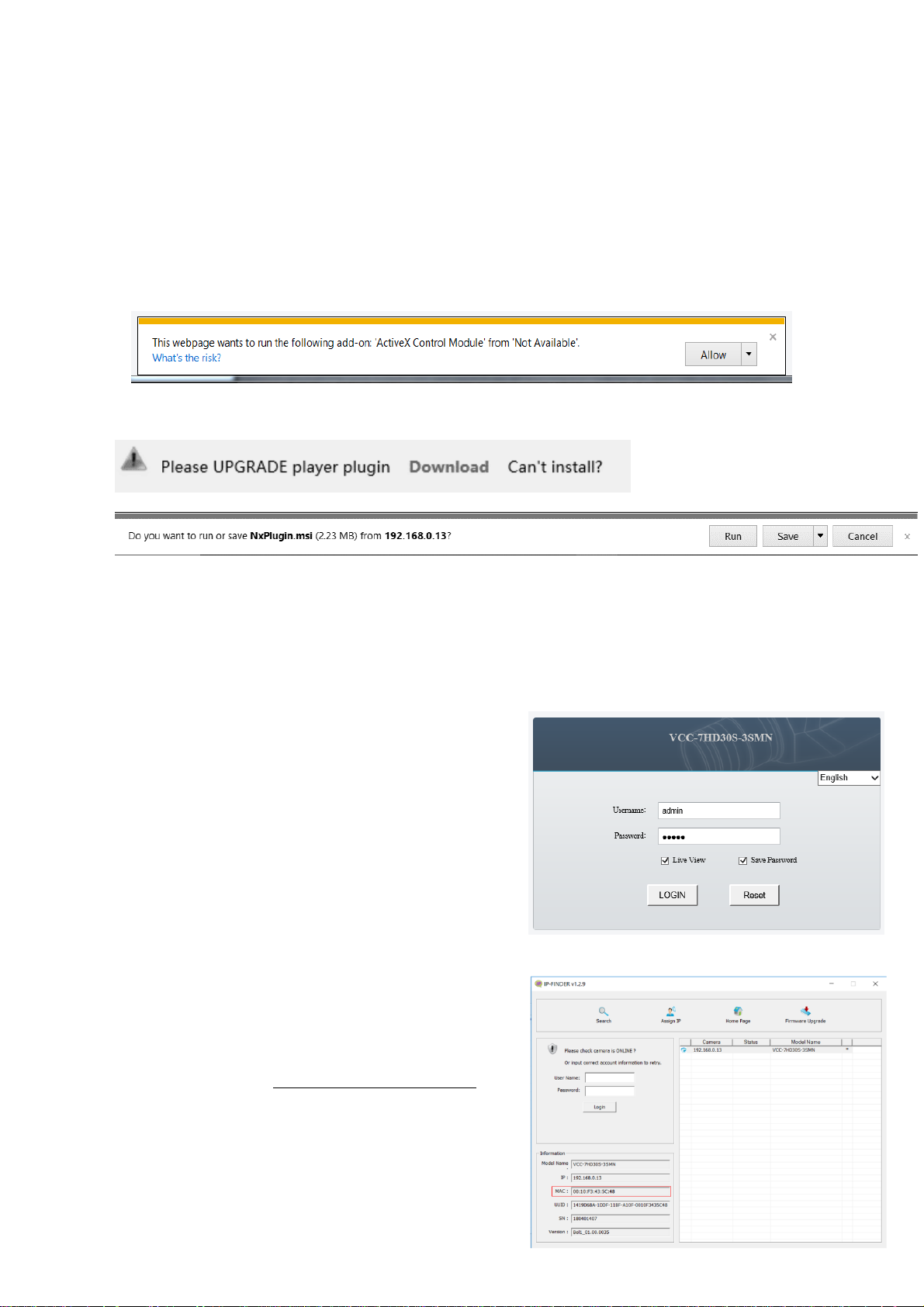
1. Browse to the login page by entering the correct IP address of your camera in the address bar.
2. If this is your first time logging in to the camera, follow system prompts and install the ActiveX. You need to
close your browser and reopen it again to complete the installation.
3. Click Allow to proceed the login process.
NOTE:
To manually load the ActiveX, type http://IP address/ActiveX/Setup.exe in the address bar and press Enter.
You may be prompted to update your video player. Follow the “Download” and “Run” prompts to update. This
will enable the user to see live video through the web interface
The default password is used for your first login. To ensure account security, please change the password after
your first login. You are recommended to set a strong password (no less than eight characters).
The camera protects itself from illegal access by limiting the number of failed login attempts. If login fails six
times consecutively, the camera locks automatically for ten minutes.
4. Enter the username and password, and then click Login. For the first login, use the default username
admin and password admin.
If you log in with Live View selected, live video will
be displayed when you are logged in. Otherwise, you
need to start live video manually in the live view
window.
If you log in with Save Password selected, you do
not need to enter the password each time when you
log in. To ensure security, you are not advised to
select Save Password.
To clear the Username and Password text boxes and
the Save Password check box, click Reset.
NOTE:
Forgot Password?
A message will pop up, which reads: “Please
contact [email protected] to reset the
password.”
When emailing [email protected],
please include the MAC address, as shown in the IP
Finder tool
A BOLIN Technology Support representative will
provide a temporary password, which can be used
to log in to the camera to create a new password.
Page 5
5
Introduction to the Web Interface
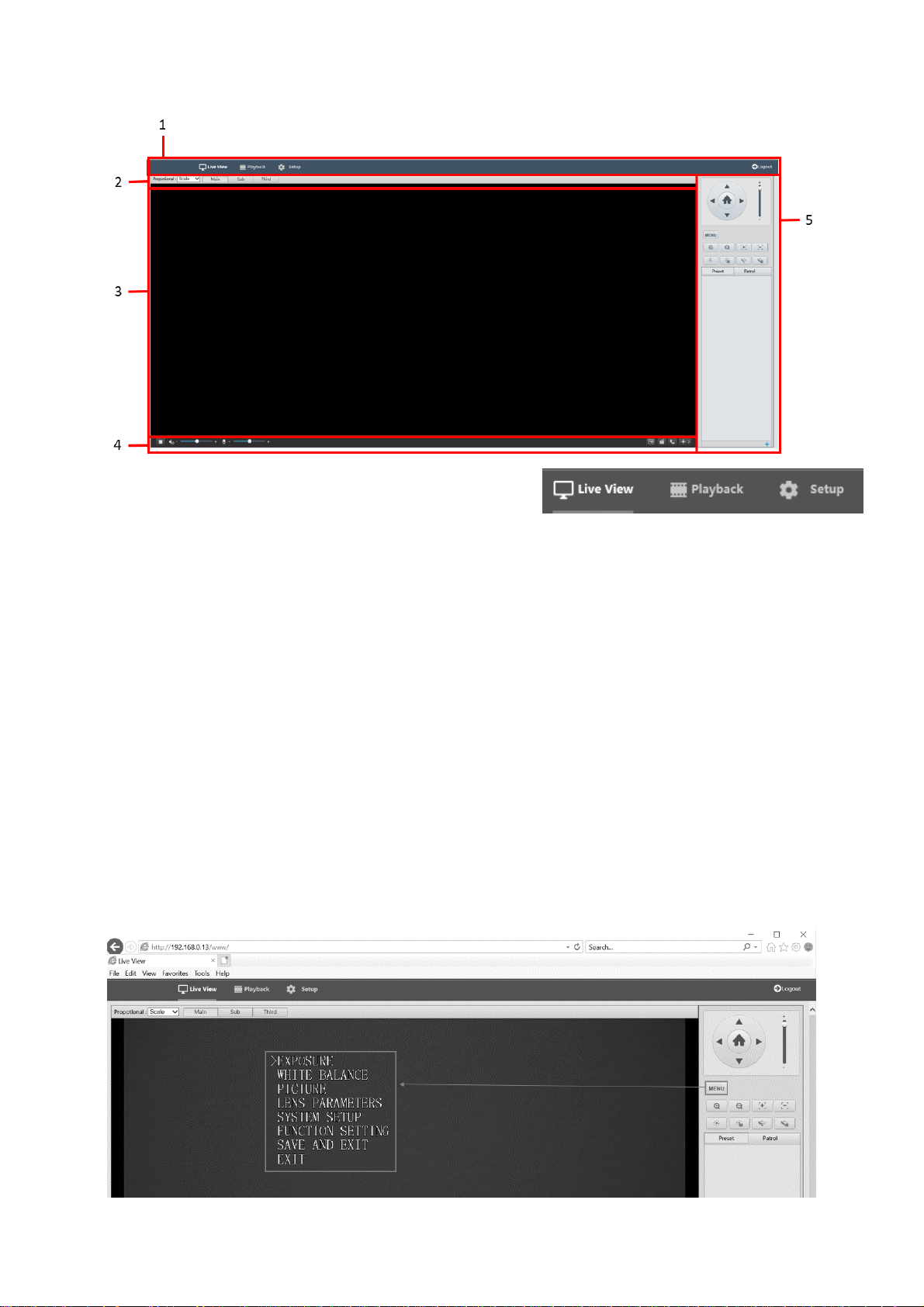
1. IP Interface Menu
Used to navigate between Live View, Playback, and
Setup menus, as well as Log Out
2. Live Stream Setup panel
Used to alter the way the live stream is viewed
Used to switch between Main, Sub, and Third streams
Contains shortcut to Image Settings interface, where image options can be configured
3. Live Stream
Where the live video will display
4. Video Controls
Used to start / stop the live stream
Used to control audio levels (input as well as output)
Snapshot, Record video, 2-way communication, and
5. Camera Control Panel
Used for PTZ control, as well as accessing / navigating SDI menu
Controlling the SDI interface from the Web GUI
Accessing the SDI Menu
The SDI menu can be accessed on the Control Panel via the Menu button
The menu is navigated by using the directional buttons on the Control Panel.
Up and Down arrows move between selection options
The Right arrow is used to confirm a selection
How to operate the SDI OSD menu, please refer to the section “Adjusting and Setting with
Menus” in this user guide.
Page 6
6
Preset tab
The Preset tab is used to access a list of presets that have been configured. A preset can be activated by clicking the arrow
next to the preset listing.
For more information about creating presets, please see the section called “Preset”
Patrol tab
The Patrol tab is used for activating a patrol that has been configured.
For more information about creating patrols, please see the section called “Patrol”
Configuring the camera from the Setup Menu
The Setup menu can be accessed by clicking the Setup button along the top of the screen
The IP menu is divided into tabs. Under each tab is a collection of settings and parameters that the
user can configure. Please refer to the list of tabs below
Common
The Common tab has some basic / common information about the camera
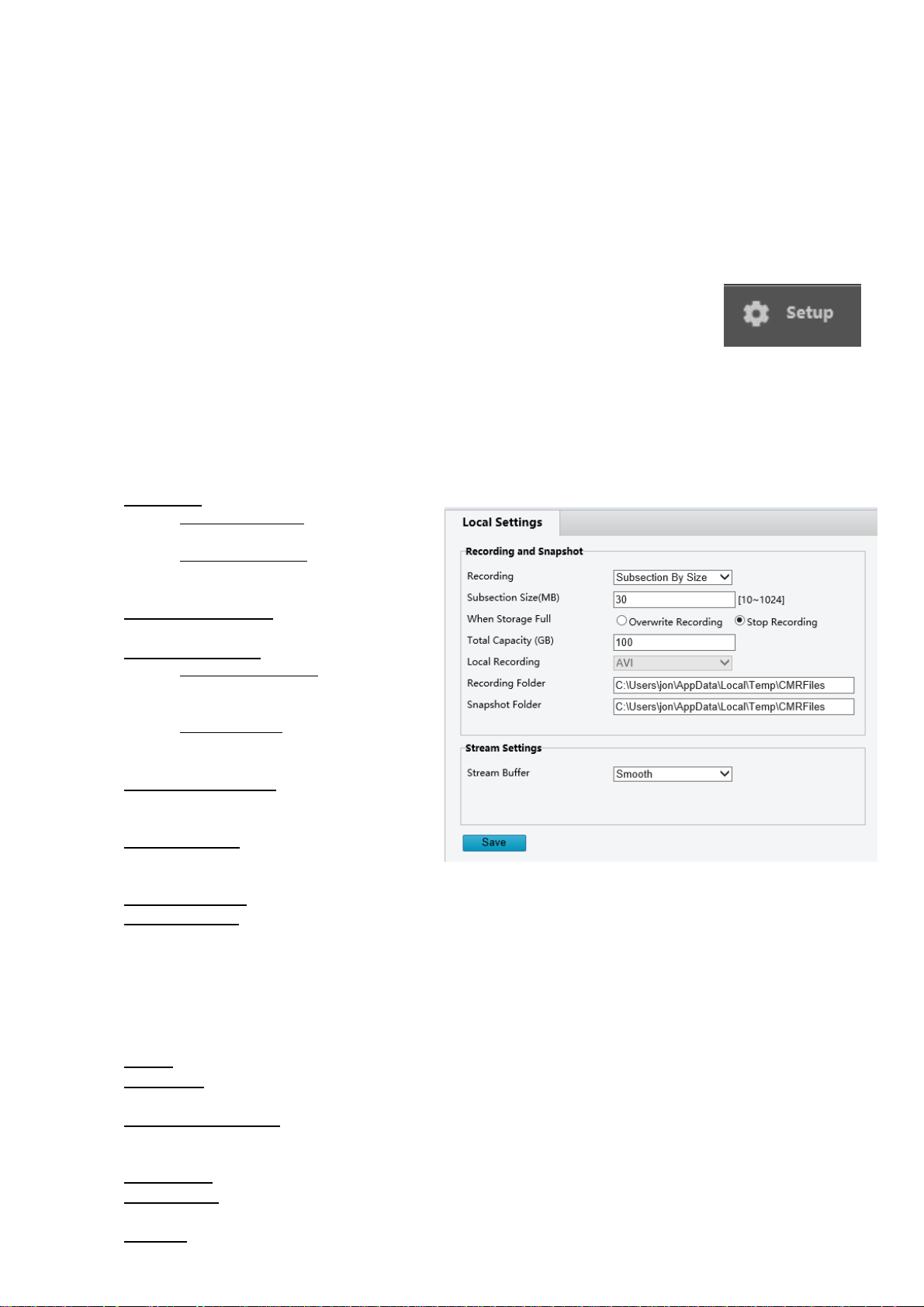
Local Settings
Recording:
o Subsection by Size – Recordings will
be catalogued according to size
o Subsection by Date – Recordings will
be catalogued according to the date
captured
Subsection Size (MB) – Determines the size
of each video clip subsection
When Storage Full:
o Overwrite Recording – Will begin
overwriting oldest footage once all
space is filled
o Stop Recording – Will cease
recording to avoid overwriting
recorded footage
Total Capacity (GB):
o The total capacity you would like to
allocate for this directory to hold
Local Recording—Determines the video file
format (Automatically configured to store AVI
files)
Recording Folder—This is the directory on the computer where recordings will be saved
Snapshot Folder—This is the directory on the computer where snapshots will be saved
A/V Streams
The A/V Streams tab is used to configure settings for the compression, format, and data rates for all video and audio
streams produced by the camera
Definitions:
Codec: The encoding standards that are available for use (H.264 / H.265)
Resolution: (WxH) The number of Pixels that make up the width of the image (W) by the number of horizontal
lines that make up the height of the image (H)
Rate Control Options:
o CBR – Constant Bit Rate
o CVBR – Constrained Variable Bit Rate.
Frame Rate: Rate at which image frames are captured
GOP Length: Interval at which a key frame is captured within a group of successive pictures within a coded
video stream
Bit Rate: The amount of data transmitted per second. Measured in Kilobits Per Second (Kbps). 1000 kbps =
1Mbps
Page 7
7
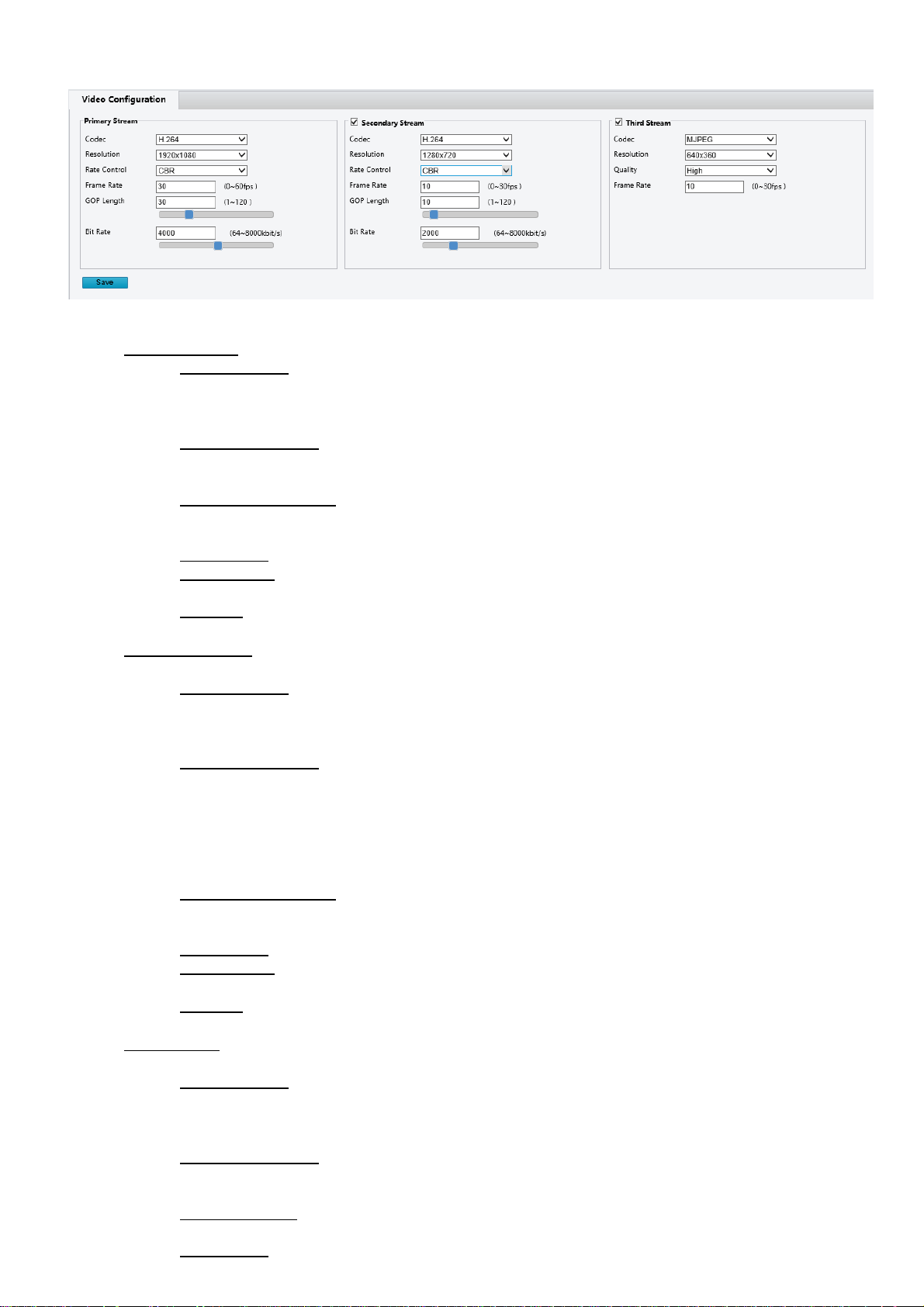
Video Configuration
Codec:
Primary Stream – The main stream, viewed by default on the Live screen
o Codec Options:
H.264
H.265
MJPEG
o Resolution Options:
1920x1080
1280x720
o Rate Control Options:
CBR – Constant Bit Rate
o CVBR – Constrained Variable Bit Rate.
o Frame Rate: Rate at which image frames are captured
o GOP Length: Interval at which a key frame is captured within a group of successive pictures within a
coded video stream
o Bit Rate: The amount of data transmitted per second. Measured in Kilobits Per Second (Kbps). 1000
kbps = 1Mbps
Secondary Stream – The second video stream produced by the camera, this can be disabled by unchecking the
box at the top of this stream’s settings
o Codec Options:
H.264
H.265
MJPEG
o Resolution Options:
1280x720
720x576
720x480
640x360
352x288
320x240
o Rate Control Options:
CBR – Constant Bit Rate
o CVBR – Constrained Variable Bit Rate.
o Frame Rate: Rate at which image frames are captured
o GOP Length: Interval at which a key frame is captured within a group of successive pictures within a
coded video stream
o Bit Rate: The amount of data transmitted per second. Measured in Kilobits Per Second (Kbps). 1000
kbps = 1Mbps
Third Stream—The third video stream produced by the camera, this can be disabled by unchecking the box at
the top of this stream’s settings
o Codec Options:
H.264
H.265
MJPEG
o Resolution Options:
640x360
352x288
o Quality Options:
High, Medium, Low
o Frame Rate: Rate at which image frames are captured
Page 8
8
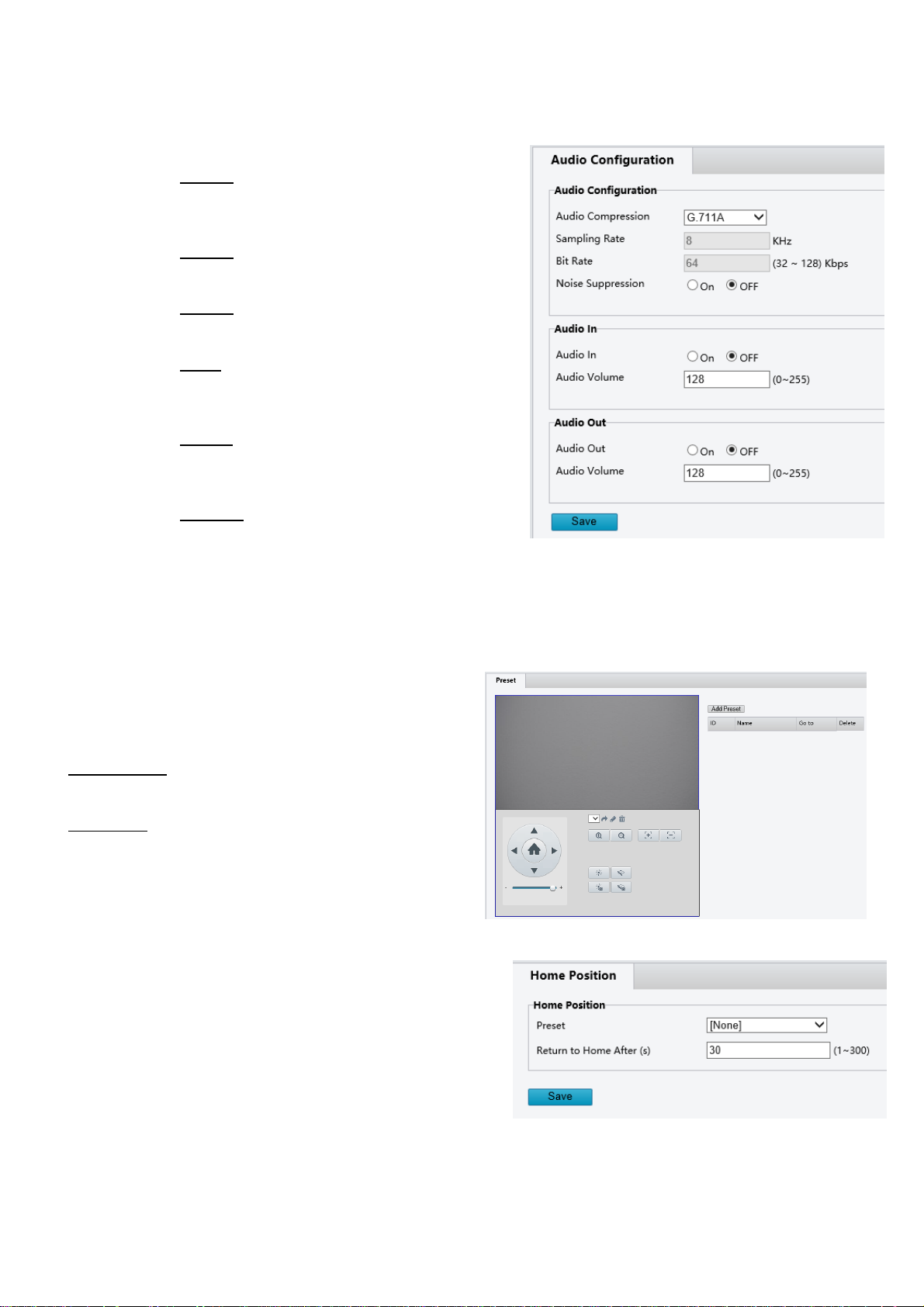
Audio Configuration
This section contains the ability to select the audio compression parameters for both the Audio In (microphone) and the
Audio Out
Audio Compression Options:
o G.711A – Pulse Code Modulation (PCM), often
used to decode voice frequencies with regard to
Telephony
o G.711U – Standard for speech compression and
decompression within digital transmission systems
o G.722.1 – A high quality, moderate bit rate
wideband audio coding standard
o G.726 – A speech codec standard covering the
transmission of voice at rates of 16, 24, 32, and 40
Kbit/s
o MP2L2 – A type of compression which removes
some voice frequency ranges which are not
detectable to the human ear
o AAC-LC – Advanced Audio Coding
Noise Suppression:
o Suppression of background noise
Audio In
o The ability for the camera to accept audio in via the Audio In jack
Audio Out
o The ability for the camera to encode and transmit audio out through the Audio Out jack
PTZ - Basic Settings
This section contains the section where the Address code and
Baud rate can be configured.
Address code: The ID by which the camera is controlled.
Often the index position of the camera within a daisy chain
Baud Rate: The rate at which command data is transmitted
to the camera. The Baud rate of the camera needs to match
the Baud Rate of the source of the command (Keyboard
controller, Control software, etc.
Home Position
The first position where the camera will aim upon boot
Once presets have been set up, one of the presets can be selected
as the Home Position.
The “Return to Home After” setting determines how long the
camera will wait before returning to the home position after
another preset has been called. This setting is measured in
seconds.
Page 9
9
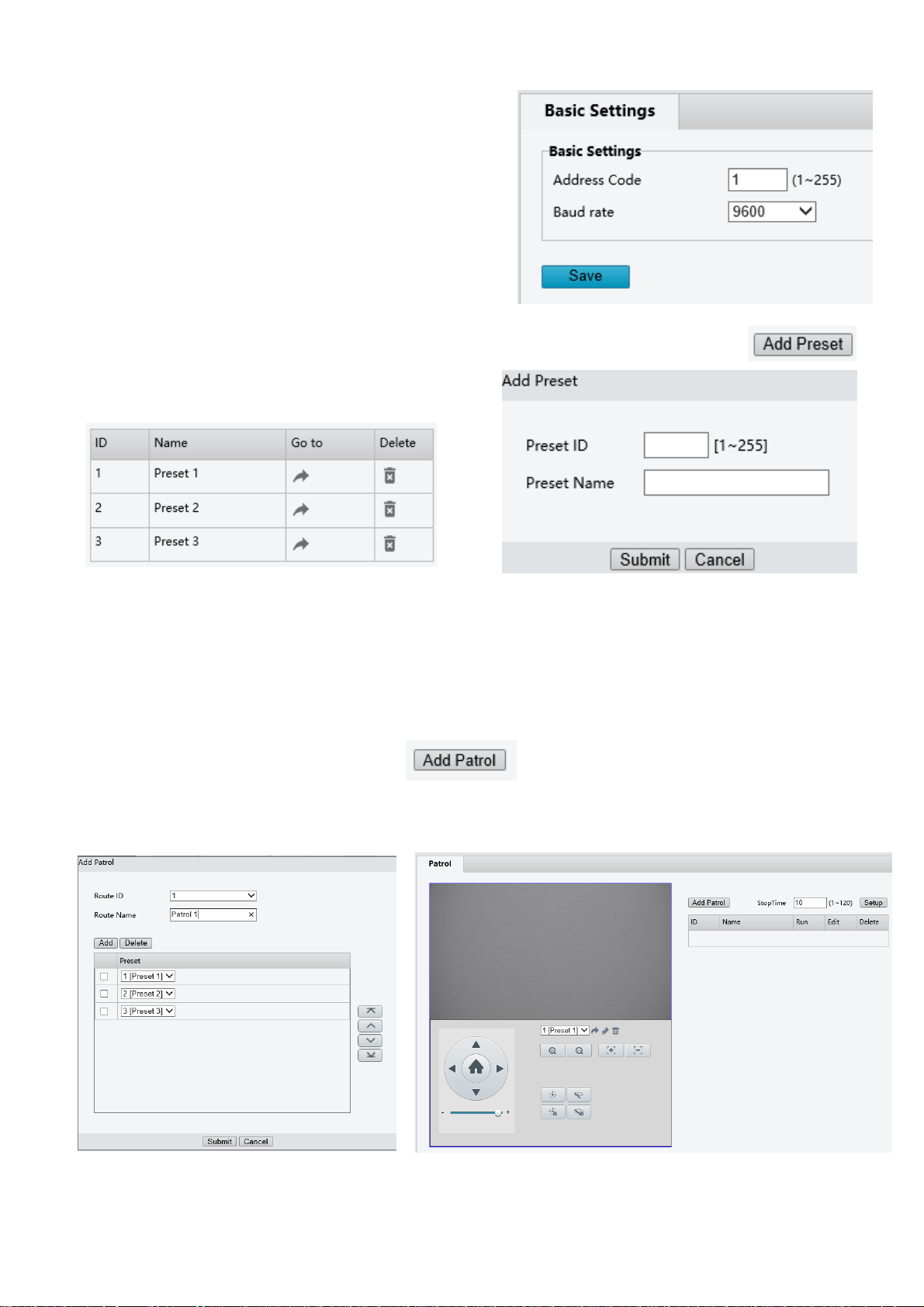
Preset
Presets are predetermined positions that the user can command the
camera to recall quickly.
To add a new preset:
1. Use the control panel and image viewer to pan to the desired
Pan, Tilt, Zoom, and Focus position
2. Click the Add Preset button
3. Enter a number for the Preset ID
4. Enter a name for the preset under the Preset
5. The table will populate with all of the created presets. These
will also appear on the Main page, within the control panel,
under the Preset tab
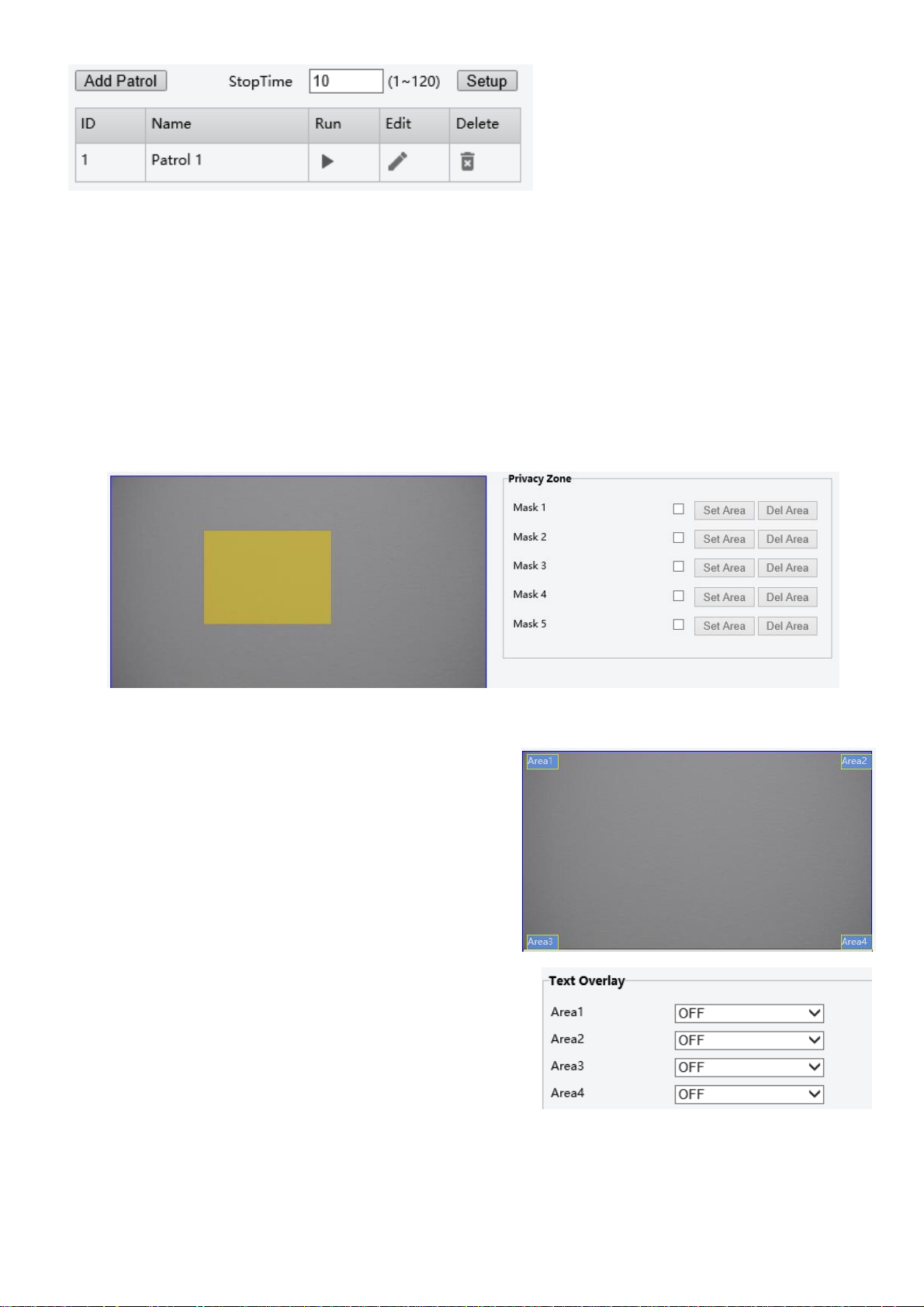
Patrol
A Patrol is a series of presets, recalled in a given order. This causes the camera to iterate through the series, moving to
each preset in the selected order
To create a new Patrol
1. Click the Add Patrol button
2. Enter a name for the Route Name
3. Click the Add/ Delete buttons to add or delete patrol positions
4. Use the dropdown for each patrol position, and select a preset from the list of presets
Click the Submit button to save. The patrol will appear in the Patrol table. Activate a patrol by clicking the Play button
Page 10
10
Image
Image parameters can be adjusted to control the way the image is captured and displayed
Privacy Zone
The Privacy Zone setting is for adding up to 5 “Masks” of pixels where the image will not be captured.
Each area can be set up by performing the following:
1. Check the box next to the “Mask” selectin
2. Draw the mask area on the provided image window
3. Click the “Set Area” button
Any Privacy Zone can be deleted by clicking the “Del Area” button next to the given Mask.
OSD
There are On Screen display (OSD) sections within the image.
Each OSD section can be individually configured to display
configurable data
Any of the 4 areas can be configured to contain one of the
following:
Nothing (OFF) – The area will not be used, and will not
display anything
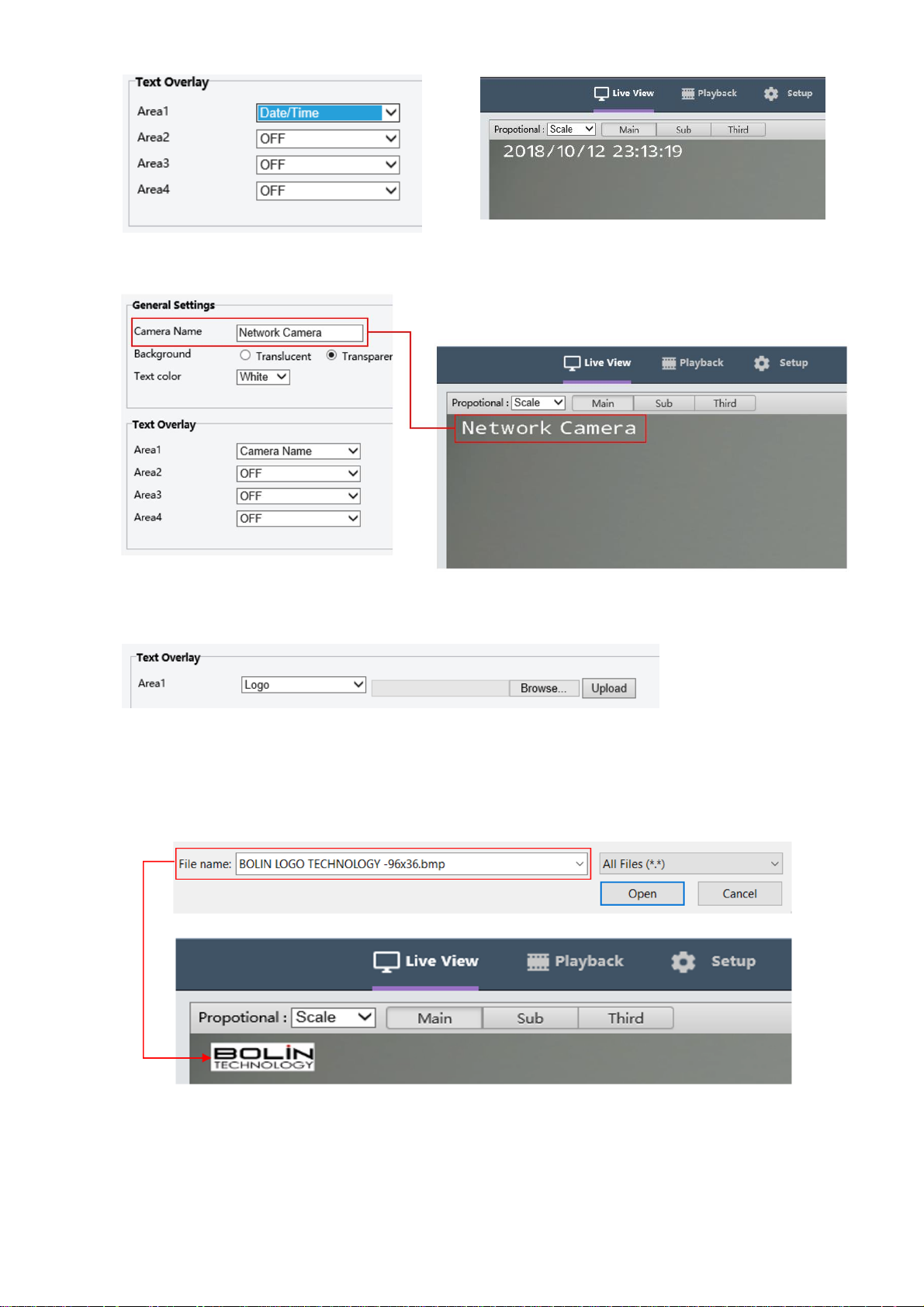
Date/ Time – The internal Date and Time settings will be used to fill the area
Page 11
11
Camera Name – The user will define a name for the camera.
Logo – An image, such as a company logo can be uploaded to be displayed within the image.
o When selecting a file, make sure that it is a .BMP format
o The width is a multiple of 32, and the height is a multiple of 4
o The total pixels should be less than 256
o Click the Upload button, and then Save. The live view will now show the uploaded image in the
selected area
Page 12
12
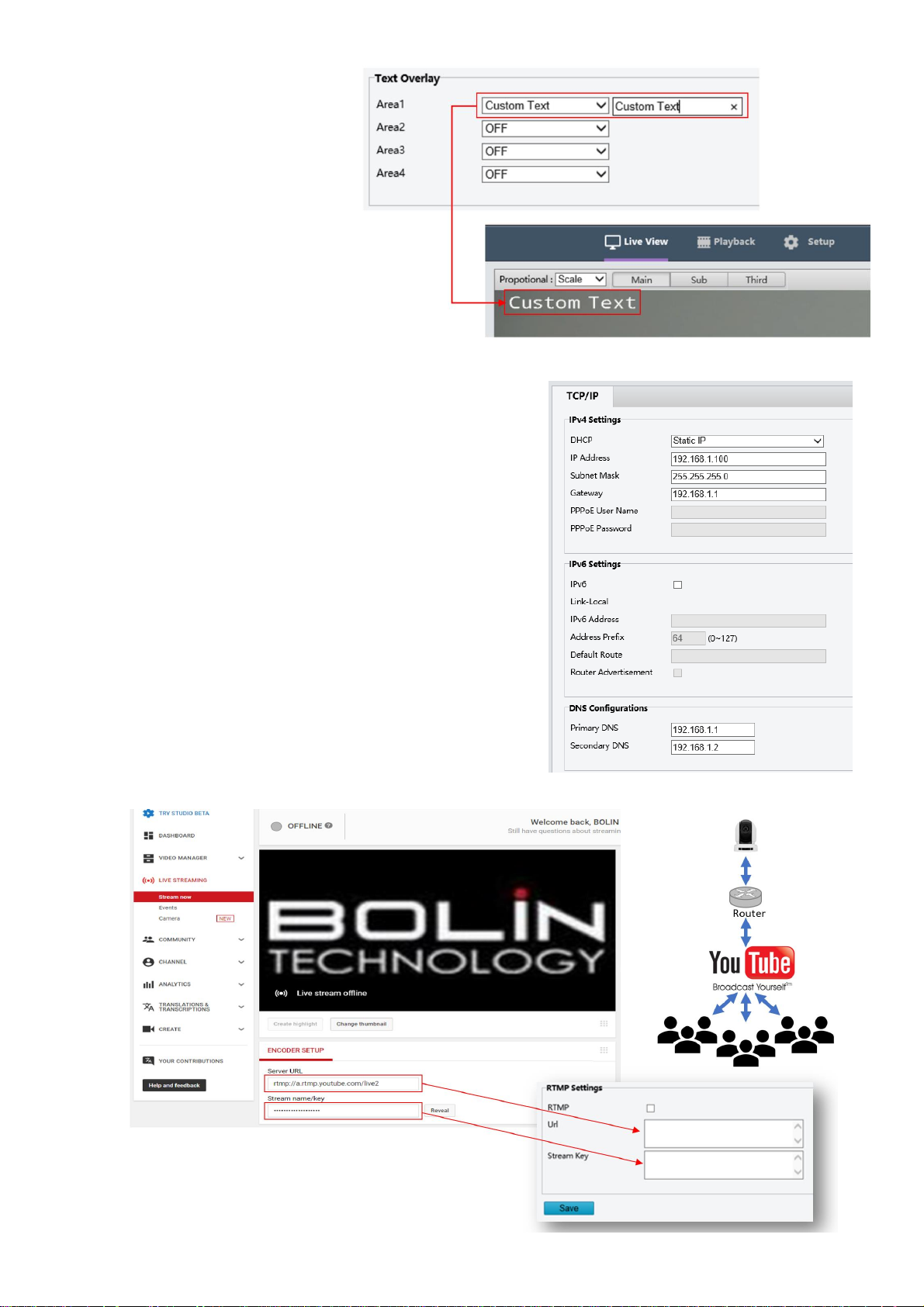
Custom Text – The user will
enter the text that they wish to be
displayed.
Network
Basic
The Basic network settings tab is where the user is able to configure
the following:
DHCP options
o DHCP – An IP address will be dynamically assigned
to the camera from the gateway (router)
o Static IP – The user will enter / define the IP address
o PPPoE—Point-to-Point Protocol over Ethernet
IP Address
Subnet Mask
Gateway
IPV6 settings
DNS Configurations
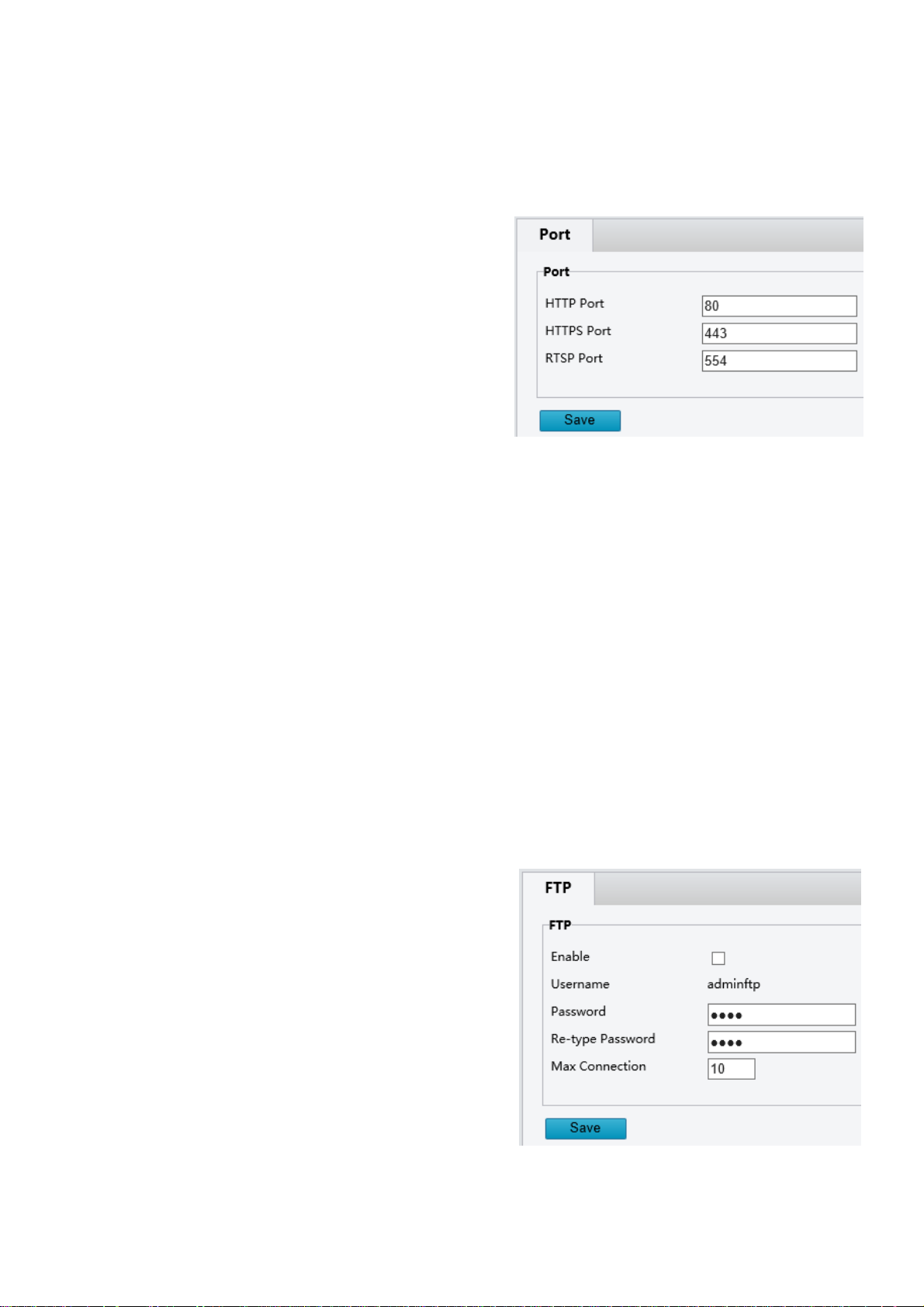
RTMP settings
o Check the RTMP checkbox
o Copy and paste the stream URL from the online
platform
o Copy and paste the Stream Key (Also known as the
Stream ID) from the online platform.
o Example below shows where to copy the information
from YouTube
Page 13
13
o Click Save
o Allow a few minutes for the stream to connect. The status on your streaming platform (Such as
YouTube) will change to Live. When this happens, the camera is streaming video Live to
NOTE: Similar steps can be followed to stream to any platform that supports RTMP, such as YouTube, Facebook,
Twitter, Twitch, etc.)
Port
This section allows the user to specify which ports the camera
will use to communicate using the following protocols:
o HTTP: Default 80
o HTTP is the protocol used to access the web
interface.
o Changing this port number will require the user
to specify the port number when entering the IP
address to the web browser.
o For example, if it is changed to 85, the IP
address will need to be entered as follows in
order to access the web interface:
http://192.168.0.13:85
o HTTPS: Default 443
o HTTPS is the protocol used for making a secure connection to the camera
o Changing this port number will require the user to specify the port number when attempting to make a
secure connection to the camera
o For example, if it is changed to 425, the IP address will need to be entered as follows in order to make a
secure connection
https://192.168.0.13:425
o RTSP: Default 554
o RTSP is the protocol used to pull real-time video over the network (using VLC Player or other network
video-compatible software)
o Changing this port number will change the way the RTSP video can be viewed. Most RTSP streaming
software uses port 554 by default, therefore it is not recommended that this port number be changed.
o Please see the section of this manual titled RTSP for more information
FTP
The camera has the ability to behave as an FTP server.
A user can connect to the camera to access internal files via FTP
To allow this camera to act as an FTP server:
o Check the “Enable” checkbox
o Create a password, and enter it into the Password field
o Re-type the password into the Re-Type Password field
Once this has been enabled, a user can use FileZilla (or some other
such FTP client software) to access the camera’s files.
Page 14
14
RTSP
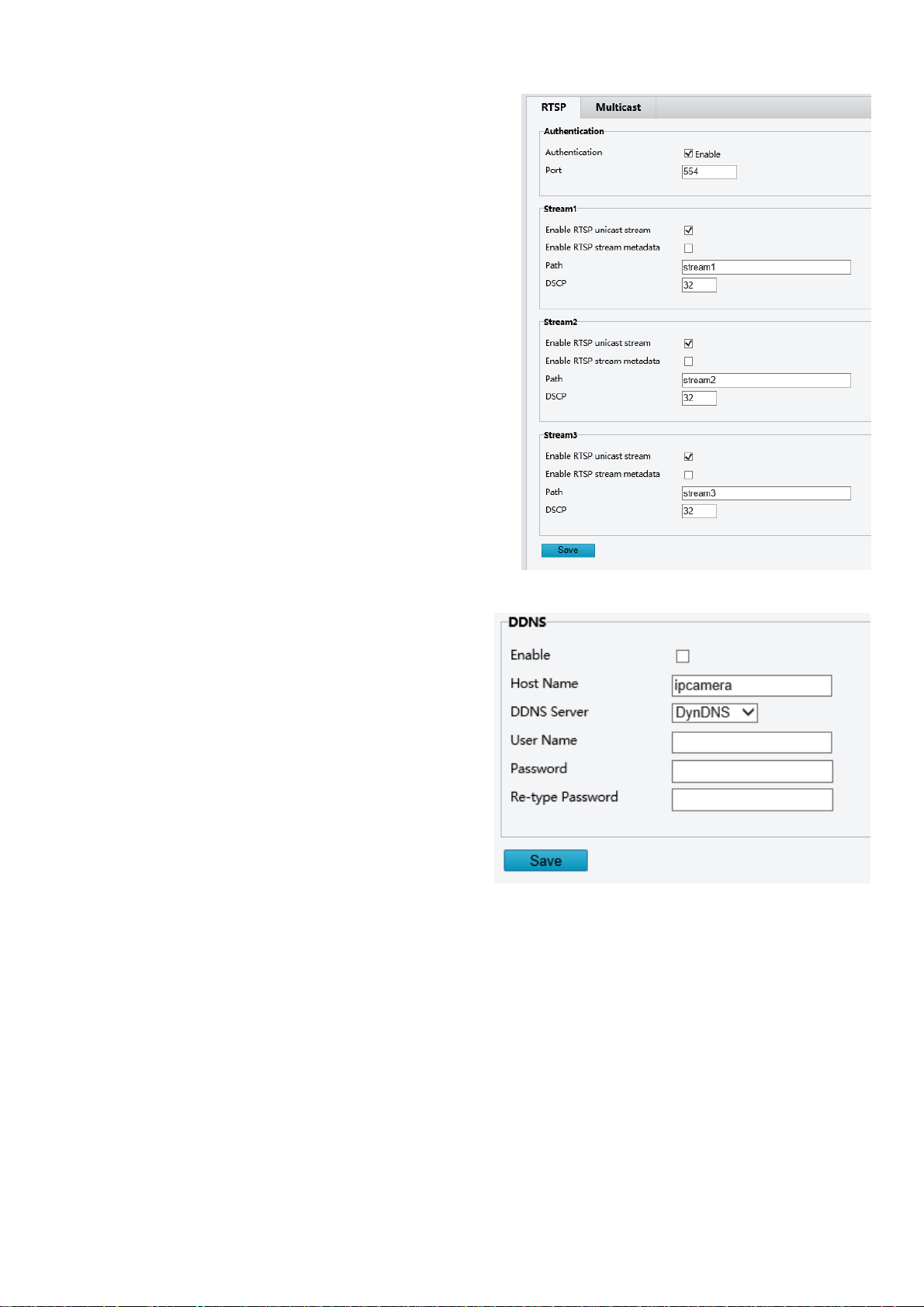
The camera is capable of providing an RTSP stream
The stream can be accessed with or without the need for
Authentication credentials. This is toggled by ticking / unticking
the checkbox for Authentication
Each stream can be accessed using the Path. The URL format is as
follows:
rtsp://{ip address}/{path}
Example:
rtsp://192.168.0.13/stream1
DDNS
Dynamic DNS is the ability to create a domain name that can
be synced to the WAN IP, and then used to access the camera
remotely (from outside the LAN where the camera exists)
This assumes that all necessary port-forwarding has been
performed on the router(s) and firewall(s) that may exist
between the camera and the WAN (Internet).
This is accomplished by:
1. Enabling DDNS by ticking the checkbox
2. Enter a hostname (Must be unique)
3. Select a DDNS server from the drop-down list
4. Create a username and Password
NOTE:
This Username and Password are for the account that is being created at the selected DDNS server. These are NOT the
credentials used to log in to the interface of the camera. The credentials used to authenticate into the camera are
configured within the User Management section.
Page 15
15
System
Date/Time
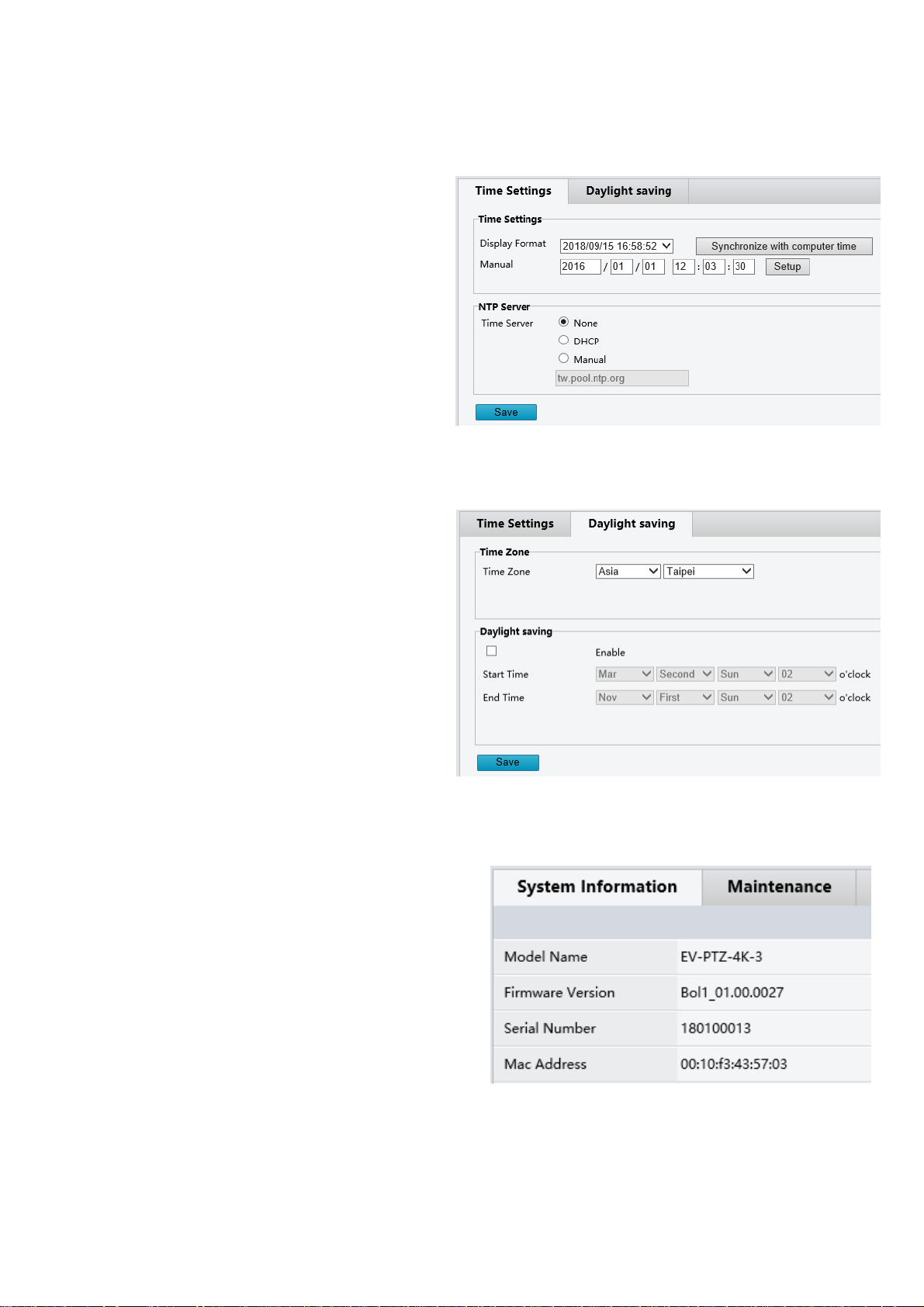
This interface allows the user to configure the date / time settings of the camera
Time Settings
o Display Format – allows the user to
configure the date time format
o Synchronize with Computer Time –
Causes the camera to pull the current
date and time information from the
computer and apply it as the current
date and time for the camera
o Manual – Allows the user to manually
enter the date and time
NTP Server
o DHCP or Manual are options that will
cause the camera to access an NTP
server (automatically,
or via the user’s configuration)
Daylight Saving
To configure the camera to automatically adjust for
daylight saving:
Select the Daylight Saving tab along the top of
the Date/Time interface
Set the proper time zone
Check the Daylight Saving time checkbox, and
then enter the dates and times when Daylight
Saving time should be activated / deactivated in
the Start Time / End Time sections respectively
Maintenance / System Information
The following general information can be found under the System Information tab within the Maintenance section of the
web GUI:
Model Name: The specific model of this camera
Firmware Version: The current firmware version running on
this device
Serial Number: The serial number of the image module within
the camera
MAC Address: The MAC address of the camera’s Network
Interface Card (NIC)
Page 16
16
Maintenance / Maintenance
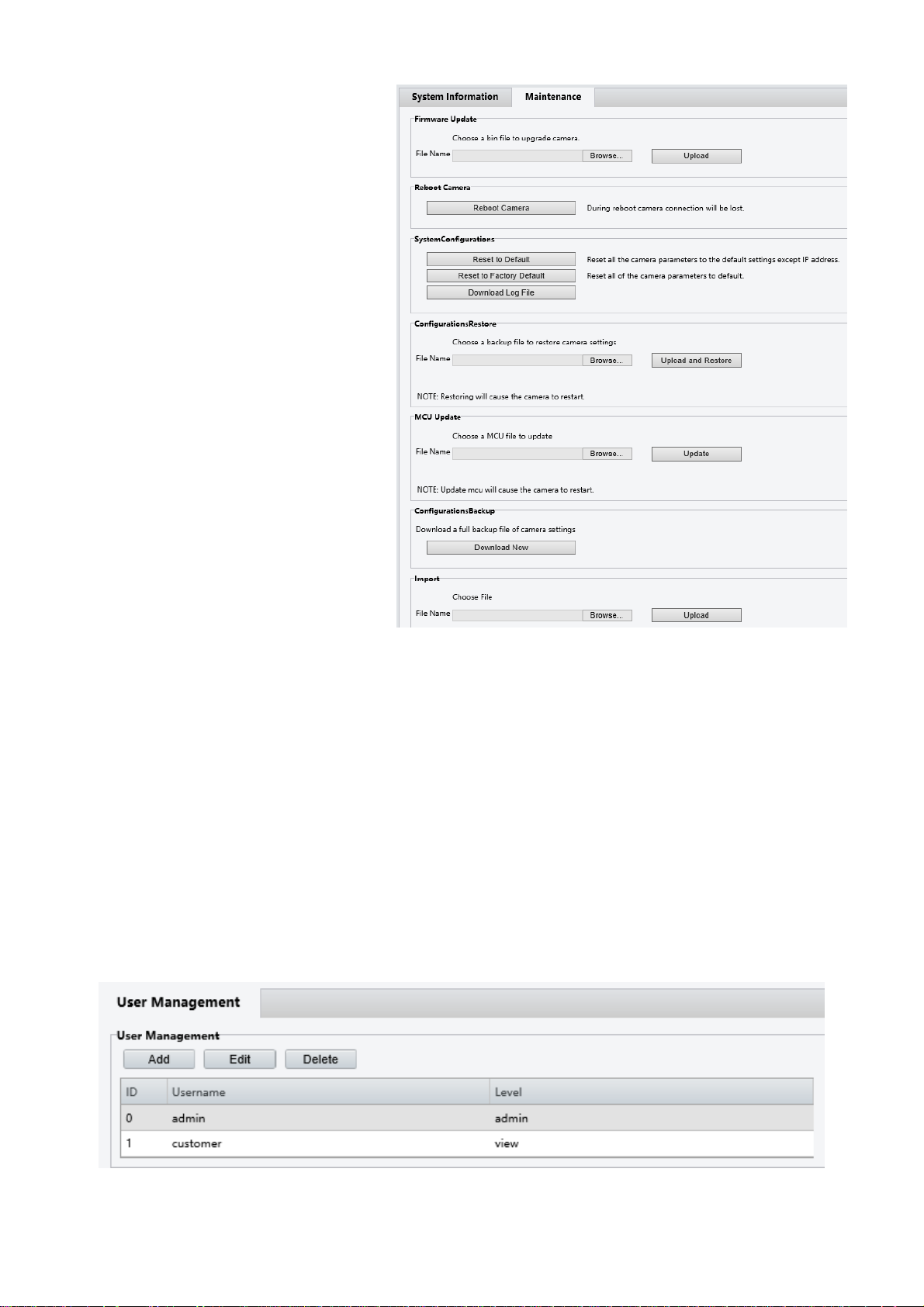
The Maintenance tab under the Maintenance
section within the web GUI can be used to
perform the following functions:
Update firmware
o A firmware file can be
obtained from BOLIN
Technology
o Click the Browse button, and
navigate to the file (.bin)
o Click Upload, and allow the
camera to load the new
firmware
o It takes a few minutes for the
camera to come back online
Reboot camera
o This button performs a soft
reboot (camera will restart
without needing to disconnect
power)
Reset to Default
o Will reset the camera’s
settings to factory defaults,
except the IP address will not
be affected
Reset to Factory Default
o Will reset all settings
(including the IP address) to
factory default
Download Log File
o Should the need arise, the Log File can be downloaded and provided to Technical Support personnel for
analysis when troubleshooting
Download Config File
o A configuration file can be downloaded, which stores all of the camera’s settings
o This file acts as a backup for the camera settings
Upload a config file
o A configuration file can be downloaded from a camera containing all the IP settings, which acts as a
backup
o This configuration file can be uploaded through this portion of the interface
Update MCU file
o MCU firmware can be obtained from BOLIN Technical Support
o MCU firmware can be updated by uploading here
User Management
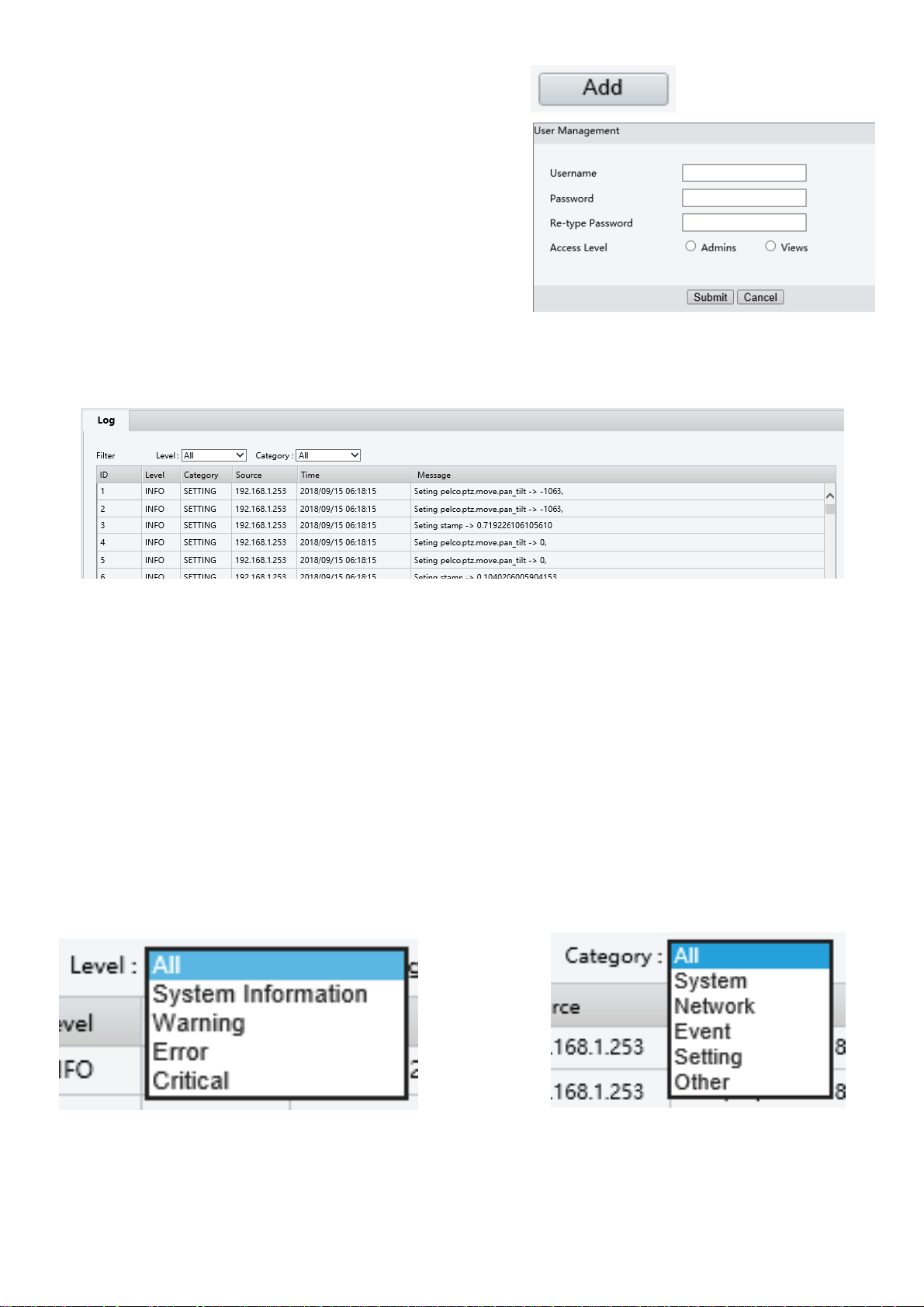
This interface allows the administrator to create / manage user accounts and passwords
Page 17
17
To add a new user:
1. Click the Add button
2. Enter the username
3. Enter the new password in the Password field
4. Re-enter the password in the Re-type Password field
Log
The Log is where the camera stores all actions that are performed by the camera. The log shows the following data points
for each event:
1. ID – The data point which identifies each individual event
2. Level – The urgency level which is used to classify the event. Each event falls into one of the following levels:
a. System Information (Info) – General operations
b. Warning – Something is operating in an abnormal (though non-critical) manner
c. Error – An error has occurred
d. Critical – A critical error has occurred
3. Category – The descriptor for the data that is affected by the event. This can be classified into the following
categories:
a. System
b. Network
c. Event
d. Setting
e. Other
4. Source – The IP address that originated the command that generated the recorded event
5. Time – The date and time when the event occurred
6. Message – Text-based data describing the action that was taken
Log events can be filtered by level of entry, as well as by Category:
Page 18
18
Event
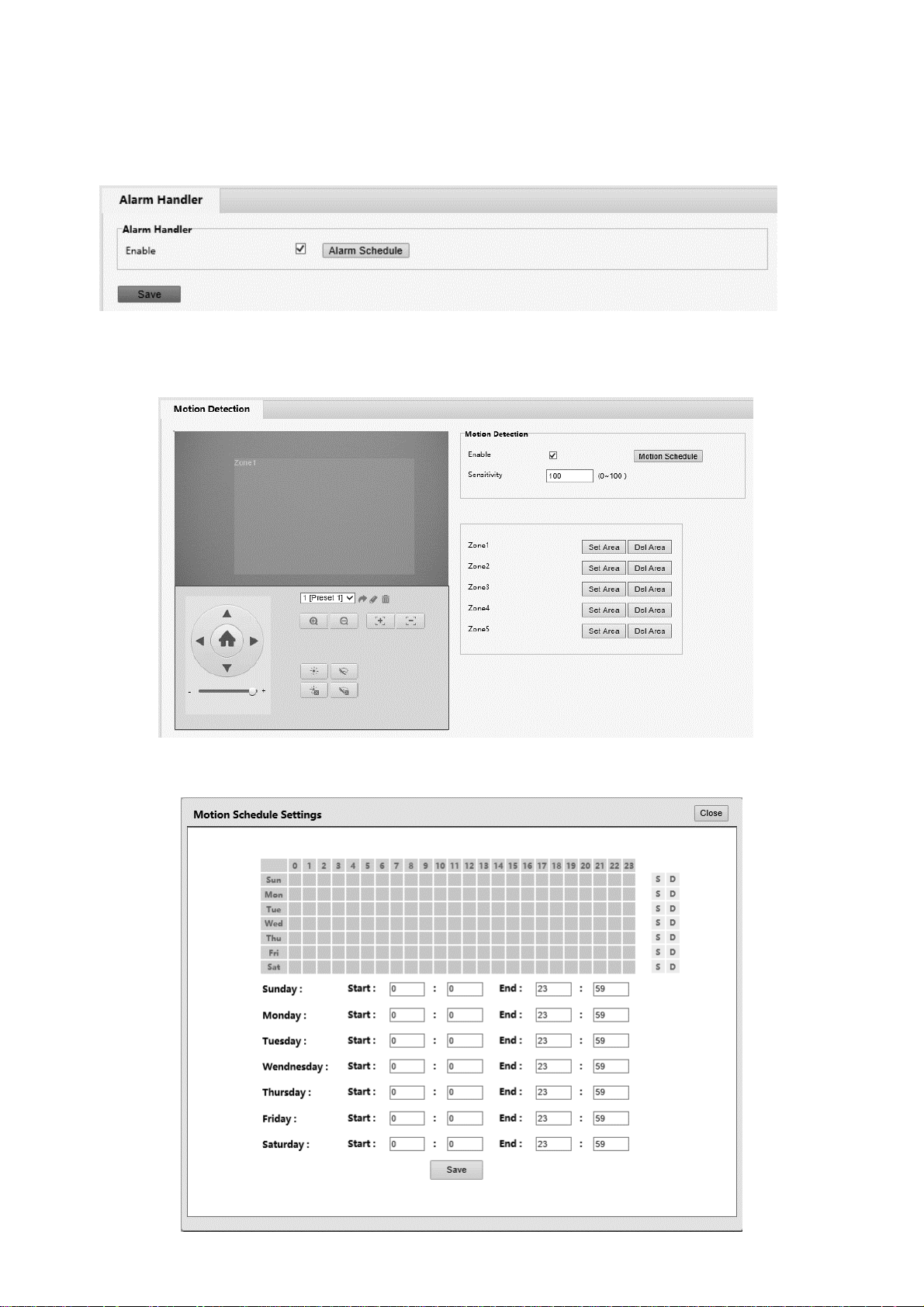
Alarm Handler
The Alarm Handler will enable the camera to accept alarms from the physical contacts on the pigtail
Motion Detection
Based on pixel density & pixel change, motion detection raises an event when motion occurs within the configured area
The Motion Schedule Settings allows the user to configure the days/ hours in which the motion detection is active on the
camera
Page 19
19
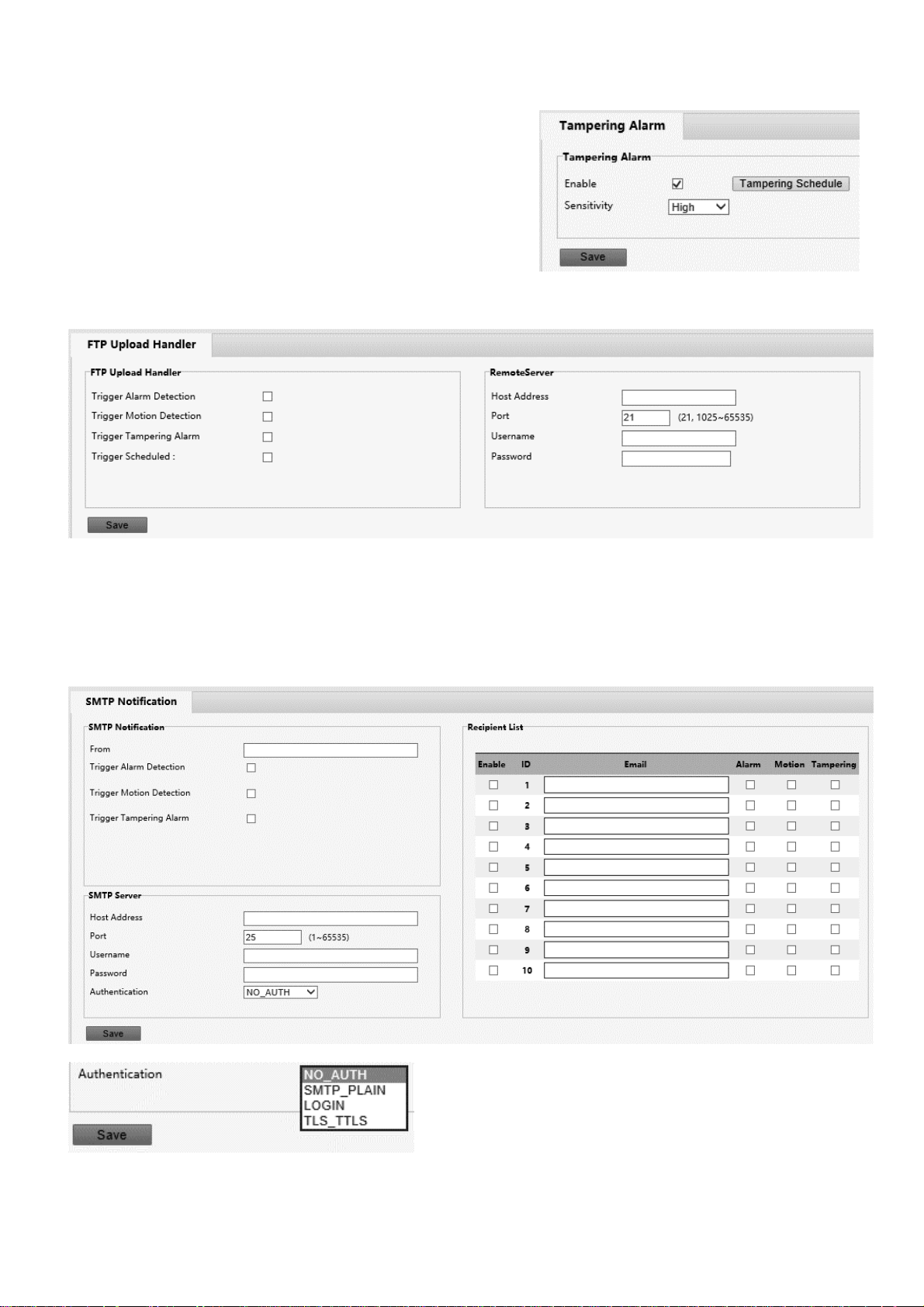
Tampering Alarm
The tampering alarm is raised when the camera image is tampered
with (i.e. artificially covered, spray painted over, etc)
FTP Upload
FTP Upload transfers a snapshot from the camera to the configured FTP server depending upon selectable conditions
SMTP Notification
SMTP Notifications are email messages that are sent to a predefined list of recipients via a preconfigured email account.
The user can define which events will cause each recipient to receive an email
Page 20
20
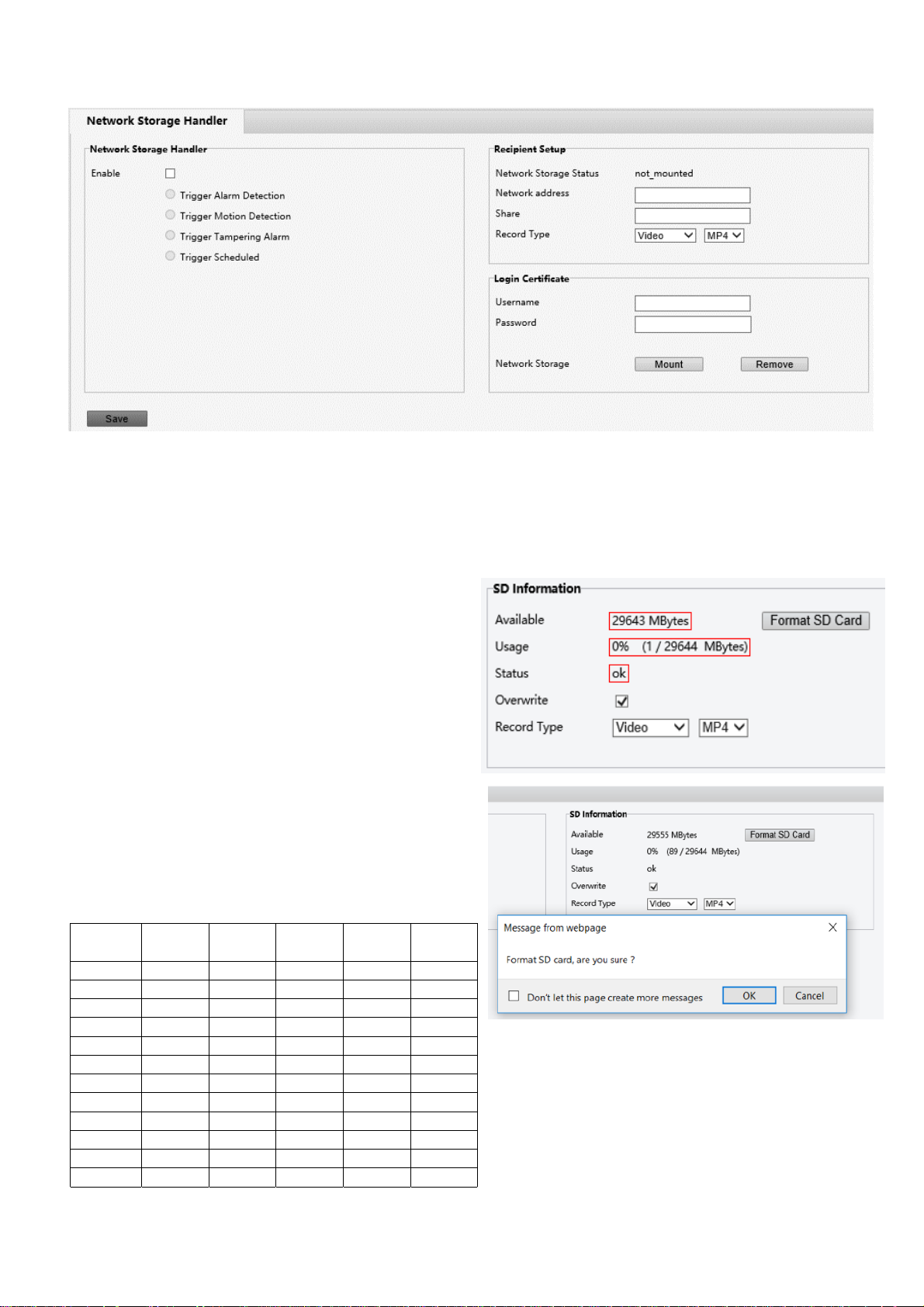
Network Storage
Storage
SD Record
Please note: on FEX model cameras, the Micro SD card can not be installed after it has been shipped. A custom
order is required to purchase FEX cameras with a Micro SD card installed
The camera has an SD card slot on the back panel, allowing
for an SD card to be inserted and used to record footage.
With the camera powered off, insert a supported Micro SD
card into the SD Card slot on the back of the camera, and
then power the camera on.
If the card has been properly detected, the “SD Information”
section will show data about the SD card, indicating that the
card is being detected, and is available to be written to
To clear all data from the Micro SD card, the user has the
option to click the Format SD Card button. This will delete
all data from the Micro SD card, and make space on the space
on the card available for recording
Currently, the following Micro SD cards are supported:
Brand Size Format Type Class
Transfer
Bus
Kingston 16GB exFAT SDHC 10 IU1
Kingston 32GB FAT32 SDHC 10 IU1
Kingston 32GB exFAT SDHC 10 IU1
Kingston 64GB exFAT SDXC 10 IU1
Kingston 128GB exFAT SDXC 10 IU1
Samsung 32GB FAT32 SDHC 10 UHS-I (1)
Samsung 32GB exFAT SDHC 10 UHS-I (1)
Samsung 32GB FAT32 SDHC 10 UHS-I (1)
Samsung 32GB exFAT SDHC 10 UHS-I (1)
Samsung 64GB exFAT SDXC 10 UHS-I (3)
Toshiba 32 FAT32 NA 10 U1
Toshiba 32 exFAT NA 10 U1
Page 21
21
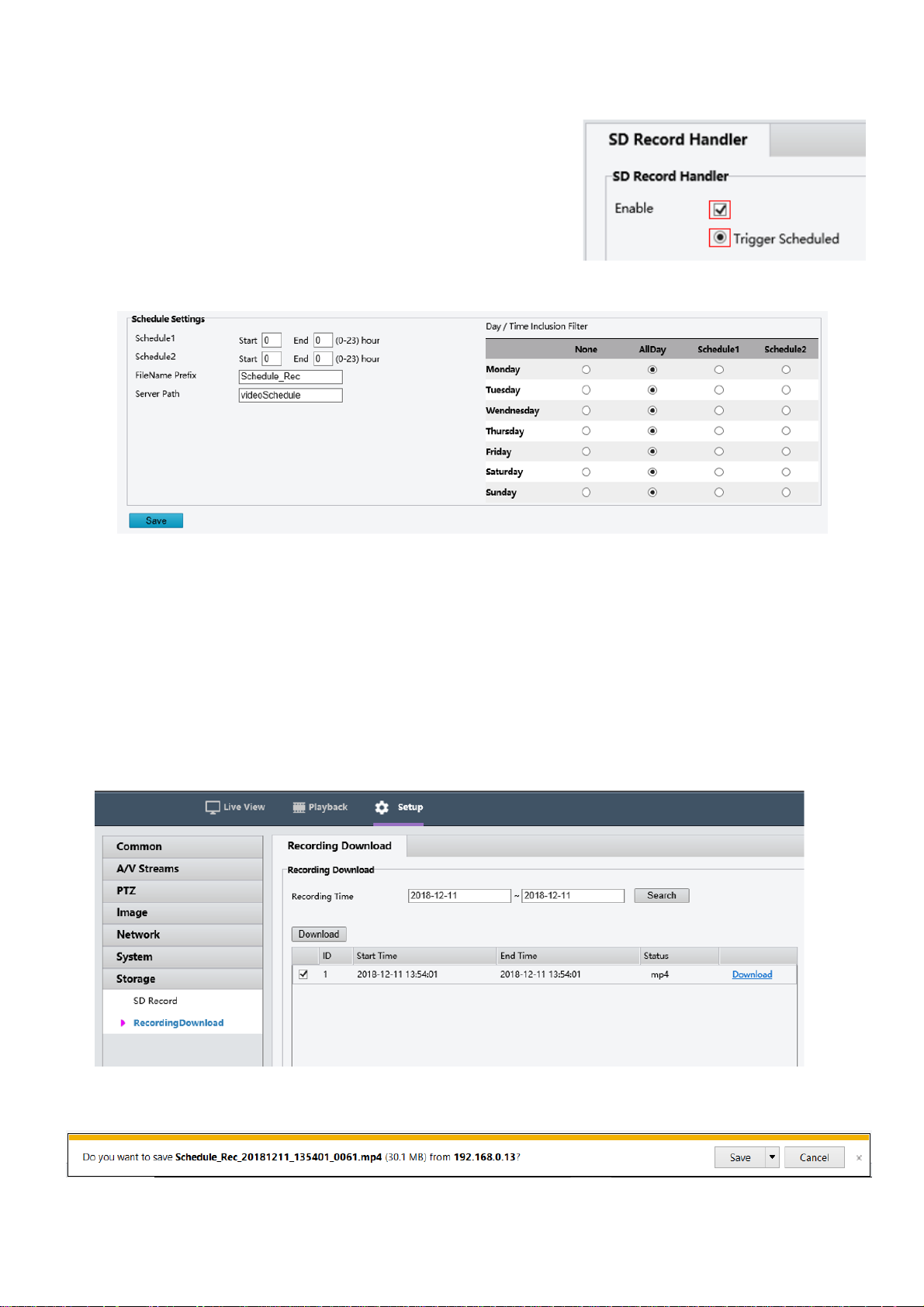
Once the card has been properly installed, follow these steps to record video to the Micro SD card:
1. From the SD Record Handler section, tick the “enable” checkbox
2. Select the “Trigger Scheduled” radio button
3. For best results, set the schedule so that the camera is set to record all
day for each day. This will result in the caemra recording every time
the camera is powered on
4. The FileName Prefix and Server Path values will change the name of
the video file, and the location where the file is saved on the SD Card,
respectively
Recording Download
When an SD card is installed and configured to record, the web interface offers the option for the recording to be
accessed and downloaded
This is accomplished by following these steps:
1. Click on the Recording Download tab
2. Select a beginning date, and an end date using the two date selection boxes
3. Click the Search button
4. Select the recording by ticking the checkbox next to the entry
5. Click the Download link
A notification will appear at the bottom of the Internet Explorer window, prompting the user to save the file.
Click Save to automatically save the file to your computer’s default Downloads folder, where it can be accessed and
played.
Page 22

22
www.bolintechnology.com
2082 TECHNOLOGY LLC
dba
BOLIN TECHNOLOGY
 Loading...