

Page 1

VIEWPORT Monitors
Active Matrix LCD Video Screens
525/625 Video Series Models: v056, v068, v4x4
also: v050, v064, 1501, 1505, 1521, 1549, 1550, and 1701 through 1709)
(
User Manual
PO Box 4728 Mission Viejo, CA 92690 (800) 918-9090 (949) 367-9911 Fax: (949) 367-9944 www.bolandcom.com
2 VIEWPORT Manual 1604a8
Page 2

Page 3

Contents
Contents 2
one Description
overview 3
•
features 3
•
customer support 3
•
Contents
two Installation
supplied items 4
•
handling 4
•
system requirements 5
•
installation and connections 5
•
three Operation 6
four Maintenance
cleaning 6
•
factory service 6
•
warranty repair 6
•
warranty terms 7
•
five Specifications 8
VIEWPORT Manual 1604a8 1
Page 4

1 description
• overview
Contents
The BOLAND VIEWPORTS are high
performance LCD video displays for
motion video display. Incorporating
Active Matrix Thin Film Transistor drive
technology, these display panels are
completely self-contained for replacing
CRT-type monitors. Active Matrix
means no LCD lag or smear on moving
video pictures. Operating in NTSC and
PAL composite video modes, the
monitors are compatible with CRTs,
• features
Compact, Mounts Anywhere
•
• Light Weight, Rugged
but may be installed in compact, spacesaving places at low power. The
display quality is excellent for both
natural and graphic video. Their sizes
range from 2.5 up to 6.8", come with
integral non-glare glass screens*, and
compliment the 8.4" and up
family of LCD Video, Computer, and
Dual (combination of both) monitors.
All offer the size, brightness and clarity
necessary for extended daily use.
VIEWPORT
• Transportable
• Plug / Pin-compatible to CRT displays
• Low Power, Instant On
• Dual A/B Input (v025x6, v4x4)
• customer support
Boland provides a full range of support
from sales through installation and use
of our products. We are here to help.
Our office hours are extended, in the
Pacific time zone. To reach us:
• High Contrast
• Protected Screens
BOLAND COMMUNICATIONS
(949) 376-9911, or
(800) 918-9090,
(949) 367-9944 [fax]
PO Box 4728, Mission Viejo, CA 92690
or: [email protected]
2 VIEWPORT Manual 1604a8
Page 5

2 installation
• supplied items
Installation
Supplied with your LCD Monitor is a
all-mount (wm) or desk-top (dt) 12 volt
w
regulated or unregulated power supply
• handling
A VIEWPORT display is rugged. As a
precaution though, please consider the
following general characteristics of
LCDs. These are not defects or
malfunctions:
Please handle the panel with care.
Since the panel is made of glass, sharp
blows to the screen, failure after
dropping onto a hard surface, etc., are
not covered by the warranty.
High voltages are present inside the
cabinet for the fluorescent lighting.
There are no fuses or other userserviceable parts inside. Do not
remove any screws or disassemble the
cabinet to stay safe and to retain the
warranty.
Use only factory-specified power
supplies for powering the panel.
(depending on screen model), and this
instruction manual.
LCD damage. Extended temperature
models are available. Please also take
care to avoid electrostatic discharges.
When a panel is not installed, place it in
its packing material or place it face
down on a smooth table.
After several thousand hours of
operation, the special internal
fluorescent lamps will eventually taper
in their brightness. Please consult the
factory for replacement.
Over long periods of time, some
changes in luminance uniformity or
small dots may become visible,
depending on image content.
Avoid fixed video patterns for extended
periods of time. Some image retention
may occur. If possible, use an
interesting screen saver or black.
A wet, condensing atmosphere (dew or
fog) should be avoided. If you require
routine operation in these conditions,
please consult the factory (optional
accessories are available).
Note the normal operating and storage
temperatures in the specification. Do
not place the unit in the sun, as
theblack cabinet absorbs much heat.
Extreme temperatures, just as
uncomfortable for people, will cause
degraded performance or permanent
VIEWPORT Manual 1604a8 3
Please handle cables and connectors
with care. Please replace worn cables
with standard, locally-available parts
(see power supply substitution caution).
Some models come with a non-glare
acrylic (hard) plastic screen cover,
rather than the heavier glass, and is
therefore somewhat more sensitive to
scratching. Please clean this screen
with a soft cloth slightly dampened with
water or, if necessary, Windex
household cleaners.
®
or 409
®
Page 6

• system requirements
Installation
Video Series monitors operate on DC
power and display a composite video
signal with a BNC connection.
A monitor will display a composite 525
NTSC or 625 PAL standard video
signal at a nominal 1.0 Vpp into 75
ohms (internally terminated, where
• physical mounting
When mounting the panel on a flat
surface, allow clearance for any
connectors on the rear. In the corners
on the backside of most cabinets are
10-32 threaded inserts for accepting
mounting screws. Both 1" and ½" long
pan head screws are provided along
with large (fender) flat washers for use
under the screw heads. You may use
any other length 10-32 screws to
accommodate mounting surface depth
requirements, but the screw may not
penetrate the panel cabinet by more
source video is 2.0 Vpp unterminated)
and are for use as connected to all
normal baseband video systems.
When a termination switch is available,
it should be in the ON position, except
when looping or "T"-ing to another
piece of equipment. (The terminations
are automatic on the v025x6 and v4x4).
than 7/16" (0.4375") maximum, or the
cabinet will be damaged.
The LCD monitor cabinets dissipates
only a few watts (see specifications), so
no special cooling or ventilation is
required. The mounting location may
usually be completely enclosed. But
avoid any mounting situations or other
nearby heat or environmental heat
sources that may cause the panel's
operating location to exceed
115°F/45°C to 140°F/60°C, depending
on model (see specifications).
• connections
VIEWPORT LCD monitors connect like
CRT-type monitors. The two
connections are video and power:
Insert the barrel plug from the w
ount or desk-top power supply into
m
the 2.5 mm (+) jack on the back of the
panel. The AC side of the power
supply will accept 117 VAC ±10% for
the wm or 100-240 VAC for the dt
supply.
4 VIEWPORT Manual 1604a8
all-
5.6 and 6.8"
BNC connector for one input video source
per screen. With the single BNC connecttor, you may loop the video by using a
BNC Tee and setting the 75
The Quad 4", with its loop-through inputs,
has two BNCs connected together L-R
internally for each each input of each
screen. Your source video may be
VIEWPORTs have a single
Ω switch off.
Page 7
connected to either BNC; the other
BNC may connect to another video
device's input. If no other video device
is connected, an internal automatic 75
termination is switched on.
3 Operation
Your VIEWPORT Monitor provides for
normal opertional adjustments. In the
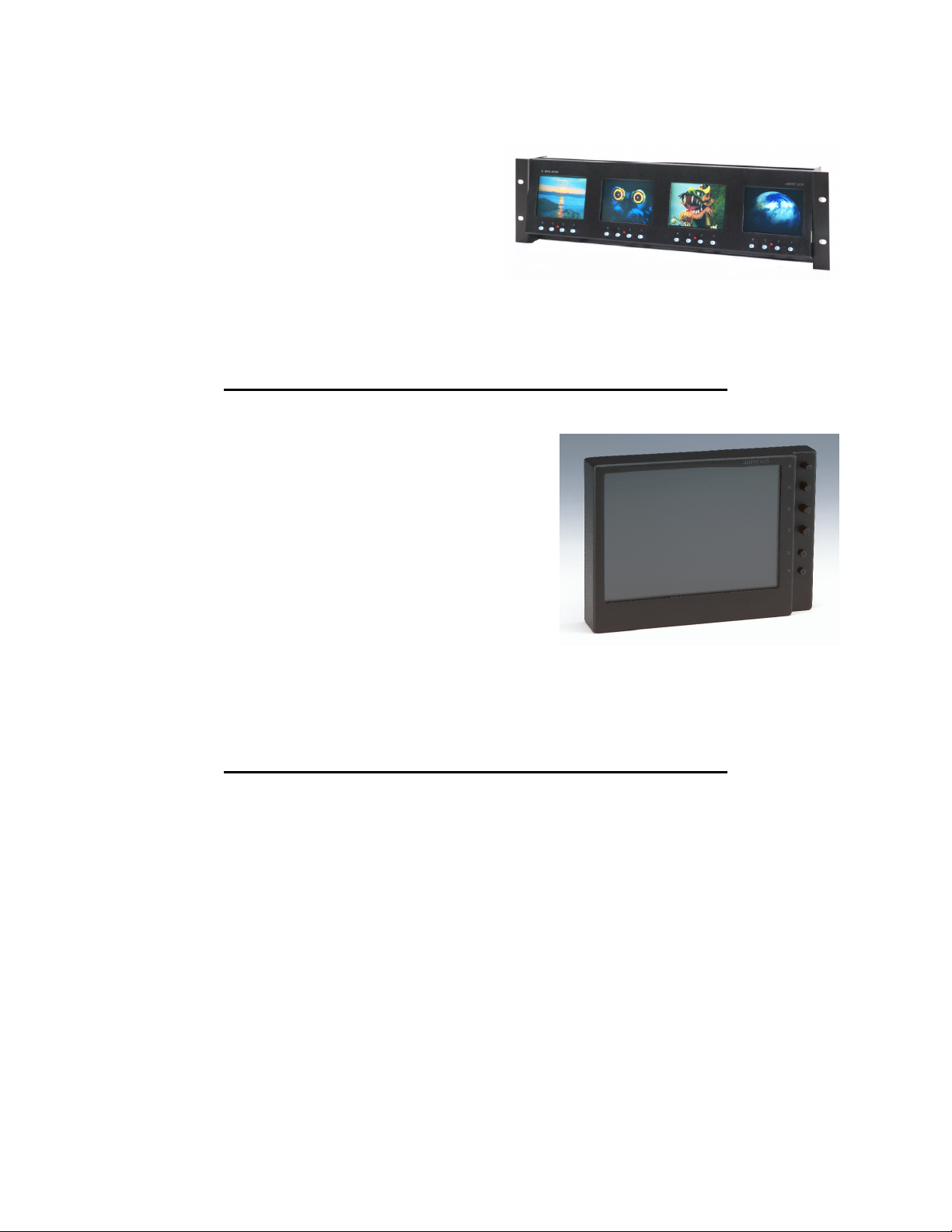
figure are shown B C C T, for
brightness, contract, color and tint
(NTSC only) Blue, Power. A/B input
select switch is available on the v4x4.
Operation and Maintenance
Ω
Model v4x4 Quad Color Rackmount Monitor
Set the brightness to just be able see
the blackest portions of the video
image, the contrast to bring the whitest
areas of an image to just less wash-out,
and color and tint for pleasing flesh
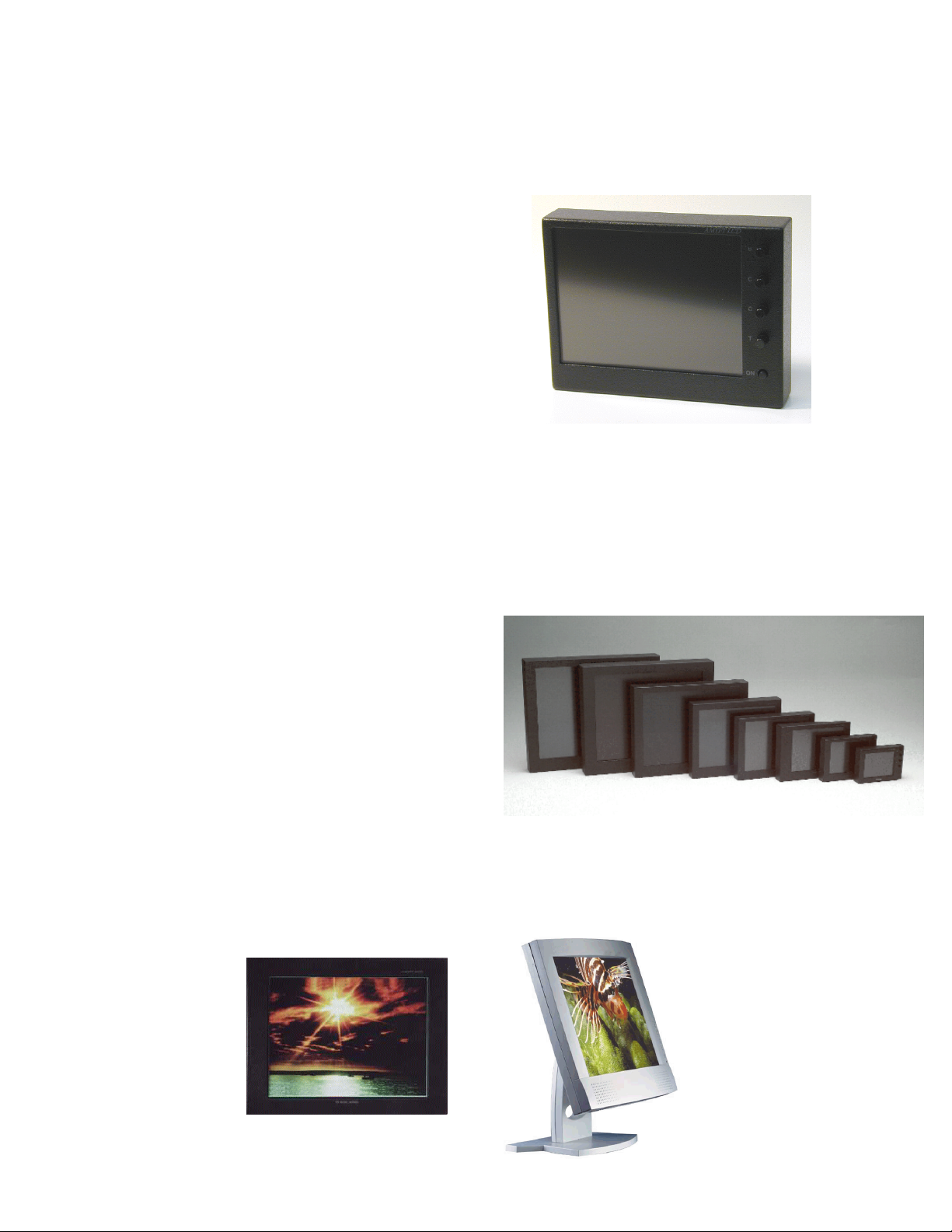
6.8" monitor with new front-side blue-check button allows
users to calibrate monitors with SMPTE Color bars.
tones, (or to match the patches of SMPTE bars in Blue mode).
4 Maintenance
A VIEWPORT display requires no
regular/periodic maintenance.
• Cleaning
The aluminum cabinet, finished in
black-anodizing or environmentallyfriendly powder-coat semi-gloss black.
The front screens are frosted glass. A
damp (not dripping) cleaning cloth with
a small amount of spray cleaner (such
®
as 409
, or Windex®) may be used to
remove dust or fingerprints. You will
not want to have enough moisture wet
enough on the outside of the cabinet
that would run inside through the cracks.
VIEWPORT Manual 1604a8 5
Page 8
• Factory Service
After between about fifteen to fifty
thousand hours of service (as long as
10 years, even if used often, depending
on the model), it may be possible to
notice the screen brightness start to fall
off. Or, the fluorescent internal lamps
may not come on at all, or stay on
properly, especially when the
temperature is cold. In these cases,
the full brightness may be restored by
replacing the special type of internal
fluorescent lamps. This requires
extreme care in a very clean
environment. Please contact
COMMUNICATIONS
for factory
replacement.
BOLAND
Operation and Maintenance
5.6 & 6.8" Video Monitors operate on 9-36 volts DC.
• Warranty
VIEWPORT Video Displays are
warranted for one year against defects
in materials or workmanship (see the
Warranty Agreement page).
Consequential damages are not
covered. Units requiring attention will
need to be returned to the factory for
correction. Telephone for a
tracking/RMA number before shipping.
Units will be returned freight pre-paid.
Warranty correction is at best an
inconvenience, so every reasonable
effort will be made by
smooth the process.
Models D151 NTSC/
PAL/XGA Combi
(left), and D150
Desktop XGA (right).
BOLAND to
Some of the family of Boland monitors.
(AC/DC, some with built-in speakers)
Other models from
5 to 21" sizes include
economical desktops.
Some models also
have both computer
and NTSC/PAL
inputs.
6 VIEWPORT Manual 1604a8
Page 9

BOLAND COMMUNICATIONS
WARRANTY AGREEMENT
All products, including hardware, software, firmware, and documentation are subject to the
terms below.
Warranty
1. Boland Communications (Boland) warrants the
their accessories are provided to be free from defects in materials and
workmanship under normal use for a period of one (1) year from date of delivery
to you.
2. In the event of a repair of this warranty, Boland's sole obligation is to replace or
repair, at Boland's option, any Product free of charge. Any replaced parts shall
become Boland's property.
3. Warranty claims must be made in writing during the warranty period and within
seven (7) days of the observation of the defect, accompanied by evidence
satisfactory to Boland. Prior to returning any Product to Boland, you must obtain
a Return Material Authorization (Tracking) Number and shipping instructions from
Boland. All Products returned to Boland shall be shipped with freight and
insurance sender-prepaid, and will be returned to you with likewise speed, but with
freight paid by Boland
4. Except as stated above, there is NO OTHER WARRANTY, REPRESENTATION,
OR CONDITION REGARDING BOLAND'S PRODUCTS, SERVICES OR
PERFORMANCE, EXPRESS OR IMPLIED, INCLUDING, BUT NOT LIMITED TO,
THE IMPLIED WARRANTIES OF MERCHANTABILITY AND FITNESS FOR A
PARTICULAR PURPOSE.
5. Boland is not responsible for any delays beyond its control, and where possible will
advise of any such delays. Boland's entire liability for damages to you or any other
party for any cause whatsoever, whether in contract or in tort, including negligence,
shall not exceed the price you paid for the unit of Product that is the subject matter
of the dispute. In no event will Boland be liable for any damages caused by your
failure to perform your obligations, or for any loss of data, profits, savings, or any
other consequential and incidental damages, even if Boland has been advised of
the possibility of damages, or for any claims by you based on any third-party claim.
VIEWPORT LCD Monitors and
VIEWPORT Manual 1604a8 7
Page 10

Page 11
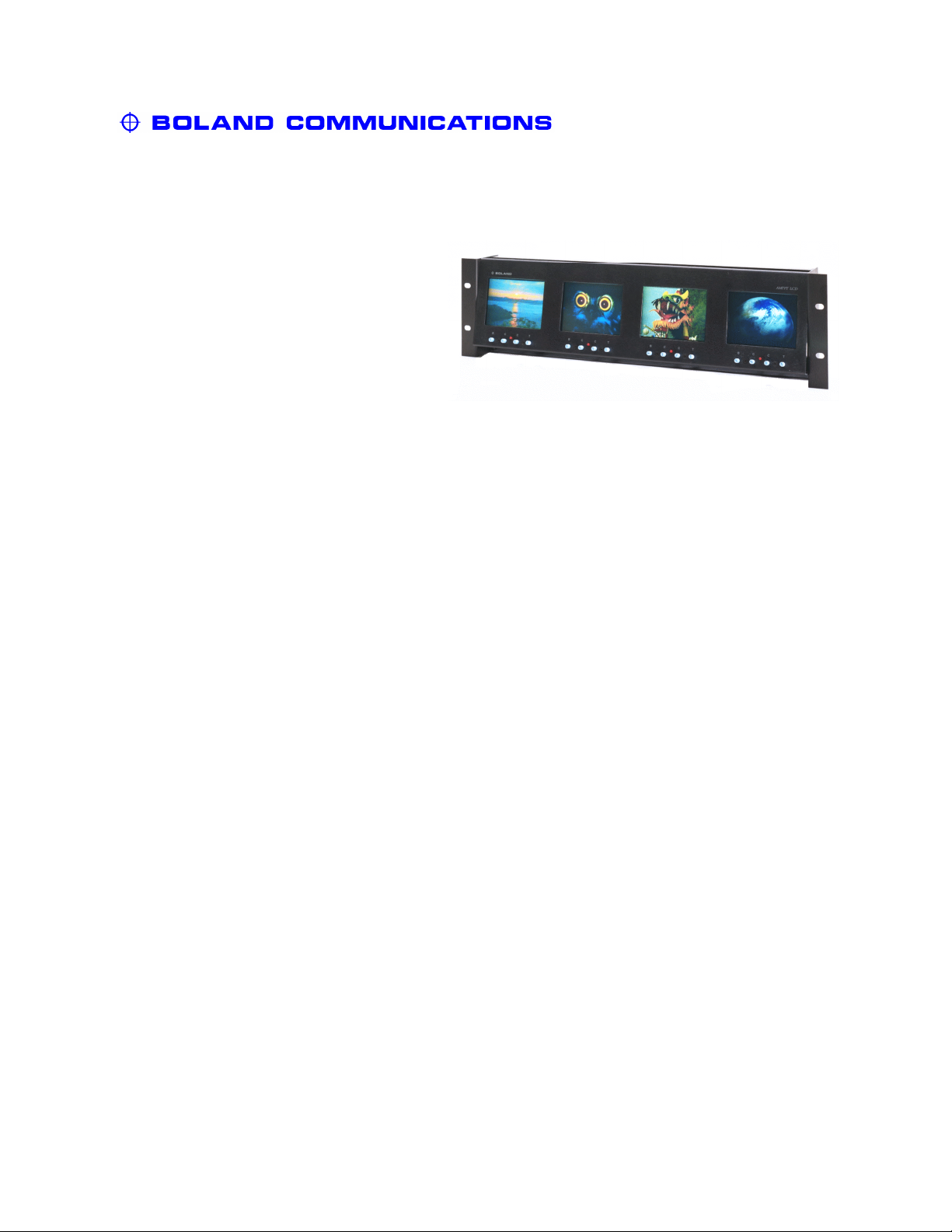
4" Video Monitors NTSC/PAL
Model: v4x4
Description: Color LCD Video Displays,
Automatic NTSC/PAL,
AutoTermination Looping
A/B Inputs, Blue-Gun,
AC/DC, Protected Screens
Specifications:
Quad 4" LCD Monitors
Display Technology:
Television Standards:
Active Area:
Dot Pitch:
Pixel Arrangement:
Resolution:
Brightness:
Contrast Ratio:
Color Temperature:
Viewing Angle:
Response Time: (tr/tf)
User Controls: (rotary)
Light Source:
Lamp Life:
Video Input Signal:
Power:
Power Supply:
Connectors: Video:
Power:
Tally:
Screen Surface:
Outside Dimensions:
Weight:
Operating:
Storage:
Cabinet Color:
Cabinet Material:
Active Matrix TFT Drive System COG LCD
525 NTSC and 625 PAL (autoselect)
4.05" / 103 mm diagonal; 3.23 x 2.43" / 82 x 62 mm HxV
0.171 w x 0.264 v mm (112,320 RGB Pixels)
480 H x 234 V RGB Delta Configuration
240 TVL H, 164 TVL V [Kell]
250 cd/m² typical (0°)
150:1 (0°)
7900° K
H: ±45°, V: +30/-10° (typ, @Contrast ≥10:1)
25 / 30 ms
Bright, Contrast, Color, Tint, A/B Input, Blue-Gun, Power
Cold Cathode Fluorescent Lamp
20,000+ Operating Hours
1.0 ± 0.3 Vpp (sync > 0.2 Vpp)
12 Vdc, ±5%, <20 watts
120/240 Vac 50/60 Hz to 12 Vdc (supplied), Approved
75 Ω loop-through Auto-termination BNC Female (16)
5.5/2.5 mm Barrel, Center Positive
D-Sub 9 pin Female (contact closure activation)
Non-glare Glass (Strong, Washable)
19.00 x 5.23 x 2.88" / 48.3 x 13.3 x 7.3 cm (hwd)
(including BNCs and tilt frame)
(4 monitors across in 3 rackunits high)
4.4 lbs / 2.0 kg
0 to 60° C, 0- 95% RH (non-condensing)
-25 to +80° C (non-condensing)
Black (standard)
Anodized (surface hardened) Aluminum
(Specification is subject to change without notice) 7.5.02
PO Box 4728 • Mission Viejo, CA 92690 USA • (800) 918-9090 • (949) 367-9911 • Fax: (949) 367-9944 • www.bolandcom.com
Page 12
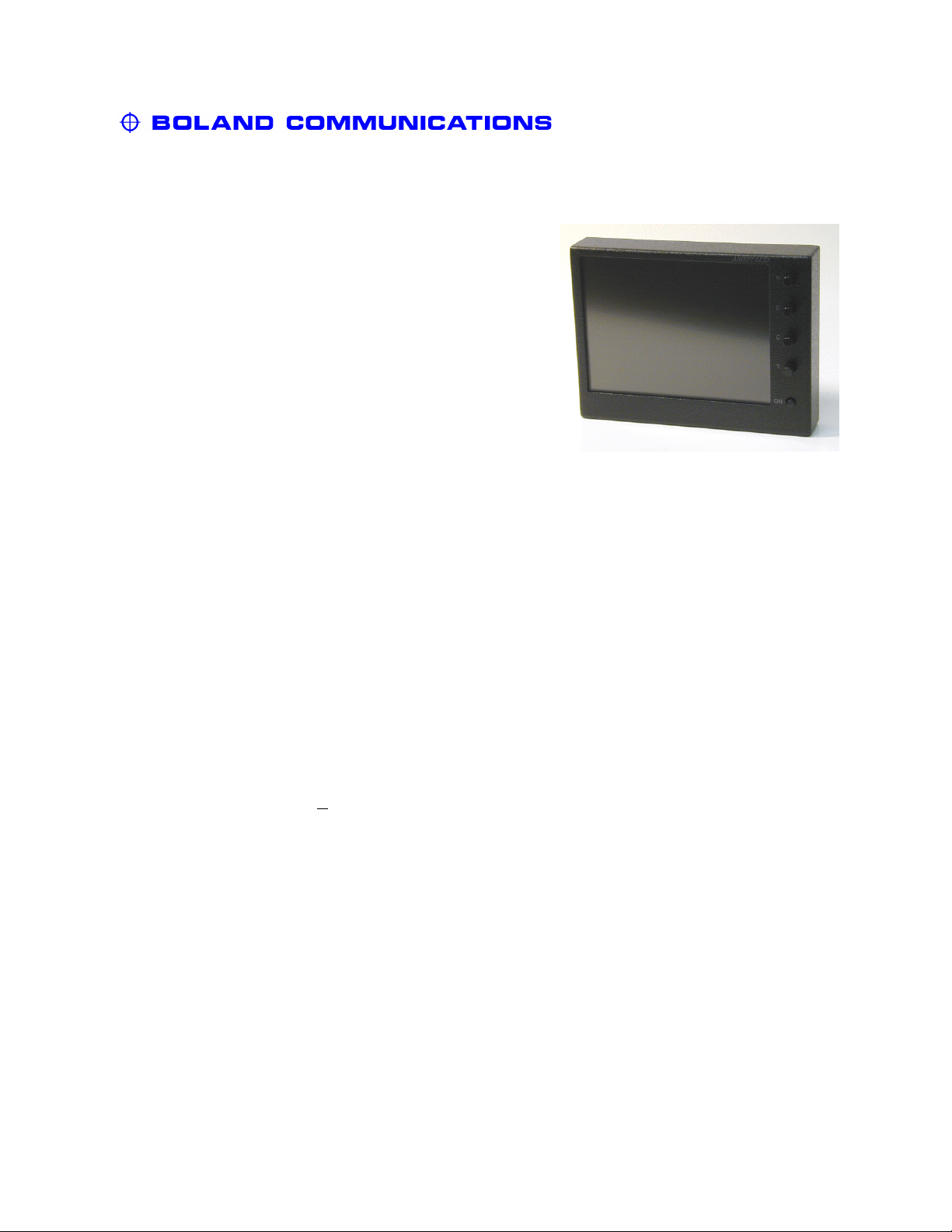
5.6" Video Monitor NTSC/PAL
Model: v056
Description: Color LCD Video Display,
NTSC/PAL, 9-36 volts,
Blue-Gun, Scan-Reverse,
Looping Video,
Protected Screen
Specifications:
Active Area (Diagonal):
Video Modes:
User Controls (knobs, switches):
Video Input Signals (nominal):
Video Connector:
Brightness, typical, 0°:
Contrast Ratio, 0°:
Scan:
Window (Display Area):
Protective Screen Cover:
Light Source (standard):
Pixel (RGB Trio) Arrangement:
Pixel (RGB Trio) Pitch:
Viewing Angle, contrast >
Response Time, max (t
10:1 :
):
r/tf
DC Power:
DC Connector (center +):
AC Connector:
Cabinet (whd, less knobs):
Mounting (threaded inserts):
Weight:
Temperature, Operating:
Temperature, Storage:
Case Color (textured):
Case Material:
5.6" LCD Monitor
5.6" / 142 mm Composite Video
525 NTSC/625 PAL (autoselect)
B,C,C,T; On,Blue,ScanRev,75
1.0 Vpp
(termination switch and tee):
ΩTerm
BNC x 1 (tee for looping)
300 nts (cd/m²)
150:1
H and V Scan Reverse Switches
4.46 x 3.33"
Non-Glare, Washable
CCFL, 20,000 hr
960 (320) x 234, Stripe
0.118 (3) x 0.362 mm
90°H; 40°V
15/25 ms
9-36 VDC, 7. watts
Barrel, 5.5/2.5 mm
IEC-320 Male;100-240 vac
5.7 x 4.3 x 1.1" / 145 x 109 x 27 mm
10-32back,¼-20bottom
18 oz / 0.51 kg
0 ~ +60°C @ 0-95% RH
-25 ~ +80° C
Textured Black Semi-Gloss
Aluminum
(Specification is subject to change without notice) 5.5.01
PO Box 4728 • Mission Viejo, CA 92690 USA • (800) 918-9090 • (949) 367-9911 • Fax: (949) 367-9944 • www.bolandcom.com
Page 13
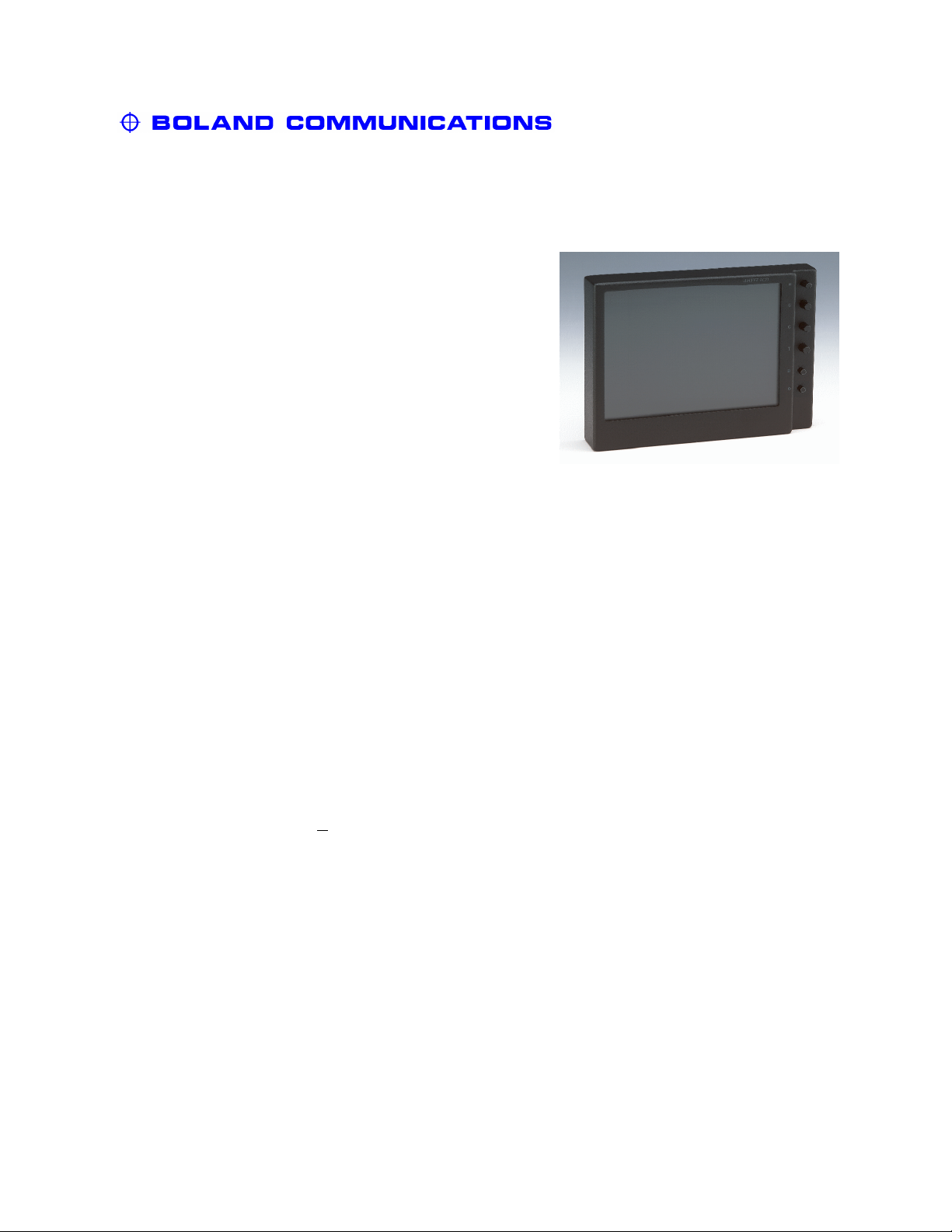
6.8" Video Monitor NTSC/PAL
Model: v068
Description: Color LCD Video Display,
NTSC/PAL, 9-36 volts,
Blue-Gun, Scan-Reverse,
Looping Video,
Protected Screen
Specifications:
Active Area (Diagonal):
Video Modes:
User Controls (knobs, switches):
Video Input Signals (nominal):
Video Connector
Audio Input, Speakers:
Brightness, typical, 0°:
Contrast Ratio, 0°:
Scan:
Window (Display Area):
Protective Screen Cover:
Light Source (standard):
Pixel (RGB Trio) Arrangement:
Pixel (RGB Trio) Pitch:
Viewing Angle, contrast >
Response Time, max (t
10:1 :
):
r/tf
DC Power:
DC Connector (center +):
AC Connector:
Cabinet (whd, less knobs):
Mounting:
Weight:
Temperature, Operating:
Temperature, Storage:
Case Color (textured):
Case Material:
6.8" LCD Monitor
6.8" Composite Video
NTSC/PAL (autoselect)
B,C,C,T, On,Blue,Scan,Term
1.0 Vpp
(termination switch and tee):
BNC x 1 (tee for looping)
N/A
300 nts (cd/m²)
150:1
H and V Scan Reverse Switches
5.44 x 4.07"
Non-Glare, Washable
CCFL, 20,000 hr
1152 (384) x 234, Stripe
0.120 (3) x 0.442 mm
±45°H; -30°, +10°V
25/30 ms
9-36 VDC, 7.5 watts
Barrel, 5.5/2.5 mm
IEC-320 Male,100-240v
7.06 x 5.25 x 1.14"
10-32back,¼-20bottom
20 oz / 0.6 kg
0 ~ +60°C @ 0-95% RH
-25 ~ +80° C
Textured Black Semi-Gloss
Aluminum
(Specification is subject to change without notice) 5.1.01
PO Box 4728 • Mission Viejo, CA 92690 USA • (800) 918-9090 • (949) 367-9911 • Fax: (949) 367-9944 • www.bolandcom.com
Page 14
Page 15
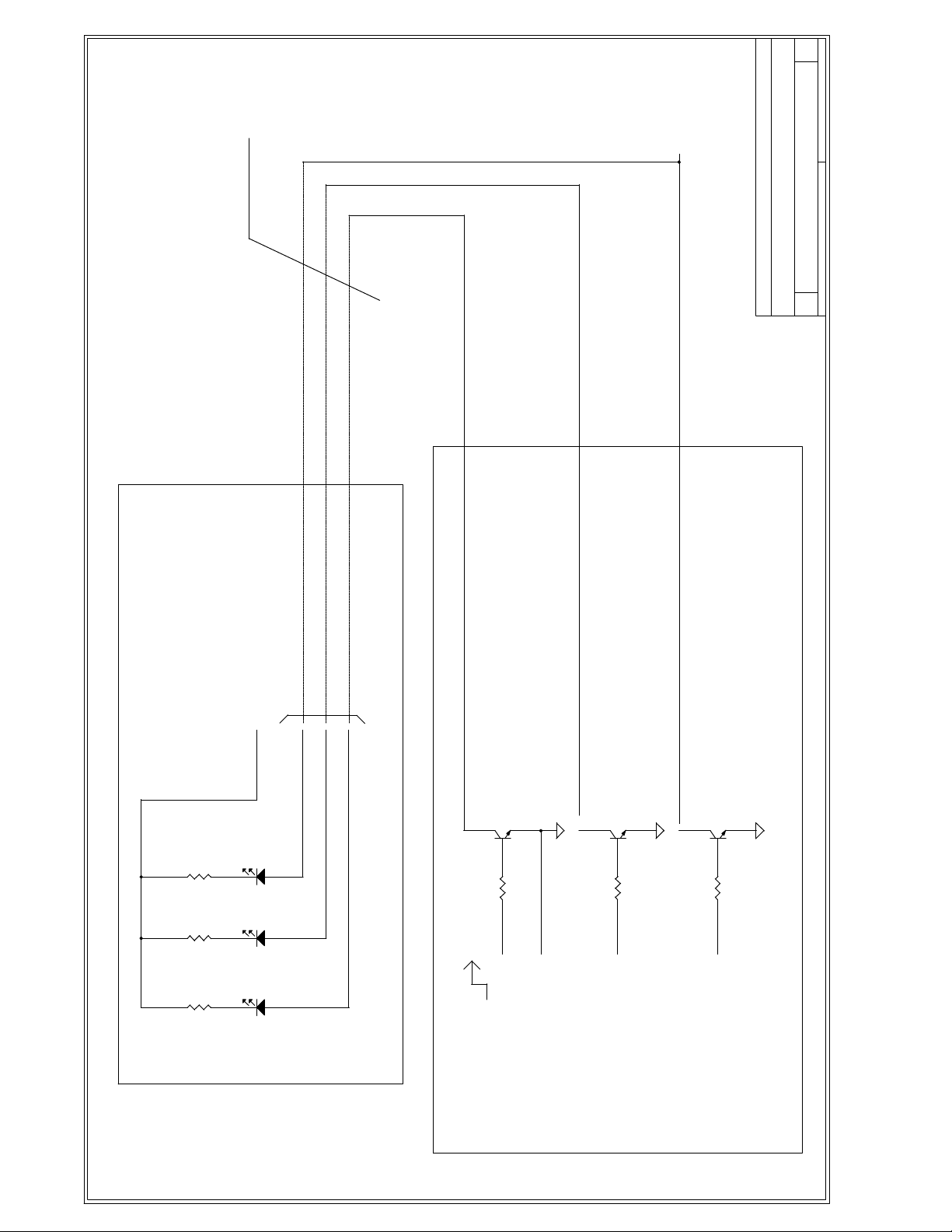
USER-SUPPLIED OPTIONAL CONNECTION
BOLAND COMMUNICATIONS
Title
2409.DSN A
SCHEMATIC, TALLY LAMPS, TWINS, TRIPLES
B
Size Document Number Rev
of
2 2Monday, June 04, 2001
Date: Sheet
1
1
(Customer Supplied)
USED WITH TWIN AND TRIPLE MONITORS
R?
1 K
12
R?
1 K
12
R?
1 K
12
+12V (+5V OK) EXTERNAL SUPPLY
2
3
4
1 2
D?
LED
1 2
D?
LED
1 2
D?
LED
1
CONTACT CLOSURE SYSTEM:
CONNECT TO GND TO LIGHT LEDs.
Q?
3
1
R?
10 K
1 2
3
(2N2222, 2N3904,...)
GENERIC TRANSISTOR
2
ON
Q?
GENERIC TRANSISTOR
2
3
1
R?
10 K
1 2
1
+2 TO +28V
(2N2222, 2N3904,...)
SYSTEM GND
Q?
GENERIC TRANSISTOR
2
3
1
R?
10 K
1 2
2
(2N2222, 2N3904,...)
(Customer Supplied)
IF YOUR SYSTEM IS VOLTAGE-SOURCE,
YOU MAY ADD THIS CIRCUIT EXTERNALLY.
A A
Page 16
of
1 2JULY 05, 2002
2409.DSN A2
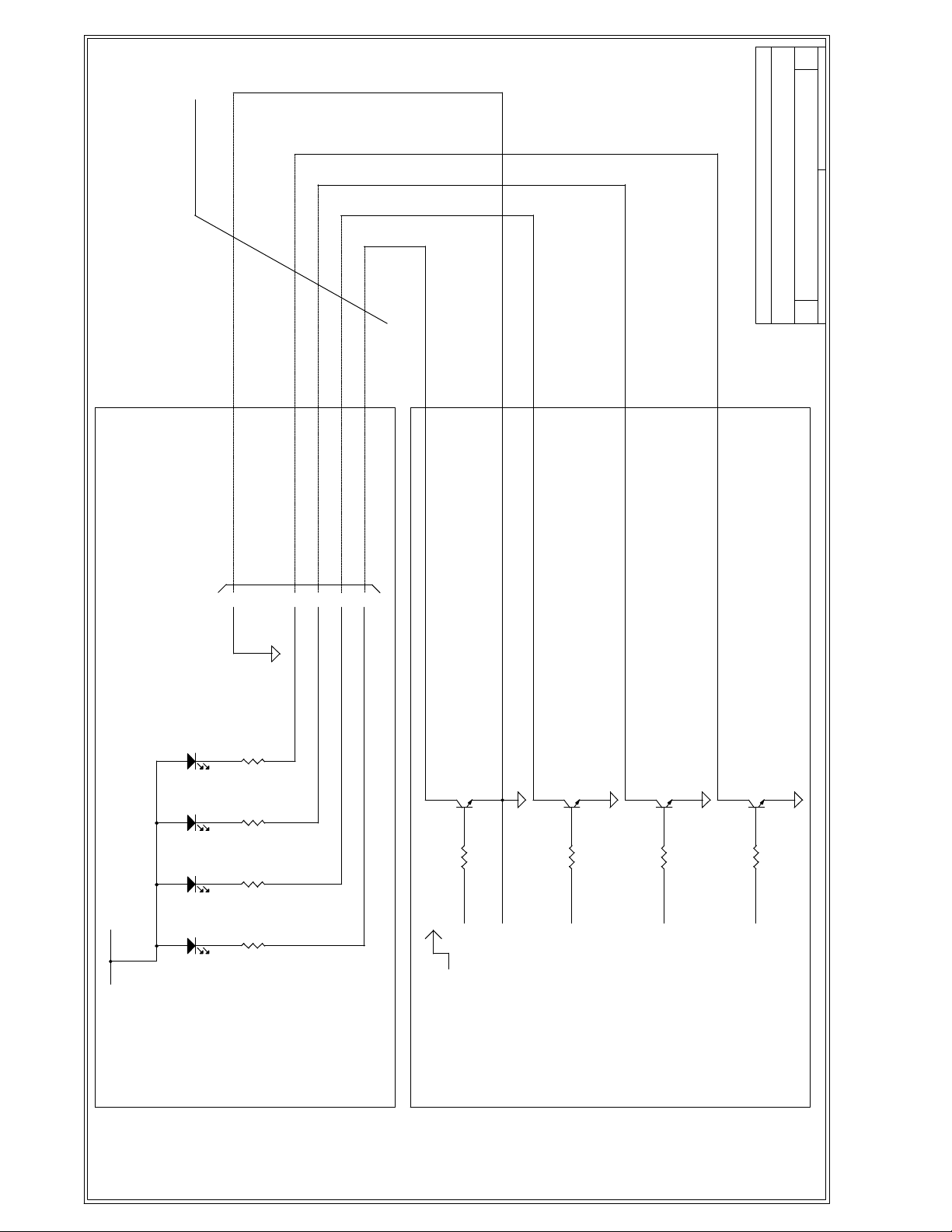
USER-SUPPLIED OPTIONAL CONNECTIONS
SCHEMATIC, TALLY LAMPS, QUAD MONS, v4x4a/b
BOLAND COMMUNICATIONS
A
Title
Size Document Number Rev
Date: Sheet
1
INTERNAL CIRCUIT USED
IN QUAD MONITORS
+12V INTERNAL SUPPLY
6
BACK CHASSIS FEMALE DB9
LED
D?
12
D?
12
D?
12
D?
12
12
LED
12
LED
12
LED
12
R?
R?
R?
R?
CONTACT CLOSURE SYSTEM:
1 K
1 K
1 K
1 K
CONNECT TO GND TO LIGHT LEDs.
4
3
1
2
ON
Q?
3
1
R?
10 K
1 2
1
+2 TO +28V
(2N2222, 2N3904,...)
GENERIC TRANSISTOR
2
SYSTEM GND
(2N2222, 2N3904,...)2(2N2222, 2N3904,...)3(2N2222, 2N3904,...)
Q?
GENERIC TRANSISTOR
2
3
1
R?
10 K
1 2
Q?
GENERIC TRANSISTOR
2
3
1
R?
10 K
1 2
Q?
GENERIC TRANSISTOR
2
3
1
R?
10 K
1 2
4
1
YOU MAY ADD THIS
CIRCUIT EXTERNALLY.
IF YOUR SYSTEM IS VOLTAGE-SOURCE,
A A
 Loading...