

Page 1
BODYFRIEND
Massage Chair
REX-L PLUS
User Manual
※ Product image or content descriptions may slightly dier due to product improvements without previous notice.
※ Product images and content descriptions are provided to enhance understanding about the product.
※ Color of the product images may dier from the model selected by the customer.
Page 2
BODYFRIEND Massage chair
02 0304
Page 3
Page 4
Introduction
Product Features
Thank you for purchasing BODYFRIEND REX-L PLUS.
To make the best use of your new product and for your
own safety, please carefully read through the safety
precautions and operation instructions before using.
We kindly ask users to understand that there may be
slight dierences in image and content descriptions
presented throughout this manual due to product
quality improvements. Thank you.
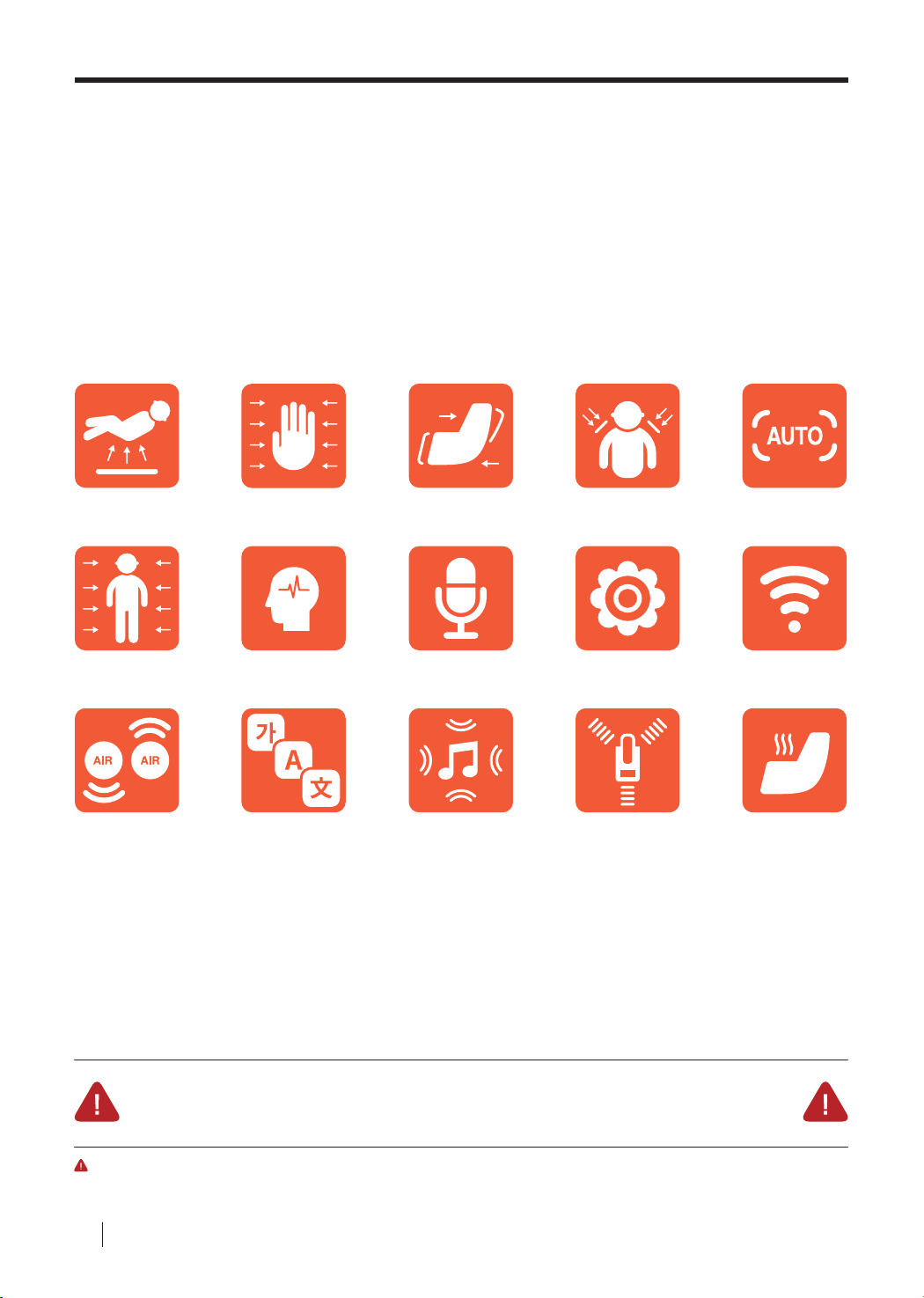
Zero Gravity
Full Body
Massage
Dual Air
Pumps
Acupressure Hand
Massage
+2 Brain
Massage
Languages
Zero Gravity
Distributing gravitational pressure
by a weightless positioning of the
body, recline angles can further be
adjusted to optimize the massage
experience.
Zero Wall
Audio Guidance
Stereo Speakers
Ergonomic Frame
SL Frame best supports the body
and massages the entire length of
the body from the head down to
the buttocks by conforming to the
contours of the body.
Auto Body
Scanning
3-Step Feet
Rollers
Zipper
Upholstery
14 Auto
Massage Modes
Bluetooth
Connectivity
Heating
Zero Wall
Zero Wall feature automatically
slides chair forward when the
chair is reclined, saving the
trouble of allocating extra space
behind the chair.
WARNING - Do not install massage chair under direct sunlight
or where high temperature uctuations can occur.
IMPORTANT - Product image or content descriptions may slightly dier due to product quality improvements.
BODYFRIEND Massage chair
Page 5

Table of Contents
Before Use Instructions Product Features 04
Safety Precautions (Before Use) 06
Important Safety Instructions 07
Components and Descriptions 08
Transporting/Installing 09
Installation Instructions Installation Information 10
Controller Information Controller Button Descriptions 14
Controller Function Descriptions 16
Program Descriptions BODYFRIEND Customized Programs 18
Product Specifications Product Specifications 20
Troubleshooting Troubleshooting 24
Customer Support Guidelines 25
Warranty Warranty Information 27
05
Page 6

Safety Precautions (Before Use)
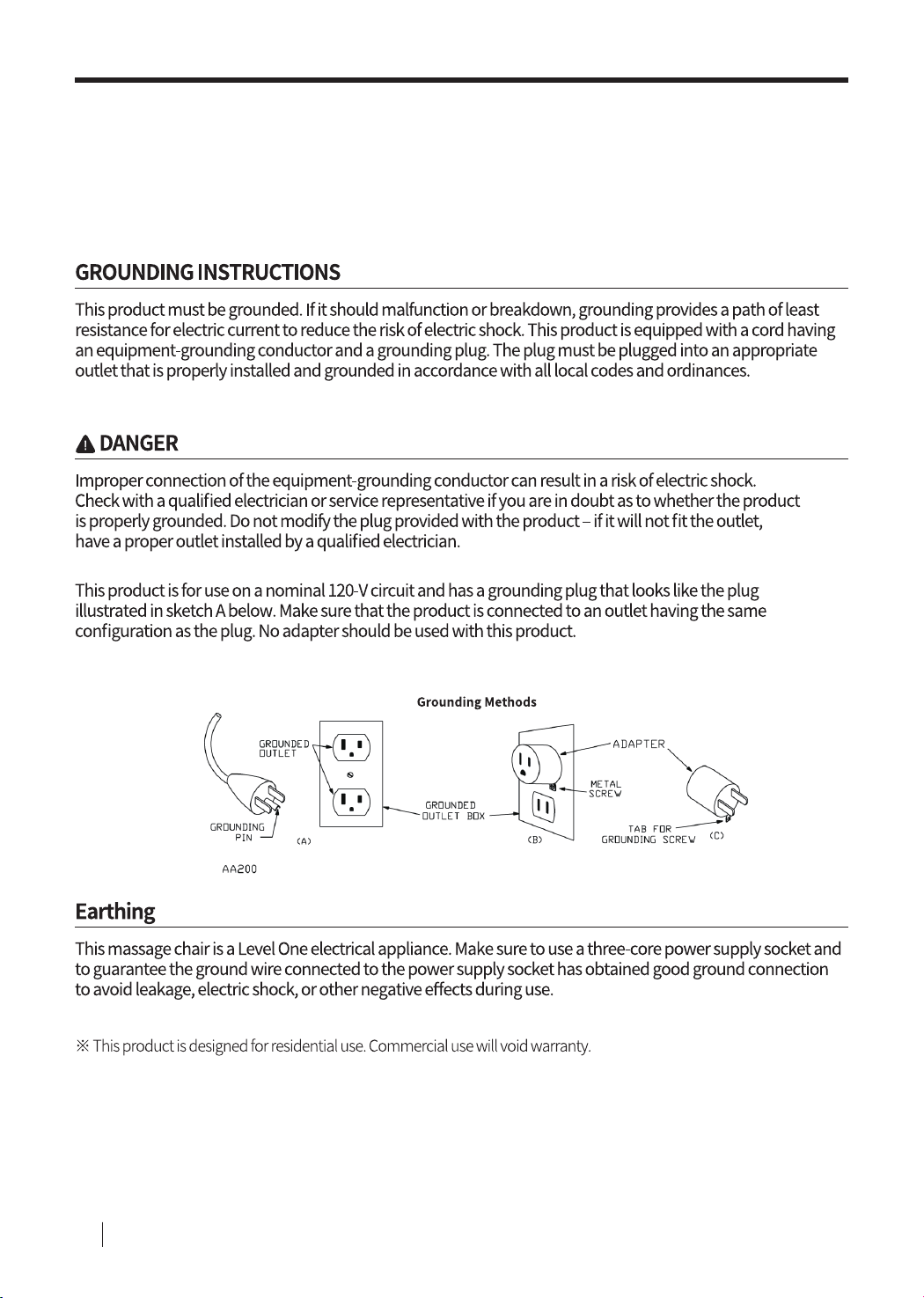
Please carefully read the safety precautions before using for proper
installation and operation.
WARNING -
Please do not try to install or repair the massage chairs
without the assistance of BODYFRIEND technicians.
BODYFRIEND is not responsible for replacement cost
if the product is damaged or breaks due to self- troubleshooting.
CAUTION – Please do not install in a non-residential settings.
This product is for non-commercial, residential use only.
Warr ant y is subject to cancellation if the pr oduct is used f or commercial purposes.
Prohibited
To reduce injury and risk of re:
Do not install in bathrooms or areas with
01
high humidity levels. Could result in
electric shock.
Avoid using in areas with excessive
02
amounts of dust or areas prone to rust.
Do not operate this device in settings with
03
temperatures exceeding 104°F.
Do not use outdoors.
04
Do not use near heaters or anything
05
radiating heat.
Install and use only when properly
06
grounded on at surfaces.
Use in areas with ample space
07
and good air circulation.
Do not use after disassembling parts.
08
Can result in product malfunctions.
Do not use concurrently with other
09
electronic or medical devices.
Do not place heavy objects on top of
11
this product.
Please take precautionary measures to
12
ensure toddlers, pets, and small beings
do not crawl under the body of the chair,
leg rest, and etc. to prevent any injuries or
damage.
Do not allow more than one person to
13
operate the machine at a time.
If the power cord or power plug becomes
14
damaged in any way, disconnect from
the main supply immediately and consult
an authorized service engineer for repair
or replacement.
Do not damage, excessively bend,
15
pull, twist, or knot any device cords.
Do not stand on the legrest before, after,
16
or while the device is sliding forward or
back to its original resting position.
Do not use aerosol (spray) products.
10
BODYFRIEND Massage chair
06
Page 7

Important Safety Instructions
Compulsory
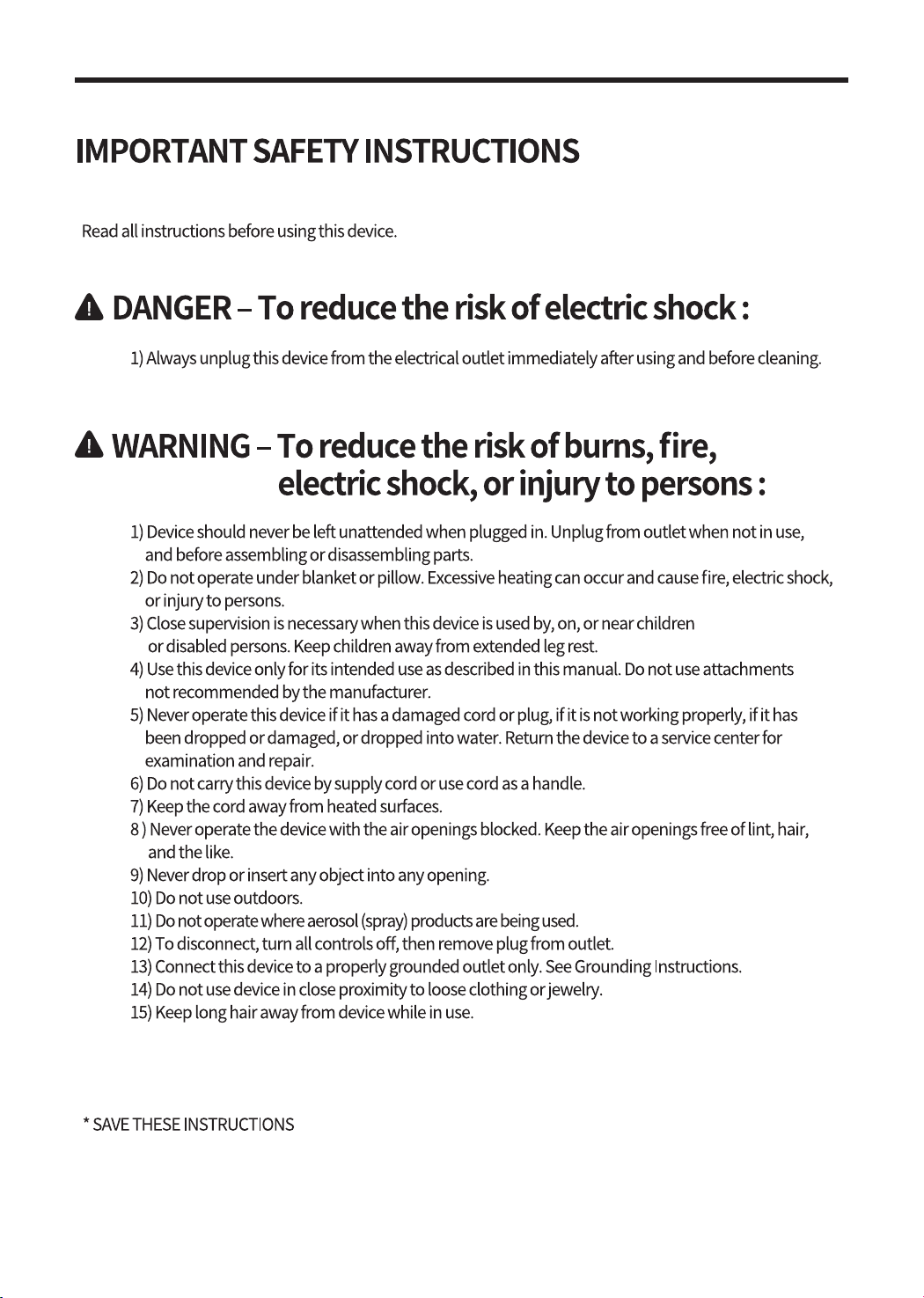
Check power supply before using.
01
Do not handle with wet hands.
02
Do not operate when body is wet.
03
Do not use after excessive eating.
04
Take precautionary measures to ensure
05
parts of the body or objects do not get
caught in any openings of the massage
chair.
When using targeted massage functions,
06
be aware of individual body signals, not to
over-stimulate targeted areas.
Individuals who have been hospitalized
07
for extended periods of time or are
recovering from medical injuries are asked
to use this product with caution.
Do not use if experiencing high fever or
08
show symptoms of high fever.
Do not use if suering from skin diseases
09
or have wounds not yet fully healed.
Consult a doctor before using if you
10
are a patient or suer from any body
malfunctions.
This device is not intended for use by
11
persons with reduced physical, sensory,
or mental capabilities or lack experience
and knowledge unless they are supervised
or have been given instructions concerning
the use of this device. Children should also
be supervised when using this device.
Consult a doctor before using if you suer
12
from any spinal disorders, osteoporosis, or
any other bone disorders.
Do not use if pregnant or have recently
14
given birth.
Please limit the use of this product for
15
children.
Be cautious not to let massage balls exert
16
excessive pressure to the spine.
Do not use this product on areas of the
17
body not intended for this device.
While the massage balls are initializing,
18
stay in the correct upright position for
accurate sensor locating.
Make sure the massage chair is upright
19
when mounting and dismounting.
Be cautious of hypothermia if unusual
20
fatigue or sleepiness ensues after receiving
a massage.
If you feel any pain or discomfort,
21
immediately stop the machine or adjust
settings to accommodate to personal
health needs/preferences.
Operate this device based on individual
22
health status.
People over 242lbs are not advised to use
23
this device.
Do not stand on the device. Operate the
24
chair only while being seated.
Do not stand on the leg rest.
25
Please be cautious of using the Brain
26
Massage feature on high volume for
extended periods of time.
Consult a doctor before using if you have
13
a pacemaker or any implantable medical
device.
This device complies with Part 15 of the FCC Rules. Operation is subject to the following two conditions:
(1) This device may not cause harmful interference, and (2) this device must accept any interference
received, including interference that may cause undesired operation.
07
Page 8
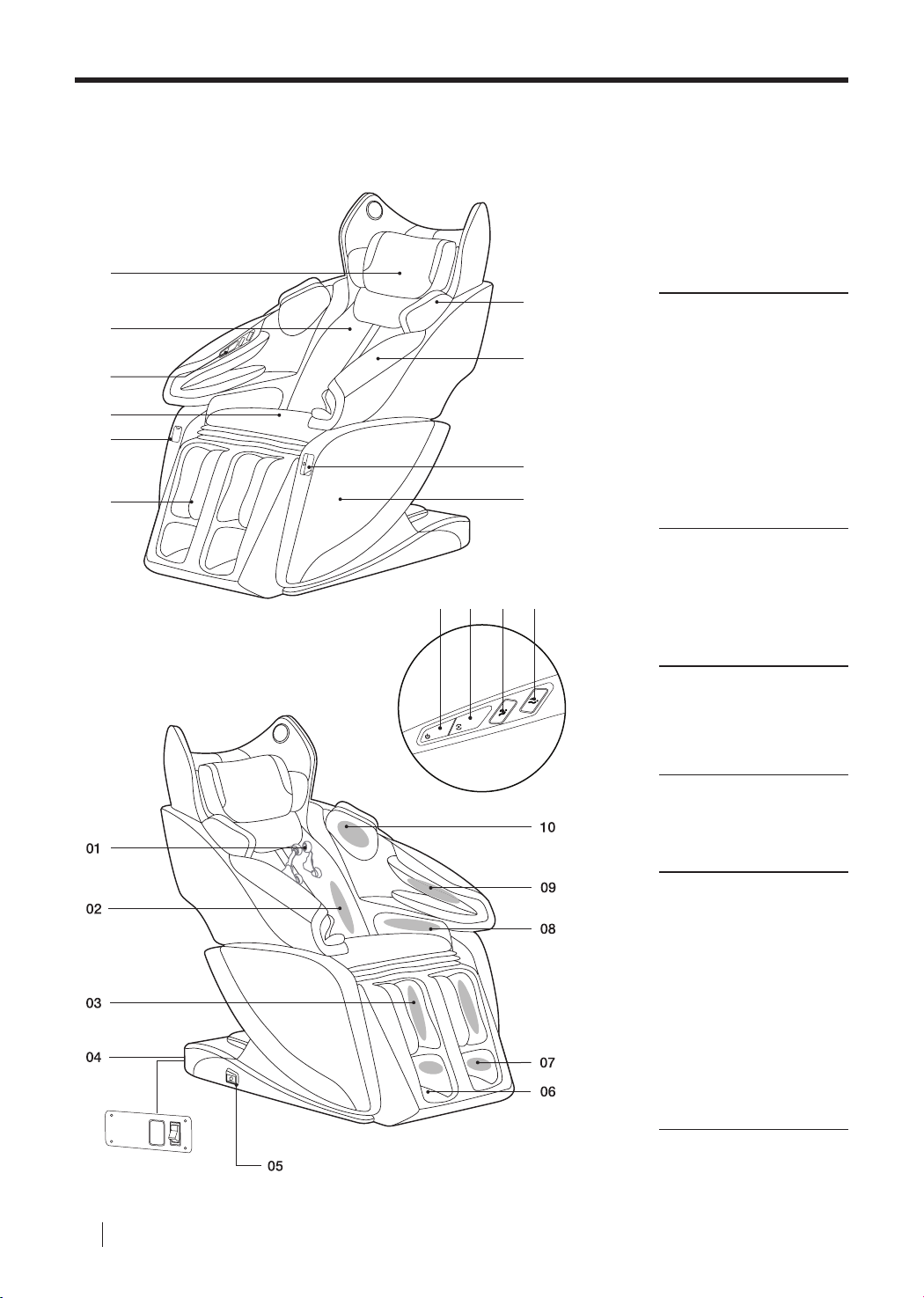
Components and Descriptions
01
02
03
04
05
06
01 02 03 04
MODE
POWER
10
09
08
07
Exterior
01
Head Rest
02
Back Rest
03
Embedded Touch Switch
04
Seat Cushion
05
Controller Storage
06
Leg Massage
07
Side Panel
08
USB Charging Port
09
Arm Massage
10
Shoulder Massage
Embedded Touch
Switch
01
Power ON/OFF
02
Auto Mode
03
Incline
04
Recline
BODYFRIEND Massage chair
08
Interior
01
Massage Balls
02
Back/Waist Airbags,
Back Heating
03
Calf Airbags
04
Power Source Terminal
05
Controller Socket
06
Feet Rollers
07
Feet Airbags
08
Thigh/Hips Airbags
09
Arm Airbags
10
Shoulder Airbags
Page 9
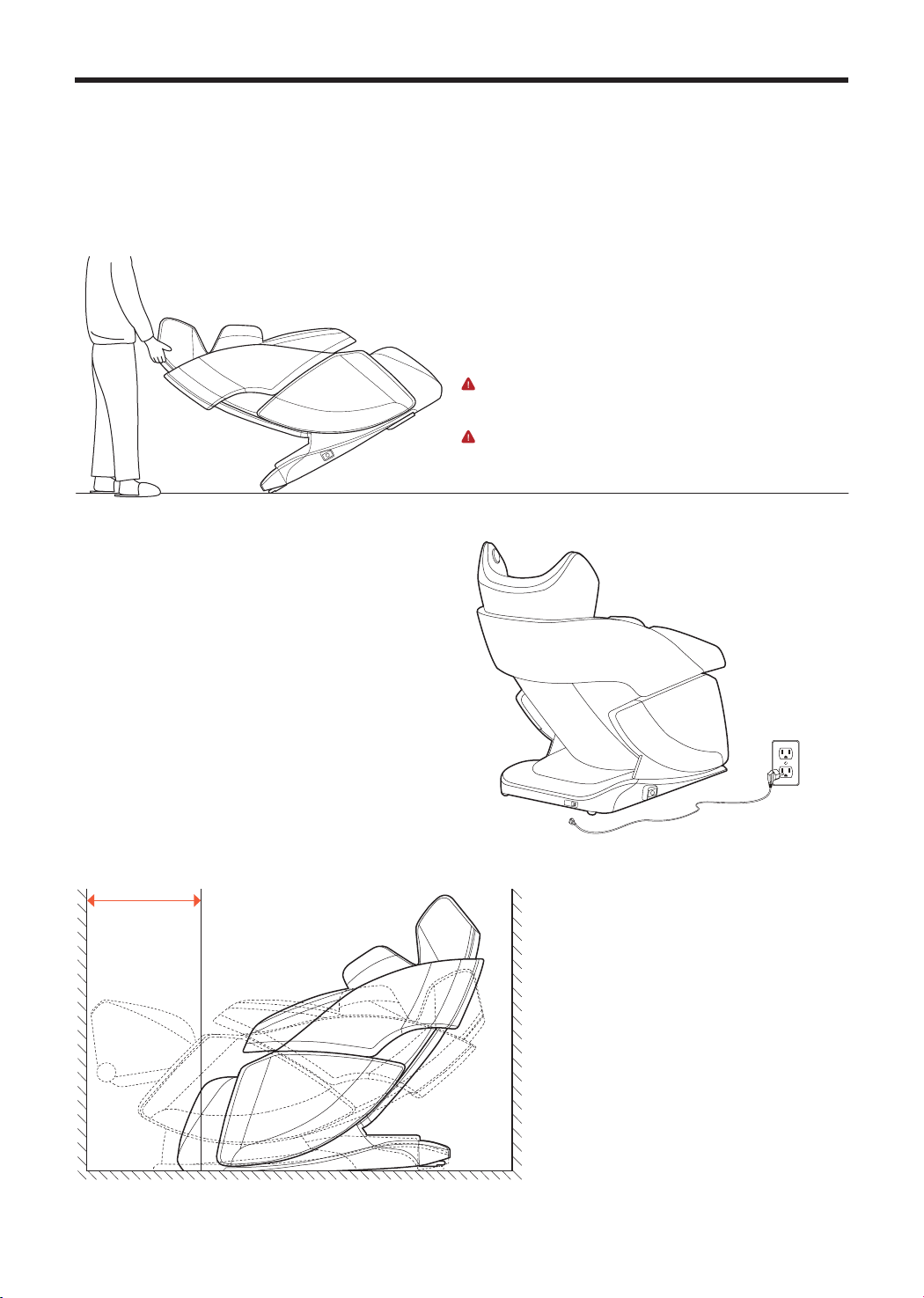
Transporting/Installing
Remove all cables and miscellaneous objects from
the oor. Then, tilt the massage chair backwards at
an angle and lift. After arriving at the desired location,
safely place the chair securely on the oor and begin
installing the chair.
WARNING
※ Do not drag and take precautions to not damage the oor.
※ Do not lift the chair by the leg unit.
IMPORTANT
※ To avoid injury or damage to the device, we recommend two or
more people when transporting.
01
Reserve ample space for
massage chair installation.
02
Remove all miscellaneous objects around
the massage which could hinder the installation
process.
03
Make sure no cables are stuck beneath
the massage chair.
20in
09
Page 10
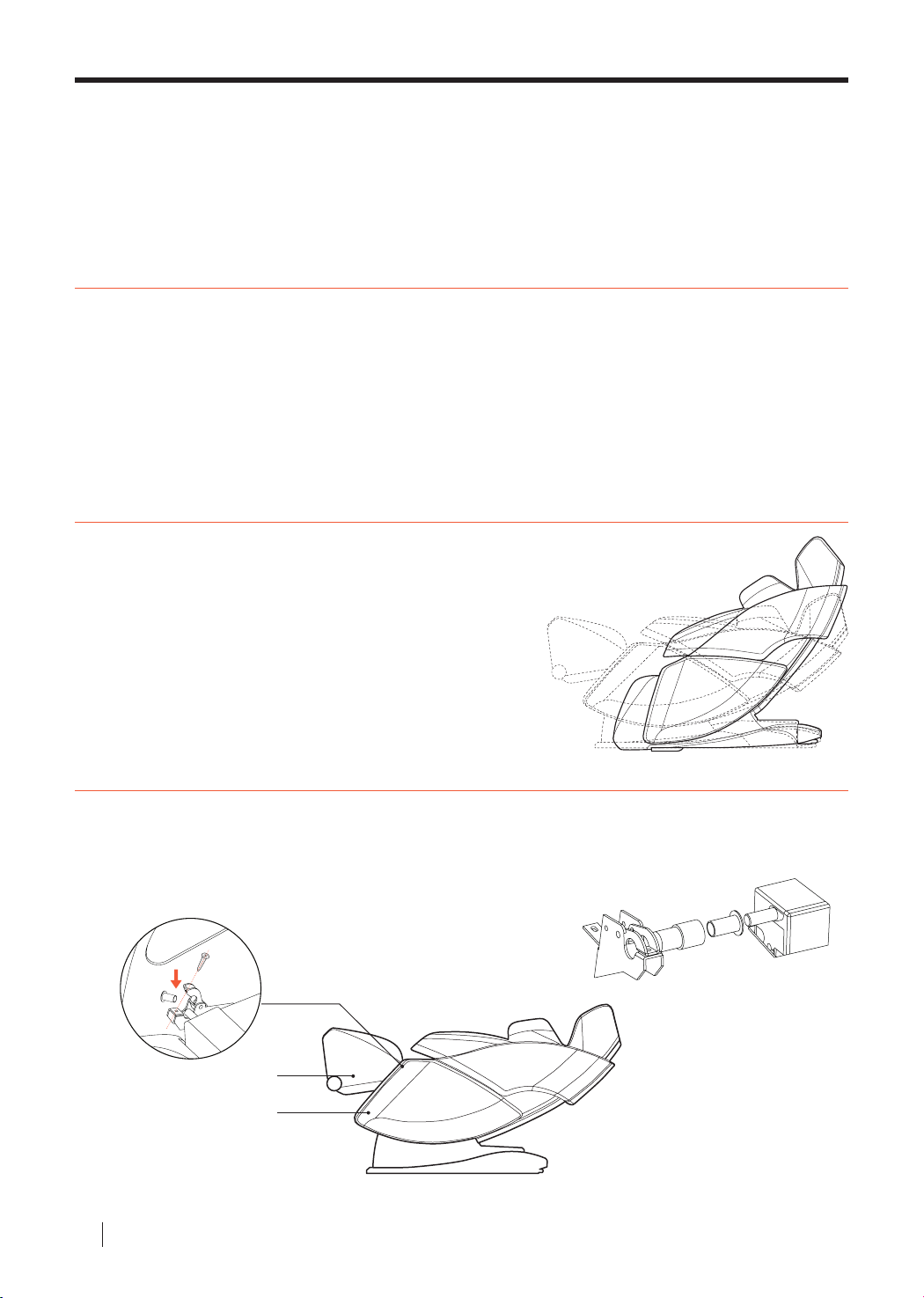
Installation Part 01
Step 1. Remove From Packaging
This product is packaged in three separate boxes.
Please check that you have received all necessary parts.
• Main Box
(Controller, Power Cord, Manual, Fuse, Leg Unit Connector Box, and Screws)
: Head Cushion, Middle Padding, Back Sheet, Accessories
• Arm/Shoulder Unit
• Leg Unit
Step 2. Return to Original Angle
Connect the power cord and use the controller to put
the massage chair to its original upright position.
Step 3. Connect the Leg Unit
Raise the leg angle to its highest possible angle (depicted below).
01
Connect the leg unit to the body of the massage chair.
02
Align the screw with the connecting unit as shown in the picture below.
03
Fasten the parts together using nails.
Leg Unit
Main Body
BODYFRIEND Massage chair
10
Leg Unit
Main Body
Page 11
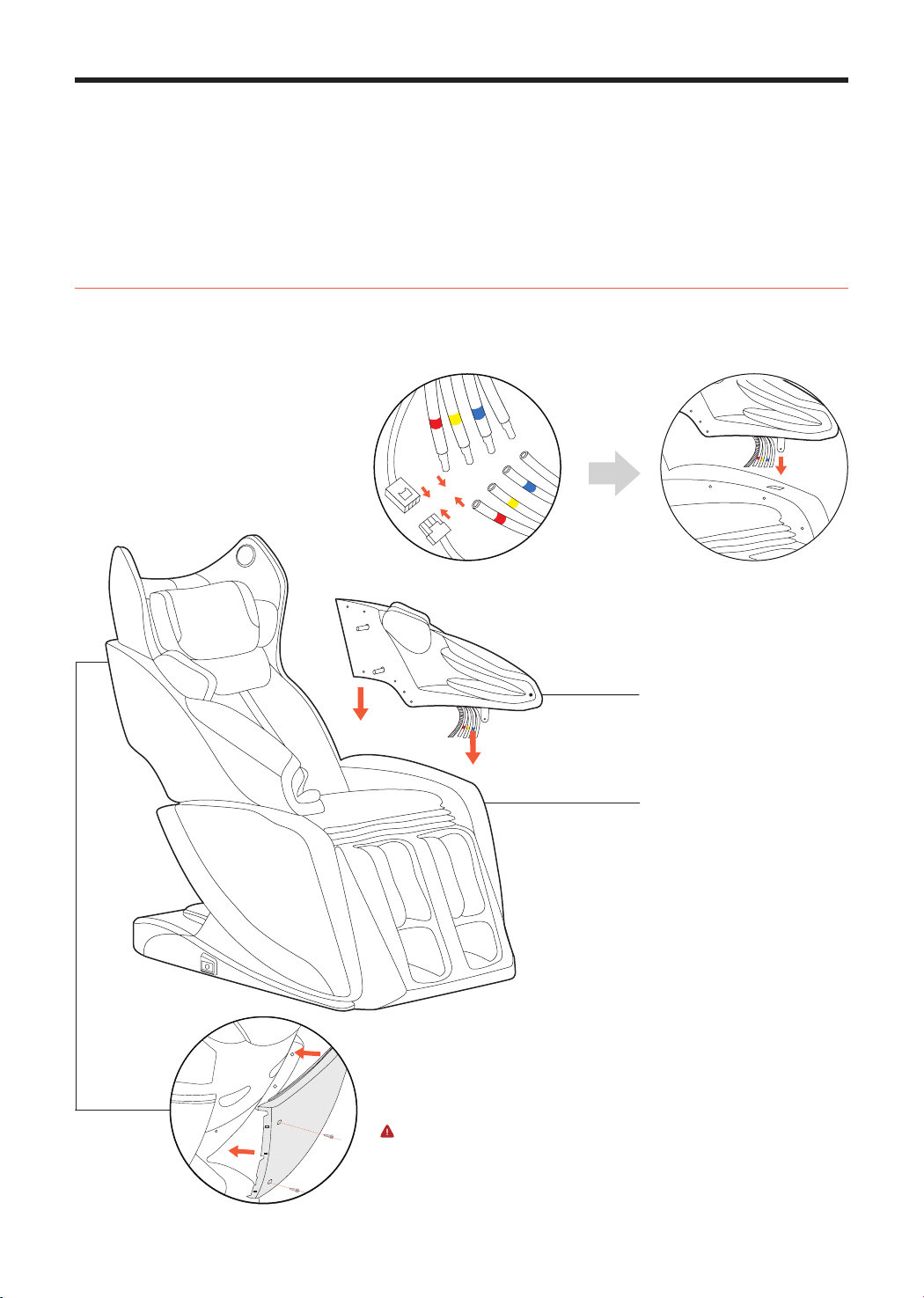
Installation Part 02
Step 4. Connect the Arm Units
After connecting the air hose and connector, organize them under the side panel.
01
After aligning the connecting unit with the body of the massage chair, x into place with a screw.
02
Back Cover
Arm Unit
Main Body
03
Attach the back panel to the body of the massage chair
with screws.
CAUTION
※ Do not lift or apply pressure to the back cover. Accidents or broken parts may
result.
11
Page 12
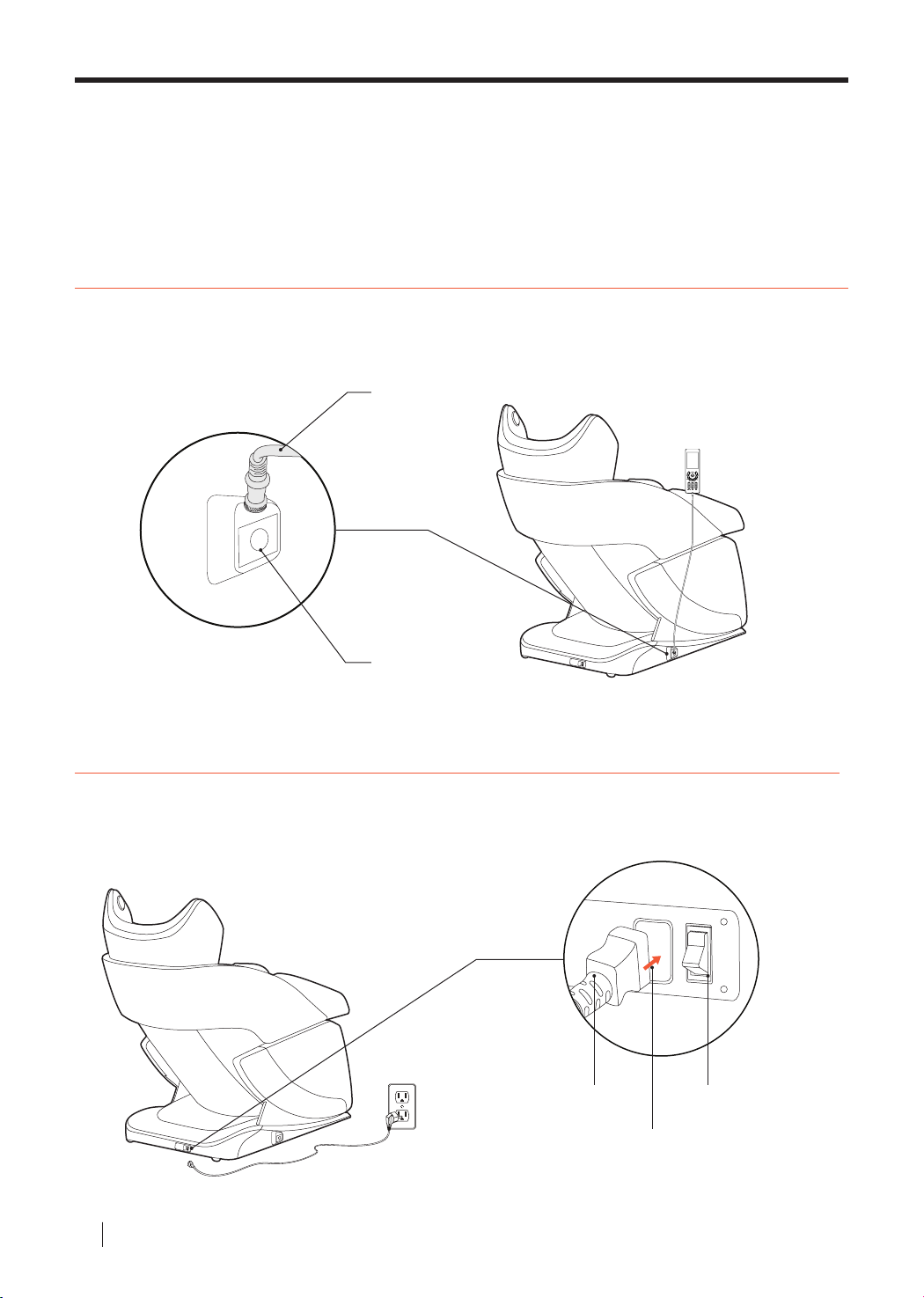
Installation Part 03
Step 5. Connect Controller
Locate the controller socket at the bottom right of the massage chair. Connect the controller cord to the
body of the massage chair.
Controller Cable
Controller Socket
Step 6. Connect to Power Supply
Plug one end of the power cord into the socket at the lower end of the massage chair (depicted below).
After plugging the other end of the power cord into the wall, ip power switch.
Power Cord Power Switch
Power Socket
BODYFRIEND Massage chair
12
Page 13
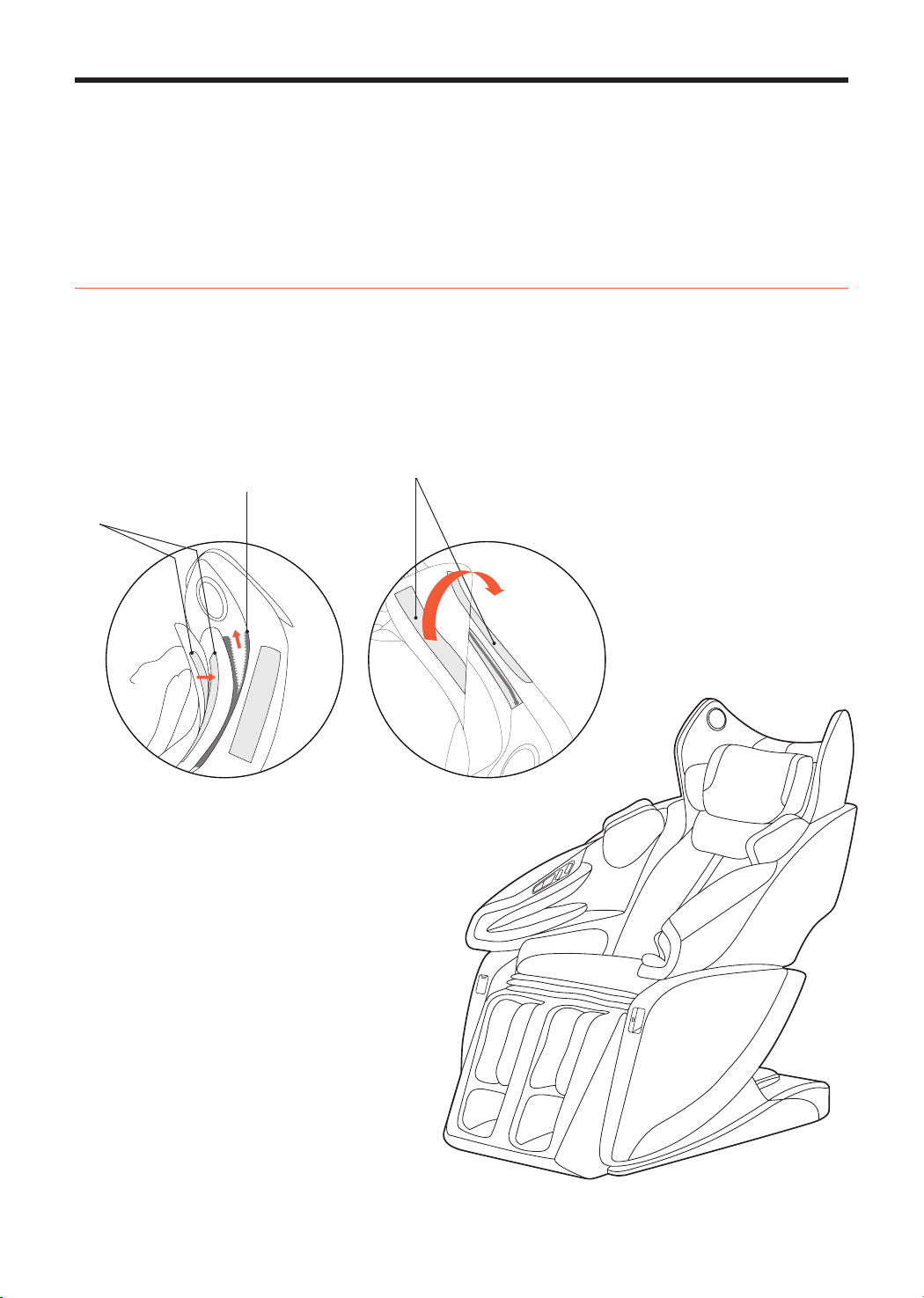
Installation Part 04
Step 7. Connect the Back/Head Cushion
Attach or detach head cushion according to preference. If the head cushion is attached, the massage
intensity for the neck and shoulders will decrease.
The back sheet can be attached using the zipper (01) and then velcro (02).
The head cushion can be attached likewise (length is adjustable).
02 Velcro
01 Zipp er
02 Velcro
13
Page 14
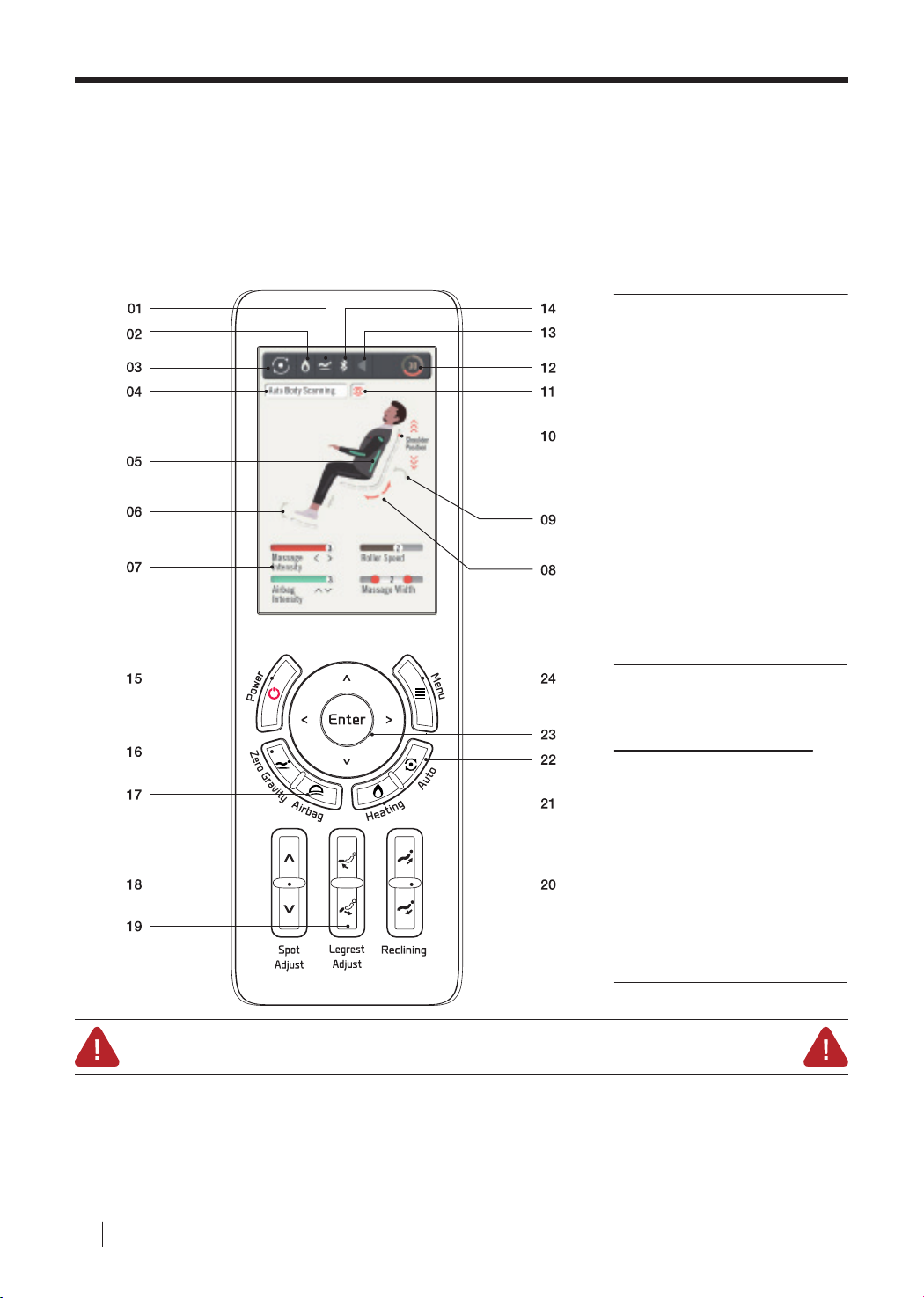
Controller Button Descriptions 01
Screen
Components
01
Zero Gravity Indicator
02
Heating Indicator
03
Auto/Manual Mode Indicator
04
Auto or Manual
Massage Technique Indicator
05
Air Massage Indicator
06
Leg Rest Adjust Indicator
07
Massage Intensity Indicator
Feet Roller Speed Indicator
Airbag Intensity Indicator
Width Indicator
08
Massage Module Movement Tracker
09
Reclining Indicator
10
Massage Module Spot Indicator
11
Massage Technique Indicator
12
Time Elapsed Indicator
13
Volume Control
14
Bluetooth Connectivity Indicator
Button
Components
15
Power
16
Zero Gravity
17
Airbag
18
Spot Adjust
19
Leg Rest Adjust
20
Reclining
21
Heating
22
Auto
23
Enter
24
Menu
Auto Slide Safety Warning
This massage chair is equipped with the automatic sliding function. Therefore, if the power button is pressed during
operation, the chair will start to automatically slide back to its original resting position. When the chair is sliding back to its
original state, please make sure children, pets, or other objects do not get caught. If there are any obstacles preventing the
chair from sliding back to its original state, immediately press any button on the controller to stop the auto slide. Please
use with caution.
BODYFRIEND Massage chair
14
Page 15
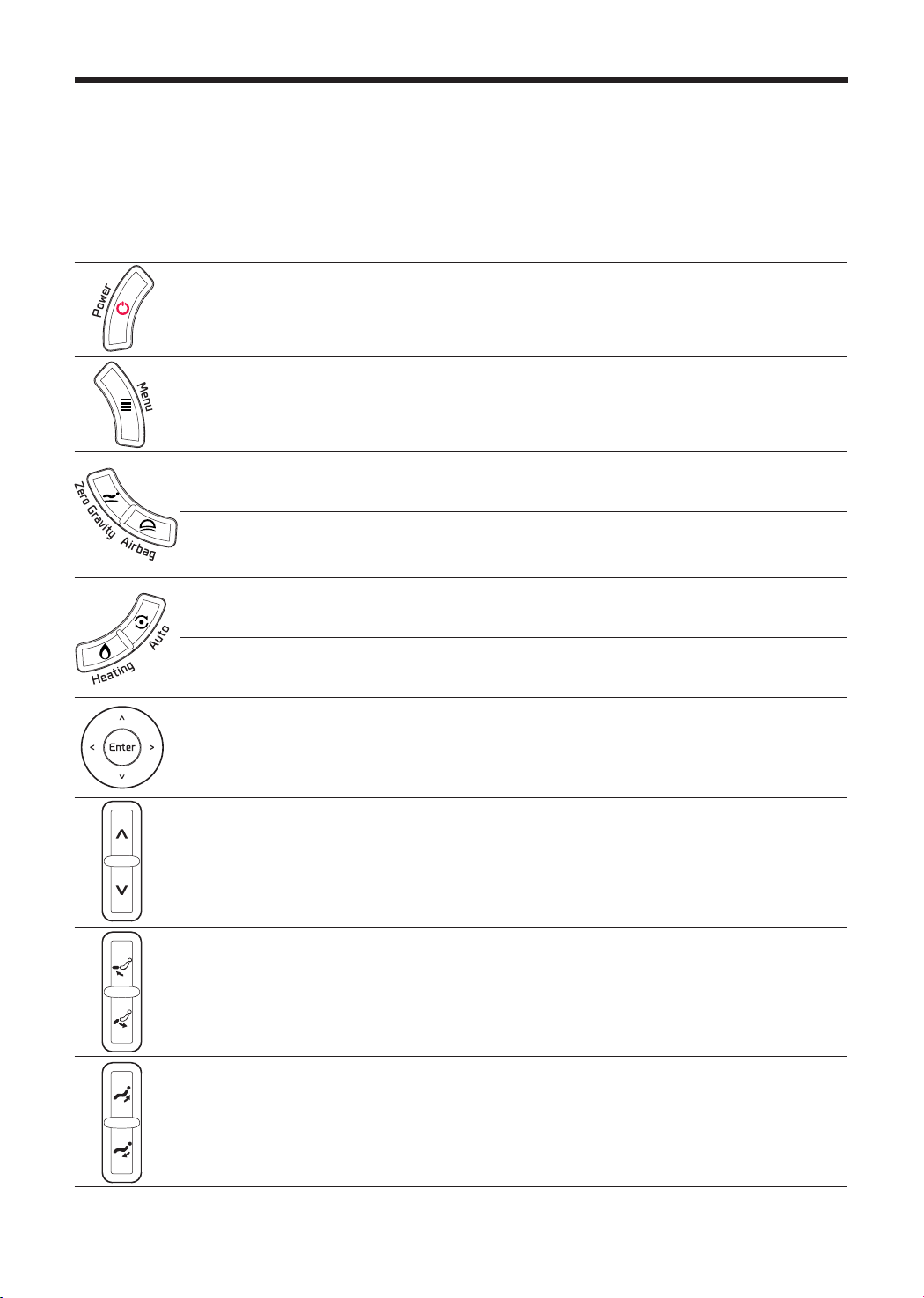
Controller Button Descriptions 02
This is the power button. If the [Power] button is pressed during a massage, the
Power
screen will ask user if the user would like to end the massage. If the massage
mode is ceased, massage balls, sliding feature, and etc. will all return to its
original resting position.
Menu
Zero
Gravity
Airbags
Auto
Heating
Arrow
Keys
Spot
Adjust
When the [Menu] button is pressed during operation, the menu screen will
appear or go back to the previous screen.
The [Zero Gravity] button will transition the body into the zero gravity position
and angle.
When the [Airbag] button is pressed during a massage mode, the airbag screen
will appear, allowing the user to adjust the airbag massage spot, intensity, and
etc.
The [Auto] button will quickly transition the user from one auto massage mode to
the next.
The [Heating] button will cause the heating screen to appear and allow the user
to adjust heating preferences.
The arrow keys allow the user to navigate between screen on the controller. On
the main screen, the [left/right] buttons control massage intensity levels and the
[up/down] buttons control airbag pressure levels.
In manual mode, the Spot Adjust buttons move the massage balls up or down
the back. In auto mode, the Spot Adjust buttons adjust the location of the
shoulders.
Leg Rest
Adjust
Reclining
The Leg Rest Adjust buttons move the leg rest up or down.
The Reclining buttons adjust the recline angles for the entire body.
15
Page 16
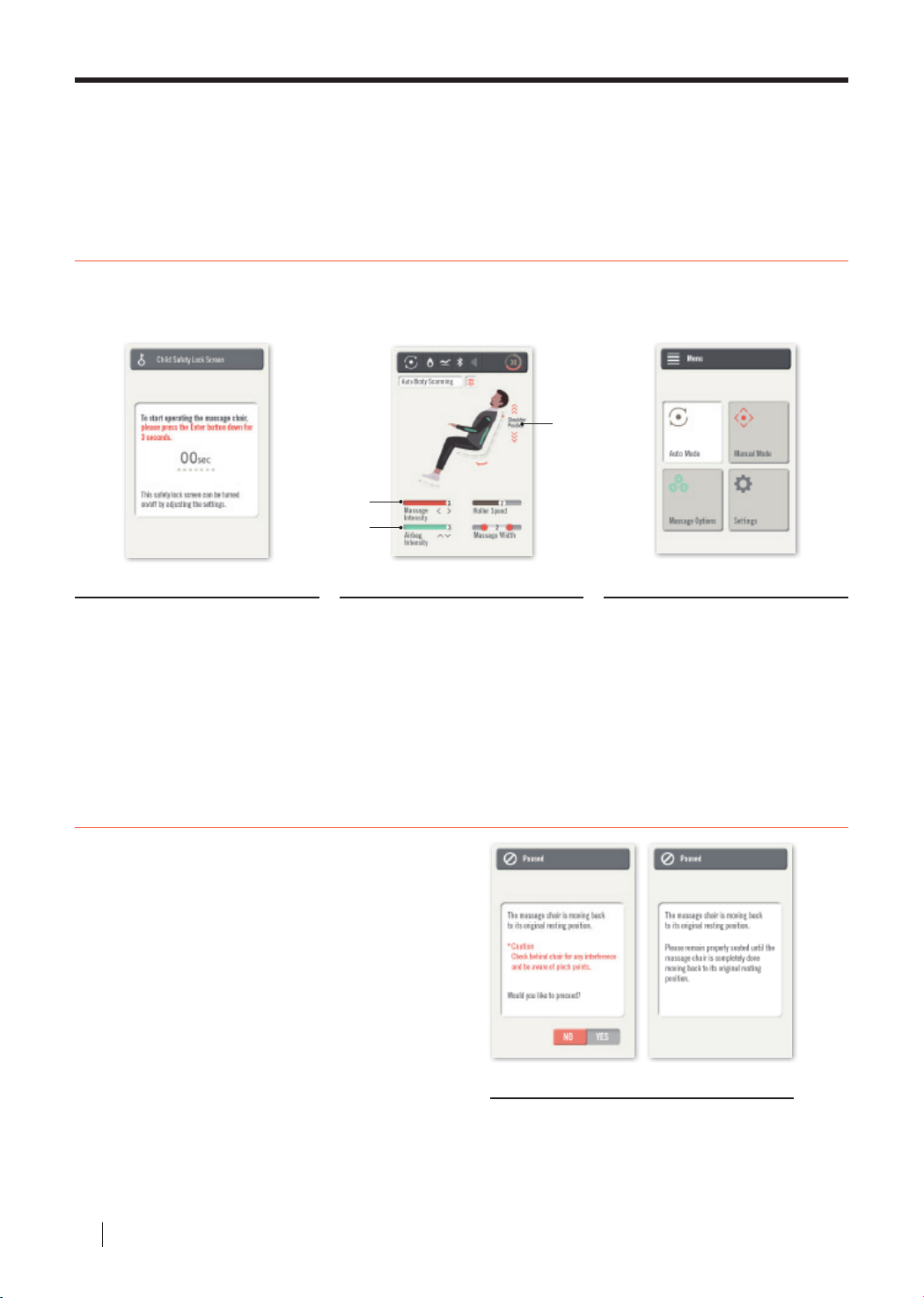
Controller Function Descriptions 01
Start
Press the [Power] button to turn on the screen and activate the massage chair.
When the child safety lock screen appears, hold down the [Enter] button for three seconds.
03
01
02
Child Safety Lock Screen Main Screen Menu Screen
The child safety lock screen has been
added as a safety precaution. After
activating the controller, the child safety
lock screen will appear requiring the user
to hold down the [Enter] button for three
seconds to transition to the next screen.
Users can make necessary changes in
Settings.
The main screen shows the current
state of the massage, elapsed time,
and etc. The [Right/Left] arrow keys
control massage intensity levels. The
[Up/Down] arrow keys control airbag
intensity levels. After the auto body
scanning is complete, the [Up/Down]
arrow keys allow shoulder spot
adjustment.
Finish
After nishing a massage mode or if user would like to
cease a massage mode, press the [Power] button.
A screen will appear asking for conrmation to end
the massage. Press [Enter] to conrm the end of the
massage mode and the machine will go back to its
original resting position.
The menu screen will appear when the
[Menu] button is pressed. Four options
with appear: Auto Mode, Manual Mode,
Massage Options, and Settings. Detailed
massage settings can be accessed through
Massage Options. Any other settings can
be accessed through Settings.
Pinch Point Prevention Screen
The pinch point prevention screen appears as
another safety measure just before the device is
turned o. Check for any objects that may prevent
the chair from moving back to its original position.
Then, press {Enter] to completely turn o the device.
BODYFRIEND Massage chair
16
Page 17
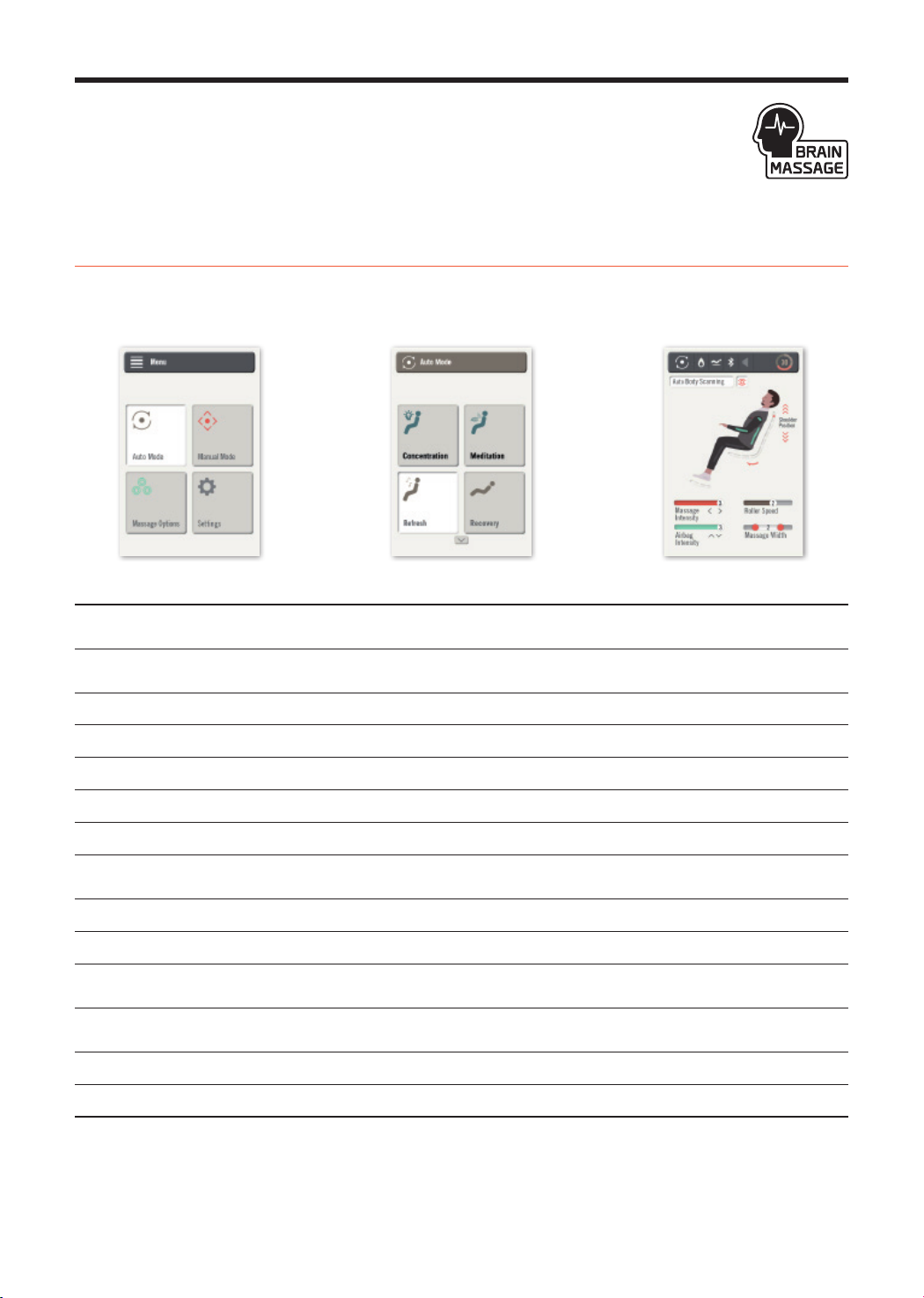
Controller Function Descriptions 02
Auto Modes
Press the [Menu] button. Go into Auto Modes and pick the preferred massage mode. Auto Body Scanning
uses sensors to pinpoint areas of your body (neck and shoulders). Massage balls will relocate to received
data and start massage mode.
Concentration
Meditation
Refresh
Recovery
Hip-Up
Rest
Athlete
Oce
Stretch
Auto Upper
Auto Lower
Lymphatic
Digestive
Waist Focused
Upper body massage while playing healing music increasing concentration and blood ow to the
brain.
Targets important acupoints in the body while playing healing music to relieve stress and
anxiety.
Simultaneously kneads and taps targeted shoulder area.
Continuous kneading and tapping on the shoulders, back, and waist.
Alternates acupressure and kneading on the hips and buttocks.
Thirty minute concentrated kneading for the entire back.
Combination of tapping, kneading, and acupressure massage targeting the shoulders.
Tapping and acupressure massage on the waist while reclining the body at
dierent angles.
Fully stretches out the body at a reclined angle while tapping and kneading the back.
Alternating tapping and acupressure massaging techniques throughout the upper body.
Concentrates on relieving tension for the lower half of the body by massaging
the legs and feet.
Pinpointed massage therapy to stimulate the Lymphatic system to drain toxins
from the body.
Acupressure massage to facilitate digestion and improve circulation throughout the body.
Massage balls target the body’s core to strengthen the waist and improve body posture.
※ Recline angles cannot be adjusted in Auto Mode as these are pre-programmed modes. Recline angles can be adjusted in Manual Mode.
17
Page 18
BODYFRIEND Customized Program 01
Brain Massage – Rested Brain Leads to Improved Productivity.
BODYFRIEND exclusive massage mode combines massaging and binaural beat healing music to improve
brain activity. Binaural Beats: A third sound is created in the brain when two sounds with varying frequencies
enters the ears. This third sound goes in accordance with the brainwaves to allow a deeper state of
relaxation and heighten concentration levels.
- Massage mode for those who experience reduced concentration levels due to
reasons such as overwork.
- Kneading and tapping massage on the neck, shoulders, and back to increase blood
ow to the brain while playing binaural healing music to enhance cognitive skills.
Brain Concentration
- Brain massage has dierent phases throughout the mode.
Step 1. Stabilization :
First phase allows the tired and overworked brain to relax and recharge.
Step 2. Recharge :
Second phase allows the body’s rhythm and brain condition to function
at the optimal level.
- Healing massage mode for those who experience high levels of stress.
- Massaging acupoints found in Oriental medicinal practices while listening to healing
binaural music can help improve stress and anxiety levels as well as stabilize
emotional uctuations.
- Brain massage has dierent phases throughout the mode.
Brain Meditation
※ Audio guidance does not turn on during the Brain Massage.
Step 1.Release :
First phase allows the brain to find peace and stability by clearing the day’s
stresses and thoughts.
Step 2. Relaxation :
Second phase allows for deeper relaxation to relieve stress and anxiety.
BODYFRIEND Massage chair
18
Page 19

BODYFRIEND Customized Program 02
Lymphatic
A special massage mode that lifts the legs and air massages the arms to allow lymph to ow freely
throughout the lymphatic system. Users who stand for extended periods of time, have muscle tension in the
lower body, or suer from swollen calves and feet are able to benet the most from this massage mode.
Digestive
A massage mode that aggressively targets acupoints on the back to help promote digestion. Compression
massage on the arms and legs allows blood to ow towards the digestive system. Users who suer from
frequent indigestion or have high stress levels are able to benet the most from this massage mode.
Rest
BODYFRIEND’s 30min Rest Mode provides healing bodies need.
Rest Mode is one of BODYFRIEND’s exclusively patented technologies.
STEP 01
STEP 02
STEP 03
Relieve tensions throughout the body with medium or strong massage levels at
recline angles up to 135°.
Set at recline angle of 150°, medium intensity kneading and acupressure massage
transcend the user to sleep. The back of the neck and head is gently kneaded to
further induce sleep.
Reclined at 170°, gentle kneading and acupressure techniques relax the body and
keep the body physically and mentally stabilized.
Stretch
Extend the body while relaxing on a massage chair. BODYFRIEND’s unique Stretch Mode
stretches the body even while sitting down. The entire body is encapsulated with airbags and
an air compression massage ensues. Airbags gently tug and pull on the body to create an
“extending” eect. From head to toe, gentle stretching allows the muscles to be loosened and
the body to be elongated.
19
Page 20
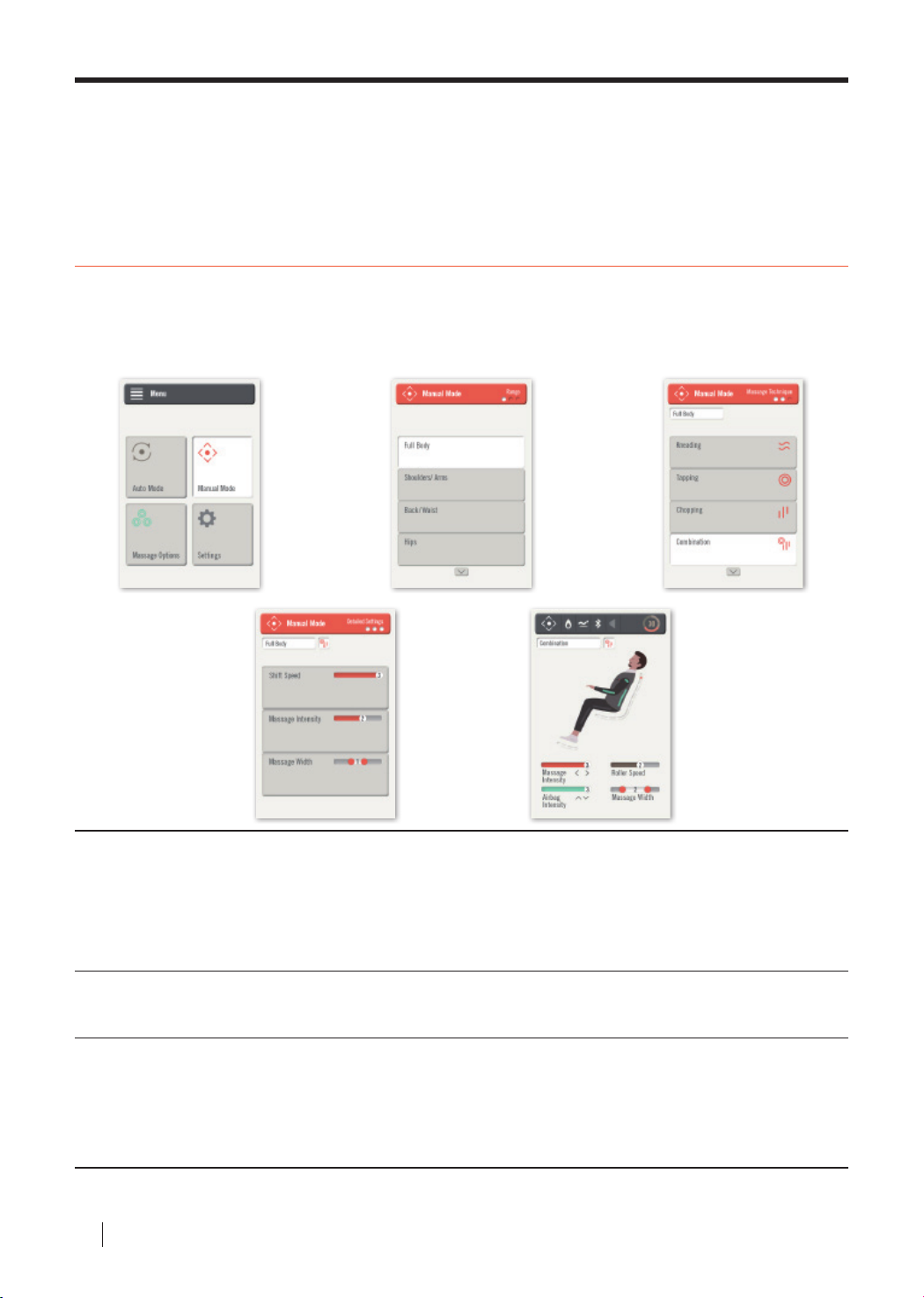
Controller Function Descriptions 03
Manual Mode
Press [Menu] and go into Manual Mode. Choose the preferred area of body for the massage.
To go back to the previous screen, press [Menu]. Use the arrow keys to choose the preferred massaging
technique and a set-up screen will appear. Personalize the massage options and start the massage.
Adjust the area that needs to be massaged.
Massage
Spot
Massage
Technique
Specic
Settings
※ When Manual Mode settings are adjusted during an Auto Mode, the Auto Mode will end and the manual mode will begin automatically.
- Full Body : All areas of the body.
- Shoulders : The neck and shoulders.
- Back/Waist : The back and waist area.
- Buttocks : The buttocks and lower thigh area.
Kneading/Tapping/Chopping/Combination (Kneading and Tapping)/ Acupressure
Massage module shift speeds, massage intensity, and massage width can all be adjusted.
- Shift Speed : The shifting speed of massage modules can be adjusted from Levels 1 to 3.
- Massage Intensity : Intensity can be adjusted between 3 levels.
- Massage Width : Massage module width can be adjusted to be narrow, medium, or wide.
BODYFRIEND Massage chair
20
Page 21
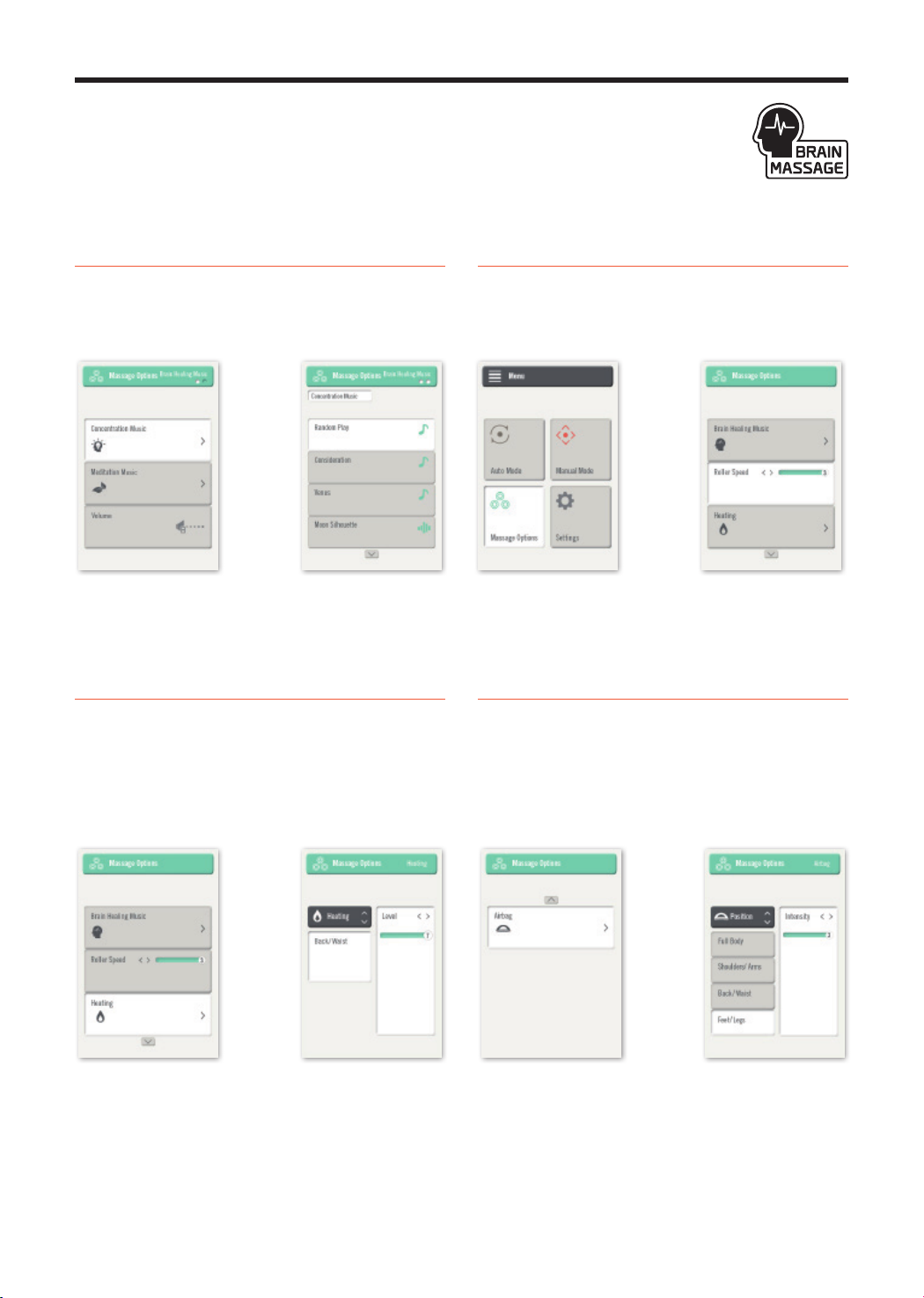
Controller Function Descriptions 04
Press [Menu] and go into Massage Options to adjust brain massage
music settings, roller speed, heating, and airbag settings.
Brain Massage Music Settings
Select “Concentration Music” or “Meditation Music”
to select preferred music.
※ User can select which brain massage music to listen to.
Otherwise, brain music will automatically turn on during Brain
Massage Auto Mode.
※ Volume for brain massage music can be adjusted in Settings.
Heating
There is a heating pad for the back and waist.
Heating temperatures can be adjusted in 9°F
increments, from 86°F to 140°F. Use the
arrow keys to adjust the heating levels and at 0, the
heating function is completely turned off.
[Left/Right]
Roller Speed
Increase the speed the feet rollers or turn on just
the feet rollers. The [Left/Right] keys adjust the
roller speeds.
Airbags
Airbag massage can be adjusted (airbag spot/
intensity). [Up/Down] adjusts the spot of the airbag
massage. [Left/Right] adjusts the intensity.
21
Page 22
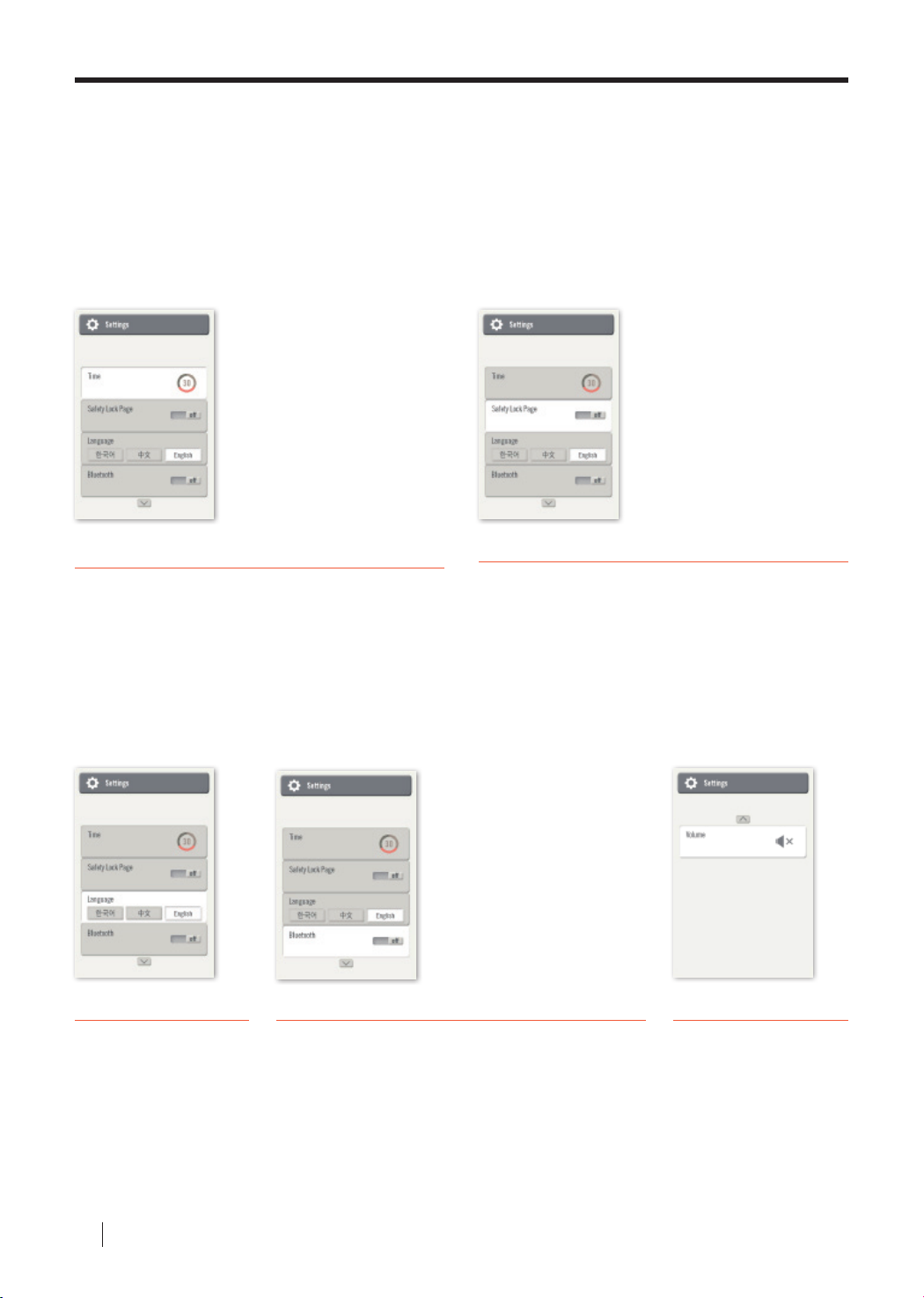
Controller Function Descriptions 05
Press [Menu] and go into the Settings.
Massage duration, Bluetooth, child safety lock screen, volume, and languages
can be adjusted.
Time Elapsed
Set massage duration time for 10min/20min/30min.
Use the arrow keys to increase massage
duration times.
(Brain Concentration Mode is pre-set to 20 min.
Brain Meditation Mode and Rest Mode is pre-set to 30 min)
Languages
Change the language
settings to Korean,
Chinese, or English. Use
the arrow keys to switch
between languages.
Bluetooth
Sync personal mobile devices with the Bluetooth
function to play music through the speakers while
receiving a massage.
Child Safety Lock Screen
Turn on the child safety lock screen to prevent.
children from operating the machine without
supervision. When the safety feature is on, the
child safety lock screen turns on when the
machine rst turns on. Press the [Enter] button
down for three seconds to proceed to the next
screen. Turn o the safety lock screen in Settings.
Connect to Bluetooth
Turn on Bluetooth under
01
Settings.
Turn on Bluetooth on mobile
02
device.
Search for BODYFRIEND REX-BT1
03
and pair.
Volume
Audio guidance can be
turned on or muted.
Volume can be adjusted.
BODYFRIEND Massage chair
22
Page 23

Product Specifications
Product Specications are subject to change without previous notications due to product improvements.
Model
Reclining Angle
Lower Body Angle
Kneading Speed
Kneading Width
Tapping
Heating Temperature
Power Supply
Rated Current
Power Frequency
Auto Timer
Airbags
Rollers
BFS-8010US
135°- 170°
0°-90°
25-35 kneads per minute
2.4in – 6.7in (6-17cm)
320-560 taps per minute
Max 140°F
110-120V~
1.8A
60Hz
10min/20min/30min
Shoulders/Waist/Arms/Hips/Calves/Feet
Feet Soles
Massage Balls
Auto Mode
Weight
(including packaging)
Product Weight
Cover / Upholstery
Dimensions Reclined
Dimensions Upright
Product Name
Neck/Shoulder/Back/Buttocks (Spot&Range)
14 Auto Massage Modes
322lbs
276lbs
ABS / Synthetic Leather
68.9in X 32.7in X 37in (175cmx83cmx94cm)
59.1in X 32.7in X 49.2in (150cmx83cmx125cm)
Massage Chair
23
Page 24

Troubleshooting
If you encounter minor malfunctions or errors, please refer below before contacting Customer Support.
Problem Causes Solutions
Massage chair does
not operate.
Beeping during activation.
Right and left shoulder
massage balls do
not align.
Noises get louder
during use.
Machine suddenly
stops during massage.
[Power] button on controller is
not turned on.
Auto Mode was not selected. Press [Enter] to select an Auto mode.
Power cord is not properly
plugged in.
Dead power cord. Please contact Customer Support.
Burnt fuse. Please contact Customer Support.
Non-electrical problem. Please contact Customer Support.
Machine noises occur. Not a problem. Machines generate noise.
Massage balls are manufactured
with about 0.8”(2cm) dierence
in alignment.
After extended hours of operation.
Worn out after years of use. Please contact Customer Support.
Accidently pressed the OFF button. Press the [Power] to restart the machine.
Massage time has nished. Restart the massage after 30 minutes.
Press [Power] to turn on the
controller on.
Properly plug power cord into socket.
Not a malfunction. Purposely
manufactured to created
alternating massage eects.
Please turn o the machine for
30min and start again.
Back motor and
legangle motor does
not move.
Does not go back to
original resting state.
Controller overheating.
Power cord and
controller cord
overheating.
Airbags do not activate.
BODYFRIEND Massage chair
24
Check for any stuck objects. Remove stuck objects.
Excessive pressure applied.
Excessive Use. Please contact Customer Support.
Overuse. Please contact Customer Support.
Excessive use.
Other miscellaneous causes. Please contact Customer Support.
Air hose disconnected. Connect the air hose.
Air related power cord
disconnected.
Please turn o the machine for
30 mins and start again.
Please turn o machine for 30 min
and start again.
Please contact Customer Support.
Page 25

Customer Support Guidelines
Massage chair interior parts
Warranty Guidelines
Fees Applied
※ Operational noises do not imply malfunctioning product.
Fees Applied
Mainboard, board parts, motors, air pump
Interior wiring/airhose
Cover Sheet
Any fading or deterioration of fabric, product parts, exterior cover sheet, etc.
caused by personal use.
Controller
Broken screens, damaged controller, etc. caused by personal use.
Fees apply for the following.
01
Problems due to liquids spilled within interior of product.
02
Broken or disabled parts due to excessive pressure.
03
Problems due to deformation or external defects caused by personal actions.
04
Problems due to not using parts or cords provided by BODYFRIEND.
05
Problems due to incorrect use of product.
06
Problems caused by user disabling parts of the machine.
07
Problems caused by repairs conducted by non-BODYFRIEND
technicians/employees.
08
Problems caused by natural disasters.
09
Failure to follow safety precautions addressed in User Manual.
10
Problems caused by personal misuse.
11
Problems caused by user’s reckless behavior, inability
to follow guidelines, and etc.
※ If after evaluation results conclude problems are not user’s fault, warranty will be issued.
REFER TO ADDITIONAL WARRANTY PAGE
* *
FOR SPECIFIC INFORMATION
25
Page 26

MEMO
BODYFRIEND Massage chair
26
Page 27
Page 28
REX-L PLUS
Product Name
Model
Manufacturer
Importer
Customer Support Contact Information
Voltage/Frequency
Rated Current
Manual No.
Massage Chair
BFS-8010US
Shanghai BODYFRIEND Electronic Technology Co., Ltd./China
BODYFRIEND Inc.
[email protected] / 888-299-8218 (toll free)
110-120V~, 60Hz
1.8A
180115
 Loading...