

Page 1

Boca’s Family ofBoca’s Family of
Boca’s Family of
Boca’s Family ofBoca’s Family of
11
1
11
Installation Guide
Installation GuideInstallation Guide
Installation GuideInstallation Guide
EtherEther
Ether
EtherEther
PrPr
Pr
PrPr
BocaNETBocaNET
BocaNET
BocaNETBocaNET
24-P24-P
24-P
24-P24-P
oductsoducts
oducts
oductsoducts
oror
or
oror
netnet
net
netnet
t Ethert Ether
t Ether
t Ethert Ether
tm
-24-24
-24
-24-24
net Hubnet Hub
net Hub
net Hubnet Hub
Page 2

22
2
22
BocaNETBocaNET
BocaNET
BocaNETBocaNET
-24-24
-24
-24-24
Page 3
33
3
33
BefBef
Bef
BefBef
Many products have large, easy-to-read legends to
allow for the easy configuring of the product. This
installation manual contains detailed instructions.
Most included software has automatic installation
programs to place the software correctly onto your
computer. However, as all computers are configured
differently, you may be required to perform some basic DOS or Windows
tasks. If you are not familiar with basic DOS commands such as DIR,
CD, or EDIT, you should check your DOS manual, or seek assistance
from you local computer dealer to install the product.
HoHo
Ho
HoHo
oror
e e
YY
or
e
oror
e e
w to get w to get
w to get
w to get w to get
ou Begou Beg
Y
ou Beg
YY
ou Begou Beg
in yin y
in y
in yin y
TT
echnical echnical
T
echnical
TT
echnical echnical
our Installaour Installa
our Installa
our Installaour Installa
AssistanceAssistance
Assistance
AssistanceAssistance
tiontion
tion
tiontion
The dealer that you purchased this product or your computer from is the
first place you should go for technical assistance. The dealer is usually
the most qualified source of help, and is most
familiar with your system and how this product
should be installed. Many dealers have customer
service and technical support programs, with
varying levels of support offered, depending on
your needs and computer knowledge.
whenever a prwhenever a pr
whenever a pr
whenever a prwhenever a pr
If your Dealer Can’t Assist youIf your Dealer Can’t Assist you
If your Dealer Can’t Assist you
If your Dealer Can’t Assist youIf your Dealer Can’t Assist you
If you can’t get assistance from your dealer, the manufacturer provides
varying levels of technical assistance as summarized on the following
page.
oblem occurs.oblem occurs.
oblem occurs.
oblem occurs.oblem occurs.
Please contact the dealer firstPlease contact the dealer first
Please contact the dealer first
Please contact the dealer firstPlease contact the dealer first
Page 4
44
4
44
Boca BBSBoca BBS
Boca BBS
Boca BBSBoca BBS
561-241-1601561-241-1601
561-241-1601
561-241-1601561-241-1601
TT
echnicalechnical
T
echnical
TT
1
2
4
3
5
7
6
8
9
1
2
4
3
5
7
6
8
9
echnicalechnical
Support FaxSupport Fax
Support Fax
Support FaxSupport Fax
561-997-2163561-997-2163
561-997-2163
561-997-2163561-997-2163
Automated Automated
Automated
Automated Automated
561-995-9456561-995-9456
561-995-9456
561-995-9456561-995-9456
Fax Retrieval SystemFax Retrieval System
Fax Retrieval System
Fax Retrieval SystemFax Retrieval System
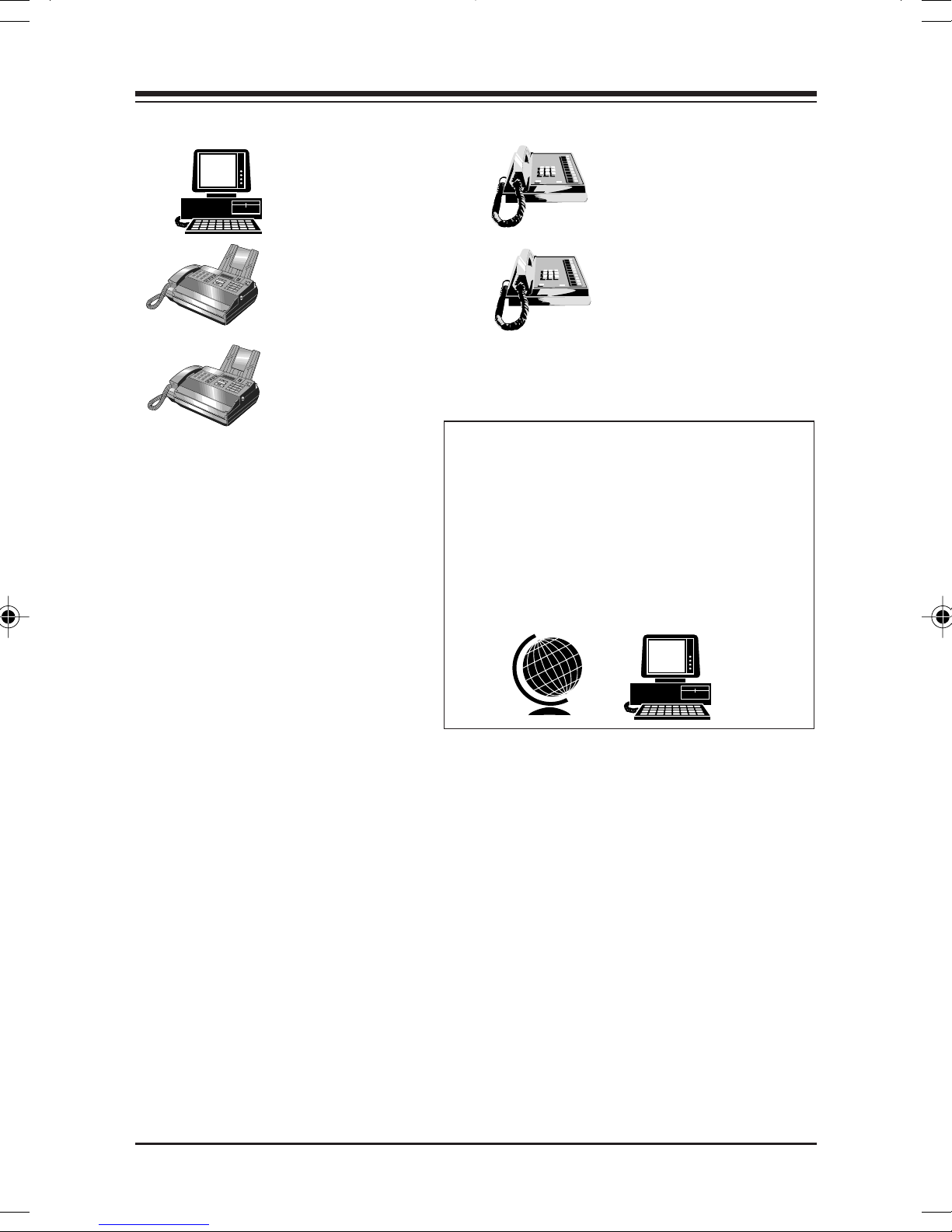
The Standard Free Technical
Support number is for quick
answers to specific inquiries
on product features and
technical questions (call
241-8088241-8088
241-8088; M-F, 8 am to 6:30 pm
241-8088241-8088
561-561-
561-
561-561-
EST). Direct access to technical
Standard FrStandard Fr
Standard Fr
Standard FrStandard Fr
TT
echnical Supportechnical Support
T
echnical Support
TT
echnical Supportechnical Support
561-241-8088561-241-8088
561-241-8088
561-241-8088561-241-8088
Priority ServicePriority Service
Priority Service
Priority ServicePriority Service
900-555-4900900-555-4900
900-555-4900
900-555-4900900-555-4900
($2 per minute)($2 per minute)
($2 per minute)
($2 per minute)($2 per minute)
On-Line Support!On-Line Support!
On-Line Support!
On-Line Support!On-Line Support!
CompuServeCompuServe
CompuServe
CompuServeCompuServe
InternetInternet
Internet
InternetInternet
email:email:
email:
email:email:
on the Won the W
on the W
on the Won the W
http://wwwhttp://www
http://www
http://wwwhttp://www
::
:
::
: GO BOCA: GO BOCA
: GO BOCA
: GO BOCA: GO BOCA
orld-wide WEB:orld-wide WEB:
orld-wide WEB:
orld-wide WEB:orld-wide WEB:
.bocaresearch.com.bocaresearch.com
.bocaresearch.com
.bocaresearch.com.bocaresearch.com
eeee
ee
eeee
support representatives is
provided on a limited basis. If
you require immediate
attention or in-depth help with
the installation of the product,
please call our 900-priority
support number for service. This number gives you immediate access to
senior-level technicians. The number is
900-555-4900 900-555-4900
900-555-4900. You will be charged
900-555-4900 900-555-4900
$2.00 per minute. The charges will appear on your next phone bill.
Damaged or Missing ItemsDamaged or Missing Items
Damaged or Missing Items
Damaged or Missing ItemsDamaged or Missing Items
We use many world-class quality assurance programs to ensure the
product you purchased is of the highest caliber. Sometimes, however, a
component may be missing from the box, or is damaged or corrupt in
some way. If this happens, immediately return the entire package to your
place of purchase so you may exchange it for a new one. Your dealer
should be able to provide you with an exchange far more quickly than by
contacting us directly. If for some reason you are unable to return the
product directly to its place of purchase, refer to the “Servicing Your
Product” and “Warranty” sections in this manual for instructions.
BocaNETBocaNET
BocaNET
BocaNETBocaNET
-24-24
-24
-24-24
Page 5

ContentsContents
Contents
ContentsContents
55
5
55
Section One: IntroductionSection One: Introduction
Section One: Introduction
Section One: IntroductionSection One: Introduction
Section Two: InstallationSection Two: Installation
Section Two: Installation
Section Two: InstallationSection Two: Installation
Section Three: Network ConfigurationSection Three: Network Configuration
Section Three: Network Configuration
Section Three: Network ConfigurationSection Three: Network Configuration
3.1 10BASE-T Ports3.1 10BASE-T Ports
3.1 10BASE-T Ports
3.1 10BASE-T Ports3.1 10BASE-T Ports
3.2 10BASE2 Ports3.2 10BASE2 Ports
3.2 10BASE2 Ports
3.2 10BASE2 Ports3.2 10BASE2 Ports
3.3 AUI Ports3.3 AUI Ports
3.3 AUI Ports
3.3 AUI Ports3.3 AUI Ports
3.4 Network Combinations3.4 Network Combinations
3.4 Network Combinations
3.4 Network Combinations3.4 Network Combinations
3.5 Single Workgroup3.5 Single Workgroup
3.5 Single Workgroup
3.5 Single Workgroup3.5 Single Workgroup
3.6 Cascaded Network3.6 Cascaded Network
3.6 Cascaded Network
3.6 Cascaded Network3.6 Cascaded Network
3.7 Cascaded Network with Routers3.7 Cascaded Network with Routers
3.7 Cascaded Network with Routers
3.7 Cascaded Network with Routers3.7 Cascaded Network with Routers
3.8 Expanded Network3.8 Expanded Network
3.8 Expanded Network
3.8 Expanded Network3.8 Expanded Network
Section Four: Cabling CharacteristicsSection Four: Cabling Characteristics
Section Four: Cabling Characteristics
Section Four: Cabling CharacteristicsSection Four: Cabling Characteristics
4.1 Cable Type4.1 Cable Type
4.1 Cable Type
4.1 Cable Type4.1 Cable Type
..........................................................................................................................................
.....................................................................
..........................................................................................................................................
........................................................................................................................
............................................................
........................................................................................................................
....................................................................................................................................
..................................................................
....................................................................................................................................
............................................................................................................
......................................................
............................................................................................................
..........................................................................................................
.....................................................
..........................................................................................................
....................................................................................................................
..........................................................
....................................................................................................................
......................................................................................
...........................................
......................................................................................
..........................................................................................................
.....................................................
..........................................................................................................
........................................................................................................
....................................................
........................................................................................................
......................................................................................................
...................................................
......................................................................................................
......................................................
...........................
......................................................
....................................................
..........................
....................................................
............................................................
..............................
............................................................
1313
13
1313
1717
17
1717
1717
17
1717
1919
19
1919
2121
21
2121
2222
22
2222
2323
23
2323
2424
24
2424
2525
25
2525
2626
26
2626
2828
28
2828
2828
28
2828
66
6
66
4.2 10BASE-T Pin Assignments4.2 10BASE-T Pin Assignments
4.2 10BASE-T Pin Assignments
4.2 10BASE-T Pin Assignments4.2 10BASE-T Pin Assignments
4.3 Crossover Function4.3 Crossover Function
4.3 Crossover Function
4.3 Crossover Function4.3 Crossover Function
4.4 Straight-Through Wiring4.4 Straight-Through Wiring
4.4 Straight-Through Wiring
4.4 Straight-Through Wiring4.4 Straight-Through Wiring
4.5 Crossover Wiring4.5 Crossover Wiring
4.5 Crossover Wiring
4.5 Crossover Wiring4.5 Crossover Wiring
Section Five: TroubleshootingSection Five: Troubleshooting
Section Five: Troubleshooting
Section Five: TroubleshootingSection Five: Troubleshooting
5.1 Status/Diagnostic LEDs5.1 Status/Diagnostic LEDs
5.1 Status/Diagnostic LEDs
5.1 Status/Diagnostic LEDs5.1 Status/Diagnostic LEDs
5.2 Installation Test5.2 Installation Test
5.2 Installation Test
5.2 Installation Test5.2 Installation Test
Appendix A: SpecificationsAppendix A: Specifications
Appendix A: Specifications
Appendix A: SpecificationsAppendix A: Specifications
Appendix B: FCC ComplianceAppendix B: FCC Compliance
Appendix B: FCC Compliance
Appendix B: FCC ComplianceAppendix B: FCC Compliance
Appendix C: Servicing Your Boca ProductAppendix C: Servicing Your Boca Product
Appendix C: Servicing Your Boca Product
Appendix C: Servicing Your Boca ProductAppendix C: Servicing Your Boca Product
WarrantyWarranty
Warranty
WarrantyWarranty
GlossaryGlossary
Glossary
GlossaryGlossary
........................................................................................................................................................................
....................................................................................
........................................................................................................................................................................
..........................................................................................................................................................................
.....................................................................................
..........................................................................................................................................................................
......................................................................................................
...................................................
......................................................................................................
..............................................................................................................
.......................................................
..............................................................................................................
........................................................................................
............................................
........................................................................................
..................................................................................................................
.........................................................
..................................................................................................................
..................................................................................................
.................................................
..................................................................................................
........................................................................................
............................................
........................................................................................
......................................................................
...................................
......................................................................
................................................................................
........................................
................................................................................
....................................................................................
..........................................
....................................................................................
..........................................
.....................
..........................................
2929
29
2929
3030
30
3030
3131
31
3131
3131
31
3131
3333
33
3333
3333
33
3333
3636
36
3636
3737
37
3737
3838
38
3838
3939
39
3939
4343
43
4343
4444
44
4444
Page 6

66
6
66
Section One: IntrSection One: Intr
Section One: Intr
Section One: IntrSection One: Intr
Congratulations on purchasing Boca Research’s BocaNET-24.
This low-cost compact Ethernet hub is fully compliant with
IEEE 802.3 standards. Its highly integrated solution
constantly monitors signal quality ensuring increased
network reliability. The case is designed for desktop usage,
rack, or wall mounting. Multiple concentrators for cascading
may be placed on one another.
FF
eaea
turtur
F
ea
FF
eaea
• Low-cost complete network expansion capabilities
e Highlights:e Highlights:
tur
e Highlights:
turtur
e Highlights:e Highlights:
oductionoduction
oduction
oductionoduction
• Designed with highly integrated DP83959 ASICs
• Attachment Unit Interface (AUI) port allows connectivity
with 10BASE5 (“thick” Ethernet), 10BASE2 (“thin”
Ethernet), as well as 10BASE-FL and/or Fiber Optic Interrepeater Link (FOIRL) segments (with appropriate adapter)
• Includes one expansion port for 10BASE2, AUI, or Fiberoptic
• Fully compliant with IEEE 802.3 specifications
BocaNETBocaNET
BocaNET
BocaNETBocaNET
-24-24
-24
-24-24
Page 7

• Easy installation and setup
• Supports automatic partitioning: the logical disabling of
ports that experience an excessive number of collisions.
Automatic re-connection occurs when error conditions
have been corrected.
• Twisted-pair Link Test capability conforming to the
10BASE-T standard.
• Automatic polarity detection and correction permits
77
7
77
automatic recovery due to wiring err ors.
Functional DescriptionFunctional Description
Functional Description
Functional DescriptionFunctional Description
The BocaNET-24 is an implementation of an IEEE 802.3/
Ethernet repeater or hub. It provides 24 10BASE-T ports, one
10BASE2 port, one AUI port, and one expansion port in a
single hub. The BocaNET-24 complies with the full set of
repeater basic functions as defined in section 9 of ISO 8802.3
(ANSI/IEEE 802.3). These functions are defined below:
Repeater FunctionRepeater Function
Repeater Function
Repeater FunctionRepeater Function
If any single network port senses the start of a valid packet
on its receive lines, then the BocaNET-24 will re-transmit the
received data to all other enabled network ports.
IntroductionIntroduction
Introduction
IntroductionIntroduction
Page 8

88
8
88
Signal RegenerationSignal Regeneration
Signal Regeneration
Signal RegenerationSignal Regeneration
When re-transmitting a packet, the BocaNET-24 ensures that
the outgoing packet complies with the 802.3 specification in
terms of preamble structure, voltage amplitude, and timing
characteristics.
JJ
aa
bber Locbber Loc
J
a
bber Loc
JJ
aa
bber Locbber Loc
kup Prkup Pr
kup Pr
kup Prkup Pr
otectionotection
otection
otectionotection
The BocaNET-24 implements a built-in jabber protection
scheme to ensure that the network is not disabled due to the
transmission of excessively long data packets.
Collision HandlingCollision Handling
Collision Handling
Collision HandlingCollision Handling
The BocaNET-24 will detect and r espond to collision
conditions as specified in 802.3. It will also protect the
network from excessive collisions by “partitioning” the
offending port from the rest of the network. Once a port is
partitioned, the data received from that port will not be
repeated. However, any other data on the network will be retransmitted on that port. If the collisions that cause the
partitioning cease, the port will be re-connected to the rest of
the network.
The status of the partitioning scheme can be checked at any
time by observing the bi-color LINK/PRT LED on the front
of the BocaNET-24. If any ports are currently partitioned, the
corresponding LED will be
BocaNETBocaNET
BocaNET
BocaNETBocaNET
-24-24
-24
-24-24
REDRED
RED.
REDRED
Page 9

99
9
99
Link Link
Link
Link Link
TT
estest
T
est
TT
estest
The BocaNET-24 implements the Link test function as
specified in the 802.3 10BASE-T standard. It transmits Link
test pulses to any port after that port’s transmitter has been
inactive for a short period of time. The device connected to
the port will respond in the same manner. The Link Status of
ports 1-24 can be viewed on the bi-color LINK/PRT LEDs of
.
the BocaNET-24
corresponding LED will be
Polarity ReversalPolarity Reversal
Polarity Reversal
Polarity ReversalPolarity Reversal
If a successful link has been established, the
GREENGREEN
GREEN.
GREENGREEN
The BocaNET-24 automatically detects and adjusts to
reversed polarity of r eceived data.
IntroductionIntroduction
Introduction
IntroductionIntroduction
Page 10
1010
10
1010
IndicaIndica
Indica
IndicaIndica
tortor
tor
tortor
s (frs (fr
s (fr
s (frs (fr
ont vieont vie
ont vie
ont vieont vie
w)w)
w)
w)w)
(LINK/PRT)
bi-color LEDs
cascade
switch
BNC
connector
ER
POW
2612255080
POWERPOWER
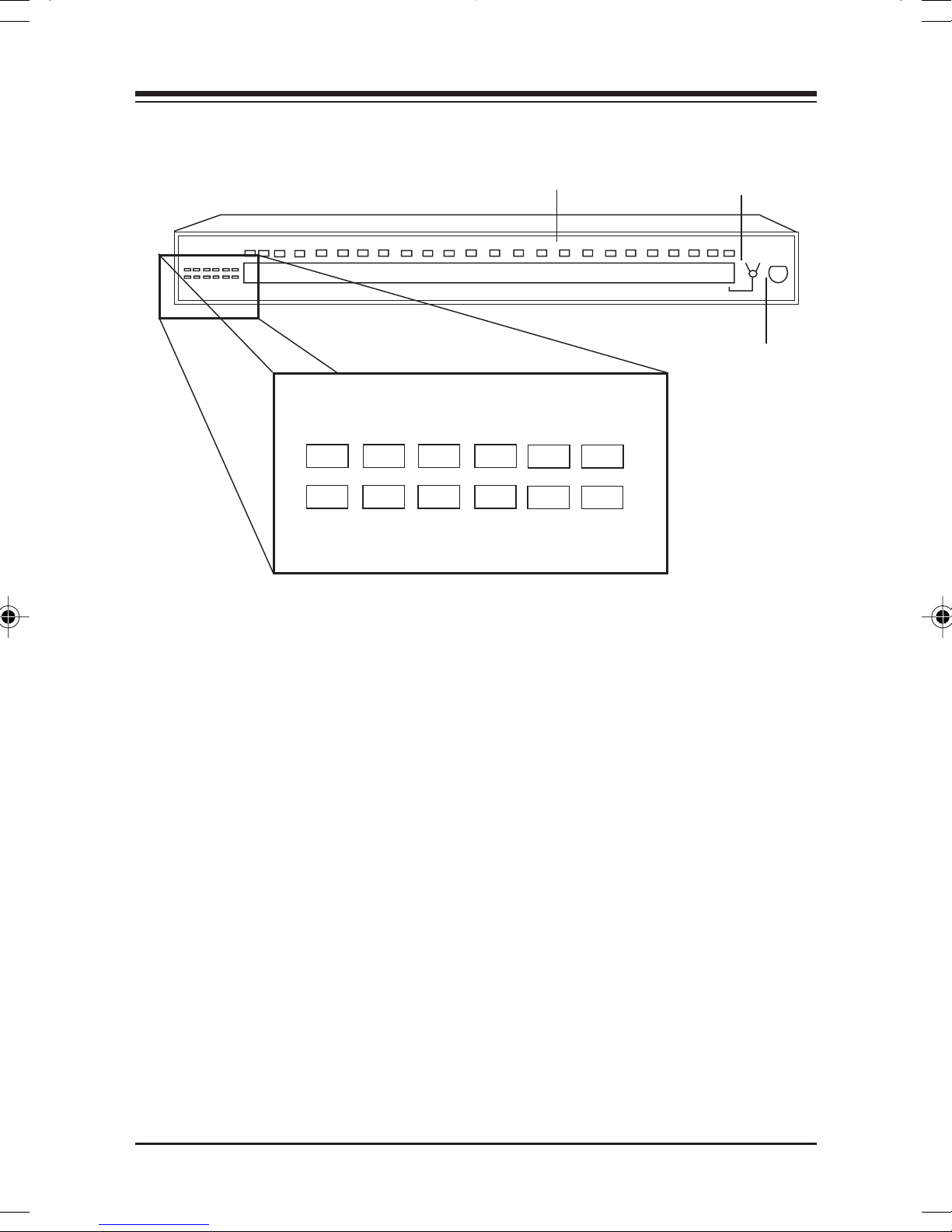
POWER: This LED lights whenever power is applied to the
POWERPOWER
BNC
PERCENT USAGE
AUI
ACTIVITY
LLISION
CO
ALERT
BocaNET-24. During normal operation, this light should be
ON.
ACTIVITYACTIVITY
ACTIVITY: This LED flashes whenever there is data activity
ACTIVITYACTIVITY
on any of the BocaNET-24 ports. A steady activity LED
indicates a busy network.
COLLISIONCOLLISION
COLLISION: This yellow LED lights whenever two or more
COLLISIONCOLLISION
ports are receiving data at the same time (i.e., collision). In
this situation, the BocaNET-24 partitions (isolates) the
colliding ports. The colliding ports remain partitioned until
valid data is received on the colliding ports. At this time, the
partitioned port is reconnected.
BocaNETBocaNET
BocaNET
BocaNETBocaNET
-24-24
-24
-24-24
Page 11
1111
11
1111
LINKLINK
LINK: These bi-color LEDs light
LINKLINK
GREENGREEN
GREEN when the
GREENGREEN
corresponding port is connected and r eceiving valid link
pulses.
PRPR
TT
PR
T: These bi-color LEDs light
PRPR
TT
REDRED
RED when the corresponding
REDRED
port is partitioned due to jabbering or excessive collisions.
BNC, AUIBNC, AUI
BNC, AUI: The green LEDs are the partition LEDs for their
BNC, AUIBNC, AUI
associated ports.
ALERALER
ALER
ALERALER
TT
T: This red LED lights when traffic level exceeds 80%
TT
for one second or more, or when any of the 10Base-T ports is
partitioned (isolated) for one second or more.
PERCENT USAGEPERCENT USAGE
PERCENT USAGE: These LEDS indicate the percentage of
PERCENT USAGEPERCENT USAGE
current network traf fic levels (2=2-5%; 6=6-11%; 12=12-24%;
25=25-49%; 50=50-79%; 80=80-100%).
ConnectorConnector
Connector
ConnectorConnector
AUI PORT
s (rs (r
ear vieear vie
s (r
ear vie
s (rs (r
ear vieear vie
w)w)
w)
w)w)
OPTION PORT
AC power
connector
IntroductionIntroduction
Introduction
IntroductionIntroduction
Page 12

1212
12
1212
24 10BASE-T POR24 10BASE-T POR
24 10BASE-T POR
24 10BASE-T POR24 10BASE-T POR
TSTS
TS: These are RJ-45 8-pin connectors used
TSTS
to connect to 10BASE-T UTP (unshielded twisted pair) cable.
Switch allows Port 24 to cascade.
1 AUI POR1 AUI POR
1 AUI POR
1 AUI POR1 AUI POR
TT
T: This connector is used to interface with
TT
10BASE5 (“thick” Ethernet coaxial cable), 10BASE2 (“thin”
Ethernet coaxial cable), 10BASE-T, or 10BASE-F segments
with an appropriate adapter.
1 BNC POR1 BNC POR
1 BNC POR
1 BNC POR1 BNC POR
1 OPTION POR1 OPTION POR
1 OPTION POR
1 OPTION POR1 OPTION POR
TT
T: Used to connect to 10BASE2 (“thin” Ethernet).
TT
TT
: :
T
: This can be used with optional plug-in
TT
: :
modules for BNC, AUI, or fiber-optic.
1 POWER CONNECTOR1 POWER CONNECTOR
1 POWER CONNECTOR: Connects to 120/220V AC wall
1 POWER CONNECTOR1 POWER CONNECTOR
outlet.
For cable types and maximum lengths, see For cable types and maximum lengths, see
For cable types and maximum lengths, see
For cable types and maximum lengths, see For cable types and maximum lengths, see
Configuration and Section Four: Cabling Characteristics.Configuration and Section Four: Cabling Characteristics.
Configuration and Section Four: Cabling Characteristics.
Configuration and Section Four: Cabling Characteristics.Configuration and Section Four: Cabling Characteristics.
Section ThrSection Thr
Section Thr
Section ThrSection Thr
ee: Networkee: Network
ee: Network
ee: Networkee: Network
BocaNETBocaNET
BocaNET
BocaNETBocaNET
-24-24
-24
-24-24
Page 13
1313
13
1313
Section Section
Section
Section Section
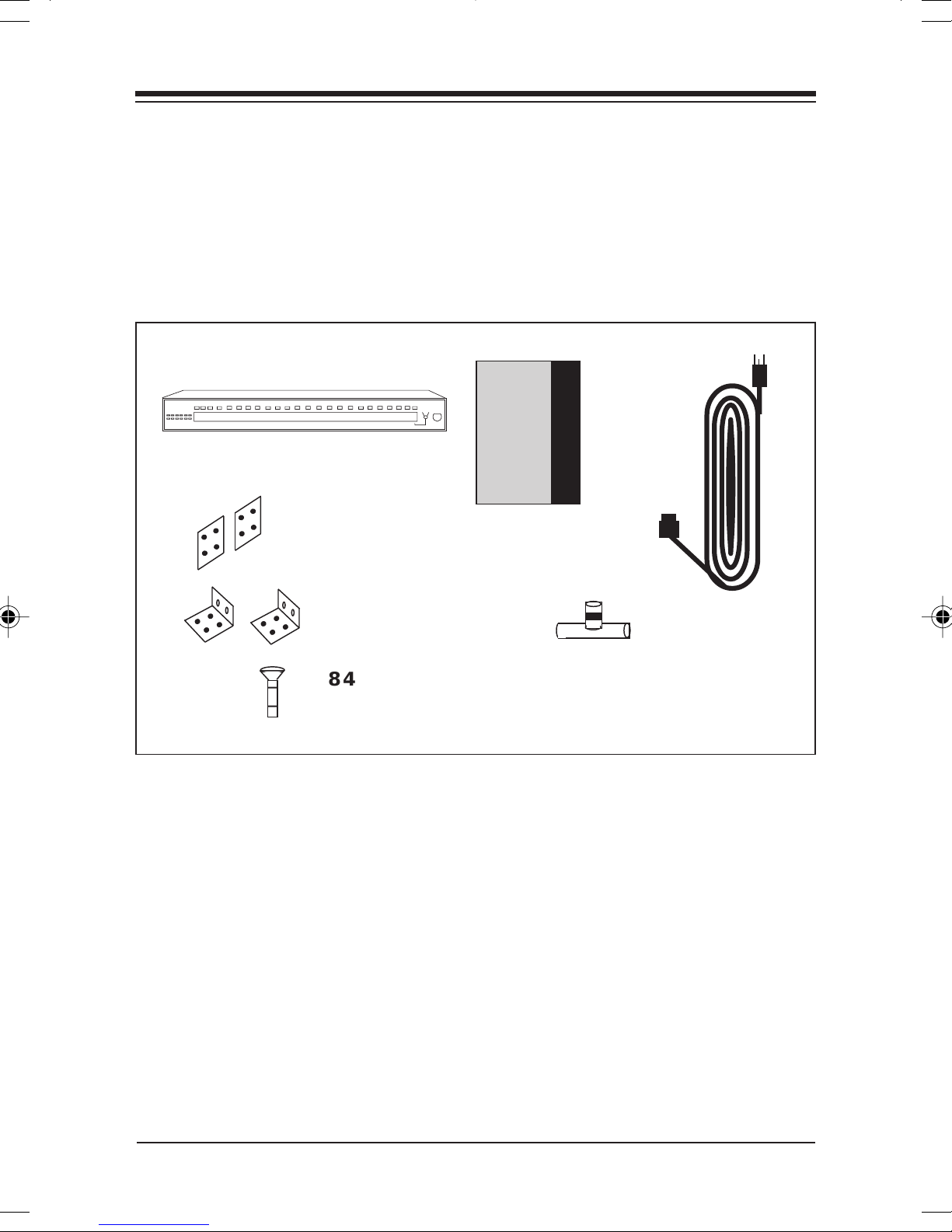
The Contents of The Contents of
The Contents of
The Contents of The Contents of
TT
ww
o: Installao: Installa
T
w
o: Installa
TT
ww
o: Installao: Installa
BocaNETBocaNET
BocaNET
BocaNETBocaNET
2 stacking2 stacking
2 stacking
2 stacking2 stacking
bracketsbrackets
brackets
bracketsbrackets
head scrhead scr
head scr
head scrhead scr
YY
our Pour P
Y
our P
YY
our Pour P
-24-24
-24
-24-24
2 rack2 rack
2 rack
2 rack2 rack
mountingmounting
mounting
mountingmounting
anglesangles
angles
anglesangles
8 4-40 x 1/4"8 4-40 x 1/4"
8 4-40 x 1/4"
8 4-40 x 1/4"8 4-40 x 1/4"
Phillips pan-Phillips pan-
Phillips pan-
Phillips pan-Phillips pan-
acac
ac
acac
ee
wsws
e
ws
ee
wsws
tiontion
tion
tiontion
kagekage
kage
kagekage
Boca’s Family of
Ethernet
Products
InstallationInstallation
Installation
InstallationInstallation
GuideGuide
Guide
GuideGuide
Installation Guide
BNC BNC
TT
BNC
BNC BNC
ConnectorConnector
Connector
ConnectorConnector
--
T
-
TT
--
AC PowerAC Power
AC Power
AC PowerAC Power
corcor
dd
cor
d
corcor
dd
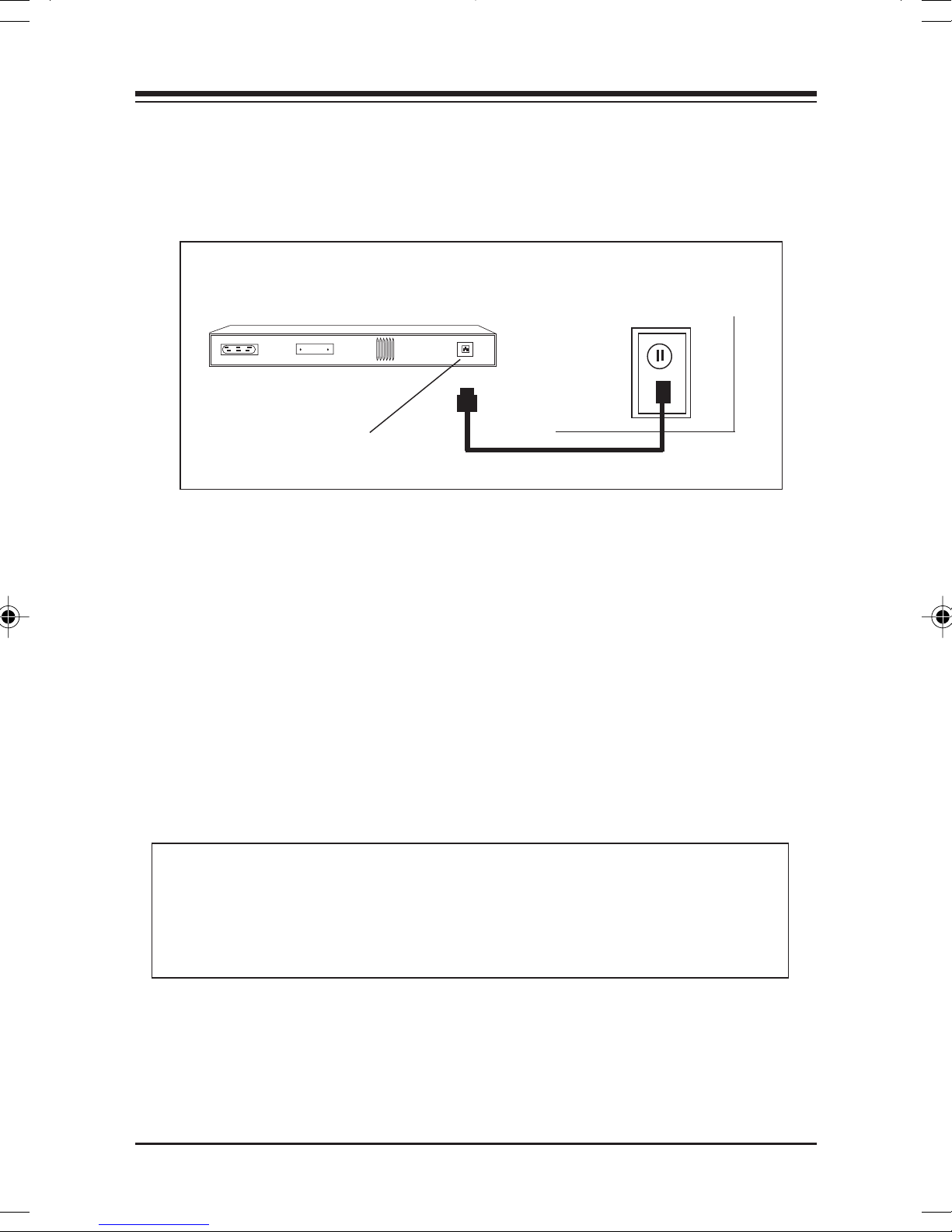
Connecting the Power SupplyConnecting the Power Supply
Connecting the Power Supply
Connecting the Power SupplyConnecting the Power Supply
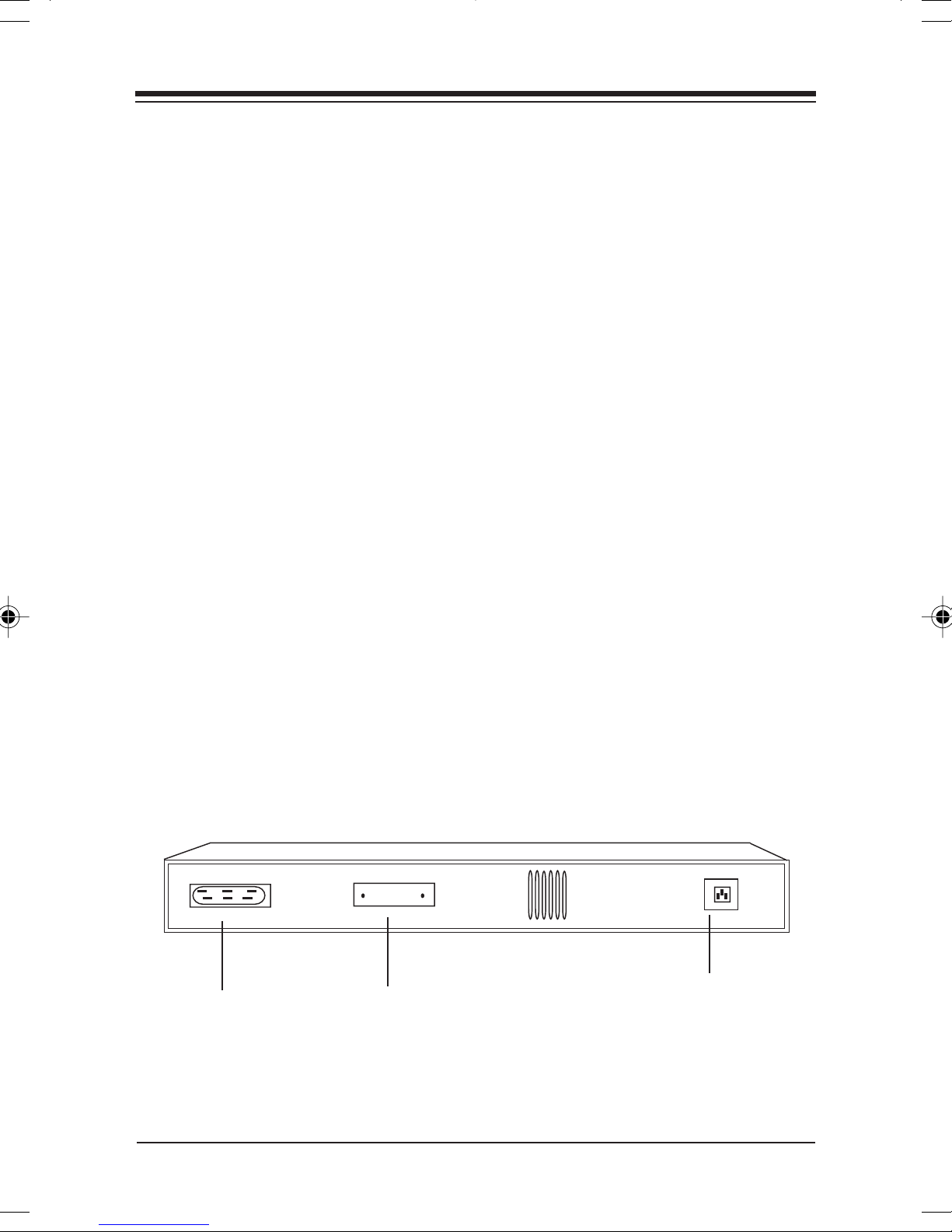
1. Connect the appropriate end of the power cor d to the back
of the BocaNET-24 and insert the remaining end to any
conveniently accessible wall outlet.
InstallationInstallation
Installation
InstallationInstallation
Page 14
1414
14
1414
REAR OF BocaNETREAR OF BocaNET
REAR OF BocaNET
REAR OF BocaNETREAR OF BocaNET
AC PowerAC Power
AC Power
AC PowerAC Power
connectorconnector
connector
connectorconnector
-24-24
-24
-24-24
2. Check the front panel LEDs. If the power (POWER) LED is
not ON, turn to Section Five: Troubleshooting.
For other installation options, turn to the next page.
NOTE: For safety purposes, connect the unit as closeNOTE: For safety purposes, connect the unit as close
NOTE: For safety purposes, connect the unit as close
NOTE: For safety purposes, connect the unit as closeNOTE: For safety purposes, connect the unit as close
as possible to its power source, ensuring the socket-as possible to its power source, ensuring the socket-
as possible to its power source, ensuring the socket-
as possible to its power source, ensuring the socket-as possible to its power source, ensuring the socketoutlet is easily accessible.outlet is easily accessible.
outlet is easily accessible.
outlet is easily accessible.outlet is easily accessible.
BocaNETBocaNET
BocaNET
BocaNETBocaNET
-24-24
-24
-24-24
Page 15
1515
15
1515
If StacIf Stac
If Stac
If StacIf Stac
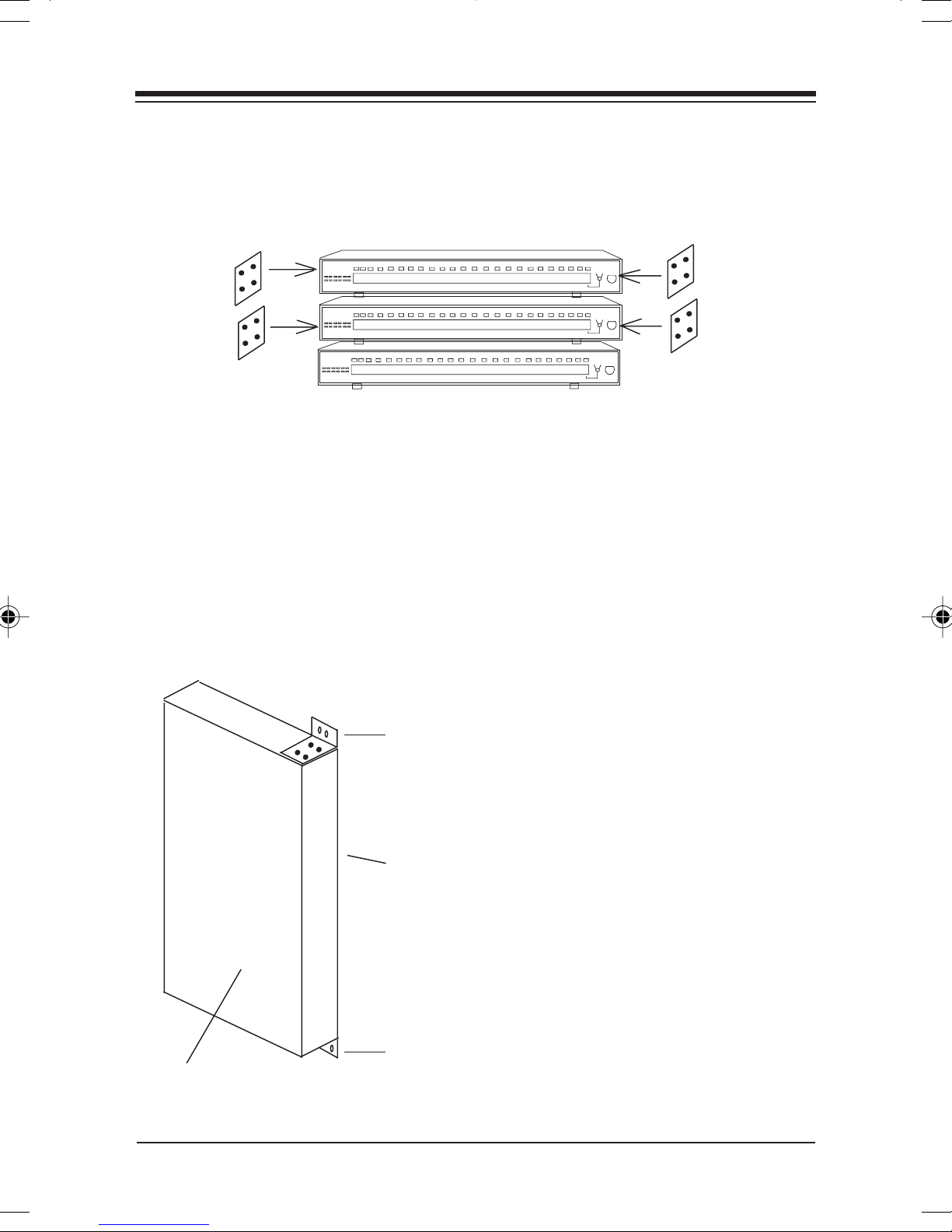
king Multiple BocaNETking Multiple BocaNET
king Multiple BocaNET
king Multiple BocaNETking Multiple BocaNET
stackingstacking
stacking
stackingstacking
bracketsbrackets
brackets
bracketsbrackets
-24s-24s
-24s
-24s-24s
stackingstacking
stacking
stackingstacking
bracketsbrackets
brackets
bracketsbrackets
You will need one pair of stacking brackets for every BocaNET24 case you add to the stack. Each bracket comes with four
holes (two for the lower case, two for the next case above).
Attach four (4) 4-40 1/4-inch Phillips pan-head screws
Included) on one side and four on the other to secure the cases
for vertical stacking.
If If
WW
all-Mounting One or Morall-Mounting One or Mor
If
W
all-Mounting One or Mor
If If
WW
all-Mounting One or Morall-Mounting One or Mor
rack-rack-
rack-
rack-rackmountingmounting
mounting
mountingmounting
angleangle
angle
angleangle
top oftop of
top of
top oftop of
casecase
case
casecase
goes togoes to
goes to
goes togoes to
wallwall
wall
wallwall
rack-rack-
rack-
rack-rackmountingmounting
mounting
mountingmounting
angleangle
angle
bottom ofbottom of
bottom of
bottom ofbottom of
casecase
case
casecase
angleangle
e BocaNETe BocaNET
e BocaNET
e BocaNETe BocaNET
-24s-24s
-24s
-24s-24s
You will need one pair of
rack-mounting angles for
every BocaNET-24 case you
mount to the wall. Attach
the 1 1/2" angle portion (4
holes) to two sides of the
case using the 4-40 1/4"
screws (included). Attach
the 7/8" angle portion (2
holes) to the wall. This will
require 4 additional screws.
InstallationInstallation
Installation
InstallationInstallation
Page 16
1616
16
1616
If RacIf Rac
If Rac
If RacIf Rac
k Mounting One or Mork Mounting One or Mor
k Mounting One or Mor
k Mounting One or Mork Mounting One or Mor
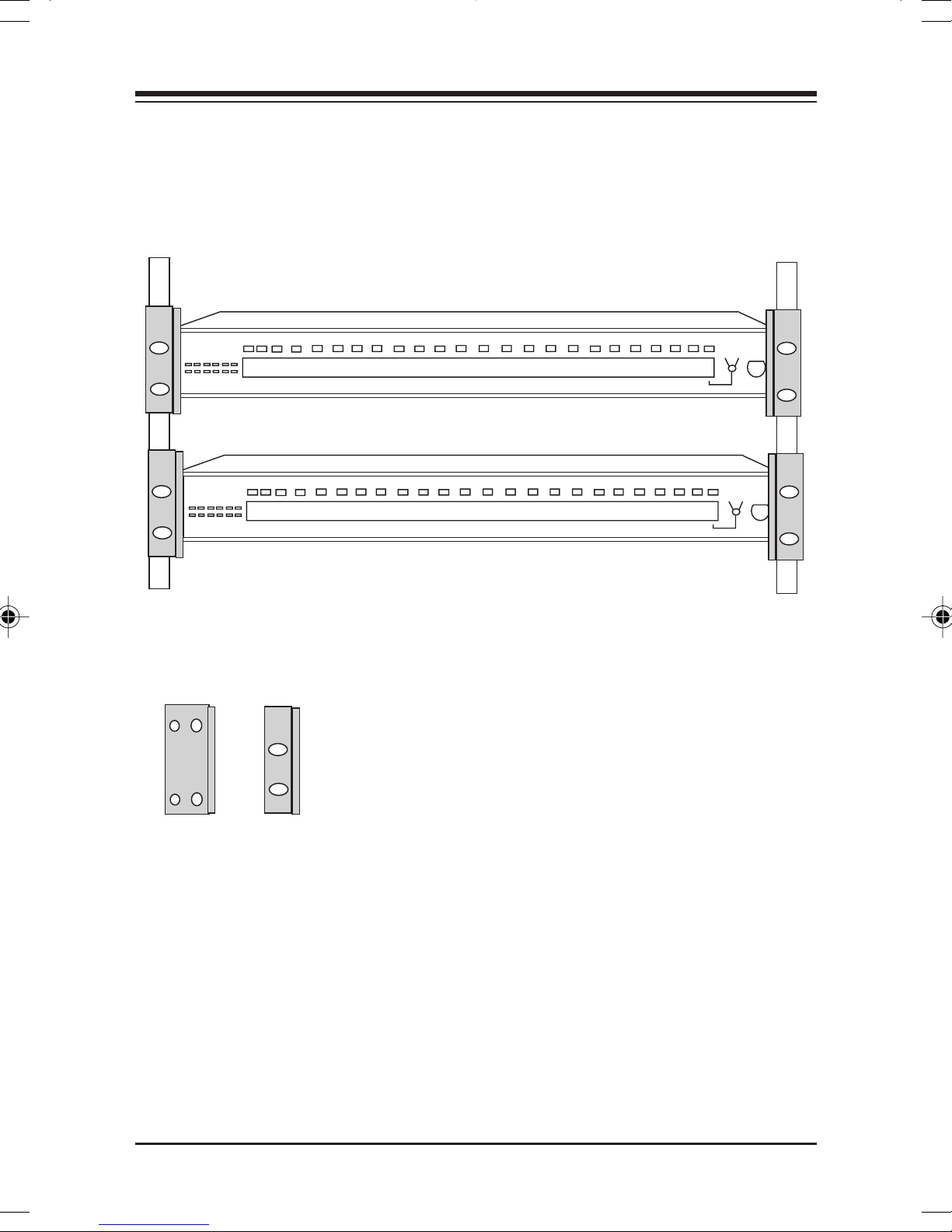
RACK MOUNTINGRACK MOUNTING
RACK MOUNTING
RACK MOUNTINGRACK MOUNTING
ANGLEANGLE
ANGLE
ANGLEANGLE
e BocaNETe BocaNET
e BocaNET
e BocaNETe BocaNET
You will need one pair of rackmounting angles for every BocaNET-
-24s-24s
-24s
-24s-24s
1 1/2-1 1/2-
1 1/2-
1 1/2-1 1/2inchinch
inch
inchinch
sideside
side
sideside
BocaNETBocaNET
BocaNET
BocaNETBocaNET
-24-24
-24
-24-24
7/8-inch7/8-inch
7/8-inch
7/8-inch7/8-inch
sideside
side
sideside
24 case you attach to a rack. Attach
the 1 1/2" angle portion (4 holes) to
two sides of the case using the 4-40
1/4" screws (included). Attach the
7/8" angle portion (2 holes) to attach
the assembly to the vertical rack. This
will require 4 additional screws.
Page 17

1717
17
1717
Section Section
Section
Section Section
The BocaNET-24 is intended to connect multiple
workstations (stand-alone) and/or other concentrators to an
Ethernet star topology network.
3.1 10B3.1 10B
3.1 10B
3.1 10B3.1 10B
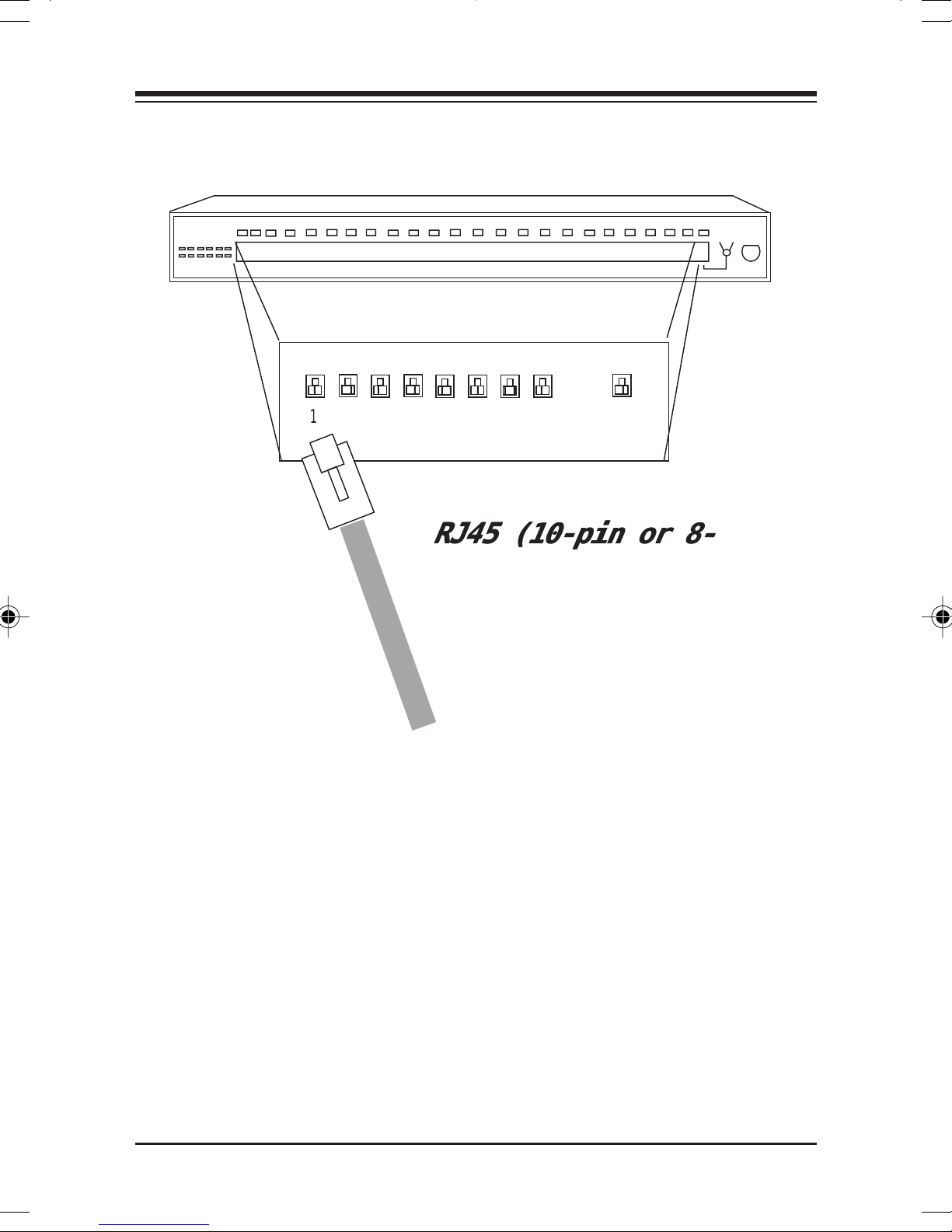
The BocaNET-24 has 24 10BASE-T UTP (unshielded twisted
pair) ports to connect to other hubs or workstations. This
connection uses an RJ-45 8-pin connector. When connecting
to workstations, a straight-through connector is used. When
connecting to other hubs, a “crossed” cable is used.
ThrThr
ee: Netwee: Netw
Thr
ee: Netw
ThrThr
ee: Netwee: Netw
ASE-T PORASE-T POR
ASE-T POR
ASE-T PORASE-T POR
TSTS
TS
TSTS
oror
k Confk Conf
or
k Conf
oror
k Confk Conf
iguraigura
igura
iguraigura
tiontion
tion
tiontion
Connections are on the next page. See Section Four: Cabling
Characteristics for pin-outs of cables.
NOTE: If a straight cable is used to connect toNOTE: If a straight cable is used to connect to
NOTE: If a straight cable is used to connect to
NOTE: If a straight cable is used to connect toNOTE: If a straight cable is used to connect to
another hub, use the switch to internally cross Port 24another hub, use the switch to internally cross Port 24
another hub, use the switch to internally cross Port 24
another hub, use the switch to internally cross Port 24another hub, use the switch to internally cross Port 24
the transmit and receive pairs of the cable.the transmit and receive pairs of the cable.
the transmit and receive pairs of the cable.
the transmit and receive pairs of the cable.the transmit and receive pairs of the cable.
Network ConfigurationNetwork Configuration
Network Configuration
Network ConfigurationNetwork Configuration
Page 18
1818
12
12
18
1818
1 2 3 4 5 6 7 8...
RJ45 (10-pin or 8-RJ45 (10-pin or 8-
RJ45 (10-pin or 8-
RJ45 (10-pin or 8-RJ45 (10-pin or 8pin) (see Sectionpin) (see Section
pin) (see Section
pin) (see Sectionpin) (see Section
Four for pinouts.Four for pinouts.
Four for pinouts.
Four for pinouts.Four for pinouts.
24
BocaNETBocaNET
BocaNET
BocaNETBocaNET
-24-24
-24
-24-24
Page 19

1919
19
1919
3.2 10B3.2 10B
3.2 10B
3.2 10B3.2 10B
The BocaNET-24 has one 10BASE2 (BNC) connector which
interfaces directly to a 10BASE2 (“thin” Ethernet) network.
The 10BASE2 connection must be to RG58 A/U or C/U 50ohm coaxial cable. The ends of the cable segment must have
50-ohm terminators installed. Up to 30 connections (taps)
can be made to a 10BASE2 segment. The BocaNET-24 is
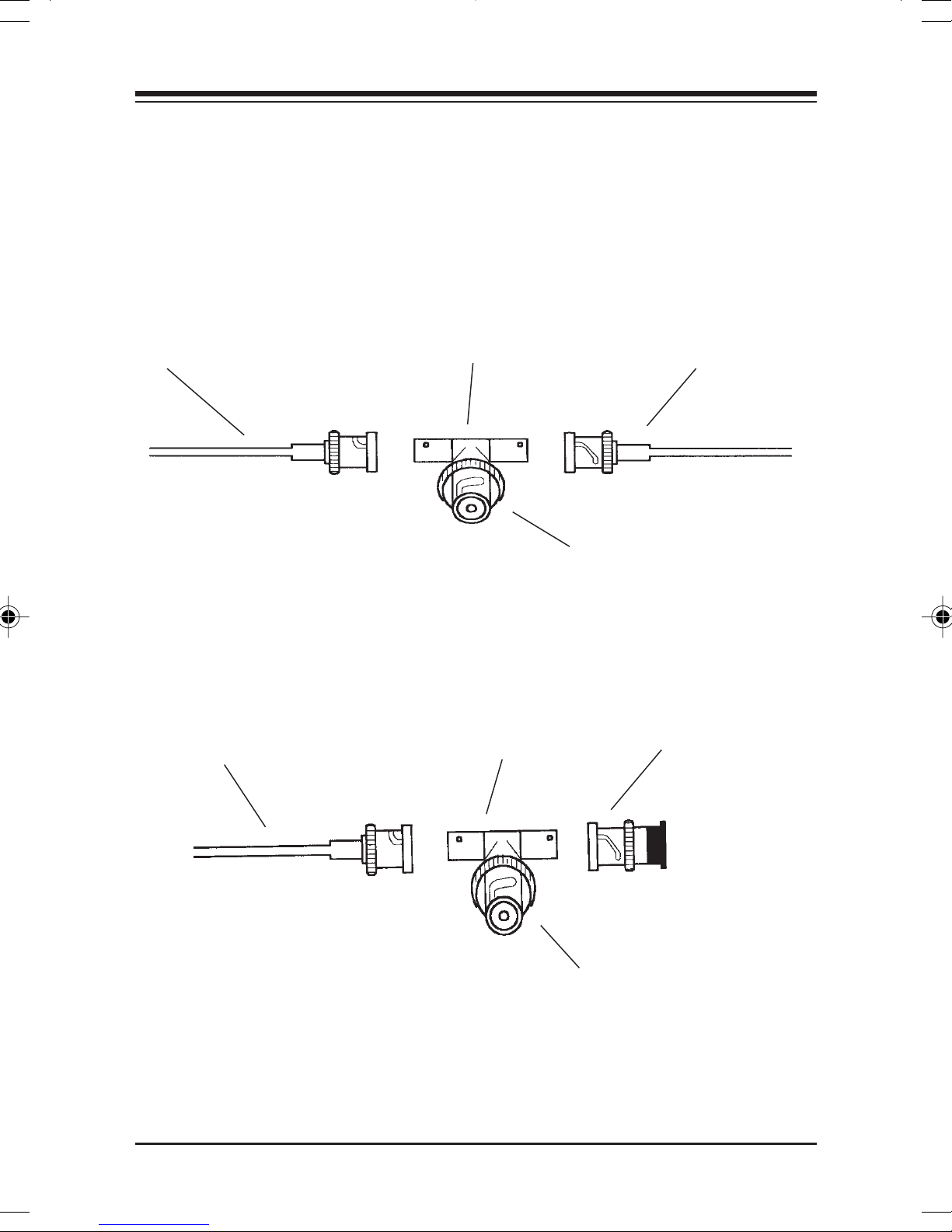
connected to a 10BASE2 segment with a BNC T-connector,
which is illustrated on the next page.
ASE2 PORASE2 POR
ASE2 POR
ASE2 PORASE2 POR
TSTS
TS
TSTS
Network ConfigurationNetwork Configuration
Network Configuration
Network ConfigurationNetwork Configuration
Page 20
2020
20
2020
For Installation in the middle of a 10BASE2 SegmentFor Installation in the middle of a 10BASE2 Segment
For Installation in the middle of a 10BASE2 Segment
For Installation in the middle of a 10BASE2 SegmentFor Installation in the middle of a 10BASE2 Segment
BNC “T”BNC “T”
BNC “T”
10BASE2 Cable10BASE2 Cable
10BASE2 Cable
10BASE2 Cable10BASE2 Cable
(Thin Ethernet)(Thin Ethernet)
(Thin Ethernet)
(Thin Ethernet)(Thin Ethernet)
For Installation at the end of a 10BASE2 SegmentFor Installation at the end of a 10BASE2 Segment
For Installation at the end of a 10BASE2 Segment
For Installation at the end of a 10BASE2 SegmentFor Installation at the end of a 10BASE2 Segment
10BASE2 Cable10BASE2 Cable
10BASE2 Cable
10BASE2 Cable10BASE2 Cable
(Thin Ethernet)(Thin Ethernet)
(Thin Ethernet)
(Thin Ethernet)(Thin Ethernet)
BNC “T”BNC “T”
ConnectorConnector
Connector
ConnectorConnector
BNC “T”BNC “T”
BNC “T”
BNC “T”BNC “T”
ConnectorConnector
Connector
ConnectorConnector
10BASE2 Cable10BASE2 Cable
10BASE2 Cable
10BASE2 Cable10BASE2 Cable
(Thin Ethernet)(Thin Ethernet)
(Thin Ethernet)
(Thin Ethernet)(Thin Ethernet)
Connect to coaxConnect to coax
Connect to coax
Connect to coaxConnect to coax
port on BocaNET-port on BocaNET-
port on BocaNET-
port on BocaNET-port on BocaNET2424
24
2424
50-ohm coaxial50-ohm coaxial
50-ohm coaxial
50-ohm coaxial50-ohm coaxial
terminatorterminator
terminator
terminatorterminator
BocaNETBocaNET
BocaNET
BocaNETBocaNET
-24-24
-24
-24-24
Connect to coaxConnect to coax
Connect to coax
Connect to coaxConnect to coax
port on BocaNET-port on BocaNET-
port on BocaNET-
port on BocaNET-port on BocaNET2424
24
2424
Page 21
2121
21
2121
3.3 3.3
3.3
3.3 3.3
AA
UI PORUI POR
A
UI POR
AA
UI PORUI POR
TT
T
TT
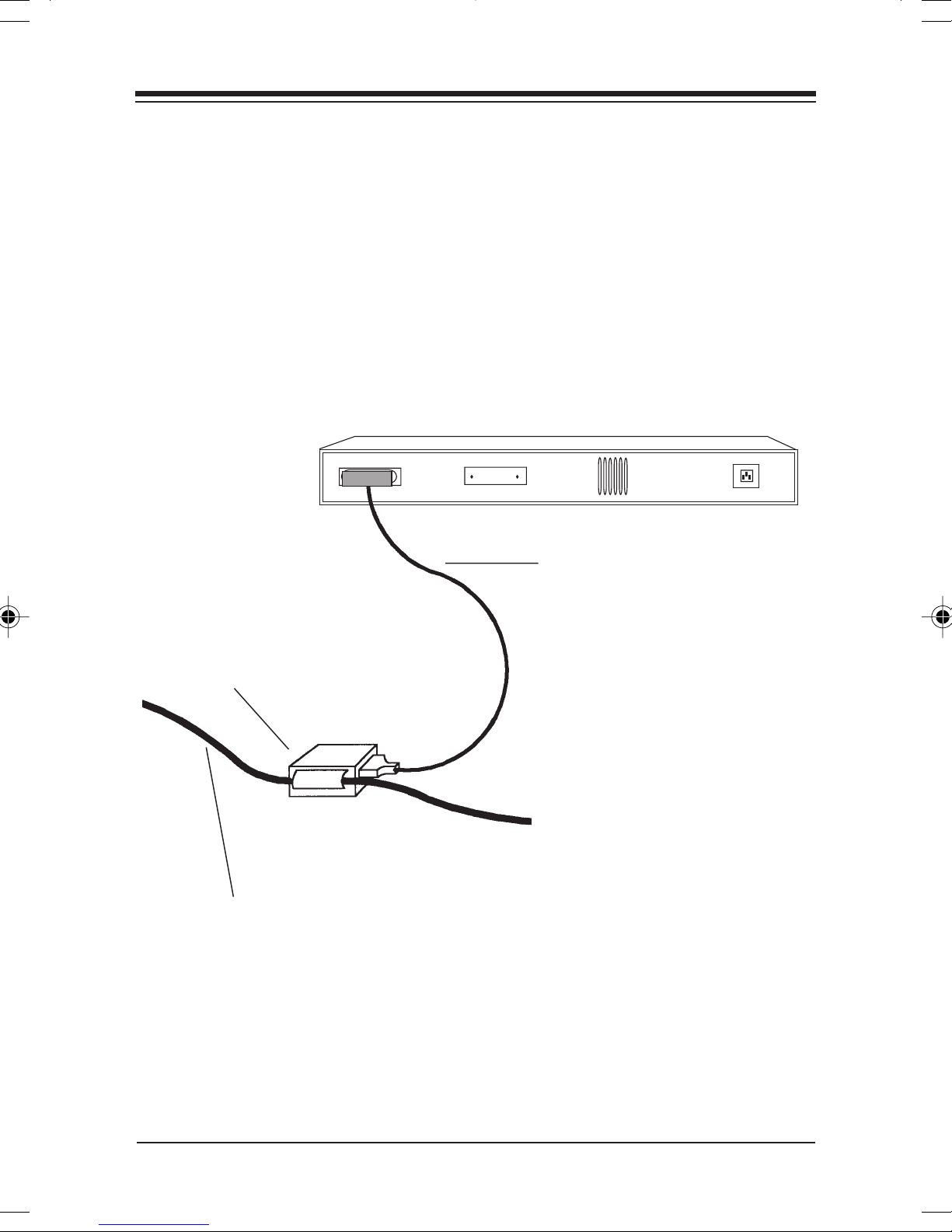
The BocaNET-24 has one AUI connector which interfaces
with a 10BASE5 (“thick” Ethernet) network. The AUI port is
normally used to connect to 10BASE5, but can also be used
to interface with other types of networks such as 10BASE2,
10BASE-T, or 10BASE-FL. A sample connection is shown
below.
BocaNET-BocaNET-
BocaNET-
BocaNET-BocaNET2424
24
2424
AUI cableAUI cable
AUI cable
AUI cableAUI cable
TransceiverTransceiver
Transceiver
TransceiverTransceiver
10BASE5 (Thick Ethernet) Backbone10BASE5 (Thick Ethernet) Backbone
10BASE5 (Thick Ethernet) Backbone
10BASE5 (Thick Ethernet) Backbone10BASE5 (Thick Ethernet) Backbone
Network ConfigurationNetwork Configuration
Network Configuration
Network ConfigurationNetwork Configuration
Page 22

2222
22
2222
3.4 Network Combinations3.4 Network Combinations
3.4 Network Combinations
3.4 Network Combinations3.4 Network Combinations
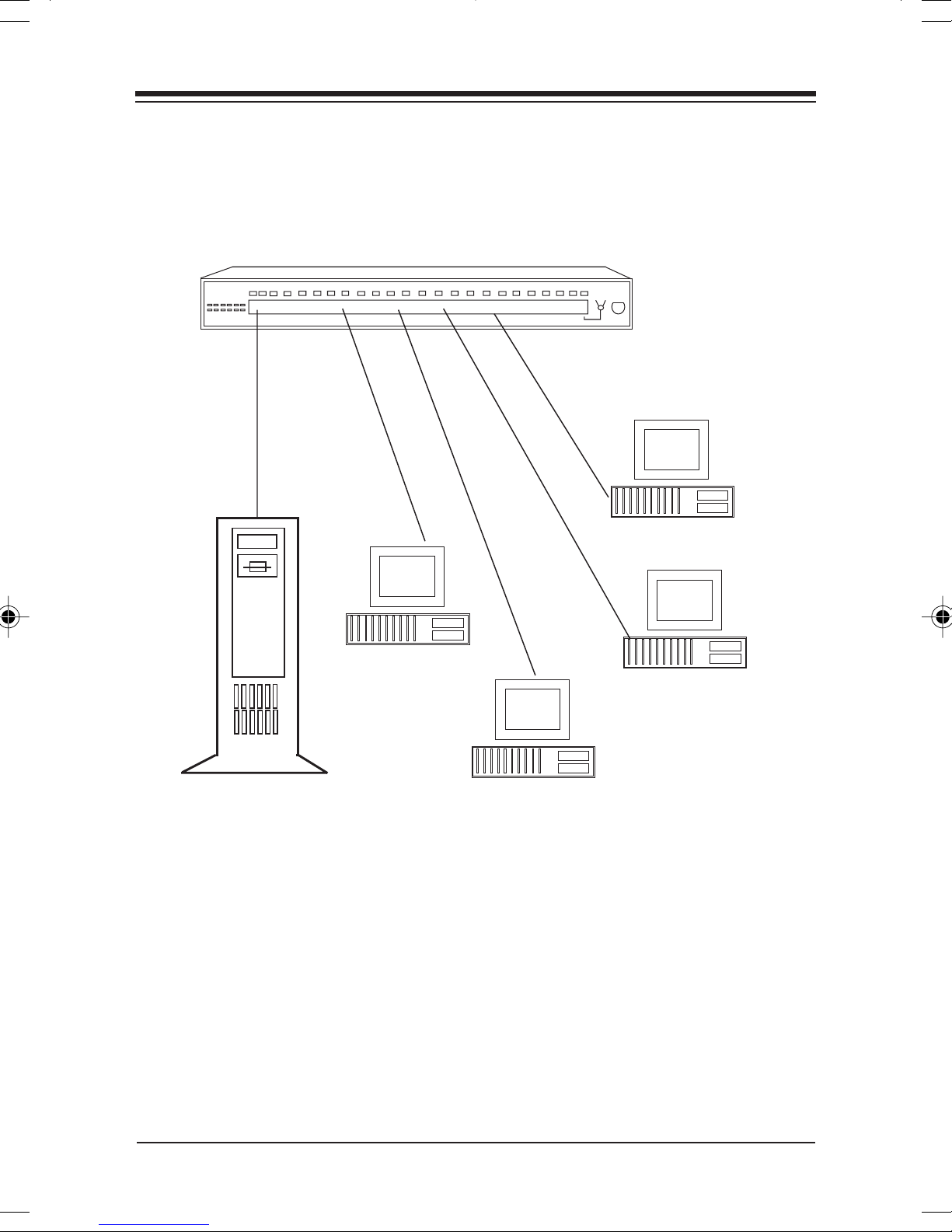
Note that the different types of topologies can co-exist in one
network using the BocaNET-24. Following are some sample
network arrangements using multiple topologies.
Note: When cascading concentrators, there should be noNote: When cascading concentrators, there should be no
Note: When cascading concentrators, there should be no
Note: When cascading concentrators, there should be noNote: When cascading concentrators, there should be no
more than four (4) concentrators between any two (2)more than four (4) concentrators between any two (2)
more than four (4) concentrators between any two (2)
more than four (4) concentrators between any two (2)more than four (4) concentrators between any two (2)
workstations.workstations.
workstations.
workstations.workstations.
BocaNETBocaNET
BocaNET
BocaNETBocaNET
-24-24
-24
-24-24
Page 23
2323
23
2323
3.5 SINGLE 3.5 SINGLE
3.5 SINGLE
3.5 SINGLE 3.5 SINGLE
WW
ORKGRORKGR
W
ORKGR
WW
ORKGRORKGR
OUP CONFIGURAOUP CONFIGURA
OUP CONFIGURA
OUP CONFIGURAOUP CONFIGURA
10BASE-T Segments10BASE-T Segments
10BASE-T Segments
10BASE-T Segments10BASE-T Segments
TIONTION
TION
TIONTION
NOTE: File server canNOTE: File server can
NOTE: File server can
NOTE: File server canNOTE: File server can
plug into any port on theplug into any port on the
plug into any port on the
plug into any port on theplug into any port on the
BocaNET-24BocaNET-24
BocaNET-24
BocaNET-24BocaNET-24
Network ConfigurationNetwork Configuration
Network Configuration
Network ConfigurationNetwork Configuration
Page 24
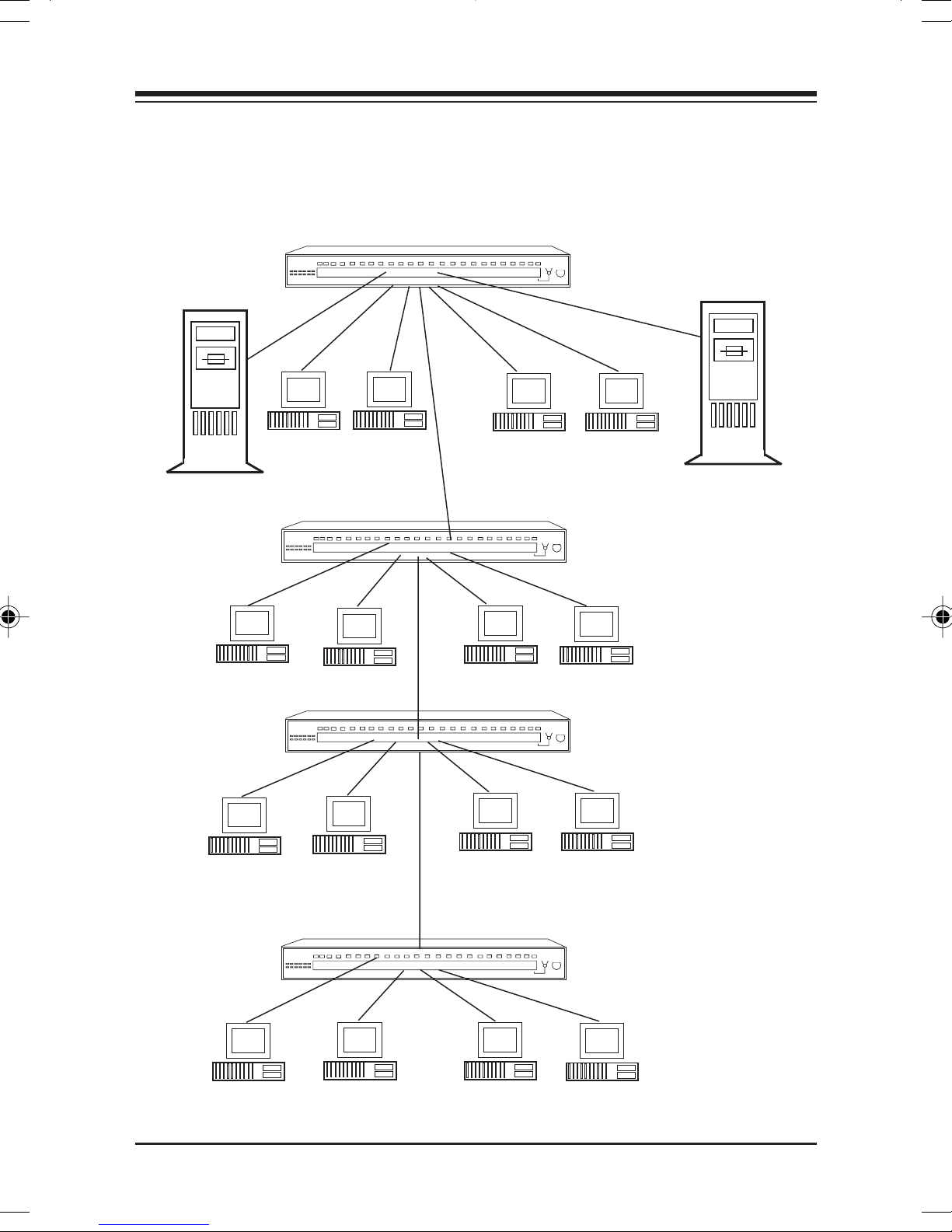
2424
24
2424
3.6 C3.6 C
3.6 C
3.6 C3.6 C
ServerServer
Server
ServerServer
ASCASC
ASC
ASCASC
ADED NETWADED NETW
ADED NETW
ADED NETWADED NETW
ORK CONFIGURAORK CONFIGURA
ORK CONFIGURA
ORK CONFIGURAORK CONFIGURA
NOTE: FileNOTE: File
NOTE: File
NOTE: FileNOTE: File
server can plugserver can plug
server can plug
server can plugserver can plug
into any port oninto any port on
into any port on
into any port oninto any port on
the BocaNET-24the BocaNET-24
the BocaNET-24
the BocaNET-24the BocaNET-24
TIONTION
TION
TIONTION
ServerServer
Server
ServerServer
BocaNETBocaNET
BocaNET
BocaNETBocaNET
-24-24
-24
-24-24
Page 25
2525
25
2525
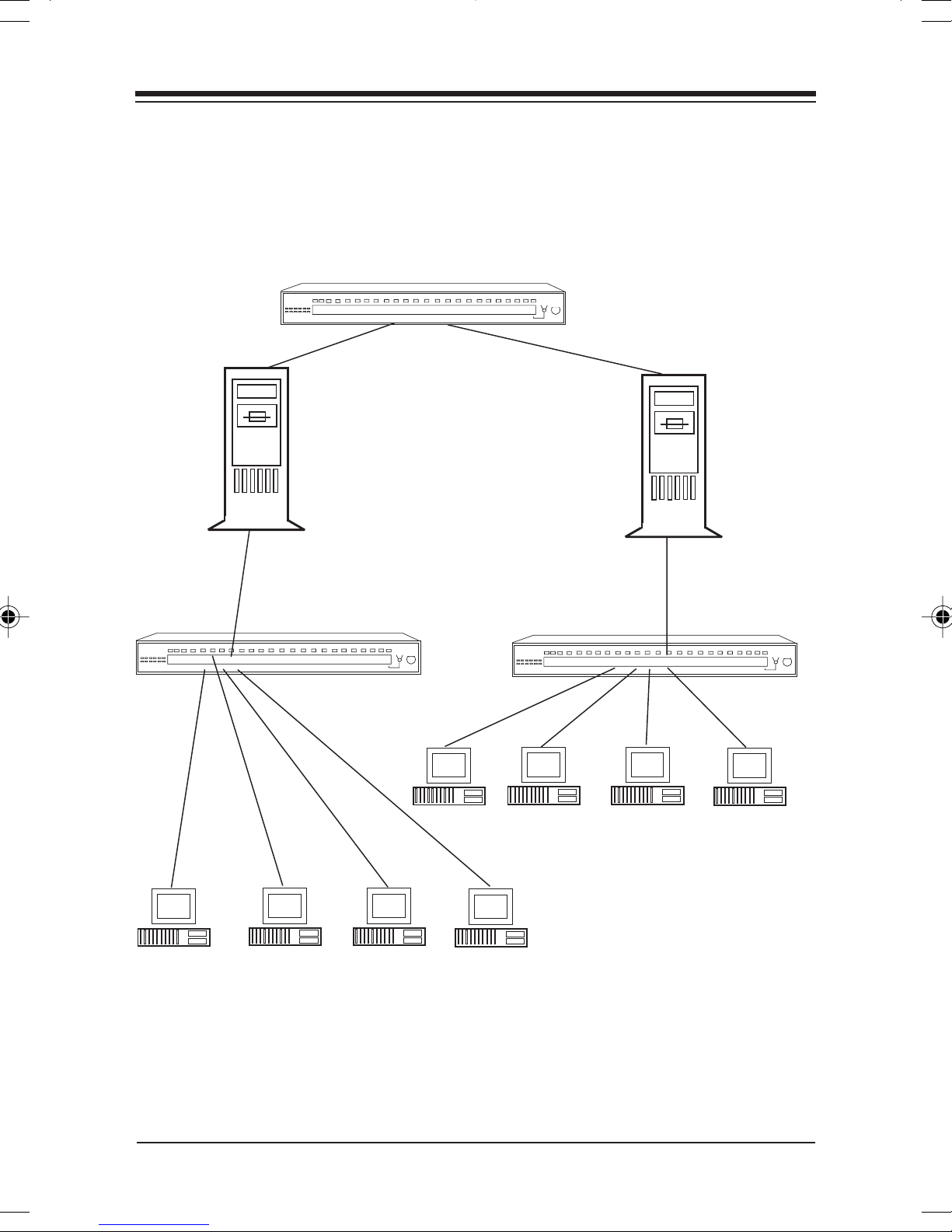
3.7 C3.7 C
3.7 C
3.7 C3.7 C
ROUTERS ROUTERS
ROUTERS
ROUTERS ROUTERS
ff
or infor inf
f
or inf
ff
or infor inf
ASCASC
ASC
ASCASC
oror
mama
or
ma
oror
mama
ADED NETWADED NETW
ADED NETW
ADED NETWADED NETW
(see your network operating system documentation(see your network operating system documentation
(see your network operating system documentation
(see your network operating system documentation(see your network operating system documentation
tion on rtion on r
tion on r
tion on rtion on r
outerouter
outer
outerouter
ServerServer
Server
ServerServer
ORK CONFIGURAORK CONFIGURA
ORK CONFIGURA
ORK CONFIGURAORK CONFIGURA
s)s)
s)
s)s)
ServerServer
Server
ServerServer
TION USINGTION USING
TION USING
TION USINGTION USING
Network ConfigurationNetwork Configuration
Network Configuration
Network ConfigurationNetwork Configuration
Page 26
2626
26
2626
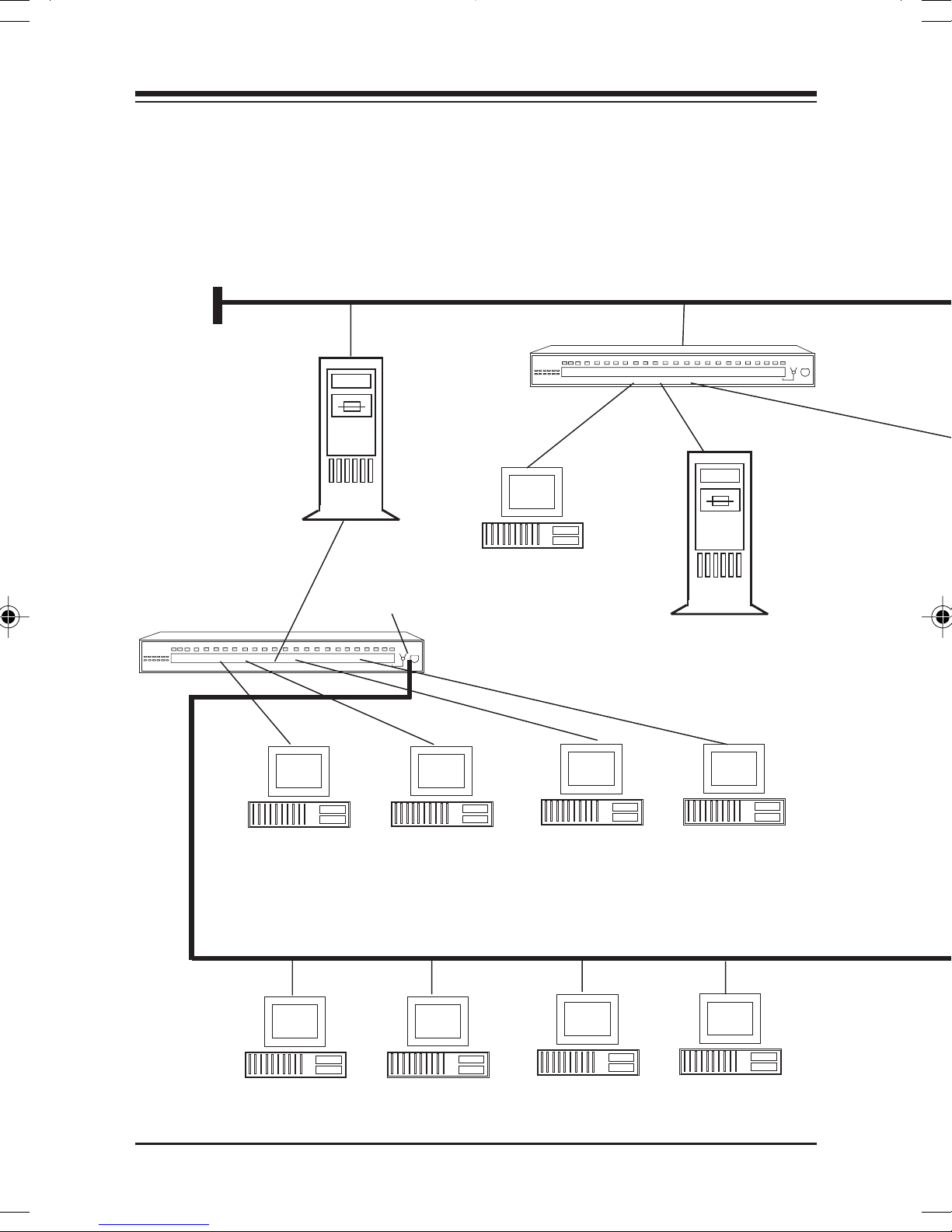
3.8 EXP3.8 EXP
3.8 EXP
3.8 EXP3.8 EXP
CONFIGURACONFIGURA
CONFIGURA
CONFIGURACONFIGURA
operaopera
opera
operaopera
50-ohm50-ohm
50-ohm
50-ohm50-ohm
TerminatorTerminator
Terminator
TerminatorTerminator
ANDED CANDED C
ANDED C
ANDED CANDED C
ting system documentating system documenta
ting system documenta
ting system documentating system documenta
ServerServer
Server
ServerServer
ASCASC
ASC
ASCASC
TION USING RTION USING R
TION USING R
TION USING RTION USING R
BACKBONE (10BASE5/10BASE2)BACKBONE (10BASE5/10BASE2)
BACKBONE (10BASE5/10BASE2)
BACKBONE (10BASE5/10BASE2)BACKBONE (10BASE5/10BASE2)
50-ohm50-ohm
50-ohm
50-ohm50-ohm
TerminatorTerminator
Terminator
TerminatorTerminator
ADED NETWADED NETW
ADED NETW
ADED NETWADED NETW
OUTERS OUTERS
OUTERS
OUTERS OUTERS
tion ftion f
tion f
tion ftion f
or infor inf
or inf
or infor inf
oror
or
oror
ORKORK
ORK
ORKORK
(see y(see y
(see y
(see y(see y
mama
tion on rtion on r
ma
tion on r
mama
tion on rtion on r
our netwour netw
our netw
our netwour netw
outerouter
outer
outerouter
or
s)s)
s)
s)s)
oror
oror
kk
k
kk
ServerServer
Server
ServerServer
10BASE2 (thin Ethernet10BASE2 (thin Ethernet
10BASE2 (thin Ethernet
10BASE2 (thin Ethernet10BASE2 (thin Ethernet
Segment (maximum 30 stations)Segment (maximum 30 stations)
Segment (maximum 30 stations)
Segment (maximum 30 stations)Segment (maximum 30 stations)
BocaNETBocaNET
BocaNET
BocaNETBocaNET
-24-24
-24
-24-24
Page 27
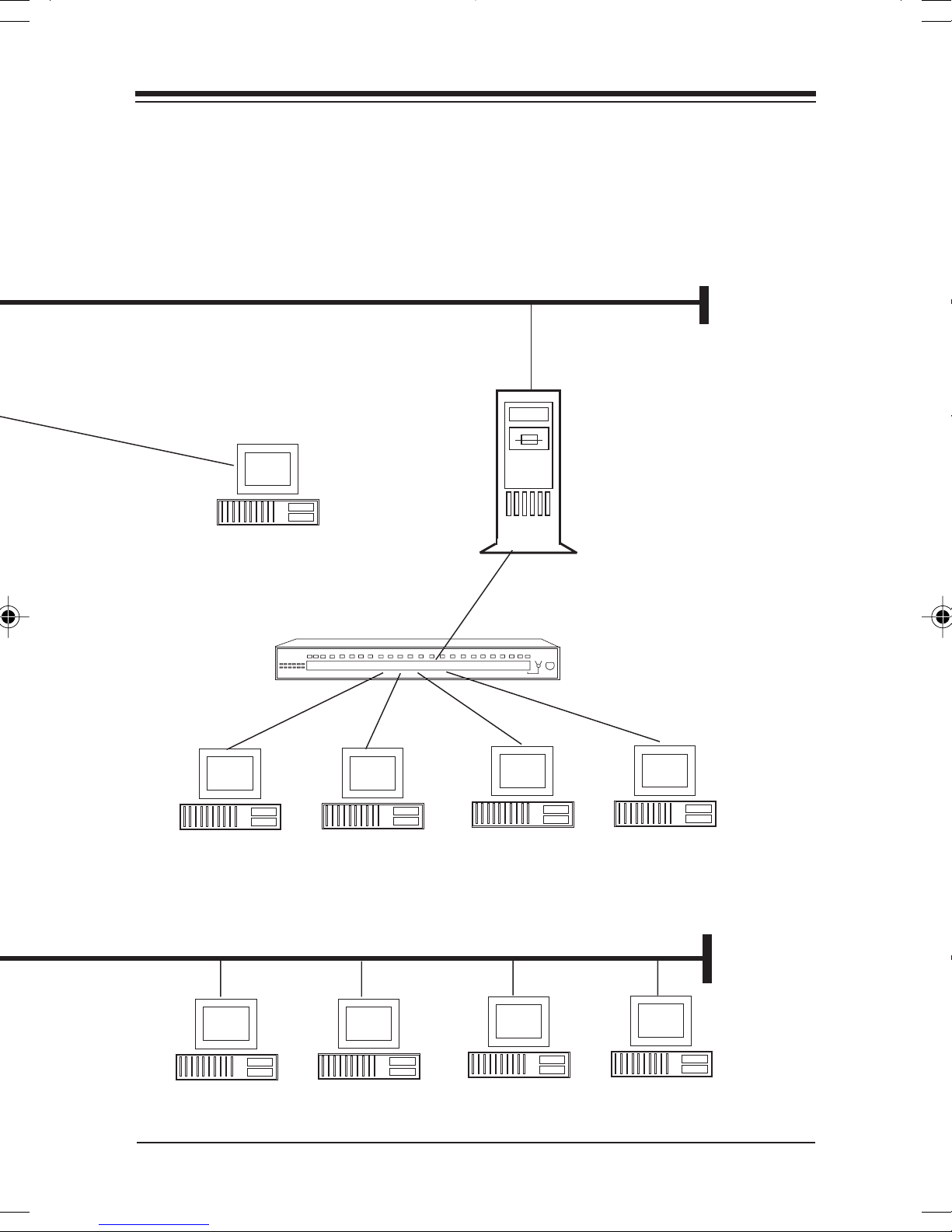
BACKBONE (10BASE5/10BASE2)BACKBONE (10BASE5/10BASE2)
BACKBONE (10BASE5/10BASE2)
BACKBONE (10BASE5/10BASE2)BACKBONE (10BASE5/10BASE2)
ServerServer
Server
ServerServer
2727
27
2727
50-ohm50-ohm
50-ohm
50-ohm50-ohm
TerminatorTerminator
Terminator
TerminatorTerminator
10BASE2 (thin Ethernet10BASE2 (thin Ethernet
10BASE2 (thin Ethernet
10BASE2 (thin Ethernet10BASE2 (thin Ethernet
Segment (maximum 30 stations)Segment (maximum 30 stations)
Segment (maximum 30 stations)
Segment (maximum 30 stations)Segment (maximum 30 stations)
50-ohm50-ohm
50-ohm
50-ohm50-ohm
TerminatorTerminator
Terminator
TerminatorTerminator
Network ConfigurationNetwork Configuration
Network Configuration
Network ConfigurationNetwork Configuration
Page 28

2828
28
2828
Section Four: Cabling CharacteristicsSection Four: Cabling Characteristics
Section Four: Cabling Characteristics
Section Four: Cabling CharacteristicsSection Four: Cabling Characteristics
4.1 Ca4.1 Ca
4.1 Ca
4.1 Ca4.1 Ca
10BASE-T10BASE-T
10BASE-T
10BASE-T10BASE-T
Cable:Cable:
Cable:
Cable:Cable:
UTP Thin Thick STP Fiber
TT
T
TT
Unshielded 50-ohm 50-ohm Shielded 625/125
Twisted-pair coax coax
22-26 AWG RG58 RG1 1
(0.4-0.6 mm) A/U or A/U or
2 pairs C/U C/U
ype:ype:
ype:
ype:ype:
ble ble
ble
ble ble
TT
ypeype
T
ype
TT
ypeype
10BASE210BASE2
10BASE2
10BASE210BASE2
Cable:Cable:
Cable:
Cable:Cable:
Coaxial Coaxial Optic
TT
ype:ype:
T
ype:
TT
ype:ype:
10BASE510BASE5
10BASE5
10BASE510BASE5
Cable:Cable:
Cable:
Cable:Cable:
TT
ype:ype:
T
ype:
TT
ype:ype:
AUI CableAUI Cable
AUI Cable
AUI CableAUI Cable
Cable:Cable:
Cable:
Cable:Cable:
TT
ype:ype:
T
ype:
TT
ype:ype:
Twisted-pair type A1b
8 pairs
10BASE-FL10BASE-FL
10BASE-FL
10BASE-FL10BASE-FL
Cable:Cable:
Cable:
Cable:Cable:
TT
ype:ype:
T
ype:
TT
ype:ype:
µM
Connector:Connector:
Connector:
Connector:Connector:
8-pin RJ-45 BNC coaxial tap DB-15 with ST
Max. Dist.:Max. Dist.:
Max. Dist.:
Max. Dist.:Max. Dist.:
100m (328') 185m (607')
Min. Dist.:Min. Dist.:
Min. Dist.:
Min. Dist.:Min. Dist.:
NA .6m (2') .5m (1.64') NA NA
BocaNETBocaNET
BocaNET
BocaNETBocaNET
-24-24
-24
-24-24
Connector:Connector:
Connector:
Connector:Connector:
connector connector slide latch BFOC/2.5
Max. Dist.:Max. Dist.:
Max. Dist.:
Max. Dist.:Max. Dist.:
Min. Dist.:Min. Dist.:
Min. Dist.:
Min. Dist.:Min. Dist.:
Connector:Connector:
Connector:
Connector:Connector:
Max. Dist.:Max. Dist.:
Max. Dist.:
Max. Dist.:Max. Dist.:
500m (1640')
Min. Dist.:Min. Dist.:
Min. Dist.:
Min. Dist.:Min. Dist.:
Connector:Connector:
Connector:
Connector:Connector:
Max. Dist.:Max. Dist.:
Max. Dist.:
Max. Dist.:Max. Dist.:
50m (164') 2000m (6560')
Min. Dist.:Min. Dist.:
Min. Dist.:
Min. Dist.:Min. Dist.:
ConnectorConnector
Connector:
ConnectorConnector
Max. Dist.:Max. Dist.:
Max. Dist.:
Max. Dist.:Max. Dist.:
Min. Dist.:Min. Dist.:
Min. Dist.:
Min. Dist.:Min. Dist.:
Page 29

2929
29
2929
4.2 10BASE-T Pin Assignments4.2 10BASE-T Pin Assignments
4.2 10BASE-T Pin Assignments
4.2 10BASE-T Pin Assignments4.2 10BASE-T Pin Assignments
An Ethernet twisted pair link segment calls for two pairs of
wires, with each pair dif ferentiated by color. Each twisted
pair link segment must have an RJ-45 male connector
attached to both ends. Pins 1 and 2 on the RJ-45 connector
are for transmitting data while pins 3 and 6 ar e for receiving
data. See chart below:
RJ-45 Assignment* RJ-45 Assignment*
1 Tx+ 1 Rx+
This is theThis is the
This is the
This is standardThis is standard
This is standard
This is standardThis is standard
2 Tx- 2 Rx3 Rx+ 3 T x +
for Ethernetfor Ethernet
for Ethernet
for Ethernetfor Ethernet
devices.devices.
devices.
devices.devices.
This is theThis is the
signal on thesignal on the
signal on the
signal on thesignal on the
BocaNETBocaNET
BocaNET
BocaNETBocaNET
-24.-24.
-24.
-24.-24.
6 Rx- 6 Tx-
* The “+” and “-” signs are used to represent the polarity of
the two wires that make up each wire pair.
NOTE: Each wire pair must be connected to the RJ-45 connectorsNOTE: Each wire pair must be connected to the RJ-45 connectors
NOTE: Each wire pair must be connected to the RJ-45 connectors
NOTE: Each wire pair must be connected to the RJ-45 connectorsNOTE: Each wire pair must be connected to the RJ-45 connectors
in a specific orientation. Refer to 4.3 Crossover Function forin a specific orientation. Refer to 4.3 Crossover Function for
in a specific orientation. Refer to 4.3 Crossover Function for
in a specific orientation. Refer to 4.3 Crossover Function forin a specific orientation. Refer to 4.3 Crossover Function for
details.details.
details.
details.details.
Cabling CharacteristicsCabling Characteristics
Cabling Characteristics
Cabling CharacteristicsCabling Characteristics
Page 30

3030
30
3030
4.3 Cr4.3 Cr
4.3 Cr
4.3 Cr4.3 Cr
Two Ethernet 10BASE-T devices can communicate only if the
transmitter on one device is connected to the receiver of the
other device. The 10BASE-T specification suggests that the
crossover function be implemented in the concentrator itself.
On the BocaNET-24, this crossover function is implemented
in all ports. The switch for Port 24 allows a straight-through
connection for cascading hubs.
When a twisted-pair port labelled with an “X” is connected
to a device which does not support the crossover function,
“straight-through” wiring can be used (see 4.4).
When connecting two identical twisted-pair ports (that is,
ossoosso
osso
ossoosso
vv
er Functioner Function
v
er Function
vv
er Functioner Function
ports that either BOTH support or NOT support the
crossover function), a crossover must be implemented in the
wiring (see 4.5).
BocaNETBocaNET
BocaNET
BocaNETBocaNET
-24-24
-24
-24-24
Page 31
3131
31
3131
4.4 Straight-Thr4.4 Straight-Thr
4.4 Straight-Thr
4.4 Straight-Thr4.4 Straight-Thr
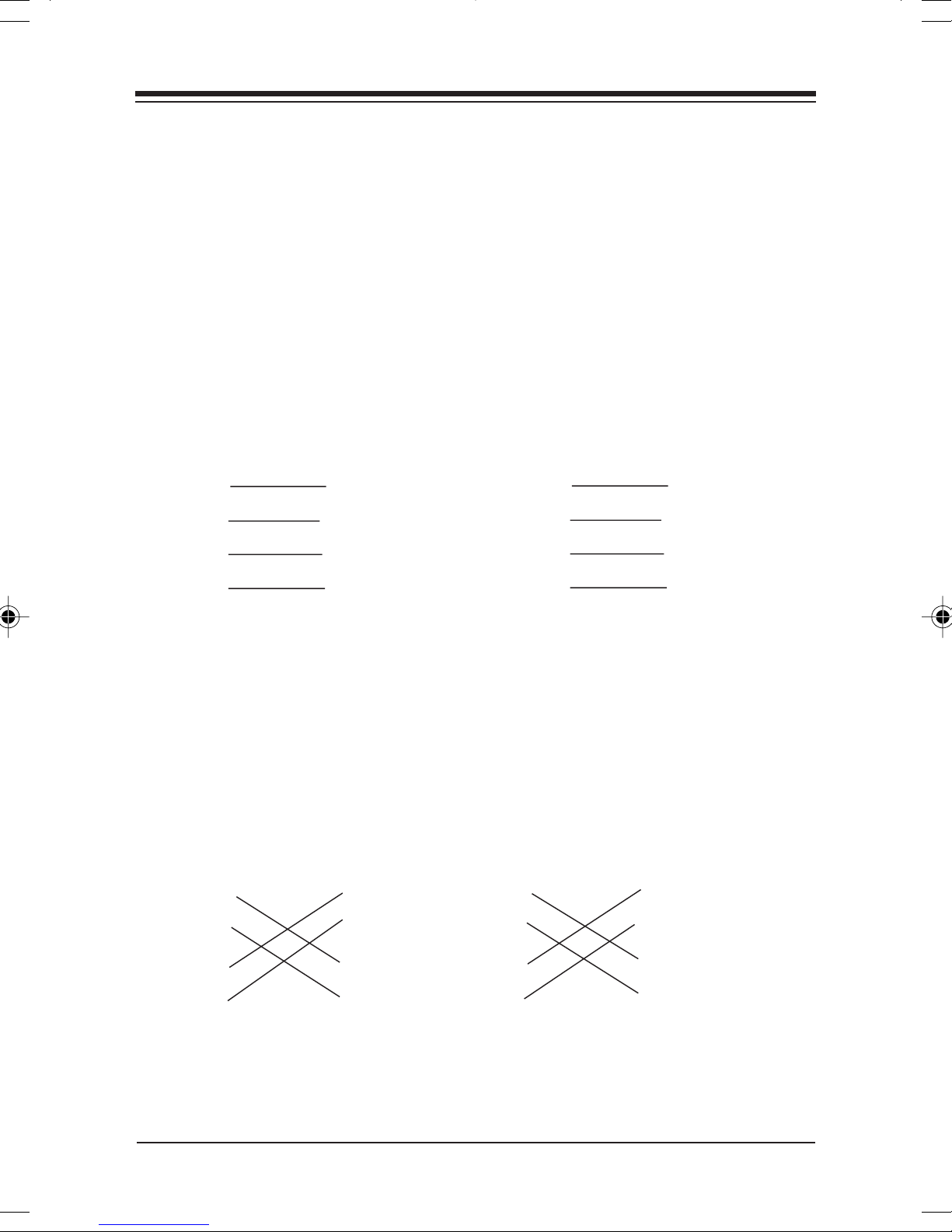
If the twisted pair link segment is to connect two ports and
only one of the ports features an internal
crossover, the two pairs of wires must be straight-through:
STRAIGHTSTRAIGHT
STRAIGHT
STRAIGHTSTRAIGHT
(8-pin RJ-45) (10-pin RJ-45)
Concentrator Device Concentrator Device
1 (Rx+) 1 (Tx+) 2 (Rx+) 2 (Tx+)
2 (Rx-) 2 (Tx-) 3 (Rx-) 3 (Tx-)
3 (Tx+) 3 (Rx+) 4 (Tx+) 4 (Rx+)
6 (Tx-) 6 (Rx-) 7 (Tx-) 7 (Rx-)
-THROUGH RJ-45 PIN ASSIGNMENTS-THROUGH RJ-45 PIN ASSIGNMENTS
-THROUGH RJ-45 PIN ASSIGNMENTS
-THROUGH RJ-45 PIN ASSIGNMENTS-THROUGH RJ-45 PIN ASSIGNMENTS
CROSSED NOT CROSSED
ough ough
ough
ough ough
WW
W
WW
irir
ir
irir
inging
ing
inging
4.5 Cr4.5 Cr
4.5 Cr
4.5 Cr4.5 Cr
If both ports are labelled “X”, or neither port is labelled, then
the crossover must be implemented in the wiring.
(8-pin RJ-45) (10-pin RJ-45)
ossoosso
osso
ossoosso
CROSSED NOT CROSSED
1 (+) 1 (+) 2 (+) 2 (+)
2 (-) 2 (-) 3 (-) 3 (-)
3 (+) 3 (+) 4 (+) 4 (+)
6 (-) 6 (-) 7 (-) 7 (-)
vv
v
vv
er er
er
er er
WW
W
WW
irir
ir
irir
inging
ing
inging
Cabling CharacteristicsCabling Characteristics
Cabling Characteristics
Cabling CharacteristicsCabling Characteristics
Page 32
3232
32
3232
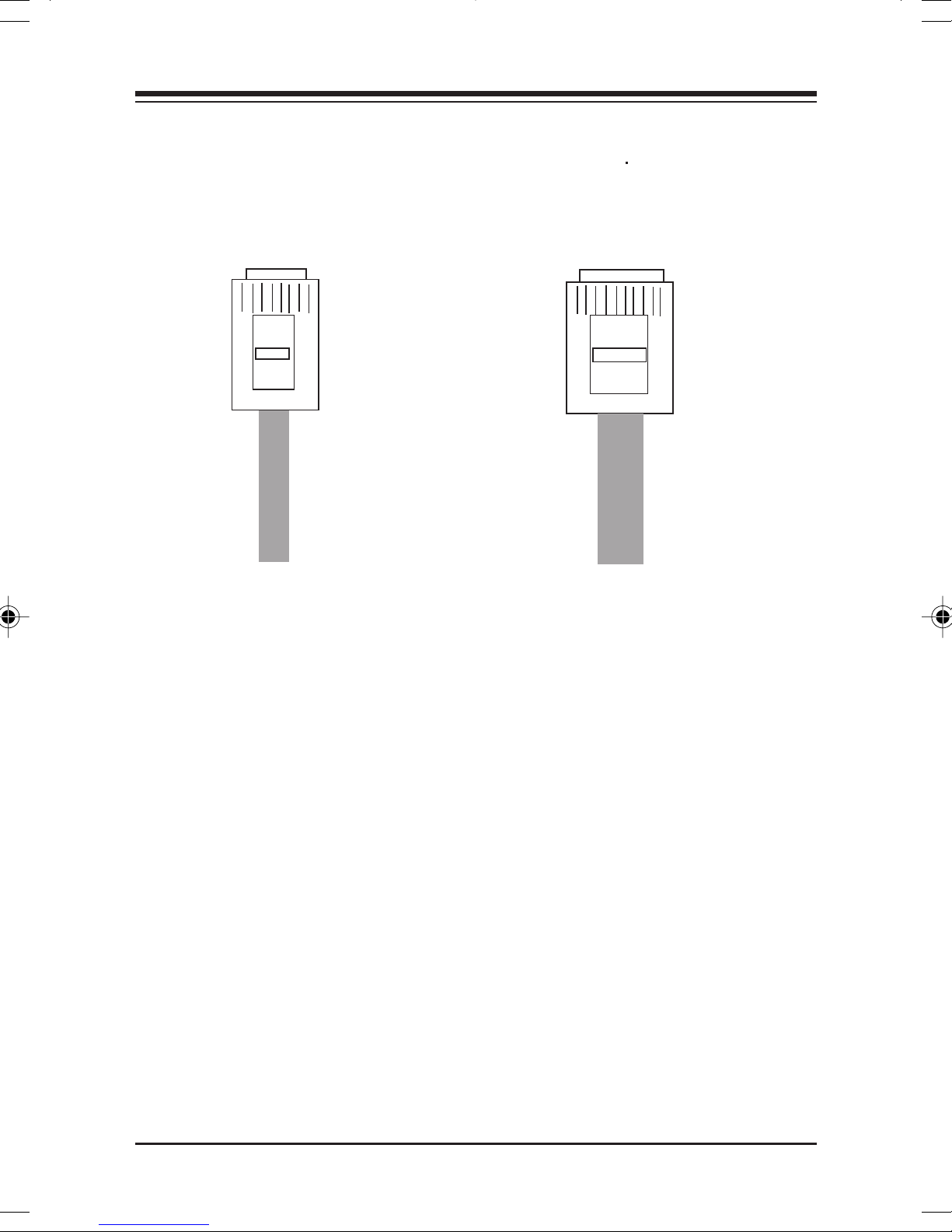
8-pin8-pin
8-pin
8-pin8-pin
RJ45RJ45
RJ45
RJ45RJ45
ConnectorConnector
Connector
ConnectorConnector
10-pin10-pin
10-pin
10-pin10-pin
RJ45RJ45
RJ45
RJ45RJ45
ConnectorConnector
Connector
ConnectorConnector
Pin 1Pin 1
Pin 1
Pin 1Pin 1
NOTE ON SIGNAL POLARITYNOTE ON SIGNAL POLARITY
NOTE ON SIGNAL POLARITY
NOTE ON SIGNAL POLARITYNOTE ON SIGNAL POLARITY
Pin 8Pin 8
Pin 8
Pin 8Pin 8
Bottom ofBottom of
Bottom of
Bottom ofBottom of
plugplug
plug
plugplug
Pin 1Pin 1
Pin 1
Pin 1Pin 1
Pin 10Pin 10
Pin 10
Pin 10Pin 10
If a receive data pair has the “+” and “-” signals
unintentionally reversed, the BocaNET-24 automatically
detects and adjusts this reversal so the data path will
function properly.
BocaNETBocaNET
BocaNET
BocaNETBocaNET
-24-24
-24
-24-24
Page 33
3333
33
3333
Section FivSection Fiv
Section Fiv
Section FivSection Fiv
5.1 Status/Diagnostic LEDs5.1 Status/Diagnostic LEDs
5.1 Status/Diagnostic LEDs
5.1 Status/Diagnostic LEDs5.1 Status/Diagnostic LEDs
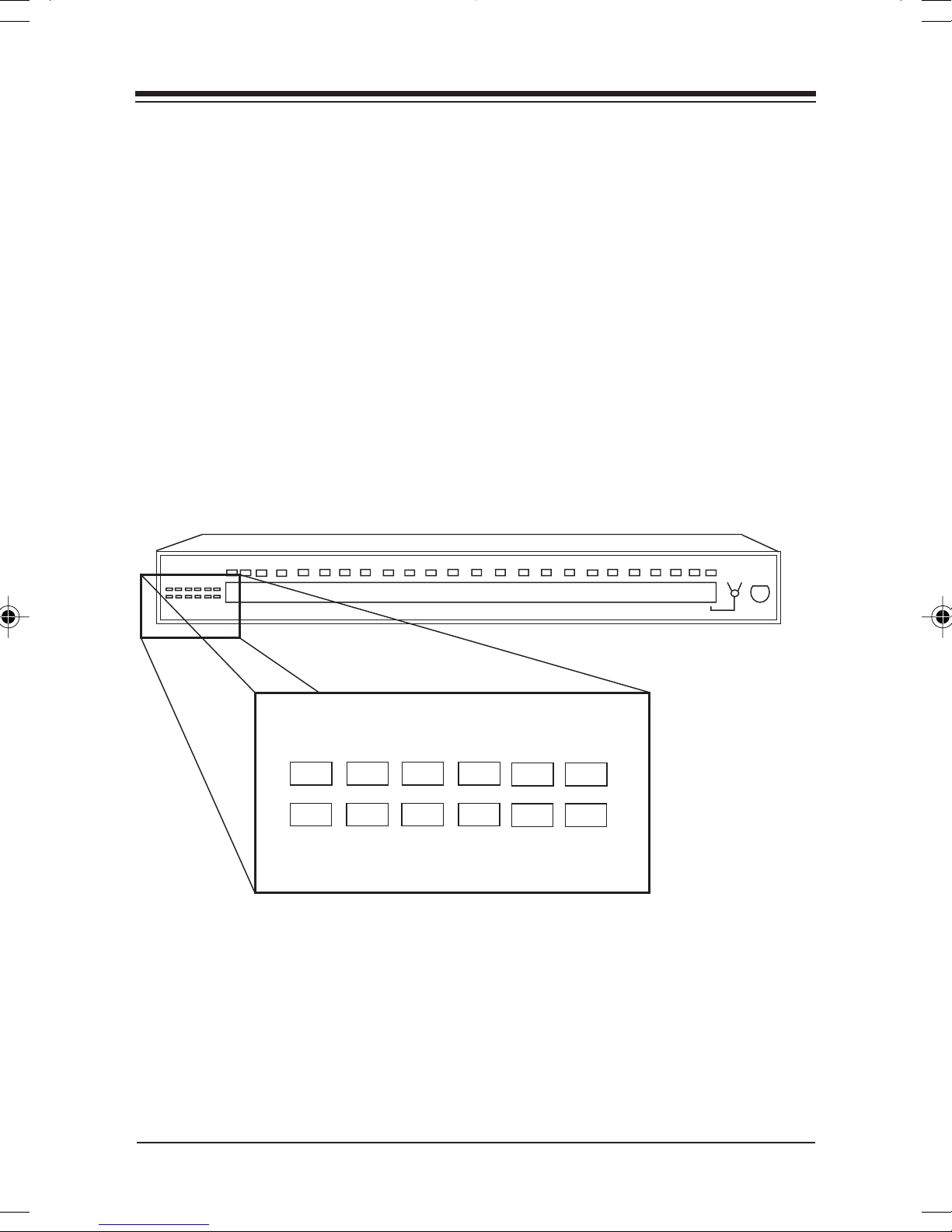
The BocaNET-24 featur es a total of 36 front panel LEDs to
aid in testing the installation and the diagnosing of
problems. There are 24 LINK/PARTITION bi-color LEDs,
one Power LED, one Collision LED, one Activity LED, one
AUI LED, one BNC LED, one ALERT LED, and six
PERCENT USAGE LEDs.
e: e:
e:
e: e:
TT
rr
oubleshootingoubleshooting
T
r
oubleshooting
TT
rr
oubleshootingoubleshooting
ER
POW
2 6 12 25 50 80
BNC
AUI
PERCENT USAGE
ACTIVITY
COLLISION
ALERT
T
TT
TT
rr
ouboub
leshootingleshooting
r
oub
leshooting
rr
ouboub
leshootingleshooting
Page 34

3434
34
3434
Ports 1 through 24 feature an associated Link and Partition
LED.
For the bi-color LINK/PFor the bi-color LINK/P
For the bi-color LINK/P
For the bi-color LINK/PFor the bi-color LINK/P
GREENGREEN
be
GREEN for a given port IF a device is physically attached
GREENGREEN
and functioning normally. If the LED is
problem with the corresponding device. If the LED is
ARITION LEDARITION LED
ARITION LED, the status LED will
ARITION LEDARITION LED
OFFOFF
OFF, there is a
OFFOFF
REDRED
RED,
REDRED
the associated device has been isolated from the network
because of excessive collisions (concentrator receiving data
from two or more devices at the same time), or jabbering.
Each BocaNET-24 concentrator also has:
• A GREEN power LED to indicate that the BocaNET-24 has
power.
• One YELLOW collision LED to signal a network collision.
If this light stays ON, observe the bi-color link/partition
LEDs to isolate which device is causing the collision.
• One GREEN activity LED to indicate network activity.
LED functionality is summarized as follows:
BocaNETBocaNET
BocaNET
BocaNETBocaNET
-24-24
-24
-24-24
Page 35

3535
35
3535
LED COLOR # STATUS MEANING
POWER GREEN 1 ON BocaNET-24 has power.
COLLISION YELLOW 1 ON A network collision has
been detected. The
BocaNET-24 is receiving
data from two or more
devices at the same
time.
ACTIVITY GREEN 1 ON The BocaNET-24
receiving data from one
or more ports.
OFF
PORT
LINK/ valid link test signal.
PARTITION RED Device has been
STATUS isolated because of
(1-24) collision.
PORT GREEN 2 OFF Associated device is
PARTITION attached and
STATUS functioning normally.
(BNC, AUI) ON Device has been
BI-COLOR
24
GREEN
OFF No connection.
The BocaNET-24 is not
receiving data on any of
its ports.
The port is receiving a
isolated because of
collision.
is
ALERT RED 1 ON
PERCENT
USAGE COLOR
MULTI-
Usage exceeds 80%, or
when any 10Base-T
port is isolated for more
than 1 second.
6 GREEN 2, 6, 12, 25% usage.
YELLOW
RED 80% usage.
50% usage.
Page 36

3636
36
3636
5.2 Installa5.2 Installa
5.2 Installa
5.2 Installa5.2 Installa
IF THE POWER LED IS NOT ON AND THE BocaNETIF THE POWER LED IS NOT ON AND THE BocaNET
IF THE POWER LED IS NOT ON AND THE BocaNET
IF THE POWER LED IS NOT ON AND THE BocaNETIF THE POWER LED IS NOT ON AND THE BocaNET
SHOWS NO ACTIVITYSHOWS NO ACTIVITY
SHOWS NO ACTIVITY
SHOWS NO ACTIVITYSHOWS NO ACTIVITY
• Check the connections between the concentrator, the
power cord, and the wall outlet.
• Make sure the wall outlet has power.
• Try another AC power cord that you know works. If the
Power LED still fails to come ON, the BocaNET-24 may be
faulty. Call Technical Support.
tion tion
tion
tion tion
TT
estest
T
est
TT
estest
-24-24
-24
-24-24
IF THE LINK LEDs DO NOT RESPONDIF THE LINK LEDs DO NOT RESPOND
IF THE LINK LEDs DO NOT RESPOND
IF THE LINK LEDs DO NOT RESPONDIF THE LINK LEDs DO NOT RESPOND
Check the connections between each network device and the
concentrator port, including wiring. Make certain all devices
have power and are working normally.
BocaNETBocaNET
BocaNET
BocaNETBocaNET
-24-24
-24
-24-24
Page 37

Appendix A: SpecificationsAppendix A: Specifications
Appendix A: Specifications
Appendix A: SpecificationsAppendix A: Specifications
OperatingOperating
Operating
OperatingOperating
TT
emperature:emperature:
T
emperature: 20-50 degrees Centigrade
TT
emperature:emperature:
RelativeRelative
Relative
RelativeRelative
Humidity:Humidity:
Humidity: 70% (non-condensing)
Humidity:Humidity:
Power:Power:
Power: 120/220V AC -30W
Power:Power:
• Twisted-Pair Cable Interface: Twisted Pair using RJ-45 connectors
• Coaxial Cable Interface: RG58 A/U or C/U using BNC connector
• AUI cable Interface: DSUB 15 with latch using shielded twisted pair
3737
37
3737
ConnectorsConnectors
Connectors:
ConnectorsConnectors
• 24 10BASE-T ports using RJ-45 (unshielded twisted pair) (maximum
cable length: 328')
• 1 10BASE2 port with BNC connector (maximum cable length: 607')
• 1 AUI port with DB-15 connector (maximum cable length: 164'
between concentrator or adapter and receiver)
LEDs: 36 including 1 power LED (green), 1 collision LED (yellow), 1
activity LED (green), 1 BNC (green), 1 AUI (green), 1 alert LED (red), 6
network utilization LEDs (multi-color), and 24 link status/portpartitioning bi-color LEDs.
Dimensions:Dimensions:
Dimensions: 17" x 1.75" x 8"
Dimensions:Dimensions:
SpecificationsSpecifications
Specifications
SpecificationsSpecifications
Page 38

3838
38
3838
Appendix B: FCC ComplianceAppendix B: FCC Compliance
Appendix B: FCC Compliance
Appendix B: FCC ComplianceAppendix B: FCC Compliance
This equipment has been tested and found to comply with the
limits for a
Rules. These limits are designed to provide reasonable protection
against harmful interference when the equipment is operated in a
commercial environment.
This equipment generates, uses, and can radiate radio frequency
energy and, if not installed and used in accordance with the
instructions, may cause harmful interference to radio
communications. Operation of this equipment in a residential area
is likely to cause harmful interference in which case users will be
required to correct the interference at their own expense.”
CHANGES OR MODIFICACHANGES OR MODIFICA
CHANGES OR MODIFICA
CHANGES OR MODIFICACHANGES OR MODIFICA
EQUIPMENT NOT EXPRESSLEQUIPMENT NOT EXPRESSL
EQUIPMENT NOT EXPRESSL
EQUIPMENT NOT EXPRESSLEQUIPMENT NOT EXPRESSL
Class A Class A
Class A digital device, pursuant to Part 15 of the FCC
Class A Class A
TIONS TO THISTIONS TO THIS
TIONS TO THIS
TIONS TO THISTIONS TO THIS
Y APPROVED BY THEY APPROVED BY THE
Y APPROVED BY THE
Y APPROVED BY THEY APPROVED BY THE
MANUFMANUF
MANUF
MANUFMANUF
TO OPERATO OPERA
TO OPERA
TO OPERATO OPERA
BocaNETBocaNET
BocaNET
BocaNETBocaNET
ACTURER COULD VOID YOUR AUTHORITYACTURER COULD VOID YOUR AUTHORITY
ACTURER COULD VOID YOUR AUTHORITY
ACTURER COULD VOID YOUR AUTHORITYACTURER COULD VOID YOUR AUTHORITY
-24-24
-24
-24-24
TE THE EQUIPMENTTE THE EQUIPMENT
TE THE EQUIPMENT
TE THE EQUIPMENTTE THE EQUIPMENT
..
.
..
Page 39

3939
39
3939
Appendix C: SerAppendix C: Ser
Appendix C: Ser
Appendix C: SerAppendix C: Ser
If your Boca product r equires service, first contact the
authorized dealer from whom you purchased the product. If
the dealer is unable to assist you, and you must contact Boca
Research, Inc., please follow the instructions below.
Our electronic BBS is available 24 hours a day at (561) 2411601 and will support data transmission speeds up to 33.6K
bps with settings of 8, N, 1. If you have a modem, the BBS
may be helpful(especially during off hours) if you have a
question about product settings or compatibility, or if you
wish to download driver software or utilities.
vicing the Boca Prvicing the Boca Pr
vicing the Boca Pr
vicing the Boca Prvicing the Boca Pr
oductoduct
oduct
oductoduct
If the Troubleshooting section did not resolve your problem,
you may call our technical support staff for assistance. If you
haven’t referred to the Troubleshooting section, there’s a
good chance the solution to your problem is there.
NOTE: CALLING TECHNICALNOTE: CALLING TECHNICAL
NOTE: CALLING TECHNICAL
NOTE: CALLING TECHNICALNOTE: CALLING TECHNICAL
COMPLETE AND ACCURACOMPLETE AND ACCURA
COMPLETE AND ACCURA
COMPLETE AND ACCURACOMPLETE AND ACCURA
CONCERNING YOUR PROBLEM MACONCERNING YOUR PROBLEM MA
CONCERNING YOUR PROBLEM MA
CONCERNING YOUR PROBLEM MACONCERNING YOUR PROBLEM MA
CONSUMING AND FRUSTRACONSUMING AND FRUSTRA
CONSUMING AND FRUSTRA
CONSUMING AND FRUSTRACONSUMING AND FRUSTRA
1. When calling Boca Research Technical Support, have the
following information available:
SUPPOR SUPPOR
SUPPOR
SUPPOR SUPPOR
TE INFORMATE INFORMA
TE INFORMA
TE INFORMATE INFORMA
TING FOR YOU.TING FOR YOU.
TING FOR YOU.
TING FOR YOU.TING FOR YOU.
T WITHOUTT WITHOUT
T WITHOUT
T WITHOUTT WITHOUT
Y BE BOTH TIME-Y BE BOTH TIME-
Y BE BOTH TIME-
Y BE BOTH TIME-Y BE BOTH TIME-
TIONTION
TION
TIONTION
Servicing the Boca ProductServicing the Boca Product
Servicing the Boca Product
Servicing the Boca ProductServicing the Boca Product
Page 40

4040
40
4040
• Name of product
(BocaNET-24)
• Computer Manufacturer
• Computer Model
• Peripherals in system
• Operating System and version
If you suspect a problem with aIf you suspect a problem with a
If you suspect a problem with a
If you suspect a problem with aIf you suspect a problem with a
specific program or softwarespecific program or software
specific program or software
specific program or softwarespecific program or software
package, make note of thepackage, make note of the
package, make note of the
package, make note of thepackage, make note of the
name, version or releasename, version or release
name, version or release
name, version or releasename, version or release
numbernumber
number
numbernumber
the software.the software.
the software.
the software.the software.
, and manufacturer of, and manufacturer of
, and manufacturer of
, and manufacturer of, and manufacturer of
If you suspect a problem with a specific program or
software package, make note of the name, version or
release number, and manufacturer of the software.
2. Call Boca Research Technical Support Department
between the hours of 8:00 a.m. and 6:30 p.m. EST Monday
through Friday at (561) 241-8088. A technical support
specialist will be available to discuss the problem(s) you
are experiencing.
If factory service is requir ed, you will be given a Return
Merchandise Authorization (RMA) number.
this number on the outside of the package this number on the outside of the package
this number on the outside of the package when you
this number on the outside of the package this number on the outside of the package
Please placePlease place
Please place
Please placePlease place
return the item(s) for service and reference it on any
correspondence included in the package. Boca Research,
Inc. will return any pr oduct which is not accompanied by
an RMA number.
3. Refer to the Warranty Statement if the product is covered
under the five-year Boca Research, Inc. Limited Warranty.
BocaNETBocaNET
BocaNET
BocaNETBocaNET
-24-24
-24
-24-24
Page 41

4141
41
4141
4. Certain parts will not be covered under the Boca Resear ch,
Inc. Limited Warranty. Dealer installed parts are warranted
by the dealer. Parts which you have installed yourself are
covered only by the supplier’s warranties. In these cases,
Boca Research, Inc. can identify which parts are defective,
but will not replace such parts until specific written
authorization is received from you. The cost of parts and
labor involved in making such repairs will be billed to you
C.O.D.
5. When sending the product to Boca Research, Inc. for
repairs, please be sure to include:
• the Boca Research pr oduct
(BocaNET(BocaNET
(BocaNET
(BocaNET(BocaNET
-24 unit only)-24 unit only)
-24 unit only)
-24 unit only)-24 unit only)
• your name
• your return street address (for UPS purposes)
• phone number
• the RMA number mentioned above
Package the product securely in a container equivalent to
the original packaging, and insure the package to protect
against loss or damage during
transit. Shipping charges must be prepaid; C.O.D.
shipments will not be accepted. Please use the address
below for all correspondence:
SerSer
Ser
SerSer
vicing vicing
vicing
vicing vicing
YY
our Boca Prour Boca Pr
Y
our Boca Pr
YY
our Boca Prour Boca Pr
oductoduct
oduct
oductoduct
Page 42

4242
42
4242
Boca Research, Inc.Boca Research, Inc.
Boca Research, Inc.
Boca Research, Inc.Boca Research, Inc.
RMA Department - RMA # _________RMA Department - RMA # _________
RMA Department - RMA # _________
RMA Department - RMA # _________RMA Department - RMA # _________
6500 W6500 W
6500 W
6500 W6500 W
Boca Raton, FL 33487-2841Boca Raton, FL 33487-2841
Boca Raton, FL 33487-2841
Boca Raton, FL 33487-2841Boca Raton, FL 33487-2841
est Rogers Circleest Rogers Circle
est Rogers Circle
est Rogers Circleest Rogers Circle
6. If the repairs performed on your product were covered by
the warranty, Boca Research, Inc. will return it prepaid via
UPS.
CopyrightCopyright
Copyright
CopyrightCopyright
© 1997. Boca Research, Inc. All rights reserved. No reproduction of this
document in any form is allowed without permission in writing from Boca
Research, Inc. Boca Research is not liable for any damages resulting from
technical or editorial errors or omissions contained in this document. The
information in this manual is subject to change without notice. Revisions to the
product(s) in this manual may occur at any time without notice.
TT
rademarksrademarks
T
rademarks
TT
rademarksrademarks
All Boca Research products are trademarks of Boca Research, Inc. All other
references to computer systems, software, and peripherals use trademarks
owned by their respective manufacturers.
Publication Date: NovemberPublication Date: November
Publication Date: November
Publication Date: NovemberPublication Date: November
Printed in the U.S.A. 9379.P65
BocaNETBocaNET
BocaNET
BocaNETBocaNET
-24-24
-24
-24-24
, 1997, 1997
, 1997
, 1997, 1997
Page 43

4343
43
4343
Limited WLimited W
Limited W
Limited WLimited W
Boca Research, Inc. (BRI) warrants to the original buyer of this BRI product that the
hardware is free of defects in materials and workmanship for a period specified in the
original sales contract (“the Warranty Period”). Should the product fail to be in working
order at any time during the specified period, BRI, will at its option, repair or r eplace this
product as described below, provided that in BRI’s sole determination the part or
product has not been abused, misused, repaired, or modified.
All products will be serviced and returned via gr ound at no charge to customer. All
returns for limited warranty service require a Return Merchandise Authorization (RMA).
All customers are requir ed to demonstrate pr oof of purchase when requesting an RMA.
The period of warranty commences on the date of purchase. A dated copy of the sales
slip must be included with the returned merchandise.
Products which require Limited Warranty service during the warranty period should be
delivered to BRI at the address shown below in the Appendix (Servicing Your Boca
Product) with proof of pur chase, copy of canceled check (if any), and the Return
Merchandise Authorization (RMA) number provided by BRI Technical Support. Refer to
the Appendix in this manual. Replacement parts or complete products will be furnished
on an exchange basis only. Replaced parts and/or products become the property of BRI.
If the returned product is sent by mail, the pur chaser agrees to prepay shipping charges,
insure the product or assume the risk of loss or damage which may occur in transit, and
to use a shipping container equivalent to the original packaging. BRI does not make any
warranties in respect to the product, either expr essed or implied, including no implied
warranties of merchantability or fitness for a particular purpose, except as expressly
provided in this agreement. If any labor, repair, or parts replacement is required because
of accident, negligence, misuse, theft, vandalism, fire, water or other peril; or because of
conditions outside of specifications, including, but not limited to, electrical power,
temperature, humidity or dust; or by moving, repair relocation, or alteration not
performed by BRI, or by any other cause other than normal use, the warranty and
maintenance obligations provided herein shall not apply.
arrantyarranty
arranty
arrantyarranty
Boca's products are manufactured from new and serviceable used parts tested to BocaBoca's products are manufactured from new and serviceable used parts tested to Boca
Boca's products are manufactured from new and serviceable used parts tested to Boca
Boca's products are manufactured from new and serviceable used parts tested to BocaBoca's products are manufactured from new and serviceable used parts tested to Boca
Research's quality assurance standards. OccasionallyResearch's quality assurance standards. Occasionally
Research's quality assurance standards. Occasionally
Research's quality assurance standards. OccasionallyResearch's quality assurance standards. Occasionally
used, serviceable parts. If the product proves to be defective, Boca Research will bearused, serviceable parts. If the product proves to be defective, Boca Research will bear
used, serviceable parts. If the product proves to be defective, Boca Research will bear
used, serviceable parts. If the product proves to be defective, Boca Research will bearused, serviceable parts. If the product proves to be defective, Boca Research will bear
the costs of labor and materials for hardware replacement or repair during the abovethe costs of labor and materials for hardware replacement or repair during the above
the costs of labor and materials for hardware replacement or repair during the above
the costs of labor and materials for hardware replacement or repair during the abovethe costs of labor and materials for hardware replacement or repair during the above
specified warranty period. Boca Research or its Authorized Service Providers shallspecified warranty period. Boca Research or its Authorized Service Providers shall
specified warranty period. Boca Research or its Authorized Service Providers shall
specified warranty period. Boca Research or its Authorized Service Providers shallspecified warranty period. Boca Research or its Authorized Service Providers shall
have the option to replace any defective part(s) with new part(s) orhave the option to replace any defective part(s) with new part(s) or
have the option to replace any defective part(s) with new part(s) or
have the option to replace any defective part(s) with new part(s) orhave the option to replace any defective part(s) with new part(s) or
Boca Research, with serviceable used parts that are equivalent to new parts inBoca Research, with serviceable used parts that are equivalent to new parts in
Boca Research, with serviceable used parts that are equivalent to new parts in
Boca Research, with serviceable used parts that are equivalent to new parts inBoca Research, with serviceable used parts that are equivalent to new parts in
performance. Boca Research shall also have the option to replace any defectiveperformance. Boca Research shall also have the option to replace any defective
performance. Boca Research shall also have the option to replace any defective
performance. Boca Research shall also have the option to replace any defectiveperformance. Boca Research shall also have the option to replace any defective
product(s) with functionally equivalent product(s).product(s) with functionally equivalent product(s).
product(s) with functionally equivalent product(s).
product(s) with functionally equivalent product(s).product(s) with functionally equivalent product(s).
BRI SHALLBRI SHALL
BRI SHALL
BRI SHALLBRI SHALL
CONSEQUENTIAL DAMAGES OR FOR LOSS, DAMAGE, OR EXPENSECONSEQUENTIAL DAMAGES OR FOR LOSS, DAMAGE, OR EXPENSE
CONSEQUENTIAL DAMAGES OR FOR LOSS, DAMAGE, OR EXPENSE
CONSEQUENTIAL DAMAGES OR FOR LOSS, DAMAGE, OR EXPENSECONSEQUENTIAL DAMAGES OR FOR LOSS, DAMAGE, OR EXPENSE
DIRECTLDIRECTL
DIRECTL
DIRECTLDIRECTL
INABILITY TO USE THE EQUIPMENT EITHER SEPINABILITY TO USE THE EQUIPMENT EITHER SEP
INABILITY TO USE THE EQUIPMENT EITHER SEP
INABILITY TO USE THE EQUIPMENT EITHER SEPINABILITY TO USE THE EQUIPMENT EITHER SEP
COMBINACOMBINA
COMBINA
COMBINACOMBINA
LOSS OR DESTRUCTION OF OTHER PROPERLOSS OR DESTRUCTION OF OTHER PROPER
LOSS OR DESTRUCTION OF OTHER PROPER
LOSS OR DESTRUCTION OF OTHER PROPERLOSS OR DESTRUCTION OF OTHER PROPER
CAUSE.CAUSE.
CAUSE.
CAUSE.CAUSE.
This warranty shall not be applicable to the extent that any provision of this warranty is
prohibited by any Federal, state, or municipal law which cannot be preempted. This
warranty gives you specific legal rights, and you may also have other rights which vary
from state to state.
NOT BE LIABLE FOR ANY SPECIAL, INCIDENT NOT BE LIABLE FOR ANY SPECIAL, INCIDENT
NOT BE LIABLE FOR ANY SPECIAL, INCIDENT
NOT BE LIABLE FOR ANY SPECIAL, INCIDENT NOT BE LIABLE FOR ANY SPECIAL, INCIDENT
Y OR INDIRECTLY OR INDIRECTL
Y OR INDIRECTL
Y OR INDIRECTLY OR INDIRECTL
TION WITH OTHER EQUIPMENTTION WITH OTHER EQUIPMENT
TION WITH OTHER EQUIPMENT
TION WITH OTHER EQUIPMENTTION WITH OTHER EQUIPMENT
Y ARISING FROM CUSTOMER’S USE OF ORY ARISING FROM CUSTOMER’S USE OF OR
Y ARISING FROM CUSTOMER’S USE OF OR
Y ARISING FROM CUSTOMER’S USE OF ORY ARISING FROM CUSTOMER’S USE OF OR
, some new products may contain, some new products may contain
, some new products may contain
, some new products may contain, some new products may contain
, at the option of, at the option of
, at the option of
, at the option of, at the option of
AL, ORAL, OR
AL, OR
AL, ORAL, OR
ARAARA
TELTEL
TEL
TELTEL
Y OR INY OR IN
Y OR IN
Y OR INY OR IN
INJUR INJUR
INJUR
INJUR INJUR
ARA
ARAARA
, OR FOR PERSONAL, OR FOR PERSONAL
, OR FOR PERSONAL
, OR FOR PERSONAL, OR FOR PERSONAL
TYTY
, OR FROM ANY OTHER, OR FROM ANY OTHER
TY
, OR FROM ANY OTHER
TYTY
, OR FROM ANY OTHER, OR FROM ANY OTHER
Y ORY OR
Y OR
Y ORY OR
Page 44

4444
44
4444
GlossaryGlossary
Glossary
GlossaryGlossary
10Base-T10Base-T
10Base-T. Twisted pair cabling using an RJ-45 connector.
10Base-T10Base-T
10BASE510BASE5
10BASE5. Original Ethernet using coaxial cable.
10BASE510BASE5
10BASE210BASE2
10BASE2. Also known as “cheapernet”. Another name for Thin Ethernet
10BASE210BASE2
using a BNC connector.
802.3.802.3.
802.3. Defined by the IEEE (
802.3.802.3.
these standards regulate the use of the CSMA/CD (Carrier Sense
Multiple Access/Collision Detection network access method used by
Ethernet networks.
Address.Address.
Address. A unique identifier assigned to networks and workstations so
Address.Address.
that each device can be separately designated to send and receive
messages.
AUI ConnectorAUI Connector
AUI Connector. Attachment Unit Interface; 15-pin “D” connector for use
AUI ConnectorAUI Connector
with external transceivers, such as 10BASE5 or fiber optics.
Backbone.Backbone.
Backbone. Cable on which two or more stations or networks may be
Backbone.Backbone.
attached.
BNC ConnectorBNC Connector
BNC Connector
BNC ConnectorBNC Connector
thin Ethernet cable. A BNC barrel connector joins two lengths of thin
Ethernet cable.
. .
. BNC jacks and plugs connect network hardware via
. .
Institute of Electrical and Electronics Engineers
),
Boot PROM.Boot PROM.
Boot PROM. (
Boot PROM.Boot PROM.
usually mounted on the network interface card that enables a personal
computer to load the operating system from the network.
Bus topologyBus topology
Bus topology. A network topology in which nodes are connected to a
Bus topologyBus topology
single cable with terminators at each end.
Client.Client.
Client. A node that requests network services from a server.
Client.Client.
BocaNETBocaNET
BocaNET
BocaNETBocaNET
Boot Programmable Read-Only Memory
-24-24
-24
-24-24
). A ROM chip
Page 45

4545
45
4545
Coaxial Cable.Coaxial Cable.
Coaxial Cable. Data transmission medium with a single-wire conductor
Coaxial Cable.Coaxial Cable.
insulated from electro-magnetic and radio frequency interference.
ConcentratorConcentrator
Concentrator
ConcentratorConcentrator
CSMA/CDCSMA/CD
CSMA/CD. Carrier Sense Multiple Access with Collision Detection.
CSMA/CDCSMA/CD
CSMA/CD is the access method used in Ethernet where nodes contend
for the right to send data.
DMA. DMA.
DMA. Direct Memory Access. DACK stands for Dma ACKnowledge
DMA. DMA.
and DRQ for Dma ReQuest. DMA provides direct access to system
memory without adding to CPU overhead. The DACK and DRQ
channels govern that communication.
Ethernet.Ethernet.
Ethernet. A 10 megabits-per-second baseband, CSMA/CD network
Ethernet.Ethernet.
originally designed by the Xerox Corporation.
File ServerFile Server
File Server. A device on a LAN that provides mass storage of files. A file
File ServerFile Server
server can be dedicated (only performs network management functions)
or non-dedicated (where user applications can co-exist while the
network is available.
..
. See hub.
..
HubHub
Hub. A concentrator or repeater in a star topology at which node
HubHub
connections meet.
JabberJabber
Jabber
JabberJabber
transmitted from the node (i.e., workstation, server). At that point, the
hub, or concentrator, partitions (isolates) the node from the network until
the condition is corrected.
LED.LED.
LED. Light-emitting diode.
LED.LED.
Network topologyNetwork topology
Network topology
Network topologyNetwork topology
ring, tree, or bus pattern.
Node.Node.
Node. Any device including servers and workstations connected to a
Node.Node.
network; also the point where devices are connected.
..
. This occurs when there are excessively long data packets being
..
..
. The arrangement of nodes usually forming a star,
..
Page 46

4646
46
4646
Packet.Packet.
Packet. A collection of bits comprising data and control information
Packet.Packet.
formatted for transmission from one node to another.
Protocol.Protocol.
Protocol. A standardized set of rules that specify the format, timing,
Protocol.Protocol.
sequencing, and/or error checking for data transmissions.
RepeaterRepeater
Repeater. Used to extend the topology, allowing two or more cable
RepeaterRepeater
segments to be joined. In a 10Base-T network, the repeater provides the
central connection point where the gathering of statistics and network
management functions take place.
Ring TRing T
Ring T
Ring TRing T
closed loop; no terminators are required because there are no
unconnected ends.
ServerServer
Server
ServerServer
printers, to the network.
Star TStar T
Star T
Star TStar T
common device such as hub or concentrator.
TT
-Connector-Connector
T
-Connector
TT
-Connector-Connector
connectors.
TT
erminatorerminator
T
erminator
TT
erminatorerminator
connector when the associated station is first or last in the group.
TT
opologyopology
T
opology. The physical layout of a network. The principal LAN
TT
opologyopology
topologies are bus, ring, and star.
opologyopology
opology
opologyopology
..
. A computer that provides shared resources, such as files and
..
opologyopology
opology
opologyopology
..
. A network topology in which nodes are connected in a
..
. .
. A network topology in which nodes are connected to a
. .
..
. A T-shaped device with two female and one male BNC
..
. .
. 50-ohm coaxial plug used to attach to one end of a BNC T-
. .
TT
ransceiverransceiver
T
ransceiver
TT
ransceiverransceiver
and transmitting data that often provides collision detection as well.
TT
wisted-Pair cablewisted-Pair cable
T
wisted-Pair cable. A wiring scheme with one or more pairs of 18 to 24-
TT
wisted-Pair cablewisted-Pair cable
guage copper strands.
BocaNETBocaNET
BocaNET
BocaNETBocaNET
..
. An AUI (Attachment Unit Interface) device for receiving
..
-24-24
-24
-24-24
Page 47

4747
47
4747
Page 48

4848
48
4848
BocaNETBocaNET
BocaNET
BocaNETBocaNET
-24-24
-24
-24-24
Manual PManual P
Manual P
Manual PManual P
11/97-211/97-2
11/97-2
11/97-211/97-2
arar
ar
arar
t No.t No.
t No.
t No.t No.
9379 9379
9379
9379 9379
 Loading...