

Page 1
To Purchase This Item, Visit BMI Gaming | www.bmigaming.com | (800) 746-2255 | +1.561.391.7200
OPERATING MANUAL
Rev. 07-13-10
(Software Version: OPER0713)
Coastal Amusements, Inc.
1935 Swarthmore Ave.
Lakewood, NJ 08701
(732) 905-6662
http://www.coastalamusements.com
Page 2

To Purchase This Item, Visit BMI Gaming | www.bmigaming.com | (800) 746-2255 | +1.561.391.7200
INTRODUCTION
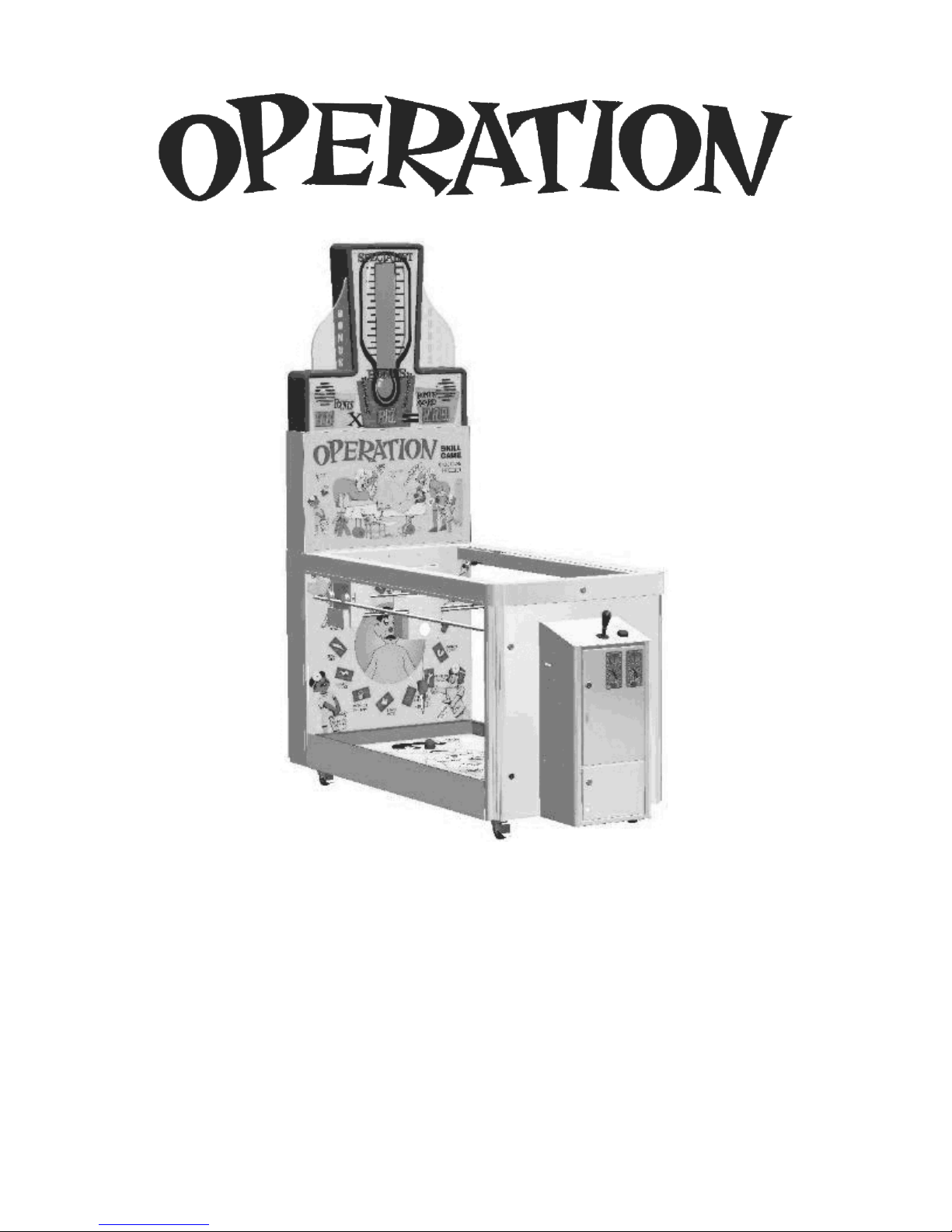
The coin-operated version of Operation™ is a licensed product from Warner
Bros., based on the universally popular board game. As in the original board
game, the player must “extract” a “body part” to win tickets.
The player tries to “extract” the random body part selected by the game.
When a player successfully “extracts” the part, the value is added to the points
total. A second body part will be selected, and if the player successfully
“extracts” that part, the value will be added to the total points and the bonus
multiplier will increase by one. The multiplier will keep increasing for each
subsequent body part “extracted” until time runs out. The faster you play, the
more you win!
OPERATION
OPTIONS & SETTINGS
To change settings, press the ERROR RESET button located inside the front
door. Operation must be in attract mode to access and change settings.
The OPTION NUMBER
The CURRENT VALUE
is displayed on the POINTS display.
is displayed in the BONUS AWARD display.
Move the joystick UP
Move the joystick DOWN
Move the joystick LEFT
Move the joystick RIGHT
to INCREASE the OPTION NUMBER.
to DECREASE the OPTION NUMBER.
to INCREASE the OPTION VALUE.
to DECREASE the OPTION VALUE.
Press the LOWER FORCEPS
button to EXIT and SAVE the settings.
Page 3
To Purchase This Item, Visit BMI Gaming | www.bmigaming.com | (800) 746-2255 | +1.561.391.7200
#
OPTION
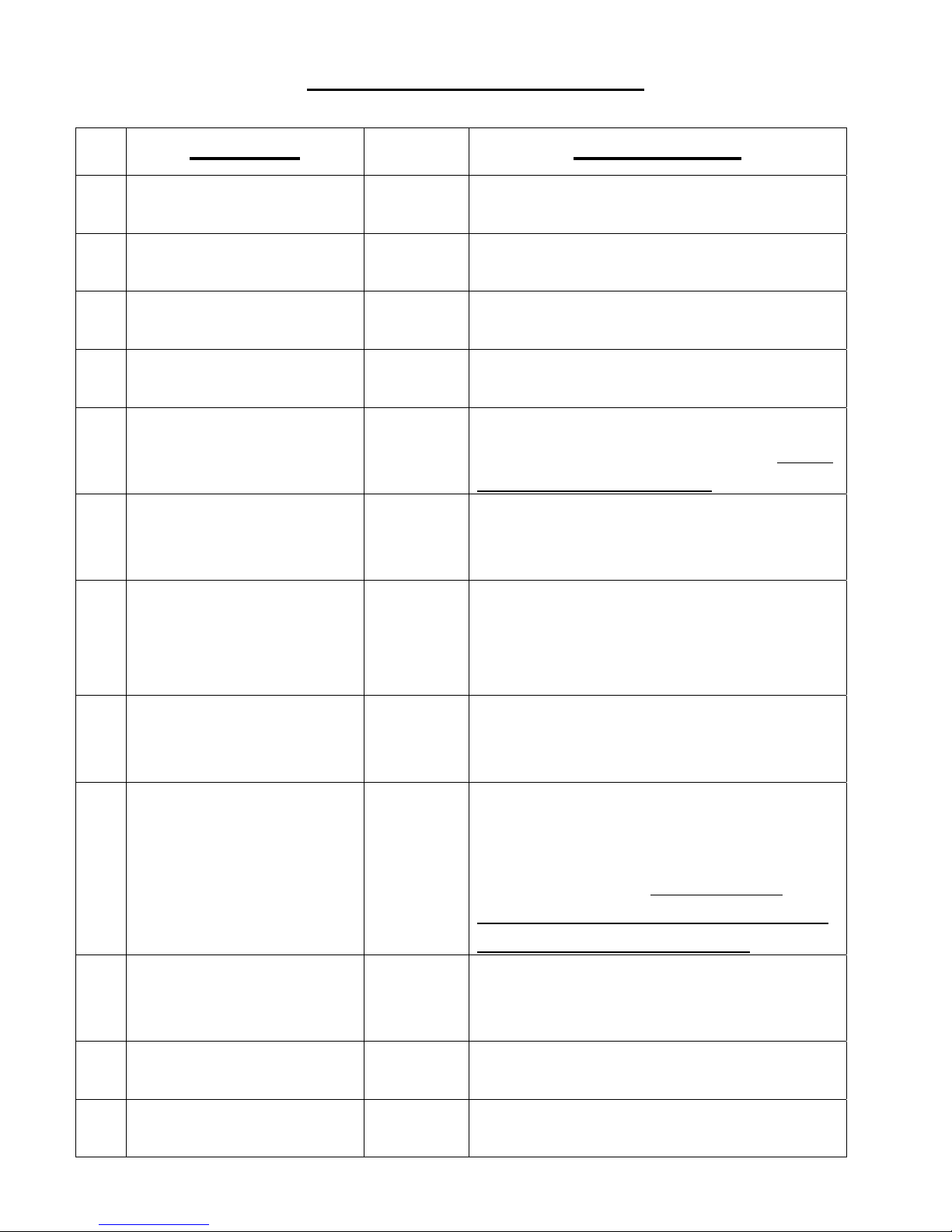
OPTIONS & SETTINGS
RANGE
(DEFAULT)
COMMENTS
COINS PER PLAY 1-8
1
GAME TIME 10-60
2
GRACE PERIOD 0-5
3
ATTENDANT PAY 0-900
4
FLAT PAY 0=OFF;
5
SOUND IN
6
ATTRACT
DEMO MODE
7
(5 TICKET PAY),
(1)
(30)
(1)
(500)
1-10
(0)
0=OFF;
1=ON
(1)
0=OFF;
1=ON
SETS # OF COINS REQUIRED
TO PLAY ONE GAME
SETS MAX. # OF SECONDS FOR
ONE GAME PLAY
SETS # OF SECONDS BEFORE
GAME TIME BEGINS
SETS MAX. # OF TICKETS TO
BE PAID DIRECTLY BY GAME
SETS EQUAL TICKET VALUES
FOR ALL “BODY PARTS” (WILL
OVERRIDE OPTION 9)
ELIMINATES SOUND WHEN
GAME IS NOT BEING PLAYED
NO COIN(S) NEEDED TO PLAY.
GAME WILL PAY 5 TICKETS.
8
9
10
11
NO METERS /
(0)
COIN ERRORS
MERCY TICKETS 0=OFF;
1-10
(0)
TICKET SETTING
TICKET
DISPENSER
1-8
(1)
0=OFF;
1=ON
(1)
VALUE OF COIN 1-200
(25)
METERS WILL NOT RECORD.
SETS # OF TICKETS PAID IF NO
WINNER RECORDED
VALUES WILL BE SET
RANDOMLY AMONG ALL
TARGETS. SEE TABLE BELOW
FOR VALUES. (GAME WILL
RANDOMLY SELECT 13 VALUES
WITHIN THE RANGE SET)
IF OFF, GAME WILL NOT PAY
ANY TICKETS
VALUE OF EACH COIN (IN
CENTS)
12
VALUE OF TICKET 1-5
VALUE OF TICKET (IN CENTS)
(1)
Page 4
To Purchase This Item, Visit BMI Gaming | www.bmigaming.com | (800) 746-2255 | +1.561.391.7200
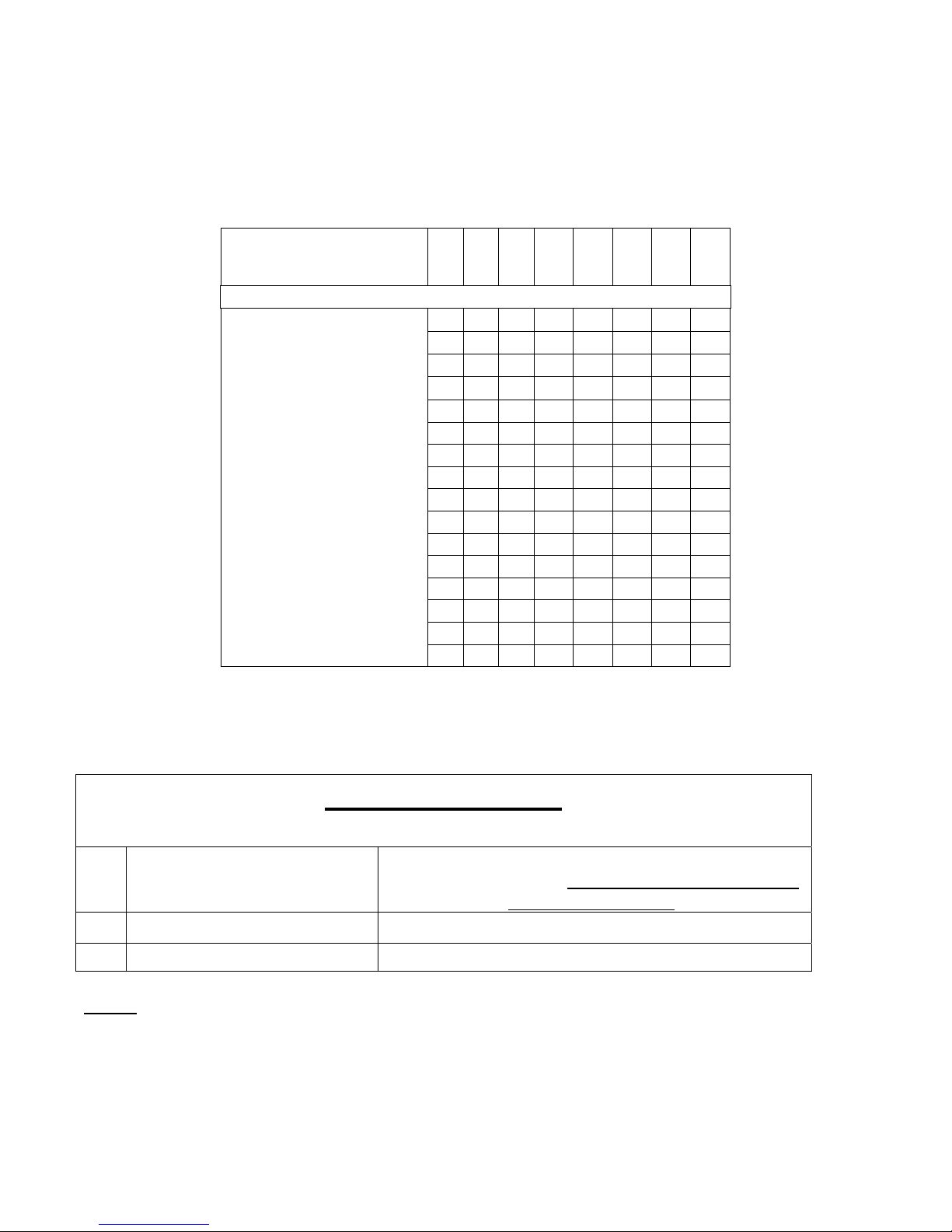
PAYTABLE
8 7 6 5 4 3 2 1
NUMBER
14 12 10 8 6 4 2 1
VALUES
(Distributed
Randomly)
15 13 11 9 7 5 3 2
16 14 12 10 8 6 4 3
17 15 13 11 9 7 5 4
18 16 14 12 10 8 6 5
19 17 15 13 11 9 7 6
20 18 16 14 12 10 8 7
21 19 17 15 13 11 9 8
22 20 18 16 14 12 10 9
23 21 19 17 15 13 11 10
24 22 20 18 16 14 12 11
25 23 21 19 17 15 13 12
26 24 22 20 18 16 14 13
27 25 23 21 19 17 15 14
28 26 24 22 20 18 16 15
x 27 25 23 21 19 17 16
BOOKKEEPING
(FOR INFORMATION ONLY)
13 PAYOUT PERCENTAGE VALUE OF AVG. TICKETS PER GAME DIVIDED
BY COST OF GAME (MUST SET PROPER VALUES
IN OPTIONS 11 & 12)
14 TICKETS PER GAME AVG. # OF TICKETS PAID PER GAME PLAYED
15 HIT FREQUENCY PERCENTAGE OF WINS PER GAMES PLAYED
NOTE
displays.
To restore factory settings, cycle the AC power while holding both the ERROR RESET and
ATTENDANT PAY buttons for at least 5 seconds.
: To clear bookkeeping, press the ATTENDANT PAY button while option 13, 14 or 15 is on the
Page 5

To Purchase This Item, Visit BMI Gaming | www.bmigaming.com | (800) 746-2255 | +1.561.391.7200
DIAGNOSTIC MODE
To enter Diagnostic Mode, hold Attendant Pay button while powering up the game, until you hear a
beep, then release button.
Test 1: The playfield displays will start counting 0-9, and then 10-90 to self-test all of the digits. This
test will repeat until you advance to the next test.
The Attendant Pay button will advance you to the next test.
Test 2: The body cavity displays will be numbered from 1 to 13 in a U-shaped pattern to make sure that
they are wired correctly.
Test 3: Will light the ‘rim’ of each cavity on the playfield, starting at ‘brain freeze’ and working down
and up in a u-shaped pattern. This test will also repeat until you advance to the next test.
Test 4:
(1) Will light up the 13 back board lights, one at a time, starting at WRITER’S CRAMP moving
counterclockwise to BROKEN HEART;
(2) then the nose light;
(3) the front corner LED strips;
(4) and playfield border LED strips all at once. Again, this test will keep cycling until you
proceed to the next one.
Test 5: Will light up the TIME, MULTIPLIER, and SCORE displays on the head. They will all count
0-9 and 10-90, and then the SCORE display will count 100-900.
Test 6: Pressing attendant pay again will show 14, 15, and 16 in those same displays from left to right.
Test 7: Will light up the timer column LED’s and turn rows off one by one starting at the top working
downward.
Test 8: The final test will check the gantry, the playfield cavities, the coin mechs, ticket dispenser,
joystick, switches and meters.
(1) Use the joystick to move the gantry in any direction and test the limit switches.
(2) Press the ‘drop’ button to test the up/down motor and up/down limit switches.
(3) Insert a coin to advance the coin meter by one and display either a 1 or a 2 depending on
which mech is used.
(4) Press the Error Reset button to increment the ticket meter by 3 and dispense 3 tickets. It
will also display a 3 on the top display.
(5) Test the playfield by hooking a wire to GND (the forceps are connected to GND) and
touching the bottom of each cavity. The LED’s around the cavity should light up and you should
hear a ‘winner’ sound. If you touch the outer rim of a cavity, the nose should light up and you
should hear the ‘loser’ buzzer.
Page 6

To Purchase This Item, Visit BMI Gaming | www.bmigaming.com | (800) 746-2255 | +1.561.391.7200
ERROR CODES
“BRAIN FREEZE” light is flashing on back panel on power up: Indicates a TWI communication
error.
“Er” is visible on the POINTS display and “0” is visible on the MULTIPLIER display: Indicates
gantry did not return to the home position, or at least one of the limits switches is not being read.
CORD WINDING
It is possible that the cord connecting the forceps may unwind all the way and wind back
up in the opposite direction. If you think that may be the case, compare your gantry to the
pictures below:
CORRECT WINDING INCORRECT WINDING
 Loading...