

Page 1

SPECTROstar
Nano
Operating Manual
Revision C
Page 2
SPECTROstar Nano Operating Manual BMG LABTECH
2/16 0601B0001C 2012-07-18
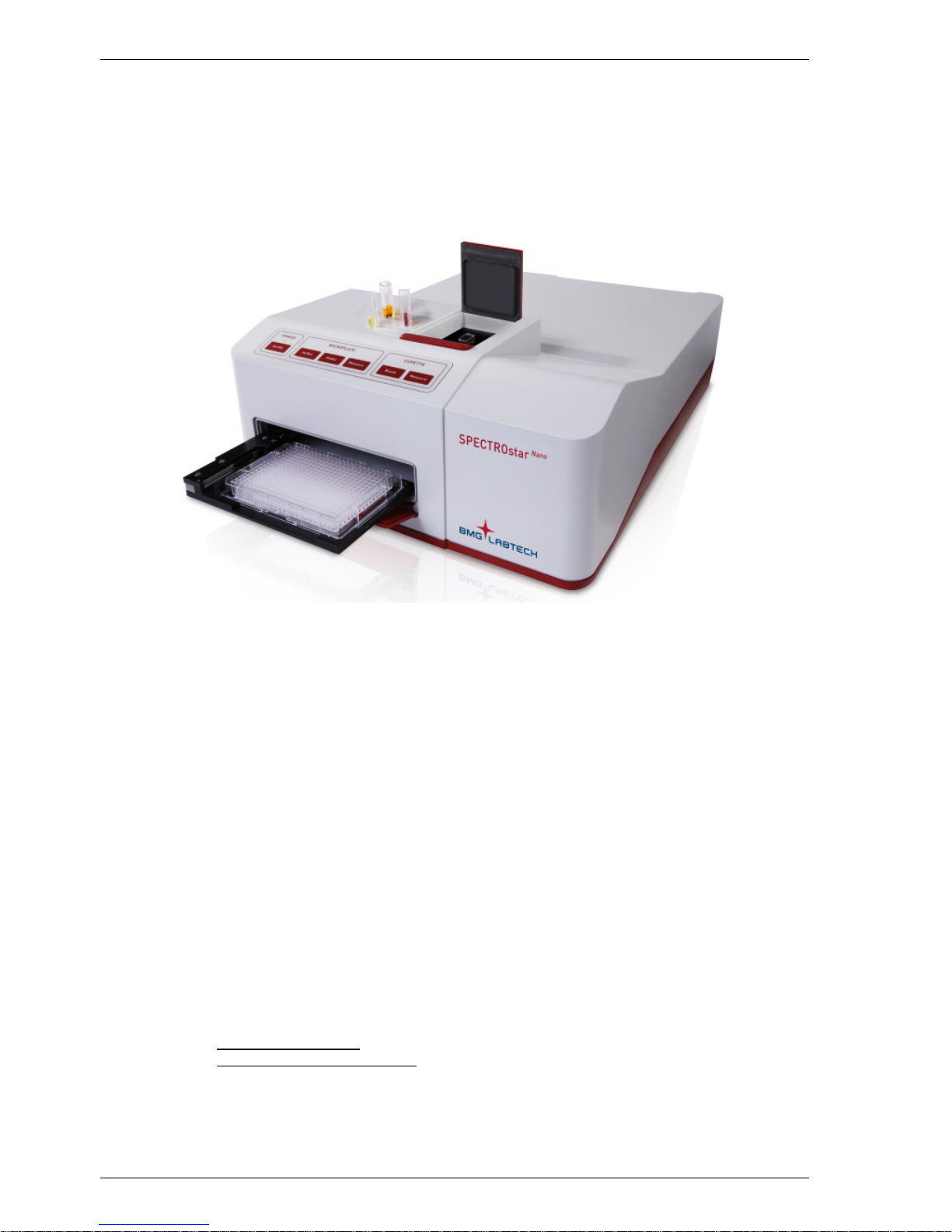
The SPECTROstar Nano is an absorbance microplate and cu vette reader that performs a wide variet y of
applications for full s pectrum absorbance. T he SPECTROstar Nano has high-end perform ance in all plate
and cuvette formats. B y using proprietary technology in a variety of important par ts, t he SPECT ROstar Nano
delivers high-end results.
SPECTROstar
Nano
Manufacturer: BMG LABTECH GmbH
Allmendgrün 8
77799 Ortenberg
Germany
Copyright 2010-2012 BMG LABTECH. All rights reserved. All BMG LABTECH brand and product names are trademarks of
BMG LABTECH. Other brand and product names are trademarks or registered trademarks of their respective holders.
Page 3

BMG LABTECH SPECTROstar Nano Operating Manual
2012-07-18 0601B0001C 3/16
This manual was designed to guide the SPECTROstar Nano user through the bas ic hardware features of
this microplate reader instrument.
Although these instruc tions were c areful ly writt en and c heck ed, we c annot acc ept res ponsibi lity for problem s
encountered when using this manual. Suggestions for improving this manual will be gratefully accepted.
BMG LABTECH reser ves the right to change or update this manual at any time. The revision n umber is
stated at the bottom of every page.
For contact information please visit www.bmglabtech.com or send an email to [email protected]
Disclaimer note:
The information contai ned in this docum entation is subj ect to change without n otice. BMG LABT ECH Gm bH
shall not be liable, t o any extent whatsoever, for an y damages resulting from or arising o ut of the use or
performance of this system and related documentation or the procedures specified in this manual, regardless
of foreseeability or the form of action, whether in contract, tort (including negli gence), breach of warranty,
strict liability or otherwise, and including but not limited to damages resulting from loss of data, loss of
anticipated profits, or an y special, indirect, incidental or consequen tial damages. BMG LA BTECH GmbH is
not responsible for any damage to this equipment or personal injury that may result from the use of this
equipment or of an accessory not manufactured by BMG LABTECH GmbH. The user assumes full
responsibility for the results obtained from the use of this system and related documentation and for
application of such results.
Page 4

SPECTROstar Nano Operating Manual BMG LABTECH
4/16 0601B0001C 2012-07-18
TABLE O F CONTENTS
1 TECHNICAL SPECIFICATIONS 5
2 SAFETY INFORMATION 7
2.1 DESCRIPTION OF WARNINGS 7
2.1 GENERAL INFORMATION 7
2.2 ENVIRONMENTAL SAFETY STANDARDS 8
2.4 ELECTRICAL SAFETY 8
2.5 CHEMICAL AND BIOLOGICAL SAFETY 8
2.6 CLEANING AND INSTRUMENT DISINFECTION 9
2.7 DISPOSAL AND INSTRUMENT TAKEBACK / RECYCLING PROGRAM 11
2.7.1 DISPOSAL OF TRANSPORT PACKING 11
2.7.2 WEEE COMPLIANCE 11
3 OVERVIEW 12
3.1 FRONT AND KEYPAD CONTROL OF SPECTROSTAR NANO 12
3.1.1 MICROPLATE CARRIER 12
3.1.2 CUVETTE PORT 12
3.1.3 KEYPAD CONTROL 13
3.2 BACK OF SPECTROSTAR NANO 14
4 UNPACKING AND INSTALLATION 14
4.1 TRANSPORT LOCK 15
4.2 SOFTWARE INSTALLATION 16
4.3 POWER AND COMMUNICATION CONNECTIONS 16
5 GENERAL WARNINGS FOR OPERATION 16
Page 5

BMG LABTECH SPECTROstar Nano Operating Manual
2012-07-18 0601B0001C 5/16
1 Technical Specifications
Detection Mode
- UV/Vis Absorbance Spectra
Measurement Modes
- Endpoint and Kinetic measurements
- Well Scanning
Microplate Formats
- 6 to 1536-well plates, user definable
Microplate Carrier
- Auto lock microplate carrier
- Robot compatible
- All microplate formats up to 1536-well
Microplates should adhere to the SBS specification and non-SBS
formats should fit: (l x w x h) (mm) max: 128x86x20; min: length 124
Cuvette Port
- Cuvette port for cuvettes with 10 mm path length
- Micro cuvettes, Traycell compatible
- Beam height 8,5 mm
Light Source
- High energy xenon flash lamp
Detector
- Spectrometer with CCD
Spectral Range
- 220 - 1000 nm for ABS (Absorbance Spectrometer)
Sensitivity
- ABS with Spectrometer Selectabl e
Spectral resolution: 1 nm, 2 nm, 5 nm, 10 nm
OD range: 0 – 4 OD
Accuracy: < 1% at 2 OD
Precision: < 0.5% at 1 OD and < 0.8% at 2 OD
Read Times
- Full spectrum from 220 to 1000 nm in less than 1 sec/well
Shaking
- Linear, orbital, and double-orbital with user-definable time and
speed
Incubation
+3°C above ambient up to 45°C for microplate and cuvette
Software
- Multi-user Reader Control and MARS Data Analysis Software
included
Computer interface
- USB 2.0, compatible to USB 1.1
Power requirements
- External Power Supply: Type: XP Power AEF120PS24
- Input Voltage: 100 or 115 or 230 V, 50/60 Hz, auto ranging
- Output Voltage: 24V DC / 5A
Page 6

SPECTROstar Nano Operating Manual BMG LABTECH
6/16 0601B0001C 2012-07-18
Power consumption
- Standby 0 W (<0,5W)
- Idle Mode 5 W
- Measuring 15 W
- Maximum 60 W
Ambient conditions
- Operating temperature: 15°C to 35°C
- Storage temperature: -10°C to 50°C
- Humidity of atmosphere: 20 % to 80 %
- Non-condensing environment
Instrument conformity
- Over voltage category II;
- Contamination class II
- Protection class III
Dimensions
- Width: 36 cm, depth: 50 cm, height: 16 cm
- Weight: 11 kg
Options
- Gas Vent: system to inject an atmosphere or to pull a vacuum into
the reader
- External manual barcode reader
- 1536 well format
- LVis Plate: microplate for low volume (2 µL) absorbance
measurements and instrument performance testing
Limit of detection was calculated according to the IUPAC standard: 3(SD
blank
)/slope.
Specifications are subject to change without notice.
Page 7
BMG LABTECH SPECTROstar Nano Operating Manual
2012-07-18 0601B0001C 7/16
2 Safety Information
Description of warnings 2.1
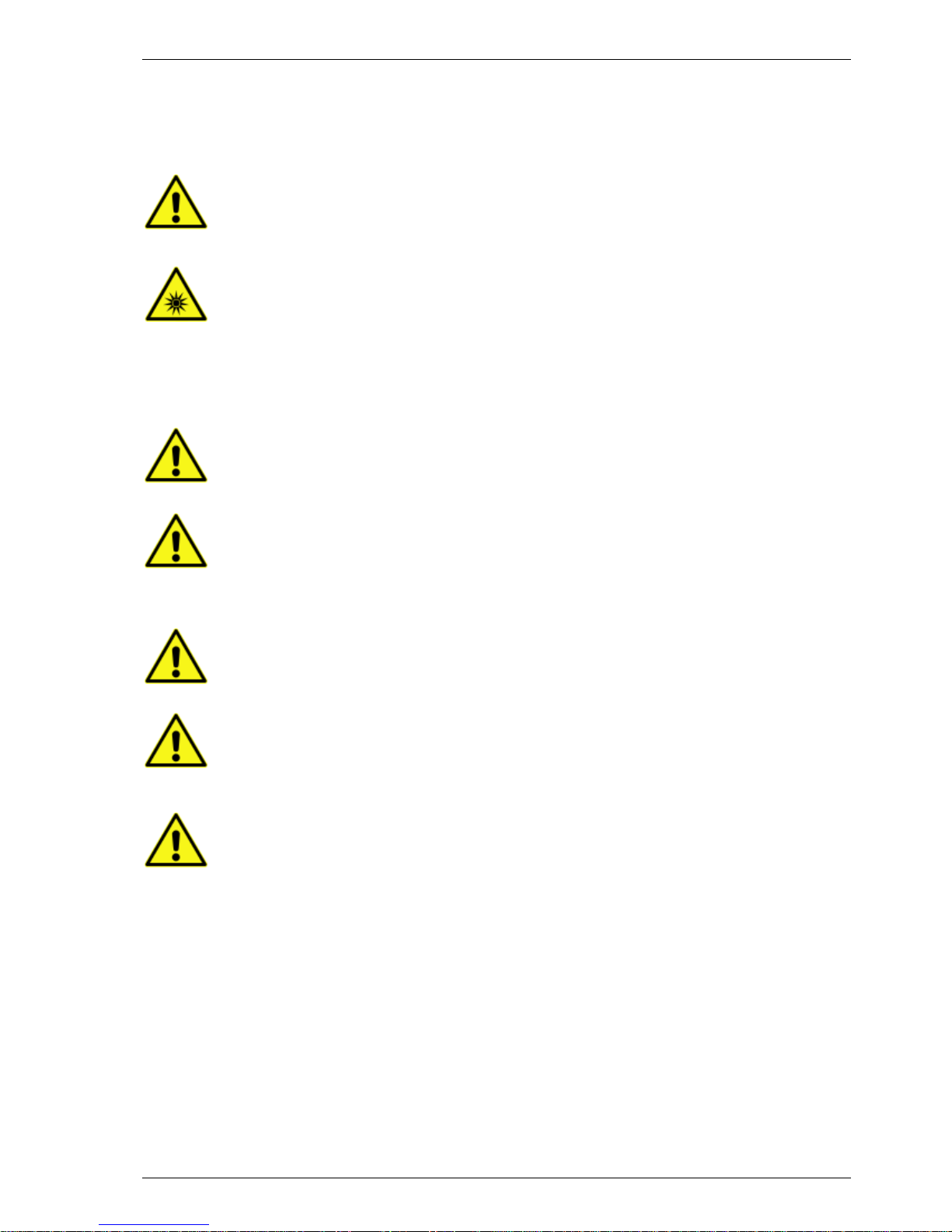
The warning signs used throughout this manual adhere to the description set forth in DIN 4844-2.
A general warning calls attention to a condition which is further described and must be
strictly followed by the operator
Warning for optical radiation
General Information 2.2
This instrument must be installed and used as lined out in this Operating Manual.
Installation, service and any operation which requires opening the instrument must be
performed only by trained and certified personnel from BMG LABTECH. Failure to
comply with these instructions will impair or even invalidate the warranty a nd can lead
to unsafe operation of this equipmen t
The area designated for the instrument should be free of dust, liquids and acidic
vapour. The surface of the table should be flat and even. Avoid areas subject to
vibrations and direct sunlight
Prior to turning the instrument on the first time let the instrument adapt to room
temperature for at least 3 h to avoid condensation causing a short circuit.
BMG LABTECH will void the warranty if damage occurs to electrical and/or mechanical
parts in case the instrument was turned on before the recommended accommodation
time
Handling and operation of the equipment must be carried out only by qualified
personnel and staff trained by an official BMG LABTECH representative
Samples and reagents, be it in solid, liquid, or gaseous form, must be removed from
the instrument immediately after measurement to avoid corrosion and accumulation of
hazardous substances inside the instrument
Page 8

SPECTROstar Nano Operating Manual BMG LABTECH
8/16 0601B0001C 2012-07-18
Environmental Safety Standards 2.3
The environmental safety standards for operation under norm IEC 61010-1 are met under the following
conditions:
• Indoor use (adhere to t he O cc upatio nal Exposure Limit Values for ECM, UPS, vibr atio n, and s u nl ight
when setting up the instrument in the laboratory)
• Altitude (up to 2000 m)
• Temperature (+15
o
C to +35oC)
• Relative Humidity (Maximum 80% at 31
o
C non condensing then decreasi ng linearly to 50% at 40oC)
• Mains supply voltage fluctuation (+/- 10%)
• Overvoltage category (II) acc. to IEC 60364-4-443
• Pollution degree (2) acc. to IEC 61010-1
Electrical Safety 2.4
• Connect the unit onl y to an earthed s upply sock et. The instrument is class 3 constr uction and mus t
be earthed.
• Connect the unit onl y to a power suppl y with a designated volta ge rating corresp onding to the labe l
on the back of the instrument.
Xenon high power flashlamp –
emits ultraviolet light during operation at levels that
could injure the eye. Thus avoid looking at the light directly. During normal operation
the user will not encounter any light from th e xenon flash lamp
Chemical and Biological Safety 2.5
Daily routine with this instr ument ma y involve the handling and use of compounds that ar e toxic, flamm able,
or biologically harm ful. When working with mater ials and compounds as stat ed, make sure to observe the
following precautions:
• Handle all samples, be it liquid, solid, or in gaseous form according to good laboratory practice.
• Adhere to the maxim um workplace concentration (MAC) and to laboratory safety regulations (e.g.
BGI 850-0, formerly BGR120 in Germany).
• Wear safety goggles since spilling of liquids may occur.
• Contact your safety officer to dispose of hazardous waste solutions and when working with
flammable liquids.
Gas vent connection –
for the standard gas purge vent use a regulator followed by a
flow restrictor to set the flow rate. The instrument should be housed in an atmospheric
gas tight bag (e.g. Aldrich
®
AtmosBag, Z530220-1E) to prevent spillage of gas
Use only mild detergent or 70% ethanol for cleaning the instrument. Make sure the
instrument is always in the OFF position for cleaning and servicing
Page 9

BMG LABTECH SPECTROstar Nano Operating Manual
2012-07-18 0601B0001C 9/16
Cleaning and Instrument Disinfection 2.6
Please follow all instructions carefully for a successful disinfection of this instrument.
All parts of the instr ument, whic h have the p ossibilit y of contacting patient sera or positiv e samples, have to
be handled as if they are hazardous. For this reason, it is recommended that gloves be worn while
maintaining or working with the instrument.
It is very important that the instr ument is thoroughly dis infected before maintenanc e or before removing the
instrument from the laboratory. Be sure that the instrument is disinfected before you send it to your
distributor or to the m anufacturer. For saf ety reasons, you ha ve to fill out the Disi nfection Certificate, or the
instrument may not be accepted by the service center or by customs authorities.
Use suitable disinfectants, e.g. Alcohol (70%).
Authorized personne l wearing d isposable gloves an d protecti ve clothing should only perf orm the d isinfectio n
procedure. The location should be well ventilated.
Disinfection Steps
1. Disconnect the instrument from the main power supply.
2. Remove the USB cable from the connector.
3. Clean all outside surfaces of the instrument carefully with cotton wool, which has been soaked in
disinfecting solution.
4. Place the instrument in a large plastic bag along with the cotton wool that has been soaked in
disinfecting solution. Ensure that the wool does not touch the instrument.
5. Close and seal the bag.
6. Keep the instrument in the plastic bag for at least 24 hours.
7. After the disinfec tion time has lapsed, r emove the instrum ent from the plastic bag an d clean all outside
surfaces of the instrument with cotton wool that has been soaked in alcohol solution.
8. Repeat the procedure for disinfection on any accessories, which will be returned with the instrument.
9. Complete the Disinfection Certificate.
Page 10

SPECTROstar Nano Operating Manual BMG LABTECH
10/16 0601B0001C 2012-07-18
Disinfection Certification
This instrument and its inventory have never been in contact with
any dangerous biological material, or if so, the instrument and its
inventory have been disinfected according to the instruc tions
given in the Operating Manual.
Name: ________________________________________________
Firm:
________________________________________________
________________________________________________
________________________________________________
________________________________________________
Date, Signature: ________________________
Page 11

BMG LABTECH SPECTROstar Nano Operating Manual
2012-07-18 0601B0001C 11/16
Disposal and Instrument Takeback / Recycling Program 2.7
We strongly recomm end storing the trans port box in c ase you nee d to ship the in strument back for upgrade
or repair. In case of disposing the unit please adhere to these guidelines:
2.7.1 Disposal of Transport Packing
Straps to fix the packing on pal let, edge protection , air cushion styrofoam , and plastic foil m ust be disposed
of and recycled according to your local “plastic recycling” policy.
Transport cardboard box must be disposed of and recycled according to your local “paper recycling” policy.
2.7.2 WEEE Compliance
The European Union Waste Electrical and Electronic Equipment Directive (WEEE) is a Producer
Responsibility Directive aimed at reducing the waste from electrical equipment, increasing recovery and
recycling rates of W EEE and improving environm ental perform ance of all operat ors involved in th e life cycle
of electrical and electronic equipment.
The directive specifies th at, as of August 13, 2005, m anufacturers of specified el ectronic equipment will be
obliged to take back these products at the end of their useful life.
BMG LABTECH will com ply with the WEEE take back requirements for BMG LABTECH branded product
sold in the EU after August 13, 2005.
BMG LABTECH customers based in Europe can take advantage of the BMG LABTECH Takeback and
Recycle Program. Please check BMG LABTECH’s website for country-specific availability.
This Takeback and Recycle Program ensures that you can ship the product back to BMG LABTCH for
proper handling at the end of its useful life. Disposal will be carried out in an en vironmentally safe manner
using processes that comply with all current eWaste regulations where applicable.
Upon completion of the recycling process BMG LABTECH will provide, on request, a Certificate of
Destruction (COD). This will release your business from any further liability for the equipment.
The program is accessible via the web
at www.bmglabtech.com/support/countryselect.cfm?page=support.cfm
Page 12
SPECTROstar Nano Operating Manual BMG LABTECH
12/16 0601B0001C 2012-07-18
3 Overview
Front and Keypad Control of SPECTROstar Nano 3.1
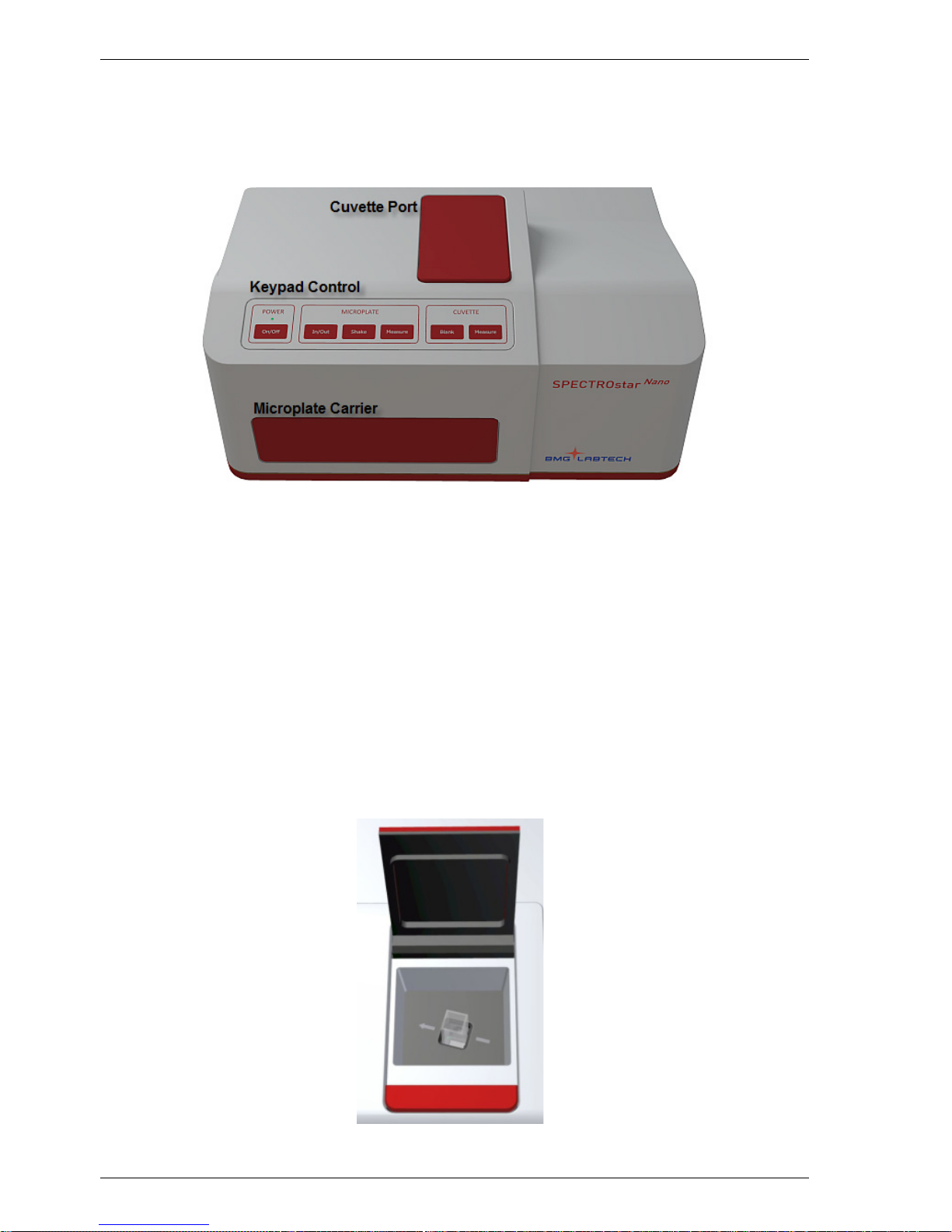
The front of the SPECTROs tar Nano is divided into th ree sections: the Micro plate Carrier, th e Cuvette Port,
and the Keypad Control (figure 1). Each section is described below.
Figure 1: Front view of SPECTROstar Nano
3.1.1 Microplate Carrier
The Microplate Carrier is d esigned for standard SBS microtitre plates from 6 – 1536 well format as well as
for BMG LABTECH´s LVis Plate (for low volume measurements down to 2 µL and for instrument
performance testing).
3.1.2 Cuvette Port
The SPECTROstar Nano comes with an integrated cuvette port for standard cuvettes with 10 mm path
length, for micro cuvettes, and is also compatible with low volume cuvettes such as the Traycell.
Open the cuvette port b y briefly pressing on the lever of the lid. The door op ens a utomatically and sh o ws th e
cuvette port. An arrow inside the cuv ette port displays the direction of the light path. Hence a cuvette must
be placed so the light can pass through (figure 2.). Close the cuvette port by pressing on the lid until it
resides flat.
Figure 2: The SPECTROstar Nano Cuvette Port
Page 13
BMG LABTECH SPECTROstar Nano Operating Manual
2012-07-18 0601B0001C 13/16
3.1.3 Keypad Control
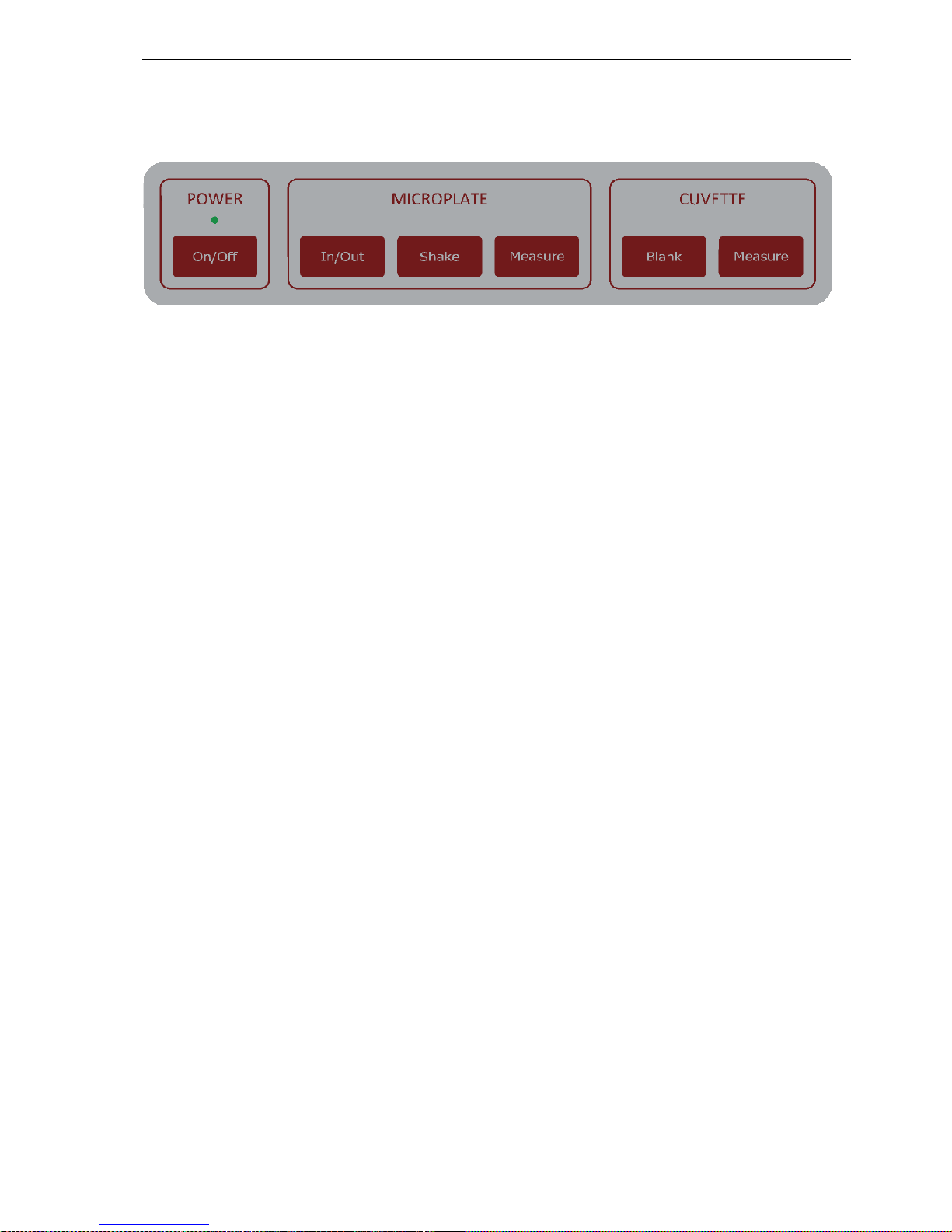
The Keypad Control of the SPECTRO star Nano consists of easy single push but ton operated pad controls
for the basic operation of the instrument (figure 3). Each button and its function are described below:
Figure 3: The SPECTROstar Nano Keypad Control
- POWER On/Off
Reader is OFF
Short click: reader will be switched On
Reader is ON
Double click: reader will be initialized (e.g. after error)
Long click: reader will be switched Off
LED Status
LED On green: reader is switched On and in standby
LED flashing green: reader is busy, e.g. measurement operation
LED flashing red: reader error has occurred
- MICROPLATE In/Out
Reader is in standby
Short click: microplate carrier will move In/Out
Long click (≥ 3 sec): microplate carrier will move to transport lock position
- MICROPLATE Shake
First short click: pre-set 10 sec shaking (700 RPM, orbital), user definable
Second short click (while running): shaking will stop
Long click: shaking will be performed as long as button is pressed
- MICROPLATE Measure
Short clic k: starts test pr otocol which is assigned t o the Re-Run butt on in the reader
Control Software
Double click (while running): test protocol will be stopped
- CUVETTE Blank
Short click: starts cuvette measurement ( 0/100% absorbance values)
- CUVETTE Measure
Short c lick: starts cuvette meas urement which is assigned to the C uvette Measure
button in the reader Control Software
Double click (while running): cuvette measurement will be stopped
Page 14
SPECTROstar Nano Operating Manual BMG LABTECH
14/16 0601B0001C 2012-07-18
Back of SPECTROstar Nano 3.2
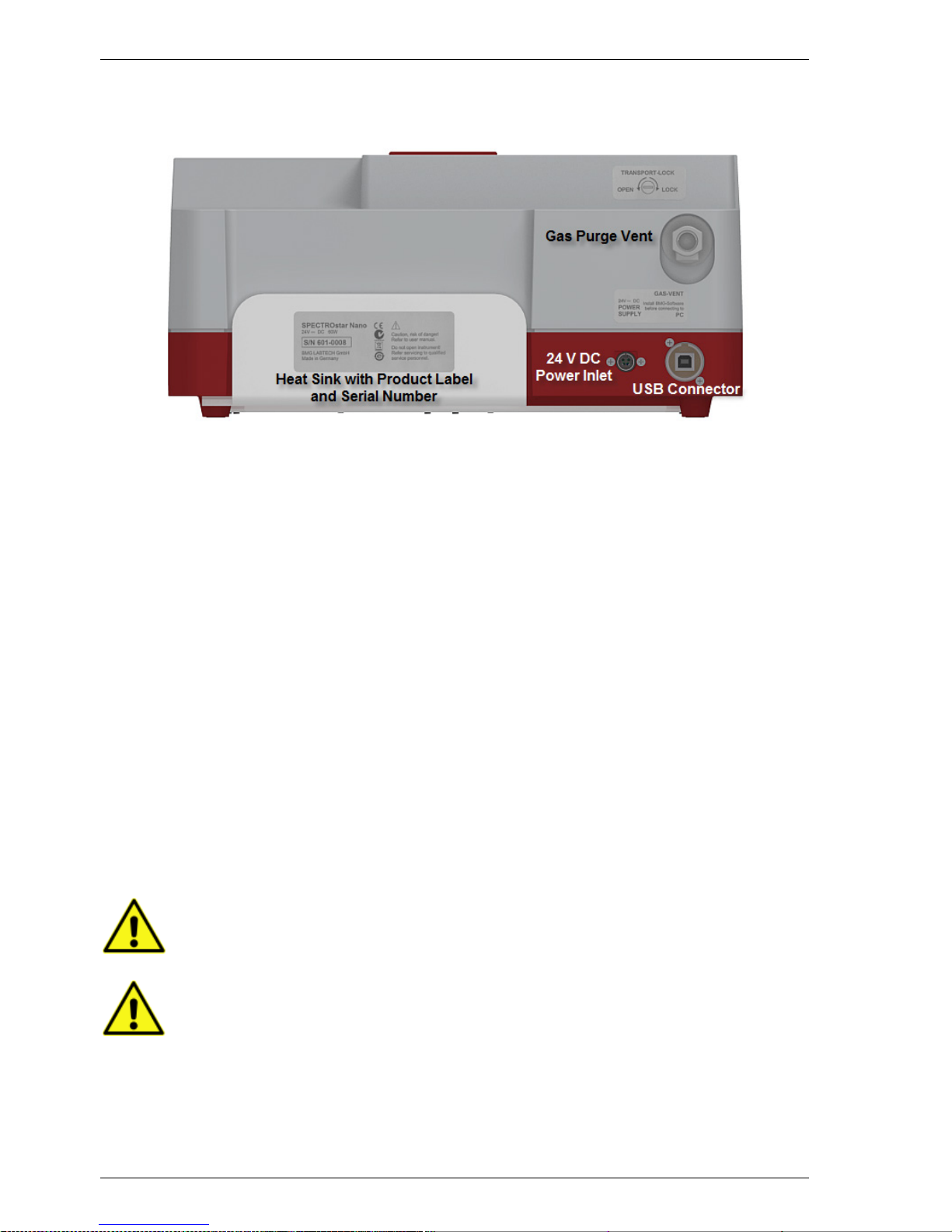
The backside of the SPEC TRO star N ano depicts the power conn ector , the US B connecti on to a PC, a nd th e
gas purge vent to control the atmosphere inside the instrument (figure 4).
Figure 4: Backside view of SPECTROstar Nano
4 Unpacking and Installati on
This chapter includes the initial important points that must be followed before a measurement can be
performed. Please follow these steps.
When unpacking the instrument check to ensure that all parts are included.
The shipping box should contain:
SPECTROstar Nano instrument
• Control and MARS Data Analysis software (CD ROM in a cover inside the manual)
• Manual (also on CD ROM)
• Power cord + External Power Supply
• USB cable
• Slotted 5,5 mm screwdriver
Call BMG LABTECH immediately if any of these items are missing.
The area designated for the instr ument should be free of dust, liquids an d acid ic vapour s . T he table' s s ur f ace
should be flat and even. Avo id areas subject to vibrations and direc t sunlight. Behind the instrument there
should be a minimum distance of 10 cm.
The operator of the SPECTROstar Nano microplate reader is assumed to be trained in the
correct operation of the instrument and the safety issues. Throughout this manual the
word "you" refers to this trained operator
Upon unpacking and positioning the reader, make sure to unlock the transport lock before
any power connection
Page 15
BMG LABTECH SPECTROstar Nano Operating Manual
2012-07-18 0601B0001C 15/16
Transport Lock 4.1
When the SPECTROstar Nano microplate reader is shipped, the transport lock for the plate carrier is in the
locked position and must be unlocked prior to using the instrument. Once the instrument is placed at its
designated lab bench position unlock the plate carrier.
If the SPECTROstar Nano has to be moved or shipped to another location, it is very
important to lock and secure the transport lock in order to avoid damage to the microplate
carrier system
Unlocking the Plate Carrier
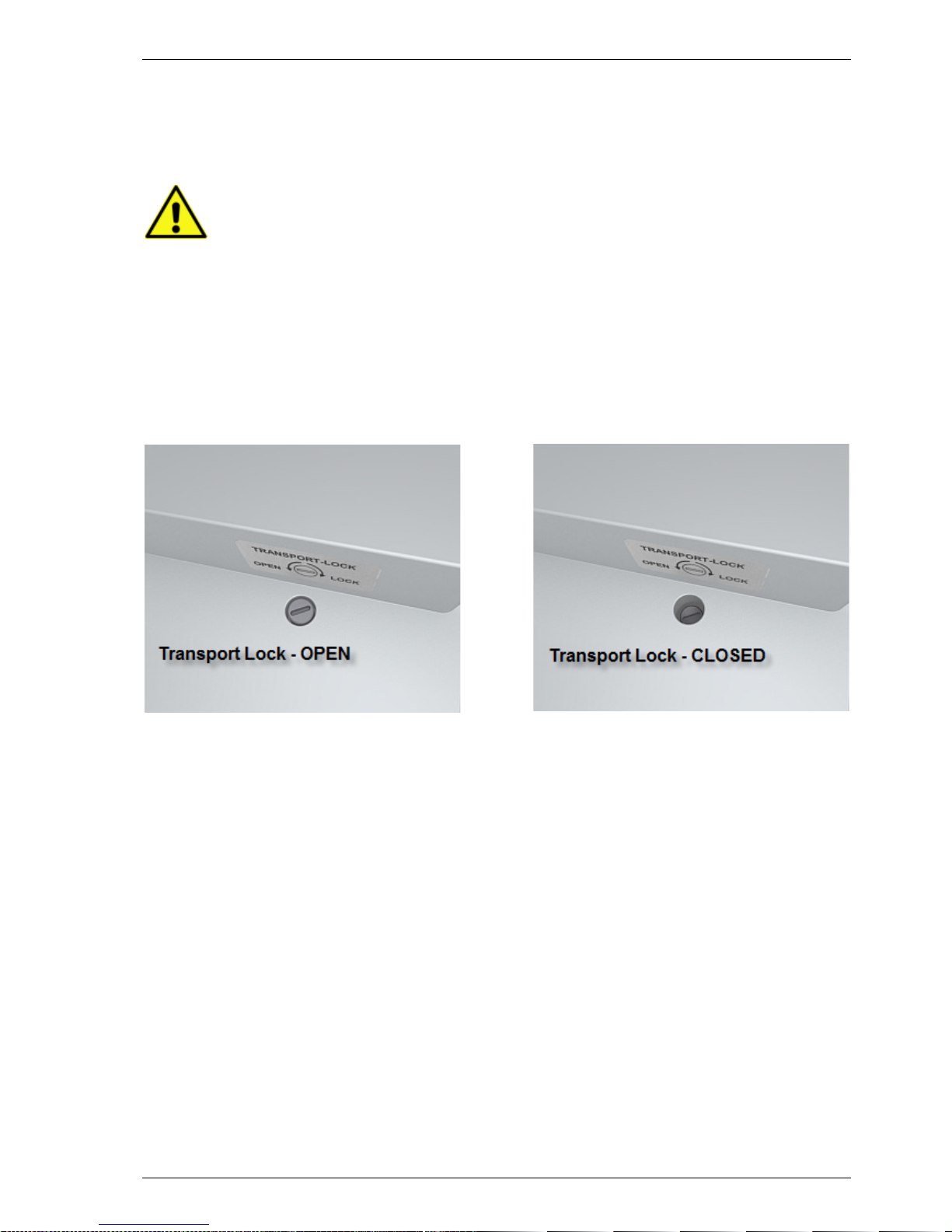
The transport pin that lock s the plate carrier can be ac cessed from the top of the ins trument. Locate
the silver screw locat ed next to t he label “T ransport Loc k” (figure 5). Use the s upplied 5,5 m m slotted
screwdriver and unlock the pin b y turning the s crew count er clock wise. The p late carrier is unlock ed if
the screw moves freel y up and down. Once the SPECTRO star Nano has been turned on, press th e
In/Out button (figure 10) briefly and the plate carrier should move out.
Figure 5: Transport Lock position
Locking the Plate Carrier
Upon closing the Control Software or pushing the plate carrier In/Out button for more than three seconds
(figure 10), the plate carrier will move into the respective lock position. Slowly and carefully push the screw
down with the slotted 5,5 mm screwdriver and turn it clockwise to fasten and to lock the plate carrier. The
screw has to be tight and must not be moving as it was in the unlocked position.
Page 16

SPECTROstar Nano Operating Manual BMG LABTECH
16/16 0601B0001C 2012-07-18
Software Installation 4.2
The Control and MARS Dat a Ana lysis software must be installe d f irs t on the PC/ la ptop b ef or e c onnecti ng th e
SPECTROstar Nano.
Insert the supplied CD-RO M for the SPECTROstar Nano and f ollow the instructions for both insta lling the
Reader Control and MARS Data Analysis software.
Power and Communication Connections 4.3
Connect the supplied 24 V / 5 A power suppl y to the SPECTROstar first before connecting the other end to
the mains power outlet.
Connect the supplied USB cable to the USB connector located at the backside of the SPECTROstar Nano.
Connect the other end of the USB cable to a standard USB port of a PC/laptop.
Switch on the SPECTROs tar Nano by briefly pushing the “Power On” button and power up the PC/lapt op.
The Power LED shows a stead y green li ght, ind icating that the SP ECT ROstar Nano is no w turned On an d in
standby.
Double click the SPECTRO star Nano icon. A window will appear and upon click ing “Run” for the standard
“user” the Control Software will automatically recognize the SPECTROstar Nano and will establish a
connection.
You can verify the connection by going into the “Settings” menu and perform a “Connection” manually.
Once the SPECTROs tar Nano has bee n connec ted, it is not n ecessar y anymore to power on t he instrum ent
before starting the Control Software. The reader will be switched On by simply starting the Control Software.
5 General Warnings for Operati on
Do not obstruct the heat sink with any objects and avoid placing thermal sources (e.g.
external power supply) near the heat sink
Connect only the supplied DC power supply to the SPECTROstar Nano. Keep the DC
power supply at a dry, cool, and protected location
Never open the plate carrier door while measuring
 Loading...