

Page 1
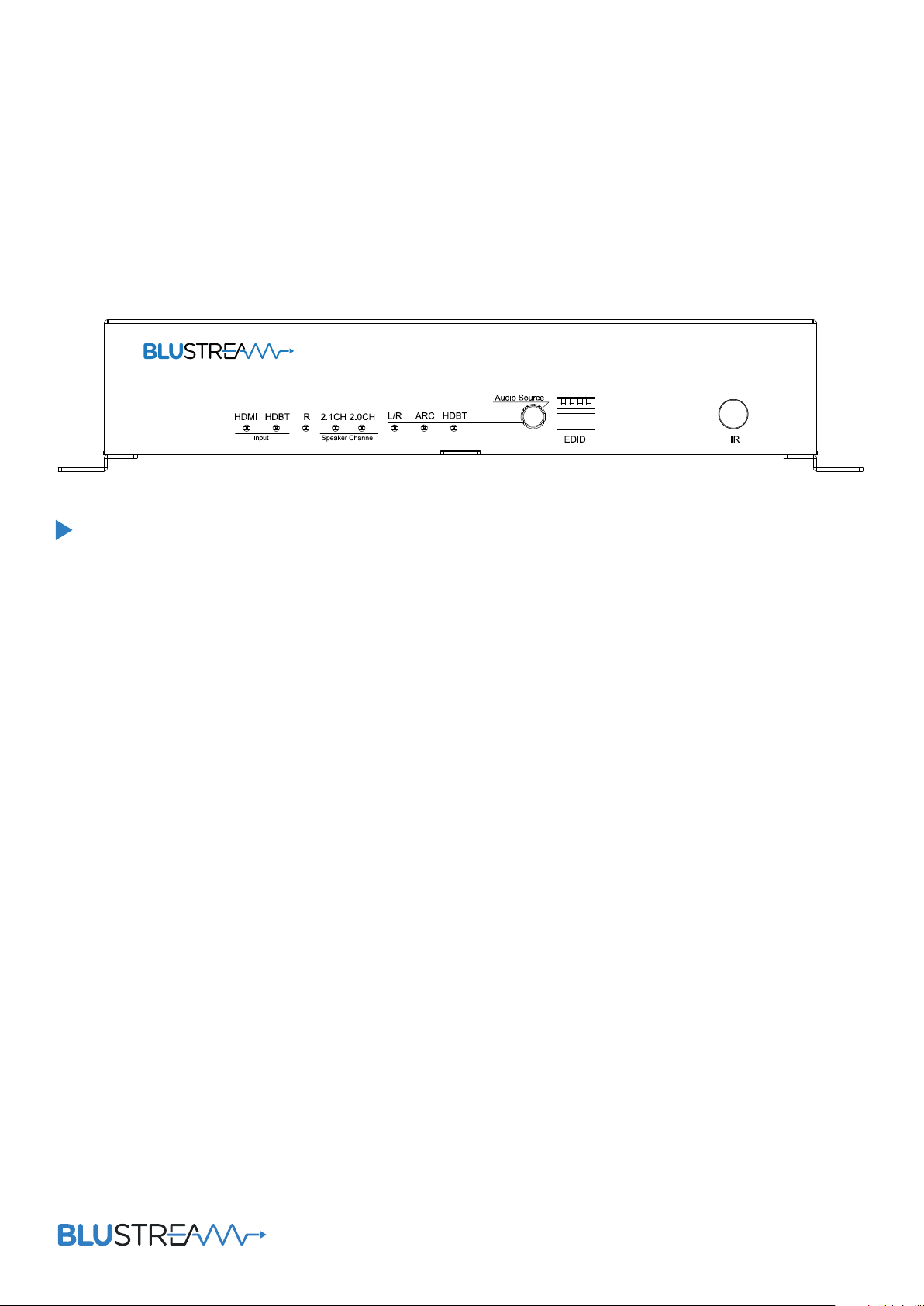
RX70AMP
User Manual
Page 2

RX70AMP User ManUal
Thank you for purchasing
this product.
For optimum performance and safety,
please read these instructions carefully before connecting, operating or
adjusting this product. Please keep this
manual for future reference.
Contents
Introduction 03
Features 03
Panel Descriptions 03/04
Remote Control Descriptions 04
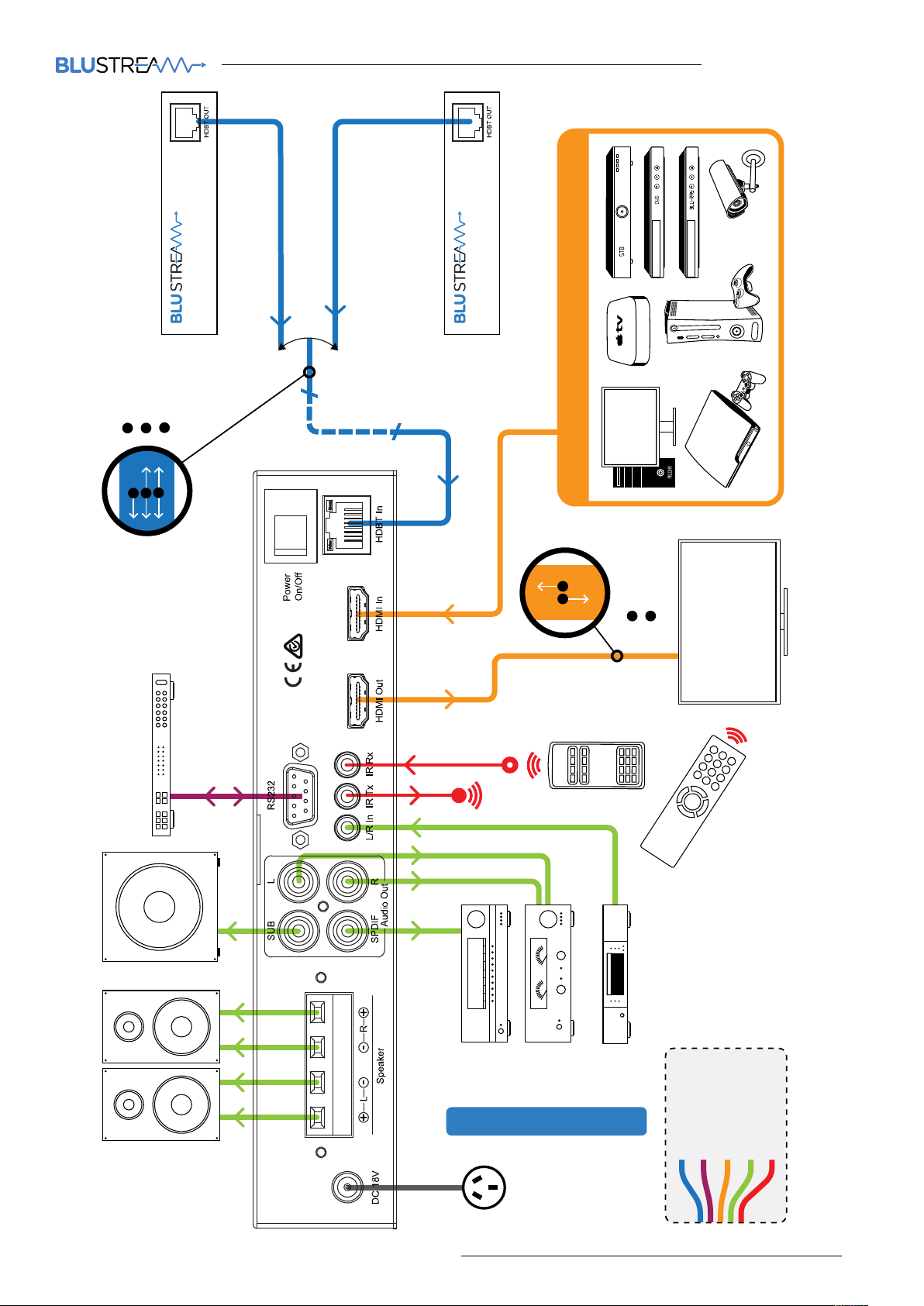
Application Diagram 05
Surge protection device
recommended
This product contains sensitive electrical components that may be damaged
by electrical spikes, surges, electric
shock, lightning strikes, etc. Use of
surge protection systems is highly
recommended in order to protect and
extend the life of your equipment.
Safety And
Performance Notice
The transmission distances of HDMI
over UTP cables are measured using TE
CONNECTIVITY 1427071-6
EIA/TIA-568-B termination (T568B) of
cables is recommended for optimal
performance.
Specifications 06
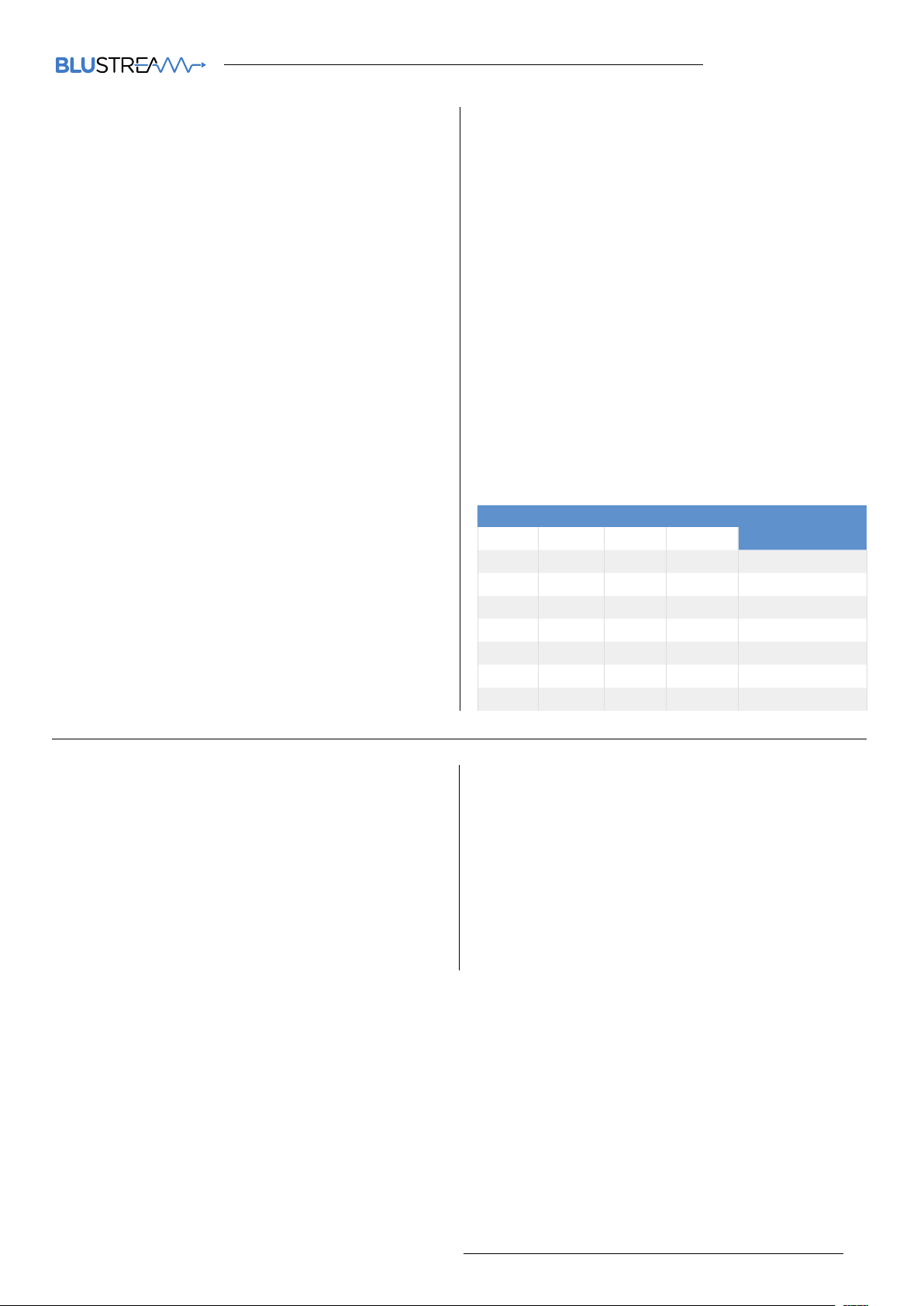
DIP for EDID Setting 06
Package Contents 06
Maintenance 06
To minimize interference of the unshielded twisted pairs in the CAT5e/6
cable do not run the HDBaseT /
Cat5e/6/6a cabling with or in close parallel proximity to mains power cables.
Do not substitute or use any other
power supply other than the enclosed
unit, or a Bluestream approved replacement.
contact [email protected] / [email protected]
02
Page 3
RX70AMP User ManUal
Introduction
FEATURES:
The RX70AMP, with HDBaseT chipset inside is a combination of
HDBaseT (HDBT) receiver and Class D digital audio amplifier. It also
supports the Audio Return Channel (ARC), multiple control modes,
bi-directional IR, RS232 and front panel control for useful audio-visual
integration.
• Multifunction HDBaseT receiver
and Class D Amplifier in one
compact box.
• 3:1 Audio Switcher/Receiver – Audio
from centralized source via HDBaseT
transmitter, Audio Return Channel
(ARC) or local L/R source.
• 70m/230 transmission distance
between device and RX70AMP
• 2.1 stereo audio at 30w per channel
- amplifier capable of driving 4, 6 & 8
Ohm speaker loads.
Front Panel
• High quality pre-amplifier adjustment for tone/volume/sub/mute
control.
• Variable Analog line level outputs.
• Analog (RCA) Subwoofer output.
• S/PDIF out.
• Stereo speaker amplified outputs
with le/right spring terminal connections.
• Bi-directional control of source and
display via IR or RS232 from HDbaseT
transmitter end
• EDID management and pre-sets via
DIP switch.
• HDMI v1.4 features supported.
• HDCP compliant.
• Internal ESD protection.
• Compact size for flexible integration
location.
• Mounting brackets supplied.
4 4 4
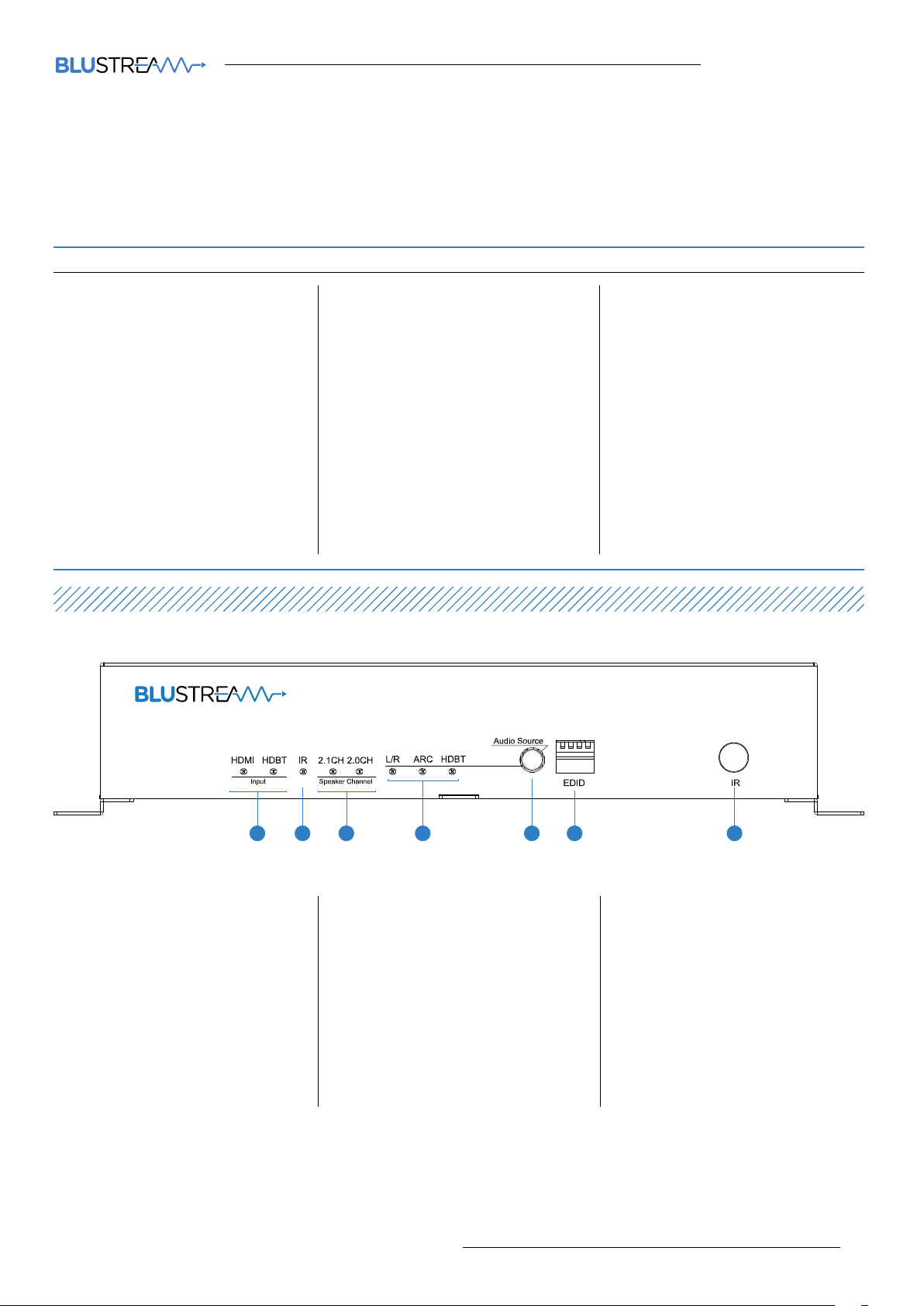
3 33 3
1 Input indicators – Indicates the cur-
rent selected input source HDMI or
HDBT.
2 IR indicator – Flashes when an IR
signal is received from the remote
control.
3 2.0/2.1 Audio LED indicator – Indi-
cates what audio mode is selected
2.0/2.1 (Selected by using the
remote).
contact [email protected] / [email protected]
4 Audio Source LED indicator –
Indicates the currently selected
audio input.
5 Audio Source Select button – Press
to manually toggle through L/R,
ARC or HDBaseT audio sources
(Lit when selected). Press it for 5
seconds (the ‘Audio Source LED Indicator’ flashing) to switch between
local HDMI input and HDBT input.
6 DIP switch for EDID – enables the
EDID to be user definable (See table
below for settings)
7 IR window – Receives the IR signal
from the remote control of RX70AMP
03
Page 4
RX70AMP User ManUal
05
contact [email protected] / [email protected]
HDMI
RS232
A
B
A
B
HDBaseT Transmitter
HDBaseT matrix switcher
1 LOCAL SOURCE
IR
C
C
70m max
B
A
HDMI
ARC
A
B
DISPLAY
Control Processor
RX70AMP
CONNECTION DIAgRAM
Cat 5/5e/6
RS232
HDMI
Stereo Audio
IR Cable
Page 5
RX70AMP User ManUal
06
contact [email protected] / [email protected]
Specifications
EDID Control
Video Input Connectors: 1x RJ-45 connector,
1x HDMI Type A, female
Video Output Connectors: 1x HDMI Type A, female
Audio Output Connectors: 1x RCA(S/PDIF), 1x RCA
(subwoofer), 1x 4-pin spring terminal connector,
2x RCA(L/R)
DIP switch: 4-pin
RS-232 serial port: DB9 female connector
IR Input ports: 1x 3.5mm stereo jack
IR Output ports: 1x 3.5mm stereo jack
Rack-Mountable: 2x mounting bracket
Dimensions (W x D x H): 428mm x 145mm x 43mm,
without feet
Shipping Weight: 2.7kg
Operating Temperature: 32°F to 104°F (0°C to 40°C)
Storage Temperature : -4°F to 140°F (-20°C to 60°C)
Power Supply: 18V/4A DC, screw connector
NOTE: Specifications are subject to change without notice.
Weight and dimensions are approximate.
EDID (Extended Display Identification Data) is a data structure
that is used between a display and a source. This data is used
by the source to find out what audio and video resolutions
are supported by the display then from this information the
source will determine what the best audio and video resolutions need to be outputted.
While the objective of EDID is to make connecting a digital
display to a source a simple plug and play procedure issues
do arise when multiple displays or video matrix switching is
introduced because of the increased number of variables.
By pre-determining the video resolution and audio format
of the source and display device you can reduce the time
need for EDID hand shaking thus making switching quicker
and more reliable. Instructions on these setting can be
found below.
Global EDID settings
DIP ON ▼/OFF▲ swITchINg POsITIONs
12 34
OFF OFF ON OFF 1080p 3D/2.0
OFF ON OFF OFF 1080p/2.0
OFF ON ON OFF 1080i/2.0
ON OFF OFF OFF 1080p/5.1
ON OFF ON OFF 1080p/7.1
ON ON OFF OFF 4K
OFF OFF OFF OFF Copy sink EDID
eDID TyPe
Package Contents:
• 1 x RX70AMP
• 1 x remote control
• 2 x mounting ears
• 1 x 18V/4A power supply
• 1 x IR emitter cable
• 1 x IR receiver cable
Maintenance
Clean this unit with a so, dry cloth. Never use
alcohol, paint thinner or benzene to clean this unit.
.
Page 6

www.blustream.co.uk / www.blustream.com.au
 Loading...