

Page 1
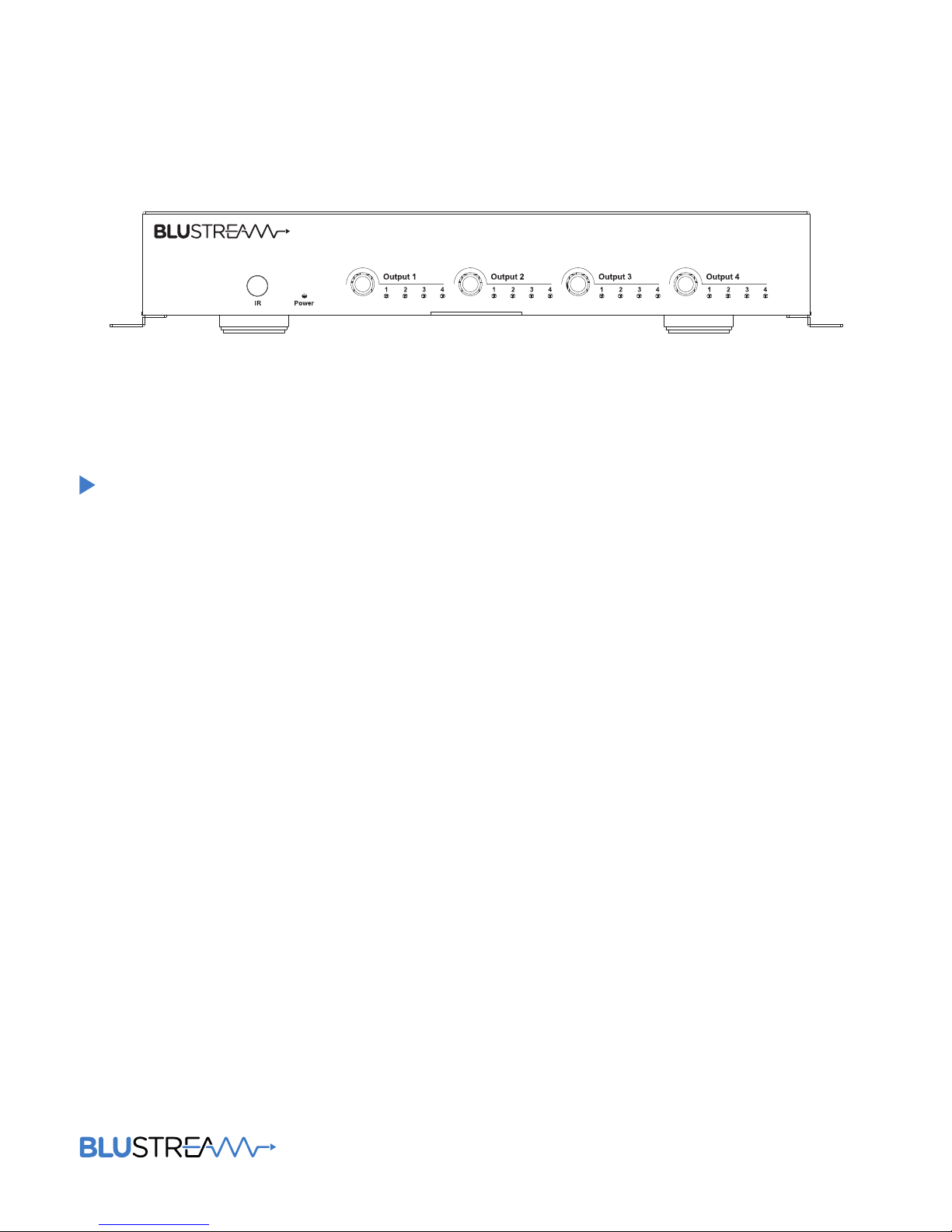
MX44AB
User Manual
4x4 4K HDMI Matrix
Page 2

MX44AB USER MANUAL
MX44AB User ManUal
Surge protection device
recommended
This product contains sensitive electrical components that may be damaged
by electrical spikes, surges, electric
shock, lightning strikes, etc. Use of
surge protection systems is highly
recommended in order to protect and
extend the life of your equipment.
Introduction 03
Features 03
Panel Descriptions 03/04
Remote Control Descriptions 04
Specifications 05
RS-232 Pin Assignment 05
DIP for EDID Setting 05
Application Diagram 06
Package Contents 07
Maintenance 07
Contents
Thank you for purchasing
this product.
For optimum performance and safety,
please read these instructions carefully before connecting, operating or
adjusting this product. Please keep this
manual for future reference.
02
www.blustream.co.uk
Page 3
MX44AB USER MANUAL
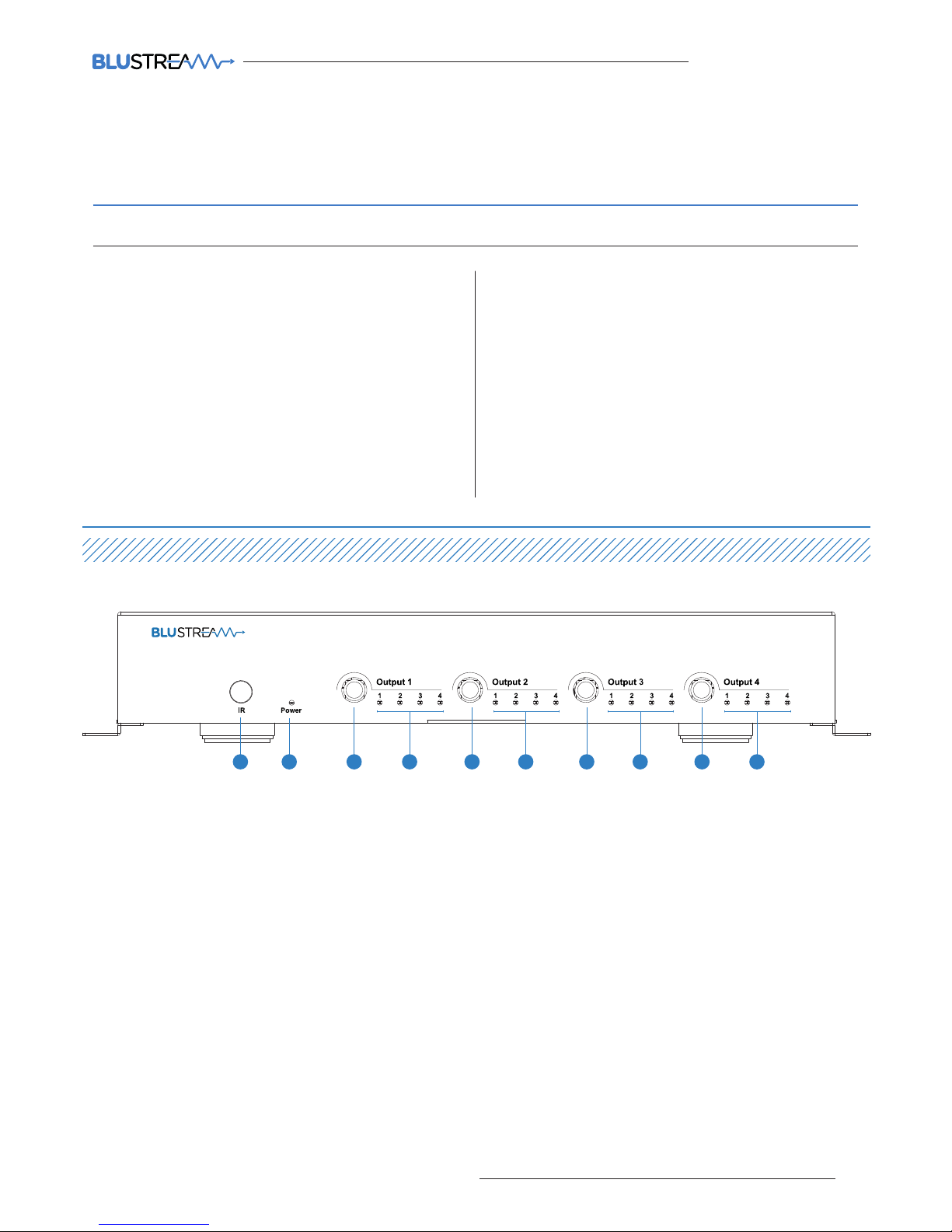
Front Panel
2 4 4 4 41 3 3 3 3
1 IR receiver window – Receive the IR from the remote control of MX44AB.
2 Power LED indicator – Indicate the power state of the matrix.
3 HDMI output selection button 1 to 4 – Press to select the desired source input for
the marked output zone 1 to 4.
4 Input LED indicator – Indicates the selected source in the zone output.
03
contact [email protected] / [email protected]
Our MX44AB 4K HDMI matrix individually distributes four HDMI sources to four displays.
This enables all sources to be viewed seamlessly as required within a matrix configuration.
The unit transmits all HDMI resolutions up to and including 4K. The 4-Way matrix also
includes the advanced features of audio breakout and EDID management.
Introduction
FEATURES:
• Features 4x HDMI inputs which can be independantly
routed to 4x HDMI outputs
• Supports 4K UHD video (3840 x 2160 @30Hz 4:4:4, 4096 x
2160 @24Hz 4:4:4, and 4K @60Hz 4:2:0)
• Supports all industry standard video resolutions including
VGA-WUXGA and 480i-4K
• Supports 3D signal display
• Supports all known HDMI audio formats including Dolby
TrueHD, Dolby Atmos, Dolby Digital Plus and DTS-HD
Master Audio transmission
• HDMI audio de-embedded to associated output analogue
L/R audio and coaxial digital outputs concurrently
• Supports bi-directional IR from all input and output
locations
• Supplied with Blustream IR receivers and emitters
• Control via front panel, IR and RS-232
• 3rd Party drivers available for all major home control
brands
• Advanced EDID management
• HDCP compliant
Page 4
MX44AB USER MANUAL
MX44AB User ManUal
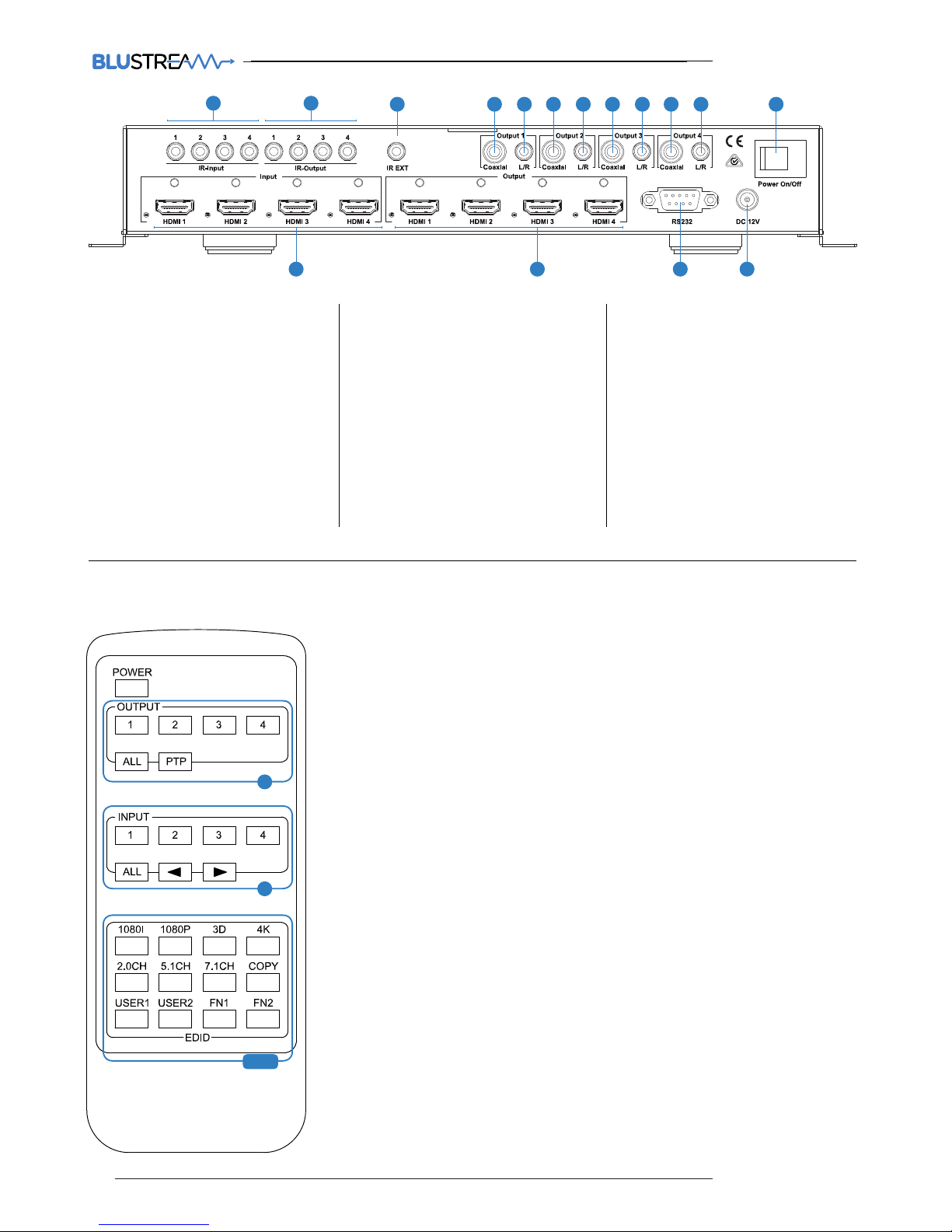
Rear Panel
MX44AB
21
3 4 4 4 45 5 5 5 6
7 8 9 10
1 IR inputs 1 to 4 – Zone specific
3.5mm stereo phone-jack IR inputs
2 IR outputs 1 to 4 – Source spe-
cific 3.5mm IR jacks which provide
routed IR from the zone IR inputs.
Routing is determined by which
source is selected in a zone.
3 IR extension receiver input –
3.5mm stereo phone-jack enabling
the use of an external IR sensor for
control of the matrix.
4 Coaxial output – RCA (S/PDIF)
output from HDMI output (Zone
specific)
5 L/R output – 3.5mm stereo phone-
jack, audio from HDMI output (Only
supports stereo PCM digital audio
feeds)
6 Power switcher – Press to power
matrix on/o
7 HDMI inputs 1 to 4 – Connect HDMI
sources
8 HDMI outputs 1 to 4 – Output for
displays, AVR etc.
9 RS232 female port – RS232 connec-
tion enabling external third party
setup and control of the matrix.
q Power port – Use included 12V/2A
DC adaptor to power the matrix
switcher.
Remote Control Description
OUTPUT AND INPUT SELECTION
A Selects the zone OUTPUT you wish to
change the source on (Numbers 1 - 4
correspond to the zone outputs 1 - 4)
B Selects the source INPUT you wish to
change on the selected zone
(Numbers 1 - 4 correspond to the
source inputs 1 - 4)
EXAMPLE
To switch source 2 to zone 4 you would
press 4 in the output section (A) followed
by pressing 2 in the Input section (B).
ALL button: The all button selects all the
inputs or outputs in its corresponding box.
Example: (The “All” button in the Output
box selects all the zones so all zones will
change to what source input is selected
next)
PTP: This button will align all the zone
outputs with the like numbered source
inputs. Example: Input 1 to output 1, input
2 to output 2, etc
EDID SET UP
The MX44AB provides a comprehensive
range of EDID settings. Below are three ex-
amples of how to deploy the desired EDID
setting when using the supplied remote.
A. Fix EDID to an INPUT or ALL inpus:
Press the desired video resolution
button (1080I / 1080P / 3D / 4K),
then select the desired audio format
(2.0CH / 5.1CH / 7.1CH), then select
the source input you want this EDID
information allocated to by pressing
the INPUT 1 – 4 or the ALL button
B. Copy EDID of OUTPUT-X to an
INPUT or ALL: Press the COPY but-
ton then select the OUTPUT you wish
to copy the EDID information from,
then select the source input you want
to copy this EDID to by selecting the
INPUT 1-4 or the ALL button.
C. User defined EDID to an INPUT or
ALL inputs: Press USER1 / USER2
button then select the source you
wish to assign this EDID to by selecting INPUT 1-4 or the ALL button
NOTE: The button press sequence should
be finished in 5 seconds, otherwise the
operation is discarded.
A
B
EDID
04
www.blustream.co.uk
Page 5

MX44AB USER MANUAL
MX44AB User ManUal
Specifications
[DIp]=0000:HDMI1080p@60Hz,Audio2CHPCM
[DIp]=0001:HDMI1080p@60Hz,Audio5.1CHPCM/DTS/DOLBY
[DIp]=0010:HDMI1080p@60Hz,Audio7.1CHPCM/DTS/DOLBY/HD
[DIp]=0011:HDMI1080i@60Hz,Audio2CHPCM
[DIp]=0100:HDMI1080i@60Hz,Audio5.1CHPCM/DTS/DOLBY
[DIp]=0101:HDMI1080i@60Hz,Audio7.1CHPCM/DTS/DOLBY/HD
[DIp]=0110:HDMI1080p@60Hz/3D,Audio2CHPCM
[DIp]=0111:HDMI1080p@60Hz/3D,Audio5.1CHPCM/DTS/DOLBY
[DIp]=1000:HDMI1080p@60Hz/3D,Audio7.1CHPCM/DTS/DOLBY/HD
[DIp]=1001:HDMI4K2K,Audio2CHPCM
[DIp]=1010:HDMI4K2K,Audio5.1CHPCM/DTS/DOLBY
[DIp]=1011:HDMI4K2K,Audio7.1CHPCM/DTS/DOLBY/HD
[DIp]=1100:DVI1280x1024@60Hz,AudioNone
[DIp]=1101:DVI1920x1080@60Hz,AudioNone
[DIp]=1110:DVI1920x1200@60Hz,AudioNone
EDID Control
EDID (Extended Display Identification
Data) is a data structure that is used
between a display and source. This data is
used by the source to find out what audio
and video resolutions are supported by
the display then from this information the
source will determine what the best audio
and video resolutions are to be outputted.
While the objective of EDID is to make
connecting a digital display to a source
a simple plug and play procedure issues
do arise when multiple displays or video
matrix switching is introduced because of
the increased number of variables.
By pre-determining the video resolution and audio format of the source and
display device we can remove some of
the EDID hand shaking process thus making switching quicker and more reliable.
Instructions on these setting can be found
on the right
RS232 Pin Assignment
MT0404-A40 reMOTe cOnTrOl cOnsOle
PIN Assignment PIN Assignment
1 NC 1 NC
2 Tx 2 Rx
3 Rx 3 Tx
4 NC 4 NC
5 GND 5 GND
6 NC 6 NC
7 NC 7 NC
8 NC 8 NC
9 NC 9 NC
Baud Rate: 57600 bps
Data Bit: 8-bit
Parity: None
Stop Bit: 1-bit
Flow Control: None
05
contact [email protected] / [email protected]
• Video Input Connectors: 4x HDMI Type A, 19-pin, female,
locking
• Video Output Connectors: 4x HDMI Type A, 19-pin, female,
locking
• Audio Output Connectors: 4x RCA (SPDIF), 4x Analogue
audio L/R (3.5mm stereo Jack)
• RS-232 Serial Port: DB-9, female
• IR Input Ports: 5x 3.5mm stereo jack
• IR Output Ports: 4x 3.5mm mono jack
• Rack-Mountable: Rack ears included
• Dimensions (WxDxH): 428x114x43mm, without feet
• Shipping Weight: 1.0kg
• Operating Temperature: 32°F to 104°F (0°C to 40°C)
• Storage Temperature: -4°F to 140°F (-20°C to 60°C)
• Power Supply: 12V/2A DC, screw type connector
Page 6
MX44AB USER MANUAL
MX44AB User ManUal
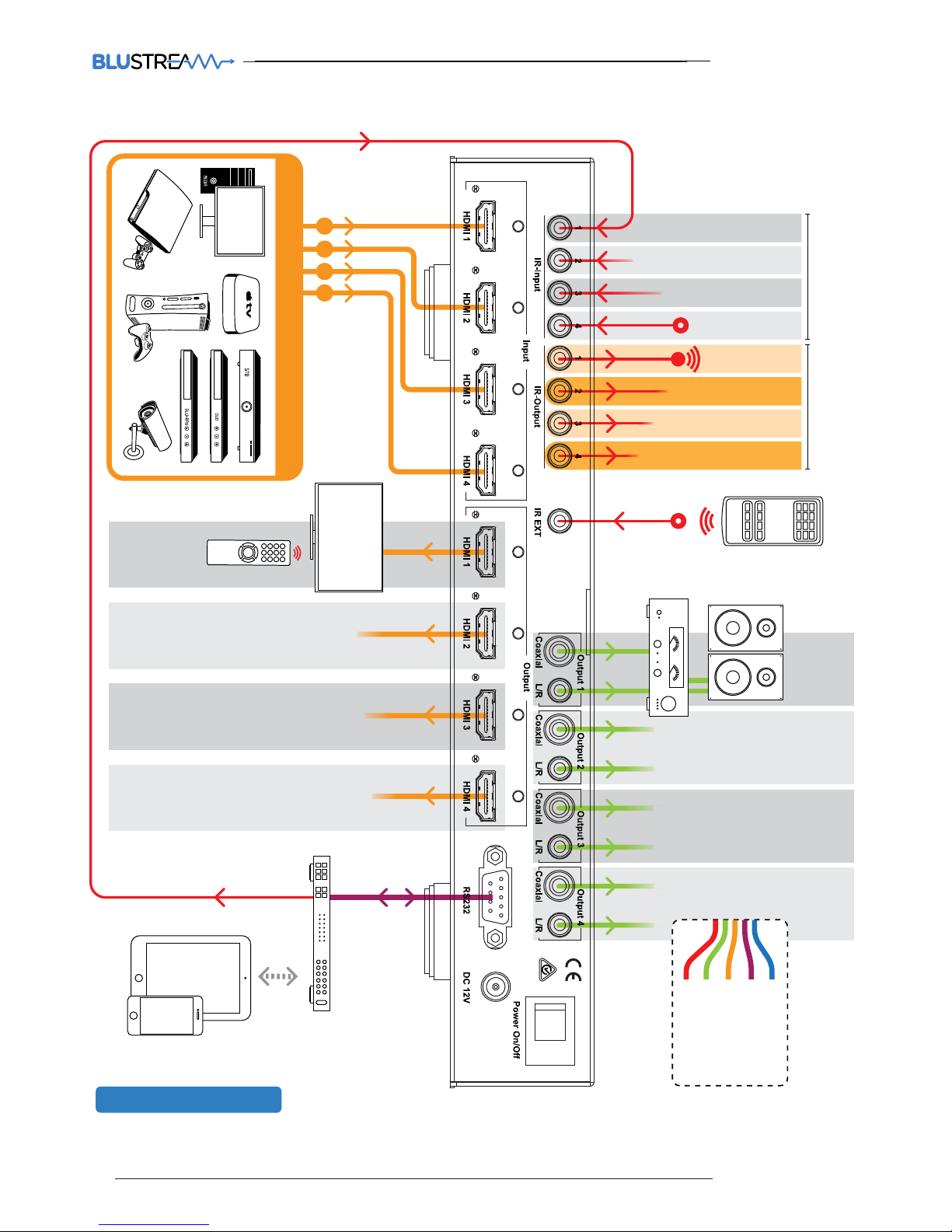
CONNECTION DIAGRAM
1 2 3 4
MAXIMUM OF 4 SOURCES
Control
Processor
ZONE
01
ZONE
02
ZONE
03
ZONE
04
ZONE
01
ZONE
02
ZONE
03
ZONE
04
DISPLAY
SOURCE 01
SOURCE 02
SOURCE 03
SOURCE 04
IR Emitter
Link to source
ZONE 01
ZONE 02
ZONE 03
ZONE 04
IR Receiver
Link to control device
MX44AB
Cat 5/5e/6
RS232
HDMI
Stereo Audio
IR Cable
06
www.blustream.co.uk
Page 7

MX44AB USER MANUAL
MX44AB User ManUal
Package Contents:
Maintenance
Clean this unit with a so, dry cloth. Never use
alcohol, paint thinner or benzene to clean this unit.
NOTES
07
contact [email protected] / [email protected]
• 1 x MX44AB
• 1 x 12V/2A DC power supply
• 1 x Remote control
• 4 x IR emitters
• 5 x IR receivers
• 1 x Mounting kit
• 1 x User manual
Page 8

www.blustream.co.uk
www.blustream.com.au
 Loading...