

Page 1
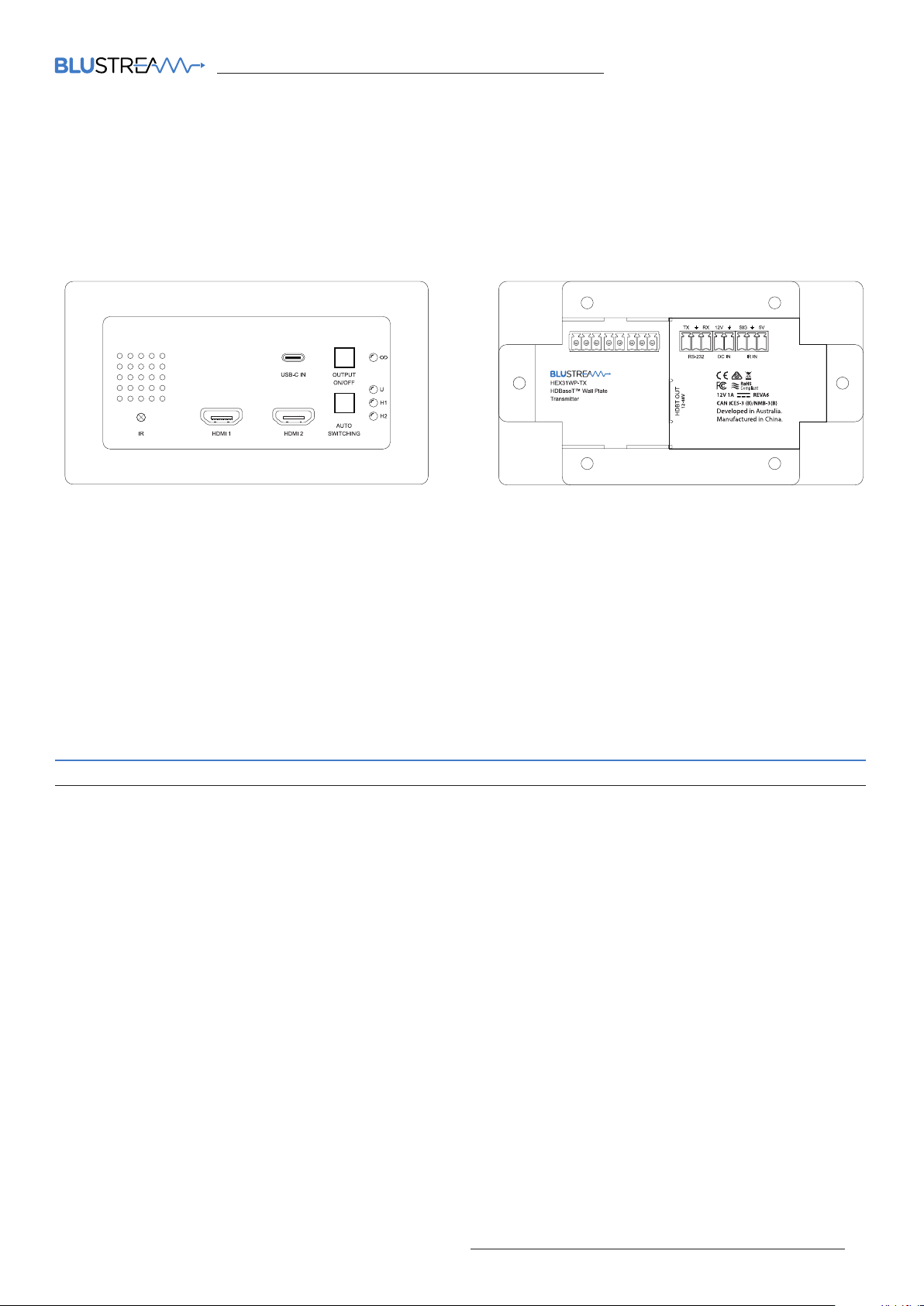
HE X3 1WP -TX QUICK REFERENCE GUIDE
HEX31WP-TX
Quick Reference Guide
Our HEX31WP HDMI / USB-C wall plate HDBaseT™ Transmitter is a multi-format
Introduction
FE ATURES:
• Features 2 x HDMI & 1 x USB-C inputs with manual / auto source selection
• Advanced HDBaseT™ technology oering distribution of video and audio over a single CAT cable
• Supports 4K UHD video up to 40m (3840 x 2160 @30Hz 4:4:4, 4096 x 2160 @24Hz 4:4:4, and 4K @60Hz 4:2:0)
• Extends HDMI at 1080p up to a distance of 70m
• Supports all known HDMI audio formats including Dolby TrueHD, Dolby Atmos, Dolby Digital Plus and DTS-HD
Master Audio transmission
• Input selection via front panel, IR and RS-232
• Programmable ON / OFF button utilising IR, RS-232 or CEC for control of display device at HDBaseT™ Receiver
• Supports 12V-48V PoC from compatible Blustream HDBaseT™ Receiver / Matrix products
• Bi-directional RS-232 pass through
• Supports IR pass-through to HDBaseT™ device
• Compatible with all Blustream HDBaseT™ Receiver / Matrix products*
• Magnetic faceplate surround allowing both UK & EU backbox compatibility
• HDCP 2.2 support
*Technical performance is subject to the features supported on the connected HDBaseT™ device
4K input switcher solution delivering HDMI and USB-C inputs up to 70m at 1080p
(40m at 4K 60Hz 4:2:0). The HEX31WP-TX features both manual or automated
source selection and includes display on / o control via CEC, RS-232 and IR (via
compatible HDBaseT™ Receiver / Matrix). The HEX31WP-TX has been designed
to work with all Blustream HDBaseT™ Receiver and Matrix solutions, be installed
in both UK and European backboxes, and can be powered locally or from
compatible Blustream HDBaseT™ products.
contact: [email protected] / [email protected]
01
Page 2
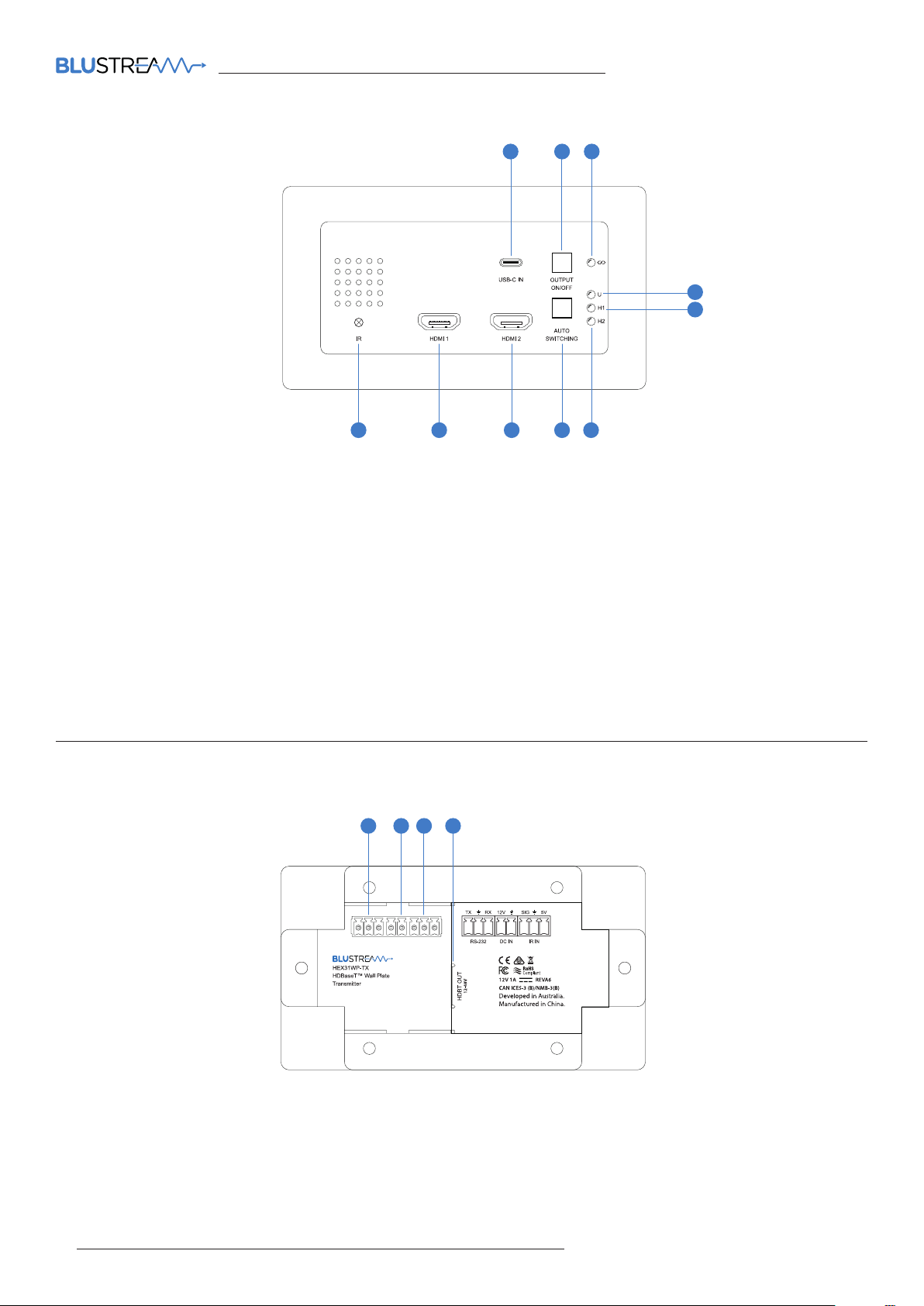
Front Panel Description
HE X3 1WP -TX QUICK REFERENCE GUIDE
21
3
9
10
4 5 6 7
8
1 USB-C Input - Type C USB port to connect to USB-C source device
2 Output ON / OFF Button - Triggers the output on / o sequence (see Output On / O section on next page)
3 HDBaseT™ link status indicator - Illuminates when the Transmitter is connected to the Receiver / Matrix successfully
4 IR Receiver - Built in IR sensor for IR pass through
5 HDMI Input 1 - Type A HDMI port to connect HDMI source device
6 HDMI Input 2 - Type A HDMI port to connect HDMI source device
7 Auto Switching Button - Press to change source, hold for 3 seconds to enable / disable auto signal sense switching.
8 HDMI Input 2 Indicator - Illuminates when HDMI 2 input is connected
9 USB Input Indicator - Illuminates when USB-C input is connected
q HDMI Input 1 Indicator - Illuminates when HDMI 1 input is connected
Rear Panel Description
1211 13 14
w RS-232 - 3-pin phoenix connector for RS-232 pass through to / from compatible HDBaseT™ Receiver / Matrix products
e 12V DC Input - 2-pin phoenix connector to connect to Blustream 12V power supply (supplied)
r IR Receiver Input - 3-pin phoenix connector to connect to Blustream IR Receiver (phoenix block supplied, IR Receiver
not supplied)
t HDBaseT™ Output - RJ45 HDB aseT™ port to connect to the HD BaseT ™ input port of the compatible Blustream
HDBaseT ™ Receiver / Matrix device
02
www.blustream.com.au / www.blustream.co.uk
Page 3

HE X3 1WP -TX QUICK REFERENCE GUIDE
Output On / O Button
This product features an Output On / O button that can turn on or o the display connected to the HDBaseT™
Receiver via CEC, IR or RS-232. The default setting for this is disabled and the function needs to be enabled prior to use.
This button allows custom RS-232 and IR signals to be learned into the On and O commands.
For further information please see the HEX31WP-TX User Manual - available to download from the Blustream website.
RS-232 Configuration
The RS-232 port is used for configuration / control of the product, as well as pass through of RS-232 commands to a
compatible Blustream HDBaseT™ Receiver / Matrix device.
The default RS-232 communication settings are:
Baud rate: 57600
Data bit: 8
Stop bit: 1
Parity bit: none
For a complete RS-232 command list please see the HEX31WP-TX User Manual - available to download from the
Blustream website.
EDID Control
EDID (Extended Display Identification Data) is a data structure that is used between a display and a source. This data
is used by the source to find out what audio and video resolutions are supported by the display. By pre-determining
the video resolution and audio format of the source and display device you can reduce the time needed for EDID hand
shaking thus making switching quicker and more reliable.
Configuration of the EDID settings for each input can be achieved using the following RS-232 commands to specify the
required EDID:
EDIDxxDFzz
Where xx = Input: 00 refers to ALL inputs; 01 = input 1 (HDMI 1); 02 = input 2 (HDMI 2); 03 = input 3 (USB-C)
zz = EDID as shown below
zz=00: HDMI 1080p@60Hz, Audio 2ch PCM
zz=01: HDMI 1080p@60Hz, Audio 5.1ch PCM/DTS/DOLBY
zz=02: HDMI 1080p@60Hz, Audio 7.1ch PCM/DTS/DOLBY/HD
zz=03: HDMI 1080i@60Hz, Audio 2ch PCM
zz=04: HDMI 1080i@60Hz, Audio 5.1ch PCM/DTS/DOLBY
zz=05: HDMI 1080i@60Hz, Audio 7.1ch PCM/DTS/DOLBY/HD
zz=06: HDMI 1080p@60Hz/3D, Audio 2ch PCM
zz=07: HDMI 1080p@60Hz/3D, Audio 5.1ch PCM/DTS/DOLBY
zz=08: HDMI 1080p@60Hz/3D, Audio 7.1ch PCM/DTS/DOLBY/HD
zz=09: HDMI 4K2K@30Hz, Audio 2ch PCM
zz=10: HDMI 4K2K@30Hz, Audio 5.1ch PCM/DTS/DOLBY
zz=11: HDMI 4K2K@30Hz, Audio 7.1ch PCM/DTS/DOLBY/HD
zz=12: HDMI 4K2K@60Hz 4:2:0 8 bit, Audio 2ch PCM
zz=13: HDMI 4K2K@60Hz 4:2:0 8 bit, Audio 5.1ch PCM/DTS/
DOLBY
zz=14: HDMI 4K2K@60Hz 4:2:0 8 bit, Audio 7.1ch PCM/DTS/
DOLBY/HD
zz=15: DVI 1280x1024@60Hz, Audio None
zz=16: DVI 1920x1080@60Hz, Audio None
zz=17: DVI 1920x1200@60Hz, Audio None
zz=18: DVI 1920x1200@60Hz, Audio 2ch
zz=19: Copy User EDID 1 - refer to User Manual for details
zz=20: Copy User EDID 2 - refer to User Manual for details
zz=21: EDID Pass through
contact: [email protected] / [email protected]
03
Page 4

Specifications
HEX31WP-TX
• Video Input Connectors: 2 x HDMI Type A, 19-pin, female, 1 x USB-C Type C
• Video Output Connectors: 1 x HDBaseT™ RJ45 connector
• RS-232 serial port: 1 x 3-Pin Phoenix connector
• IR Input port: 1 x 3-Pin Phoenix connector
• Product upgrade: 1 x Micro USB female
• Local power input: 1 x 2-Pin Phoenix connector
• Casing Dimensions (W x H x D): 136mm x 76mm x 44mm (without faceplate)
• Faceplate Dimensions (W x H x D): 146mm x 86mm x 6mm
• Backbox Mounting Depth: 40mm (minimum), 47mm (recommended)
• Shipping Weight: 1.0kg
• Operating Temperature: 32°F to 104°F (-5°C to +55°C)
HE X3 1WP -TX QUICK REFERENCE GUIDE
• Storage Temperature : -4°F to 140°F (-25°C to +70°C)
• Power Supply: 12V/1A DC
NOTE: Specifications are subject to change without notice. Weights and dimensions are approximate.
Package Contents
HEX31WP-TX
• 1 x HEX31WP-TX
• 1 x 12V/1A DC Power Supply
• 1 x Magnetic Faceplate
• 1 x RS-232 Control Cable
• 1 x Quick Reference Guide
Maintenance
Clean this unit with a so, dry cloth. Never use alcohol, paint thinner or benzene to clean this unit.
04
www.blustream.com.au / www.blustream.co.uk
REVA2_QRG_HEX31WP-TX_0309
 Loading...