

Page 1

HEX100ARC-RX-V2
HEX100ARC-TX-V2
HEX100ARC-KIT V2
User Manual
IR TXI R RX
Optical
Page 2

Thank you for purchasing
this product.
For optimum performance and safety,
please read these instructions carefully before connecting, operating or
adjusting this product. Please keep this
manual for future reference.
HEX100ARC-KIT V2 USER MANUAL
Contents
Introduction 03
Features 03
Panel Descriptions 04
Control Ports 05
HDBaseT Receiver Options 06
Surge protection device
recommended
This product contains sensitive
electrical components that may be
damaged by electrical spikes, surges,
electric shock, lightning strikes, etc. Use
of surge protection systems is highly
recommended in order to protect and
extend the life of your equipment.
Safety And
Performance Notice
The transmission distances of HDMI
over UTP cables are measured using TE
CONNECTIVITY 1427071-6
EIA/TIA-568-B termination (T568B) of
cables is recommended for optimal
performance.
To minimise interference of the
unshielded twisted pairs in the CAT5e/6
cable do not run the HDBaseT /
Cat5e/6/6a cabling with or in close
parallel proximity to mains power
cables.
Matrix Front Panel Controls 07
Terminating HDBaseT CAT Cables 08
Understanding Matrix/RX Status Lights 08
Infrared Distribution 09
Infrared Remote Control 10
EDID Control 11
Application Diagram 12
TL to update when manual complete
Specifications 13
Package Contents 13
Maintenance 13
Do not substitute or use any other
power supply other than the enclosed
unit, or a Blustream approved
replacement.
Do not disassemble either the
Transmission or Receiver units for
any reason. Doing so will void the
manufacturer’s warranty.
02
RS-232 and Telnet Commands 14-15
Infrared Commands 16-18
Web Browser Interface 19
PC Configuration Soware 19
www.blustream.co.uk
Page 3

HEX100ARC-KIT V2 USER MANUAL
Introduction
FEATURES:
• Advanced HDBaseT technology oering uncompressed video and audio with zero latency
• Extends HDMI up to a distance of 100m over single CAT cable
• Supports 4K UHD video up to 70m (3840 x 2160 @30Hz 4:4:4, 4096 x 2160 @24Hz 4:4:4, and 4K @60Hz
4:2:0)
• Supports all industry standard video resolutions including VGA-WUXGA and 480i-4K
• Supports 3D signal display
• Features 1x HDMI loop out for integrating local displays or cascading to multiple devices
Our Platinum Range of HDBaseT products oer the very best in performance
and flexibility. The HEX100ARC extender set is an industry leading 4K
HDBaseT solution delivering HDMI with HDCP 2.2 support, Bi-directional IR,
RS232 and PoH (PoE) up to lengths of 100m over a single CAT cable. The
HEX100ARC also provides enhanced features including HDMI loop-out on
the Transmitter, ARC via HDMI or Optical (S/PDIF) and an integrated 3-port
ethernet switch.
• Supports ARC (Audio Return Channel) from display via HDMI and Optical digital inputs (ARC feature
supports distance of up to 90m)
• Supports audio return to HDMI, Optical digital and analogue L/R audio outputs (DAC PCM only)
• Supports all known HDMI audio formats including Dolby TrueHD, Dolby Atmos, Dolby Digital Plus and
DTS-HD Master Audio transmission
• Integrated 3-port ethernet switch (LAN Serving)
• Bi-directional RS-232 pass through
• Bi-directional IR from all input and output locations
• Supplied with Blustream IR receiver and emitter
• Bi-directional PoH (Power over HDBaseT) to power extenders from either transmitter or receiverend
• HDCP 2.2 support
contact [email protected] / [email protected]
03
Page 4
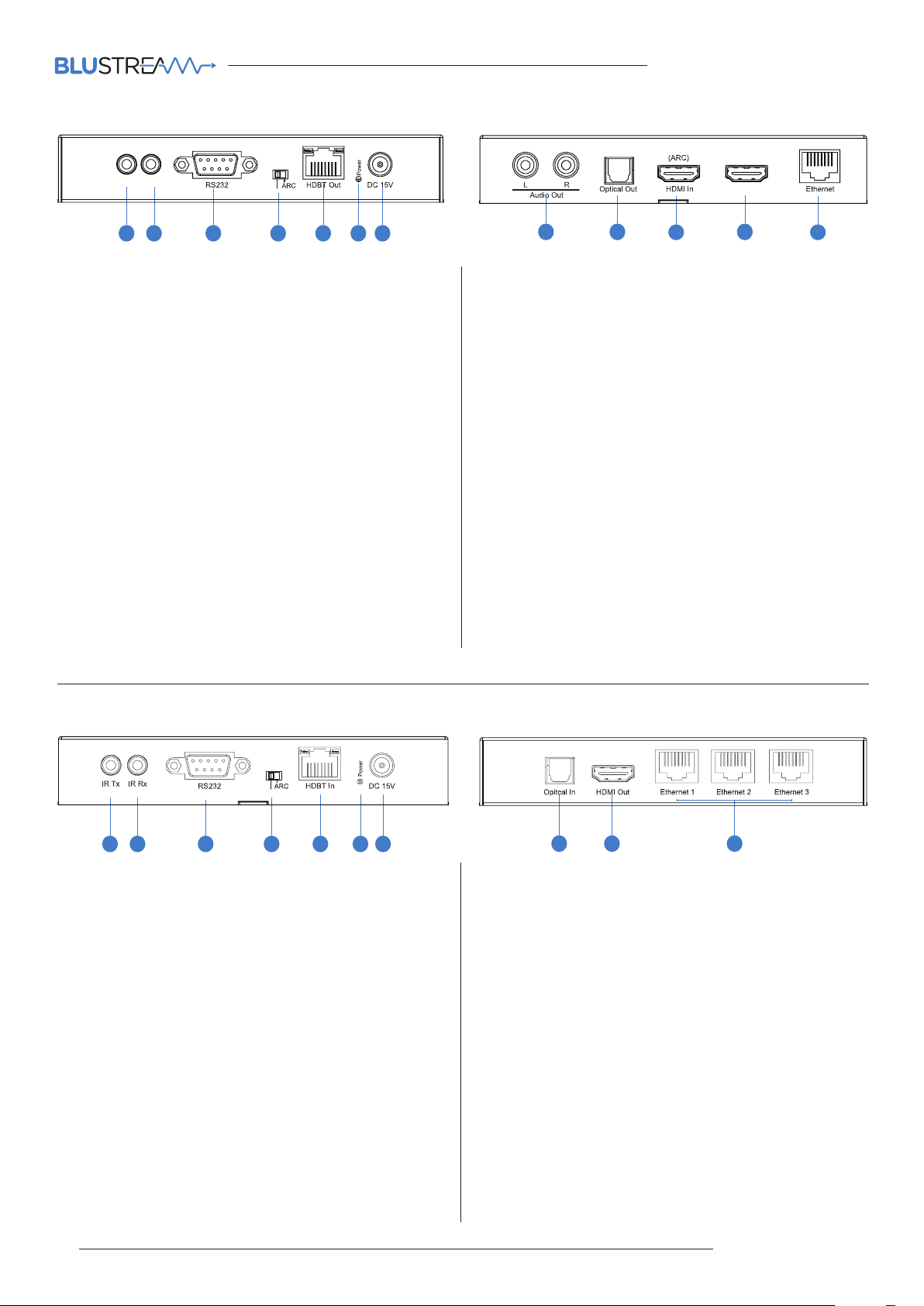
HEX100ARC-TX V2
HEX100ARC-KIT V2 USER MANUAL
HEX100ARC-TX-V2
IR TXI R RX
1 3 4 5 6 7
2
Optical
1 IR TX port - Connect to Blustream 5V Emitter. Connection is
used to control the local source device from Blustream IR
Receiver connected at the HEX100ARC-RX.
2 IR RX port - Connect to Blustream 5V IR Receiver or IRCAB
cable (when used with third party control processor).
Connection is used extend IR over the HDBaseT signal to
control devices located at the HEX100ARC-RX end.
3 RS-232 port - Bi-directional RS-232 with HEX100ARC-RX
RS-232 port.
4 Audio output selection switch - Audio source selection for
Analogue L/R audio outputs (connections). Select between
ARC and audio breakout of local HDMI input. When ARC
feature is used, selection between Optical and HDMI audio
ARC is via dip-switch on the HEX100ARC-RX (see below).
5 HDBaseT output - RJ45 connector. Connect to HDBaseT
input on HEX100ARC-RX.
6 Power LED indicator
7 Power port - Connect Blustream 15V DC power supply
only. Note - HDBaseT extender kit can be powered from
either the Transmitter or Receiver by using the power over
cable (POH) feature.
HDMI Loop Out
8 9
10
11
12
8 Analogue audio 2CH L/R output - Connects to third
party audio amplifier for audio breakout of either local
HDMI or Audio Return Channel from HEX100ARC-RX.
Note: Audio format must be 2ch PCM.
9 Optical audio output - TOSLINK audio output. Connects
to local AV amplifier when using Audio Return Channel
(ARC) feature.
q HDMI input - Connect to the HDMI output of the local
source device or Matrix output to be extended to the
HEX100ARC-RX.
w HDMI output - Loop-through of HDMI input signal. Used
for connection to local display or to daisy-chain HDMI
devices.
e Ethernet ports - RJ45 connector. Connect to local
network switch to extend 10/100 network to HDBaseT
Receiver ethernet ports.
HEX100ARC-RX V2
NON-ARC
1 3 4 5 6 7
2
1 IR TX port - Connect to Blustream 5V Emitter. Connection
is used to control the local display device from control
processor or IR sensor located at the source/transmitter
end.
2 IR RX port - Connect to Blustream 5V IR Receiver
Connection is used to control sources devices located at
the HEX100ARC-TX end.
3 RS-232 port - Bi-directional RS-232 with HEX100ARC-TX
RS-232 port.
4 Audio return selection switch - Switch between ARC and
TOSLINK (Optical) when using Audio Return feature.
5 HDBaseT input - RJ45 connector. Connect to HDBaseT
output on HEX100ARC-TX.
6 Power LED indicator
7 Power port - Connect Blustream 15V DC power supply
only. Note - HDBaseT extender kit can be powered from
either the Transmitter or Receiver by using the power
over cable (POH) feature.
HEX100ARC-RX-V2
8 9 10
8 Optical audio input - TOSLINK audio input. Connects to
the Optical output of the local display device for Audio
Return feature.
9 HDMI Output - Connect to the HDMI input on local display
device.
q Ethernet ports x3 - RJ45 connectors. Connect to local
network products to extend 10/100 network from
HDBaseT Transmitter.
04
www.blustream.co.uk
Page 5

HEX100ARC-KIT V2 USER MANUAL
Terminating the interconnecting HDBaseT CAT cable
It is important that the interconnecting CAT cable between the Blustream HDBaseT products is terminated using the correct RJ45
pin configuration. The link CAT cable MUST be a ‘straight’ (pin-to-pin) CAT cable and it is advised that this is wired to the T568B
wiring standard as this format is less prone to EMI (Electro-Magnetic Interference).
When installing CAT cables it is advised that you use the best possible CAT cable quality possible. HDMI distribution products will
only work if used with CAT5e standard cable or above. Blustream recommends using a CAT6 cable for your installations, especially
when running over longer distances, in areas of high EMI, or with 4K signal distribution.
RJ45 Pin-Out
1 2 3 4 5 6 7 8
T568B
Understanding the HEX100ARC V2 HDBaseT status lights
The Blustream Matrix and HDBaseT extender solutions include status LED indicators on both the Transmitter and Receiver
products to show all connections are active and to help diagnose possible problems.
Understanding the status lights:-
Blustream HEX100ARC-TX V2:
• The Yellow HDBaseT status link light will be o when the output has been turned o or there is a problem with the HDBaseT
output.
• The Yellow HDBaseT status link light will blink when the output is on and working
• The Green HDBaseT link light will blink if there is an unstable connection between the Blustream HDBaseT Transmitter and
HDBaseT Receiver
• The Green HDBaseT link light will be lit when a there is an active HDBaseT Receiver connected to the Transmitter
• The Green HDBaseT link light will be o when a there is no connection with a HDBaseT receiver
• The HDMI link light will be o when there is no connection with a source device
• The HDMI link light will be on when there is an active connection with asource device
Blustream HEX100ARC-RX V2:
• The HDMI link light will be o when there is no connection with a display
• The HDMI link light will be on when there is an active connection with a display
• The HDBaseT link light will be o when there is no CAT cable/active HDBaseT connection on the RJ45 HDBaseT input
• The HDBaseT link light will blink if there is an unstable connection between the Blustream Transmitter and HDBaseT Receiver
• The HDBaseT link light will be lit when a CAT cable is connected to the HDBaseT RJ45 output on the Transmitter and an active
connection is achieved with the Blustream HDBaseT Receiver.
Blustream Support department are on hand to assist with signal distribution issues should they arise - please email us at one of
the email addresses below
contact [email protected] / [email protected]
05
Page 6

HEX100ARC-KIT V2 USER MANUAL
Infrared (IR) Distribution
The Blustream range of HDBaseT products include multiple options for control and routing of IR.
IMPORTANT: Blustream Infrared products are all 5V and NOT compatible with alternative manufacturers Infrared solutions. When using third party 12V IR control solutions please use supplied Blustream IRCAB cable for IR conversion.
Each Blustream Matrix and HDBaseT receiver is supplied with all necessary IR hardware required and includes:
IR Emitter - IR1 & IR2 (IR2 sold separately)
Blustream 5V IR Emitter designed for discrete IR control of
hardware
IR Receiver - IRR
Blustream 5V IR receiver to receive IR signal and distribute
through Blustream products
Infrared 3.5mm Pin-Out
IR Emitter - Mono 3.5mm
Signal
Ground
IR Receiver - Stereo 3.5mm
Signal
5V
Ground
IR Control Cable - IRCAB (sold separately)
Blustream IR Control cable 3.5mm Mono to 3.5mm Stereo for
linking third party control solutions to Blustream products.
Compatible with 12V IR third party products.
Note: Cable is directional as indicated
06
www.blustream.co.uk
Page 7
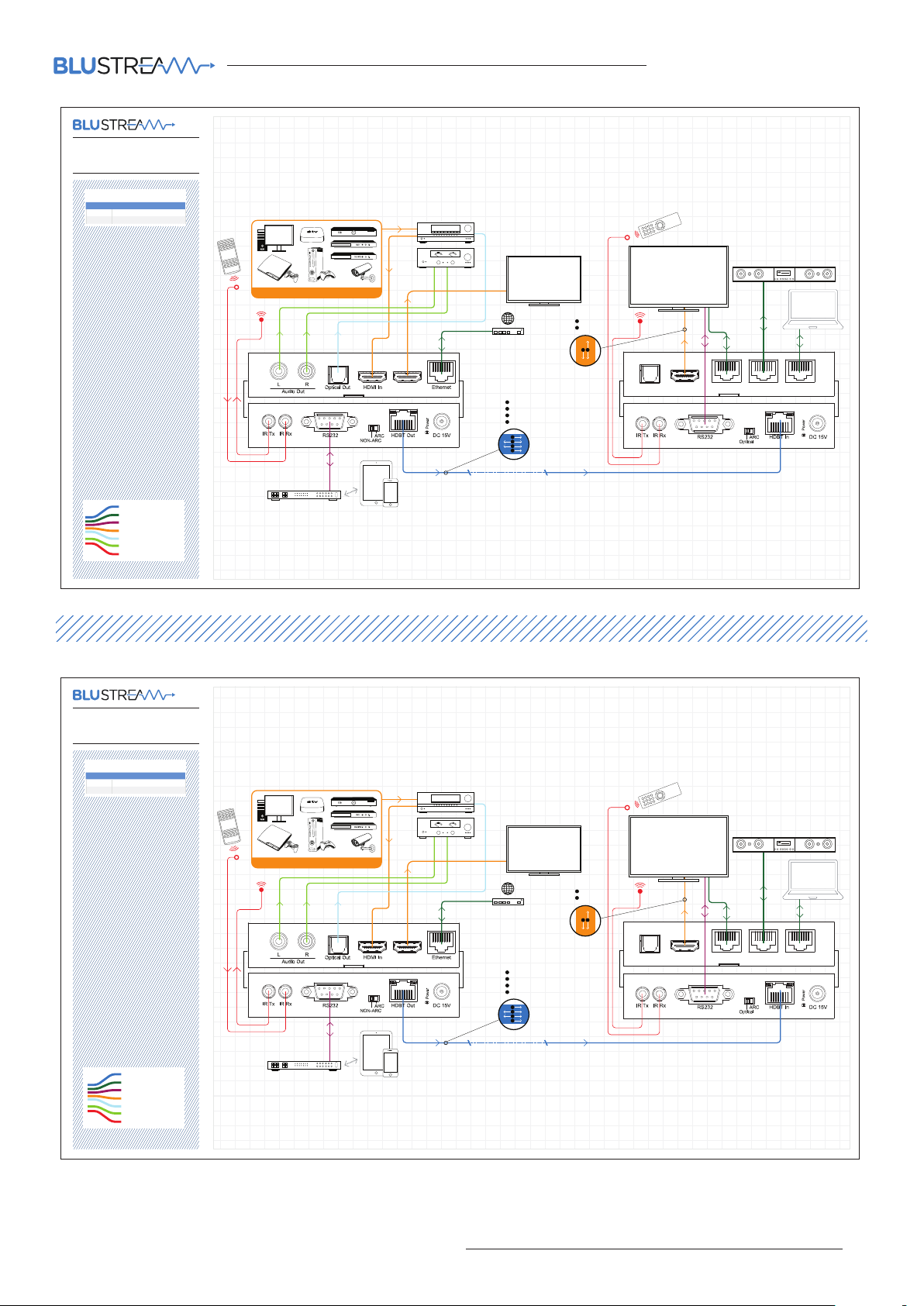
Example Schematic
HEX100ARC-Kit-V2
TV AND AVR SUPPORT ARC
HEX100ARC POSITION SWITCHER MODE SEL ECTION
Transmitter ARC
Receiver ARC
HEX100ARC-KIT V2 USER MANUAL
Cat 5/6
Network Connection
RS232
HDMI
Optical Digital Audio
Stereo Audio
IR Cable
Example Schematic
HEX100ARC-Kit-V2
HEX100ARC-Tx
Transmitter
1 SOURCE
Control
Processor
HDMI Loop Out
100m max
A
HDMI
B
RS232
C
IR
D
POH
A
B
C
D
LOCAL
DISPLAY
(HDMI)
DISPLAY
(HDBaseT)
A
HDMI
B
ARC
B
A
HEX100ARC-Rx
Optical In HDMI Out Ethernet 1 Ethernet 2 Ethernet 3
Receiver
TV WITH ARC, AVR WITHOUT ARC
HEX100ARC POSITION SWITCHER MODE SEL ECTION
Transmitter NON-ARC
Receiver ARC
Cat 5/6
Network Connection
RS232
HDMI
Optical Digital Audio
Stereo Audio
IR Cable
HEX100ARC-Tx
Transmitter
1 SOURCE
Control
Processor
HDMI Loop Out
100m max
A
HDMI
B
RS232
C
IR
D
POH
A
B
C
D
LOCAL
DISPLAY
(HDMI)
DISPLAY
(HDBaseT)
A
HDMI
B
ARC
B
A
HEX100ARC-Rx
Optical In HDMI Out Ethernet 1 Ethernet 2 Ethernet 3
Receiver
contact [email protected] / [email protected]
07
Page 8
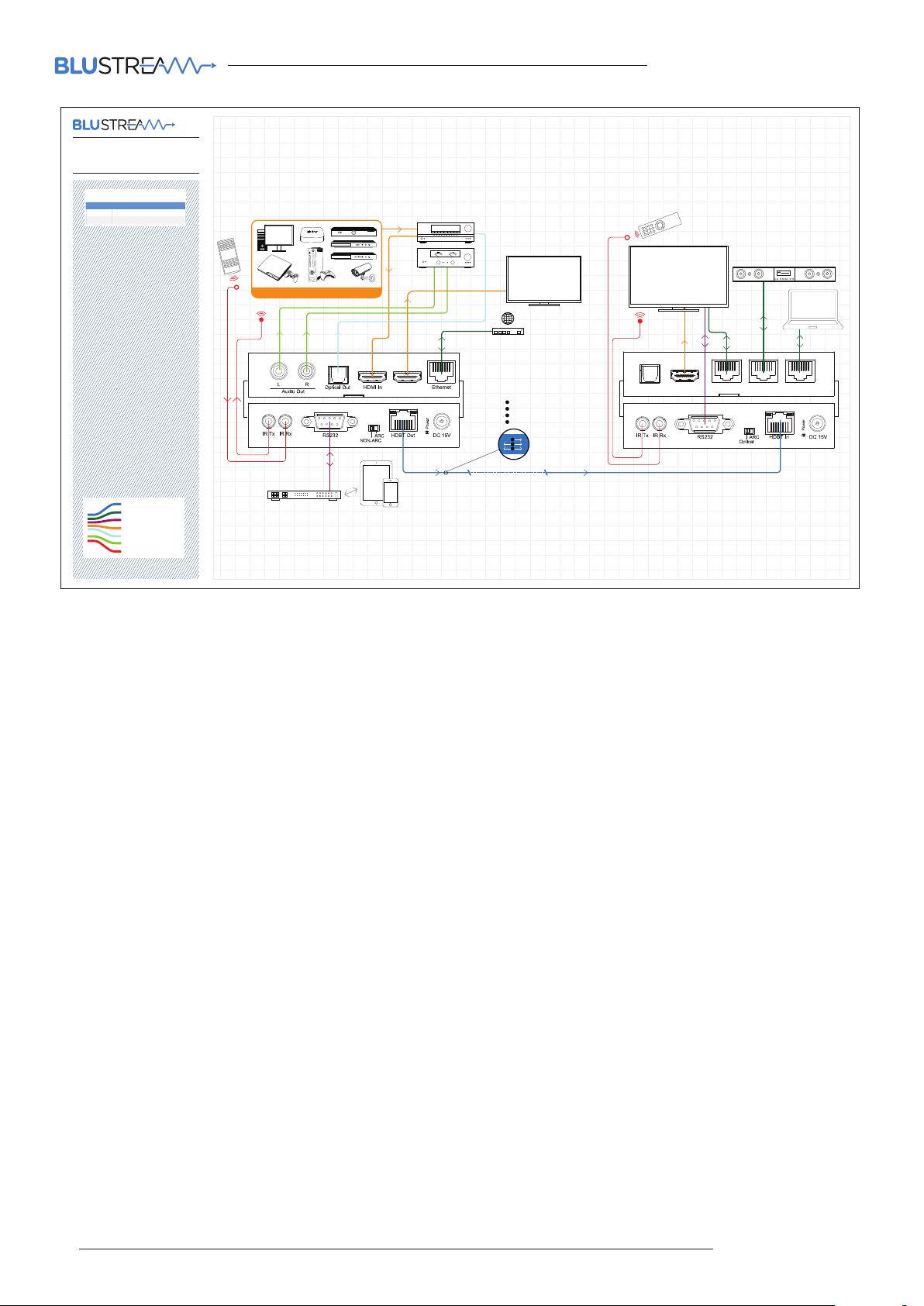
Example Schematic
HEX100ARC-Kit-V2
TV WITHOUT ARC, AVR WITHOUT ARC
HEX100ARC POSITION SWITCHER MODE SEL ECTION
Transmitter NON-ARC
Receiver Optical
HEX100ARC-KIT V2 USER MANUAL
Cat 5/6
Network Connection
RS232
HDMI
Optical Digital Audio
Stereo Audio
IR Cable
HEX100ARC-Tx
Transmitter
1 SOURCE
Control
Processor
HDMI Loop Out
100m max
A
HDMI
B
RS232
C
IR
D
POH
A
B
C
LOCAL
DISPLAY
(HDMI)
DISPLAY
(HDBaseT)
A
B
HEX100ARC-Rx
Optical In HDMI Out Ethernet 1 Ethernet 2 Ethernet 3
Receiver
08
www.blustream.co.uk
Page 9

Specifications:
HEX100ARC-KIT V2 USER MANUAL
HEX100ARC-TX V2
Video Input Connectors: 1x HDMI Type A, 19-pin, female, locking
Video Output Connectors: 1x HDMI Type A, 1x HDBaseT™ RJ45
connector
Audio Output Connectors: 2x RCA (L/R) Analogue, 1x Optical
(TOSLINK)
RS-232 serial port: 1x DB 9 connector
Ethernet port: 1x RJ45, female
IR Input ports: 1x 3.5mm stereo jack
IR Output ports: 1x 3.5mm mono jack
Dimensions (W x H x D): 143mm x 24mm x 134mm
Shipping Weight: 0.4Kg
Operating Temperature: 32°F to 104°F (0°C to 40°C)
Storage Temperature : -4°F to 140°F (-20°C to 60°C)
Power Supply: 1x 15V DC/2A
NOTE: Specifications are subject to change without notice.
HEX100ARC-RX V2
Video Input Connectors: 1x HDBaseT™ RJ45 connector
Video Output Connectors: 1x HDMI Type A
Audio Input Connector: 1x Optical (TOSLINK)
RS-232 serial port: 1x DB 9 connector
Ethernet ports: 3x RJ45, female
IR Input ports: 1x 3.5mm stereo jack
IR Output ports: 1x 3.5mm mono jack
Dimensions (W x H x D): 114mm x 24mm x 134mm
Shipping Weight: 0.4Kg
Operating Temperature: 32°F to 104°F (0°C to 40°C)
Storage Temperature : -4°F to 140°F (-20°C to 60°C)
Package Contents:
• 1 x HEX100ARC-TX V2
• 1x HEX100ARC-RX V2
• 1 x Mounting kit
• 1 x 15V/2A power supply
• 1 x IRR Blustream 5V IR receiver
• 1 x IRCAB Blustream IR control cable - 3.5mm-3.5mm cable
• 1 x IR1 Blustream 5V IR emitter
• 1 x User manual
Maintenance
Clean this unit with a so, dry cloth. Never use alcohol, paint thinner or benzene to clean this unit.
contact [email protected] / [email protected]
09
Page 10

www.blustream.co.uk
www.blustream.com.au
 Loading...