

Page 1

HEX100ARC-RX/-TX
User Manual
HEX100ARC-Rx
HEX100ARC-Tx
Page 2

HEX100ARC User ManUal
02
contact [email protected] / suppor
Surge protection device
recommended
This product contains sensitive electrical components that may be damaged
by electrical spikes, surges, electric
shock, lightning strikes, etc. Use of
surge protection systems is highly
recommended in order to protect and
extend the life of your equipment.
Safety And
Performance Notice
The transmission distances of HDMI
over UTP cables are measured using TE
CONNECTIVITY 1427071-6
EIA/TIA-568-B termination (T568B) of
cables is recommended for optimal
performance.
To minimize interference of the unshielded twisted pairs in the CAT5e/6
cable do not run the HDBaseT /
Cat5e/6/6a cabling with or in close parallel proximity to mains power cables.
Do not substitute or use any other
power supply other than the enclosed
unit, or a Blustream approved replacement.
Do not disassemble either the Transmitter or Receiver units for any reason.
Doing so will void the manufacturer’s
warranty.
Introduction 03
Features 03
Panel Descriptions 03/04
Application Diagram 04/05
Specifications 06
Package Contents 06
Maintenance 06
Contents
Thank you for purchasing
this product.
For optimum performance and safety,
please read these instructions carefully before connecting, operating or
adjusting this product. Please keep this
manual for future reference.
Page 3

HEX100ARC User ManUal
03
contact support@blustream.
co.uk / [email protected]
The Blustream HEX100ARC is a HDMI extender solution enabling a
single CAT5e/6 cable to distribute HDMI, bi-directional IR, RS232 and
Ethernet up to 100 metres by utilizing full HDbaseT technology. Not
only can the HEX100ARC send HDMI, IR, RS232 and Ethernet over a
single CAT5e/6 cable but it also has the ability to send audio back
from a display over the same CAT5e/6 cable via an ARC (Audio Return
Channel) or from a TOSLINK (optical) output on a display. The
HEX100ARC Tx audio outputs are via HDMI (ARC), TOSLINK (optical) or
analogue audio extracted from the PCM digital audio feed.
Introduction
• Audio Return Channel (ARC) support.
• Audio extractor for ARC at transmit-
ter side via TOSLINK and analogue
audio
• Ethernet pass through with 3-way
Ethernet switcher
• HDMI v1.4 and HDCP compliant,
support 1080p@60Hz, 3D and 4K.
• Support 1080P@60Hz or VESA:
1920x1200@60Hz up to 100m,
4K up to 60m.
• Transmission distance for ARC up
to 90m
• Dolby TrueHD and DTS-HD master
audio pass through HDMI output
• Bi-Directional IR and RS232
• POH (Power over HDBT) supported,
only one power supply needed at
either transmitter or receiver side.
FEATURES:
Note: The POH function is designed for powering compatible transmitter or receiver units of Blustream only.
Do not connect any part of this equipment to Power over Ethernet devices. Damage may result.
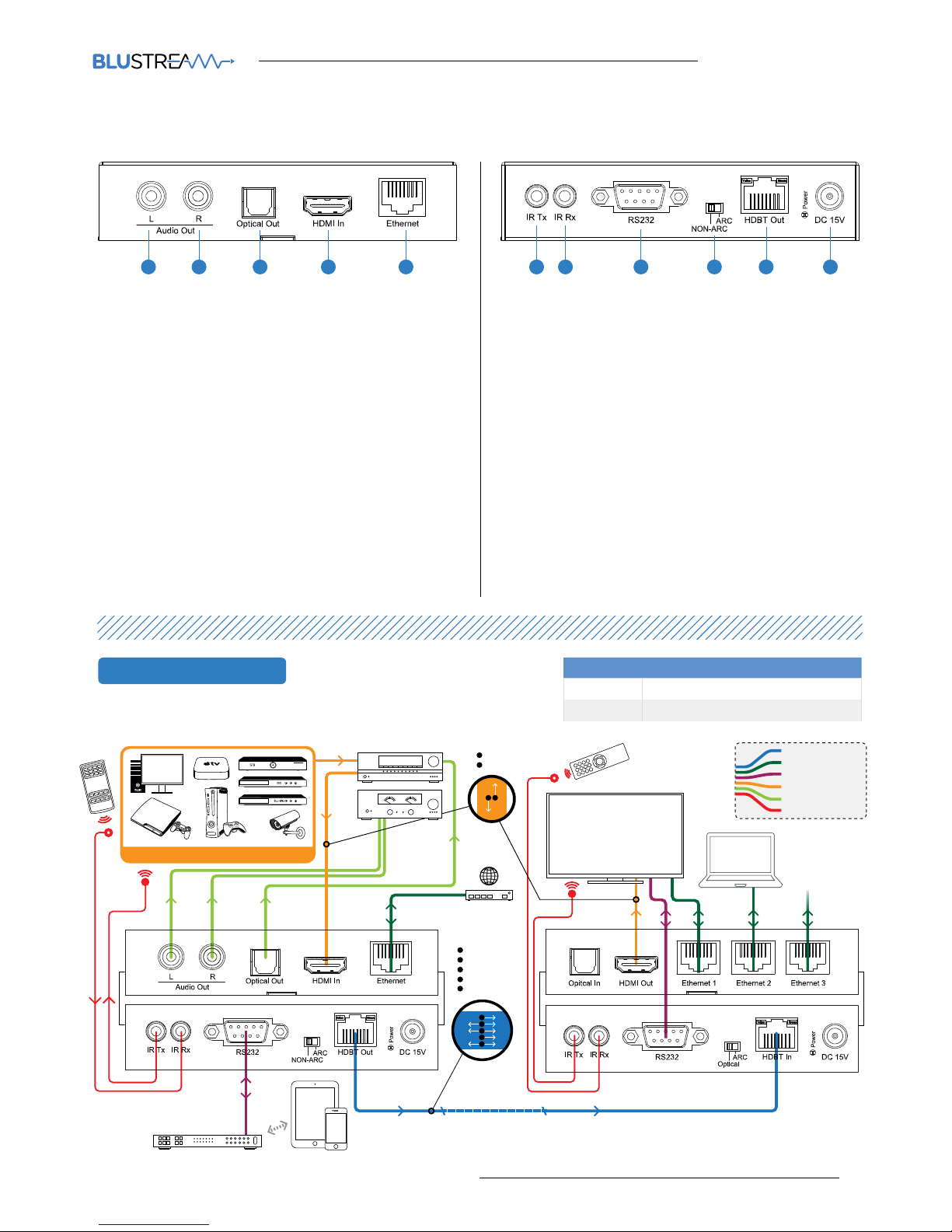
Panel Description HEXARC100-RX
HEX100ARC-Rx
Receiver
1 2 1 1 1 1 1 1 1 1
1 Optical audio in –TOSLINK audio in, connects to the
optical out of the display device
2 HDMI Out –Connect to HDMI input on display device
3 100BaseT Ethernet ports
1 IR Tx port - connect to IR emitter. Used to control display
device from control processor or IR sensor located at the
source end.
2 IR Rx port - connect to IR sensor. Used to control IR con-
trolled source devices at HEX100ARC-Tx end
3 RS232 port – Bi-directional RS232 with HEX100ARC-Tx
RS232 port
4 Audio return position switcher - switch between ARC and
TOSLINK (optical) modes
5 HDBT in - RJ45 connector, connect to HDbaseT port of
HEX100ARC Tx
6 Power LED indicator
7 Power port – can be powered from transmitter by using
the power over cable (POH) feature
Page 4
HEX100ARC User ManUal
04
contact support@blustream.
co.uk / [email protected]
CONNECTION DIAGRAM
Panel Description HEXARC100-TX
HEX100ARC-Tx
Transmitter
1 Le channel of L/R – RCA output, extracted from PCM
only ARC stream
2 Right channel of L/R – RCA output, extracted from PCM
only ARC stream
3 Optical audio out (TOSLINK) – Bit stream audio out
4 HDMI In – Connect to HDMI source device.
5 Ethernet port – Connect to LAN (Network Switch).
1 IR Rx port – transmits IR to HEX100ARC Rx (Tx IR port).
Connect IR sensor or control processor to send IR
commands to a display
2 RS232 port – Bi-directional RS232 to and from the
HEX100ARC-Rx
3 HDBT out – RJ45 connector, connect to HDbaseT in on
HEX100ARC-Rx
4 Power port – Use included 15V/2A DC adaptor to power
the unit.
5 IR Tx port – connect an IR emitter. Used to control source
devices from display end
6 Audio return position switcher – switch between ARC
and NON-ARC modes.
7 Power LED indicator
1 12 23 34 45 5 6
Transmitter
HEX100ARC-Tx
Receiver
HEX100ARC-Rx
Control
Processor
100m max
DISPLAY
A
HDMI
ARC
A
1 SOURCE
HDMI
RS232
IR
POH
A
B
C
D
ETHERNET
E
A
C
D
E
B
B
B
Cat 5/5e/6
Network Connection
RS232
HDMI
Stereo Audio
IR Cable
HEX100ARC PosiTion swiTCHER modE sElECTion
Transmitter ARC
Receiver ARC
TV And AVR suPPoRT ARC
Page 5
HEX100ARC User ManUal
05
contact support@blustream.
co.uk / [email protected]
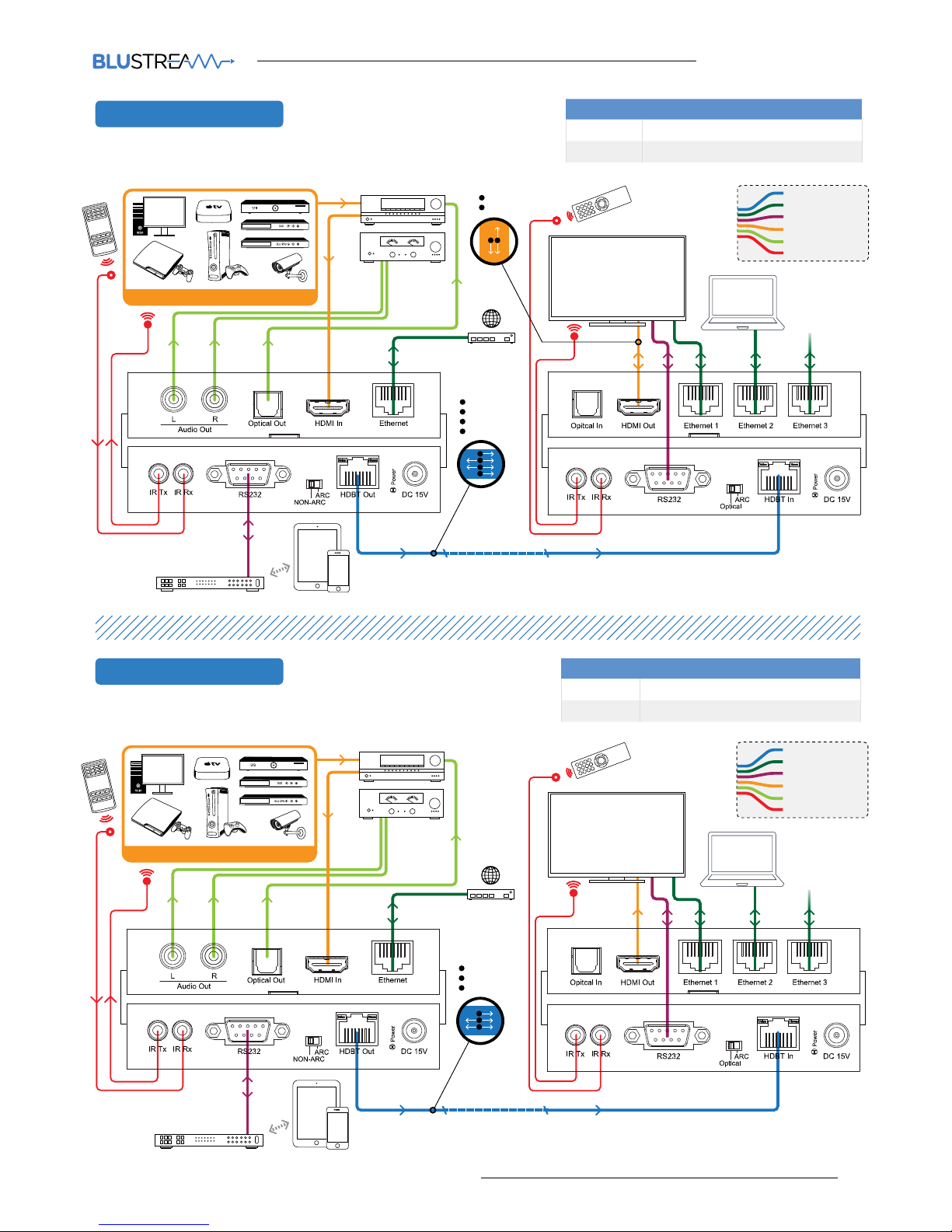
CONNECTION DIAgRAM
CONNECTION DIAgRAM
Transmitter
HEX100ARC-Tx
Receiver
HEX100ARC-Rx
Control
Processor
100m max
DISPLAY
A
B
HDMI
ARC
A
1 SOURCE
HDMI
RS232
IR
POH
A
B
C
D
A
C
D
B
B
Cat 5/5e/6
Network Connection
RS232
HDMI
Stereo Audio
IR Cable
TV wiTH ARC, AVR wiTHouT ARC
HEX100ARC PosiTion swiTCHER modE sElECTion
Transmitter NON-ARC
Receiver ARC
TV wiTHouT ARC, AVR wiTHouT ARC
HEX100ARC PosiTion swiTCHER modE sElECTion
Transmitter NON-ARC
Receiver Optical
Transmitter
HEX100ARC-Tx
Receiver
HEX100ARC-Rx
Control
Processor
100m max
HDMI
RS232
IR
A
A
DISPLAY
1 SOURCE
B
C
C
B
Cat 5/5e/6
Network Connection
RS232
HDMI
Stereo Audio
IR Cable
Page 6

HEX100ARC User ManUal
06
contact [email protected] / suppor
Specifications
Package Contents:
• 1 x HEX100ARC-kit
• 1 x 15V/2A DC power supply
• 1 x IR sensor
• 1 x IR emitter
• 1 x mounting kit
• 1 x manual
Maintenance
Clean this unit with a so, dry cloth. Never use
alcohol, paint thinner or benzene to clean this unit.
NOTE: Specifications are subject to change without notice. Weight and dimensions are approximate.
HEX100ARC-Tx
Video Input Connectors: 1x HDMI Type A, female
Video Output Connectors: 1x RJ-45 connector,
Audio Output Connectors: 2x RCA(L/R), 1x Toslink
Ethernet port: 1x RJ-45 connector,
RS-232 serial port: 1x DB-9 female
IR Input ports: 1x 3.5mm stereo jack
IR Output ports: 1x 3.5mm mono jack
Rack-Mountable: 2x mounting bracket
Dimensions (W x D x H): 114mm x 135mm x 24mm,
without feet
Shipping Weight: 0.4kg
Operating Temperature: 32°F to 104°F (0°C to 40°C)
Storage Temperature : -4°F to 140°F (-20°C to 60°C)
Power Supply: 15V/2A DC, screw connector
HEX100ARC-Rx
Bandwidth: 10.2 Gbps
Video Input Connectors: 1x RJ-45 connector,
Video Output Connectors: 1x HDMI Type A, female
Audio Input Connectors:1x Toslink
Ethernet port: 3x RJ-45 connector,
RS-232 serial port: 1x DB-9 female
IR Input ports: 1x 3.5mm stereo jack
IR Output ports: 1x 3.5mm mono jack
Rack-Mountable: 2x mounting bracket
Dimensions (W x D x H ): 114mm x 135mm x 24mm,
without feet
Shipping Weight: 0.4kg
Operating Temperature: 32°F to 104°F (0°C to 40°C)
Storage Temperature : -4°F to 140°F (-20°C to 60°C)
Power Supply: 15V/2A DC, screw connector
Page 7

www.blustream.co.uk / www.blustream.com.au
 Loading...