

Page 1
HDMI In
CEX120B-TX
Power
Signal
+5V DC
IR TX
IR RX
Coax Input
CEX120B-RX
Coax Output
IR TX
IR RX
MODE
CEX120B-KIT
User Manual
OFF
ON
Power
Signal
HDMI Out
+5V DC
Page 2
Thank you for purchasing
this product.
For optimum performance and safety,
please read these instructions carefully before connecting, operating or
adjusting this product. Please keep this
manual for future reference.
CEX120B-KIT USER MANUAL
Contents
Introduction 03
Features 03
Panel Descriptions 04
Working With Coaxial Cable 05
Understanding TX/RX Status Lights 05
Surge protection device
recommended
This product contains sensitive
electrical components that may be
damaged by electrical spikes, surges,
electric shock, lightning strikes, etc. Use
of surge protection systems is highly
recommended in order to protect and
extend the life of your equipment.
Safety And
Performance Notice
The transmission distances of HDMI
over Coaxial cables depends on the
characteristics and quality of the cable.
Solid and shielded cables terminated
with 75 OHM BNC connectors
is recommended for optimal
performance.
To minimise interference on the coaxial
cable do not run cabling with or in
close parallel proximity to mains power
cables.
EDID Control 06
InfraRed Distribution 07
Application Diagram 08
Specifications 09
Package Contents 09
Maintenance 09
Do not substitute or use any other
power supply other than the enclosed
unit, or a Blustream approved
replacement.
Do not disassemble either the
Transmitter or Receiver units for
any reason. Doing so will void the
manufacturer’s warranty.
02
www.blustream.co.uk
Page 3

CEX120B-KIT USER MANUAL
Introduction
FEATURES:
• Extends HDMI 1080p up to a distances of 120m over a single Coaxial cable
• Supports the following video resolutions - 480i, 576i, 720p, 1080i and 1080p
• Supports Bi-directional IR from input and output locations
• Supports audio formats up to 7.1CH
• Supplied with Blustream IR receiver and emitter
• Requires local power at both Transmitter and Receiver, it is possible to power via USB at 5V 1A
• Smart EDID management
• HDCP compliant
Our CEX120B-KIT HDMI™ extender set oers HDMI distribution over a single
Coaxial cable. The product delivers HDMI & Bi-directional IR up to lengths
of 120m @ 1080p.
WARNING!
Due to the video processing used in this product, users may experience a minimal delay in signal distribution between Transmitter
and Receiver.
Please read these instructions carefully before connecting, operating or adjusting this product. Incorrect termination of the Coaxial
connecting cable may result in damage to the Blustream hardware.
contact [email protected] / [email protected]
03
Page 4
CEX120B-KIT USER MANUAL
CEX120B-TX
HDMI In
2
+5V DC
Power
Signal
CEX120B-TX
1 3 5 6 7
4
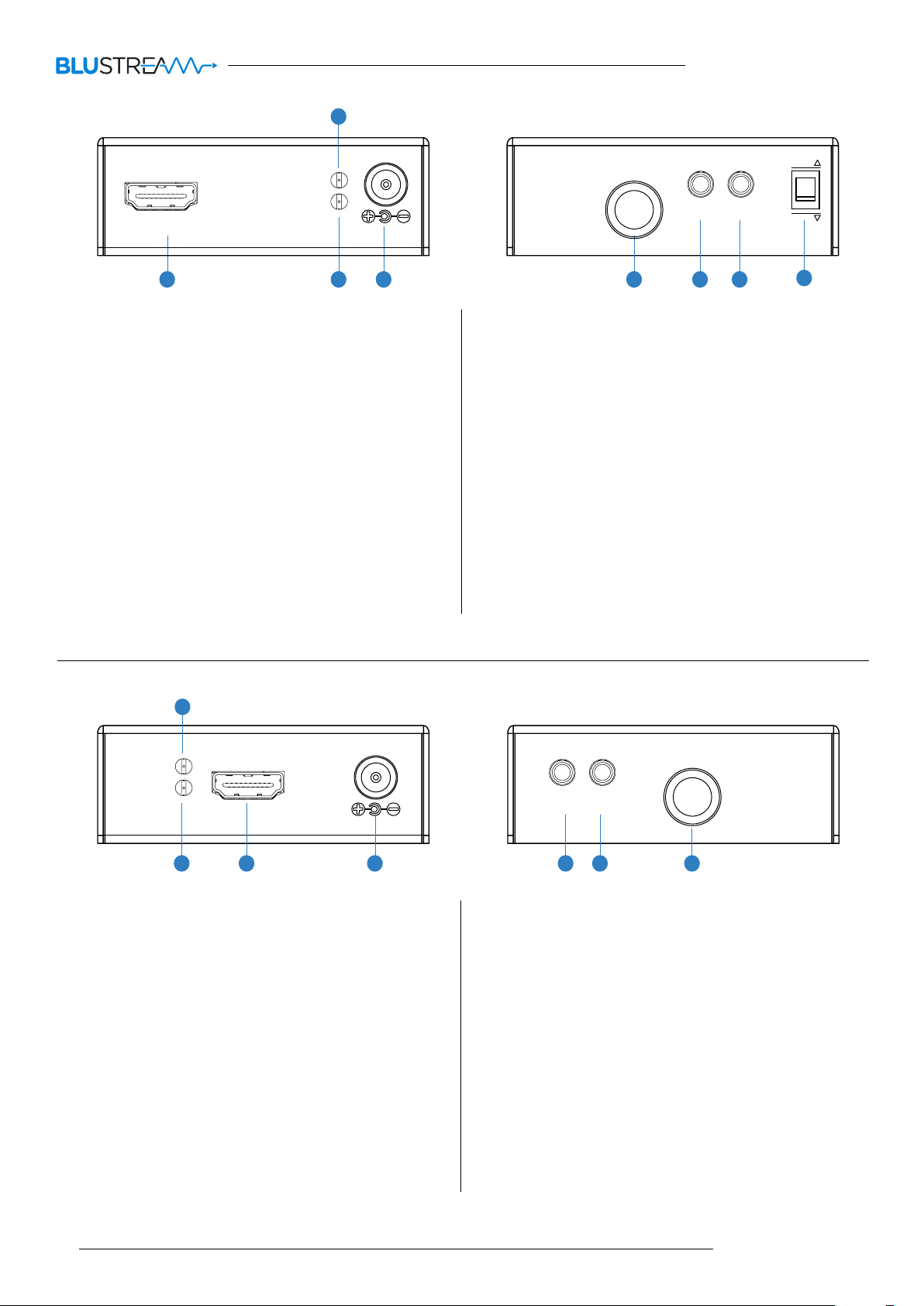
1 HDMI input - Connect to the HDMI output of the local
source device or Matrix output to be extended to the
CEX120B-RX.
2 Power LED indicator.
3 Signal Status LED - LED indicators on both the Transmitter
and Receiver products used to show all connections are
active and to help diagnose possible problems (See Page 5
for further details).
4 Power port - Connect Blustream 5V DC power supply
only. Note - HDMI extender kit must be powered at
both the Transmitter and Receiver ends in order for the kit
to work.
Coax Output
IR TX
IR RX
OFF
ON
MODE
8
5 Coaxial output - BNC connector. Connect to coaxial input
on the CEX120B-RX.
6 IR TX port - Connect to Blustream 5V Emitter. Connection
is used to control the local source device from Blustream
IR Receiver connected at the CEX120B-RX.
7 IR RX port - Connect to Blustream 5V IR Receiver or IRCAB
cable (when used with a third party control processor).
Connection is used to extend IR over the coaxial signal to
control devices located at the CEX120B-RX end.
8 EDID management dip-switches (See page 6 for further
details)
CEX120B-RX
Power
Signal
1
HDMI Out
3 5 6 72
+5V DC
4
1 Power LED indicator.
2 Signal Status LED - LED indicators on both the
Transmitter and Receiver products used to show all
connections are active and to help diagnose possible
problems (See Page 5 for further details).
3 HDMI output - Connect to the HDMI input of the local
display.
4 Power port - Connect Blustream 5V DC power supply
only. Note - HDMI extender kit must be powered at
both the Transmitter and Receiver ends in order for the
kit to work.
Coax Input
IR TX
IR RX
CEX120B-RX
5 IR TX port - Connect to Blustream 5V Emitter. Connection
is used to control the local display device from control
processor or IR sensor located at the source/transmitter
end.
6 IR RX port - Connect to Blustream 5V IR Receiver
Connection is used to control sources devices located at
the CEX120B-TX end.
7 Coaxial input - BNC connector. Connect to coaxial output
on the CEX120B-TX.
04
www.blustream.co.uk
Page 5

CEX120B-KIT USER MANUAL
Working with Coaxial cable
The transmission distances of HDMI over Coaxial cables depends on the characteristics, age and quality of the cable therefore it is
advised that you use the best possible quality Coaxial cable. Solid and shielded cables terminated with 75 OHM BNC connectors
are recommended for optimal performance.
To minimise interference on the coaxial cable do not run cabling with or in close parallel proximity to mains power cables.
It is recommended that there are no joins in the Coaxial cable as these may result in signal loss and decrease distance capabilities
of the extender kit. Should joins be required it is advised that a back-to-back Coaxial coupler is used. The Coaxial cable can be
terminated with either a BNC or F-type connector (CEX120B-KIT is supplied with 2x F-type to BNC converters) using one of two
methods:
• Crimp-style or Compression connectors - They are typically more diicult to install, but can attain the greatest lengths and
best connections when used correctly.
• Screw-on connectors - Are easy to use, but are less secure. With a Screw-on connector there is rarely a good bond between the
cable shielding and the metal of the outer part of the connector, resulting in an increase risk of interference on the cable.
Understanding the CEX120B-KIT status lights
The Blustream HDMI Coaxial extender solution includes status LED indicators on both the Transmitter and Receiver products to
show all connections are active and to help diagnose possible problems.
Understanding the status lights:-
Blustream CEX120B-TX
• The Red power status light will be lit when the 5V 1.2A DC power supply is connected and o when no power supply is
connected.
• The Green signal status light will be lit when there is an active HDMI source connected to the HDMI input.
Blustream CEX120B-RX
• The Red power status light will be lit when the 5V 1.2A DC power supply is connected and o when no power supply is
connected.
• The Green signal status light will be lit when there is an active Coaxial cable connection between the CEX120B-TX and
CEX120B-RX.
Blustream Support department are on hand to assist with signal distribution issues should they arise - please email us at one
of the email addresses below
contact [email protected] / [email protected]
05
Page 6

CEX120B-KIT USER MANUAL
EDID Control
EDID (Extended Display Identification Data) is a data structure that is used between a display and a source. This data is used by the source to
find out what audio and video resolutions are supported by the display then from this information the source will determine what the best
resolution is to output.
While the objective of EDID is to make connecting a digital display to a source a simple plug and play procedure issues do arise.
By pre-determining the video resolution and audio format of the source and display device you can potentially work around compatibility
issues associated with some display and source combinations.
The CEX120B-KIT has 2x dip-switches on the Transmitter which allow you to fix the Video and Audio resolution to one of the settings shown
below.
Adjusting the EDID settings
EDID Dip-switches
IR TX
IR RX
OFF
ON
MODE
The EDID configuration can be altered using the 2x dip-switches located on the side panel of the CEX120B
Transmitter.
Please see table below for EDID settings.
Note: You must power-cycle the CEX120B-TX aer changes have been made in order for the EDID settings to update.
Dip-switch settings
[DIP]=O/O: HDMI 1080p, Multi-channel audio
[DIP]=O/On: HDMI 1080p, Audio 2ch PCM
[DIP]=On/O: HDMI 720p 60Hz, Audio 2ch PCM
[DIP]=On/On: Copy EDID from display
EDID learning
Should you not know the EDID values of the connected display the EDID configuration can be copied from the display connected
to the HDMI output of the CEX120B-RX.
1 Set both dip-switches on the CEX120B-TX to ON/ON.
2 Power the Transmitter
3 The Green LED on the CEX120B-TX will light up indicating the EDID learning procedure is complete.
Note:
• Do not change the dip-switch settings aer learning mode has been completed otherwise the built-in EDID learning information will be lost.
• Video resolution is limited to 1080p when the EDID is copied from the display (Dip-switches both in position ‘1,1’).
06
www.blustream.co.uk
Page 7
CEX120B-KIT USER MANUAL
InfraRed (IR) Distribution
The Blustream HDMI extender products include multiple options for control and routing of IR.
IMPORTANT: Blustream InfraRed products are all 5V and NOT compatible with alternative manufacturers InfraRed
solutions. When using third party 12V IR control solutions please use Blustream IRCAB cable for IR conversion (sold
separately).
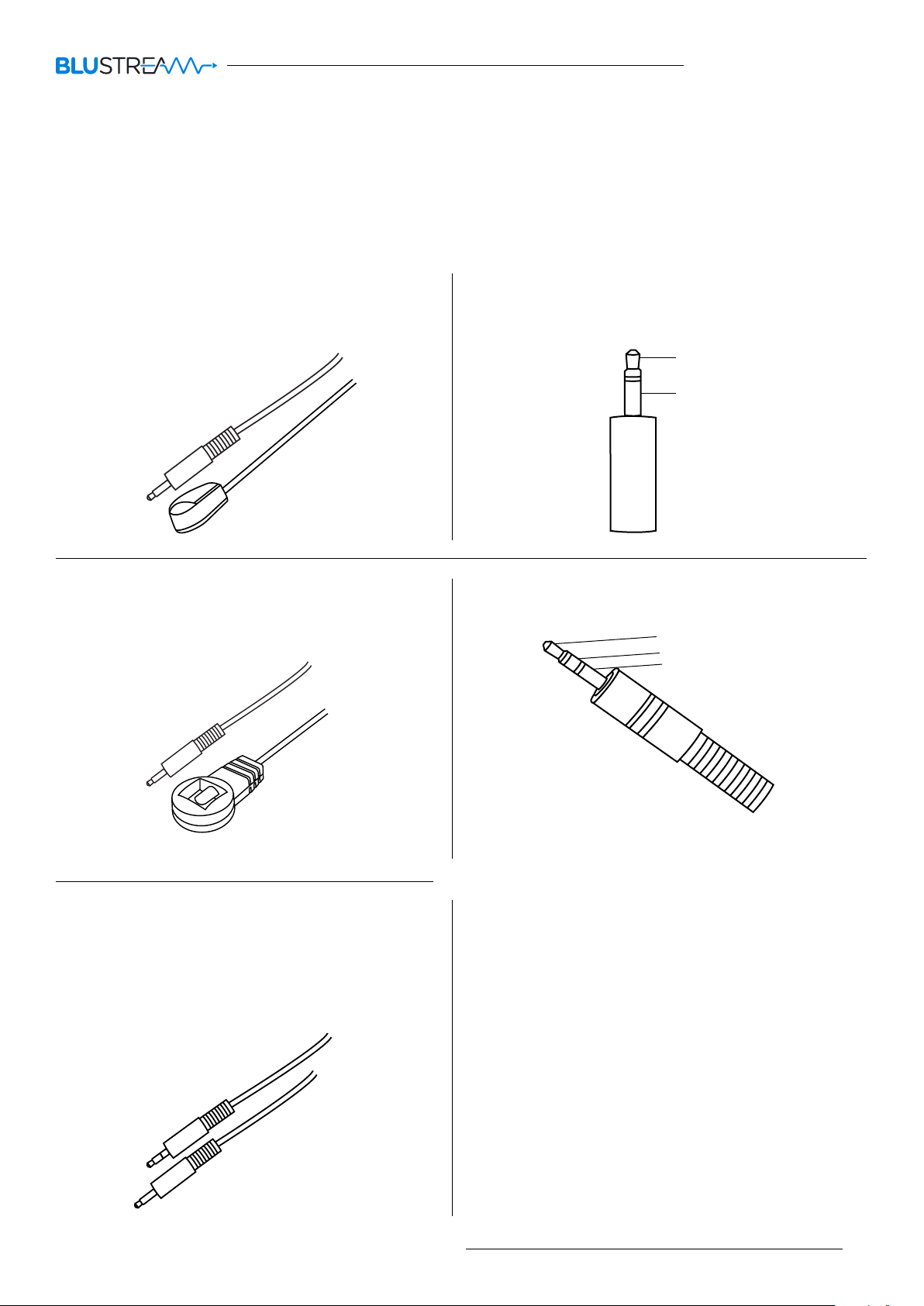
Each Blustream HDMI extender kit is supplied with all necessary IR hardware required and includes:
IR Emitter - IR1 & IR2 (IR2 sold separately)
Blustream 5V IR Emitter designed for discrete IR control of
hardware
IR Receiver - IRR
Blustream 5V IR receiver to receive IR signal and distribute
through Blustream products
InfraRed 3.5mm Pin-Out
IR Emitter - Mono 3.5mm
Signal
Ground
IR Receiver - Stereo 3.5mm
Signal
5V
Ground
IR Control Cable - IRCAB (sold separately)
Blustream IR Control cable 3.5mm Mono to 3.5mm Stereo for
linking third party control solutions to Blustream products.
Compatible with 12V IR third party products.
Note: Cable is directional as indicated
contact [email protected] / [email protected]
07
Page 8
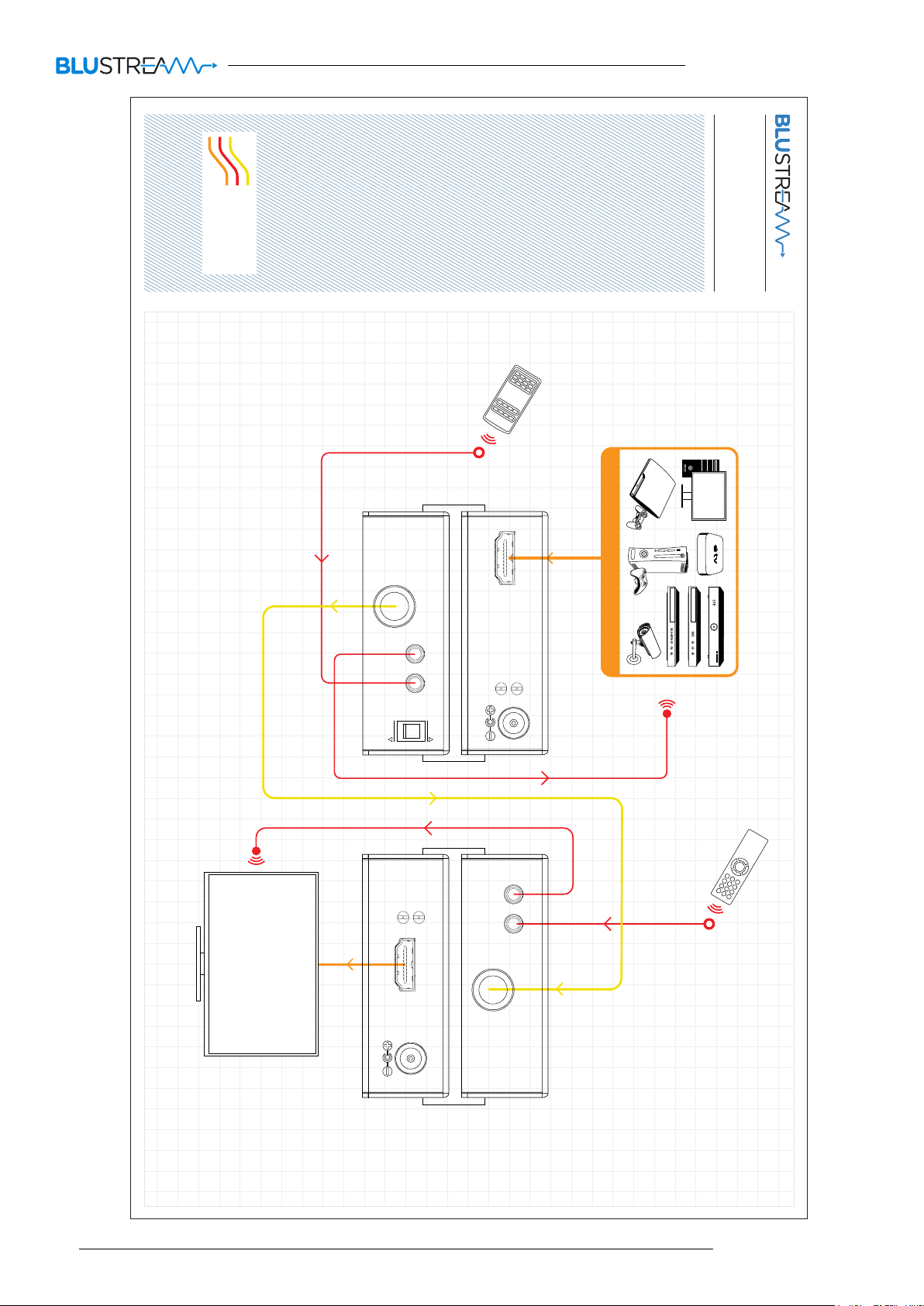
HDMI
IR Cable
Coaxial Digital
CEX120B-KIT USER MANUAL
Example Schematic
CEX120B-Kit
DISPLAY
CEX120B-TX
HDMI In
Coax Output
IR TX
IR RX
MODE
OFF
ON
Power
Signal
HDMI Out
Power
Signal
+5V DC
IR TX
IR RX
Coax Input
1 SOURCE
08
CEX120B-RX
+5V DC
www.blustream.co.uk
Page 9

Specifications:
CEX120B-KIT USER MANUAL
CEX120B-TX
Video Input Connectors: 1x HDMI Type A
Video Output Connectors: 1x BNC connector
IR Input ports: 1x 3.5mm stereo jack
IR Output ports: 1x 3.5mm mono jack
Dimensions (Casing - W x D x H): 79mm x 84mm x 28mm
Unit Weight: 0.25Kg
Shipping Weight: 1.1Kg
Operating Temperature: 32°F to 104°F (0°C to 40°C)
Storage Temperature : -4°F to 140°F (-20°C to 60°C)
Power Supply: 1x 5V DC/1.2A
Supported Video Resolutions: 480i 30Hz, 576i 25Hz, 720p 50Hz,
720p 60Hz, 1080i 25Hz, 1080i 30Hz, 1080p 24Hz, 1080p 30Hz,
1080p 60Hz
Note: 4K, 3D and 480i/p Video is not supported
Supported Audio Resolutions: Dolby Digital (up to 7.1CH), DTS
ES (up to 7.1CH), 2CH PCM
CEX120B-RX
Video Input Connectors: 1x BNC connector
Video Output Connectors: 1x HDMI Type A
IR Input ports: 1x 3.5mm stereo jack
IR Output ports: 1x 3.5mm mono jack
Dimensions (Casing - W x D x H): 79mm x 84mm x 28mm
Operating Temperature: 32°F to 104°F (0°C to 40°C)
Storage Temperature : -4°F to 140°F (-20°C to 60°C)
Power Supply: 1x 5V DC/1.2A
Note: Audio formats must be 48 KHz
Product does not support Dolby HD, Dolby TRU HD,
DTS-HD, Dolby Atmos or any other 192 KHz audio format
Specifications are subject to change without notice.
Package Contents:
• 1 x CEX120B-TX
• 1 x CEX120B-RX
• 2 x Mounting kits
• 2 x 5V/1.2A power supply
• 1 x IRR Blustream 5V IR receiver
• 1 x IR1 Blustream 5V IR emitter
• 2 x F-type to BNC adaptor
• 1 x User manual
Maintenance
Clean this unit with a so, dry cloth. Never use alcohol, paint thinner or benzene to clean this unit.
contact [email protected] / [email protected]
09
Page 10

www.blustream.co.uk
www.blustream.com.au
 Loading...