

Page 1

M14
Wireless stereo speaker
Content
Specifications
Charging for Wireless speaker
Pair Wireless speaker with Mobile phone or Tablet PC , Computer with Wireless
Function Introduction of Wireless speaker
Notes
Maintains
Specifications
Wireless speaker version: V4.0
Frequency: 2.4GHZ
Rated Power: 5W*2
Rated impedance: 4Ω
Signal-To-Noise: ≥85dB
Frequency Response range: 150HZ-20KHZ
Voltage for working: 3.7V
Voltage for charging: DC5v
Battery Capacity : 4500mah
Range: 10M
Music playing time: 12hrs as the volume of voice
Time to charging : 4-5 hrs
Charging for Wireless Speaker
1. Rechargeable battery is built in this Wireless speaker
2. Please make sure the speaker is fully charged before using it for the first time
3. The red light indicator will be on in a charging state, and the indicator light will be off after
fully charged.
4. Only the charger with 5V DC or USB for computer can be used
Pairing Wireless speaker with your mobile device
1. Please make sure the Wireless speaker is on
2. Turn on the Wireless function of mobile phone and search the devices with Wireless, then
Page 2
locate the name “BluP ro M14” and chose it, Click the word “pair” and “Pair successfully”
will be shown
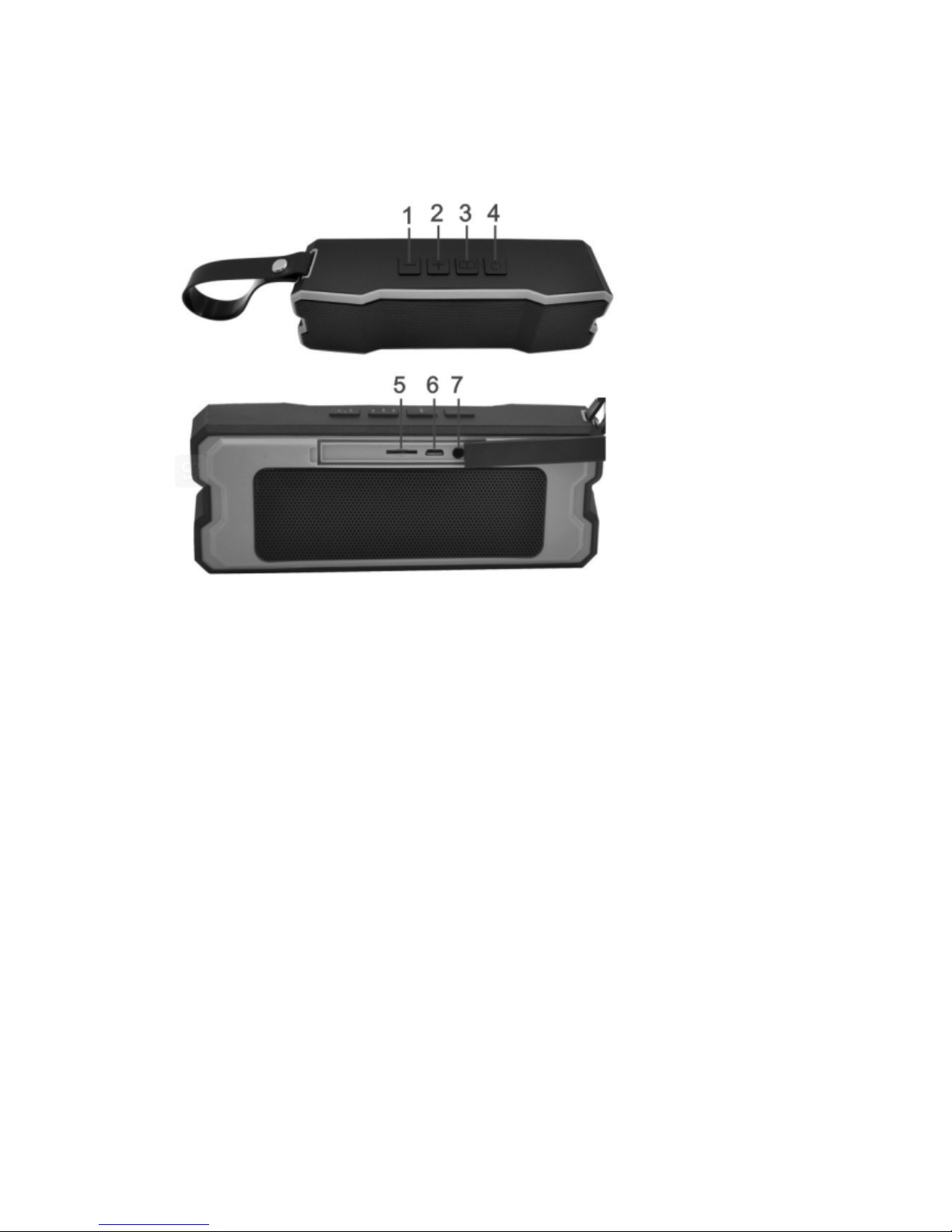
Wireless Speaker Introduction
1. Long press is last song, short press is volume down
2. Long press is next song , short press is volume up
3. Short press to switch modes of Wireless , TF and AUX
4. Long press to turn power on/off , short press to pause/play, and answer/ hangup the phone
call.
5. TF card slot
6. Charging port DC-5v
7. Audio input port
Notes:
1. Don’t put the Wireless speaker on the supplementary restraint system in car. It ma y result in
injury if the supplementary restraint system pops-up
2. Caution for children playing with the Wireless speaker , as some small parts may mak e the
child choke if the swallow it accidentally.
3. Please pay attention when you get into a specialized place as a hospital as you may be
requested to turn off your wireless device or speaker .
4. Please make sure your Wireless Speaker is off before taking a flight
5. Please play your music at an appropriate volume to protect your ears
6. Please don’t try to disassemble the Wireless speaker by yourself
7. Please don’t Clean the Wireless speaker when it charging , wait for full charge the charge and
then clean the speaker.
8. Please Don’t force to open the built-in battery of the Wireless Speaker
Page 3

Maintain
1. Turn the Wireless speaker off when not in use. if not, your mobile device may call any one by
accident
2. Don’t clean the Wireless Speaker with something corrosive
3. Don’t expose the Wireless speaker to sunshine for a long time
4. Don’t use the Wireless speaker close to a fire or stove
5. Don’t expose the Wireless speaker to high or low temperature conditions
6. Don’t put the Wireless speaker into a fire as it will result in a blast
7. Don’t expose the Wireless speaker to any sharp object that could cause damage
8. Don’t try to open the Wireless speaker
9. Keep the Wireless speaker in a dry area. If it isn’t used for a long time, please charge once
every month to prolong the battery
10. Don’t charge the Wireless speaker in a high or Low Temperature
11. Don’t discard the Wireless speaker as regular household garbage, it should be discarded
according to recycling rules.
 Loading...