

Page 1
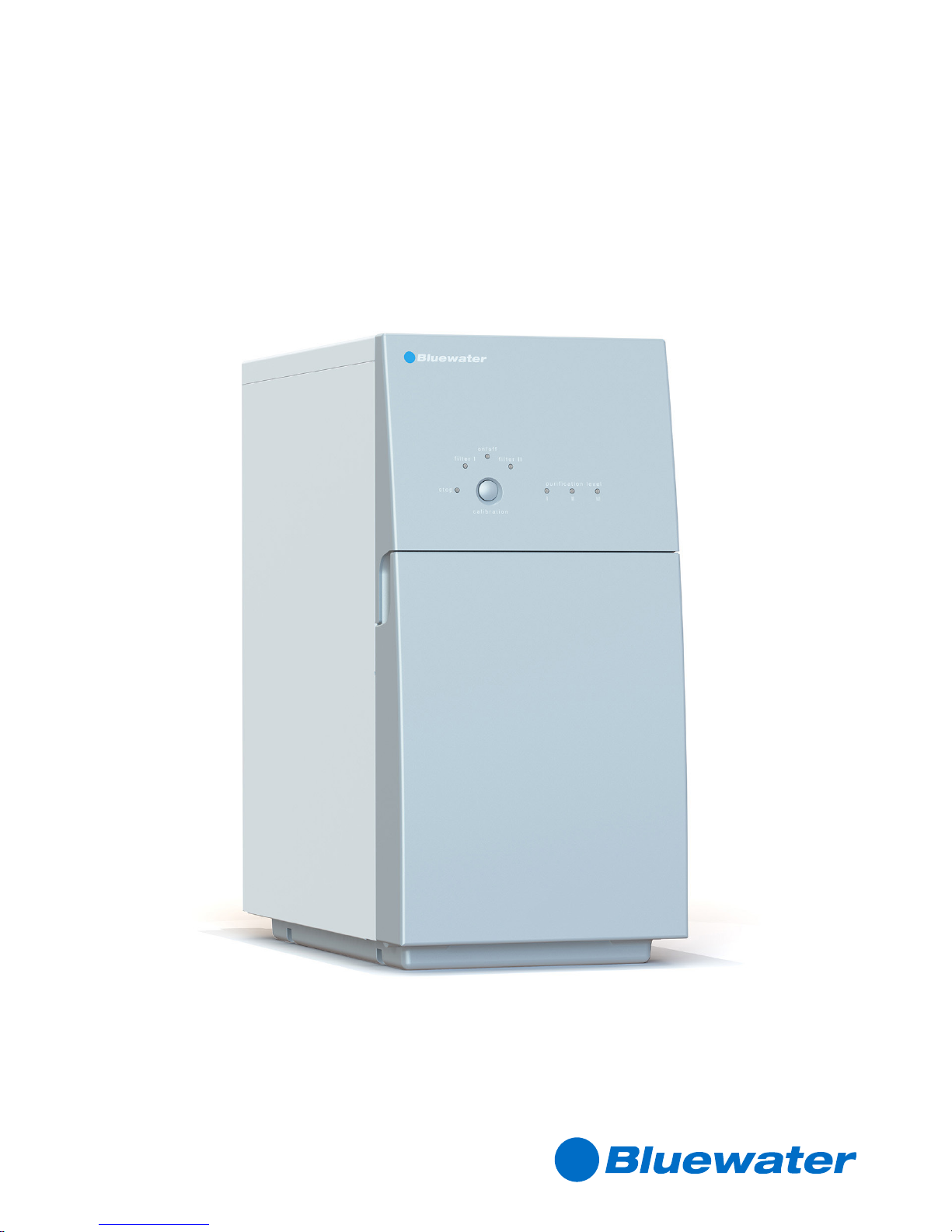
PRO
Water purifier
Document No 822901697 Revision BB1619
© Bluewater Group 2016
Complete User Manual
Page 2

02
Complete User manual
Contents
INTRODUCTION ........................................................................................................................... 03
About this manual ....................................................................................................................................... 03
Limited warranty .......................................................................................................................................... 03
Environment information ............................................................................................................................... 03
Disposal ..................................................................................................................................................... 03
Safety instructions ....................................................................................................................................... 03
Safety information ........................................................................................................................................ 04
PRODUCT OVERVIEW.................................................................................................................. 05
Models ....................................................................................................................................................... 05
Pro outside ................................................................................................................................................. 05
Pro inside.................................................................................................................................................... 07
Move the water purifier ................................................................................................................................ 07
SYSTEM OVERVIEW .................................................................................................................... 08
System description ...................................................................................................................................... 08
Leak protection system ............................................................................................................................... 09
Low pressure protection .............................................................................................................................. 09
Water production......................................................................................................................................... 10
INSTALLATION ............................................................................................................................. 11
Before installation ........................................................................................................................................ 11
Position Pro ................................................................................................................................................ 12
Affix information decal .................................................................................................................................. 12
Install clean water faucet .............................................................................................................................. 13
Install feed water connection ........................................................................................................................ 13
Install drain water connection ....................................................................................................................... 14
Connect water purifier.................................................................................................................................. 14
After installation ........................................................................................................................................... 15
Calibration ................................................................................................................................................... 16
MAINTENANCE ............................................................................................................................ 17
Each month ................................................................................................................................................ 17
Each 4-6 months ........................................................................................................................................ 18
Each year ................................................................................................................................................... 21
Other .......................................................................................................................................................... 21
TECHNICAL INFORMATION ..........................................................................................................26
Technical data ............................................................................................................................................. 26
Requirements on feed water to water purifier ................................................................................................ 27
TROUBLESHOOTING ................................................................................................................... 28
How to solve simple problems ..................................................................................................................... 28
Page 3

03
© Bluewater Group 2016
INTRODUCTION
About this manual
This manual contains complete user instructions for the Pro. It gives you the necessary instructions to safely install, operate, do
maintenance and do troubleshooting on the device.
Original language
The original language of this instruction is English.
Printing options
This manual is made to be printed as a double sided A4 or A5 booklet.
Limited warranty
Refer to www.bluewatergroup.com for more information on Limited warranty.
Environment information
80% of the the water purifier components and its packaging have a label to help you recycle and discard it correctly.
The water purifier is more efficient when it cleans water for longer periods. Example: do not fill a glass with water. Fill a jug
instead.
Disposal
At the end of the water purifier’s life, disconnect the plug from the electrical supply and cut the cable at the point where it enters
the appliance. Make sure that children do not play with the left-over cable. Contact your local authority for information about
where the water purifier can be left, or contact your dealer.
Appliances bearing this symbol must be deposited at the designated local reception point for the disposal of
electrical and electronic equipment. This product may not be disposed of using the normal household refuse
collection processes.
Safety instructions
Before you install or operate the device, you must read the safety information. Obey the instructions in this manual to prevent
injuries or damage to the equipment. This manual contains CAUTIONS and NOTES that are applicable for the safe operation of
the device.
A CAUTION identifies conditions that can cause injury or, damage to the
equipment. Obey the instructions and do not continue until all conditions are
accepted and engaged.
A Note identifies important information for a trouble free and optimal use of the water purifier.
Page 4
04
Complete User manual
Safety information
Install the water purifier in accordance with local regulations. If you are not sure,
contact a Bluewater dealer for aid. Bluewater has no responsibility for installation
of the water purifier.
Only use the cleaned water when the lights “Purification level II and/or III” on the
control panel are on.
This appliance can be used by children who are more than 8 years old. It can also
be used by persons with reduced physical, sensory or mental capabilities or lack
of experience and knowledge, if they have been given supervision or instruction
about the use of the appliance in a safe way and understand the hazards involved.
Children shall not play with the apliance. Cleaning and user maintenance shall not
be made by children without supervision.
Do not repair or modify parts of the water purifier. This can make it operate
incorrectly, and lead to injury and damage not covered by warranty.
Only approved Bluewater staff can do servicing and repairs on the water purifier.
Only use original replacement cartridges and parts from Bluewater.
The water to be cleaned must obey the requirements in “Technical information”.
Check the cleaned water when the water purifier is installed if the water does not
obey these requirements. Test the water one time every year. If the water is not
clean, tastes, or smells bad, do not drink it.
Installation must comply with applicable local plumbing codes and regulations.
Connect the water purifier to an earthed electrical supply. Use a plug that is easy
to access after installation. Only an approved electrician must do permanent
wiring on the system. A safety switch must be installed on the system. Incorrect
installation can lead to damage, or make the water purifier dangerous to use.
Do not use the power cord if there are visible signs of damage on it. If the power
cord is damaged, a qualified electrician must replace it in order to prevent danger.
Do not use Pro without a filter. To do so can cause damage. When Pro is cleaned
or put in storage, the filter can be removed.
If the water purifier is disconnected from water and electricity for >5 days, store it as described
in Complete User manual ”Put into storage” on page 23.
Page 5
05
© Bluewater Group 2016
PRODUCT OVERVIEW
Models
Model Capable of handling higher TDS,
including brackish inlet water
Suitable for commercial use without
an automatic shutoff
Clean water rinse valve suitable for
environments where extra high water
quality is required
Pro 400B-HR
9
Pro 400C-HF
9
Pro 400C-HR
9
Pro 400BC-HR
99
Pro 400CV-HR
99
Pro 400BCV-HR
999
Pro 600C-HF
9
Pro 600CV-HR
99
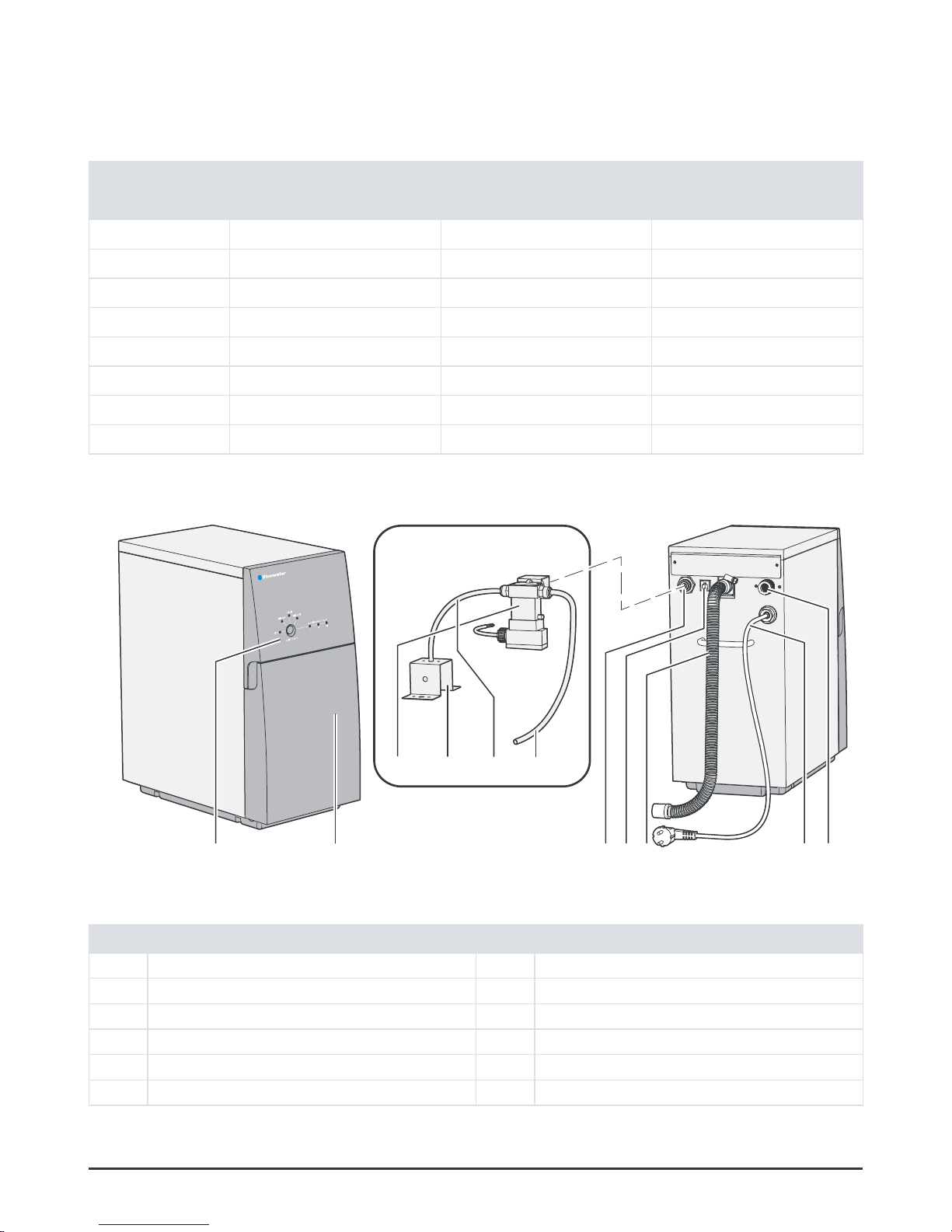
Pro outside
Figure 1.
CV / BCV
2 761453
119810
Pro outside
Pos Description Pos Description
1 Control panel 7 Feed water connection with grid filter
2 Front cover 8 Clean water rinse valve (CV-models)
3 Clean water connection 9 Air gap bracket
4 Electrical connection for faucet (optional) 10 Rinse water tube
5 Drain water tubing 11 Pure water tube
6 Power cord
Page 6
06
Complete User manual
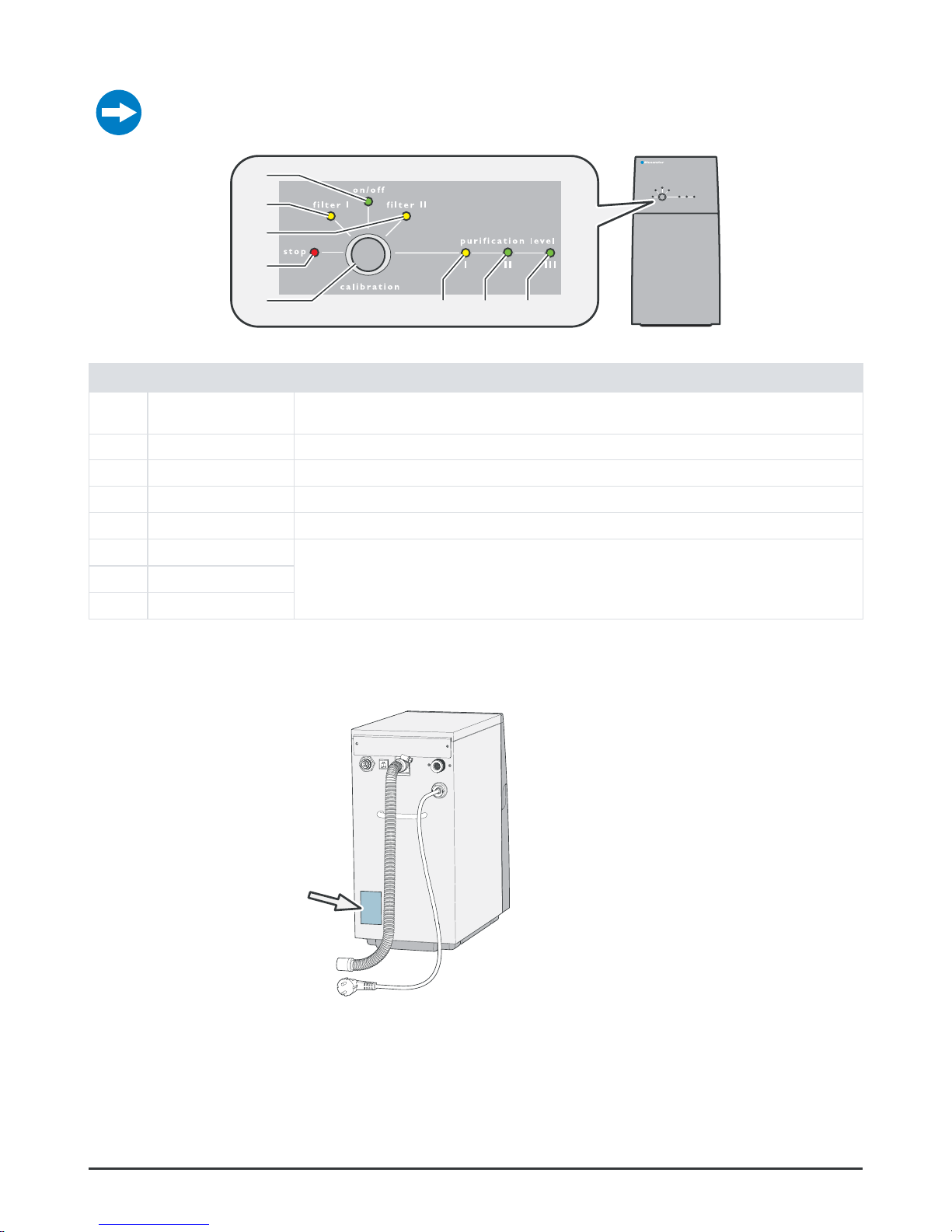
Control panel
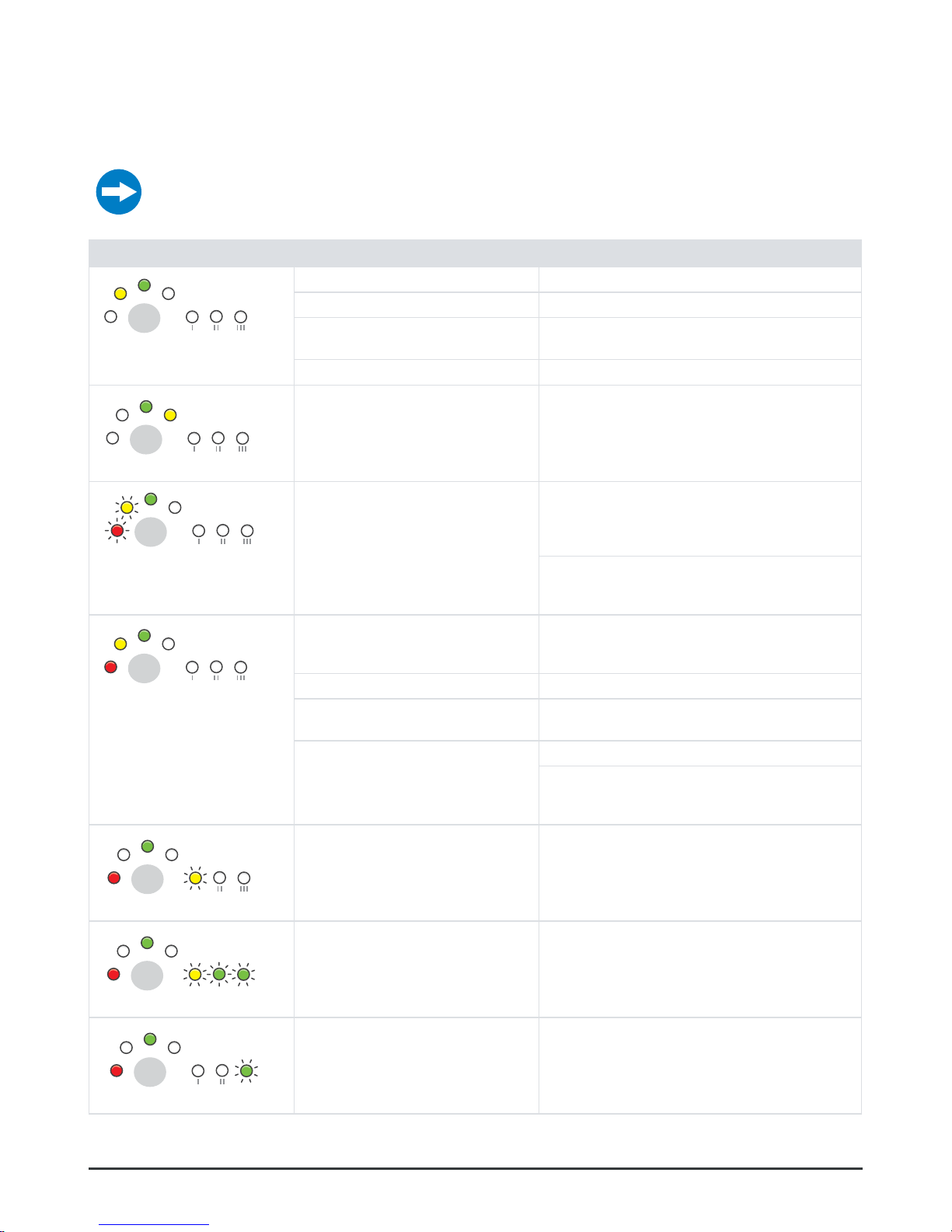
For information about combinations of lights that flashes/are on, see “Troubleshooting” on
page 12.
Figure 2.
1
2
3
4
5
6
7 8
Control panel
Pos Light/button Description
1 on/off On: The water purifier is connected to power
Off: The water purifier is not connected to power
2 filter I On: The filter must be replaced. Pro 600: Replace both Combi filters.
3 filter II On: The filter must be replaced. Pro 600: Replace both Combi filters.
4 stop Flashes/On: Something is wrong, see “Troubleshooting” on page 12.
5 calibration calibration button, various functions see “Calibration” on page 16.
6 purification level I On: Purification level I-III indicates clean water purification level.
Low level I to high level III
7 purification level II
8 purification level III
Data plate
The data plate is located on the rear side of the water purifier.
Figure 3. Data plate
Page 7
07
© Bluewater Group 2016
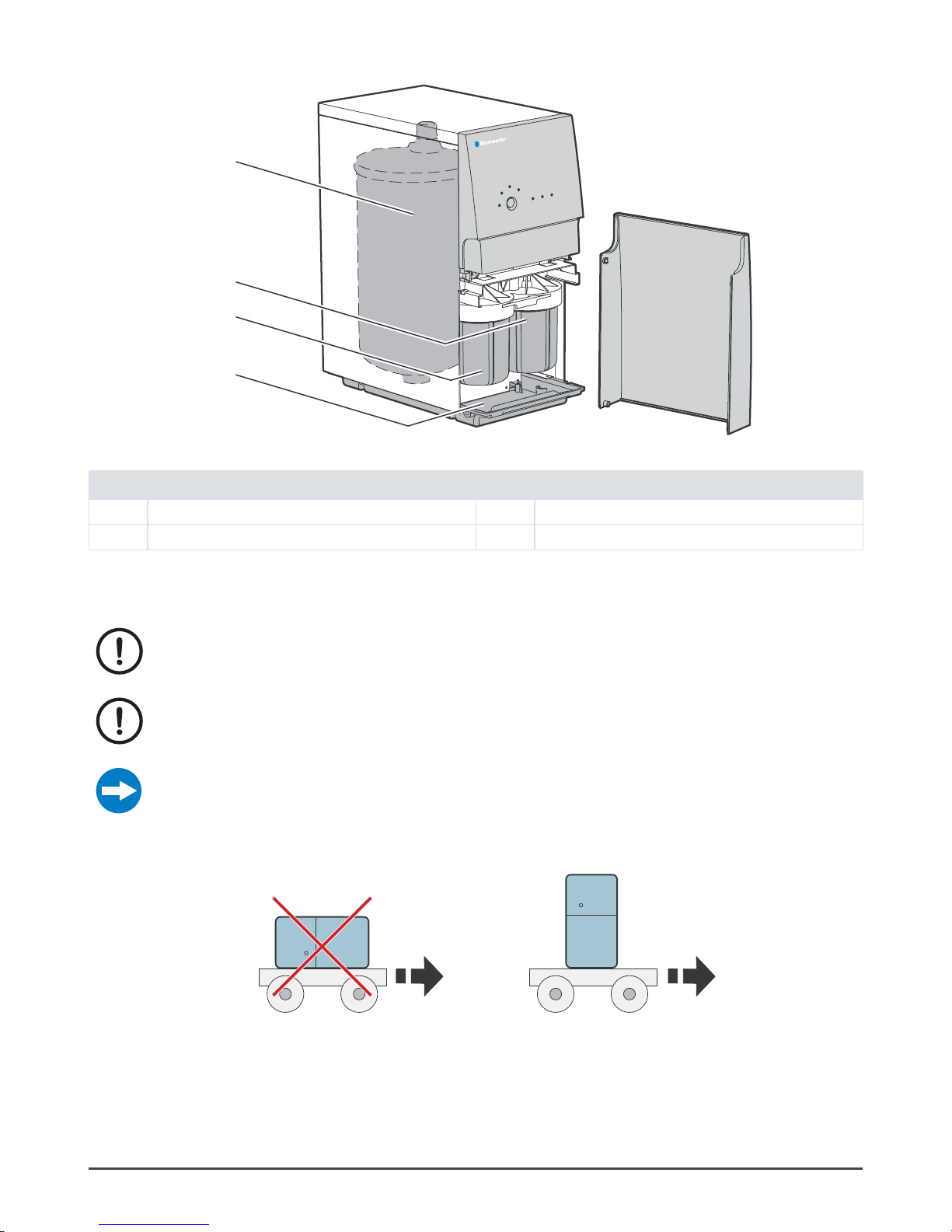
Pro inside
Figure 4.
4
2
3
1
Pro inside
Pos Description Pos Description
1 Base plate 3 Pre-filter II, Pro 600 Combi filter
2 Pre-filter I, Pro 600 Combi filter 4 Reverse osmosis membrane
Move the water purifier
Always transport the water purifier upright.
Install according to “Installation” on page 11.
Only calibrate the water purifier if the quality of the feed water has changed, or if
the membrane was replaced.
Put the water purifier into storage if it will not be used for 4 months or more, or if it is to be
disconnected from the water and electricity for >5 days, see “Put into storage” on page 23.
Figure 5. Move the water purifier
Page 8
08
Complete User manual
SYSTEM OVERVIEW
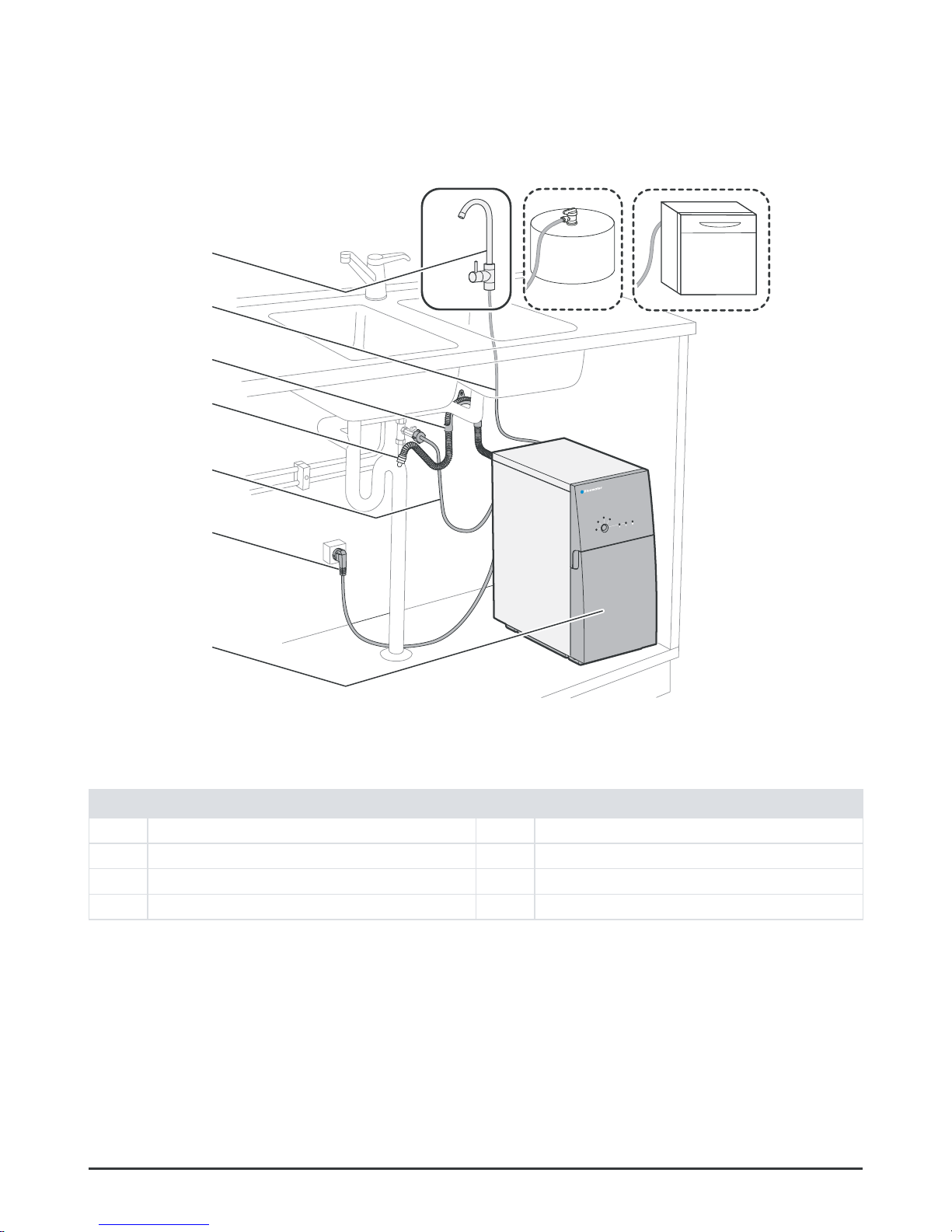
System description
5
6
4
3
2
1
7
Figure 6. System overview
Pos Description Pos Description
1 Water purifier 5 Bracket for drain water tubing
2 Power cord 6 Clean water tubing
3 Feed water tubing 7 Clean water faucet (optional Pro 400 series)
4 Drain water tubing
Page 9
09
© Bluewater Group 2016
Leak protection system
A sensor at the bottom of the water purifier senses water leaks. If there is a leak, the feed water supply is stopped. The water
purifier cannot be started again until the leak has been repaired.
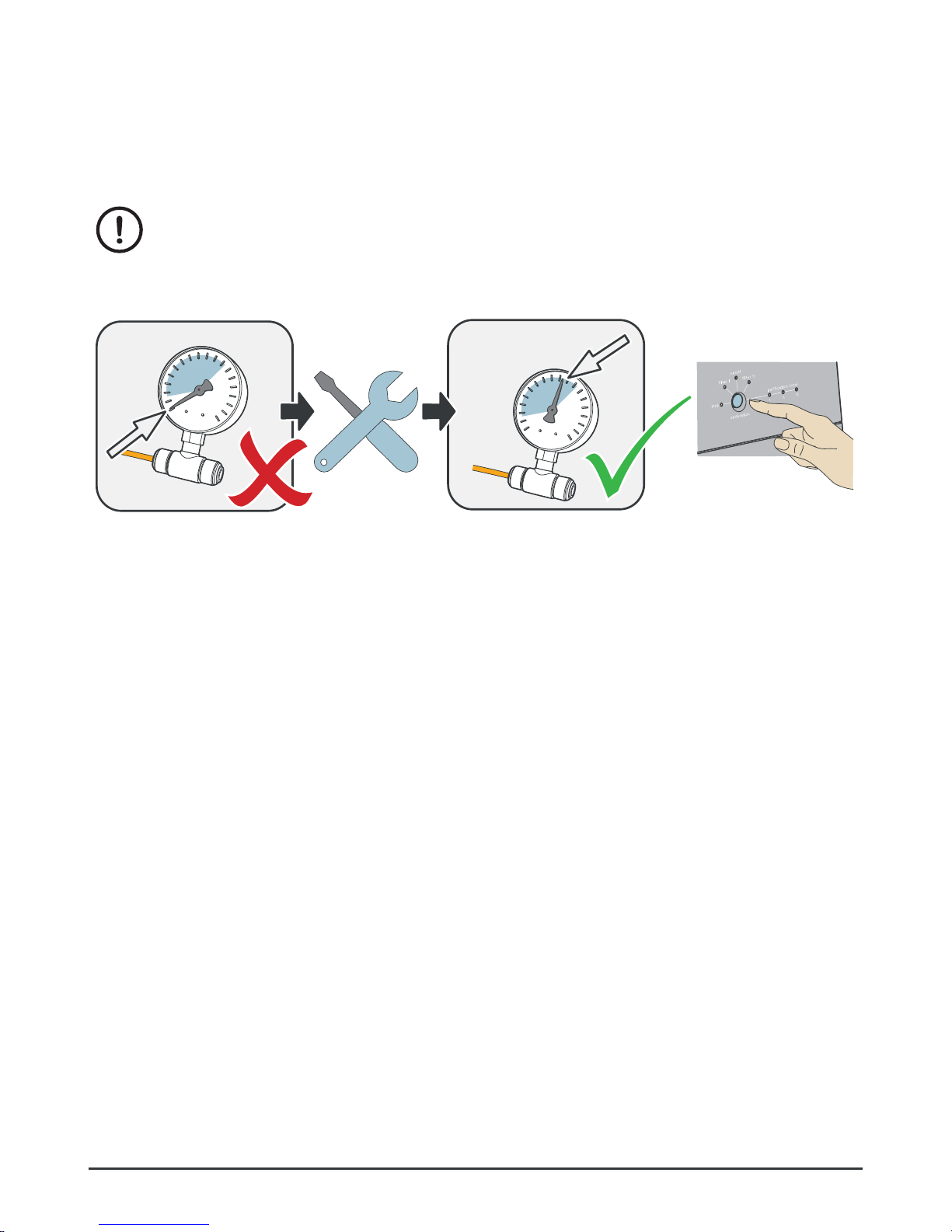
Low pressure protection
If Pro stops because of low pressure, the cause of the low pressure must be
removed. If not, the pump can be permanently damaged.
Low pressure restart function
Figure 7.
0.8-7 bar
(11-102 psi)
Manual restart after low pressure cause has been removed
Page 10
10
Complete User manual
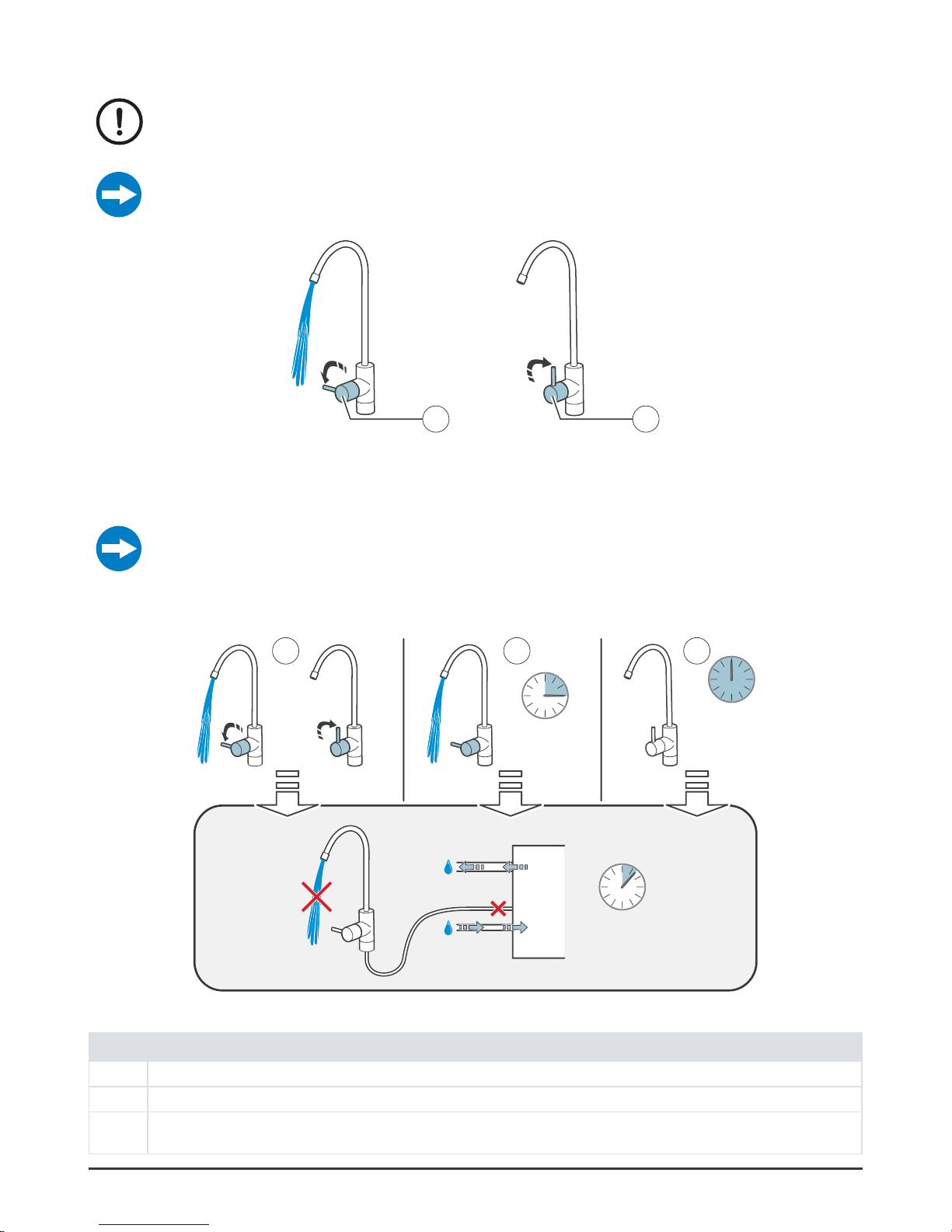
Water production
Only use the cleaned water when the lights “Purification level II and III” on the
control panel are on. It can take up to 60 seconds before the water purifier
indicates good water quality.
For models suitable for commercial use the faucet could be replaced by for example a valve or
a tank.
Figure 8.
2
1
Water production on/off
Automatic flush
The length of the flush process varies between 5-120 seconds, depending on how long the
previous drawing of water lasted.
An automatic flush will be performed if one of the conditions below are fulfilled:
Figure 9.
1 2 3
+
12 h
15 min
5-120 s
Automatic flush
Pos Description
1 Flush after drawing water. Every time after drawing water.
2 Flush when drawing water. After maximum operation time 15 minutes. (Pro 400B must be manually restarted)
3 Water purifier in standby mode. Pro is connected to water and power. Flush is performed every 12 hours, regardless of when clean
water was last produced.
Page 11
11
© Bluewater Group 2016
INSTALLATION
Install the water purifier in accordance with local regulations. If you are not sure,
contact a Bluewater dealer for aid. Bluewater has no responsibility for installation
of the water purifier.
Install the water purifier in a vertical position on a horizontal surface. Make sure
that tubing and cables can move freely when the water purifier is installed.
Plumbing must be done by an approved plumber. Obey local rules for plumbing
and sanitation if you do work yourself.
Use the tubing set that is supplied with the water purifier. Do not use used tubing sets again.
Before installation
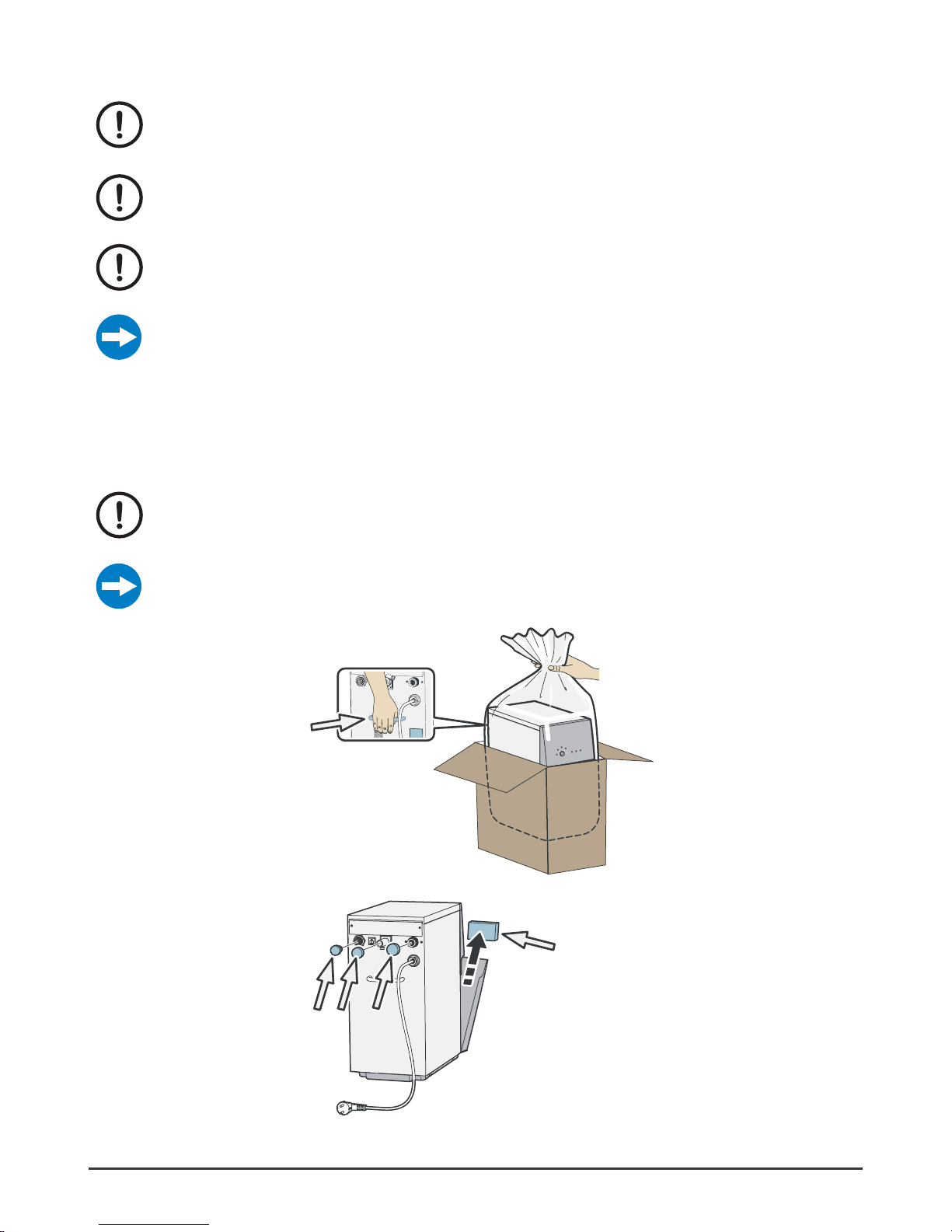
Unpack Pro
Warning! Discard the packing material. It can cause injury to children if they play
with it.
Make sure that Pro shows no signs of damage, and that no accessories are missing. Tell the
Bluewater dealer about missing parts, damage and other problems.
Tell the transport company immediately if Pro is damaged during transport.
Figure 10. Unpack Pro
Figure 11.
Remove the plugs
Page 12
12
Complete User manual
Position Pro
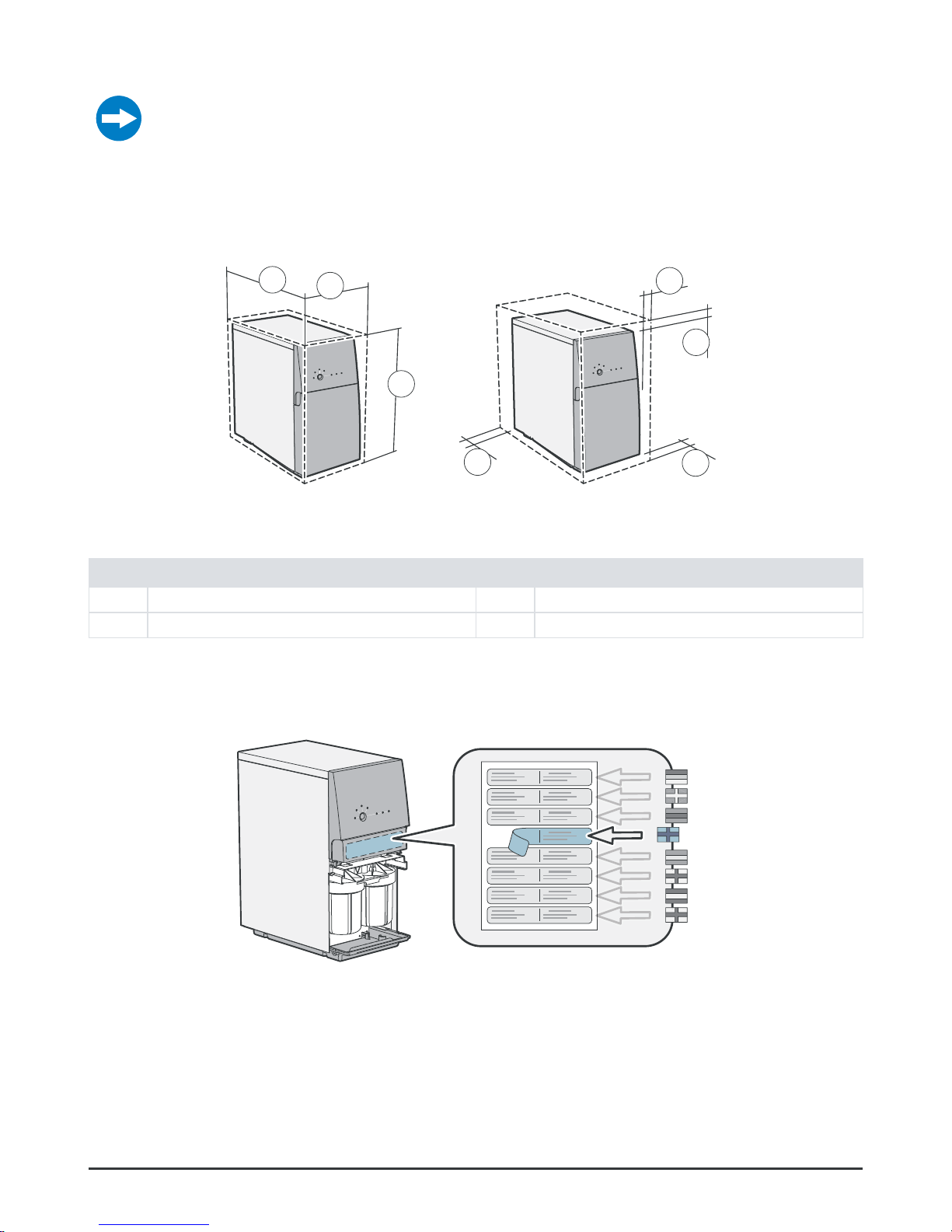
Put Pro in a vertical position on a horizontal surface below the kitchen sink. Make sure that the
surface can support Pro
Position Pro near the cold water supply, the drain and an earthed electrical supply.
• Make sure that it is easy to see the control panel.
• Make sure that the front cover can be opened to get access to the prefilters.
• Hoses and cables can go in all directions from the connection point. Make sure that nothing can crush them or cause damage to them.
Figure 12.
A
B
C
D
D
D
D
Position Pro
Pos Description Pos Description
A 460 mm (18”) C 482 mm (19”)
B 190 mm (7 1/2”) D min. 20 mm (1”)
Affix information decal
Figure 13. Affix information decal
Page 13
13
© Bluewater Group 2016
Install clean water faucet
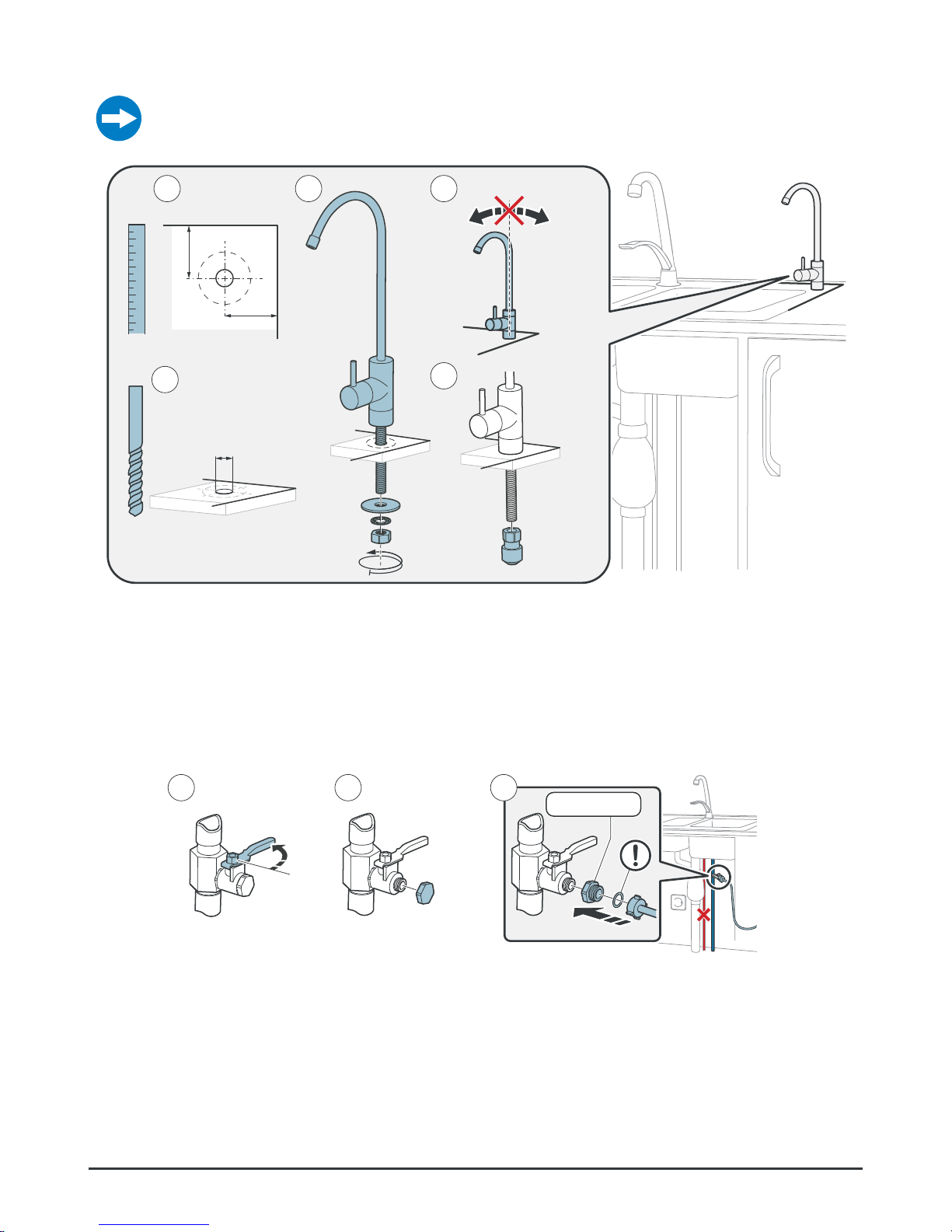
Measure the clean water faucet for measure A.
Figure 14.
2
3 4
5
1
Ø 13 mm
(1/2”)
A
A
1234567
Install clean water faucet
Install feed water connection
The water purifier is connected to cold water via the feed water tubing. See “Requirements on feed water to water purifier” on
page 27.
Figure 15.
1/2” - 3/4”
21 3
Install feed water connection
Page 14
14
Complete User manual
Install drain water connection
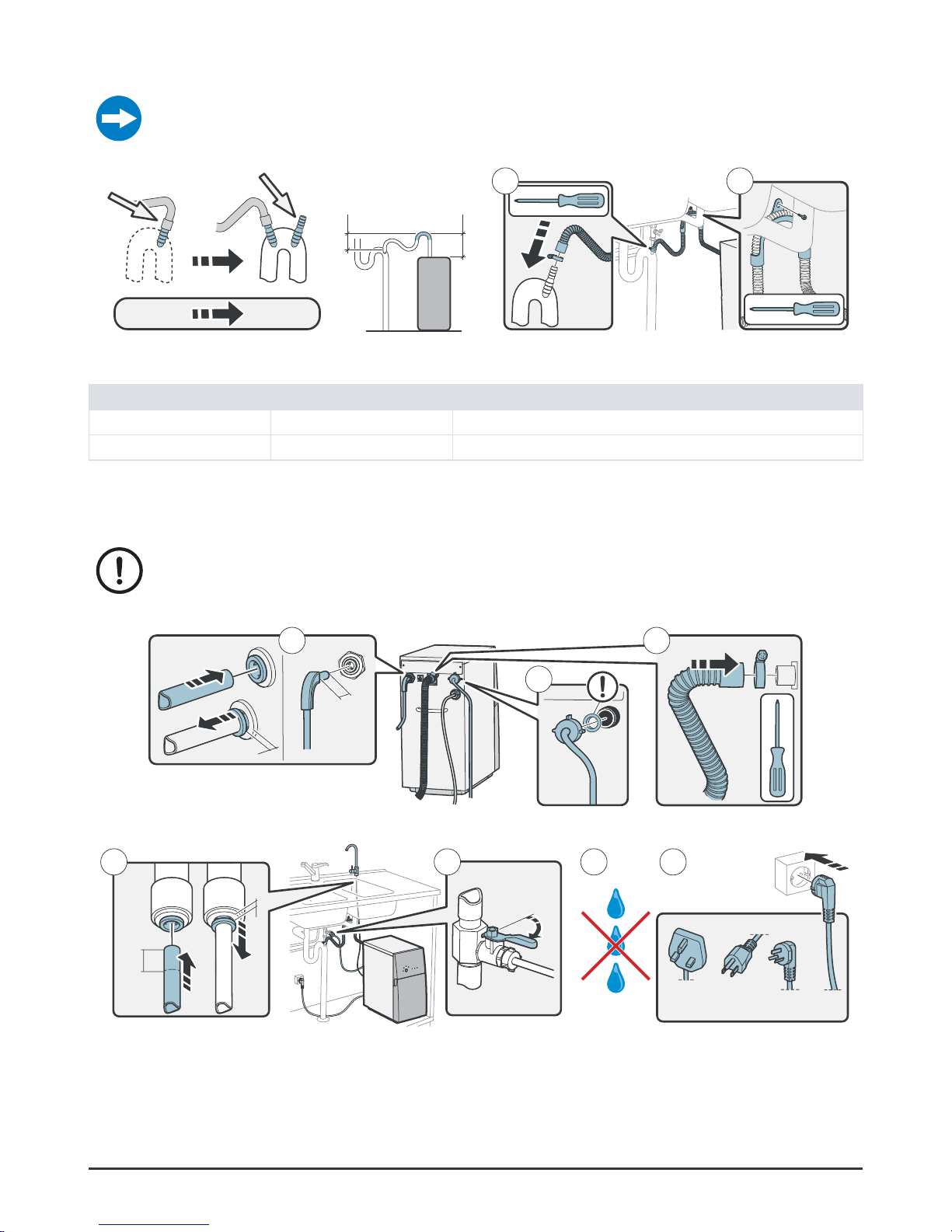
The flushed water goes through the drain water tubing to the drain water outlet. This tubing
can be a maximum of four meters long. The minimum internal diameter is 13 mm.
Figure 16.
×1 ×2
1 2
X
Y
Install drain water connection
Minimum Maximum
X 50 mm (2”) 500 mm (20”)
Y 50 mm (2”) 500 mm (20”)
Connect water purifier
Do not connect the clean water tubing to other drinking water equipment before
Pro has been flushed.
19
mm
(3/4”)
2
31
UK US ZH EU
5 64 7
19
mm
(3/4”)
Figure 17. Connect water purifier
Page 15
15
© Bluewater Group 2016
After installation
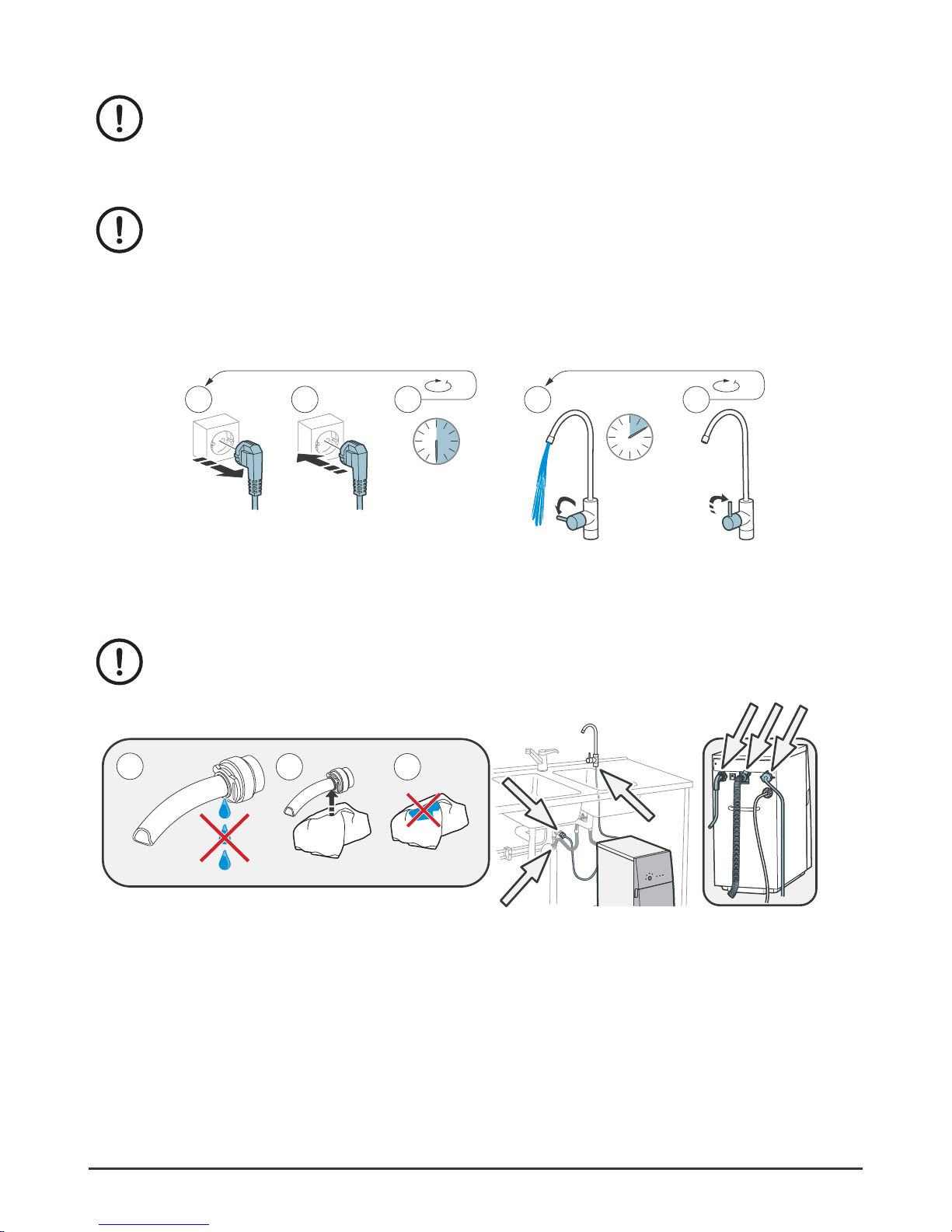
When Pro is installed, and after each maintenance, the following procedures must
be perfomed before operation.
Flush Pro
Do not drink the water when the water purifier flushes. It is not safe to use.
The water purifier should always be flushed:
• when it is new and has not been used,
• when it is installed again after storage/freeze protection
• when it has been cleaned
• when the membrane has been replaced.
Figure 18.
3 2
1 2 3
30 s
10 min
4 5
Flush Pro
Do a check for leaks
The tubing connections must be tight!
Figure 19.
1
2 3
×6
Check for leaks
Page 16
16
Complete User manual
Calibration
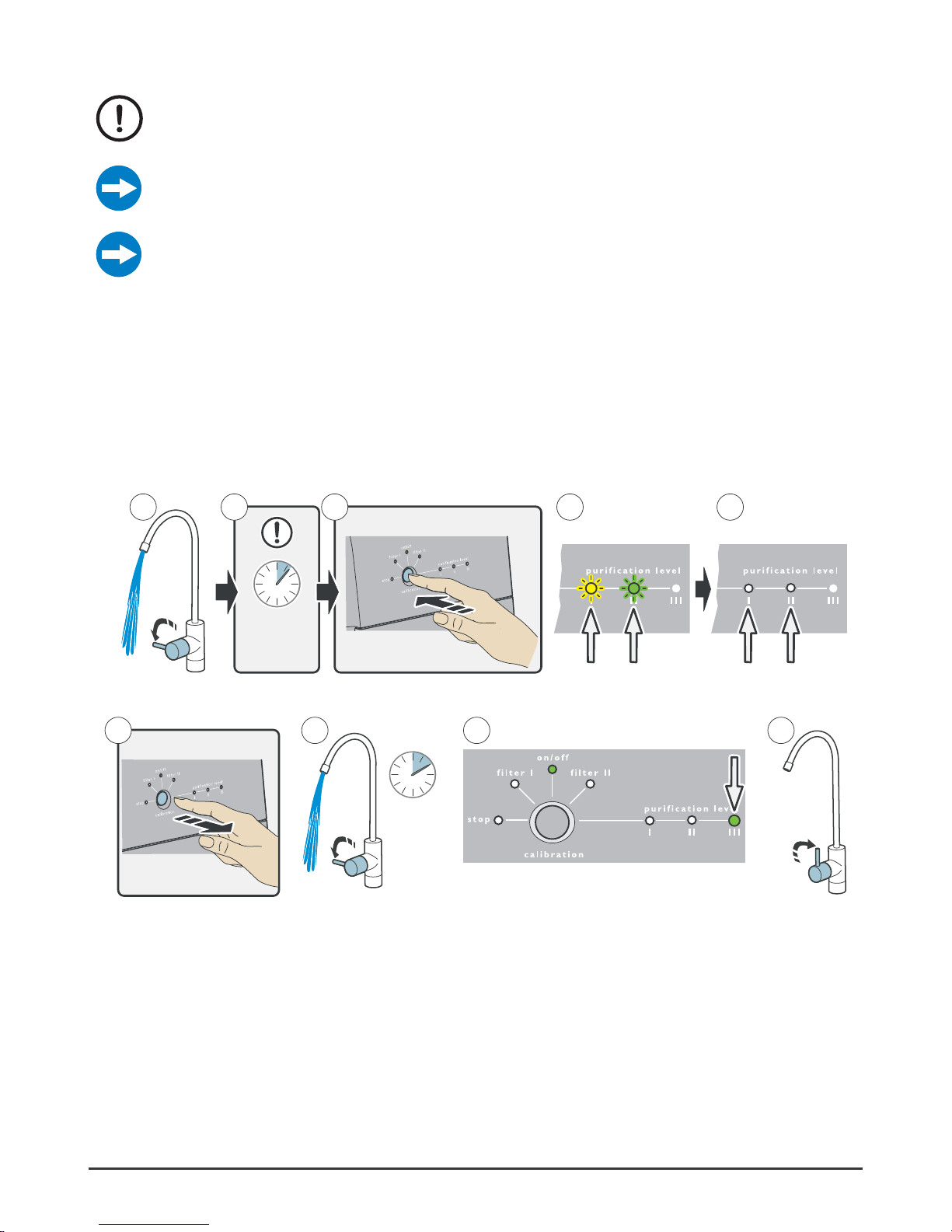
Do not drink the water that is produced when the water purifier is calibrated. It is
not safe to use.
If any of the purification level lights I-III does not go out, go through the checkpoints under
Flushing and restart the calibration.
If the purification level lights I-III do a wandering flashing light, restart the calibration.
Calibrate (reset) the water purifyer, to achieve a starting position for the degree of purification based specifically on your water.
Only calibrate the water purifyer if:
• it is new and has not been used before.
• the feed water quality changed (for example when the water purifyer has been moved).
• the membranes were replaced.
• the emergency stop must be reset.
21 43 5
max
10 s
10 min
6 7 8 9
Figure 20. Calibration
Page 17
17
© Bluewater Group 2016
MAINTENANCE
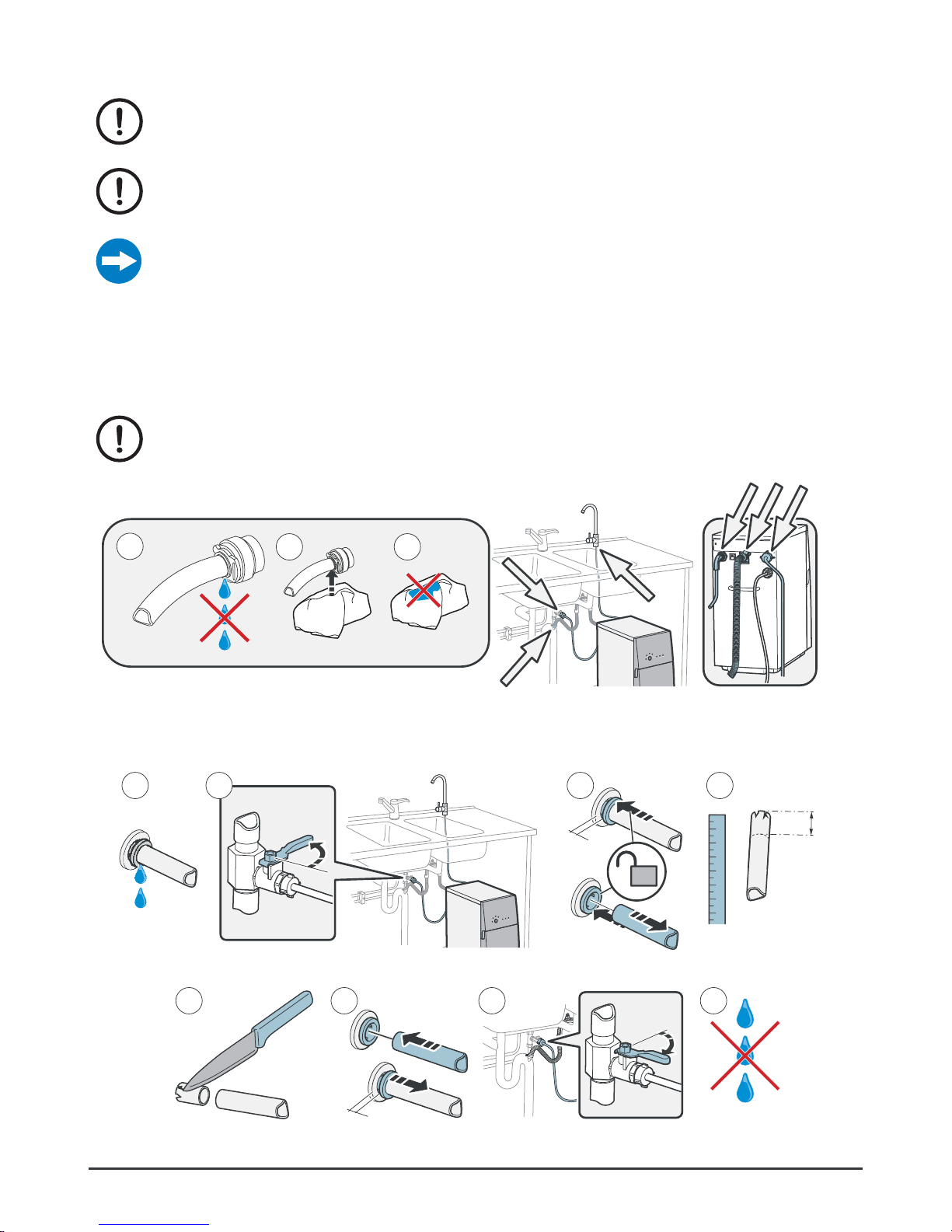
After each maintenance, all procedures in “After installation” on page 15, must
be perfomed before operation.
Regular maintenance is important for correct function and long term operation.
Only educated and approved personnel can do the maintenance.
The water quality controls the maintenance frequency. If the feed water is of low quality, do
maintenance more frequently.
Each month
Do a check for leaks
The tubing connections must be tight!
Figure 21.
1
2 3
×6
Check for leaks
Repair leaks
41 3
5 6
min
10mm
(1/2”)
1234567
7 8
2
Figure 22. Repair leaks
Page 18
18
Complete User manual
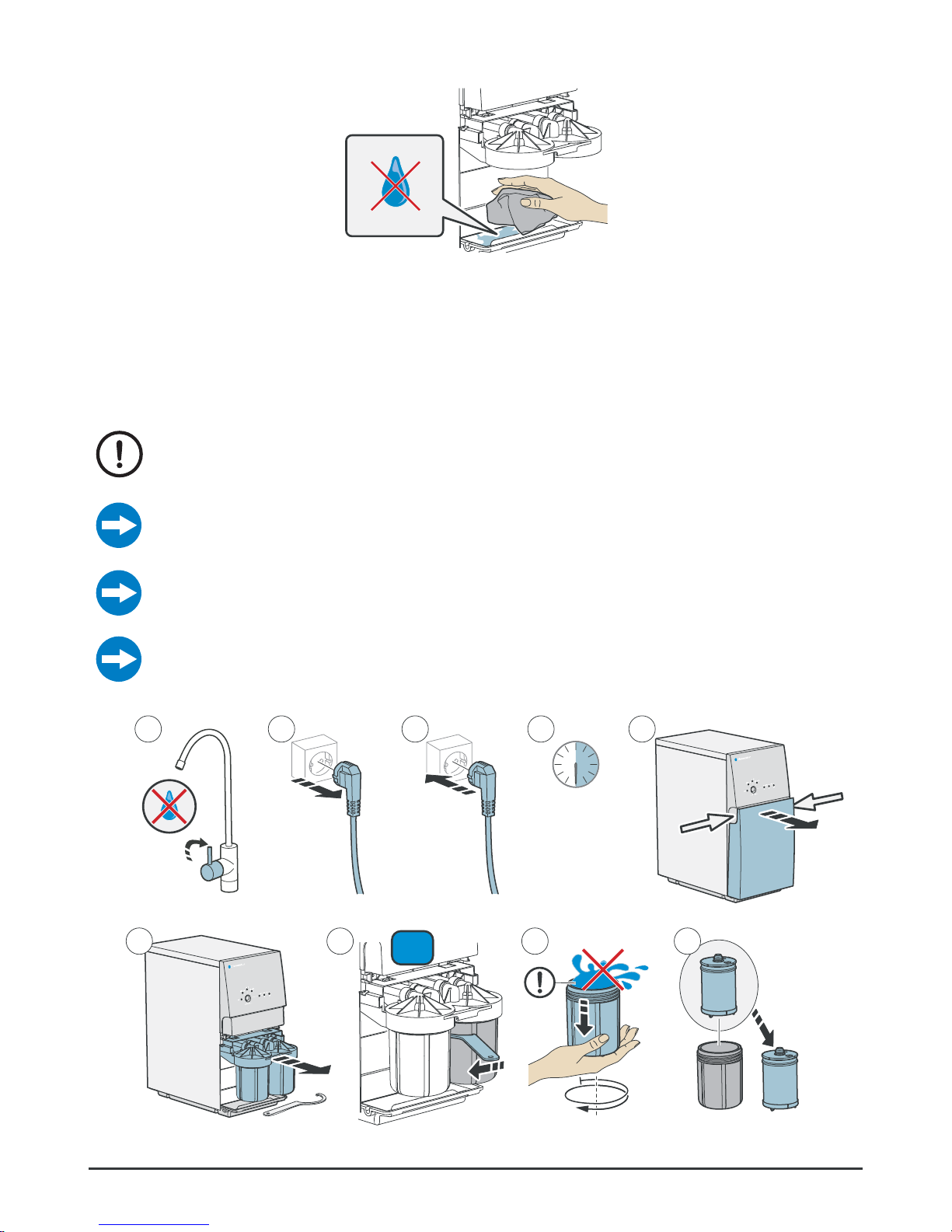
Wipe off condensation from base plate
Figure 23. Wipe off condensation from base plate
Each 4-6 months
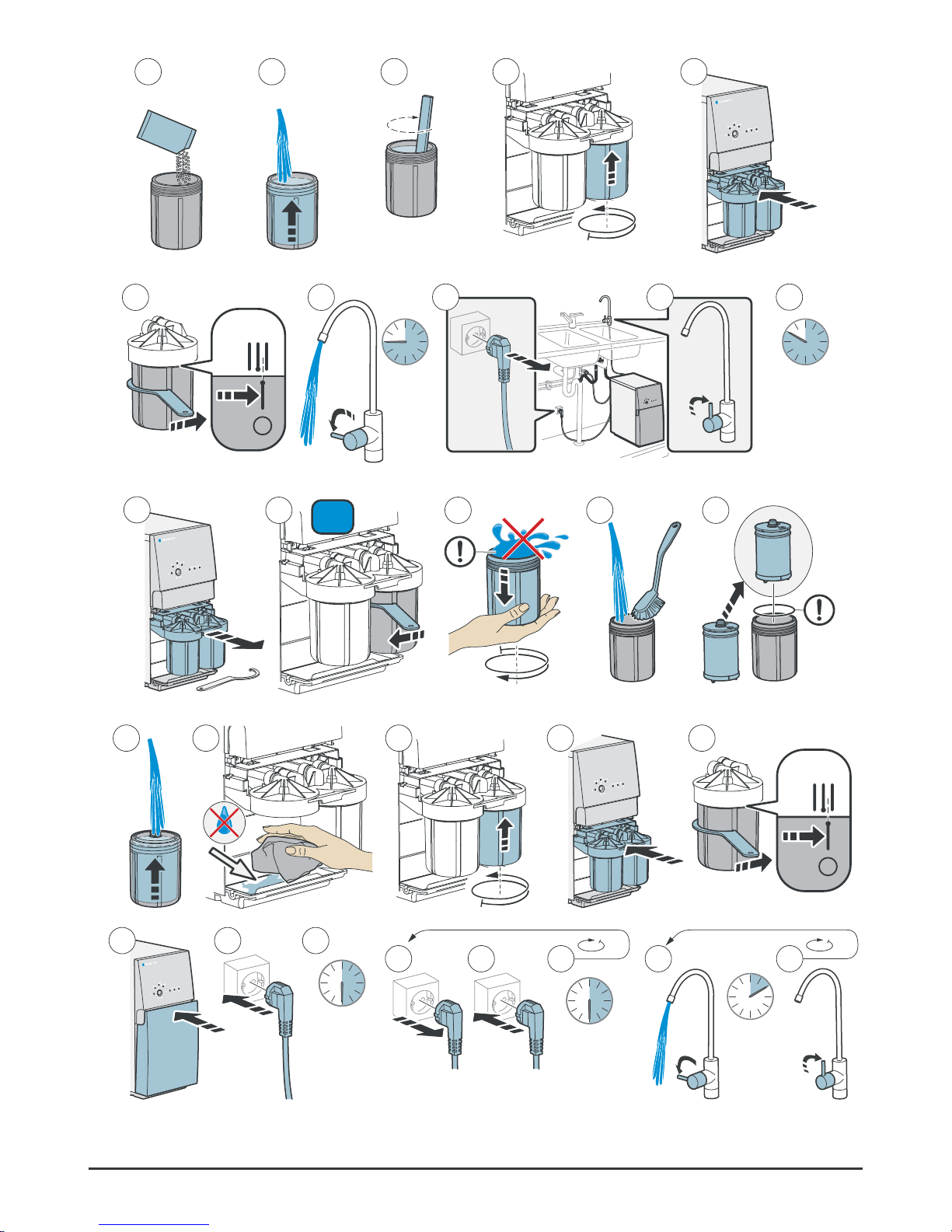
Descale
The descaling product is harmful. Keep it where children cannot get it. Clean your
hands when you have used it.
Frequency depends on water quality and usage!
To extend the water purifier lifetime: Descale Pro with 6 month intervals or when the flow is
decreased.
If Pro has been descaled and the filters have been replaced, but the water flow cannot be
restored, contact your Bluewater dealer.
The descale takes approximately 10 hours. Do not use the water purifier during this time.
Order the descaling product from Bluewater
21 3 54
30 s
96 87
II
Page 19
19
© Bluewater Group 2016
~25 °C
(77 °F)
200 g
7 oz
10 11 12
1413
45 s
10 h
16 18 1917
15
21
2322
20
24
II
27 2826 2925
Figure 24.
2
2
30 31 32
33 34 35
30 s
30 s
36 37
10 min
Descale
Page 20
20
Complete User manual
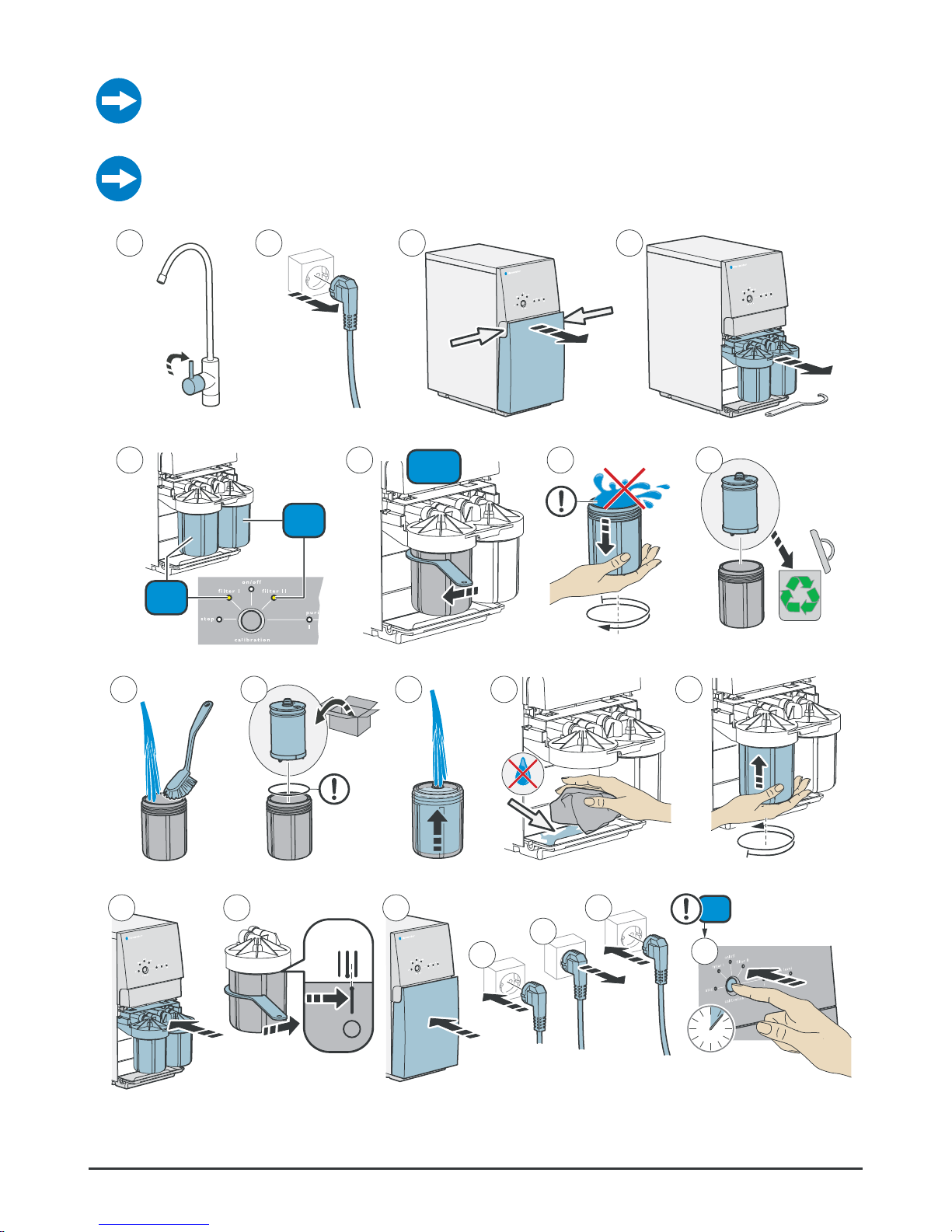
Replace prefilter
Pro 600: change both filters when filter light I or II lights up.
If filter II is replaced before the filter II light shows that it is necessary, reset Pro as given in
steps 18-20. The filter light will go on and then go out when Pro is started.
21 3 4
65 87
II
I/II
I
9
10
11
12
13
Figure 25.
20
II
1615
14
17
18
19
6-8 s
Replace prefilter
Page 21
21
© Bluewater Group 2016
Each year
Test the water
An approved lab must do a test of the water that is cleaned by Pro one time each
year, if the feed water has been classed as unfit.
Other
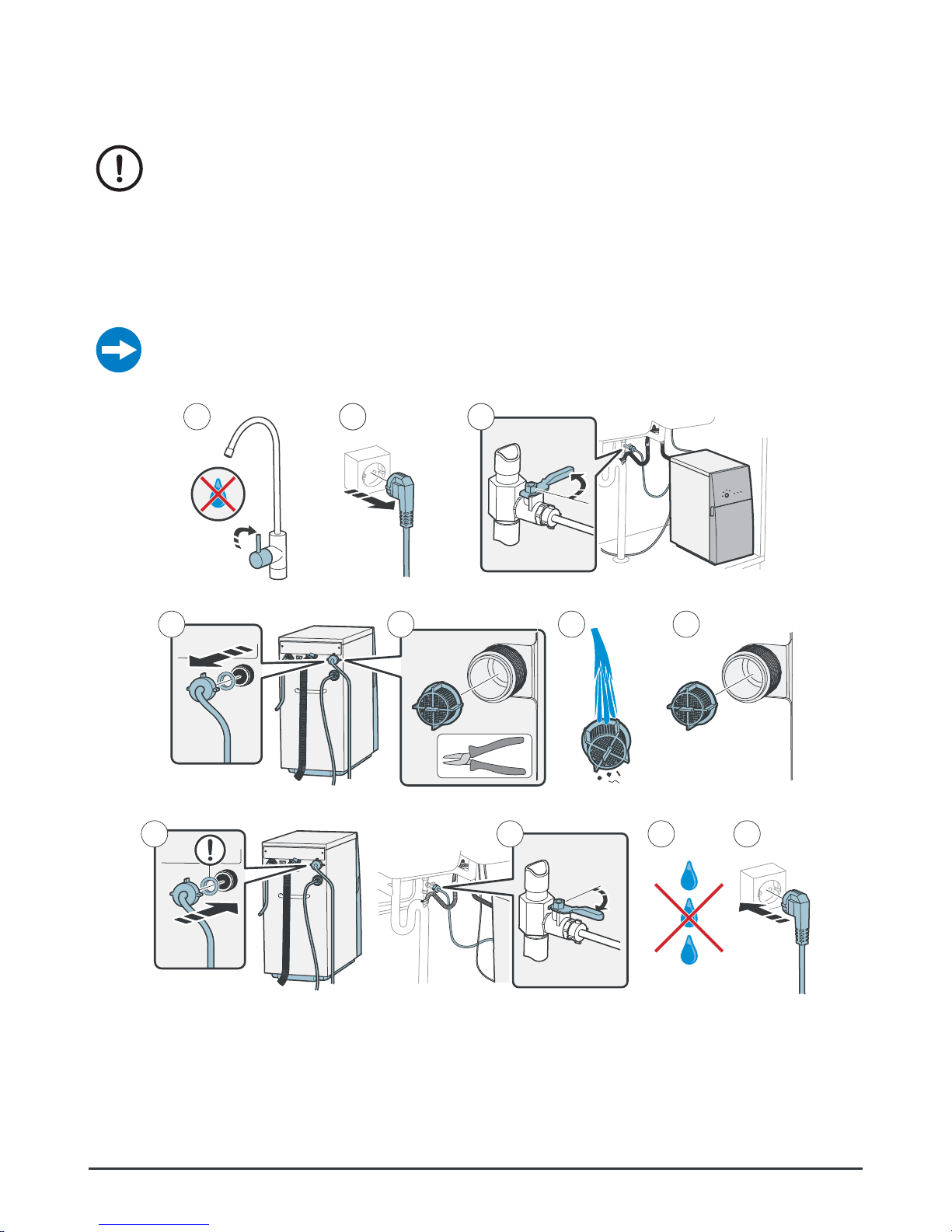
Clean the grid filter
The grid filter in the feed water connection catches larger particles. If the flow is decreased or if
Pro makes a noise, the grid filter can be blocked.
21 2 23
654 7
10 11
8 9
Figure 26. Clean the grid filter
Page 22
22
Complete User manual
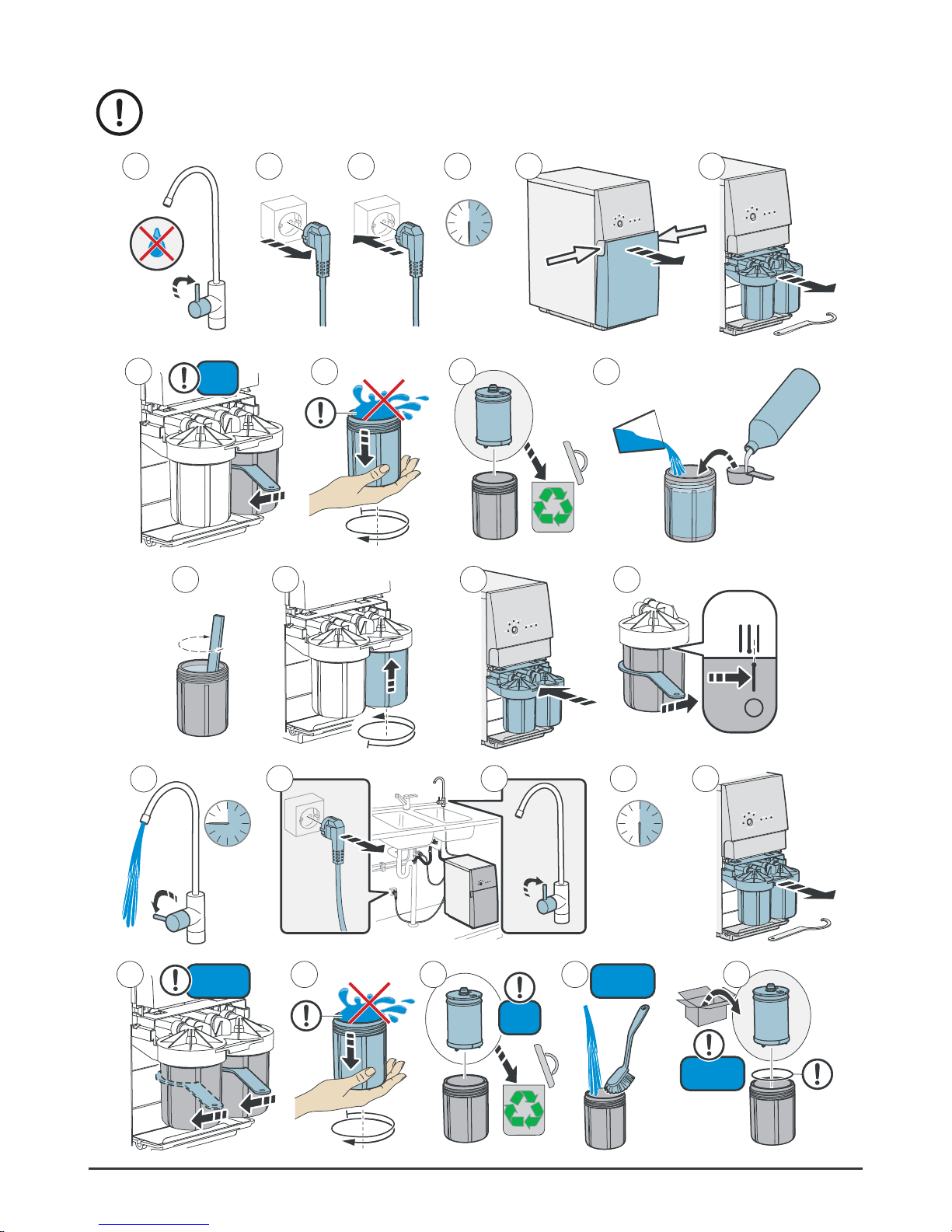
Use disinfectant to clean the system
Disinfectant is harmful! Keep it where children cannot get it. Clean your hands
when you have used it.
21 3 5 64
30 s
9
10
87
II
25 ml
(NaClO
3.5%)
400 ml
~25°C
(77
°F)
11 141312
45 s
30 min
15
17 18
16
19
20 23
21
22
24
I + II I + II
I + II
I
Page 23
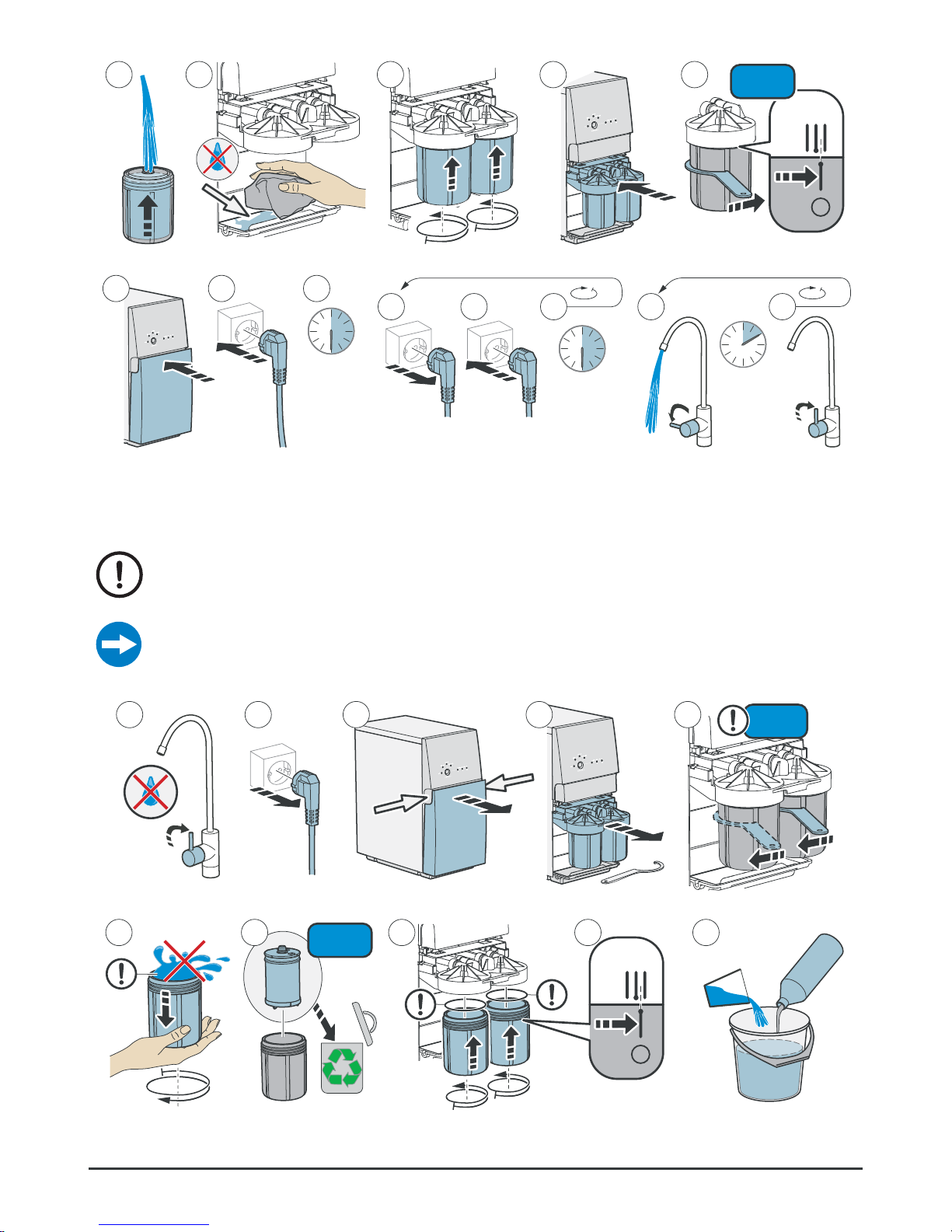
23
© Bluewater Group 2016
27 2826 2925
I + II
Figure 27.
2
2
33 34 35
30 s
36 37
10 min
30 31 32
30 s
Use desinfectant to clean the system
Put into storage
Preserving agent is harmful! Keep it where children cannot get it. Clean your hands
when you have used it.
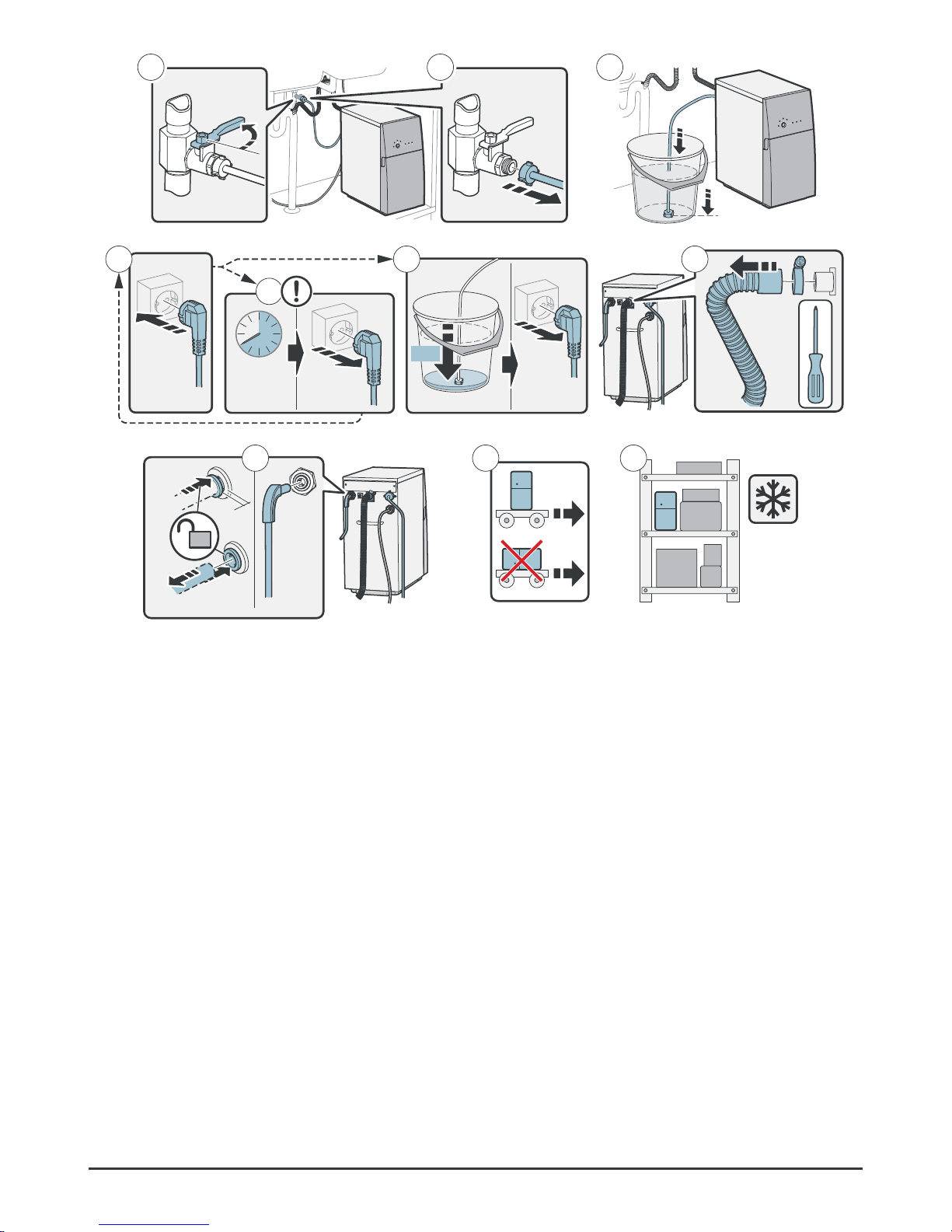
Put the water purifier into storage if it will not be used for 4 months or more, or if it is to be
disconnected from the water and electricity for >5 days.
21 3 4 5
I + II
8 9
10
76
I + II
3+3 l
(~0.8+0.8 gal)
Page 24
24
Complete User manual
11
12
13
Max
40 s
0%
1714 16
15
Figure 28.
19
2018
-30°C
(-22°F)
Put into storage
Page 25
25
© Bluewater Group 2016
Reinstall after storage
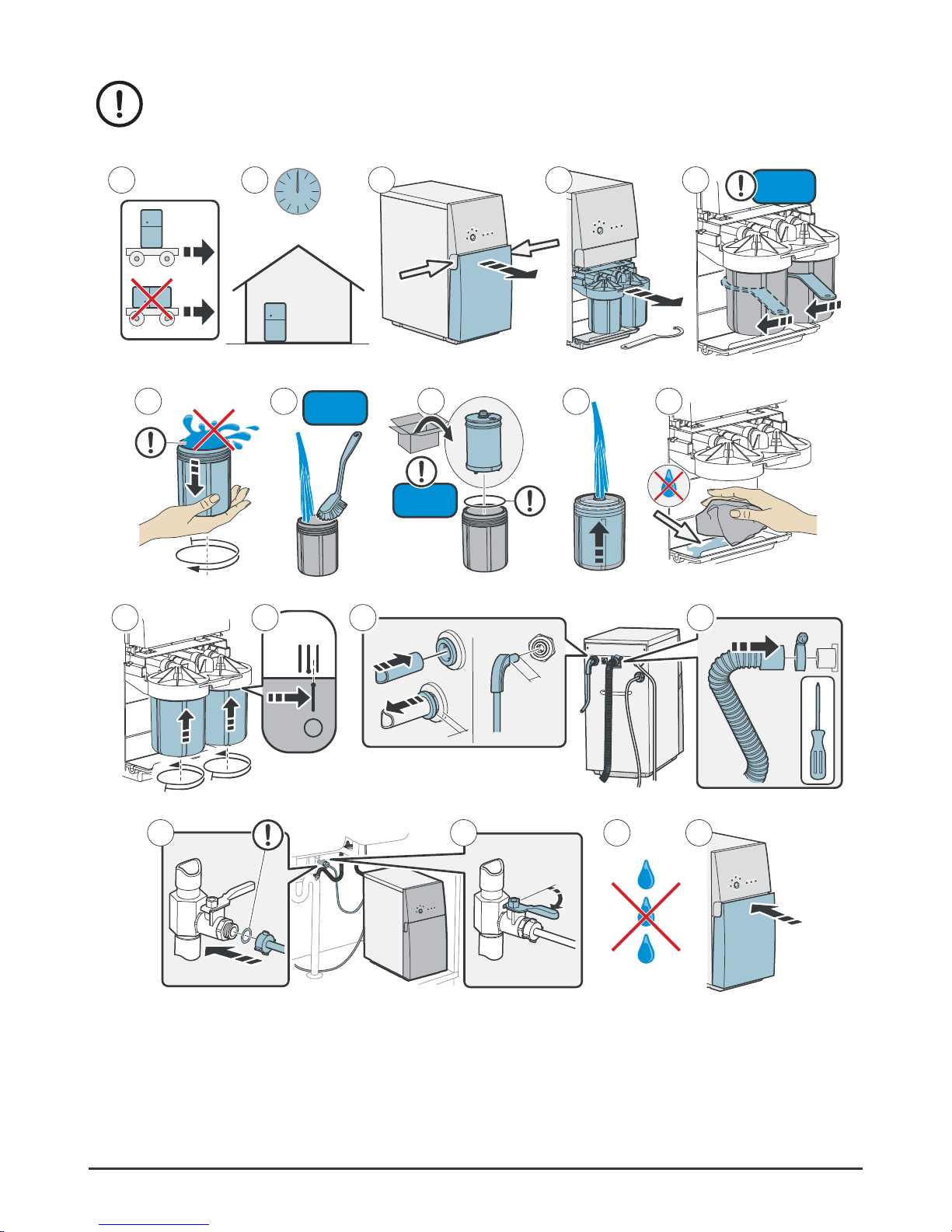
Preserving agent is harmful! Keep it where children cannot get it. Clean your hands
when you have used it. Always flush the water purifier after storage. See “Flush
Pro” on page 15.
3 4 5
I + II
+5°C
(40°F)
21
48 h
8 9
10
76
I + II
I + II
19 mm
(3/4”)
13 14
11
12
15 1716 18
Figure 29. Reinstall after storage
Page 26

26
Complete User manual
TECHNICAL INFORMATION
Technical data
Size W×H×D Weight Power supply
earthed
Power Purified water flow
rate
Sound level
Pro 400B-HR
230V
225×466×460 mm 29 kg 230V, 50-60 Hz 530 W 3.1 ±0.5 l/min
< 60 dB(A)
120V
8.9×18.3×18.1” 64 lbs 120V, 60 Hz 6 Amps 0.8 ± 0.13 gal/min
Pro 400C-HF
230V
225×466×460 mm 29 kg 230V, 50-60 Hz 530 W 3.5 ±0.5 l/min
< 60 dB(A)
120V
8.9×18.3×18.1” 64 lbs 120V, 60 Hz 6 Amps 0.9 ± 0.13 gal/min
Pro 400C-HR
230V
225×466×460 mm 29 kg 230V, 50-60 Hz 530 W 3.1 ±0.5 l/min
< 60 dB(A)
120V
8.9×18.3×18.1” 64 lbs 120V, 60 Hz 6 Amps 0.8 ± 0.13 gal/min
Pro 400BC-HR
230V
225×466×460 mm 29 kg 230V, 50-60 Hz 530 W 3.1 ±0.5 l/min
< 60 dB(A)
120V
8.9×18.3×18.1” 64 lbs 120V, 60 Hz 6 Amps 0.8 ± 0.13 gal/min
Pro 400CV-HR
230V
225×466×470 mm 29 kg 230V, 50-60 Hz 530 W 3.0 ±0.5 l/min
< 60 dB(A)
120V
8.9×18.3×18.5” 64 lbs 120V, 60 Hz 6 Amps 0.8 ± 0.13 gal/min
Pro 400BCV-HR
230V
225×466×470 mm 29 kg 230V, 50-60 Hz 530 W 3.0 ±0.5 l/min
< 60 dB(A)
120V
8.9×18.3×18.5” 64 lbs 120V, 60 Hz 6 Amps 0.8 ± 0.13 gal/min
Pro 600C-HF
230V
225×466×460 mm 29 kg 230V 50-60 Hz 720 W 5.2 ±0.5 l/min < 60 dB(A)
Pro 600CV-HR
230V
225×466×470 mm 29 kg 230V 50-60 Hz 720 W 4.5 ±0.5 l/min < 60 dB(A)
Recovery [%] Rejection [%] On/Off
[bar (psi)]
Membrane
6310C
Prefilter Operation sequence
(production/flush)
[minutes]
Pro 400B-HR 50-60 97-99 0.5/2 (7.3/29) High rejection Particle
Granulated carbon
Max 15
Pro 400C-HF 60-70 95-99 3/4.5 (44/65) High flow Particle
Granulated carbon
15/2
Pro 400C-HR 50-60 97-99 3/4.5 (44/65) High rejection Particle
Granulated carbon
15/2
Pro 400BC-HR 50-60 97-99 0.5/2 (7/29) High rejection Particle
Granulated carbon
15/2
Pro 400CV-HR 50-60 97-99 3/4.5 (44/65) High rejection Particle
Granulated carbon
15/2
Pro 400BCV-HR 50-60 97-99 0.5/2 (7/29) High rejection Particle
Granulated carbon
15/2
Pro 600C-HF 60-70 95-99 3/4.5 (44/65) High flow Carbon block 15/2
Pro 600CV-HR 60-70 97-99 3/4.5 (44/65) High rejection Carbon block 15/2
Page 27

27
© Bluewater Group 2016
Requirements on feed water to water purifier
Do not install the water purifier if the water is microbiologically unsafe!
Pro 400B-HR
Pro 400BC-HR
Pro 400BCV-HR
Pro 400C-HF
Pro 400C-HR
Pro 400CV-HR
Pro 600C-HF
Pro 600CV-HR
230V 120V 230V 120V 230V
Temperature
2-30 °C
36-86 °F 2-35 °C 36-95 °F 2-35 °C
Feed water flowing pressure
1.5-10 bar
22-145 psi
1.5-10 bar
22-145 psi 2-10 bar
TDS
(Total Disolved Solids)
< 7500 ppm < 1500 ppm
< 1500 ppm
Water flow
> 8 l/min
> 2.1 gal/min
> 8 l/min
> 2.1 gal/min > 10 l/min
Conductivity
[μS/cm, 25 °C (77 °F)]
< 13 000 < 2000
< 2000
Hardness
< 20 °dH
<20.9 grains/gal
< 20 °dH
<20.9 grains/gal
< 20 °dH
pH
4-10 4-10 4-10
Turbidity [FNU]
< 0.5 < 0.5 < 0.5
Iron Fe
(I I)
/Fe
(I I I)
<1.5 / <0.3 mg/l
<1.5 / <0.3 ppm
<1.5 / <0.3 mg/l
<1.5 / <0.3 ppm
<1.0 / <0.3 mg/l
Manganese Mn
<0.3 mg/l
<0.3 ppm
<0.3 mg/l
<0.3 ppm
<0.3 mg/l
Chlorine Cl2
<1.0 mg/l <1.0 ppm <1.0 mg/l <1.0 ppm <1.0 mg/l
Page 28
28
Complete User manual
TROUBLESHOOTING
How to solve simple problems
If Pro stops because of an emergency, disconnect it from power and connect it again, or press
calibration button to reset the emergency stop.
Symptom Cause Solution
Filter I must be replaced. See “Replace prefilter” on page 20.
The grid filter is blocked. See “Clean the grid filter” on page 21.
The feed water pressure is too low. Make sure that the feed water pressure is sufficient. If
necessary, increase the pressure.
The leak protection has been activated. Find the leaks. Repair them.
Filter II must be replaced. See “Replace prefilter” on page 20.
Replace prefilter II. In PRO 600, replace both prefilters.
The feed water pressure is too low. The
water purifier has stopped. It waits and must
be started again.
The water purifier will try to start automatically. Make sure
that the feed water pressure is sufficient. If necessary,
replace the filters.
See “Replace prefilter” on page 20.
Push the calibration button to start the water purifier.
Release the button when the filter I light and the stop light
go out.
filter I or filter II are blocked. Make sure that nothing in the filter makes the water not
flow. If necessary, replace filter I or filter II. See “Replace
prefilter” on page 20.
The grid filter is blocked. See “Clean the grid filter” on page 21.
There is a water leakage or condensation
on the base plate.
Make sure that all connections are water tight. Tilt the water
purifier forward, and dry the base plate with a cloth.
The feed water pressure is too low. Install a pump with increased pressure for the feed water.
Do a check of the parts that have an effect on the feed
water pressure (the water line, the coarse filter, the extra
pre-filter).
The water purifier has stopped. The clean
water quality has become too low.
Disconnect the water purifyer from power. Connect it again
to start the automatic flush. Do this 2 or 3 times.
If the problem is repeated, contact your service dealer.
Calibration not carried out correctly Calibrate again. See “Calibration” on page 16 for
instructions.
Water quality meter does not work correctly. Disconnect the water purifier from power. Connect it again
to start the automatic flush. Do not use the water purifier
for 2 hours.
If the problem is repeated, contact your service dealer.
Page 29

29
© Bluewater Group 2016
Symptom Cause Solution
The tap has been on for more than 15
minutes. The water purifier has stopped.
(Pro 400B)
Turn off the tap and wait at least 30 minutes.
Disconnect the water purifier from power. Connect it again
to start the automatic flush. Restart the water purifier.
The flow rate from the clean water
faucet is low.
The clean water tubing is tensioned or
jammed.
Make sure that the clean water tubing can move freely.
The water purifier needs to be descaled. See “Descale” on page 18.
The pump is worn out. Contact your Bluewater dealer.
The water purifier starts and stops
again (short starts).
The water pressure between the water
purifier and the faucet/valve/tank is below
the starting pressure level.
Examine the connections.
Make sure that the ends of the water tubing are circular
and have no burrs.
Make sure that the faucets and the valves are water tight
when they are closed. If no leak can be detected, contact
your service dealer.
The water smells bad Microbial growth in the water because the
water purifier has not been used for a week
or longer.
Flush the water purifier, see “Flush Pro” on page 15.
Clean the water purifier, see “Use disinfectant to clean the
system” on page 22.
Page 30

30
Complete User manual
Page 31

Page 32

Bluewater Group
Danderydsgatan 11, SE-114 26 Stockholm
Sweden
Tel: +46-8-564 738 00
[email protected] - www.bluewatergroup.com
For a complete list of sales offices and dealers, please visit www.bluewatergroup.com
 Loading...