

Page 1
User Manual
Certificate
Inspector:
QC:
SAFETY INSTRUCTIONS
Please observe the following instructions to ensure safety use:
01
DO NOT attempt to replace the internal battery with anything other than authorized
replacement battery by yourself.
02
DO NOT operate in wet conditions, let unit dry completely before using.
03
Ensure proper ventilation while in use and do not obstruct fan openings on use. Inadequate
ventilation may cause damage to the power station.
04
DO NOT stack anything on top of the power station in storage or in use, vibration and impact
may lead to poor connection to hardware inside.
05
DO NOT insert foreign objects into outputs or ventilation holes.
06
DO NOT place the power station near heat sources like furnace or ambient heater.
07
The power station generates the same potentially lethal AC power as household wall outlet,
please take carefully and keep children away from it.
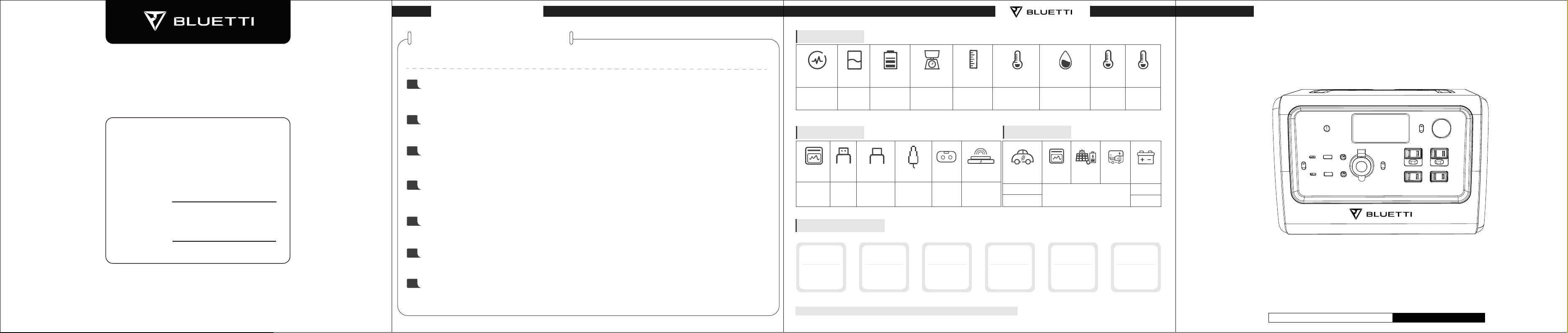
General Specs
AC Rated Power Typical
700W
(1400W Surge)
Capacity
716Wh LiFe-PO4
Battery Type Net Weight Dimensions Storage Ambient
Around 20.9lbs/9.5KG
(The weight may subject
to slightlyn change without
notice)
320*217*222mm
(12.6*8.5*8.7 inches)
Temperature
0-45℃/32-113℉ 10-90% -20-40℃/
Output Specs
AC Output
*4 100-120VAC
*2 220-240VAC
USB
Output *2
5VDC,3A Max.100W
Type-C *2 Cigarette Lighter
5/9/12/15/20VDC, 3A;
20VDC, 5A
(emark chip built-in )
Output *1
12VDC,10A,
120W
5521
Output *2
12VDC,10A,
120W
Wireless
Charging Pad *2
5W/7.5W/
10W/15W
About 3-4 Hours @24V
About 7-8 Hours @12V
Common Loads
10Wh
Smart Phone
Around 50-60 Times
10Wh
716Wh×DOD×η÷ (the current load power W) = available time(unit: hrs/times)
Note:DOD indicates Depth of Discharge, η indicates inverter efficiency, DOD=90% , η=90%.
LED Light Bulb
Around 20-30 Hrs
20W
Television
Around 7-8 Hrs
75W
Electronic Tools
Around 7-8 Hrs
80W
Working Environment
Humidity
Input Specs
Car Charging
AC Charging
Solar
Charging
12-28V 200W
About 3-4 hours
Refrigerator
Around 6-7 Hrs
90W
Discharge
Temperature
-4-104℉
Generator
Charging
Charge
Temperature
0-40℃/
32-104℉
Battery
Charging
About 3-4 Hours
@24V
About 7-8 Hours
@12V
Slow Cooker
Around 2-3 Hrs
200W
716Wh Portable Power Station
User Manual
Please read this manual before use and follow its guidance. Keep this manual for future reference.
Detailed user manual please access:
WWW.BLUETTI.COM
Page 2
User Manual
User Manual
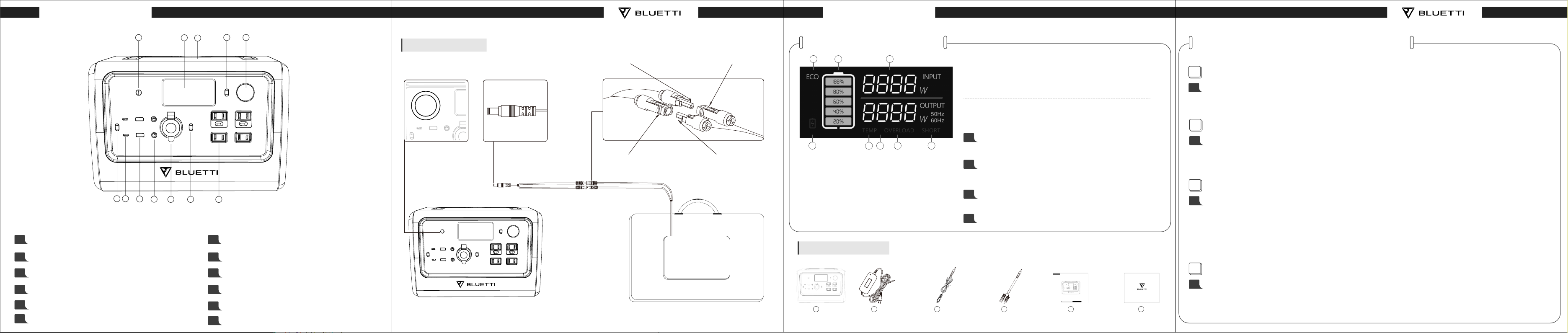
QUICK GUIDE
01
Charging Port
02
LCD Screen
03
Wireless Charging Pad
04
LED Lamp Button
05
LED Lamp
06
DC Power Button
6 7
1
2
3
4 5
Solar Charging
Connecting Cable PV+
Solar Panel P
V+
LCD SCREEN GUIDE
a
b
c
Attention:
Screen turns off when all output turns off in 2s.
Screen turns off while on standby.
FREQUENTLY ASKED QUESTIONS
1
How do I clean for power station?
A
Dry, non-abrasive cloths to wipe will be perfect. The power station is a versatile tool for various
adventures, simple cleaning would be required from time to time to keep the unit in a good condition.
How to operate on power station to turn ON/OFF ECO Mode\
and change the working frequency:
To Enter Settings Mode: Turn “AC” mode to the off position.
01
d
Charging Port
8
9
11
10
12
07
Type-C Port
Charging Plug
Connecting Cable PV-
MC4 Connectors
Solar P
anel PV-
a. ECO-Mode Icon
b. Battery Capacity
c. Input Power
d. Alert Icon for low
Voltage
e
g
f
e. Alert Icon for Temperature
Anomaly
f. Output Power
g. Alert Icon for Overload
h. Alert Icon for Short Circuit
h
Press “AC” and “DC” buttons at same time for 2 seconds to enter
“Settings” mode.
To Change Frequency Setting: Once in “Settings” mode,
02
press the “AC” button to switch frequency of the AC output
ports to either 50 or 60 Hz depending on your location.
Eco Mode: Once in “Settings” mode, press the “DC” button to
03
turn ON / OFF the ECO mode.
Exit Settings Mode: Long press the “AC” and “DC” buttons at
04
the same time for 2 seconds to save and exit the settings mode.
What`s In The Box
08
USB Port
09
DC 5521 Output Port
10
Cigarette Lighter Port
11
AC Power Button
12
AC Outlet
Solar PanelPower Station
1
Power Station
2
AC Adapter
3
Car Charging Cable
4
Solar Charging Cable
716Wh Portable Power Station
User Manual
Please read this manual before use and follow its guidance. Keep this manual for future reference.
Detailed user manual please access:
WWW.BLUETTI.COM
5
User Manual
6
Warranty Card
2
How do I store my power station?
A
Please store the power station in a dry and cool place at the recommended temperature. Do not expose
the power station to humid environment. If you want to store it for a long time, please fully charge the
battery every 6 months to extend the lifespan. Remind to turn off the unit before storing.
3
How do I know if my device will work with the power station?
Step1: You need to figure out the amount of power your devices require. Some research may be taken
A
on internet search or the user guide of your device shall suffice.
Step 2: Check the rated power of certain port on power station. For example, if the AC output port
generates 2000W of power and your device requires over 2000W for a extended period of time, the
power station will turn itself off.
4
How to claim the warranty?
A
Please place your after-sale requirement as the warranty card written to the platform where you order
the product.
 Loading...