

Page 1

BT400 G3
Bluetooth Headset
QUICK START-UP
www.bluetake.com
Page 2

2
C O N T E N T
English……………………………………3
French………………………………….12
German………………………………….21
Italian………………………………….30
Russian………………………………….39
Spanish………………………………….48
Specification……………………………….57
Page 3
3
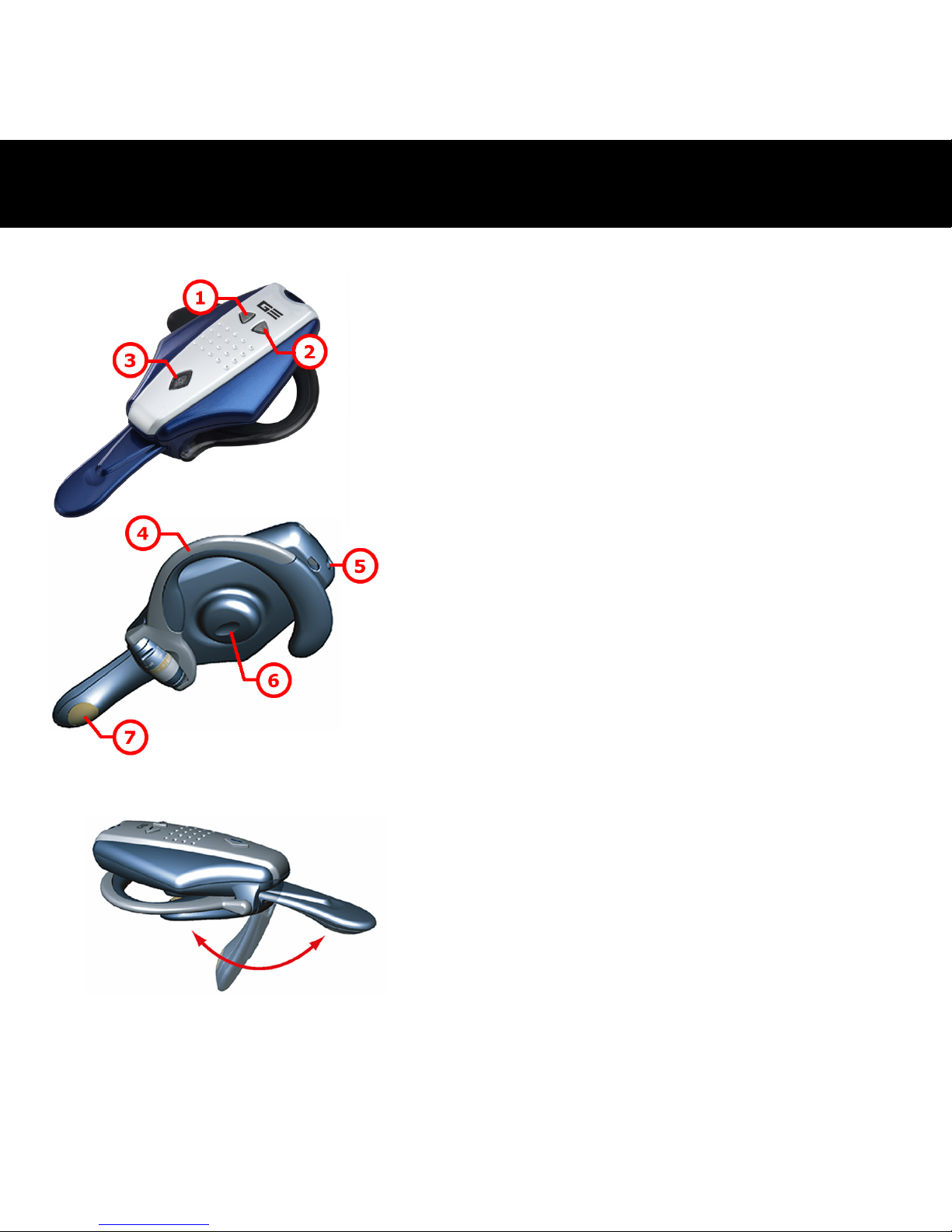
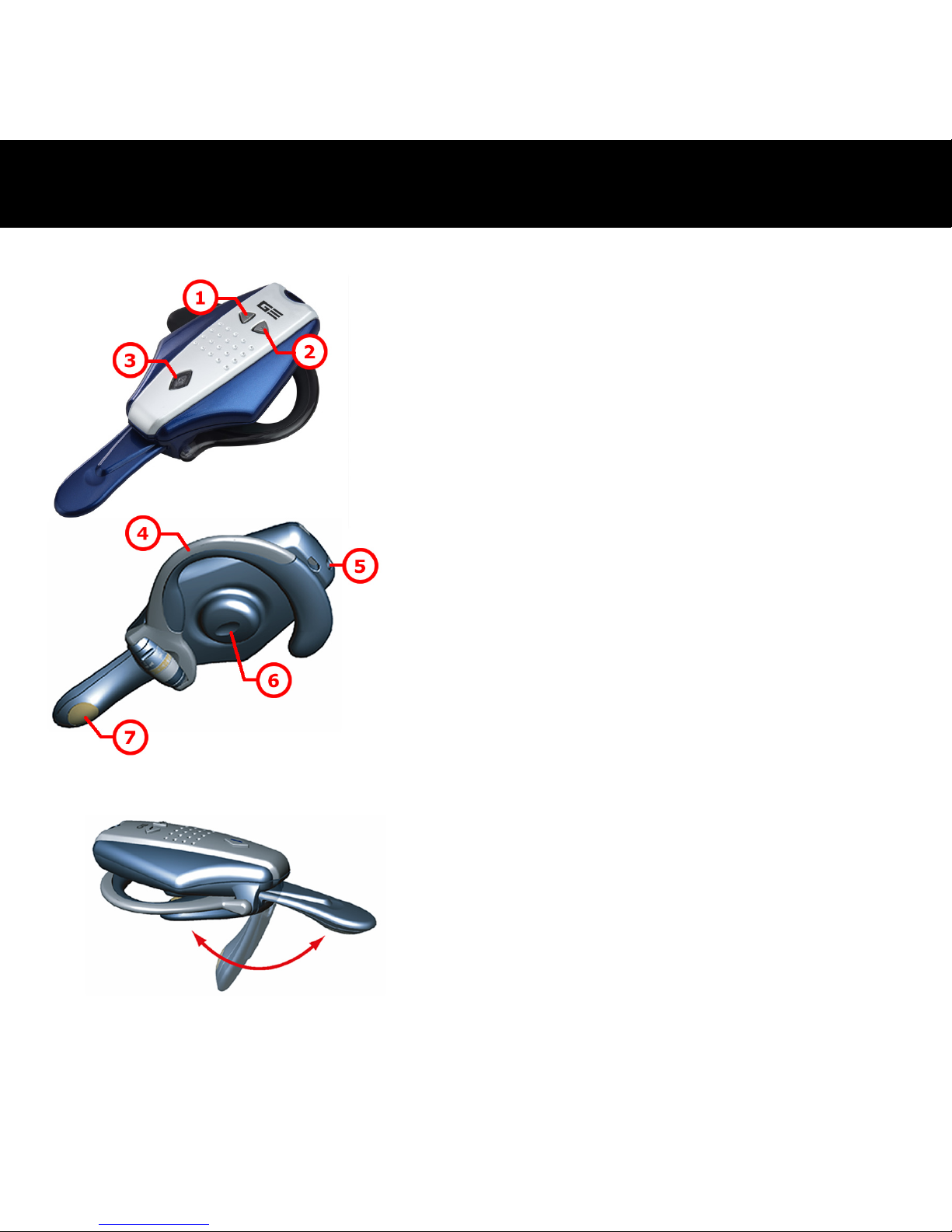
1
Volume Down Button
2
Volume Up Button
3
Power/Talking/Pairing Button
4
Ear Hook
5
DC Power In
6
Speaker
7
Microphone
Foldable Microphone
The microphone can be folded up
easily when you don't use the headset.
- Overview of BT400 G3 -
Page 4
4
1.
2.
3.
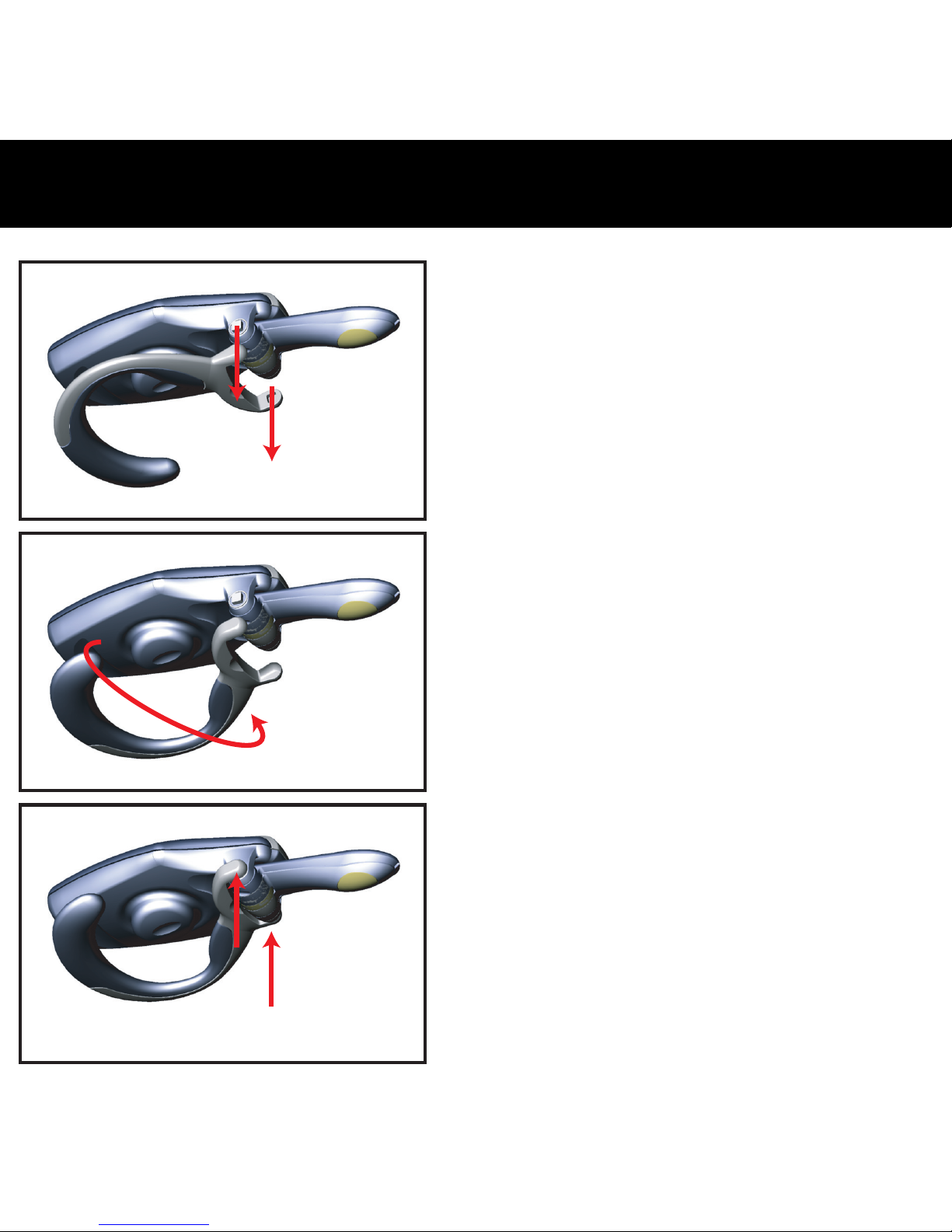
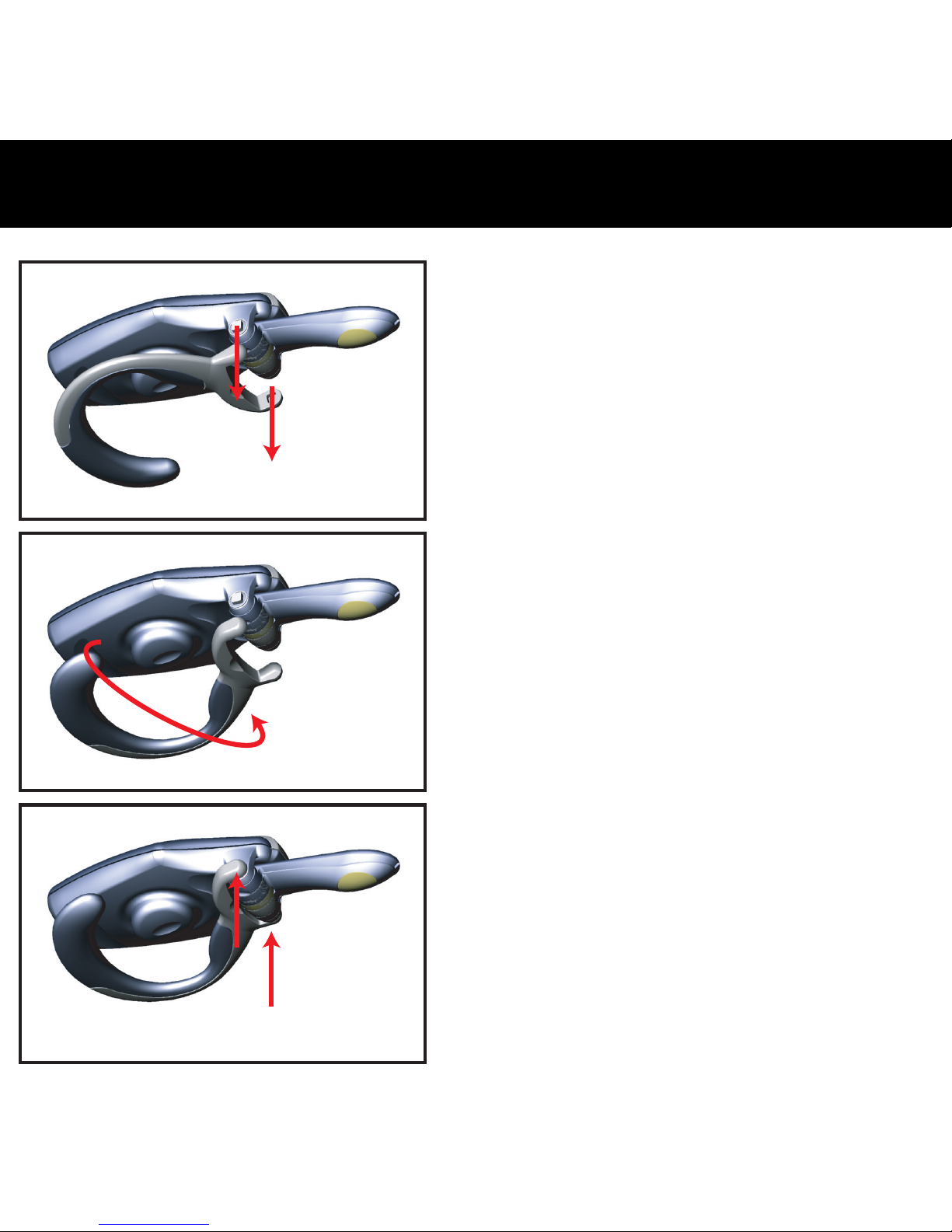
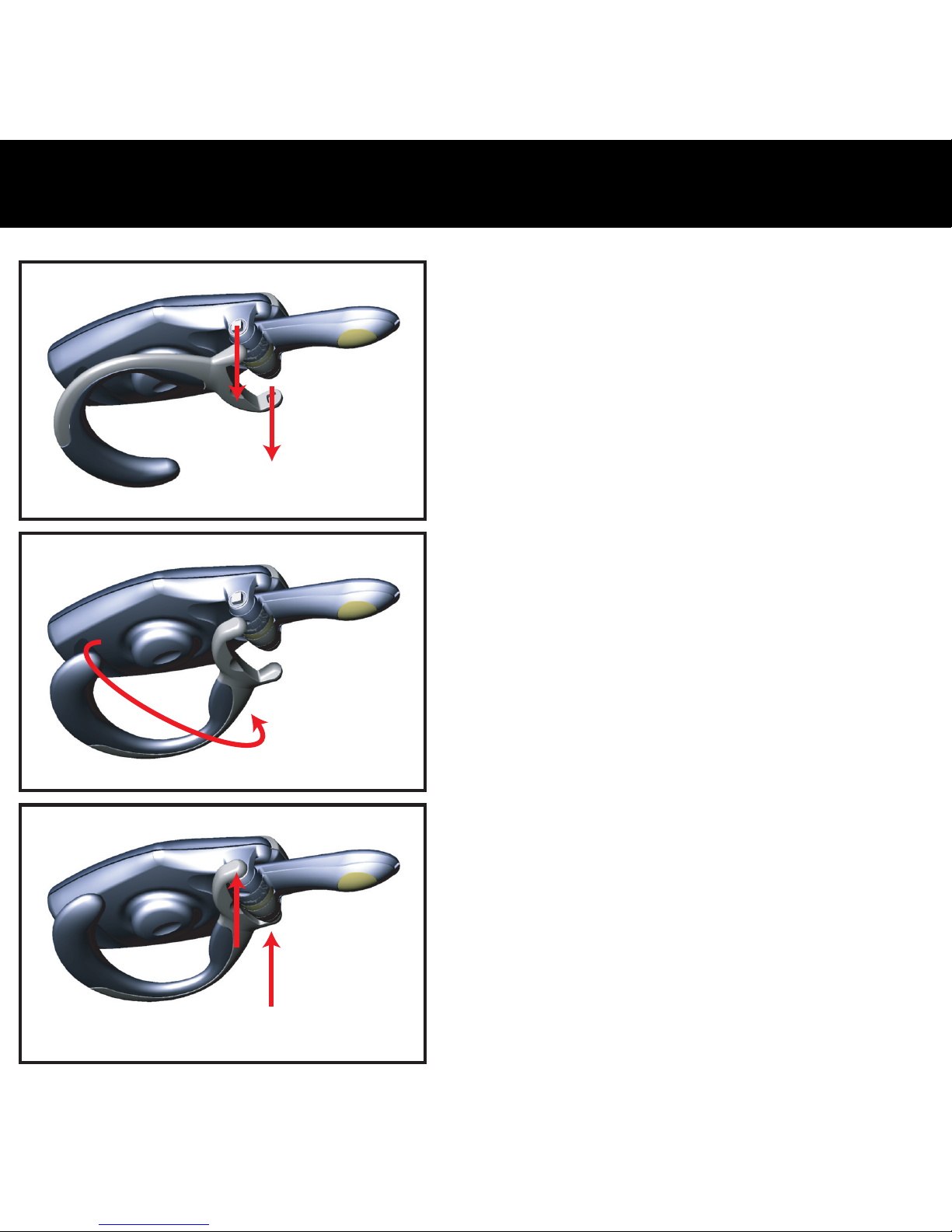
The BT400 G3 Bluetooth headset
can be worn on either ear. Please
follow the below steps to shift the
ear hook for wearing it on the
other ear.
1. Carefully remove the ear hook
from the headset.
2. Change the direction of the ear
hook as shown in diagram 2.
3. Carefully relocate the ear hook
to the headset.
- Changing the earhook -
Page 5

5
To turn your headset ON:
Press and hold the
button for 5 seconds, and then the
speaker will emit two high tones. When the power is ON, the
LED in the
button starts to flash blue.
(Note: the headset will enter pairing mode if you press and
hold the
button for 7 seconds from OFF status.)
To turn your headset OFF:
Press and hold the
button for 2 seconds, and then the
speaker will emit two high tones. When the power is OFF,
the LED in the
button will stop flashing.
- Turning the headset ON/OFF -
Page 6

6
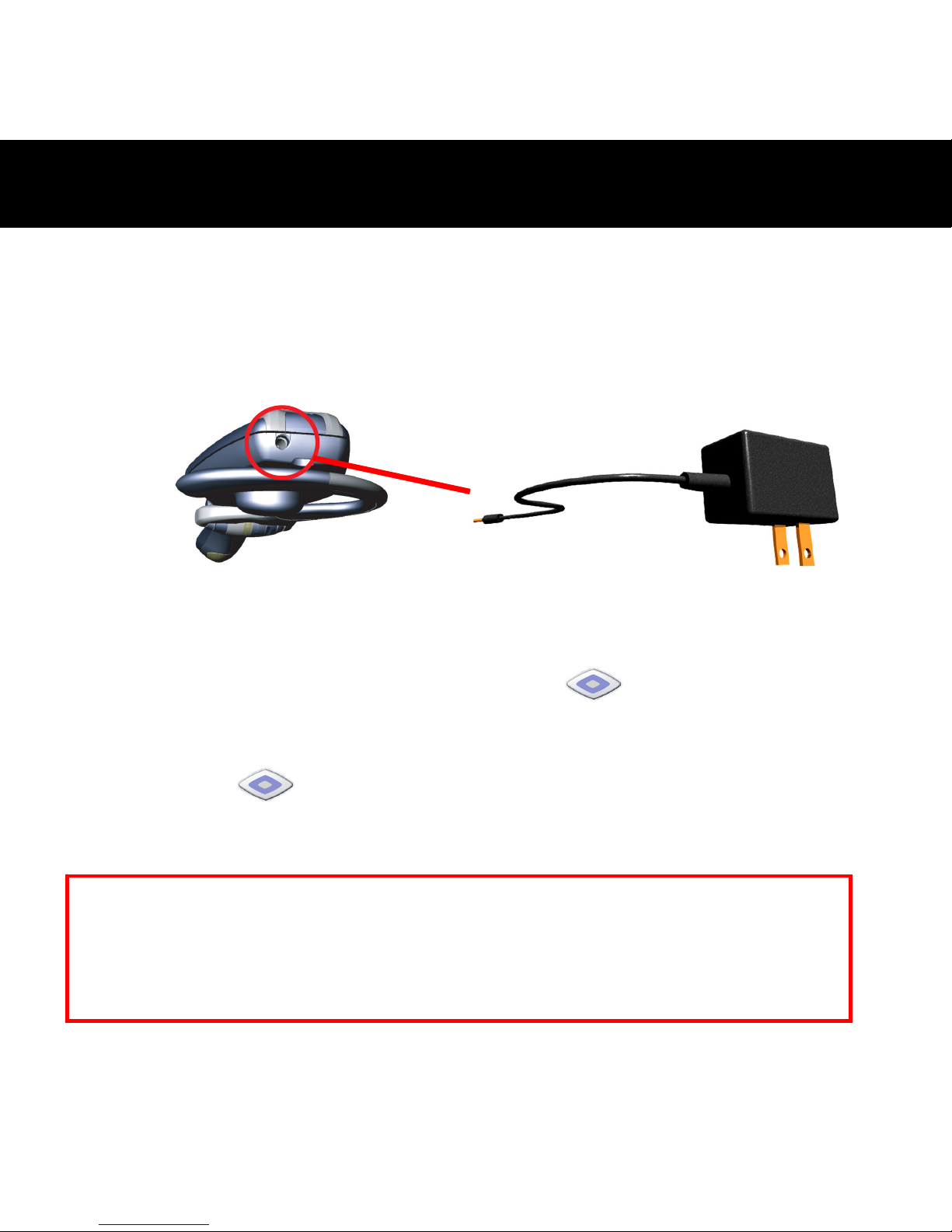
Please charge the battery for approximate 2.5 hours to ensure a fully
power while first time using BT400 G3. The LED will turn to be green
when the power is fully charged.
1. Plug the AC power adapter into the DC Jack situated at the back of
the headset.
2. Plug the AC power adapter
3. When charging, the LED in the
button is on and remains red
color.
4. The LED in the
button turns to be green after the battery is
fully charged.
5. Remove the AC power adapter from the headset’s AC Power Jack.
- Charging the battery -
Caution: Risk of explosion if battery is replaced by an incorrect type. Dispose of
used batteries according to the instructions
Notice: The headset doesn’t work while it’s char
ging
.
Page 7

7
Please follow the instruction below to pair the headset with a
Bluetooth cell phone:
1. Ensure the headset is OFF.
2. Press and hold the
button for approximately 7 seconds until
the headset LED starts to flash with blue and red.
3. Release the
button when the LED is flashing, the status
indicates that the headset is in pairing mode and waiting to pair
with another Bluetooth device.
4. Follow the operating instruction for your Bluetooth phone to start a
pairing process.
5. The phone’s display will indicate that it found one or more
Bluetooth devices, the “BT400 G3” should be included in the list,
please select it for pairing.
6. The phone’s display then prompt you for a pairing passkey or PIN,
please enter four zeros “0000”.
7. When the pairing process is finished successfully, the headset LED
will return to normal status of flashing blue only.
8. The phone’s display may ask you whether you want to change the
headset’s name; you can replace the “BT400 G3” with any name
you prefer.
- Pairing to a Bluetooth phone -
Page 8

8
Answering a call:
After being paired with your cell phone, the headset is now ready to
receive incoming calls without handling the phone. When there’s an
incoming call, both the cell phone and the headset will ring
simultaneously. Upon hearing the ring tones through the headset’s
speaker you can answer the incoming call by pressing
button
and then speaking normally.
Ending a call:
You can use either of the ways to end a call:
1. Press the headset’s
button to end a call.
2. Press the phone’s keypad to end a call.
Making a call:
There are two ways to make calls:
1. Using the phone’s keypad:
As general usage, dial the phone number you want to call by
pressing the phone’s keypad. You may also hear the dialing tones
through the headset.
2. Using the Voice Dialing through the headset:
What is voice dialing?
Voice dialing is a feature on some Bluetooth phones which
- Use the headset -
Page 9

9
allows you make calls by saying the name of the person you want
to call. The phone compares your voice with your previous
recording (called a voice tag). If they match then the phone will
automatically dial the corresponding phone number. Not all
Bluetooth phones support voice dialing, please refer to your
phone’s specification to make sure whether your phone supports
this feature.
Voice dialing:
The headset does not have a keyboard so it’s necessary to use voice
dialing to make calls. To do this you have to record voice tags for the
contacts in your phone address book. If your phone supports voice
function, you can use this feature with the headset easily. Note that the
voice dialing on your phone must be enabled and the voice tags must
have been recorded previously. (Please refer to your phone’s
instruction on voice recording and storing voice tags.)
a. Briefly press the
button once.
b. After the tone, say the name of the person you want to call.
c. The phone number will be dialed automatically by phone after
recognizing the correct voice tag.
Page 10

10
Multi-Pairing:
BT400 G3 supports a particular function “Multi-Pairing”. It allows the
headset to be paired with several Bluetooth devices but connected to
only one device at a time. The only one basis for multi-pairing is that the
last paired device has the highest priority than others.
If the headset is switched on within10 meters of several paired devices,
the headset will try to connect to the “1
st
device” within a few seconds.
If the headset can not connect to the “1
st
device”, the headset tries to
connect to the second device within a few seconds.
If the headset can not connect to either of the phones, it remains
discoverable for other devices for the next xxxxxx minutes, which is
displayed by the blinking green indicator light. If you do not make the
connection during this time, the headset is switched off automatically.
If you want to use the headset with a paired device that is not a “1
st
device” or “last device”, make the connection in your device’s Bluetooth
menu.
Page 11

11
If you are experiencing difficulties connecting or using your headset,
check whether your problem is listed below.
Q: Why can’t I use the voice dialing function after paired the BT400
G3 with my Bluetooth-enabled mobile phone?
A: Please make sure the voice dialing function in your mobile phone is
active. Please refer to your mobile phone user’s manual to enable the
function.
Q: Why there is an annoying echo when I’m talking by using the
BT400 G3?
A: Please reduce your mobile phone’s volume to eliminate the echo.
Q: Why can not my Bluetooth-enabled mobile phone pair with the
BT400 G3?
A:
1. Please make sure the Bluetooth function in your mobile phone is
active.
2. Please make BT400 G3 go into pairing mode again if the mode is
timeout.
- Troubleshooting -
Page 12
12
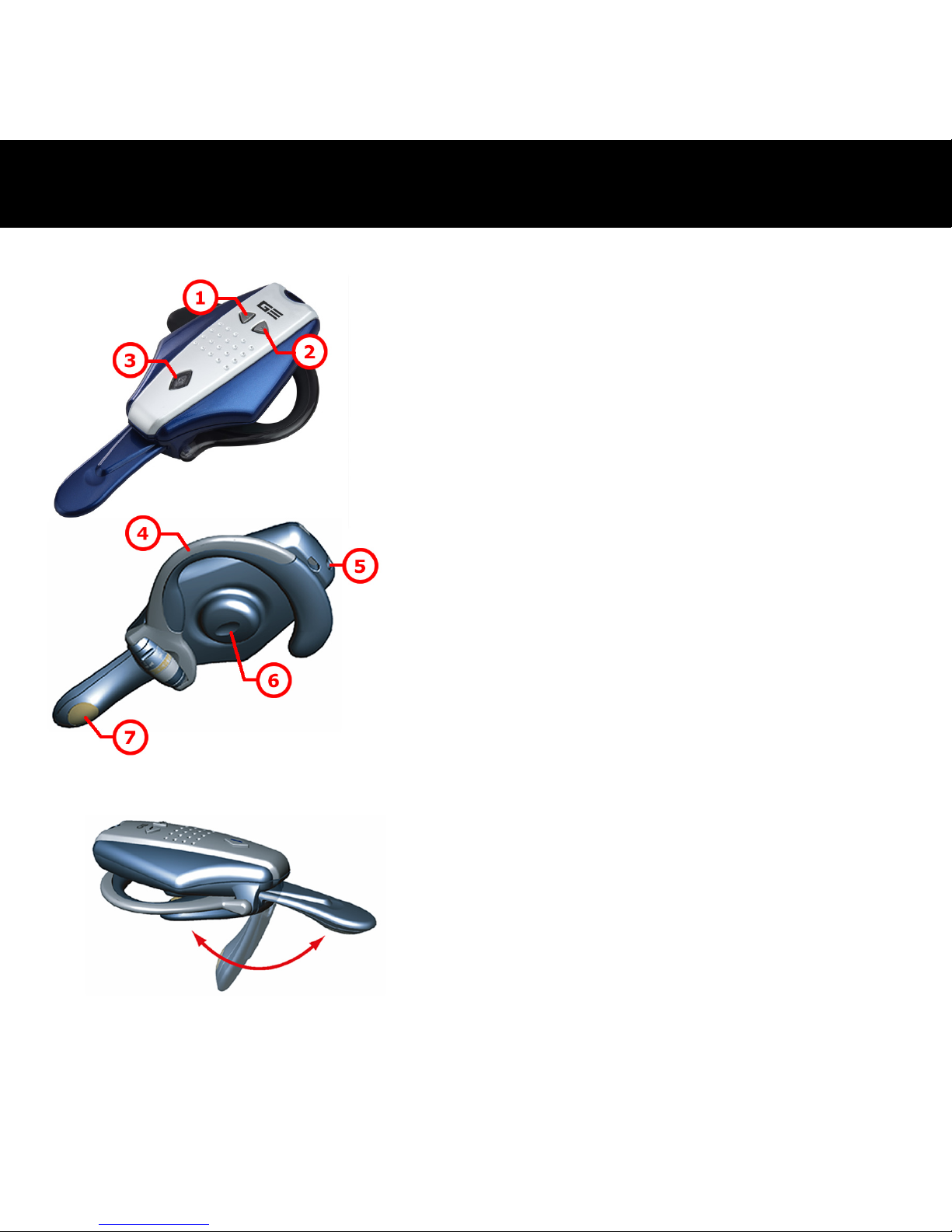
1
Bouton Diminuer le volume
2
Bouton Augmenter le volume
3
Bouton
Alimentation/Parler/Appariement
4
Oreillette
5
Entrée courant continu
6
Haut-parleur
7
Microphone
Microphone pliable
Le microphone peut être plié
facilement quand vous n'utilisez pas le
combiné.
- Aperçu du BT400 G3 -
Page 13
13
1.
2.
3.
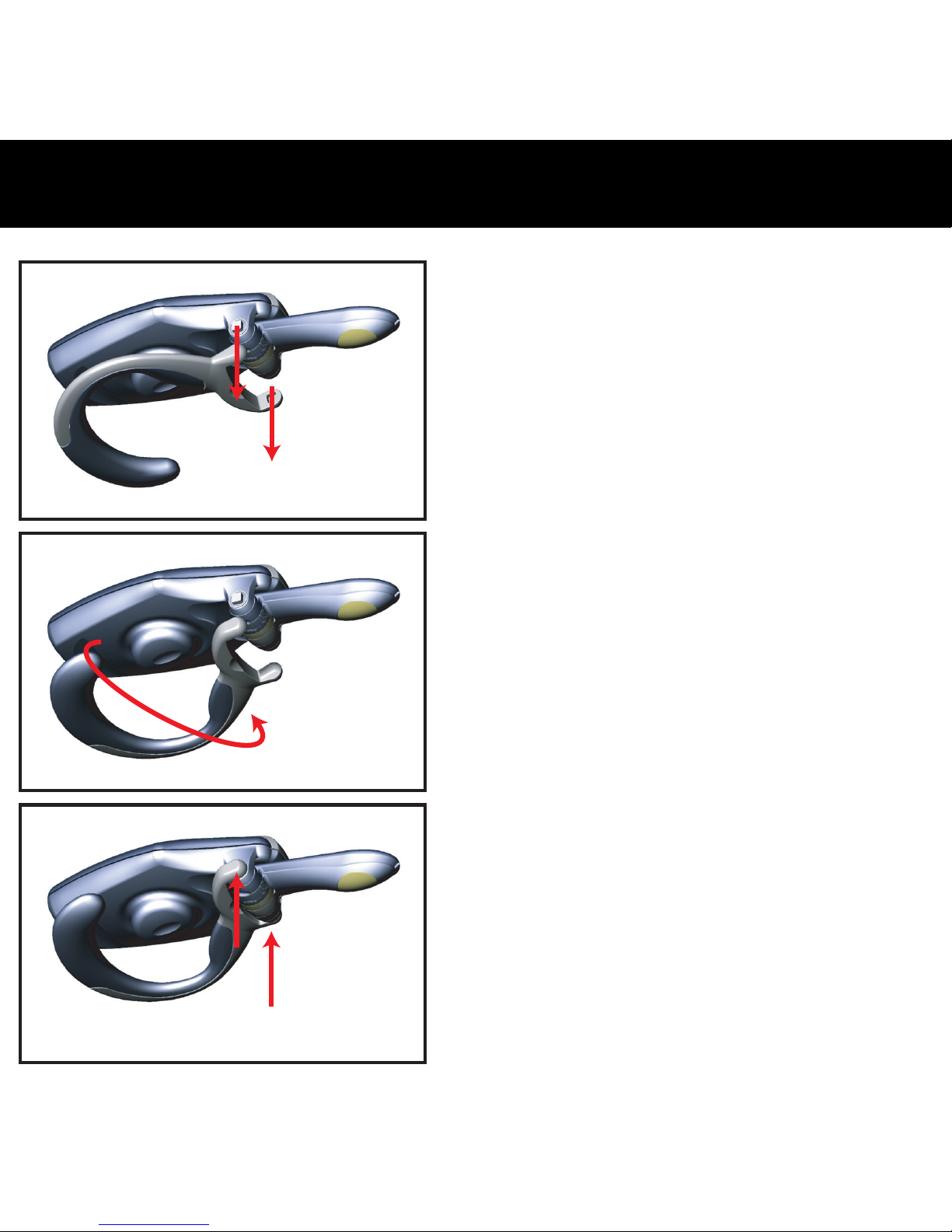
Le combiné Bluetooth BT400 G3
peut être porté sur n'importe quelle
oreille. Suivez les étapes
ci-dessous pour changer l'oreillette
pour la porter sur l'autre oreille.
1. Retirez délicatement l'oreillette
du combiné.
2. Changez la direction de
l'oreillette comme indiqué sur le
schéma 2.
3. Replacez délicatement
l'oreillette sur le combiné.
- Changer l’oreillette -
Page 14

14
Pour allumer le combiné :
Appuyez sur le
bouton pendant 5 secondes puis le
haut-parleur émettra deux sons aigus. Quand le combiné est
allumé, la LED témoin dans le bouton
commence à
clignoter en bleu.
(Remarque : Le combiné entrera en mode d’appariement si
vous appuyez sur le bouton
pendant 7
secondes lorsqu’il est éteint)
Pour éteindre le combiné :
Appuyez sur le bouton
pendant 2 secondes puis le
haut-parleur émettra deux sons aigus. Quand le combiné est
éteint, la
LED témoin arrête de clignoter.
- Allumer et éteindre le combiné -
Page 15
15
Chargez la batterie pendant environ 2,5 heures pour assurer une charge
complète avant la première utilisation du BT400 G3. La LED témoin
deviendra verte quand la batterie est complètement chargée.
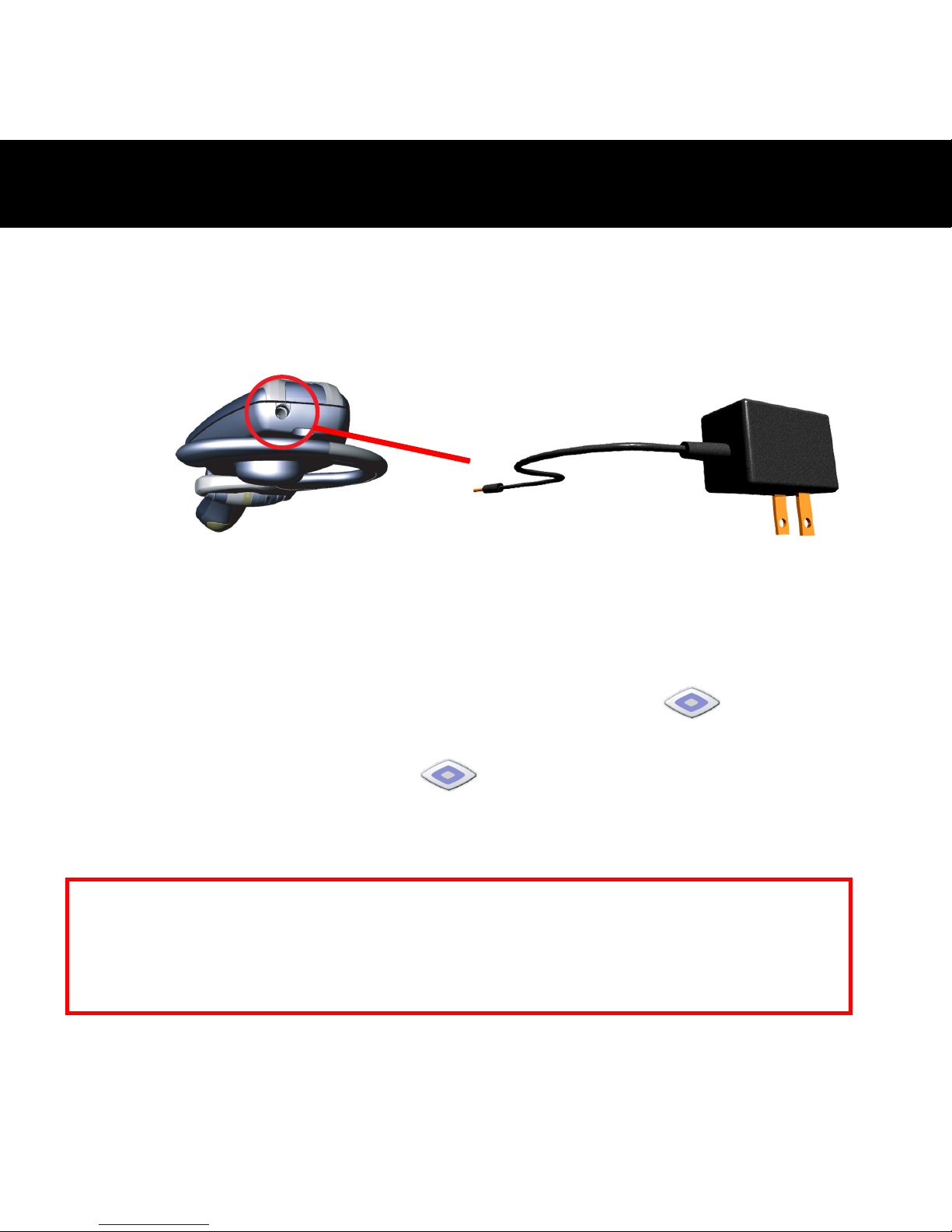
1. Branchez le transformateur dans la prise d’entrée CC située à
l’arrière du combiné.
2. Branchez le transformateur secteur.
3. Lors du chargement, la LED témoin du bouton
est allumée
et reste rouge.
4. La LED témoin du bouton
devient verte une fois que la
batterie est complètement chargée.
5. Retirez le transformateur secteur de la prise CC du combiné.
- Charger la batterie -
Attention : Risque d'explosion si la batterie est remplacée par un type incorrect.
Mettez les batteries usagées au rebut selon la réglementation locale.
Remarque : Le combiné ne fonctionne pas quand il est en cours de chargement.
Page 16

16
Suivez les instructions ci-dessous pour apparier le combiné à un
téléphone mobile Bluetooth :
1. Vérifiez que le combiné est éteint.
2. Appuyez sur le bouton
pendant environ 7 secondes jusqu’à
ce que la LED témoin du combiné commence à clignoter en bleu et
rouge.
3. Relâchez le bouton
quand la LED témoin clignote, cet état
indique que le combiné est en mode d’appariement et attend de
s’apparier avec un autre appareil Bluetooth.
4. Suivez les instructions du mode d’emploi de votre téléphone
portable Bluetooth pour initier un processus d’appariement.
5. L’écran du téléphone indiquera qu’il a trouvé un ou plusieurs
périphériques Bluetooth, “BT400 G3” devrait être dans la liste,
choisissez-le pour appariement.
6. L’écran du téléphone affiche un message vous demandant le code
d’appariement, entrez quatre zéros “0000”.
7. Quand le processus d’appariement a finalement réussi, la LED
témoin du combiné retournera à l’état normal de clignotement en
bleu uniquement.
8. L'affichage du téléphone peut vous demander si vous souhaitez
changer le nom du combiné; vous pouvez remplacer “BT400-G3”
par un nom que vous préférez.
- Appariement à un téléphone
Page 17

17
Répondre à un appel :
Après avoir été apparié avec votre téléphone portable, le combiné est
maintenant près à recevoir des appels sans avoir à toucher au
téléphone. Quand un appel arrive, le téléphone et le combiné sonneront
simultanément. Quand vous entendez la sonnerie par le haut-parleur du
combiné, vous pouvez répondre à l'appel en appuyant sur le bouton
puis en parlant normalement.
Terminer un appel :
Vous pouvez terminer un appel de l’une des deux manières suivantes :
1. Appuyez sur le bouton
du combiné pour terminer l’appel.
2. Appuyez sur le clavier du téléphone pour terminer l’appel.
Passer un appel :
Il y a deux manières de passer un appel :
1. Avec le clavier du téléphone :
Comme d’habitude, composez le numéro que vous voulez appeler
avec le clavier du téléphone. Vous entendrez peut-être aussi le son
des touches par le combiné.
2. Avec la composition vocale par le combiné :
Qu’est-ce que la composition vocale ?
La composition vocale est une fonction trouvée sur certains
- Utiliser le combiné -
Page 18

18
téléphones Bluetooth qui vous permet de passer un appel en
prononçant le nom de la personne que vous voulez appeler. Le
téléphone compare votre voix à votre enregistrement existant
(appelé étiquette vocale). S’il y a correspondance, le téléphone
composera automatiquement le numéro de téléphone correspondant.
Tous les téléphones Bluetooth ne prennent pas en charge pas la
composition vocale, consultez les spécifications de votre téléphone
pour vérifier s’il offre cette fonction.
Composition vocale :
Le combiné ne possède pas de clavier, il faut donc utiliser la
composition vocale pour effectuer des appels. Pour ce faire, vous
devez enregistrer des étiquettes vocales pour les contacts dans votre
carnet d'adresses. Si votre téléphone prend en charge la fonction
vocale, vous pouvez aisément utiliser cette fonction avec le combiné.
Remarquez que la composition vocale doit avoir été activée sur votre
téléphone et les étiquettes vocales doivent avoir été enregistrées
auparavant. (Consultez les instructions fournies avec votre téléphone
sur la composition vocale et l'enregistrement des étiquettes vocales.)
a. Appuyez une fois brièvement sur le bouton
.
b. Après la tonalité, dites le nom de la personne que vous voulez
appeler.
c. Le numéro de téléphone sera composé automatiquement par le
Page 19

19
téléphone une fois qu’il aura reconnu l’étiquette vocale.
Appariement multiple :
Le BT400 G3 prend en charge une fonction spéciale “d'appariement
multiple”. Elle permet d'apparier le combiné avec plusieurs
périphériques Bluetooth mais avec une connexion à un seul appareil à la
fois. La règle de base pour l'appariement multiple est que le dernier
appareil ayant eu une communication/connexion a une priorité
supérieure aux autres.
Page 20

20
Si vous éprouvez des difficultés à connecter ou à utiliser votre combiner,
vérifiez que votre problème ne se trouve mentionné ci-dessous.
Q : Pourquoi ne puis-je pas utiliser la fonction de composition vocale
après avoir apparié le BT400 G3 avec mon téléphone portable
compatible Bluetooth ?
R : Vérifiez que la fonction de composition vocale de votre portable est
active. Consultez le manuel de l'utilisateur de votre téléphone portable
pour activer cette fonction.
Q : Pourquoi y a-t-il un écho ennuyeux quand je parle avec le BT400
G3 ?
R : Diminuez le volume de votre téléphone portable pour éliminer l'écho.
Q : Pourquoi est-ce que mon téléphone portable compatible Bluetooth
ne peut pas s'apparier avec le BT400 G3 ?
R:
1. Vérifiez que la fonction Bluetooth de votre téléphone portable est
active.
2. Vérifiez que le BT400 G3 retourne en mode d'appariement si le
délai du mode est écoulé.
- Dépannage -
Page 21
21
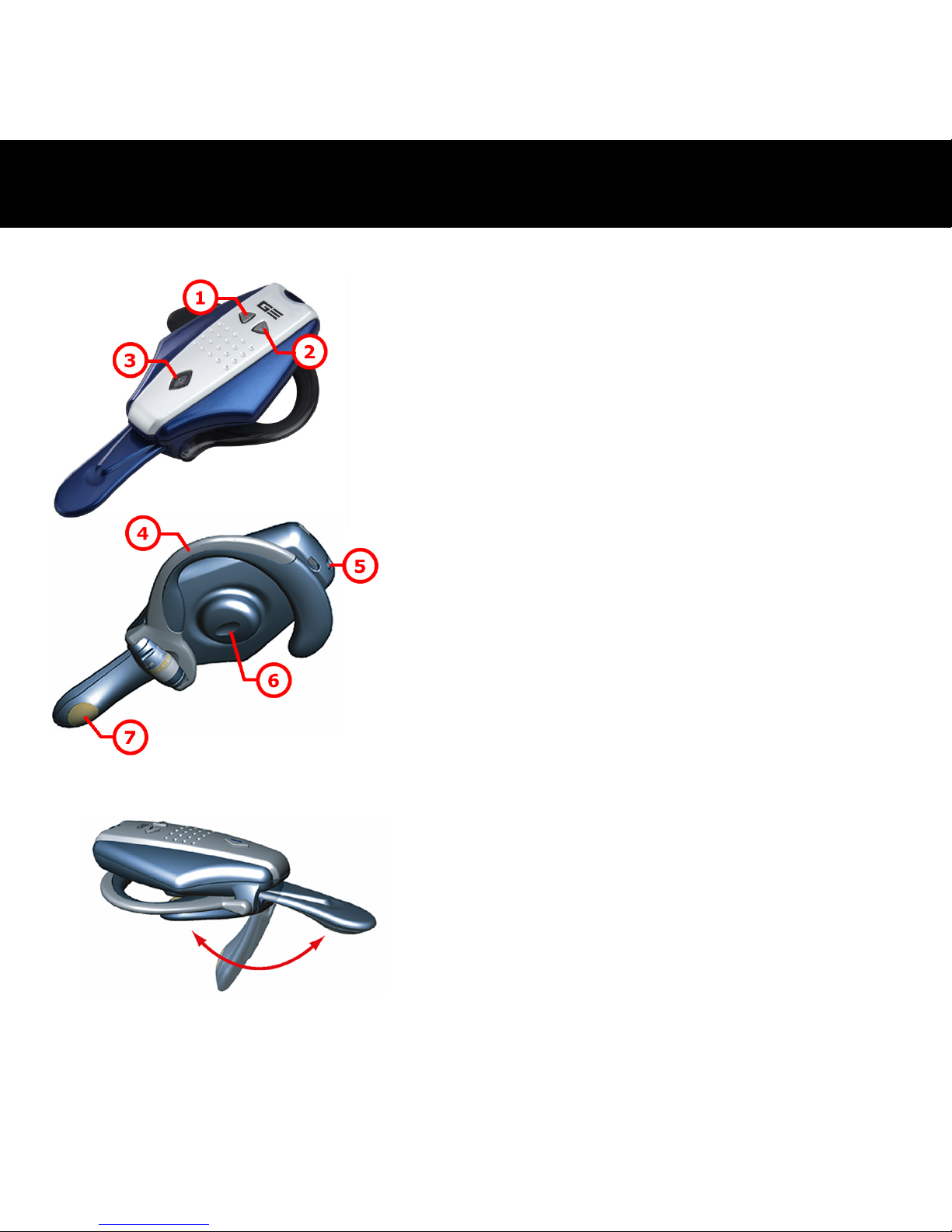
1
Taste zum Verringern der
Lautstärke
2
Taste zum Erhöhen der Lautstärke
3
Netz-/Sprech-/Paarbildungs-Taste
4
Ohrhaken
5
Gleichstromnetzanschluss
6
Lautsprecher
7
Mikrofon
Faltbares Mikrofon
Das Mikrofon kann leicht
zusammengefaltet werden, wenn Sie
den Kopfhörer nicht benutzen.
- Übersicht BT400 G3 -
Page 22
22
1.
2.
3.
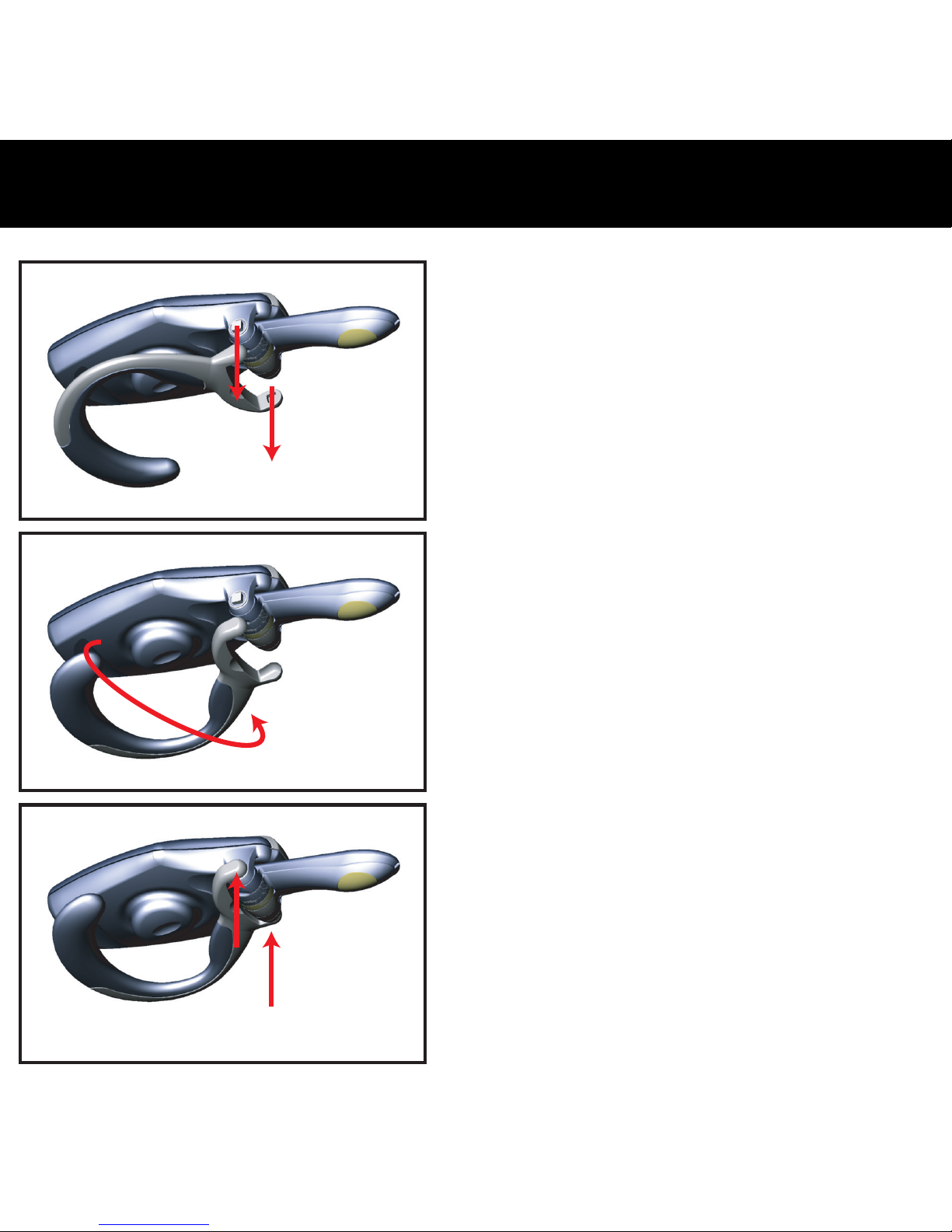
Der BT400
G3-Bluetooth-Kopfhörer kann auf
beiden Ohren getragen werden.
Zum tragen des Kopfhörers am
anderen Ohr befolgen Sie die
folgenden Anweisungen.
1. Nehmen Sie den Ohrhaken
vorsichtig vom Kopfhörer ab.
2. Wechseln Sie die Ausrichtung des
Ohrhakens; siehe Abbildung 2.
3. Bringen Sie den Ohrhaken
wieder vorsichtig an den
Kopfhörer an.
- Umdrehen des Ohrhakens -
Page 23

23
Den Kopfhörer einschalten:
Die
-Taste für 5 Sekunden gedrückt halten, bis der
Lautsprecher zwei Hohe akustische Signale abgibt. Wenn die
Stromversorgung eingeschaltet ist, wird die LED in der
-Taste blau blinken.
(Anmerkung: Der Kopfhörer wird in den Paarbildungsmodus
geschaltet, wenn die
-Taste im
Ausschaltzustand für 7 Sekunden gedrückt
wird.)
Den Kopfhörer ausschalten:
Die
-Taste für 2 Sekunden gedrückt halten, bis der
Lautsprecher zwei hohe Töne abgibt. Wenn die
Stromversorgung ausgeschaltet ist, stoppt das Blinken der
LED in der
-Taste.
- Ein-/Ausschalten der Spannung -
Page 24
24
Lassen Sie die Batterie ungefähr 2,5 Stunden aufladen, um die
vollständige Ladung für die erste Benutzung des BT400 G3 zu
gewährleisten. Die LED wechselt auf grün, wenn die Batterie
vollständig aufgeladen ist.
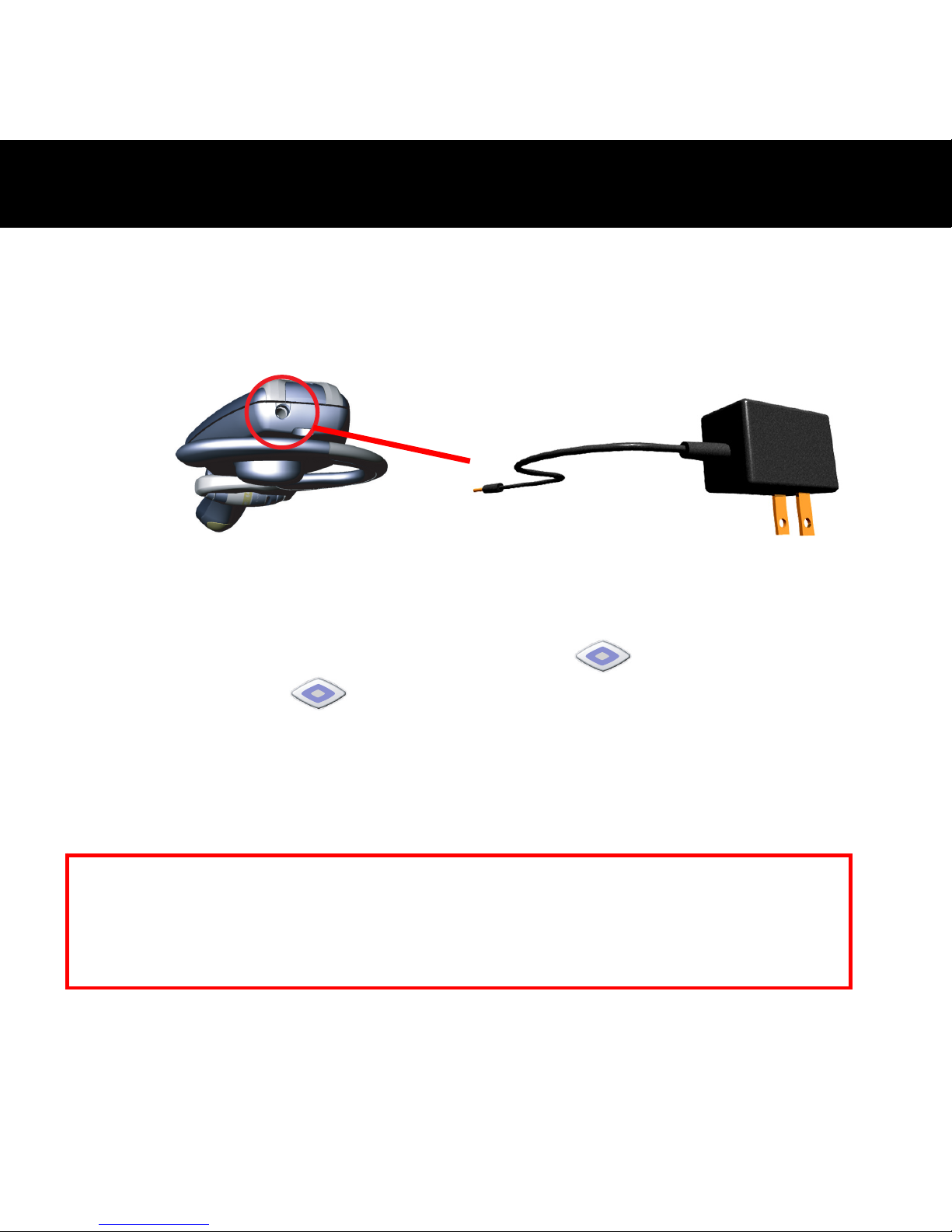
1. Den AC-Netzadapter an die Gleichstrom-Buchse auf der Rückseite
des Gerätes anschließen.
2. Den AC-Netzadapter anschließen.
3. Beim Aufladen leuchtet die LED in der
-Taste und bleibt rot.
4. Die LED in der
-Taste wechselt auf grün, nachdem die
Batterie vollständig aufgeladen wurde.
5. Den AC-Netzadapter von der Spannungsbuchse des Kopfhörers
abtrennen.
- Die Batterie aufladen -
Vorsicht: Bei einem Einsetzen eines falschen Batterietyps besteht
Explosionsgefahr. Entsorgen Sie verbrauchte Batterien bitte unbedingt
gemäß den Anweisungen.
Hinweis: Das Gerät funktioniert während dem Aufladevor
gang
nicht.
Page 25

25
Um den Bluetooth-Kopfhörer mit einem Bluetooth-Handy zu paaren
gehen Sie bitte wie folgt vor:
1. Die Spannung des Kopfhörers muss ausgeschaltet sein.
2. Die Taste für ca. 7 Sekunden gedrückt halten, bis die LED in der
-Taste blau und rot zu blinken beginnt.
3. Die
-Taste loslassen, wenn die LED blinkt. Dieser Status
bedeutet, dass das Gerät sich im Paarbildungsmodus mit einem
anderen Bluetooth-Gerät befindet.
4. Zum Starten des Paarbildungsvorgangs ist den Hinweisen des
Bluetooth-Handys zu folgen.
5. Die Anzeige des Handys wird anzeigen, dass es ein oder mehrere
Bluetooth-Geräte gefunden hat, wobei der “BT400 G3” ebenfalls
auf der Liste aufgeführt sein sollte.
6. Die Anzeige fordert Sie dann zur Eingabe eines Kennworts oder
PIN auf. Geben Sie vier Nullen “0000” ein.
7. Wenn der Paarbildungsvorgang erfolgreich abgeschlossen wurde,
schaltet die LED des Kopfhörers zum normalen Status zurück und
blinkt nur blau.
8. Die Anzeige des Handys wird anfragen, ob Sie die Bezeichnung des
Kopfhörers ändern wollen. Der “BT400 G3” kann durch jeden von
Ihnen gewählten Namen ersetzt werden.
- Paarbildung mit einem
Page 26

26
Beantworten eines Anrufs:
Nach der Paarbildung mit Ihrem Handy ist der Kopfhörer bereit,
ankommende Anrufe unabhängig vom Telefon zu empfangen. Bei
einem ankommenden Anruf klingeln das Handy und der Kopfhörer
gleichzeitig. Wenn Sie das Klingelzeichen aus dem Lautsprecher des
Kopfhörers hören, können Sie diesen ankommenden Anruf durch
Drücken der
-Taste und durch nachfolgendes übliches Sprechen
beantworten.
Beenden eines Anrufs:
Ein Anruf kann auf zwei Arten beendet werden:
1. Die
-Taste am Kopfhörer drücken.
2. Mit der Handy-Tastatur.
Telefonieren:
Es kann auf zwei Weisen telefoniert werden:
1. Mit der Handy-Tastatur:
Wie sonst auf der Handy-Tastatur die Rufnummer wählen, die
angerufen wird. Der Ton beim Wählen ist im Kopfhörer hörbar.
2. Voice Dialing (sprachgesteuertes Wählen) mit dem Kopfhörer:
Was ist Voice Dialing (sprachgesteuertes Wählen)?
Das Voice Dialing (sprachgesteuerte Wählen) ist eine Funktion, die
bei einigen Bluetooth-Handys vorhanden ist, die gestattet durch
- Den Kopfhörer benutzen -
Page 27

27
Nennung des Namens der anzurufenden Person eine Rufnummer zu
wählen. Die Stimme vergleicht Ihre Stimme mit vorherigen
Aufzeichnungen (ein Stimmkennzeichen oder Voice Tag). Falls sie
übereinstimmen, dann wählt das Handy automatische die
entsprechende Nummer. Das Voice Dialing (sprachgesteuerte
Wählen) wird jedoch nicht durch alle Bluetooth-Handys unterstützt.
Informationen hierzu finden Sie unter den technischen Daten Ihres
Handys, um festzustellen, ob diese Funktion unterstützt wird.
Sprachgesteuertes Wählen:
Der Kopfhörer verfügt über keine Tastatur, daher müssen die Anrufe
mit Hilfe des sprachgesteuerten Wählens getätigt werden. Dazu
müssen für Ihre Kontakte die Voice Tags (Stimmkennzeichen) im
Adressbuch des Handy aufgezeichnet sein. Falls Ihr Handy die
Sprachfunktion unterstützt, können Sie diese Funktion leicht mit dem
Kopfhörer anwenden. Beachten Sie bitte, dass das sprachgesteuerte
Wählen auf Ihrem Telefon ermöglicht sein muss und die Voice Tags
(Stimmkennzeichen) zuvor aufgezeichnet sein müssen (Hinweise dazu
entnehmen Sie der Anleitung zu Ihrem Telefon hinsichtlich der
Aufzeichnung und Speicherung von solchen Stimmkennzeichen).
a. Die
-Taste kurz drücken.
b. Beim Ertönen des akustischen Signals sprechen Sie kurz den
Namen der anzurufenden Person aus.
c. Die Rufnummer wird automatisch gewählt, wenn das Handy
das stimmliche Kennzeichen erkennt.
Page 28

28
Mehrfache Paarbildung:
Der BT400 G3 unterstützt eine besondere Funktion, d. h. die “mehrfache
Paarbildung”. Damit kann die Paarbildung zwischen dem Kopfhörer und
mehreren Bluetooth-Geräten ausgeführt werden, wobei jedoch der
Kopfhörer nur an einem Gerät auf einmal angeschlossen sein muss. Die
einzige Basis für die mehrfache Paarbildung besteht darin, dass das
zuletzt verbundene Gerät eine höhere Priorität besitzt als die anderen
Geräte.
Page 29

29
Beim Auftreten einer Störung beim Anschließen oder Betrieb des
Kopfhörers prüfen Sie nach, ob sich diese Störung anhand der
untenstehenden Lösungen beheben lässt.
F: Die Funktion für das sprachgesteuerte Wählen funktioniert auch
selbst nach der Paarbildung des BT400 G3 mit dem
Bluetooth-betriebenen Handy nicht?
A: Stellen Sie sicher, dass die Funktion für das sprachgesteuerte Wählen
Ihres Handys aktiviert ist. Die Anleitung zum Aktivieren der Funktion
entnehmen Sie der Benutzeranleitung des Handys.
F: Ertönen eines störenden Echos beim Sprechen über den BT400
G3?
A: Zum Beseitigen des Echos verringern Sie die Lautstärke des Handys.
F: Mit dem Bluetooth-betriebenen Handy kann keine Paarbildung
mit dem BT400 G3 hergestellt werden.
A:
1. Stellen Sie sicher, dass die Bluetooth-Funktion in Ihrem Handy
aktiviert ist.
2. Schalten Sie den BT400 G3 erneut in den Paarbildungsmodus,
falls die Zeit dieses Modus abgelaufen ist.
- Störungssuche -
Page 30
30
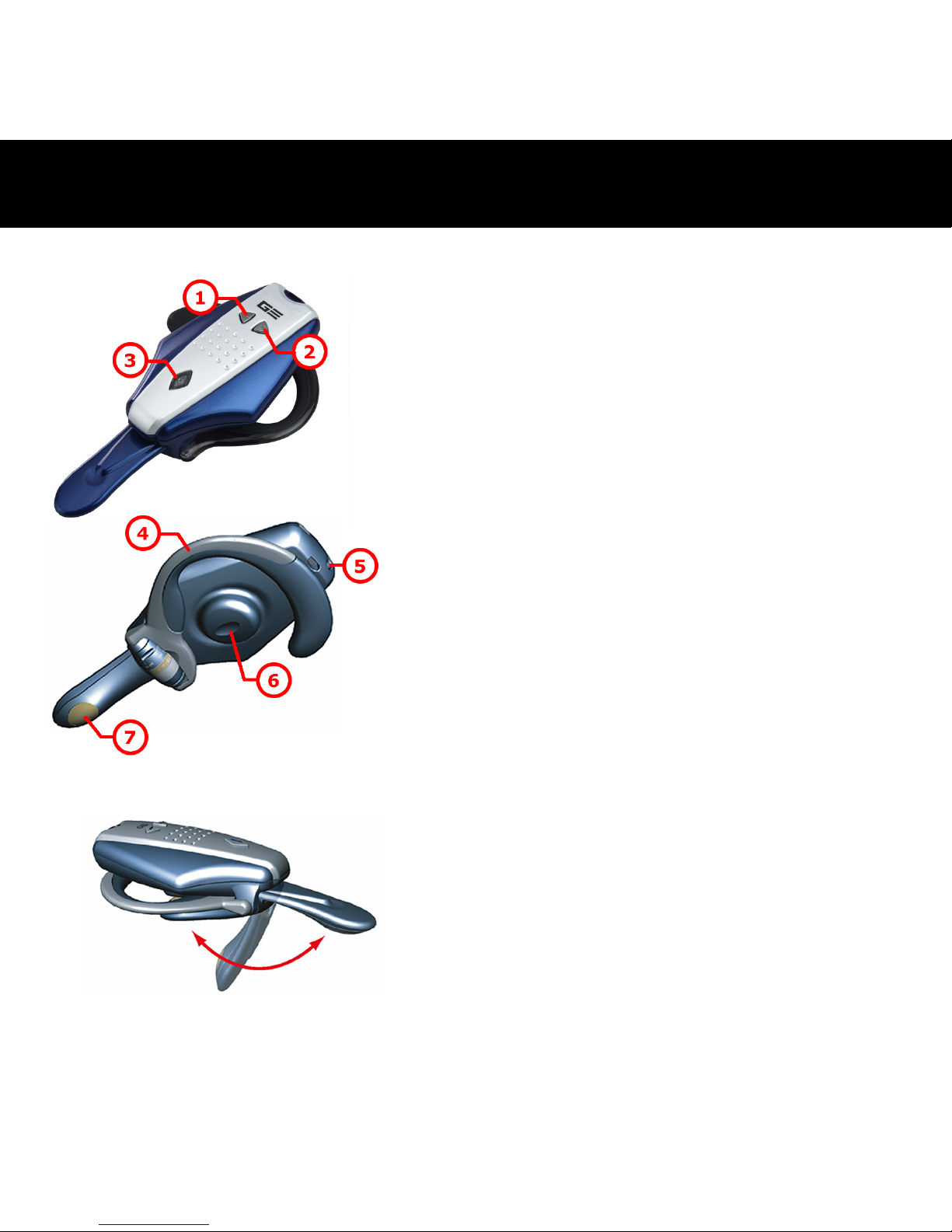
1
Tasto Volume giù
2
Tasto Volume su
3
Tasto
On-Off/Conversazione/Abbinamento
4
Gancio per l’orecchio
5
Corrente DC in entrata
6
Altoparlante
7
Microfono
Microfono ripiegabile
Il microfono si può piegare facilmente
quando non si utilizza l’auricolare.
- Presentazione del BT400 G3 -
Page 31
31
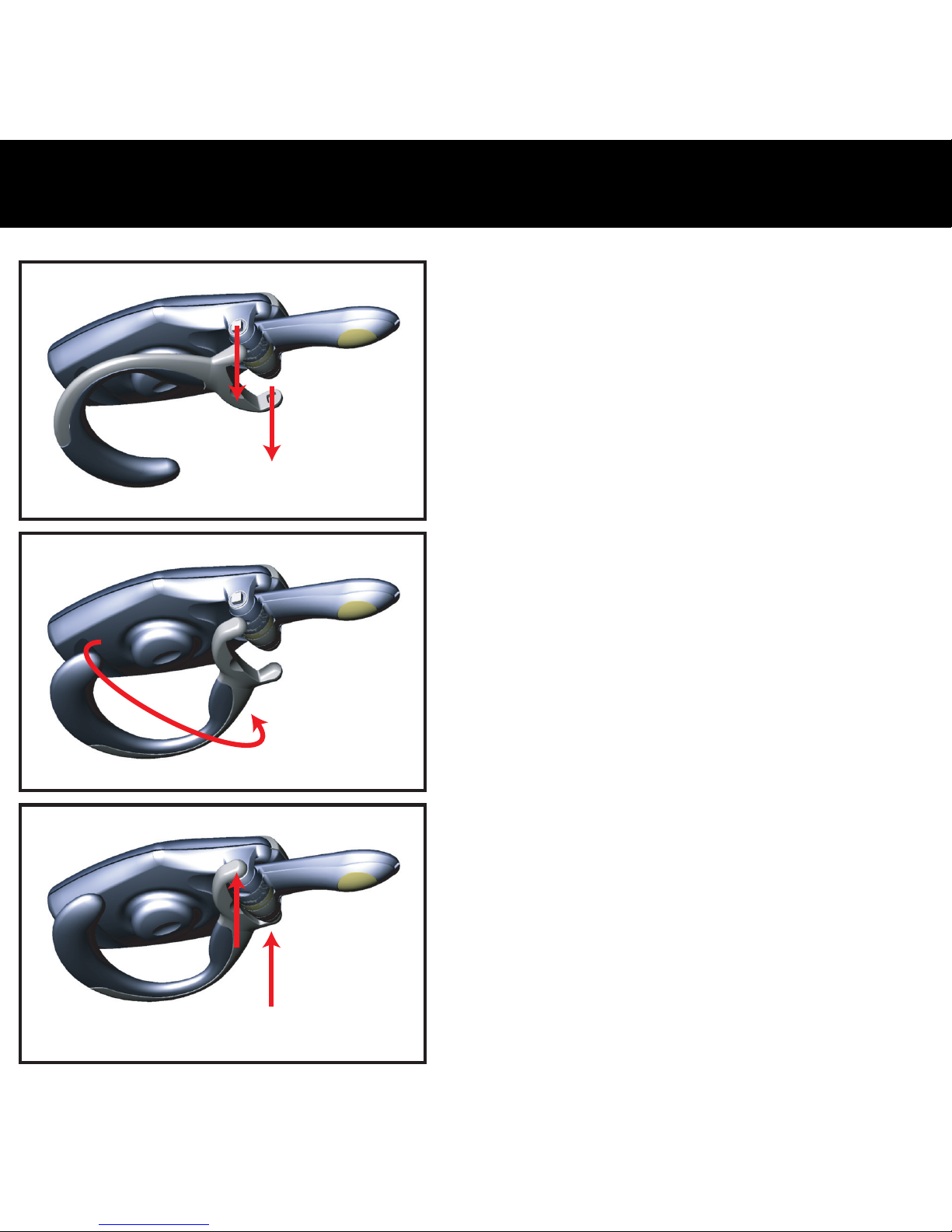
1.
2.
3.
L’auricolare BT400 G3 Bluetooth
può essere collocato sia
sull’orecchio destro che
sull’orecchio sinistro. Procedere
come illustrato sotto per adattare il
gancio da un orecchio all’altro.
1. Rimuovere con attenzione il
gancio dell'orecchio
dall’auricolare.
2. Cambiare il senso del gancio
dell'orecchio come indicato in
figura 2.
3. Ricollegare con attenzione il
gancio dell'orecchio
all’auricolare.
- Cambiare il gancio per l ‘orecchio -
Page 32

32
Per accendere l’auricolare:
Premere il tasto
e tenerlo premuto per 5 secondi,
l’altoparlante emetterà due toni alti. Quando l’auricolare è
acceso, il LED del tasto
è blu lampeggiante.
(Nota: l’auricolare entra in modalità abbinamento premendo
il tasto
e tenendolo premuto per 7 secondi a
partire dalla condizione OFF)
Per spegnere l’auricolare:
Premere il tasto
e tenerlo premuto per 2 secondi, e
l’altoparlante emetterà due toni alti. Quando l’auricolare è
spento, il LED del tasto
non lampeggia più.
- Accensione e spegnimento dell’auricolare -
Page 33
33
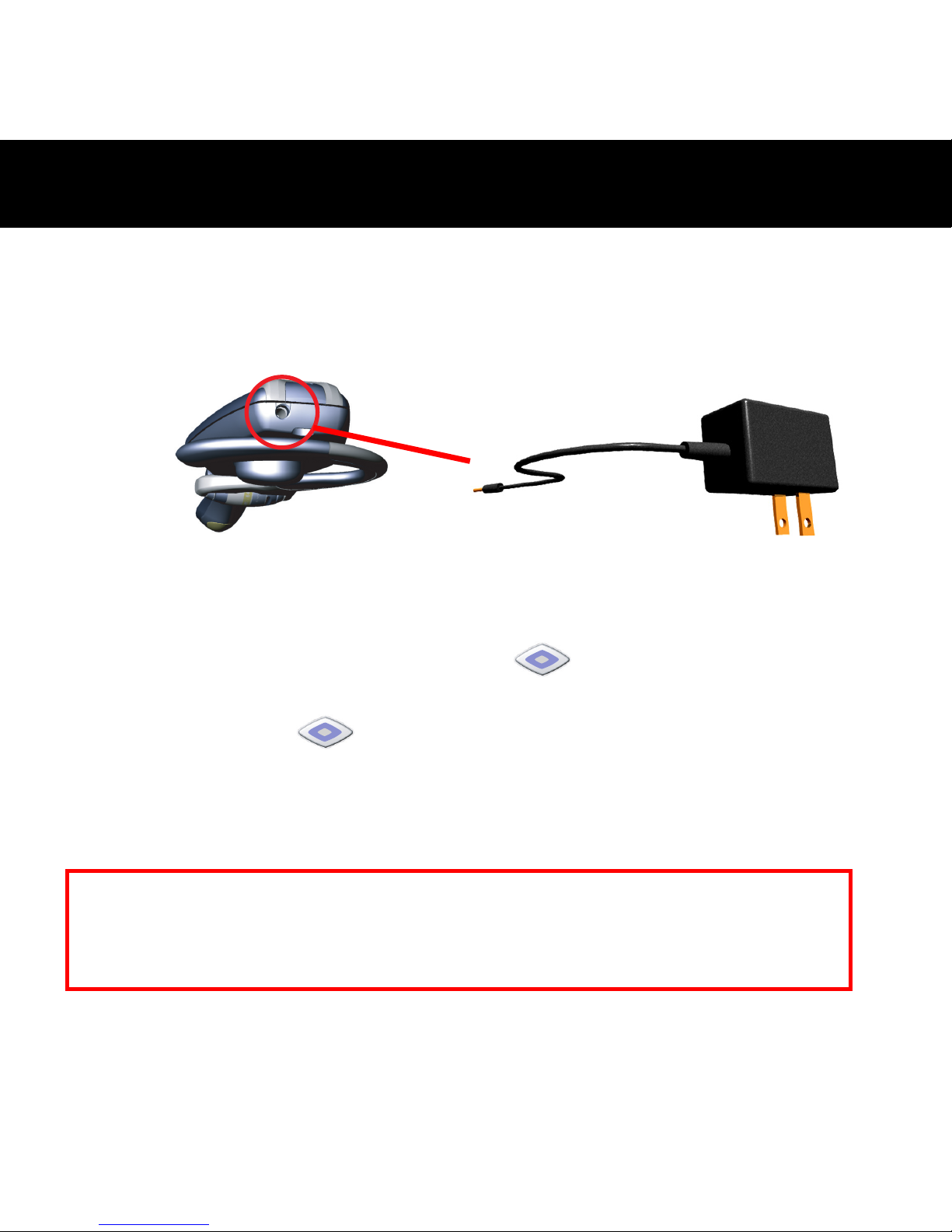
Caricare la batteria per circa 2.5 ore e mezzo per essere sicuri che la
carica sia completa la prima volta che si usa BT400 G3. Il LED
diventa verde quando la carica è completa.
1. Collegare l’adattatore di corrente AC al connettore DC situato
dietro all’auricolare.
2. Collegare l'adattatore AC
3. Durante la carica, il LED nel tasto
è acceso e di colore
rosso.
4. Il LED nel tasto
diventa verde dopo che la batteria è
completamente carica.
5. Rimuovere l'adattatore AC dalla presa di corrente AC
dell’auricolare.
- Ricarica della batteria -
Attenzione: rischio di esplosione se la batteria è sostituita con un tipo errato.
Smaltire le batterie usate secondo le istruzioni
Avviso: l’auricolare non funziona durante la ricarica.
Page 34

34
Per abbinare l’auricolare a un telefono cellulare Bluetooth, procedere
nel modo seguente:
1. Accertarsi che l’auricolare sia spento.
2. Premere il tasto
e tenerlo premuto per circa 7 secondi finché
il LED dell’auricolare lampeggia in azzurro e rosso.
3. Lasciare il tasto
quando il LED lampeggia, la condizione
indica che l’auricolare è in modalità abbinamento ed aspetta di
abbinarsi ad un altro apparecchio Bluetooth.
4. Seguire le istruzioni sull’uso per iniziare l’abbinamento del telefono
Bluetooth.
5. Il display del telefono indica che ha trovato uno o più apparecchi
Bluetooth, il “BT400 G3” deve essere compreso nella lista di
selezione per l’abbinamento.
6. Quando il display del telefono chiede una parola d’ordine o PIN,
immettere quattro zeri “0000”.
7. Quando l’abbinamento è completo con successo, il LED
dell’auricolare ritorna alla condizione normale di solo lampeggio
blu.
8. Il display del telefono può richiedere se si vuole cambiare il nome
dell’auricolare, si può sostituire “BT400 G3” con un altro nome
preferito.
- Abbinamento a un telefono -
Page 35

35
Risposta a una chiamata:
Una volta abbinato con il telefono cellulare, l’auricolare è pronto a
ricevere le chiamate senza toccare il telefono. Quando si riceve una
chiamata, sia il telefono cellulare che l’auricolare squillano insieme.
Quando si sente la suoneria con l'altoparlante dell’auricolare, si può
rispondere alla chiamata premendo il tasto
e parlando
normalmente.
Termine di una chiamata:
Si può usare uno di questi modi per terminare una chiamata:
1. Premere il tasto
dell’auricolare per terminare una chiamata.
2. Premere il tastierino del telefono per terminare una chiamata.
Effettuazione di una chiamata:
Ci sono due maniere di effettuare chiamate:
1. Con il tastierino del telefono:
In generale, immettere il numero telefonico da chiamare premendo
il tastierino del telefono. Si sentirà anche il tono di composizione
nell’auricolare.
2. Usando la Composizione Vocale dell’auricolare:
Cos’è la Composizione Vocale?
- Usare l’auricolare -
Page 36

36
Composizione vocale è una caratteristica di alcuni telefoni
Bluetooth che permette di effettuare chiamate con comando vocale
dicendo il nome della persona che si vuole chiamare. Il telefono
confronta la voce con una registrazione anteriore (chiamata voice
tag). Se le voci corrispondono, il telefono compone il numero
telefonico corrispondente. Ma non tutti i telefoni Bluetooth
supportano la composizione vocale. Consultare le specifiche del
telefono per assicurarsi che supporti questa caratteristica.
Composizione Vocale:
L’auricolare non ha una tastiera, così c’è bisogno di usare la
composizione vocale per effettuare chiamate. Per far ciò, bisogna
registrare i voice tag per i contatti nella rubrica. Se il telefono supporta
la funzione di composizione vocale, si può facilmente usare questa
caratteristica con l’auricolare. Si noti che la composizione vocale nel
telefono deve essere abilitata e i voice tag devono essere preregistrati.
(Consultare le istruzioni su registrazione e salvataggio di voice tag)
a. Premere brevemente il tasto
.
b. Dopo aver sentito un tono, dire il nome della persona da
chiamare.
c. Il numero telefonico sarà composto automaticamente sul
telefono dopo il riconoscimento corretto del voice tag.
Page 37

37
Multi-abbinamento:
BT400 G3 supporta una funzione particolare di “Multi abbinamento”.
Permette di abbinare l’auricolare con parecchi dispositivi Bluetooth, ma
collegandosi a solo un dispositivo alla volta. L'unico criterio per il multi
abbinamento è che l'ultimo dispositivo di connesso/in comunicazione ha
la priorità sugli altri.
Page 38

38
Se si incontrano difficoltà nel collegare o nell’usare l’auricolare,
controllare se il problema è elencato sotto.
Q: Perchè non posso usare la funzione di composizione vocale dopo
aver abbinato il BT400 G3 con il telefono cellulare Bluetooth?
A: Assicurarsi che la funzione di composizione vocale del telefono sia
attiva. Fare riferimento al manuale dell'utente del cellulare per attivarla.
Q: Perchè c’è un’eco fastidiosa durante l’uso del BT400 G3?
A: Ridurre il volume del telefono cellulare per eliminare l'eco.
Q: Perchè non riesco ad abbinare il mio telefono cellulare Bluetooth
con il BT400 G3?
A:
1. Assicurarsi che la funzione Bluetooth nel telefono cellulare sia
attiva.
2. Portare ancora il BT400 G3 nella modalità abbinamento se la
modalità è timeout.
- Risoluzione dei problemi -
Page 39
39
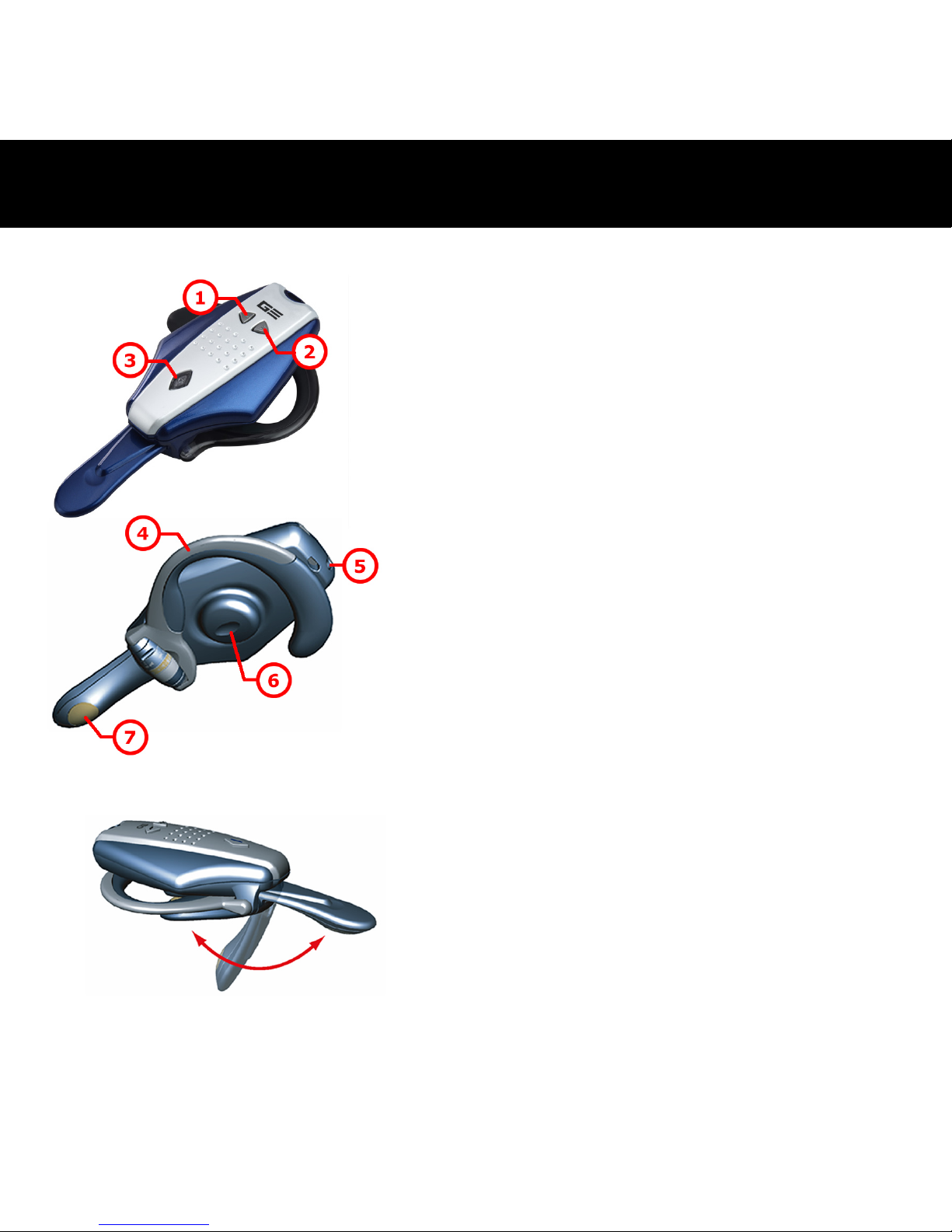
1
Кнопка Убавить громкость
2
Кнопка Прибавить громкость
3
Кнопка
Питание\Разговор\Спаривание
4
Клипса для крепления наушника
на ухе
5
Постоянный ток
6
Колонка
7
Микорофон
Складывающийся микрофон
Вы можете сложить микрофон если
вы не собираетесь пользоваться
гарнитурой.
- Обозрение BT400 G3 -
Page 40
40
1.
2.
3.
Вы можете носить гарнитуру
BT400 G3 Bluetooth как на
правом, так и на левом ухе.
Следуйте по этапной
инструкции для изменения
формы клипсы наушника,
позволяющая носить его на
другом ухе.
1. Осторожно отсоедините
клипсу наушника от
гарнитуры.
2. Измените направление
клипсы наушника как это
показано на рис 2.
3. Осторожно подсоедините
клипсу наушника к
гарнитуре.
- Изменения направления клипсы наушника -
Page 41

41
Для того чтобы включить гарнитуру:
Нажмите и держите
кнопку на протяжение 5
секунд, вы услышите два высокотольных сигнала. Когда
питание включено, LED индикатор кнопки
станеть
мигать синим цветом.
(Примечание: Если вы нажмете и будете держать
кнопку на протяжение 7 секунд, то
гарнитура из режима Выключить перейдет
в режим Спаривания)
Для того чтобы выключить головной телефон:
Нажмите и держите
кнопку на протяжение 2
секунд, вы услышите два высокотольных сигнала. При
отключение питания LED индикатор кнопки
перестанет мигать.
- Включение и Выключение гарнитуры -
Page 42
42
При использование BT400 G3 в первый раз, батарейку следует
подзаряжать в течение приблизительно 2.5 часов, чтобы быть
уверенным в ее полной подзарядке. LED индикатор загориться
зеленым цветом после того как процесс подзарядки будет
завершен.
1. Подсоедините сетевой адаптер AC к входу DC Разъему,
расположенному на задней части головного телефона.
2. Подсоедините адаптер Переменного тока
3. Во время подзарядки LED индикато
кнопки будет гореть
красным цветом.
4. После того как батарейку будет полностью подзаряжена LED
индикатор
кнопки загориться зеленым цветом.
5. Отсоедините адаптер Переменного Тока от сетевого разъема
Переменного тока гарнитуры.
- Подзарядка батарейки -
Предостережение: Существует опасность взрыва батарейки, если
батарейка была заменена не на эквивалентный тип.
Избавляться от использованных батареек следует в
соответствие с предписаниями.
Примечание: Во время подзарядки головной телефон не работает.
Page 43

43
Для осущесвления спаривания головного телефона с мобильным
телефоном Bluetooth, следуйте инструкциям привединные ниже:
1. Убедите сь что головной телефон выключен.
2. Нажмите и держите
кнопку на протяжение
приблизительно 7 секунд, пока LED индикатор головного
телефона не начнет мигать красным и голубым светом.
3. Отпустите
кнопку после того как LED индикатор начал
мигать. Данный статус указывает на то, что головной телефон
перешел в режим “Спаривания” и ждет осуществления
спаривания с другим устройтсвом Bluetooth.
4. Для осуществления процесса спаривания, следуйте
операционным инструциям для вашего телефона Bluetooth.
5. На дисплее телефона появиться сообщение, что обнажен одино
или более устройств Bluetooth. В
спискок задач должна быть
включена опция “BT400 G3”, выберите ее для осуществления
спаривания.
6. На дисплее телефона появится сообщение о необходимости
ввода пароля или PIN кода, введите четыре ноля “0000”.
7. После того как процесс Спаривания будет удачно завершен,
LED индикатор головного телефона вернется к нормальному
статусу и будет гореть синим цветом.
8. Возможно на дисплее телефона появиться сообщение о
возможности измениния именим гарнитуры. Вы можете
заменить имя ‘‘BT400 G3”, на любое другое по желанию.
- Спаривание с телефоном Bluetooth -
Page 44

44
Ответ на входячий звонок:
После завершения спаривания с вашим сотовым телефоном,
гарнитура будет готова к приему звонков и перед вами не будет
стоять обходимость отвечать на звонки в ручную. При наличие
входного звонка мобильный телефон и гарнитура синхронно
подадут звуковой сигнал. После того как вы услышите звуковой
сигнал через колонки гарнитуры вы можете ответить на
входной
звонок по средствам нажатия на кнопку
.
Завершение разговора:
Вы можете завершить разговор используя следующие способы:
1. Для завершения разговора, нажмите
кнопку на головном
телефоне.
2. Для завершения разговора нажмите кнопку прекращение
разговора на телефоне.
Набор номера:
Вы можете осуществить набор номера следующим способом:
1. По средствам нажатия на кнопки телефона:
Как основной способ, вы можете набирать номер по средствам
нажатия на кнопки телефона. Вам также будет слышан сигнал
набора в головном телефоне.
2. Применение функции гарнитуры Голосовоого Набора номера:
Что из себе представляет голосовой набор номера?
Голо с ов ой
набор номера является дополнительной опцией на
- Применение гарнитуры -
Page 45

45
некоторых телефонах Bluetooth, позволяющая вам совершать
звонок путем называния имени человека, которому вы хотите
позвонить. Телефон сравнивает ваш голос с существующей уже
записью (данная опция называется «голосовой ярлык») и если
они совпадают, то телефон осуществит автоматический набор
запрашиваемого номера. Но поскольку не все телефоны
Bluetooth поддерживают опцию голосового набора номера, вам
следует
ознакомиться со спецификациями вашего телефона,
чтобы убедиться, что ваш телефон поддерживает данную
опцию.
Голосовоого Набора номера
Гарнитура не оснащена клавиатурой, поэтому для совершение
звонка необходимо наличие функции голосового набора номера.
Для этого вам следует сделать запись голосового ярлыка для
совершения контакта по вашей адресной книге. Если ваш телефон
поддерживает голосовую функцию, то вы можете свободно
использовать данную опция с головным телефоном. Примите во
внимание то, что функция
голосового набора должна быть
активизирована и запись имени человека в опции голосового
ярлыка должна быть осуществлена соответствующим образом.
(Ознакомтесь с инструкцие по эксплуатации вашего телефона по
вопросу записи и сохранения голосового ярлыка)
a. Нажмите один раз на
кнопку.
b. После того как услышите звуковой сигнал, произнесите
имя человека, которуму вы собираетесь позвонить.
Page 46

46
c. После того как телефон признает соответствующий голосовой
ярлык, произойдет автоматический набор номера.
Мульти-спаривание:
BT400 G3 поддерживает функцию «Мульти-спаривания». Данная
функция позволяет вам осуществлять спаривание гарнитуры с
несколькими устройствами Bluetooth, но только при подключение к
одному устройству за раз. При условие что последущие
подключение будет осуществляться к устройству с более высоким
приоритетом чем предыдущее.
Page 47

47
Если при подключение или использование вашего гарнитура вы
испытываете сложности, то свертись со списков возможных причин
и их решением внизу.
В: Почему я не могу активизировать голосовую функцию после
того как я осуществил спаривание BT400 G3 со своим
мобильным телефоном поддерживающим Bluetooth?
О. Убедите сь, что на вашем сотовом телефоне активизирована
функция голосового набора номера
. Изучите инструкция по
эксплуатации вашего сотового телефона для активизации данной
функции.
В. Почему я слышу эхо при разговоре по телефону по средствам
BT400 G3?
О. Пожалуйста уберите громкость на вашем сотовом телефоне для
утсранения данного эха.
В. Почему я не могу осуществить спаривания моего сотового
телефона поддерживающего Bluetooth с BT400 G3?
O:
1. Убедите сь,
что функция Bluetooth вашего мобильного
телефона активизированна.
2. Убедите сь, что по исходу установленного временного периода,
BT400 G3 снова перейдет в режим спаривания.
Возможные проблемы и их решение -
Page 48
48
1
Botón para bajar volumen
2
Botón para subir volumen
3
Botón de
Energía/Conversación/Acoplamiento
4
Enganche auricular
5
Entrada Alimentación DC
6
Altavoz
7
Micrófono
Micrófono plegable
El micrófono puede ser plegado
fácilmente cuando no use los
auriculares.
- Visión General del BT400 G3 -
Page 49
49
1.
2.
3.
El auricular Bluetooth BT400 G3
puede ser usado en ambas orejas.
Por favor siga los pasos de abajo
para cambiar el gancho para la
oreja para poder usarlo en la otra
oreja.
1. Quite el gancho para la oreja del
auricular con cuidado.
2. Cambie la dirección del gancho
para la oreja como se muestra
en el diagrama 2.
3. Vuelva a colocar el gancho en el
auricular con cuidado.
- Cambiando el Enganche Auricular -
Page 50

50
Para desconectar sus auriculares ON:
Pulsar y mantener pulsado el botón
por 5 segundos, y
entonces el altavoz emitirá dos tonos altos. Cuando la energía
está ENCENDIDA, el LED del botón
empieza a
parpadear en azul.
(Nota: Los auriculares entrarán en modo de acoplamiento si
usted pulsar y mantener pulsado el botón
por 7
segundos a partir del estado desconectado
APAGADO)
Para desconectar sus auriculares OFF:
Pulsar y mantener pulsado el botón
por 2 segundos, y
entonces el altavoz emitirá dos tonos altos. Cuando la energía
está apagada, el LED del botón
para de destellar.
-
Conectando/Desconectando los auriculares
-
Page 51
51
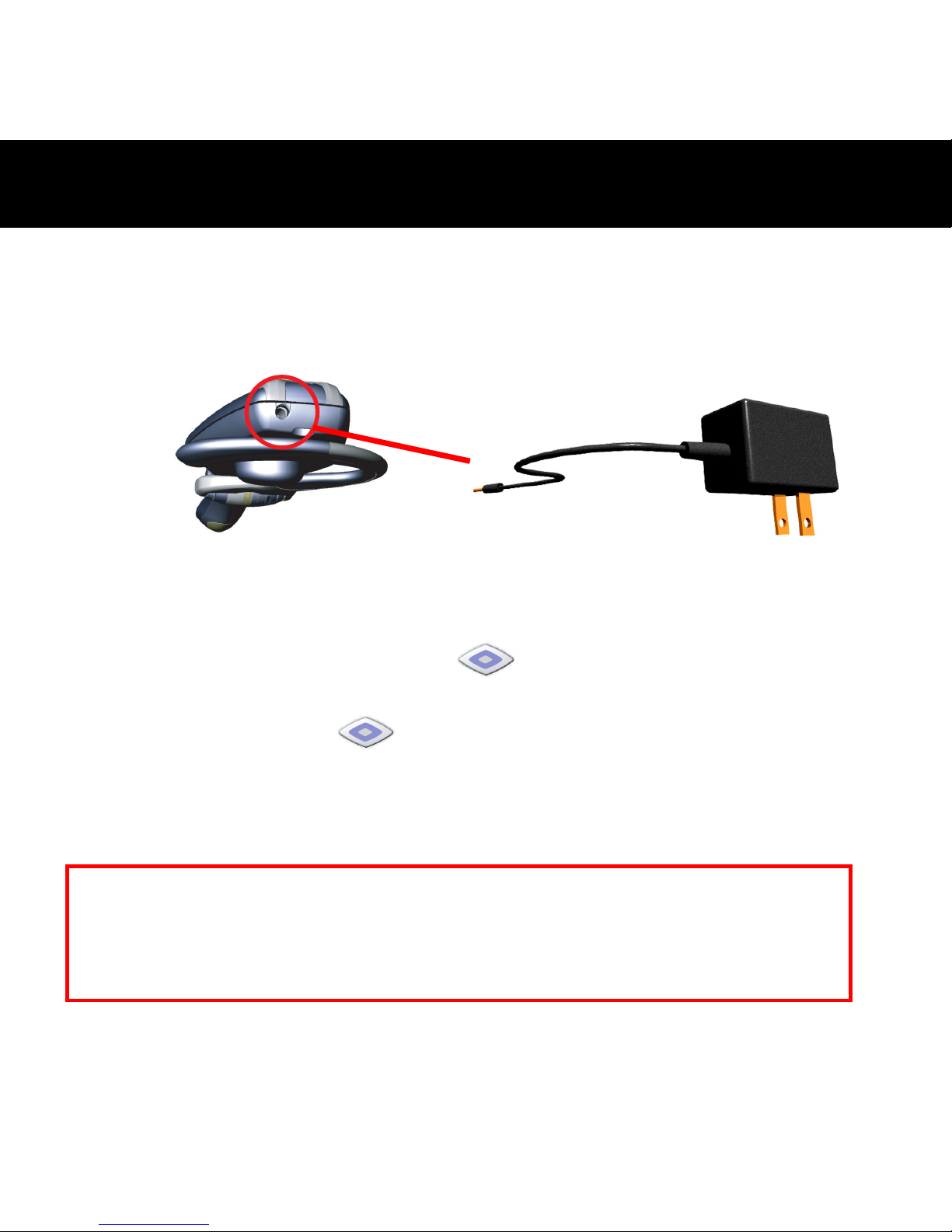
Por favor cargue la batería durante aproximadamente 2.5 horas para
asegurarse de que está completamente llena al usar por primera vez el
BT400 G3. El led pasara a ponerse verde cuando la energía esté
totalmente llena.
1. Enchufe el adaptador de energía CA en el enchufe CC situado
detrás de los auriculares.
2. Enchufe el adaptador de corriente CA
3. Al cargar, el LED en el botón
está encendido y permanece
rojo.
4. El LED en el botón
cambia y se pone verde cuando la
batería esté totalmente cargada.
5. Quite el adaptador AC del enchufe de energía AC de los
auriculares.
- Cargando la batería -
Cuidado: Hay riesgo de explosión si la batería es reemplazada por otra de tipo
incorrecto. Deshágase de las baterías usadas de acuerdo a las
instrucciones.
Nota: El auricular no funciona mientras se está cargando.
Page 52

52
Proceder como sigue la instrucción abajo para acoplar los auriculares
con teléfono móvil Bluetooth:
1. Asegurarse de que los auriculares están desconectados OFF.
2. Pulsar y mantener pulsado el botón
por aproximadamente 7
segundos hasta parpadear el LED de los auriculares en azul y rojo.
3. Suelte el botón
cuando el LED está parpadeando, el estado
indica que los auriculares están en modo de acoplamiento y
esperando acoplar con un otro aparato Bluetooth.
4. Siga las instrucciones de funcionamiento para su teléfono Bluetooth
empezar el proceso de acoplamiento.
5. La visualización del teléfono indica que encontró uno o más
aparatos Bluetooth, el “BT400 G3” debe ser incluido en la lista, por
favor selecciónelo para el acoplamiento.
6. La visualización del teléfono pide una contraseña de acoplamiento
o PIN, por favor entre cuatro ceros “0000”.
7. Si el proceso de acoplamiento termina con éxito, el LED de los
auriculares se vuelve al estado normal parpadeando solamente en
azul.
8. Puede que la pantalla del teléfono le pregunte si quiere cambiar el
nombre del auricular; puede reemplazar el “BT400 G3” con
cualquier nombre que prefiera.
- Acoplando a un teléfono Bluetooth -
Page 53

53
Contestando una llamada:
Después de ser emparejado con su móvil, el auricular está listo para
recibir llamadas entrantes sin usar el teléfono. Cuando haya una
llamada entrante, tanto el móvil como el auricular sonarán
simultaneamente. Al escuchar el timbre a través del altavoz del
auricular puede responder a la llamada entrante presionando el botón
y hablando con normalidad.
Finalizando una llamada:
Usted puede usar cualquier una de esas maneras para finalizar una
llamada:
1. Pulsar el botón
de los auriculares para finalizar la llamada.
2. Pulsar el teclado numérico para finalizar una llamada.
Haciendo una llamada:
Ha dos maneras de hacer llamadas:
1. Usando teclado numérico del teléfono:
Como uso general, marcar el número telefónico que usted desea
llamar apretando el teclado numérico del teléfono. Usted puede oír
también los tonos de marcación a través de los auriculares.
2. Usando marcación de números por voz a través de los auriculares:
¿Qué es marcación por voz?
- Usar el auricular -
Page 54

54
La marcación por voz es una característica en algunos teléfonos
Bluetooth que le permite hacer llamadas al decir el nombre de la
persona que quiera llamar. El teléfono compara su voz con sus
grabaciones anteriores (llamados voice tag). Si coinciden entonces
el teléfono marcará automaticamente el número telefónico
correspondiente. Pero no todos los teléfonos Bluetooth soportan
marcación por voz, por favor consulta las especificaciones para
asegurarse de que su teléfono soporta esta característica.
Marcación por Voz:
El auricular no tiene un teclado por lo tanto es necesario usar la
marcación por voz para hacer llamadas. Para ello tiene que grabar
etiquetas de nombre para los contactos en la libreta de direcciónes de
su móvil. Si su móvil soporta la función de voz, puede usar esta
característica fácilmente con el auricular. Tenga en cuenta que la
marcación por voz en su móvil debe ser habilitada y las etiquetas de
voz deben ser grabadas previamente. (Por favor consulte las
instrucciones de su móvil sobre marcación de voz y almacenaje de
etiquetas de voz.)
a. Pulsar brevemente el botón
una vez.
b. Después de oír el tono, diga el nombre de la persona que usted
desea llamar.
c. El número telefónico se marcará automaticamente por teléfono
después de reconocer el voice tag correcto.
Page 55

55
Multi-Emparejamiento:
BT400 G3 soporta una función particular de “Multi-Emparejamiento”.
Permite al auricular ser emparejado con varios dispositivos Bluetooth
pero ser conectado sólo a un dispositivo cada vez. La única regla para el
multi-emparejamiento es que el último disposivito
conectado/comunicado tiene más prioridad que los demás.
Page 56

56
Si tiene dificultades al conectar o utilizar su auricular, compruebe si el
problema está listado abajo:
P: Por qué no puedo usar la función de marcación por voz después de
emparejar el BT400 G3 con my teléfono móvil con Bluetooth
habilitado?
R: Por favor asegúrese de que la función de marcación por voz en su
móvil esté activada. Por favor consulte el manual del usuario de su
móvil para habilitar esta función.
P: Por qué hay un eco molesto cuando hablo usando el BT400 G3?
R: Por favor reduzca el volumen de su teléfono móvil para eliminar el eco.
P: Por qué no puede mi teléfono móvil con Bluetooth habilitado
emparejarse con el BT400 G3?
R:
1. Por favor asegúrese de que la función Bluetooth en su teléfono
móvil esté activa.
2. Por favor haga que el BT400 G3 vaya al modo emparejamiento si
se ha salido de este modo.
- Solución de Problemas -
Page 57

57
Product Name BT400 G3 Bluetooth Headset
General Radio 2.4 ~ 2.480 GHz ISM
Bluetooth Specification Compliant to Bluetooth specification v1.1
Spread Spectrum FHSS (Frequency Hopping Spread Spectrum)
Operating Range Class II device; Max. 10 meters in open space
Bluetooth Profile Headset profile, Handsfree profile
Antenna Type Chip antenna
Talking Time Up to 10 hours
Standby Time Up to 350 hours
Input Power DC 5V / 500mA
Battery Type Rechargeable Li-Polymer battery; 3.7V / 160mA
Dimension 92mm(L) x 50mm(W) x 26mm(H)
Weight 26g
- Specification -
Page 58
58
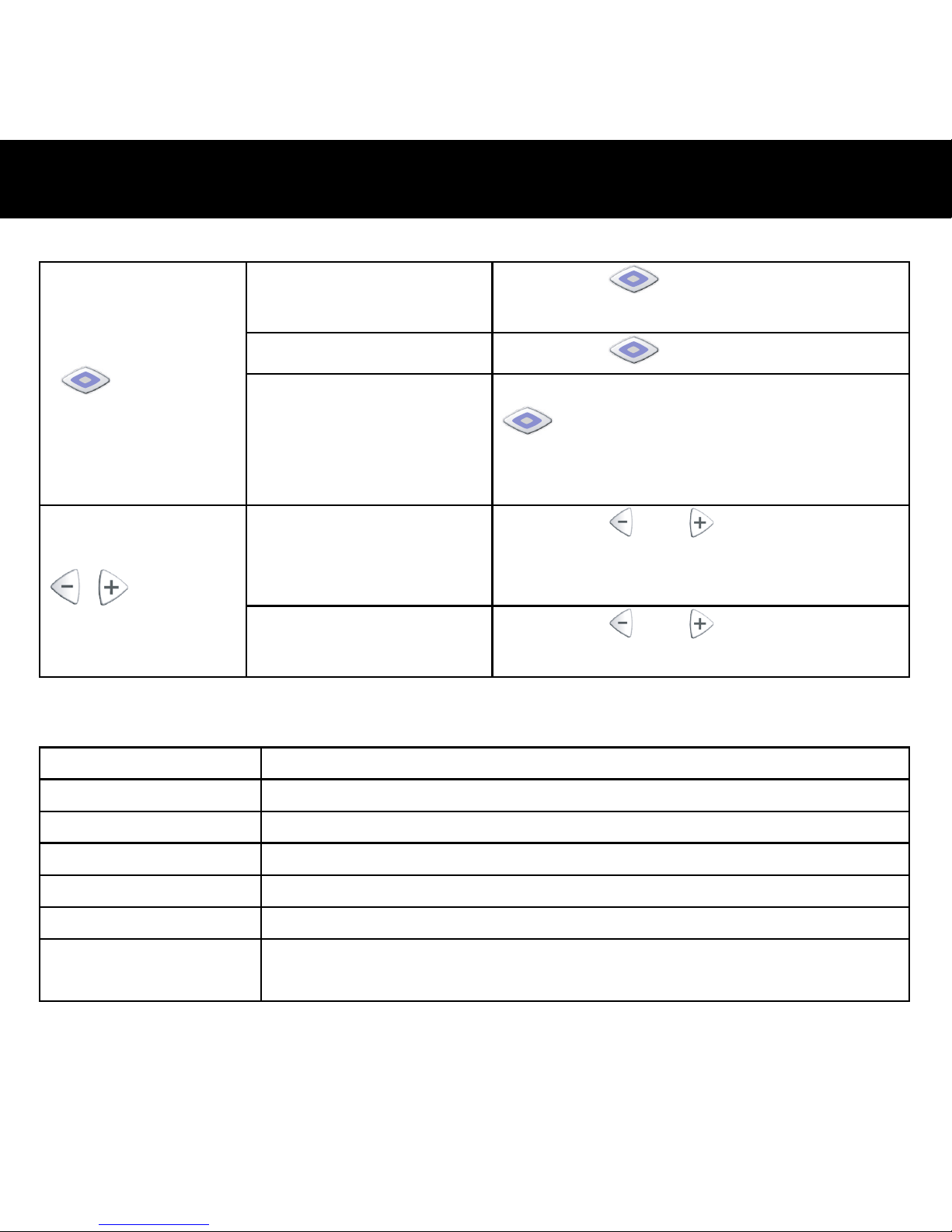
Button Function
Turn ON/OFF
Press the
button for 3 seconds
until the blue LED flashes 5 times
Answer/End calls
Press the
button once
button
Pairing
When the headset is off, press the
button to turn on and keep it
pressed for about 7 seconds until the
LED flashes blue and red alternately.
Volume control
Press the
or button
repeatedly until you reach your
desired level.
/ button
Mute/Unmute
Press the
or button for about
2 seconds.
Audio Tone
Turn On 2 high tones
Turn Off 2 low tones
Pairing mode 2 high tones
Incoming call A ring tone at 2 seconds interval
Mute Repeated 2 low beeps at a 3 seconds interval
Unmute A single beep
Battery low Starts when the talk time is left about 3~5 minutes. At a 16
seconds interval.
- Appendix I -
Page 59

59
FCC INFORMATION
The Federal Communication Commission Radio Frequency Interference Statement includes
the following paragraph:
The equipment has been tested and found to comply with the limits for a Class B Digital
Device, pursuant to part 15 of the FCC Rules. These limits are designed to provide reasonable
protection against harmful interference in a residential installation. This equipment generates,
uses and can radiate radio frequency energy and, if not installed and used in accordance with
the instruction, may cause harmful interference to radio communication. However, there is no
grantee that interference will not occur in a particular installation. If this equipment does cause
harmful interference to radio or television reception, which can be determined by turning the
equipment off and on, the user is encouraged to try to correct the interference by one or more
of the following measures:
-- Reorient or relocate the receiving antenna.
-- Increase the separation between the equipment and receiver.
-- Connect the equipment into an outlet on a circuit different from that to which the receiver is
connected.
-- Consult the dealer or an experienced radio/TV technician for help.
15.21You are cautioned that changes or modifications not expressly approved by the part
responsible for compliance could void the user's authority to operate the equipment.
- Appendix II -
Page 60

 Loading...