

Page 1
HDBT In
HDMI In
IR Out L/R In
Tx
Rx
HDBT In
HDMI In
IR Out L/R In
Tx
Rx
HDMI In
IR Out L/R In
Tx
Rx
HDMI In
IR Out L/R In
Tx
Rx
HDMI In
IR Out L/R In
Tx
Rx
HDMI In
IR Out L/R In
Tx
Rx
HDMI In
IR Out L/R In
Tx
Rx
HDMI In
IR Out L/R In
Tx
Rx
HDBT Out
HDMI Out
IR In
L/R Out
Coax. Out
1 2
3
4 5 6 7 8
IN
OUT
1 2 3 4 5 6 7
8
HDBT Out
HDMI Out
IR In
L/R Out
Coax. Out
HDBT Out
HDMI Out
IR In
L/R Out
Coax. Out
HDBT Out
HDMI Out
IR In
L/R Out
Coax. Out
HDBT Out
HDMI Out
IR In
L/R Out
Coax. Out
HDBT Out
HDMI Out
IR In
L/R Out
Coax. Out
HDBT Out
HDMI Out
IR In
L/R Out
Coax. Out
HDBT Out
HDMI Out
IR In
L/R Out
Coax. Out
IR In
IR Out
Global
TCP/IP
Ethernet
Tx
Rx
On/Off
In
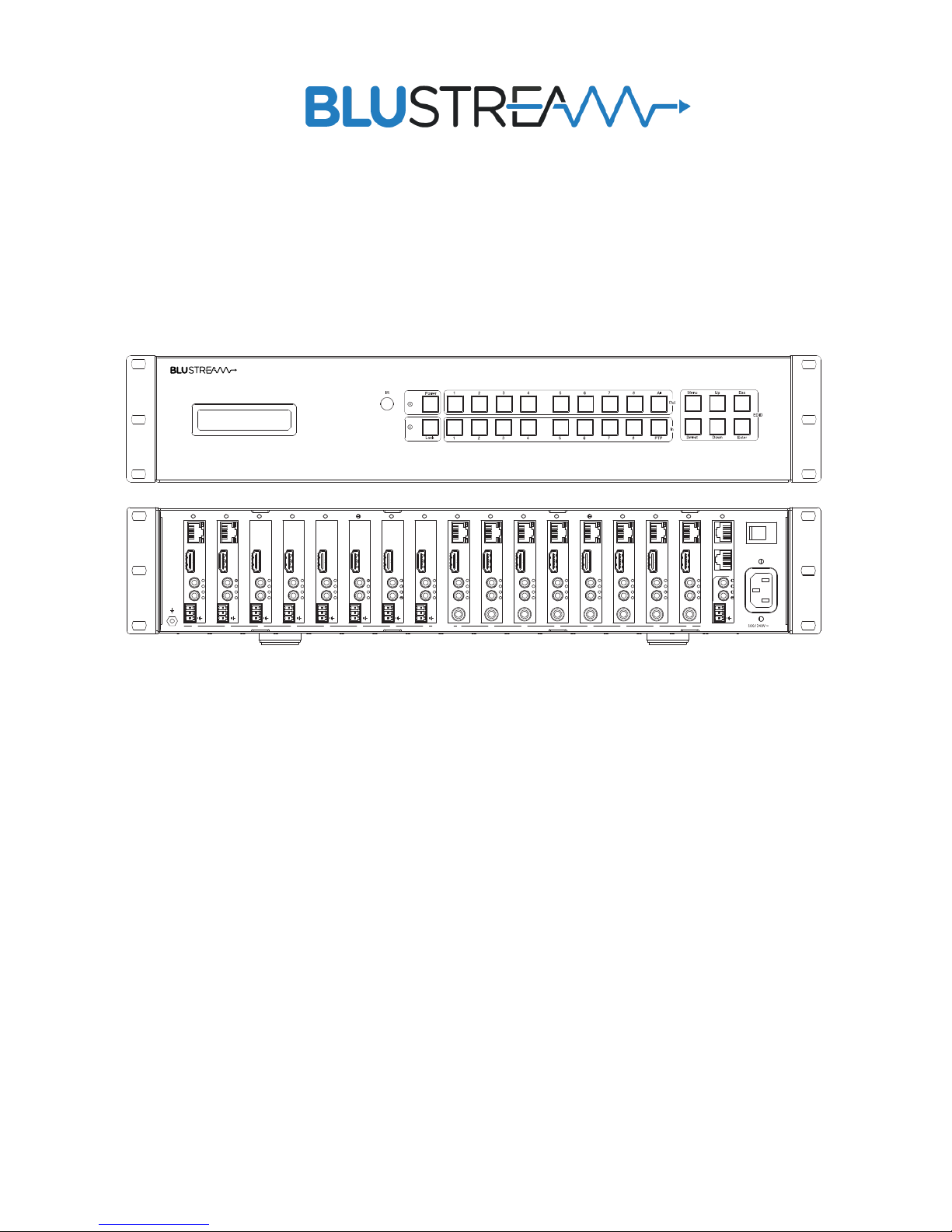
PLA88ARC V2
PLA88L V2
PLA66ARC V2
PLA66L V2
User Manual
PLATINUM MATRIX SOLUTIONS
Page 2

PLATINUM SERIES V2 USER MANUAL
02
www.blustream.co.uk
Contents
Surge protection device
recommended
This product contains sensitive electrical
components that may be damaged by
electrical spikes, surges, electric shock,
lightning strikes, etc. Use of surge protec tio n
systems is highly recommended in order
to protect and extend the life of your
equipment.
Safety And
Performance Notice
The transmission distances of HDMI
over UTP cables are measured using
TE CONNECTIVITY 1427071-6
EIA/TIA-568-B termination (T568B)
of cables is recommended for optimal
performance.
To minimize interference of the unshielded
twisted pairs in the CAT5e/6/6 a cable do
not run the HDBaseT / CAT5e/6/6a cabling
with or in close parallel proximity to mains
power cables.
Do not substitute or use any other power
supply other than the enclosed unit, or a
Blustream approved replacement.
Do not disassemble either the Transmitter or
Receiver units for any reason. Doing so will
void the manufacturer’s warranty.
Thank you for purchasing
this product.
For optimum performance and safety, please
read these instructions carefully before
connecting, operating or adjusting this
product. Please keep this manual for future
reference.
Introduction 03
Features 03
Panel Descriptions 04
Matrix Main Communication Board 05
Matrix HDBaseT Receiver Options 06
Matrix HDBaseT Transmitter Options 07
Matrix Front Panel Control 08
EDID Control 09
Audio Breakout 09
Terminating HDBaseT Cat Cable 10
Understanding the Matrix/Receiver Status Lights 10
Infrared Distribution 11
Infrared Remote Control 12
Application Diagram 13
Specifications 14
Package Contents 14
Maintenance 14
Infrared Commands 15-16
RS-232 and Telnet Commands 17-19
Certifications 20
Page 3

03
contact [email protected] / [email protected]
PLATINUM SERIES V2 USER MANUAL
Our Platinum series of HDBaseT Matrix products oer the very best performance
and flexibility for the custom installer. The Platinum Matrix V2 is a 4K HDCP 2.2
compliant Matrix, transmitting HDMI, Bi-directional IR, RS-232 and PoH (PoE) up
to lengths of 100m over a single CAT cable. The Matrix also provides advanced
features including independent audio routing, Audio Return Channel (ARC),
simultaneous HDBaseT/HDMI outputs, HDBaseT inputs and LAN Serving. The
Matrix can be controlled and configured using the Blustream soware or Web GUI, allowing the user to define audio channels, designate EDID presets and insert
audio delays on outputs to correct any lip sync issues within the system.
Introduction
• 6-8x HDMI inputs which can be independently routed to 6-8x HDBaseT/HDMI video outputs (quantity dependent on
model)
• Simultaneous HDBaseT™ and HDMI outputs to allow connection to dual displays per zone
• Supports 4K UHD video (3840 x 2160 @30Hz 4:4:4, 4096 x 2160 @24Hz 4:4:4, and 4K @60Hz 4:2:0)
• Supports distances of up to 70m @ 1080p & 40m @ 4K on a single CAT cable
• 1-2x HDBaseT inputs allowing sources to be located remotely using Blustream HDBaseT transmitters (quantity
dependent on model)
• Supports POH (Power over HDBaseT) to power Blustream transmitters and receivers - no local power supplies
required
• Integrated 24 Input x 16 output Audio Matrix (16 Input x 12 output on PLA66 models)
• Analogue audio L/R embedding onto HDMI outputs with audio delay adjustment
• HDMI audio de-embedding to analog audio L/R + digital coaxial outputs. Please note: Input must be PCM 2CH audio
as the Matrix does not down-mix 5.1ch audio signals
• Bi-directional RS-232 and IR from all input and output locations (with compatible Blustream 5V emitters and
receivers)
• Web interface module for control & configuration of the matrix
• Advanced EDID management
• HDCP 2.2 Compliant
PLA**L-V2 Features:
• Supports distances of up to 100m @ 1080p & 70m @ 4K on a single CAT cable
• LAN serving (Ethernet Switch) with compatible HEX100ARC-RX Blustream HDBaseT receivers
• Audio Return Channel (ARC) via HDMI or Optical with compatible HEX100ARC-RX Blustream HDBaseT receivers
PLA**ARC-V2 Additional Features:
Page 4
PLATINUM SERIES V2 USER MANUAL
04
www.blustream.co.uk
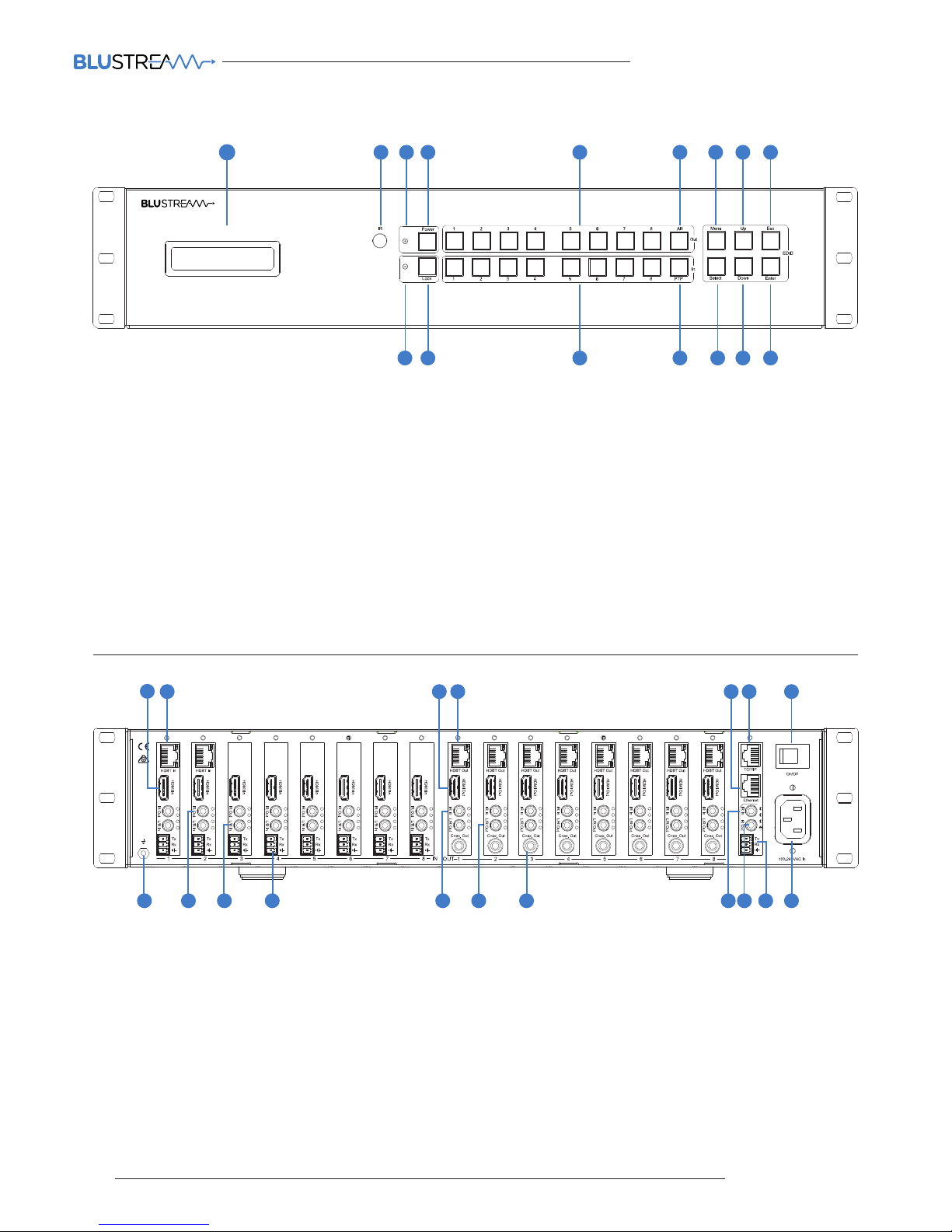
1 LCD display – Show the status of input
& output selection and EDID info.
2 IR receiver window – Receives IR from a
hand held remote control or processor.
3 Power LED indicator - Indicates the
power status of the matrix.
4 Power button – Press to toggle power
of the matrix on/o.
5 HDMI output selection button 1 to 8 –
Press to select the output from 1 to 8.
6 All button for HDMI outputs – Press to
select all of the outputs from 1 to 8.
7 Menu button – Press to enter EDID
setup.
8 Up – Press to change up through the
adjustable values.
9 ESC - Press to quit EDID set up menu.
q Lock LED indicator - Indicate the status
of the key lock.
w Lock button – Press to lock the buttons
on the front panel (Press and hold for 2
seconds).
e HDMI input selection button 1 to 8 –
Press to select the input from 1 to 8.
r PTP button-Press to mirror all inputs
and outputs (e.g. output 1 to input 1,
output 2 to input 2 and so on).
t Select – Press to select an EDID
parameter to change. Selected
segment will blink.
y Down – Press to change down through
the adjustable values.
u Enter – Press to set EDID to specified
INPUT or copy EDID from specified
OUTPUT to specified INPUT.
1 2
10 11 12 13 14 15 16
3
4
5
6
7
8 9
Rear Panel (PLA88xx model shown)
1 HDMI inputs 1 to 6/8 – Connect HDMI
sources.
2 HDBT inputs 1 & 2 – Connect remote
HDBT transmitter.
3 HDMI outputs 1 to 6/8 – Output for
displays.
4 HDBT outputs 1 to 6/8 – Output for
displays.
5 Ethernet-embedded for L AN serving to
all connected HDBT transmitters and
receivers (ARC models only).
6 RJ45 - TCP/IP control.
7 Power switch.
8 GND – Ground connection.
9 IR outputs 1 to 6/8 – 3.5mm mono
jack for routed IR emitter outputs for
discrete source control.
q L/R stereo inputs 1 to 6/8 – 3.5mm
stereo jack.
w RS-232 port – Connect to this port
for the control of the matrix from a
computer or control processor.
e IR Inputs 1 to 6/8 – 3.5mm stereo
jack for integration with a control
proce ssor.
r L/R stereo outputs 1 to 6/8 – 3.5mm
stereo jack.
t Coaxial Digital outputs 1 to 6/8 – RCA
connector.
y Global IR Input – 3.5mm stereo jack.
u Global IR Output – 3.5mm mono jack.
i RS-232 Port – 3-pin phoenix terminal.
Front Panel
1
8 9 12 1510 1311 14 16 17 18
2 3 5 6 74
Panel Descriptions
Page 5
05
contact [email protected] / [email protected]
PLATINUM SERIES V2 USER MANUAL
Matrix Main Communication Board
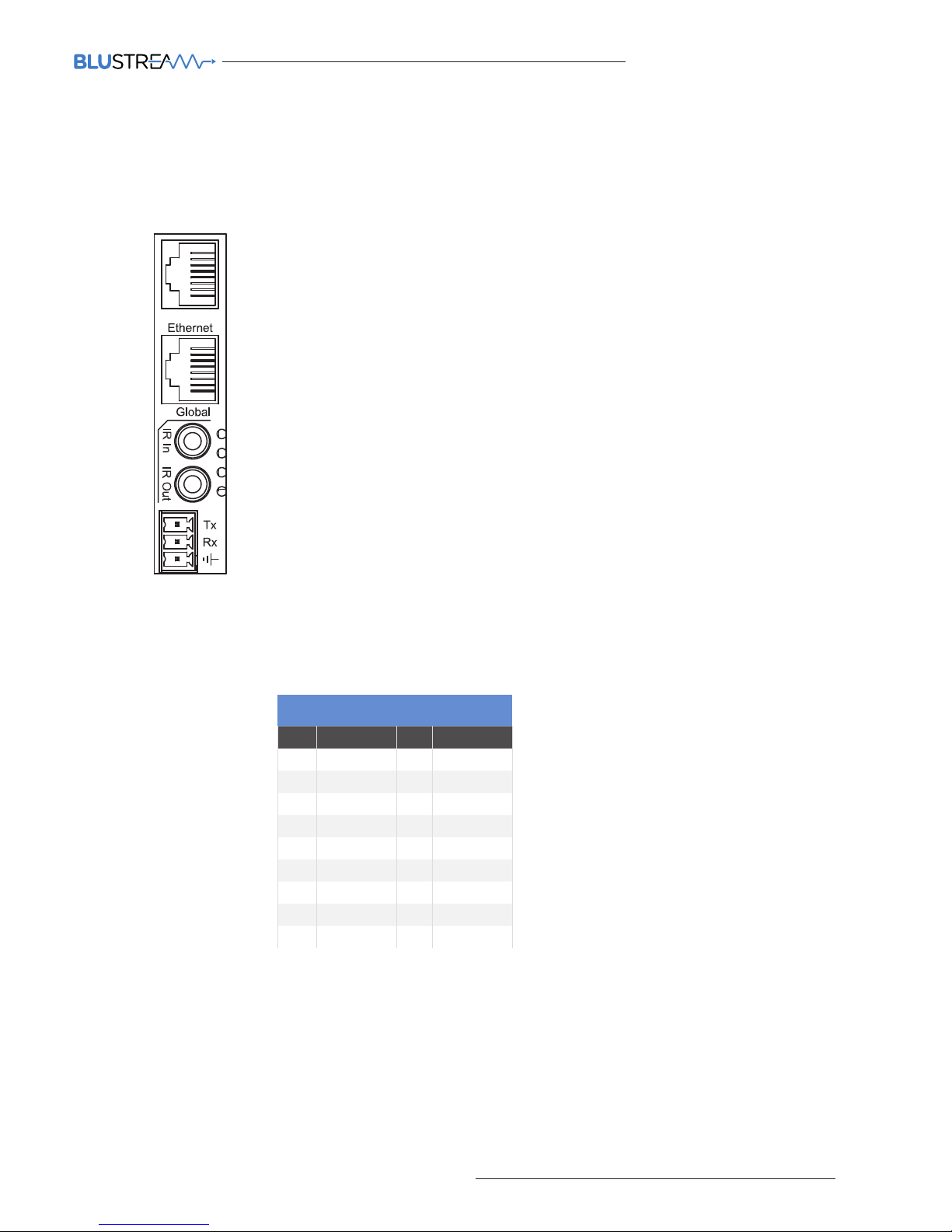
The Matrix main communication board is located on the rear panel and has the following connections:-
Connections
A. TCP/IP – For control of Matrix (RJ45 Connector)
B. Ethernet – Matrix includes a 10/100 Ethernet switch (RJ45 Connector) - ARC-V2 verison
C. Global IR Input 3.5mm stereo jack
D. Global IR Output 3.5mm mono jack
E. RS-232 2-way (Phoenix Connector) for 3rd party control of Matrix.
TCP/IP
The Blustream Matrix can be controlled via TCP/IP.
For full list of protocols please see ‘RS-232 & Telnet Commands’ located at the rear of
this manual.
A ‘Straight-through’ RJ45 patch lead should be used
RS-232 2-Way
The Blustream matrix can be controlled via supplied 3-pin Phoenix to 9-pin serial
cable.
For full list of 3rd party control protocols please see ‘RS-232 & Telnet Commands’
located at the rear of this manual.
Details of RS-232 pin assignment and communication are below:
Baud Rate: 57600 bps
Data Bit: 8-bit
Parity: None
Stop Bit: 1-bit
Flow Control: None
A
B
C
D
E
PLA-XX V2 REMOTE CONTROL
CONSOLE
PIN Assignment PIN Assignment
1 NC 1 NC
2 Tx 2 Rx
3 Rx 3 Tx
4 NC 4 NC
5 GND 5 GND
6 NC 6 NC
7 NC 7 NC
8 NC 8 NC
9 NC 9 NC
TCP/IP
Page 6
PLATINUM SERIES V2 USER MANUAL
06
www.blustream.co.uk
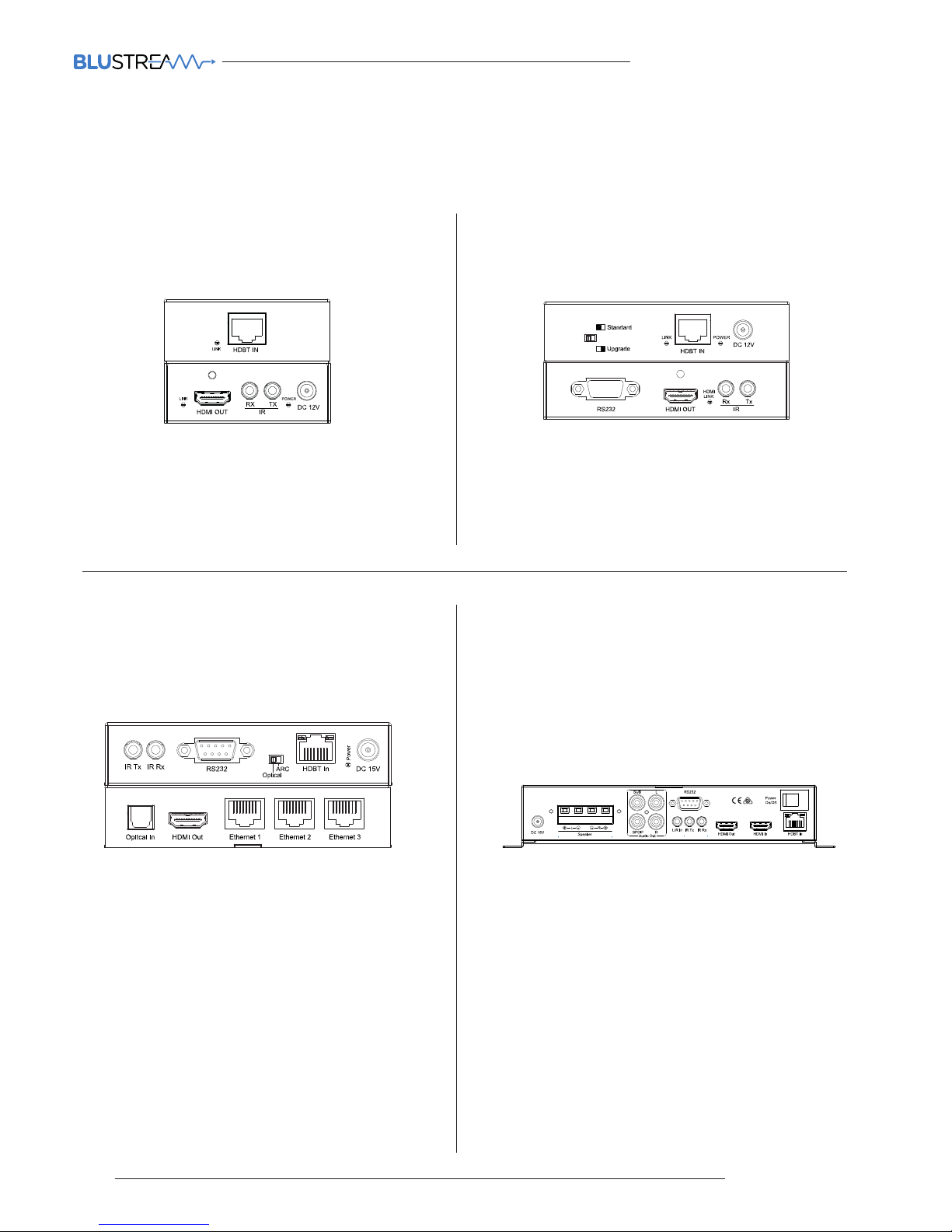
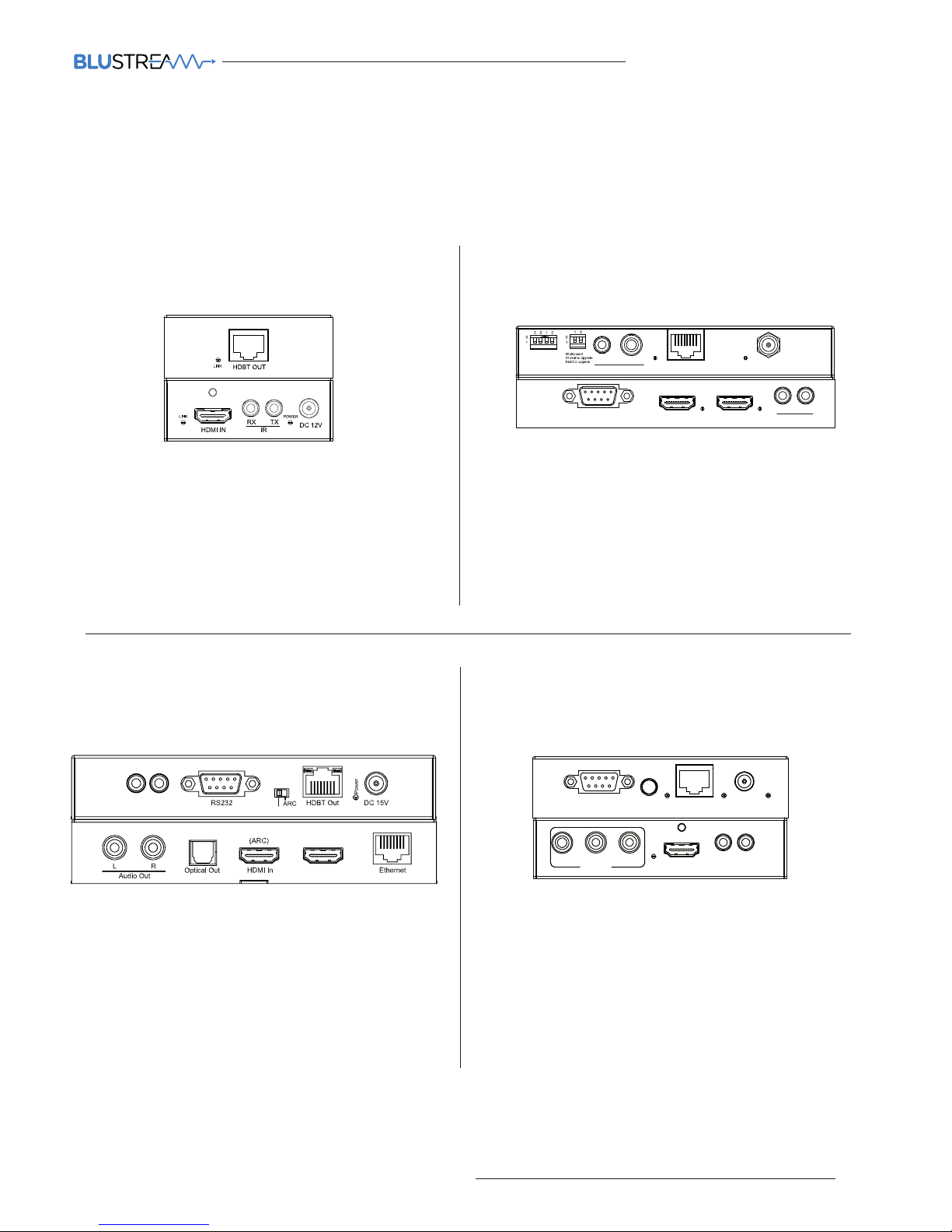
There are four HDBaseT receiver options that are compatible with the HDBaseT outputs of the Blustream Matrix:-
HEX70B-RX
Basic HDBaset Receiver with 2-way IR pass-through. Supports
distances up to 70m. Compatible with all Platinum Blustream
Matrix products.
HEX100ARC-RX
Premium HDBaseT receiver which features 2-way IR & RS-232,
HDMI ARC (when used with associated PLAxxARC Matrix) and
display distances up to 100m. Only compatible with PLA88ARC and
PLA66ARC Blustream Matrix products.
HEX70ED-RX
Mid-Level HDBaseT receiver which has the same features as
the HEX70B-RX receiver but with added 2-way RS-232 control.
Compatible with all Platinum Blustream Matrix products.
RX70AMP
The RX70AMP is a combination of HDBaseT receiver and Class D
digital audio amplifier (30W per channel). The unit has local HDMI
and Analogue audio inputs as well as supporting HDMI ARC (audio
Return Channel) with compatible products. Should you wish to
use alternate power amplification the unit has variable analogue
outputs. Control of the unit is possible via front panel or by bidirectional RS-232 or IR control. Supports distances up to 70m.
Compatible with all Platinum Blustream Matrix products.
HDBaseT input
HDMI output
IR Output 3.5mm mono jack
IR Input 3.5mm stereo jack
HDBaseT input
HDMI Output
Optical Audio input (Toslink)
2-way RS-232 (9-pin serial)
IR Output 3.5mm Mono Jack
IR Input 3.5mm Mono Jack
3x 10/100 Ethernet connections (RJ45)
HDBaseT input
HDMI output
2-way RS-232 (9-pin serial)
IR Output 3.5mm mono jack
IR Input 3.5mm stereo jack
HDBaseT input
HDMI output
HDMI Local input for connection of local source
2.1 Stereo audio output @ 30W per channel (capable of drive 4, 6 &
8 Ohm speakers) & analogue Subwoofer output (RCA)
Variable analogue line level outputs (RCA)
Digital Coaxial S/PDIF output
Local analogue L/R audio input 3.5mm Stereo Jack
2-way RS232 (9-pin serial)
IR Output 3.5mm mono Jack
IR Input 3.5mm stereo Jack
Built-in IR receiver on front panel of unit
Matrix HDBaseT Receiver Options
Receiver
HEX70B-Rx
HEX100ARC-Rx
Receiver
HEX70ED-Rx
Receiver
RX70AMP
Page 7
07
contact [email protected] / [email protected]
PLATINUM SERIES V2 USER MANUAL
Matrix HDBaseT Transmitter Options
RS232 HDMI In HDMI Out
Link Link
Rx Tx
IR
Transmitter
When it is a requirement that source equipment is to be located away from the central Blustream Matrix there are
four Blustream HDBaseT Transmitters that that can be partnered with the HDBaseT Inputs and allow hardware to be
located at distances up to 100m:-
HEX70B-TX
Basic HDBaset Transmitter with 2-way IR pass-through. Supports
distances up to 70m.
HEX100ARC-TX V2
Premium HDBaseT HDCP 2.2 Transmitter which features HDMI
loop-out, 2-way IR & RS-232 and distances up to 100m.
HEX70ED-TX V2
HDBaseT HDCP 2.2 Transmitter which features HDMI loop-out,
2-way IR & RS-232 and distances up to 70m.
HEX100HDVGA-TX
Premium HDBaseT Transmitter which features selectable HDMI or
VGA+ audio inputs and 2-way IR & RS-232. Supports distances up
to 100m.
HDMI input
HDBaseT output
IR output 3.5mm mono jack
IR input 3.5mm stereo jack
HDCP 1.4 compliant
HDMI input
HDBaseT output
HDMI output (loop-out)
2-way RS-232 (9-pin serial)
IR output 3.5mm mono Jack
IR input 3.5mm stereo jack
HDCP 2.2 compliant
HDMI input
HDBaseT output
HDMI output (loop-out)
2-way RS-232 (9-pin serial)
IR output 3.5mm mono jack
IR input 3.5mm stereo jack
HDCP 2.2 compliant
HDMI & VGA+ audio input
HDBaseT output
2-way RS-232 (9-pin serial)
IR output 3.5mm mono jack
IR input 3.5mm stereo jack
HDCP 1.4 compliant
HEX70B-Tx
Transmitter
HEX100HDVGA
HDMI
LINK
HDMI Out
Audio Out
Coaxial RL
IR RX IR TX
HDBT In
Input
Select
RS232 DC12V
LINK Power
RS232 HDMI In HDMI Out
Link Link
Rx Tx
IR
Transmitter
L/R Coaxial
Out
Link Power
EDID
HDBT Out
DC 12V
HEX70ED-TX-V2
HDMI Loop Out
IR TXI R RX
Optical
HEX100ARC-TX-V2
Page 8
PLATINUM SERIES V2 USER MANUAL
08
www.blustream.co.uk
Matrix Front Panel Control
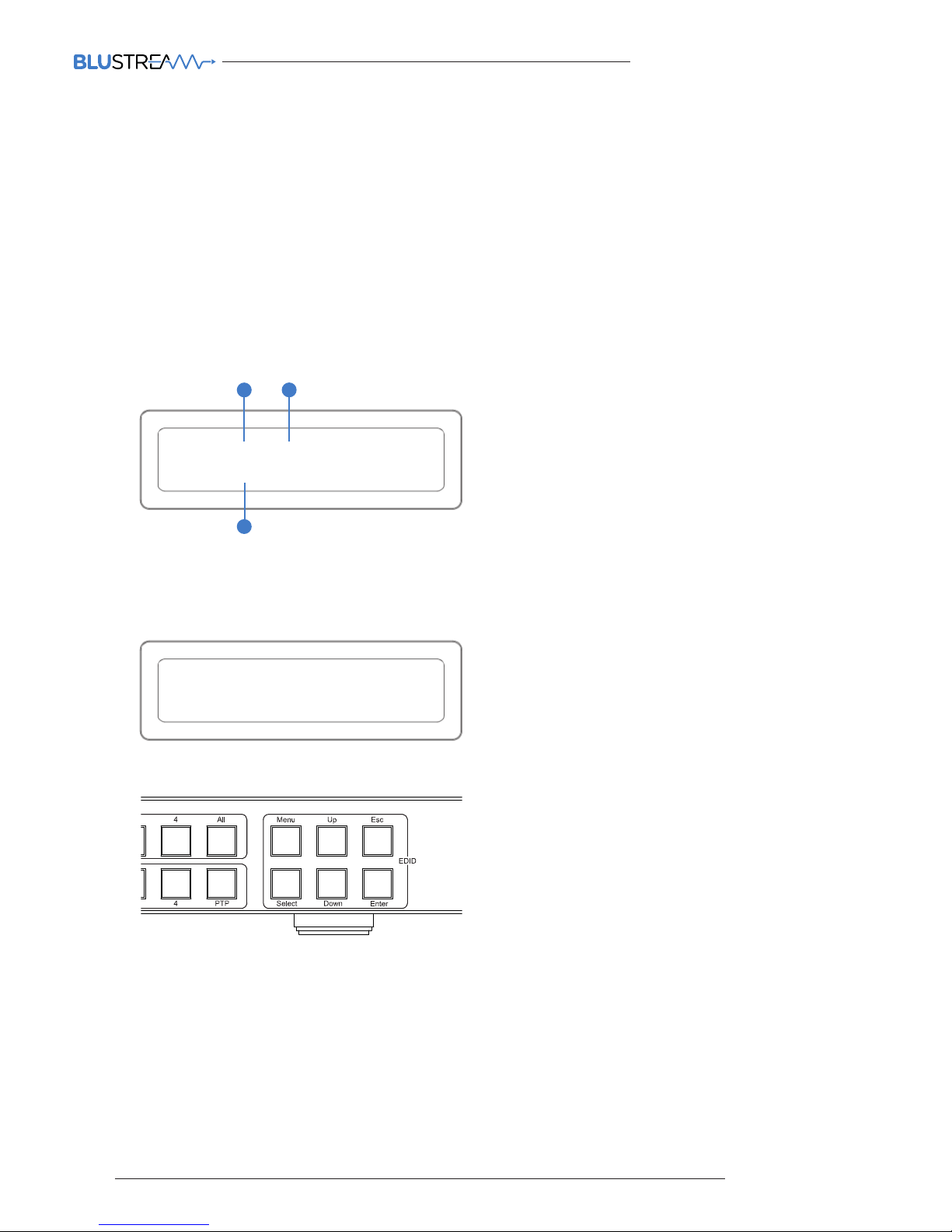
Front Panel Display - Input/Output selection
The following display shows current source input selection per zone output.
1. To change input selection first press ‘OUTPUT’ button (1-4)
2. Press desired ‘INPUT’ button (1-4)
3. An ‘X’ indicates that the zone output has been turned o.
Zones can be turned on/o using RS-232/TCP/IP commands.
Zone outputs can be forced back on by powering OFF/ON the Matrix. All outputs will be turned on when powered up.
Zone outputs can be forced back on by pressing and holding ‘OUTPUT 1’ button on the front panel for 10 seconds. The
Matrix will reset and all outputs will be turned back on.
OUT 1 2 x 4
IN 1 2 3 4
EDID: IN ALL
HDMI: 1080P 2CH
EDID Management - Global or individual input settings
The following characters show adjusting the EDID for ‘All’ inputs (Global). Current EDID value is set to 1080P & 2CH audio.
To change the input signal type using the Matrix front panel buttons press the following:-
Using Matrix Front Panel Buttons
a. Press MENU button
b. Panel will display ‘EDID settings’. Press SELECT button
c. Select the input you wish to fix the EDID on (1-8) or select ‘All’. Use UP/DOWN buttons to toggle selection and SELECT button to
confirm
d. Select video resolution required (4K, 1080p, 3D etc). Use UP/DOWN buttons to toggle selection and SELECT button to confirm
e. Select audio resolution required (2CH, 5.1 or 7.1). Use UP/DOWN buttons to toggle selection and SELECT button to confirm
f. Press the ESC button to exit
2
1
3
Page 9

09
contact [email protected] / [email protected]
PLATINUM SERIES V2 USER MANUAL
EDID (Extended Display Identification Data) is a data structure that is used between a display and a source. This data is used by the source
to find out what audio and video resolutions are suppor ted by the display then from this information the source will discover what the best
audio and video resolutions need to be outputted.
While the objective of EDID is to make connecting a digital display to a source a simple plug and play procedure issues do arise when
multiple displays or video matrix switching is introduced because of the increased number of variables.
By pre-determining the video resolution and audio format of the source and display device you can reduce the time need for EDID hand
shaking thus making switching quicker and more reliable.
Configuration of Matrix EDID settings can be acheived in one of three ways:-
1 Using Matrix web browser interface (See ‘Blustream Web Browser Interface Guide’ for further details available at www.
blustream.co.uk )
2 Using Matrix Front Panel Buttons (For further details see page 8)
3 Using Supplied Blustream Matrix IR Remote Control (For further details see page 12)
EDID Control
Note: EDID settings were revised June 2017 to include independant 4K 4:2:0 and 4K 4:4:4 settings to help with signal management/bandwidth
limitations when using HDMI over HDBaseT distribution. For alternate EDID settings and Firmware please visit the Blustream website.
Audio Breakout
The PLAXX V2 Matrix includes both both coaxial digital and 2CH analogue audio outputs. Audio can be selected from:-
• Breakout from selected HDMI/HDBaseT output. Extracted audio will be concurrent with the corresponding HDMI/HDBaseT
video output.
• Breakout from selected HDMI/HDBaseT inputs. Extracted audio will be fixed to the selected HDMI/HDBaseT source input.
• Analogue 2CH audio inputs. Audio will be fixed to the selected analogue audio input.
• ARC audio return when used with compatible HDBaseT Receivers (feature only available on PLA88/66ARC models). Extracted
audio will be fixed to the selected HDMI/HDBaseT zone output.
The PLAxx V2 analogue outputs include pre-amp line level control allowing you to connect the Blustream Matrix directly into a
power amplifier for all your multi-room audio needs.
Both coaxial and analogue audio outputs can be adjusted for audio delay.
Control of the pre-amp line level outputs is via RS-232, TCP/IP or using the in-built web browser interface. Please see ‘RS-232 &
Telnet Commands’ on page 17 for further details.
Note: Volume control is only available on the analogue audio outputs. Source input must be PCM 2CH audio for analogue audio
outputs to work. The PLAxx V2 Matrix do not down-mix 5.1CH audio signals.
Volume control of audio outputs is not possible via Infrared control.
1. Analogue pre-amp line level output 3.5mm stereo jack - Output 3
2. Coaxial digital output - Output 2
1
2
HDMI In
Tx
Rx
HDBT Out
HDMI Out
IR In
L/R Out
Coax. Out
IN
OUT
1 2 3 4 5 6 7
8
HDBT Out
HDMI Out
IR In
L/R Out
Coax. Out
HDBT Out
HDMI Out
IR In
L/R Out
Coax. Out
HDBT Out
HDMI Out
IR In
L/R Out
Coax. Out
HDBT Out
HDMI Out
IR In
L/R Out
Coax. Out
HDBT Out
HDMI Out
IR In
L/R Out
Coax. Out
HDBT Out
HDMI Out
IR In
L/R Out
Coax. Ou
t
HDBT Out
HDMI Out
IR In
L/R Out
Coax. Out
IR In
IR Out
Global
TCP/IP
Ethernet
Tx
Rx
On/Off
In
Page 10

PLATINUM SERIES V2 USER MANUAL
10
www.blustream.co.uk
Terminating HDBaseT CAT cable
It is important that the interconnecting CAT cable between the Blustream HDBaseT products is terminated using the
correct RJ45 pin configuration. The link CAT cable MUST be a ‘straight’ (pin-to-pin) CAT cable and it is advised that this
is wired to the T568B wiring standard as this format is less prone to EMI (Electro-Magnetic Interference).
When installing CAT cables it is advised that you use the best possible CAT cable quality possible. HDMI distribution
products will only work if used with CAT5e standard cable or above. Blustream recommends using a CAT6 cable for
your installations, especially when running over longer distances, in areas of high EMI, or for 4K signal distribution. It
is advised that using any method of patch panel, wall plate or join in the CAT cable is avoided as these will result in
HDBaseT signal degradation. Blustream also recommend using the best quality RJ45 connectors possible.
RJ45 Wiring T568B
Understanding the Matrix / Receiver HDBaseT status lights
The Blustream Matrix and HDBaseT extender solutions include status LED indicators on both the Matrix and Receiver
products to show all connections are active and to help diagnose possible problems.
Understanding the status lights:-
Blustream Matrix:
• The Yellow HDBaseT status link light will be o when the zone output has been turned o or there is a problem with
the specific Matrix output.
• The Yellow HDBaseT status link light will blink when the zone output is on and working
• The Green HDBaseT link light will blink if there is an unstable connection between the Blustream Matrix and
HDBaseT Receiver
• The Green HDBaseT link light will be lit when a there is an active HDBaseT Receiver connected to the Matrix
• The Green HDBaseT link light will be o when a there is no connection with a HDBaseT receiver
Blustream HDBaseT Receiver:
• The HDMI link light will be o when there is no connection with a display
• The HDMI link light will be on when there is an active connection with a display (NOTE - Not all HDBaseT RX feature a
HDMI status LED)
• The HDBaseT link light will be o when there is no CAT cable/active HDBaseT connection on the RJ45 HDBaseT
input
• The HDBaseT link light will blink if there is an unstable connection between the Blustream Matrx and HDBaseT
receiver
• The HDBaseT link light will be lit when a CAT cable is connected to the HDBaseT RJ45 output on the Matrix and an
active connection is achieved with the Blustream HDBaseT Receiver.
Page 11

11
contact [email protected] / [email protected]
PLATINUM SERIES V2 USER MANUAL
The Blustream range of matrix products include multiple options for control and routing of IR.
IMPORTANT: Blustream Infrared products are all 5v and NOT compatible with alternative manufacturers Infrared
solutions. When using third party 12v IR control solutions please use supplied Blustream IRCAB cable for IR conversion.
Each Blustream Matrix and HDBaseT receiver is supplied with all necessary IR hardware required and includes:
IR Emitter - IR1 & IR2 (IR2 sold separately)
Blustream 5V IR Emitter designed for discrete IR control of
hardware
IR Receiver - IRR
Blustream 5V IR receiver to receive IR signal and distribute
through Blustream products
IR Control Cable - IRCAB
Blustream IR Control cable 3.5mm Mono to 3.5mm Stereo for
linking third party control solutions to Blustream products.
Compatible with 12v IR third party products.
Note: Cable is directional as indicated
Infrared 3.5mm Pin-Out
IR Emitter - Mono 3.5mm
IR Receiver - Stereo 3.5mm
Infrared (IR) Distribution
Signal
Ground
Signal
5V
Ground
Page 12
PLATINUM SERIES V2 USER MANUAL
12
www.blustream.co.uk
Infrared (IR) Control
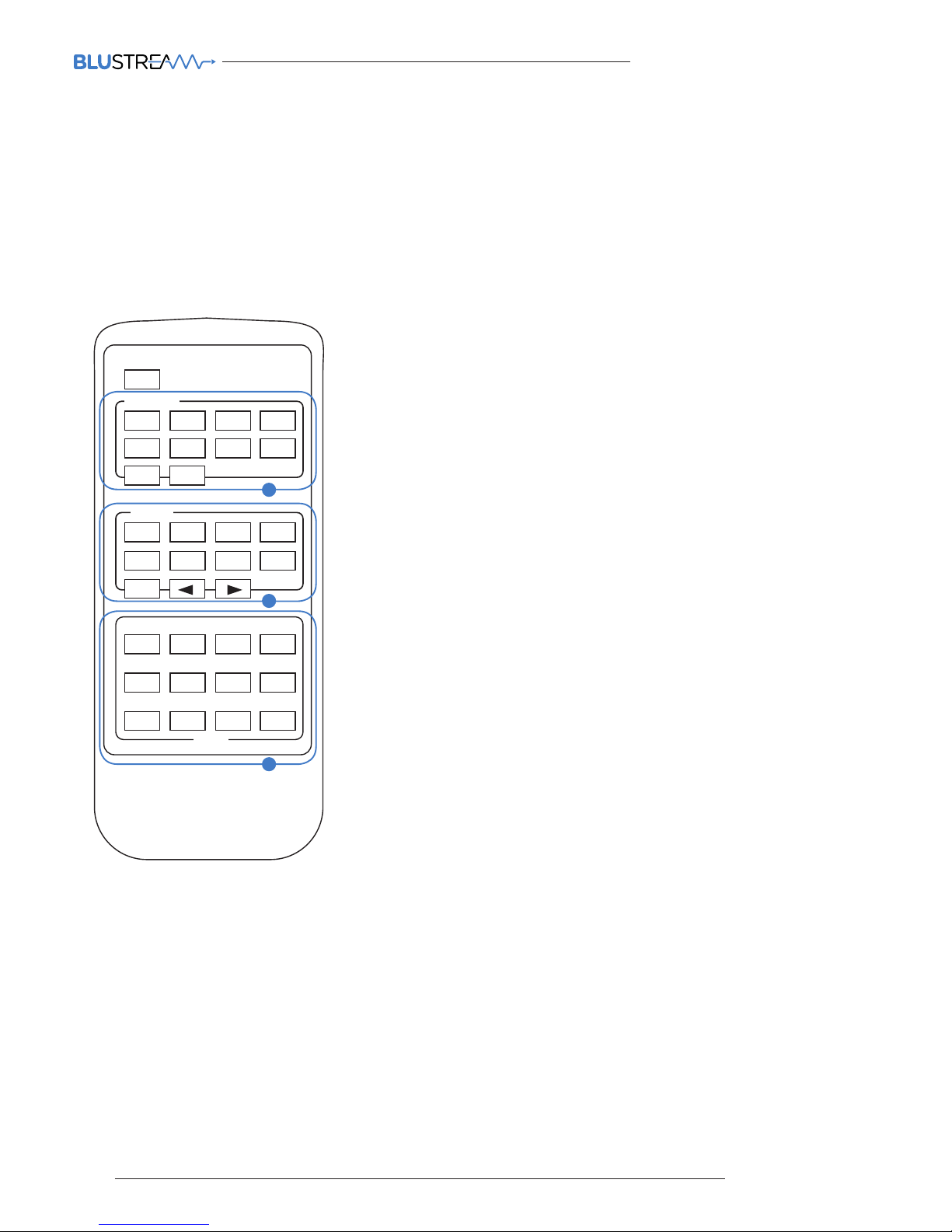
Remote Control Description
The Blustream Platinum Series matrix units are supplied with IR Remote Control for source selection and general
setup.
As well as controlling matrix solutions using the original Blustream remote the Blustream products can be controlled
using the original Infrared NEC codes shown at the rear of this manual.
OUTPUT AND INPUT SELECTION
A Select the zone OUTPUT you wish to change the source on
(Numbers 1-8 correspond to the zone outputs 1-8).
B Select the source INPUT you wish to change on the selected
zone to
(Numbers 1-8 corresponds to the source inputs 1-8)
C Press PTP button If you wish to instantly mirror all inputs
and outputs
(Example - Input 1 to output 1, input 2 to output 2 etc).
EDID SET UP
The PLAxx V2 provides a comprehensive range of EDID settings.
Below are three examples of how to deploy the desired EDID setting
when using the supplied remote.
A. Fix EDID to an Input or ALL inputs: Press the desired video
resolution button (1080I / 1080P / 3D / 4K), then select the
desired audio format (2.0CH / 5.1CH / 7.1CH), then select the
source input you want this EDID information allocated to by
pressing the INPUT 1 – 4 or the ALL button
B. Copy EDID of Output-X to an Input or ALL: Press the COPY
but-ton then select the OUTPUT you wish to copy the EDID
information from, then select the source input you want to copy
this EDID to by selecting the INPUT 1-4 or the ALL button.
C. User defined EDID to an Input or ALL inputs: Press USER1 /
USER2 button then select the source you wish to assign this EDID
to by select-ing INPUT 1-4 or the ALL button
POWER
1
ALL PTP
OUTPUT
2 3 4
5 6 7 8
1
ALL
INPUT
2 3 4
5 6 7 8
1080i 1080p 3D 4K
USER1 USER2 FN1
EDID
FN2
2.0CH 5.1CH 7.1CH COPY
B
C
A
Page 13
13
contact [email protected] / [email protected]
PLATINUM SERIES V2 USER MANUAL
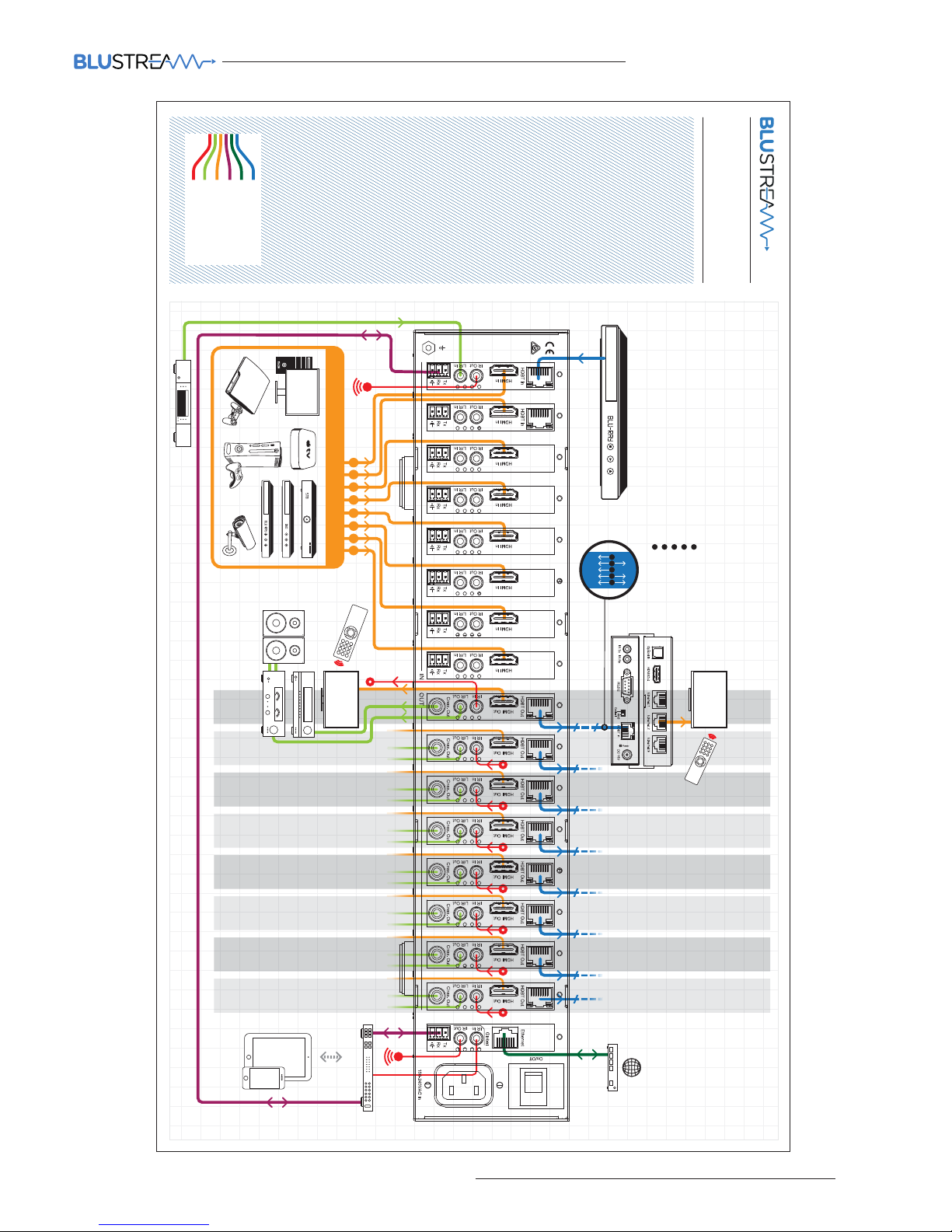
Example Schematic
PLA88ARC-V2
5 6 7 84321
Cat 5/5e/6
Network Connection
RS232
HDMI
Stereo Audio
IR Cable
HEX100ARC-Rx
Receiver
DISPLAY 2
DISPLAY 1
in
out
UP TO 100m max
A
ZONE
01
ZONE
01
ZONE
02
ZONE
03
ZONE
04
ZONE
05
ZONE
06
ZONE
07
ZONE
08
ZONE
02
ZONE
03
ZONE
04
ZONE
05
ZONE
06
ZONE
07
ZONE
08
UP TO 8 SOURCES
Control Processor
HDMI
100BaseTEthernet
ARC
IR
A
B
C
D
RS232
E
B
C
D
E
Cat Cable
Page 14

PLATINUM SERIES V2 USER MANUAL
14
www.blustream.co.uk
Video Input Connections: 6/8x HDMI Type A, 19-pin, female, 2x HDBaseT RJ45 connector
Video Output Connections: 6/8x HDMI Type A, 19-pin, female, 8x HDBaseT RJ45 connector
Audio Input Connections: 6/8x 3.5mm stereo jack (L/R)
Audio Output Connections: 6/8x RCA (SPDIF), 8x 3.5mm stereo jack (L/R)
RS-232 serial ports: 7/9x 3-Pin Phoenix connector
TCP/IP Control: RJ45, female
Ethernet/Network: RJ45, female
IR Input ports: 7/9x 5v 3.5mm stereo jack
IR Output ports: 7/9x 5v 3.5mm mono jack
Rack-Mountable: 2U rack height, rack ears included
Casing Dimensions (W x H x D): 440mm x 87mm x 361m, without feet
Dimensions Including Connections (W x H x D): 440mm x 87mm x 369mm, with feet
Shipping Weight: 8.8kg
Operating Temperature: 32°F to 104°F (0°C to 40°C)
Storage Temperature: -4°F to 140°F (-20°C to 60°C)
Input: 100V-250V, 50Hz-60Hz, 13A
NOTE: Specifications are subject to change without notice. Weight details are approximate and will alter per model.
Specifications
Maintenance
Clean this unit with a so, dry cloth. Never use alcohol, paint thinner or benzene to clean this unit.
Package Contents:
PLA88L V2 Matrix
• 1x PLA88L V2
• 1x AC power cable
• 1x Remote control
• 9x IR emitter
• 9x IR receiver
• 9x IR 3.5-3.5mm interface cable
• 2x Serial cable – 9-pin DB9 to 3-pin phoenix connector
• 1x Rack mounting kit
PLA66L V2 Matrix
• 1x PLA88L V2
• 1x AC power cable
• 1x Remote control
• 7x IR emitter
• 7x IR receiver
• 7x IR 3.5-3.5mm Interface cable
• 2x Serial cable – 9-pin DB9 to 3-pin phoenix connector
• 1x Rack mounting kit
PLA88ARC V2 Matrix
• 1x PLA88ARC V2
• 1x AC power cable
• 1x Remote control
• 9x IR emitter
• 9x IR receiver.
• 9x IR 3.5-3.5mm interface cable
• 2x Serial cable – 9-pin DB9 to 3-pin phoenix connector
• 1x Rack mounting kit
PLA66ARC V2 Matrix
• 1x PLA88ARC V2
• 1x AC power cable
• 1x Remote control
• 7x IR transmitter,
• 7x IR receiver.
• 7x IR 3.5-3.5mm interface cable
• 2x Serial cable – 9-pin DB9 to 3-pin phoenix connector
• 1x Rack mounting kit
Page 15

15
contact [email protected] / [email protected]
PLATINUM SERIES V2 USER MANUAL
IR commands
COMMAND NEC HEX
POWER 0X14
0000 0069 0000 002a 0150 00a8 0015 0015 0015 0015 0015
0015 0015 003f 0015 003f 0015 0015 0015 0015 0015 003f 0015 0015
0015 0015 0015 0015 0015 003f 0015 003f 0015 0015 0015 0015 0015
0015 0015 0015 0015 0015 0015 003f 0015 0015 0015 003f 0015 0015
0015 0015 0015 0015 0015 003f 0015 003f 0015 0015 0015 003f 0015
0015 0015 003f 0015 003f 0015 003f 0015 05d3
OUTPUT 1 0X09
0000 0069 0000 002a 0150 00a8 0015 0015 0015 0015 0015
0015 0015 003f 0015 003f 0015 0015 0015 0015 0015 003f 0015 0015
0015 0015 0015 0015 0015 003f 0015 003f 0015 0015 0015 0015 0015
0015 0015 003f 0015 0015 0015 0015 0015 003f 0015 0015 0015 0015
0015 0015 0015 0015 0015 0015 0015 003f 0015 003f 0015 0015 0015
003f 0015 003f 0015 003f 0015 003f 0015 05d3
OUTPUT 2 0X1d
0000 0069 0000 002a 0150 00a8 0015 0015 0015 0015 0015
0015 0015 003f 0015 003f 0015 0015 0015 0015 0015 003f 0015 0015
0015 0015 0015 0015 0015 003f 0015 003f 0015 0015 0015 0015 0015
0015 0015 003f 0015 0015 0015 003f 0015 003f 0015 003f 0015 0015
0015 0015 0015 0015 0015 0015 0015 003f 0015 0015 0015 0015 0015
0015 0015 003f 0015 003f 0015 003f 0015 05d3
OUTPUT 3 0X1f
0000 0069 0000 002a 0150 00a8 0015 0015 0015 0015 0015
0015 0015 003f 0015 003f 0015 0015 0015 0015 0015 003f 0015 0015
0015 0015 0015 0015 0015 003f 0015 003f 0015 0015 0015 0015 0015
0015 0015 003f 0015 003f 0015 003f 0015 003f 0015 003f 0015 0015
0015 0015 0 015 0015 0015 0 015 00 15 0015 0 015 00 15 0015 0 015
0015 0015 0015 003f 0015 003f 0015 003f 0015 05d3
OUTPUT 4 0X0d
0000 0069 0000 002a 0150 00a8 0015 0015 0015 0015 0015
0015 0015 003f 0015 003f 0015 0015 0015 0015 0015 003f 0015 0015
0015 0015 0015 0015 0015 003f 0015 003f 0015 0015 0015 0015 0015
0015 0015 003f 0015 0015 0015 003f 0015 003f 0015 0015 0015 0015
0015 0015 0015 0015 0015 0015 0015 003f 0015 0015 0015 0015 0015
003f 0015 003f 0015 003f 0015 003f 0015 05d3
NEC Customer Code = 1898
OUTPUT 5 0X19
0000 0069 0000 002a 0150 00a8 0015 0015 0015 0015 0015
0015 0015 003f 0015 003f 0015 0015 0015 0015 0015 003f 0015 0015
0015 0015 0015 0015 0015 003f 0015 003f 0015 0015 0015 0015 0015
0015 0015 003f 0015 0015 0015 0015 0015 003f 0015 003f 0015 0015
0015 0015 0015 0015 0015 0015 0015 003f 0015 003f 0015 0015 0015
0015 0015 003f 0015 003f 0015 003f 0015 05d3
OUTPUT 6 0X1b
0000 0069 0000 002a 0150 00a8 0015 0015 0015 0015 0015 0015
0015 003f 0015 003f 0015 0015 0015 0015 0015 003f 0015 0015 0015
0015 0015 0015 0015 003f 0015 003f 0015 0015 0015 0015 0015 0015
0015 003f 0015 003f 0015 0015 0015 003f 0015 003f 0015 0015 0015
0015 0015 0015 0015 0015 0015 0015 0015 003f 0015 0015 0015 0015
0015 003f 0015 003f 0015 003f 0015 05d3
OUTPUT 7 0X11
0000 0069 0000 002a 0150 00a8 0015 0015 0015 0015 0015 0015
0015 003f 0015 003f 0015 0015 0015 0015 0015 003f 0015 0015 0015
0015 0015 0015 0015 003f 0015 003f 0015 0015 0015 0015 0015 0015
0015 003f 0015 0015 0015 0015 0015 0015 0015 003f 0015 0015 0015
0015 0015 0015 0015 0015 0015 003f 0015 003f 0015 003f 0015 0015
0015 003f 0015 003f 0015 003f 0015 05d3
OUTPUT 8 0X15
0000 0069 0000 002a 0150 00a8 0015 0015 0015 0015 0015 0015
0015 003f 0015 003f 0015 0015 0015 0015 0015 003f 0015 0015 0015
0015 0015 0015 0015 003f 0015 003f 0015 0015 0015 0015 0015 0015
0015 003f 0015 0015 0015 003f 0015 0015 0015 003f 0015 0015 0015
0015 0015 0015 0015 0015 0015 003f 0015 0015 0015 003f 0015 0015
0015 003f 0015 003f 0015 003f 0015 05d3
OUTPUT ALL 0X17
0000 006D 0000 0022 0157 00AC 0016 0016 0016 0016 0016 0016
0016 003F 0016 003F 0016 0016 0016 0016 0016 0016 0016 0016 0016
0016 0016 0016 0016 003F 0016 003F 0016 0016 0016 0016 0016 003F
0016 003F 0016 003F 0016 003F 0016 0016 0016 003F 0016 0016 0016
0016 0016 0016 0016 0016 0016 0016 0016 0016 0016 003F 0016 0016
0016 003F 0016 003F 0016 003F 0016 0689
OUTPUT PTP 0X12
0000 006D 0000 0022 0157 00AC 0016 0016 0016 0016 0016 0016
0016 003F 0016 003F 0016 0016 0016 0016 0016 0016 0016 0016 0016
0016 0016 0016 0016 003F 0016 003F 0016 0016 0016 0016 0016 003F
0016 0016 0016 003F 0016 0016 0016 0016 0016 003F 0016 0016 0016
0016 0016 0016 0016 003F 0016 0016 0016 003F 0016 003F 0016 0016
0016 003F 0016 003F 0016 003F 0016 0689
Advanced Matrix features are not available via IR commands
COMMAND NEC HEX
INPUT 1 0X50
0000 0069 0000 002a 0150 00a8 0015 0015 0015 0015 0015
0015 0015 003f 0015 003f 0015 0015 0015 0015 0015 003f 0015 0015
0015 0015 0015 0015 0015 003f 0015 003f 0015 0015 0015 0015 0015
0015 0015 0015 0015 0015 0015 0015 0015 0015 0015 003f 0015 0015
0015 003f 0015 0015 0015 003f 0015 003f 0015 003f 0015 003f 0015
0015 0015 003f 0015 0015 0015 003f 0015 05d3
INPUT 2 0X55
0000 0069 0000 002a 0150 00a8 0015 0015 0015 0015 0015
0015 0015 003f 0015 003f 0015 0015 0015 0015 0015 003f 0015 0015
0015 0015 0015 0015 0015 003f 0015 003f 0015 0015 0015 0015 0015
0015 0015 003f 0015 0015 0015 003f 0015 0015 0015 003f 0015 0015
0015 003f 0015 0015 0015 0015 0015 003f 0015 0015 0015 003f 0015
0015 0015 003f 0015 0015 0015 003f 0015 05d3
INPUT 3 0X48
0000 0069 0000 002a 0150 00a8 0015 0015 0015 0015 0015
0015 0015 003f 0015 003f 0015 0015 0015 0015 0015 003f 0015 0015
0015 0015 0015 0015 0015 003f 0015 003f 0015 0015 0015 0015 0015
0015 0015 0015 0015 0015 0015 0015 0015 003f 0015 0015 0015 0015
0015 003f 0015 0015 0015 003f 0015 003f 0015 003f 0015 0015 0015
003f 0015 003f 0015 0015 0015 003f 0015 05d3
INPUT 4 0X4a
0000 0069 0000 002a 0150 00a8 0015 0015 0015 0015 0015
0015 0015 003f 0015 003f 0015 0015 0015 0015 0015 003f 0015 0015
0015 0015 0015 0015 0015 003f 0015 003f 0015 0015 0015 0015 0015
0015 0015 0015 0015 003f 0015 0015 0015 003f 0015 0015 0015 0015
0015 003f 0015 0015 0015 003f 0015 0015 0015 003f 0015 0015 0015
003f 0015 003f 0015 0015 0015 003f 0015 05d3
INPUT 5 0X5e
0000 0069 0000 002a 0150 00a8 0015 0015 0015 0015 0015
0015 0015 003f 0015 003f 0015 0015 0015 0015 0015 003f 0015 0015
0015 0015 0015 0015 0015 003f 0015 003f 0015 0015 0015 0015 0015
0015 0015 0015 0015 003f 0015 003f 0015 003f 0015 003f 0015 0015
0015 003f 0015 0015 0015 003f 0015 0015 0015 0015 0015 0015 0015
0015 0015 003f 0015 0015 0015 003f 0015 05d3
INPUT 6 0X06
0000 0069 0000 002a 0150 00a8 0015 0015 0015 0015 0015
0015 0015 003f 0015 003f 0015 0015 0015 0015 0015 003f 0015 0015
0015 0015 0015 0015 0015 003f 0015 003f 0015 0015 0015 0015 0015
0015 0015 0015 0015 003f 0015 003f 0015 0015 0015 0015 0015 0015
0015 0015 0015 0015 0015 003f 0015 0015 0015 0015 0015 003f 0015
003f 0015 003f 0015 003f 0015 003f 0015 05d3
INPUT 7 0X05
0000 0069 0000 002a 0150 00a8 0015 0015 0015 0015 0015 0015
0015 003f 0015 003f 0015 0015 0015 0015 0015 003f 0015 0015 0015
0015 0015 0015 0015 003f 0015 003f 0015 0015 0015 0015 0015 0015
0015 003f 0015 0015 0015 003f 0015 0015 0015 0015 0015 0015 0015
0015 0015 0015 0015 0015 0015 003f 0015 0015 0015 003f 0015 003f
0015 003f 0015 003f 0015 003f 0015 05d3
INPUT 8 0X03
0000 0069 0000 002a 0150 00a8 0015 0015 0015 0015 0015 0015
0015 003f 0015 003f 0015 0015 0015 0015 0015 003f 0015 0015 0015
0015 0015 0015 0015 003f 0015 003f 0015 0015 0015 0015 0015 0015
0015 003f 0015 003f 0015 0015 0015 0015 0015 0015 0015 0015 0015
0015 0015 0015 0015 0015 0015 0015 0015 003f 0015 003f 0015 003f
0015 003f 0015 003f 0015 003f 0015 05d3
INPUT ALL 0X47
0000 006D 0000 0022 0157 00AC 0016 0016 0016 0016 0016 0016
0016 003F 0016 003F 0016 0016 0016 0016 0016 0016 0016 0016 0016
0016 0016 0016 0016 003F 0016 003F 0016 0016 0016 0016 0016 003F
0016 003F 0016 003F 0016 003F 0016 0016 0016 0016 0016 0016 0016
003F 0016 0016 0016 0016 0016 0016 0016 0016 0016 003F 0016 003F
0016 003F 0016 0016 0016 003F 0016 0689
INPUT DOWN 0X07
0000 006D 0000 0022 0157 00AC 0016 0016 0016 0016 0016 0016
0016 003F 0016 003F 0016 0016 0016 0016 0016 0016 0016 0016 0016
0016 0016 0016 0016 003F 0016 003F 0016 0016 0016 0016 0016 003F
0016 003F 0016 003F 0016 003F 0016 0016 0016 0016 0016 0016 0016
0016 0016 0016 0016 0016 0016 0016 0016 0016 0016 003F 0016 003F
0016 003F 0016 003F 0016 003F 0016 0689
INPUT UP 0X40
0000 006D 0000 0022 0157 00AC 0016 0016 0016 0016 0016 0016
0016 003F 0016 003F 0016 0016 0016 0016 0016 0016 0016 0016 0016
0016 0016 0016 0016 003F 0016 003F 0016 0016 0016 0016 0016 003F
0016 0 016 0016 0016 0016 0016 0 016 0016 0 016 0016 0016 00 16 0016
003F 0016 0016 0016 003F 0016 003F 0016 003F 0016 003F 0016 003F
0016 003F 0016 0016 0016 003F 0016 0689
Page 16

PLATINUM SERIES V2 USER MANUAL
16
www.blustream.co.uk
COMMAND NEC HEX
1080i 0X18
0000 006D 0000 0022 0157 00AC 0016 0016 0016 0016 0016
0016 0016 003F 0016 003F 0016 0016 0016 0016 0016 0016 0016
0016 0016 0016 0016 0016 0016 003F 0016 003F 0016 0016 0016
0016 0016 003F 0016 0016 0016 0016 0016 0016 0016 003F 0016
003F 0016 0016 0016 0016 0016 0016 0016 003F 0016 003F 0016
003F 0016 0016 0016 0016 0016 003F 0016 003F 0016 003F 0016
0689
1080p 0X44
0000 006D 0000 0022 0157 00AC 0016 0016 0016 0016 0016
0016 0016 003F 0016 003F 0016 0016 0016 0016 0016 0016 0016
0016 0016 0016 0016 0016 0016 003F 0016 003F 0016 0016 0016
0016 0016 003F 0016 0016 0016 0016 0016 003F 0016 0016 0016
0016 0016 0016 0016 003F 0016 0016 0016 003F 0016 003F 0016
0016 0016 003F 0016 003F 0016 003F 0016 0016 0016 003F 0016
0689
3D 0X0F
0000 006D 0000 0022 0157 00AC 0016 0016 0016 0016 0016
0016 0016 003F 0016 003F 0016 0016 0016 0016 0016 0016 0016
0016 0016 0016 0016 0016 0016 003F 0016 003F 0016 0016 0016
0016 0016 003F 0016 0016 0016 0016 0016 003F 0016 0016 0016
0016 0016 0016 0016 003F 0016 0016 0016 003F 0016 003F 0016
0016 0016 003F 0016 003F 0016 003F 0016 0016 0016 003F 0016
0689
4K 0X51
0000 006D 0000 0022 0157 00AC 0016 0016 0016 0016 0016
0016 0016 003F 0016 003F 0016 0016 0016 0016 0016 0016 0016
0016 0016 0016 0016 0016 0016 003F 0016 003F 0016 0016 0016
0016 0016 003F 0016 003F 0016 0016 0016 0016 0016 0016 0016
003F 0016 0016 0016 003F 0016 0016 0016 0016 0016 003F 0016
003F 0016 003F 0016 0016 0016 003F 0016 0016 0016 003F 0016
0689
2.0CH Audio 0X0A
0000 006D 0000 0022 0157 00AC 0016 0016 0016 0016 0016
0016 0016 003F 0016 003F 0016 0016 0016 0016 0016 0016 0016
0016 0016 0016 0016 0016 0016 003F 0016 003F 0016 0016 0016
0016 0016 003F 0016 0016 0016 003F 0016 0016 0016 003F 0016
0016 0016 0016 0016 0016 0016 0016 0016 003F 0016 0016 0016
003F 0016 0016 0016 003F 0016 003F 0016 003F 0016 003F 0016
0689
5.1CH A udio 0X1E
0000 006D 0000 0022 0157 00AC 0016 0016 0016 0016 0016
0016 0016 003F 0016 003F 0016 0016 0016 0016 0016 0016 0016
0016 0016 0016 0016 0016 0016 003F 0016 003F 0016 0016 0016
0016 0016 003F 0016 0016 0016 003F 0016 003F 0016 003F 0016
003F 0016 0016 0016 0016 0016 0016 0016 003F 0016 0016 0016
0016 0016 0016 0016 0016 0016 003F 0016 003F 0016 003F 0016
0689
7.1C H A u d i o 0X0E
0000 006D 0000 0022 0157 00AC 0016 0016 0016 0016 0016 0016
0016 003F 0016 003F 0016 0016 0016 0016 0016 0016 0016 0016 0016
0016 0016 0016 0016 003F 0016 003F 0016 0016 0016 0016 0016 003F
0016 0016 0016 003F 0016 003F 0016 003F 0016 0016 0016 0016 0016
0016 0016 0016 0016 003F 0016 0016 0016 0016 0016 0016 0016 003F
0016 003F 0016 003F 0016 003F 0016 0689
Copy EDID 0X1A
0000 006D 0000 0022 0157 00AC 0016 0016 0016 0016 0016 0016
0016 003F 0016 003F 0016 0016 0016 0016 0016 0016 0016 0016 0016
0016 0016 0016 0016 003F 0016 003F 0016 0016 0016 0016 0016 003F
0016 0016 0016 003F 0016 0016 0016 003F 0016 003F 0016 0016 0016
0016 0016 0016 0016 003F 0016 0016 0016 003F 0016 0016 0016 0016
0016 003F 0016 003F 0016 003F 0016 0689
User 1 0X53
0000 006D 0000 0022 0157 00AC 0016 0016 0016 0016 0016 0016
0016 003F 0016 003F 0016 0016 0016 0016 0016 0016 0016 0016 0016
0016 0016 0016 0016 003F 0016 003F 0016 0016 0016 0016 0016 003F
0016 003F 0016 003F 0016 0016 0016 0016 0016 003F 0016 0016 0016
003F 0016 0016 0016 0016 0016 0016 0016 003F 0016 003F 0016 0016
0016 003F 0016 0016 0016 003F 0016 0689
COMMAND NEC HEX
User 2 0X52
0000 006D 0000 0022 0157 00AC 0016 0016 0016 0016 0016 0016
0016 003F 0016 003F 0016 0016 0016 0016 0016 0016 0016 0016 0016
0016 0016 0016 0016 003F 0016 003F 0016 0016 0016 0016 0016 003F
0016 0016 0016 003F 0016 0016 0016 0016 0016 003F 0016 0016 0016
003F 0016 0016 0016 003F 0016 0016 0016 003F 0016 003F 0016 0016
0016 003F 0016 0016 0016 003F 0016 0689
User 3 0X01
0000 006D 0000 0022 0157 00AC 0016 0016 0016 0016 0016 0016
0016 003F 0016 003F 0016 0016 0016 0016 0016 0016 0016 0016 0016
0016 0016 0016 0016 003F 0016 003F 0016 0016 0016 0016 0016 003F
0016 003F 0016 0016 0016 0016 0016 0016 0016 0016 0016 0016 0016
0016 0016 0016 0016 0016 0016 003F 0016 003F 0016 003F 0016 003F
0016 003F 0016 003F 0016 003F 0016 0689
User 4 0X45
0000 006D 0000 0022 0157 00AC 0016 0016 0016 0016 0016 0016
0016 003F 0016 003F 0016 0016 0016 0016 0016 0016 0016 0016 0016
0016 0016 0016 0016 003F 0016 003F 0016 0016 0016 0016 0016 003F
0016 003F 0016 0016 0016 003F 0016 0016 0016 0016 0016 0016 0016
003F 0016 0016 0016 0016 0016 003F 0016 0016 0016 003F 0016 003F
0016 003F 0016 0016 0016 003F 0016 0689
Page 17

17
contact [email protected] / [email protected]
PLATINUM SERIES V2 USER MANUAL
RS232 and Telnet Commands
The Blustream Platinum Matrix products can be controlled via serial and TCP/IP. The following pages list all available serial commands for the Platinum Matrix. Details of RS-232 pin assignment can be found on page 5.
Commonly used Serial commands:
There are several commands that are commonly used for control and testing:-
STATUS Status will give feedback on Matrix such as zones on, type of connection etc
PON Power on
POFF Power o
OUTxxON (xx is the zone number you wish to turn on)
Example:- OUT01ON (This would turn output one back on)
OUTxxFRyy (xx is the zone out, yy is the input)
Example:- OUT01FR04 (This would switch output 1 to source input 4)
Common Mistakes
• Carriage return – Some programs do not require the carriage return where as other will not work unless sent directly aer the
string. In the case of some Terminal soware the token <CR> is used to execute a carriage return. Depending on the program you
are using this token maybe dierent. Some other examples that other control systems deploy include \r or 0D (in hex)
• Spaces – Blustream commands do not require space between commands unless specified. There may be some programs that
require spacing in order to work.
- How the string should look is as follows OUT01ON
- How the string may look if spaces are required: OUT{Space}01{Space}ON
• Baud rate or other serial protocol settings not correct - please see Page 5 for Matrix settings
Page 18

PLATINUM SERIES V2 USER MANUAL
18
www.blustream.co.uk
RS-232 and Telnet Commands
NO. COMAND ACTION
1 ? Print Help Information
2 HELP Print Help Information
3 STATUS Print System Status And Port Status
4 PON Power On, System Run On Normal State
5 POFF Power O, System Run On Power Save State
6 IR ON/OFF Set System IR Control On Or O
7 KEY ON/OFF Set System KEY Control On Or O
8 APM ON/OFF Set Advanced Process Mode On Or O
9 BEEP ON/OFF Set Onboard Beep On Or O
10
RESET
RESET ALL
Reset System To Default Setting
(Should Type “Yes” To Conrm , “No” To Discard)
Reset System And Net work To Default Set ting
11
MXIR xx FR y y O u t p u t
Port IR:xx From Local
IR:yy
xx=[00]: All Output IR, [01...08]: Output IR
yy=[01...08] Local IR
12
MXIR GI (+-)xx
Global IR _ IN Signal
To Input/Output IR:xx
xx=[01...08]: Input IR, [09...16]: Local IR
xx=[17...24]: Output IR
+: Add xx To Current Setting
-: Remove xx From Current Setting
13
MXIR GO (+-)
xx Global IR_OUT
Signal From Input/
Output IR:xx
xx=[01...08]: Input IR, [09...16]: Local IR
xx=[17...24]: Output IR, [25]: Global IR In
+: Add xx To Current Setting
-: Remove xx From Current Setting
14
MXRS-232 xx TO
yy Local RS-232:xx
Connect To Input/
Output RS-232:yy
xx=[01...08]: Local RS-232, [09]: Global RS-232
yy=[00]: Disconnect With Any RS-232
yy=[01...08]: Input RS-232, [09...16]: Output
RS -232
15 MXS TA Print Matrix IR And RS-232 Connect State
16 AUD OUT xx ANA yy Outp ut Por t : xx Audio From Input Port: yy Stereo
NO. COMAND ACTION
17 AUD OUT x x EXT y y
Output Por t:xx Audio From Input Por t:yy Extr act
xx=[00]: All Ou tput Audio, [01...08]: Output Audio
yy=[01...08]: Input Por t Audio
18 AUD OUT xx ARC tt
Output Port:xx Audio From Output Port:tt ARC
xx=[00]: All Ou tput Audio, [01...08]: Output Audio
yy=[01...08]: Input Por t Audio
19 AUD OUT xx FOANA
Output Por t : xx Audio From Sele c t V i de o In pu t Stere o
xx=[00]: All Ou tput Audio, [01...08]: Output Audio
20 AUD OUT xx FOE XT
Output Port:xx Audio From Select Video Extract
xx=[00]: All Ou tput Audio, [01...08]: Output Audio
21 AUD OUT xx DL zz
Set AUDIO:xx Delay zz ms
zz=00 ~ 500ms Delay, 50ms per Step
22 AUD S TA Print Input/Output Port Audio Setting State
23 AUD IN xx ORG
Input Port :x x Use Or iginal R eceive HD MI/DV I Signal
23 AUD IN xx BPS Input Port:x x Bypass Re ceive HDMI/ DVI Signal
24 AUD IN xx ANA Input Port: x x Inse r t Stereo To HDMI/DVI Signal
25 AUD IN xx AUTO
Input Port: xx Inser t Stereo To DVI Signal Only
xx==[00]: All Input Port, [01...08]: Input Port
26 IN xx FO yy INPUT:xx Force Select Source:yy, Stop Auto
27 IN xx AU yy
INPUT:xx Auto Detect S ource, Source:y y H igh
Priority
xx=[00]: All INPUT Port, [01...08]: INPUT Port
yy=[01]: HDMI, [02]: HDBT
28 OUT xx ON/OFF Set OUTPUT:xx On Or O
29 OUT xx FR yy Set OUTPUT:xx From INPUT:yy
30 OUT xx EH/ET
Set OUTPUT:xx Use HDMI/HDBT EDID
xx=[00]: All OUTPUT Port, [01...08]: OUTPUT
Port
yy=[01...08]: INPUT Port
Page 19

19
contact [email protected] / [email protected]
PLATINUM SERIES V2 USER MANUAL
COMMAND ACTION
EDID xx CP yy
Set Input:xx EDID Co py From Output:yy
EDID xx DF zz
Set Input:xx EDID To Default EDID:z z
xx=[00]: All INPUT Port, [01...0 6]: INPUT Por t
yy=[01...06]: OUTPUT Port
zz=0 0: HDMI 1080p@60Hz, Audio 2CH PCM
zz=01: HDMI 1080p@60Hz, Audio 5.1CH DTS/DOLBY
zz=02: HDMI 1080p@60Hz, Audio 7.1CH DTS/DOLBY/HD
zz=03: HDMI 1080i@60Hz, Audio 2CH PCM
zz=0 4: HDMI 1080i@60Hz, Audio 5.1CH DTS/DOLBY
zz=05: HDMI 1080i@60Hz, Audio 7.1CH DTS/DOLBY/HD
zz=0 6: HDMI 1080p@60Hz /3D, Audio 2CH PCM
zz=07: HDMI 1080p@60H z/3D, Audio 5.1CH DTS/DOLBY
zz=0 8: HDMI 1080p@60Hz /3D, Audio 7.1CH DTS/DOLBY/HD
zz=0 9: HDMI 4K@30Hz 4:4:4, Audio 2CH PCM
zz=10: HDMI 4K@30Hz 4:4:4, Audio 5.1CH DTS/DOLBY
zz=11: HDMI 4K@30Hz 4:4:4, Audio 7.1CH DTS/DOLBY/HD
zz=12: DVI 1280x1024@60Hz, Audio None
zz=13: DVI 1920x1080@60Hz, Audio None
zz=14: DVI 1920x1200@60 Hz, Audio None
zz=15: User EDID 1
zz=16: User EDID 2
zz=17: GUI Download EDID
zz=18: HDMI 4K@60 Hz 4:2:0, Audio 2CH PCM
zz=19: HDMI 4K@60Hz 4:2:0, Audio 5.1CH DTS/DOLBY
zz=20: HDMI 4K@60Hz 4:2:0, Audio 7.1CH DTS/DOLBY/HD
MUTE ON/OFF OUT yy
Set Output Audio: yy Mute ON or OFF
VOL xx OUT yy
Set Output Audio:yy Volume to xx
yy=[00]: All Output Audio, [01...06]: Output Aud io
xx=[00. ..30]: Volume Value
xx=+: Volume Increase
xx=-: Volum e Decrease
NET DHCP ON/OF
Set Auto IP(DHCP) ON Or OFF
NET IP xxx.xxx.xxx.xxx
Set IP Address
NET GW xxx.xxx.xxx.xxx
Set Gateway Address
NET SM xxx.xxx.xxx.xxx
Set Subnet Mask Address
NET RB
Set Network Reboot and Apply New Cong!!!
NET TN xxxx
Set Telnet Port
Page 20

PLATINUM SERIES V2 USER MANUAL
20
www.blustream.co.uk
FCC Notice
This equipment has been tested and found to comply with the limits for a Class B digital device, pursuant to part 15 of the FCC Rules. T hese
limits are designed to provide reasonable protection against harmful interference in a residential installation. This equipment generates, uses, and
can radiate radio frequency energy and, if not installed and used in accordance with the instructions, may cause harmful interference to radio
communications. However, there is no guarantee that interference will not occur in a particular installation. If this equipment does cause harmful
interference to radio or television reception, which can be determined by turning the equipment o and on, the user is encouraged to try to correct
the interference by one or more of the following measures:
• Reorient or relocate the receiving antenna.
• Increase the separation between the equipment and receiver.
• Connect the equipment into an outlet on a circuit dierent from that to which the receiver is connected.
• Consult the dealer or an experienced radio/TV technician for help.
CAUTION - changes or modications not expressly approved by the party responsible for compliance could void the user’s authority to operate
the equipment.
CANADA, INDUSTRY CANADA IC NOTICES
This Class B digital apparatus complies with Canadian ICES-003.
Operation is subject to the following two conditions: (1) this device may not cause interference, and (2) this device must accept any interference,
including interference that may cause undesired operation of the device.
CANADA, AVIS D’INDUSTRY CANADA IC
Cet appareil numérique de classe B est conforme aux normes canadiennes ICES-003.
Son fonctionnement est soumis aux deux conditions suivantes : (1) cet appareil ne doit pas causer d’interférence et (2) cet appareil doit accepter
toute interférence, notamment les interférences qui peuvent aecter son fonctionnement.
CORRECT DISPOSAL OF THIS PRODUCT
This marking indicates that this product should not be disposed with other household wastes. To prevent possible harm to
the environment or human health from uncontrolled waste disposal, recycle it responsibly to promote the sustainable reuse of
material resources. To return your used device, please use the return and collection s ystems or contact the retailer where the
product was purchased. They can take this product for environmentally safe recycling.
Certifications
Page 21

21
contact [email protected] / [email protected]
PLATINUM SERIES V2 USER MANUAL
Notes
––––––––––––––––––––––––––––––––––––––––––––––––––––––––––––––––––––––––––––––––––––––
––––––––––––––––––––––––––––––––––––––––––––––––––––––––––––––––––––––––––––––––––––––
––––––––––––––––––––––––––––––––––––––––––––––––––––––––––––––––––––––––––––––––––––––
––––––––––––––––––––––––––––––––––––––––––––––––––––––––––––––––––––––––––––––––––––––
––––––––––––––––––––––––––––––––––––––––––––––––––––––––––––––––––––––––––––––––––––––
 Loading...