

Page 1
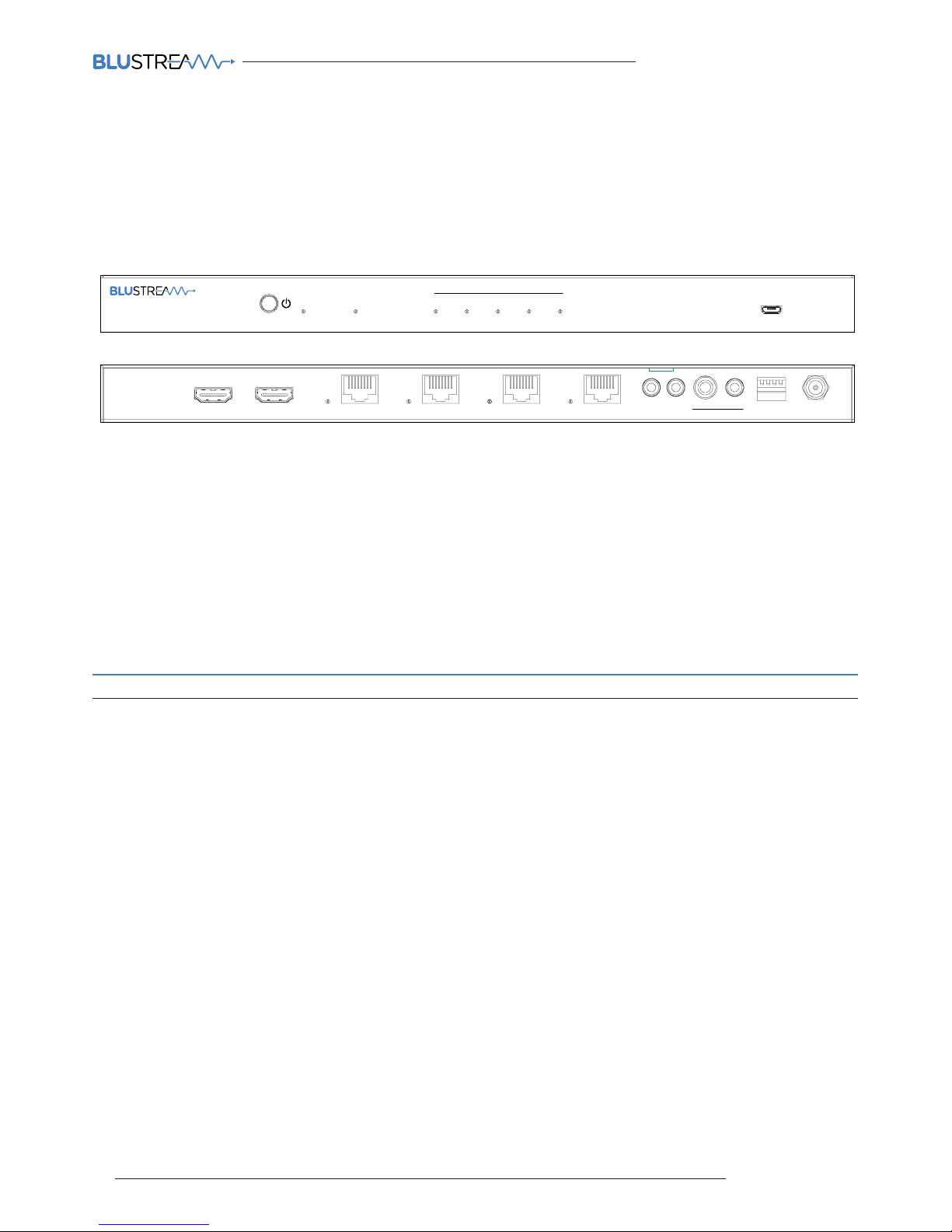
HSP14CS QUICK REFERENCE GUIDE
www.blustream.co.uk
• Advanced HDBaseT™ technology oering uncompressed video and audio with zero latency
• Advanced Colour Space Conversion (CSC) supports HDMI 2.0 18Gbps specification including HDR
• Features 1x HDMI input that is replicated to 4x HDBaseT™ outputs
• Features 1x HDMI loop out for integrating local displays or cascading to multiple devices
• Supports 4K 60Hz 4:4:4 UHD video up to 40m
• Extends HDMI 1080p video up to 70m
• Supports all industry standard video resolutions including VGA-WUXGA and 480i-4K
• Supports all known HDMI audio formats including Dolby TrueHD, Dolby Atmos, Dolby Digital Plus and DTS-HD Master Audio
transmission
• HDMI audio breakout to both analogue L/R audio and coaxial digital outputs concurrently
• Supports PoH (Power over HDBaseT™) to power compatible HDBaseT™ receivers
• Compatible with the following HDBaseT™ Blustream receivers - HEX70CS-RX (4K 60Hz 4:4:4), HEX70B-RX & HEX70ED-RX (4K
60Hz 4:2:0)
• Advanced EDID management
• HDCP 2.2 compliant
Our HSP14CS 4K HDBaseT™ CSC splitter distributes a single HDMI 2.0 4K 60Hz 4:4:4 source
to four simultaneous HDBaseT™ outputs. The HSP14CS splitter utilises CSC technology to
deliver HDMI, Bi-directional IR and PoH (PoE) up to lengths of 70m (40m 4K 60Hz 4:4:4) over
a single CAT cable. The 4-Way splitter also features audio breakout, EDID management and
HDMI loop out for integrating local displays or cascading to multiple devices.
KEY FEATURES
Introduction
Quick Reference Guide
HSP14CS
Upgrade
Output
HDMI
HDBT1 HDBT2 HDBT3 HDBT4InputPower
4-Way HDBaseT™ Splitter - Supporting 4K 60Hz 4:4:4 (40m)
Link
Link
Link
Link
IR IN
0
0123
1
IR OUT
Coaxial
Audio Out
EDID DC 12V
L/R
Input Output
HDBT Output 4HDBT Output 3HDBT Output 2HDBT Output 1
HSP14CS
01
Page 2
contact [email protected] / [email protected]
HSP14CS QUICK REFERENCE GUIDE
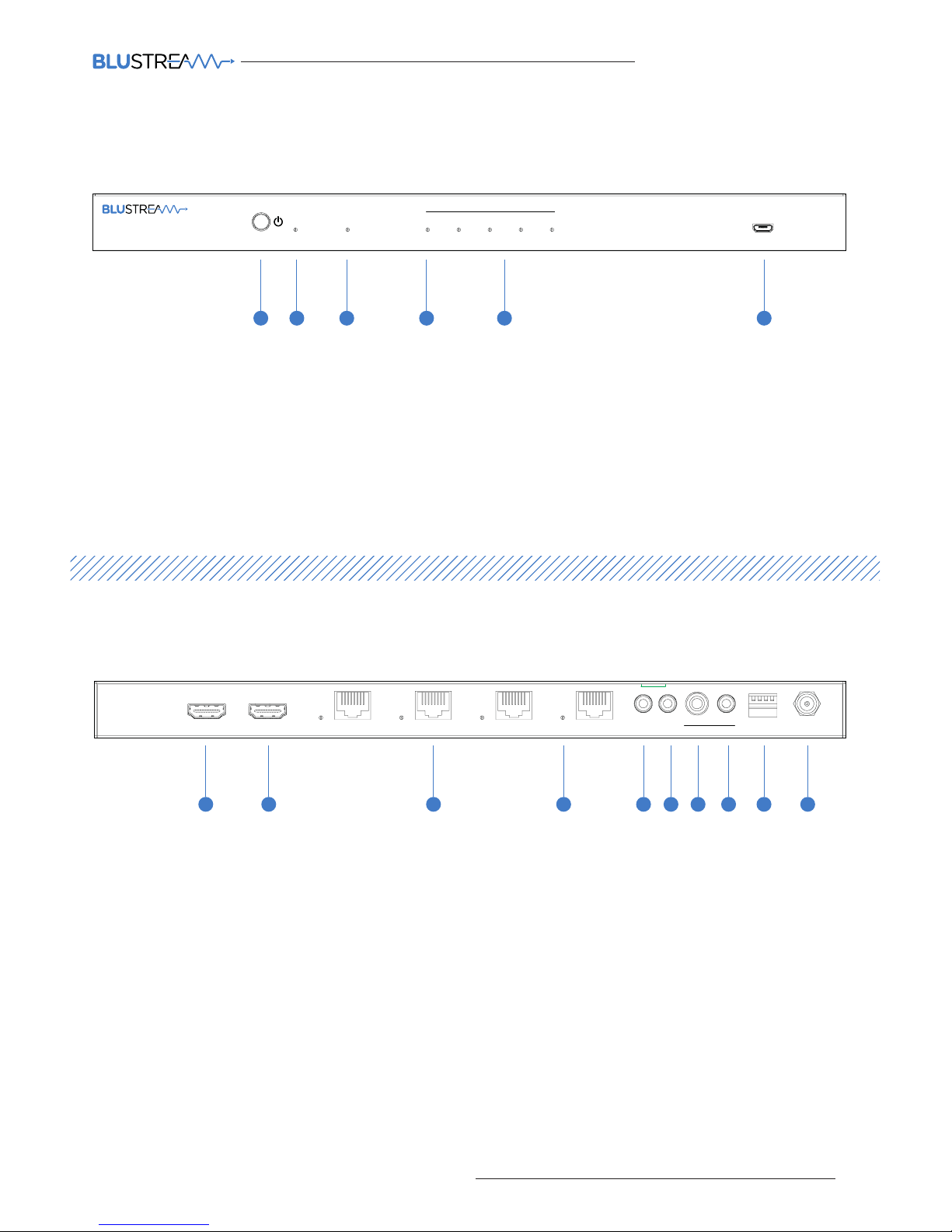
Front Panel
Panel Descriptions
1 Power button - press to power on / o the splitter
2 Power LED indicator - indicates if the unit is on or o
3 Input LED indicator - indicates if a source is attached and is active
4 HDMI output indicator - indicates if a HDMI output is attached and is active
5 HDBaseT™ output indicator - indicates if a HDBaseT™ receiver is attached and an active link is available on the output
6 Upgrade port
1 HDMI input - connect to a HDMI source
2 HDMI output - connect to a HDMI display or additional HDMI distribution equipment
3 HDBaseT™ outputs - connect to HDBaseT™ receivers
4 HDBaseT™ link lights
5 IR input - 3.5mm stereo jack. Transmits IR to the zone HDBaseT™ receivers (displays)
6 IR output - 3.5mm mono jack. Connect to Blustream 5V IR emitter for source control from remote areas
7 Coaxial audio out - RCA connector, de-embedded audio from the HDMI input
8 L/R audio out - 3.5mm stereo jack, de-embedded audio from the HDMI input. Source input must be PCM 2ch audio
for the analogue audio output to work. The HSP14CS does not down-mix 5.1ch audio signals.
9 EDID DIP switch - used for global EDID settings, see page 3
q Power port - use supplied Blustream 12V adaptor to power the splitter
1 2 3 4 5 6
1 2 3 5 6 7 8 9 104
Rear Panel
Upgrade
Output
HDMI
HDBT1 HDBT2 HDBT3 HDBT4InputPower
4-Way HDBaseT™ Splitter - Supporting 4K 60Hz 4:4:4 (40m)
Link
Link
Link
Link
IR IN
0
0123
1
IR OUT
Coaxial
Audio Out
EDID DC 12V
L/R
Input Output
HDBT Output 4HDBT Output 3HDBT Output 2HDBT Output 1
HSP14CS
02
Page 3
HSP14CS QUICK REFERENCE GUIDE
www.blustream.co.uk
Understanding the Splitter / Receiver status lights
The Blustream splitter and HDBaseT™ extender solutions include status LED indicators on both the splitter and receiver products
to show all connections are active and to help diagnose possible problems.
Understanding the status lights:-
Blustream HSP14CS splitter:
• The Yellow HDBaseT™ status link light will be o when the zone output has been turned o or there is a problem with the specific
splitter output.
• The Yellow HDBaseT™ status link light will blink when the zone output is on and working
• The Green HDBaseT™ link light will blink if there is an unstable connection between the Blustream splitter and HDBaseT™
receiver
• The Green HDBaseT™ link light will be lit when there is an active HDBaseT™ receiver connected to the splitter
• The Green HDBaseT™ link light will be o when there is no connection with a HDBaseT™ receiver
Blustream HDBaseT™ receiver:
• The HDMI link light will be o when there is no connection with a display
• The HDMI link light will be on when there is an active connection with a display (NOTE - Not all HDBaseT™ RX feature a HDMI
status LED)
• The HDBaseT™ link light will be o when there is no CAT cable/active HDBaseT™ connection on the RJ45 HDBaseT input
• The HDBaseT™ link light will blink if there is an unstable connection between the Blustream splitter and HDBaseT™ receiver
• The HDBaseT™ link light will be lit when a CAT cable is connected to the HDBaseT™ RJ45 output on the splitter and an active
connection is achieved with the Blustream HDBaseT™ receiver.
EDID (Extended Display Identification Data) is a data structure that is used between a display and a source. This data is used by
the source to find out what audio and video resolutions are supported by the display.
By pre-determining the video resolution and
audio format of the source and display device you can reduce the time need for EDID hand shaking thus making switching quicker
and more reliable.
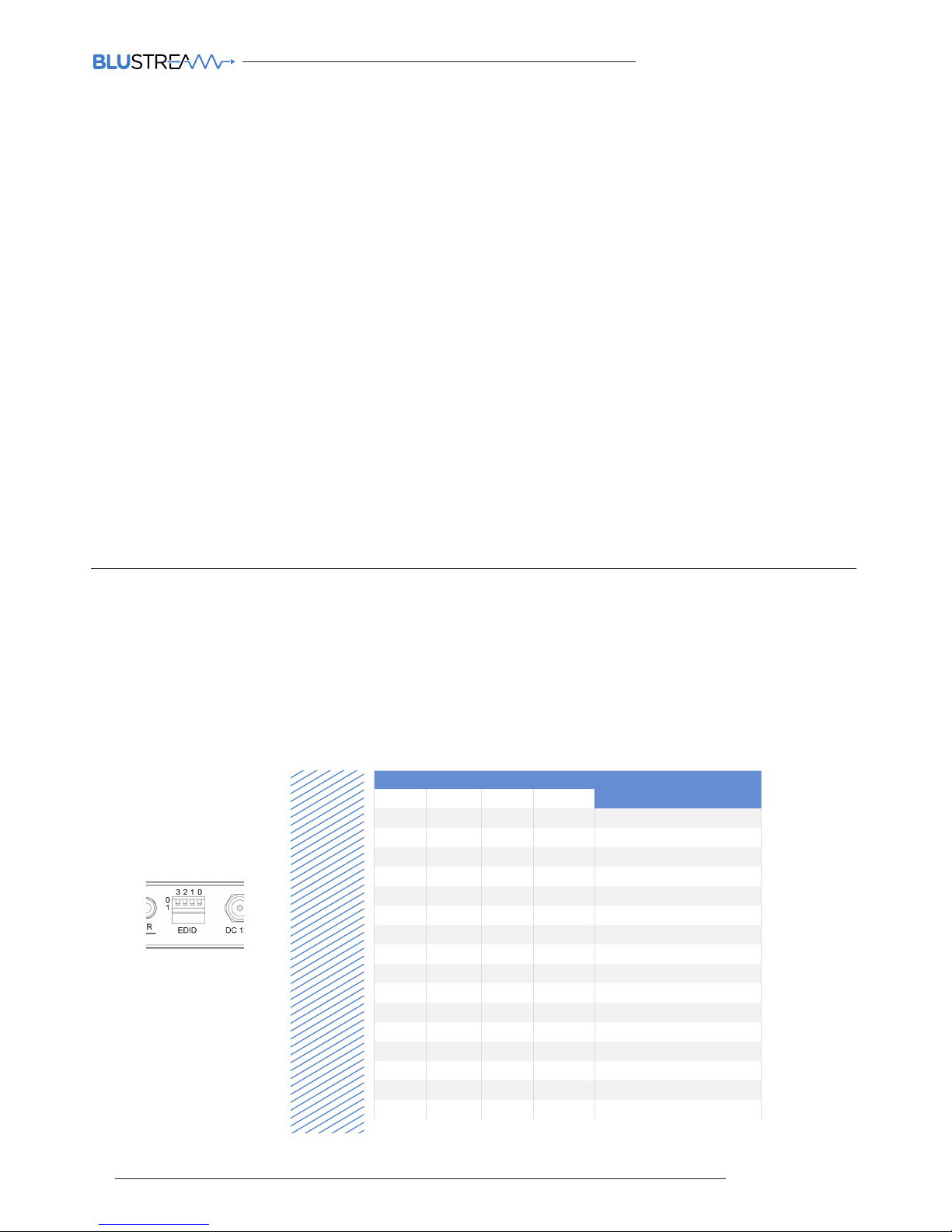
Configuration of HSP14CS splitter EDID settings is achieved by using EDID dip-switches located on the rear of the splitter - See below
EDID Control
Global EDID settings
DIP ON ▼/OFF▲ SWITCHING POSITIONS
EDID TYPE
3 2 1 0
OFF OFF OFF OFF 1080 p/2.0
OFF OFF OFF ON 108 0p/5.1
OFF OFF ON OFF 108 0p/7.1
OFF OFF ON ON 1080i/ 2.0
OFF ON OFF OFF 1080i/5.1
OFF ON OFF ON 10 80i /7.1
OFF ON ON OFF 4K60Hz 4:2:0/4K30Hz 4:4:4/2.0
OFF ON ON ON 4K60Hz 4:2:0/4K30Hz 4:4:4/5.1
ON OFF OFF OFF 4K60Hz 4:2:0/4K30Hz 4:4:4/7.1
ON OFF OFF ON 4K60Hz 4:4:4/2.0
ON OFF ON OFF 4K60Hz 4:4:4/5.1
ON OFF ON ON 4K60Hz 4:4:4/7.1
ON ON OFF OFF DVI 1280x1024
ON ON OFF ON DVI 1920x1080
ON ON ON OFF DVI 1920x1200
ON ON ON ON Copy Display EDID
Dip-switch position ‘0’ = O
Dip-switch position ‘1’ = On
03
Page 4

contact [email protected] / [email protected]
HSP14CS QUICK REFERENCE GUIDE
For the full Blustream HSP14CS User Manual please visit the download area of our website www.blustream.co.uk
RevA1_QRG_HSP14CS_180907
• 1 x HSP14CS
• 1 x 12V/5A DC power supply
• 1 x IR emitter (IRE)
• 5 x IR receiver (IRR)
• 1 x Mounting kit
• 1 x User manual
Clean this unit with a so, dry cloth. Never use alcohol, paint thinner or benzene to clean this unit.
Components inside this unit are not user serviceable. Do not remove the protective cover from the unit. Removing any
panel from this product will invalidate the manufacturers warranty.
NOTE: Specifications are subjec t to change without notice. Weights and dimensions are approximate.
• Video input: 1x HDMI Type A, female
• Video output: 4x HDBaseT™ RJ45 connector, 1x HDMI Type A, female
• Audio output:1x 3.5mm L/R analogue audio & 1x digital coaxial (RCA)
• PoH (Power over HDBaseT™) supplied to compatible Blustream HDBaseT™ receivers from the splitter
• IR input: 1x 3.5mm stereo jack
• IR output: 1x 3.5mm mono jack
• EDID: 4 pin dip-switch
• Mounting kit included
• Dimensions excl. connections (W x D x H ): 287x145x23mm, without feet
• Shipping weight (Kit): 1.1 kg
• Power: 12V/5A DC, screw type connector
• Operating temperature: 32°F to 104°F (0°C to 40°C)
• Storage temperature: -4°F to 140°F (-20°C to 60°C)
• Compatible with (HDBaseT™ Receivers): HEX70CS-RX (4K 60Hz 4:4:4 maximum output)
HEX70B-RX & HEX70ED-RX (4K 60Hz 4:2:0 maximum output)
Specifications
Package Contents
Maintenance
04
 Loading...