

Page 1

BLU STUDIO MINI LTE 2 English Manual
BLU STUDIO MINI LTE 2
USER MANUAL
Table of Contents
Safety Information
Introduction
Call Functions
Notifications Bar
Contacts
Messaging
Bluetooth & Wi-Fi
Opera Browser
Gmail
Play Store
Camera
Gallery
Play Music
FM Radio
Page 2

Sound Recorder
File Manager
Calendar
Alarm Clock
Settings
Storage
Troubleshooting
Safety Information
Please carefully read the terms below:
Use Safely
Do not use the phone in situations where it might cause danger.
Transportation Safety
Please observe all transportation laws and regulations.
Please drive with both hands on the wheel.
PLEASE DRIVE RESPONSIBLY - DO NOT TEXT AND DRIVE
Hospital Safety
Please follow hospital rules and limitations.
Please turn off your mobile phone when near medical instruments.
Page 3

Airport Safety
Remember to follow all airport and flight safety regulations.
Please do not use your phone during flight.
Chemical Warning
Do not use your mobile phone around fuels or chemicals.
Temperature Warning
Do not subject your phone to extreme temperature conditions.
Water Hazard
Your phone is not waterproof. Keep your phone away from water or
liquid to avoid damage.
Emergency Calls
Make sure your mobile phone is switched on and in a service area. In
home screen, tap the phone key and dial the emergency number.
Accessories and Batteries
Use only Blu authorized batteries and accessories.
Information Backup
Remember to keep a written record of all important information.
Battery Safety and Precautions
Page 4

- For better performance and longer battery life, it is recommended that
you charge the battery fully before using the mobile phone for the first
time.
- The optimum performance of a new battery is typically achieved after
two or three complete charge cycles. Note: Keep in mind that continuous
overcharging will affect long term battery life.
- While charging, keep the mobile phone out the reach of children.
- Store the battery in a cool and dry place away from direct sunlight and
water.
- Do not expose batteries to extreme temperatures (below -8°C (18°F) or
above 43°C (110°F).
- Immediately stop using the battery if it produces an odor, cracks and
leaks, overheats, distorts or has any other type of physical damage.
- Avoid using the charger near or around liquids. If the charger comes in
contact with water or any liquids, immediately unplug it from the outlet
to reduce the risk of overheating, charger malfunction, electric shock or
fire.
Hazardous Waste – Battery Disposal
Warning: Do not throw away batteries with uncontrolled daily waste.
The marking in this manual indicates that the batteries in this product
should not be disposed of with household trash at the end of its working
Page 5

life. If the batteries are not disposed of properly, the substances included
can cause harm to human health and the environment. Please follow local
environmental laws and guidelines for proper waste disposal.
Cleaning and Maintenance
- Avoid using the handset and accessories in excessively moist areas to
avoid malfunction.
- Use a soft, dry cloth to clean the handset, battery and charger.
- Do not use alcohol, thinner, benzene or any other solvent to clean the
handset.
Introduction
Power On and Off
On - Please ensure the SIM card has been properly inserted into the
phone. Long press the Power key to switch the phone on.
Off - In standby mode, long press on Power key until an options menu
appears. Select Power Offin the menu to power off the phone.
Call Functions
At the dialing interface, enter the phone number and then click the dial
key. If you need to dial an extension, you may click the dial pad icon to
open the interface and enter the number of the extension. You may also
Page 6
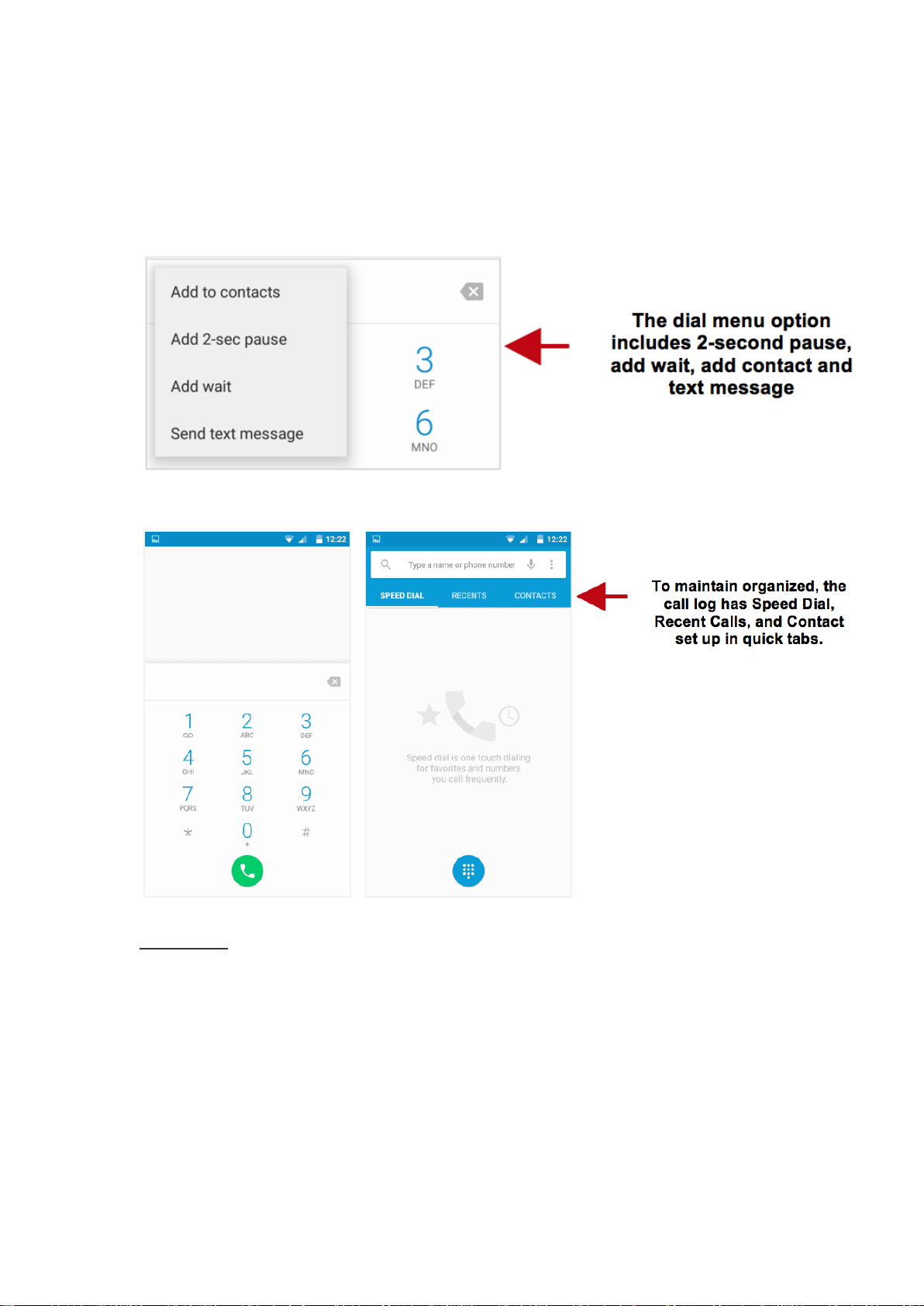
press and hold the 0 key to add a (+) sign when adding an international
dialing prefix.
Call Logs
Every telephone number called and received will be saved in the phones
call log. All numbers in the call log can be dialed by clicking the dial icon
on the screen, by clicking on the contact tile in the speed dial tab, or by
clicking on the contact and selecting call back in the recent tab. When the
Page 7
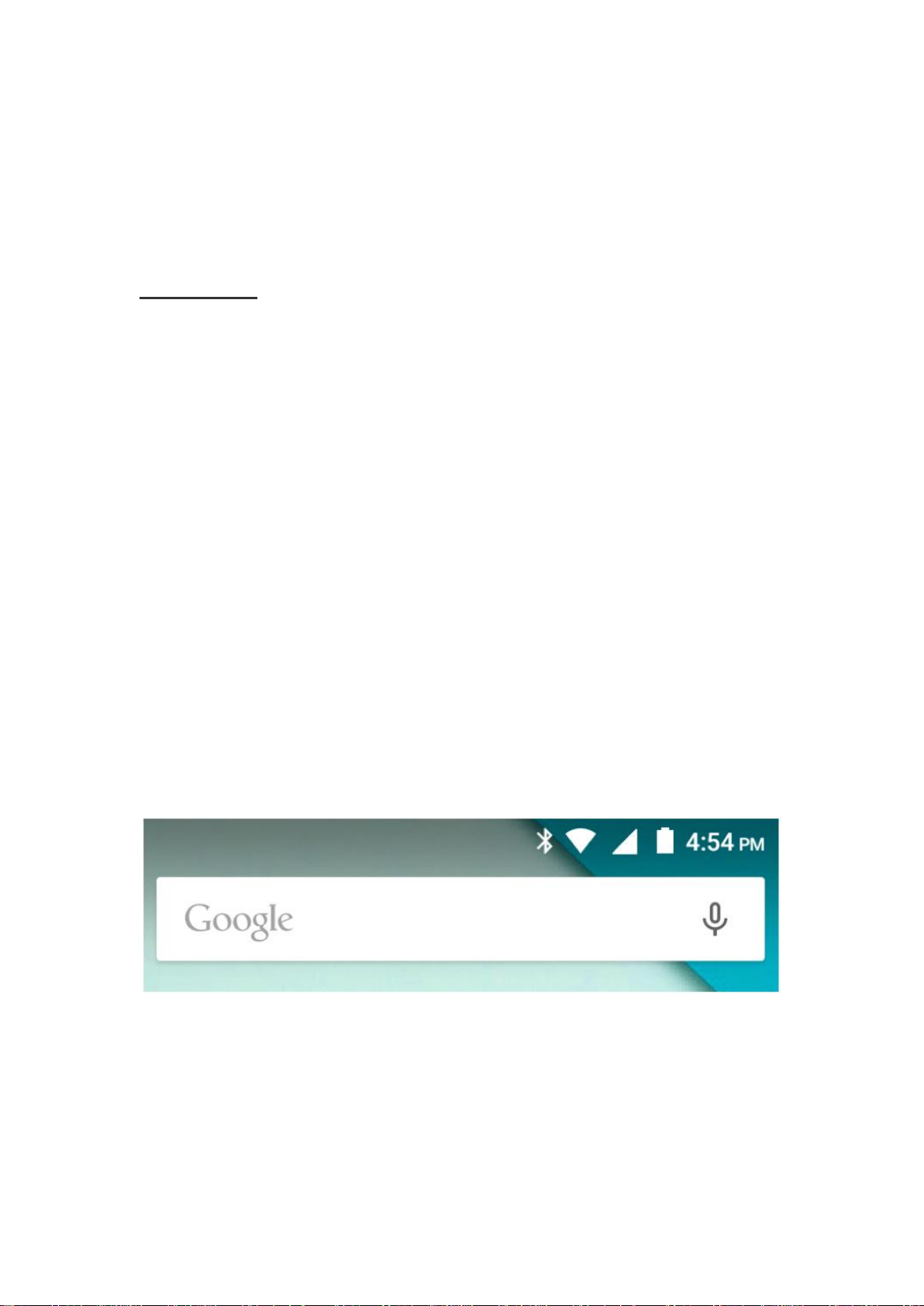
number appears on the list, click it to view details. To delete a call from
the call history, press the menu key and select delete. You may remove
one or multiple calls.
Call Options
There are different options that can be used in the call log and dialing
interface. You may press the menu key while in the general dialing
interface and adjust call settings, enter call history, clear your frequently
dialed numbers, and add a new contact.
Notifications Bar
The notification bar is located on the top of the screen which contains
useful and important information regarding your phone and the
applications that are installed.
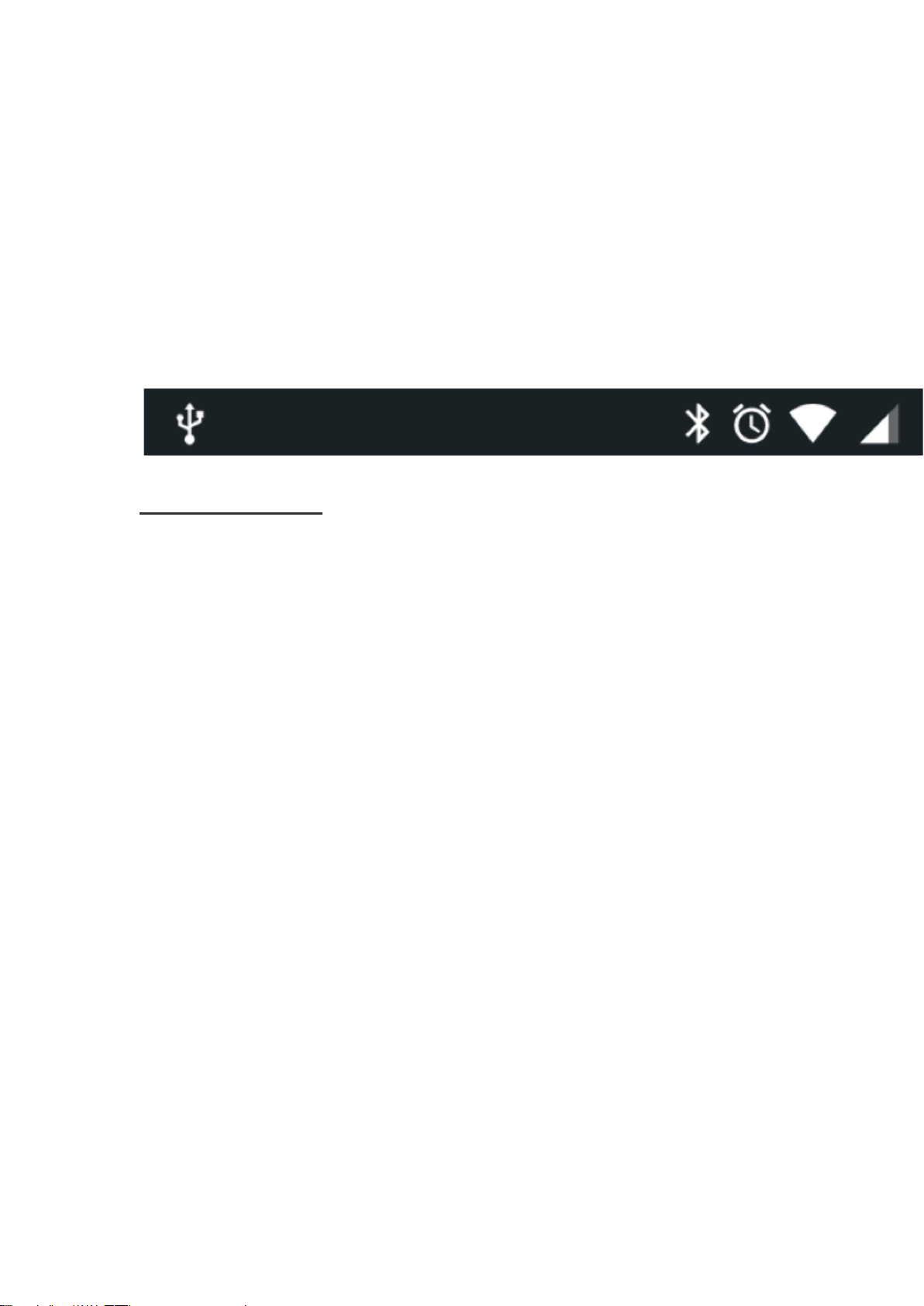
On the notification bar, several icons will appear such as signal bar,
battery indicator, data indicator, Bluetooth and Wi-Fi.You may slide the
Page 8
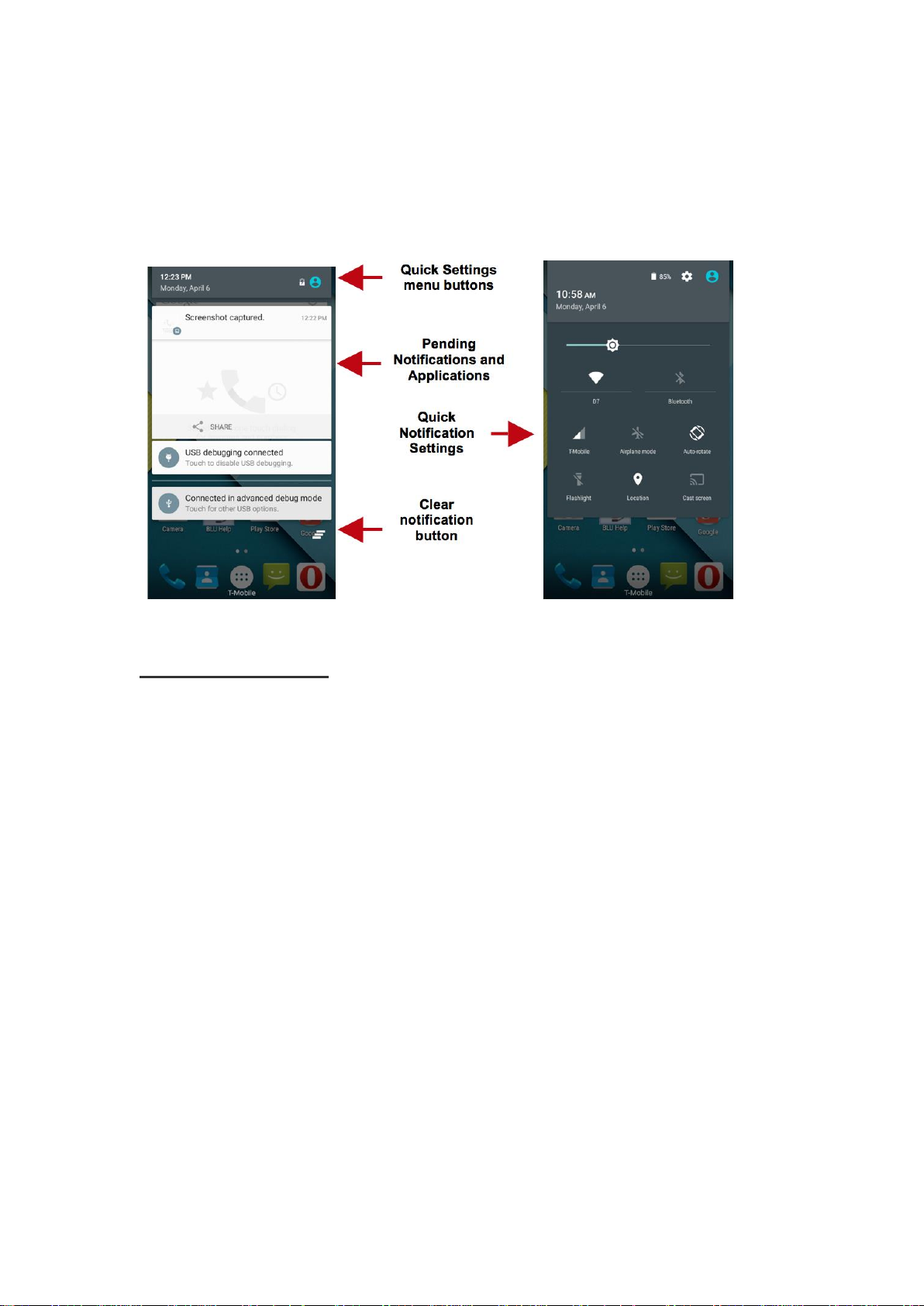
notification bar down with your finger to display any pending
notifications or actions.
Notification Settings
The notification settings window provides shortcuts to different phone
settings for quick access. Click on any of the shortcut notification icons to
power on or off.
Note: To clear notifications, drag down the notification bar and click the
clear notification icon on the lower right hand part of the notification
screen (3 horizontal lines as shown in the figure). The quick notification
settings menu is accessed by dragging down the notification bar
completely. Some settings include Wi-Fi, Bluetooth, Location, Airplane
mode, and Flashlight.
Page 9
Contacts
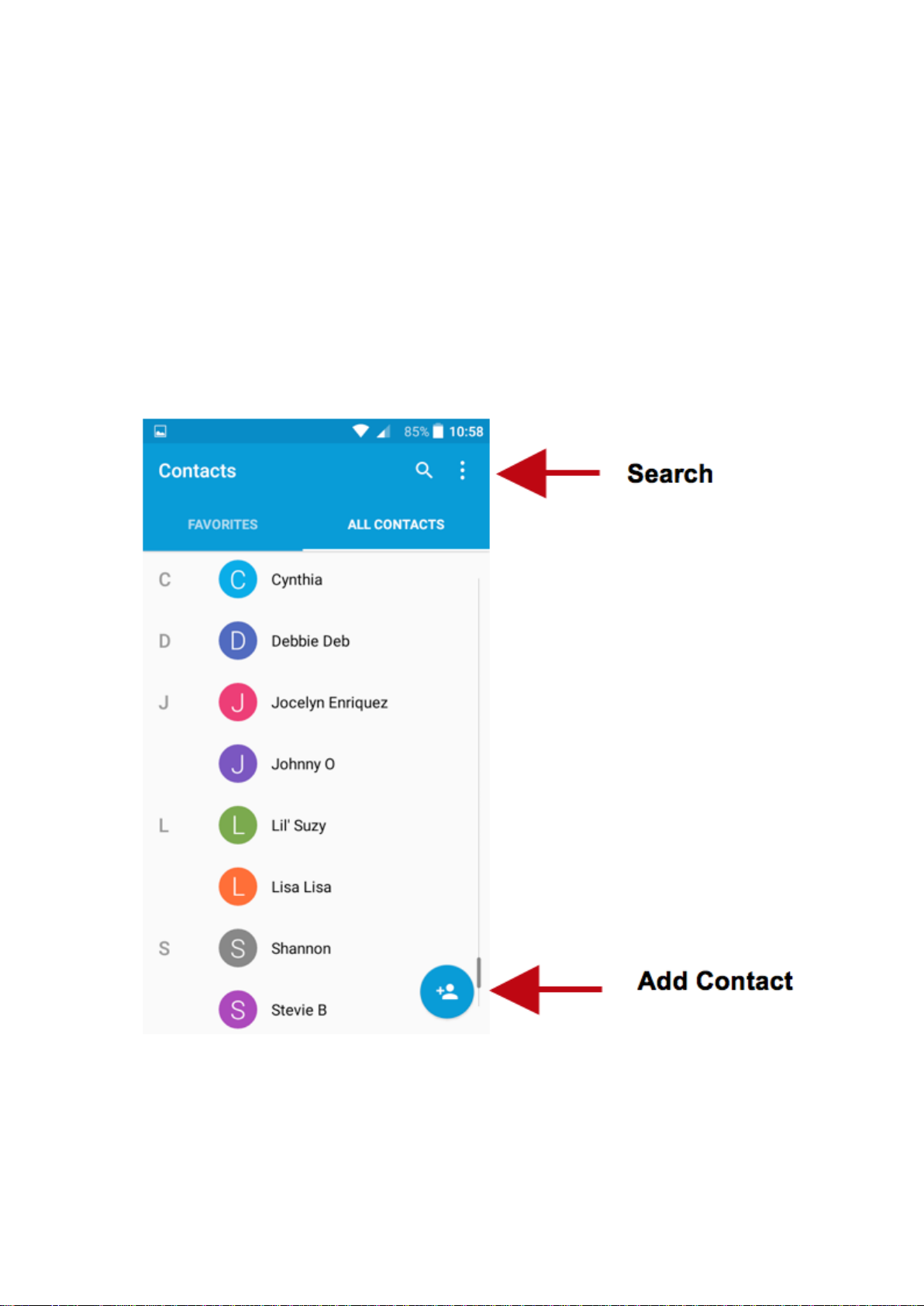
Enter: Click on the applications menu and select contacts.
The default display is the phone contacts and SIM card contacts.
The contacts are organized alphabetically by default.
Page 10
Click the Search icon to enter the contact search interface. Any numbers
or letters associated with any of the contacts saved in the list will be
shown in the search results.
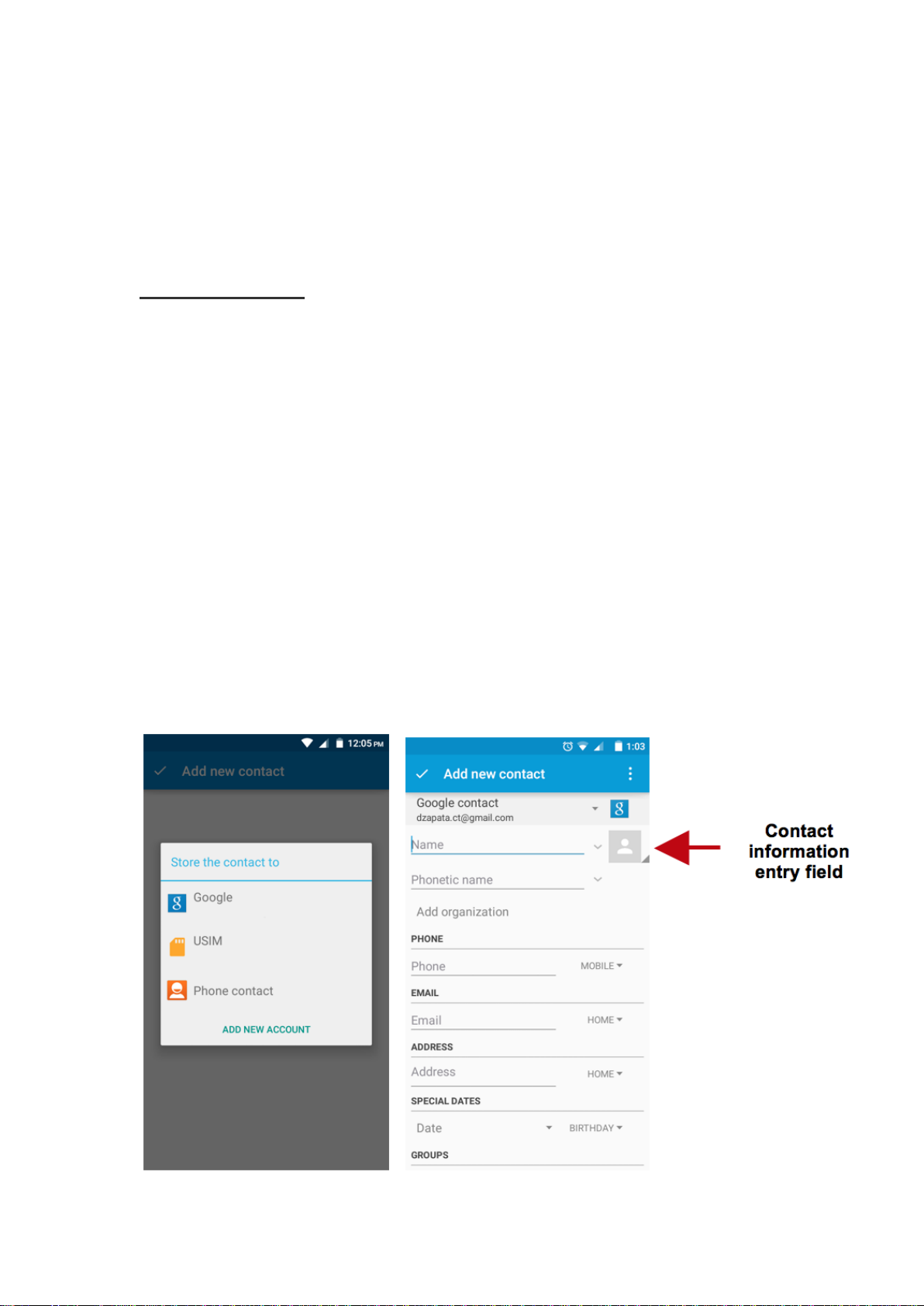
Add New Contact
Click the add contact icon (+) to add contact icon in the bottom right.
Select to save your contacts to your Google account, the phone or the
SIM card.
You may enter different contact details which include adding a picture,
name, telephone number, group, address, and email among other
options.
Click to save contact.
Page 11
Note: You may add individual contacts to any of the home screens by
entering the contacts menu, clicking on the specific contact, pressing
menu, and then selecting the ‘Place on home screen’ option. You can also
share contacts via MMS, Gmail, Bluetooth, and other share options
within the same settings menu.
Delete Contact
Click on the Contacts icon to enter the phonebook.
Click the menu key to access the Contacts menu.
Click on Delete Contact and scroll to select which contact(s) you wish
to delete.
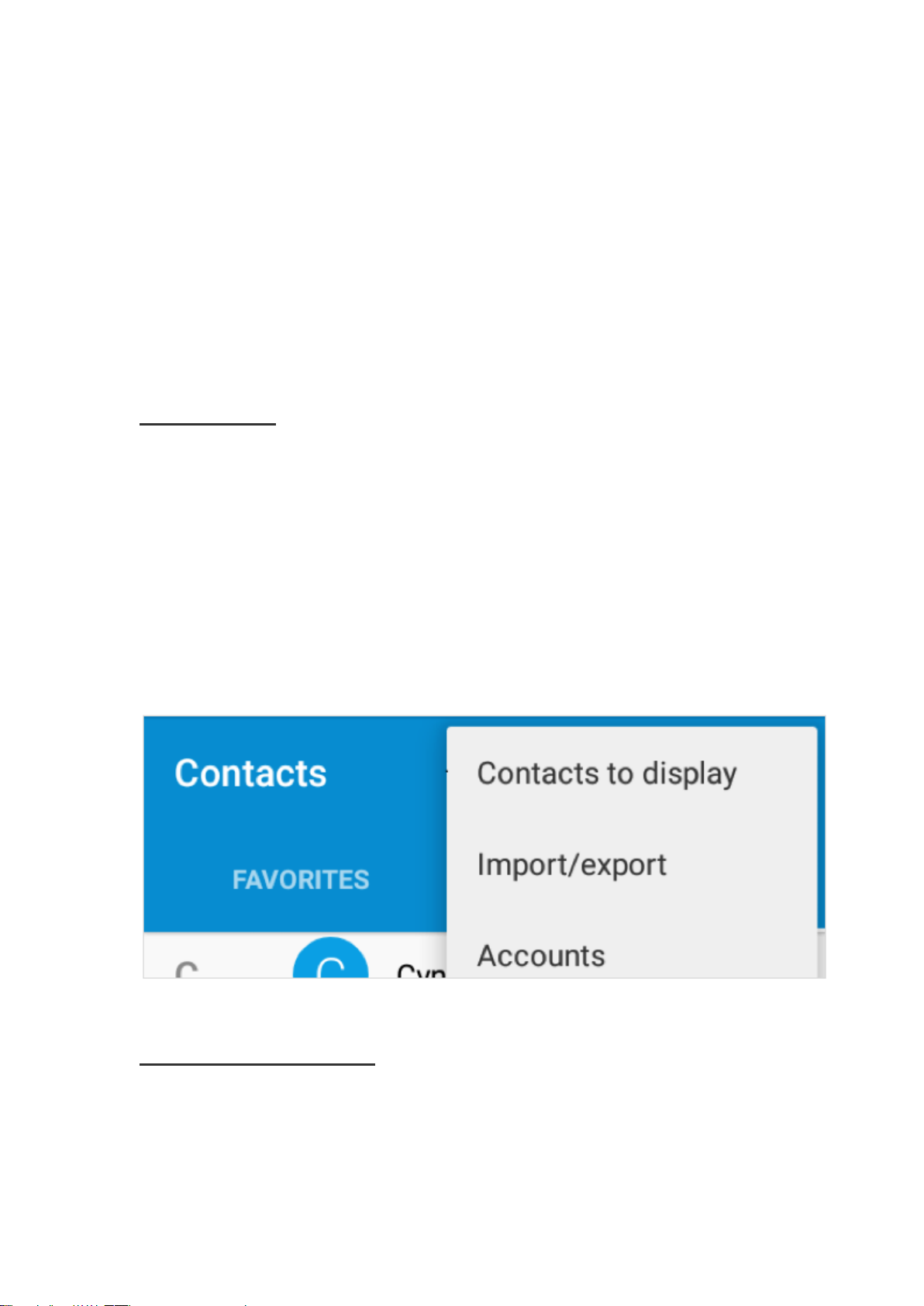
Import / Export Contacts
Page 12

The phone allows you to import and export contacts to synchronize
information between different storage types that include the SIM card,
Gmail account and your phone.
To import or export contacts:
1. Press the Contacts icon to enter the phonebook.
2. Press the menu key and select Import / Export
3. Select the source you want to copy the contacts from. Once selected
click next and select the destination where you want the contact to be
copied to then select the desired contacts to be copied.
Messaging
You may use this function to exchange text messages and multimedia
messages with your family and friends. The messages to and from the
same contact or phone number will be saved into a single conversation so
you may see the entire message history conveniently.
Page 13
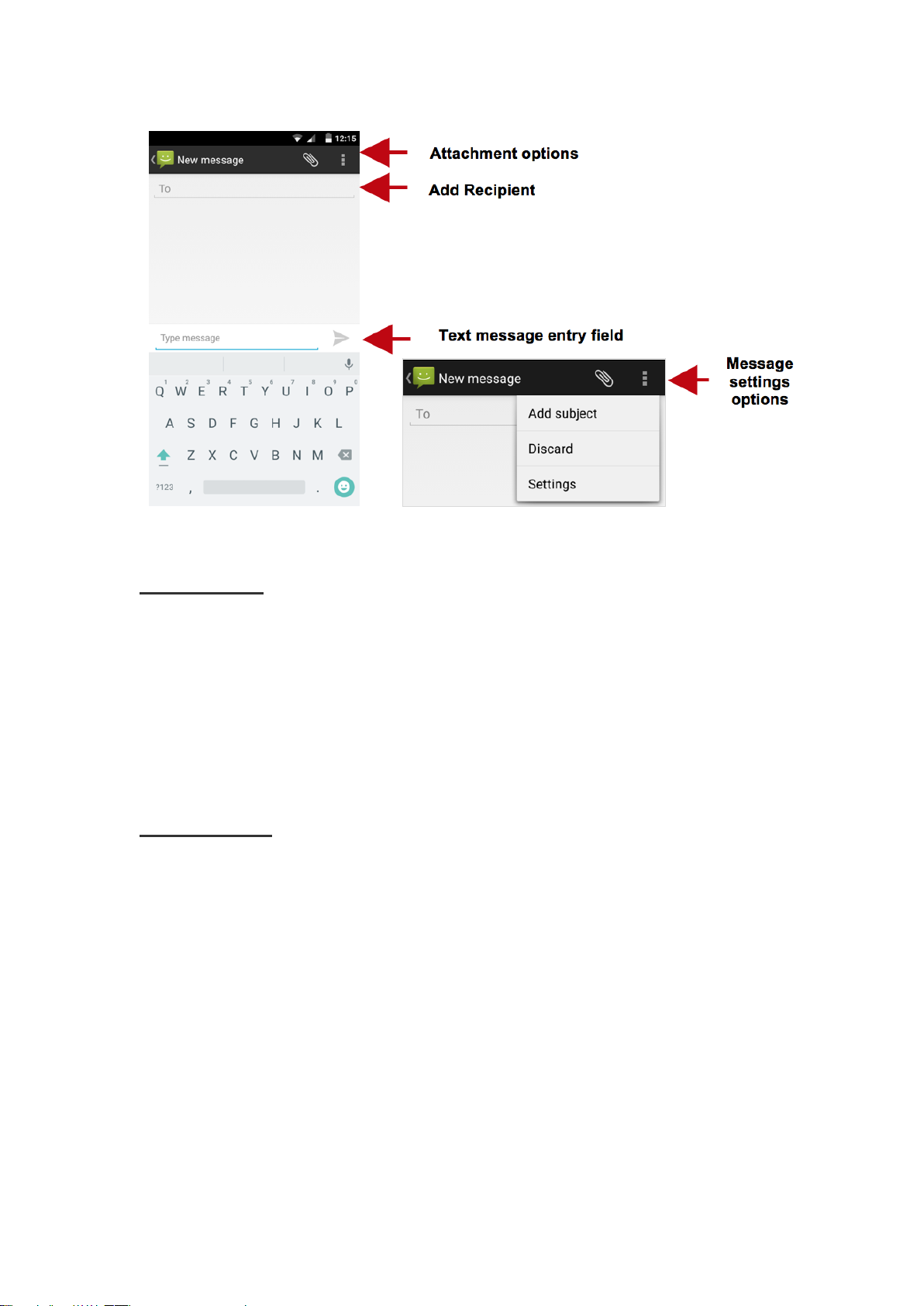
Send an SMS
Application Menu » Messaging » New message (or shortcut icon)
Click the contact icon to enter text message recipient
Compose Text Message and click Send
Send an MMS
When creating message, the default message style is SMS. The message
will automatically convert to MMS when adding an attachment or when
surpassing 10 pages of SMS messages.
Click the attachment icon in the messaging interface.
Click to add attachments and create an MMS message
Page 14
Bluetooth & Wi-Fi
Bluetooth is a short-range wireless communications technology that
devices can use to exchange information and connect to different types of
devices, which include headsets and other devices.
Power on Bluetooth
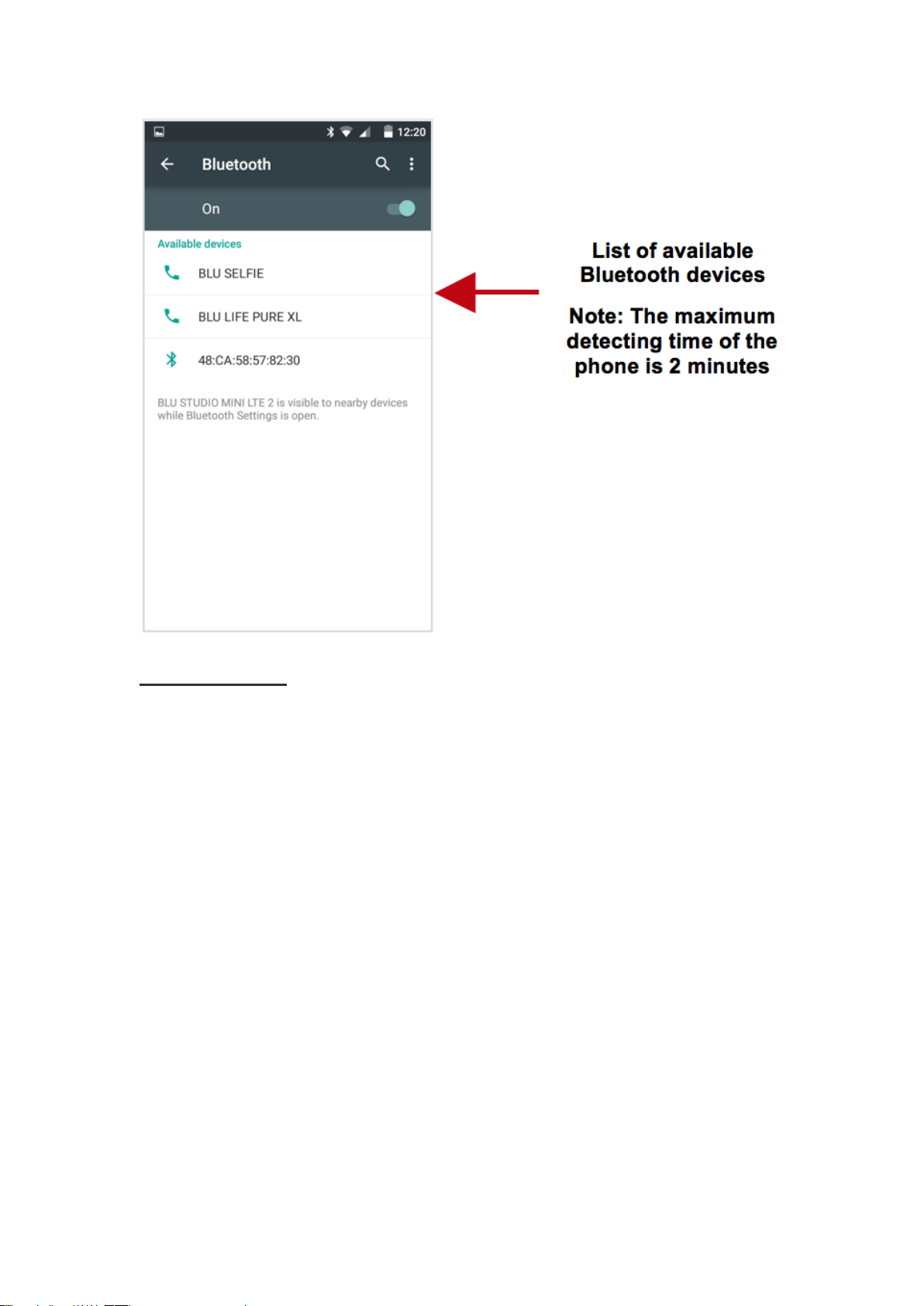
Settings » Bluetooth and select to power on Bluetooth.
The Bluetooth icon will appear in the notification bar. The Bluetooth
will then start to scan for all devices within its range and will start
display all available devices.
Once the scan is complete, all the devices found will display in a list
under available devices. Once the device has been identified, click on it
to connect.
Page 15
Power on Wi-Fi
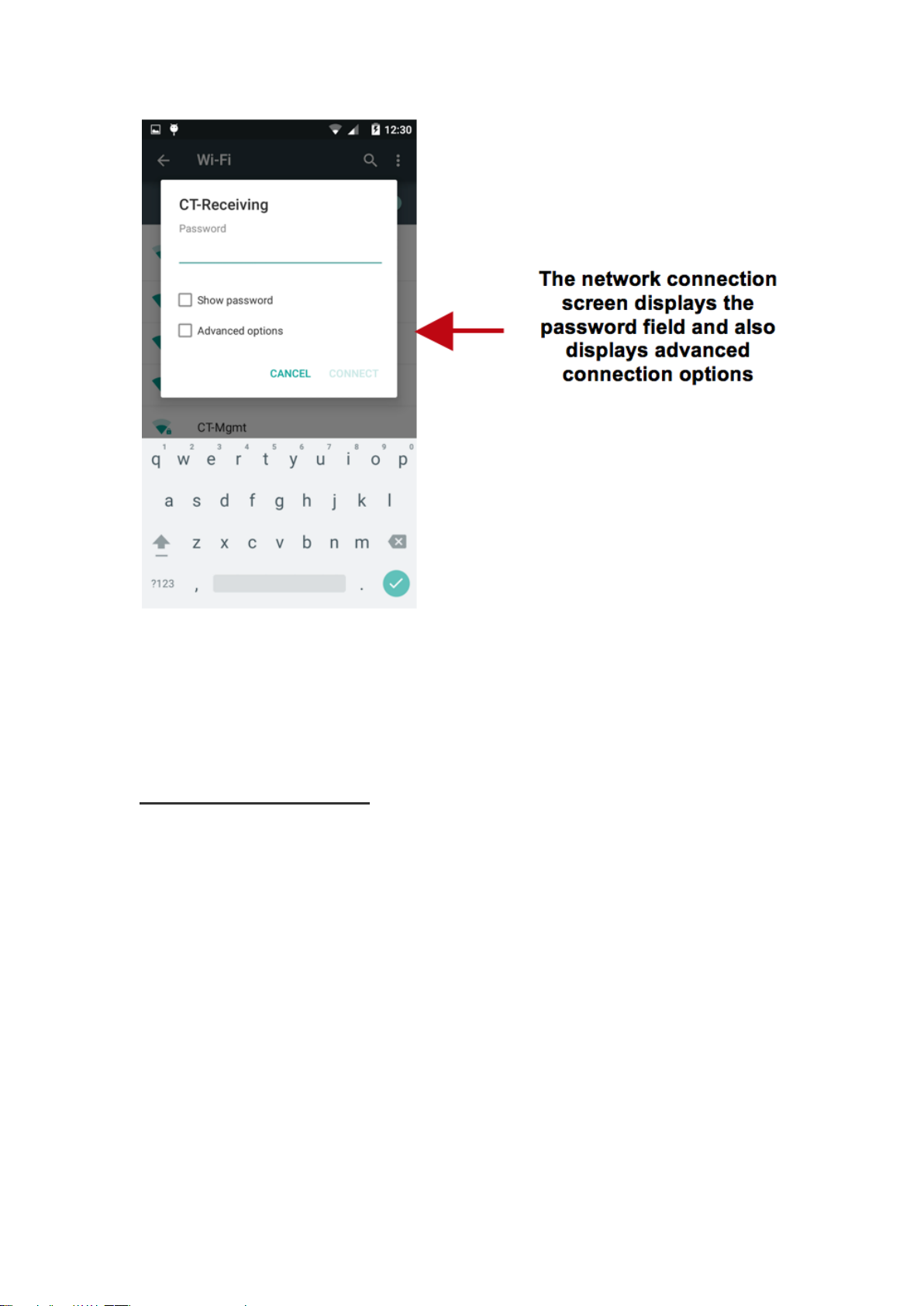
Settings » Wi-Fi and select to power on Wi-Fi
Click on the desired Wi-Fi network to be connected.
Note: Unsecured networks can be connected to directly - secured
networks require a password or credentials prior to connection.
To display advanced options, click on the available option tab.
Page 16
Opera Browser
Menu Functions Settings
App Layout
• This option changes the layout of the browser
New Tabs
• This option adds additional tabs
Clear Browsing Data
• This option clears any data stored
Off Road Images
Page 17
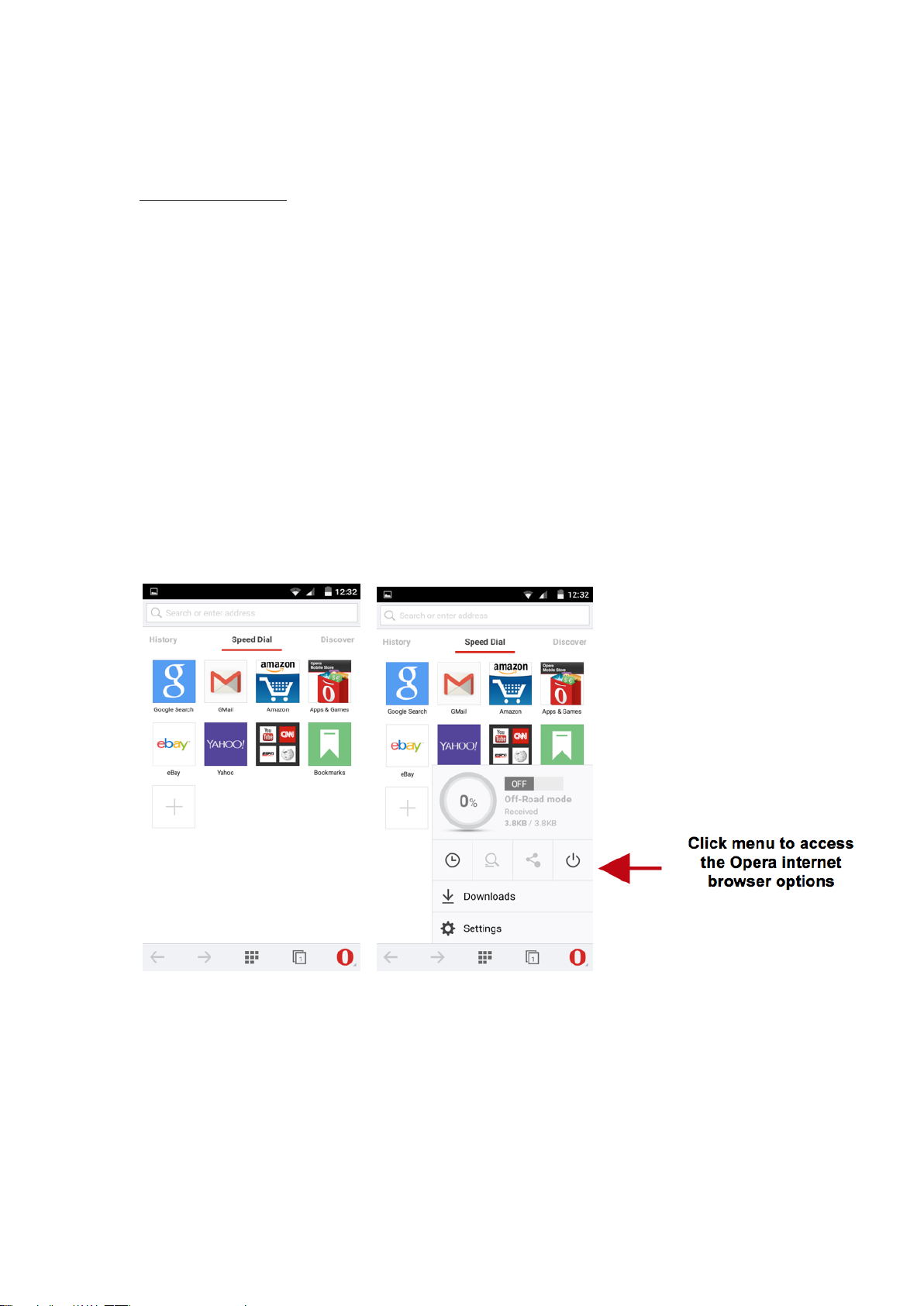
• Check to select between different image qualities
Browser Options
History
Displays recent web pages
Speed Dial
Displays bookmarks and frequently accessed pages
Discover
Displays top stories and recent news
Gmail
Page 18
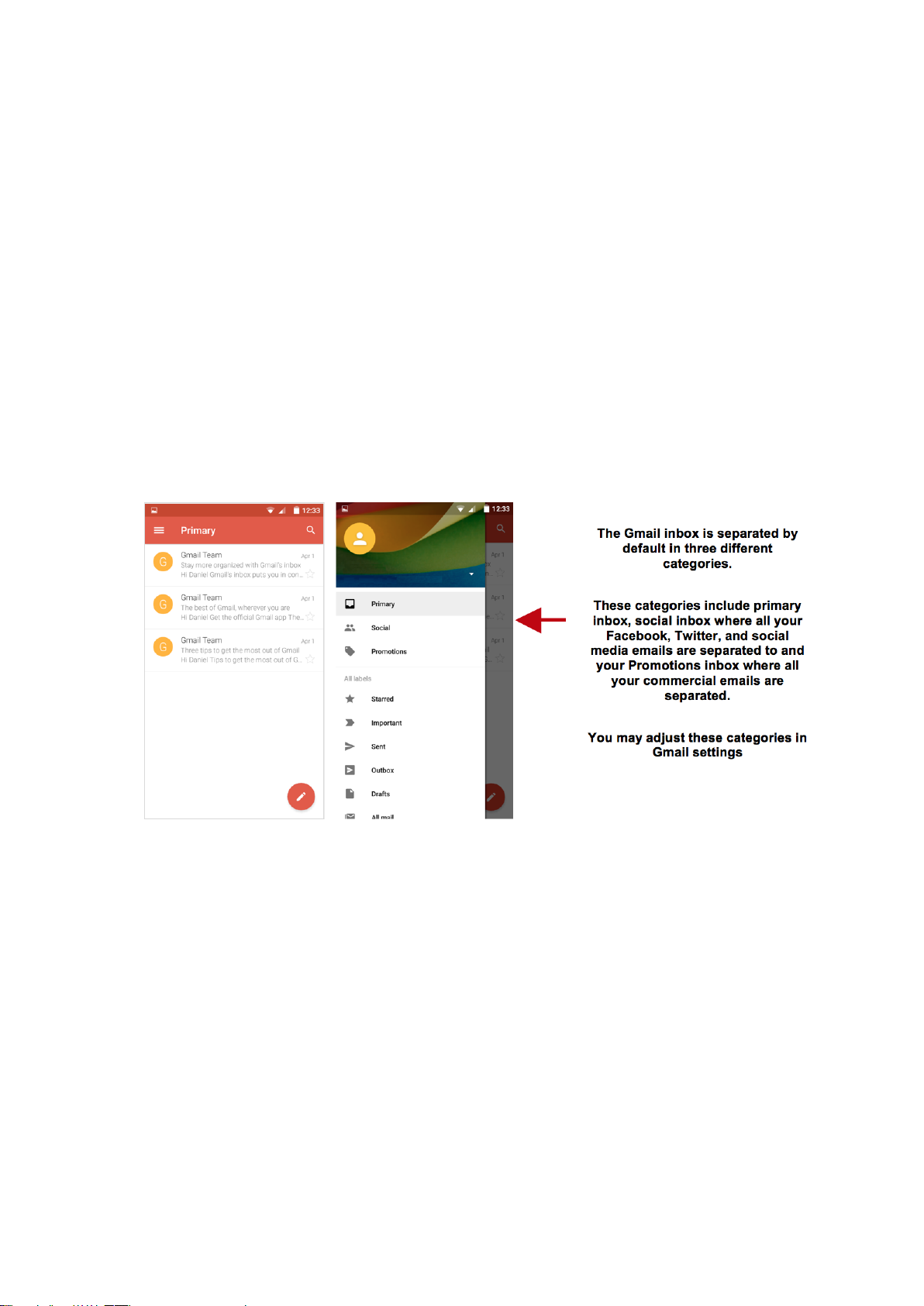
Gmail is Google’s free email service. To access the Gmail program, click
the applications menu and click on the Gmail icon and either sign in with
your existing account or follow the instructions to create a new account.
Note: In order to keep accounts streamlined with Google services, your
Gmail account user name and password will be used for some Google
programs which include: Google Play Store, Google Drive, Google
Photos, Google +, Google Calendar, and Google Wallet.
Play Store
Google Play allows you to download music, movies, and games directly
to your device.
To access the Google Play Store, click on the applications menu and then
the Play Store icon.
Page 19
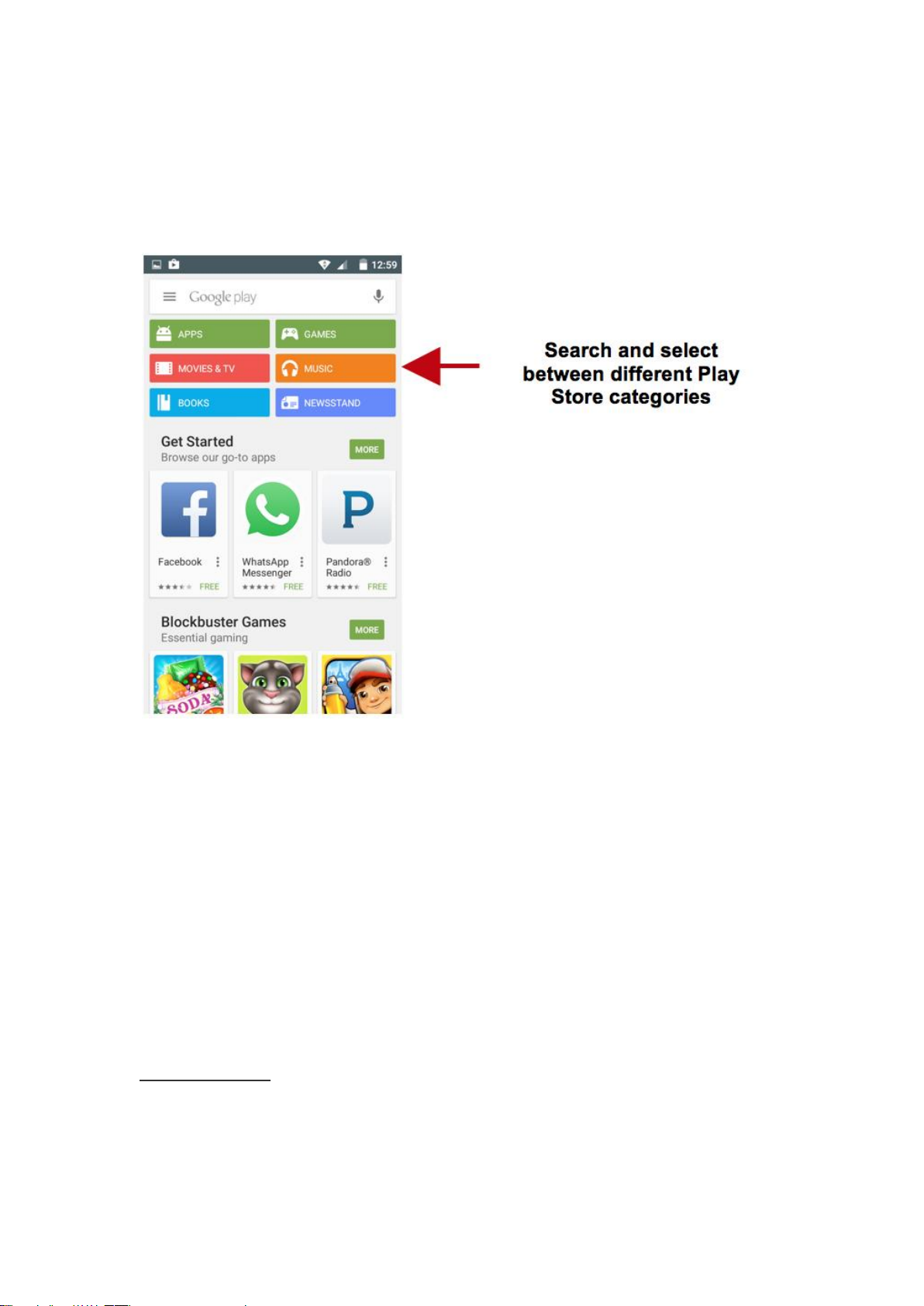
Note: You will need to log in to your Google account when configuring
the phone or entering the Play Store for the first time.
Camera
Prior to use: It is suggested that you insert SD card before using the
camera or video camera. All photos or videos taken by the phone should
be typically stored in the memory card for storage of large capacity
images and videos.
Open Camera
Click the Applications Menu » Camera
Switch to video mode if you want to record videos.
Page 20
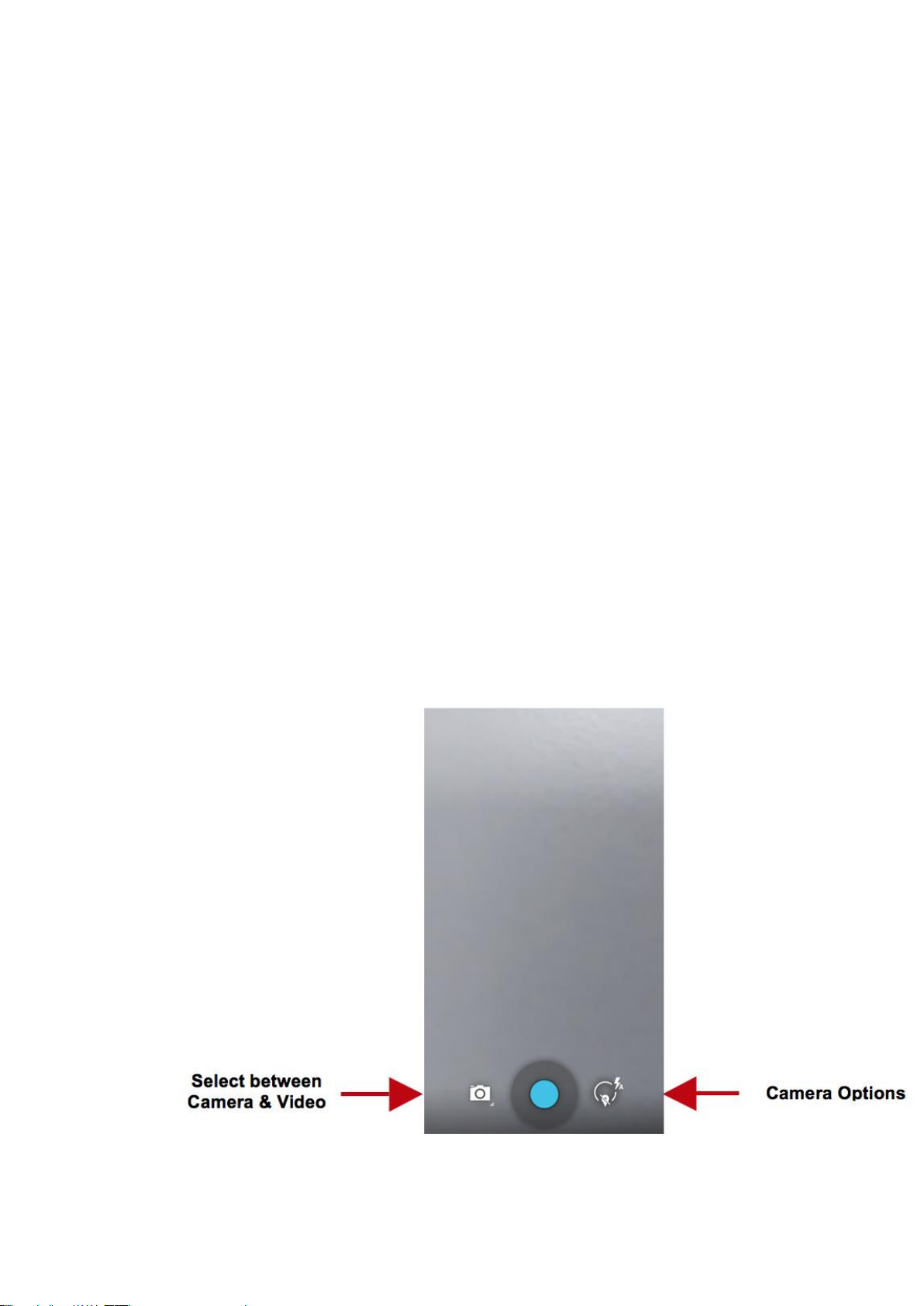
Note: You may place a camera shortcut icon on any of the screens
Take Pictures
Aim at the object in which the picture will be taken.
Press the Shutter button on the screen to capture image.
After taking the picture, the file will be saved in the cameras gallery
folder.
You can view the photos by clicking the preview box button.
You may adjust various settings for the camera by pressing Menu while
in the camera interface. When in the standard camera mode, you can
switch to video to record or click the gallery preview box.
Page 21
Gallery
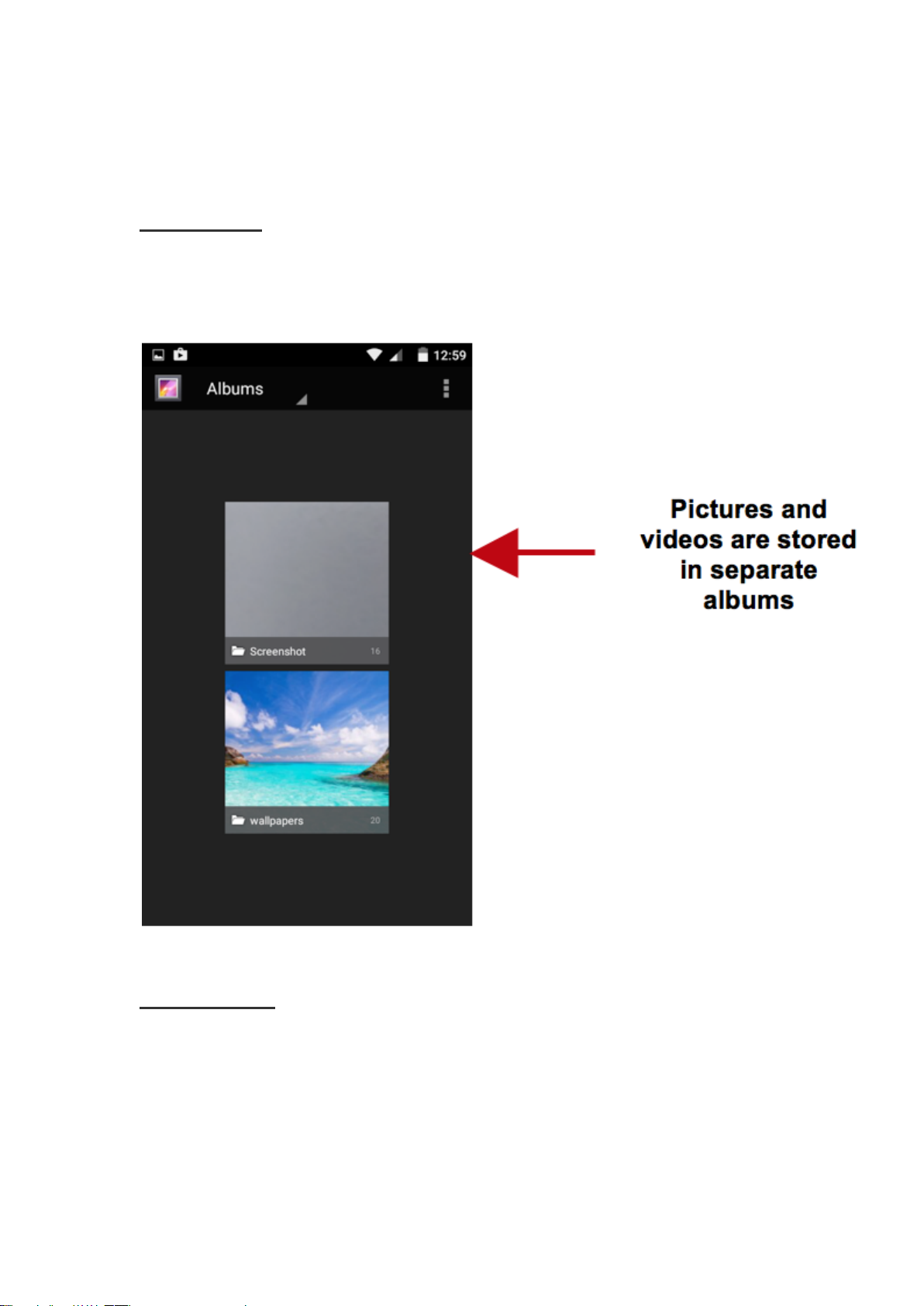
Open Images
Click on the Applications Menu then click on the Gallery icon.
Share Pictures
You may share pictures by sending them through different types of
installed applications. You may also send pictures through the MMS
message function by attaching a picture and also via Bluetooth.
Page 22

Adjust Image
Press Menu and select edit to adjust images. You may select from
different effects that may include: Vintage, Black and White, Instant,
Latte, Litho, X-Process, Crop, Rotate, Mirror, Straighten, Vignette,
Contrast, Exposure, Auto color, Shadows, and Vibrancy among other
options.
Crop Pictures
Click menu and crop to adjust the size of the picture. Once the picture
appears, pinch your fingers in or out to adjust the size. To keep
proportion, hold down any of the four corners of the image and adjust.
Play Music
Open Music
Click on the Music icon to open the Play Music Player
Page 23
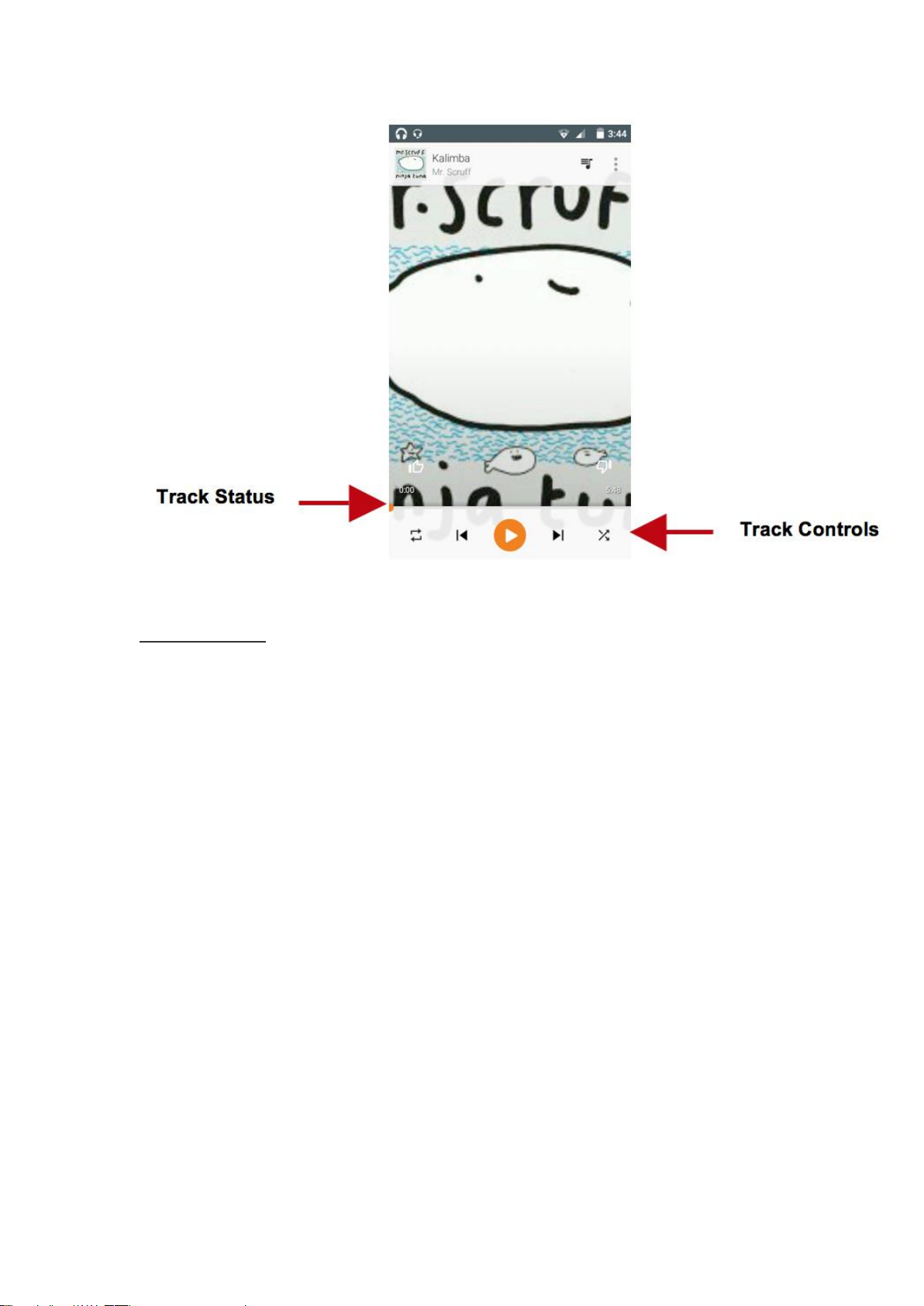
Search Music
You may choose to search for music from media folder through artist
name, song name, album name. Some of the following formats are
available: AMR, MIDI, MP3, WAV, and OGG.
Page 24
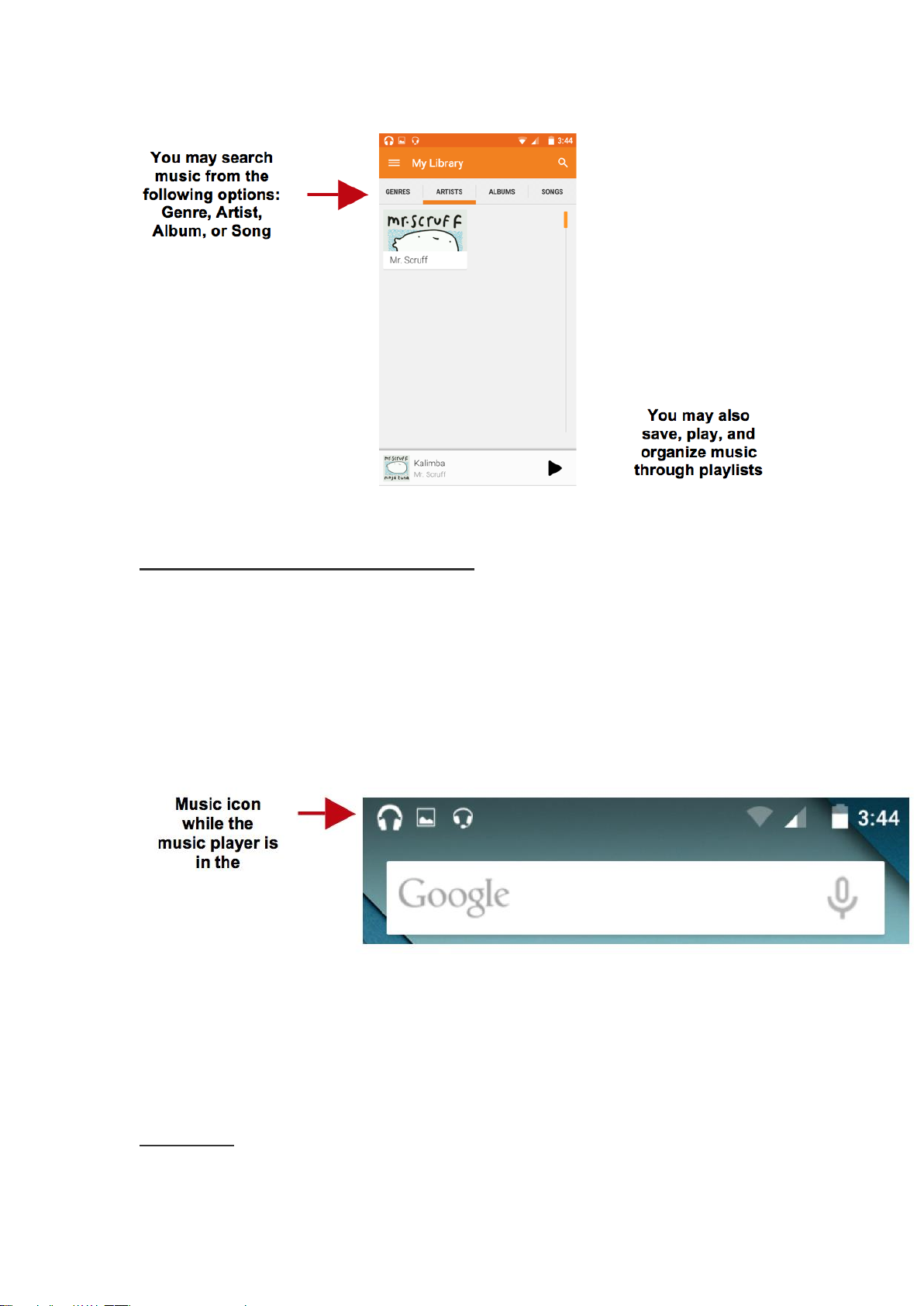
Set Music Player in the Background
Click on the Home key to move the Play Music Player to the background.
You will see an icon on the status bar indicating that the music player is
active.
FM Radio
FM Radio
Page 25
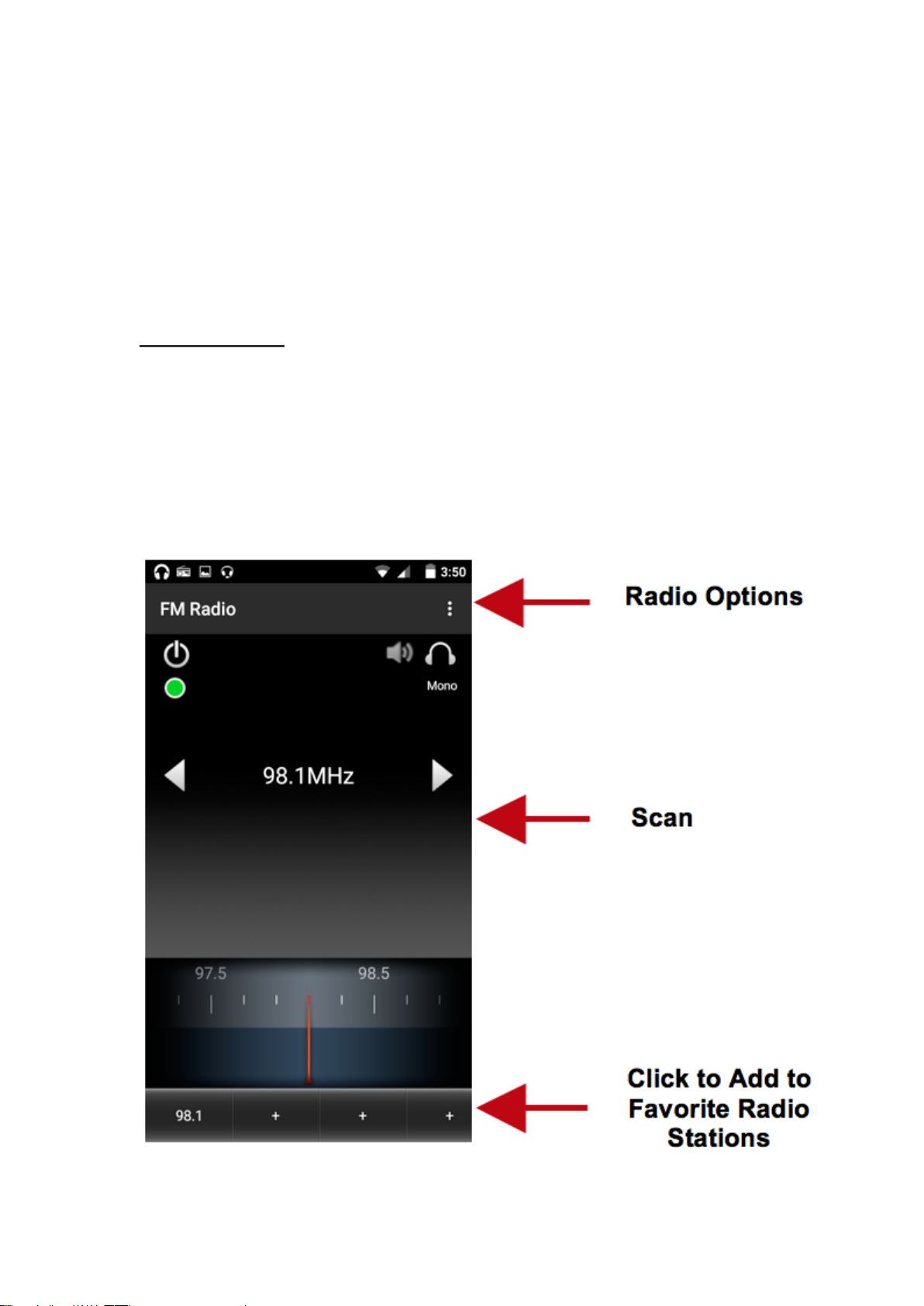
Through this function, you may listen to FM radio on the device. The FM
radio uses the wired headphones as an antenna in order to receive signal.
Before using this function, connect the original equipment headphones
that came with the phone.
Open FM radio
Press the FM Radio icon to open the application.
Click to scan FM channels automatically then click to add any of your
favorite radio stations.
Page 26

FM Radio as Background
Click on the Home key to move the FM Radio to the background.
Favorite Channels
Click on the Star to add to Favorite Channels. You may also click on the
Channel List to browse through added stations.
Sound Recorder
You may send any recorded audio via the File Manager by selecting any
of the default share options which include Bluetooth, MMS, Google
Drive and Gmail.
Record
Keep the phone’s microphone near the sound source.
Click the record button to record the audio and click the stop button to
end the recording.
Page 27
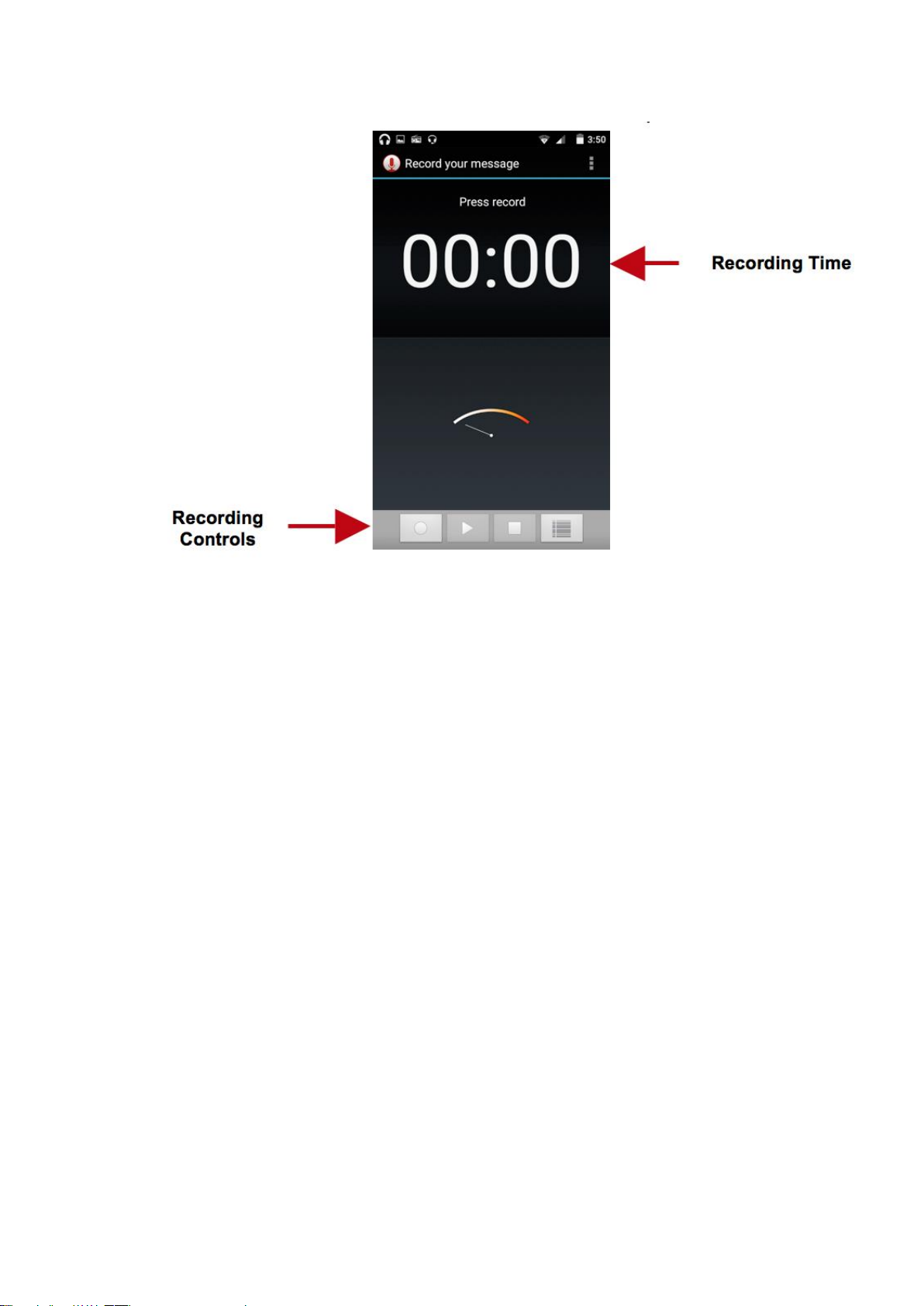
It is suggested that you save all your recordings in your SD card for
maximum storage capacity.
Please ensure the SD card is installed for extended storage space.
File Manager
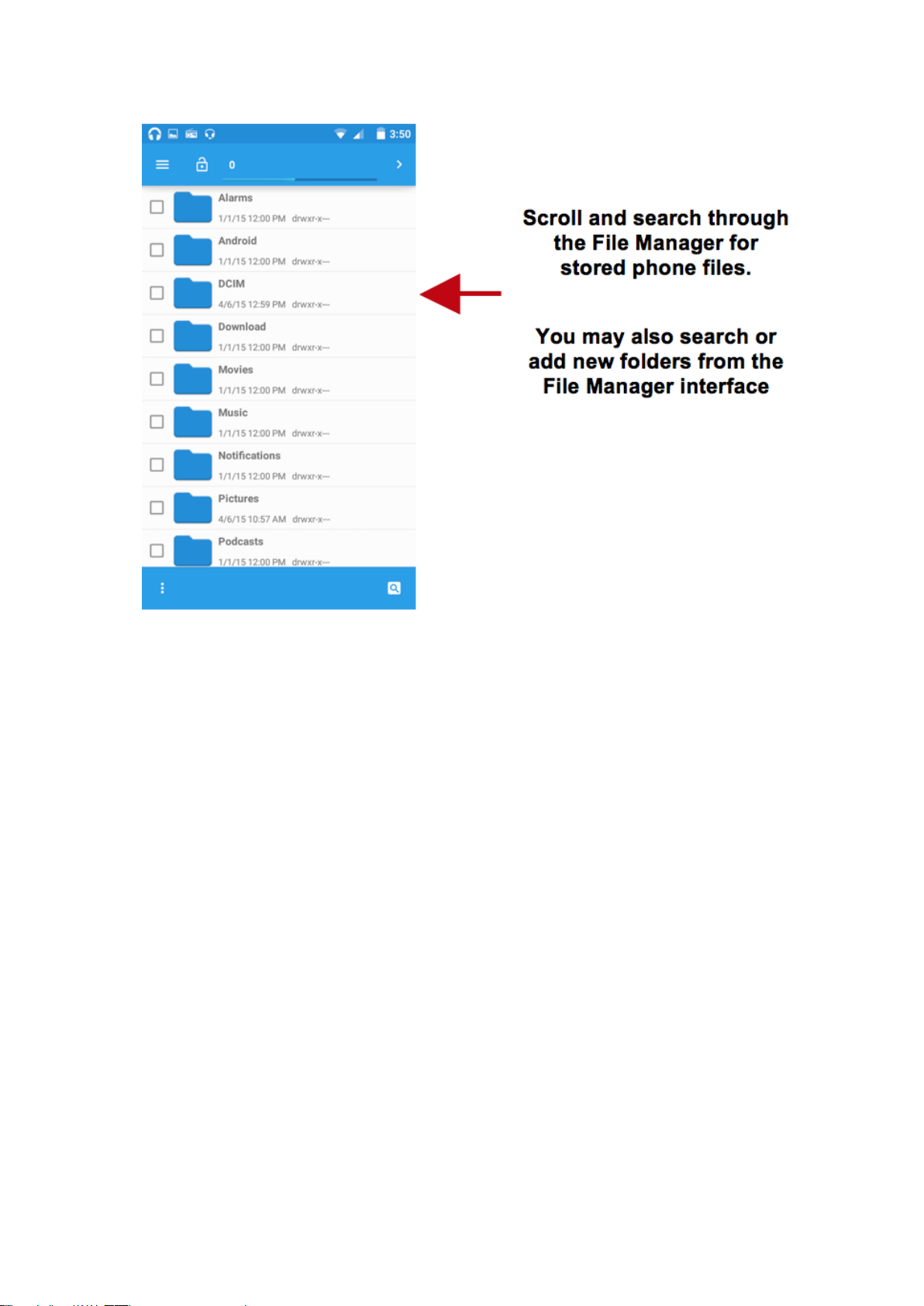
The file manager allows you to search and organize your stored phone
files conveniently and efficiently through one program.
Page 28
Calendar
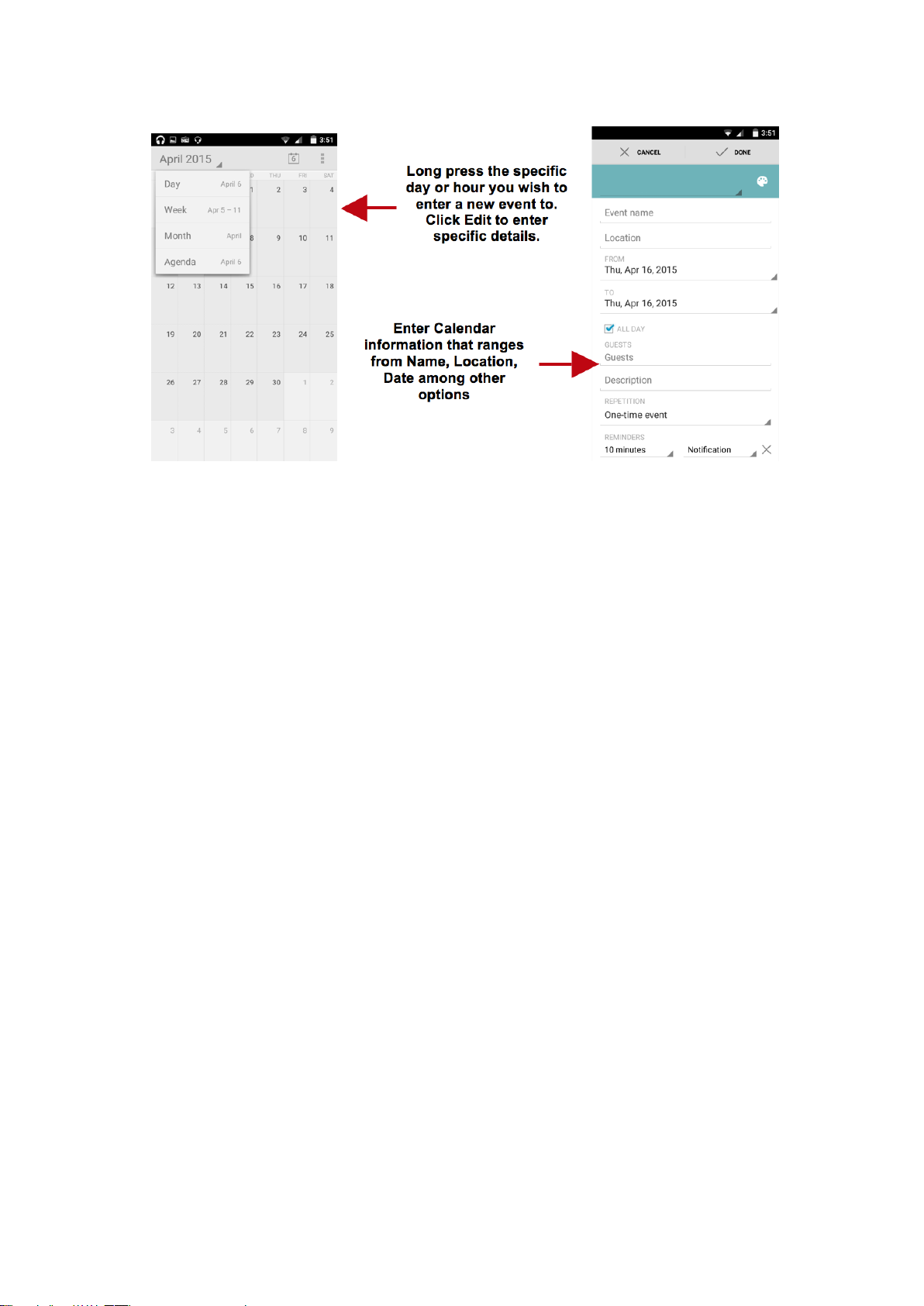
The calendar helps keep track of your life’s most important moments in
one application.
Page 29
Alarm Clock
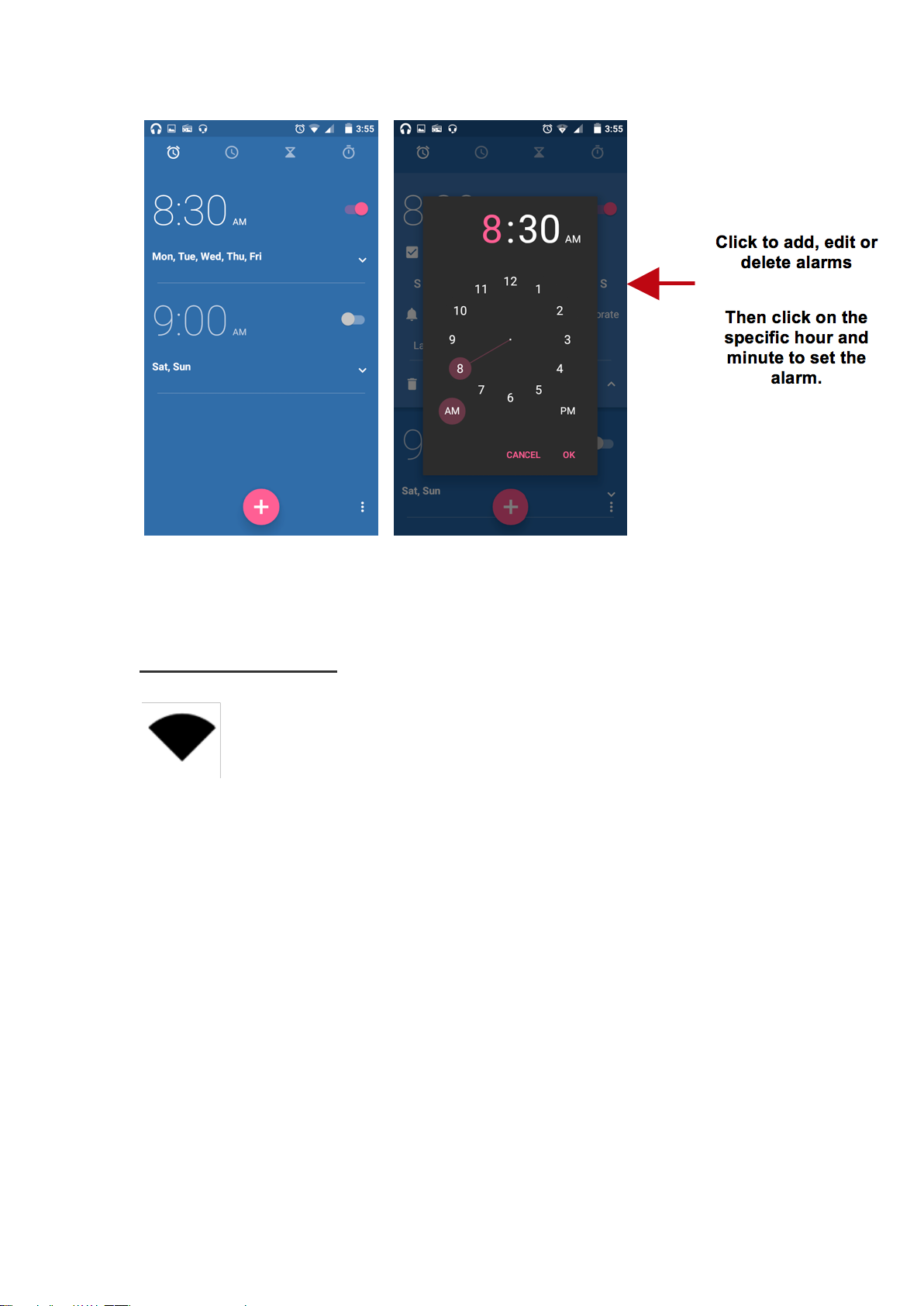
Click on the Clock icon then click the alarm tab to enter the alarm clock
interface.
This option allows you to add and edit alarms.
Page 30
Settings
Wireless & Networks
Wi-Fi
Settings » Wi-Fi to power on. When on, the Wi-Fi will automatically
search for available networks. Any unsecured network can be used
directly and any secured network requires a password or credentials
prior to connection
Page 31
Bluetooth
Power on Bluetooth. Once on, Bluetooth will automatically scan for any
nearby open devices
Click to connect device
Data Usage
Mobile and Wi-Fi Data Usage
More Wireless & Networks
Tethering, Portable Hotspot, VPN, Cellular Networks (APN)
Airplane Mode
Page 32
Note: Airplane mode will turn off all network connections automatically.
Device
Display
Brightness, Wallpaper, Sleep, Daydream, Font Size, and Rotation
Sound & Notification
This option sets the phone ring tone settings for receiving calls and
notifications. Some of the settings include:
Vibrate, volume, ring tones, ring tones notification, dial touchpad, and
haptic feedback and tones
Storage
Page 33
View phone memory usage information and set default write disk.
Battery
General power usage information.
Apps
Manage Applications - Manage and delete installed applications
Running Applications- Press the Stop button to terminate any of the
applications from the running apps list and clear any RAM usage.
Users
Add and manage user profiles.
Page 34
Personal
Location
High Accuracy – Use Wi-Fi and Mobile Networks to determine
location.
Battery Saving – Use Mobile Networks to determine location.
Device Only – Use GPS to determine your location.
Security
Set up basic screen locks: Use slide, pattern, PIN or password to lock the
screen.
Pattern: The initial set up will include simple unlock instructions and
examples. Click to continue the security pattern step. Note: You can
add additional pattern security at power on.
PIN: Enter a PIN number to unlock the screen
Password: Use a password to unlock the screen
Page 35

Note: You may stop this security feature at any time.
Set up SIM card PIN lock
SIM card PIN (Personal Identification Number) is used to prevent
unauthorized use of SIM card.
To change a blocked PIN code, you will need to unlock the SIM lock
then go to the Change Password screen. The phone will automatically
prompt you enter the old PIN code and ask to enter a new PIN code twice.
The phone will then prompt you that the change was successful. If you
enter the PIN incorrectly three times, the SIM and PIN codes will be
automatically locked. You will need the PUK code to unlock the phone
which is available through your service provider. If you enter the PUK
code incorrectly 10 times, the SIM card will be permanently locked.
Please see your service provider for a new SIM card
Unknown Sources – Allow installation of apps from unknown sources
Accounts
Add and manage accounts (IMAP, POP3, Corporate, and application
accounts)
Page 36
Language & Input
Language – Change the language of the phone
Personal Dictionary - Add or delete words to the custom dictionary
keyboard,
Spell checker, voice typing, text-to-speech, Google voice typing.
Backup & Reset
Backup Data – Will back up all application data, WLAN passwords,
and other settings to Google's servers
Restore to Factory Settings – Restores phone and erases all stored data
completely.
System
Page 37
Date & Time
Date and Time adjustment.
Select Date Format - There are 3 kinds of formats you can choose from:
Month-Day-Year, Day-Month-Year and Year-Month-Day.
Accessibility
Power button ends call, auto rotate screen, Talk Back, speak passwords
and large text
Printing
You may print files via Cloud Ready printers
(Please check Google Cloud Print website for printer compatibility
information)
Page 38
Developer Options
If the phone does not display Developer options, press build
number seven (7) times in the about phone tab.
The developer option gives access to USB Debugging and other
developer tools.
About Device
Phone information status and firmware updates
Storage
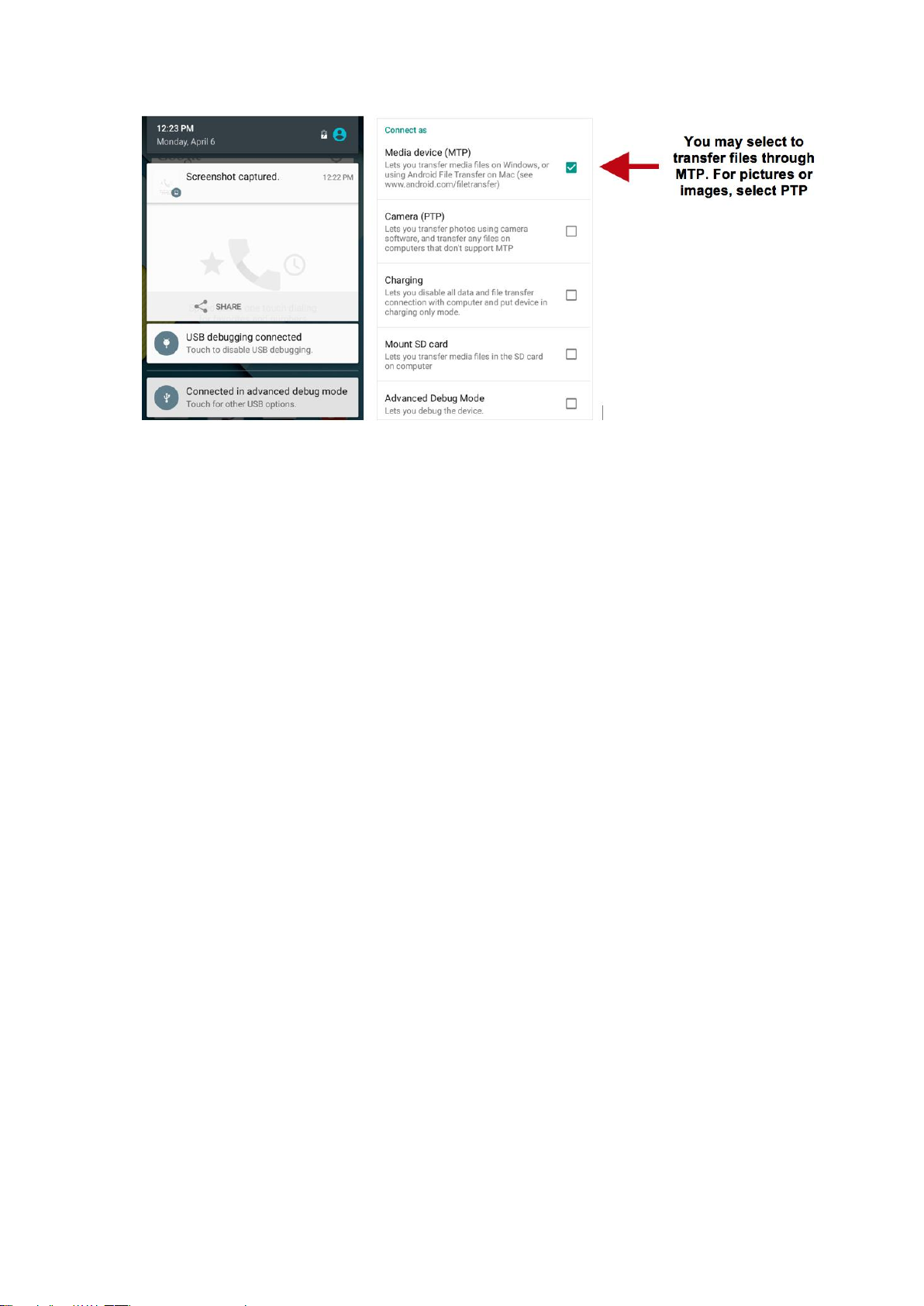
Connect the phone with the USB cable provided. Once connected, a
connection interface will appear. In the connection mode interface, select
one of the available options to transfer files to your computer.
Page 39
Troubleshooting
Below is a list of common problems that may occur when using your
mobile phone. Try these easy troubleshooting steps to resolve any type of
issues you may encounter.
The phone does not power on
Press and hold the power key until the startup sequence appears on the
display.
Check the battery level and ensure there is sufficient charge.
The phone does not respond after several minutes
Remove and insert the battery – If the phone has an internal battery,
please press and hold the power button.
Page 40

The phone powers off by itself
Check if the screen lock of the phone is enabled.
Check if the phone needs to be charged.
The battery won’t charge
Check if the battery is already fully charged.
Make sure that the battery is inserted correctly.
Ensure that the battery being used is a BLU approved battery.
Double check if the charger connector is properly connected to the
phone.
Note: Connect charger only after the battery has been inserted.
The standby time is too short
Please keep in mind that standby time relates directly to phone usage
(Internet, Text, Voice Calls, Maps, etc.).
Batteries typically have to be replaced after a year of use.
The phone cannot connect to the network (Voice or Data)
Verify if you have active service with your service provider.
Contact your local network service provider and verify if you are within
its network coverage area.
Page 41

The phone displays a SIM Error
Make sure the SIM is properly inserted and in its intended slot.
Make sure that the SIM card is not damaged or scratched.
The PIN code was entered incorrectly three times
The SIM card will lock and you will need to enter the PUK code (PIN
Unlock Code). Please contact your local service provider to obtain the
PUK.
I cannot make calls
Make sure that the number you dialed is correct and the dial key has
been pressed.
Use the full national area code when dialing out of your area or when
abroad, use country-specific international access codes.
I cannot receive calls
Make sure that your phone is connected to a network.
The caller ID does not display on incoming calls
Contact your local network service provider and verify you have the
caller ID feature enabled on your account or verify if the caller may
have blocked his number from appearing.
Page 42

The caller cannot leave a voicemail message
Contact your local network service provider and verify if the voicemail
service is active on your account or check if the network is busy.
The phone does not connect to the internet
Ensure with your service provider that your account has the appropriate
internet/data plan enabled.
Ensure internet APN settings are configured (Carrier dependent).
Text Messages cannot be Sent / Received
Ensure text messaging is enabled with your service provider.
Ensure APN settings are configured (Carrier dependent).
Page 43

FCC Regulations:
This mobile phone complies with part 15 of the FCC Rules. Operation is
subject to the following two conditions: (1) This device may not cause
harmful interference, and (2) this device must accept any interference
received, including interference that may cause undesired operation.
This mobile phone has been tested and found to comply with the limits
for a Class B digital device, pursuant to Part 15 of the FCC Rules. These
limits are designed to provide reasonable protection against harmful
interference in a residential installation. This equipment generates, uses
and can radiated radio frequency energy and, if not installed and used in
accordance with the instructions, may cause harmful interference to radio
communications. However, there is no guarantee that interference will
not occur in a particular installation If this equipment does cause harmful
interference to radio or television reception, which can be determined by
turning the equipment off and on, the user is encouraged to try to correct
the interference by one or more of the following measures:
-Reorient or relocate the receiving antenna.
-Increase the separation between the equipment and receiver.
-Connect the equipment into an outlet on a circuit different from that to
which the receiver is connected.
-Consult the dealer or an experienced radio/TV technician for help.
FCC Note:
Caution: Changes or modifications not expressly approved by the party
responsible for compliance could void the user‘s authority to operate the
equipment.
Page 44

RF Exposure Information (SAR)
This phone is designed and manufactured not to exceed the emission
limits for exposure to radio frequency (RF) energy set by the Federal
Communications Commission of the United States.
During SAR testing, this device was set to transmit at its highest certified
power level in all tested frequency bands, and placed in positions that
simulate RF exposure in usage against the head with no separation, and
near the body with the separation of 10 mm. Although the SAR is
determined at the highest certified power level, the actual SAR level of
the device while operating can be well below the maximum value. This
is because the phone is designed to operate at multiple power levels so as
to use only the power required to reach the network. In general, the closer
you are to a wireless base station antenna, the lower the power output.
The exposure standard for wireless devices employing a unit of
measurement is known as the Specific Absorption Rate, or SAR.
The SAR limit set by the FCC is 1.6W/kg.
This device is complied with SAR for general population /uncontrolled
exposure limits in ANSI/IEEE C95.1-1992 and had been tested in
accordance with the measurement methods and procedures specified in
IEEE1528. This device has been tested and meets the FCC RF exposure
guidelines when tested with the device directly contacted to the body.
The FCC has granted an Equipment Authorization for this model phone
with all reported SAR levels evaluated as in compliance with the FCC RF
exposure guidelines. SAR information on this model phone is on file with
the FCC and can be found under the Display Grant section of
www.fcc.gov/oet/ea/fccid after searching on FCC ID:
YHLBLUSTMNLTE2.
For this device, the highest reported SAR value for usage against the head
is 0.61 W/kg, for usage near the body is 1.31 W/kg.
While there may be differences between the SAR levels of various
phones and at various positions, they all meet the government
requirements.
SAR compliance for body-worn operation is based on a separation
distance of 10 mm between the unit and the human body. Carry this
device at least 10 mm away from your body to ensure RF exposure level
Page 45

compliant or lower to the reported level. To support body-worn operation,
choose the belt clips or holsters, which do not contain metallic
components, to maintain a separation of 10 mm between this device and
your body.
RF exposure compliance with any body-worn accessory, which contains
metal, was not tested and certified, and use such body-worn accessory
should be avoided.
Page 46

IC Notice
This device complies with Industry Canada license-exempt RSS
standard(s). Operation is subject to the following two conditions:
(1) this device may not cause interference, and
(2) this device must accept any interference, including interference that
may cause undesired operation of the device.
Le présent appareil est conforme aux CNR d'Industrie Canada applicables
aux appareils radio exempts de licence. L'exploitation est autorisée aux
deux conditions suivantes:
(1) l'appareil ne doit pas produire de brouillage, et
(2) l'utilisateur de l'appareil doit accepter tout brouillage radioélectrique
subi, même si le brouillage est susceptible d'en
This Class B digital apparatus complies with Canadian ICES-003.
Cet appareil numérique de la classe B est conforme à la norme NMB-003
du Canada.
IC: 11492A-STMNLTE2
IC Radiation Exposure Statement
This EUT is compliance with SAR for general population/uncontrolled
exposure limits in IC RSS-102 and had been tested in accordance with the
measurement methods and procedures specified in IEEE 1528 and IEC
62209. This equipment should be installed and operated with minimum
distance 1.0 cm between the radiator and your body. This device and its
antenna(s) must not be co-located or operating in conjunction with any
other antenna or transmitter.
Cet appareil est conforme aux limites d'exposition DAS incontrôlée pour
la population générale de la norme CNR-102 d'Industrie Canada et a été
testé en conformité avec les méthodes de mesure et procédures spécifiées
dans IEEE 1528 et IEC 62209. Cet appareil doit être installé et utilisé
avec une distance minimale de 1.0 cm entre l’émetteur et votre corps. Cet
appareil et sa ou ses antennes ne doivent pas être co-localisés ou
fonctionner en conjonction avec tout autre antenne ou transmetteur.
Page 47

The information provided in this user manual is subject to change without
ELECTRICAL SPECIFICATIONS / ESPECIFICACIONES ELÉCTRICAS /
ESPECIFICAÇÕES ELÉTRICAS / CARACTERISTIQUES ÉLECTRIQUES
BATTERY | BATERÍA | BATERIA | BATTERIE
CAPACITY
CAPACIDAD
CAPACIDADE
CAPACITÉ
VOLTAGE
VOLTAJE
VOLTAGEM
TENSION
BATTERY
TYPE
TIPO DE
BATERÍA
TIPO DE
BATERIA
TYPE DE
BATTERIE
POWER
POTENCIA
POTÊNCIA
PUISSANCE
2 000 mAh
3.8 V
Li-ion
7.6 Wh
CHARGER | CARGADOR | CARREGADOR | CHARGEUR
VOLTAGE
VOLTAJE
VOLTAGEM
TENSION
CURRENT
CORRIENTE
CORRENTE
COURANT
FREQUENCY
FRECUENCIA
FREQUÊNCIA
FRÉQUENCE
INPUT
ENTRADA
ENTRÉE
100V-240V
0.2 A
50 Hz/60 Hz
OUTPUT
SALIDA
SAÍDA
SORTIE
5.0 V
1.0 A
notice and BLU Products reserves the right to modify the manual at any
given time. BLU Products has made every effort to ensure that this user
manual is accurate and disclaims responsibility and liability for any
inaccuracies or omissions. Some software, user interface, and elements
may vary depending on final version.
Page 48

TELEPHONE | TELÉFONO | TELEFONE | TÉLÉPHONE
CONSUMPTION
ALIMENTACIÓN
CONSUMO
CONSOMMATION
3.6 V
 Loading...