

Page 1
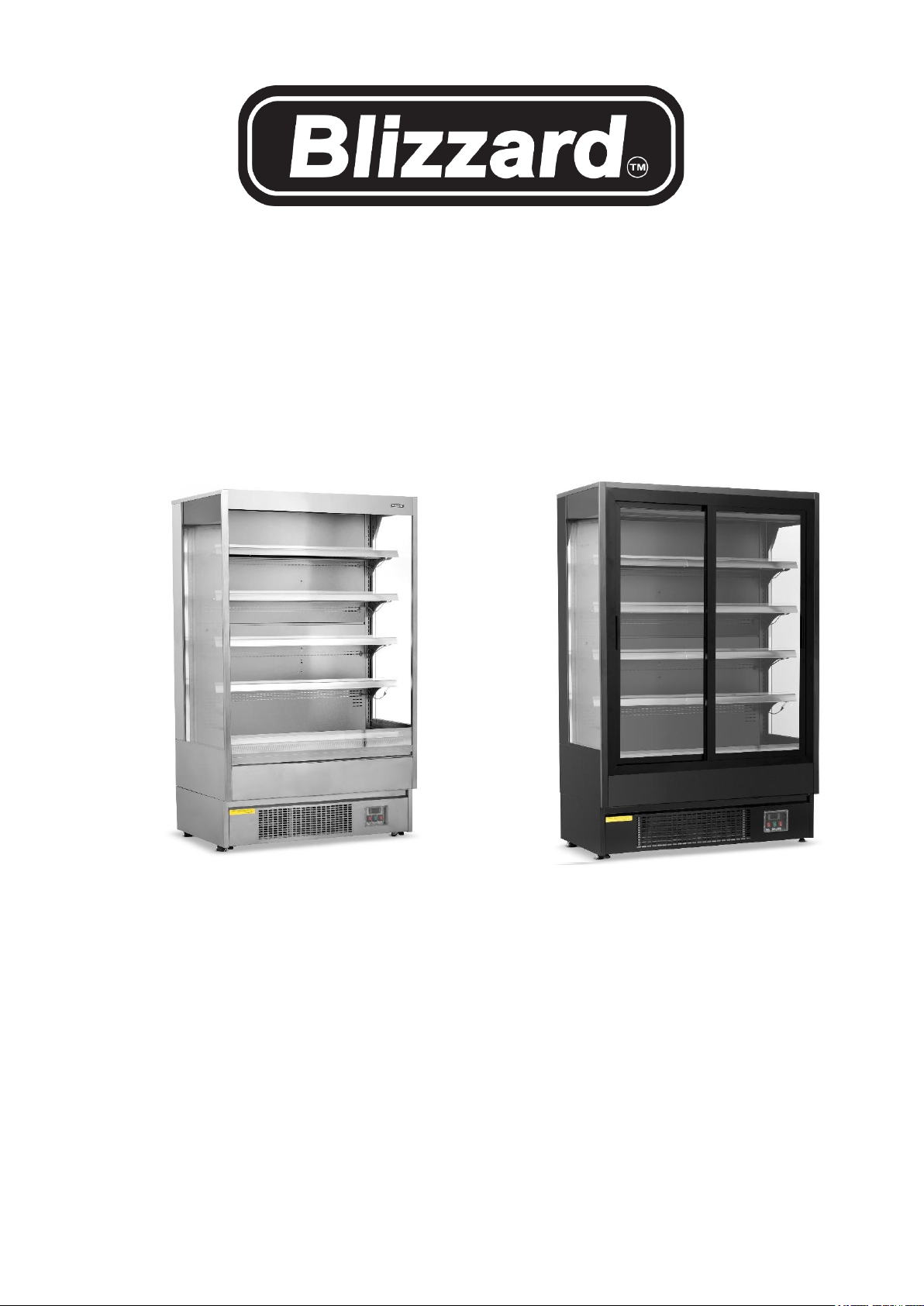
Refrigerated display cabinet
Installation, Operation & Maintenance Manual
(HC Gas R290 used)
Page 2

Safety Tips
• Position on a flat, level and stable surface.
• Position the display in the correct
environment with adequate ventilation space
behind and above the unit, Ambient
temperature must be 450mm AFFL.
• A service agent/qualified technician should
carry out installation and any repairs if
required. Do not remove any components or
service panels on this product.
• Consult Local and National Standards to
comply with The following: ·Health and Safety
at Work Legislation ·BS EN Codes of
Practice ·Fire Precautions ·IEE Wiring
Regulations ·Building Regulations
• The electrical power supply must be protected
by and Earth Fault Protective device like an
RCD, or RCBO. DO NOT use Extension leads.
• DO NOT use jet/pressure washers to clean
the appliance.
• DO NOT use the appliance outside.
• DO NOT use this appliance to store medical
supplies.
• DO NOT use electrical appliances inside the
appliance. (e.g. heaters, ice-cream makers
etc.)
• DO NOT stand or support yourself on the
base, shelves or doors.
• DO NOT allow oil or fat to come into contact
with the plastic components or seals. Clean
immediately if contact occurs.
• Bottles that contain a high percentage of
alcohol must be sealed and placed vertically in
the refrigerator.
• Always carry, store and handle the appliance
in a vertical position and move by holding the
base of the appliance.
• Always switch off and disconnect the power
supply to the unit before cleaning.
• Keep all packing away from children. Dispose
of the packaging in accordance with the
regulations of local authorities.
• If the power cord is damaged, it must be
replaced by an agent or a recommended
qualified technician in order to avoid a hazard.
Introduction Please take a few moments to
carefully read through this manual. Correct
maintenance and operation of this machine
will provide the best possible performance
from your product.
Introduction
Please take a few moments to carefully read through
this manual. Correct maintenance and operation of
this machine will provide the best possible
performance from your product.
Pack Contents
• Refrigerated display
• Shelves x 4
• Instruction manual
• Shelf guides x 8
We pride ourselves on quality and service, ensuring
that at the time of packing the contents are
supplied fully functional and free of damage.
Should you find any damage as a result of transit,
please contact your dealer immediately.
Installation Note:
If the appliance has not been stored or moved in
an upright position, let it stand upright for
approximately 6 hours before operation. If in doubt
allow the appliance to stand.
1. Remove the appliance from the packaging.
Make sure, that all protective plastic film
and coatings are thoroughly removed from
all surfaces.
2. Maintain a distance of 20cm (7 inches)
between the unit and walls, ceilings or other
objects for ventilation. Increase this
distance if the obstacle is a heat source.
3. Ensure the ambient temperature is below
25℃ with relative humidity<60%, and avoid
drafty areas, and locations below 15
degrees C.
4. Beware of enclosed rooms with other
refrigeration equipment as additional
ventilation may be required.
5. Ensure cabinet is level, use the adjustable
feet to level as necessary.
6. Ensure both mains supply leads are not
trapped and are connected to an
appropriate fixed electrical outlet which is
protected by an Earth fault protective device
like an RCD or RCBO.
7. Unfasten the cords around the shelves,
adjust as required, fit price rails on the front
of the shelves
Note: Before using the appliance for the first time,
clean the shelves and interior with warm soapy
water thoroughly dry afterwards.
Night-blind
A night-blind comes fitted to the open type display,
this must be closed when not in use. Closing the
Night-blind conserves energy. Open or close the
night blind slowly, retain hold of the night-blind
handle until it is slowly fully extended or retracted.
Fitting the Shelves
1. Place one set of shelf guides on either side
of the cabinet at the desired height.
2. Slide the shelf into place. Ensure the shelf is
supported to prevent straining or trapping
the led lighting cable.
3. Fit ticket strips to front edge of shelves
4. Repeat for the remaining shelves.
• Shelf Ticket Strips x 4
• Base ticket strips x 1
Note! double qty will be
supplied for wider models
Page 3

Operation
Storing Food
To get the best result from your appliance, follow these instructions:
• Only store foodstuffs in the appliance when it has reached the correct operating
temperature. ·Products must be pre-chilled before loading into the display.
• Do not store inflammable, explosive, volatile fluid or gas inside the appliance.
• Do not place hot food or liquid inside the appliance.
• ALL food must be covered / packaged including sauces.
• Do not overload each shelf allow sufficient space to allow for air movement around the products.
• Load products carefully into the appliance to avoid damaging/ scratching the surfaces
• Clean up any spillage immediately to avoid possible blockage and cross contamination of foods
• Do not obstruct the fans inside the appliance.
• Do not place hot food or liquid inside the appliance.
• Avoid opening the doors if fitted for prolonged periods of time.
• Observe temperature and log temperatures every 2 hours.
Turn on
1. Close the door(s) / night-blind of the appliance.
2. Ensure the power switch is set to [O] and turn on at the socket.
3. Switch on the power [l]. The current temperature within the appliance is displayed. Allow ½ hour before
loading the cabinet.
4. Switch on the red heater switch f fitted is switched on as this is needed to boil off any water condensate.
5. Switch on the light switch to illuminate the display area.
Adjusting the Set Temperature
1. Press and hold the set button for 3 seconds till the C led starts blinking with the current set temperature
shown
2. Use the arrow keys to adjust to the required set temperature setting.
3. Press the set key to store, then leave for approx. 5 secs till the display shows the cabinet temperature, the
cabinet will then cool down to the new set temperature. NOTE! The temperature shown on the display will
fluctuate during normal use as the unit regulates the cabinet temperature.
Manual Defrost
The appliance will automatically run a defrost cycle every four hours. During this part of the cycle, the
temperature may rise slightly, however the product temperature will not be affected.
Note: The cycle starts from the time the appliance is initially powered up.
To manually defrost the appliance:
1. Press and hold the DEFROST button for 5 seconds.
2. The defrost cycle will start immediately and the Defrost LED symbol illuminates. The defrost will last a
maximum of 30 minutes.
Note: Starting a manual defrost also resets the automatic defrost timer.
Cleaning, Care & Maintenance
• Switch off and disconnect from the power supply before cleaning.
• ·Clean the interior of the appliance daily and as often as possible.
• ·Do not use abrasive or corrosive cleaning agents or sprays. These can leave harmful residues.
• ·Clean the door seal with warm water with a mild detergent only.
• ·Always wipe dry after cleaning. Stainless steel cleaner can be applied to stainless steel surfaces to
preserve the finish.
• ·Do not allow water used in cleaning to run through the drain hole into the evaporation pan.
• ·Take care when cleaning the rear of the appliance. Sharp edges can cut.
• ·An agent or qualified technician must carry out repairs if required.
Cleaning the Condenser:
Periodically cleaning the condenser can extend the life of the appliance. We recommend cleaning the
condenser ONCE A MONTH especially in warmer ambient temperatures. This is sited underneath the cabinet
behind the magnetic front ventilated panel, which can be hinged down to gain access for cleaning with a
brush or vacuum cleaner, Care must be taken not to damage the thin surface, gently brush the surface. We
recommend that a skilled person or qualified technician cleans the condenser.
Page 4
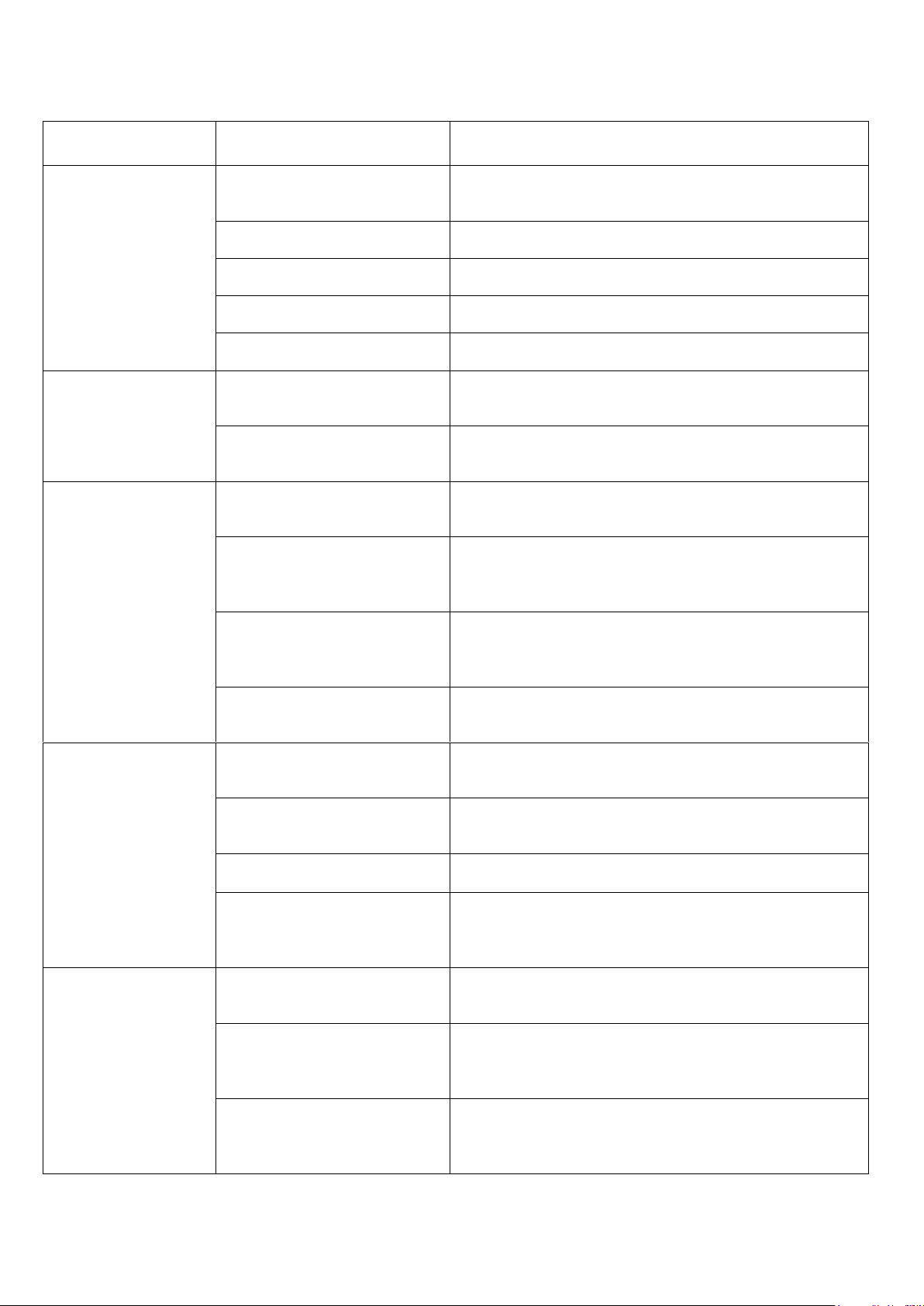
Troubleshooting
If your appliance develops a fault, please check the following table before making a call to your retailer.
Fault
Probable Cause
Action
The appliance is not
working
The unit is not switch on
Check the unit is plugged in correctly and switched
on
Plug and lead are damaged
Call your agent or qualified technician
Fuse in the plug has blown
Replace the fuse
Power supply
Check power supply
Internal wiring fault
Call your agent or qualified technician
The appliance turns
on, but the
temperature is too
high/low
Too much ice on the
evaporator
Defrost the appliance
Condenser blocked with
dust
Arrange the cleaning of the condenser
The appliance turns
on, but the
temperature is too
high/low
Doors are not shut properly
Check doors are shut and seals are not damaged
Appliance is located near a
heat source/ high ambient /
draughty location
Move the refrigerator to a more suitable location /
increase ventilation
Unsuitable foodstuffs are
being stored in the
appliance
Remove any excessive hot foodstuffs or blockages
to the fan
Appliance is overloaded
Reduce the amount of food stored in the appliance
The appliance is
leaking water
The appliance is not
properly levelled
Adjust the screw feet to level the appliance (If
applicable)
The discharge outside is
blocked
Clear the discharge outlet
The heater is switched off
Switch on the heater switch
The water container is
damaged / vaporizing tray
heater not working
Call your agent or qualified technician
Troubleshooting
process for
abnormal sounds
Check if the product is
placed horizontally.
Place the product horizontally.
Check if there are any other
items in contact with the
product.
Put other items off the product.
Check if all the adjustable
feet are in contact with the
ground.
Adjust the adjustable feet contact with the ground.
Page 5
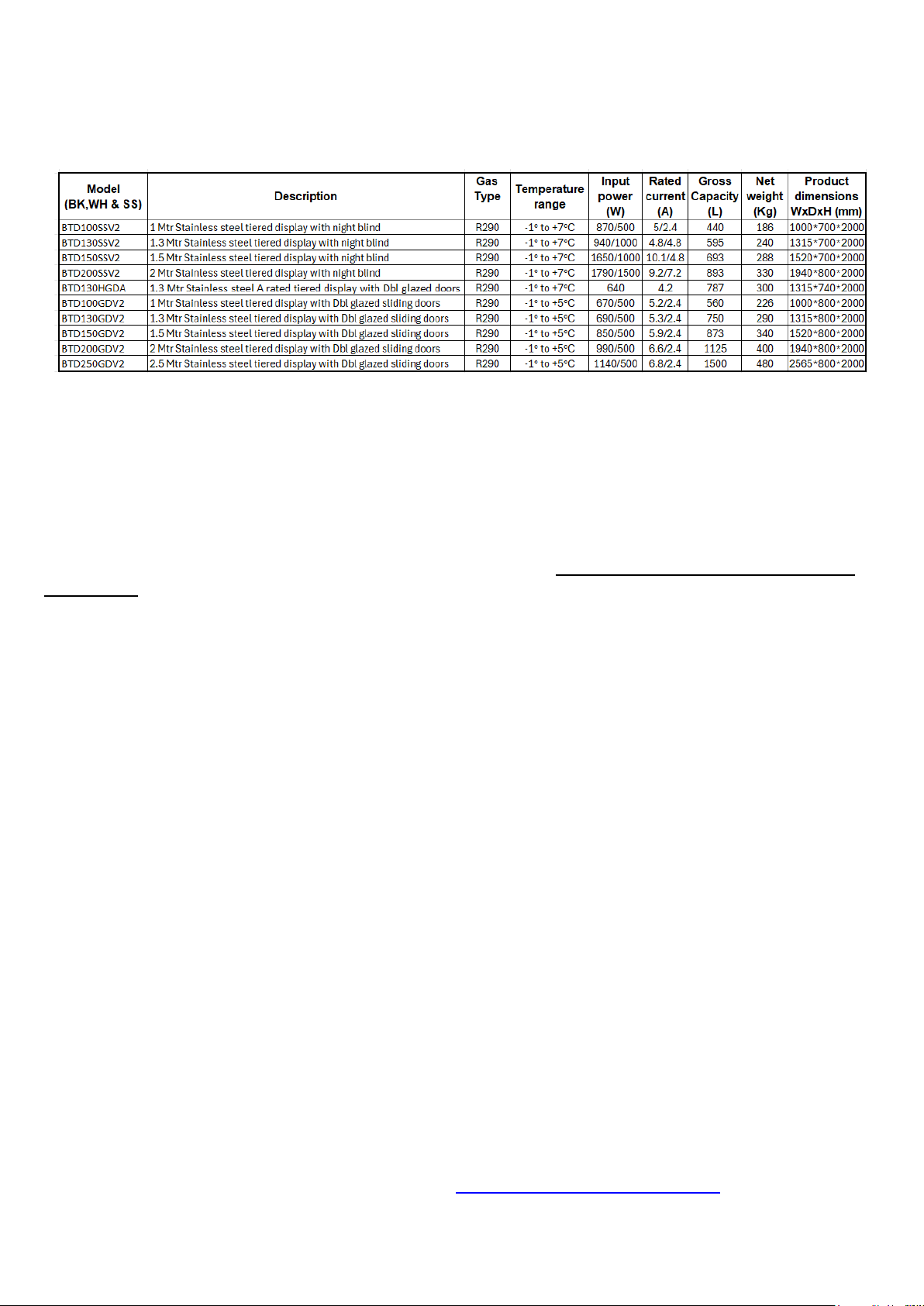
Technical Specifications
Electrical Wiring
Appliances are supplied with a 3 pin, BS1363 plug and lead, with a 13 amp fuse as standard.
The plug is to be connected to a suitable fixed mains socket outlet; extension leads or plug adaptors should
not be used.
Appliances are wired as follows: Live wire (coloured brown) to terminal marked L Neutral wire (coloured blue)
to terminal marked N Earth wire (coloured green) to terminal marked E.
All appliances must be earthed, using a dedicated earthing circuit. If in doubt, consult a qualified electrician.
The electrical socket outlet must be protected by an Earth fault protective device such as an RCD, RCBO.
Electrical isolation points must be kept clear of any obstructions. In the event of any emergency disconnection
being required they must be readily accessible.
Pentland Wholesale Ltd, Blizzard house, Unit17 Walker Park Industrial Estate, Walker Road,
Blackburn, Lancs, BB1 2QE. Tel: 01254 614444, www.pentlandwholesale.co.uk
Page 6
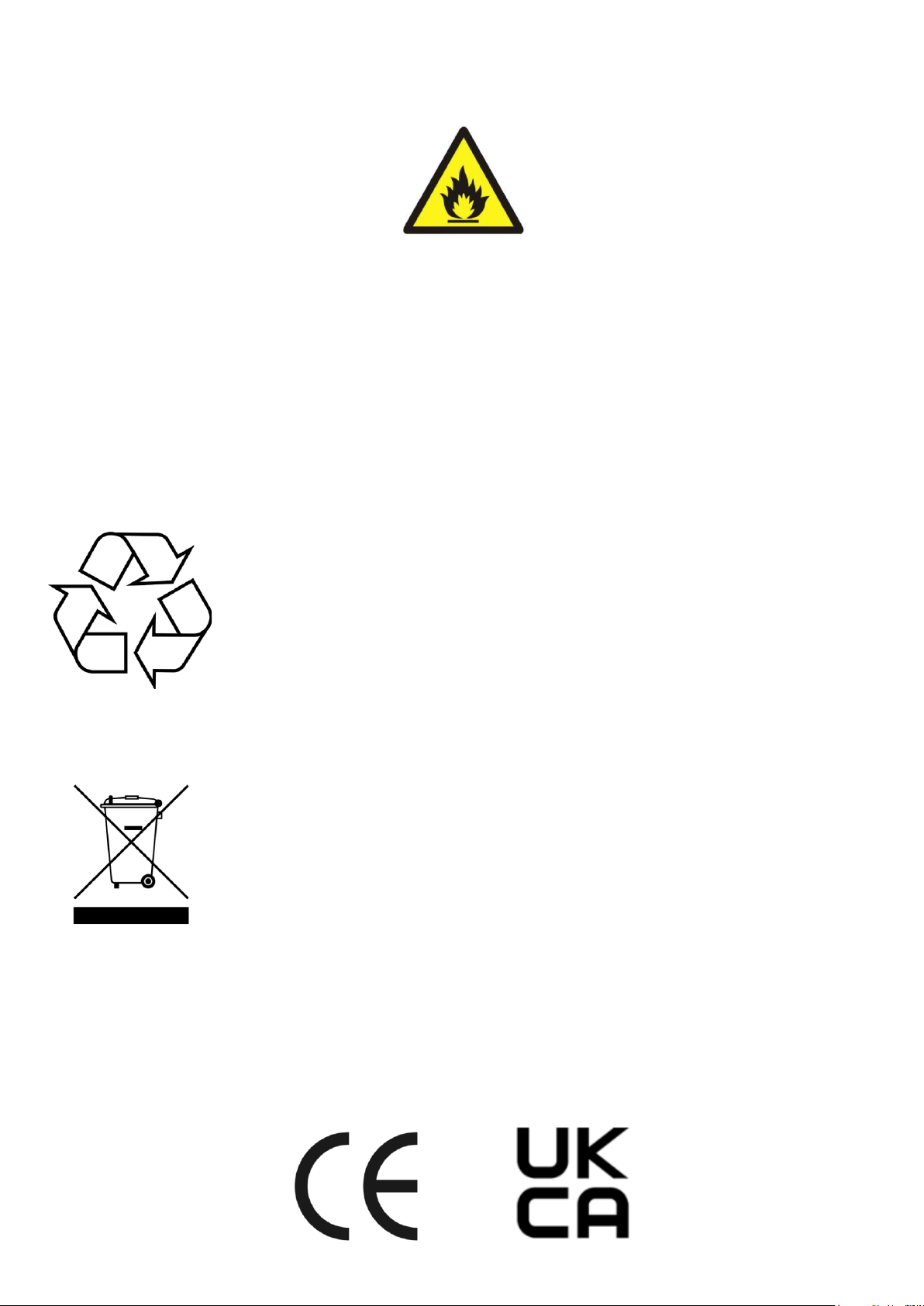
R290 refrigerant is used for this equipment.
Caution!
Consult repair manual/owner’s guide before attempting to install or service this product. All safety precautions
must be followed. Dispose of properly in accordance with federal or local regulations. Risk of fire or explosion
due to puncture of refrigerant tubing. Follow handling instructions carefully.
Danger!
Risk of fire or explosion. Flammable refrigerant used. To be repaired only by trained service personnel. Do not
use mechanical devices to defrost refrigerator. Do not puncture refrigerant tubing.
Disposal
EU regulations require refrigeration product to be disposed of by specialist companies
who remove or recycle all gases, metal and plastic components.
Consult your local waste collection authority regarding disposal of your appliance.
Local authorities are not obliged to dispose of commercial refrigeration equipment but
may be able to offer advice on how to dispose of the equipment locally. All packaging
materials should be disposed of in an environmentally friendly way.
The cardboard may be re-used or recycled. The protective foil and the foam cushions
are CFC-free.
Do not allow children to play with the packaging and destroy plastic bags safely.
Environmental protection
Discarded electric appliances are recyclable and should not be discarded in the
domestic waste! Please actively support us in conserving resources and protecting the
environment by returning this appliance to the collection centers (if available).
Compliance
Parts have undergone strict product testing in order to comply with regulatory standards and specifications set
by international, independent, and federal authorities.
Products have been approved to carry the following symbols:
 Loading...