

Page 1

!
!
!
!
!
!
!
Wireless
Blood Pressure Monitor
User Manual
Rev 7 2015!
Page 2

!
"!
!
WARRANTY
This blood pressure monitor and the cuff is warrantied to be free from defects in materials and workmanship appearing
within 1 year from date of purchase, when used as per instructions provided. The warranty is extended only to the original
purchaser. All implied warranties are limited to 1 year from date of purchase. Batteries are excluded from the warranty.
We will at our option, without charge repair or replace blip BP monitor or cuff covered by the warranty. This is the only
remedy under the above warranty. To obtain warranty service, contact us for the address of the repair location and the
return shipping and handling fee. When obtaining service, enclose proof of purchase, with your name, address, contact
number, & description of problem. We are not liable for any loss of use or any other incidental, consequential or indirect
costs, expenses or damages, unless not allowed by law.
Thank you for purchasing the blip Blood Pressure Monitor!
Date of purchase :_______________________________Serial Number:_________________________________
Questions? Comments! Call us at +1 (877) 837-9730
DESIGNED BY BLIPCARE IN USA.
Learn more @ www.blipcare.com
© Blipcare.com All rights reserved
!"#$%&'(#)*)+,&%'-+#+%./#*,0.
",,)'#)*)+,&%'-+#10%'((2"'3#+%.*,0.#
455#-'026,&-"*#0-6,&-+,/#7-'(#6$ " ' #"0 8 -'-6,&",-9)#0-6,&-+,/#,"'(#6$-"#
,%:'/0%'((2"'#(2"'(0%'(/#+$-'"(2"'(0%'(/#+$-'"#
#
Kahl Handelsvertretung#
Add.: Isarstr.33 40699 Erkrath, Germany
##,;<=#>?@#A4#B??C#CD4
!
2015
Page 3

!
#!
!
Table OF CONTENTS
Intended Use ............................................................................ 4
About Blood Pressure .............................................................. 5
Button Layout and Display ....................................................... 6
Setting Up ................................................................................. 7
How to Measure Your Blood Pressure ................................... 12
Taking a Measurement ........................................................... 15
Maintenance ........................................................................... 17
RF Statement ......................................................................... 22
Safety Statements .................................................................. 27
Error Messages ...................................................................... 30
Troubleshooting ...................................................................... 32
Symbols .................................................................................. 34
Specifications ......................................................................... 35
Appendix A-Installing and Replacing Batteries........................36
Page 4

!
$!
!
#
INTENDED USE
This device is a non-invasive blood pressure monitor. It is intended to measure Blood Pressure (Systolic and Diastolic)
and Pulse Rate in the adult population (18 years or above) at home and/or office environment. The device is intended to
store the readings in the BP Monitor memory and to transmit stored data to a web server on the Internet over a Wi-Fi
wireless network for easy and efficient health record keeping and trending for up to two users.
The device is designed as a home healthcare product only and not intended to serve as a substitute for the advice of a
physician or medical professional. The device is designed to provide supplemental information only. Supplemental
information refers to information for trending purposes only. The device or the device software is not intended to provide
diagnostic information on which treatment or therapy is based, such that when misapplied it could result in serious injury
or death. The device is not intended for those diagnosed with Arrhythmia, pacemakers, stroke episodes, or diabetes that
may need active monitoring.
The blip BP is easy to set up, but before you connect to your home wireless network, take a minute to register your
device. This gives you access to all of the features available through the web portal.
Read this manual before use. Type BF Applied part (cuff)
Page 5

!
%!
!
ABOUT BLOOD PRESSURE
High Blood Pressure, or hypertension, is a medical condition in which the arterial
blood pressure is elevated. High blood pressure can be classified as “primary”,
meaning that no medical cause can be found, or as “secondary”, meaning that it is
caused by other conditions that affect the kidneys, arteries, heart or endocrine
system. Persistent high blood pressure is a risk factor for conditions such as stroke,
heart failure, arterial aneurysm and others. It is also a leading cause of chronic
kidney failure. Even moderately elevated blood pressure for an extended period of
time may shorten your life expectancy.
Blood pressure can fluctuate considerably through the course of a single day, and it
is also affected by the seasons and by the weather. One or two readings are not
sufficient to get an accurate picture of your blood pressure. Ideally, you should check
your blood pressure at fixed times several times a day, every day to monitor your
health on an ongoing basis. For a normal, healthy person blood pressure fluctuates
within a range of approximately ±10 mmHg.
JNC7 Classification Table
&EFG;#
6HIJK<LM#
1NN$G
3#
0LEIJK<L
M#
1NN$G#
6JEG;#A#
$HO;PJ;FILKF#
≥4QB#
≥4BB#
6JEG;#4#
$HO;PJ;FILKF#
4?BR
4D5#
@BR@@#
7P;SHO;PJ;FILKF#
4ABR
4T@#
5BR5@#
'KPNE<#
U4AB#
U5B#
6%2&+)=#,S;#6;V;FJS#&;OKPJ#KW#JS;#XKLFJ#'EJLKFE<#
+KNNLJJ;;#KF#7P;V;FJLKF/#)VE<YEJLKF#EFZ#,P;EJN;FJ#
KW#$LGS#[<KKZ#7P;IIYP;#WKP#"ZY<JI.#'$*[ -#R#8EH#ABBT.#
Page 6
!
&!
!
#
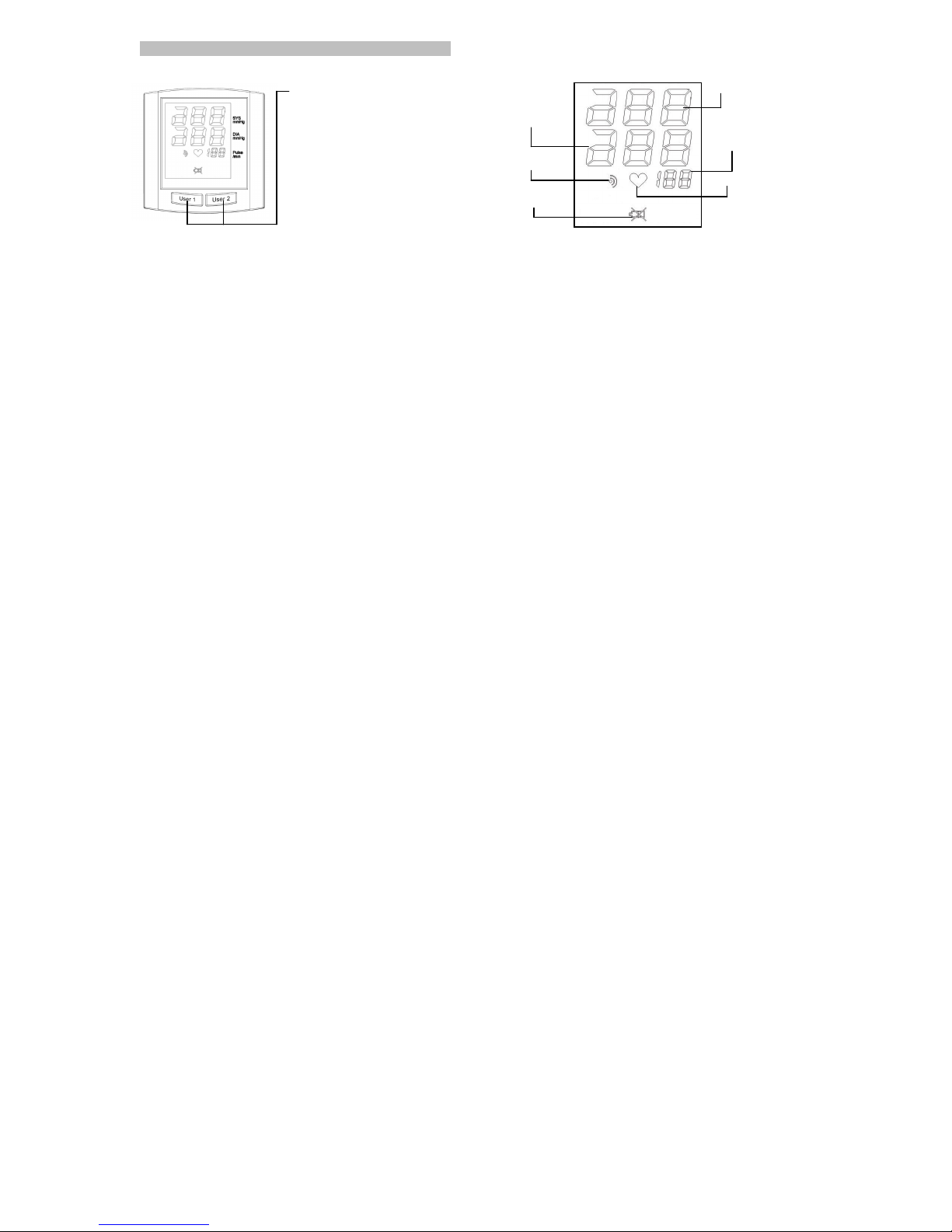
[2,,%'#*"!%2,#"'0#0-67*"!#
7P;IILFG#2I;P#4#KP#2I;P#A#
\YJJKF#KFM;#]L<<#6,"&,#JK#
LFW<EJ;#JS;#MYWW#EFZ#\;GLF#JS;#
N;EIYP;N;FJ.#7P;IILFG#JS;#
\YJJKF#EGELF#]SL<;#JS;#MYWW#LI#
LFW<EJLFG#]L<<#6,%7#JS;#
N;EIYP;N;FJ#EFZ#Z;W<EJ;#JS;#
MYWW.#
#
)EMS#KW#JS;#YI;P#\YJJKFI#
JPEM^I#E#I;OEPEJ;#GPKYO#KW#
ZEJE.#,SLI#MEF#\;#YI;Z#\H#J]K#
YI;PI#LFZLVLZYE<<H/#KP#KF;#
O;PIKF#MEF#JPEM^#JS;LP#\<KKZ#
OP;IIYP;#EJ#SKN;#_#]KP^/#
ZYPLFG#JS;#ZEH#EFZ#FLGSJ/#;JM.#
Systolic pressure
Diastolic
pressure
Pulse rate per
minute
Pulse mark
*K]#[EJJ;PH#
-FZLMEJKP
Data
transmission
Page 7

!
'!
!
SETTING UP
Before proceeding please read instructions for set up.
A. Please register your blip Blood Pressure Monitor at http://www.blipcare.com using
your Device Serial Number located under the bar code at the bottom of your device.
B. Once registered on blipcare.com you will be able to access your account using your login and password. Whenever
you take readings, the Blood Pressure Monitor will transfer the readings to your account and store them for future
review. When you login to your account, you will be able to review readings, print reports and share information as
needed with your clinician.
C. For the Blood Pressure Monitor to transmit readings to the web portal, it must be connected (or paired) to a Wi-Fi
network. You should have the following available to setup the Wi-Fi connection:
a. SSID for Wi-Fi network___________________
b. Password for Wi-Fi network_______________
c. Computer/Laptop or mobile device capable of connecting to a Wi-Fi network.
!
555A12345678A
Page 8
!
(!
!
Setting up contd..
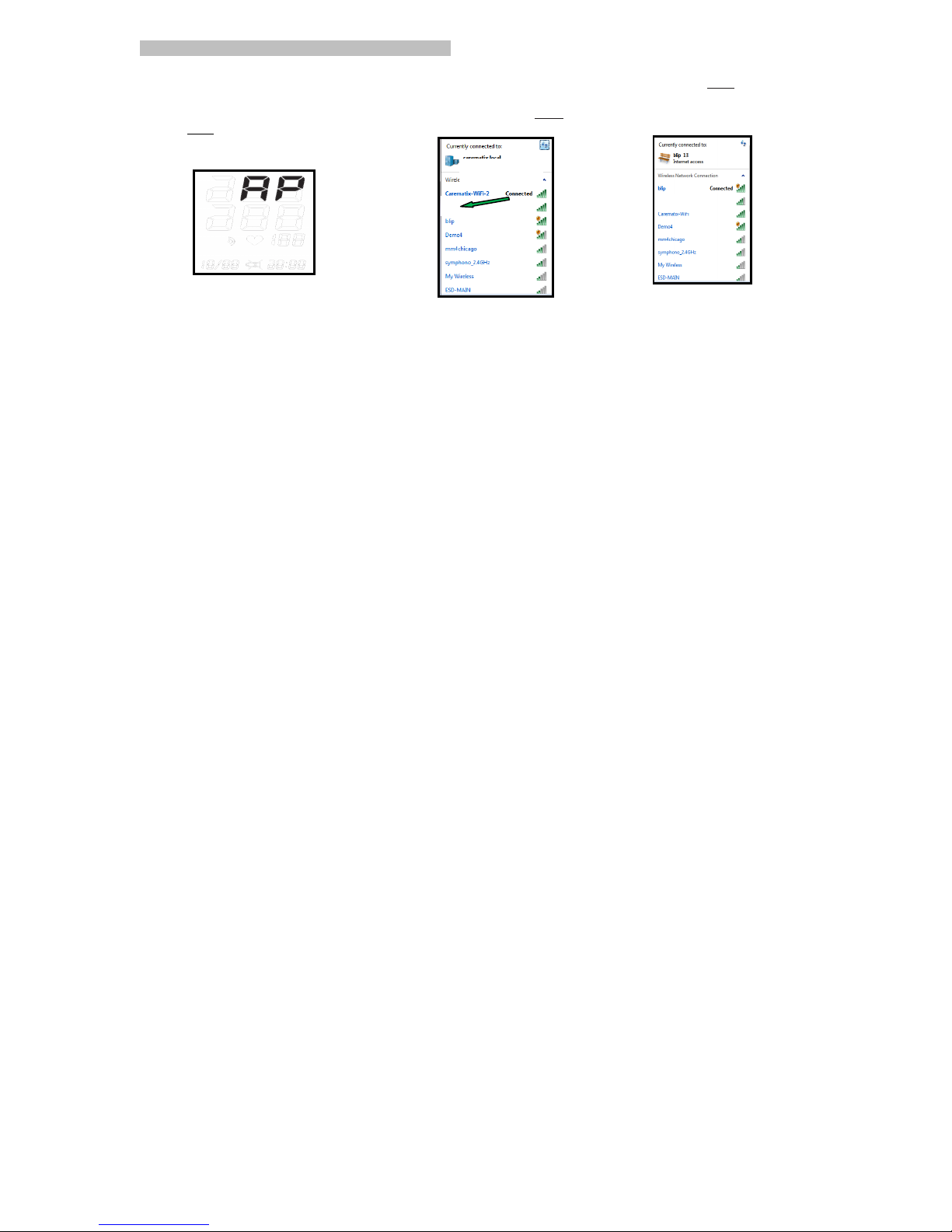
D. When batteries are installed in the
device (Refer to Page 36Appendix A) it will enter AP mode
Do NOT take readings in AP Mode.
E. On your computer/laptop/tablet/phone
search for available Wi-Fi networks that you
can connect to. Look for "blip"
F. Select “blip” and connect
to it.
Internet access
Home WiFi
Home WiFi
Page 9
!
)!
!
Setting up contd.
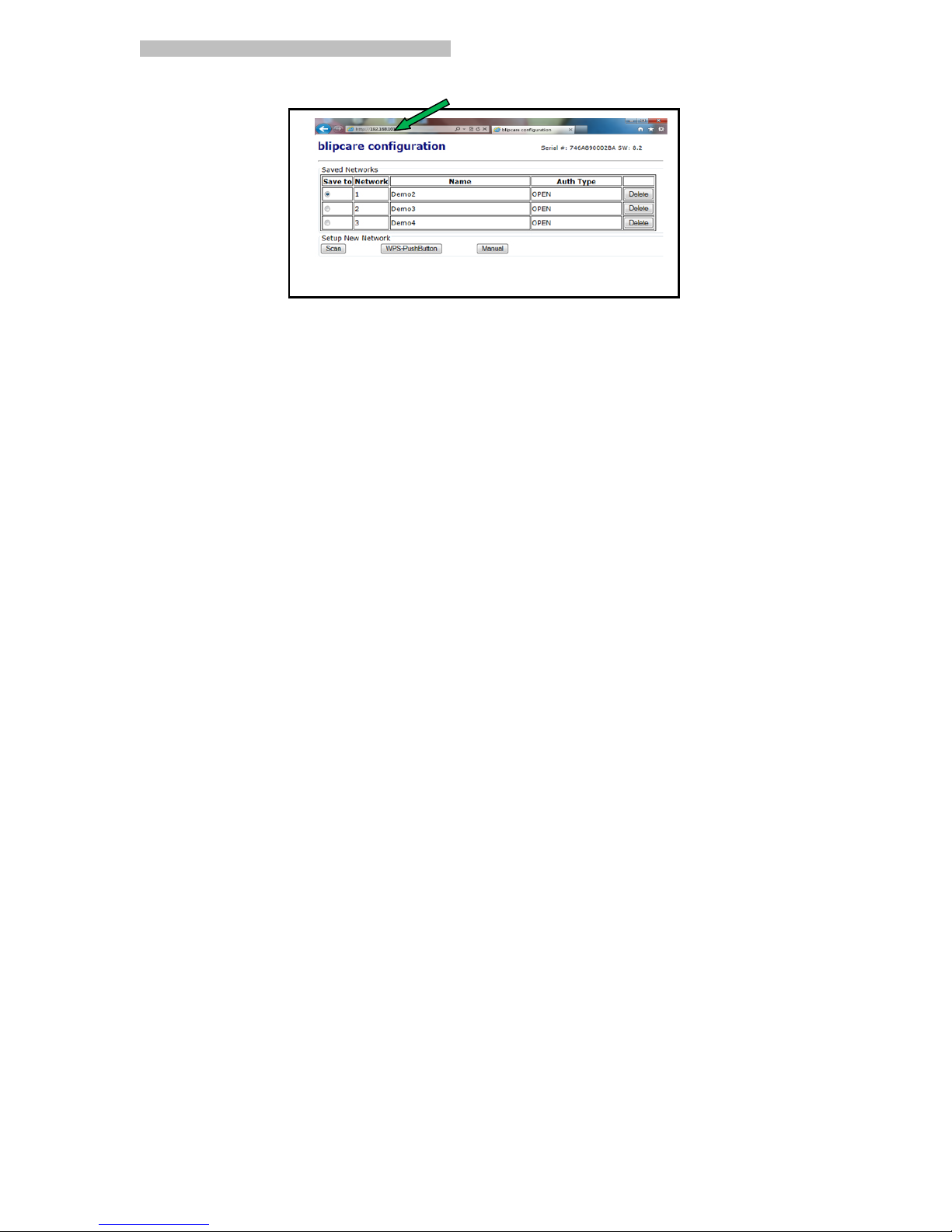
G. While you are still connected to "blip" and Blood Pressure Monitor is still in AP Mode, open any browser and go to
http://192.168.101.1 This will take you to the Blip Configuration page where you will see a list of saved networks (if
there are any). Under the saved networks box you will see three buttons (Scan, WPS-Push Button and Manual)
Page 10
!
*+!
!
Setting up contd.: SCAN
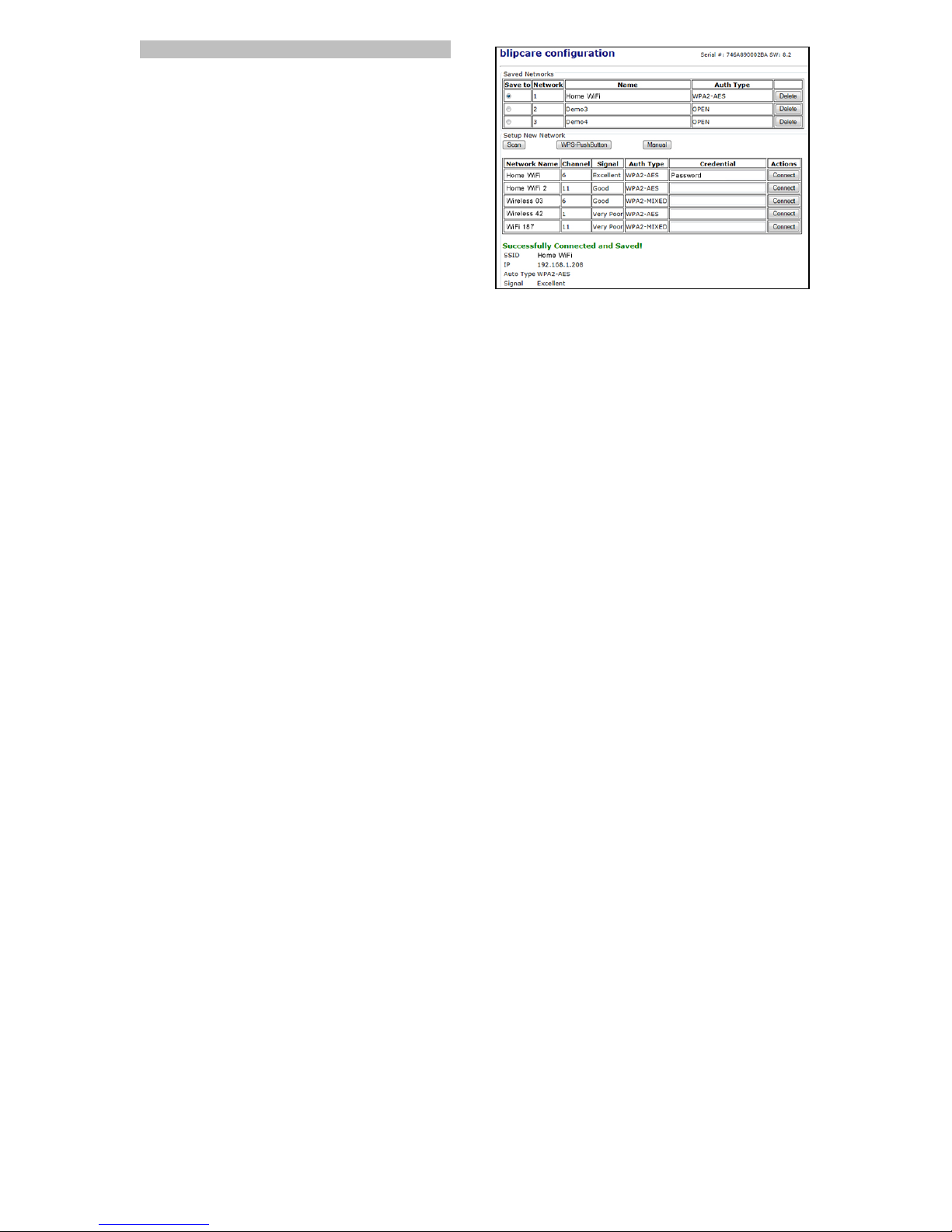
Clicking "Scan" will show you a list of active Wi-Fi networks that
you can connect to. Look for your Wi-Fi network name. Enter
your Wi-Fi network password into the “Credential” column and
click “Connect”. If the Blood Pressure Monitor connects to the
network a message will be displayed “Successfully Connected
and Saved !”.
If a connection is not established, check the password and try
again. If "Scan" mode fails or you want to connect via another
mode try one of the other connection methods as on the
following pages.
Page 11
!
**!
!
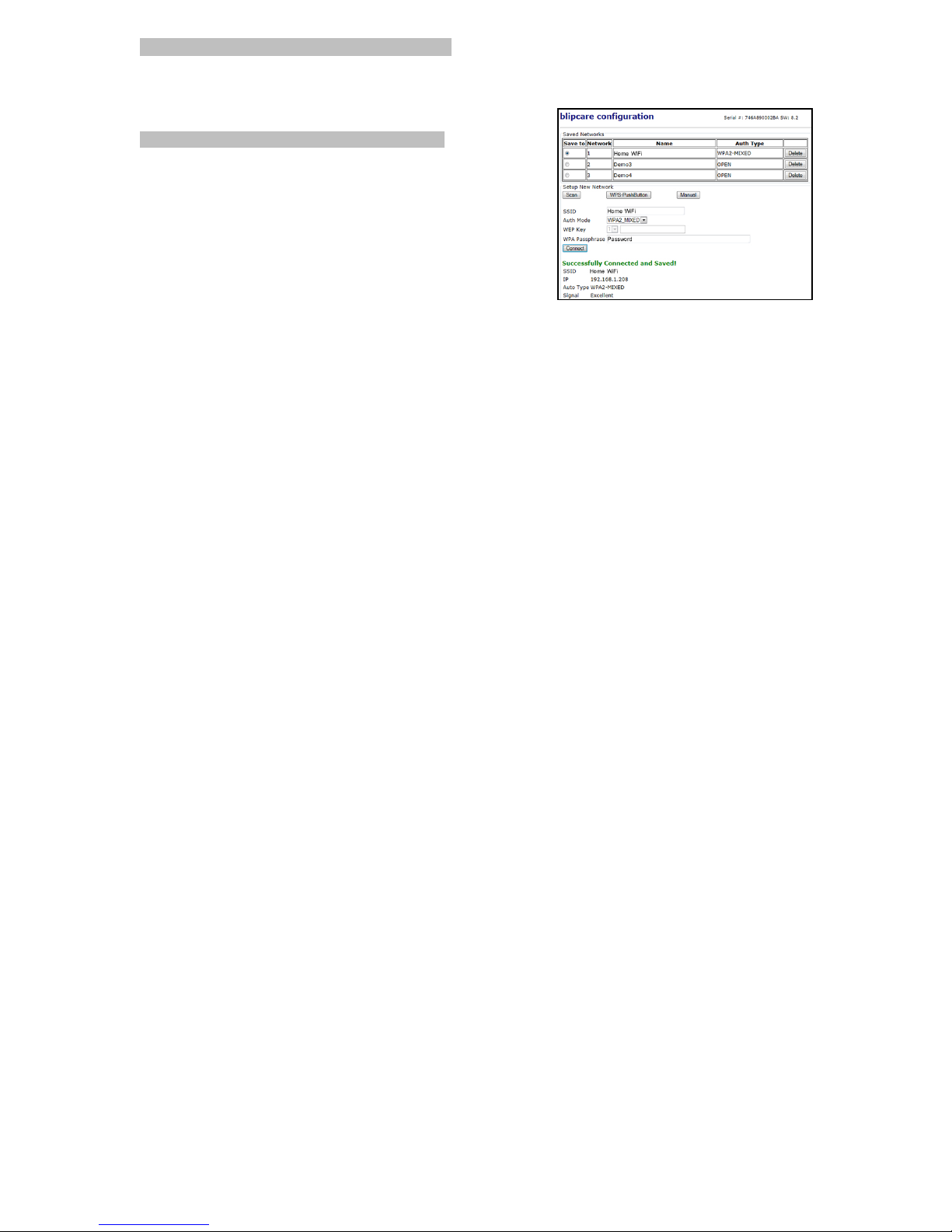
Setting up contd.: WPS-PUSHBUTTON
If your router supports Wi-Fi Protected Setup (WPS) feature click "WPS-PushButton" on the blip configuration page then
press the "WPS-PushButton" on your router to connect to your network. If the BP monitor connects to the network a
message will be displayed indicating “Successfully Connected and Saved!”
MANUAL
You must have SSID (i.e.Wi-Fi network name), Auth Mode (i.e. Security
Type) and WPA Passphrase (i.e. SSID password) for your Wi-Fi
network. WEP Key is optional. Click the “Manual” button on the
configuration page and enter the required details manually.
Note-
1. The Blood Pressure unit times out of the AP mode in about 4 minutes.
2. If at any point the Blood Pressure monitor does not display “AP” on the
screen, remove batteries for approximately 30 seconds then replace
the batteries to re-enter AP mode.
3. You can setup and save up to 3 different network credentials.
Page 12

!
*"!
!
HOW TO MEASURE YOUR BLOOD PRESSURE
Before taking a reading, you should sit quietly for around 10 minutes, and there should be an interval of at least 5 minutes
between readings. While taking a measurement, you should stay calm and relaxed, and try not to talk. This will improve
the accuracy of the readings.
The following factors can affect the results of blood pressure readings: exercise, taking a shower or bath, breathing,
speaking, smoking, drinking alcohol, medication, vibration, eating, changes in temperature, stress, mood, etc.
Page 13

!
*#!
!
PUTTING ON THE ARM CUFF
Rest your left arm on a table and relax your arm.
Correct cuff placement
Wrap the arm cuff snugly. You should be able to fit one finger between the cuff and your
arm.
Correct level
Make sure the cuff is at heart level. When measuring blood pressure, lightly bend your elbow while
resting your arm on a table. If the level of the arm cuff is lower than the heart, adjust the height by
using a pillow or a cushion.
Put your left arm through the cuff loop. The “OK” range indication should be positioned at the top
with the rubber tube pointing downward in the direction of your forearm. Position the artery mark
over the main arteries on the inside of your arm as shown in the figure to the right. The tube should
be running down the center of your arm.#
Page 14

!
*$!
!
PROPER POSTURE contd.
Turn your left palm upward and place the edge of the arm cuff at approximately 1 inch above your
elbow. The cuff should be tight enough on the arm to allow the insertion of one finger between the
cuff and arm.
Page 15

!
*%!
!
TAKING A MEASUREMENT
1. Push either the USER 1 or USER 2 button once to START the measurement.
2.”00” will blink on the LCD.
3. About 2-3 seconds later, the pressure will be reset. Then the cuff will begin to inflate and the pressure will be displayed.
4. This cuff will inflate automatically as the monitor detects that your body requires more pressure for measurement. The
BP will beep during measurement to indicate it is in progress. After displaying the measurement reading, the unit will
STOP by itself.
Note: The blood pressure monitor is a sensitive instrument. You should not move or talk while your monitor is measuring
your blood pressure. Remain quiet and relaxed with your arm still during a measurement. In case of discomfort or pain
during inflation, press any user button and the BP will STOP the measurement and deflate the cuff. Remove the cuff
immediately. If you see an error message, please refer to the Error Messages section to diagnose any possible problems
with the unit.
Page 16

!
*&!
!
TAKING A MEASUREMENT contd.
After finishing a measurement, values for systolic pressure, diastolic pressure,
and pulse rate will be displayed on the LCD as shown in the diagram.
The blood pressure monitor will automatically transfer your
measurement to the web portal via Wi-Fi wireless network.
While transmitting a reading, the data transmission symbol
will blink on and off.
Measurements should ideally be taken at the same time every day, with a
short rest of at least 5-10 minutes beforehand.
This will help with the accuracy of your readings.
#
Page 17

!
*'!
!
MAINTENANCE
1. Do not use an alcohol-based solvent or cleaning agent to clean the device.
2. Clean the device with a soft, dry cloth.
3. Do not immerse the device or cuff in water.
4. Do not bend the cuff or sleeve, and do not wrap the sleeve inside-out.
5. Do not dismantle the device or cuff or try to repair the unit by yourself. If you have a problem, contact
the manufacturer.
6. Do not operate the unit under conditions of extreme temperature or humidity, or direct sunshine.
7. Do not shake the unit.
8. When storing, make sure the air tubing is wrapped so that there are no sharp bends. This will prolong
the life of the cuff.
Note: Manufacturer will make available on request circuit diagrams, component part lists, descriptions,
calibration instructions, or other information that will assist manufacturer’s staff or authorized
representative for repair.
Page 18

!
*(!
!
REFERENCE TO STANDARDS
* COUNCIL DIRECTIVE 93/42/EEC of 14 June 1993 concerning medical devices as amended by Directive 2007/47/EC
* IEC60601-1: 2005 + CORR. 1 (2006) + CORR. 2 (2007); EN 60601-1:2006+AC2010 Medical electrical equipment - Part
1:General requirements for basic safety and essential performance
* EN1060-3:1997+A1:2005+A2:2009:Non-invasive sphygmomanometers, Part 3: Supplementary requirements for
electromechanical blood pressure measuring systems
* EN55022: 2006 + A2: 2010, Class B: Information technology equipment-Radio disturbance characteristics -Limits and
methods of measurement
* EN60601-1-2: 2007 CISPR: 2011: Medical electrical equipment: Part 12: General requirements for basic safety and
essential performance-collateral standard electromagnetic compatibility
* EN1060-4: 2004 Non-invasive sphygmomanometers. Test procedures to determine the overall system accuracy of
automated non-invasive sphygmomanometers.
* EN ISO 13485:2003 /AC: 2009:Medical devices - Quality management systems – Requirements for regulatory purposes
(ISO 13485:2003)
Page 19

!
*)!
!
Reference to standards contd.
* EN ISO14971:2012: Medical devices - Application of risk management to medical devices (ISO 14971:2007, Corrected
version 2007-10-01)
* EN ISO 10993-1:2009 Biological evaluation of medical devices-Part 1: Evaluation and testing within
a risk management process (ISO 10993-1:2009)
* ANSI/AAMI SP10: 2002/A1 2003(R) 2008: Manual, electronic or automated sphygmomanometers
* ANSI/AAMI/ISO 81060R2:2009 NonRinvasive sphygmomanometers – Part 2: Clinical validation of automated
measurement type
* FCC Part 15:2010, Sub part B, Class B: Electromagnetic Compatibility
* EN301489-1 v1.9.2 (2011-09)
* EN301489-3 v1.4.1 (2002-08)
Page 20

!
"+!
!
General Communications Commission (FCC) Statement 15.21 #
This equipment has been tested and found to comply with the limits for a Class B digital device, pursuant to part
15 of the FCC rules. These limits are designed to provide reasonable protection against harmful interference in a
residential installation. This equipment generates, uses and can radiate radio frequency energy and, if not
installed and used in accordance with the instructions, may cause harmful interference to radio communications.
However, there is no guarantee that interference will not occur in a particular installation. If this equipment does cause
harmful interference to radio or television reception, which can be determined by turning the equipment off and on, the
user is encouraged to try to correct the interference by one or more of the following measures:
• Reorient or relocate the receiving antenna.
• Increase the separation between the equipment and receiver.
• Consult the dealer or an experienced radio/TV technician for help.
Page 21

!
"*!
!
General Communications Commission (FCC) Statement 15.21 contd.
This device complies with Part 15 of the FCC Rules. Operation is subject to the following two conditions:
1) this device may not cause harmful interference and
2) this device must accept any interference received, including interference that may cause undesired operation of
the device.
FCC RF Radiation Exposure Statement: This equipment complies with FCC radiation exposure limits set forth for an
uncontrolled environment. End users must follow the specific operating instructions for satisfying RF exposure
compliance. This transmitter must not be co-located or operating in conjunction with any other antenna or transmitter.
#
,SLI#Z;VLM;#MKNO<L;I#]LJS#-FZYIJPH#+EFEZE#<LM;FI;R;`;NOJ#&66#IJEFZEPZ1I3.#%O;PEJLKF#LI#IY\a;MJ#JK#JS;#WK<<K]LFG#J]K#
MKFZLJLKFI=#143#JSLI#Z;VLM;#NEH#FKJ#MEYI;#LFJ;PW;P;FM;/#EFZ#1A3#JSLI#Z;VLM;#NYIJ#EMM;OJ#EFH#LFJ;PW;P;FM;/#LFM<YZLFG#LFJ;PW;P;FM;#
JSEJ#NEH#MEYI;#YFZ;ILP;Z#KO;PEJLKF#KW#JS;#Z;VLM;.#
Page 22

!
""!
!
RF STATEMENT
-Medical Electrical Equipment needs special precautions regarding EMC and needs to be installed and put into service
according to the EMC information provided in the following.
-Interference may occur in the vicinity of equipment marked with
-Portable and mobile RF communication equipment (e.g. cell phones) can affect Medical Electrical Equipment.
-The use of accessories and cables other than those specified may result in increased emissions or decreased immunity.
-BP-700WF uses RF energy only for its internal function. Therefore, its RF emissions are very low and are not likely to
cause any interference in nearby electronic equipment.
Page 23

!
"#!
!
RF STATEMENT contd.
-BP-700WF is suitable for use in all establishments, including domestic establishments and those directly connected to
the public low voltage power supply network that supplies buildings used for domestic purposes.
-Portable and mobile RF communications equipment should be used no closer to any part of BP-700WF wireless blood
pressure monitor, including cables, than the recommended separation distance calculated from the equation applicable
to the frequency of the transmitter.
-BP-700WF is intended for use in an electromagnetic environment in which radiated RF disturbances are controlled. Any
other accessories, transducers and cables may result in increased emissions or decreased immunity and EMC
performance.
-BP-700WF should not be used adjacent to or stacked with other equipment and that if adjacent or stacked use is
necessary, which should be observed to verify normal operation in the configuration in which it will be used.
Page 24
!
"$!
!
RF STATEMENT contd.
Medical Electrical Equipment needs
special precautions regarding EMC
and needs to be installed and put
into service according to the EMC
information provided in the following.
Portable and mobile RF
communication equipment (e.g. cell
phones) can affect Medical
Electrical Equipment. The use of
accessories and cables other than
those specified may result in
increased emissions or decreased
immunity of the unit.
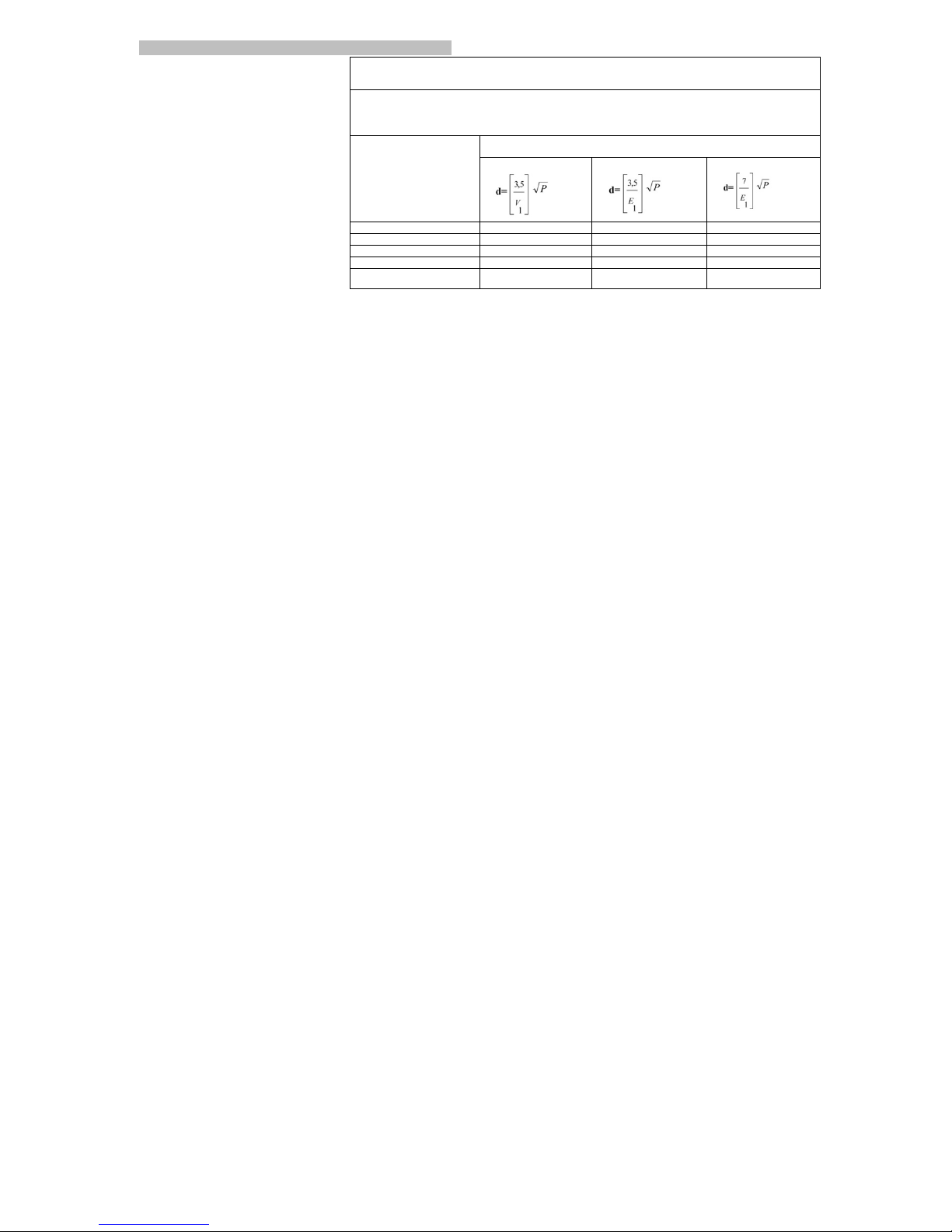
Recommended separation distances between
Portable and mobile RF communications equipment and the ME equipment#
The Wireless Blood Pressure Monitor is intended for use in an electromagnetic environment in which radiated RF disturbances are
controlled. The customer or the user o f the Wireless Blood Pressure Monitor can help prevent electromagnetic interference by
maintaining a minimum distance betwee n portable and mobile RF communication s equipment (transmitters) and the Wireless Blood
Pressure Monitor as recommended be low , according to the maximum output powe r of the communications equipment.
Rated maximum output
power of transmitter
W#
Separation distance according to frequency of transmitter
m#
"#$%&'(%)*%+$,'(%
#
+$%,'(%)*%+$$%,'(%
#
+$$%,'(%)*%-.#%/'(%
#
B.B4#
B.4A#
B.4A#
B.AT#
B.4#
B.TC#
B.TC#
B.C?#4#4.4C#
4.4C#
A.TT#
4B#
T.C#
T.C#
C.TC#
4BB#
44.QC#
44.QC#
AT.TT#
#
Page 25

!
"%!
!
RF Statement contd.
0;M<EPEJLKF#b#;<;MJPKNEGF;JLM#;NLIILKFI#EFZ#LNNYFLJH#WKP#)c2-78)',#EFZ#6!6,)86#JSEJ#EP;#FKJ#*-d)R6277%&,-'(#EFZ#EP;#IO;MLWL;Z#WKP#YI;#KF<H#LF#E#ISL;<Z;Z#<KMEJLKF#
#
012%34526277%86**9%:5277;52%,*<4)*5%92=6>5>)4*<?262=)5*@>A<2)4=%
4@@;<4)B%
C2=6>5>)4*<%D%262=)5*@>A<2)4=%4@@;<4)B#
,S;#:LP;<;II#[<KKZ#7P;IIYP;#8KFLJKP#IHIJ;N#LI#LFJ;FZ;Z#WKP#YI;#LF#JS;#
;<;MJPKNEGF;JLM#;FVLPKFN;FJ#IO;MLWL;Z#\;<K].#,S;#MYIJKN;P#KP#JS;#YI;P#KW#
JS;#:LP;<;II#[<KKZ#7P;IIYP;#8KFLJK P#IHIJ; N #ISK Y<Z #EIIY P;#JSE J#LJ#LI#YI;Z#LF#
IYMS#EF#;FVLPKFN;FJ.#
,S;#:LP;<;II#[<KKZ#7P;IIYP;#8KFLJKP#IHIJ;N#LI#LFJ;FZ;Z#WKP#YI;#LF#JS;#;<;MJPKNEGF;JLM#;FVLPKFN;FJ#IO;MLWL;Z#
\;<K].#
,S;#MYIJKN;P#KP#JS;#YI;P#KW#JS;#:LP;<;II#[<KKZ#7P;IIYP;#8KFLJKP#IHIJ;N#ISKY<Z#EIIYP;#JSEJ#LJ#LI#YI;Z#LF#IYMS#EF#
;FVLPKFN;FJ.#
-NNYFLJH#
J;IJ#
-)+#QBQB4#
J;IJ#<;V;<#
+KNO<L
EFM;#
<;V;<#
)<;MJPKNEGF;JLM#
;FVLPKFN;FJ#R#GYLZEFM;#
-NNYFLJH#J;IJ#
-)+#QBQB4#J;IJ#<;V;<#
+KNO<LEFM;#
<;V;<#
)<;MJPKNEGF;JLM#;FVLPKFN;FJ#R#GYLZEFM;#
)<;MJPKIJEJLM#
ZLIMSEPG;#
1)603-)+#Q4BBBR
?RA#
Q#^9#MKFJEMJ#
5#^9#ELP#
Q#^9#
MKFJEMJ#
5#^9#ELP#
d<KKPI#ISKY<Z#\;#]KKZ/#MKFMP;J;#KP#M;PENLM#
JL<;.#-W#W<KKPI#EP;#MKV;P;Z#]LJS#IHFJS;JLM#
NEJ;PLE</#JS;#P;<EJLV;#SYNLZLJH#ISKY<Z#\;#EJ#
<;EIJ#TB#e.#
+KFZYMJ;Z#
&d-)+#
Q4BBBR?RQ#
T#9PNI#
4DB#^$f#JK#5B#
8$f#
'g"#
7KPJE\<;#EFZ#NK\L<;#&d#
MKNNYFLMEJLKFI#
;hYLON;FJ#ISKY<Z#\;#YI;Z#
FK#M<KI;P#JK#EFH#OEPJ#KW#
JS;#)c2-78)',#KP#
6!6,)8#LFM<YZLFG#ME\<;I/#
JSEF#JS;#P;MKNN;FZ;Z#
I;OEPEJLKF#ZLIJEFM;#
ME<MY<EJ;Z#WPKN#JS;#
;hYEJLKF#EOO<LME\<;#JK#JS;#
WP;hY;FMH#KW#JS;##
)<;MJPLME<#WEIJ#
JPEFIL;FJg\YPIJ#
-)+#Q4BBBR?R?#
A#^9#WKP#OK];P#
IYOO<H#<LF;I#
4#^9#WKP#
LFOYJgKYJOYJ#<LF;I#
'g"#
8ELFI#OK];P#hYE<LJH#ISKY<Z#\;#JSEJ#KW#E#
JHOLME<#MKNN;PMLE<#KP#SKIOLJE<#;FVLPKFN ; FJ.#
6YPG;#
-)+#Q4BBBR?RD#
4#^9#ZLWW;P;FJLE<#
NKZ;#
A#^9#MKNNKF#NKZ;#
'g"#
8ELFI#OK];P#hYE<LJH#ISKY<Z#\;#JSEJ#KW#E#
JHOLME<#MKNN;PMLE<#KP#SKIOLJE<#;FVLPKFN;FJ.#
&EZLEJ;Z#
&d#
-)+#Q4BBBR
?RT#
T#9gN#
5B#8$f#JK#A.D#
($f#
'g"#
9K<JEG;#ZLOI/#
ISKPJ#
LFJ;PPYOJLKFI#EFZ#
VK<JEG;#
RD#e#2,1@D#e#ZLO#
LF#2,3#WKP#B.D#MHM<;#
R?B#e#2,1QB#e#ZLO#
LF#2,3#WKP#D#MHM<;I#
'g"#
8ELFI#OK];P#hYE<LJH#ISKY<Z#\;#JSEJ#KW#E#
JHOLME<#MKNN;PMLE<#KP#SKIOLJE<#;FVLPKFN ; FJ.#
-W#JS;#YI;P#KW#JS;#)c2-78)', #KP#6 !6 , )8 #
P;hYLP;I#MKFJLFY;Z#KO;PEJLKF#ZYPLFG#OK];P#
Page 26

!
"&!
!
#
#
JPEFINLJJ;P.#-FJ;PW;P;FM;#
NEH#KMMYP#LF#JS;#VLMLFLJH#
KW#;hYLON;FJ#NEP^;Z#
]LJS#JS;#WK<<K]LFG#IHN#
\K<.#
#
#
VEPLEJLKFI#KF#
OK];P#IYOO<H#
LFOYJ#<LF;I#
-)+#Q4BBBR?R44#
#
#
RCB#e#2,1TB#e#ZLO#
LF#2,3#WKP#AD#
MHM<;I#
RD#e#2,1@D#e#ZLO#
LF#2,3#WKP#D#I;M#
#
#
NELFI#LFJ;PPYOJLKFI/#LJ#LI#P;MKNN;FZ;Z#JS E J#
JS;#)c2-78)',#KP#6!6,) 8 #\ ;#OK ] ;P; Z#
WPKN#EF#YFLFJ;PPYOJL\<; #OK ] ; P#IY O O <H #KP#E #
\EJJ;PH.#
7K];P#WP;hY;FMH#
1DBgQB#$f3#
NEGF;JLM#WL;<Z#
-)+#Q4BBBR?R5#
T#"gN#
'g"#
7K];P#WP;hY;FMH#NEGF;JLM#WL;<ZI#ISKY<Z#\;#EJ#
<;V;<I#MSEPEMJ;PLIJLM#KW#E#JHO LME <# <KMEJLKF#LF#E#
JHOLME<#MKNN;PMLE<#KP#SKIOLJE<#;FVLPKFN ; FJ.#
C2=6>5>)4*<%D%262=)5*@>A<2)4=%2@4774*<7%
,S;#:LP;<;II#[<KKZ#7P;IIYP;#8KFLJKP#LI#LFJ;FZ;Z#WKP#YI;#LF#JS;#;<;MJPKNEGF;JLM#;FVLPKFN;FJ#IO;MLWL;Z#\;<K].#,S;#MYIJKN;P#KP#
JS;#YI;P#KW#JS;#:LP;<;II#[<KKZ#7P;IIYP;#8KFLJKP#ISKY<Z#EIIYP;#JSEJ#LJ#LI#YI;Z#LF#IYMS#EF#;FVLPKFN;FJ.#
)NLIILKFI#J;IJ#
+KNO<LEFM;#
)<;MJPKNEGF;JLM#;FVLPKFN;FJ#R#GYLZEFM;#
+)#;NLIILKFI#+-67&44#
(PKYO#4#
+<EII#[#
,S;#:LP;<;II#[<KKZ#7P;IIYP;#8KFLJKP#YI;I#&d#;F;PGH#KF<H#WKP#LJI#LFJ;PFE<#WYFMJLKF.#
,S;P;WKP;/#LJI#&d#;NLIILKFI#EP;#V;PH#<K]#EFZ#EP;#FKJ#<L^;<H#JK#MEYI;#EFH#LFJ;PW;P;FM;#LF#
F;EP\H#;<;MJPKFLM#;hYLON;FJ.#
&)#;NLIILKFI#+-67&44#
$EPNKFLM#;NLIILKFI#
-)+#Q4BBBRTRA#
'g"#
,S;#:LP;<;II#[<KKZ#7P;IIYP;#8KFLJKP#LI#IYLJE\<;#WKP#YI;#LF#E<<#;IJE\<LISN;FJI/#LFM<YZLFG#
ZKN;IJLM#;IJE\<LISN;FJI#EFZ#JSKI;#ZLP;MJ<H#MKFF;MJ;Z#JK#JS;#OY\<LM#<K]RVK<JEG;#OK];P#
IYOO<H#F;J]KP^#JSEJ#IYOO<L;I#\YL<ZLFGI#YI;Z#WKP#ZKN;IJLM#OYPOKI;I.#
9K<JEG;#W<YMJYEJLKFIg#
d<LM^;P#;NLIILKFI#
-)+#Q4BBBRTRT#
'g"#
Page 27

!
"'!
!
SAFETY STATEMENTS
Warning: No modification of this equipment is allowed
1. This unit will not serve as a cure for any symptoms of heart disease. The measuring data is only for reference. Always
consult your physician for interpreting results.
2. Always follow the operating procedures described in this manual to measure your blood pressure accurately.
3. Do not inflate the arm cuff without having the cuff wrapped on your arm.
4. Do not drop this unit. Protect it from strong impacts.
5. Be sure to keep this manual in a safe place for future reference.
6. Blood pressure measurement may be inaccurate if the device is used close to a television, microwave oven, mobile
phone, X-ray or other device with a strong electrical field.
7. Do not use this unit on infants or on persons who cannot communicate.
8. Please use only authorized parts and accessories from authorized sources with this unit.
9. 802.11e does not guarantee throughput or a minimum Quality of Service. Also, readings may not be transmitted if an
associated 802.11 network is unavailable for any reason.
,!
Page 28

!
"(!
!
BATTERY SAFETY
Batteries may leak and damage the main unit.
Please observe the following precautions:
* Use only high quality alkaline AA batteries.
* When you are not going to use the unit for a long period of time (approximately three months or more)
take out the batteries.
* Replace worn batteries with new ones immediately.
* Do not use worn and new batteries together.
* Do not insert the batteries with their polarities in the wrong direction.
* Do not touch battery terminals with wet, bare skin.
* Do not use rechargeable batteries.
* If battery acid comes in contact with skin or eyes, immediately wash with copious amounts of water.
Consult a physician if irritation does not subside.
Page 29

!
")!
!
DISPOSAL
Actuation of European directives 2002/95/EC, 2002/96/EC and 2003/108/EC, for reduction in use of
dangerous substances in the electric and electronic device and for garbage disposal. The symbol
applied on the device or its packaging means that at the end of its useful life the product must not be
disposed of with domestic waste. At the end of devices useful life, the user must deliver it to the able
collecting centers for electric and electronic garbage, or give back to the retailer when purchasing a
new device. Disposing of the product separately prevents possible negative consequences for the
environment and for health, deriving from inadequate disposal. It also allows the recovery of materials
of which it’s made up in order to obtain an important saving of energy and resources and to avoid
negative effects to the environment and health. In case of abusive disposal of device by the user, will
be applied administrative endorsements in compliance with current standard.
#
Page 30
!
#+!
!
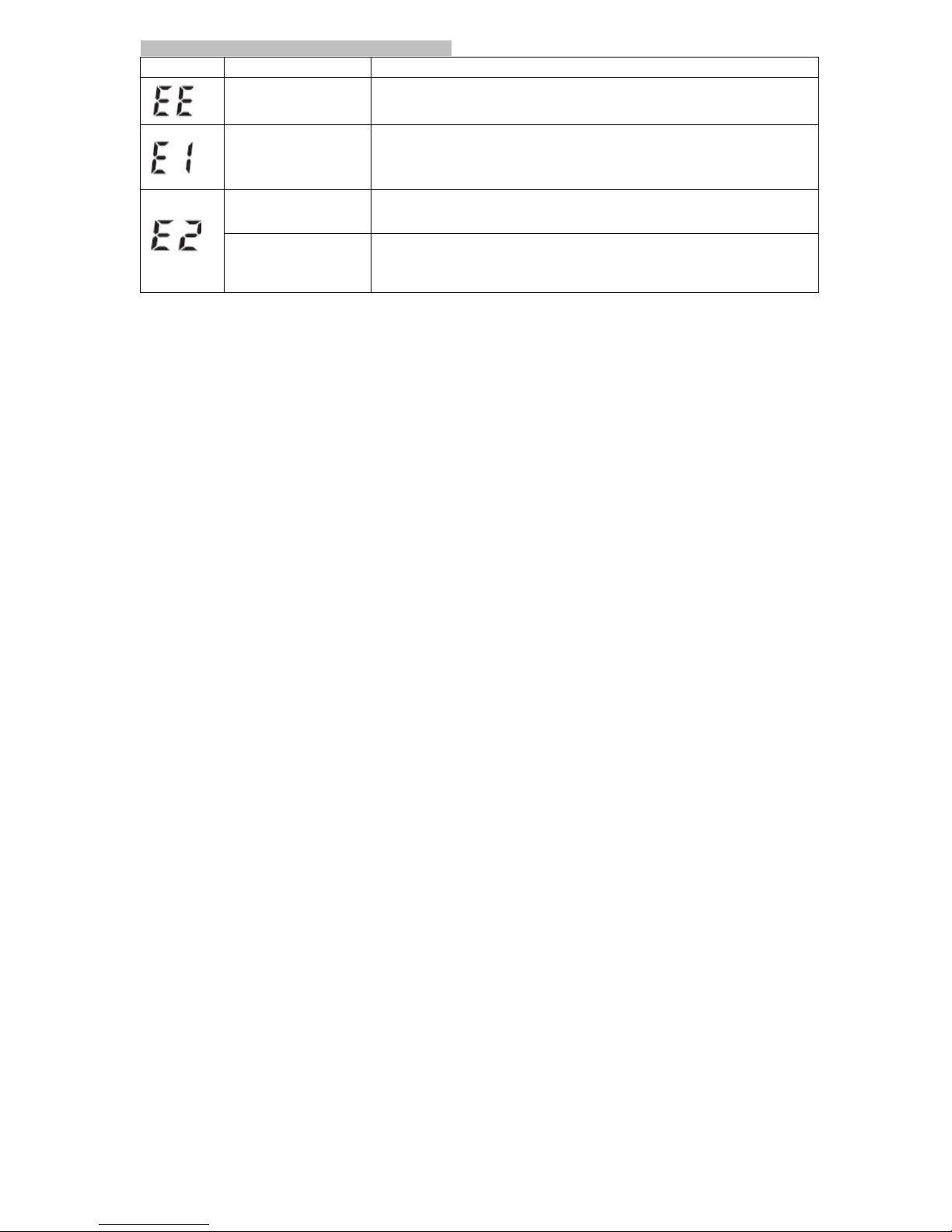
)&&%)66"()6#
E55*5%
F>;72%
G2@29B%
#
*K]#VK<JEG;#KP#LFJ;PFE<#
MLPMYLJ#OPK\<;N#
&;NKV;#EFZ#P;RLFIJE<<#F;]#\EJJ;PL;I.#-W#JS;#OPK\<;N#O;PILIJI/#O<;EI;#MKFJEMJ#JS; #
NEFYWEMJYP;P.#
#
"\FKPNE<#ILJYEJLKF#
ZYPLFG#LFW<EJLKF#
4.#+YWW#LI#FKJ#WEIJ;F;Z#];<</#O<;EI;#P;RWEIJ;F#EGELF#EMMKPZLFG#JK#JS;#LFIJPYMJLKFI.#
A.#+YWW#\PK^;F.#
T.#7YNO#KP#V;FJLFG#VE<V;#WEL<YP;/#P;O<EM;#JS;#Z;VLM;#
!
#
#
#
"PJLWLMLE<#LFJ;PW;P;FM;#
EFZ#FKLI;#
4.#2I;P#NKV;Z#ZYPLFG#JS;#N;EIYP;N;FJ.#
A.#-FMKPP;MJ#N;EIYP;N;FJ#OPKM;ZYP;#EFZgKP#OKIJYP;.#
T.#2I;P#LI#JKK#J;FI;#EFZ#FKJ#P;<E`;Z.!
"\FKPNE<#
N;EIYP;N;FJ#
4.#-W#JS;#VE<Y;#LI#<;II#JSEF#A5B#NN$G/#N;EIYP;#EGELF.#-W#)A#EOO;EPI#EGELF/#YI;P#
NEH#SEV;#E#];E^#KP#LPP;GY<EP#S;EPJ\;EJ/#EFZ#ISKY<Z#MKFJEMJ#E#OSHILMLEF.#
A.#-W#JS;#VE<Y;#LI#GP;EJ;P#JSEF#A5B#NN$G/#O<;EI;#MKFJEMJ#JS;#NEFYWEMJYP;P.#
#
Page 31

!
#*!
!
#
#
#
#
#
#
#
%V;P#IEW;JH#OP;IIYP;#
#
#
#
4.#"LP#OLO;#\<KM^;Z.#
A.#-FW<EJLKF#MKFJPK<<;P#WEL<YP;.#
T.#7P;IIYP;#I;FIKP#WEY<J.#&;RN;EIYP;/#MKFJEMJ#NEFYWEMJYP;P#LW#JS;#OPK\<;N#O;PILIJI.#
#
!
dEL<;Z#JPEFINLIILKF#
,SLI#MEF#KMMYP#ZYPLFG#FKPNE<#Z;VLM;#KO;PEJLKF.#,S;#Z;VLM;#]L<<#EJJ;NOJ#JK#P;I;FZ#
JS;#P;EZLFG.#-W#JS;#P;EZLFG#ZK;I#FKJ#EOO;EP#KF#JS;#OKPJE<#EWJ;P#IKN;#JLN;#JS;P;#
MKY<Z#\;#E#]LP;<;II#MKFF;MJLKF#OPK\<;N.#7<;EI;#P;MKFF;MJ#JK#:LRdL#F;J]KP^/#
YILFG#IJ;OI#KF#OEG;I#CR44.#
#
,S;#N;EIYPLFG#ZEJE#
WEL<;Z#
:LRdL#JPEFINLIILKF#
&;NKV;#EFZ#P;RLFIJE<<#JS;#\EJJ;PL;I.#8;EIYP;#EGELF.#-W#JS;#OPK\<;N#O;PILIJI/#
O<;EI;#MKFJEMJ#JS;#NEFYWEMJYP;P.#
#
*K]#\EJJ;PH#
&;O<EM;#JS;#\EJJ;PL;I.!
Page 32

!
#"!
!
,&%2[*)6$%%,-'(#
H>;6)!
G2@29B%
)V;F#JSKYGS#JS;#\EJJ;PL;I#EP;#LFIJE<<;Z/#JS;P;#LI#;LJS;P#FK#
LFZLMEJLKF#KP#EF#LFMKPP;MJ#LFZLMEJLKF#KF#JS;#*+0#
4.#+S;M^#EFZ#MKPP;MJ#JS;#\EJJ;PH#OK<EPLJL;I.#
A.#&;NKV;#JS;#\EJJ;PL;I#EFZ#]ELJ#WKP#KF;#NLFYJ;.#,S;F#LFIJE<<#
JS;#\EJJ;PL;I#KP#P;O<EM;#JS;#\EJJ;PL;I.#
,S;#MYWW#ZK;I#FKJ#LFW<EJ;#KP#JS;#ELP#OP;IIYP;#MEFFKJ#PLI;.#
4.#+S;M^#JS;#MYWW#OKILJLKF/#P;RWEIJ;F#JS;#MYWW#MKPP;MJ<H#EFZ#
N;EIYP;#JS;#OP;IIYP;#EGELF.#
A.#+S;M^#JS;#MYWW#MKFF;MJLKF#JK#JS;#NKFLJKP.#
#
,S;#<K]#\EJJ;PH#LFZLMEJLKF#LI#ISK]F#KF#JS;#*+0.#
&;O<EM;#JS;#\EJJ;PL;I.#
,S;#YFLJ#MEFFKJ#JE^;#HKYP#\<KKZ#OP;IIYP;/#EFZ#*+0#ISK]I#
EF#;PPKP#N;IIEG;#KP#E#]PKFG#P;IY<J.#
4.#&;RWEIJ;F#JS;#MYWW.#
A.#&;<E`#HKYPI;<W#EFZ#ILJ#ZK]F.#
T.#i;;O#JS;#MYWW#EFZ#S;EPJ#EJ#JS;#IEN;#<;V;<.#
?.#i;;O#IL<;FJ#EFZ#IJL<<#ZYPLFG#N;EIYP;N;FJ.#
D.#-W#JS;#OEJL;FJ#SEI#E#I;V;P;#S;EPJ#\;EJ#OPK\<;N/#JS;F#JS;#
\<KKZ#OP;IIYP;#NEH#FKJ#\;#P;EZ#MKPP;MJ<H.#
Page 33

!
##!
!
#
H>;6)%
G2@29B%
2FZ;P#FKPNE<#N;EIYPLFG#MLPMYNIJEFM;I#E#P;EZLFG#EJ#SKN;#
LI#ZLWW;P;FJ#WPKN#KF;#JE^;F#EJ#E#M<LFLM#KP#J]K#P;EZLFG I #EJ #
SKN;#SEV;#ZLWW;P;FJ#VE<Y;I.#
#
4.#,S;#VEPLEJLKF#LI#ZY;#JK#JS;#ZLWW;P;FJ#;FVLPKFN;FJI.#
A.#!KYP#\<KKZ#OP;IIYP;#LI#MSEFGLFG#EMMKPZLFG#JK#JS;#
OSHILK<KGLME<#KP#OIHMSK<KGLME<#IJEJYI#KW#JS;#SYNEF#\KZH.#
T.#&;MKPZ#HKYP#\<KKZ#OP;IIYP;#;EMS#ZEH#EFZ#MKFIY<J#]LJS#
HKYP#OSHILMLEF.#
,S;#[7#MKFJLFY;I#JK#\;;O#EFZ#JS;#*+0#ZK;I#FKJ#ZLIO<EH#EF#
;PPKP#N;IIEG;#KP#\<KKZ#OP;IIYP;#P;EZLFG.#
4.#+S;M^#EPN#OKILJLKF#EFZ#MYWW#MKFF;MJLKF#EFZ#P;JE^;#
P;EZLFG.#
A.#-W#JS;#OPK\<;N#O;PILIJI/#O<;EI;#MKFJEMJ#IYOOKPJ.#
Page 34
!
#$!
!
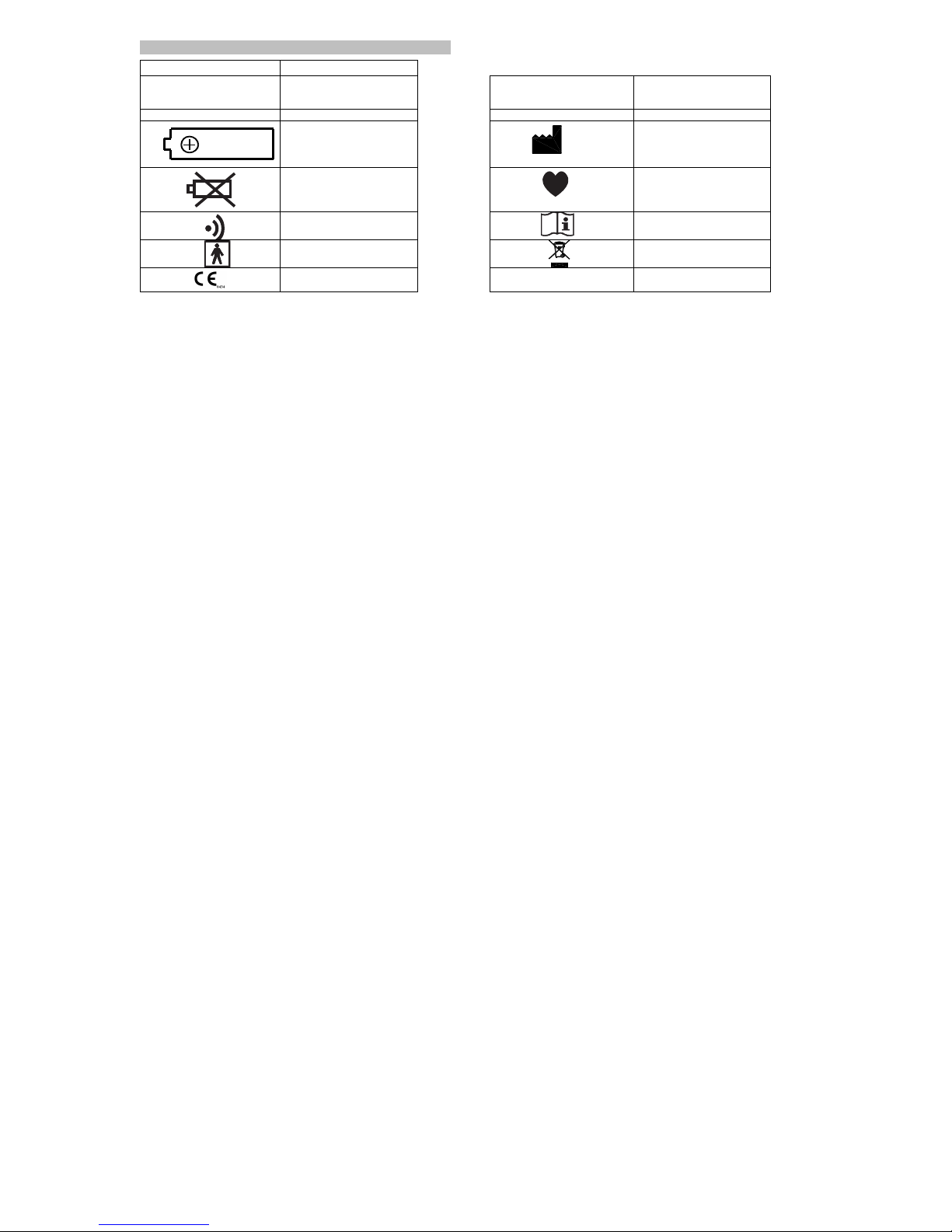
6!8[%*6#
IB@J*6%
,2><4<A%%%
%
6!6#NN$G#
6HIJK<LM#\<KKZ#OP;IIYP;/#
N;EIYP;Z#LF#NL<<LN;J;PI#KW#
N;PMYPH#
#
0-"#NN$G#
0LEIJK<LM#\<KKZ#OP;IIYP;/#
N;EIYP;Z#LF#NL<<LN;J;PI#KW#
N;PMYPH#
7Y<I;gNLF#
7Y<I;#PEJ;#O;P#NLFYJ;#
#
6;PLE<#'YN=#
6;PLE<#FYN\;P#
!
!
*-%.!/012#!344!56!7&8!
[EJJ;PH#LFIJE<<EJLKF#GYLZ;=#
[EJJ;PH#?`4.D9#*&BQ#j""k#
#
#
#
#
###################-$"#%
8EFYWEMJYP;P#EFZ#
8EFYWEMJYPLFG#H;EP#
# # #
,S;#LFZLMEJKP#\<LF^I#]S;F#
\EJJ;PH#OK];P#LI#<K].#
&;O<EM;#JS;#\EJJ;PL;I#]LJS#
F;]#KF;I#EFZ#N;EIYP;#EGELF.#
#
#
#
#
,SLI#LFZLMEJKP#JSEJ#EOO;EPI#
]SL<;#N;EIYP;N;FJ#LI#LF#
OPKGP;II.#-J#\<LF^I#]S;F#HKYP#
OY<I;#LI#Z;J;MJ;Z.#
# #
,SLI#]L<<#\<LF^#]S;F#JS;#
NKFLJKP#LI#JPEFINLJJLFG#ZEJE.#
#
#
&;EZ#JSLI#NEFYE<#\;WKP;#YI;.#
# #
,HO;#[d#"OO<L;Z#OEPJ#1MYWW3#
#
#
:)))#<E\;<#
#
+)#NEP^##-+#
-FZYIJPH#+EFEZE#
Page 35

!
#%!
!
67)+-d-+",-%'6#
8KZ;<#
[7RCBB:d#[<KKZ#7P;IIYP;#8KFLJKP#
#
)<;MJPLM#OK];P#
?#JHO;#""#4.D#VK<J#E<^E<LF;#\EJJ;PL;I#
0LIO<EH#
*+0#ZLGLJE<#ZLIO<EH#
#
8;NKPH#
4BBB>#P;EZLFGI#
8;EIYPLFG#N;JSKZ#
dYffH#8;EIYPLFG#6HIJ;N#
#
%O;PEJLFG#J;NO;PEJYP;#g#SYNLZLJH#
4B#JK#?Bl+#1DBR4B?ld3#4DR@Be#&.$.#
8;EIYPLFG#PEFG;#
7P;IIYP;=#?BRA5B#NN$G#
#
6JKPEG;#J;NO;PEJYP;#g#SYNLZLJH#
RAB#JK#DBl+#1R?R4AAld3#4DR@Be#&.$.#
"MMYPEMH#
7Y<I;#PEJ;=#?BRABB#OY<I;IgNLF#
#
:;LGSJ#
"OOPK`.#?BB#GPENI#1F;J3#
7P;IIYP;=#m#T#NN$G#WKP#OP;IIYP;I#KW#
ABB#NN$G#KP#<;II/#m#Ae#KW#OP;IIYP;#
E\KV;#ABB#NN$G#
#
"PN#JHO;#
+LPMYNW;P;FM;#AARTT#MN#1@kR4Tk3#26#
##############################AAR?A#MN#1@kR4Ck3+)#
"MMYPEMH#
7P;IIYP;#-FW<EJLKF#
7Y<I;#PEJ;=#m#De#KW#P;EZLFG#VE<Y;#
#
6;MYPLJH#
R:7"g,i-7#
R:7"AR")6#1P;MKNN;FZ;Z3#
R:)7#
"YJKNEJLM#OYNO#EMJYEJ;Z#Z;VLM;#
#
:LP;<;II#JPEFINLIILKF#
5BA.44#\gGgF#
7P;IIYP;#P;<;EI;#Z;VLM;#
"YJKNEJLM#IK<;FKLZ#V;FJLFG#VE<V;#
#
cYE<LJH#KW#6;PVLM;#
EI#O;P#5BA.44;#:LWL#8Y<JLN;ZLE#1:883#
6;FIKP#
6;NLMKFZYMJKP#OP;IIYP;#I;FIKP#
#
0LN;FILKFI#
4T4#1*3#`#4A5#1:3#`#5Q#1$3#NN#
Page 36
!
#&!
!
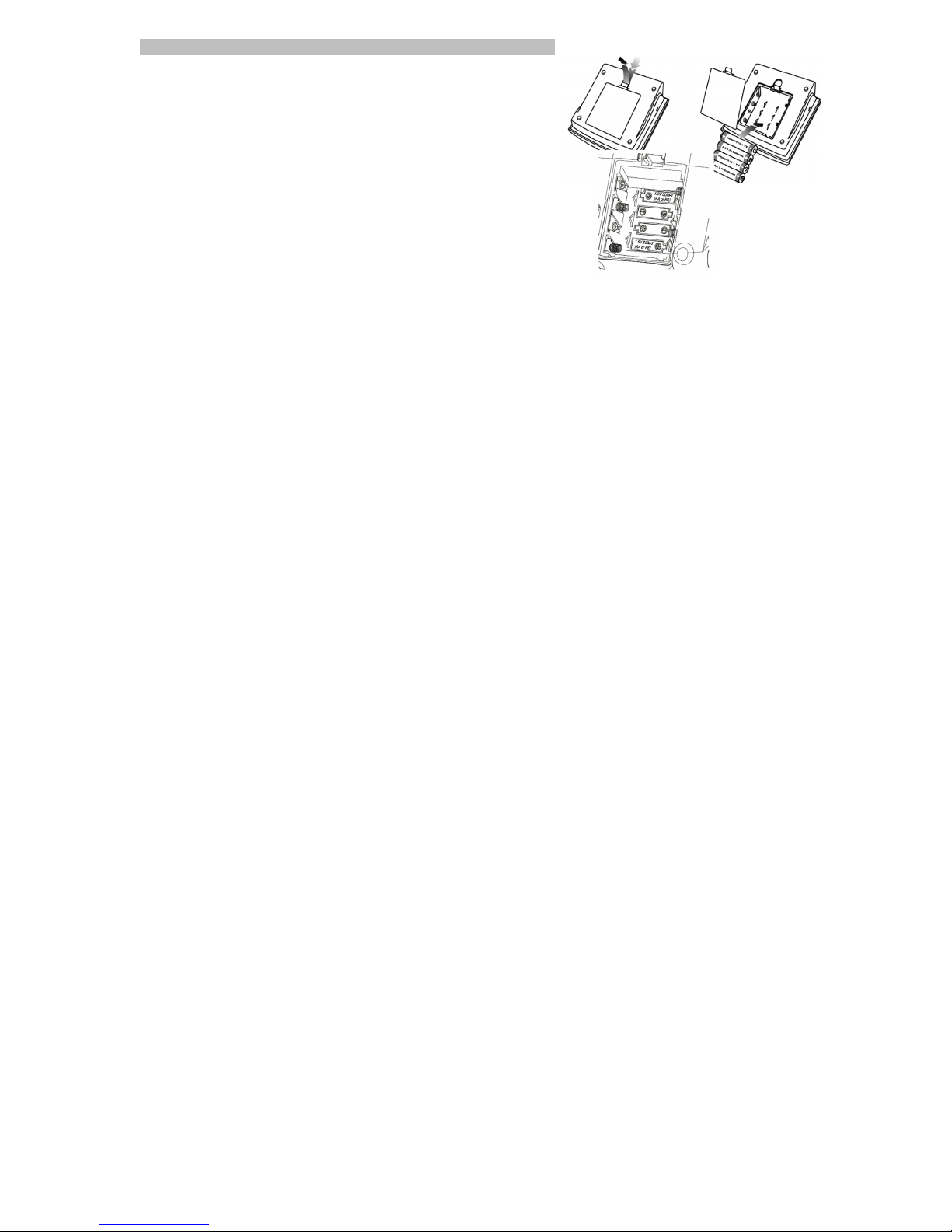
Appendix A: INSTALLING AND REPLACING BATTERIES
1. Press down and lift the battery cover in the direction of the arrows
shown in the illustration to open the battery compartment.
2. Install or replace 4 AA 1.5 Volt batteries in the battery compartment
according to the positive (+) and negative (-) terminal symbols molded
inside the compartment.
3. Replace the battery cover by inserting the bottom tabs first, then
push in the top clip of the battery door until it engages.
!
07.060.001-UI01 Rev 7
© 2015 blipcare . All rights reserved. !
 Loading...