

Page 1
ROAD ANGEL Quick Reference Guide
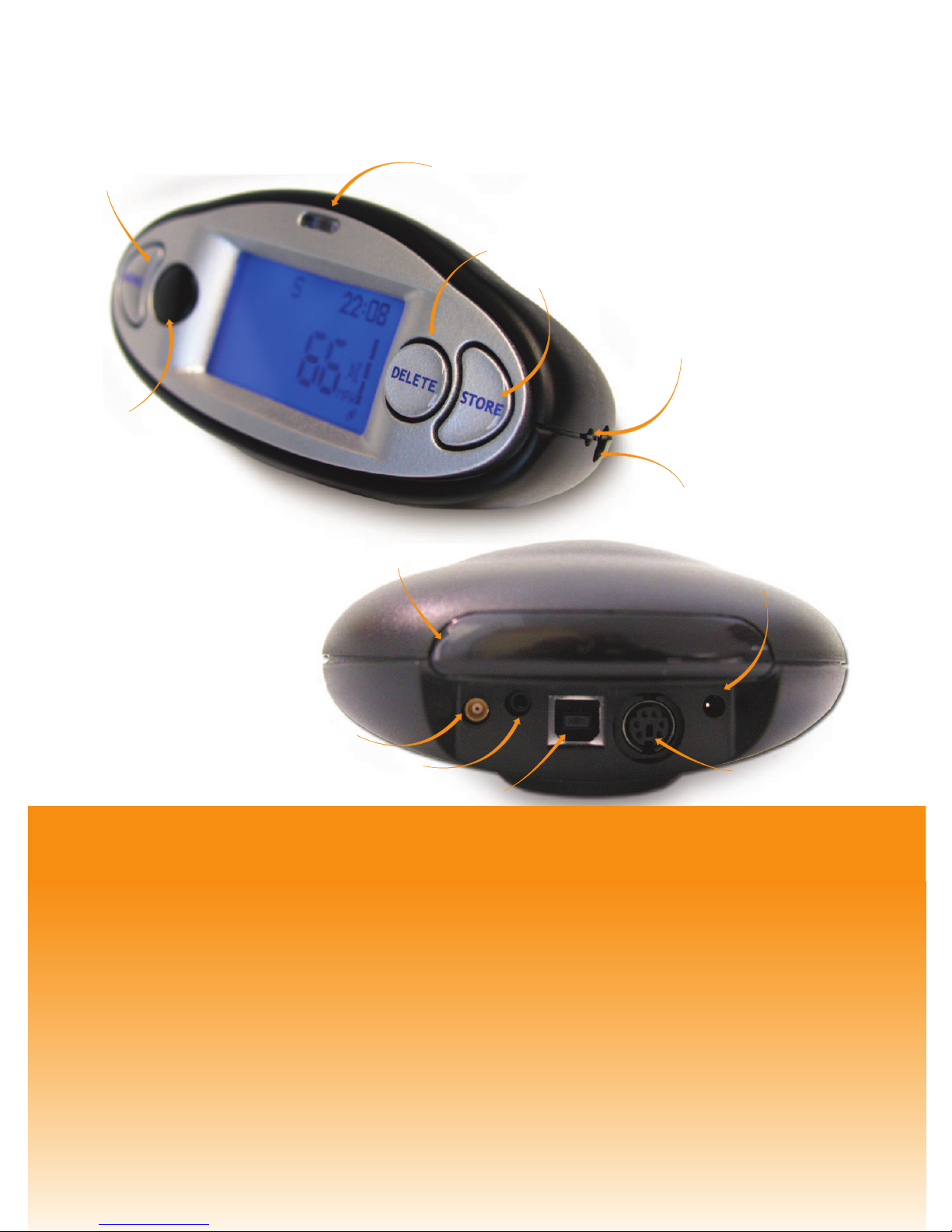
Menu Button
Delete Button
High Intensity LED
Rear
Laser
Sensor
Ear Piece
Visor Locating Guide
(one each side)
Serial Adaptor
External Antenna
Auxiliary Port
12v dc
USB Port
With camera and blackspot data changing constantly, it is imperative that you
REGISTER your unit in one of the following ways:
1. Register on-line at www.blackspot.com and click on Product Registration.
Once your details have been entered you will then be prompted to download
the update software directly to your PC.
2. Fill out the registration card that is the back page of this manual and return it
freepost to receive your free update software on a CD.
READ ME FIRST READ ME FIRST READ ME FIRST
Store Button
Front Laser Sensor
Page 2
Thank you for buying your ROAD ANGEL
As our roads become busier, more congested and more regulated, staying alert to
road and traffic conditions is a challenge to everyone. Even the most conscientious
driver can have a momentary lapse of concentration that could easily lead to an
accident or a fine and points.
ROAD ANGEL is specially designed to be a simple-to-use addition to any vehicle,
to alert and warn you in advance of known danger areas. In the comprehensive
ROAD ANGEL database are stored Police, Local Authority and Ministry of Transport
designated danger spots, including accident blackspots and safety camera locations.
Using the latest Global Positioning Satellite (GPS) technology, ROAD ANGEL compares
your position with the known danger spot locations and gives you an audible and
visual warning as you approach them. An accurate GPS speedometer in the display
gives you time to adjust your driving to the approaching danger.
The safety of you and your passengers is our prime consideration, and we trust that
for all the miles you drive, your ROAD ANGEL will enhance the safety and enjoyment
of your journey. Join other ROAD ANGEL users in guarding your life and livelihood.
We are pleased to have you as a valued customer and hope you will be delighted with
your fully integrated GPS and Laser ROAD ANGEL.Having listened to our customers
we think the new features will make this product your perfect driving companion.
Dave Clark, Managing Director
Blackspot Interactive Ltd.
Note: The directors of Blackspot Interactive Ltd. sell ROAD ANGEL as a road safety
enhancement device. Driving within the speed limits at all times and within the limitations
of the road condition and your abilities is paramount. The directors of Blackspot Interactive
Ltd. take no responsibility for the use of ROAD ANGEL for other purposes than those
stipulated.
Page 3
In this user guide:
P3
P4
P9
P11
P14
P15
P15
P16
P16
P17
P17
P17
Setting Up
ROAD ANGEL Displays
Laser Detection
P13
P6
ROAD ANGEL Menu Settings
P16
P20
How ROAD ANGEL Works
Adding and Deleting Danger Zones
ROAD ANGEL Database and Updating
Subscriptions
ROAD ANGEL and your Motorbike
Hardwiring ROAD ANGEL
Protecting and Cleaning ROAD ANGEL
Warranty
ROAD ANGEL Security
System Requirements
ROAD ANGEL Troubleshooting
Background Information
Page 4

How ROAD ANGEL works
ROAD ANGEL works by comparing the position of your vehicle using GPS
technology against the database inside the unit of safety cameras and accident
blackspots.When approaching a known danger zone, the LCD display turns from
blue to red and the type of danger is shown.The bar counter starts to count up
as the danger area gets closer. Speech warnings will tell the driver the type of
zone followed by a audible tone that increases with proximity. ROAD ANGEL has
a built in Laser detection circuit that will warn the driver with both speech and
audible tones if the vehicle is targeted. Once the warning has ceased the unit
returns to standby mode.
Global Positioning Satellites (GPS)
Operational since 1990, 24 satellites orbit the earth at a height of 11,000 miles.
At any given point on the globe, at least 4 satellites are in view at any one time.
Using sophisticated aerials and triangulation techniques, units such as ROAD
ANGEL are able to compute your exact position with great accuracy.
ROAD ANGEL uses complex heading software so it alerts you only in the
direction the camera enforces. For any GPS device to work it must see a clear
view of the sky. ROAD ANGEL has an internal high sensitivity GPS antenna, this
means the unit must be placed onto the dashboard to give it a clear view above.
If the unit needs to be fitted elsewhere then an additional antenna will be needed
(Please contact Blackspot Interactive Ltd. for details).
3
Page 5
Setting Up
How ROAD ANGEL
Works
Setting Up
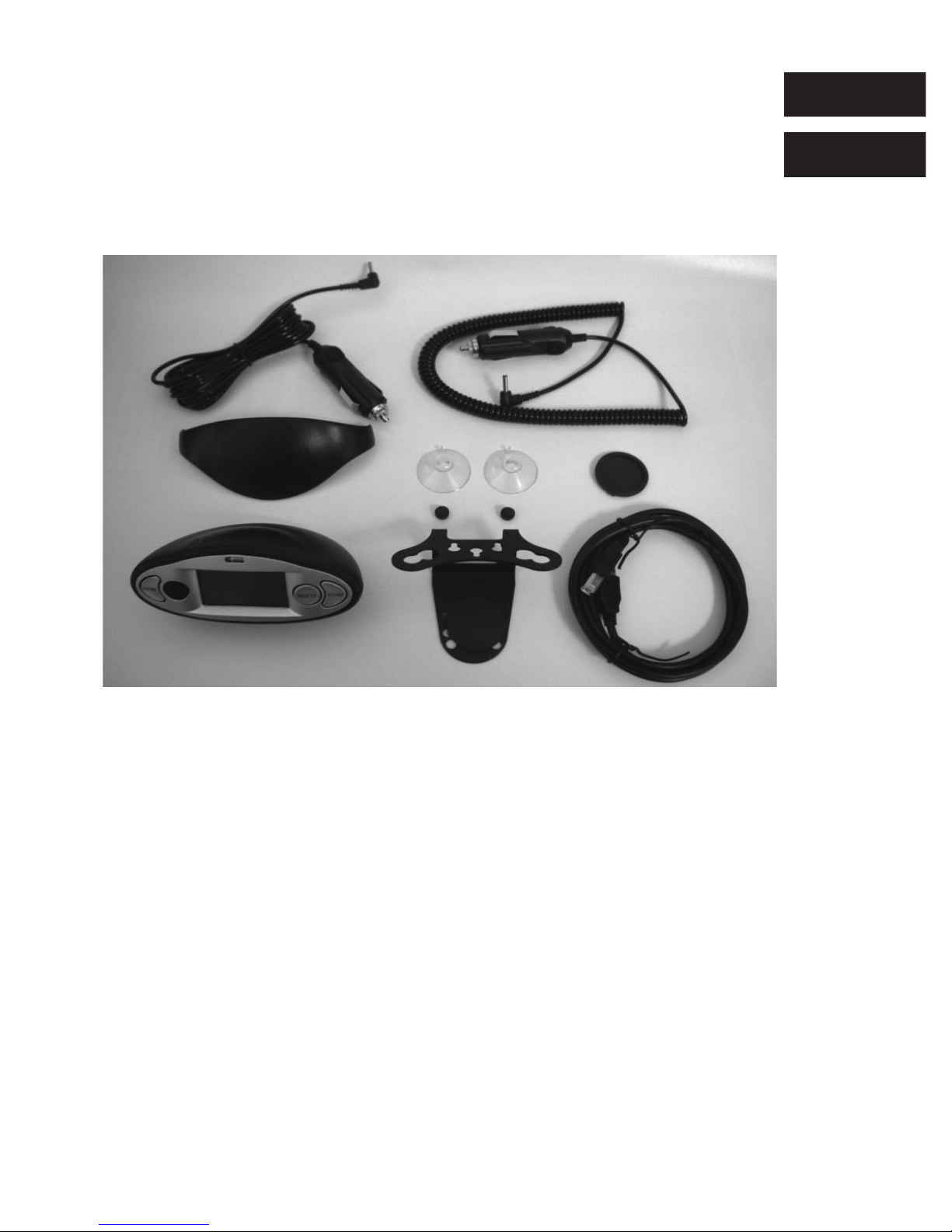
Fitting ROAD ANGEL with LASER ALERT in your vehicle.
1. Empty all the parts out of the box and familiarise yourself with
each item.
2. We highly recommend that ROAD ANGEL is positioned in the centre
of the front windscreen low down, just above the dashboard. Making
sure that the windscreen wipers do not obstruct the view.Tests with
enforcement teams have shown that this is the most effective place to
mount a single detector.Above 200m this has proved to warn every
time the vehicle was targeted (tested with a standard saloon car).
If the Laser Gun is targeting your number plate at less than 200m it is
likely that a dashboard mounted ROAD ANGEL WILL NOT detect the
signal.At 200m the beam of the laser can be as little as 200mm. If the
windscreen wipers sit low, then the unit can be mounted straight
onto the dashboard.This is due to the unit needing a clear view front
and rear to detect laser.
4
1
3
4
5
6
7
9
8
2
1. Straight Power Lead
2. Sprung Power Lead
3. Dash Pad
4. USB Cable
5. Windscreen Bracket
6. Anti-vibration Damper
7. Suction Cups
8. ROAD ANGEL
9. Anti-glare Visor
Page 6
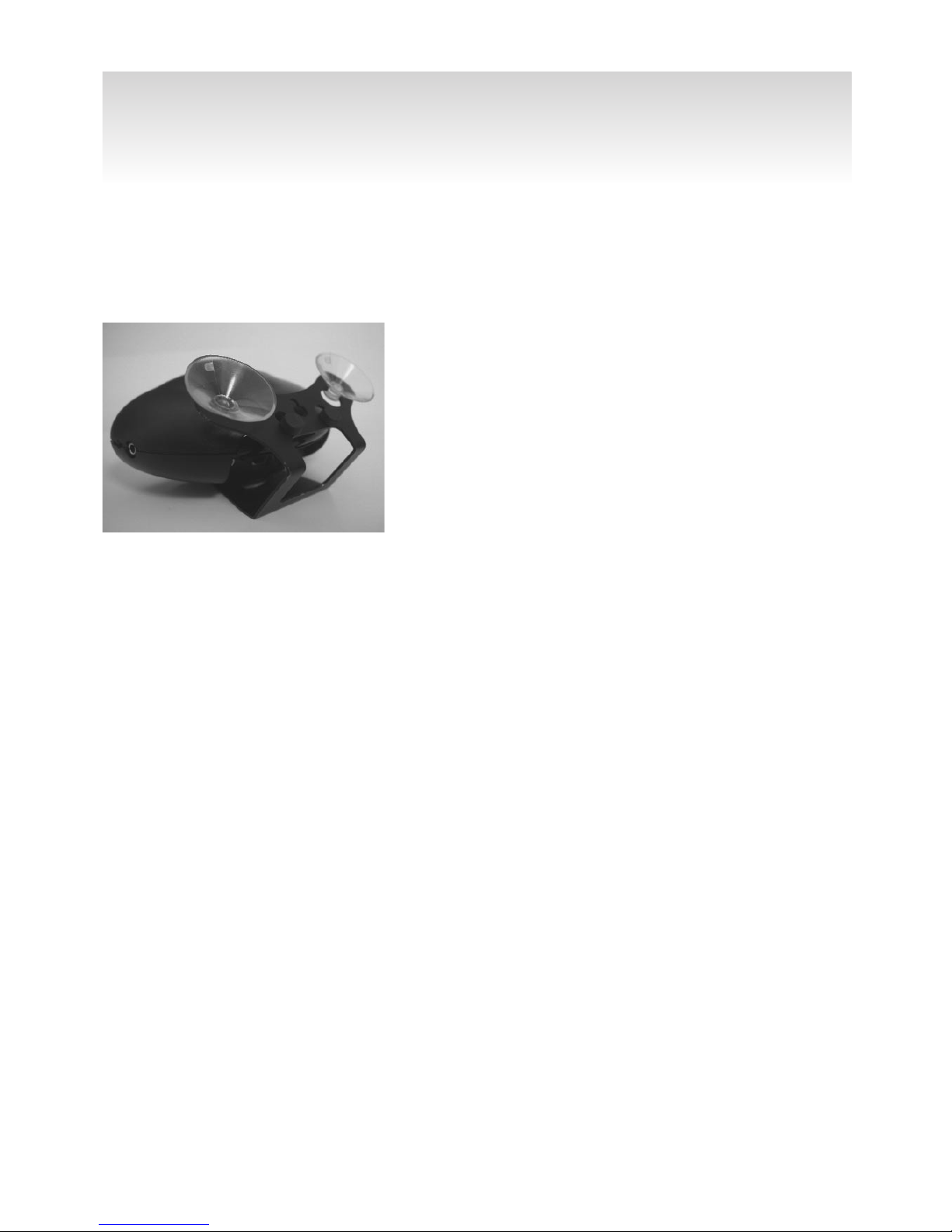
3. ROAD ANGEL has a quick release magnetic base, and is supplied with a
bracket that can be mounted on the front windscreen. A pad can also be
affixed directly onto the dashboard.
Windscreen Mount Bracket – Insert the two
clear suction cups into the holes on the back of
the bracket. Next, insert the ant-vibration
dampers into the small holes in the back, to stop
it touching the windscreen. ROAD ANGEL can be
placed onto the rubber pad where the magnetic
base will hold it firmly. Do not leave the bracket
on the front windscreen without the product
attached, for security issues.
Dashboard Pad – Remove the backing from the bottom of the pad and affix to
the dashboard where you wish ROAD ANGEL to be placed. ROAD ANGEL can be
placed onto the rubber pad where it will be held firmly.
4. Routing the Power cable – ROAD ANGEL is supplied with two types of power
cable. Choose which cable suits your vehicle the best.When routing the cable
ensure that it does not interfere with any of the vehicles controls or airbag
modules. If you use your cigar socket for any other devices a dual adaptor
may be used.
5. Park your vehicle outside with a clear view of the sky through your
windscreen (clear of obstacles such as tall buildings and over-hanging trees).
Obstacles may delay or prevent satellite acquisition.
6. Plug the power lead into the cigar lighter socket. If your socket is ignition wired
you will need the ignition to be on.The unit will beep and then the display will
light up going between the blue and the red backlights.The display will
illuminate red with ‘PLEASE REGISTER’ showing. Press any button to clear this
screen, once an update has been carried out, this message will not appear again.
5
Caution: NO ROAD ANGEL, OR ASSOCIATED ITEMS SHOULD BE ATTACHED TO OR PLACED ACROSS
THE PADDED SURFACE OF THE AIRBAG MODULE ON THE PASSENGER SIDE OF THE DASH PANEL.
ALL WIRING MUST BE TUCKED AWAY AS TO NOT INTERFERE WITH ANY OF THE VEHICLE'S
CONTROLS.
Page 7

6
7. When the unit has acquired the satellites the ‘SEARCHING FOR
SATELLITES’ will be replaced by 0 showing you are stationary,
or the speed of your vehicle if you are moving.Your unit is now
ready for use.
8. ROAD ANGEL has three buttons, when adjusting from the factory
settings the MENU button cycles between the menus, the DELETE
button is used to make all the adjustments.When you are happy with
the setting the STORE button needs to be pressed to save the
adjustments.
ROAD ANGEL Menu Settings:
To enter the menus, press ‘MENU’
Alerts:
Voice Alert
Switch voice Alerts on or off
Camera Alert volume – Changes the volume setting for safety camera
related warnings. 0%-100% in 20% increments.
Setting Up
Note: Certain vehicles (in particular some models of BMW, Mercedes, Renault
Peugeot & Citroen) have UV screens that block the GPS signals from entering the
vehicle, which can stop ROAD ANGEL from acquiring its position. These vehicles
require an additional antenna to support ROAD ANGEL (please contact Blackspot
Interactive Ltd. for details). Heated screens can also affect signal strength.
Note: ROAD ANGEL comes with a visor that can be attached to shade the display
from bright sunlight. Attach the visor using the two locating notches on each side
of the unit.
Note: The vehicle must be in the open air (not in a garage). The very first time the
unit is switched on (cold start) it must acquire a minimum of 4 satellites to
establish its position. THIS MAY TAKE UP TO 45 MINS. After approximately
4 hours use the internal battery will be charged sufficiently to memorise its
position and subsequent starts will acquire satellites within 1-2 minutes.
ROAD ANGEL
Menu Settings
Page 8

Camera alert single beep – Switch alert on or off, as each proximity bar
counts up it will emit a single beep.
Safety Alert Volume – Changes the volume setting for Blackspot, School and
Congestion related warnings. 0%-100% in 20% increments.
Safety Alert single beep – Switch alert on or off, as each proximity bar counts
up it will emit a single beep.
Blackspot alert – Switch Blackspot alerts on or off.
School zone alert – Switch School alerts on or off.
Congestion zone alert – Switch Congestion zone entry warnings on or off.
Overspeed alert – Set a speed at which the unit will warn if you exceed the
speed.
Laser alert volume – Changes the volume for laser detection warnings.
0%-100% in 20% increments.
Laser Alert – Turns on or off the internal laser detection. Sensors plugged into
auxiliary socket will still warn.
Slow speed mute – When travelling less than 15MPH the unit will not give an
audible warning. If you enter a zone below 15MPH you will hear a single beep,
followed by the proximity count up.
Speed sensitive volume – Adjust the warning volumes dependent on how fast
the vehicle is travelling.
Distances:
Alert distance – Adjusts the warning range as you approach warnings. 250M,
500M and 1KM.
Speed distance sensitivity – Doubles the advanced warning at 50MPH and
above. Switch on or off.
7
Page 9

Mapping Output – Switches NMEA data for interfacing into Mapping
Software on or off. (Requires extra cable available from Blackspot
Interactive Ltd).
Mapping Baud Rate – Switch between 4800, 9600, 19200 baud rate.
GPS/RescueLoc – This function allows the user to read off their exact
position in Latitude and Longitude, in degrees, minutes and seconds.
This can be quoted to rescue services.
Unit Data:
Unit Serial Number – Displays the serial number of the unit.
Firmware Version – Displays the firmware version of the unit.
Display:
Contrast – Adjusts the contrast of the display,1-20.
Speed Units – Alters the display readout between MPH and km/h.
High Intense LED – Turn the high intensity LED on or off for
warnings.
Clock Adjust – Enables the user to adjust the time offset.
Mute – To mute ROAD ANGEL when entering a danger zone, simply
press MENU.
ROAD ANGEL Displays
The custom high quality LCD is designed to be easily visible by the driver
in all conditions – bright sunlight to night time driving. ROAD ANGEL
also comes with a hood that can be attached to shade the display in
extreme conditions. The backlight brightness is fixed.
8
ROAD ANGEL
Menu Settings
Page 10
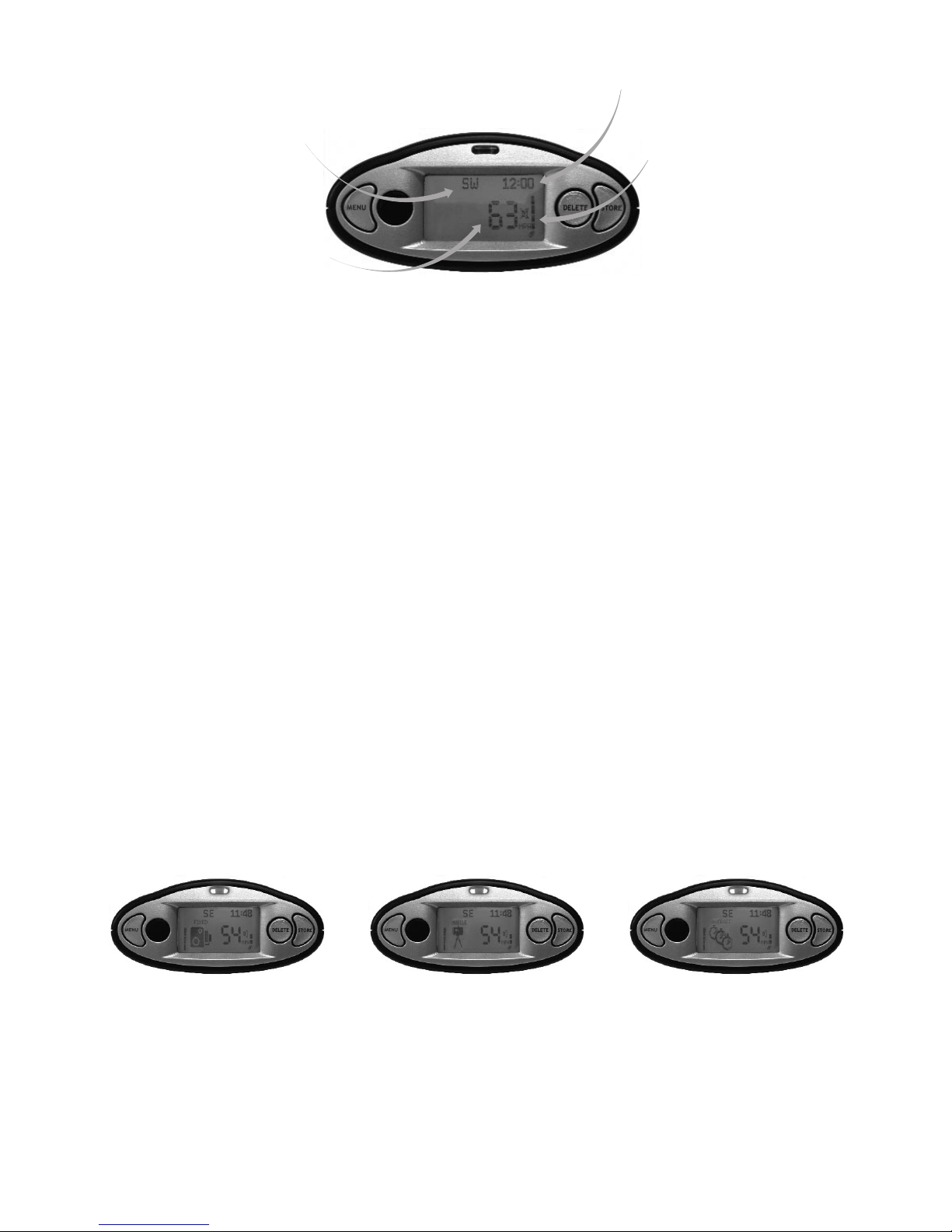
1. Normal Display – Speedometer
The backlight is blue, as default it shows vehicle speed in MPH, which is measured
by the GPS.The speed is updated every second, and at a constant speed is highly
accurate.
When quickly accelerating or decelerating, the display will lag the actual speed by
a small margin. It’s rare to find a vehicle that shows the same speed as ROAD
ANGEL.This is due to all vehicles being manufactured with a tolerance on the
speedometer to allow for tread depth, tyre size and pressure changes.
Once acquired the satellite coverage can be monitored by the bars on the right
hand side of the display, the more bars shown the greater the coverage.
2. Alert Display
ROAD ANGEL can warn the user of 6 different types of warning. When alerting
of an approaching zone the type of zone is shown on the display as a picture.
When a stored location is approached the display will turn from blue to red with
the type of warning shown on the display.The unit will give both voice and beep
alerts and the first bar of the proximity will count up.As the location is neared,
the bar chart will count up and the beeping frequency is increased.
9
Speed
Compass
Time
Satellite Reception
Fixed
Permanent Gatso,
TruVelo,Watchman and
Speedcurb sites.
Mobile
Temporary Gatso or
TruVelo sites in
roadworks, Fixed mobile
sites, DS2 and
Speedmaster
Average
Average speed detection
zones as monitored by
digital; SPECS cameras
Page 11
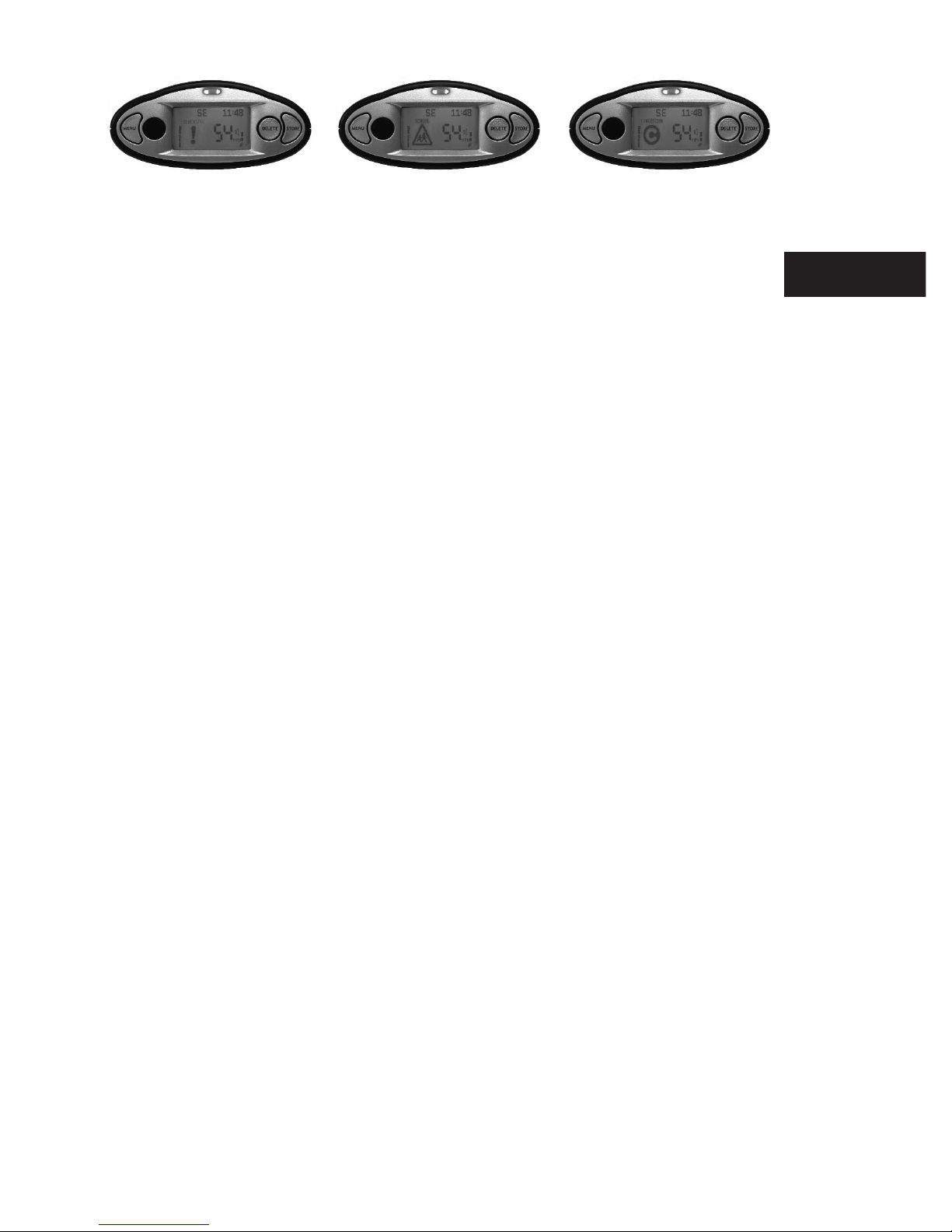
Your current road speed will display on the unit at all times.When
warning all non essential information will disappear from the display
(time, heading and satellite coverage).
There are a total of 5 display bars.When all 5 are visible you are at the
location of the danger point.The audible signal will sound rapidly and the
red backlight will flash.As soon as the location has passed the unit will go
back to standby mode.
When a congestion zone is approached, the symbol will appear on the
display with a single beep to warn.The back light will stay blue.
3. Mobile Alert
When your vehicle is targeted by a mobile laser gun, ROAD ANGEL
will instantly flash 5 bars and give voice alerts and beep quickly.
Laser warnings require immediate action, as often when it goes off it is
indicating that your speed has already been taken. See page 11.
4. Average Speed Detection
Where the authorities have designated a long section of road for average
speed detection ROAD ANGEL counts down as normal but remains red
throughout the detection zone and beeps as a reminder every 10 seconds.
10
ROAD ANGEL
Displays
Blackspot
Extreme danger zones
where serious
accidents have
occurred
School
Warns the user as they
enter the proximity of
Primary schools
Congestion
Warns as you are
approaching a
congestion charging
zone
Page 12
Medium to long range
150 M
Targetting the front windscreen
Targetting the number plate
1 KM
Medium to long range
11
Laser Detection
How Mobile Laser Traps operate
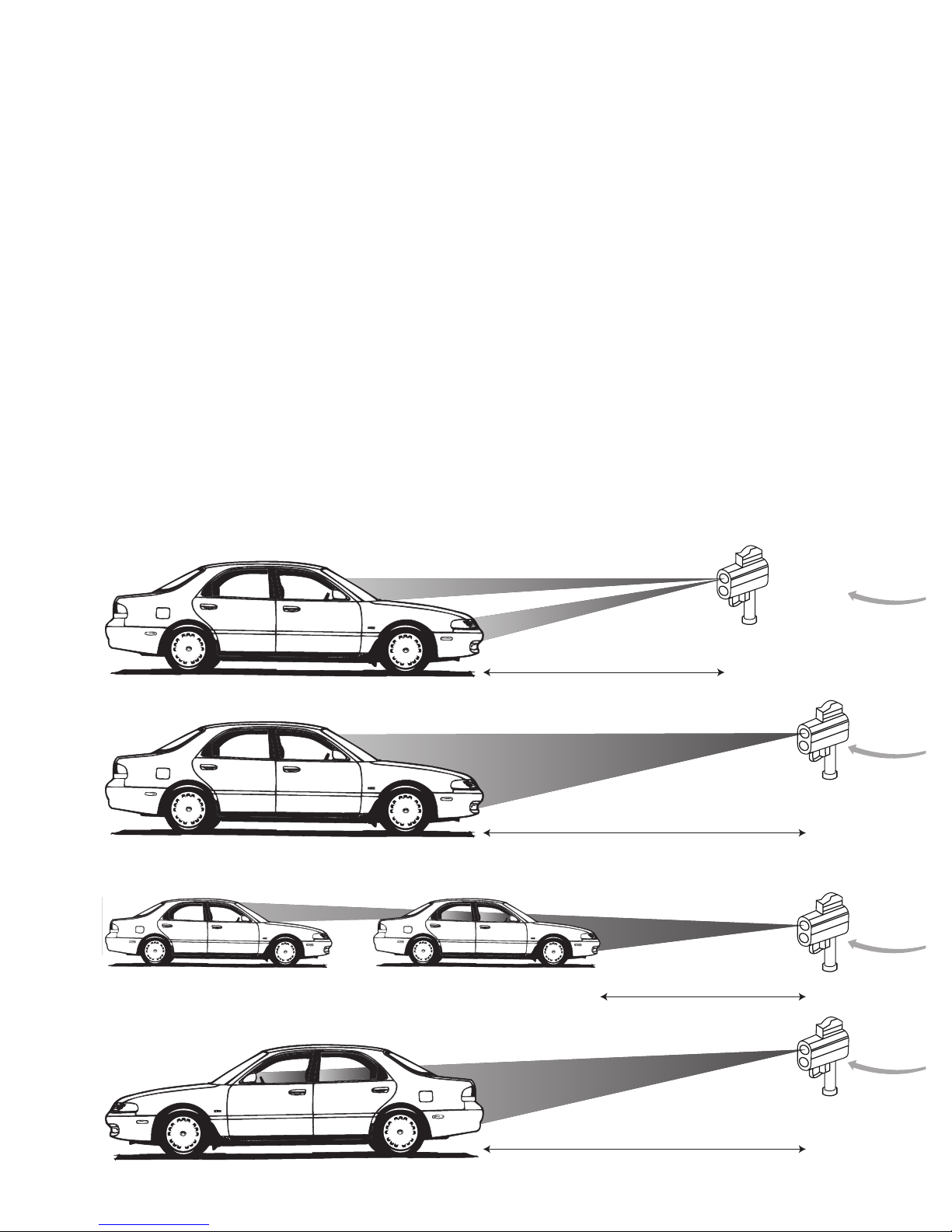
Police Laser Guns work by firing a pulsed beam of light at a vehicle which then
measures the time taken for it to return, this can take as little as a third of a
second.The beam is very narrow, this allows the enforcement officer to be very
precise in which vehicle they want to target.
From a motorway bridge any vehicle in a line of traffic could be targeted.
The beam fired from the gun is of a conical shape, the further away from the gun,
the wider the beam.This causes great problems when fitting a Laser detector to
a vehicle, as complete coverage is very difficult to achieve at short range, with
only one sensor. (Auxiliary number plate sensor available separately – please
contact Blackspot Interactive Ltd. for details).
Page 13

12
Short Range
This highlights the difficulties of short range detection.The beam is very
narrow and with a single sensor it is not possible to cover both
scenarios.
Long Range
At long range it is not possible to choose which part of the vehicle they
want to target. On some Laser Guns the sight is bigger than the vehicle.
Wherever the detector is fitted is it possible to trigger it.
Following a vehicle being targeted
At short range it is difficult to detect, but if the vehicle in front is
targeted from long to medium range it is possible to detect as long as
the sensor is fitted to the front windscreen.
Rear Detection
When the vehicle is targeted from the rear, the laser signal will pass
thorough the rear windscreen and trigger LASER ALERT as long
as no obstructions are in the way.
Laser Detection
How the enforcement officer chooses which vehicles to target
Even though the police have equipment for measuring and recording the
speeds of motorists, it is down to the officer using the equipment to
choose which vehicle to target.
A lot of people believe that the police are checking every vehicle as they
go by.This is not the case. Guidelines state that an officer can only
measure the speed of a vehicle that they believe to be exceeding the
posted limit.This is often why a driver with a Laser detector fitted may
see a gun or van nearby, but will not get a warning alarm as they
drive by. The majority of the time they are targeting the number plate of
the vehicle as this is normally vertical to the road, but any part of the
vehicle could be used.
Page 14

13
Adding and Deleting Danger Zones
Deleting zones
Simply wait until your ROAD ANGEL alerts you to the required danger zone and
then press DELETE,you will then be asked to confirm your deletion. Any of the
locations that are stored into the ROAD ANGEL database can be deleted by the
user. Please note that once a location has been deleted it cannot be restored and
is permanently deleted, unless the user re-stores or a factory reset is carried
out.To request a factory reset, email [email protected] with your serial
number and contact details.
Adding new locations
You may add new locations to the FIXED, MOBILE,AVERAGE, BLACKSPOT and
SCHOOL areas of your database.This will be permanently stored in your unit.
Storing new locations
The user can store any point they wish into ROAD ANGEL, storing it under any
of the 5 headings FIXED, MOBILE, BLACKSPOT,AVERAGE or SCHOOL.
All locations that are stored by users will be downloaded to the central database,
and can then be verified by Blackspot technicians.
In order to calculate the heading being stored, the vehicle needs to be travelling
in excess of 4 MPH.
When your vehicle is precisely alongside a new location carry out the following:
Press STORE once.This will confirm your location.
Press DELETE and choose the type of zone you want to store.
Press STORE to confirm your choice.
CAUTION: PLEASE ONLY ADD OR DELETE DANGER ZONES WHEN IT IS SAFE TO DO SO.
Page 15
Adding & Deleting
Danger Zones
ROAD ANGEL
Database & Updating
14
Adding an Average Speed monitoring section or SPECS area
The use of SPECS cameras are becoming more frequent, both in
residential areas and on Motorways. A photograph is taken of your
vehicle at the ‘start’ point and then another a set distance further down
the road. If your average speed is greater than the speed limit between
these two cameras you are automatically prosecuted.
You can record these areas as follows. Only store an average speed
monitoring area if you are absolutely sure of the start and finish points.
When passing underneath the first ‘start’ SPECS camera carry out the
following:
Press STORE once to store the first camera position.
Press DELETE to move the location type to AVERAGE.
Press STORE to confirm type – logging appears on
the screen.
Now wait until you are underneath the finish camera
Press STORE to confirm the finish position.
The section of average speed detection is now stored.
ROAD ANGEL Database and Updating
Your ROAD ANGEL is capable of storing up to 50,000 unique danger
zones. It is very important that as soon as it is purchased the unit is
REGISTERED so you are able to download the very latest version of the
database.This can be done by either returning the card on the back of
this manual or by registering online at www.blackspot.com.
Note: If you press STORE by mistake, you have the option to cancel by pressing the
MENU button
Note: Blackspot Interactive Ltd. are constantly updating the central database of
danger zones. You can be of great value to all ROAD ANGEL users by noting new
information accurately and updating to our central database. All general
information will be verified by Blackspot Interactive Ltd. before adding it to the
central file.
Page 16

15
We recommend that you update your ROAD ANGEL on a regular basis, as safety
camera locations are constantly changing.With new locations being added and
old cameras being removed, the recommended update frequency is weekly. If you
are a high mileage motorist, often on unfamiliar roads, you may wish to update
your database more regularly. If you are about to venture on a long trip and have
not updated regularly then we suggest updating just before you go.
ROAD ANGEL has been designed to be updated simply and efficiently. ROAD
ANGEL can be updated by connecting it to a PC.
With the purchase of ROAD ANGEL all the necessary software to carry out an
update is available as a download from our website, or is available on a CD-ROM.
The updating procedure comes with its own detailed instructions, these are not
supplied in this manual.
System requirements
IBM PC or 100% compatible
Microsoft Windows 98SE, ME, 2000, XP
Internet Explorer version 5.5 or above
Subscriptions
Your purchase of ROAD ANGEL comes with 6 months subscription.When this
period is over you will be contacted with plenty of notice to purchase a
further subscription.We offer 1 year, 2 year and 3 year options.
Note: we do not support Apple Macs
Page 17

ROAD ANGEL and
your Motorbike
Protecting and
Cleaning
16
ROAD ANGEL
Database & Updating
System
Requirements
Subscriptions
Hardwiring
ROAD ANGEL
Hardwiring ROAD ANGEL
ROAD ANGEL power cable can be hard wired into the vehicle
permanently. If you use lots of different products in the car this will free
up the cigar socket.The straight cable supplied in the box can be used by
removing the cigar socket. It must have its own 3A fuse in line. If you are
unsure on how to carry out the procedure then we highly recommend
using an auto electrician.
ROAD ANGEL and your Motorbike
The windscreen mounting bracket can be used to mount under the
screen of a sport bike. ROAD ANGEL can be fitted to any bike with 12V
electrics.An optional earpiece provides audible warnings inside your
helmet. ROAD ANGEL is NOT waterproof. If it is going to be used in all
weathers then a tank bag or another type of waterproof holder is
recommended.
An optional rear number plate sensor is available separately – please
contact Blackspot Interactive Ltd. For details. In cases where bikes
have a high level of electrical interference, you may get false alarms.
Please route all cables away from the ignition circuit of the bike.
Protecting and Cleaning ROAD ANGEL
Your unit is made from tough polycarbonate moulded plastic and is
designed to withstand normal daily handling. Only clean with a dry or
slightly damp cloth. Do not use solvents or a wet cloth. When cleaning
the LCD display, avoid pressing too hard as this may damage the display.
Avoid water or very damp conditions, extremes of heat (60c) or cold
(-10c) and dropping the unit.We recommend removing ROAD ANGEL,
with its bracket from the dashboard if the vehicle is parked for long
periods in direct sunlight.
Page 18

Warranty
Your unit is guaranteed for one year from date of purchase from all defects that
occur with normal use. If your unit fails to perform as specified in these
instructions, please return using registered post directly to Blackspot Interactive
Ltd. with the following:
1. The problem you are encountering
2. Proof of purchase
3. Date of purchase
4. A contact telephone number and address
Blackspot Interactive Ltd. is not liable for any incidental or consequential damages
from the use, misuse, or mounting of ROAD ANGEL.
ROAD ANGEL Security
Due to the high number of thefts from vehicles, we suggest that on leaving your
vehicle you remove ROAD ANGEL with its bracket from view.
Each ROAD ANGEL has a unique serial number on the base. Should your unit be
stolen or lost, please contact Blackspot Interactive Ltd. to report the loss of your
unit.The unit can then be disabled.
ROAD ANGEL Trouble Shooting
ROAD ANGEL fails to power
1. Check that the power lead is plugged into the correct port on the back, when
looking at the back of the unit it should be plugged into the port furthest to
the right.
2. On the cigar plug that is plugged into the cigar socket of the vehicle, check
that the LED is illuminated, if it is not then please check the internal fuse in
the plug. If this is ok then no power is reaching the socket – rectify with a
qualified auto electrician.
17
Page 19

18
Warranty
ROAD ANGEL
Security
ROAD ANGEL
Trouble Shooting
ROAD ANGEL lights up but does not acquire satellites
(stays at SEARCHING FOR SATELLITES)
1. Check that ROAD ANGEL has a clear view of the sky. ROAD ANGEL
must have a clear view of the sky.
2. Is this the first time the unit is switched on? If yes, the unit will be
carrying out a cold start that can take up to 45 minutes to acquire a
good enough signal to lock on.
3. Power down the unit and reboot.
4. Has the vehicle got a UV screen? Place ROAD ANGEL onto the roof
of the vehicle and wait for it to acquire, once acquired place back into
the car see if it can hold the signal. If it cannot then an external
antenna is required. Please contact Blackspot Interactive Ltd. for
details. If you have a Ford Focus or Mondeo with a Quickclear
windscreen, ROAD ANGEL will work if placed on the far right hand
side of the dashboard.
Satellite signal drops out (display goes from registering speed
to SEARCHING FOR SATELLITES)
1. May happen temporarily due to tunnels, tall buildings, bridges or
dense foliage. Once clear of the obstruction the signal will re-acquire
in a few seconds.
2. The unit has been moved inside the vehicle, reposition the unit back
to its original position.
3. Bad GPS coverage – very occasionally one or more satellites are out
of sequence and the signal temporarily drops out. It should be
restored within minutes.
No audible signal
1. On powering the unit, irrespective of the volume level the unit will
sound. If you can hear this then the volume has been adjusted to
minimum.
Press MENU to move to Alert screen.
Press DELETE to enter the camera alert volume.
Press DELETE to adjust.
Press STORE to save the setting.
Page 20

I am not getting a warning on all fixed cameras
1. The unit has not been updated recently; carry out an update to add all the
new locations.
2. ROAD ANGEL has a directional feature that allows it to ignore cameras that
are enforcing the speed limit in the opposite direction.
I am not getting enough warning as I approach fixed cameras
1. The distance setting is set too short
Press MENU to move to the Distances screen.
Press DELETE to enter the menu.
Press DELETE to edit the distances.
Press STORE to save the setting.
Sometimes when I am driving I get a warning for a camera that is not
there?
1. The unit has not been updated recently and the camera has been removed
from the database.
2. A camera on a parallel road very close to the road you are travelling on is
warning.The unit is probably set to a long distance setting; reduce the
distance it is set to. Please note that if it is on a parallel road the proximity
bars may switch off before they go all the way depending on your distance
setting.
ROAD ANGEL displays the message 'Please Register' when I power it up
1. This means that ROAD ANGEL hasn't been registered. If it has been registered
then it means ROAD ANGEL hasn't had a successful update yet.
ROAD ANGEL scrolls the message 'Alert Data Out Of Date'
1. The ROAD ANGEL has been used for 30 days and has yet to be updated for
the first time.You will need to update ROAD ANGEL as soon as possible.
19
Page 21
20
ROAD ANGEL
Trouble Shooting
Background
Information
Background Information
GPS Output
ROAD ANGEL can output NMEA data.This can be used to interface with
Laptops and PDA’s running routing software. Please note we have tested
on all popular systems but cannot guarantee the compatibility with all
products.
Speed cameras and blackspots
The main danger zones are:
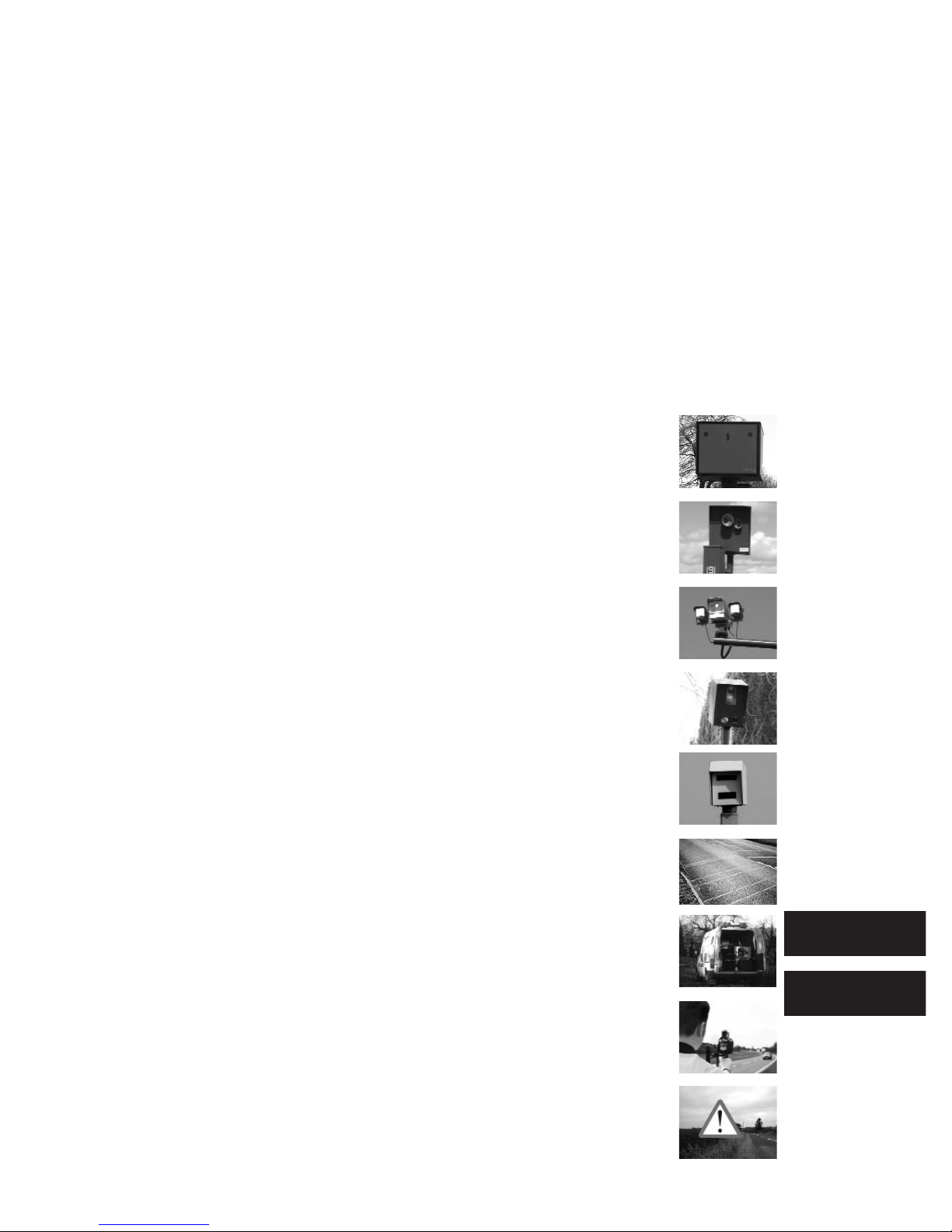
Gatso – Measure your speed and photograph the rear of
your vehicle.
TruVelo – Measure your speed and photograph the front
of the vehicle along with driver.
SPECS – Measure your average speed between two points
and photograph the front of the vehicle.
Watchman – Measure your speed and photograph the
front of the vehicle along with driver.
Speedcurb – Measures your speed and photographs the
rear of your vehicle.
DS2 – Semi-permanent, sensor based system that connects
to a camera on a tripod.
Safety Camera Vans – Mobile enforcement vehicles that
use Laser guns to measure vehicle speed.
Mobile Laser – Hand-held devices that record your speed
in either direction.
Blackspot – A specific location where a high number of
accidents have occurred e.g. a difficult junction.
Page 22

Blackspot Interactive Limited
Unit 5, New Rookery Farm, Little London
Silverstone, Northants NN12 8UP
Email: [email protected] Web: www.blackspot.com
Blackspot Interactive Ltd. have made every effort to ensure that all the information
contained in this manual is accurate and reliable. However, the information is subject to
change without notice.
Congestion – Alerts the user when they are near to or approaching
a congestion charging zone. Most congestion charging schemes
require drivers to pay if they wish to continue driving during the
scheme’s hours of operation.
Schools – Alerts the user that they are within the vicinity of a
primary school.
Page 23

Guarding your life and livelihood
Please cut along the dotted line and return your Product
Registration Card immediately in order to receive your free
software CD and free 6 month subscription.
Title:
Name:
Address:
Postcode:
Daytime Tel: Evening Tel:
Email:
ROAD ANGEL Serial Number:
Date of Purchase:
Purchased From:
Page 24
22
RESPONSE SERVICE
Licence No MID30347
Blackspot Interactive Limited
Unit 5
New Rookery Farm
Silverstone
TOWCESTER
NN12 8BR
 Loading...